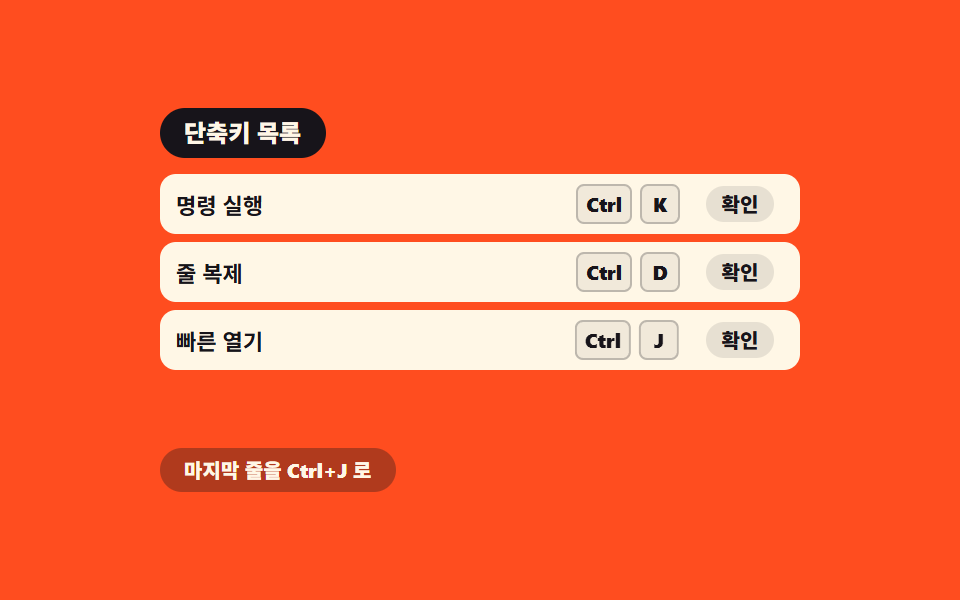
06Keyboard shortcuts — a hint list matching a key combination value to an action
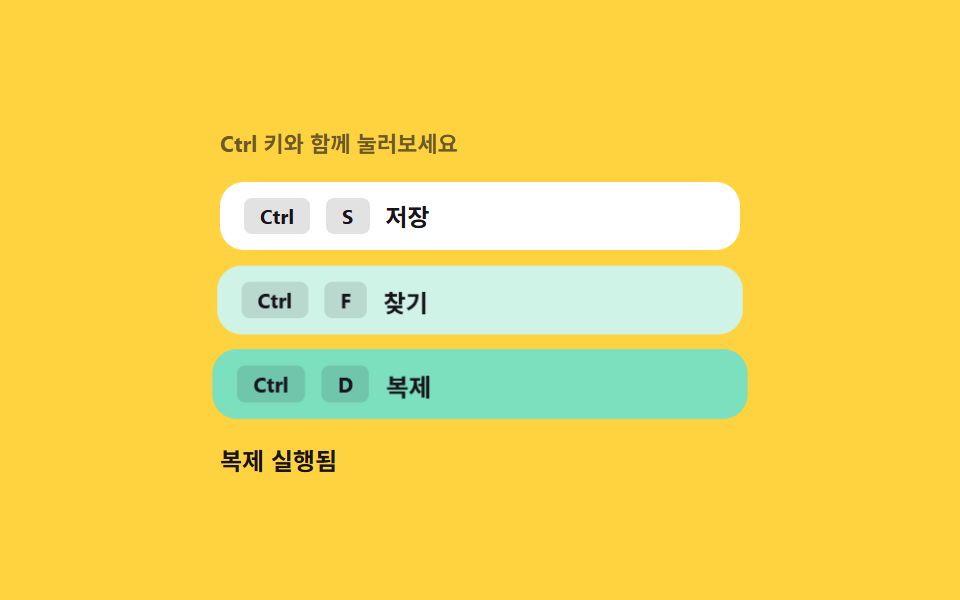
Once a key combination is entered, that combined value is recomputed and compared against the registered list, and when it matches, the action runs while the matching entry in the on-screen hint list briefly highlights.
Best forCommand shortcuts in a productivity tool, an editor screen
ctrlKeydata-comboaria-live
<main class="stage">
<div class="ks is-demo" id="ks" tabindex="0">
  <p class="ks__cap">Try pressing it with the Ctrl key</p>
  <ul class="ks__hints" id="ksHints">
    <li class="ks__hint" data-combo="ctrl+s"><kbd>Ctrl</kbd><kbd>S</kbd><span>Save</span></li>
    <li class="ks__hint" data-combo="ctrl+f"><kbd>Ctrl</kbd><kbd>F</kbd><span>Find</span></li>
    <li class="ks__hint" data-combo="ctrl+d"><kbd>Ctrl</kbd><kbd>D</kbd><span>Duplicate</span></li>
  </ul>
  <p class="ks__result" id="ksResult" aria-live="polite">Waiting</p>
</div>
</main>
@use "../../../../site/static/demo-tokens" as *;
// 키보드 단축키 — 강조는 조합 값이 등록 목록과 일치할 때만 붙는 클래스(.ks__hint--hit) 로 켠다.
// 각 항목을 따로 애니메이션하지 않고 같은 트랜지션 규칙 하나를 공유한다.
$duration: $dur-quick;
$easing: $ease-pop;
$color: $subject-mint;
@include stage($stage-yellow);
.ks {
display: flex;
flex-direction: column;
gap: $sp-3;
width: min(100%, 260px);
outline: none;
}
.ks__cap {
margin: 0;
font-weight: 700;
font-size: 11px;
color: rgba(23, 20, 26, .64);
}
.ks__hints {
list-style: none;
margin: 0;
padding: 0;
display: flex;
flex-direction: column;
gap: $sp-2;
}
.ks__hint {
display: flex;
align-items: center;
gap: $sp-2;
padding: $sp-2 $sp-3;
border-radius: $r-control;
background: $stage-paper;
transform: scale(1);
transition: transform $duration $easing, background $duration $easing;
}
.ks__hint--hit {
background: $color;
transform: scale(1.04);
}
.ks__hint kbd {
padding: $sp-1 $sp-2;
border-radius: $r-xs;
background: rgba(23, 20, 26, .12);
font-family: inherit;
font-weight: 700;
font-size: 10px;
color: $subject-ink;
}
.ks__hint span {
font-weight: 700;
font-size: 12px;
color: $subject-ink;
}
.ks__result {
margin: 0;
font-weight: 700;
font-size: 12px;
color: $subject-ink;
}
@media (max-width: 340px) {
.ks__hints { gap: $sp-1; }
.ks__hint { padding: $sp-1 $sp-2; }
}
@media (prefers-reduced-motion: reduce) {
.ks__hint { transition: none !important; }
}html, body {
margin: 0;
overflow: hidden;
}
.stage {
box-sizing: border-box;
min-height: 100vh;
display: grid;
place-items: center;
margin: 0;
background: #ffd23f;
font-family: -apple-system, "Segoe UI", "Noto Sans KR", sans-serif;
padding: clamp(8px, 4vw, 24px);
}
.ks {
display: flex;
flex-direction: column;
gap: 12px;
width: min(100%, 260px);
outline: none;
}
.ks__cap {
margin: 0;
font-weight: 700;
font-size: 11px;
color: rgba(23, 20, 26, 0.64);
}
.ks__hints {
list-style: none;
margin: 0;
padding: 0;
display: flex;
flex-direction: column;
gap: 8px;
}
.ks__hint {
display: flex;
align-items: center;
gap: 8px;
padding: 8px 12px;
border-radius: 12px;
background: #ffffff;
transform: scale(1);
transition: transform 220ms cubic-bezier(0.2, 1.4, 0.4, 1), background 220ms cubic-bezier(0.2, 1.4, 0.4, 1);
}
.ks__hint--hit {
background: #4cd4a6;
transform: scale(1.04);
}
.ks__hint kbd {
padding: 2px 8px;
border-radius: 4px;
background: rgba(23, 20, 26, 0.12);
font-family: inherit;
font-weight: 700;
font-size: 10px;
color: #17141a;
}
.ks__hint span {
font-weight: 700;
font-size: 12px;
color: #17141a;
}
.ks__result {
margin: 0;
font-weight: 700;
font-size: 12px;
color: #17141a;
}
@media (max-width: 340px) {
.ks__hints {
gap: 4px;
}
.ks__hint {
padding: 4px 8px;
}
}
@media (prefers-reduced-motion: reduce) {
.ks__hint {
transition: none !important;
}
}(function () {
var root = document.getElementById('ks');
var hints = Array.prototype.slice.call(document.querySelectorAll('[data-combo]'));
var result = document.getElementById('ksResult');
var ACTIONS = { 'ctrl+s': 'Save triggered', 'ctrl+f': 'Find triggered', 'ctrl+d': 'Duplicate triggered' };
var flashTimer = null;
var resetTimer = null;
var autoplay = null;
// 계산 겹: 눌린 키에서 조합 값을 다시 구해(수정 키 + 글자 키) 등록된 목록과 매칭한다.
// 각 단축키를 따로 처리하지 않고 하나의 값 비교 함수가 셋 다 판정한다.
function combo(e) {
var mod = e.ctrlKey || e.metaKey ? 'ctrl+' : '';
return mod + String(e.key).toLowerCase();
}
function trigger(key) {
var hit = hints.filter(function (h) { return h.getAttribute('data-combo') === key; })[0];
if (!hit) { return; }
hints.forEach(function (h) { h.classList.remove('ks__hint--hit'); });
clearTimeout(flashTimer);
clearTimeout(resetTimer);
void hit.offsetWidth;
hit.classList.add('ks__hint--hit');
result.textContent = ACTIONS[key];
resetTimer = setTimeout(function () {
hit.classList.remove('ks__hint--hit');
result.textContent = 'Waiting';
}, 900);
}
root.addEventListener('keydown', function (e) {
var key = combo(e);
if (!ACTIONS[key]) { return; }
e.preventDefault();
root.classList.remove('is-demo');
stopAutoplay();
trigger(key);
});
function stopAutoplay() {
if (autoplay) { clearInterval(autoplay); autoplay = null; }
}
var order = ['ctrl+s', 'ctrl+f', 'ctrl+d'];
var reduce = window.matchMedia('(prefers-reduced-motion: reduce)').matches;
if (!reduce) {
var i = 0;
autoplay = setInterval(function () {
trigger(order[i % order.length]);
i += 1;
}, 620);
}
})();import { useEffect, useRef, useState } from "react";
import styles from "./KeyboardShortcuts.module.scss";
// 키보드 단축키 — 눌린 키에서 조합 값을 다시 구해(수정 키 + 글자 키) 등록된 목록과 매칭한다.
// 계산 겹: 각 단축키를 따로 처리하지 않고 하나의 값 비교 함수가 셋 다 판정한다. 실사용 keydown 리스너 있음.
const ACTIONS: { [k: string]: string } = { "ctrl+s": "저장 실행됨", "ctrl+f": "찾기 실행됨", "ctrl+d": "복제 실행됨" };
const HINTS = [
{ combo: "ctrl+s", key: "S", label: "저장" },
{ combo: "ctrl+f", key: "F", label: "찾기" },
{ combo: "ctrl+d", key: "D", label: "복제" },
];
const ORDER = ["ctrl+s", "ctrl+f", "ctrl+d"];
export default function KeyboardShortcuts() {
const rootRef = useRef<HTMLDivElement>(null);
const [hit, setHit] = useState<string | null>(null);
const [result, setResult] = useState("대기 중");
const resetTimerRef = useRef<number | null>(null);
const autoplayRef = useRef<number | null>(null);
function combo(e: KeyboardEvent) {
const mod = e.ctrlKey || e.metaKey ? "ctrl+" : "";
return mod + String(e.key).toLowerCase();
}
function trigger(key: string) {
if (!ACTIONS[key]) return;
setHit(key);
setResult(ACTIONS[key]);
if (resetTimerRef.current) window.clearTimeout(resetTimerRef.current);
resetTimerRef.current = window.setTimeout(() => {
setHit(null);
setResult("대기 중");
}, 900);
}
function stopAutoplay() {
if (autoplayRef.current) {
window.clearInterval(autoplayRef.current);
autoplayRef.current = null;
}
}
useEffect(() => {
const reduce = window.matchMedia("(prefers-reduced-motion: reduce)").matches;
if (!reduce) {
let i = 0;
autoplayRef.current = window.setInterval(() => {
trigger(ORDER[i % ORDER.length]);
i += 1;
}, 620);
}
return () => stopAutoplay();
// eslint-disable-next-line react-hooks/exhaustive-deps
}, []);
function onKeyDown(e: KeyboardEvent) {
const key = combo(e);
if (!ACTIONS[key]) return;
e.preventDefault();
rootRef.current?.classList.remove(styles["is-demo"]);
stopAutoplay();
trigger(key);
}
return (
<main className={styles.stage}>
<div ref={rootRef} className={`${styles.ks} ${styles["is-demo"]}`} tabIndex={0} onKeyDown={onKeyDown}>
<p className={styles.ks__cap}>Ctrl 키와 함께 눌러보세요</p>
<ul className={styles.ks__hints}>
{HINTS.map((h) => (
<li key={h.combo} className={`${styles.ks__hint} ${hit === h.combo ? styles["ks__hint--hit"] : ""}`}>
<kbd>Ctrl</kbd><kbd>{h.key}</kbd><span>{h.label}</span>
</li>
))}
</ul>
<p className={styles.ks__result} aria-live="polite">{result}</p>
</div>
</main>
);
}06 Keyboard shortcuts — a hint list matching a key combination value to an action — Measured area 20.504% · moving frames 12/23Original by GODRICH · SCSS and React ship in the zip · Micro Interactions: 9 Essential UI Patterns
The post this demo lives in
 Micro Interactions: 9 Essential UI PatternsMicro interactions: One toast recomputes its dismiss time from its stack order; one compares each heading's viewport ove See all demos in this post