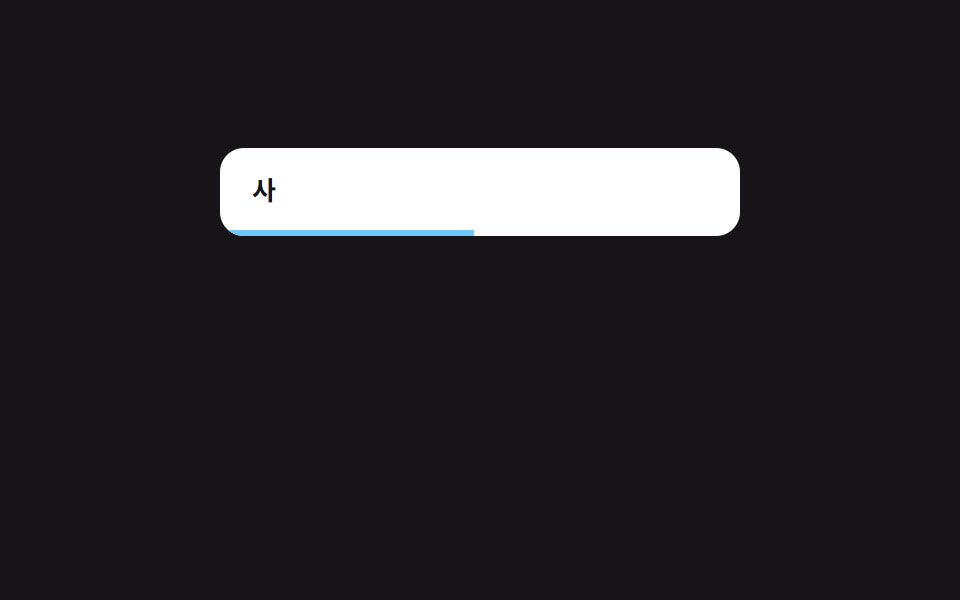
07Debounced search — a search that fires once a wait value finishes counting down from the last input
Every time the input value changes, the wait-time value restarts counting from the beginning, and only once that value counts all the way down with no further input does the search actually run.
Best forAn autocomplete search box, a live-filtered list
WAIT_MSrequestAnimationFrame--r
<main class="stage">
<div class="db is-demo" id="db">
  <div class="db__field">
    <input class="db__input" id="dbInput" type="text" value="" placeholder="Enter search term" aria-label="Search">
    <span class="db__bar" id="dbBar"></span>
  </div>
  <ul class="db__list" id="dbList"></ul>
</div>
</main>
@use "../../../../site/static/demo-tokens" as *;
// 디바운스 검색 — 진행 막대 폭(--r)은 매 프레임 실제 경과 시간을 다시 재서 얻은 값이다.
// 입력이 다시 들어오면 경과 시간이 0으로 리셋되어 막대도 처음부터 다시 채워진다.
$duration: $dur-instant;
$easing: $ease-out;
$color: $subject-sky;
@include stage($stage-ink);
.db {
display: flex;
flex-direction: column;
gap: $sp-3;
width: min(100%, 260px);
}
.db__field {
position: relative;
border-radius: $r-control;
background: $stage-paper;
overflow: hidden;
}
.db__input {
box-sizing: border-box;
width: 100%;
border: 0;
background: transparent;
padding: $sp-3 $sp-4;
font-family: inherit;
font-weight: 700;
font-size: 13px;
color: $subject-ink;
outline: none;
}
.db__bar {
display: block;
height: 3px;
width: calc(var(--r, 0) * 100%);
background: $color;
transition: width $duration $easing;
}
.db__list {
list-style: none;
margin: 0;
padding: 0;
display: flex;
flex-direction: column;
gap: $sp-1;
min-height: 96px;
}
.db__row {
padding: $sp-2 $sp-3;
border-radius: $r-sm;
background: rgba(255, 255, 255, .08);
font-weight: 600;
font-size: 12px;
color: $stage-paper;
}
@media (max-width: 340px) {
.db__row { font-size: 11px; }
}
@media (prefers-reduced-motion: reduce) {
.db__bar { transition: none !important; }
}html, body {
margin: 0;
overflow: hidden;
}
.stage {
box-sizing: border-box;
min-height: 100vh;
display: grid;
place-items: center;
margin: 0;
background: #17141a;
font-family: -apple-system, "Segoe UI", "Noto Sans KR", sans-serif;
padding: clamp(8px, 4vw, 24px);
}
.db {
display: flex;
flex-direction: column;
gap: 12px;
width: min(100%, 260px);
}
.db__field {
position: relative;
border-radius: 12px;
background: #ffffff;
overflow: hidden;
}
.db__input {
box-sizing: border-box;
width: 100%;
border: 0;
background: transparent;
padding: 12px 16px;
font-family: inherit;
font-weight: 700;
font-size: 13px;
color: #17141a;
outline: none;
}
.db__bar {
display: block;
height: 3px;
width: calc(var(--r, 0) * 100%);
background: #6ec8ff;
transition: width 140ms ease-out;
}
.db__list {
list-style: none;
margin: 0;
padding: 0;
display: flex;
flex-direction: column;
gap: 4px;
min-height: 96px;
}
.db__row {
padding: 8px 12px;
border-radius: 8px;
background: rgba(255, 255, 255, 0.08);
font-weight: 600;
font-size: 12px;
color: #ffffff;
}
@media (max-width: 340px) {
.db__row {
font-size: 11px;
}
}
@media (prefers-reduced-motion: reduce) {
.db__bar {
transition: none !important;
}
}(function () {
var root = document.getElementById('db');
var input = document.getElementById('dbInput');
var bar = document.getElementById('dbBar');
var list = document.getElementById('dbList');
var WAIT_MS = 480;
var ITEMS = ['Apple pie recipe', 'Apple tree pests', 'Making apple juice', 'Banana smoothie', 'Baking banana bread'];
var timer = null;
var startedAt = 0;
var raf = null;
var autoplay = null;
// 계산 겹: 입력 값이 바뀔 때마다 남은 대기 시간을 처음부터 다시 잰다(디바운스).
// 진행 막대 폭은 실제 경과 시간 / WAIT_MS 비율로 매 프레임 다시 계산한다 — 고정 트랜지션이 아니다.
function tick() {
var elapsed = Date.now() - startedAt;
var ratio = Math.min(1, elapsed / WAIT_MS);
bar.style.setProperty('--r', ratio.toFixed(3));
if (ratio < 1) { raf = requestAnimationFrame(tick); }
}
function search(value) {
var q = value.trim().toLowerCase();
var matched = q ? ITEMS.filter(function (t) { return t.toLowerCase().indexOf(q) !== -1; }) : [];
list.innerHTML = '';
matched.forEach(function (text) {
var li = document.createElement('li');
li.className = 'db__row';
li.textContent = text;
list.appendChild(li);
});
bar.style.setProperty('--r', '0');
}
function onInput(value) {
input.value = value;
startedAt = Date.now();
bar.style.setProperty('--r', '0');
if (raf) { cancelAnimationFrame(raf); }
raf = requestAnimationFrame(tick);
clearTimeout(timer);
timer = setTimeout(function () { search(value); }, WAIT_MS);
}
input.addEventListener('input', function (e) {
root.classList.remove('is-demo');
stopAutoplay();
onInput(e.target.value);
});
function stopAutoplay() { if (autoplay) { clearInterval(autoplay); autoplay = null; } }
var script = ['A', 'Ap', 'Ap ', 'App'];
var reduce = window.matchMedia('(prefers-reduced-motion: reduce)').matches;
if (!reduce) {
var i = 0;
autoplay = setInterval(function () {
onInput(script[i % script.length]);
i += 1;
}, 640);
}
})();import { useEffect, useRef, useState } from "react";
import type { CSSProperties, ChangeEvent } from "react";
import styles from "./DebounceSearch.module.scss";
// 디바운스 검색 — 입력 값이 바뀔 때마다 남은 대기 시간을 처음부터 다시 잰다(디바운스).
// 계산 겹: 진행 막대 폭은 실제 경과 시간 / WAIT_MS 비율로 매 프레임 다시 계산한다 — 고정 트랜지션이 아니다.
const WAIT_MS = 480;
const ITEMS = ["사과 파이 레시피", "사과나무 병충해", "사과주스 만들기", "바나나 스무디", "바나나빵 굽기"];
const SCRIPT = ["사", "사과", "사과 ", "사과 파"];
export default function DebounceSearch() {
const rootRef = useRef<HTMLDivElement>(null);
const barRef = useRef<HTMLSpanElement>(null);
const [value, setValue] = useState("");
const [matched, setMatched] = useState<string[]>([]);
const timerRef = useRef<number | null>(null);
const rafRef = useRef<number | null>(null);
const startedAtRef = useRef(0);
const autoplayRef = useRef<number | null>(null);
function tick() {
const elapsed = Date.now() - (startedAtRef.current ?? 0);
const ratio = Math.min(1, elapsed / WAIT_MS);
barRef.current?.style.setProperty("--r", ratio.toFixed(3));
if (ratio < 1) { rafRef.current = requestAnimationFrame(tick); }
}
function search(v: string) {
const q = v.trim().toLowerCase();
const list = q ? ITEMS.filter((t) => t.toLowerCase().indexOf(q) !== -1) : [];
setMatched(list);
barRef.current?.style.setProperty("--r", "0");
}
function onInput(v: string) {
setValue(v);
startedAtRef.current = Date.now();
barRef.current?.style.setProperty("--r", "0");
if (rafRef.current) cancelAnimationFrame(rafRef.current);
rafRef.current = requestAnimationFrame(tick);
if (timerRef.current) window.clearTimeout(timerRef.current);
timerRef.current = window.setTimeout(() => search(v), WAIT_MS);
}
function stopAutoplay() {
if (autoplayRef.current) {
window.clearInterval(autoplayRef.current);
autoplayRef.current = null;
}
}
useEffect(() => {
const reduce = window.matchMedia("(prefers-reduced-motion: reduce)").matches;
if (!reduce) {
let i = 0;
autoplayRef.current = window.setInterval(() => {
onInput(SCRIPT[i % SCRIPT.length]);
i += 1;
}, 640);
}
return () => {
stopAutoplay();
if (timerRef.current) window.clearTimeout(timerRef.current);
if (rafRef.current) cancelAnimationFrame(rafRef.current);
};
// eslint-disable-next-line react-hooks/exhaustive-deps
}, []);
return (
<main className={styles.stage}>
<div ref={rootRef} className={`${styles.db} ${styles["is-demo"]}`}>
<div className={styles.db__field}>
<input
className={styles.db__input}
type="text"
value={value}
placeholder="검색어 입력"
aria-label="검색"
onChange={(e: ChangeEvent<HTMLInputElement>) => {
rootRef.current?.classList.remove(styles["is-demo"]);
stopAutoplay();
onInput(e.target.value);
}}
/>
<span ref={barRef} className={styles.db__bar} style={{ "--r": 0 } as CSSProperties} />
</div>
<ul className={styles.db__list}>
{matched.map((text) => (
<li key={text} className={styles.db__row}>{text}</li>
))}
</ul>
</div>
</main>
);
}07 Debounced search — a search that fires once a wait value finishes counting down from the last input — Measured area 20.589% · moving frames 19/23Original by GODRICH · SCSS and React ship in the zip · Micro Interactions: 9 Essential UI Patterns
The post this demo lives in
 Micro Interactions: 9 Essential UI PatternsMicro interactions: One toast recomputes its dismiss time from its stack order; one compares each heading's viewport ove See all demos in this post
If you like this effect - similar demos
 Interactions05 Pointer parallax — the math behind a diorama that gently followsIsometric CSS: 9 True-Projection 3D Dioramas
 Interactions01 Follow basics — the lagged chaseMouse Follow Effect CSS — 9 Cursor Chasers
 Interactions01 Icon-morph check — a button that draws its success as a single stroke9 Copy Button CSS UI Patterns (Copy to Clipboard)