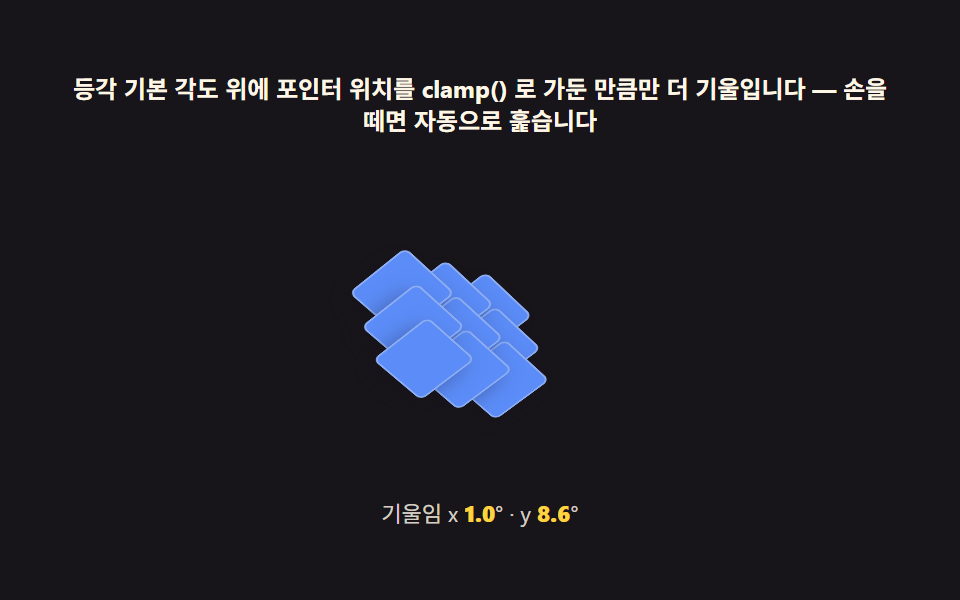
05Pointer parallax — the math behind a diorama that gently follows
Normalize pointermove coordinates to -1..1 from center, clamp the max rotation, then lerp the current angle toward the target inside requestAnimationFrame to update the whole scene's rotateX and rotateY. The isometric grid never changes — only the camera appears to.
Best forProduct heroes, interactive banners
pointermoverequestAnimationFrameclamp
<main class="stage">
<div class="pt" id="pt">
  <p class="pt__hint">On top of the base isometric angle, tilts only as far as the pointer position clamped by clamp() — release and it sweeps automatically</p>
  <div class="pt__field" role="application" aria-label="Scene that tilts by parallax as the pointer moves, and sweeps automatically once released" tabindex="0" id="field">
    <div class="pt__tilt" id="tilt">
      <div class="pt__world" id="world"></div>
    </div>
  </div>
  <p class="pt__meta">Tilt x  <b id="rx">0</b>° · y <b id="ry">0</b>°</p>
</div>
</main>
@use "../../../../site/static/demo-tokens" as *;
// 포인터 시차 기울임(05) — 무대는 먹. 등각 고정각(35.264°) 위에 포인터 목표각을 clamp() 로
// 가둔 만큼만 rotateX/rotateY 로 더한다. lerp(0.16) 로 부드럽게 따라가고, 입력이 없으면
// requestAnimationFrame 루프가 자동 경로로 대신 훑는다.
$duration: $dur-loop;
$easing: $ease-out;
$color: $subject-blue-light;
@include stage($stage-ink);
.pt {
display: flex; flex-direction: column; align-items: center; gap: $sp-2;
width: 100%; max-width: 420px;
}
.pt__hint {
margin: 0; font-weight: 700; font-size: clamp(10px, 2.6vw, 12px); line-height: 1.35;
color: $subject-cream; text-align: center;
}
.pt__field {
position: relative;
width: clamp(180px, 42vw, 220px); height: clamp(140px, 34vw, 168px);
display: grid; place-items: center;
perspective: 700px;
outline: none;
}
.pt__tilt { position: relative; transform-style: preserve-3d; width: 1px; height: 1px; }
.pt__world { position: relative; transform-style: preserve-3d; width: 1px; height: 1px; }
.pt__block {
position: absolute; left: 0; top: 0;
width: calc(38px - 3px); height: calc(38px - 3px);
transform: translate3d(var(--tx), var(--ty), 0) translate(-50%, -50%);
background: $subject-blue-light;
border: 1px solid rgba($subject-cream, .3);
border-radius: $r-xs;
box-shadow: $shadow-press;
}
.pt__meta { margin: 0; font-size: clamp(9px, 2.4vw, 11px); color: rgba($subject-cream, .82); }
.pt__meta b { font-weight: 800; color: $stage-yellow; font-variant-numeric: tabular-nums; }
@media (max-width: 340px) {
.pt { gap: $sp-1; }
.pt__field { width: 156px; height: 112px; }
.pt__block { width: calc(30px - 3px); height: calc(30px - 3px); }
.pt__hint { font-size: 8px; }
.pt__meta { font-size: 7px; }
}
// reduce — 자동 훑기·lerp 추적이 멎는다. 0.7 위상 각도로 고정된 정지 장면만 남긴다.
@media (prefers-reduced-motion: reduce) {
.pt.is-still .pt__tilt { transition: none; }
}html, body {
margin: 0;
overflow: hidden;
}
.stage {
box-sizing: border-box;
min-height: 100vh;
display: grid;
place-items: center;
margin: 0;
background: #17141a;
font-family: -apple-system, "Segoe UI", "Noto Sans KR", sans-serif;
padding: clamp(8px, 4vw, 24px);
}
.pt {
display: flex;
flex-direction: column;
align-items: center;
gap: 8px;
width: 100%;
max-width: 420px;
}
.pt__hint {
margin: 0;
font-weight: 700;
font-size: clamp(10px, 2.6vw, 12px);
line-height: 1.35;
color: #fff7e6;
text-align: center;
}
.pt__field {
position: relative;
width: clamp(180px, 42vw, 220px);
height: clamp(140px, 34vw, 168px);
display: grid;
place-items: center;
perspective: 700px;
outline: none;
}
.pt__tilt {
position: relative;
transform-style: preserve-3d;
width: 1px;
height: 1px;
}
.pt__world {
position: relative;
transform-style: preserve-3d;
width: 1px;
height: 1px;
}
.pt__block {
position: absolute;
left: 0;
top: 0;
width: 35px;
height: 35px;
transform: translate3d(var(--tx), var(--ty), 0) translate(-50%, -50%);
background: #5b8cf8;
border: 1px solid rgba(255, 247, 230, 0.3);
border-radius: 4px;
box-shadow: 0 6px 12px rgba(23, 20, 26, 0.32);
}
.pt__meta {
margin: 0;
font-size: clamp(9px, 2.4vw, 11px);
color: rgba(255, 247, 230, 0.82);
}
.pt__meta b {
font-weight: 800;
color: #ffd23f;
font-variant-numeric: tabular-nums;
}
@media (max-width: 340px) {
.pt {
gap: 4px;
}
.pt__field {
width: 156px;
height: 112px;
}
.pt__block {
width: 27px;
height: 27px;
}
.pt__hint {
font-size: 8px;
}
.pt__meta {
font-size: 7px;
}
}
@media (prefers-reduced-motion: reduce) {
.pt.is-still .pt__tilt {
transition: none;
}
}// 포인터 시차 기울임(05) — 등각 고정 각도(35.264°) 는 그대로 두고, 그 바깥 래퍼에
// 포인터 좌표를 clamp() 로 제한한 소량의 rotateX/rotateY 를 더해 "시차"를 만든다.
// 실제 포인터가 들어오면 pointermove 로 목표각을 갱신하고, 1.1초 넘게 입력이 없으면
// requestAnimationFrame 루프가 자체 계산한 경로로 자동 훑기를 재개한다(자동 시연).
(function () {
var root = document.getElementById('pt');
var field = document.getElementById('field');
var tilt = document.getElementById('tilt');
var world = document.getElementById('world');
var rxEl = document.getElementById('rx');
var ryEl = document.getElementById('ry');
if (!root || !field || !tilt || !world || !rxEl || !ryEl) return;
function clamp(v, lo, hi) { return v < lo ? lo : (v > hi ? hi : v); }
function mat4RotateX(deg) {
var r = deg * Math.PI / 180, c = Math.cos(r), s = Math.sin(r);
return [1, 0, 0, 0, 0, c, s, 0, 0, -s, c, 0, 0, 0, 0, 1];
}
function mat4RotateZ(deg) {
var r = deg * Math.PI / 180, c = Math.cos(r), s = Math.sin(r);
return [c, s, 0, 0, -s, c, 0, 0, 0, 0, 1, 0, 0, 0, 0, 1];
}
function mat4Mul(a, b) {
var out = new Array(16);
for (var col = 0; col < 4; col++) {
for (var row = 0; row < 4; row++) {
var sum = 0;
for (var k = 0; k < 4; k++) sum += a[k * 4 + row] * b[col * 4 + k];
out[col * 4 + row] = sum;
}
}
return out;
}
function mat4ToCss(m) {
var s = '';
for (var i = 0; i < m.length; i++) s += (i ? ',' : '') + m[i].toFixed(6);
return 'matrix3d(' + s + ')';
}
var TILT = -35.264;
world.style.transform = mat4ToCss(mat4Mul(mat4RotateX(TILT), mat4RotateZ(45)));
var mm = window.matchMedia('(max-width: 340px)').matches;
var TILE_W = mm ? 30 : 38, TILE_H = mm ? 15 : 19;
var N = 3;
for (var row = 0; row < N; row++) {
for (var col = 0; col < N; col++) {
var b = document.createElement('div');
b.className = 'pt__block';
var x = (col - row) * TILE_W / 2;
var y = (col + row) * TILE_H / 2;
b.style.setProperty('--tx', x.toFixed(2) + 'px');
b.style.setProperty('--ty', y.toFixed(2) + 'px');
b.style.zIndex = String(Math.round((col + row) * 10));
world.appendChild(b);
}
}
var LIMIT = 9; // 최대 기울임 각도(도) — clamp 의 상하한
var targetX = 0, targetY = 0;
var curX = 0, curY = 0;
var lastInput = -Infinity;
var IDLE_MS = 1100;
field.addEventListener('pointermove', function (ev) {
var rect = field.getBoundingClientRect();
var nx = ((ev.clientX - rect.left) / rect.width) * 2 - 1; // -1..1
var ny = ((ev.clientY - rect.top) / rect.height) * 2 - 1;
targetX = clamp(-ny * LIMIT, -LIMIT, LIMIT);
targetY = clamp(nx * LIMIT, -LIMIT, LIMIT);
lastInput = performance.now();
});
field.addEventListener('pointerleave', function () { lastInput = -Infinity; });
function autoPath(t) {
targetX = Math.sin(t * 0.6) * LIMIT * 0.85;
targetY = Math.cos(t * 0.42) * LIMIT;
}
function paint(now, t) {
if (now - lastInput > IDLE_MS) autoPath(t);
curX += (targetX - curX) * 0.16;
curY += (targetY - curY) * 0.16;
tilt.style.transform = 'rotateX(' + curX.toFixed(2) + 'deg) rotateY(' + curY.toFixed(2) + 'deg)';
rxEl.textContent = curX.toFixed(1);
ryEl.textContent = curY.toFixed(1);
}
var reduce = window.matchMedia('(prefers-reduced-motion: reduce)').matches;
if (reduce) {
autoPath(0.7);
curX = targetX; curY = targetY;
paint(0, 0.7);
root.classList.add('is-still');
} else {
var start = performance.now();
(function step(now) {
paint(now, (now - start) / 1000);
requestAnimationFrame(step);
})(start);
}
})();// IsometricPointerParallaxTilt — vanilla 판(run/333/demo/05-isometric-pointer-parallax-tilt/index.html)
// 의 React 포트. 등각 기본 각도(-35.264deg) 위에 포인터 위치를 clamp() 로 가둔 만큼만
// 덧기울인다. 손을 떼면 자동 경로(sin/cos)로 같은 보간을 계속한다.
import { useEffect, useRef } from "react";
import styles from "./IsometricPointerParallaxTilt.module.scss";
export type IsometricPointerParallaxTiltProps = {
duration?: string;
easing?: string;
color?: string;
};
type Box<T> = { current: T };
const HINT = "등각 기본 각도 위에 포인터 위치를 clamp() 로 가둔 만큼만 더 기울입니다 — 손을 떼면 자동으로 훑습니다";
const ARIA_FIELD = "포인터를 올리면 등각 장면이 시차만큼 기울고, 손을 떼면 자동으로 훑는 장면";
const LABEL_TILT = "기울임 x ";
const TILT = -35.264;
const LIMIT = 9;
const IDLE_MS = 1100;
function clamp(v: number, lo: number, hi: number): number {
return v < lo ? lo : v > hi ? hi : v;
}
export default function IsometricPointerParallaxTilt({
duration = "600ms",
easing = "ease-out",
color = "#5b8cf8"
}: IsometricPointerParallaxTiltProps) {
const rootRef = useRef<HTMLDivElement | null>(null);
const fieldRef = useRef<HTMLDivElement | null>(null);
const tiltRef = useRef<HTMLDivElement | null>(null);
const tiltXRef = useRef<HTMLElement | null>(null);
const stateRef = useRef({
targetX: 0,
targetY: 0,
curX: 0,
curY: 0,
lastInput: -Infinity
}) as Box<{ targetX: number; targetY: number; curX: number; curY: number; lastInput: number }>;
const rafRef = useRef(0) as Box<number>;
useEffect(() => {
const field = fieldRef.current;
const tilt = tiltRef.current;
const root = rootRef.current;
if (!field || !tilt || !root) return;
function onMove(e: PointerEvent): void {
if (!field) return;
const rect = field.getBoundingClientRect();
const nx = (e.clientX - rect.left) / rect.width - 0.5;
const ny = (e.clientY - rect.top) / rect.height - 0.5;
stateRef.current.targetX = clamp(nx * LIMIT * 2, -LIMIT, LIMIT);
stateRef.current.targetY = clamp(ny * LIMIT * 2, -LIMIT, LIMIT);
stateRef.current.lastInput = performance.now();
}
function onLeave(): void {
stateRef.current.lastInput = -Infinity;
}
field.addEventListener("pointermove", onMove);
field.addEventListener("pointerleave", onLeave);
function autoPath(t: number): { x: number; y: number } {
return { x: Math.sin(t * 0.6) * LIMIT * 0.85, y: Math.cos(t * 0.42) * LIMIT };
}
function paint(now: number, t: number): void {
const s = stateRef.current;
const idle = now - s.lastInput > IDLE_MS;
if (idle) {
const p = autoPath(t);
s.targetX = p.x;
s.targetY = p.y;
}
s.curX += (s.targetX - s.curX) * 0.16;
s.curY += (s.targetY - s.curY) * 0.16;
tilt!.style.transform =
"rotateX(" + (TILT + s.curY).toFixed(3) + "deg) rotateY(" + s.curX.toFixed(3) + "deg)";
if (tiltXRef.current) tiltXRef.current.textContent = s.curX.toFixed(1);
}
const reduce = window.matchMedia("(prefers-reduced-motion: reduce)").matches;
if (reduce) {
paint(0, 0.8);
root.classList.add(styles.isStill);
} else {
const start = performance.now();
const step = (now: number): void => {
paint(now, (now - start) / 1000);
rafRef.current = requestAnimationFrame(step);
};
rafRef.current = requestAnimationFrame(step);
}
return () => {
cancelAnimationFrame(rafRef.current);
field.removeEventListener("pointermove", onMove);
field.removeEventListener("pointerleave", onLeave);
};
// eslint-disable-next-line react-hooks/exhaustive-deps
}, []);
return (
<main className={styles.stage}>
<div className={styles.pt} ref={rootRef} data-duration={duration} data-easing={easing} data-color={color}>
<p className={styles.hint}>{HINT}</p>
<div className={styles.field} ref={fieldRef} role="img" aria-label={ARIA_FIELD} tabIndex={0}>
<div className={styles.tilt} ref={tiltRef}>
<div className={styles.grid3}>
{Array.from({ length: 9 }).map((_, i) => (
<div key={i} className={styles.block}></div>
))}
</div>
</div>
</div>
<p className={styles.meta}>
<span className={styles.metaLabel}>{LABEL_TILT}</span>
<b className={styles.tiltVal} ref={tiltXRef}>0.0</b>
</p>
</div>
</main>
);
}05 Pointer parallax — the math behind a diorama that gently follows — Measured area 1.605% · moving frames 23/23Original by GODRICH · SCSS and React ship in the zip · Isometric CSS: 9 True-Projection 3D Dioramas
The post this demo lives in
 Isometric CSS: 9 True-Projection 3D DioramasIsometric css done right: Each cube face shades by a light-angle calc, grid coords map to screen via the 2:1 isometric f See all demos in this post