06A Modal That Clears as Its Ripple Settles
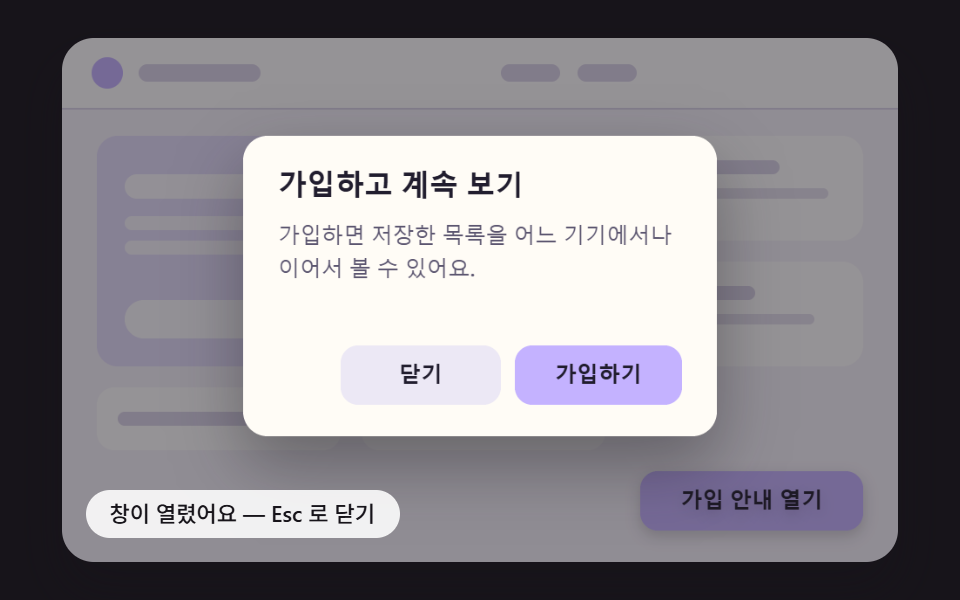
A wave equation is solved on a height grid every tick to spread a ripple from the center, and each cell redraws the window image shifted by its height slope, so the wavy window sharpens as the ripple dies down.
Best forSummer feature announcement
RIPPLE_DAMPINGRIPPLE_STRENGTHREFRACT_SCALE

<main class="stage">
<div class="md is-demo" id="md">
  <canvas class="md__canvas" data-role="canvas" width="480" height="300" aria-hidden="true"></canvas>
  <button class="md__open" data-role="open" type="button" aria-haspopup="dialog">See the feature</button>
  <div class="md__dialog" data-role="dialog" role="dialog" aria-modal="true" aria-labelledby="md-title-06" aria-describedby="md-body-06" hidden>
    <h2 class="md__title" data-role="title" id="md-title-06">The summer feature is here</h2>
    <p class="md__body" data-role="body" id="md-body-06">Beach gear and summer clothes, gathered in one place.</p>
    <button class="md__btn" data-role="close" type="button">Close</button>
    <button class="md__btn" data-role="confirm" type="button">Browse</button>
  </div>
  <p class="md__status" data-role="status" aria-live="off">The window is closed — use the button to open it again</p>
</div>
</main>
@use "../../../../site/static/demo-tokens" as *;
@include stage($stage-ink);
.md {
position: relative;
width: min(92vw, calc(160vh - 12.8vw));
aspect-ratio: 480 / 300;
margin: 0 auto;
border-radius: $r-card;
overflow: hidden;
box-shadow: $shadow-raised;
background: $subject-ink;
}
.md__canvas {
display: block;
width: 100%;
height: 100%;
// 손가락 세로 쓸기는 브라우저에 남겨 페이지 스크롤이 막히지 않게 한다
touch-action: pan-y;
}
// 버튼·대화상자 층 — 글자는 캔버스가 그리고, 이 층은 같은 자리에 겹쳐 화면 낭독기·키보드·클릭을 받는다.
// 자리(left·top·width·height)는 스크립트가 장면 좌표(480x300)를 백분율로 바꿔 넣는다
.md__open,
.md__dialog,
.md__title,
.md__body,
.md__btn {
position: absolute;
box-sizing: border-box;
margin: 0;
padding: 0;
border: 0;
background: transparent;
color: transparent;
font-weight: 600;
font-size: 12px;
line-height: 1.4;
overflow: hidden;
}
.md__open,
.md__btn {
border-radius: $r-control;
font-family: inherit;
cursor: pointer;
transition: outline-color $dur-instant ease-out;
}
.md__title,
.md__body {
pointer-events: none;
}
.md__open:focus-visible,
.md__btn:focus-visible {
outline: 2px solid $subject-ink;
outline-offset: 2px;
}
// 창이 아직 움직이는 동안에는 초점 고리를 감춘다 — 고리는 다 열린 창의 버튼 자리에 맞춰져 있다
.md:not(.md--open) .md__btn:focus-visible {
outline-color: transparent;
}
.md__status {
position: absolute;
left: $sp-3;
bottom: $sp-3;
box-sizing: border-box;
max-width: 62%;
margin: 0;
padding: $sp-1 $sp-3;
border-radius: $r-control;
background: rgba(255, 255, 255, .88);
color: $subject-ink;
font-weight: 500;
font-size: 11px;
line-height: 1.4;
pointer-events: none;
}
@media (max-width: 340px) {
.md__status { font-size: 10px; padding: $sp-1 $sp-2; }
}
// 움직임은 스크립트가 matchMedia 로 끈다(열기·닫기가 그 자리에서 끝난다). CSS 쪽은 초점 고리 전환을 끈다
@media (prefers-reduced-motion: reduce) {
.md__open, .md__btn { transition: none; }
}html, body {
margin: 0;
overflow: hidden;
}
.stage {
box-sizing: border-box;
min-height: 100vh;
display: grid;
place-items: center;
margin: 0;
background: #17141a;
font-family: -apple-system, "Segoe UI", "Noto Sans KR", sans-serif;
padding: clamp(8px, 4vw, 24px);
}
.md {
position: relative;
width: min(92vw, 160vh - 12.8vw);
aspect-ratio: 480/300;
margin: 0 auto;
border-radius: 16px;
overflow: hidden;
box-shadow: 0 14px 24px rgba(23, 20, 26, 0.32);
background: #17141a;
}
.md__canvas {
display: block;
width: 100%;
height: 100%;
touch-action: pan-y;
}
.md__open,
.md__dialog,
.md__title,
.md__body,
.md__btn {
position: absolute;
box-sizing: border-box;
margin: 0;
padding: 0;
border: 0;
background: transparent;
color: transparent;
font-weight: 600;
font-size: 12px;
line-height: 1.4;
overflow: hidden;
}
.md__open,
.md__btn {
border-radius: 12px;
font-family: inherit;
cursor: pointer;
transition: outline-color 140ms ease-out;
}
.md__title,
.md__body {
pointer-events: none;
}
.md__open:focus-visible,
.md__btn:focus-visible {
outline: 2px solid #17141a;
outline-offset: 2px;
}
.md:not(.md--open) .md__btn:focus-visible {
outline-color: transparent;
}
.md__status {
position: absolute;
left: 12px;
bottom: 12px;
box-sizing: border-box;
max-width: 62%;
margin: 0;
padding: 4px 12px;
border-radius: 12px;
background: rgba(255, 255, 255, 0.88);
color: #17141a;
font-weight: 500;
font-size: 11px;
line-height: 1.4;
pointer-events: none;
}
@media (max-width: 340px) {
.md__status {
font-size: 10px;
padding: 4px 8px;
}
}
@media (prefers-reduced-motion: reduce) {
.md__open, .md__btn {
transition: none;
}
}(function () {
const root = document.getElementById("md");
if (!root) return;
const W = 480;
const H = 300;
const FIXED_DT = 16;
const TAU = Math.PI * 2;
// 창과 여는 버튼의 자리 — 장면 좌표(480x300). 화면 위 버튼·대화상자 층도 이 값으로 같은 자리에 맞춘다
const PANEL = { x: 104, y: 56, w: 272, h: 172 };
const OPENER = { x: 332, y: 248, w: 128, h: 34 };
// 창 안의 자리 — 창 왼쪽 위가 원점
const TITLE_BOX = { x: 20, y: 18, w: 232, h: 26 };
const BODY_BOX = { x: 20, y: 52, w: 232, h: 56 };
const CLOSE_BOX = { x: 56, y: 120, w: 92, h: 34 };
const CONFIRM_BOX = { x: 156, y: 120, w: 96, h: 34 };
const PANEL_RADIUS = 14;
const BUTTON_RADIUS = 10;
// 뒤 페이지를 덮는 막의 가장 진한 값
const SCRIM_MAX = 0.46;
// 파스텔 팔레트 — 밝은 페이지 위에 어두운 막이 덮이며 창이 떠오른다. 글자는 진한 먹색으로 명도 차를 둔다
const PAGE_BG = [246, 243, 251];
const PAGE_CARD = [255, 255, 255];
const PAGE_HERO = [228, 221, 252];
const PAGE_LINE = [218, 212, 232];
const PANEL_BG = [255, 252, 246];
const GHOST = [236, 232, 245];
const INK = [33, 29, 46];
const MUTED = [92, 86, 112];
const SCRIM = [23, 20, 26];
const WHITE = [255, 255, 255];
const FONT_FAMILY = '"Segoe UI", "Malgun Gothic", "Hiragino Sans", "Noto Sans KR", sans-serif';
function clamp(v, lo, hi) { return v < lo ? lo : (v > hi ? hi : v); }
function lerp(a, b, k) { return a + (b - a) * k; }
function smooth(x) { const c = clamp(x, 0, 1); return c * c * (3 - 2 * c); }
// 감속 곡선 — 처음 빠르고 끝에 느리다
function easeOutCubic(x) { const c = 1 - clamp(x, 0, 1); return 1 - c * c * c; }
// 가속 곡선 — 처음 느리고 끝에 빠르다
function easeInCubic(x) { const c = clamp(x, 0, 1); return c * c * c; }
function easeInOutCubic(x) {
const c = clamp(x, 0, 1);
return c < 0.5 ? 4 * c * c * c : 1 - Math.pow(-2 * c + 2, 3) / 2;
}
function mix(a, b, k) { return [lerp(a[0], b[0], k), lerp(a[1], b[1], k), lerp(a[2], b[2], k)]; }
function rgba(c, a) {
return 'rgba(' + Math.round(clamp(c[0], 0, 255)) + ',' + Math.round(clamp(c[1], 0, 255)) + ',' + Math.round(clamp(c[2], 0, 255)) + ',' + clamp(a, 0, 1).toFixed(3) + ')';
}
// 시드 고정 난수 — 같은 시드면 같은 배치가 다시 나온다 (32비트 정수 섞기)
function makeRng(seed) {
let s = seed >>> 0;
return function () {
s = (s + 0x6d2b79f5) >>> 0;
let t = s;
t = Math.imul(t ^ (t >>> 15), t | 1);
t ^= t + Math.imul(t ^ (t >>> 7), t | 61);
return ((t ^ (t >>> 14)) >>> 0) / 4294967296;
};
}
// 진행률을 목표(0 또는 1) 쪽으로 dt/길이만큼 옮긴다 — 닫히는 중에 다시 열면 지금 값에서 그대로 되돌아간다
function approach(v, target, dt, ms) {
const s = dt / ms;
return target > v ? Math.min(target, v + s) : Math.max(target, v - s);
}
// 감쇠 스프링 한 스텝 — 가속도 = -강성 x (위치 - 목표) - 감쇠 x 속도. 속도를 먼저 고친 뒤 그 속도로 위치를 옮긴다. dt 는 초
function springStep(s, target, stiffness, damping, dt) {
const a = -stiffness * (s.x - target) - damping * s.v;
s.v += a * dt;
s.x += s.v * dt;
}
function springRest(s, target) { return Math.abs(s.x - target) < 0.002 && Math.abs(s.v) < 0.02; }
function lerpRect(a, b, k) {
return { x: lerp(a.x, b.x, k), y: lerp(a.y, b.y, k), w: lerp(a.w, b.w, k), h: lerp(a.h, b.h, k) };
}
function inside(r, x, y) { return x >= r.x && x <= r.x + r.w && y >= r.y && y <= r.y + r.h; }
// 모서리 둥근 사각형 경로 — 가로 반경 rx 와 세로 반경 ry 를 따로 받는다(늘어난 좌표계에서는 배율로 나눈 반경을 넣어 모서리를 원으로 되돌린다)
function roundRectPath(c, x, y, w, h, rx, ry) {
const ax = Math.max(0, Math.min(rx, w / 2));
const ay = Math.max(0, Math.min(ry, h / 2));
c.beginPath();
c.moveTo(x + ax, y);
c.lineTo(x + w - ax, y);
c.ellipse(x + w - ax, y + ay, ax, ay, 0, -Math.PI / 2, 0);
c.lineTo(x + w, y + h - ay);
c.ellipse(x + w - ax, y + h - ay, ax, ay, 0, 0, Math.PI / 2);
c.lineTo(x + ax, y + h);
c.ellipse(x + ax, y + h - ay, ax, ay, 0, Math.PI / 2, Math.PI);
c.lineTo(x, y + ay);
c.ellipse(x + ax, y + ay, ax, ay, 0, Math.PI, Math.PI * 1.5);
c.closePath();
}
const canvasEl = root.querySelector('[data-role="canvas"]');
const statusEl = root.querySelector('[data-role="status"]');
const openEl = root.querySelector('[data-role="open"]');
const dialogEl = root.querySelector('[data-role="dialog"]');
const titleEl = root.querySelector('[data-role="title"]');
const bodyEl = root.querySelector('[data-role="body"]');
const closeEl = root.querySelector('[data-role="close"]');
const confirmEl = root.querySelector('[data-role="confirm"]');
const ctxRaw = canvasEl ? canvasEl.getContext('2d') : null;
if (!canvasEl || !ctxRaw || !statusEl || !openEl || !dialogEl || !titleEl || !bodyEl || !closeEl || !confirmEl) {
return;
}
const cv = canvasEl;
const ctx = ctxRaw;
const status = statusEl;
const openBtn = openEl;
const dialog = dialogEl;
const titleNode = titleEl;
const bodyNode = bodyEl;
const closeBtn = closeEl;
const confirmBtn = confirmEl;
function textOf(el) { return (el.textContent || '').trim(); }
// 화면에 보이는 글자는 DOM 글자를 캔버스에 그린 것 — 문구를 바꾸면 그림도 같이 바뀐다
const OPEN_LABEL = textOf(openBtn);
const TITLE = textOf(titleNode);
const BODY = textOf(bodyNode);
const CLOSE_LABEL = textOf(closeBtn);
const CONFIRM_LABEL = textOf(confirmBtn);
const reduceQuery = window.matchMedia('(prefers-reduced-motion: reduce)');
// 페이지를 연 채 동작 줄이기 설정을 바꿔도 아래 change 리스너가 이 값을 다시 읽는다
let still = reduceQuery.matches;
// 자동 시연 중인가 — 사람이 처음 만지는 순간 시연을 멈추고 상태 줄을 읽어 주기 시작한다
let demo = root.classList.contains('is-demo');
function wake() {
if (!demo) {
return;
}
demo = false;
root.classList.remove('is-demo');
status.setAttribute('aria-live', 'polite');
}
function say(text) {
if (status.textContent !== text) {
status.textContent = text;
}
}
function fontOf(weight, px) { return weight + ' ' + px.toFixed(1) + 'px ' + FONT_FAMILY; }
// 한 줄에 들어가도록 글자 크기를 줄인다 — 언어마다 글자 길이가 달라도 상자 안에 든다
function fitFont(c, text, weight, px, maxW) {
let size = px;
c.font = fontOf(weight, size);
while (size > 8 && c.measureText(text).width > maxW) {
size -= 0.5;
c.font = fontOf(weight, size);
}
return size;
}
// 줄 나누기 — 폭을 넘으면 마지막 띄어쓰기에서 끊고, 띄어쓰기가 없는 글(일본어)은 그 글자에서 끊는다
function wrapLines(c, text, maxW) {
const out = [];
let line = '';
const chars = Array.from(text);
for (let i = 0; i < chars.length; i += 1) {
const ch = chars[i];
const test = line + ch;
if (line !== '' && c.measureText(test).width > maxW) {
const cut = line.lastIndexOf(' ');
if (cut > 0 && ch !== ' ') {
out.push(line.slice(0, cut));
line = line.slice(cut + 1) + ch;
}
else {
out.push(line);
line = ch === ' ' ? '' : ch;
}
}
else {
line = test;
}
}
if (line !== '') {
out.push(line);
}
return out;
}
function drawButton(c, r, fill, label, alpha) {
if (alpha <= 0.001) {
return;
}
c.save();
c.globalAlpha *= alpha;
roundRectPath(c, r.x, r.y, r.w, r.h, BUTTON_RADIUS, BUTTON_RADIUS);
c.fillStyle = rgba(fill, 1);
c.fill();
fitFont(c, label, 600, 12.5, r.w - 14);
c.fillStyle = rgba(INK, 1);
c.textAlign = 'center';
c.textBaseline = 'middle';
c.fillText(label, r.x + r.w / 2, r.y + r.h / 2 + 0.5);
c.restore();
}
// 창 그림 — 창 하나를 화면 밖 캔버스에 한 번 그려 두고, 효과마다 이 그림을 잘라·늘려·옮겨 그린다
let dpr = 1;
function makeSprite(withBg, withConfirm) {
const sc = document.createElement('canvas');
sc.width = Math.round(PANEL.w * dpr);
sc.height = Math.round(PANEL.h * dpr);
const c = sc.getContext('2d');
if (!c) {
return sc;
}
c.setTransform(dpr, 0, 0, dpr, 0, 0);
if (withBg) {
roundRectPath(c, 0, 0, PANEL.w, PANEL.h, PANEL_RADIUS, PANEL_RADIUS);
c.fillStyle = rgba(PANEL_BG, 1);
c.fill();
}
c.textAlign = 'left';
c.textBaseline = 'top';
fitFont(c, TITLE, 700, 16.5, TITLE_BOX.w);
c.fillStyle = rgba(INK, 1);
c.fillText(TITLE, TITLE_BOX.x, TITLE_BOX.y + 3);
// 본문 — 줄 수가 상자 높이를 넘으면 글자 크기를 반 px 씩 줄인다
let size = 12.5;
let lines = [];
for (; size >= 9; size -= 0.5) {
c.font = fontOf(500, size);
lines = wrapLines(c, BODY, BODY_BOX.w);
if (lines.length * size * 1.5 <= BODY_BOX.h) {
break;
}
}
c.fillStyle = rgba(MUTED, 1);
for (let i = 0; i < lines.length; i += 1) {
c.fillText(lines[i], BODY_BOX.x, BODY_BOX.y + i * size * 1.5);
}
drawButton(c, CLOSE_BOX, GHOST, CLOSE_LABEL, 1);
if (withConfirm) {
drawButton(c, CONFIRM_BOX, ACCENT, CONFIRM_LABEL, 1);
}
return sc;
}
// 배경·글자·두 버튼 / 글자·버튼만(배경 없음) / 배경·글자·Close 버튼만(확인 버튼은 효과가 따로 그린다)
let spriteFull = document.createElement('canvas');
let spriteContent = document.createElement('canvas');
let spriteBare = document.createElement('canvas');
function fitCanvas() {
// 배율은 2 에서 자른다 — 배율 3 기기에서 화소가 2.25배로 늘어 프레임마다 일이 그만큼 커지지 않게
dpr = Math.min(window.devicePixelRatio || 1, 2);
cv.width = Math.round(W * dpr);
cv.height = Math.round(H * dpr);
ctx.setTransform(dpr, 0, 0, dpr, 0, 0);
spriteFull = makeSprite(true, true);
spriteContent = makeSprite(false, true);
spriteBare = makeSprite(true, false);
}
// 창 그림의 한 조각을 장면에 옮겨 그린다 — 원본 좌표는 창 기준 px, 그림 배율을 곱해 화소로 바꾼다
function blit(sp, sx, sy, sw, sh, dx, dy, dw, dh) {
if (sw <= 0 || sh <= 0 || dw <= 0 || dh <= 0) {
return;
}
ctx.drawImage(sp, sx * dpr, sy * dpr, sw * dpr, sh * dpr, dx, dy, dw, dh);
}
// 버튼·대화상자 층을 장면 좌표와 같은 자리에 백분율로 놓는다(한 번만 — 크기가 바뀌어도 백분율이라 그대로 맞는다)
function pct(v, of) { return ((v / of) * 100).toFixed(3) + '%'; }
function place(el, r, pw, ph) {
el.style.left = pct(r.x, pw);
el.style.top = pct(r.y, ph);
el.style.width = pct(r.w, pw);
el.style.height = pct(r.h, ph);
}
function placeOverlays() {
place(openBtn, OPENER, W, H);
place(dialog, PANEL, W, H);
place(titleNode, TITLE_BOX, PANEL.w, PANEL.h);
place(bodyNode, BODY_BOX, PANEL.w, PANEL.h);
place(closeBtn, CLOSE_BOX, PANEL.w, PANEL.h);
place(confirmBtn, CONFIRM_BOX, PANEL.w, PANEL.h);
}
function fillRound(x, y, w, h, r, col, a) {
roundRectPath(ctx, x, y, w, h, r, r);
ctx.fillStyle = rgba(col, a);
ctx.fill();
}
// 뒤 페이지 — 머리 띠·큰 카드·작은 카드 몇 장. 글자 대신 막대로 그려 언어와 상관없이 같은 그림이다
function drawPage() {
ctx.fillStyle = rgba(PAGE_BG, 1);
ctx.fillRect(0, 0, W, H);
ctx.fillStyle = rgba(PAGE_CARD, 1);
ctx.fillRect(0, 0, W, 40);
ctx.fillStyle = rgba(PAGE_LINE, 1);
ctx.fillRect(0, 40, W, 1);
ctx.fillStyle = rgba(ACCENT, 1);
ctx.beginPath();
ctx.arc(26, 20, 9, 0, TAU);
ctx.fill();
fillRound(44, 15, 70, 10, 5, PAGE_LINE, 1);
fillRound(252, 15, 34, 10, 5, PAGE_LINE, 1);
fillRound(296, 15, 34, 10, 5, PAGE_LINE, 1);
fillRound(20, 56, 284, 132, 12, PAGE_HERO, 1);
fillRound(36, 78, 150, 14, 7, WHITE, 0.85);
fillRound(36, 102, 210, 8, 4, WHITE, 0.7);
fillRound(36, 116, 176, 8, 4, WHITE, 0.7);
fillRound(36, 150, 88, 22, 11, WHITE, 0.9);
fillRound(316, 56, 144, 60, 12, PAGE_CARD, 1);
fillRound(328, 70, 84, 8, 4, PAGE_LINE, 1);
fillRound(328, 86, 112, 6, 3, PAGE_LINE, 0.7);
fillRound(316, 128, 144, 60, 12, PAGE_CARD, 1);
fillRound(328, 142, 70, 8, 4, PAGE_LINE, 1);
fillRound(328, 158, 104, 6, 3, PAGE_LINE, 0.7);
fillRound(20, 200, 140, 36, 10, PAGE_CARD, 1);
fillRound(172, 200, 140, 36, 10, PAGE_CARD, 1);
fillRound(32, 214, 80, 8, 4, PAGE_LINE, 1);
fillRound(184, 214, 64, 8, 4, PAGE_LINE, 1);
itemPage();
}
function drawOpener(alpha) {
ctx.save();
ctx.shadowColor = rgba(SCRIM, 0.2);
ctx.shadowBlur = 8 * dpr;
ctx.shadowOffsetY = 3 * dpr;
drawButton(ctx, OPENER, ACCENT, OPEN_LABEL, alpha);
ctx.restore();
}
// 뒤를 덮는 막 — a 는 0(없음)에서 1(가장 진함)
function drawScrim(a) {
if (a <= 0.001) {
return;
}
ctx.fillStyle = rgba(SCRIM, SCRIM_MAX * clamp(a, 0, 1));
ctx.fillRect(0, 0, W, H);
}
// 창을 가운데 기준으로 s 배 키워 그린다. lift 는 떠오른 높이(px) — 그림자 번짐과 거리가 이 값 하나로 정해진다
function drawPanelScaled(sp, s, alpha, lift) {
if (alpha <= 0.001 || s <= 0.001) {
return;
}
const cx = PANEL.x + PANEL.w / 2;
const cy = PANEL.y + PANEL.h / 2;
ctx.save();
ctx.globalAlpha = clamp(alpha, 0, 1);
ctx.translate(cx, cy);
ctx.scale(s, s);
// 그림자 값은 변환을 따라가지 않는 화소 단위라 배율(dpr)을 직접 곱한다
ctx.shadowColor = rgba(SCRIM, clamp(0.16 + 0.008 * lift, 0, 0.5));
ctx.shadowBlur = (4 + lift * 1.3) * dpr;
ctx.shadowOffsetY = (2 + lift * 0.55) * dpr;
ctx.drawImage(sp, -PANEL.w / 2, -PANEL.h / 2, PANEL.w, PANEL.h);
ctx.restore();
}
// 열고 닫는 흐름 — closed → opening → open → closing → closed. 효과마다 itemStep 이 「다 끝났다」 를 알려 준다
let phase = 'closed';
let phaseAge = 0;
function setPhase(p) {
phase = p;
phaseAge = 0;
root.classList.toggle('md--open', p === 'open');
}
function shown() { return phase === 'opening' || phase === 'open'; }
// 대화상자 층 보이기 — 창이 떠 있는 동안 여는 버튼은 inert 로 막아 Tab·클릭이 창 뒤로 새지 않게 한다
function showDialog(v) {
dialog.hidden = !v;
if (v) {
openBtn.setAttribute('inert', '');
}
else {
openBtn.removeAttribute('inert');
}
}
function snapTo(open) {
itemSnap(open);
showDialog(open);
setPhase(open ? 'open' : 'closed');
}
function requestOpen(user) {
if (shown()) {
return;
}
showDialog(true);
setPhase('opening');
itemOpen();
// 동작 줄이기 — 움직임 없이 그 자리에서 다 열린 창을 그린다
if (still) {
snapTo(true);
}
if (user) {
(FIRST_FOCUS === 'close' ? closeBtn : confirmBtn).focus({ preventScroll: true });
}
}
function requestClose(user, via) {
if (!shown()) {
return;
}
const hadFocus = dialog.contains(document.activeElement);
showDialog(false);
setPhase('closing');
itemClose(via);
if (still) {
snapTo(false);
}
// 닫으면 초점은 창을 열었던 버튼으로 돌아간다
if (user || hadFocus) {
openBtn.focus({ preventScroll: true });
}
}
const TXT_CLOSED = 'The window is closed — use the button to open it again';
const TXT_OPENING = 'The window is opening';
const TXT_OPEN = 'The window is open — press Esc to close';
const TXT_CLOSING = 'The window is closing';
function stateText() {
const s = itemStatus();
if (s !== '') {
return s;
}
if (phase === 'open') {
return TXT_OPEN;
}
if (phase === 'opening') {
return TXT_OPENING;
}
if (phase === 'closing') {
return TXT_CLOSING;
}
return TXT_CLOSED;
}
function render() {
drawPage();
itemDraw();
say(stateText());
}
function tick() {
const done = itemStep(FIXED_DT);
phaseAge += FIXED_DT;
if (phase === 'opening' && done) {
setPhase('open');
}
else if (phase === 'closing' && done) {
setPhase('closed');
}
}
// 시연 — DEMO_LOOP_MS 마다 같은 시간표로 연다(DEMO_OPEN_AT) → 닫는다(DEMO_CLOSE_AT, DEMO_CLOSE_VIA 버튼으로)
let demoCycle = -1;
let demoOpened = false;
let demoClosed = false;
function demoTick(t) {
const cyc = Math.floor(t / DEMO_LOOP_MS);
if (cyc !== demoCycle) {
demoCycle = cyc;
demoOpened = false;
demoClosed = false;
if (phase !== 'closed') {
snapTo(false);
}
}
const lt = t - cyc * DEMO_LOOP_MS;
if (!demoOpened && lt >= DEMO_OPEN_AT) {
demoOpened = true;
requestOpen(false);
}
if (!demoClosed && lt >= DEMO_CLOSE_AT) {
demoClosed = true;
if (DEMO_CLOSE_VIA !== 'confirm' || !itemConfirm()) {
requestClose(false, DEMO_CLOSE_VIA);
}
}
}
// 화면 좌표(CSS px) → 장면 좌표(480x300). 리사이즈 뒤에도 그때그때 현재 크기로 다시 잰다
function toScene(ev) {
const r = cv.getBoundingClientRect();
return [((ev.clientX - r.left) / r.width) * W, ((ev.clientY - r.top) / r.height) * H];
}
// 물결 감쇠 — 틱(16ms)마다 높이에 곱하는 값. 1 에 가까울수록 오래 일렁인다
const RIPPLE_DAMPING = 0.95;
// 처음 떨어뜨리는 물방울 높이
const RIPPLE_STRENGTH = 160;
// 굴절 — 높이 기울기 1 당 창 그림을 옮기는 거리(px)
const REFRACT_SCALE = 0.08;
// 높이 격자 칸 크기(px)
const RIPPLE_CELL_PX = 4;
const RIPPLE_COLS = Math.ceil(PANEL.w / RIPPLE_CELL_PX);
const RIPPLE_ROWS = Math.ceil(PANEL.h / RIPPLE_CELL_PX);
// 창이 비치기 시작해 다 보이기까지(ms) · 닫히며 흐려지는 시간(ms)
const RIPPLE_FADE_MS = 260;
const RIPPLE_CLOSE_MS = 420;
// 이 높이 밑으로 잦아들면 「맑아졌다」 고 본다
const RIPPLE_CALM = 6;
const ACCENT = [150, 214, 236];
const FIRST_FOCUS = 'confirm';
const DEMO_LOOP_MS = 2400;
const DEMO_OPEN_AT = 200;
const DEMO_CLOSE_AT = 1850;
const DEMO_CLOSE_VIA = 'close';
const TXT_SETTLING = 'The ripple is settling';
let waveCur = new Float32Array(RIPPLE_COLS * RIPPLE_ROWS);
let wavePrev = new Float32Array(RIPPLE_COLS * RIPPLE_ROWS);
let rippleAlpha = 0;
let rippleTarget = 0;
// 물방울 — (gx, gy) 칸 둘레 반경 r 칸 안에 가운데일수록 높게 높이를 더한다
function dropAt(gx, gy, amp, r) {
for (let y = -r; y <= r; y += 1) {
for (let x = -r; x <= r; x += 1) {
const cx = gx + x;
const cy = gy + y;
const d = Math.hypot(x, y) / (r + 0.5);
if (cx < 1 || cy < 1 || cx >= RIPPLE_COLS - 1 || cy >= RIPPLE_ROWS - 1 || d > 1) {
continue;
}
waveCur[cy * RIPPLE_COLS + cx] += amp * (1 - d * d);
}
}
}
// 파동 방정식 한 스텝 — 다음 높이 = (이웃 넷의 합 / 2 - 이전 높이) x 감쇠. 가장자리 칸은 0 에 묶어 물결이 벽에서 되돌아온다
function waveStep() {
const c = waveCur;
const p = wavePrev;
for (let y = 1; y < RIPPLE_ROWS - 1; y += 1) {
for (let x = 1; x < RIPPLE_COLS - 1; x += 1) {
const i = y * RIPPLE_COLS + x;
p[i] = ((c[i - 1] + c[i + 1] + c[i - RIPPLE_COLS] + c[i + RIPPLE_COLS]) / 2 - p[i]) * RIPPLE_DAMPING;
}
}
waveCur = p;
wavePrev = c;
}
function waveEnergy() {
let m = 0;
for (let i = 0; i < waveCur.length; i += 1) {
m = Math.max(m, Math.abs(waveCur[i]));
}
return m;
}
function clearWaves() {
waveCur.fill(0);
wavePrev.fill(0);
}
function itemOpen() {
rippleTarget = 1;
const rng = makeRng(4736);
dropAt(Math.floor(RIPPLE_COLS / 2), Math.floor(RIPPLE_ROWS / 2), RIPPLE_STRENGTH, 3);
// 작은 물방울 둘 — 자리는 시드 난수로 정해 매번 같다
for (let k = 0; k < 2; k += 1) {
dropAt(4 + Math.floor(rng() * (RIPPLE_COLS - 8)), 4 + Math.floor(rng() * (RIPPLE_ROWS - 8)), RIPPLE_STRENGTH * 0.45, 2);
}
}
function itemClose(via) {
rippleTarget = 0;
dropAt(Math.floor(RIPPLE_COLS / 2), Math.floor(RIPPLE_ROWS / 2), RIPPLE_STRENGTH * 0.6, 2);
}
function itemSnap(open) {
rippleTarget = open ? 1 : 0;
rippleAlpha = rippleTarget;
clearWaves();
}
function itemStep(dt) {
if (rippleAlpha > 0 || rippleTarget > 0) {
waveStep();
}
rippleAlpha = approach(rippleAlpha, rippleTarget, dt, rippleTarget > 0 ? RIPPLE_FADE_MS : RIPPLE_CLOSE_MS);
if (rippleTarget > 0) {
return rippleAlpha === 1 && waveEnergy() < RIPPLE_CALM;
}
if (rippleAlpha === 0) {
clearWaves();
return true;
}
return false;
}
function itemPage() { drawOpener(1); }
function itemDraw() {
if (rippleAlpha <= 0) {
return;
}
drawScrim(smooth(rippleAlpha));
ctx.save();
ctx.globalAlpha = rippleAlpha;
ctx.fillStyle = rgba(SCRIM, 0.22);
roundRectPath(ctx, PANEL.x + 6, PANEL.y + 12, PANEL.w - 12, PANEL.h, PANEL_RADIUS, PANEL_RADIUS);
ctx.fill();
const cs = RIPPLE_CELL_PX;
for (let gy = 0; gy < RIPPLE_ROWS; gy += 1) {
for (let gx = 0; gx < RIPPLE_COLS; gx += 1) {
const i = gy * RIPPLE_COLS + gx;
// 높이 기울기 — 양옆·위아래 칸의 차
const sx = (gx < RIPPLE_COLS - 1 ? waveCur[i + 1] : 0) - (gx > 0 ? waveCur[i - 1] : 0);
const sy = (gy < RIPPLE_ROWS - 1 ? waveCur[i + RIPPLE_COLS] : 0) - (gy > 0 ? waveCur[i - RIPPLE_COLS] : 0);
const x = gx * cs;
const y = gy * cs;
const w = Math.min(cs, PANEL.w - x);
const h = Math.min(cs, PANEL.h - y);
// 굴절 — 기울기만큼 옆 자리의 창 그림을 가져와 그린다
const ox = clamp(x + sx * REFRACT_SCALE, 0, PANEL.w - w);
const oy = clamp(y + sy * REFRACT_SCALE, 0, PANEL.h - h);
blit(spriteFull, ox, oy, w, h, PANEL.x + x, PANEL.y + y, w, h);
// 빛 — 기울기가 왼쪽 위(빛 쪽)를 향하면 밝게, 반대면 어둡게
const light = clamp(-(sx + sy) * 0.006, -0.3, 0.4);
if (light > 0.02) {
ctx.fillStyle = rgba(WHITE, light);
ctx.fillRect(PANEL.x + x, PANEL.y + y, w, h);
}
else if (light < -0.02) {
ctx.fillStyle = rgba(SCRIM, -light);
ctx.fillRect(PANEL.x + x, PANEL.y + y, w, h);
}
}
}
ctx.restore();
}
function itemConfirm() { return false; }
function itemStatus() { return phase === 'opening' && rippleAlpha === 1 ? TXT_SETTLING : ''; }
function after() { render(); }
root.addEventListener('pointerdown', function () { wake(); });
openBtn.addEventListener('click', function () { wake(); requestOpen(true); after(); });
closeBtn.addEventListener('click', function () { wake(); requestClose(true, 'close'); after(); });
confirmBtn.addEventListener('click', function () {
wake();
if (still || !itemConfirm()) {
requestClose(true, 'confirm');
}
after();
});
// 창 바깥(막)을 누르면 닫는다
cv.addEventListener('pointerdown', function (ev) {
const p = toScene(ev);
if (shown() && !inside(PANEL, p[0], p[1])) {
requestClose(true, 'backdrop');
after();
}
});
root.addEventListener('keydown', function (ev) {
wake();
if (ev.key === 'Escape') {
if (!shown()) {
return;
}
ev.preventDefault();
requestClose(true, 'esc');
after();
return;
}
// 초점 가두기 — 창이 떠 있는 동안 Tab 은 창 안 두 버튼 사이만 돈다
if (ev.key === 'Tab' && shown()) {
const order = [closeBtn, confirmBtn];
const i = order.indexOf(document.activeElement);
const n = i < 0 ? 0 : (i + (ev.shiftKey ? order.length - 1 : 1)) % order.length;
ev.preventDefault();
order[n].focus({ preventScroll: true });
}
});
function onResize() {
fitCanvas();
render();
}
placeOverlays();
fitCanvas();
window.addEventListener('resize', onResize);
let rafId = 0;
let lastTs = -1;
let acc = 0;
let clock = 0;
function frame(ts) {
if (still) {
rafId = 0;
return;
}
if (lastTs < 0) {
lastTs = ts;
}
// 탭이 숨었다 돌아와도 한 번에 100ms 까지만 따라잡는다 — 순간이동 대신 이어서 움직인다
acc += Math.min(ts - lastTs, 100);
lastTs = ts;
let n = 0;
while (acc >= FIXED_DT && n < 6) {
clock += FIXED_DT;
if (demo) {
demoTick(clock);
}
tick();
acc -= FIXED_DT;
n += 1;
}
render();
rafId = window.requestAnimationFrame(frame);
}
function startLoop() {
if (rafId) {
return;
}
lastTs = -1;
acc = 0;
rafId = window.requestAnimationFrame(frame);
}
// 동작 줄이기 설정이 페이지를 연 채 바뀌면 — 켜지면 루프를 멈추고 지금 가는 쪽의 끝 상태로, 꺼지면 루프를 다시 돈다
function onMotionPref() {
still = reduceQuery.matches;
if (still) {
if (rafId) {
window.cancelAnimationFrame(rafId);
rafId = 0;
}
snapTo(shown());
render();
}
else {
startLoop();
}
}
if (typeof reduceQuery.addEventListener === 'function') {
reduceQuery.addEventListener('change', onMotionPref);
}
if (still) {
// 동작 줄이기 — 시연 대신 다 열린 창을 한 장 그려 둔다. 버튼을 누르면 그 자리에서 열리고 닫힌다
snapTo(true);
render();
}
else {
render();
startLoop();
}
return function () {
window.cancelAnimationFrame(rafId);
window.removeEventListener('resize', onResize);
if (typeof reduceQuery.removeEventListener === 'function') {
reduceQuery.removeEventListener('change', onMotionPref);
}
};
})();// WaterRippleRefractOpen - vanilla 판(06-modal-anim-water-ripple-refract-open) 의 React 포트. 같은 계산을 useEffect 안에서 돌린다.
import { useEffect, useRef } from "react";
import styles from "./WaterRippleRefractOpen.module.scss";
const cx = (s: string): string => s.split(" ").map((n) => styles[n] ?? n).join(" ");
export default function WaterRippleRefractOpen() {
const rootRef = useRef<HTMLDivElement | null>(null);
useEffect(() => {
const rootEl = rootRef.current;
if (!rootEl) return;
const root: HTMLElement = rootEl;
type RGB = [number, number, number];
type Pt = [number, number];
type Rect = { x: number; y: number; w: number; h: number };
type Spring = { x: number; v: number };
type Phase = 'closed' | 'opening' | 'open' | 'closing';
const W = 480;
const H = 300;
const FIXED_DT = 16;
const TAU = Math.PI * 2;
// 창과 여는 버튼의 자리 — 장면 좌표(480x300). 화면 위 버튼·대화상자 층도 이 값으로 같은 자리에 맞춘다
const PANEL: Rect = { x: 104, y: 56, w: 272, h: 172 };
const OPENER: Rect = { x: 332, y: 248, w: 128, h: 34 };
// 창 안의 자리 — 창 왼쪽 위가 원점
const TITLE_BOX: Rect = { x: 20, y: 18, w: 232, h: 26 };
const BODY_BOX: Rect = { x: 20, y: 52, w: 232, h: 56 };
const CLOSE_BOX: Rect = { x: 56, y: 120, w: 92, h: 34 };
const CONFIRM_BOX: Rect = { x: 156, y: 120, w: 96, h: 34 };
const PANEL_RADIUS = 14;
const BUTTON_RADIUS = 10;
// 뒤 페이지를 덮는 막의 가장 진한 값
const SCRIM_MAX = 0.46;
// 파스텔 팔레트 — 밝은 페이지 위에 어두운 막이 덮이며 창이 떠오른다. 글자는 진한 먹색으로 명도 차를 둔다
const PAGE_BG: RGB = [246, 243, 251];
const PAGE_CARD: RGB = [255, 255, 255];
const PAGE_HERO: RGB = [228, 221, 252];
const PAGE_LINE: RGB = [218, 212, 232];
const PANEL_BG: RGB = [255, 252, 246];
const GHOST: RGB = [236, 232, 245];
const INK: RGB = [33, 29, 46];
const MUTED: RGB = [92, 86, 112];
const SCRIM: RGB = [23, 20, 26];
const WHITE: RGB = [255, 255, 255];
const FONT_FAMILY = '"Segoe UI", "Malgun Gothic", "Hiragino Sans", "Noto Sans KR", sans-serif';
function clamp(v: number, lo: number, hi: number): number { return v < lo ? lo : (v > hi ? hi : v); }
function lerp(a: number, b: number, k: number): number { return a + (b - a) * k; }
function smooth(x: number): number { const c = clamp(x, 0, 1); return c * c * (3 - 2 * c); }
// 감속 곡선 — 처음 빠르고 끝에 느리다
function easeOutCubic(x: number): number { const c = 1 - clamp(x, 0, 1); return 1 - c * c * c; }
// 가속 곡선 — 처음 느리고 끝에 빠르다
function easeInCubic(x: number): number { const c = clamp(x, 0, 1); return c * c * c; }
function easeInOutCubic(x: number): number {
const c = clamp(x, 0, 1);
return c < 0.5 ? 4 * c * c * c : 1 - Math.pow(-2 * c + 2, 3) / 2;
}
function mix(a: RGB, b: RGB, k: number): RGB { return [lerp(a[0], b[0], k), lerp(a[1], b[1], k), lerp(a[2], b[2], k)]; }
function rgba(c: RGB, a: number): string {
return 'rgba(' + Math.round(clamp(c[0], 0, 255)) + ',' + Math.round(clamp(c[1], 0, 255)) + ',' + Math.round(clamp(c[2], 0, 255)) + ',' + clamp(a, 0, 1).toFixed(3) + ')';
}
// 시드 고정 난수 — 같은 시드면 같은 배치가 다시 나온다 (32비트 정수 섞기)
function makeRng(seed: number): () => number {
let s = seed >>> 0;
return function (): number {
s = (s + 0x6d2b79f5) >>> 0;
let t = s;
t = Math.imul(t ^ (t >>> 15), t | 1);
t ^= t + Math.imul(t ^ (t >>> 7), t | 61);
return ((t ^ (t >>> 14)) >>> 0) / 4294967296;
};
}
// 진행률을 목표(0 또는 1) 쪽으로 dt/길이만큼 옮긴다 — 닫히는 중에 다시 열면 지금 값에서 그대로 되돌아간다
function approach(v: number, target: number, dt: number, ms: number): number {
const s = dt / ms;
return target > v ? Math.min(target, v + s) : Math.max(target, v - s);
}
// 감쇠 스프링 한 스텝 — 가속도 = -강성 x (위치 - 목표) - 감쇠 x 속도. 속도를 먼저 고친 뒤 그 속도로 위치를 옮긴다. dt 는 초
function springStep(s: Spring, target: number, stiffness: number, damping: number, dt: number): void {
const a = -stiffness * (s.x - target) - damping * s.v;
s.v += a * dt;
s.x += s.v * dt;
}
function springRest(s: Spring, target: number): boolean { return Math.abs(s.x - target) < 0.002 && Math.abs(s.v) < 0.02; }
function lerpRect(a: Rect, b: Rect, k: number): Rect {
return { x: lerp(a.x, b.x, k), y: lerp(a.y, b.y, k), w: lerp(a.w, b.w, k), h: lerp(a.h, b.h, k) };
}
function inside(r: Rect, x: number, y: number): boolean { return x >= r.x && x <= r.x + r.w && y >= r.y && y <= r.y + r.h; }
// 모서리 둥근 사각형 경로 — 가로 반경 rx 와 세로 반경 ry 를 따로 받는다(늘어난 좌표계에서는 배율로 나눈 반경을 넣어 모서리를 원으로 되돌린다)
function roundRectPath(c: CanvasRenderingContext2D, x: number, y: number, w: number, h: number, rx: number, ry: number): void {
const ax = Math.max(0, Math.min(rx, w / 2));
const ay = Math.max(0, Math.min(ry, h / 2));
c.beginPath();
c.moveTo(x + ax, y);
c.lineTo(x + w - ax, y);
c.ellipse(x + w - ax, y + ay, ax, ay, 0, -Math.PI / 2, 0);
c.lineTo(x + w, y + h - ay);
c.ellipse(x + w - ax, y + h - ay, ax, ay, 0, 0, Math.PI / 2);
c.lineTo(x + ax, y + h);
c.ellipse(x + ax, y + h - ay, ax, ay, 0, Math.PI / 2, Math.PI);
c.lineTo(x, y + ay);
c.ellipse(x + ax, y + ay, ax, ay, 0, Math.PI, Math.PI * 1.5);
c.closePath();
}
const canvasEl = root.querySelector('[data-role="canvas"]') as HTMLCanvasElement | null;
const statusEl = root.querySelector('[data-role="status"]') as HTMLElement | null;
const openEl = root.querySelector('[data-role="open"]') as HTMLButtonElement | null;
const dialogEl = root.querySelector('[data-role="dialog"]') as HTMLElement | null;
const titleEl = root.querySelector('[data-role="title"]') as HTMLElement | null;
const bodyEl = root.querySelector('[data-role="body"]') as HTMLElement | null;
const closeEl = root.querySelector('[data-role="close"]') as HTMLButtonElement | null;
const confirmEl = root.querySelector('[data-role="confirm"]') as HTMLButtonElement | null;
const ctxRaw = canvasEl ? canvasEl.getContext('2d') : null;
if (!canvasEl || !ctxRaw || !statusEl || !openEl || !dialogEl || !titleEl || !bodyEl || !closeEl || !confirmEl) { return; }
const cv: HTMLCanvasElement = canvasEl;
const ctx: CanvasRenderingContext2D = ctxRaw;
const status: HTMLElement = statusEl;
const openBtn: HTMLButtonElement = openEl;
const dialog: HTMLElement = dialogEl;
const titleNode: HTMLElement = titleEl;
const bodyNode: HTMLElement = bodyEl;
const closeBtn: HTMLButtonElement = closeEl;
const confirmBtn: HTMLButtonElement = confirmEl;
function textOf(el: HTMLElement): string { return (el.textContent || '').trim(); }
// 화면에 보이는 글자는 DOM 글자를 캔버스에 그린 것 — 문구를 바꾸면 그림도 같이 바뀐다
const OPEN_LABEL = textOf(openBtn);
const TITLE = textOf(titleNode);
const BODY = textOf(bodyNode);
const CLOSE_LABEL = textOf(closeBtn);
const CONFIRM_LABEL = textOf(confirmBtn);
const reduceQuery = window.matchMedia('(prefers-reduced-motion: reduce)');
// 페이지를 연 채 동작 줄이기 설정을 바꿔도 아래 change 리스너가 이 값을 다시 읽는다
let still = reduceQuery.matches;
// 자동 시연 중인가 — 사람이 처음 만지는 순간 시연을 멈추고 상태 줄을 읽어 주기 시작한다
let demo = root.classList.contains('is-demo');
function wake(): void {
if (!demo) { return; }
demo = false;
root.classList.remove('is-demo');
status.setAttribute('aria-live', 'polite');
}
function say(text: string): void {
if (status.textContent !== text) { status.textContent = text; }
}
function fontOf(weight: number, px: number): string { return weight + ' ' + px.toFixed(1) + 'px ' + FONT_FAMILY; }
// 한 줄에 들어가도록 글자 크기를 줄인다 — 언어마다 글자 길이가 달라도 상자 안에 든다
function fitFont(c: CanvasRenderingContext2D, text: string, weight: number, px: number, maxW: number): number {
let size = px;
c.font = fontOf(weight, size);
while (size > 8 && c.measureText(text).width > maxW) {
size -= 0.5;
c.font = fontOf(weight, size);
}
return size;
}
// 줄 나누기 — 폭을 넘으면 마지막 띄어쓰기에서 끊고, 띄어쓰기가 없는 글(일본어)은 그 글자에서 끊는다
function wrapLines(c: CanvasRenderingContext2D, text: string, maxW: number): string[] {
const out: string[] = [];
let line = '';
const chars = Array.from(text);
for (let i = 0; i < chars.length; i += 1) {
const ch = chars[i];
const test = line + ch;
if (line !== '' && c.measureText(test).width > maxW) {
const cut = line.lastIndexOf(' ');
if (cut > 0 && ch !== ' ') {
out.push(line.slice(0, cut));
line = line.slice(cut + 1) + ch;
} else {
out.push(line);
line = ch === ' ' ? '' : ch;
}
} else {
line = test;
}
}
if (line !== '') { out.push(line); }
return out;
}
function drawButton(c: CanvasRenderingContext2D, r: Rect, fill: RGB, label: string, alpha: number): void {
if (alpha <= 0.001) { return; }
c.save();
c.globalAlpha *= alpha;
roundRectPath(c, r.x, r.y, r.w, r.h, BUTTON_RADIUS, BUTTON_RADIUS);
c.fillStyle = rgba(fill, 1);
c.fill();
fitFont(c, label, 600, 12.5, r.w - 14);
c.fillStyle = rgba(INK, 1);
c.textAlign = 'center';
c.textBaseline = 'middle';
c.fillText(label, r.x + r.w / 2, r.y + r.h / 2 + 0.5);
c.restore();
}
// 창 그림 — 창 하나를 화면 밖 캔버스에 한 번 그려 두고, 효과마다 이 그림을 잘라·늘려·옮겨 그린다
let dpr = 1;
function makeSprite(withBg: boolean, withConfirm: boolean): HTMLCanvasElement {
const sc = document.createElement('canvas');
sc.width = Math.round(PANEL.w * dpr);
sc.height = Math.round(PANEL.h * dpr);
const c = sc.getContext('2d');
if (!c) { return sc; }
c.setTransform(dpr, 0, 0, dpr, 0, 0);
if (withBg) {
roundRectPath(c, 0, 0, PANEL.w, PANEL.h, PANEL_RADIUS, PANEL_RADIUS);
c.fillStyle = rgba(PANEL_BG, 1);
c.fill();
}
c.textAlign = 'left';
c.textBaseline = 'top';
fitFont(c, TITLE, 700, 16.5, TITLE_BOX.w);
c.fillStyle = rgba(INK, 1);
c.fillText(TITLE, TITLE_BOX.x, TITLE_BOX.y + 3);
// 본문 — 줄 수가 상자 높이를 넘으면 글자 크기를 반 px 씩 줄인다
let size = 12.5;
let lines: string[] = [];
for (; size >= 9; size -= 0.5) {
c.font = fontOf(500, size);
lines = wrapLines(c, BODY, BODY_BOX.w);
if (lines.length * size * 1.5 <= BODY_BOX.h) { break; }
}
c.fillStyle = rgba(MUTED, 1);
for (let i = 0; i < lines.length; i += 1) { c.fillText(lines[i], BODY_BOX.x, BODY_BOX.y + i * size * 1.5); }
drawButton(c, CLOSE_BOX, GHOST, CLOSE_LABEL, 1);
if (withConfirm) { drawButton(c, CONFIRM_BOX, ACCENT, CONFIRM_LABEL, 1); }
return sc;
}
// 배경·글자·두 버튼 / 글자·버튼만(배경 없음) / 배경·글자·닫기 버튼만(확인 버튼은 효과가 따로 그린다)
let spriteFull: HTMLCanvasElement = document.createElement('canvas');
let spriteContent: HTMLCanvasElement = document.createElement('canvas');
let spriteBare: HTMLCanvasElement = document.createElement('canvas');
function fitCanvas(): void {
// 배율은 2 에서 자른다 — 배율 3 기기에서 화소가 2.25배로 늘어 프레임마다 일이 그만큼 커지지 않게
dpr = Math.min(window.devicePixelRatio || 1, 2);
cv.width = Math.round(W * dpr);
cv.height = Math.round(H * dpr);
ctx.setTransform(dpr, 0, 0, dpr, 0, 0);
spriteFull = makeSprite(true, true);
spriteContent = makeSprite(false, true);
spriteBare = makeSprite(true, false);
}
// 창 그림의 한 조각을 장면에 옮겨 그린다 — 원본 좌표는 창 기준 px, 그림 배율을 곱해 화소로 바꾼다
function blit(sp: HTMLCanvasElement, sx: number, sy: number, sw: number, sh: number, dx: number, dy: number, dw: number, dh: number): void {
if (sw <= 0 || sh <= 0 || dw <= 0 || dh <= 0) { return; }
ctx.drawImage(sp, sx * dpr, sy * dpr, sw * dpr, sh * dpr, dx, dy, dw, dh);
}
// 버튼·대화상자 층을 장면 좌표와 같은 자리에 백분율로 놓는다(한 번만 — 크기가 바뀌어도 백분율이라 그대로 맞는다)
function pct(v: number, of: number): string { return ((v / of) * 100).toFixed(3) + '%'; }
function place(el: HTMLElement, r: Rect, pw: number, ph: number): void {
el.style.left = pct(r.x, pw);
el.style.top = pct(r.y, ph);
el.style.width = pct(r.w, pw);
el.style.height = pct(r.h, ph);
}
function placeOverlays(): void {
place(openBtn, OPENER, W, H);
place(dialog, PANEL, W, H);
place(titleNode, TITLE_BOX, PANEL.w, PANEL.h);
place(bodyNode, BODY_BOX, PANEL.w, PANEL.h);
place(closeBtn, CLOSE_BOX, PANEL.w, PANEL.h);
place(confirmBtn, CONFIRM_BOX, PANEL.w, PANEL.h);
}
function fillRound(x: number, y: number, w: number, h: number, r: number, col: RGB, a: number): void {
roundRectPath(ctx, x, y, w, h, r, r);
ctx.fillStyle = rgba(col, a);
ctx.fill();
}
// 뒤 페이지 — 머리 띠·큰 카드·작은 카드 몇 장. 글자 대신 막대로 그려 언어와 상관없이 같은 그림이다
function drawPage(): void {
ctx.fillStyle = rgba(PAGE_BG, 1);
ctx.fillRect(0, 0, W, H);
ctx.fillStyle = rgba(PAGE_CARD, 1);
ctx.fillRect(0, 0, W, 40);
ctx.fillStyle = rgba(PAGE_LINE, 1);
ctx.fillRect(0, 40, W, 1);
ctx.fillStyle = rgba(ACCENT, 1);
ctx.beginPath();
ctx.arc(26, 20, 9, 0, TAU);
ctx.fill();
fillRound(44, 15, 70, 10, 5, PAGE_LINE, 1);
fillRound(252, 15, 34, 10, 5, PAGE_LINE, 1);
fillRound(296, 15, 34, 10, 5, PAGE_LINE, 1);
fillRound(20, 56, 284, 132, 12, PAGE_HERO, 1);
fillRound(36, 78, 150, 14, 7, WHITE, 0.85);
fillRound(36, 102, 210, 8, 4, WHITE, 0.7);
fillRound(36, 116, 176, 8, 4, WHITE, 0.7);
fillRound(36, 150, 88, 22, 11, WHITE, 0.9);
fillRound(316, 56, 144, 60, 12, PAGE_CARD, 1);
fillRound(328, 70, 84, 8, 4, PAGE_LINE, 1);
fillRound(328, 86, 112, 6, 3, PAGE_LINE, 0.7);
fillRound(316, 128, 144, 60, 12, PAGE_CARD, 1);
fillRound(328, 142, 70, 8, 4, PAGE_LINE, 1);
fillRound(328, 158, 104, 6, 3, PAGE_LINE, 0.7);
fillRound(20, 200, 140, 36, 10, PAGE_CARD, 1);
fillRound(172, 200, 140, 36, 10, PAGE_CARD, 1);
fillRound(32, 214, 80, 8, 4, PAGE_LINE, 1);
fillRound(184, 214, 64, 8, 4, PAGE_LINE, 1);
itemPage();
}
function drawOpener(alpha: number): void {
ctx.save();
ctx.shadowColor = rgba(SCRIM, 0.2);
ctx.shadowBlur = 8 * dpr;
ctx.shadowOffsetY = 3 * dpr;
drawButton(ctx, OPENER, ACCENT, OPEN_LABEL, alpha);
ctx.restore();
}
// 뒤를 덮는 막 — a 는 0(없음)에서 1(가장 진함)
function drawScrim(a: number): void {
if (a <= 0.001) { return; }
ctx.fillStyle = rgba(SCRIM, SCRIM_MAX * clamp(a, 0, 1));
ctx.fillRect(0, 0, W, H);
}
// 창을 가운데 기준으로 s 배 키워 그린다. lift 는 떠오른 높이(px) — 그림자 번짐과 거리가 이 값 하나로 정해진다
function drawPanelScaled(sp: HTMLCanvasElement, s: number, alpha: number, lift: number): void {
if (alpha <= 0.001 || s <= 0.001) { return; }
const cx = PANEL.x + PANEL.w / 2;
const cy = PANEL.y + PANEL.h / 2;
ctx.save();
ctx.globalAlpha = clamp(alpha, 0, 1);
ctx.translate(cx, cy);
ctx.scale(s, s);
// 그림자 값은 변환을 따라가지 않는 화소 단위라 배율(dpr)을 직접 곱한다
ctx.shadowColor = rgba(SCRIM, clamp(0.16 + 0.008 * lift, 0, 0.5));
ctx.shadowBlur = (4 + lift * 1.3) * dpr;
ctx.shadowOffsetY = (2 + lift * 0.55) * dpr;
ctx.drawImage(sp, -PANEL.w / 2, -PANEL.h / 2, PANEL.w, PANEL.h);
ctx.restore();
}
// 열고 닫는 흐름 — closed → opening → open → closing → closed. 효과마다 itemStep 이 「다 끝났다」 를 알려 준다
let phase: Phase = 'closed';
let phaseAge = 0;
function setPhase(p: Phase): void {
phase = p;
phaseAge = 0;
root.classList.toggle('md--open', p === 'open');
}
function shown(): boolean { return phase === 'opening' || phase === 'open'; }
// 대화상자 층 보이기 — 창이 떠 있는 동안 여는 버튼은 inert 로 막아 Tab·클릭이 창 뒤로 새지 않게 한다
function showDialog(v: boolean): void {
dialog.hidden = !v;
if (v) { openBtn.setAttribute('inert', ''); } else { openBtn.removeAttribute('inert'); }
}
function snapTo(open: boolean): void {
itemSnap(open);
showDialog(open);
setPhase(open ? 'open' : 'closed');
}
function requestOpen(user: boolean): void {
if (shown()) { return; }
showDialog(true);
setPhase('opening');
itemOpen();
// 동작 줄이기 — 움직임 없이 그 자리에서 다 열린 창을 그린다
if (still) { snapTo(true); }
if (user) { (FIRST_FOCUS === 'close' ? closeBtn : confirmBtn).focus({ preventScroll: true }); }
}
function requestClose(user: boolean, via: string): void {
if (!shown()) { return; }
const hadFocus = dialog.contains(document.activeElement);
showDialog(false);
setPhase('closing');
itemClose(via);
if (still) { snapTo(false); }
// 닫으면 초점은 창을 열었던 버튼으로 돌아간다
if (user || hadFocus) { openBtn.focus({ preventScroll: true }); }
}
const TXT_CLOSED = '창이 닫혔어요 — 버튼으로 다시 열기';
const TXT_OPENING = '창이 열리는 중';
const TXT_OPEN = '창이 열렸어요 — Esc 로 닫기';
const TXT_CLOSING = '창이 닫히는 중';
function stateText(): string {
const s = itemStatus();
if (s !== '') { return s; }
if (phase === 'open') { return TXT_OPEN; }
if (phase === 'opening') { return TXT_OPENING; }
if (phase === 'closing') { return TXT_CLOSING; }
return TXT_CLOSED;
}
function render(): void {
drawPage();
itemDraw();
say(stateText());
}
function tick(): void {
const done = itemStep(FIXED_DT);
phaseAge += FIXED_DT;
if (phase === 'opening' && done) { setPhase('open'); }
else if (phase === 'closing' && done) { setPhase('closed'); }
}
// 시연 — DEMO_LOOP_MS 마다 같은 시간표로 연다(DEMO_OPEN_AT) → 닫는다(DEMO_CLOSE_AT, DEMO_CLOSE_VIA 버튼으로)
let demoCycle = -1;
let demoOpened = false;
let demoClosed = false;
function demoTick(t: number): void {
const cyc = Math.floor(t / DEMO_LOOP_MS);
if (cyc !== demoCycle) {
demoCycle = cyc;
demoOpened = false;
demoClosed = false;
if (phase !== 'closed') { snapTo(false); }
}
const lt = t - cyc * DEMO_LOOP_MS;
if (!demoOpened && lt >= DEMO_OPEN_AT) {
demoOpened = true;
requestOpen(false);
}
if (!demoClosed && lt >= DEMO_CLOSE_AT) {
demoClosed = true;
if (DEMO_CLOSE_VIA !== 'confirm' || !itemConfirm()) { requestClose(false, DEMO_CLOSE_VIA); }
}
}
// 화면 좌표(CSS px) → 장면 좌표(480x300). 리사이즈 뒤에도 그때그때 현재 크기로 다시 잰다
function toScene(ev: PointerEvent): Pt {
const r = cv.getBoundingClientRect();
return [((ev.clientX - r.left) / r.width) * W, ((ev.clientY - r.top) / r.height) * H];
}
// 물결 감쇠 — 틱(16ms)마다 높이에 곱하는 값. 1 에 가까울수록 오래 일렁인다
const RIPPLE_DAMPING = 0.95;
// 처음 떨어뜨리는 물방울 높이
const RIPPLE_STRENGTH = 160;
// 굴절 — 높이 기울기 1 당 창 그림을 옮기는 거리(px)
const REFRACT_SCALE = 0.08;
// 높이 격자 칸 크기(px)
const RIPPLE_CELL_PX = 4;
const RIPPLE_COLS = Math.ceil(PANEL.w / RIPPLE_CELL_PX);
const RIPPLE_ROWS = Math.ceil(PANEL.h / RIPPLE_CELL_PX);
// 창이 비치기 시작해 다 보이기까지(ms) · 닫히며 흐려지는 시간(ms)
const RIPPLE_FADE_MS = 260;
const RIPPLE_CLOSE_MS = 420;
// 이 높이 밑으로 잦아들면 「맑아졌다」 고 본다
const RIPPLE_CALM = 6;
const ACCENT: RGB = [150, 214, 236];
const FIRST_FOCUS: string = 'confirm';
const DEMO_LOOP_MS = 2400;
const DEMO_OPEN_AT = 200;
const DEMO_CLOSE_AT = 1850;
const DEMO_CLOSE_VIA: string = 'close';
const TXT_SETTLING = '물결이 잦아드는 중';
let waveCur = new Float32Array(RIPPLE_COLS * RIPPLE_ROWS);
let wavePrev = new Float32Array(RIPPLE_COLS * RIPPLE_ROWS);
let rippleAlpha = 0;
let rippleTarget = 0;
// 물방울 — (gx, gy) 칸 둘레 반경 r 칸 안에 가운데일수록 높게 높이를 더한다
function dropAt(gx: number, gy: number, amp: number, r: number): void {
for (let y = -r; y <= r; y += 1) {
for (let x = -r; x <= r; x += 1) {
const cx = gx + x;
const cy = gy + y;
const d = Math.hypot(x, y) / (r + 0.5);
if (cx < 1 || cy < 1 || cx >= RIPPLE_COLS - 1 || cy >= RIPPLE_ROWS - 1 || d > 1) { continue; }
waveCur[cy * RIPPLE_COLS + cx] += amp * (1 - d * d);
}
}
}
// 파동 방정식 한 스텝 — 다음 높이 = (이웃 넷의 합 / 2 - 이전 높이) x 감쇠. 가장자리 칸은 0 에 묶어 물결이 벽에서 되돌아온다
function waveStep(): void {
const c = waveCur;
const p = wavePrev;
for (let y = 1; y < RIPPLE_ROWS - 1; y += 1) {
for (let x = 1; x < RIPPLE_COLS - 1; x += 1) {
const i = y * RIPPLE_COLS + x;
p[i] = ((c[i - 1] + c[i + 1] + c[i - RIPPLE_COLS] + c[i + RIPPLE_COLS]) / 2 - p[i]) * RIPPLE_DAMPING;
}
}
waveCur = p;
wavePrev = c;
}
function waveEnergy(): number {
let m = 0;
for (let i = 0; i < waveCur.length; i += 1) { m = Math.max(m, Math.abs(waveCur[i])); }
return m;
}
function clearWaves(): void {
waveCur.fill(0);
wavePrev.fill(0);
}
function itemOpen(): void {
rippleTarget = 1;
const rng = makeRng(4736);
dropAt(Math.floor(RIPPLE_COLS / 2), Math.floor(RIPPLE_ROWS / 2), RIPPLE_STRENGTH, 3);
// 작은 물방울 둘 — 자리는 시드 난수로 정해 매번 같다
for (let k = 0; k < 2; k += 1) {
dropAt(4 + Math.floor(rng() * (RIPPLE_COLS - 8)), 4 + Math.floor(rng() * (RIPPLE_ROWS - 8)), RIPPLE_STRENGTH * 0.45, 2);
}
}
function itemClose(via: string): void {
rippleTarget = 0;
dropAt(Math.floor(RIPPLE_COLS / 2), Math.floor(RIPPLE_ROWS / 2), RIPPLE_STRENGTH * 0.6, 2);
}
function itemSnap(open: boolean): void {
rippleTarget = open ? 1 : 0;
rippleAlpha = rippleTarget;
clearWaves();
}
function itemStep(dt: number): boolean {
if (rippleAlpha > 0 || rippleTarget > 0) { waveStep(); }
rippleAlpha = approach(rippleAlpha, rippleTarget, dt, rippleTarget > 0 ? RIPPLE_FADE_MS : RIPPLE_CLOSE_MS);
if (rippleTarget > 0) { return rippleAlpha === 1 && waveEnergy() < RIPPLE_CALM; }
if (rippleAlpha === 0) {
clearWaves();
return true;
}
return false;
}
function itemPage(): void { drawOpener(1); }
function itemDraw(): void {
if (rippleAlpha <= 0) { return; }
drawScrim(smooth(rippleAlpha));
ctx.save();
ctx.globalAlpha = rippleAlpha;
ctx.fillStyle = rgba(SCRIM, 0.22);
roundRectPath(ctx, PANEL.x + 6, PANEL.y + 12, PANEL.w - 12, PANEL.h, PANEL_RADIUS, PANEL_RADIUS);
ctx.fill();
const cs = RIPPLE_CELL_PX;
for (let gy = 0; gy < RIPPLE_ROWS; gy += 1) {
for (let gx = 0; gx < RIPPLE_COLS; gx += 1) {
const i = gy * RIPPLE_COLS + gx;
// 높이 기울기 — 양옆·위아래 칸의 차
const sx = (gx < RIPPLE_COLS - 1 ? waveCur[i + 1] : 0) - (gx > 0 ? waveCur[i - 1] : 0);
const sy = (gy < RIPPLE_ROWS - 1 ? waveCur[i + RIPPLE_COLS] : 0) - (gy > 0 ? waveCur[i - RIPPLE_COLS] : 0);
const x = gx * cs;
const y = gy * cs;
const w = Math.min(cs, PANEL.w - x);
const h = Math.min(cs, PANEL.h - y);
// 굴절 — 기울기만큼 옆 자리의 창 그림을 가져와 그린다
const ox = clamp(x + sx * REFRACT_SCALE, 0, PANEL.w - w);
const oy = clamp(y + sy * REFRACT_SCALE, 0, PANEL.h - h);
blit(spriteFull, ox, oy, w, h, PANEL.x + x, PANEL.y + y, w, h);
// 빛 — 기울기가 왼쪽 위(빛 쪽)를 향하면 밝게, 반대면 어둡게
const light = clamp(-(sx + sy) * 0.006, -0.3, 0.4);
if (light > 0.02) {
ctx.fillStyle = rgba(WHITE, light);
ctx.fillRect(PANEL.x + x, PANEL.y + y, w, h);
} else if (light < -0.02) {
ctx.fillStyle = rgba(SCRIM, -light);
ctx.fillRect(PANEL.x + x, PANEL.y + y, w, h);
}
}
}
ctx.restore();
}
function itemConfirm(): boolean { return false; }
function itemStatus(): string { return phase === 'opening' && rippleAlpha === 1 ? TXT_SETTLING : ''; }
function after(): void { render(); }
root.addEventListener('pointerdown', function (): void { wake(); });
openBtn.addEventListener('click', function (): void { wake(); requestOpen(true); after(); });
closeBtn.addEventListener('click', function (): void { wake(); requestClose(true, 'close'); after(); });
confirmBtn.addEventListener('click', function (): void {
wake();
if (still || !itemConfirm()) { requestClose(true, 'confirm'); }
after();
});
// 창 바깥(막)을 누르면 닫는다
cv.addEventListener('pointerdown', function (ev: PointerEvent): void {
const p = toScene(ev);
if (shown() && !inside(PANEL, p[0], p[1])) {
requestClose(true, 'backdrop');
after();
}
});
root.addEventListener('keydown', function (ev: KeyboardEvent): void {
wake();
if (ev.key === 'Escape') {
if (!shown()) { return; }
ev.preventDefault();
requestClose(true, 'esc');
after();
return;
}
// 초점 가두기 — 창이 떠 있는 동안 Tab 은 창 안 두 버튼 사이만 돈다
if (ev.key === 'Tab' && shown()) {
const order: HTMLButtonElement[] = [closeBtn, confirmBtn];
const i = order.indexOf(document.activeElement as HTMLButtonElement);
const n = i < 0 ? 0 : (i + (ev.shiftKey ? order.length - 1 : 1)) % order.length;
ev.preventDefault();
order[n].focus({ preventScroll: true });
}
});
function onResize(): void {
fitCanvas();
render();
}
placeOverlays();
fitCanvas();
window.addEventListener('resize', onResize);
let rafId = 0;
let lastTs = -1;
let acc = 0;
let clock = 0;
function frame(ts: number): void {
if (still) { rafId = 0; return; }
if (lastTs < 0) { lastTs = ts; }
// 탭이 숨었다 돌아와도 한 번에 100ms 까지만 따라잡는다 — 순간이동 대신 이어서 움직인다
acc += Math.min(ts - lastTs, 100);
lastTs = ts;
let n = 0;
while (acc >= FIXED_DT && n < 6) {
clock += FIXED_DT;
if (demo) { demoTick(clock); }
tick();
acc -= FIXED_DT;
n += 1;
}
render();
rafId = window.requestAnimationFrame(frame);
}
function startLoop(): void {
if (rafId) { return; }
lastTs = -1;
acc = 0;
rafId = window.requestAnimationFrame(frame);
}
// 동작 줄이기 설정이 페이지를 연 채 바뀌면 — 켜지면 루프를 멈추고 지금 가는 쪽의 끝 상태로, 꺼지면 루프를 다시 돈다
function onMotionPref(): void {
still = reduceQuery.matches;
if (still) {
if (rafId) { window.cancelAnimationFrame(rafId); rafId = 0; }
snapTo(shown());
render();
} else {
startLoop();
}
}
if (typeof reduceQuery.addEventListener === 'function') { reduceQuery.addEventListener('change', onMotionPref); }
if (still) {
// 동작 줄이기 — 시연 대신 다 열린 창을 한 장 그려 둔다. 버튼을 누르면 그 자리에서 열리고 닫힌다
snapTo(true);
render();
} else {
render();
startLoop();
}
return function (): void {
window.cancelAnimationFrame(rafId);
window.removeEventListener('resize', onResize);
if (typeof reduceQuery.removeEventListener === 'function') { reduceQuery.removeEventListener('change', onMotionPref); }
};
}, []);
return (
<div className={cx("md") + " is-demo"} ref={rootRef}>
<canvas className={cx("md__canvas")} data-role="canvas" width={480} height={300} aria-hidden="true"></canvas>
<button className={cx("md__open")} data-role="open" type="button" aria-haspopup="dialog">기획전 보기</button>
<div className={cx("md__dialog")} data-role="dialog" role="dialog" aria-modal="true" aria-labelledby="md-title-06" aria-describedby="md-body-06" hidden>
<h2 className={cx("md__title")} data-role="title" id="md-title-06">여름 기획전이 열렸어요</h2>
<p className={cx("md__body")} data-role="body" id="md-body-06">물놀이 용품과 여름 옷을 한곳에 모았어요.</p>
<button className={cx("md__btn")} data-role="close" type="button">닫기</button>
<button className={cx("md__btn")} data-role="confirm" type="button">둘러보기</button>
</div>
<p className={cx("md__status")} data-role="status" aria-live="off">창이 닫혔어요 — 버튼으로 다시 열기</p>
</div>
);
}06 A Modal That Clears as Its Ripple Settles — Measured area 75.897% · moving frames 21/23Original by GODRICH · SCSS and React ship in the zip · Modal Animation Examples: 9 Open and Close Effects
The post this demo lives in
 Modal Animation Examples: 9 Open and Close EffectsModals get a careful entrance, then just vanish. Here 03 opens in a circle sized to the farthest corner, 05 appears cell See all demos in this post
If you like this effect - similar demos
 Transitions01 Notification Panel That Opens After Its Badge Value PulsesNotification Animation CSS: 9 Panel UI Patterns
 Transitions01 Slide overshoot — a cart panel whose open position value passes its target before settling backCart Drawer UI Patterns: 9 Motion Techniques
 Transitions04 Row-insert and position values changing together — when a new row is added, its position value settles into place while the rows below shift their position values tooCollapsible Table Row: 9 UI Patterns