02A Number That Overshoots and Springs Back to Settle
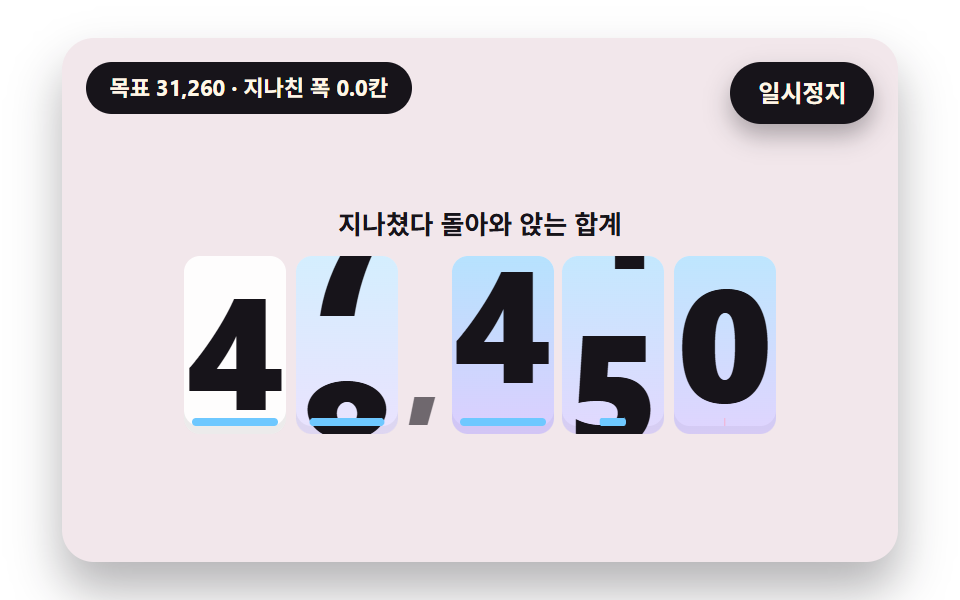
The strip runs a little past the target digit then springs back and rings two or three times before it stops, so the value settles with weight instead of snapping.
Best forTotal amount on a payment complete screen
SPRING_KSPRING_CPLACE_DELAY_S
<main class="stage">
<div class="vj is-demo" id="vj">
  <div class="vj__scene" data-role="scene" role="img" aria-label="The strips run a little past the target digit, spring back, ring a few times and stop; an underline under each place shows the remaining distance and turns pink when the strip is past the target"></div>
  <button class="vj__pad" data-role="pad" type="button" aria-label="Number scene stage: click it, or press Enter or the right or up arrow key, to roll the next value"></button>
  <p class="vj__status" data-role="status" aria-hidden="true">Number rolling scene</p>
  <p class="vj__live" data-role="live" role="status" aria-live="off"></p>
  <button class="vj__pause" data-role="pause" type="button" aria-pressed="false">Pause</button>
</div>
</main>
@use "../../../../site/static/demo-tokens" as *;
@include stage($stage-paper);
// 숫자띠 한 줄 — 창 하나에 0~9 띠(열두 칸)를 세로로 놓고 translateY 로 밀어 올린다. 글자 크기는 무대 폭(cqw)에 비례
$ink-soft: rgba($subject-ink, .6);
$win-bg: rgba(255, 255, 255, .92);
$flap-top: mix($subject-lilac, #ffffff, 24%);
$flap-bot: mix($subject-lilac, #ffffff, 10%);
.vj {
position: relative;
width: min(92vw, calc(160vh - 12.8vw));
aspect-ratio: 480 / 300;
margin: 0 auto;
border-radius: $r-card;
overflow: hidden;
box-shadow: $shadow-raised;
background: mix($subject-cream, $subject-lilac, 82%);
container-type: inline-size;
}
.vj__scene {
position: absolute;
inset: 0;
display: grid;
place-items: center;
}
.stack {
display: grid;
justify-items: center;
gap: 1.6cqw;
padding-top: 5cqw;
}
.cap {
font-size: max(10px, 3.1cqw);
font-weight: 700;
line-height: 1.3;
color: $subject-ink;
text-align: center;
}
.cap--bad { color: $error; }
.odo {
display: inline-flex;
align-items: center;
font-weight: 800;
line-height: 1;
font-variant-numeric: tabular-nums;
color: $subject-ink;
}
.odo.lg { font-size: 16.5cqw; }
.odo.xl { font-size: 19cqw; }
.odo.md { font-size: 6.4cqw; }
.odo.sm { font-size: 6.6cqw; }
.odo__sep {
padding: 0 .04em;
font-size: .7em;
color: $ink-soft;
align-self: flex-end;
margin-bottom: .1em;
}
.odo__sep--unit {
margin-left: .2em;
font-size: .5em;
color: $subject-ink;
}
.dg {
position: relative;
display: inline-block;
width: .64em;
height: 1.12em;
margin: 0 .03em;
overflow: hidden;
border-radius: $r-sm;
background: $win-bg;
box-shadow: inset 0 -.05em 0 rgba($subject-ink, .08);
}
.dg__col {
position: absolute;
left: 0;
right: 0;
top: 0;
height: 1200%;
display: flex;
flex-direction: column;
}
.dg__cell {
flex: 0 0 calc(100% / 12);
display: flex;
align-items: center;
justify-content: center;
}
// 속도가 붙으면 옅은 하늘·라일락 빛이 올라온다 — 불투명도만 움직인다
.dg__glow {
position: absolute;
inset: 0;
opacity: 0;
pointer-events: none;
background: linear-gradient(180deg, rgba($subject-sky, .5), rgba($subject-lilac, .5));
}
// 02 — 목표까지 남은 거리를 알리는 밑줄. 가운데에서 양쪽으로 늘어난다
.dg__bar {
position: absolute;
left: 8%;
right: 8%;
bottom: 4%;
height: 5%;
border-radius: $r-xs;
background: $subject-sky;
transform: scaleX(0);
}
.dg__bar.is-over { background: $subject-pink; }
// 05 — 시세 판. 오르면 박하색, 내리면 분홍색이 판 전체에 번쩍였다 가라앉는다
.panel {
position: relative;
padding: 3cqw 5cqw;
border-radius: $r-card;
overflow: hidden;
background: rgba(255, 255, 255, .7);
box-shadow: $shadow-press;
}
.panel .dg { background: rgba(255, 255, 255, .55); }
.panel__flash {
position: absolute;
inset: 0;
opacity: 0;
pointer-events: none;
}
.panel.is-up .panel__flash { background: rgba($subject-mint, .55); }
.panel.is-down .panel__flash { background: rgba($subject-pink, .6); }
// 06 — 접히는 잎. 위 장은 아래 가장자리에서, 아래 장은 위 가장자리에서 돈다
.fl {
position: relative;
display: inline-block;
width: .66em;
height: 1.12em;
margin: 0 .03em;
perspective: 2.4em;
}
.fl__half {
position: absolute;
left: 0;
right: 0;
height: 50%;
overflow: hidden;
backface-visibility: hidden;
}
.fl__top,
.fl__ft {
top: 0;
border-radius: $r-sm $r-sm 0 0;
background: $flap-top;
}
.fl__bot,
.fl__fb {
bottom: 0;
border-radius: 0 0 $r-sm $r-sm;
background: $flap-bot;
}
.fl__ft { z-index: 2; transform-origin: 50% 100%; }
.fl__fb { z-index: 2; transform-origin: 50% 0; opacity: 0; }
.fl__num {
position: absolute;
left: 0;
right: 0;
height: 200%;
display: flex;
align-items: center;
justify-content: center;
color: $subject-ink;
}
.fl__top .fl__num,
.fl__ft .fl__num { top: 0; }
.fl__bot .fl__num,
.fl__fb .fl__num { bottom: 0; }
.fl__shade {
position: absolute;
left: 0;
right: 0;
bottom: 0;
height: 50%;
z-index: 1;
border-radius: 0 0 $r-sm $r-sm;
background: $subject-ink;
opacity: 0;
pointer-events: none;
}
.fl__seam {
position: absolute;
left: 0;
right: 0;
top: 50%;
height: 2px;
z-index: 3;
background: rgba($subject-ink, .2);
}
// 07 — 원통 드럼. 칸마다 JS 가 높이(scaleY=cos θ)·폭·불투명도를 계산해 준다
.dr {
position: relative;
width: 28cqw;
height: 42cqw;
margin: 0 1cqw;
overflow: hidden;
border-radius: $r-card;
font-size: 8cqw;
background: linear-gradient(180deg, rgba($subject-ink, .14), rgba(255, 255, 255, .9) 38%, rgba(255, 255, 255, .9) 62%, rgba($subject-ink, .14));
}
.dr__band {
position: absolute;
left: 6%;
right: 6%;
top: 50%;
height: 16%;
margin-top: -8%;
border-radius: $r-sm;
background: rgba($subject-lilac, .38);
}
.dr__groove {
position: absolute;
left: 8%;
right: 8%;
top: 50%;
height: 2px;
margin-top: -1px;
border-radius: $r-xs;
background: rgba($subject-ink, .5);
opacity: 0;
}
.dr__item {
position: absolute;
left: 0;
right: 0;
top: 50%;
height: 16%;
margin-top: -8%;
display: flex;
align-items: center;
justify-content: center;
font-weight: 800;
opacity: 0;
}
// 08 — 눈금자. 가운데 바늘은 고정, 눈금 줄이 옆으로 흐른다
.ruler {
position: relative;
width: 90cqw;
height: 9.6cqw;
overflow: hidden;
border-radius: $r-card;
background: rgba(255, 255, 255, .5);
}
.ruler__track {
position: absolute;
left: 50%;
top: 0;
bottom: 0;
}
// 눈금마다 그 자리의 숫자(0~9)를 아래에 적는다 — 5 의 배수 눈금은 길고 진하다
.ruler__tick {
position: absolute;
top: 0;
bottom: 0;
width: 7cqw;
margin-left: -3.5cqw;
padding-top: 4.4cqw;
box-sizing: border-box;
font-size: 3.4cqw;
font-weight: 700;
line-height: 1;
text-align: center;
color: $ink-soft;
}
.ruler__tick::before {
content: "";
position: absolute;
top: 0;
left: 50%;
width: .6cqw;
height: 2.8cqw;
margin-left: -.3cqw;
border-radius: $r-xs;
background: rgba($subject-ink, .4);
}
.ruler__tick.is-major { color: $subject-ink; }
.ruler__tick.is-major::before {
height: 4cqw;
background: $subject-ink;
}
.ruler__needle {
position: absolute;
left: 50%;
top: 0;
bottom: 0;
width: 1cqw;
margin-left: -.5cqw;
border-radius: $r-xs;
background: $subject-pink;
}
// 09 — 첫 화면 통계 한 줄
.hero {
display: flex;
gap: 2.6cqw;
}
.hero__stat {
display: grid;
justify-items: center;
gap: 1cqw;
padding: 2.6cqw 2.8cqw;
border-radius: $r-card;
background: rgba(255, 255, 255, .78);
box-shadow: $shadow-press;
}
.hero__label {
font-size: max(10px, 2.8cqw);
font-weight: 700;
color: $subject-ink;
}
.vj__pad {
position: absolute;
inset: 0;
padding: 0;
border: 0;
border-radius: inherit;
background: transparent;
cursor: pointer;
}
// 바깥 .vj 가 넘침을 자르므로 포커스 테두리는 안쪽으로 들인다
.vj__pad:focus-visible {
outline: 3px solid $subject-ink;
outline-offset: -3px;
}
.vj__pause {
position: absolute;
right: $sp-3;
top: $sp-3;
padding: $sp-1 $sp-3;
border: 2px solid $subject-ink;
border-radius: $r-pill;
background: $subject-ink;
color: $subject-cream;
font-family: inherit;
font-weight: 700;
font-size: 12px;
line-height: 1.6;
cursor: pointer;
box-shadow: $shadow-press;
transition: transform $dur-quick $ease-spring;
}
// 눌린 상태(멈춤) — 바탕과 글자색을 뒤집어 aria-pressed 가 눈에도 보이게
.vj__pause[aria-pressed="true"] {
background: $subject-cream;
color: $subject-ink;
}
.vj__pause:hover { transform: translateY(-2px); }
.vj__pause:active { transform: translateY(1px); }
.vj__pause:focus-visible {
outline: 3px solid $subject-ink;
outline-offset: 3px;
}
// 상태 줄 — 지금 장면의 수치를 글자로. 화면 읽기 프로그램에는 넘기지 않는다(aria-hidden)
.vj__status {
position: absolute;
left: $sp-3;
top: $sp-3;
max-width: calc(100% - 120px);
margin: 0;
padding: $sp-1 $sp-3;
border-radius: $r-pill;
background: $subject-ink;
color: $subject-cream;
font-weight: 700;
font-size: 11px;
line-height: 1.6;
white-space: nowrap;
overflow: hidden;
text-overflow: ellipsis;
pointer-events: none;
}
// 바뀐 최종 값을 읽어 주는 숨은 알림 영역
.vj__live {
position: absolute;
width: 1px;
height: 1px;
margin: -1px;
padding: 0;
overflow: hidden;
clip: rect(0 0 0 0);
white-space: nowrap;
}
@media (max-width: 340px) {
.vj__pause,
.vj__status { font-size: 10px; padding: 0 $sp-2; }
}
// 움직임 줄이기 — 스크립트가 굴림 없이 최종 숫자 한 장으로 멈춘다. 버튼도 떠오르지 않게
@media (prefers-reduced-motion: reduce) {
.vj__pause { transition: none !important; }
.vj__pause:hover,
.vj__pause:active { transform: none !important; }
}html, body {
margin: 0;
overflow: hidden;
}
.stage {
box-sizing: border-box;
min-height: 100vh;
display: grid;
place-items: center;
margin: 0;
background: #ffffff;
font-family: -apple-system, "Segoe UI", "Noto Sans KR", sans-serif;
padding: clamp(8px, 4vw, 24px);
}
.vj {
position: relative;
width: min(92vw, 160vh - 12.8vw);
aspect-ratio: 480/300;
margin: 0 auto;
border-radius: 16px;
overflow: hidden;
box-shadow: 0 14px 24px rgba(23, 20, 26, 0.32);
background: rgb(95.0588235294%, 90.7215686275%, 91.9607843137%);
container-type: inline-size;
}
.vj__scene {
position: absolute;
inset: 0;
display: grid;
place-items: center;
}
.stack {
display: grid;
justify-items: center;
gap: 1.6cqw;
padding-top: 5cqw;
}
.cap {
font-size: max(10px, 3.1cqw);
font-weight: 700;
line-height: 1.3;
color: #17141a;
text-align: center;
}
.cap--bad {
color: #c2361a;
}
.odo {
display: inline-flex;
align-items: center;
font-weight: 800;
line-height: 1;
font-variant-numeric: tabular-nums;
color: #17141a;
}
.odo.lg {
font-size: 16.5cqw;
}
.odo.xl {
font-size: 19cqw;
}
.odo.md {
font-size: 6.4cqw;
}
.odo.sm {
font-size: 6.6cqw;
}
.odo__sep {
padding: 0 0.04em;
font-size: 0.7em;
color: rgba(23, 20, 26, 0.6);
align-self: flex-end;
margin-bottom: 0.1em;
}
.odo__sep--unit {
margin-left: 0.2em;
font-size: 0.5em;
color: #17141a;
}
.dg {
position: relative;
display: inline-block;
width: 0.64em;
height: 1.12em;
margin: 0 0.03em;
overflow: hidden;
border-radius: 8px;
background: rgba(255, 255, 255, 0.92);
box-shadow: inset 0 -0.05em 0 rgba(23, 20, 26, 0.08);
}
.dg__col {
position: absolute;
left: 0;
right: 0;
top: 0;
height: 1200%;
display: flex;
flex-direction: column;
}
.dg__cell {
flex: 0 0 8.3333333333%;
display: flex;
align-items: center;
justify-content: center;
}
.dg__glow {
position: absolute;
inset: 0;
opacity: 0;
pointer-events: none;
background: linear-gradient(180deg, rgba(110, 200, 255, 0.5), rgba(185, 160, 255, 0.5));
}
.dg__bar {
position: absolute;
left: 8%;
right: 8%;
bottom: 4%;
height: 5%;
border-radius: 4px;
background: #6ec8ff;
transform: scaleX(0);
}
.dg__bar.is-over {
background: #ff9ebb;
}
.panel {
position: relative;
padding: 3cqw 5cqw;
border-radius: 16px;
overflow: hidden;
background: rgba(255, 255, 255, 0.7);
box-shadow: 0 6px 12px rgba(23, 20, 26, 0.32);
}
.panel .dg {
background: rgba(255, 255, 255, 0.55);
}
.panel__flash {
position: absolute;
inset: 0;
opacity: 0;
pointer-events: none;
}
.panel.is-up .panel__flash {
background: rgba(76, 212, 166, 0.55);
}
.panel.is-down .panel__flash {
background: rgba(255, 158, 187, 0.6);
}
.fl {
position: relative;
display: inline-block;
width: 0.66em;
height: 1.12em;
margin: 0 0.03em;
perspective: 2.4em;
}
.fl__half {
position: absolute;
left: 0;
right: 0;
height: 50%;
overflow: hidden;
backface-visibility: hidden;
}
.fl__top,
.fl__ft {
top: 0;
border-radius: 8px 8px 0 0;
background: rgb(93.4117647059%, 91.0588235294%, 100%);
}
.fl__bot,
.fl__fb {
bottom: 0;
border-radius: 0 0 8px 8px;
background: rgb(97.2549019608%, 96.2745098039%, 100%);
}
.fl__ft {
z-index: 2;
transform-origin: 50% 100%;
}
.fl__fb {
z-index: 2;
transform-origin: 50% 0;
opacity: 0;
}
.fl__num {
position: absolute;
left: 0;
right: 0;
height: 200%;
display: flex;
align-items: center;
justify-content: center;
color: #17141a;
}
.fl__top .fl__num,
.fl__ft .fl__num {
top: 0;
}
.fl__bot .fl__num,
.fl__fb .fl__num {
bottom: 0;
}
.fl__shade {
position: absolute;
left: 0;
right: 0;
bottom: 0;
height: 50%;
z-index: 1;
border-radius: 0 0 8px 8px;
background: #17141a;
opacity: 0;
pointer-events: none;
}
.fl__seam {
position: absolute;
left: 0;
right: 0;
top: 50%;
height: 2px;
z-index: 3;
background: rgba(23, 20, 26, 0.2);
}
.dr {
position: relative;
width: 28cqw;
height: 42cqw;
margin: 0 1cqw;
overflow: hidden;
border-radius: 16px;
font-size: 8cqw;
background: linear-gradient(180deg, rgba(23, 20, 26, 0.14), rgba(255, 255, 255, 0.9) 38%, rgba(255, 255, 255, 0.9) 62%, rgba(23, 20, 26, 0.14));
}
.dr__band {
position: absolute;
left: 6%;
right: 6%;
top: 50%;
height: 16%;
margin-top: -8%;
border-radius: 8px;
background: rgba(185, 160, 255, 0.38);
}
.dr__groove {
position: absolute;
left: 8%;
right: 8%;
top: 50%;
height: 2px;
margin-top: -1px;
border-radius: 4px;
background: rgba(23, 20, 26, 0.5);
opacity: 0;
}
.dr__item {
position: absolute;
left: 0;
right: 0;
top: 50%;
height: 16%;
margin-top: -8%;
display: flex;
align-items: center;
justify-content: center;
font-weight: 800;
opacity: 0;
}
.ruler {
position: relative;
width: 90cqw;
height: 9.6cqw;
overflow: hidden;
border-radius: 16px;
background: rgba(255, 255, 255, 0.5);
}
.ruler__track {
position: absolute;
left: 50%;
top: 0;
bottom: 0;
}
.ruler__tick {
position: absolute;
top: 0;
bottom: 0;
width: 7cqw;
margin-left: -3.5cqw;
padding-top: 4.4cqw;
box-sizing: border-box;
font-size: 3.4cqw;
font-weight: 700;
line-height: 1;
text-align: center;
color: rgba(23, 20, 26, 0.6);
}
.ruler__tick::before {
content: "";
position: absolute;
top: 0;
left: 50%;
width: 0.6cqw;
height: 2.8cqw;
margin-left: -0.3cqw;
border-radius: 4px;
background: rgba(23, 20, 26, 0.4);
}
.ruler__tick.is-major {
color: #17141a;
}
.ruler__tick.is-major::before {
height: 4cqw;
background: #17141a;
}
.ruler__needle {
position: absolute;
left: 50%;
top: 0;
bottom: 0;
width: 1cqw;
margin-left: -0.5cqw;
border-radius: 4px;
background: #ff9ebb;
}
.hero {
display: flex;
gap: 2.6cqw;
}
.hero__stat {
display: grid;
justify-items: center;
gap: 1cqw;
padding: 2.6cqw 2.8cqw;
border-radius: 16px;
background: rgba(255, 255, 255, 0.78);
box-shadow: 0 6px 12px rgba(23, 20, 26, 0.32);
}
.hero__label {
font-size: max(10px, 2.8cqw);
font-weight: 700;
color: #17141a;
}
.vj__pad {
position: absolute;
inset: 0;
padding: 0;
border: 0;
border-radius: inherit;
background: transparent;
cursor: pointer;
}
.vj__pad:focus-visible {
outline: 3px solid #17141a;
outline-offset: -3px;
}
.vj__pause {
position: absolute;
right: 12px;
top: 12px;
padding: 4px 12px;
border: 2px solid #17141a;
border-radius: 999px;
background: #17141a;
color: #fff7e6;
font-family: inherit;
font-weight: 700;
font-size: 12px;
line-height: 1.6;
cursor: pointer;
box-shadow: 0 6px 12px rgba(23, 20, 26, 0.32);
transition: transform 220ms cubic-bezier(0.2, 0.8, 0.2, 1);
}
.vj__pause[aria-pressed=true] {
background: #fff7e6;
color: #17141a;
}
.vj__pause:hover {
transform: translateY(-2px);
}
.vj__pause:active {
transform: translateY(1px);
}
.vj__pause:focus-visible {
outline: 3px solid #17141a;
outline-offset: 3px;
}
.vj__status {
position: absolute;
left: 12px;
top: 12px;
max-width: calc(100% - 120px);
margin: 0;
padding: 4px 12px;
border-radius: 999px;
background: #17141a;
color: #fff7e6;
font-weight: 700;
font-size: 11px;
line-height: 1.6;
white-space: nowrap;
overflow: hidden;
text-overflow: ellipsis;
pointer-events: none;
}
.vj__live {
position: absolute;
width: 1px;
height: 1px;
margin: -1px;
padding: 0;
overflow: hidden;
clip: rect(0 0 0 0);
white-space: nowrap;
}
@media (max-width: 340px) {
.vj__pause,
.vj__status {
font-size: 10px;
padding: 0 8px;
}
}
@media (prefers-reduced-motion: reduce) {
.vj__pause {
transition: none !important;
}
.vj__pause:hover,
.vj__pause:active {
transform: none !important;
}
}(function () {
const root = document.getElementById("vj");
if (!root) return;
const cls = (s) => s;
function clamp(v, lo, hi) { return v < lo ? lo : (v > hi ? hi : v); }
function lerp(a, b, k) { return a + (b - a) * k; }
function mod(a, n) { return ((a % n) + n) % n; }
// 감속 곡선 — 처음이 가장 빠르고 끝에서 0 으로 닿는다(3제곱)
function easeOut3(x) { const u = 1 - clamp(x, 0, 1); return 1 - u * u * u; }
function easeInOut(x) { const c = clamp(x, 0, 1); return c * c * (3 - 2 * c); }
// 장면 시계(초) — 장면 계산이 고치고 화면 쪽이 읽는다
let sceneT = 0;
// 지금 몇 번째 값인가 — 한 바퀴(LOOP_S)가 돌 때마다 하나 올라 다음 목표 값을 고른다
let cycle = 0;
// 숫자띠 한 줄의 칸 수 — 0 부터 9 까지 열 칸에 0, 1 을 한 번 더 붙여 9 에서 0 으로 넘어가는 경계를 끊김 없이 잇는다
const CELLS = 12;
// 번짐 기준 속도(칸/초) — 이만큼 빠르면 번짐이 최대. 꼬리 한 장의 간격(칸)
const BLUR_REF = 60;
const BLUR_LAG = 0.55;
function mk(tag, name, parent) {
const e = document.createElement(tag);
e.className = cls(name);
if (parent) {
parent.appendChild(e);
}
return e;
}
// 자리 하나 — 창 하나에 0~9 띠(ghosts 장의 꼬리 띠 포함)와 속도 반짝임 층
function makeStrip(parent, extra, ghosts) {
const win = mk('span', 'dg ' + extra, parent);
// 속도 반짝임 층은 띠 뒤에 깐다 — 숫자 글자는 항상 그 위에서 또렷하다
const glow = mk('span', 'dg__glow', win);
const cols = [];
for (let g = 0; g <= ghosts; g += 1) {
const col = mk('span', g === 0 ? 'dg__col' : 'dg__col dg__ghost', win);
for (let i = 0; i < CELLS; i += 1) {
const c = mk('span', 'dg__cell', col);
c.textContent = String(i % 10);
}
cols.push(col);
}
return { win: win, cols: cols, glow: glow };
}
function putCol(col, pos) {
col.style.transform = 'translateY(' + (-mod(pos, 10) / CELLS * 100).toFixed(3) + '%)';
}
// pos = 지금 띠가 밀려 올라온 칸 수(소수), speed = 칸/초(방향 포함). 꼬리 띠가 있으면 속도에 비례해 번진다
function moveStrip(s, pos, speed) {
putCol(s.cols[0], pos);
if (s.cols.length < 2) {
return;
}
const sp = clamp(Math.abs(speed) / BLUR_REF, 0, 1);
const dir = speed < 0 ? -1 : 1;
s.cols[0].style.opacity = (1 - 0.5 * sp).toFixed(3);
for (let g = 1; g < s.cols.length; g += 1) {
putCol(s.cols[g], pos - dir * sp * BLUR_LAG * g);
s.cols[g].style.opacity = (0.5 * sp / g).toFixed(3);
}
}
function glowStrip(s, v) { s.glow.style.opacity = clamp(v, 0, 1).toFixed(3); }
// 칸 패턴 — d 는 숫자띠 한 자리, 그 밖의 글자는 구분 기호(쉼표·점·콜론). 왼쪽부터 순서대로 돌려준다
function buildRow(parent, pattern, extra, ghosts) {
const row = mk('span', 'odo ' + extra, parent);
const out = [];
for (const ch of pattern) {
if (ch === 'd') {
out.push(makeStrip(row, extra, ghosts));
}
else {
const sep = mk('span', 'odo__sep', row);
sep.textContent = ch;
}
}
return out;
}
// 정수를 len 자리 숫자 배열로(왼쪽 자리부터)
function digitsOf(n, len) {
const out = [];
for (let i = 0; i < len; i += 1) {
out.push(Math.floor(n / Math.pow(10, len - 1 - i)) % 10);
}
return out;
}
function fmtNum(n) {
const s = String(Math.round(n));
let out = '';
for (let i = 0; i < s.length; i += 1) {
if (i > 0 && (s.length - i) % 3 === 0) {
out += ',';
}
out += s.charAt(i);
}
return out;
}
function q(role) {
const e = root.querySelector('[data-role="' + role + '"]');
if (!(e instanceof HTMLElement)) {
throw new Error('missing ' + role);
}
return e;
}
const scene = q('scene');
const pad = q('pad');
const pauseBtn = q('pause');
const statusEl = q('status');
const liveEl = q('live');
const LOOP_S = 3.6;
const REST_T = 3.3;
const START_S = 0.25;
// 자리 사이 출발 간격(초)
const PLACE_DELAY_S = 0.06;
// 스프링 — 목표와 떨어진 칸 수에 SPRING_K 를 곱한 힘으로 당기고, 속도에 SPRING_C 를 곱한 만큼 브레이크를 건다
const SPRING_K = 120;
const SPRING_C = 12;
const PLACES = 5;
const VALUES = [31260, 12480, 86350, 47910];
let springs = [];
let strips = [];
let bars = [];
let toV = VALUES[0];
// 일의 자리가 목표를 지나친 가장 큰 폭(칸)
let peakOver = 0;
function build() {
scene.textContent = '';
const stack = mk('div', 'stack', scene);
mk('span', 'cap', stack).textContent = 'A total that overshoots and settles back';
strips = buildRow(stack, 'dd,ddd', 'xl', 0);
bars = [];
for (const s of strips) {
bars.push(mk('span', 'dg__bar', s.win));
}
}
function reset() {
toV = VALUES[cycle % VALUES.length];
const prev = VALUES[(cycle + VALUES.length - 1) % VALUES.length];
const a = digitsOf(prev, PLACES);
const b = digitsOf(toV, PLACES);
springs = [];
peakOver = 0;
for (let i = 0; i < PLACES; i += 1) {
// 4 칸 이상은 반드시 굴러 간다 — 같은 숫자여도 눈에 보이게
const dist = 4 + mod(b[i] - a[i] - 4, 10);
springs.push({ x: a[i], v: 0, start: START_S + (PLACES - 1 - i) * PLACE_DELAY_S, goal: a[i] + dist });
}
}
function update(dt) {
// 240Hz 로 잘게 나눠 쌓는다 — 프레임이 길어도 스프링이 터지지 않는다
const n = Math.max(1, Math.ceil(dt * 240));
const h = dt / n;
for (let i = 0; i < springs.length; i += 1) {
const sp = springs[i];
if (sceneT < sp.start) {
continue;
}
for (let j = 0; j < n; j += 1) {
const acc = SPRING_K * (sp.goal - sp.x) - SPRING_C * sp.v;
sp.v += acc * h;
sp.x += sp.v * h;
}
}
const one = springs[PLACES - 1];
if (sceneT >= one.start) {
peakOver = Math.max(peakOver, one.x - one.goal);
}
}
function draw() {
for (let i = 0; i < PLACES; i += 1) {
const sp = springs[i];
moveStrip(strips[i], sp.x, sp.v);
glowStrip(strips[i], Math.abs(sp.v) / BLUR_REF * 2);
// 남은 거리를 밑줄 길이로 — 지나쳤을 때는 분홍, 모자랄 때는 하늘색
const gap = sp.goal - sp.x;
bars[i].style.transform = 'scaleX(' + clamp(Math.abs(gap) / 4, 0, 1).toFixed(3) + ')';
bars[i].classList.toggle(cls('is-over'), gap < 0);
}
}
function isSettled() {
if (sceneT < START_S + PLACES * PLACE_DELAY_S + 0.3) {
return false;
}
for (const sp of springs) {
if (Math.abs(sp.goal - sp.x) > 0.01 || Math.abs(sp.v) > 0.05) {
return false;
}
}
return true;
}
function statusText() {
return 'Target {n} · overshoot {o} cells'.replace('{n}', fmtNum(toV)).replace('{o}', peakOver.toFixed(1));
}
function finalText() {
return 'The total settled at {n}'.replace('{n}', fmtNum(toV));
}
let shownStatus = '';
function pushStatus(s) {
if (s === shownStatus) {
return;
}
shownStatus = s;
statusEl.textContent = s;
}
// 바뀐 최종 값은 한 번만 알린다 — 굴러가는 중간 숫자는 읽는 쪽으로 보내지 않는다
let wasSettled = false;
function checkSettled() {
const s = isSettled();
if (s && !wasSettled) {
liveEl.textContent = finalText();
}
wasSettled = s;
}
let paused = false;
const reduceQuery = window.matchMedia('(prefers-reduced-motion: reduce)');
// 페이지를 연 채 움직임 줄이기 설정을 바꿔도 change 리스너가 다시 읽는다
let still = reduceQuery.matches;
// 자동 시연 표시 — 사람이 처음 손대면 떼고 알림 영역을 polite 로 켠다
let demo = root.classList.contains('is-demo');
const off = new AbortController();
function wake() {
if (!demo) {
return;
}
demo = false;
root.classList.remove('is-demo');
liveEl.setAttribute('aria-live', 'polite');
}
// 한 프레임에 넘기는 시간 상한(초) — 오래 숨었다 돌아온 첫 프레임도 50ms 까지만 계산에 넣는다
const DT_MAX = 0.05;
function advance(dt) {
sceneT += dt;
if (sceneT >= LOOP_S) {
sceneT -= LOOP_S;
cycle += 1;
reset();
}
update(dt);
}
function paint() {
draw();
pushStatus(statusText());
checkSettled();
}
let rafId = 0;
let lastTs = -1;
function frame(ts) {
if (still || paused) {
rafId = 0;
return;
}
if (lastTs < 0) {
lastTs = ts;
}
const dt = Math.min((ts - lastTs) / 1000, DT_MAX);
lastTs = ts;
if (dt > 0) {
advance(dt);
}
paint();
rafId = window.requestAnimationFrame(frame);
}
function startLoop() {
if (rafId) {
return;
}
// 멈췄던 사이의 시간을 첫 프레임 dt 로 넘기지 않는다
lastTs = -1;
rafId = window.requestAnimationFrame(frame);
}
function stopLoop() {
if (rafId) {
window.cancelAnimationFrame(rafId);
rafId = 0;
}
}
// 움직임 줄이기 — 굴림 없이 이 값의 최종 숫자 한 장
function showRest() {
stopLoop();
sceneT = 0;
reset();
for (let k = 0; k < Math.ceil(REST_T * 60); k += 1) {
sceneT += 1 / 60;
update(1 / 60);
}
paint();
}
function play() {
sceneT = 0;
reset();
paint();
if (!paused) {
startLoop();
}
}
// 다음 값 — 눌렀을 때 바로 다음 목표로 넘어가 처음부터 굴린다(움직임 줄이기에서는 즉시 최종 숫자)
function nextNow() {
wake();
cycle += 1;
wasSettled = false;
if (still) {
showRest();
}
else {
play();
}
}
function togglePause() {
paused = !paused;
pauseBtn.setAttribute('aria-pressed', paused ? 'true' : 'false');
wake();
if (paused) {
stopLoop();
}
else if (!still) {
startLoop();
}
}
pauseBtn.addEventListener('click', togglePause, { signal: off.signal });
// 무대 버튼 — 누르면(Enter·Space·클릭은 브라우저가 click 으로 준다) 다음 값. 오른쪽·위 화살표도 같다
pad.addEventListener('click', nextNow, { signal: off.signal });
pad.addEventListener('keydown', function (e) {
if (e.altKey || e.ctrlKey || e.metaKey) {
return;
}
if (e.key === 'ArrowRight' || e.key === 'ArrowUp') {
e.preventDefault();
nextNow();
}
}, { signal: off.signal });
// 탭이 숨으면 멈추고, 돌아오면 시계를 다시 맞춰 시작 — 숨은 동안의 몇 초가 한 프레임에 몰리지 않게
document.addEventListener('visibilitychange', function () {
if (document.hidden) {
stopLoop();
}
else if (!paused && !still) {
startLoop();
}
}, { signal: off.signal });
// 설정이 바뀌면 — 켜지면 최종 숫자 한 장, 꺼지면 다시 움직인다
reduceQuery.addEventListener('change', function () {
still = reduceQuery.matches;
if (still) {
showRest();
}
else {
play();
}
}, { signal: off.signal });
build();
if (still) {
showRest();
}
else {
play();
}
return function () {
stopLoop();
off.abort();
};
})();// SpringOvershootSettle - 같은 항목 vanilla index.html 의 React 판. 같은 계산을 useEffect 안에서 돌린다
import { useEffect, useRef } from "react";
import styles from "./SpringOvershootSettle.module.scss";
const cx = (s: string): string => s.split(" ").map((n) => styles[n] ?? n).join(" ");
export default function SpringOvershootSettle() {
const rootRef = useRef<HTMLDivElement | null>(null);
useEffect(() => {
const rootEl = rootRef.current;
if (!rootEl) return;
const root: HTMLElement = rootEl;
const cls = cx;
function clamp(v: number, lo: number, hi: number): number { return v < lo ? lo : (v > hi ? hi : v); }
function lerp(a: number, b: number, k: number): number { return a + (b - a) * k; }
function mod(a: number, n: number): number { return ((a % n) + n) % n; }
// 감속 곡선 — 처음이 가장 빠르고 끝에서 0 으로 닿는다(3제곱)
function easeOut3(x: number): number { const u = 1 - clamp(x, 0, 1); return 1 - u * u * u; }
function easeInOut(x: number): number { const c = clamp(x, 0, 1); return c * c * (3 - 2 * c); }
// 장면 시계(초) — 장면 계산이 고치고 화면 쪽이 읽는다
let sceneT = 0;
// 지금 몇 번째 값인가 — 한 바퀴(LOOP_S)가 돌 때마다 하나 올라 다음 목표 값을 고른다
let cycle = 0;
// 숫자띠 한 줄의 칸 수 — 0 부터 9 까지 열 칸에 0, 1 을 한 번 더 붙여 9 에서 0 으로 넘어가는 경계를 끊김 없이 잇는다
const CELLS = 12;
// 번짐 기준 속도(칸/초) — 이만큼 빠르면 번짐이 최대. 꼬리 한 장의 간격(칸)
const BLUR_REF = 60;
const BLUR_LAG = 0.55;
interface Strip { win: HTMLElement; cols: HTMLElement[]; glow: HTMLElement; }
function mk(tag: string, name: string, parent: HTMLElement | null): HTMLElement {
const e = document.createElement(tag);
e.className = cls(name);
if (parent) { parent.appendChild(e); }
return e;
}
// 자리 하나 — 창 하나에 0~9 띠(ghosts 장의 꼬리 띠 포함)와 속도 반짝임 층
function makeStrip(parent: HTMLElement, extra: string, ghosts: number): Strip {
const win = mk('span', 'dg ' + extra, parent);
// 속도 반짝임 층은 띠 뒤에 깐다 — 숫자 글자는 항상 그 위에서 또렷하다
const glow = mk('span', 'dg__glow', win);
const cols: HTMLElement[] = [];
for (let g = 0; g <= ghosts; g += 1) {
const col = mk('span', g === 0 ? 'dg__col' : 'dg__col dg__ghost', win);
for (let i = 0; i < CELLS; i += 1) {
const c = mk('span', 'dg__cell', col);
c.textContent = String(i % 10);
}
cols.push(col);
}
return { win: win, cols: cols, glow: glow };
}
function putCol(col: HTMLElement, pos: number): void {
col.style.transform = 'translateY(' + (-mod(pos, 10) / CELLS * 100).toFixed(3) + '%)';
}
// pos = 지금 띠가 밀려 올라온 칸 수(소수), speed = 칸/초(방향 포함). 꼬리 띠가 있으면 속도에 비례해 번진다
function moveStrip(s: Strip, pos: number, speed: number): void {
putCol(s.cols[0], pos);
if (s.cols.length < 2) { return; }
const sp = clamp(Math.abs(speed) / BLUR_REF, 0, 1);
const dir = speed < 0 ? -1 : 1;
s.cols[0].style.opacity = (1 - 0.5 * sp).toFixed(3);
for (let g = 1; g < s.cols.length; g += 1) {
putCol(s.cols[g], pos - dir * sp * BLUR_LAG * g);
s.cols[g].style.opacity = (0.5 * sp / g).toFixed(3);
}
}
function glowStrip(s: Strip, v: number): void { s.glow.style.opacity = clamp(v, 0, 1).toFixed(3); }
// 칸 패턴 — d 는 숫자띠 한 자리, 그 밖의 글자는 구분 기호(쉼표·점·콜론). 왼쪽부터 순서대로 돌려준다
function buildRow(parent: HTMLElement, pattern: string, extra: string, ghosts: number): Strip[] {
const row = mk('span', 'odo ' + extra, parent);
const out: Strip[] = [];
for (const ch of pattern) {
if (ch === 'd') { out.push(makeStrip(row, extra, ghosts)); } else {
const sep = mk('span', 'odo__sep', row);
sep.textContent = ch;
}
}
return out;
}
// 정수를 len 자리 숫자 배열로(왼쪽 자리부터)
function digitsOf(n: number, len: number): number[] {
const out: number[] = [];
for (let i = 0; i < len; i += 1) { out.push(Math.floor(n / Math.pow(10, len - 1 - i)) % 10); }
return out;
}
function fmtNum(n: number): string {
const s = String(Math.round(n));
let out = '';
for (let i = 0; i < s.length; i += 1) {
if (i > 0 && (s.length - i) % 3 === 0) { out += ','; }
out += s.charAt(i);
}
return out;
}
function q(role: string): HTMLElement {
const e = root.querySelector('[data-role="' + role + '"]');
if (!(e instanceof HTMLElement)) { throw new Error('missing ' + role); }
return e;
}
const scene: HTMLElement = q('scene');
const pad: HTMLElement = q('pad');
const pauseBtn: HTMLElement = q('pause');
const statusEl: HTMLElement = q('status');
const liveEl: HTMLElement = q('live');
const LOOP_S = 3.6;
const REST_T = 3.3;
const START_S = 0.25;
// 자리 사이 출발 간격(초)
const PLACE_DELAY_S = 0.06;
// 스프링 — 목표와 떨어진 칸 수에 SPRING_K 를 곱한 힘으로 당기고, 속도에 SPRING_C 를 곱한 만큼 브레이크를 건다
const SPRING_K = 120;
const SPRING_C = 12;
const PLACES = 5;
const VALUES = [31260, 12480, 86350, 47910];
interface Spring { x: number; v: number; start: number; goal: number; }
let springs: Spring[] = [];
let strips: Strip[] = [];
let bars: HTMLElement[] = [];
let toV = VALUES[0];
// 일의 자리가 목표를 지나친 가장 큰 폭(칸)
let peakOver = 0;
function build(): void {
scene.textContent = '';
const stack = mk('div', 'stack', scene);
mk('span', 'cap', stack).textContent = '지나쳤다 돌아와 앉는 합계';
strips = buildRow(stack, 'dd,ddd', 'xl', 0);
bars = [];
for (const s of strips) { bars.push(mk('span', 'dg__bar', s.win)); }
}
function reset(): void {
toV = VALUES[cycle % VALUES.length];
const prev = VALUES[(cycle + VALUES.length - 1) % VALUES.length];
const a = digitsOf(prev, PLACES);
const b = digitsOf(toV, PLACES);
springs = [];
peakOver = 0;
for (let i = 0; i < PLACES; i += 1) {
// 4 칸 이상은 반드시 굴러 간다 — 같은 숫자여도 눈에 보이게
const dist = 4 + mod(b[i] - a[i] - 4, 10);
springs.push({ x: a[i], v: 0, start: START_S + (PLACES - 1 - i) * PLACE_DELAY_S, goal: a[i] + dist });
}
}
function update(dt: number): void {
// 240Hz 로 잘게 나눠 쌓는다 — 프레임이 길어도 스프링이 터지지 않는다
const n = Math.max(1, Math.ceil(dt * 240));
const h = dt / n;
for (let i = 0; i < springs.length; i += 1) {
const sp = springs[i];
if (sceneT < sp.start) { continue; }
for (let j = 0; j < n; j += 1) {
const acc = SPRING_K * (sp.goal - sp.x) - SPRING_C * sp.v;
sp.v += acc * h;
sp.x += sp.v * h;
}
}
const one = springs[PLACES - 1];
if (sceneT >= one.start) { peakOver = Math.max(peakOver, one.x - one.goal); }
}
function draw(): void {
for (let i = 0; i < PLACES; i += 1) {
const sp = springs[i];
moveStrip(strips[i], sp.x, sp.v);
glowStrip(strips[i], Math.abs(sp.v) / BLUR_REF * 2);
// 남은 거리를 밑줄 길이로 — 지나쳤을 때는 분홍, 모자랄 때는 하늘색
const gap = sp.goal - sp.x;
bars[i].style.transform = 'scaleX(' + clamp(Math.abs(gap) / 4, 0, 1).toFixed(3) + ')';
bars[i].classList.toggle(cls('is-over'), gap < 0);
}
}
function isSettled(): boolean {
if (sceneT < START_S + PLACES * PLACE_DELAY_S + 0.3) { return false; }
for (const sp of springs) { if (Math.abs(sp.goal - sp.x) > 0.01 || Math.abs(sp.v) > 0.05) { return false; } }
return true;
}
function statusText(): string {
return '목표 {n} · 지나친 폭 {o}칸'.replace('{n}', fmtNum(toV)).replace('{o}', peakOver.toFixed(1));
}
function finalText(): string {
return '합계가 {n} 으로 자리를 잡았습니다'.replace('{n}', fmtNum(toV));
}
let shownStatus = '';
function pushStatus(s: string): void {
if (s === shownStatus) { return; }
shownStatus = s;
statusEl.textContent = s;
}
// 바뀐 최종 값은 한 번만 알린다 — 굴러가는 중간 숫자는 읽는 쪽으로 보내지 않는다
let wasSettled = false;
function checkSettled(): void {
const s = isSettled();
if (s && !wasSettled) { liveEl.textContent = finalText(); }
wasSettled = s;
}
let paused = false;
const reduceQuery = window.matchMedia('(prefers-reduced-motion: reduce)');
// 페이지를 연 채 움직임 줄이기 설정을 바꿔도 change 리스너가 다시 읽는다
let still = reduceQuery.matches;
// 자동 시연 표시 — 사람이 처음 손대면 떼고 알림 영역을 polite 로 켠다
let demo = root.classList.contains('is-demo');
const off = new AbortController();
function wake(): void {
if (!demo) { return; }
demo = false;
root.classList.remove('is-demo');
liveEl.setAttribute('aria-live', 'polite');
}
// 한 프레임에 넘기는 시간 상한(초) — 오래 숨었다 돌아온 첫 프레임도 50ms 까지만 계산에 넣는다
const DT_MAX = 0.05;
function advance(dt: number): void {
sceneT += dt;
if (sceneT >= LOOP_S) {
sceneT -= LOOP_S;
cycle += 1;
reset();
}
update(dt);
}
function paint(): void {
draw();
pushStatus(statusText());
checkSettled();
}
let rafId = 0;
let lastTs = -1;
function frame(ts: number): void {
if (still || paused) { rafId = 0; return; }
if (lastTs < 0) { lastTs = ts; }
const dt = Math.min((ts - lastTs) / 1000, DT_MAX);
lastTs = ts;
if (dt > 0) { advance(dt); }
paint();
rafId = window.requestAnimationFrame(frame);
}
function startLoop(): void {
if (rafId) { return; }
// 멈췄던 사이의 시간을 첫 프레임 dt 로 넘기지 않는다
lastTs = -1;
rafId = window.requestAnimationFrame(frame);
}
function stopLoop(): void {
if (rafId) { window.cancelAnimationFrame(rafId); rafId = 0; }
}
// 움직임 줄이기 — 굴림 없이 이 값의 최종 숫자 한 장
function showRest(): void {
stopLoop();
sceneT = 0;
reset();
for (let k = 0; k < Math.ceil(REST_T * 60); k += 1) { sceneT += 1 / 60; update(1 / 60); }
paint();
}
function play(): void {
sceneT = 0;
reset();
paint();
if (!paused) { startLoop(); }
}
// 다음 값 — 눌렀을 때 바로 다음 목표로 넘어가 처음부터 굴린다(움직임 줄이기에서는 즉시 최종 숫자)
function nextNow(): void {
wake();
cycle += 1;
wasSettled = false;
if (still) { showRest(); } else { play(); }
}
function togglePause(): void {
paused = !paused;
pauseBtn.setAttribute('aria-pressed', paused ? 'true' : 'false');
wake();
if (paused) { stopLoop(); } else if (!still) { startLoop(); }
}
pauseBtn.addEventListener('click', togglePause, { signal: off.signal });
// 무대 버튼 — 누르면(Enter·Space·클릭은 브라우저가 click 으로 준다) 다음 값. 오른쪽·위 화살표도 같다
pad.addEventListener('click', nextNow, { signal: off.signal });
pad.addEventListener('keydown', function (e: KeyboardEvent): void {
if (e.altKey || e.ctrlKey || e.metaKey) { return; }
if (e.key === 'ArrowRight' || e.key === 'ArrowUp') {
e.preventDefault();
nextNow();
}
}, { signal: off.signal });
// 탭이 숨으면 멈추고, 돌아오면 시계를 다시 맞춰 시작 — 숨은 동안의 몇 초가 한 프레임에 몰리지 않게
document.addEventListener('visibilitychange', function (): void {
if (document.hidden) { stopLoop(); } else if (!paused && !still) { startLoop(); }
}, { signal: off.signal });
// 설정이 바뀌면 — 켜지면 최종 숫자 한 장, 꺼지면 다시 움직인다
reduceQuery.addEventListener('change', function (): void {
still = reduceQuery.matches;
if (still) { showRest(); } else { play(); }
}, { signal: off.signal });
build();
if (still) { showRest(); } else { play(); }
return function (): void {
stopLoop();
off.abort();
};
}, []);
return (
<div className={cx("vj") + " is-demo"} ref={rootRef}>
<div className={cx("vj__scene")} data-role="scene" role="img" aria-label={'숫자띠가 목표 숫자를 조금 지나쳤다가 스프링 힘으로 돌아와 몇 번 떨고 멈추며, 자리마다 밑줄이 남은 거리를 보여 주고 지나쳤을 때는 분홍색이 된다'} />
<button className={cx("vj__pad")} data-role="pad" type="button" aria-label={'숫자 장면 무대 — 누르거나 Enter, 오른쪽·위 화살표로 다음 값 굴리기'} />
<p className={cx("vj__status")} data-role="status" aria-hidden="true">{'숫자 롤링 장면'}</p>
<p className={cx("vj__live")} data-role="live" role="status" aria-live="off" />
<button className={cx("vj__pause")} data-role="pause" type="button" aria-pressed="false">{'일시정지'}</button>
</div>
);
}02 A Number That Overshoots and Springs Back to Settle — Measured area 15.678% · moving frames 14/23Original by GODRICH · SCSS and React ship in the zip · Number Rolling Animation JS: 9 Odometer Scenes
The post this demo lives in
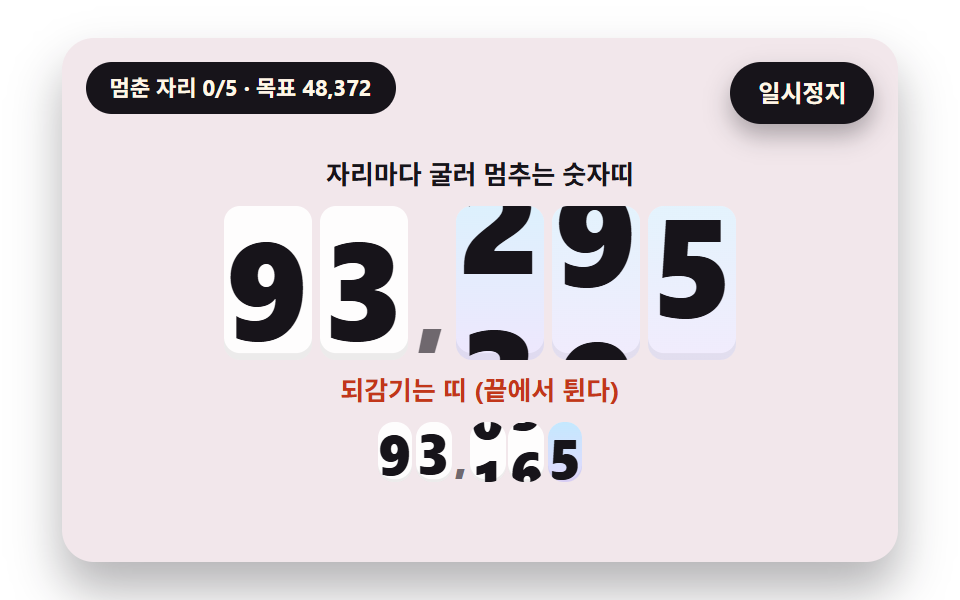 Number Rolling Animation JS: 9 Odometer ScenesNumber rolling animation js: Why does a number feel more trustworthy rolling than jumping? 02 overshoots its target and See all demos in this post
If you like this effect - similar demos
 Feedback07 Save-conflict banner — a notice value appears and waits for a choice when the same item was already saved elsewhereAutosave Indicator: 9 Save-Status Patterns
 Feedback04 Letters That Dodge the Pointer and Spring Back HomeFalling Text Animation: 9 Letters With Physics
 Feedback02 ease-in-out-back curve9 CSS Easing Curves You Can Copy-Paste