06QR Code That Settles as Its Jitter Amplitude Shrinks While Generating
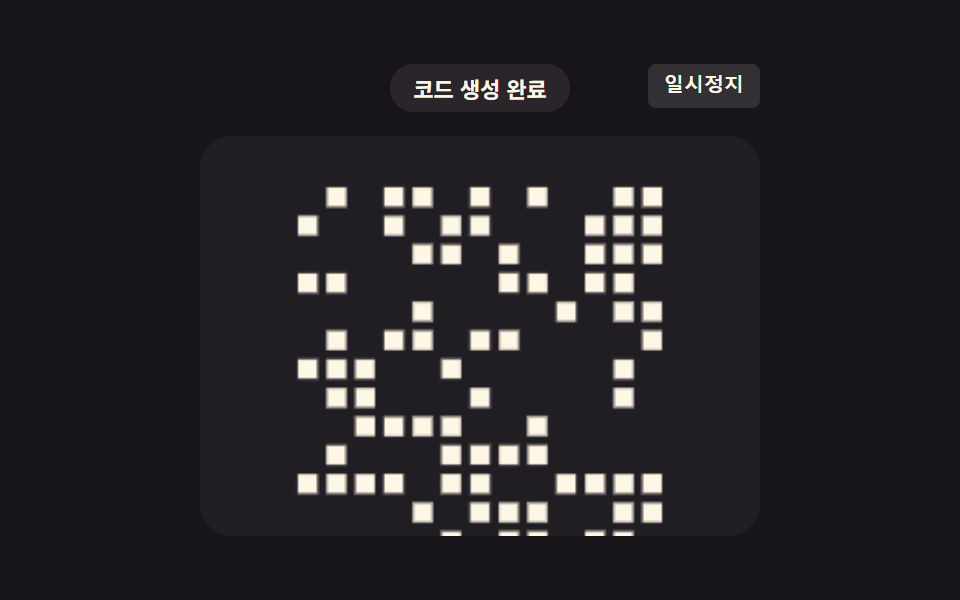
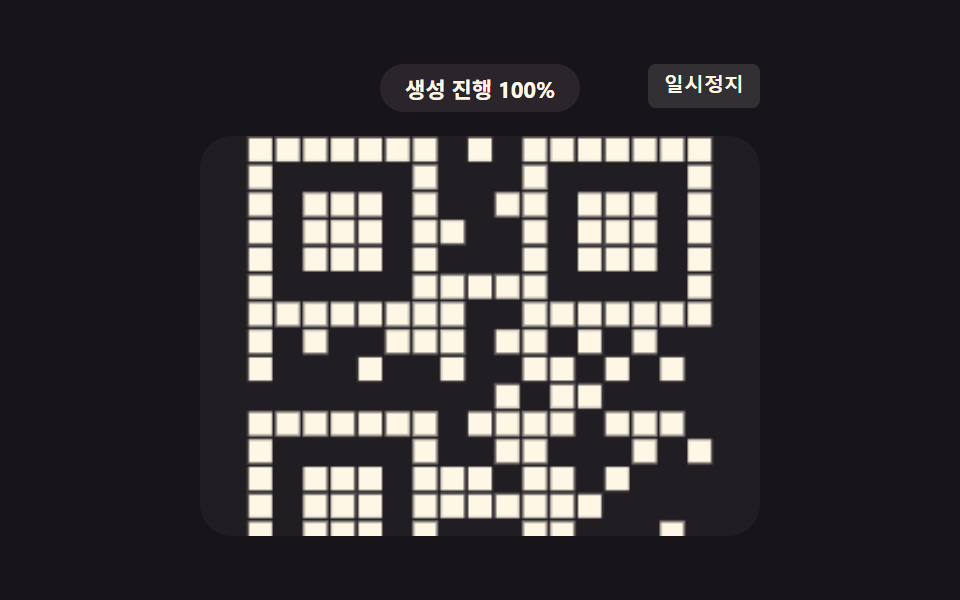
As the generation progress value grows, the jitter amplitude value of each module position shrinks, so the noisy, trembling grid gradually settles into place.
Best forNew QR code issuance animation
QR_NOISE_SETTLE_AMPLITUDE_PXSETTLE_MSwobble
<main class="stage">
<div class="gns is-demo" id="gnsRoot">
  <div class="gns__badge" id="gnsBadge">Generating code</div>
  <button class="gns__ctrl" id="gnsCtrl" type="button">Pause</button>
  <div class="gns__canvas-wrap">
    <canvas class="gns__canvas" id="gnsCanvas" width="240" height="200"></canvas>
  </div>
</div>
</main>
@use "../../../../site/static/demo-tokens" as *;
// 핵심: 모듈별 위상·방향으로 흔드는 노이즈 진폭이 시간에 따라 지수 감쇠해
// 0으로 수렴한다 — 흔들리던 픽셀이 점점 제자리로 가라앉는다.
@include stage($stage-ink);
.gns {
position: relative;
width: min(100%, 280px);
display: flex;
flex-direction: column;
align-items: center;
gap: $sp-3;
}
.gns__badge {
padding: $sp-1 $sp-3;
border-radius: $r-pill;
background: rgba(255, 247, 230, .08);
color: $subject-cream;
font-weight: 700;
font-size: 11px;
font-variant-numeric: tabular-nums;
}
.gns__ctrl {
position: absolute;
top: 0;
right: 0;
border: 0;
border-radius: $r-xs;
padding: $sp-1 $sp-2;
background: rgba(255, 247, 230, .12);
color: $subject-cream;
font-weight: 600;
font-size: 10px;
line-height: 1.4;
cursor: pointer;
}
.gns__ctrl:focus-visible { outline: 2px solid $subject-blue-light; outline-offset: 2px; }
.gns__canvas-wrap {
width: 100%;
aspect-ratio: 7 / 5;
border-radius: $r-card;
background: rgba(255, 255, 255, .04);
display: grid;
place-items: center;
overflow: hidden;
}
.gns__canvas {
width: 100%;
height: 100%;
display: block;
}
@media (max-width: 340px) {
.gns { gap: $sp-1; }
.gns__badge { padding: $sp-1 $sp-2; font-size: 10px; }
.gns__canvas-wrap { max-width: 150px; aspect-ratio: 3 / 2; margin: 0 auto; }
}
@media (prefers-reduced-motion: reduce) {
.gns__canvas-wrap { background: rgba(255, 255, 255, .04); }
}html, body {
margin: 0;
overflow: hidden;
}
.stage {
box-sizing: border-box;
min-height: 100vh;
display: grid;
place-items: center;
margin: 0;
background: #17141a;
font-family: -apple-system, "Segoe UI", "Noto Sans KR", sans-serif;
padding: clamp(8px, 4vw, 24px);
}
.gns {
position: relative;
width: min(100%, 280px);
display: flex;
flex-direction: column;
align-items: center;
gap: 12px;
}
.gns__badge {
padding: 4px 12px;
border-radius: 999px;
background: rgba(255, 247, 230, 0.08);
color: #fff7e6;
font-weight: 700;
font-size: 11px;
font-variant-numeric: tabular-nums;
}
.gns__ctrl {
position: absolute;
top: 0;
right: 0;
border: 0;
border-radius: 4px;
padding: 4px 8px;
background: rgba(255, 247, 230, 0.12);
color: #fff7e6;
font-weight: 600;
font-size: 10px;
line-height: 1.4;
cursor: pointer;
}
.gns__ctrl:focus-visible {
outline: 2px solid #5b8cf8;
outline-offset: 2px;
}
.gns__canvas-wrap {
width: 100%;
aspect-ratio: 7/5;
border-radius: 16px;
background: rgba(255, 255, 255, 0.04);
display: grid;
place-items: center;
overflow: hidden;
}
.gns__canvas {
width: 100%;
height: 100%;
display: block;
}
@media (max-width: 340px) {
.gns {
gap: 4px;
}
.gns__badge {
padding: 4px 8px;
font-size: 10px;
}
.gns__canvas-wrap {
max-width: 150px;
aspect-ratio: 3/2;
margin: 0 auto;
}
}
@media (prefers-reduced-motion: reduce) {
.gns__canvas-wrap {
background: rgba(255, 255, 255, 0.04);
}
}(function () {
// QR_NOISE_SETTLE_AMPLITUDE_PX — 변형 1: 6 → 2 로 늘리면 초기 흔들림 폭이 더 커진다(전값이 초기값).
var QR_NOISE_SETTLE_AMPLITUDE_PX = 6;
var LOOP_MS = 2000;
var SETTLE_MS = 1500;
var SIZE = 13;
var canvas = document.getElementById('gnsCanvas');
var ctx = canvas.getContext('2d');
var badge = document.getElementById('gnsBadge');
var ctrl = document.getElementById('gnsCtrl');
var root = document.getElementById('gnsRoot');
function seedRand(seed) {
var s = seed >>> 0;
return function () { s = (s * 1664525 + 1013904223) >>> 0; return s / 4294967296; };
}
var rand = seedRand(407060);
var modules = [];
for (var y = 0; y < SIZE; y += 1) {
for (var x = 0; x < SIZE; x += 1) {
if (rand() < 0.45) {
modules.push({
x: x, y: y,
phase: rand() * Math.PI * 2,
freq: 6 + rand() * 4,
dir: rand() * Math.PI * 2
});
}
}
}
function draw(elapsed) {
var cw = canvas.width, ch = canvas.height;
ctx.clearRect(0, 0, cw, ch);
var box = Math.min(cw, ch) - 40;
var cell = box / SIZE;
var ox = (cw - box) / 2, oy = (ch - box) / 2;
// 계산 한 겹: 진폭이 시간에 따라 지수 감쇠 — 초기 QR_NOISE_SETTLE_AMPLITUDE_PX 에서
// SETTLE_MS 동안 0으로 잦아들며, 모듈마다 다른 위상·방향으로 흔들려 자리를 잡는다.
var settleP = Math.min(1, elapsed / SETTLE_MS);
var amp = QR_NOISE_SETTLE_AMPLITUDE_PX * Math.exp(-4 * settleP);
ctx.fillStyle = 'rgb(255,247,230)';
modules.forEach(function (m) {
var wobble = Math.sin(elapsed / 1000 * m.freq + m.phase) * amp;
var jx = Math.cos(m.dir) * wobble;
var jy = Math.sin(m.dir) * wobble;
var s = cell * 0.68;
var cx = ox + m.x * cell + cell / 2 + jx;
var cy = oy + m.y * cell + cell / 2 + jy;
ctx.globalAlpha = 0.55 + 0.45 * settleP;
ctx.fillRect(cx - s / 2, cy - s / 2, s, s);
});
ctx.globalAlpha = 1;
badge.textContent = settleP >= 1 ? 'Code generated' : 'Generating code ' + Math.round(settleP * 100) + '%';
}
var reduce = window.matchMedia('(prefers-reduced-motion: reduce)').matches;
var playing = true;
var elapsed = reduce ? SETTLE_MS : 0;
if (reduce) {
playing = false;
root.classList.remove('is-demo');
}
var lastTs = null;
function tick(ts) {
if (lastTs === null) lastTs = ts;
var dt = ts - lastTs;
lastTs = ts;
if (playing) {
elapsed += dt;
if (elapsed >= LOOP_MS) elapsed -= LOOP_MS;
}
draw(elapsed);
requestAnimationFrame(tick);
}
draw(elapsed);
requestAnimationFrame(tick);
ctrl.addEventListener('click', function () {
playing = !playing;
ctrl.textContent = playing ? 'Pause' : 'Play';
});
ctrl.addEventListener('keydown', function (e) {
if ((e.key === 'r' || e.key === 'R') && !reduce) {
elapsed = 0;
playing = true;
ctrl.textContent = 'Pause';
}
});
})();import { useEffect, useRef, useState } from "react";
import styles from "./GenerateNoiseSettle.module.scss";
export default function GenerateNoiseSettle() {
const rootRef = useRef<HTMLDivElement>(null);
const canvasRef = useRef<HTMLCanvasElement>(null);
const ctrlRef = useRef<HTMLButtonElement>(null);
const [badge, setBadge] = useState("코드 생성 중");
const [ctrlLabel, setCtrlLabel] = useState("일시정지");
useEffect(() => {
const root = rootRef.current;
const canvas = canvasRef.current;
const ctrl = ctrlRef.current;
if (!root || !canvas || !ctrl) return;
const ctx = canvas.getContext("2d");
if (!ctx) return;
// QR_NOISE_SETTLE_AMPLITUDE_PX — 변형 1: 6 → 2 로 늘리면 초기 흔들림 폭이 더 커진다(전값이 초기값).
const QR_NOISE_SETTLE_AMPLITUDE_PX = 6;
const LOOP_MS = 2000;
const SETTLE_MS = 1500;
const SIZE = 13;
function seedRand(seed: number) {
let s = seed >>> 0;
return function () {
s = (s * 1664525 + 1013904223) >>> 0;
return s / 4294967296;
};
}
const rand = seedRand(407060);
const modules: { x: number; y: number; phase: number; freq: number; dir: number }[] = [];
for (let y = 0; y < SIZE; y += 1) {
for (let x = 0; x < SIZE; x += 1) {
if (rand() < 0.45) {
modules.push({
x, y,
phase: rand() * Math.PI * 2,
freq: 6 + rand() * 4,
dir: rand() * Math.PI * 2,
});
}
}
}
function draw(elapsed: number) {
const cw = canvas!.width, ch = canvas!.height;
ctx!.clearRect(0, 0, cw, ch);
const box = Math.min(cw, ch) - 40;
const cell = box / SIZE;
const ox = (cw - box) / 2, oy = (ch - box) / 2;
// 계산 한 겹: 진폭이 시간에 따라 지수 감쇠 — 초기 QR_NOISE_SETTLE_AMPLITUDE_PX 에서
// SETTLE_MS 동안 0으로 잦아들며, 모듈마다 다른 위상·방향으로 흔들려 자리를 잡는다.
const settleP = Math.min(1, elapsed / SETTLE_MS);
const amp = QR_NOISE_SETTLE_AMPLITUDE_PX * Math.exp(-4 * settleP);
ctx!.fillStyle = "rgb(255,247,230)";
modules.forEach((m) => {
const wobble = Math.sin((elapsed / 1000) * m.freq + m.phase) * amp;
const jx = Math.cos(m.dir) * wobble;
const jy = Math.sin(m.dir) * wobble;
const s = cell * 0.68;
const cx = ox + m.x * cell + cell / 2 + jx;
const cy = oy + m.y * cell + cell / 2 + jy;
ctx!.globalAlpha = 0.55 + 0.45 * settleP;
ctx!.fillRect(cx - s / 2, cy - s / 2, s, s);
});
ctx!.globalAlpha = 1;
setBadge(settleP >= 1 ? "코드 생성 완료" : "코드 생성 중 " + Math.round(settleP * 100) + "%");
}
const reduce = window.matchMedia("(prefers-reduced-motion: reduce)").matches;
let playing = true;
let elapsed = reduce ? SETTLE_MS : 0;
if (reduce) {
playing = false;
root.classList.remove("is-demo");
}
let lastTs: number | null = null;
let raf = 0;
function tick(ts: number) {
if (lastTs === null) lastTs = ts;
const dt = ts - lastTs;
lastTs = ts;
if (playing) {
elapsed += dt;
if (elapsed >= LOOP_MS) elapsed -= LOOP_MS;
}
draw(elapsed);
raf = requestAnimationFrame(tick);
}
draw(elapsed);
raf = requestAnimationFrame(tick);
function onClick() {
playing = !playing;
setCtrlLabel(playing ? "일시정지" : "재생");
}
function onKeydown(e: KeyboardEvent) {
if ((e.key === "r" || e.key === "R") && !reduce) {
elapsed = 0;
playing = true;
setCtrlLabel("일시정지");
}
}
ctrl.addEventListener("click", onClick);
ctrl.addEventListener("keydown", onKeydown);
return () => {
cancelAnimationFrame(raf);
ctrl.removeEventListener("click", onClick);
ctrl.removeEventListener("keydown", onKeydown);
};
}, []);
return (
<main className={styles.stage}>
<div className={`${styles.gns} is-demo`} ref={rootRef}>
<div className={styles.gns__badge}>{badge}</div>
<button className={styles.gns__ctrl} type="button" ref={ctrlRef}>{ctrlLabel}</button>
<div className={styles["gns__canvas-wrap"]}>
<canvas className={styles.gns__canvas} ref={canvasRef} width={240} height={200} />
</div>
</div>
</main>
);
}06 QR Code That Settles as Its Jitter Amplitude Shrinks While Generating — Measured area 10.958% · moving frames 23/23Original by GODRICH · SCSS and React ship in the zip · QR Code Loading Animation — 9 CSS Expiry Patterns
The post this demo lives in
 QR Code Loading Animation — 9 CSS Expiry PatternsNot a scan failure, not sitting too long — one time left ratio for qr code loading animation must run out: item 3 shrink See all demos in this post
If you like this effect - similar demos
 Loaders04 Button That Shakes Briefly on Failure Then Reverts to Its LabelLoading Button UI — 9 States, Spinner to Success
 Loaders03 Particle Swirl That Gathers Into the Core as an Orbit-radius Value ShrinksAI Loading Animation: 9 Patterns by One Value
 Loaders08 Picture that arrives late into a ratio box already holding its placePage Loading Animation CSS: 9 Route-Change Demos