05Double-click desktop icons
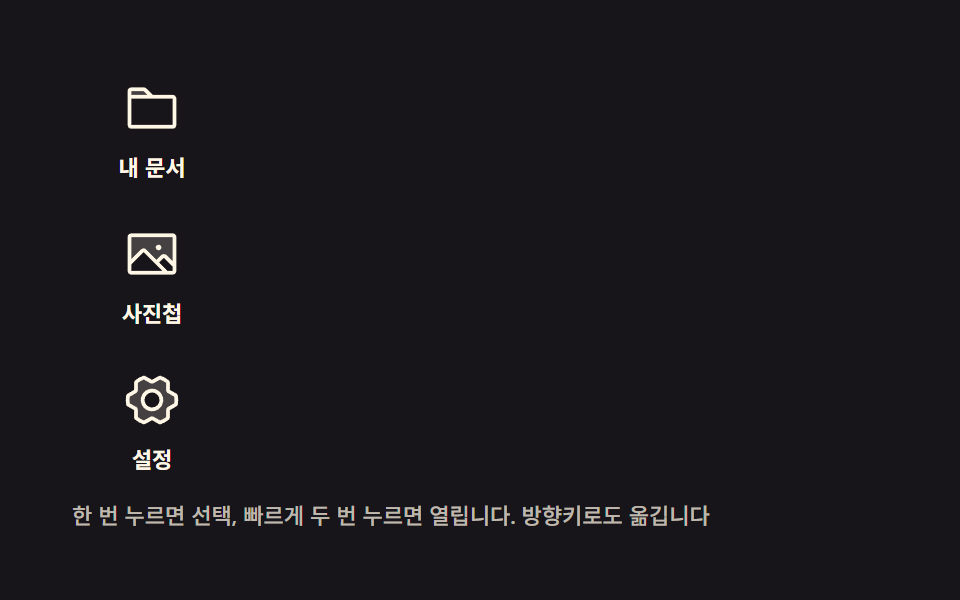
One click tints only the label with the selection color; two clicks inside a short window pop the icon once and open a panel. Arrow keys move the selection between icons as well.
Best forScreen picking items from an icon grid
detailaria-selectedtransform-origin
<main class="stage">
<div class="dt is-demo" id="dt">
  <div class="dt__icons" id="list" role="listbox" aria-label="Desktop icons" tabindex="0">
    <button type="button" class="dt__ico dt__ico--0" role="option" aria-selected="false" tabindex="-1">
      <span class="dt__glyph" aria-hidden="true"><svg xmlns="http://www.w3.org/2000/svg" width="1em" height="1em" viewBox="0 0 256 256"><g fill="currentColor"><path d="M128 80H32V56a8 8 0 0 1 8-8h52.69a8 8 0 0 1 5.65 2.34Z" opacity=".2"/><path d="M216 72h-84.69L104 44.69A15.86 15.86 0 0 0 92.69 40H40a16 16 0 0 0-16 16v144.62A15.4 15.4 0 0 0 39.38 216h177.51A15.13 15.13 0 0 0 232 200.89V88a16 16 0 0 0-16-16M92.69 56l16 16H40V56ZM216 200H40V88h176Z"/></g></svg></span>
      <span class="dt__label">My docs</span>
    </button>
    <button type="button" class="dt__ico dt__ico--1" role="option" aria-selected="false" tabindex="-1">
      <span class="dt__glyph" aria-hidden="true"><svg xmlns="http://www.w3.org/2000/svg" width="1em" height="1em" viewBox="0 0 256 256"><g fill="currentColor"><path d="M224 56v122.06l-39.72-39.72a8 8 0 0 0-11.31 0L147.31 164l-49.65-49.66a8 8 0 0 0-11.32 0L32 168.69V56a8 8 0 0 1 8-8h176a8 8 0 0 1 8 8" opacity=".2"/><path d="M216 40H40a16 16 0 0 0-16 16v144a16 16 0 0 0 16 16h176a16 16 0 0 0 16-16V56a16 16 0 0 0-16-16m0 16v102.75l-26.07-26.06a16 16 0 0 0-22.63 0l-20 20l-44-44a16 16 0 0 0-22.62 0L40 149.37V56ZM40 172l52-52l80 80H40Zm176 28h-21.37l-36-36l20-20L216 181.38zm-72-100a12 12 0 1 1 12 12a12 12 0 0 1-12-12"/></g></svg></span>
      <span class="dt__label">Photos</span>
    </button>
    <button type="button" class="dt__ico dt__ico--2" role="option" aria-selected="false" tabindex="-1">
      <span class="dt__glyph" aria-hidden="true"><svg xmlns="http://www.w3.org/2000/svg" width="1em" height="1em" viewBox="0 0 256 256"><g fill="currentColor"><path d="m230.1 108.76l-31.85-18.14c-.64-1.16-1.31-2.29-2-3.41l-.12-36A104.6 104.6 0 0 0 162 32l-32 17.89h-4L94 32a104.6 104.6 0 0 0-34.11 19.25l-.16 36c-.7 1.12-1.37 2.26-2 3.41l-31.84 18.1a99.2 99.2 0 0 0 0 38.46l31.85 18.14c.64 1.16 1.31 2.29 2 3.41l.12 36A104.6 104.6 0 0 0 94 224l32-17.87h4L162 224a104.6 104.6 0 0 0 34.08-19.25l.16-36c.7-1.12 1.37-2.26 2-3.41l31.84-18.1a99.2 99.2 0 0 0 .02-38.48M128 168a40 40 0 1 1 40-40a40 40 0 0 1-40 40" opacity=".2"/><path d="M128 80a48 48 0 1 0 48 48a48.05 48.05 0 0 0-48-48m0 80a32 32 0 1 1 32-32a32 32 0 0 1-32 32m109.94-52.79a8 8 0 0 0-3.89-5.4l-29.83-17l-.12-33.62a8 8 0 0 0-2.83-6.08a111.9 111.9 0 0 0-36.72-20.67a8 8 0 0 0-6.46.59L128 41.85L97.88 25a8 8 0 0 0-6.47-.6a111.9 111.9 0 0 0-36.68 20.75a8 8 0 0 0-2.83 6.07l-.15 33.65l-29.83 17a8 8 0 0 0-3.89 5.4a106.5 106.5 0 0 0 0 41.56a8 8 0 0 0 3.89 5.4l29.83 17l.12 33.63a8 8 0 0 0 2.83 6.08a111.9 111.9 0 0 0 36.72 20.67a8 8 0 0 0 6.46-.59L128 214.15L158.12 231a7.9 7.9 0 0 0 3.9 1a8.1 8.1 0 0 0 2.57-.42a112.1 112.1 0 0 0 36.68-20.73a8 8 0 0 0 2.83-6.07l.15-33.65l29.83-17a8 8 0 0 0 3.89-5.4a106.5 106.5 0 0 0-.03-41.52m-15 34.91l-28.57 16.25a8 8 0 0 0-3 3c-.58 1-1.19 2.06-1.81 3.06a7.94 7.94 0 0 0-1.22 4.21l-.15 32.25a95.9 95.9 0 0 1-25.37 14.3L134 199.13a8 8 0 0 0-3.91-1h-3.83a8.1 8.1 0 0 0-4.1 1l-28.84 16.1A96 96 0 0 1 67.88 201l-.11-32.2a8 8 0 0 0-1.22-4.22c-.62-1-1.23-2-1.8-3.06a8.1 8.1 0 0 0-3-3.06l-28.6-16.29a90.5 90.5 0 0 1 0-28.26l28.52-16.28a8 8 0 0 0 3-3c.58-1 1.19-2.06 1.81-3.06a7.94 7.94 0 0 0 1.22-4.21l.15-32.25a95.9 95.9 0 0 1 25.37-14.3L122 56.87a8 8 0 0 0 4.1 1h3.64a8 8 0 0 0 4.1-1l28.84-16.1A96 96 0 0 1 188.12 55l.11 32.2a8 8 0 0 0 1.22 4.22c.62 1 1.23 2 1.8 3.06a8.1 8.1 0 0 0 3 3.06l28.6 16.29a90.5 90.5 0 0 1 .05 28.29Z"/></g></svg></span>
      <span class="dt__label">Settings</span>
    </button>
  </div>
  <section class="dt__win" id="win" aria-hidden="true">
    <header class="dt__tbar">
      <span class="dt__tico" aria-hidden="true"><svg xmlns="http://www.w3.org/2000/svg" width="1em" height="1em" viewBox="0 0 256 256"><g fill="currentColor"><path d="M128 80H32V56a8 8 0 0 1 8-8h52.69a8 8 0 0 1 5.65 2.34Z" opacity=".2"/><path d="M216 72h-84.69L104 44.69A15.86 15.86 0 0 0 92.69 40H40a16 16 0 0 0-16 16v144.62A15.4 15.4 0 0 0 39.38 216h177.51A15.13 15.13 0 0 0 232 200.89V88a16 16 0 0 0-16-16M92.69 56l16 16H40V56ZM216 200H40V88h176Z"/></g></svg></span>
      <span class="dt__ttl" id="ttl">My docs</span>
      <button type="button" class="dt__x" id="x" aria-label="Close window"><svg xmlns="http://www.w3.org/2000/svg" width="1em" height="1em" viewBox="0 0 256 256"><g fill="currentColor"><path d="M216 56v144a16 16 0 0 1-16 16H56a16 16 0 0 1-16-16V56a16 16 0 0 1 16-16h144a16 16 0 0 1 16 16" opacity=".2"/><path d="M205.66 194.34a8 8 0 0 1-11.32 11.32L128 139.31l-66.34 66.35a8 8 0 0 1-11.32-11.32L116.69 128L50.34 61.66a8 8 0 0 1 11.32-11.32L128 116.69l66.34-66.35a8 8 0 0 1 11.32 11.32L139.31 128Z"/></g></svg></button>
    </header>
    <p class="dt__body" id="wbody">This window opened by double-clicking the docs icon</p>
  </section>
  <p class="dt__hint">One click selects, two quick clicks open. Arrow keys also move the selection</p>
</div>
</main>@use "../../../../site/static/demo-tokens" as *;
// 두 번 눌러 여는 바탕화면 아이콘 — 한 번 누르면 이름표만 선택 색으로 바뀌고, 짧은 사이에
// 두 번 누르면 아이콘이 자기 중심에서 한 번 커졌다가 창이 열린다. 방향키로도 선택이 옮겨 다닌다.
// 두 번 누르기 판정은 click 이벤트의 e.detail(같은 자리 연달아 누른 횟수) — 터치는 시간차로 보조한다.
$duration: $dur-quick;
$easing: $ease-pop;
$color: $subject-blue-deep;
$cream: rgba(255, 247, 230, .72);
@include stage($stage-ink);
.dt {
position: relative; box-sizing: border-box;
width: min(100%, 432px); padding: $sp-3;
}
// ── 아이콘 세로줄
.dt__icons { display: flex; flex-direction: column; gap: $sp-3; width: max-content; }
.dt__ico {
display: flex; flex-direction: column; align-items: center; gap: $sp-1;
width: 80px; padding: $sp-1 0; margin: 0;
border: 0; border-radius: $r-xs; background: transparent; cursor: pointer;
font-family: inherit;
}
.dt__ico:focus-visible { outline: 2px solid $subject-blue-light; outline-offset: 2px; }
// 아이콘 몸 — 커질 땐 반드시 자기 중심에서(규칙 8: 스스로 완결한 요소의 기본 원점)
.dt__glyph {
display: block; color: $subject-cream; font-size: 30px; line-height: 1;
transform-origin: 50% 50%;
}
.dt__label {
padding: 0 $sp-1; border-radius: $r-xs;
color: $subject-cream; font-weight: 700; font-size: 11px; line-height: 16px;
white-space: nowrap;
}
// 한 번 누르기 — 이름표만 선택 색으로
.dt__ico[aria-selected="true"] .dt__label {
background: $color; color: $stage-paper;
}
// 두 번 누르기 — 아이콘이 한 번 커졌다가 제자리로(원점은 중심 그대로)
.dt__ico.is-pop .dt__glyph {
animation-name: dtPopOnce;
animation-duration: 300ms; animation-timing-function: $easing;
animation-iteration-count: 1;
}
// ── 열리는 창
.dt__win {
position: absolute; top: $sp-3; right: $sp-3; width: min(58%, 236px);
border-radius: $r-card; background: $stage-paper; box-shadow: $shadow-raised;
opacity: 0; pointer-events: none;
transition: opacity $duration $easing, transform $duration $easing;
}
.dt__win.is-open { opacity: 1; pointer-events: auto; }
.dt__tbar {
display: flex; align-items: center; gap: $sp-2;
padding: $sp-1 $sp-2; border-radius: $r-card $r-card 0 0;
background: $color; color: $stage-paper;
}
.dt__tico { display: grid; place-items: center; font-size: 13px; }
.dt__ttl { flex: 1 1 auto; font-weight: 700; font-size: 12px; line-height: 1.4; }
.dt__x {
display: grid; place-items: center; width: 20px; height: 20px; margin: 0;
border: 0; border-radius: $r-xs; background: rgba(255, 255, 255, .18);
color: $stage-paper; font-family: inherit; font-size: 11px; line-height: 1; cursor: pointer;
}
.dt__x:hover { background: rgba(255, 255, 255, .32); }
.dt__x:focus-visible { outline: 2px solid $stage-paper; outline-offset: 1px; }
.dt__body { margin: 0; padding: $sp-3; color: $subject-ink; font-weight: 500; font-size: 12px; line-height: 1.6; }
.dt__hint { margin: $sp-2 0 0; color: $cream; font-weight: 500; font-size: 11px; line-height: 1.4; }
// ── 격자 미리보기 루프(2초)
// 8% 첫 아이콘 이름표가 선택 색으로 컷, 16% 아이콘이 한 번 커졌다가, 22% 창이 컷으로 열리며
// 14px 아래에서 제자리로 정착한다. 60% 창이 닫히고 68% 방향키로 옮긴 듯 둘째 아이콘이 선택,
// 84% 선택이 풀려 처음 모습으로 돌아온다. 창이 열리는 프레임이 닫히는 프레임보다 앞이라
// poster 는 열린 창이 잡힌다.
.dt.is-demo .dt__ico--0 .dt__label {
animation-name: dtSelA;
animation-duration: $dur-loop; animation-timing-function: steps(1, end);
animation-iteration-count: infinite; animation-fill-mode: backwards;
}
.dt.is-demo .dt__ico--1 .dt__label {
animation-name: dtSelB;
animation-duration: $dur-loop; animation-timing-function: steps(1, end);
animation-iteration-count: infinite; animation-fill-mode: backwards;
}
.dt.is-demo .dt__ico--0 .dt__glyph {
animation-name: dtPopLoop;
animation-duration: $dur-loop; animation-timing-function: $easing;
animation-iteration-count: infinite; animation-fill-mode: backwards;
}
.dt.is-demo .dt__win {
animation-name: dtWinO, dtWinY;
animation-duration: $dur-loop, $dur-loop;
animation-timing-function: steps(1, end), $easing;
animation-iteration-count: infinite, infinite;
animation-fill-mode: backwards, backwards;
transition: none;
}
@keyframes dtSelA {
0%, 7.9% { background: transparent; color: $subject-cream; }
8%, 59.9% { background: $color; color: $stage-paper; }
60%, 100% { background: transparent; color: $subject-cream; }
}
@keyframes dtSelB {
0%, 67% { background: transparent; color: $subject-cream; }
68%, 83% { background: $color; color: $stage-paper; }
84%, 100% { background: transparent; color: $subject-cream; }
}
@keyframes dtPopLoop {
0%, 16% { transform: scale(1); }
19% { transform: scale(1.16); }
23%, 100% { transform: scale(1); }
}
@keyframes dtPopOnce {
0% { transform: scale(1); }
40% { transform: scale(1.18); }
100% { transform: scale(1); }
}
@keyframes dtWinO {
0%, 21% { opacity: 0; }
22%, 59% { opacity: 1; }
60%, 100% { opacity: 0; }
}
@keyframes dtWinY {
0%, 22% { transform: translateY(14px); }
29%, 100% { transform: translateY(0); }
}
// ── 좁은 화면: 아이콘 줄을 가로로 눕히고 창을 아이콘 위에 겹쳐 연다.
// 세로 한 줄이면 아이콘 셋만으로 155px — 320×200 무대에 남는 높이가 없다(2026-09-13 실측).
@media (max-width: 340px) {
.dt { padding: $sp-2; }
.dt__icons { flex-direction: row; justify-content: center; width: 100%; gap: $sp-2; }
.dt__ico { width: 64px; padding: 0; }
.dt__glyph { font-size: 20px; }
.dt__label { font-size: 11px; line-height: 13px; }
.dt__win { top: $sp-2; right: $sp-2; left: $sp-2; width: auto; }
.dt__body { padding: $sp-2; font-size: 11px; }
.dt__hint { margin-top: $sp-1; font-size: 10px; }
}
@media (prefers-reduced-motion: reduce) {
.dt.is-demo .dt__label, .dt.is-demo .dt__glyph, .dt.is-demo .dt__win {
animation: none !important;
transition: none !important;
}
// 루프를 끊으면 정적 모습 — 첫 아이콘이 선택돼 있고 창은 열려 있다(화면이 비지 않게)
.dt.is-demo .dt__ico--0 .dt__label { background: $color !important; color: $stage-paper !important; }
.dt.is-demo .dt__win { opacity: 1 !important; transform: none !important; }
}html, body {
margin: 0;
overflow: hidden;
}
.stage {
box-sizing: border-box;
min-height: 100vh;
display: grid;
place-items: center;
margin: 0;
background: #17141a;
font-family: -apple-system, "Segoe UI", "Noto Sans KR", sans-serif;
padding: clamp(8px, 4vw, 24px);
}
.dt {
position: relative;
box-sizing: border-box;
width: min(100%, 432px);
padding: 12px;
}
.dt__icons {
display: flex;
flex-direction: column;
gap: 12px;
width: max-content;
}
.dt__ico {
display: flex;
flex-direction: column;
align-items: center;
gap: 4px;
width: 80px;
padding: 4px 0;
margin: 0;
border: 0;
border-radius: 4px;
background: transparent;
cursor: pointer;
font-family: inherit;
}
.dt__ico:focus-visible {
outline: 2px solid #5b8cf8;
outline-offset: 2px;
}
.dt__glyph {
display: block;
color: #fff7e6;
font-size: 30px;
line-height: 1;
transform-origin: 50% 50%;
}
.dt__label {
padding: 0 4px;
border-radius: 4px;
color: #fff7e6;
font-weight: 700;
font-size: 11px;
line-height: 16px;
white-space: nowrap;
}
.dt__ico[aria-selected=true] .dt__label {
background: #0a4fe8;
color: #ffffff;
}
.dt__ico.is-pop .dt__glyph {
animation-name: dtPopOnce;
animation-duration: 300ms;
animation-timing-function: cubic-bezier(0.2, 1.4, 0.4, 1);
animation-iteration-count: 1;
}
.dt__win {
position: absolute;
top: 12px;
right: 12px;
width: min(58%, 236px);
border-radius: 16px;
background: #ffffff;
box-shadow: 0 14px 24px rgba(23, 20, 26, 0.32);
opacity: 0;
pointer-events: none;
transition: opacity 220ms cubic-bezier(0.2, 1.4, 0.4, 1), transform 220ms cubic-bezier(0.2, 1.4, 0.4, 1);
}
.dt__win.is-open {
opacity: 1;
pointer-events: auto;
}
.dt__tbar {
display: flex;
align-items: center;
gap: 8px;
padding: 4px 8px;
border-radius: 16px 16px 0 0;
background: #0a4fe8;
color: #ffffff;
}
.dt__tico {
display: grid;
place-items: center;
font-size: 13px;
}
.dt__ttl {
flex: 1 1 auto;
font-weight: 700;
font-size: 12px;
line-height: 1.4;
}
.dt__x {
display: grid;
place-items: center;
width: 20px;
height: 20px;
margin: 0;
border: 0;
border-radius: 4px;
background: rgba(255, 255, 255, 0.18);
color: #ffffff;
font-family: inherit;
font-size: 11px;
line-height: 1;
cursor: pointer;
}
.dt__x:hover {
background: rgba(255, 255, 255, 0.32);
}
.dt__x:focus-visible {
outline: 2px solid #ffffff;
outline-offset: 1px;
}
.dt__body {
margin: 0;
padding: 12px;
color: #17141a;
font-weight: 500;
font-size: 12px;
line-height: 1.6;
}
.dt__hint {
margin: 8px 0 0;
color: rgba(255, 247, 230, 0.72);
font-weight: 500;
font-size: 11px;
line-height: 1.4;
}
.dt.is-demo .dt__ico--0 .dt__label {
animation-name: dtSelA;
animation-duration: 2s;
animation-timing-function: steps(1, end);
animation-iteration-count: infinite;
animation-fill-mode: backwards;
}
.dt.is-demo .dt__ico--1 .dt__label {
animation-name: dtSelB;
animation-duration: 2s;
animation-timing-function: steps(1, end);
animation-iteration-count: infinite;
animation-fill-mode: backwards;
}
.dt.is-demo .dt__ico--0 .dt__glyph {
animation-name: dtPopLoop;
animation-duration: 2s;
animation-timing-function: cubic-bezier(0.2, 1.4, 0.4, 1);
animation-iteration-count: infinite;
animation-fill-mode: backwards;
}
.dt.is-demo .dt__win {
animation-name: dtWinO, dtWinY;
animation-duration: 2s, 2s;
animation-timing-function: steps(1, end), cubic-bezier(0.2, 1.4, 0.4, 1);
animation-iteration-count: infinite, infinite;
animation-fill-mode: backwards, backwards;
transition: none;
}
@keyframes dtSelA {
0%, 7.9% {
background: transparent;
color: #fff7e6;
}
8%, 59.9% {
background: #0a4fe8;
color: #ffffff;
}
60%, 100% {
background: transparent;
color: #fff7e6;
}
}
@keyframes dtSelB {
0%, 67% {
background: transparent;
color: #fff7e6;
}
68%, 83% {
background: #0a4fe8;
color: #ffffff;
}
84%, 100% {
background: transparent;
color: #fff7e6;
}
}
@keyframes dtPopLoop {
0%, 16% {
transform: scale(1);
}
19% {
transform: scale(1.16);
}
23%, 100% {
transform: scale(1);
}
}
@keyframes dtPopOnce {
0% {
transform: scale(1);
}
40% {
transform: scale(1.18);
}
100% {
transform: scale(1);
}
}
@keyframes dtWinO {
0%, 21% {
opacity: 0;
}
22%, 59% {
opacity: 1;
}
60%, 100% {
opacity: 0;
}
}
@keyframes dtWinY {
0%, 22% {
transform: translateY(14px);
}
29%, 100% {
transform: translateY(0);
}
}
@media (max-width: 340px) {
.dt {
padding: 8px;
}
.dt__icons {
flex-direction: row;
justify-content: center;
width: 100%;
gap: 8px;
}
.dt__ico {
width: 64px;
padding: 0;
}
.dt__glyph {
font-size: 20px;
}
.dt__label {
font-size: 11px;
line-height: 13px;
}
.dt__win {
top: 8px;
right: 8px;
left: 8px;
width: auto;
}
.dt__body {
padding: 8px;
font-size: 11px;
}
.dt__hint {
margin-top: 4px;
font-size: 10px;
}
}
@media (prefers-reduced-motion: reduce) {
.dt.is-demo .dt__label, .dt.is-demo .dt__glyph, .dt.is-demo .dt__win {
animation: none !important;
transition: none !important;
}
.dt.is-demo .dt__ico--0 .dt__label {
background: #0a4fe8 !important;
color: #ffffff !important;
}
.dt.is-demo .dt__win {
opacity: 1 !important;
transform: none !important;
}
}var dt = document.getElementById('dt');
var list = document.getElementById('list');
var icons = [].slice.call(document.querySelectorAll('.dt__ico'));
var win = document.getElementById('win');
var ttl = document.getElementById('ttl');
var wbody = document.getElementById('wbody');
var lastTap = 0;
var lastIdx = -1;
var META = [
{ t: 'My docs', b: 'This window opened by double-clicking the docs icon' },
{ t: 'Photos', b: 'This window opened by double-clicking the photos icon' },
{ t: 'Settings', b: 'This window opened by double-clicking the settings icon' }
];
function select(i, grab) {
icons.forEach(function (b, k) { b.setAttribute('aria-selected', k === i ? 'true' : 'false'); });
if (grab && icons[i]) icons[i].focus({ preventScroll: true });
}
function openWin(i) {
ttl.textContent = META[i].t;
wbody.textContent = META[i].b;
win.classList.add('is-open');
win.setAttribute('aria-hidden', 'false');
icons[i].classList.remove('is-pop');
void icons[i].offsetWidth;
icons[i].classList.add('is-pop');
}
function closeWin() {
win.classList.remove('is-open');
win.setAttribute('aria-hidden', 'true');
}
icons.forEach(function (b, i) {
b.addEventListener('click', function (e) {
dt.classList.remove('is-demo');
select(i, false);
// e.detail 은 같은 자리에서 연달아 누른 횟수 — 2 이상이면 두 번 누르기다.
// 터치는 detail 이 항상 1 이라 시간차(400ms)로 판정한다
if (e.detail >= 2 || (i === lastIdx && Date.now() - lastTap < 400)) openWin(i);
lastTap = Date.now();
lastIdx = i;
});
});
list.addEventListener('keydown', function (e) {
dt.classList.remove('is-demo');
var k = e.key;
var cur = -1;
icons.forEach(function (b, i) { if (b.getAttribute('aria-selected') === 'true') cur = i; });
if (k === 'ArrowDown' || k === 'ArrowRight') { e.preventDefault(); select((cur + 1) % icons.length, true); }
else if (k === 'ArrowUp' || k === 'ArrowLeft') { e.preventDefault(); select((cur - 1 + icons.length) % icons.length, true); }
else if (k === 'Enter' || k === ' ') { e.preventDefault(); if (cur < 0) cur = 0; select(cur, false); openWin(cur); }
else if (k === 'Escape') closeWin();
});
document.getElementById('x').addEventListener('click', closeWin);
dt.addEventListener('pointerdown', function (e) {
if (e.target === dt) { dt.classList.remove('is-demo'); select(-1, false); closeWin(); }
});// DesktopIcons — vanilla 판(run/023/demo/05-os-desktop-icon-doubleclick/index.html) 의 React 포트.
// 한 번 누르면 이름표만 선택 샅, 짧은 사이 두 번 누르면 아이콘이 한 번 커졌다가 창이 열린다.
// 두 번 누르기 판정은 click 이벤트의 e.detail — 터치는 시간차(400ms)로 보조한다.
// 방향키로 선택이 옮겨 다니고 Enter 로 연다.
import { useRef, useState } from "react";
import type { CSSProperties, ReactNode } from "react";
import styles from "./DesktopIcons.module.scss";
export type DesktopIconsProps = {
duration?: number;
easing?: string;
color?: string;
};
type Vars = CSSProperties & { "--duration"?: string; "--easing"?: string; "--color"?: string };
// ambient 타입에 React 이벤트 제네릭이 없다 — 쓰는 것만 로컬 타입으로 선언한다
type KeyEvt = { key: string; preventDefault(): void };
type ClickEvt = { detail: number; stopPropagation(): void };
type PtrEvt = { target: Node | null; currentTarget: Node | null };
type BtnBox = { current: Array<HTMLButtonElement | null> };
type NumBox = { current: number };
const LIST_ARIA = "바탕화면 아이콘";
const CLOSE_ARIA = "창 닫기";
const HINT = "한 번 누르면 선택, 빠르게 두 번 누르면 열립니다. 방향키로도 옮깁니다";
const META = [
{ icon: "folder", t: "내 문서", b: "문서 아이콘을 두 번 눌러 연 창입니다" },
{ icon: "image", t: "사진첩", b: "사진첩 아이콘을 두 번 눌러 연 창입니다" },
{ icon: "gear", t: "설정", b: "설정 아이콘을 두 번 눌러 연 창입니다" }
];
const ICONS: { [k: string]: ReactNode } = {
folder: (
<svg xmlns="http://www.w3.org/2000/svg" width="1em" height="1em" viewBox="0 0 256 256"><g fill="currentColor"><path d="M128 80H32V56a8 8 0 0 1 8-8h52.69a8 8 0 0 1 5.65 2.34Z" opacity=".2" /><path d="M216 72h-84.69L104 44.69A15.86 15.86 0 0 0 92.69 40H40a16 16 0 0 0-16 16v144.62A15.4 15.4 0 0 0 39.38 216h177.51A15.13 15.13 0 0 0 232 200.89V88a16 16 0 0 0-16-16M92.69 56l16 16H40V56ZM216 200H40V88h176Z" /></g></svg>
),
image: (
<svg xmlns="http://www.w3.org/2000/svg" width="1em" height="1em" viewBox="0 0 256 256"><g fill="currentColor"><path d="M224 56v122.06l-39.72-39.72a8 8 0 0 0-11.31 0L147.31 164l-49.65-49.66a8 8 0 0 0-11.32 0L32 168.69V56a8 8 0 0 1 8-8h176a8 8 0 0 1 8 8" opacity=".2" /><path d="M216 40H40a16 16 0 0 0-16 16v144a16 16 0 0 0 16 16h176a16 16 0 0 0 16-16V56a16 16 0 0 0-16-16m0 16v102.75l-26.07-26.06a16 16 0 0 0-22.63 0l-20 20l-44-44a16 16 0 0 0-22.62 0L40 149.37V56ZM40 172l52-52l80 80H40Zm176 28h-21.37l-36-36l20-20L216 181.38zm-72-100a12 12 0 1 1 12 12a12 12 0 0 1-12-12" /></g></svg>
),
gear: (
<svg xmlns="http://www.w3.org/2000/svg" width="1em" height="1em" viewBox="0 0 256 256"><g fill="currentColor"><path d="m230.1 108.76l-31.85-18.14c-.64-1.16-1.31-2.29-2-3.41l-.12-36A104.6 104.6 0 0 0 162 32l-32 17.89h-4L94 32a104.6 104.6 0 0 0-34.11 19.25l-.16 36c-.7 1.12-1.37 2.26-2 3.41l-31.84 18.1a99.2 99.2 0 0 0 0 38.46l31.85 18.14c.64 1.16 1.31 2.29 2 3.41l.12 36A104.6 104.6 0 0 0 94 224l32-17.87h4L162 224a104.6 104.6 0 0 0 34.08-19.25l.16-36c.7-1.12 1.37-2.26 2-3.41l31.84-18.1a99.2 99.2 0 0 0 .02-38.48M128 168a40 40 0 1 1 40-40a40 40 0 0 1-40 40" opacity=".2" /><path d="M128 80a48 48 0 1 0 48 48a48.05 48.05 0 0 0-48-48m0 80a32 32 0 1 1 32-32a32 32 0 0 1-32 32m109.94-52.79a8 8 0 0 0-3.89-5.4l-29.83-17l-.12-33.62a8 8 0 0 0-2.83-6.08a111.9 111.9 0 0 0-36.72-20.67a8 8 0 0 0-6.46.59L128 41.85L97.88 25a8 8 0 0 0-6.47-.6a111.9 111.9 0 0 0-36.68 20.75a8 8 0 0 0-2.83 6.07l-.15 33.65l-29.83 17a8 8 0 0 0-3.89 5.4a106.5 106.5 0 0 0 0 41.56a8 8 0 0 0 3.89 5.4l29.83 17l.12 33.63a8 8 0 0 0 2.83 6.08a111.9 111.9 0 0 0 36.72 20.67a8 8 0 0 0 6.46-.59L128 214.15L158.12 231a7.9 7.9 0 0 0 3.9 1a8.1 8.1 0 0 0 2.57-.42a112.1 112.1 0 0 0 36.68-20.73a8 8 0 0 0 2.83-6.07l.15-33.65l29.83-17a8 8 0 0 0 3.89-5.4a106.5 106.5 0 0 0-.03-41.52m-15 34.91l-28.57 16.25a8 8 0 0 0-3 3c-.58 1-1.19 2.06-1.81 3.06a7.94 7.94 0 0 0-1.22 4.21l-.15 32.25a95.9 95.9 0 0 1-25.37 14.3L134 199.13a8 8 0 0 0-3.91-1h-3.83a8.1 8.1 0 0 0-4.1 1l-28.84 16.1A96 96 0 0 1 67.88 201l-.11-32.2a8 8 0 0 0-1.22-4.22c-.62-1-1.23-2-1.8-3.06a8.1 8.1 0 0 0-3-3.06l-28.6-16.29a90.5 90.5 0 0 1 0-28.26l28.52-16.28a8 8 0 0 0 3-3c.58-1 1.19-2.06 1.81-3.06a7.94 7.94 0 0 0 1.22-4.21l.15-32.25a95.9 95.9 0 0 1 25.37-14.3L122 56.87a8 8 0 0 0 4.1 1h3.64a8 8 0 0 0 4.1-1l28.84-16.1A96 96 0 0 1 188.12 55l.11 32.2a8 8 0 0 0 1.22 4.22c.62 1 1.23 2 1.8 3.06a8.1 8.1 0 0 0 3 3.06l28.6 16.29a90.5 90.5 0 0 1 .05 28.29Z" /></g></svg>
)
};
export default function DesktopIcons(props: DesktopIconsProps) {
const duration = props.duration ?? 220;
const easing = props.easing ?? "cubic-bezier(.2, 1.4, .4, 1)";
const color = props.color ?? "#0a4fe8";
const [preview, setPreview] = useState(true);
const [sel, setSel] = useState(-1);
const [winIdx, setWinIdx] = useState(-1);
const [pop, setPop] = useState({ idx: -1, key: 0 });
const btnBox = useRef<Array<HTMLButtonElement | null>>([]) as BtnBox;
const lastTap = useRef(0) as NumBox;
const lastIdx = useRef(-1) as NumBox;
const vars: Vars = { "--duration": duration + "ms", "--easing": easing, "--color": color };
const select = (i: number, grab: boolean) => {
setSel(i);
if (grab && btnBox.current[i]) btnBox.current[i].focus({ preventScroll: true });
};
const openWin = (i: number) => {
setWinIdx(i);
setPop((p: { idx: number; key: number }) => ({ idx: i, key: p.key + 1 }));
};
const closeWin = () => setWinIdx(-1);
const onClick = (i: number, e: ClickEvt) => {
setPreview(false);
select(i, false);
// e.detail 은 같은 자리에서 연달아 누른 횟수 — 2 이상이면 두 번 누르기다
if (e.detail >= 2 || (i === lastIdx.current && Date.now() - lastTap.current < 400)) openWin(i);
lastTap.current = Date.now();
lastIdx.current = i;
};
const onKeyDown = (e: KeyEvt) => {
setPreview(false);
const k = e.key;
if (k === "ArrowDown" || k === "ArrowRight") {
e.preventDefault();
select((sel + 1) % META.length, true);
} else if (k === "ArrowUp" || k === "ArrowLeft") {
e.preventDefault();
select((sel - 1 + META.length) % META.length, true);
} else if (k === "Enter" || k === " ") {
e.preventDefault();
const cur = sel < 0 ? 0 : sel;
select(cur, false);
openWin(cur);
} else if (k === "Escape") {
closeWin();
}
};
return (
<main className={styles.stage}>
<div
className={styles.root + (preview ? " " + styles.isDemo : "")}
style={vars}
onPointerDown={(e: PtrEvt) => {
if (e.target === e.currentTarget) {
setPreview(false);
select(-1, false);
closeWin();
}
}}
>
<div className={styles.icons} role="listbox" aria-label={LIST_ARIA} tabIndex={0} onKeyDown={onKeyDown}>
{META.map((m, i) => (
<button
key={i}
type="button"
ref={(el: HTMLButtonElement | null) => { btnBox.current[i] = el; }}
className={styles.ico + " " + styles["i" + i]}
role="option"
aria-selected={sel === i}
tabIndex={-1}
onClick={(e: ClickEvt) => onClick(i, e)}
>
<span key={pop.idx === i ? pop.key : "idle"} className={styles.glyph + (pop.idx === i ? " " + styles.isPop : "")} aria-hidden="true">
{ICONS[m.icon]}
</span>
<span className={styles.label}>{m.t}</span>
</button>
))}
</div>
<section className={styles.win + (winIdx >= 0 ? " " + styles.isOpen : "")} aria-hidden={winIdx < 0}>
<header className={styles.tbar}>
<span className={styles.tico} aria-hidden="true">{ICONS.folder}</span>
<span className={styles.ttl}>{winIdx >= 0 ? META[winIdx].t : META[0].t}</span>
<button type="button" className={styles.x} aria-label={CLOSE_ARIA} onClick={closeWin}>
<svg xmlns="http://www.w3.org/2000/svg" width="1em" height="1em" viewBox="0 0 256 256"><g fill="currentColor"><path d="M216 56v144a16 16 0 0 1-16 16H56a16 16 0 0 1-16-16V56a16 16 0 0 1 16-16h144a16 16 0 0 1 16 16" opacity=".2" /><path d="M205.66 194.34a8 8 0 0 1-11.32 11.32L128 139.31l-66.34 66.35a8 8 0 0 1-11.32-11.32L116.69 128L50.34 61.66a8 8 0 0 1 11.32-11.32L128 116.69l66.34-66.35a8 8 0 0 1 11.32 11.32L139.31 128Z" /></g></svg>
</button>
</header>
<p className={styles.body}>{winIdx >= 0 ? META[winIdx].b : META[0].b}</p>
</section>
<p className={styles.hint}>{HINT}</p>
</div>
</main>
);
}05 Double-click desktop icons — Measured area 12.865% · moving frames 8/23Original by GODRICH · SCSS and React ship in the zip · Windows 98 CSS: 9 Retro OS Parts, No Library
The post this demo lives in
 Windows 98 CSS: 9 Retro OS Parts, No LibraryWindows 98 CSS rebuilds a 1998 desktop out of one stylesheet and a little script — nine parts where the windows really d See all demos in this post