09Blue error screen and restart
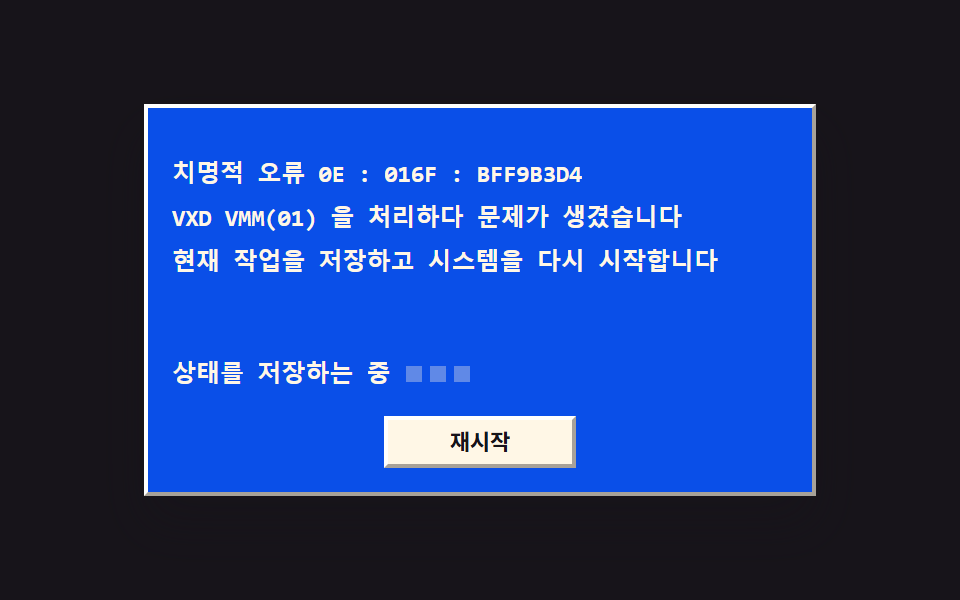
The error text appears on a blue field in a single frame, and three dots on the guidance line light in turn. Press restart and the screen wipes away from top to bottom, returning to the original window.
Best forScreen that announces a fatal error loudly
steps(1, end)clip-pathanimation-delay
<main class="stage">
<div class="bs is-demo" id="bs">
  <div class="bs__win">
    <div class="bs__title">
      <span class="bs__tico" aria-hidden="true"><svg xmlns="http://www.w3.org/2000/svg" width="14" height="14" viewBox="0 0 256 256"><g fill="currentColor"><path d="M128 144h80v72l-80-14.55Zm-96 40l64 11.64V144H32Zm96-129.45V112h80V40ZM32 112h64V60.36L32 72Z" opacity=".2"/><path d="M208 136h-80a8 8 0 0 0-8 8v57.45a8 8 0 0 0 6.57 7.88l80 14.54a7.6 7.6 0 0 0 1.43.13a8 8 0 0 0 8-8v-72a8 8 0 0 0-8-8m-8 70.41l-64-11.63V152h64ZM96 136H32a8 8 0 0 0-8 8v40a8 8 0 0 0 6.57 7.87l64 11.64a8.5 8.5 0 0 0 1.43.13a8 8 0 0 0 8-8V144a8 8 0 0 0-8-8m-8 50.05l-48-8.73V152h48ZM213.13 33.86a8 8 0 0 0-6.56-1.73l-80 14.55a8 8 0 0 0-6.57 7.87V112a8 8 0 0 0 8 8h80a8 8 0 0 0 8-8V40a8 8 0 0 0-2.87-6.14M200 104h-64V61.22l64-11.63Zm-98.87-49.78a8 8 0 0 0-6.56-1.73l-64 11.64A8 8 0 0 0 24 72v40a8 8 0 0 0 8 8h64a8 8 0 0 0 8-8V60.36a8 8 0 0 0-2.87-6.14M88 104H40V78.68L88 70Z"/></g></svg></span>
      <span class="bs__tname">System info</span>
      <span class="bs__tbtns" aria-hidden="true"><span class="bs__gb bs__gb--min"></span><span class="bs__gb"></span></span>
    </div>
    <div class="bs__body">
      <p class="bs__row"><span class="bs__k">Processor</span><span class="bs__v">486DX2 66MHz</span></p>
      <p class="bs__row"><span class="bs__k">Memory</span><span class="bs__v">16 MB</span></p>
      <p class="bs__row"><span class="bs__k">Disk</span><span class="bs__v">540 MB</span></p>
      <div class="bs__actions">
        <button type="button" class="bs__btn" id="crash">System error</button>
      </div>
    </div>
  </div>
  <div class="bs__screen" id="screen">
    <div class="bs__err">
      <p class="bs__eline">Fatal error 0E : 016F : BFF9B3D4</p>
      <p class="bs__eline">A problem occurred while handling VXD VMM(01)</p>
      <p class="bs__eline">Save your work and restart the system</p>
    </div>
    <div class="bs__guide">
      <span class="bs__gtext">Saving state</span>
      <span class="bs__dots" aria-hidden="true"><span class="bs__dot"></span><span class="bs__dot"></span><span class="bs__dot"></span></span>
    </div>
    <div class="bs__sact">
      <button type="button" class="bs__btn bs__btn--s" id="restart">Restart</button>
    </div>
  </div>
</div>
</main>@use "../../../../site/static/demo-tokens" as *;
// 파란 오류 화면과 재시작 — 오류 문구는 steps(1, end) 컷으로 한 프레임에 통째로 나타난다
// (0%{A} 100%{B} 한 구간이면 end 타이밍이 구간 끝에서만 바뀌어 2초 내내 A 만 보이므로
// 컷 지점을 7%·8% 중간 키프레임으로 넣는다). 안내 줄의 점 세 개는 음수 animation-delay 로
// 위상을 밀어 20%·30%·40% 에 차례로 켜지고 켜진 채로 남는다. 재시작을 누르면 화면이
// clip-path 위프로 위에서 아래로 쓸려 사라지는데, 위프는 steps 와 섞지 않고 이징 짝
// 애니메이션으로 분리했다(실패표 266). 루프에서는 쓸려 나간 자리에 원래 창이 그대로
// 드러나 화면이 비지 않는다(실패표 255).
$duration: $dur-enter;
$easing: $ease-spring;
$color: $subject-blue-deep; // 크림 글자를 얹는 파란 면은 한 단계 진한 쪽(5.98:1)
$mono: ui-monospace, SFMono-Regular, "SF Mono", Consolas, "Liberation Mono", monospace;
$edge: rgba(23, 20, 26, .38);
$lite: rgba(255, 255, 255, .95);
$muted: rgba(23, 20, 26, .72);
@include stage($stage-ink);
// ── 원래 창
.bs {
position: relative;
box-sizing: border-box; width: min(100%, 336px); height: 196px;
max-height: calc(100vh - 32px);
border: 2px solid; border-color: $lite $edge $edge $lite;
background: $subject-cream; box-shadow: $shadow-raised;
}
.bs button { font-family: inherit; cursor: pointer; }
.bs button:focus-visible { outline: 2px solid $stage-yellow; outline-offset: 1px; }
.bs__win { display: flex; flex-direction: column; height: 100%; }
.bs__title {
display: flex; align-items: center; gap: $sp-1;
height: 24px; padding: 0 $sp-1; box-sizing: border-box;
background: $color; color: $subject-cream;
}
.bs__tico { display: grid; place-items: center; }
.bs__tname { flex: 1 1 auto; font-weight: 700; font-size: 12px; line-height: 1.4; white-space: nowrap; overflow: hidden; }
.bs__tbtns { display: flex; align-items: center; gap: $sp-1; }
.bs__gb { width: 14px; height: 13px; box-sizing: border-box; border: 2px solid rgba(255, 247, 230, .85); }
.bs__gb--min { border: 0; border-bottom: 2px solid rgba(255, 247, 230, .85); width: 12px; align-self: flex-end; }
.bs__body { display: flex; flex-direction: column; gap: $sp-1; padding: $sp-3; }
.bs__row { margin: 0; display: flex; align-items: baseline; justify-content: space-between; gap: $sp-2; }
.bs__k { font-weight: 500; font-size: 12px; line-height: 1.5; color: $muted; }
.bs__v { font-family: $mono; font-weight: 700; font-size: 12px; line-height: 1.5; color: $subject-ink; }
.bs__actions { display: flex; justify-content: flex-end; margin-top: $sp-2; }
// ── 단추 — 올라온 상태는 밝은 면이 위·왼쪽, 눌림은 반대
.bs__btn {
min-width: 96px; height: 26px; box-sizing: border-box; padding: 0 $sp-2;
background: $subject-cream; color: $subject-ink;
border: 2px solid; border-color: $lite $edge $edge $lite;
font-weight: 700; font-size: 11px; line-height: 1.4;
transition: transform $dur-quick $ease-out;
}
.bs__btn:active { border-color: $edge $lite $lite $edge; transform: translateY(1px); }
// ── 파란 오류 화면 — 창을 통째로 덮는다. 숨김은 visibility 로(탭 순서에서도 빠진다)
.bs__screen {
position: absolute; inset: 0; z-index: 2; box-sizing: border-box;
display: flex; flex-direction: column; gap: $sp-3; padding: $sp-3;
background: $color; clip-path: inset(0 0 0 0);
opacity: 0; visibility: hidden; pointer-events: none;
}
.bs__screen.is-crash { opacity: 1; visibility: visible; pointer-events: auto; transition: clip-path $duration $easing; }
// 재시작 — 위쪽 inset 이 100% 로 자라며 파란 면이 위에서 아래로 쓸려 나간다
.bs__screen.is-crash.is-wiped { clip-path: inset(100% 0 0 0); }
.bs__err { margin-top: $sp-3; display: flex; flex-direction: column; gap: $sp-1; }
.bs__eline { margin: 0; font-family: $mono; font-weight: 600; font-size: 12px; line-height: 1.5; color: $subject-cream; }
.bs__guide { display: flex; align-items: center; gap: $sp-2; margin-top: auto; }
.bs__gtext { font-family: $mono; font-weight: 600; font-size: 12px; line-height: 1.5; color: $subject-cream; }
.bs__dots { display: flex; align-items: center; gap: $sp-1; }
.bs__dot { width: 8px; height: 8px; background: rgba(255, 247, 230, .35); }
.bs__sact { display: flex; justify-content: center; }
// ── 격자 미리보기 루프 (2초): 8% 에 파란 화면이 컷으로 들어오고, 점이 20%·30%·40% 에
// 차례로 켜진 뒤 켜진 채로 남는다. 58% 부터 70% 까지 위프로 쓸려 나가 원래 창이 드러나고,
// 바퀴가 돌아갈 동안 화면이 비는 순간은 없다.
.bs.is-demo .bs__screen {
visibility: visible; opacity: 1; pointer-events: none;
animation-name: bsCut, bsWipe;
animation-duration: $dur-loop, $dur-loop;
animation-timing-function: steps(1, end), $easing;
animation-iteration-count: infinite, infinite;
animation-fill-mode: backwards, backwards;
}
// 점 세 개 — 같은 키프레임을 음수 animation-delay 로 위상 이동해 차례로 켠다.
// 켜진 뒤에는 자기 위상의 50% 까지(=화면이 쓸려 나간 뒤까지) 켜진 채로 남는다
.bs.is-demo .bs__dot {
animation-name: bsDot;
animation-duration: $dur-loop; animation-timing-function: steps(1, end);
animation-iteration-count: infinite; animation-fill-mode: backwards;
}
.bs.is-demo .bs__dot:nth-child(1) { animation-delay: -1600ms; }
.bs.is-demo .bs__dot:nth-child(2) { animation-delay: -1400ms; }
.bs.is-demo .bs__dot:nth-child(3) { animation-delay: -1200ms; }
// 등장 컷 — 중간 키프레임(7%)을 둬야 8% 지점에서 한 프레임에 바뀐다
@keyframes bsCut {
0%, 7% { opacity: 0; }
8%, 100% { opacity: 1; }
}
// 퇴장 위프 — steps 가 아니라 이징으로 보간되는 짝 애니메이션이다
@keyframes bsWipe {
0%, 58% { clip-path: inset(0 0 0 0); }
70%, 100% { clip-path: inset(100% 0 0 0); }
}
@keyframes bsDot {
0%, 50% { background: $stage-yellow; }
51%, 100% { background: rgba(255, 247, 230, .35); }
}
// ── 좁은 화면: 줄 글자를 한 단계 줄여 무대 안에 들어온다
@media (max-width: 340px) {
.bs { height: 168px; }
.bs__k, .bs__v { font-size: 11px; }
.bs__eline, .bs__gtext { font-size: 11px; }
.bs__err { margin-top: 0; }
.bs__body { padding: $sp-2; gap: 0; }
.bs__row + .bs__row { margin-top: $sp-1; }
}
@media (prefers-reduced-motion: reduce) {
.bs.is-demo .bs__screen, .bs.is-demo .bs__dot {
animation: none !important;
}
.bs.is-demo .bs__screen { opacity: 0 !important; visibility: hidden !important; clip-path: none !important; }
.bs.is-demo .bs__dot { background: rgba(255, 247, 230, .35) !important; }
}html, body {
margin: 0;
overflow: hidden;
}
.stage {
box-sizing: border-box;
min-height: 100vh;
display: grid;
place-items: center;
margin: 0;
background: #17141a;
font-family: -apple-system, "Segoe UI", "Noto Sans KR", sans-serif;
padding: clamp(8px, 4vw, 24px);
}
.bs {
position: relative;
box-sizing: border-box;
width: min(100%, 336px);
height: 196px;
max-height: calc(100vh - 32px);
border: 2px solid;
border-color: rgba(255, 255, 255, 0.95) rgba(23, 20, 26, 0.38) rgba(23, 20, 26, 0.38) rgba(255, 255, 255, 0.95);
background: #fff7e6;
box-shadow: 0 14px 24px rgba(23, 20, 26, 0.32);
}
.bs button {
font-family: inherit;
cursor: pointer;
}
.bs button:focus-visible {
outline: 2px solid #ffd23f;
outline-offset: 1px;
}
.bs__win {
display: flex;
flex-direction: column;
height: 100%;
}
.bs__title {
display: flex;
align-items: center;
gap: 4px;
height: 24px;
padding: 0 4px;
box-sizing: border-box;
background: #0a4fe8;
color: #fff7e6;
}
.bs__tico {
display: grid;
place-items: center;
}
.bs__tname {
flex: 1 1 auto;
font-weight: 700;
font-size: 12px;
line-height: 1.4;
white-space: nowrap;
overflow: hidden;
}
.bs__tbtns {
display: flex;
align-items: center;
gap: 4px;
}
.bs__gb {
width: 14px;
height: 13px;
box-sizing: border-box;
border: 2px solid rgba(255, 247, 230, 0.85);
}
.bs__gb--min {
border: 0;
border-bottom: 2px solid rgba(255, 247, 230, 0.85);
width: 12px;
align-self: flex-end;
}
.bs__body {
display: flex;
flex-direction: column;
gap: 4px;
padding: 12px;
}
.bs__row {
margin: 0;
display: flex;
align-items: baseline;
justify-content: space-between;
gap: 8px;
}
.bs__k {
font-weight: 500;
font-size: 12px;
line-height: 1.5;
color: rgba(23, 20, 26, 0.72);
}
.bs__v {
font-family: ui-monospace, SFMono-Regular, "SF Mono", Consolas, "Liberation Mono", monospace;
font-weight: 700;
font-size: 12px;
line-height: 1.5;
color: #17141a;
}
.bs__actions {
display: flex;
justify-content: flex-end;
margin-top: 8px;
}
.bs__btn {
min-width: 96px;
height: 26px;
box-sizing: border-box;
padding: 0 8px;
background: #fff7e6;
color: #17141a;
border: 2px solid;
border-color: rgba(255, 255, 255, 0.95) rgba(23, 20, 26, 0.38) rgba(23, 20, 26, 0.38) rgba(255, 255, 255, 0.95);
font-weight: 700;
font-size: 11px;
line-height: 1.4;
transition: transform 220ms ease-out;
}
.bs__btn:active {
border-color: rgba(23, 20, 26, 0.38) rgba(255, 255, 255, 0.95) rgba(255, 255, 255, 0.95) rgba(23, 20, 26, 0.38);
transform: translateY(1px);
}
.bs__screen {
position: absolute;
inset: 0;
z-index: 2;
box-sizing: border-box;
display: flex;
flex-direction: column;
gap: 12px;
padding: 12px;
background: #0a4fe8;
clip-path: inset(0 0 0 0);
opacity: 0;
visibility: hidden;
pointer-events: none;
}
.bs__screen.is-crash {
opacity: 1;
visibility: visible;
pointer-events: auto;
transition: clip-path 600ms cubic-bezier(0.2, 0.8, 0.2, 1);
}
.bs__screen.is-crash.is-wiped {
clip-path: inset(100% 0 0 0);
}
.bs__err {
margin-top: 12px;
display: flex;
flex-direction: column;
gap: 4px;
}
.bs__eline {
margin: 0;
font-family: ui-monospace, SFMono-Regular, "SF Mono", Consolas, "Liberation Mono", monospace;
font-weight: 600;
font-size: 12px;
line-height: 1.5;
color: #fff7e6;
}
.bs__guide {
display: flex;
align-items: center;
gap: 8px;
margin-top: auto;
}
.bs__gtext {
font-family: ui-monospace, SFMono-Regular, "SF Mono", Consolas, "Liberation Mono", monospace;
font-weight: 600;
font-size: 12px;
line-height: 1.5;
color: #fff7e6;
}
.bs__dots {
display: flex;
align-items: center;
gap: 4px;
}
.bs__dot {
width: 8px;
height: 8px;
background: rgba(255, 247, 230, 0.35);
}
.bs__sact {
display: flex;
justify-content: center;
}
.bs.is-demo .bs__screen {
visibility: visible;
opacity: 1;
pointer-events: none;
animation-name: bsCut, bsWipe;
animation-duration: 2s, 2s;
animation-timing-function: steps(1, end), cubic-bezier(0.2, 0.8, 0.2, 1);
animation-iteration-count: infinite, infinite;
animation-fill-mode: backwards, backwards;
}
.bs.is-demo .bs__dot {
animation-name: bsDot;
animation-duration: 2s;
animation-timing-function: steps(1, end);
animation-iteration-count: infinite;
animation-fill-mode: backwards;
}
.bs.is-demo .bs__dot:nth-child(1) {
animation-delay: -1600ms;
}
.bs.is-demo .bs__dot:nth-child(2) {
animation-delay: -1400ms;
}
.bs.is-demo .bs__dot:nth-child(3) {
animation-delay: -1200ms;
}
@keyframes bsCut {
0%, 7% {
opacity: 0;
}
8%, 100% {
opacity: 1;
}
}
@keyframes bsWipe {
0%, 58% {
clip-path: inset(0 0 0 0);
}
70%, 100% {
clip-path: inset(100% 0 0 0);
}
}
@keyframes bsDot {
0%, 50% {
background: #ffd23f;
}
51%, 100% {
background: rgba(255, 247, 230, 0.35);
}
}
@media (max-width: 340px) {
.bs {
height: 168px;
}
.bs__k, .bs__v {
font-size: 11px;
}
.bs__eline, .bs__gtext {
font-size: 11px;
}
.bs__err {
margin-top: 0;
}
.bs__body {
padding: 8px;
gap: 0;
}
.bs__row + .bs__row {
margin-top: 4px;
}
}
@media (prefers-reduced-motion: reduce) {
.bs.is-demo .bs__screen, .bs.is-demo .bs__dot {
animation: none !important;
}
.bs.is-demo .bs__screen {
opacity: 0 !important;
visibility: hidden !important;
clip-path: none !important;
}
.bs.is-demo .bs__dot {
background: rgba(255, 247, 230, 0.35) !important;
}
}var root = document.getElementById('bs');
var screen = document.getElementById('screen');
var crash = document.getElementById('crash');
var restart = document.getElementById('restart');
// 사람 손이 닿으면 격자 미리보기 루프를 끊고 실제 조작 경로로 돌아간다
root.addEventListener('pointerdown', function () { root.classList.remove('is-demo'); });
// System error — 파란 화면이 한 프레임에 통째로 뜬다(전환이라 트랜지션 없이 클래스만)
crash.addEventListener('click', function () {
screen.classList.remove('is-wiped');
screen.classList.add('is-crash');
restart.focus({ preventScroll: true });
});
// Restart — 화면이 위에서 아래로 쓸려 사라지고 원래 창이 드러난다
restart.addEventListener('click', function () { screen.classList.add('is-wiped'); });
screen.addEventListener('transitionend', function (e) {
if (e.propertyName !== 'clip-path') return;
screen.classList.remove('is-crash', 'is-wiped');
});// BlueScreen — vanilla 판(run/023/demo/09-os-bluescreen-reboot/index.html) 의 React 포트.
// 오류 문구는 steps(1, end) 컷으로 한 프레임에 통째로 나타나고(중간 키프레임 7%·8% 가 컷 지점),
// 안내 줄의 점 세 개는 음수 animation-delay 로 위상을 밀어 차례로 켜진 뒤 켜진 채로 남는다.
// 재시작을 누르면 clip-path 위프(이징 짝 애니메이션)로 위에서 아래로 쓸려 사라지고 원래 창이
// 드러난다 — 퇴장이 주제여도 루프에서 화면이 비는 순간은 없다.
import { useRef, useState } from "react";
import type { CSSProperties } from "react";
import styles from "./BlueScreen.module.scss";
export type BlueScreenProps = {
duration?: number;
easing?: string;
color?: string;
winTitle?: string;
crashText?: string;
restartText?: string;
};
type Vars = CSSProperties & { "--duration"?: string; "--easing"?: string; "--color"?: string };
// ambient 타입에 TransitionEvent 가 없다 — 쓰는 속성만 로컬 타입으로 선언한다
type TransEvt = { propertyName: string };
// useRef<T> 는 { current: T | null } 을 돌려준다 — ambient 타입에 맞춘 상자 타입
type Box<T> = { current: T | null };
const WIN_TITLE = "시스템 정보";
const CRASH = "시스템 오류";
const RESTART = "재시작";
const ROWS: { k: string; v: string }[] = [
{ k: "프로세서", v: "486DX2 66MHz" },
{ k: "메모리", v: "16 MB" },
{ k: "디스크", v: "540 MB" },
];
const ERR_LINES = [
"치명적 오류 0E : 016F : BFF9B3D4",
"VXD VMM(01) 을 처리하다 문제가 생겼습니다",
"현재 작업을 저장하고 시스템을 다시 시작합니다",
];
const GUIDE = "상태를 저장하는 중";
export default function BlueScreen(props: BlueScreenProps) {
const duration = props.duration ?? 600;
const easing = props.easing ?? "cubic-bezier(.2, .8, .2, 1)";
const color = props.color ?? "#0a4fe8";
const winTitle = props.winTitle ?? WIN_TITLE;
const crashText = props.crashText ?? CRASH;
const restartText = props.restartText ?? RESTART;
const [preview, setPreview] = useState<boolean>(true);
const [crashed, setCrashed] = useState<boolean>(false);
const [wiped, setWiped] = useState<boolean>(false);
const restartRef = useRef<HTMLButtonElement>(null) as Box<HTMLButtonElement>;
const leave = () => setPreview(false);
// 시스템 오류 — 파란 화면이 한 프레임에 통째로 뜬다(전환이라 트랜지션 없이 상태만).
// 포커스는 iframe 안 데모라 부모 스크롤을 밀지 않도록 preventScroll 과 함께
const onCrash = () => {
setWiped(false);
setCrashed(true);
if (restartRef.current) restartRef.current.focus({ preventScroll: true });
};
// 재시작 — 화면이 위에서 아래로 쓸려 사라지고 원래 창이 드러난다
const onRestart = () => setWiped(true);
const onWipeEnd = (e: TransEvt) => {
if (e.propertyName !== "clip-path") return;
setCrashed(false);
setWiped(false);
};
const vars: Vars = { "--duration": duration + "ms", "--easing": easing, "--color": color };
return (
<main className={styles.stage}>
<div
className={styles.root + (preview ? " " + styles.isDemo : "")}
style={vars}
onPointerDown={leave}
>
<div className={styles.win}>
<div className={styles.title}>
<span className={styles.tico} aria-hidden="true">
<svg xmlns="http://www.w3.org/2000/svg" width="14" height="14" viewBox="0 0 256 256">
<g fill="currentColor">
<path d="M128 144h80v72l-80-14.55Zm-96 40l64 11.64V144H32Zm96-129.45V112h80V40ZM32 112h64V60.36L32 72Z" opacity=".2" />
<path d="M208 136h-80a8 8 0 0 0-8 8v57.45a8 8 0 0 0 6.57 7.88l80 14.54a7.6 7.6 0 0 0 1.43.13a8 8 0 0 0 8-8v-72a8 8 0 0 0-8-8m-8 70.41l-64-11.63V152h64ZM96 136H32a8 8 0 0 0-8 8v40a8 8 0 0 0 6.57 7.87l64 11.64a8.5 8.5 0 0 0 1.43.13a8 8 0 0 0 8-8V144a8 8 0 0 0-8-8m-8 50.05l-48-8.73V152h48ZM213.13 33.86a8 8 0 0 0-6.56-1.73l-80 14.55a8 8 0 0 0-6.57 7.87V112a8 8 0 0 0 8 8h80a8 8 0 0 0 8-8V40a8 8 0 0 0-2.87-6.14M200 104h-64V61.22l64-11.63Zm-98.87-49.78a8 8 0 0 0-6.56-1.73l-64 11.64A8 8 0 0 0 24 72v40a8 8 0 0 0 8 8h64a8 8 0 0 0 8-8V60.36a8 8 0 0 0-2.87-6.14M88 104H40V78.68L88 70Z" />
</g>
</svg>
</span>
<span className={styles.tname}>{winTitle}</span>
<span className={styles.tbtns} aria-hidden="true">
<span className={styles.gb + " " + styles.gbMin} />
<span className={styles.gb} />
</span>
</div>
<div className={styles.wbody}>
{ROWS.map((row, i) => (
<p key={i} className={styles.row + (i > 0 ? " " + styles.rowGap : "")}>
<span className={styles.k}>{row.k}</span>
<span className={styles.v}>{row.v}</span>
</p>
))}
<div className={styles.actions}>
<button type="button" className={styles.btn} onClick={onCrash}>
{crashText}
</button>
</div>
</div>
</div>
<div
className={
styles.screen +
(crashed ? " " + styles.isCrash : "") +
(wiped ? " " + styles.isWiped : "")
}
onTransitionEnd={onWipeEnd}
>
<div className={styles.err}>
{ERR_LINES.map((text, i) => (
<p key={i} className={styles.eline}>
{text}
</p>
))}
</div>
<div className={styles.guide}>
<span className={styles.gtext}>{GUIDE}</span>
<span className={styles.dots} aria-hidden="true">
<span className={styles.dot} />
<span className={styles.dot} />
<span className={styles.dot} />
</span>
</div>
<div className={styles.sact}>
<button
type="button"
className={styles.btn + " " + styles.btnS}
ref={restartRef}
onClick={onRestart}
>
{restartText}
</button>
</div>
</div>
</div>
</main>
);
}09 Blue error screen and restart — Measured area 36.953% · moving frames 8/23Original by GODRICH · SCSS and React ship in the zip · Windows 98 CSS: 9 Retro OS Parts, No Library
The post this demo lives in
 Windows 98 CSS: 9 Retro OS Parts, No LibraryWindows 98 CSS rebuilds a 1998 desktop out of one stylesheet and a little script — nine parts where the windows really d See all demos in this post