02A Submit Button That Springs Back While Its Shadow Tracks the Height
On press it moves the target depth and integrates a damped spring every frame, so the face overshoots slightly before settling, while the shadow's blur and offset are recomputed in proportion to the depth.
Best forSign-up and payment confirm buttons
SPRING_KSPRING_DAMPSHADOW_LIFT_PX
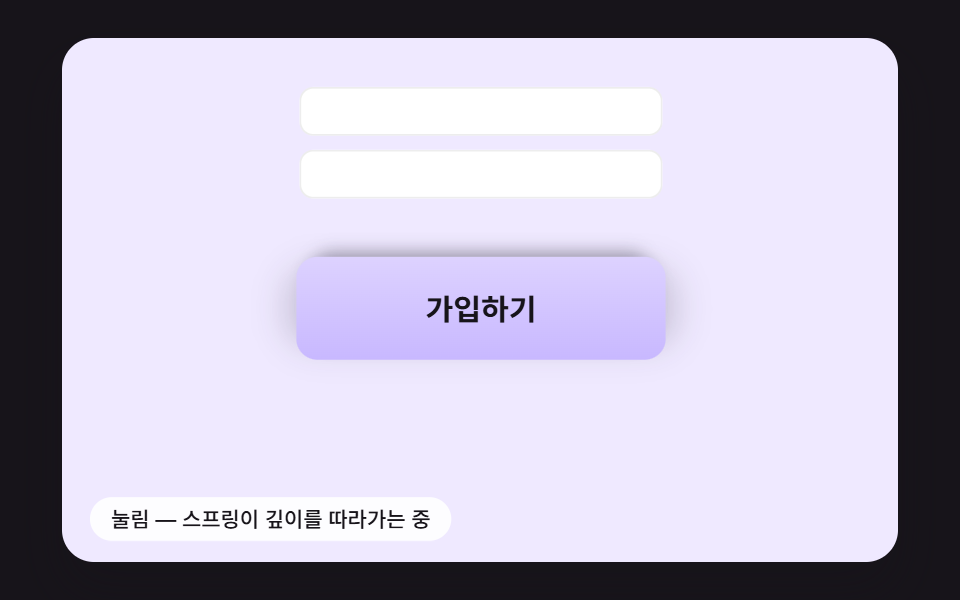
<main class="stage">
<div class="sb is-demo" id="sb">
  <div class="sb__scene" data-role="scene">
    <span class="sp__field sp__field--a" aria-hidden="true"></span>
    <span class="sp__field sp__field--b" aria-hidden="true"></span>
    <canvas class="sb__canvas" data-role="canvas" width="480" height="300" aria-hidden="true"></canvas>
    <button class="sp__send" data-role="send" type="button"><span class="sp__label" data-role="label">Sign up</span></button>
    <p class="sb__status" data-role="status" aria-live="off">Ready to send</p>
  </div>
</div>
</main>
@use "../../../../site/static/demo-tokens" as *;
@include stage($stage-ink);
.sb {
position: relative;
width: min(92vw, calc(160vh - 12.8vw));
aspect-ratio: 480 / 300;
margin: 0 auto;
border-radius: $r-card;
overflow: hidden;
box-shadow: $shadow-raised;
}
// 장면 판 — 480×300 좌표로 짜 두고 스크립트가 상자 폭에 맞춰 scale 한다.
// 기준점이 왼쪽 위 모서리인 이유: 판이 상자 왼쪽 위에 붙어 있어 모서리 기준으로 줄여야 줄인 판이 상자와 겹친다
.sb__scene {
position: absolute;
left: 0;
top: 0;
width: 480px;
height: 300px;
transform-origin: 0 0;
}
.sb__canvas {
position: absolute;
left: 0;
top: 0;
width: 480px;
height: 300px;
pointer-events: none;
}
.sb__status {
position: absolute;
left: $sp-4;
bottom: $sp-3;
box-sizing: border-box;
max-width: 260px;
margin: 0;
padding: $sp-1 $sp-3;
border-radius: $r-pill;
background: rgba(255, 255, 255, .9);
color: $subject-ink;
font-weight: 500;
font-size: 12px;
line-height: 1.4;
pointer-events: none;
}
.sb__status--top {
top: $sp-3;
bottom: auto;
}
.sb__status--side {
max-width: 140px;
border-radius: $r-control;
}
.sb { background: #efe9ff; }
.sp__field {
position: absolute;
left: 136px;
width: 208px;
height: 28px;
border-radius: $r-sm;
background: #ffffff;
box-shadow: inset 0 0 0 1px rgba(23, 20, 26, .08);
}
.sp__field--a { top: 28px; }
.sp__field--b { top: 64px; }
// 버튼 자리 = 스크립트의 BTN_CX 240 · BTN_CY 142 · 208×60. 그림자는 그 아래 캔버스가 그린다
.sp__send {
position: absolute;
left: 136px;
top: 112px;
width: 208px;
height: 60px;
margin: 0;
padding: 0;
border: 0;
border-radius: $r-control;
background: linear-gradient(180deg, #ddd2ff, #c8b8ff);
color: $subject-ink;
font: inherit;
font-weight: 700;
font-size: 17px;
line-height: 1;
cursor: pointer;
touch-action: manipulation;
}
.sp__send:focus-visible {
outline: 3px solid $subject-ink;
outline-offset: 3px;
}
@media (max-width: 340px) {
// 이 폭에서는 장면이 0.6 배 남짓으로 줄어든다 — 상태 줄 글자를 키워 줄인 뒤에도 읽히게 한다
.sb__status { font-size: 16px; }
}
@media (prefers-reduced-motion: reduce) {
// 움직임은 전부 스크립트가 그리고, 스크립트는 reduce 에서 루프를 돌리지 않고 결과 상태만 둔다. CSS 쪽 전환도 막아 둔다
.sb__scene * {
transition: none !important;
animation: none !important;
}
}html, body {
margin: 0;
overflow: hidden;
}
.stage {
box-sizing: border-box;
min-height: 100vh;
display: grid;
place-items: center;
margin: 0;
background: #17141a;
font-family: -apple-system, "Segoe UI", "Noto Sans KR", sans-serif;
padding: clamp(8px, 4vw, 24px);
}
.sb {
position: relative;
width: min(92vw, 160vh - 12.8vw);
aspect-ratio: 480/300;
margin: 0 auto;
border-radius: 16px;
overflow: hidden;
box-shadow: 0 14px 24px rgba(23, 20, 26, 0.32);
}
.sb__scene {
position: absolute;
left: 0;
top: 0;
width: 480px;
height: 300px;
transform-origin: 0 0;
}
.sb__canvas {
position: absolute;
left: 0;
top: 0;
width: 480px;
height: 300px;
pointer-events: none;
}
.sb__status {
position: absolute;
left: 16px;
bottom: 12px;
box-sizing: border-box;
max-width: 260px;
margin: 0;
padding: 4px 12px;
border-radius: 999px;
background: rgba(255, 255, 255, 0.9);
color: #17141a;
font-weight: 500;
font-size: 12px;
line-height: 1.4;
pointer-events: none;
}
.sb__status--top {
top: 12px;
bottom: auto;
}
.sb__status--side {
max-width: 140px;
border-radius: 12px;
}
.sb {
background: #efe9ff;
}
.sp__field {
position: absolute;
left: 136px;
width: 208px;
height: 28px;
border-radius: 8px;
background: #ffffff;
box-shadow: inset 0 0 0 1px rgba(23, 20, 26, 0.08);
}
.sp__field--a {
top: 28px;
}
.sp__field--b {
top: 64px;
}
.sp__send {
position: absolute;
left: 136px;
top: 112px;
width: 208px;
height: 60px;
margin: 0;
padding: 0;
border: 0;
border-radius: 12px;
background: linear-gradient(180deg, #ddd2ff, #c8b8ff);
color: #17141a;
font: inherit;
font-weight: 700;
font-size: 17px;
line-height: 1;
cursor: pointer;
touch-action: manipulation;
}
.sp__send:focus-visible {
outline: 3px solid #17141a;
outline-offset: 3px;
}
@media (max-width: 340px) {
.sb__status {
font-size: 16px;
}
}
@media (prefers-reduced-motion: reduce) {
.sb__scene * {
transition: none !important;
animation: none !important;
}
}(function () {
const root = document.getElementById("sb");
if (!root) return;
const W = 480;
const H = 300;
const FIXED_DT = 16;
// 파스텔 팔레트 — 캔버스와 스크립트가 칠하는 색은 여기서만 고른다 (scss 쪽 색은 demo-tokens)
const INK = [38, 33, 52];
const PAPER = [255, 252, 246];
const CREAM = [255, 243, 224];
const SKY = [158, 208, 255];
const LILAC = [200, 184, 255];
const MINT = [156, 228, 204];
const PINK = [255, 182, 204];
const PEACH = [255, 214, 184];
function clamp(v, lo, hi) { return v < lo ? lo : (v > hi ? hi : v); }
function lerp(a, b, t) { return a + (b - a) * t; }
function easeOut(x) { const c = clamp(x, 0, 1); return 1 - Math.pow(1 - c, 3); }
function easeInOut(x) {
const c = clamp(x, 0, 1);
return c < 0.5 ? 4 * c * c * c : 1 - Math.pow(-2 * c + 2, 3) / 2;
}
function rgba(c, a) {
return 'rgba(' + Math.round(c[0]) + ',' + Math.round(c[1]) + ',' + Math.round(c[2]) + ',' + clamp(a, 0, 1).toFixed(3) + ')';
}
function mix(a, b, t) { return [lerp(a[0], b[0], t), lerp(a[1], b[1], t), lerp(a[2], b[2], t)]; }
// 시드 고정 난수 — 같은 시드면 같은 값이 다시 나온다 (32비트 정수 섞기)
function makeRng(seed) {
let s = seed >>> 0;
return function () {
s = (s + 0x6d2b79f5) >>> 0;
let t = s;
t = Math.imul(t ^ (t >>> 15), t | 1);
t ^= t + Math.imul(t ^ (t >>> 7), t | 61);
return ((t ^ (t >>> 14)) >>> 0) / 4294967296;
};
}
const sceneEl = root.querySelector('[data-role="scene"]');
const statusEl = root.querySelector('[data-role="status"]');
if (!sceneEl || !statusEl) {
return;
}
const scene = sceneEl;
const status = statusEl;
const reduceQuery = window.matchMedia('(prefers-reduced-motion: reduce)');
const still = reduceQuery.matches;
const resizeHooks = [];
// 자동 시연 중인가 — 사람이 처음 만지는 순간 시연을 멈추고 처음 상태로 돌린 뒤 상태 줄을 읽어 주기 시작한다
let demo = root.classList.contains('is-demo');
function wake() {
if (!demo) {
return;
}
demo = false;
root.classList.remove('is-demo');
status.setAttribute('aria-live', 'polite');
resetIdle();
}
function say(text) {
if (status.textContent !== text) {
status.textContent = text;
}
}
// 장면 배율 — 480×300 좌표로 짠 판을 상자 폭에 맞춰 통째로 줄인다
let k = 1;
function fitScene() {
const w = root.clientWidth;
k = w > 0 ? w / W : 1;
scene.style.transform = 'scale(' + k.toFixed(4) + ')';
}
// 화면 좌표(CSS px) → 장면 좌표(480×300). 줄인 배율 k 로 나눠야 판 안의 위치가 된다
function toScene(clientX, clientY) {
const r = root.getBoundingClientRect();
return [(clientX - r.left) / k, (clientY - r.top) / k];
}
// 캡처 단계에서 듣는다 — 버튼 자신의 pointerdown 보다 먼저 시연을 끝내야 사람의 첫 누름이 처음 상태에서 시작한다
root.addEventListener('pointerdown', wake, true);
root.addEventListener('keydown', wake, true);
const canvasEl = root.querySelector('[data-role="canvas"]');
const ctxRaw = canvasEl ? canvasEl.getContext('2d') : null;
if (!canvasEl || !ctxRaw) {
return;
}
const cv = canvasEl;
const ctx = ctxRaw;
let dprNow = 1;
function fitCanvas() {
// 배율은 2 에서 자른다 — 배율 3 기기에서 화소가 2.25배로 늘어 프레임마다 일이 그만큼 커지지 않게
const dpr = Math.min(window.devicePixelRatio || 1, 2);
dprNow = dpr;
cv.width = Math.round(W * dpr);
cv.height = Math.round(H * dpr);
ctx.setTransform(dpr, 0, 0, dpr, 0, 0);
}
fitCanvas();
resizeHooks.push(fitCanvas);
// 감쇠 스프링 한 걸음 — 질량 1, 강성 stiff, 감쇠비 zeta. 속도를 먼저 바꾸고 그 속도로 위치를 옮긴다(반암시적 오일러)
function springStep(s, stiff, zeta, dtMs) {
const dt = dtMs / 1000;
const c = 2 * zeta * Math.sqrt(stiff);
const a = -stiff * (s.x - s.target) - c * s.v;
s.v += a * dt;
s.x += s.v * dt;
}
// 버튼 자리(장면 px) — scss 의 .sp__send 위치·크기와 같은 값
const BTN_CX = 240;
const BTN_CY = 142;
const BTN_W = 208;
const BTN_H = 60;
// 감쇠 스프링 강성(1/s²) — 고유 각진동수 √520 ≈ 22.8 rad/s
const SPRING_K = 520;
// 감쇠비 — 1 이면 넘치지 않고 멈추고, 낮출수록 더 넘치고 더 오래 출렁인다
const SPRING_DAMP = 0.45;
// 쉴 때 버튼 면이 바닥에서 떠 있는 높이(px). 그림자 거리·흐림·진하기가 이 높이에서 다시 계산된다
const SHADOW_LIFT_PX = 16;
// 누르면 목표 깊이가 이만큼(px) 내려간다
const PRESS_DEPTH = 12;
const HOLD_MS = 180;
const DEMO_CYCLE = 1300;
const TXT_IDLE = 'Sign up';
const TXT_SENT = 'Signed up';
const TXT_READY = 'Ready to send';
const TXT_DOWN = 'Pressed — the spring is chasing the depth';
const TXT_DONE = 'Sent — sign-up received';
const sendEl = root.querySelector('[data-role="send"]');
const labelEl = root.querySelector('[data-role="label"]');
if (!sendEl || !labelEl) {
return;
}
const send = sendEl;
const label = labelEl;
// x = 눌린 깊이(px, 아래가 +). 목표만 바꾸고 위치는 스프링이 프레임마다 따라간다
const depth = { x: 0, v: 0, target: 0 };
let down = false;
let demoNext = 200;
let releaseAt = -1;
// 그림자 세 값 — 면의 높이 h(px)에 비례한다. 높을수록 멀리·흐리게·옅게
function shadowOffset(h) { return 2 + h * 0.85; }
function shadowBlur(h) { return 4 + h * 1.6; }
function shadowAlpha(h) { return clamp(0.42 - h * 0.012, 0.12, 0.42); }
function pressDown() {
if (down) {
return;
}
down = true;
depth.target = PRESS_DEPTH;
if (still) {
depth.x = PRESS_DEPTH;
depth.v = 0;
}
say(TXT_DOWN);
}
function release() {
if (!down) {
return;
}
down = false;
depth.target = 0;
if (still) {
depth.x = 0;
depth.v = 0;
}
}
function submit() {
label.textContent = TXT_SENT;
say(TXT_DONE);
}
function resetIdle() {
down = false;
releaseAt = -1;
depth.x = 0;
depth.v = 0;
depth.target = 0;
label.textContent = TXT_IDLE;
say(TXT_READY);
}
function settle() {
resetIdle();
submit();
}
function step() {
if (still) {
return;
}
springStep(depth, SPRING_K, SPRING_DAMP, FIXED_DT);
}
function demoTick(t) {
if (releaseAt >= 0 && t >= releaseAt) {
releaseAt = -1;
release();
submit();
}
if (t < demoNext) {
return;
}
demoNext += DEMO_CYCLE;
resetIdle();
pressDown();
releaseAt = t + HOLD_MS;
}
function draw() {
const h = SHADOW_LIFT_PX - depth.x;
// 빠르게 움직이는 동안만 세로로 살짝 늘고 줄어든다 — 가로는 넓이를 지키게 역수
const sy = 1 - clamp(depth.v * 0.00018, -0.05, 0.05);
send.style.transform = 'translateY(' + depth.x.toFixed(2) + 'px) scale(' + (1 / sy).toFixed(4) + ',' + sy.toFixed(4) + ')';
ctx.clearRect(0, 0, W, H);
const off = 1000;
ctx.save();
// 그림자만 남기는 꼼수 — 판 밖(왼쪽 1000px)에 그린 사각형의 그림자를 제자리로 옮겨 온다. shadow 값은 기기 화소 단위라 배율을 곱한다
ctx.shadowColor = rgba(INK, shadowAlpha(h));
ctx.shadowBlur = shadowBlur(h) * dprNow;
ctx.shadowOffsetX = off * dprNow;
ctx.shadowOffsetY = shadowOffset(h) * dprNow;
ctx.fillStyle = rgba(INK, 1);
const w = BTN_W - 12 + h * 0.4;
const y = BTN_CY - BTN_H / 2 + 6;
ctx.beginPath();
ctx.roundRect(BTN_CX - w / 2 - off, y, w, BTN_H - 8, 14);
ctx.fill();
// 둘째 겹 = 넓게 퍼지는 주변 그림자. 같은 높이 h 에서 거리 4 + 1.4h · 흐림 8 + 3h 로 — 높이가 바뀌면 바닥 넓은 면의 톤이 함께 바뀐다
ctx.shadowColor = rgba(INK, 0.16);
ctx.shadowBlur = (8 + h * 3) * dprNow;
ctx.shadowOffsetY = (4 + h * 1.4) * dprNow;
ctx.beginPath();
ctx.roundRect(BTN_CX - (w + 30) / 2 - off, y + 4, w + 30, BTN_H - 12, 18);
ctx.fill();
ctx.restore();
}
send.addEventListener('pointerdown', function () { pressDown(); });
send.addEventListener('pointerup', function () { release(); });
send.addEventListener('pointerleave', function () { release(); });
send.addEventListener('pointercancel', function () { release(); });
send.addEventListener('keydown', function (ev) {
if ((ev.key === ' ' || ev.key === 'Enter') && !ev.repeat) {
pressDown();
}
});
send.addEventListener('keyup', function (ev) {
if (ev.key === ' ' || ev.key === 'Enter') {
release();
}
});
send.addEventListener('click', function () { submit(); });
resetIdle();
let rafId = 0;
let lastTs = -1;
let acc = 0;
let clock = 0;
function onResize() {
fitScene();
for (const f of resizeHooks) {
f();
}
draw();
}
fitScene();
window.addEventListener('resize', onResize);
function frame(ts) {
if (lastTs < 0) {
lastTs = ts;
}
// 탭이 숨었다 돌아와도 한 번에 100ms 까지만 따라잡는다 — 순간이동 대신 이어서 움직인다
acc += Math.min(ts - lastTs, 100);
lastTs = ts;
let n = 0;
while (acc >= FIXED_DT && n < 6) {
clock += FIXED_DT;
if (demo) {
demoTick(clock);
}
step();
acc -= FIXED_DT;
n += 1;
}
draw();
rafId = window.requestAnimationFrame(frame);
}
if (still) {
settle();
draw();
}
else {
rafId = window.requestAnimationFrame(frame);
}
return function () {
window.cancelAnimationFrame(rafId);
window.removeEventListener('resize', onResize);
};
})();// SendSpringPressShadow - vanilla 판(02-send-btn-spring-press-shadow) 의 React 포트. 같은 계산을 useEffect 안에서 돌린다.
import { useEffect, useRef } from "react";
import styles from "./SendSpringPressShadow.module.scss";
const cx = (s: string): string => s.split(" ").map((n) => styles[n] ?? n).join(" ");
export default function SendSpringPressShadow() {
const rootRef = useRef<HTMLDivElement | null>(null);
useEffect(() => {
const rootEl = rootRef.current;
if (!rootEl) return;
const root: HTMLElement = rootEl;
type RGB = [number, number, number];
const W = 480;
const H = 300;
const FIXED_DT = 16;
// 파스텔 팔레트 — 캔버스와 스크립트가 칠하는 색은 여기서만 고른다 (scss 쪽 색은 demo-tokens)
const INK: RGB = [38, 33, 52];
const PAPER: RGB = [255, 252, 246];
const CREAM: RGB = [255, 243, 224];
const SKY: RGB = [158, 208, 255];
const LILAC: RGB = [200, 184, 255];
const MINT: RGB = [156, 228, 204];
const PINK: RGB = [255, 182, 204];
const PEACH: RGB = [255, 214, 184];
function clamp(v: number, lo: number, hi: number): number { return v < lo ? lo : (v > hi ? hi : v); }
function lerp(a: number, b: number, t: number): number { return a + (b - a) * t; }
function easeOut(x: number): number { const c = clamp(x, 0, 1); return 1 - Math.pow(1 - c, 3); }
function easeInOut(x: number): number {
const c = clamp(x, 0, 1);
return c < 0.5 ? 4 * c * c * c : 1 - Math.pow(-2 * c + 2, 3) / 2;
}
function rgba(c: RGB, a: number): string {
return 'rgba(' + Math.round(c[0]) + ',' + Math.round(c[1]) + ',' + Math.round(c[2]) + ',' + clamp(a, 0, 1).toFixed(3) + ')';
}
function mix(a: RGB, b: RGB, t: number): RGB { return [lerp(a[0], b[0], t), lerp(a[1], b[1], t), lerp(a[2], b[2], t)]; }
// 시드 고정 난수 — 같은 시드면 같은 값이 다시 나온다 (32비트 정수 섞기)
function makeRng(seed: number): () => number {
let s = seed >>> 0;
return function (): number {
s = (s + 0x6d2b79f5) >>> 0;
let t = s;
t = Math.imul(t ^ (t >>> 15), t | 1);
t ^= t + Math.imul(t ^ (t >>> 7), t | 61);
return ((t ^ (t >>> 14)) >>> 0) / 4294967296;
};
}
const sceneEl = root.querySelector('[data-role="scene"]') as HTMLElement | null;
const statusEl = root.querySelector('[data-role="status"]') as HTMLElement | null;
if (!sceneEl || !statusEl) { return; }
const scene: HTMLElement = sceneEl;
const status: HTMLElement = statusEl;
const reduceQuery = window.matchMedia('(prefers-reduced-motion: reduce)');
const still = reduceQuery.matches;
const resizeHooks: Array<() => void> = [];
// 자동 시연 중인가 — 사람이 처음 만지는 순간 시연을 멈추고 처음 상태로 돌린 뒤 상태 줄을 읽어 주기 시작한다
let demo = root.classList.contains('is-demo');
function wake(): void {
if (!demo) { return; }
demo = false;
root.classList.remove('is-demo');
status.setAttribute('aria-live', 'polite');
resetIdle();
}
function say(text: string): void {
if (status.textContent !== text) { status.textContent = text; }
}
// 장면 배율 — 480×300 좌표로 짠 판을 상자 폭에 맞춰 통째로 줄인다
let k = 1;
function fitScene(): void {
const w = root.clientWidth;
k = w > 0 ? w / W : 1;
scene.style.transform = 'scale(' + k.toFixed(4) + ')';
}
// 화면 좌표(CSS px) → 장면 좌표(480×300). 줄인 배율 k 로 나눠야 판 안의 위치가 된다
function toScene(clientX: number, clientY: number): [number, number] {
const r = root.getBoundingClientRect();
return [(clientX - r.left) / k, (clientY - r.top) / k];
}
// 캡처 단계에서 듣는다 — 버튼 자신의 pointerdown 보다 먼저 시연을 끝내야 사람의 첫 누름이 처음 상태에서 시작한다
root.addEventListener('pointerdown', wake, true);
root.addEventListener('keydown', wake, true);
const canvasEl = root.querySelector('[data-role="canvas"]') as HTMLCanvasElement | null;
const ctxRaw = canvasEl ? canvasEl.getContext('2d') : null;
if (!canvasEl || !ctxRaw) { return; }
const cv: HTMLCanvasElement = canvasEl;
const ctx: CanvasRenderingContext2D = ctxRaw;
let dprNow = 1;
function fitCanvas(): void {
// 배율은 2 에서 자른다 — 배율 3 기기에서 화소가 2.25배로 늘어 프레임마다 일이 그만큼 커지지 않게
const dpr = Math.min(window.devicePixelRatio || 1, 2);
dprNow = dpr;
cv.width = Math.round(W * dpr);
cv.height = Math.round(H * dpr);
ctx.setTransform(dpr, 0, 0, dpr, 0, 0);
}
fitCanvas();
resizeHooks.push(fitCanvas);
type Spring = { x: number; v: number; target: number };
// 감쇠 스프링 한 걸음 — 질량 1, 강성 stiff, 감쇠비 zeta. 속도를 먼저 바꾸고 그 속도로 위치를 옮긴다(반암시적 오일러)
function springStep(s: Spring, stiff: number, zeta: number, dtMs: number): void {
const dt = dtMs / 1000;
const c = 2 * zeta * Math.sqrt(stiff);
const a = -stiff * (s.x - s.target) - c * s.v;
s.v += a * dt;
s.x += s.v * dt;
}
// 버튼 자리(장면 px) — scss 의 .sp__send 위치·크기와 같은 값
const BTN_CX = 240;
const BTN_CY = 142;
const BTN_W = 208;
const BTN_H = 60;
// 감쇠 스프링 강성(1/s²) — 고유 각진동수 √520 ≈ 22.8 rad/s
const SPRING_K = 520;
// 감쇠비 — 1 이면 넘치지 않고 멈추고, 낮출수록 더 넘치고 더 오래 출렁인다
const SPRING_DAMP = 0.45;
// 쉴 때 버튼 면이 바닥에서 떠 있는 높이(px). 그림자 거리·흐림·진하기가 이 높이에서 다시 계산된다
const SHADOW_LIFT_PX = 16;
// 누르면 목표 깊이가 이만큼(px) 내려간다
const PRESS_DEPTH = 12;
const HOLD_MS = 180;
const DEMO_CYCLE = 1300;
const TXT_IDLE = '가입하기';
const TXT_SENT = '신청 완료';
const TXT_READY = '보낼 준비 됨';
const TXT_DOWN = '눌림 — 스프링이 깊이를 따라가는 중';
const TXT_DONE = '보냄 — 가입 신청을 받았어요';
const sendEl = root.querySelector('[data-role="send"]') as HTMLButtonElement | null;
const labelEl = root.querySelector('[data-role="label"]') as HTMLElement | null;
if (!sendEl || !labelEl) { return; }
const send: HTMLButtonElement = sendEl;
const label: HTMLElement = labelEl;
// x = 눌린 깊이(px, 아래가 +). 목표만 바꾸고 위치는 스프링이 프레임마다 따라간다
const depth: Spring = { x: 0, v: 0, target: 0 };
let down = false;
let demoNext = 200;
let releaseAt = -1;
// 그림자 세 값 — 면의 높이 h(px)에 비례한다. 높을수록 멀리·흐리게·옅게
function shadowOffset(h: number): number { return 2 + h * 0.85; }
function shadowBlur(h: number): number { return 4 + h * 1.6; }
function shadowAlpha(h: number): number { return clamp(0.42 - h * 0.012, 0.12, 0.42); }
function pressDown(): void {
if (down) { return; }
down = true;
depth.target = PRESS_DEPTH;
if (still) { depth.x = PRESS_DEPTH; depth.v = 0; }
say(TXT_DOWN);
}
function release(): void {
if (!down) { return; }
down = false;
depth.target = 0;
if (still) { depth.x = 0; depth.v = 0; }
}
function submit(): void {
label.textContent = TXT_SENT;
say(TXT_DONE);
}
function resetIdle(): void {
down = false;
releaseAt = -1;
depth.x = 0;
depth.v = 0;
depth.target = 0;
label.textContent = TXT_IDLE;
say(TXT_READY);
}
function settle(): void {
resetIdle();
submit();
}
function step(): void {
if (still) { return; }
springStep(depth, SPRING_K, SPRING_DAMP, FIXED_DT);
}
function demoTick(t: number): void {
if (releaseAt >= 0 && t >= releaseAt) {
releaseAt = -1;
release();
submit();
}
if (t < demoNext) { return; }
demoNext += DEMO_CYCLE;
resetIdle();
pressDown();
releaseAt = t + HOLD_MS;
}
function draw(): void {
const h = SHADOW_LIFT_PX - depth.x;
// 빠르게 움직이는 동안만 세로로 살짝 늘고 줄어든다 — 가로는 넓이를 지키게 역수
const sy = 1 - clamp(depth.v * 0.00018, -0.05, 0.05);
send.style.transform = 'translateY(' + depth.x.toFixed(2) + 'px) scale(' + (1 / sy).toFixed(4) + ',' + sy.toFixed(4) + ')';
ctx.clearRect(0, 0, W, H);
const off = 1000;
ctx.save();
// 그림자만 남기는 꼼수 — 판 밖(왼쪽 1000px)에 그린 사각형의 그림자를 제자리로 옮겨 온다. shadow 값은 기기 화소 단위라 배율을 곱한다
ctx.shadowColor = rgba(INK, shadowAlpha(h));
ctx.shadowBlur = shadowBlur(h) * dprNow;
ctx.shadowOffsetX = off * dprNow;
ctx.shadowOffsetY = shadowOffset(h) * dprNow;
ctx.fillStyle = rgba(INK, 1);
const w = BTN_W - 12 + h * 0.4;
const y = BTN_CY - BTN_H / 2 + 6;
ctx.beginPath();
ctx.roundRect(BTN_CX - w / 2 - off, y, w, BTN_H - 8, 14);
ctx.fill();
// 둘째 겹 = 넓게 퍼지는 주변 그림자. 같은 높이 h 에서 거리 4 + 1.4h · 흐림 8 + 3h 로 — 높이가 바뀌면 바닥 넓은 면의 톤이 함께 바뀐다
ctx.shadowColor = rgba(INK, 0.16);
ctx.shadowBlur = (8 + h * 3) * dprNow;
ctx.shadowOffsetY = (4 + h * 1.4) * dprNow;
ctx.beginPath();
ctx.roundRect(BTN_CX - (w + 30) / 2 - off, y + 4, w + 30, BTN_H - 12, 18);
ctx.fill();
ctx.restore();
}
send.addEventListener('pointerdown', function (): void { pressDown(); });
send.addEventListener('pointerup', function (): void { release(); });
send.addEventListener('pointerleave', function (): void { release(); });
send.addEventListener('pointercancel', function (): void { release(); });
send.addEventListener('keydown', function (ev: KeyboardEvent): void {
if ((ev.key === ' ' || ev.key === 'Enter') && !ev.repeat) { pressDown(); }
});
send.addEventListener('keyup', function (ev: KeyboardEvent): void {
if (ev.key === ' ' || ev.key === 'Enter') { release(); }
});
send.addEventListener('click', function (): void { submit(); });
resetIdle();
let rafId = 0;
let lastTs = -1;
let acc = 0;
let clock = 0;
function onResize(): void {
fitScene();
for (const f of resizeHooks) { f(); }
draw();
}
fitScene();
window.addEventListener('resize', onResize);
function frame(ts: number): void {
if (lastTs < 0) { lastTs = ts; }
// 탭이 숨었다 돌아와도 한 번에 100ms 까지만 따라잡는다 — 순간이동 대신 이어서 움직인다
acc += Math.min(ts - lastTs, 100);
lastTs = ts;
let n = 0;
while (acc >= FIXED_DT && n < 6) {
clock += FIXED_DT;
if (demo) { demoTick(clock); }
step();
acc -= FIXED_DT;
n += 1;
}
draw();
rafId = window.requestAnimationFrame(frame);
}
if (still) {
settle();
draw();
} else {
rafId = window.requestAnimationFrame(frame);
}
return function (): void {
window.cancelAnimationFrame(rafId);
window.removeEventListener('resize', onResize);
};
}, []);
return (
<div className={cx("sb") + " is-demo"} ref={rootRef}>
<div className={cx("sb__scene")} data-role="scene">
<span className={cx("sp__field sp__field--a")} aria-hidden="true"></span>
<span className={cx("sp__field sp__field--b")} aria-hidden="true"></span>
<canvas className={cx("sb__canvas")} data-role="canvas" width={480} height={300} aria-hidden="true"></canvas>
<button className={cx("sp__send")} data-role="send" type="button"><span className={cx("sp__label")} data-role="label">가입하기</span></button>
<p className={cx("sb__status")} data-role="status" aria-live="off">보낼 준비 됨</p>
</div>
</div>
);
}02 A Submit Button That Springs Back While Its Shadow Tracks the Height — Measured area 9.168% · moving frames 13/23Original by GODRICH · SCSS and React ship in the zip · Send Button Animation CSS: 9 Fold-and-Fly Buttons
The post this demo lives in
 Send Button Animation CSS: 9 Fold-and-Fly ButtonsA send button should show that something left — 01 folds into a paper plane that banks along a curve, 02 springs back as See all demos in this post
If you like this effect - similar demos
 Buttons01 An Arrow That Sinks and Springs BackCSS Download Button: 9 Demos With Springs and Arcs
 Buttons01 Press-value overshoot — the pressed value passes its target value and swings back, repeating while the swing shrinksButton Press Animation UI: 9 Calculation Patterns
 Buttons01 Accordion-reveal value toggle — when the button's open value changes, its rounding and shadow values change along, presenting the content belowExpanding Button UI: 9 Shape-Morph Patterns