05A Mail Send Button That Becomes an Envelope, Folds Its Flap and Seals
It rotates the triangular flap around its top edge and shrinks its height with perspective projection, swaps the front and back faces the moment it passes 90 degrees, then pops the seal sticker on with a spring.
Best forEmail sends and inquiry received screens
FLAP_DEGFLAP_MSSEAL_POP
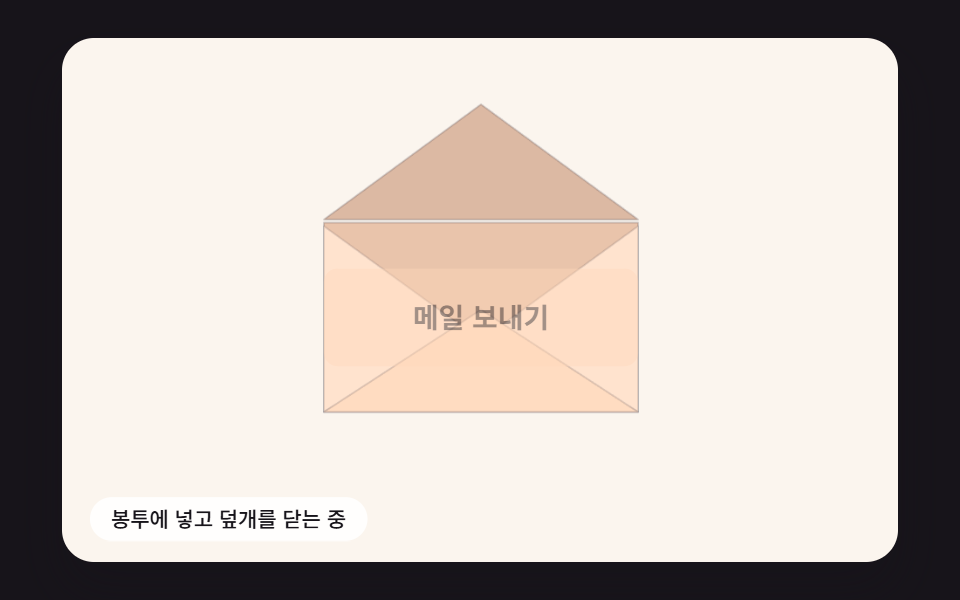
<main class="stage">
<div class="sb is-demo" id="sb">
  <div class="sb__scene" data-role="scene">
    <canvas class="sb__canvas" data-role="canvas" width="480" height="300" aria-hidden="true"></canvas>
    <button class="ev__send" data-role="send" type="button"><span class="ev__label" data-role="label">Send email</span></button>
    <p class="sb__status" data-role="status" aria-live="off">Ready to send</p>
  </div>
</div>
</main>
@use "../../../../site/static/demo-tokens" as *;
@include stage($stage-ink);
.sb {
position: relative;
width: min(92vw, calc(160vh - 12.8vw));
aspect-ratio: 480 / 300;
margin: 0 auto;
border-radius: $r-card;
overflow: hidden;
box-shadow: $shadow-raised;
}
// 장면 판 — 480×300 좌표로 짜 두고 스크립트가 상자 폭에 맞춰 scale 한다.
// 기준점이 왼쪽 위 모서리인 이유: 판이 상자 왼쪽 위에 붙어 있어 모서리 기준으로 줄여야 줄인 판이 상자와 겹친다
.sb__scene {
position: absolute;
left: 0;
top: 0;
width: 480px;
height: 300px;
transform-origin: 0 0;
}
.sb__canvas {
position: absolute;
left: 0;
top: 0;
width: 480px;
height: 300px;
pointer-events: none;
}
.sb__status {
position: absolute;
left: $sp-4;
bottom: $sp-3;
box-sizing: border-box;
max-width: 260px;
margin: 0;
padding: $sp-1 $sp-3;
border-radius: $r-pill;
background: rgba(255, 255, 255, .9);
color: $subject-ink;
font-weight: 500;
font-size: 12px;
line-height: 1.4;
pointer-events: none;
}
.sb__status--top {
top: $sp-3;
bottom: auto;
}
.sb__status--side {
max-width: 140px;
border-radius: $r-control;
}
.sb { background: #fbf5ee; }
// 버튼 자리 = 봉투 가운데 (ECX 240, ECY 160) · 180×56 — 누르면 같은 너비의 봉투로 늘어난다
.ev__send {
position: absolute;
left: 150px;
top: 132px;
width: 180px;
height: 56px;
margin: 0;
padding: 0;
border: 0;
border-radius: $r-sm;
background: #ffd6b8;
color: $subject-ink;
font: inherit;
font-weight: 700;
font-size: 16px;
line-height: 1;
cursor: pointer;
}
.ev__send.is-sent { background: #b4ecd9; }
.ev__send:focus-visible {
outline: 3px solid $subject-ink;
outline-offset: 3px;
}
@media (max-width: 340px) {
// 이 폭에서는 장면이 0.6 배 남짓으로 줄어든다 — 상태 줄 글자를 키워 줄인 뒤에도 읽히게 한다
.sb__status { font-size: 16px; }
}
@media (prefers-reduced-motion: reduce) {
// 움직임은 전부 스크립트가 그리고, 스크립트는 reduce 에서 루프를 돌리지 않고 결과 상태만 둔다. CSS 쪽 전환도 막아 둔다
.sb__scene * {
transition: none !important;
animation: none !important;
}
}html, body {
margin: 0;
overflow: hidden;
}
.stage {
box-sizing: border-box;
min-height: 100vh;
display: grid;
place-items: center;
margin: 0;
background: #17141a;
font-family: -apple-system, "Segoe UI", "Noto Sans KR", sans-serif;
padding: clamp(8px, 4vw, 24px);
}
.sb {
position: relative;
width: min(92vw, 160vh - 12.8vw);
aspect-ratio: 480/300;
margin: 0 auto;
border-radius: 16px;
overflow: hidden;
box-shadow: 0 14px 24px rgba(23, 20, 26, 0.32);
}
.sb__scene {
position: absolute;
left: 0;
top: 0;
width: 480px;
height: 300px;
transform-origin: 0 0;
}
.sb__canvas {
position: absolute;
left: 0;
top: 0;
width: 480px;
height: 300px;
pointer-events: none;
}
.sb__status {
position: absolute;
left: 16px;
bottom: 12px;
box-sizing: border-box;
max-width: 260px;
margin: 0;
padding: 4px 12px;
border-radius: 999px;
background: rgba(255, 255, 255, 0.9);
color: #17141a;
font-weight: 500;
font-size: 12px;
line-height: 1.4;
pointer-events: none;
}
.sb__status--top {
top: 12px;
bottom: auto;
}
.sb__status--side {
max-width: 140px;
border-radius: 12px;
}
.sb {
background: #fbf5ee;
}
.ev__send {
position: absolute;
left: 150px;
top: 132px;
width: 180px;
height: 56px;
margin: 0;
padding: 0;
border: 0;
border-radius: 8px;
background: #ffd6b8;
color: #17141a;
font: inherit;
font-weight: 700;
font-size: 16px;
line-height: 1;
cursor: pointer;
}
.ev__send.is-sent {
background: #b4ecd9;
}
.ev__send:focus-visible {
outline: 3px solid #17141a;
outline-offset: 3px;
}
@media (max-width: 340px) {
.sb__status {
font-size: 16px;
}
}
@media (prefers-reduced-motion: reduce) {
.sb__scene * {
transition: none !important;
animation: none !important;
}
}(function () {
const root = document.getElementById("sb");
if (!root) return;
const W = 480;
const H = 300;
const FIXED_DT = 16;
// 파스텔 팔레트 — 캔버스와 스크립트가 칠하는 색은 여기서만 고른다 (scss 쪽 색은 demo-tokens)
const INK = [38, 33, 52];
const PAPER = [255, 252, 246];
const CREAM = [255, 243, 224];
const SKY = [158, 208, 255];
const LILAC = [200, 184, 255];
const MINT = [156, 228, 204];
const PINK = [255, 182, 204];
const PEACH = [255, 214, 184];
function clamp(v, lo, hi) { return v < lo ? lo : (v > hi ? hi : v); }
function lerp(a, b, t) { return a + (b - a) * t; }
function easeOut(x) { const c = clamp(x, 0, 1); return 1 - Math.pow(1 - c, 3); }
function easeInOut(x) {
const c = clamp(x, 0, 1);
return c < 0.5 ? 4 * c * c * c : 1 - Math.pow(-2 * c + 2, 3) / 2;
}
function rgba(c, a) {
return 'rgba(' + Math.round(c[0]) + ',' + Math.round(c[1]) + ',' + Math.round(c[2]) + ',' + clamp(a, 0, 1).toFixed(3) + ')';
}
function mix(a, b, t) { return [lerp(a[0], b[0], t), lerp(a[1], b[1], t), lerp(a[2], b[2], t)]; }
// 시드 고정 난수 — 같은 시드면 같은 값이 다시 나온다 (32비트 정수 섞기)
function makeRng(seed) {
let s = seed >>> 0;
return function () {
s = (s + 0x6d2b79f5) >>> 0;
let t = s;
t = Math.imul(t ^ (t >>> 15), t | 1);
t ^= t + Math.imul(t ^ (t >>> 7), t | 61);
return ((t ^ (t >>> 14)) >>> 0) / 4294967296;
};
}
const sceneEl = root.querySelector('[data-role="scene"]');
const statusEl = root.querySelector('[data-role="status"]');
if (!sceneEl || !statusEl) {
return;
}
const scene = sceneEl;
const status = statusEl;
const reduceQuery = window.matchMedia('(prefers-reduced-motion: reduce)');
const still = reduceQuery.matches;
const resizeHooks = [];
// 자동 시연 중인가 — 사람이 처음 만지는 순간 시연을 멈추고 처음 상태로 돌린 뒤 상태 줄을 읽어 주기 시작한다
let demo = root.classList.contains('is-demo');
function wake() {
if (!demo) {
return;
}
demo = false;
root.classList.remove('is-demo');
status.setAttribute('aria-live', 'polite');
resetIdle();
}
function say(text) {
if (status.textContent !== text) {
status.textContent = text;
}
}
// 장면 배율 — 480×300 좌표로 짠 판을 상자 폭에 맞춰 통째로 줄인다
let k = 1;
function fitScene() {
const w = root.clientWidth;
k = w > 0 ? w / W : 1;
scene.style.transform = 'scale(' + k.toFixed(4) + ')';
}
// 화면 좌표(CSS px) → 장면 좌표(480×300). 줄인 배율 k 로 나눠야 판 안의 위치가 된다
function toScene(clientX, clientY) {
const r = root.getBoundingClientRect();
return [(clientX - r.left) / k, (clientY - r.top) / k];
}
// 캡처 단계에서 듣는다 — 버튼 자신의 pointerdown 보다 먼저 시연을 끝내야 사람의 첫 누름이 처음 상태에서 시작한다
root.addEventListener('pointerdown', wake, true);
root.addEventListener('keydown', wake, true);
const canvasEl = root.querySelector('[data-role="canvas"]');
const ctxRaw = canvasEl ? canvasEl.getContext('2d') : null;
if (!canvasEl || !ctxRaw) {
return;
}
const cv = canvasEl;
const ctx = ctxRaw;
let dprNow = 1;
function fitCanvas() {
// 배율은 2 에서 자른다 — 배율 3 기기에서 화소가 2.25배로 늘어 프레임마다 일이 그만큼 커지지 않게
const dpr = Math.min(window.devicePixelRatio || 1, 2);
dprNow = dpr;
cv.width = Math.round(W * dpr);
cv.height = Math.round(H * dpr);
ctx.setTransform(dpr, 0, 0, dpr, 0, 0);
}
fitCanvas();
resizeHooks.push(fitCanvas);
// 감쇠 스프링 한 걸음 — 질량 1, 강성 stiff, 감쇠비 zeta. 속도를 먼저 바꾸고 그 속도로 위치를 옮긴다(반암시적 오일러)
function springStep(s, stiff, zeta, dtMs) {
const dt = dtMs / 1000;
const c = 2 * zeta * Math.sqrt(stiff);
const a = -stiff * (s.x - s.target) - c * s.v;
s.v += a * dt;
s.x += s.v * dt;
}
// 봉투(장면 px) — 버튼 180×56 이 같은 너비의 봉투 180×112 로 늘어난다
const EX = 150;
const EY = 104;
const EW = 180;
const EH = 112;
const BTN_H = 56;
const ECX = EX + EW / 2;
const ECY = EY + EH / 2;
// 덮개 회전 각 — 180° 는 위로 활짝 열린 자리, 0° 는 앞면에 닫힌 자리. 윗변이 회전축이다
const FLAP_DEG = 180;
// 덮개가 180° 에서 0° 까지 닫히는 시간
const FLAP_MS = 480;
// 봉인 스티커 스프링에 처음 주는 속도(1/s) — 클수록 크기 1 을 더 넘었다 돌아온다
const SEAL_POP = 12;
const SEAL_K = 420;
const SEAL_ZETA = 0.32;
const FLAP_H = 66;
const FOCAL = 500;
const MORPH_MS = 160;
const LETTER_MS = 360;
const SEAL_MS = 360;
const AWAY_MS = 420;
const BACK_MS = 280;
const DEMO_CYCLE = 3000;
const TXT_IDLE = 'Send email';
const TXT_SENT = 'Sent';
const TXT_READY = 'Ready to send';
const TXT_FOLD = 'Sealing it in the envelope';
const TXT_DONE = 'Sent — we got your email';
const sendEl = root.querySelector('[data-role="send"]');
const labelEl = root.querySelector('[data-role="label"]');
if (!sendEl || !labelEl) {
return;
}
const send = sendEl;
const label = labelEl;
const seal = { x: 0, v: 0, target: 1 };
let phase = 'idle';
let pt = 0;
let demoNext = 200;
function project(p) {
const s = FOCAL / (FOCAL + p[2]);
return [ECX + (p[0] - ECX) * s, ECY + (p[1] - ECY) * s];
}
// 덮개 끝점 — 윗변(y = EY)을 축으로 deg 만큼 세운다. 90° 에서 화면 쪽(z 음수)으로 가장 튀어나온다
function flapTip(deg) {
const a = deg * Math.PI / 180;
return [ECX, EY + FLAP_H * Math.cos(a), -FLAP_H * Math.sin(a)];
}
// 90° 를 넘었는가 — 넘으면 덮개의 안쪽 면이 보이고 몸통 뒤에 그린다
function flapInsideVisible(deg) { return deg > 90; }
function flapDegAt(t) { return FLAP_DEG * (1 - easeInOut(t / FLAP_MS)); }
function poly(pts, fill, line) {
ctx.beginPath();
ctx.moveTo(pts[0][0], pts[0][1]);
for (let i = 1; i < pts.length; i += 1) {
ctx.lineTo(pts[i][0], pts[i][1]);
}
ctx.closePath();
ctx.fillStyle = fill;
ctx.fill();
ctx.strokeStyle = line;
ctx.lineWidth = 1;
ctx.lineJoin = 'round';
ctx.stroke();
}
function drawFlap(deg) {
const tip = project(flapTip(deg));
const shade = 0.78 + 0.22 * Math.abs(Math.cos(deg * Math.PI / 180));
const base = flapInsideVisible(deg) ? mix(PEACH, INK, 0.16) : PEACH;
poly([[EX, EY], [EX + EW, EY], tip], rgba(mix(mix(base, INK, 0.3), base, shade), 1), rgba(INK, 0.2));
}
function drawLetter(top) {
ctx.fillStyle = rgba(PAPER, 1);
ctx.fillRect(EX + 12, top, EW - 24, 92);
ctx.fillStyle = rgba(LILAC, 0.9);
ctx.fillRect(EX + 26, top + 16, 72, 6);
ctx.fillStyle = rgba(INK, 0.16);
ctx.fillRect(EX + 26, top + 30, 124, 4);
ctx.fillRect(EX + 26, top + 40, 104, 4);
}
function drawEnvelope(h, letterTop, deg, sealScale) {
const top = ECY - h / 2;
const bottom = ECY + h / 2;
if (flapInsideVisible(deg)) {
drawFlap(deg);
}
poly([[EX, top], [EX + EW, top], [EX + EW, bottom], [EX, bottom]], rgba(mix(PEACH, INK, 0.1), 1), rgba(INK, 0.2));
if (letterTop < 900) {
drawLetter(letterTop);
}
// 앞 주머니 — 양옆 삼각형 두 장 + 아래 삼각형 한 장
const mid = top + h * 0.58;
poly([[EX, top + 2], [ECX - 6, mid], [EX, bottom]], rgba(mix(PEACH, PAPER, 0.35), 1), rgba(INK, 0.14));
poly([[EX + EW, top + 2], [ECX + 6, mid], [EX + EW, bottom]], rgba(mix(PEACH, PAPER, 0.35), 1), rgba(INK, 0.14));
poly([[EX, bottom], [ECX, top + h * 0.46], [EX + EW, bottom]], rgba(mix(PEACH, PAPER, 0.15), 1), rgba(INK, 0.16));
if (!flapInsideVisible(deg)) {
drawFlap(deg);
}
if (sealScale > 0.01) {
const tip = flapTip(0);
ctx.save();
ctx.translate(tip[0], tip[1]);
ctx.scale(sealScale, sealScale);
ctx.fillStyle = rgba(PINK, 1);
ctx.beginPath();
ctx.arc(0, 0, 13, 0, Math.PI * 2);
ctx.fill();
ctx.strokeStyle = rgba(PAPER, 0.95);
ctx.lineWidth = 2;
ctx.beginPath();
ctx.arc(0, 0, 7.5, 0, Math.PI * 2);
ctx.stroke();
ctx.restore();
}
}
// 자리표시 — 버튼 자리(150, 132, 180×56)를 Sent 색(scss 의 #b4ecd9)으로 옅게
const SENT = [180, 236, 217];
const GHOST_ALPHA = 0.5;
function drawGhost(a) {
if (a <= 0.01) {
return;
}
ctx.fillStyle = rgba(SENT, a);
ctx.beginPath();
ctx.roundRect(EX, ECY - BTN_H / 2, EW, BTN_H, 8);
ctx.fill();
}
function setButton(scale, alpha) {
send.style.transform = scale === 1 ? '' : 'scale(' + scale.toFixed(3) + ')';
send.style.opacity = alpha === 1 ? '' : alpha.toFixed(3);
}
function resetIdle() {
phase = 'idle';
pt = 0;
seal.x = 0;
seal.v = 0;
label.textContent = TXT_IDLE;
send.classList.remove('is-sent');
setButton(1, 1);
say(TXT_READY);
}
function finish() {
phase = 'done';
pt = 0;
label.textContent = TXT_SENT;
send.classList.add('is-sent');
setButton(1, 1);
say(TXT_DONE);
}
function settle() { finish(); }
function press() {
if (phase !== 'idle' && phase !== 'done') {
return;
}
if (still) {
finish();
return;
}
resetIdle();
phase = 'morph';
say(TXT_FOLD);
}
function step() {
if (phase === 'idle' || phase === 'done') {
return;
}
pt += FIXED_DT;
if (phase === 'morph' && pt >= MORPH_MS) {
phase = 'letter';
pt = 0;
}
else if (phase === 'letter' && pt >= LETTER_MS) {
phase = 'flap';
pt = 0;
}
else if (phase === 'flap' && pt >= FLAP_MS) {
phase = 'seal';
pt = 0;
seal.x = 0;
seal.v = SEAL_POP;
}
else if (phase === 'seal') {
springStep(seal, SEAL_K, SEAL_ZETA, FIXED_DT);
if (pt >= SEAL_MS) {
phase = 'away';
pt = 0;
}
}
else if (phase === 'away' && pt >= AWAY_MS) {
phase = 'back';
pt = 0;
label.textContent = TXT_SENT;
send.classList.add('is-sent');
}
else if (phase === 'back' && pt >= BACK_MS) {
finish();
}
}
function demoTick(t) {
if (t < demoNext) {
return;
}
demoNext += DEMO_CYCLE;
resetIdle();
press();
}
function draw() {
ctx.clearRect(0, 0, W, H);
if (phase === 'idle' || phase === 'done') {
return;
}
if (phase === 'back') {
const p = clamp(pt / BACK_MS, 0, 1);
drawGhost(GHOST_ALPHA * (1 - p));
setButton(lerp(0.94, 1, easeOut(p)), lerp(GHOST_ALPHA, 1, p));
return;
}
// 봉투가 떠나는 동안 버튼 자리를 Sent 색 자리표시로 채운다 — 떠난 뒤 프레임이 빈 구멍이 아니다
if (phase === 'away') {
drawGhost(GHOST_ALPHA * easeOut(pt / AWAY_MS));
}
setButton(1, phase === 'morph' ? 1 - pt / MORPH_MS : 0);
let h = EH;
let letterTop = EY + 12;
let deg = 0;
let sealScale = 1;
if (phase === 'morph') {
h = lerp(BTN_H, EH, easeOut(pt / MORPH_MS));
letterTop = 1000;
deg = FLAP_DEG;
sealScale = 0;
}
else if (phase === 'letter') {
// 편지가 봉투 위 바깥에서 내려와 주머니 안으로 들어간다
letterTop = lerp(EY - 96, EY + 12, easeInOut(pt / LETTER_MS));
deg = FLAP_DEG;
sealScale = 0;
}
else if (phase === 'flap') {
deg = flapDegAt(pt);
sealScale = 0;
}
else if (phase === 'seal') {
sealScale = Math.max(0, seal.x);
}
if (phase === 'away') {
const p = pt / AWAY_MS;
const e = p * p;
ctx.save();
ctx.translate(ECX + 300 * e, ECY - 70 * e);
ctx.rotate(-0.16 * e);
ctx.scale(1 - 0.35 * e, 1 - 0.35 * e);
ctx.translate(-ECX, -ECY);
drawEnvelope(h, letterTop, deg, sealScale);
ctx.restore();
}
else {
drawEnvelope(h, letterTop, deg, sealScale);
}
}
send.addEventListener('click', function () { press(); });
resetIdle();
let rafId = 0;
let lastTs = -1;
let acc = 0;
let clock = 0;
function onResize() {
fitScene();
for (const f of resizeHooks) {
f();
}
draw();
}
fitScene();
window.addEventListener('resize', onResize);
function frame(ts) {
if (lastTs < 0) {
lastTs = ts;
}
// 탭이 숨었다 돌아와도 한 번에 100ms 까지만 따라잡는다 — 순간이동 대신 이어서 움직인다
acc += Math.min(ts - lastTs, 100);
lastTs = ts;
let n = 0;
while (acc >= FIXED_DT && n < 6) {
clock += FIXED_DT;
if (demo) {
demoTick(clock);
}
step();
acc -= FIXED_DT;
n += 1;
}
draw();
rafId = window.requestAnimationFrame(frame);
}
if (still) {
settle();
draw();
}
else {
rafId = window.requestAnimationFrame(frame);
}
return function () {
window.cancelAnimationFrame(rafId);
window.removeEventListener('resize', onResize);
};
})();// SendEnvelopeFlapSeal - vanilla 판(05-send-btn-envelope-flap-seal) 의 React 포트. 같은 계산을 useEffect 안에서 돌린다.
import { useEffect, useRef } from "react";
import styles from "./SendEnvelopeFlapSeal.module.scss";
const cx = (s: string): string => s.split(" ").map((n) => styles[n] ?? n).join(" ");
export default function SendEnvelopeFlapSeal() {
const rootRef = useRef<HTMLDivElement | null>(null);
useEffect(() => {
const rootEl = rootRef.current;
if (!rootEl) return;
const root: HTMLElement = rootEl;
type RGB = [number, number, number];
const W = 480;
const H = 300;
const FIXED_DT = 16;
// 파스텔 팔레트 — 캔버스와 스크립트가 칠하는 색은 여기서만 고른다 (scss 쪽 색은 demo-tokens)
const INK: RGB = [38, 33, 52];
const PAPER: RGB = [255, 252, 246];
const CREAM: RGB = [255, 243, 224];
const SKY: RGB = [158, 208, 255];
const LILAC: RGB = [200, 184, 255];
const MINT: RGB = [156, 228, 204];
const PINK: RGB = [255, 182, 204];
const PEACH: RGB = [255, 214, 184];
function clamp(v: number, lo: number, hi: number): number { return v < lo ? lo : (v > hi ? hi : v); }
function lerp(a: number, b: number, t: number): number { return a + (b - a) * t; }
function easeOut(x: number): number { const c = clamp(x, 0, 1); return 1 - Math.pow(1 - c, 3); }
function easeInOut(x: number): number {
const c = clamp(x, 0, 1);
return c < 0.5 ? 4 * c * c * c : 1 - Math.pow(-2 * c + 2, 3) / 2;
}
function rgba(c: RGB, a: number): string {
return 'rgba(' + Math.round(c[0]) + ',' + Math.round(c[1]) + ',' + Math.round(c[2]) + ',' + clamp(a, 0, 1).toFixed(3) + ')';
}
function mix(a: RGB, b: RGB, t: number): RGB { return [lerp(a[0], b[0], t), lerp(a[1], b[1], t), lerp(a[2], b[2], t)]; }
// 시드 고정 난수 — 같은 시드면 같은 값이 다시 나온다 (32비트 정수 섞기)
function makeRng(seed: number): () => number {
let s = seed >>> 0;
return function (): number {
s = (s + 0x6d2b79f5) >>> 0;
let t = s;
t = Math.imul(t ^ (t >>> 15), t | 1);
t ^= t + Math.imul(t ^ (t >>> 7), t | 61);
return ((t ^ (t >>> 14)) >>> 0) / 4294967296;
};
}
const sceneEl = root.querySelector('[data-role="scene"]') as HTMLElement | null;
const statusEl = root.querySelector('[data-role="status"]') as HTMLElement | null;
if (!sceneEl || !statusEl) { return; }
const scene: HTMLElement = sceneEl;
const status: HTMLElement = statusEl;
const reduceQuery = window.matchMedia('(prefers-reduced-motion: reduce)');
const still = reduceQuery.matches;
const resizeHooks: Array<() => void> = [];
// 자동 시연 중인가 — 사람이 처음 만지는 순간 시연을 멈추고 처음 상태로 돌린 뒤 상태 줄을 읽어 주기 시작한다
let demo = root.classList.contains('is-demo');
function wake(): void {
if (!demo) { return; }
demo = false;
root.classList.remove('is-demo');
status.setAttribute('aria-live', 'polite');
resetIdle();
}
function say(text: string): void {
if (status.textContent !== text) { status.textContent = text; }
}
// 장면 배율 — 480×300 좌표로 짠 판을 상자 폭에 맞춰 통째로 줄인다
let k = 1;
function fitScene(): void {
const w = root.clientWidth;
k = w > 0 ? w / W : 1;
scene.style.transform = 'scale(' + k.toFixed(4) + ')';
}
// 화면 좌표(CSS px) → 장면 좌표(480×300). 줄인 배율 k 로 나눠야 판 안의 위치가 된다
function toScene(clientX: number, clientY: number): [number, number] {
const r = root.getBoundingClientRect();
return [(clientX - r.left) / k, (clientY - r.top) / k];
}
// 캡처 단계에서 듣는다 — 버튼 자신의 pointerdown 보다 먼저 시연을 끝내야 사람의 첫 누름이 처음 상태에서 시작한다
root.addEventListener('pointerdown', wake, true);
root.addEventListener('keydown', wake, true);
const canvasEl = root.querySelector('[data-role="canvas"]') as HTMLCanvasElement | null;
const ctxRaw = canvasEl ? canvasEl.getContext('2d') : null;
if (!canvasEl || !ctxRaw) { return; }
const cv: HTMLCanvasElement = canvasEl;
const ctx: CanvasRenderingContext2D = ctxRaw;
let dprNow = 1;
function fitCanvas(): void {
// 배율은 2 에서 자른다 — 배율 3 기기에서 화소가 2.25배로 늘어 프레임마다 일이 그만큼 커지지 않게
const dpr = Math.min(window.devicePixelRatio || 1, 2);
dprNow = dpr;
cv.width = Math.round(W * dpr);
cv.height = Math.round(H * dpr);
ctx.setTransform(dpr, 0, 0, dpr, 0, 0);
}
fitCanvas();
resizeHooks.push(fitCanvas);
type Spring = { x: number; v: number; target: number };
// 감쇠 스프링 한 걸음 — 질량 1, 강성 stiff, 감쇠비 zeta. 속도를 먼저 바꾸고 그 속도로 위치를 옮긴다(반암시적 오일러)
function springStep(s: Spring, stiff: number, zeta: number, dtMs: number): void {
const dt = dtMs / 1000;
const c = 2 * zeta * Math.sqrt(stiff);
const a = -stiff * (s.x - s.target) - c * s.v;
s.v += a * dt;
s.x += s.v * dt;
}
type Phase = 'idle' | 'morph' | 'letter' | 'flap' | 'seal' | 'away' | 'back' | 'done';
type V3 = [number, number, number];
// 봉투(장면 px) — 버튼 180×56 이 같은 너비의 봉투 180×112 로 늘어난다
const EX = 150;
const EY = 104;
const EW = 180;
const EH = 112;
const BTN_H = 56;
const ECX = EX + EW / 2;
const ECY = EY + EH / 2;
// 덮개 회전 각 — 180° 는 위로 활짝 열린 자리, 0° 는 앞면에 닫힌 자리. 윗변이 회전축이다
const FLAP_DEG = 180;
// 덮개가 180° 에서 0° 까지 닫히는 시간
const FLAP_MS = 480;
// 봉인 스티커 스프링에 처음 주는 속도(1/s) — 클수록 크기 1 을 더 넘었다 돌아온다
const SEAL_POP = 12;
const SEAL_K = 420;
const SEAL_ZETA = 0.32;
const FLAP_H = 66;
const FOCAL = 500;
const MORPH_MS = 160;
const LETTER_MS = 360;
const SEAL_MS = 360;
const AWAY_MS = 420;
const BACK_MS = 280;
const DEMO_CYCLE = 3000;
const TXT_IDLE = '메일 보내기';
const TXT_SENT = '보냈어요';
const TXT_READY = '보낼 준비 됨';
const TXT_FOLD = '봉투에 넣고 덮개를 닫는 중';
const TXT_DONE = '보냄 — 문의 메일을 받았어요';
const sendEl = root.querySelector('[data-role="send"]') as HTMLButtonElement | null;
const labelEl = root.querySelector('[data-role="label"]') as HTMLElement | null;
if (!sendEl || !labelEl) { return; }
const send: HTMLButtonElement = sendEl;
const label: HTMLElement = labelEl;
const seal: Spring = { x: 0, v: 0, target: 1 };
let phase: Phase = 'idle';
let pt = 0;
let demoNext = 200;
function project(p: V3): [number, number] {
const s = FOCAL / (FOCAL + p[2]);
return [ECX + (p[0] - ECX) * s, ECY + (p[1] - ECY) * s];
}
// 덮개 끝점 — 윗변(y = EY)을 축으로 deg 만큼 세운다. 90° 에서 화면 쪽(z 음수)으로 가장 튀어나온다
function flapTip(deg: number): V3 {
const a = deg * Math.PI / 180;
return [ECX, EY + FLAP_H * Math.cos(a), -FLAP_H * Math.sin(a)];
}
// 90° 를 넘었는가 — 넘으면 덮개의 안쪽 면이 보이고 몸통 뒤에 그린다
function flapInsideVisible(deg: number): boolean { return deg > 90; }
function flapDegAt(t: number): number { return FLAP_DEG * (1 - easeInOut(t / FLAP_MS)); }
function poly(pts: Array<[number, number]>, fill: string, line: string): void {
ctx.beginPath();
ctx.moveTo(pts[0][0], pts[0][1]);
for (let i = 1; i < pts.length; i += 1) { ctx.lineTo(pts[i][0], pts[i][1]); }
ctx.closePath();
ctx.fillStyle = fill;
ctx.fill();
ctx.strokeStyle = line;
ctx.lineWidth = 1;
ctx.lineJoin = 'round';
ctx.stroke();
}
function drawFlap(deg: number): void {
const tip = project(flapTip(deg));
const shade = 0.78 + 0.22 * Math.abs(Math.cos(deg * Math.PI / 180));
const base = flapInsideVisible(deg) ? mix(PEACH, INK, 0.16) : PEACH;
poly([[EX, EY], [EX + EW, EY], tip], rgba(mix(mix(base, INK, 0.3), base, shade), 1), rgba(INK, 0.2));
}
function drawLetter(top: number): void {
ctx.fillStyle = rgba(PAPER, 1);
ctx.fillRect(EX + 12, top, EW - 24, 92);
ctx.fillStyle = rgba(LILAC, 0.9);
ctx.fillRect(EX + 26, top + 16, 72, 6);
ctx.fillStyle = rgba(INK, 0.16);
ctx.fillRect(EX + 26, top + 30, 124, 4);
ctx.fillRect(EX + 26, top + 40, 104, 4);
}
function drawEnvelope(h: number, letterTop: number, deg: number, sealScale: number): void {
const top = ECY - h / 2;
const bottom = ECY + h / 2;
if (flapInsideVisible(deg)) { drawFlap(deg); }
poly([[EX, top], [EX + EW, top], [EX + EW, bottom], [EX, bottom]], rgba(mix(PEACH, INK, 0.1), 1), rgba(INK, 0.2));
if (letterTop < 900) { drawLetter(letterTop); }
// 앞 주머니 — 양옆 삼각형 두 장 + 아래 삼각형 한 장
const mid = top + h * 0.58;
poly([[EX, top + 2], [ECX - 6, mid], [EX, bottom]], rgba(mix(PEACH, PAPER, 0.35), 1), rgba(INK, 0.14));
poly([[EX + EW, top + 2], [ECX + 6, mid], [EX + EW, bottom]], rgba(mix(PEACH, PAPER, 0.35), 1), rgba(INK, 0.14));
poly([[EX, bottom], [ECX, top + h * 0.46], [EX + EW, bottom]], rgba(mix(PEACH, PAPER, 0.15), 1), rgba(INK, 0.16));
if (!flapInsideVisible(deg)) { drawFlap(deg); }
if (sealScale > 0.01) {
const tip = flapTip(0);
ctx.save();
ctx.translate(tip[0], tip[1]);
ctx.scale(sealScale, sealScale);
ctx.fillStyle = rgba(PINK, 1);
ctx.beginPath();
ctx.arc(0, 0, 13, 0, Math.PI * 2);
ctx.fill();
ctx.strokeStyle = rgba(PAPER, 0.95);
ctx.lineWidth = 2;
ctx.beginPath();
ctx.arc(0, 0, 7.5, 0, Math.PI * 2);
ctx.stroke();
ctx.restore();
}
}
// 자리표시 — 버튼 자리(150, 132, 180×56)를 보냄 색(scss 의 #b4ecd9)으로 옅게
const SENT: RGB = [180, 236, 217];
const GHOST_ALPHA = 0.5;
function drawGhost(a: number): void {
if (a <= 0.01) { return; }
ctx.fillStyle = rgba(SENT, a);
ctx.beginPath();
ctx.roundRect(EX, ECY - BTN_H / 2, EW, BTN_H, 8);
ctx.fill();
}
function setButton(scale: number, alpha: number): void {
send.style.transform = scale === 1 ? '' : 'scale(' + scale.toFixed(3) + ')';
send.style.opacity = alpha === 1 ? '' : alpha.toFixed(3);
}
function resetIdle(): void {
phase = 'idle';
pt = 0;
seal.x = 0;
seal.v = 0;
label.textContent = TXT_IDLE;
send.classList.remove('is-sent');
setButton(1, 1);
say(TXT_READY);
}
function finish(): void {
phase = 'done';
pt = 0;
label.textContent = TXT_SENT;
send.classList.add('is-sent');
setButton(1, 1);
say(TXT_DONE);
}
function settle(): void { finish(); }
function press(): void {
if (phase !== 'idle' && phase !== 'done') { return; }
if (still) { finish(); return; }
resetIdle();
phase = 'morph';
say(TXT_FOLD);
}
function step(): void {
if (phase === 'idle' || phase === 'done') { return; }
pt += FIXED_DT;
if (phase === 'morph' && pt >= MORPH_MS) { phase = 'letter'; pt = 0; }
else if (phase === 'letter' && pt >= LETTER_MS) { phase = 'flap'; pt = 0; }
else if (phase === 'flap' && pt >= FLAP_MS) { phase = 'seal'; pt = 0; seal.x = 0; seal.v = SEAL_POP; }
else if (phase === 'seal') {
springStep(seal, SEAL_K, SEAL_ZETA, FIXED_DT);
if (pt >= SEAL_MS) { phase = 'away'; pt = 0; }
} else if (phase === 'away' && pt >= AWAY_MS) {
phase = 'back';
pt = 0;
label.textContent = TXT_SENT;
send.classList.add('is-sent');
} else if (phase === 'back' && pt >= BACK_MS) { finish(); }
}
function demoTick(t: number): void {
if (t < demoNext) { return; }
demoNext += DEMO_CYCLE;
resetIdle();
press();
}
function draw(): void {
ctx.clearRect(0, 0, W, H);
if (phase === 'idle' || phase === 'done') { return; }
if (phase === 'back') {
const p = clamp(pt / BACK_MS, 0, 1);
drawGhost(GHOST_ALPHA * (1 - p));
setButton(lerp(0.94, 1, easeOut(p)), lerp(GHOST_ALPHA, 1, p));
return;
}
// 봉투가 떠나는 동안 버튼 자리를 보냄 색 자리표시로 채운다 — 떠난 뒤 프레임이 빈 구멍이 아니다
if (phase === 'away') { drawGhost(GHOST_ALPHA * easeOut(pt / AWAY_MS)); }
setButton(1, phase === 'morph' ? 1 - pt / MORPH_MS : 0);
let h = EH;
let letterTop = EY + 12;
let deg = 0;
let sealScale = 1;
if (phase === 'morph') {
h = lerp(BTN_H, EH, easeOut(pt / MORPH_MS));
letterTop = 1000;
deg = FLAP_DEG;
sealScale = 0;
} else if (phase === 'letter') {
// 편지가 봉투 위 바깥에서 내려와 주머니 안으로 들어간다
letterTop = lerp(EY - 96, EY + 12, easeInOut(pt / LETTER_MS));
deg = FLAP_DEG;
sealScale = 0;
} else if (phase === 'flap') {
deg = flapDegAt(pt);
sealScale = 0;
} else if (phase === 'seal') {
sealScale = Math.max(0, seal.x);
}
if (phase === 'away') {
const p = pt / AWAY_MS;
const e = p * p;
ctx.save();
ctx.translate(ECX + 300 * e, ECY - 70 * e);
ctx.rotate(-0.16 * e);
ctx.scale(1 - 0.35 * e, 1 - 0.35 * e);
ctx.translate(-ECX, -ECY);
drawEnvelope(h, letterTop, deg, sealScale);
ctx.restore();
} else {
drawEnvelope(h, letterTop, deg, sealScale);
}
}
send.addEventListener('click', function (): void { press(); });
resetIdle();
let rafId = 0;
let lastTs = -1;
let acc = 0;
let clock = 0;
function onResize(): void {
fitScene();
for (const f of resizeHooks) { f(); }
draw();
}
fitScene();
window.addEventListener('resize', onResize);
function frame(ts: number): void {
if (lastTs < 0) { lastTs = ts; }
// 탭이 숨었다 돌아와도 한 번에 100ms 까지만 따라잡는다 — 순간이동 대신 이어서 움직인다
acc += Math.min(ts - lastTs, 100);
lastTs = ts;
let n = 0;
while (acc >= FIXED_DT && n < 6) {
clock += FIXED_DT;
if (demo) { demoTick(clock); }
step();
acc -= FIXED_DT;
n += 1;
}
draw();
rafId = window.requestAnimationFrame(frame);
}
if (still) {
settle();
draw();
} else {
rafId = window.requestAnimationFrame(frame);
}
return function (): void {
window.cancelAnimationFrame(rafId);
window.removeEventListener('resize', onResize);
};
}, []);
return (
<div className={cx("sb") + " is-demo"} ref={rootRef}>
<div className={cx("sb__scene")} data-role="scene">
<canvas className={cx("sb__canvas")} data-role="canvas" width={480} height={300} aria-hidden="true"></canvas>
<button className={cx("ev__send")} data-role="send" type="button"><span className={cx("ev__label")} data-role="label">메일 보내기</span></button>
<p className={cx("sb__status")} data-role="status" aria-live="off">보낼 준비 됨</p>
</div>
</div>
);
}05 A Mail Send Button That Becomes an Envelope, Folds Its Flap and Seals — Measured area 24.408% · moving frames 18/23Original by GODRICH · SCSS and React ship in the zip · Send Button Animation CSS: 9 Fold-and-Fly Buttons
The post this demo lives in
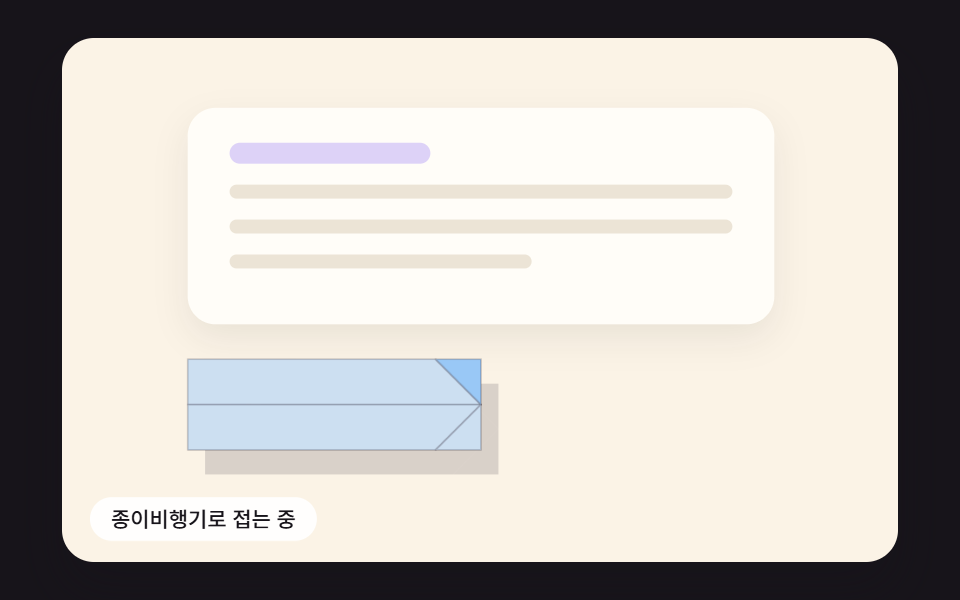 Send Button Animation CSS: 9 Fold-and-Fly ButtonsA send button should show that something left — 01 folds into a paper plane that banks along a curve, 02 springs back as See all demos in this post
If you like this effect - similar demos
 Buttons05 The button becomes its own progress bar9 button state css patterns, loading to done
 Buttons01 Accordion-reveal value toggle — when the button's open value changes, its rounding and shadow values change along, presenting the content belowExpanding Button UI: 9 Shape-Morph Patterns
 Buttons04 Liquid-metal Button That Merges and Spreads With a Pointer-distance ValueButton Click Effect CSS: 9 Canvas Pixel Patterns