09Bottom pay bar that steps aside once the summary is on screen
The total and pay bar pinned to the bottom drops away the moment the order summary enters the viewport, and climbs back when the summary leaves.
Best forSticky pay buttons on mobile checkout, total bars on long order forms
IntersectionObservertranslateYposition
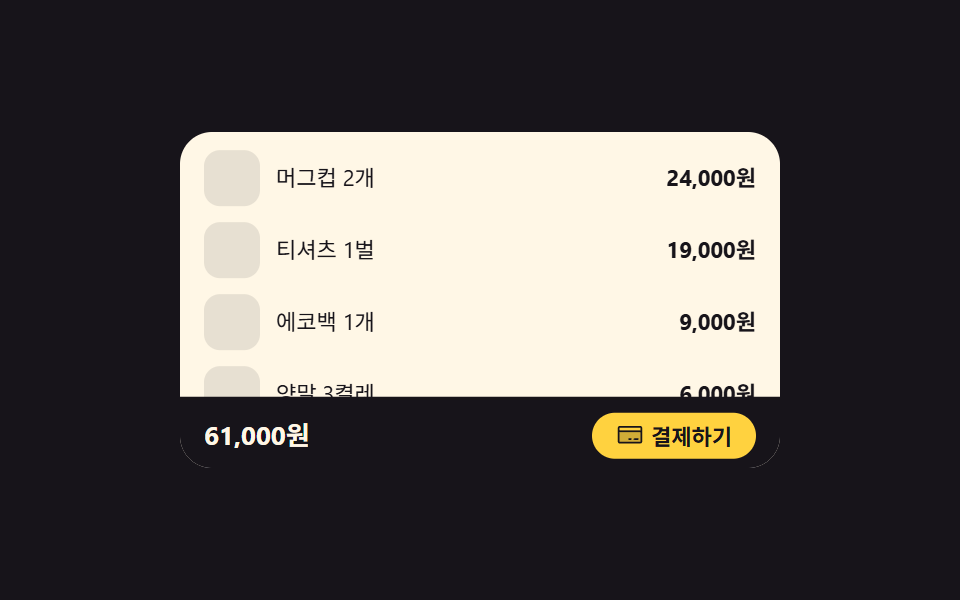
<main class="stage">
  <section class="co is-demo" id="co" aria-label="Order form and bottom pay bar">
    <div class="co__view" id="co-view" tabindex="0" role="region" aria-label="Order form">
      <div class="co__pad">
        <p class="co__title">Order form</p>

        <div class="co__item">
          <span class="co__thumb" aria-hidden="true"></span>
          <span class="co__name">Mug ×2</span>
          <span class="co__price">24,000 KRW</span>
        </div>
        <div class="co__item">
          <span class="co__thumb" aria-hidden="true"></span>
          <span class="co__name">T-shirt ×1</span>
          <span class="co__price">19,000 KRW</span>
        </div>
        <div class="co__item">
          <span class="co__thumb" aria-hidden="true"></span>
          <span class="co__name">Tote bag ×1</span>
          <span class="co__price">9,000 KRW</span>
        </div>
        <div class="co__item">
          <span class="co__thumb" aria-hidden="true"></span>
          <span class="co__name">Socks ×3</span>
          <span class="co__price">6,000 KRW</span>
        </div>

        <div class="co__sum" id="co-sum">
          <p class="co__sumHead">
            <span class="co__ic" aria-hidden="true"><svg viewBox="0 0 256 256" fill="currentColor"><path d="M224,56V208l-32-16-32,16-32-16L96,208,64,192,32,208V56a8,8,0,0,1,8-8H216A8,8,0,0,1,224,56Z" opacity="0.2"/><path d="M72,104a8,8,0,0,1,8-8h96a8,8,0,0,1,0,16H80A8,8,0,0,1,72,104Zm8,40h96a8,8,0,0,0,0-16H80a8,8,0,0,0,0,16ZM232,56V208a8,8,0,0,1-11.58,7.15L192,200.94l-28.42,14.21a8,8,0,0,1-7.16,0L128,200.94,99.58,215.15a8,8,0,0,1-7.16,0L64,200.94,35.58,215.15A8,8,0,0,1,24,208V56A16,16,0,0,1,40,40H216A16,16,0,0,1,232,56Zm-16,0H40V195.06l20.42-10.22a8,8,0,0,1,7.16,0L96,199.06l28.42-14.22a8,8,0,0,1,7.16,0L160,199.06l28.42-14.22a8,8,0,0,1,7.16,0L216,195.06Z"/></svg></span>
            Order summary
          </p>
          <p class="co__row"><span>Item total</span><span>58,000 KRW</span></p>
          <p class="co__row"><span>Shipping</span><span>3,000 KRW</span></p>
          <p class="co__row co__row--total"><span>Total</span><span>61,000 KRW</span></p>
        </div>
      </div>
    </div>

    <div class="co__bar" id="co-bar">
      <span class="co__barTotal">61,000 KRW</span>
      <button class="co__pay" type="button">
        <span class="co__ic" aria-hidden="true"><svg viewBox="0 0 256 256" fill="currentColor"><path d="M232,96v96a8,8,0,0,1-8,8H32a8,8,0,0,1-8-8V96Z" opacity="0.2"/><path d="M224,48H32A16,16,0,0,0,16,64V192a16,16,0,0,0,16,16H224a16,16,0,0,0,16-16V64A16,16,0,0,0,224,48Zm0,16V88H32V64Zm0,128H32V104H224v88Zm-16-24a8,8,0,0,1-8,8H168a8,8,0,0,1,0-16h32A8,8,0,0,1,208,168Zm-64,0a8,8,0,0,1-8,8H120a8,8,0,0,1,0-16h16A8,8,0,0,1,144,168Z"/></svg></span>
        Pay now
      </button>
    </div>
  </section>
</main>@use "../../../../site/static/demo-tokens" as *;
// 주문 요약이 시야에 들어오면 하단 결제 바가 translateY 로 내려가 자리를 비운다.
// 바는 스크롤 상자 밖에 position: absolute 로 겹쳐 둔다 — 스크롤이 0 인 첫 장면에서도
// 제자리에 서 있어야 하고, 상자 안에 넣으면 내용과 함께 흘러가 버린다.
$duration: $dur-loop;
$easing: $ease-spring;
$color: $subject-blue;
@include stage($stage-ink);
.co {
position: relative;
box-sizing: border-box;
width: min(300px, 92vw);
border-radius: $r-card;
background: $subject-cream;
color: $subject-ink;
font-family: -apple-system, "Segoe UI", "Noto Sans KR", sans-serif;
overflow: hidden;
}
.co * { box-sizing: border-box; }
.co__view {
height: 168px;
overflow-y: auto;
scrollbar-width: none;
&::-webkit-scrollbar { display: none; }
&:focus-visible { outline: 2px solid $color; outline-offset: -4px; }
}
.co__pad {
display: grid;
gap: $sp-2;
// 아래 여백은 얇게 — 끝까지 내려가면 바는 이미 물러나 있으므로, 바 높이만큼 비워 두면
// 마지막 장면이 요약 카드 아래의 빈 크림색 띠가 된다
padding: $sp-3 $sp-3 $sp-4;
}
.co__title {
margin: 0;
font-size: 13px;
font-weight: 700;
line-height: 1.3;
}
.co__item {
display: flex;
align-items: center;
gap: $sp-2;
}
.co__thumb {
flex: 0 0 auto;
width: 28px;
height: 28px;
border-radius: $r-sm;
background: rgba(23, 20, 26, .1);
}
.co__name {
flex: 1 1 auto;
font-size: 11px;
line-height: 1.4;
}
.co__price {
font-size: 11px;
font-weight: 700;
line-height: 1.4;
}
// 요약 카드 — 바가 내려간 자리를 이 카드가 채운다 (빈 장면이 대표 이미지로 나가지 않게)
.co__sum {
padding: $sp-3;
border-radius: $r-control;
background: rgba(47, 109, 246, .12);
}
.co__sumHead {
display: flex;
align-items: center;
gap: $sp-1;
margin: 0 0 $sp-2;
font-size: 11px;
font-weight: 700;
line-height: 1.3;
color: $subject-blue-deep; // 파란 tint 카드 위 파란 글자 — 진한 파랑이라야 AA
}
.co__ic {
display: inline-grid;
place-items: center;
width: 14px;
height: 14px;
}
.co__ic svg { width: 100%; height: 100%; }
.co__row {
display: flex;
justify-content: space-between;
gap: $sp-2;
margin: 0;
font-size: 11px;
line-height: 1.6;
}
.co__row--total {
margin-top: $sp-1;
padding-top: $sp-1;
border-top: 1px solid rgba(23, 20, 26, .16);
font-size: 12px;
font-weight: 700;
}
// ── 하단 결제 바 ──
.co__bar {
position: absolute;
left: 0;
right: 0;
bottom: 0;
display: flex;
align-items: center;
gap: $sp-2;
padding: $sp-2 $sp-3;
background: $subject-ink;
color: $subject-cream;
transform: translateY(0);
transition: transform $dur-base $easing;
}
.co.is-down .co__bar { transform: translateY(110%); }
.co__barTotal {
font-size: 13px;
font-weight: 700;
line-height: 1.4;
}
.co__pay {
display: inline-flex;
align-items: center;
gap: $sp-1;
margin-left: auto;
padding: $sp-1 $sp-3;
border: 0;
border-radius: $r-pill;
background: $stage-yellow;
color: $subject-ink;
font-family: inherit;
font-size: 11px;
font-weight: 700;
line-height: 1.4;
cursor: pointer;
&:focus-visible { outline: 2px solid $subject-cream; outline-offset: 2px; }
}
// ── 격자 미리보기 루프 ──
// 주문서가 실제로 스크롤될 때 보이는 것과 같은 순서: 내용이 올라가 요약이 드러나면 바가 내려간다.
// 내용이 멈춘 뒤에 바를 움직여, 가장 크게 변하는 프레임(= 대표 이미지)이 늘 「바가 서 있는 주문서」 가 되게 한다
@keyframes coScroll {
0%, 12% { transform: translateY(0); }
40%, 70% { transform: translateY(-120px); }
90%, 100% { transform: translateY(0); }
}
@keyframes coBar {
0%, 44% { transform: translateY(0); }
56%, 68% { transform: translateY(110%); }
84%, 100% { transform: translateY(0); }
}
.co.is-demo {
.co__pad {
animation-name: coScroll;
animation-duration: $duration;
animation-timing-function: $easing;
animation-iteration-count: infinite;
}
.co__bar {
animation-name: coBar;
animation-duration: $duration;
animation-timing-function: $easing;
animation-iteration-count: infinite;
}
}
@media (max-width: 340px) {
.co__view { height: 140px; }
.co__pad { padding: $sp-2 $sp-2 $sp-3; }
.co__title { font-size: 12px; }
.co__thumb { width: 24px; height: 24px; }
.co__sum { padding: $sp-2; }
}
@media (prefers-reduced-motion: reduce) {
.co__bar { transition: none !important; }
.co.is-demo .co__pad,
.co.is-demo .co__bar { animation: none !important; transform: none !important; }
}html, body {
margin: 0;
overflow: hidden;
}
.stage {
box-sizing: border-box;
min-height: 100vh;
display: grid;
place-items: center;
margin: 0;
background: #17141a;
font-family: -apple-system, "Segoe UI", "Noto Sans KR", sans-serif;
padding: clamp(8px, 4vw, 24px);
}
.co {
position: relative;
box-sizing: border-box;
width: min(300px, 92vw);
border-radius: 16px;
background: #fff7e6;
color: #17141a;
font-family: -apple-system, "Segoe UI", "Noto Sans KR", sans-serif;
overflow: hidden;
}
.co * {
box-sizing: border-box;
}
.co__view {
height: 168px;
overflow-y: auto;
scrollbar-width: none;
}
.co__view::-webkit-scrollbar {
display: none;
}
.co__view:focus-visible {
outline: 2px solid #2f6df6;
outline-offset: -4px;
}
.co__pad {
display: grid;
gap: 8px;
padding: 12px 12px 16px;
}
.co__title {
margin: 0;
font-size: 13px;
font-weight: 700;
line-height: 1.3;
}
.co__item {
display: flex;
align-items: center;
gap: 8px;
}
.co__thumb {
flex: 0 0 auto;
width: 28px;
height: 28px;
border-radius: 8px;
background: rgba(23, 20, 26, 0.1);
}
.co__name {
flex: 1 1 auto;
font-size: 11px;
line-height: 1.4;
}
.co__price {
font-size: 11px;
font-weight: 700;
line-height: 1.4;
}
.co__sum {
padding: 12px;
border-radius: 12px;
background: rgba(47, 109, 246, 0.12);
}
.co__sumHead {
display: flex;
align-items: center;
gap: 4px;
margin: 0 0 8px;
font-size: 11px;
font-weight: 700;
line-height: 1.3;
color: #0a4fe8;
}
.co__ic {
display: inline-grid;
place-items: center;
width: 14px;
height: 14px;
}
.co__ic svg {
width: 100%;
height: 100%;
}
.co__row {
display: flex;
justify-content: space-between;
gap: 8px;
margin: 0;
font-size: 11px;
line-height: 1.6;
}
.co__row--total {
margin-top: 4px;
padding-top: 4px;
border-top: 1px solid rgba(23, 20, 26, 0.16);
font-size: 12px;
font-weight: 700;
}
.co__bar {
position: absolute;
left: 0;
right: 0;
bottom: 0;
display: flex;
align-items: center;
gap: 8px;
padding: 8px 12px;
background: #17141a;
color: #fff7e6;
transform: translateY(0);
transition: transform 300ms cubic-bezier(0.2, 0.8, 0.2, 1);
}
.co.is-down .co__bar {
transform: translateY(110%);
}
.co__barTotal {
font-size: 13px;
font-weight: 700;
line-height: 1.4;
}
.co__pay {
display: inline-flex;
align-items: center;
gap: 4px;
margin-left: auto;
padding: 4px 12px;
border: 0;
border-radius: 999px;
background: #ffd23f;
color: #17141a;
font-family: inherit;
font-size: 11px;
font-weight: 700;
line-height: 1.4;
cursor: pointer;
}
.co__pay:focus-visible {
outline: 2px solid #fff7e6;
outline-offset: 2px;
}
@keyframes coScroll {
0%, 12% {
transform: translateY(0);
}
40%, 70% {
transform: translateY(-120px);
}
90%, 100% {
transform: translateY(0);
}
}
@keyframes coBar {
0%, 44% {
transform: translateY(0);
}
56%, 68% {
transform: translateY(110%);
}
84%, 100% {
transform: translateY(0);
}
}
.co.is-demo .co__pad {
animation-name: coScroll;
animation-duration: 2s;
animation-timing-function: cubic-bezier(0.2, 0.8, 0.2, 1);
animation-iteration-count: infinite;
}
.co.is-demo .co__bar {
animation-name: coBar;
animation-duration: 2s;
animation-timing-function: cubic-bezier(0.2, 0.8, 0.2, 1);
animation-iteration-count: infinite;
}
@media (max-width: 340px) {
.co__view {
height: 140px;
}
.co__pad {
padding: 8px 8px 12px;
}
.co__title {
font-size: 12px;
}
.co__thumb {
width: 24px;
height: 24px;
}
.co__sum {
padding: 8px;
}
}
@media (prefers-reduced-motion: reduce) {
.co__bar {
transition: none !important;
}
.co.is-demo .co__pad,
.co.is-demo .co__bar {
animation: none !important;
transform: none !important;
}
}// 주문 요약이 시야에 들어오면 하단 결제 바가 내려가 자리를 비운다.
// 「보이는가」 는 스크롤 좌표 계산이 아니라 IntersectionObserver 가 판정한다 — root 는 Order form 스크롤 상자.
var co = document.getElementById('co');
var view = document.getElementById('co-view');
var summary = document.getElementById('co-sum');
// 관찰자는 붙자마자 한 번 알려 주므로, 미리보기 루프는 사람이 실제로 스크롤할 때만 끈다
view.addEventListener('scroll', function () {
co.classList.remove('is-demo');
}, { passive: true });
if (window.IntersectionObserver) {
var watcher = new IntersectionObserver(function (entries) {
for (var i = 0; i < entries.length; i++) {
co.classList.toggle('is-down', entries[i].isIntersecting);
}
}, { root: view, threshold: 0.45 });
watcher.observe(summary);
}import { useEffect, useRef, useState } from "react";
import type { CSSProperties } from "react";
import styles from "./CheckoutStickyTotalBar.module.scss";
export type CheckoutLine = { name: string; price: string };
export type CheckoutStickyTotalBarProps = {
title?: string;
lines?: CheckoutLine[];
summaryLabel?: string;
itemsLabel?: string;
itemsTotal?: string;
shippingLabel?: string;
shippingFee?: string;
totalLabel?: string;
total?: string;
payLabel?: string;
groupLabel?: string;
bodyLabel?: string;
/** 격자 미리보기용 2초 자동 루프. 사람이 스크롤하면 꺼진다 */
demo?: boolean;
duration?: number;
easing?: string;
color?: string;
};
type Vars = CSSProperties & { "--duration"?: string; "--easing"?: string; "--color"?: string };
// ambient 가 얇아 DOM 요소 타입을 못 쓴다 — 관찰자에 넘길 만큼만 로컬 타입으로 선언
type Box = { scrollTop: number };
function ReceiptIcon() {
return (
<svg viewBox="0 0 256 256" width="1em" height="1em" fill="currentColor" aria-hidden="true"><path d="M224,56V208l-32-16-32,16-32-16L96,208,64,192,32,208V56a8,8,0,0,1,8-8H216A8,8,0,0,1,224,56Z" opacity="0.2"/><path d="M72,104a8,8,0,0,1,8-8h96a8,8,0,0,1,0,16H80A8,8,0,0,1,72,104Zm8,40h96a8,8,0,0,0,0-16H80a8,8,0,0,0,0,16ZM232,56V208a8,8,0,0,1-11.58,7.15L192,200.94l-28.42,14.21a8,8,0,0,1-7.16,0L128,200.94,99.58,215.15a8,8,0,0,1-7.16,0L64,200.94,35.58,215.15A8,8,0,0,1,24,208V56A16,16,0,0,1,40,40H216A16,16,0,0,1,232,56Zm-16,0H40V195.06l20.42-10.22a8,8,0,0,1,7.16,0L96,199.06l28.42-14.22a8,8,0,0,1,7.16,0L160,199.06l28.42-14.22a8,8,0,0,1,7.16,0L216,195.06Z"/></svg>
);
}
function CreditCardIcon() {
return (
<svg viewBox="0 0 256 256" width="1em" height="1em" fill="currentColor" aria-hidden="true"><path d="M232,96v96a8,8,0,0,1-8,8H32a8,8,0,0,1-8-8V96Z" opacity="0.2"/><path d="M224,48H32A16,16,0,0,0,16,64V192a16,16,0,0,0,16,16H224a16,16,0,0,0,16-16V64A16,16,0,0,0,224,48Zm0,16V88H32V64Zm0,128H32V104H224v88Zm-16-24a8,8,0,0,1-8,8H168a8,8,0,0,1,0-16h32A8,8,0,0,1,208,168Zm-64,0a8,8,0,0,1-8,8H120a8,8,0,0,1,0-16h16A8,8,0,0,1,144,168Z"/></svg>
);
}
export default function CheckoutStickyTotalBar({
title = "주문서",
lines = [
{ name: "머그컵 2개", price: "24,000원" },
{ name: "티셔츠 1벌", price: "19,000원" },
{ name: "에코백 1개", price: "9,000원" },
{ name: "양말 3켤레", price: "6,000원" },
],
summaryLabel = "주문 요약",
itemsLabel = "상품 금액",
itemsTotal = "58,000원",
shippingLabel = "배송비",
shippingFee = "3,000원",
totalLabel = "총 결제 금액",
total = "61,000원",
payLabel = "결제하기",
groupLabel = "주문서와 하단 결제 바",
bodyLabel = "주문서",
demo = true,
duration = 2000,
easing = "cubic-bezier(.2,.8,.2,1)",
color = "#2f6df6",
}: CheckoutStickyTotalBarProps) {
const [down, setDown] = useState(false);
const [live, setLive] = useState(demo);
const viewRef = useRef<HTMLDivElement>(null);
const summaryRef = useRef<HTMLDivElement>(null);
// 「보이는가」 는 스크롤 좌표 계산이 아니라 관찰자가 판정한다 — root 는 주문서 스크롤 상자
useEffect(() => {
const view = viewRef.current;
const summary = summaryRef.current;
if (!view || !summary) return;
const watcher = new IntersectionObserver(
(entries) => {
for (const entry of entries) setDown(entry.isIntersecting);
},
{ root: view, threshold: 0.45 },
);
watcher.observe(summary);
return () => watcher.disconnect();
}, []);
// 관찰자는 붙자마자 한 번 알려 주므로, 미리보기 루프는 사람이 실제로 스크롤할 때만 끈다
function onScroll() {
const view: Box | null = viewRef.current;
if (!view) return;
setLive(false);
}
const vars: Vars = { "--duration": `${duration}ms`, "--easing": easing, "--color": color };
const cls = [styles.co, live ? styles.isDemo : "", down ? styles.isDown : ""].filter(Boolean).join(" ");
return (
<section className={cls} style={vars} aria-label={groupLabel}>
<div className={styles.view} ref={viewRef} onScroll={onScroll} tabIndex={0} role="region" aria-label={bodyLabel}>
<div className={styles.pad}>
<p className={styles.title}>{title}</p>
{lines.map((line) => (
<div className={styles.item} key={line.name}>
<span className={styles.thumb} aria-hidden="true" />
<span className={styles.name}>{line.name}</span>
<span className={styles.price}>{line.price}</span>
</div>
))}
<div className={styles.sum} ref={summaryRef}>
<p className={styles.sumHead}>
<span className={styles.ic} aria-hidden="true"><ReceiptIcon /></span>
{summaryLabel}
</p>
<p className={styles.row}><span>{itemsLabel}</span><span>{itemsTotal}</span></p>
<p className={styles.row}><span>{shippingLabel}</span><span>{shippingFee}</span></p>
<p className={`${styles.row} ${styles.rowTotal}`}><span>{totalLabel}</span><span>{total}</span></p>
</div>
</div>
</div>
<div className={styles.bar}>
<span className={styles.barTotal}>{total}</span>
<button className={styles.pay} type="button">
<span className={styles.ic} aria-hidden="true"><CreditCardIcon /></span>
{payLabel}
</button>
</div>
</section>
);
}09 Bottom pay bar that steps aside once the summary is on screen — Measured area 25.205% · moving frames 16/23Original by GODRICH · SCSS and React ship in the zip · Checkout Page Design — 9 Cart Patterns, No Library
The post this demo lives in
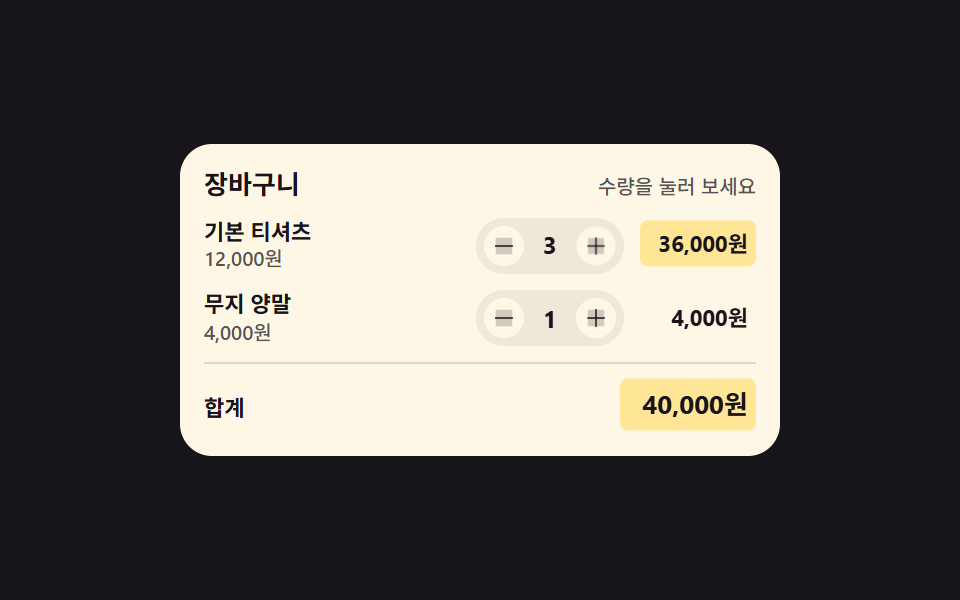 Checkout Page Design — 9 Cart Patterns, No LibraryCheckout page design covers every screen between "I want this" and the pay button. These nine patterns are plain HTML, S See all demos in this post
If you like this effect - similar demos
 Inputs01 Next button that stays locked until the rules are met9 Multi Step Form UI Patterns — Branch and Resume
 Inputs01 Length threshold fill — the strength value steps up each time the input's character-count value crosses a set boundary valuePassword Strength Meter UI: 9 Calculation Patterns
 Inputs04 Count-badge roll toggle — each time the selected-count value rises or falls, the badge digit's position value rolls up or downCSS Custom Checkbox: 9 Interaction Patterns