05Emergency bang button
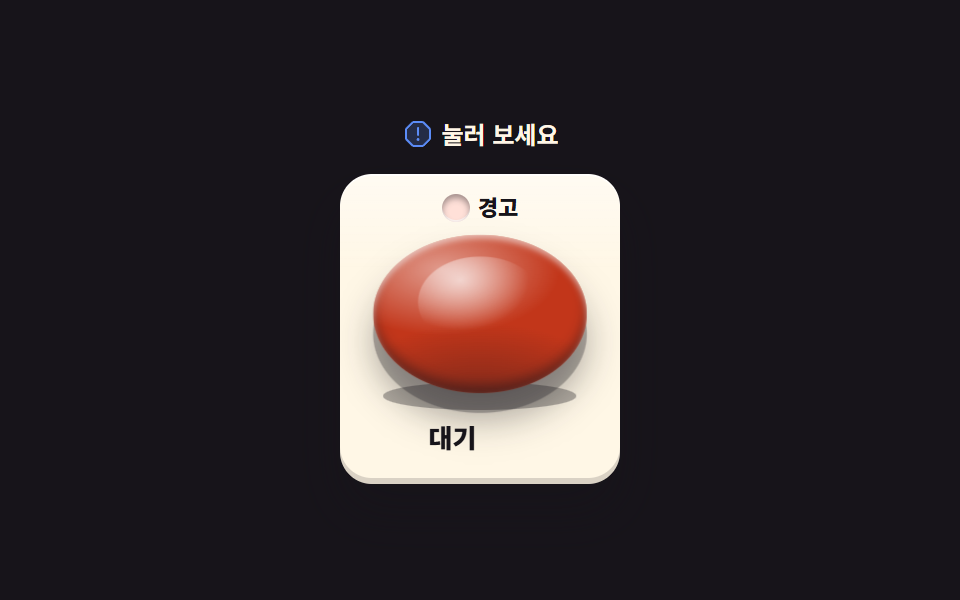
Press the red button and it sinks deep into the perspective scene as the base shadow tightens and the warning lamp lights. The press itself travels through aria-pressed.
Best forAn emergency-stop control mockup, the reset button on an event page
aria-pressedperspectivetranslateZbox-shadow
<svg width="0" height="0" style="position:absolute" aria-hidden="true">
  <defs>
    <symbol id="ico-warning" viewBox="0 0 256 256" fill="currentColor"><g><path d="M224 91.55v72.9a8 8 0 0 1-2.34 5.66l-51.55 51.55a8 8 0 0 1-5.66 2.34h-72.9a8 8 0 0 1-5.66-2.34l-51.55-51.55a8 8 0 0 1-2.34-5.66v-72.9a8 8 0 0 1 2.34-5.66l51.55-51.55A8 8 0 0 1 91.55 32h72.9a8 8 0 0 1 5.66 2.34l51.55 51.55a8 8 0 0 1 2.34 5.66" opacity=".2"/><path d="M120 136V80a8 8 0 0 1 16 0v56a8 8 0 0 1-16 0m112-44.45v72.9a15.86 15.86 0 0 1-4.69 11.31l-51.55 51.55a15.86 15.86 0 0 1-11.31 4.69h-72.9a15.86 15.86 0 0 1-11.31-4.69l-51.55-51.55A15.86 15.86 0 0 1 24 164.45v-72.9a15.86 15.86 0 0 1 4.69-11.31l51.55-51.55A15.86 15.86 0 0 1 91.55 24h72.9a15.86 15.86 0 0 1 11.31 4.69l51.55 51.55A15.86 15.86 0 0 1 232 91.55m-16 0L164.45 40h-72.9L40 91.55v72.9L91.55 216h72.9L216 164.45ZM128 160a12 12 0 1 0 12 12a12 12 0 0 0-12-12"/></g></symbol>
  </defs>
</svg>
<main class="stage">
<div class="bb is-demo" id="bb">
  <p class="bb__hint">
    <svg class="bb__ico" aria-hidden="true"><use href="#ico-warning"/></svg>
    <span>Press it</span>
  </p>
  <div class="bb__scene">
    <div class="bb__panel">
      <span class="bb__lampWrap">
        <i class="bb__lamp"><i class="bb__lampGlow"></i></i>
        <span class="bb__lampText">Warning</span>
      </span>
      <div class="bb__well">
        <i class="bb__shadow"></i>
        <button class="bb__btn" id="btn" type="button" aria-pressed="false" aria-label="Emergency stop button">
          <i class="bb__dome"></i>
        </button>
      </div>
      <p class="bb__state">
        <span class="bb__stateIdle">Standby</span>
        <span class="bb__stateHit">Running</span>
      </p>
    </div>
  </div>
</div>
</main>@use "../../../../site/static/demo-tokens" as *;
// 비상 뱅 버튼 — 붉은 버튼을 누르면 원근 장면(perspective) 안으로 깊이 가라앉는다(translateZ).
// 가라앉으며 받침 그림자가 좁아지고(scaleX) 경고등이 켠다. 눌림은 색이 아니라 글자(대기/가동)와
// aria-pressed 로도 전달된다. 정적 경로는 transition 으로, 격자 미리보기(.is-demo)만 루프 키프레임.
// 사람이 버튼을 누르면 JS 가 .is-demo 를 뗀다.
$duration: $dur-quick;
$easing: $ease-spring;
$color: $error;
@include stage($stage-ink);
.bb { display: flex; flex-direction: column; align-items: center; gap: $sp-3; width: 100%; max-width: 340px; }
.bb__hint {
display: flex; align-items: center; gap: $sp-1; margin: 0;
font-weight: 700; font-size: clamp(10px, 2.8vw, 12px); color: $subject-cream;
}
.bb__ico { width: 16px; height: 16px; flex: 0 0 auto; color: $subject-blue-light; }
.bb__scene { display: flex; justify-content: center; }
.bb__panel {
display: flex; flex-direction: column; align-items: center; gap: $sp-1;
border-radius: $r-card; padding: $sp-2 $sp-4 $sp-3;
background: linear-gradient(180deg, rgba($stage-paper, .5), rgba($stage-paper, 0) 30%), $subject-cream;
box-shadow: $shadow-raised, inset 0 1px 0 rgba(255, 255, 255, .8), inset 0 -3px 0 rgba($subject-ink, .16);
}
.bb__lampWrap { display: inline-flex; align-items: center; gap: $sp-1; }
.bb__lamp {
position: relative; width: 14px; height: 14px; border-radius: 50%;
background: $error-soft; box-shadow: inset 0 2px 3px rgba($subject-ink, .4), inset 0 -1px 0 rgba(255, 255, 255, .7);
transition: background $duration $easing, box-shadow $duration $easing;
}
.bb__lampGlow {
position: absolute; inset: -4px; border-radius: 50%;
background: radial-gradient(circle, rgba($color, .85), rgba($color, 0) 70%);
opacity: 0;
}
.bb__lampText {
font-weight: 800; font-size: clamp(9px, 2.4vw, 11px); line-height: 1.6; color: $subject-ink;
}
.bb.is-on .bb__lamp {
background: $color;
box-shadow: 0 0 0 2px rgba($color, .28), 0 0 14px 2px rgba($color, .65), inset 0 2px 3px rgba($subject-ink, .35);
}
// 우물 — 버튼이 들어앉은 받침. perspective 는 이 상자에 걸고 버튼은 직계 자식이어야 원근이 먹는다
.bb__well { position: relative; display: flex; justify-content: center; perspective: 600px; }
.bb__shadow {
position: absolute; left: 50%; bottom: -8px; width: 92%; height: 14px;
transform: translateX(-50%) scaleX(1); border-radius: 50%;
background: rgba($subject-ink, .34);
transition: transform $duration $easing, opacity $duration $easing;
}
.bb__btn {
position: relative; display: block; width: clamp(88px, 24vw, 108px); height: clamp(64px, 17vw, 80px);
border: 0; border-radius: 50%; padding: 0; cursor: pointer; touch-action: manipulation;
background:
radial-gradient(120% 90% at 32% 22%, rgba(255, 255, 255, .5), rgba(255, 255, 255, 0) 46%),
radial-gradient(140% 120% at 50% 118%, rgba($subject-ink, .5), rgba($subject-ink, 0) 52%),
$color;
box-shadow: 0 10px 0 rgba($subject-ink, .3), 0 14px 18px rgba($subject-ink, .35), inset 0 2px 3px rgba(255, 255, 255, .55), inset 0 -4px 6px rgba($subject-ink, .45);
transition: transform $duration $easing, box-shadow $duration $easing;
}
.bb__btn:focus-visible { outline: 2px solid $subject-blue-light; outline-offset: 3px; }
.bb__dome {
position: absolute; left: 50%; top: 14%; width: 58%; height: 58%;
transform: translateX(-50%); border-radius: 50%;
background: radial-gradient(100% 100% at 34% 26%, rgba(255, 255, 255, .65), rgba(255, 255, 255, 0) 55%);
}
// 눌림 — 장면 깊이로 가라앉는다. 받침 그림자는 같은 타이밍에 좁아진다
.bb__btn[aria-pressed="true"] { transform: translateZ(-120px); }
.bb.is-on .bb__shadow { transform: translateX(-50%) scaleX(.55); opacity: .55; }
.bb__state { margin: $sp-2 0 0; font-weight: 800; font-size: clamp(11px, 3vw, 13px); line-height: 1.6; }
.bb__stateIdle { color: $subject-ink; }
.bb__stateHit { color: $error; }
.bb:not(.is-on) .bb__stateHit { display: none; }
.bb.is-on .bb__stateIdle { display: none; }
// ── 미리보기 루프(2초 한 바퀴) ─────────────────────────────────────
// 가라앉기(6% 부터) → 점등 hold 와 경고등 깜빡임 → 46% 부터 돌아온다(복귀는 90% 안에).
// 상태 글자 교체는 steps(1,end) 로 한 프레임에 컷 — 반투명 유령 프레임을 만들지 않는다.
.bb.is-demo .bb__btn {
animation-name: bbSink; animation-duration: $dur-loop;
animation-timing-function: $easing; animation-iteration-count: infinite;
}
.bb.is-demo .bb__shadow {
animation-name: bbShadow; animation-duration: $dur-loop;
animation-timing-function: $easing; animation-iteration-count: infinite;
}
.bb.is-demo .bb__lampGlow {
animation-name: bbBlink; animation-duration: $dur-loop;
animation-timing-function: linear; animation-iteration-count: infinite;
}
.bb.is-demo .bb__stateIdle, .bb.is-demo .bb__stateHit { display: inline; }
.bb.is-demo .bb__stateIdle {
animation-name: bbIdleCut; animation-duration: $dur-loop;
animation-timing-function: steps(1, end); animation-iteration-count: infinite;
}
.bb.is-demo .bb__stateHit {
animation-name: bbHitCut; animation-duration: $dur-loop;
animation-timing-function: steps(1, end); animation-iteration-count: infinite;
}
@keyframes bbSink {
0%, 6% { transform: translateZ(0); }
14%, 46% { transform: translateZ(-120px); }
54%, 100% { transform: translateZ(0); }
}
@keyframes bbShadow {
0%, 6% { transform: translateX(-50%) scaleX(1); opacity: 1; }
14%, 46% { transform: translateX(-50%) scaleX(.55); opacity: .55; }
54%, 100% { transform: translateX(-50%) scaleX(1); opacity: 1; }
}
@keyframes bbBlink {
0%, 9% { opacity: 0; }
12% { opacity: .45; }
18% { opacity: 1; }
24% { opacity: .5; }
30% { opacity: 1; }
36% { opacity: .5; }
42% { opacity: 1; }
47%, 100% { opacity: 0; }
}
@keyframes bbIdleCut {
0%, 13% { opacity: 1; }
14%, 46% { opacity: 0; }
47%, 100% { opacity: 1; }
}
@keyframes bbHitCut {
0%, 13% { opacity: 0; }
14%, 46% { opacity: 1; }
47%, 100% { opacity: 0; }
}
@media (max-width: 340px) {
.bb { gap: $sp-2; }
.bb__panel { padding: $sp-2 $sp-3; gap: 0; }
.bb__shadow { bottom: -4px; height: 10px; }
}
// reduce 에서는 루프를 끄고 버튼이 올라온 정적 한 장으로 둔다
@media (prefers-reduced-motion: reduce) {
.bb.is-demo .bb__btn { animation: none !important; }
.bb.is-demo .bb__shadow { animation: none !important; }
.bb.is-demo .bb__lampGlow { animation: none !important; opacity: 0 !important; }
.bb.is-demo .bb__stateIdle { animation: none !important; }
.bb.is-demo .bb__stateHit { animation: none !important; }
.bb__btn { transition: none !important; }
.bb__shadow { transition: none !important; }
}html, body {
margin: 0;
overflow: hidden;
}
.stage {
box-sizing: border-box;
min-height: 100vh;
display: grid;
place-items: center;
margin: 0;
background: #17141a;
font-family: -apple-system, "Segoe UI", "Noto Sans KR", sans-serif;
padding: clamp(8px, 4vw, 24px);
}
.bb {
display: flex;
flex-direction: column;
align-items: center;
gap: 12px;
width: 100%;
max-width: 340px;
}
.bb__hint {
display: flex;
align-items: center;
gap: 4px;
margin: 0;
font-weight: 700;
font-size: clamp(10px, 2.8vw, 12px);
color: #fff7e6;
}
.bb__ico {
width: 16px;
height: 16px;
flex: 0 0 auto;
color: #5b8cf8;
}
.bb__scene {
display: flex;
justify-content: center;
}
.bb__panel {
display: flex;
flex-direction: column;
align-items: center;
gap: 4px;
border-radius: 16px;
padding: 8px 16px 12px;
background: linear-gradient(180deg, rgba(255, 255, 255, 0.5), rgba(255, 255, 255, 0) 30%), #fff7e6;
box-shadow: 0 14px 24px rgba(23, 20, 26, 0.32), inset 0 1px 0 rgba(255, 255, 255, 0.8), inset 0 -3px 0 rgba(23, 20, 26, 0.16);
}
.bb__lampWrap {
display: inline-flex;
align-items: center;
gap: 4px;
}
.bb__lamp {
position: relative;
width: 14px;
height: 14px;
border-radius: 50%;
background: #ffe0d8;
box-shadow: inset 0 2px 3px rgba(23, 20, 26, 0.4), inset 0 -1px 0 rgba(255, 255, 255, 0.7);
transition: background 220ms cubic-bezier(0.2, 0.8, 0.2, 1), box-shadow 220ms cubic-bezier(0.2, 0.8, 0.2, 1);
}
.bb__lampGlow {
position: absolute;
inset: -4px;
border-radius: 50%;
background: radial-gradient(circle, rgba(194, 54, 26, 0.85), rgba(194, 54, 26, 0) 70%);
opacity: 0;
}
.bb__lampText {
font-weight: 800;
font-size: clamp(9px, 2.4vw, 11px);
line-height: 1.6;
color: #17141a;
}
.bb.is-on .bb__lamp {
background: #c2361a;
box-shadow: 0 0 0 2px rgba(194, 54, 26, 0.28), 0 0 14px 2px rgba(194, 54, 26, 0.65), inset 0 2px 3px rgba(23, 20, 26, 0.35);
}
.bb__well {
position: relative;
display: flex;
justify-content: center;
perspective: 600px;
}
.bb__shadow {
position: absolute;
left: 50%;
bottom: -8px;
width: 92%;
height: 14px;
transform: translateX(-50%) scaleX(1);
border-radius: 50%;
background: rgba(23, 20, 26, 0.34);
transition: transform 220ms cubic-bezier(0.2, 0.8, 0.2, 1), opacity 220ms cubic-bezier(0.2, 0.8, 0.2, 1);
}
.bb__btn {
position: relative;
display: block;
width: clamp(88px, 24vw, 108px);
height: clamp(64px, 17vw, 80px);
border: 0;
border-radius: 50%;
padding: 0;
cursor: pointer;
touch-action: manipulation;
background: radial-gradient(120% 90% at 32% 22%, rgba(255, 255, 255, 0.5), rgba(255, 255, 255, 0) 46%), radial-gradient(140% 120% at 50% 118%, rgba(23, 20, 26, 0.5), rgba(23, 20, 26, 0) 52%), #c2361a;
box-shadow: 0 10px 0 rgba(23, 20, 26, 0.3), 0 14px 18px rgba(23, 20, 26, 0.35), inset 0 2px 3px rgba(255, 255, 255, 0.55), inset 0 -4px 6px rgba(23, 20, 26, 0.45);
transition: transform 220ms cubic-bezier(0.2, 0.8, 0.2, 1), box-shadow 220ms cubic-bezier(0.2, 0.8, 0.2, 1);
}
.bb__btn:focus-visible {
outline: 2px solid #5b8cf8;
outline-offset: 3px;
}
.bb__dome {
position: absolute;
left: 50%;
top: 14%;
width: 58%;
height: 58%;
transform: translateX(-50%);
border-radius: 50%;
background: radial-gradient(100% 100% at 34% 26%, rgba(255, 255, 255, 0.65), rgba(255, 255, 255, 0) 55%);
}
.bb__btn[aria-pressed=true] {
transform: translateZ(-120px);
}
.bb.is-on .bb__shadow {
transform: translateX(-50%) scaleX(0.55);
opacity: 0.55;
}
.bb__state {
margin: 8px 0 0;
font-weight: 800;
font-size: clamp(11px, 3vw, 13px);
line-height: 1.6;
}
.bb__stateIdle {
color: #17141a;
}
.bb__stateHit {
color: #c2361a;
}
.bb:not(.is-on) .bb__stateHit {
display: none;
}
.bb.is-on .bb__stateIdle {
display: none;
}
.bb.is-demo .bb__btn {
animation-name: bbSink;
animation-duration: 2s;
animation-timing-function: cubic-bezier(0.2, 0.8, 0.2, 1);
animation-iteration-count: infinite;
}
.bb.is-demo .bb__shadow {
animation-name: bbShadow;
animation-duration: 2s;
animation-timing-function: cubic-bezier(0.2, 0.8, 0.2, 1);
animation-iteration-count: infinite;
}
.bb.is-demo .bb__lampGlow {
animation-name: bbBlink;
animation-duration: 2s;
animation-timing-function: linear;
animation-iteration-count: infinite;
}
.bb.is-demo .bb__stateIdle, .bb.is-demo .bb__stateHit {
display: inline;
}
.bb.is-demo .bb__stateIdle {
animation-name: bbIdleCut;
animation-duration: 2s;
animation-timing-function: steps(1, end);
animation-iteration-count: infinite;
}
.bb.is-demo .bb__stateHit {
animation-name: bbHitCut;
animation-duration: 2s;
animation-timing-function: steps(1, end);
animation-iteration-count: infinite;
}
@keyframes bbSink {
0%, 6% {
transform: translateZ(0);
}
14%, 46% {
transform: translateZ(-120px);
}
54%, 100% {
transform: translateZ(0);
}
}
@keyframes bbShadow {
0%, 6% {
transform: translateX(-50%) scaleX(1);
opacity: 1;
}
14%, 46% {
transform: translateX(-50%) scaleX(0.55);
opacity: 0.55;
}
54%, 100% {
transform: translateX(-50%) scaleX(1);
opacity: 1;
}
}
@keyframes bbBlink {
0%, 9% {
opacity: 0;
}
12% {
opacity: 0.45;
}
18% {
opacity: 1;
}
24% {
opacity: 0.5;
}
30% {
opacity: 1;
}
36% {
opacity: 0.5;
}
42% {
opacity: 1;
}
47%, 100% {
opacity: 0;
}
}
@keyframes bbIdleCut {
0%, 13% {
opacity: 1;
}
14%, 46% {
opacity: 0;
}
47%, 100% {
opacity: 1;
}
}
@keyframes bbHitCut {
0%, 13% {
opacity: 0;
}
14%, 46% {
opacity: 1;
}
47%, 100% {
opacity: 0;
}
}
@media (max-width: 340px) {
.bb {
gap: 8px;
}
.bb__panel {
padding: 8px 12px;
gap: 0;
}
.bb__shadow {
bottom: -4px;
height: 10px;
}
}
@media (prefers-reduced-motion: reduce) {
.bb.is-demo .bb__btn {
animation: none !important;
}
.bb.is-demo .bb__shadow {
animation: none !important;
}
.bb.is-demo .bb__lampGlow {
animation: none !important;
opacity: 0 !important;
}
.bb.is-demo .bb__stateIdle {
animation: none !important;
}
.bb.is-demo .bb__stateHit {
animation: none !important;
}
.bb__btn {
transition: none !important;
}
.bb__shadow {
transition: none !important;
}
}(function () {
var root = document.getElementById('bb');
var btn = document.getElementById('btn');
btn.addEventListener('click', function () {
root.classList.remove('is-demo');
var on = btn.getAttribute('aria-pressed') === 'true';
btn.setAttribute('aria-pressed', on ? 'false' : 'true');
root.classList.toggle('is-on', !on);
});
})();// BangButton — vanilla 판(run/013/demo/05-skeuo-bang-button) 의 React 포트.
// 누르면 원근 장면 안으로 translateZ 깊이 가라앉고 받침 그림자가 좁아지며 경고등이 켠다.
// 눌림은 aria-pressed 와 글자(대기/가동) 둘로 전달된다. 값·타이밍은 vanilla 와 같다.
import { useState } from "react";
import type { CSSProperties } from "react";
import styles from "./BangButton.module.scss";
export type BangButtonProps = {
duration?: number;
easing?: string;
color?: string;
};
type Vars = CSSProperties & { "--duration"?: string; "--easing"?: string; "--color"?: string };
const HINT = "눌러 보세요";
const ARIA_LABEL = "비상 정지 버튼";
const LAMP_TEXT = "경고";
const STATE_IDLE = "대기";
const STATE_HIT = "가동";
export default function BangButton({
duration = 220,
easing = "cubic-bezier(.2, .8, .2, 1)",
color = "#c2361a",
}: BangButtonProps) {
const [on, setOn] = useState(false);
const [demo, setDemo] = useState(true);
const vars: Vars = { "--duration": `${duration}ms`, "--easing": easing, "--color": color };
function press() {
setDemo(false);
setOn((v) => !v);
}
const cls = [styles.root, demo ? styles.isDemo : "", on ? styles.isOn : ""].filter(Boolean).join(" ");
return (
<main className={styles.stage}>
<svg width="0" height="0" style={{ position: "absolute" }} aria-hidden="true">
<defs>
<symbol id="ico-warning" viewBox="0 0 256 256" fill="currentColor"><g><path d="M224 91.55v72.9a8 8 0 0 1-2.34 5.66l-51.55 51.55a8 8 0 0 1-5.66 2.34h-72.9a8 8 0 0 1-5.66-2.34l-51.55-51.55a8 8 0 0 1-2.34-5.66v-72.9a8 8 0 0 1 2.34-5.66l51.55-51.55A8 8 0 0 1 91.55 32h72.9a8 8 0 0 1 5.66 2.34l51.55 51.55a8 8 0 0 1 2.34 5.66" opacity=".2"/><path d="M120 136V80a8 8 0 0 1 16 0v56a8 8 0 0 1-16 0m112-44.45v72.9a15.86 15.86 0 0 1-4.69 11.31l-51.55 51.55a15.86 15.86 0 0 1-11.31 4.69h-72.9a15.86 15.86 0 0 1-11.31-4.69l-51.55-51.55A15.86 15.86 0 0 1 24 164.45v-72.9a15.86 15.86 0 0 1 4.69-11.31l51.55-51.55A15.86 15.86 0 0 1 91.55 24h72.9a15.86 15.86 0 0 1 11.31 4.69l51.55 51.55A15.86 15.86 0 0 1 232 91.55m-16 0L164.45 40h-72.9L40 91.55v72.9L91.55 216h72.9L216 164.45ZM128 160a12 12 0 1 0 12 12a12 12 0 0 0-12-12"/></g></symbol>
</defs>
</svg>
<div className={cls} style={vars}>
<p className={styles.hint}>
<svg className={styles.ico} aria-hidden="true"><use href="#ico-warning" /></svg>
<span>{HINT}</span>
</p>
<div className={styles.scene}>
<div className={styles.panel}>
<span className={styles.lampWrap}>
<i className={styles.lamp}><i className={styles.lampGlow} /></i>
<span className={styles.lampText}>{LAMP_TEXT}</span>
</span>
<div className={styles.well}>
<i className={styles.shadow} />
<button className={styles.btn} type="button" aria-pressed={on} aria-label={ARIA_LABEL} onClick={press}>
<i className={styles.dome} />
</button>
</div>
<p className={styles.state}>
<span className={styles.stateIdle}>{STATE_IDLE}</span>
<span className={styles.stateHit}>{STATE_HIT}</span>
</p>
</div>
</div>
</div>
</main>
);
}05 Emergency bang button — Measured area 4.902% · moving frames 11/23Original by GODRICH · SCSS and React ship in the zip · CSS Switch Button 9 Ways — Rocker to Tape Eject
The post this demo lives in
 CSS Switch Button 9 Ways — Rocker to Tape EjectA css switch button is a control drawn to behave like the physical switch it stands in for: a lever that tilts, a knob t See all demos in this post