08Physically pressable button
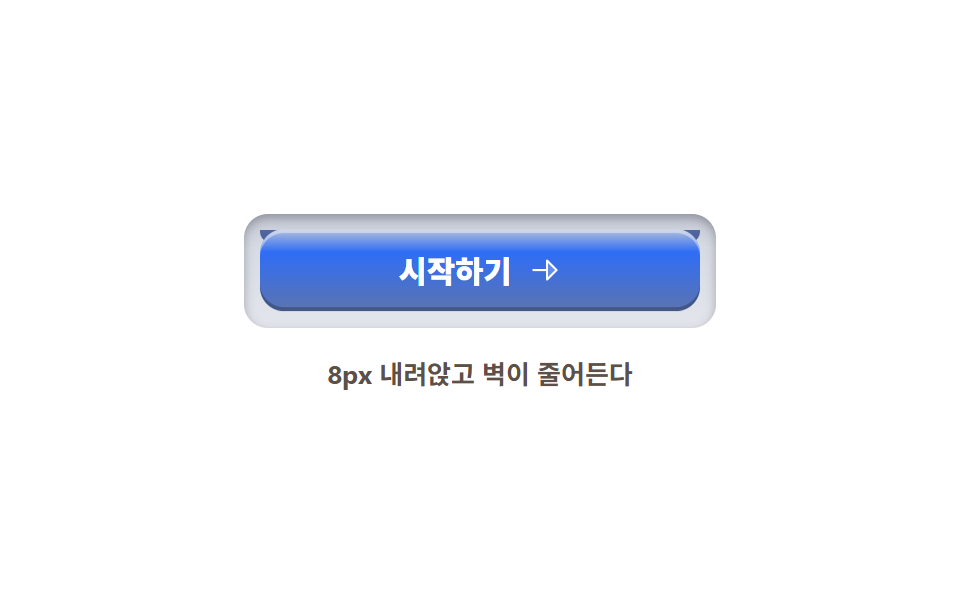
The keycap sinks 8px while the side wall beneath it shrinks to a quarter via scaleY, and letting go springs it back up.
Best forFinal conversion buttons, payment confirmation, game-style UI
옆벽 scaleY8px 스트로크radius 12
<main class="stage">
  <section class="physkey">
    <div class="physkey__well">
      <span class="physkey__wall" aria-hidden="true"></span>
      <button class="physkey__cap" type="button">
        <span class="physkey__label">Get started</span>
        <svg xmlns="http://www.w3.org/2000/svg" width="1em" height="1em" viewBox="0 0 256 256" aria-hidden="true"><g fill="currentColor"><path d="m216 128l-72 72V56Z" opacity=".2"/><path d="m221.66 122.34l-72-72A8 8 0 0 0 136 56v64H40a8 8 0 0 0 0 16h96v64a8 8 0 0 0 13.66 5.66l72-72a8 8 0 0 0 0-11.32M152 180.69V75.31L204.69 128Z"/></g></svg>
      </button>
    </div>
    <p class="physkey__caption">Sinks 8px and the wall shrinks</p>
  </section>
</main>
@use "../../../../site/static/demo-tokens" as *;
// 스큐어모픽 키 — 윗면(cap)·옆벽(wall)·홈(well) 셋으로 물리적 눌림을 만든다.
// 벽은 box-shadow 가 아니라 별도 요소: scaleY 로 줄어드는 것도 transform 이다
$key-face-1: #b5c0da; // 윗면 밝은 모서리
$key-face-2: $subject-blue; // 윗면 (토큰)
$key-face-3: #5d74af; // 윗면 어두운 모서리
$wall: #5067a2; // 옆벽
$wall-deep: #475b90; // 옆벽 아래
$well: #d7dbe4; // 키가 빠져나가는 홈
$duration: $dur-loop; // 눌림 → 유지 → 복귀 한 주기
$easing: $ease-spring; // 놓으면 스프링처럼 튀어 오른다
$color: $key-face-2;
@include stage($stage-paper);
.physkey {
display: flex;
flex-direction: column;
align-items: center;
gap: $sp-4;
}
// 홈 — 키가 앉는 구멍. 윗면보다 넓다
.physkey__well {
position: relative;
box-sizing: border-box;
width: clamp(180px, 56vw, 236px);
padding: 8px;
border-radius: $r-control;
background: linear-gradient(180deg, #c3c8d4, $well 30%, #e3e6ec);
box-shadow: inset 0 2px 5px rgba(23, 20, 26, .3);
}
// 옆벽 — cap 아래의 두께. 눌리면 scaleY 로 4분의 1이 된다 (transform-origin top)
.physkey__wall {
position: absolute;
left: 8px; right: 8px;
top: 8px;
height: 8px;
border-radius: 0 0 $r-control $r-control;
background: linear-gradient(180deg, $wall, $wall-deep);
transform-origin: 50% 0; // 규칙8: 옆벽 윗변 붙어 압축
animation: wallPress $duration $easing infinite;
}
// 윗면 — 8px 내려앉는다. 라벨과 아이콘이 같이 내려간다
.physkey__cap {
position: relative;
z-index: 1;
box-sizing: border-box;
display: inline-flex;
align-items: center;
justify-content: center;
gap: $sp-2;
width: 100%;
padding: $sp-3 $sp-4;
border: 0;
border-radius: $r-control;
background: linear-gradient(180deg, $key-face-1 0%, $key-face-2 28%, $key-face-3 100%);
color: #ffffff;
font-weight: 800; font-size: clamp(13px, 3.2vw, 16px); line-height: 1;
font-family: inherit;
box-shadow: inset 0 2px 0 rgba(255, 255, 255, .4), inset 0 -2px 0 rgba(0, 0, 0, .25);
cursor: pointer;
animation: capPress $duration $easing infinite;
}
.physkey__cap:focus-visible {
outline: 3px solid #5d74af;
outline-offset: 3px;
}
.physkey__label {
font-family: inherit;
}
.physkey__cap svg {
width: 1.1em;
height: 1.1em;
}
.physkey__caption {
margin: 0;
color: #5c5048;
font-weight: 700; font-size: clamp(11px, 2.8vw, 13px); line-height: 1;
font-family: inherit;
}
// 눌림: cap 8px 하강 ↔ 벽 scaleY .25. 놓으면 한 번 튀어 오른 뒤 정지 — 벽도 살짝 늘어난다
@keyframes capPress {
0%, 12% { transform: translateY(0); }
32%, 46% { transform: translateY(8px); }
62% { transform: translateY(-3px); }
76%, 100% { transform: translateY(0); }
}
@keyframes wallPress {
0%, 12% { transform: scaleY(1); }
32%, 46% { transform: scaleY(.25); }
62% { transform: scaleY(1.1); }
76%, 100% { transform: scaleY(1); }
}
@media (max-width: 340px), (max-height: 220px) {
.physkey__well { padding: 4px; width: 188px; }
.physkey__wall { left: 4px; right: 4px; top: 4px; height: 8px; }
.physkey__caption { display: none; }
.physkey { gap: $sp-3; }
}
@media (prefers-reduced-motion: reduce) {
.physkey__cap { animation: none !important; }
.physkey__wall { animation: none !important; }
}html, body {
margin: 0;
overflow: hidden;
}
.stage {
box-sizing: border-box;
min-height: 100vh;
display: grid;
place-items: center;
margin: 0;
background: #ffffff;
font-family: -apple-system, "Segoe UI", "Noto Sans KR", sans-serif;
padding: clamp(8px, 4vw, 24px);
}
.physkey {
display: flex;
flex-direction: column;
align-items: center;
gap: 16px;
}
.physkey__well {
position: relative;
box-sizing: border-box;
width: clamp(180px, 56vw, 236px);
padding: 8px;
border-radius: 12px;
background: linear-gradient(180deg, #c3c8d4, #d7dbe4 30%, #e3e6ec);
box-shadow: inset 0 2px 5px rgba(23, 20, 26, 0.3);
}
.physkey__wall {
position: absolute;
left: 8px;
right: 8px;
top: 8px;
height: 8px;
border-radius: 0 0 12px 12px;
background: linear-gradient(180deg, #5067a2, #475b90);
transform-origin: 50% 0;
animation: wallPress 2s cubic-bezier(0.2, 0.8, 0.2, 1) infinite;
}
.physkey__cap {
position: relative;
z-index: 1;
box-sizing: border-box;
display: inline-flex;
align-items: center;
justify-content: center;
gap: 8px;
width: 100%;
padding: 12px 16px;
border: 0;
border-radius: 12px;
background: linear-gradient(180deg, #b5c0da 0%, #2f6df6 28%, #5d74af 100%);
color: #ffffff;
font-weight: 800;
font-size: clamp(13px, 3.2vw, 16px);
line-height: 1;
font-family: inherit;
box-shadow: inset 0 2px 0 rgba(255, 255, 255, 0.4), inset 0 -2px 0 rgba(0, 0, 0, 0.25);
cursor: pointer;
animation: capPress 2s cubic-bezier(0.2, 0.8, 0.2, 1) infinite;
}
.physkey__cap:focus-visible {
outline: 3px solid #5d74af;
outline-offset: 3px;
}
.physkey__label {
font-family: inherit;
}
.physkey__cap svg {
width: 1.1em;
height: 1.1em;
}
.physkey__caption {
margin: 0;
color: #5c5048;
font-weight: 700;
font-size: clamp(11px, 2.8vw, 13px);
line-height: 1;
font-family: inherit;
}
@keyframes capPress {
0%, 12% {
transform: translateY(0);
}
32%, 46% {
transform: translateY(8px);
}
62% {
transform: translateY(-3px);
}
76%, 100% {
transform: translateY(0);
}
}
@keyframes wallPress {
0%, 12% {
transform: scaleY(1);
}
32%, 46% {
transform: scaleY(0.25);
}
62% {
transform: scaleY(1.1);
}
76%, 100% {
transform: scaleY(1);
}
}
@media (max-width: 340px), (max-height: 220px) {
.physkey__well {
padding: 4px;
width: 188px;
}
.physkey__wall {
left: 4px;
right: 4px;
top: 4px;
height: 8px;
}
.physkey__caption {
display: none;
}
.physkey {
gap: 12px;
}
}
@media (prefers-reduced-motion: reduce) {
.physkey__cap {
animation: none !important;
}
.physkey__wall {
animation: none !important;
}
}import type { CSSProperties } from "react";
import styles from "./PressableKey.module.scss";
export type PressableKeyProps = {
label?: string;
caption?: string;
/** 한 주기(기본 2000ms) */
duration?: number;
easing?: string;
color?: string;
};
type Vars = CSSProperties & { "--duration"?: string; "--easing"?: string; "--color"?: string };
export default function PressableKey({
label = "시작하기",
caption = "8px 내려앉고 벽이 줄어든다",
duration = 2000,
easing = "cubic-bezier(.2,.8,.2,1)",
color = "#2f6df6",
}: PressableKeyProps) {
const vars: Vars = { "--duration": `${duration}ms`, "--easing": easing, "--color": color };
return (
<section className={styles.physkey} style={vars}>
<div className={styles.well}>
<span className={styles.wall} aria-hidden="true" />
<button type="button" className={styles.cap}>
<span className={styles.label}>{label}</span>
<svg xmlns="http://www.w3.org/2000/svg" width="1em" height="1em" viewBox="0 0 256 256" aria-hidden="true"><g fill="currentColor"><path d="m216 128l-72 72V56Z" opacity=".2"/><path d="m221.66 122.34l-72-72A8 8 0 0 0 136 56v64H40a8 8 0 0 0 0 16h96v64a8 8 0 0 0 13.66 5.66l72-72a8 8 0 0 0 0-11.32M152 180.69V75.31L204.69 128Z"/></g></svg>
</button>
</div>
<p className={styles.caption}>{caption}</p>
</section>
);
}08 Physically pressable button — Measured area 7.858% · moving frames 12/23Original by GODRICH · SCSS and React ship in the zip · Skeuomorphism Design Kit: 9 Tactile Landing Parts
The post this demo lives in
 Skeuomorphism Design Kit: 9 Tactile Landing PartsSkeuomorphism design brings the feel of real materials — leather, metal, wood, glass — onto the screen. This kit rebuild See all demos in this post