01Basic Spirograph Curve Tracing a Gear Inside a Ring
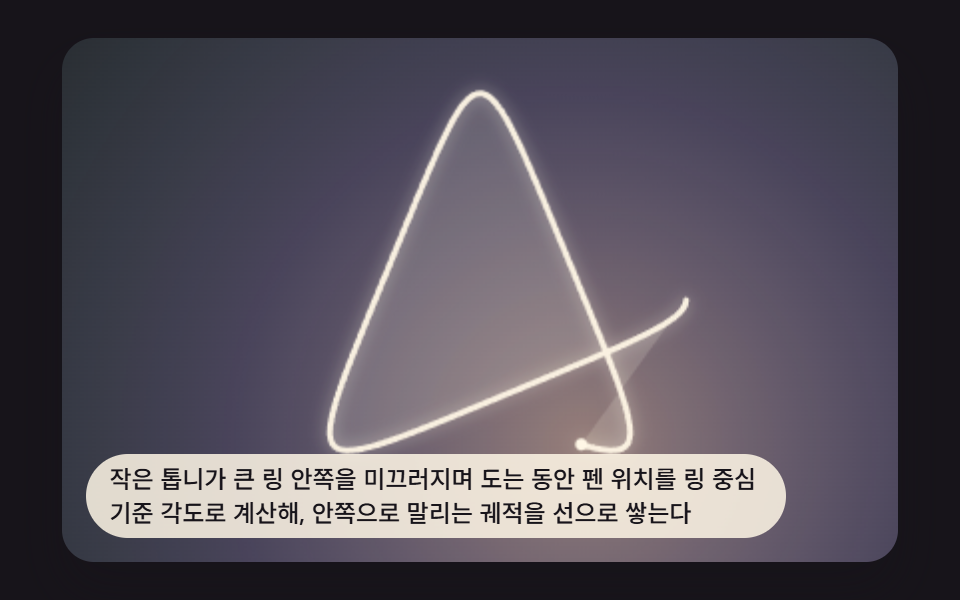
While the small gear rolls inside the ring, the pen position is computed from angles around the ring's center, stacking the inward-curling trace line by line.
Best forOpening scene of a geometric-pattern section
GEAR_RING_TEETHSEGMENTS_PER_TURNshadowBlur
<main class="stage">
<div class="sp1 is-demo" id="sp1Root" tabindex="0">
  <canvas class="sp1__canvas" id="sp1Canvas" width="480" height="300"></canvas>
  <p class="sp1__caption">As a small gear slides around the inside of a large ring, the pen position is calculated as an angle from the ring's center, stacking up a curve that curls inward</p>
</div>
</main>
@use "../../../../site/static/demo-tokens" as *;
@include stage($stage-ink);
.sp1 {
position: relative;
width: min(92vw, calc(160vh - 12.8vw));
aspect-ratio: 480 / 300;
margin: 0 auto;
border-radius: $r-card;
overflow: hidden;
box-shadow: $shadow-raised;
background: $stage-ink;
}
.sp1__canvas {
display: block;
width: 100%;
height: 100%;
}
.sp1__caption {
position: absolute;
left: $sp-3;
bottom: $sp-3;
max-width: 78%;
margin: 0;
padding: $sp-1 $sp-3;
border-radius: $r-pill;
background: rgba(255, 247, 230, .85);
color: $subject-ink;
font-weight: 500;
font-size: 12px;
line-height: 1.4;
pointer-events: none;
}
@media (max-width: 340px) {
.sp1__caption { font-size: 10px; padding: $sp-1 $sp-2; }
}
@media (prefers-reduced-motion: reduce) {
.sp1 { cursor: default; }
}html, body {
margin: 0;
overflow: hidden;
}
.stage {
box-sizing: border-box;
min-height: 100vh;
display: grid;
place-items: center;
margin: 0;
background: #17141a;
font-family: -apple-system, "Segoe UI", "Noto Sans KR", sans-serif;
padding: clamp(8px, 4vw, 24px);
}
.sp1 {
position: relative;
width: min(92vw, 160vh - 12.8vw);
aspect-ratio: 480/300;
margin: 0 auto;
border-radius: 16px;
overflow: hidden;
box-shadow: 0 14px 24px rgba(23, 20, 26, 0.32);
background: #17141a;
}
.sp1__canvas {
display: block;
width: 100%;
height: 100%;
}
.sp1__caption {
position: absolute;
left: 12px;
bottom: 12px;
max-width: 78%;
margin: 0;
padding: 4px 12px;
border-radius: 999px;
background: rgba(255, 247, 230, 0.85);
color: #17141a;
font-weight: 500;
font-size: 12px;
line-height: 1.4;
pointer-events: none;
}
@media (max-width: 340px) {
.sp1__caption {
font-size: 10px;
padding: 4px 8px;
}
}
@media (prefers-reduced-motion: reduce) {
.sp1 {
cursor: default;
}
}(function () {
// 기법: 하이포트로코이드(내접 톱니) 파라메트릭 좌표를 매 프레임 각도 t 만큼 전진시켜 점진적으로
// 이어 그린다. R = 링 반지름, r = 안쪽 톱니 반지름, d = 펜 구멍이 톱니 중심에서 떨어진 거리.
// x(t) = (R-r)cos(t) + d cos(((R-r)/r) t) · y(t) = (R-r)sin(t) - d sin(((R-r)/r) t)
var root = document.getElementById('sp1Root');
var canvas = document.getElementById('sp1Canvas');
var ctx = canvas.getContext('2d');
var wrap = canvas.parentElement;
var CALC_DIM = 200;
var GEAR_RING_TEETH = 72;
var GEAR_ROLL_TEETH = 27;
var PEN_TIP_RATIO = 0.6;
var TOOTH_UNIT = 1.4;
var SEGMENTS_PER_TURN = 220;
function gcd(a, b) { a = Math.abs(a); b = Math.abs(b); while (b) { var t = b; b = a % b; a = t; } return a; }
var R = GEAR_RING_TEETH * TOOTH_UNIT;
var r = GEAR_ROLL_TEETH * TOOTH_UNIT;
var d = r * PEN_TIP_RATIO;
var g = gcd(GEAR_RING_TEETH, GEAR_ROLL_TEETH);
var TURNS = GEAR_ROLL_TEETH / g;
var TOTAL_T = TURNS * Math.PI * 2;
var CYCLE_SECONDS = 6;
var SPEED = TOTAL_T / CYCLE_SECONDS;
function point(t) {
var k = (R - r) / r;
return {
x: (R - r) * Math.cos(t) + d * Math.cos(k * t),
y: (R - r) * Math.sin(t) - d * Math.sin(k * t)
};
}
var cw = 480, ch = 300, scale = 1, cx = 240, cy = 150;
function fit() {
var rect = wrap.getBoundingClientRect();
cw = Math.max(1, Math.round(rect.width));
ch = Math.max(1, Math.round(rect.height));
canvas.width = cw; canvas.height = ch;
scale = Math.min(cw, ch) / CALC_DIM * 0.92;
cx = cw / 2; cy = ch / 2;
}
function toScreen(p) { return { x: cx + p.x * scale, y: cy + p.y * scale }; }
function drawFull(tMax) {
ctx.clearRect(0, 0, cw, ch);
var tipW = toScreen(point(tMax));
var wash = ctx.createRadialGradient(tipW.x, tipW.y, 0, tipW.x, tipW.y, Math.max(cw, ch) * 0.85);
wash.addColorStop(0, 'rgba(255,214,200,.55)');
wash.addColorStop(0.5, 'rgba(200,190,255,.28)');
wash.addColorStop(1, 'rgba(160,230,220,.10)');
ctx.fillStyle = wash;
ctx.fillRect(0, 0, cw, ch);
var fillSteps = Math.max(2, Math.round((tMax / (Math.PI * 2)) * SEGMENTS_PER_TURN));
ctx.beginPath();
for (var fi = 0; fi <= fillSteps; fi += 1) {
var fs = toScreen(point((fi / fillSteps) * tMax));
if (fi === 0) ctx.moveTo(fs.x, fs.y); else ctx.lineTo(fs.x, fs.y);
}
ctx.closePath();
ctx.fillStyle = 'rgba(255,247,230,.16)';
ctx.fill('evenodd');
ctx.lineWidth = Math.max(3, scale * 0.04);
ctx.strokeStyle = 'rgba(255,247,230,.94)';
ctx.shadowColor = 'rgba(255,247,230,.55)';
ctx.shadowBlur = Math.max(8, scale * 0.12);
ctx.lineJoin = 'round';
ctx.lineCap = 'round';
var steps = Math.max(2, Math.round((tMax / (Math.PI * 2)) * SEGMENTS_PER_TURN));
ctx.beginPath();
for (var i = 0; i <= steps; i += 1) {
var t = (i / steps) * tMax;
var s = toScreen(point(t));
if (i === 0) ctx.moveTo(s.x, s.y); else ctx.lineTo(s.x, s.y);
}
ctx.stroke();
ctx.shadowBlur = 0;
if (tMax > 0.001) {
var tip = toScreen(point(tMax));
ctx.fillStyle = 'rgba(255,247,230,1)';
ctx.beginPath();
ctx.arc(tip.x, tip.y, Math.max(3, scale * 0.05), 0, Math.PI * 2);
ctx.fill();
}
}
var reduce = window.matchMedia('(prefers-reduced-motion: reduce)').matches;
if (reduce) root.classList.remove('is-demo');
fit();
if (reduce) {
drawFull(TOTAL_T);
} else {
var elapsed = 0.35;
var lastTs = null;
function tick(ts) {
if (lastTs === null) lastTs = ts;
var dt = Math.min(ts - lastTs, 48);
lastTs = ts;
elapsed += dt / 1000;
var t = elapsed * SPEED;
if (t > TOTAL_T) { elapsed = 0; t = 0; }
drawFull(t);
requestAnimationFrame(tick);
}
drawFull(elapsed * SPEED);
window.addEventListener('resize', function () { fit(); drawFull(elapsed * SPEED); });
requestAnimationFrame(tick);
}
})();import { useEffect, useRef } from "react";
import styles from "./SpiroSceneHypotrochoidBasic.module.scss";
type Pt = { x: number; y: number };
export default function SpiroSceneHypotrochoidBasic() {
const rootRef = useRef<HTMLDivElement>(null);
const canvasRef = useRef<HTMLCanvasElement>(null);
useEffect(() => {
const root = rootRef.current;
const canvas = canvasRef.current;
if (!root || !canvas) return;
const ctx = canvas.getContext("2d");
if (!ctx) return;
const wrap = canvas.parentElement as HTMLElement;
const CALC_DIM = 200;
const GEAR_RING_TEETH = 72;
const GEAR_ROLL_TEETH = 27;
const PEN_TIP_RATIO = 0.6;
const TOOTH_UNIT = 1.4;
const SEGMENTS_PER_TURN = 220;
function gcd(a: number, b: number): number {
a = Math.abs(a); b = Math.abs(b);
while (b) { const t = b; b = a % b; a = t; }
return a;
}
const R = GEAR_RING_TEETH * TOOTH_UNIT;
const r = GEAR_ROLL_TEETH * TOOTH_UNIT;
const d = r * PEN_TIP_RATIO;
const g = gcd(GEAR_RING_TEETH, GEAR_ROLL_TEETH);
const TURNS = GEAR_ROLL_TEETH / g;
const TOTAL_T = TURNS * Math.PI * 2;
const CYCLE_SECONDS = 6;
const SPEED = TOTAL_T / CYCLE_SECONDS;
function point(t: number): Pt {
const k = (R - r) / r;
return {
x: (R - r) * Math.cos(t) + d * Math.cos(k * t),
y: (R - r) * Math.sin(t) - d * Math.sin(k * t)
};
}
let cw = 480, ch = 300, scale = 1, cx = 240, cy = 150;
function fit() {
const rect = wrap.getBoundingClientRect();
cw = Math.max(1, Math.round(rect.width));
ch = Math.max(1, Math.round(rect.height));
canvas!.width = cw; canvas!.height = ch;
scale = Math.min(cw, ch) / CALC_DIM * 0.92;
cx = cw / 2; cy = ch / 2;
}
function toScreen(p: Pt): Pt { return { x: cx + p.x * scale, y: cy + p.y * scale }; }
function drawFull(tMax: number) {
ctx!.clearRect(0, 0, cw, ch);
const tipW = toScreen(point(tMax));
const wash = ctx!.createRadialGradient(tipW.x, tipW.y, 0, tipW.x, tipW.y, Math.max(cw, ch) * 0.85);
wash.addColorStop(0, "rgba(255,214,200,.55)");
wash.addColorStop(0.5, "rgba(200,190,255,.28)");
wash.addColorStop(1, "rgba(160,230,220,.10)");
ctx!.fillStyle = wash;
ctx!.fillRect(0, 0, cw, ch);
const fillSteps = Math.max(2, Math.round((tMax / (Math.PI * 2)) * SEGMENTS_PER_TURN));
ctx!.beginPath();
for (let fi = 0; fi <= fillSteps; fi += 1) {
const fs = toScreen(point((fi / fillSteps) * tMax));
if (fi === 0) ctx!.moveTo(fs.x, fs.y); else ctx!.lineTo(fs.x, fs.y);
}
ctx!.closePath();
ctx!.fillStyle = "rgba(255,247,230,.16)";
ctx!.fill("evenodd");
ctx!.lineWidth = Math.max(3, scale * 0.04);
ctx!.strokeStyle = "rgba(255,247,230,.94)";
ctx!.shadowColor = "rgba(255,247,230,.55)";
ctx!.shadowBlur = Math.max(8, scale * 0.12);
ctx!.lineJoin = "round";
ctx!.lineCap = "round";
const steps = Math.max(2, Math.round((tMax / (Math.PI * 2)) * SEGMENTS_PER_TURN));
ctx!.beginPath();
for (let i = 0; i <= steps; i += 1) {
const t = (i / steps) * tMax;
const s = toScreen(point(t));
if (i === 0) ctx!.moveTo(s.x, s.y); else ctx!.lineTo(s.x, s.y);
}
ctx!.stroke();
ctx!.shadowBlur = 0;
if (tMax > 0.001) {
const tip = toScreen(point(tMax));
ctx!.fillStyle = "rgba(255,247,230,1)";
ctx!.beginPath();
ctx!.arc(tip.x, tip.y, Math.max(3, scale * 0.05), 0, Math.PI * 2);
ctx!.fill();
}
}
const reduce = window.matchMedia("(prefers-reduced-motion: reduce)").matches;
if (reduce) root.classList.remove("is-demo");
fit();
let raf = 0;
if (reduce) {
drawFull(TOTAL_T);
} else {
let elapsed = 0.35;
let lastTs: number | null = null;
const onResize = () => { fit(); drawFull(elapsed * SPEED); };
function tick(ts: number) {
if (lastTs === null) lastTs = ts;
const dt = Math.min(ts - lastTs, 48);
lastTs = ts;
elapsed += dt / 1000;
let t = elapsed * SPEED;
if (t > TOTAL_T) { elapsed = 0; t = 0; }
drawFull(t);
raf = requestAnimationFrame(tick);
}
drawFull(elapsed * SPEED);
window.addEventListener("resize", onResize);
raf = requestAnimationFrame(tick);
return () => {
cancelAnimationFrame(raf);
window.removeEventListener("resize", onResize);
};
}
return () => { cancelAnimationFrame(raf); };
}, []);
return (
<main className={styles.stage}>
<div className={`${styles.sp1} is-demo`} ref={rootRef} tabIndex={0}>
<canvas className={styles.sp1__canvas} ref={canvasRef} width={480} height={300} />
<p className={styles.sp1__caption}>작은 톱니가 큰 링 안쪽을 미끄러지며 도는 동안 펜 위치를 링 중심 기준 각도로 계산해, 안쪽으로 말리는 궤적을 선으로 쌓는다</p>
</div>
</main>
);
}01 Basic Spirograph Curve Tracing a Gear Inside a Ring — Measured area 65.706% · moving frames 23/23Original by GODRICH · SCSS and React ship in the zip · Spirograph Generator: 9 Gear-Ratio Curve Patterns
The post this demo lives in
 Spirograph Generator: 9 Gear-Ratio Curve PatternsWhen the two gear tooth counts share no common factor the curve closes, and the moment the ratio slips the sheet wanders See all demos in this post