06Guide Overlay Showing the Gear and Pen on the Curve
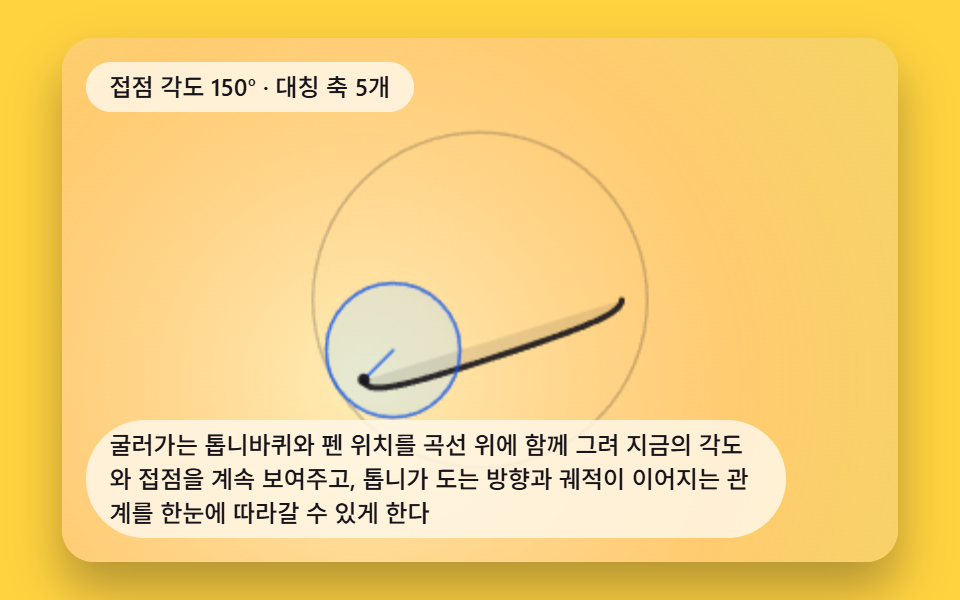
The rolling gear and the pen are drawn on top of the curve so the current angle and contact point stay visible, letting the eye follow how the spin direction relates to the growing trace.
Best forExplanatory annotation overlay
HOLD_FRACTIONAXIS_COUNTrollCenterAt
<main class="stage">
<div class="sp6 is-demo" id="sp6Root" tabindex="0">
  <canvas class="sp6__canvas" id="sp6Canvas" width="480" height="300"></canvas>
  <p class="sp6__badge" id="sp6Badge"></p>
  <p class="sp6__caption">Draws the rolling gear and pen position together on top of the curve, continuously showing the current angle and contact point, so the relationship between the gear's turning direction and the unfolding trace can be followed at a glance</p>
</div>
</main>
@use "../../../../site/static/demo-tokens" as *;
@include stage($stage-yellow);
.sp6 {
position: relative;
width: min(92vw, calc(160vh - 12.8vw));
aspect-ratio: 480 / 300;
margin: 0 auto;
border-radius: $r-card;
overflow: hidden;
box-shadow: $shadow-raised;
background: $stage-yellow;
}
.sp6__canvas {
display: block;
width: 100%;
height: 100%;
}
.sp6__badge {
position: absolute;
left: $sp-3;
top: $sp-3;
margin: 0;
padding: $sp-1 $sp-3;
border-radius: $r-pill;
background: rgba(255, 247, 230, .85);
color: $subject-ink;
font-weight: 500;
font-size: 12px;
line-height: 1.4;
pointer-events: none;
}
.sp6__caption {
position: absolute;
left: $sp-3;
bottom: $sp-3;
max-width: 78%;
margin: 0;
padding: $sp-1 $sp-3;
border-radius: $r-pill;
background: rgba(255, 247, 230, .85);
color: $subject-ink;
font-weight: 500;
font-size: 12px;
line-height: 1.4;
pointer-events: none;
}
@media (max-width: 340px) {
.sp6__caption, .sp6__badge { font-size: 10px; padding: $sp-1 $sp-2; }
}
@media (prefers-reduced-motion: reduce) {
.sp6 { cursor: default; }
}html, body {
margin: 0;
overflow: hidden;
}
.stage {
box-sizing: border-box;
min-height: 100vh;
display: grid;
place-items: center;
margin: 0;
background: #ffd23f;
font-family: -apple-system, "Segoe UI", "Noto Sans KR", sans-serif;
padding: clamp(8px, 4vw, 24px);
}
.sp6 {
position: relative;
width: min(92vw, 160vh - 12.8vw);
aspect-ratio: 480/300;
margin: 0 auto;
border-radius: 16px;
overflow: hidden;
box-shadow: 0 14px 24px rgba(23, 20, 26, 0.32);
background: #ffd23f;
}
.sp6__canvas {
display: block;
width: 100%;
height: 100%;
}
.sp6__badge {
position: absolute;
left: 12px;
top: 12px;
margin: 0;
padding: 4px 12px;
border-radius: 999px;
background: rgba(255, 247, 230, 0.85);
color: #17141a;
font-weight: 500;
font-size: 12px;
line-height: 1.4;
pointer-events: none;
}
.sp6__caption {
position: absolute;
left: 12px;
bottom: 12px;
max-width: 78%;
margin: 0;
padding: 4px 12px;
border-radius: 999px;
background: rgba(255, 247, 230, 0.85);
color: #17141a;
font-weight: 500;
font-size: 12px;
line-height: 1.4;
pointer-events: none;
}
@media (max-width: 340px) {
.sp6__caption, .sp6__badge {
font-size: 10px;
padding: 4px 8px;
}
}
@media (prefers-reduced-motion: reduce) {
.sp6 {
cursor: default;
}
}(function () {
// 기법: 링 톱니·구름 톱니 두 원과 펜 스포크를 매 프레임 현재 각도로 다시 그려,
// 곡선이 자라나는 동안에도 "지금 어디를 굴러가는지"가 항상 화면에 남아 있게 한다.
var root = document.getElementById('sp6Root');
var canvas = document.getElementById('sp6Canvas');
var badge = document.getElementById('sp6Badge');
var ctx = canvas.getContext('2d');
var wrap = canvas.parentElement;
var CALC_DIM = 200;
var GEAR_RING_TEETH = 60;
var GEAR_ROLL_TEETH = 24;
var PEN_TIP_RATIO = 0.62;
var TOOTH_UNIT = 1.3;
var SEGMENTS_PER_TURN = 200;
var CYCLE_SECONDS = 6;
var HOLD_FRACTION = 0.84;
function gcd(a, b) { while (b) { var t = b; b = a % b; a = t; } return a; }
var g = gcd(GEAR_RING_TEETH, GEAR_ROLL_TEETH);
var TURNS = GEAR_ROLL_TEETH / g;
var AXIS_COUNT = GEAR_RING_TEETH / g;
var R = GEAR_RING_TEETH * TOOTH_UNIT;
var r = GEAR_ROLL_TEETH * TOOTH_UNIT;
var d = r * PEN_TIP_RATIO;
var K = (R - r) / r;
function penAt(t) {
return {
x: (R - r) * Math.cos(t) + d * Math.cos(K * t),
y: (R - r) * Math.sin(t) - d * Math.sin(K * t)
};
}
function rollCenterAt(t) {
return { x: (R - r) * Math.cos(t), y: (R - r) * Math.sin(t) };
}
var cw = 480, ch = 300, scale = 1, cx = 240, cy = 150;
function fit() {
var rect = wrap.getBoundingClientRect();
cw = Math.max(1, Math.round(rect.width));
ch = Math.max(1, Math.round(rect.height));
canvas.width = cw; canvas.height = ch;
scale = Math.min(cw, ch) / CALC_DIM * 0.82;
cx = cw / 2; cy = ch / 2;
}
function toScreen(p) { return { x: cx + p.x * scale, y: cy + p.y * scale }; }
var maxT = 2 * Math.PI * TURNS;
var dtSample = (2 * Math.PI) / SEGMENTS_PER_TURN;
function render(progress) {
var t = maxT * Math.min(progress / HOLD_FRACTION, 1);
ctx.fillStyle = '#ffd23f';
ctx.fillRect(0, 0, cw, ch);
var tipW = toScreen(penAt(t));
var wash = ctx.createRadialGradient(tipW.x, tipW.y, 0, tipW.x, tipW.y, Math.max(cw, ch) * 0.9);
wash.addColorStop(0, 'rgba(255,255,255,.62)');
wash.addColorStop(0.5, 'rgba(255,190,215,.32)');
wash.addColorStop(1, 'rgba(190,225,255,.14)');
ctx.fillStyle = wash;
ctx.fillRect(0, 0, cw, ch);
var rcW = toScreen(rollCenterAt(t));
ctx.beginPath();
ctx.arc(rcW.x, rcW.y, r * scale, 0, Math.PI * 2);
ctx.fillStyle = 'rgba(190,225,255,.38)';
ctx.fill();
var ringCenter = toScreen({ x: 0, y: 0 });
ctx.beginPath();
ctx.arc(ringCenter.x, ringCenter.y, R * scale, 0, Math.PI * 2);
ctx.strokeStyle = 'rgba(23,20,26,.22)';
ctx.lineWidth = Math.max(1.4, scale * 0.02);
ctx.stroke();
ctx.beginPath();
var first = true;
for (var tt = 0; tt <= t; tt += dtSample) {
var p = toScreen(penAt(tt));
if (first) { ctx.moveTo(p.x, p.y); first = false; } else { ctx.lineTo(p.x, p.y); }
}
ctx.save();
ctx.fillStyle = 'rgba(23,20,26,.10)';
ctx.fill('evenodd');
ctx.restore();
ctx.strokeStyle = 'rgba(23,20,26,.9)';
ctx.lineWidth = Math.max(3, scale * 0.04);
ctx.lineJoin = 'round'; ctx.lineCap = 'round';
ctx.stroke();
var rc = rollCenterAt(t);
var rcS = toScreen(rc);
ctx.beginPath();
ctx.arc(rcS.x, rcS.y, r * scale, 0, Math.PI * 2);
ctx.strokeStyle = 'rgba(10,79,232,.75)';
ctx.lineWidth = Math.max(1.6, scale * 0.024);
ctx.stroke();
var pen = toScreen(penAt(t));
ctx.beginPath();
ctx.moveTo(rcS.x, rcS.y);
ctx.lineTo(pen.x, pen.y);
ctx.strokeStyle = 'rgba(10,79,232,.75)';
ctx.lineWidth = Math.max(1.4, scale * 0.018);
ctx.stroke();
ctx.beginPath();
ctx.arc(pen.x, pen.y, Math.max(3, scale * 0.05), 0, Math.PI * 2);
ctx.fillStyle = 'rgba(23,20,26,.92)';
ctx.fill();
var deg = Math.round((((t * 180 / Math.PI) % 360) + 360) % 360);
badge.textContent = 'Contact angle ' + deg + '° · ' + AXIS_COUNT + ' symmetry axes';
}
var reduce = window.matchMedia('(prefers-reduced-motion: reduce)').matches;
fit();
if (reduce) {
root.classList.remove('is-demo');
render(HOLD_FRACTION);
} else {
var startTs = null;
function tick(ts) {
if (startTs === null) startTs = ts;
var elapsed = (ts - startTs) / 1000;
var progress = (elapsed % CYCLE_SECONDS) / CYCLE_SECONDS;
render(progress);
requestAnimationFrame(tick);
}
window.addEventListener('resize', function () { fit(); });
requestAnimationFrame(tick);
}
})();import { useEffect, useRef } from "react";
import styles from "./SpiroSceneGearVisualGuide.module.scss";
type Pt = { x: number; y: number };
export default function SpiroSceneGearVisualGuide() {
const rootRef = useRef<HTMLDivElement>(null);
const canvasRef = useRef<HTMLCanvasElement>(null);
const badgeRef = useRef<HTMLParagraphElement>(null);
useEffect(() => {
const root = rootRef.current;
const canvas = canvasRef.current;
const badge = badgeRef.current;
if (!root || !canvas || !badge) return;
const ctx = canvas.getContext("2d");
if (!ctx) return;
const wrap = canvas.parentElement as HTMLElement;
const CALC_DIM = 200;
const GEAR_RING_TEETH = 60;
const GEAR_ROLL_TEETH = 24;
const PEN_TIP_RATIO = 0.62;
const TOOTH_UNIT = 1.3;
const SEGMENTS_PER_TURN = 200;
const CYCLE_SECONDS = 6;
const HOLD_FRACTION = 0.84;
function gcd(a: number, b: number): number { while (b) { const t = b; b = a % b; a = t; } return a; }
const g = gcd(GEAR_RING_TEETH, GEAR_ROLL_TEETH);
const TURNS = GEAR_ROLL_TEETH / g;
const AXIS_COUNT = GEAR_RING_TEETH / g;
const R = GEAR_RING_TEETH * TOOTH_UNIT;
const r = GEAR_ROLL_TEETH * TOOTH_UNIT;
const d = r * PEN_TIP_RATIO;
const K = (R - r) / r;
function penAt(t: number): Pt {
return {
x: (R - r) * Math.cos(t) + d * Math.cos(K * t),
y: (R - r) * Math.sin(t) - d * Math.sin(K * t)
};
}
function rollCenterAt(t: number): Pt {
return { x: (R - r) * Math.cos(t), y: (R - r) * Math.sin(t) };
}
let cw = 480, ch = 300, scale = 1, cx = 240, cy = 150;
function fit() {
const rect = wrap.getBoundingClientRect();
cw = Math.max(1, Math.round(rect.width));
ch = Math.max(1, Math.round(rect.height));
canvas!.width = cw; canvas!.height = ch;
scale = Math.min(cw, ch) / CALC_DIM * 0.82;
cx = cw / 2; cy = ch / 2;
}
function toScreen(p: Pt): Pt { return { x: cx + p.x * scale, y: cy + p.y * scale }; }
const maxT = 2 * Math.PI * TURNS;
const dtSample = (2 * Math.PI) / SEGMENTS_PER_TURN;
function render(progress: number) {
const t = maxT * Math.min(progress / HOLD_FRACTION, 1);
ctx!.fillStyle = "#ffd23f";
ctx!.fillRect(0, 0, cw, ch);
const tipW = toScreen(penAt(t));
const wash = ctx!.createRadialGradient(tipW.x, tipW.y, 0, tipW.x, tipW.y, Math.max(cw, ch) * 0.9);
wash.addColorStop(0, 'rgba(255,255,255,.62)');
wash.addColorStop(0.5, 'rgba(255,190,215,.32)');
wash.addColorStop(1, 'rgba(190,225,255,.14)');
ctx!.fillStyle = wash;
ctx!.fillRect(0, 0, cw, ch);
const rcW = toScreen(rollCenterAt(t));
ctx!.beginPath();
ctx!.arc(rcW.x, rcW.y, r * scale, 0, Math.PI * 2);
ctx!.fillStyle = 'rgba(190,225,255,.38)';
ctx!.fill();
const ringCenter = toScreen({ x: 0, y: 0 });
ctx!.beginPath();
ctx!.arc(ringCenter.x, ringCenter.y, R * scale, 0, Math.PI * 2);
ctx!.strokeStyle = "rgba(23,20,26,.22)";
ctx!.lineWidth = Math.max(1.4, scale * 0.02);
ctx!.stroke();
ctx!.beginPath();
let first = true;
for (let tt = 0; tt <= t; tt += dtSample) {
const p = toScreen(penAt(tt));
if (first) { ctx!.moveTo(p.x, p.y); first = false; } else { ctx!.lineTo(p.x, p.y); }
}
ctx!.save();
ctx!.fillStyle = "rgba(23,20,26,.10)";
ctx!.fill("evenodd");
ctx!.restore();
ctx!.strokeStyle = "rgba(23,20,26,.9)";
ctx!.lineWidth = Math.max(3, scale * 0.04);
ctx!.lineJoin = "round"; ctx!.lineCap = "round";
ctx!.stroke();
const rc = rollCenterAt(t);
const rcS = toScreen(rc);
ctx!.beginPath();
ctx!.arc(rcS.x, rcS.y, r * scale, 0, Math.PI * 2);
ctx!.strokeStyle = "rgba(10,79,232,.75)";
ctx!.lineWidth = Math.max(1.6, scale * 0.024);
ctx!.stroke();
const pen = toScreen(penAt(t));
ctx!.beginPath();
ctx!.moveTo(rcS.x, rcS.y);
ctx!.lineTo(pen.x, pen.y);
ctx!.strokeStyle = "rgba(10,79,232,.75)";
ctx!.lineWidth = Math.max(1.4, scale * 0.018);
ctx!.stroke();
ctx!.beginPath();
ctx!.arc(pen.x, pen.y, Math.max(3, scale * 0.05), 0, Math.PI * 2);
ctx!.fillStyle = "rgba(23,20,26,.92)";
ctx!.fill();
const deg = Math.round((((t * 180 / Math.PI) % 360) + 360) % 360);
badge!.textContent = "접점 각도 " + deg + "° · 대칭 축 " + AXIS_COUNT + "개";
}
const reduce = window.matchMedia("(prefers-reduced-motion: reduce)").matches;
fit();
let raf = 0;
if (reduce) {
root.classList.remove("is-demo");
render(HOLD_FRACTION);
} else {
let startTs: number | null = null;
const onResize = () => { fit(); };
function tick(ts: number) {
if (startTs === null) startTs = ts;
const elapsed = (ts - startTs) / 1000;
const progress = (elapsed % CYCLE_SECONDS) / CYCLE_SECONDS;
render(progress);
raf = requestAnimationFrame(tick);
}
window.addEventListener("resize", onResize);
raf = requestAnimationFrame(tick);
return () => {
cancelAnimationFrame(raf);
window.removeEventListener("resize", onResize);
};
}
return () => { cancelAnimationFrame(raf); };
}, []);
return (
<main className={styles.stage}>
<div className={`${styles.sp6} is-demo`} ref={rootRef} tabIndex={0}>
<canvas className={styles.sp6__canvas} ref={canvasRef} width={480} height={300} />
<p className={styles.sp6__badge} ref={badgeRef} />
<p className={styles.sp6__caption}>굴러가는 톱니바퀴와 펜 위치를 곡선 위에 함께 그려 지금의 각도와 접점을 계속 보여주고, 톱니가 도는 방향과 궤적이 이어지는 관계를 한눈에 따라갈 수 있게 한다</p>
</div>
</main>
);
}06 Guide Overlay Showing the Gear and Pen on the Curve — Measured area 59.176% · moving frames 23/23Original by GODRICH · SCSS and React ship in the zip · Spirograph Generator: 9 Gear-Ratio Curve Patterns
The post this demo lives in
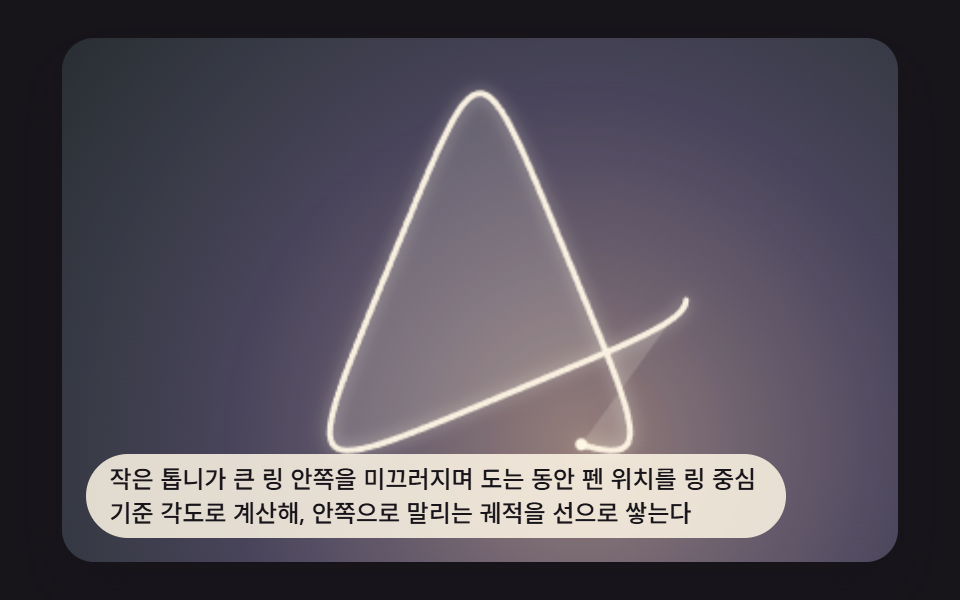 Spirograph Generator: 9 Gear-Ratio Curve PatternsWhen the two gear tooth counts share no common factor the curve closes, and the moment the ratio slips the sheet wanders See all demos in this post
If you like this effect - similar demos
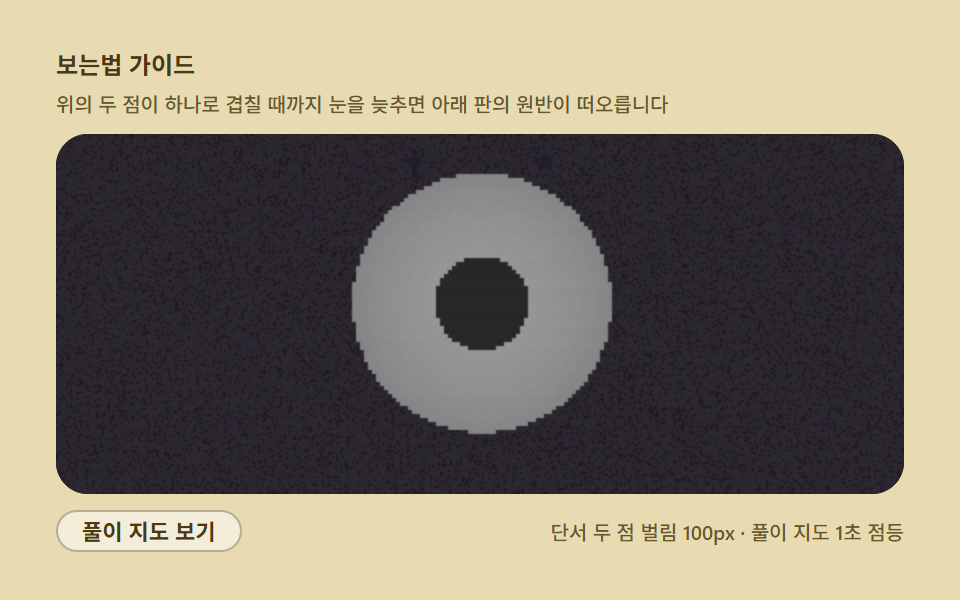 Creative UI06 How-to-see guide — guide dots and a self-solve overlayMagic Eye Stereograms: 9 Depth Map Demos
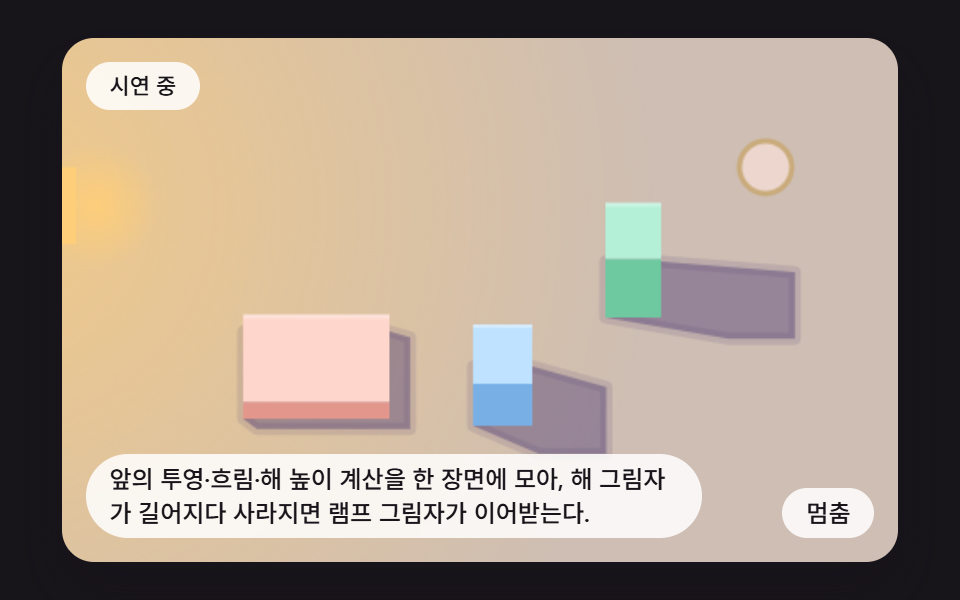 Creative UI09 A Desk Hero Where the Sun Sets and a Lamp Turns OnCSS Shadow Effects: 9 Demos That Compute the Cast
 Creative UI08 Panning and zooming the grid canvasNode Based UI Design: 9 Patterns, No Library