06A Circular Opening That Grows From the Logo Center
The needed radius is the largest of the four distances from the center to the corners (171.6 px in the first run). The center is toward the lower left, not the middle, so the distances split into 111.7, 171.6, 84.1 and 155.1 px, and the right panel, which pins the radius to half the width (103 px), keeps three corners covered.
Best forA circular transition that opens the screen from a button or logo position
EXIT_MSMAX_RADIUSFIXED_RADIUS
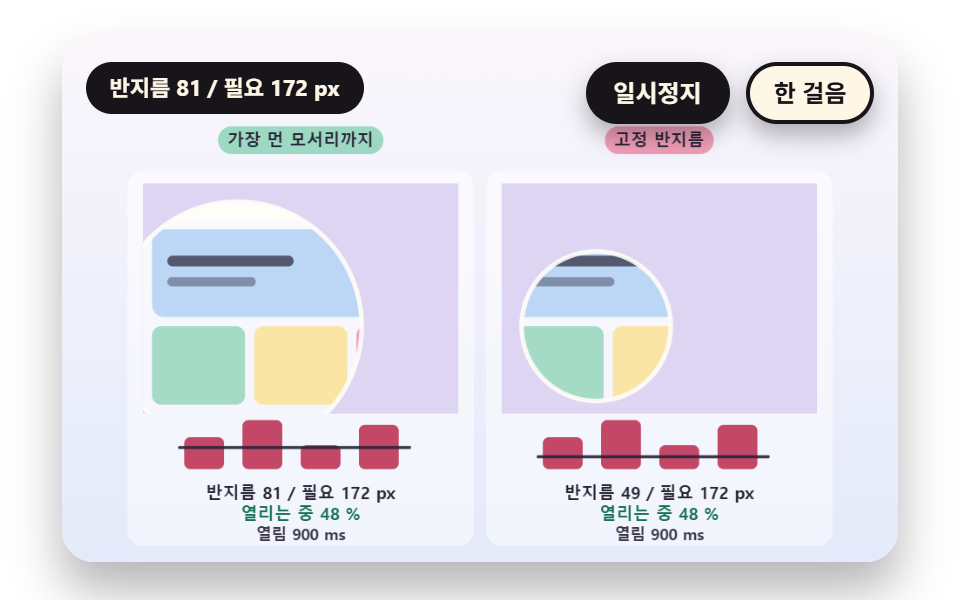
<main class="stage">
<div class="vj is-demo" id="vj">
  <div class="vj__pad" data-role="pad" tabindex="0" role="application" aria-label="Splash stage: Enter, Space, R or a click restarts, P pauses, N steps once">
    <canvas class="vj__canvas" data-role="canvas" width="480" height="300" role="img" aria-label="Two splashes that open as a circle from the logo spot. The left grows the radius to the farthest of the four corner distances and opens the whole screen, while the right pins the radius to half the screen width and three corners stay covered. The four bars below show the corner distances and the current radius, and a bar the radius could not reach is pink"></canvas>
  </div>
  <p class="vj__status" data-role="status" aria-live="off">Splash demo</p>
  <div class="vj__ctrl">
    <button class="vj__pause" data-role="pause" type="button" aria-pressed="false">Pause</button>
    <button class="vj__step" data-role="step" type="button">Step</button>
  </div>
  <p class="vj__done" data-role="done" role="status" aria-live="polite"></p>
  <div class="vj__prog" data-role="progress" role="progressbar" aria-label="Splash progress" aria-valuemin="0" aria-valuemax="100" aria-valuenow="0"></div>
</div>
</main>
@use "../../../../site/static/demo-tokens" as *;
@include stage($stage-paper);
.vj {
position: relative;
width: min(92vw, calc(160vh - 12.8vw));
aspect-ratio: 480 / 300;
margin: 0 auto;
border-radius: $r-card;
overflow: hidden;
box-shadow: $shadow-raised;
background: $subject-cream;
}
// 무대 상자 — 누르거나 Enter·Space·R 을 치면 처음부터 다시 시작한다. 키보드 포커스도 여기서 받는다(touch-action: none 은 이 상자에만). 무대 밖 터치는 페이지 스크롤 그대로
.vj__pad {
position: absolute;
inset: 0;
border-radius: inherit;
outline: none;
touch-action: none;
cursor: pointer;
}
// 바깥 .vj 가 넘침을 자르므로 포커스 테두리는 안쪽으로 들인다
.vj__pad:focus-visible {
outline: 3px solid $subject-ink;
outline-offset: -3px;
}
.vj__canvas {
position: absolute;
inset: 0;
display: block;
width: 100%;
height: 100%;
}
.vj__ctrl {
position: absolute;
right: $sp-3;
top: $sp-3;
display: flex;
gap: $sp-2;
}
.vj__pause,
.vj__step {
padding: $sp-1 $sp-3;
border: 2px solid $subject-ink;
border-radius: $r-pill;
background: $subject-ink;
color: $subject-cream;
font-family: inherit;
font-weight: 700;
font-size: 12px;
line-height: 1.6;
cursor: pointer;
box-shadow: $shadow-press;
transition: transform $dur-quick $ease-spring;
}
.vj__step {
background: $subject-cream;
color: $subject-ink;
}
// 스크린리더에만 읽히는 완료 알림과 진행 막대
.vj__done,
.vj__prog {
position: absolute;
width: 1px;
height: 1px;
margin: 0;
overflow: hidden;
clip-path: inset(50%);
white-space: nowrap;
}
// 눌린 상태(멈춤) — 바탕과 글자색을 뒤집어 aria-pressed 가 눈에도 보이게
.vj__pause[aria-pressed="true"] {
background: $subject-cream;
color: $subject-ink;
}
.vj__pause:hover,
.vj__step:hover {
transform: translateY(-2px);
}
.vj__pause:active,
.vj__step:active {
transform: translateY(1px);
}
.vj__pause:focus-visible,
.vj__step:focus-visible {
outline: 3px solid $subject-ink;
outline-offset: 3px;
}
// 상태 줄 — 지금 장면의 수치를 글자로. 시연 중에는 aria-live off, 사람이 처음 손대면 polite
.vj__status {
position: absolute;
left: $sp-3;
top: $sp-3;
max-width: calc(100% - 190px);
margin: 0;
padding: $sp-1 $sp-3;
border-radius: $r-pill;
background: $subject-ink;
color: $subject-cream;
font-weight: 700;
font-size: 11px;
line-height: 1.6;
white-space: nowrap;
overflow: hidden;
text-overflow: ellipsis;
pointer-events: none;
}
@media (max-width: 340px) {
.vj__pause,
.vj__step,
.vj__status { font-size: 10px; padding: 0 $sp-2; }
}
// 움직임 줄이기 — 장면은 스크립트가 정지 장면 한 장으로 멈춘다. 버튼도 떠오르지 않게
@media (prefers-reduced-motion: reduce) {
.vj__pause,
.vj__step { transition: none !important; }
.vj__pause:hover,
.vj__pause:active,
.vj__step:hover,
.vj__step:active { transform: none !important; }
}html, body {
margin: 0;
overflow: hidden;
}
.stage {
box-sizing: border-box;
min-height: 100vh;
display: grid;
place-items: center;
margin: 0;
background: #ffffff;
font-family: -apple-system, "Segoe UI", "Noto Sans KR", sans-serif;
padding: clamp(8px, 4vw, 24px);
}
.vj {
position: relative;
width: min(92vw, 160vh - 12.8vw);
aspect-ratio: 480/300;
margin: 0 auto;
border-radius: 16px;
overflow: hidden;
box-shadow: 0 14px 24px rgba(23, 20, 26, 0.32);
background: #fff7e6;
}
.vj__pad {
position: absolute;
inset: 0;
border-radius: inherit;
outline: none;
touch-action: none;
cursor: pointer;
}
.vj__pad:focus-visible {
outline: 3px solid #17141a;
outline-offset: -3px;
}
.vj__canvas {
position: absolute;
inset: 0;
display: block;
width: 100%;
height: 100%;
}
.vj__ctrl {
position: absolute;
right: 12px;
top: 12px;
display: flex;
gap: 8px;
}
.vj__pause,
.vj__step {
padding: 4px 12px;
border: 2px solid #17141a;
border-radius: 999px;
background: #17141a;
color: #fff7e6;
font-family: inherit;
font-weight: 700;
font-size: 12px;
line-height: 1.6;
cursor: pointer;
box-shadow: 0 6px 12px rgba(23, 20, 26, 0.32);
transition: transform 220ms cubic-bezier(0.2, 0.8, 0.2, 1);
}
.vj__step {
background: #fff7e6;
color: #17141a;
}
.vj__done,
.vj__prog {
position: absolute;
width: 1px;
height: 1px;
margin: 0;
overflow: hidden;
clip-path: inset(50%);
white-space: nowrap;
}
.vj__pause[aria-pressed=true] {
background: #fff7e6;
color: #17141a;
}
.vj__pause:hover,
.vj__step:hover {
transform: translateY(-2px);
}
.vj__pause:active,
.vj__step:active {
transform: translateY(1px);
}
.vj__pause:focus-visible,
.vj__step:focus-visible {
outline: 3px solid #17141a;
outline-offset: 3px;
}
.vj__status {
position: absolute;
left: 12px;
top: 12px;
max-width: calc(100% - 190px);
margin: 0;
padding: 4px 12px;
border-radius: 999px;
background: #17141a;
color: #fff7e6;
font-weight: 700;
font-size: 11px;
line-height: 1.6;
white-space: nowrap;
overflow: hidden;
text-overflow: ellipsis;
pointer-events: none;
}
@media (max-width: 340px) {
.vj__pause,
.vj__step,
.vj__status {
font-size: 10px;
padding: 0 8px;
}
}
@media (prefers-reduced-motion: reduce) {
.vj__pause,
.vj__step {
transition: none !important;
}
.vj__pause:hover,
.vj__pause:active,
.vj__step:hover,
.vj__step:active {
transform: none !important;
}
}(function () {
const root = document.getElementById("vj");
if (!root) return;
// 무대 좌표 — 캔버스 안 계산은 늘 480×300. 화면에 보이는 크기와 상관없다
const W = 480;
const H = 300;
const PI = Math.PI;
const TAU = Math.PI * 2;
function clamp(v, lo, hi) { return v < lo ? lo : (v > hi ? hi : v); }
function lerp(a, b, k) { return a + (b - a) * k; }
function ease(x) { const c = clamp(x, 0, 1); return c * c * (3 - 2 * c); }
// 가속 뒤 감속 — 앞 절반은 4p³, 뒤 절반은 대칭
function easeInOut(x) { const p = clamp(x, 0, 1); return p < 0.5 ? 4 * p * p * p : 1 - Math.pow(-2 * p + 2, 3) / 2; }
// 시드 고정 난수 — 선형 합동 생성기(곱 1664525, 더함 1013904223). 같은 시드면 같은 수열
function seeded(seed) {
let s = (seed >>> 0) || 1;
return function () {
s = (Math.imul(s, 1664525) + 1013904223) >>> 0;
return s / 4294967296;
};
}
// 파스텔 팔레트 — 글자는 늘 INK, 면은 연한 색. 읽음은 민트, 어긋남은 분홍, 로고는 라벤더
const BG_TOP = [250, 246, 252];
const BG_BOT = [228, 234, 250];
const FACE = [255, 253, 248];
const FACE_EDGE = [206, 198, 226];
const SKY = [176, 210, 246];
const SKY_DEEP = [74, 120, 176];
const GOLD = [250, 226, 150];
const GOLD_DEEP = [196, 150, 52];
const ROSE = [240, 150, 176];
const ROSE_DEEP = [190, 52, 86];
const MINT = [150, 214, 190];
const MINT_DEEP = [22, 112, 82];
const LAV = [188, 172, 236];
const LAV_DEEP = [104, 82, 176];
const INK = [40, 36, 54];
const PAPER = [250, 246, 240];
const PEACH = [250, 204, 170];
const PEACH_DEEP = [176, 92, 40];
function mix(a, b, k) { return [lerp(a[0], b[0], k), lerp(a[1], b[1], k), lerp(a[2], b[2], k)]; }
function rgba(c, a) {
return 'rgba(' + Math.round(clamp(c[0], 0, 255)) + ',' + Math.round(clamp(c[1], 0, 255)) + ',' + Math.round(clamp(c[2], 0, 255)) + ',' + clamp(a, 0, 1).toFixed(3) + ')';
}
// 장면 시계(초)·판 반복 번호·시간표 — 시간표는 (시각, 할 일) 목록이고 시각이 지나면 한 번씩 부른다
// sceneT 는 rAF 타임스탬프 차이(dt, 한 프레임 0.05초 상한)를 쌓은 값 하나뿐이다 — 이 장면의 시간 원천은 이것 하나
let sceneT = 0;
let lap = 0;
let script = [];
let evAt = 0;
let res = [];
let totalKb = 1;
let doneT = 0;
// 로딩은 시각 start 에 시작해 spanS 초 안에 끝난다. 큰 리소스일수록 오래 걸린다
function makeLoad(seed, n, start, spanS) {
const rnd = seeded(seed);
const raw = [];
let sum = 0;
let mx = 0;
for (let i = 0; i < n; i += 1) {
const kb = Math.round(24 + rnd() * 276);
const a = rnd() * 0.5;
const b = a + 0.12 + (kb / 300) * 0.38;
raw.push({ kb: kb, t0: a, t1: b });
sum += kb;
mx = Math.max(mx, b);
}
res = raw.map(function (r) { return { kb: r.kb, t0: start + (r.t0 / mx) * spanS, t1: start + (r.t1 / mx) * spanS }; });
totalKb = sum;
doneT = start + spanS;
}
// 리소스 하나가 시각 t 에 얼마나 읽혔는지 0 에서 1
function resFrac(r, t) { return clamp((t - r.t0) / (r.t1 - r.t0), 0, 1); }
// 읽어 온 KB — 리소스마다 읽힌 비율 × 크기의 합
function loadedKb(t) {
let s = 0;
for (let i = 0; i < res.length; i += 1) {
s += res[i].kb * resFrac(res[i], t);
}
return s;
}
// 읽어 온 비율 0 에서 1 — 연출은 이 값만 받는다
function loadFrac(t) { return loadedKb(t) / totalKb; }
// 리소스가 통째로 도착했을 때만 세는 KB — 덩어리째 올라가는 진행률(03 의 목표값)
function arrivedKb(t) {
let s = 0;
for (let i = 0; i < res.length; i += 1) {
if (t >= res[i].t1) {
s += res[i].kb;
}
}
return s;
}
// 읽어 온 비율이 f 에 처음 닿는 시각 — 단조 증가라 이분 탐색
function timeAtFrac(f) {
let lo = 0;
let hi = doneT;
for (let i = 0; i < 40; i += 1) {
const mid = (lo + hi) / 2;
if (loadFrac(mid) < f) {
lo = mid;
}
else {
hi = mid;
}
}
return hi;
}
// 감쇠 스프링의 계단 응답 — 0 에서 시작해 1 로 가며 한 번 넘쳤다가 선다. k 는 강성, c 는 감쇠
function springStep(q, k, c) {
if (q <= 0) {
return 0;
}
const w = Math.sqrt(k);
const z = c / (2 * w);
const wd = w * Math.sqrt(Math.max(1e-6, 1 - z * z));
return 1 - Math.exp(-z * w * q) * (Math.cos(wd * q) + ((z * w) / wd) * Math.sin(wd * q));
}
const canvasEl = root.querySelector('[data-role="canvas"]');
const padEl = root.querySelector('[data-role="pad"]');
const pauseEl = root.querySelector('[data-role="pause"]');
const statusEl = root.querySelector('[data-role="status"]');
const stepEl = root.querySelector('[data-role="step"]');
const doneEl = root.querySelector('[data-role="done"]');
const progEl = root.querySelector('[data-role="progress"]');
const ctxRaw = canvasEl ? canvasEl.getContext('2d') : null;
if (!canvasEl || !ctxRaw || !pauseEl || !padEl || !stepEl || !doneEl) {
return;
}
const cv = canvasEl;
const ctx = ctxRaw;
const pauseBtn = pauseEl;
const stepBtn = stepEl;
const doneP = doneEl;
const pad = padEl;
// 외부 웹폰트는 부르지 않는다 — 기기에 있는 글꼴 목록만
const FONT_STACK = 'system-ui, -apple-system, "Segoe UI", "Noto Sans KR", sans-serif';
let dpr = 1;
function fitCanvas() {
// 배율은 2 에서 자른다 — 배율 3 기기에서 화소가 2.25배로 늘지 않게
dpr = Math.min(window.devicePixelRatio || 1, 2);
cv.width = Math.round(W * dpr);
cv.height = Math.round(H * dpr);
ctx.setTransform(dpr, 0, 0, dpr, 0, 0);
}
const VIEW_S = 0.88;
function skyFill(top, bot) {
ctx.setTransform(dpr, 0, 0, dpr, 0, 0);
const g = ctx.createLinearGradient(0, 0, 0, H);
g.addColorStop(0, rgba(top, 1));
g.addColorStop(1, rgba(bot, 1));
ctx.fillStyle = g;
ctx.fillRect(0, 0, W, H);
// 위쪽 Pause·상태 알약이 덮는 띠를 비우려고 장면 전체를 VIEW_S 배로 줄여 아래 가운데에 붙인다 — 이 줄 뒤에 그리는 것은 모두 줄어든 좌표계
ctx.translate(W / 2, H - 3);
ctx.scale(VIEW_S, VIEW_S);
ctx.translate(-W / 2, -(H - 3));
}
function disc(x, y, r, c, a) {
if (r <= 0.2 || a <= 0) {
return;
}
ctx.beginPath();
ctx.arc(x, y, r, 0, TAU);
ctx.fillStyle = rgba(c, a);
ctx.fill();
}
function ring(x, y, r, width, c, a) {
if (r <= 0.2 || a <= 0) {
return;
}
ctx.beginPath();
ctx.arc(x, y, r, 0, TAU);
ctx.lineWidth = width;
ctx.strokeStyle = rgba(c, a);
ctx.stroke();
}
function oval(x, y, rx, ry, c, a) {
if (rx <= 0.2 || ry <= 0.1 || a <= 0) {
return;
}
ctx.beginPath();
ctx.ellipse(x, y, rx, ry, 0, 0, TAU);
ctx.fillStyle = rgba(c, a);
ctx.fill();
}
function seg(x1, y1, x2, y2, width, c, a) {
if (a <= 0) {
return;
}
ctx.beginPath();
ctx.moveTo(x1, y1);
ctx.lineTo(x2, y2);
ctx.lineWidth = width;
ctx.lineCap = 'round';
ctx.strokeStyle = rgba(c, a);
ctx.stroke();
}
function box(x, y, w, h, r, c, a) {
if (w <= 0.2 || h <= 0.2 || a <= 0) {
return;
}
ctx.beginPath();
ctx.roundRect(x, y, w, h, Math.max(0, Math.min(r, w / 2, h / 2)));
ctx.fillStyle = rgba(c, a);
ctx.fill();
}
function outline(x, y, w, h, r, width, c, a) {
if (w <= 0.2 || h <= 0.2 || a <= 0) {
return;
}
ctx.beginPath();
ctx.roundRect(x, y, w, h, Math.max(0, Math.min(r, w / 2, h / 2)));
ctx.lineWidth = width;
ctx.strokeStyle = rgba(c, a);
ctx.stroke();
}
function text(s, x, y, c, a, px, weight, align) {
ctx.font = weight + ' ' + px + 'px ' + FONT_STACK;
ctx.textAlign = align;
ctx.textBaseline = 'middle';
ctx.fillStyle = rgba(c, a);
ctx.fillText(s, x, y);
}
// 글자 이름표 — 바탕 알약 위에 글자
function tag(s, x, y, bg, fg, px, align) {
ctx.font = '700 ' + px + 'px ' + FONT_STACK;
const w = ctx.measureText(s).width + px * 1.1;
const left = align === 'center' ? x - w / 2 : (align === 'right' ? x - w : x);
box(left, y - px * 0.82, w, px * 1.64, px * 0.82, bg, 0.92);
text(s, left + w / 2, y + 0.5, fg, 1, px, 700, 'center');
}
// ── 공통 틀 ───────────────────────────────────────────────
let shownStatus = '';
function pushStatus(s) {
if (!statusEl || s === shownStatus) {
return;
}
shownStatus = s;
statusEl.textContent = s;
}
let paused = false;
const reduceQuery = window.matchMedia('(prefers-reduced-motion: reduce)');
// 페이지를 연 채 움직임 줄이기 설정을 바꿔도 change 리스너가 다시 읽는다
let still = reduceQuery.matches;
// 자동 시연 표시 — 사람이 처음 손대면 떼고 상태 줄을 polite 로 켠다
let demo = root.classList.contains('is-demo');
const off = new AbortController();
function wake() {
if (!demo) {
return;
}
demo = false;
root.classList.remove('is-demo');
if (statusEl) {
statusEl.setAttribute('aria-live', 'polite');
}
}
// 한 판 시연이 끝났음을 스크린리더에 한 번만 알린다 — 판이 되풀이돼도 다시 읽지 않는다
let doneSaid = false;
function checkDone() {
if (!doneSaid && sceneT >= RESULT_S) {
doneSaid = true;
doneP.textContent = statusText();
}
}
function advance(dt) {
sceneT += dt;
while (evAt < script.length && script[evAt].t <= sceneT) {
const ev = script[evAt];
evAt += 1;
ev.f();
}
if (sceneT >= LAP_S) {
lap += 1;
begin();
return;
}
update(dt);
}
// 첫 판은 START_S 만큼 앞서 시작한다 — 연출이 이미 진행 중인 장면에서 처음 보인다
function runTo(t) {
while (sceneT < t - 1e-6) {
advance(Math.min(1 / 30, t - sceneT));
}
}
function begin() {
sceneT = 0;
evAt = 0;
script = [];
build();
if (lap === 0 && !still) {
runTo(START_S);
}
}
const DT_MAX = 0.05;
// 진행 막대(role=progressbar) — 값이 바뀔 때만 aria-valuenow 를 쓴다. 값은 장면의 progressNow() 가 0 에서 100 으로
let shownProg = -1;
function pushProgress() {
if (!progEl) {
return;
}
const v = Math.round(clamp(progressNow(), 0, 100));
if (v === shownProg) {
return;
}
shownProg = v;
progEl.setAttribute('aria-valuenow', String(v));
}
function showNow() {
draw();
pushStatus(statusText());
pushProgress();
checkDone();
}
let rafId = 0;
let lastTs = -1;
function frame(ts) {
if (still || paused) {
rafId = 0;
return;
}
if (lastTs < 0) {
lastTs = ts;
}
const dt = Math.min((ts - lastTs) / 1000, DT_MAX);
lastTs = ts;
if (dt > 0) {
advance(dt);
}
showNow();
rafId = window.requestAnimationFrame(frame);
}
function startLoop() {
if (rafId) {
return;
}
// 멈췄던 사이의 시간을 첫 프레임 dt 로 넘기지 않는다
lastTs = -1;
rafId = window.requestAnimationFrame(frame);
}
function stopLoop() {
if (rafId) {
window.cancelAnimationFrame(rafId);
rafId = 0;
}
}
// 움직임 줄이기 — 루프 없이 한 판의 멈춘 한 장. 시간표의 REST_S 초 장면에서 멈춘다
function showRest() {
stopLoop();
sceneT = 0;
evAt = 0;
script = [];
build();
runTo(REST_S);
doneSaid = false;
showNow();
}
function play() {
begin();
showNow();
if (!paused) {
startLoop();
}
}
function togglePause() {
paused = !paused;
pauseBtn.setAttribute('aria-pressed', paused ? 'true' : 'false');
wake();
if (paused) {
stopLoop();
}
else if (!still) {
startLoop();
}
}
// 다시 — 시간표를 처음부터 다시. 움직임 줄이기에서는 멈춘 한 장
function restart() {
lap += 1;
doneSaid = false;
if (still) {
showRest();
return;
}
begin();
showNow();
if (!paused) {
startLoop();
}
}
// Step — 멈춘 채 시간표의 다음 일 하나까지 시계를 보낸다. 더 부를 일이 없으면 판을 다시 연다
function stepOnce() {
wake();
if (!paused) {
paused = true;
pauseBtn.setAttribute('aria-pressed', 'true');
stopLoop();
}
if (evAt >= script.length) {
restart();
return;
}
runTo(script[evAt].t + 0.05);
showNow();
}
pauseBtn.addEventListener('click', togglePause, { signal: off.signal });
stepBtn.addEventListener('click', stepOnce, { signal: off.signal });
// 키보드 — 무대에 포커스가 있을 때만. Enter·Space·R 은 처음부터 다시, P 는 Pause, N 은 Step
pad.addEventListener('keydown', function (e) {
if (e.altKey || e.ctrlKey || e.metaKey) {
return;
}
const k = e.key;
if (k === 'Enter' || k === ' ') {
e.preventDefault();
wake();
restart();
}
else if (k === 'p' || k === 'P') {
togglePause();
}
else if (k === 'n' || k === 'N') {
stepOnce();
}
else if (k === 'r' || k === 'R') {
wake();
restart();
}
}, { signal: off.signal });
// 마우스·터치 — 무대를 누르면 처음부터 다시
pad.addEventListener('click', function () {
wake();
restart();
}, { signal: off.signal });
// 탭이 숨으면 멈추고, 돌아오면 시계를 다시 맞춰 시작 — 숨은 동안의 몇 초가 한 프레임에 몰리지 않게
document.addEventListener('visibilitychange', function () {
if (document.hidden) {
stopLoop();
}
else if (!paused && !still) {
startLoop();
}
}, { signal: off.signal });
// 설정이 바뀌면 — 켜지면 결과 한 장, 꺼지면 다시 움직인다
reduceQuery.addEventListener('change', function () {
still = reduceQuery.matches;
if (still) {
showRest();
}
else {
lap = 0;
play();
}
}, { signal: off.signal });
window.addEventListener('resize', function () {
fitCanvas();
showNow();
}, { signal: off.signal });
// ── 스플래시 장면 도구 ────────────────────────────────────
// 패널 — 비교판 한 칸의 바탕
function panel(x, y, w, h, c, a) {
box(x, y, w, h, 10, c, a);
}
// 진행 막대 — 트랙 위에 f(0 에서 1) 만큼 채운다
function bar(x, y, w, h, f, c, bg) {
box(x, y, w, h, h / 2, bg, 0.9);
if (f > 0.001) {
box(x, y, Math.max(h, w * clamp(f, 0, 1)), h, h / 2, c, 1);
}
}
function pctText(f) { return String(Math.round(clamp(f, 0, 1) * 100)); }
// 자체 로고 — 둥근 타일에 큰 구멍과 작은 구멍 하나씩. 실제 브랜드와 무관한 도형
function logoPath(cx, cy, s) {
ctx.beginPath();
ctx.roundRect(cx - s / 2, cy - s / 2, s, s, s * 0.3);
const ex = cx - s * 0.08;
const ey = cy + s * 0.06;
ctx.moveTo(ex + s * 0.2, ey);
ctx.arc(ex, ey, s * 0.2, 0, TAU);
const dx = cx + s * 0.2;
const dy = cy - s * 0.22;
ctx.moveTo(dx + s * 0.09, dy);
ctx.arc(dx, dy, s * 0.09, 0, TAU);
}
function drawLogo(cx, cy, s, c, a) {
if (s <= 1 || a <= 0) {
return;
}
logoPath(cx, cy, s);
ctx.fillStyle = rgba(c, a);
ctx.fill('evenodd');
}
// 로고 마스크 와이프 — 왼쪽에서 오른쪽으로 f(0 에서 1) 만큼 채운다. 가장자리 EDGE 폭은 조각으로 나눠 흐리게
const EDGE_STRIPS = 6;
function maskW(s, soft, f) { return clamp(f, 0, 1) * (s + soft); }
function logoWipe(cx, cy, s, f, soft, c, a) {
const left = cx - s / 2;
const x = left + maskW(s, soft, f);
drawLogo(cx, cy, s, c, 0.22 * a);
const solidW = x - soft - left;
if (solidW > 0) {
ctx.save();
ctx.beginPath();
ctx.rect(left - 1, cy - s / 2 - 1, solidW + 1, s + 2);
ctx.clip();
drawLogo(cx, cy, s, c, a);
ctx.restore();
}
for (let k = 0; k < EDGE_STRIPS; k += 1) {
const sw = soft / EDGE_STRIPS;
const sx = (x - soft) + k * sw;
if (sx + sw <= left || sx >= x) {
continue;
}
ctx.save();
ctx.beginPath();
ctx.rect(Math.max(sx, left - 1), cy - s / 2 - 1, sw + 0.5, s + 2);
ctx.clip();
drawLogo(cx, cy, s, c, a * (1 - (k + 0.5) / EDGE_STRIPS));
ctx.restore();
}
}
// 본문 화면 한 장 — 머리띠·히어로·카드 셋. 해골 판과 같은 사각형을 쓴다
const PAGE_COLORS = [FACE, SKY, MINT, GOLD, ROSE];
function pageRects(x, y, w, h) {
const g = 6;
const hh = h * 0.16;
const heroH = h * 0.38;
const cw = (w - g * 4) / 3;
const cy = y + hh + g + heroH + g;
const ch = y + h - cy - g;
return [
[x, y, w, hh, 6, 0],
[x + g, y + hh + g, w - 2 * g, heroH, 8, 1],
[x + g, cy, cw, ch, 6, 2],
[x + g * 2 + cw, cy, cw, ch, 6, 3],
[x + g * 3 + 2 * cw, cy, cw, ch, 6, 4]
];
}
function drawPage(x, y, w, h, a) {
if (a <= 0) {
return;
}
const rs = pageRects(x, y, w, h);
for (let i = 0; i < rs.length; i += 1) {
const r = rs[i];
box(r[0], r[1], r[2], r[3], r[4], i === 0 ? FACE : mix(PAGE_COLORS[r[5]], PAPER, 0.15), a);
}
// 머리띠의 메뉴 점 셋과 히어로의 줄 둘
for (let i = 0; i < 3; i += 1) {
disc(x + w - 14 - i * 14, y + h * 0.08, 3, LAV, a);
}
box(x + 16, y + h * 0.16 + 6 + h * 0.38 * 0.3, w * 0.4, 7, 3.5, INK, 0.7 * a);
box(x + 16, y + h * 0.16 + 6 + h * 0.38 * 0.3 + 14, w * 0.28, 6, 3, INK, 0.4 * a);
}
// 해골 판 — 같은 자리를 연한 회색으로 채우고 빛 띠가 t 에 따라 훑고 지나간다
function drawSkeleton(x, y, w, h, a, t) {
if (a <= 0) {
return;
}
const rs = pageRects(x, y, w, h);
const base = mix(PAPER, LAV, 0.28);
const bx = x + (((t * 0.9) % 1.6) - 0.3) * w;
for (let i = 0; i < rs.length; i += 1) {
const r = rs[i];
box(r[0], r[1], r[2], r[3], r[4], base, 0.95 * a);
ctx.save();
ctx.beginPath();
ctx.roundRect(r[0], r[1], r[2], r[3], r[4]);
ctx.clip();
const g = ctx.createLinearGradient(bx, 0, bx + 44, 0);
g.addColorStop(0, rgba(FACE, 0));
g.addColorStop(0.5, rgba(FACE, 0.8 * a));
g.addColorStop(1, rgba(FACE, 0));
ctx.fillStyle = g;
ctx.fillRect(r[0], r[1], r[2], r[3]);
ctx.restore();
}
}
// 이징 곡선 상자 — 가로가 진행 p, 세로가 fn(p). 지금 p 의 값을 점으로 찍는다
function curve(x, y, w, h, fn, p, c) {
box(x, y, w, h, 4, FACE, 0.8);
ctx.beginPath();
for (let i = 0; i <= 24; i += 1) {
const px = x + 3 + ((w - 6) * i) / 24;
const py = y + h - 3 - (h - 6) * fn(i / 24);
if (i === 0) {
ctx.moveTo(px, py);
}
else {
ctx.lineTo(px, py);
}
}
ctx.lineWidth = 2;
ctx.lineJoin = 'round';
ctx.strokeStyle = rgba(c, 0.9);
ctx.stroke();
disc(x + 3 + (w - 6) * clamp(p, 0, 1), y + h - 3 - (h - 6) * fn(clamp(p, 0, 1)), 3.4, INK, 1);
}
// ── 06 To the farthest corner 반지름을 키우는 원형 열림과 Fixed radius 실패판 ────
// 열림 중심은 화면 가운데가 아니라 로고 자리(왼쪽 아래 쪽). 필요한 반지름 = 네 모서리까지 거리 hypot 의 최댓값
const SEED = 5061;
const EXIT_MS = 900;
const LOAD_START = 0.3;
const LOAD_SPAN = 2.6;
const OPEN_AT = 3.2;
const FX = 0.3;
const FY = 0.62;
const PW = 206;
const PH = 150;
const LAP_S = 8.0;
const START_S = 3.25;
const REST_S = 5.2;
const RESULT_S = 5.2;
function build() { makeLoad(SEED + (lap % 3), 7, LOAD_START, LOAD_SPAN); }
function update(dt) { if (dt < 0) {
return;
} }
function openP(t) { return clamp((t - OPEN_AT) / (EXIT_MS / 1000), 0, 1); }
// 중심(fx, fy)에서 사각형 네 모서리까지의 거리 — 위왼·위오른·아래왼·아래오른
function cornerDist(fx, fy) {
const w = PW;
const h = PH;
return [Math.hypot(fx, fy), Math.hypot(w - fx, fy), Math.hypot(fx, h - fy), Math.hypot(w - fx, h - fy)];
}
function MAX_RADIUS() {
const d = cornerDist(FX * PW, FY * PH);
return Math.max(d[0], d[1], d[2], d[3]);
}
// Fixed radius 실패판 — 화면 너비의 절반으로 못박는다
function FIXED_RADIUS() { return PW / 2; }
function radiusAt(t, full) { return ease(openP(t)) * (full ? MAX_RADIUS() : FIXED_RADIUS()); }
function drawPanel(x0, full) {
const t = sceneT;
const cx = x0 + 113;
const px = x0 + 10;
const py = 54;
const fx = px + FX * PW;
const fy = py + FY * PH;
const r = radiusAt(t, full);
const p = openP(t);
panel(x0, 46, 226, 244, [255, 255, 255], 0.5);
tag(full ? 'To the farthest corner' : 'Fixed radius', cx, 26, full ? MINT : ROSE, INK, 11, 'center');
ctx.save();
ctx.beginPath();
ctx.rect(px, py, PW, PH);
ctx.clip();
drawPage(px, py, PW, PH, 1);
// 덮개 — 사각형에서 반지름 r 의 원을 뺀 evenodd. 원이 사각형을 다 덮으면 덮개가 없다
ctx.beginPath();
ctx.rect(px, py, PW, PH);
if (r > 0.5) {
ctx.moveTo(fx + r, fy);
ctx.arc(fx, fy, r, 0, TAU);
}
ctx.fillStyle = rgba(mix(LAV, FACE, 0.5), 1);
ctx.fill('evenodd');
if (r > 0.5 && p < 1) {
ctx.beginPath();
ctx.arc(fx, fy, r, 0, TAU);
ctx.lineWidth = 3;
ctx.strokeStyle = rgba(FACE, 0.9);
ctx.stroke();
}
logoWipe(fx, fy, 46, loadFrac(t), 12, LAV_DEEP, clamp(1 - p * 3, 0, 1));
ctx.restore();
// 네 모서리 막대 — 높이는 거리, 가로 선이 지금 반지름. 반지름이 못 닿은 막대는 분홍
const d = cornerDist(FX * PW, FY * PH);
const bx = x0 + 37;
const by = 240;
const scale = 32 / 172;
for (let i = 0; i < 4; i += 1) {
const hh = d[i] * scale;
box(bx + i * 38, by - hh, 26, hh, 4, r >= d[i] - 0.5 ? MINT_DEEP : ROSE_DEEP, 0.9);
}
box(bx - 4, by - r * scale, 152, 2, 1, INK, 0.9);
let miss = 0;
for (let i = 0; i < 4; i += 1) {
if (r < d[i] - 0.5 && p >= 1) {
miss += 1;
}
}
text('Radius {r} / needed {n} px'.replace('{r}', String(Math.round(r))).replace('{n}', String(Math.round(MAX_RADIUS()))), cx, 256, INK, 1, 11, 700, 'center');
text(p >= 1 ? (miss > 0 ? '{m} corners still covered'.replace('{m}', String(miss)) : 'Open to every corner') : 'Opening {p} %'.replace('{p}', pctText(p)), cx, 270, miss > 0 ? ROSE_DEEP : MINT_DEEP, 1, 11, 700, 'center');
text('Opening {s} ms'.replace('{s}', String(EXIT_MS)), cx, 283, INK, 0.9, 10, 700, 'center');
}
function draw() {
skyFill(BG_TOP, BG_BOT);
drawPanel(10, true);
drawPanel(244, false);
}
function statusText() {
return 'Radius {r} / needed {n} px'.replace('{r}', String(Math.round(radiusAt(sceneT, true)))).replace('{n}', String(Math.round(MAX_RADIUS())));
}
function progressNow() { return loadFrac(sceneT) * 100; }
fitCanvas();
if (still) {
showRest();
}
else {
play();
}
return function () {
stopLoop();
off.abort();
};
})();// IrisRadiusCornerHypotHandoff - 같은 항목 vanilla index.html 의 React 판. 같은 계산을 useEffect 안에서 돌린다
import { useEffect, useRef } from "react";
import styles from "./IrisRadiusCornerHypotHandoff.module.scss";
const cx = (s: string): string => s.split(" ").map((n) => styles[n] ?? n).join(" ");
export default function IrisRadiusCornerHypotHandoff() {
const rootRef = useRef<HTMLDivElement | null>(null);
useEffect(() => {
const rootEl = rootRef.current;
if (!rootEl) return;
const root: HTMLElement = rootEl;
type RGB = [number, number, number];
type RGBA = [number, number, number, number];
// 무대 좌표 — 캔버스 안 계산은 늘 480×300. 화면에 보이는 크기와 상관없다
const W = 480;
const H = 300;
const PI = Math.PI;
const TAU = Math.PI * 2;
function clamp(v: number, lo: number, hi: number): number { return v < lo ? lo : (v > hi ? hi : v); }
function lerp(a: number, b: number, k: number): number { return a + (b - a) * k; }
function ease(x: number): number { const c = clamp(x, 0, 1); return c * c * (3 - 2 * c); }
// 가속 뒤 감속 — 앞 절반은 4p³, 뒤 절반은 대칭
function easeInOut(x: number): number { const p = clamp(x, 0, 1); return p < 0.5 ? 4 * p * p * p : 1 - Math.pow(-2 * p + 2, 3) / 2; }
// 시드 고정 난수 — 선형 합동 생성기(곱 1664525, 더함 1013904223). 같은 시드면 같은 수열
function seeded(seed: number): () => number {
let s = (seed >>> 0) || 1;
return function (): number {
s = (Math.imul(s, 1664525) + 1013904223) >>> 0;
return s / 4294967296;
};
}
// 파스텔 팔레트 — 글자는 늘 INK, 면은 연한 색. 읽음은 민트, 어긋남은 분홍, 로고는 라벤더
const BG_TOP: RGB = [250, 246, 252];
const BG_BOT: RGB = [228, 234, 250];
const FACE: RGB = [255, 253, 248];
const FACE_EDGE: RGB = [206, 198, 226];
const SKY: RGB = [176, 210, 246];
const SKY_DEEP: RGB = [74, 120, 176];
const GOLD: RGB = [250, 226, 150];
const GOLD_DEEP: RGB = [196, 150, 52];
const ROSE: RGB = [240, 150, 176];
const ROSE_DEEP: RGB = [190, 52, 86];
const MINT: RGB = [150, 214, 190];
const MINT_DEEP: RGB = [22, 112, 82];
const LAV: RGB = [188, 172, 236];
const LAV_DEEP: RGB = [104, 82, 176];
const INK: RGB = [40, 36, 54];
const PAPER: RGB = [250, 246, 240];
const PEACH: RGB = [250, 204, 170];
const PEACH_DEEP: RGB = [176, 92, 40];
function mix(a: RGB, b: RGB, k: number): RGB { return [lerp(a[0], b[0], k), lerp(a[1], b[1], k), lerp(a[2], b[2], k)]; }
function rgba(c: RGB, a: number): string {
return 'rgba(' + Math.round(clamp(c[0], 0, 255)) + ',' + Math.round(clamp(c[1], 0, 255)) + ',' + Math.round(clamp(c[2], 0, 255)) + ',' + clamp(a, 0, 1).toFixed(3) + ')';
}
// 장면 시계(초)·판 반복 번호·시간표 — 시간표는 (시각, 할 일) 목록이고 시각이 지나면 한 번씩 부른다
// sceneT 는 rAF 타임스탬프 차이(dt, 한 프레임 0.05초 상한)를 쌓은 값 하나뿐이다 — 이 장면의 시간 원천은 이것 하나
let sceneT = 0;
let lap = 0;
type Ev = { t: number; f: () => void };
let script: Ev[] = [];
let evAt = 0;
// ── 가상 리소스 로딩 모델 ──────────────────────────────────
// 진짜 네트워크를 부르지 않는다. 시드로 리소스 n 개의 크기(KB)와 도착 구간(시작·끝 시각)을 정하고,
// 화면의 진행값(읽어 온 비율)은 전부 이 표에서만 나온다 — 연출은 이 값을 받아 계산한다
type Res = { kb: number; t0: number; t1: number };
let res: Res[] = [];
let totalKb = 1;
let doneT = 0;
// 로딩은 시각 start 에 시작해 spanS 초 안에 끝난다. 큰 리소스일수록 오래 걸린다
function makeLoad(seed: number, n: number, start: number, spanS: number): void {
const rnd = seeded(seed);
const raw: Res[] = [];
let sum = 0;
let mx = 0;
for (let i = 0; i < n; i += 1) {
const kb = Math.round(24 + rnd() * 276);
const a = rnd() * 0.5;
const b = a + 0.12 + (kb / 300) * 0.38;
raw.push({ kb: kb, t0: a, t1: b });
sum += kb;
mx = Math.max(mx, b);
}
res = raw.map(function (r: Res): Res { return { kb: r.kb, t0: start + (r.t0 / mx) * spanS, t1: start + (r.t1 / mx) * spanS }; });
totalKb = sum;
doneT = start + spanS;
}
// 리소스 하나가 시각 t 에 얼마나 읽혔는지 0 에서 1
function resFrac(r: Res, t: number): number { return clamp((t - r.t0) / (r.t1 - r.t0), 0, 1); }
// 읽어 온 KB — 리소스마다 읽힌 비율 × 크기의 합
function loadedKb(t: number): number {
let s = 0;
for (let i = 0; i < res.length; i += 1) { s += res[i].kb * resFrac(res[i], t); }
return s;
}
// 읽어 온 비율 0 에서 1 — 연출은 이 값만 받는다
function loadFrac(t: number): number { return loadedKb(t) / totalKb; }
// 리소스가 통째로 도착했을 때만 세는 KB — 덩어리째 올라가는 진행률(03 의 목표값)
function arrivedKb(t: number): number {
let s = 0;
for (let i = 0; i < res.length; i += 1) { if (t >= res[i].t1) { s += res[i].kb; } }
return s;
}
// 읽어 온 비율이 f 에 처음 닿는 시각 — 단조 증가라 이분 탐색
function timeAtFrac(f: number): number {
let lo = 0;
let hi = doneT;
for (let i = 0; i < 40; i += 1) {
const mid = (lo + hi) / 2;
if (loadFrac(mid) < f) { lo = mid; } else { hi = mid; }
}
return hi;
}
// 감쇠 스프링의 계단 응답 — 0 에서 시작해 1 로 가며 한 번 넘쳤다가 선다. k 는 강성, c 는 감쇠
function springStep(q: number, k: number, c: number): number {
if (q <= 0) { return 0; }
const w = Math.sqrt(k);
const z = c / (2 * w);
const wd = w * Math.sqrt(Math.max(1e-6, 1 - z * z));
return 1 - Math.exp(-z * w * q) * (Math.cos(wd * q) + ((z * w) / wd) * Math.sin(wd * q));
}
const canvasEl = root.querySelector('[data-role="canvas"]') as HTMLCanvasElement | null;
const padEl = root.querySelector('[data-role="pad"]') as HTMLElement | null;
const pauseEl = root.querySelector('[data-role="pause"]') as HTMLButtonElement | null;
const statusEl = root.querySelector('[data-role="status"]') as HTMLElement | null;
const stepEl = root.querySelector('[data-role="step"]') as HTMLButtonElement | null;
const doneEl = root.querySelector('[data-role="done"]') as HTMLElement | null;
const progEl = root.querySelector('[data-role="progress"]') as HTMLElement | null;
const ctxRaw = canvasEl ? canvasEl.getContext('2d') : null;
if (!canvasEl || !ctxRaw || !pauseEl || !padEl || !stepEl || !doneEl) { return; }
const cv: HTMLCanvasElement = canvasEl;
const ctx: CanvasRenderingContext2D = ctxRaw;
const pauseBtn: HTMLButtonElement = pauseEl;
const stepBtn: HTMLButtonElement = stepEl;
const doneP: HTMLElement = doneEl;
const pad: HTMLElement = padEl;
// 외부 웹폰트는 부르지 않는다 — 기기에 있는 글꼴 목록만
const FONT_STACK = 'system-ui, -apple-system, "Segoe UI", "Noto Sans KR", sans-serif';
let dpr = 1;
function fitCanvas(): void {
// 배율은 2 에서 자른다 — 배율 3 기기에서 화소가 2.25배로 늘지 않게
dpr = Math.min(window.devicePixelRatio || 1, 2);
cv.width = Math.round(W * dpr);
cv.height = Math.round(H * dpr);
ctx.setTransform(dpr, 0, 0, dpr, 0, 0);
}
const VIEW_S = 0.88;
function skyFill(top: RGB, bot: RGB): void {
ctx.setTransform(dpr, 0, 0, dpr, 0, 0);
const g = ctx.createLinearGradient(0, 0, 0, H);
g.addColorStop(0, rgba(top, 1));
g.addColorStop(1, rgba(bot, 1));
ctx.fillStyle = g;
ctx.fillRect(0, 0, W, H);
// 위쪽 일시정지·상태 알약이 덮는 띠를 비우려고 장면 전체를 VIEW_S 배로 줄여 아래 가운데에 붙인다 — 이 줄 뒤에 그리는 것은 모두 줄어든 좌표계
ctx.translate(W / 2, H - 3);
ctx.scale(VIEW_S, VIEW_S);
ctx.translate(-W / 2, -(H - 3));
}
function disc(x: number, y: number, r: number, c: RGB, a: number): void {
if (r <= 0.2 || a <= 0) { return; }
ctx.beginPath();
ctx.arc(x, y, r, 0, TAU);
ctx.fillStyle = rgba(c, a);
ctx.fill();
}
function ring(x: number, y: number, r: number, width: number, c: RGB, a: number): void {
if (r <= 0.2 || a <= 0) { return; }
ctx.beginPath();
ctx.arc(x, y, r, 0, TAU);
ctx.lineWidth = width;
ctx.strokeStyle = rgba(c, a);
ctx.stroke();
}
function oval(x: number, y: number, rx: number, ry: number, c: RGB, a: number): void {
if (rx <= 0.2 || ry <= 0.1 || a <= 0) { return; }
ctx.beginPath();
ctx.ellipse(x, y, rx, ry, 0, 0, TAU);
ctx.fillStyle = rgba(c, a);
ctx.fill();
}
function seg(x1: number, y1: number, x2: number, y2: number, width: number, c: RGB, a: number): void {
if (a <= 0) { return; }
ctx.beginPath();
ctx.moveTo(x1, y1);
ctx.lineTo(x2, y2);
ctx.lineWidth = width;
ctx.lineCap = 'round';
ctx.strokeStyle = rgba(c, a);
ctx.stroke();
}
function box(x: number, y: number, w: number, h: number, r: number, c: RGB, a: number): void {
if (w <= 0.2 || h <= 0.2 || a <= 0) { return; }
ctx.beginPath();
ctx.roundRect(x, y, w, h, Math.max(0, Math.min(r, w / 2, h / 2)));
ctx.fillStyle = rgba(c, a);
ctx.fill();
}
function outline(x: number, y: number, w: number, h: number, r: number, width: number, c: RGB, a: number): void {
if (w <= 0.2 || h <= 0.2 || a <= 0) { return; }
ctx.beginPath();
ctx.roundRect(x, y, w, h, Math.max(0, Math.min(r, w / 2, h / 2)));
ctx.lineWidth = width;
ctx.strokeStyle = rgba(c, a);
ctx.stroke();
}
function text(s: string, x: number, y: number, c: RGB, a: number, px: number, weight: number, align: CanvasTextAlign): void {
ctx.font = weight + ' ' + px + 'px ' + FONT_STACK;
ctx.textAlign = align;
ctx.textBaseline = 'middle';
ctx.fillStyle = rgba(c, a);
ctx.fillText(s, x, y);
}
// 글자 이름표 — 바탕 알약 위에 글자
function tag(s: string, x: number, y: number, bg: RGB, fg: RGB, px: number, align: CanvasTextAlign): void {
ctx.font = '700 ' + px + 'px ' + FONT_STACK;
const w = ctx.measureText(s).width + px * 1.1;
const left = align === 'center' ? x - w / 2 : (align === 'right' ? x - w : x);
box(left, y - px * 0.82, w, px * 1.64, px * 0.82, bg, 0.92);
text(s, left + w / 2, y + 0.5, fg, 1, px, 700, 'center');
}
// ── 공통 틀 ───────────────────────────────────────────────
let shownStatus = '';
function pushStatus(s: string): void {
if (!statusEl || s === shownStatus) { return; }
shownStatus = s;
statusEl.textContent = s;
}
let paused = false;
const reduceQuery = window.matchMedia('(prefers-reduced-motion: reduce)');
// 페이지를 연 채 움직임 줄이기 설정을 바꿔도 change 리스너가 다시 읽는다
let still = reduceQuery.matches;
// 자동 시연 표시 — 사람이 처음 손대면 떼고 상태 줄을 polite 로 켠다
let demo = root.classList.contains('is-demo');
const off = new AbortController();
function wake(): void {
if (!demo) { return; }
demo = false;
root.classList.remove('is-demo');
if (statusEl) { statusEl.setAttribute('aria-live', 'polite'); }
}
// 한 판 시연이 끝났음을 스크린리더에 한 번만 알린다 — 판이 되풀이돼도 다시 읽지 않는다
let doneSaid = false;
function checkDone(): void {
if (!doneSaid && sceneT >= RESULT_S) {
doneSaid = true;
doneP.textContent = statusText();
}
}
function advance(dt: number): void {
sceneT += dt;
while (evAt < script.length && script[evAt].t <= sceneT) {
const ev = script[evAt];
evAt += 1;
ev.f();
}
if (sceneT >= LAP_S) { lap += 1; begin(); return; }
update(dt);
}
// 첫 판은 START_S 만큼 앞서 시작한다 — 연출이 이미 진행 중인 장면에서 처음 보인다
function runTo(t: number): void {
while (sceneT < t - 1e-6) { advance(Math.min(1 / 30, t - sceneT)); }
}
function begin(): void {
sceneT = 0;
evAt = 0;
script = [];
build();
if (lap === 0 && !still) { runTo(START_S); }
}
const DT_MAX = 0.05;
// 진행 막대(role=progressbar) — 값이 바뀔 때만 aria-valuenow 를 쓴다. 값은 장면의 progressNow() 가 0 에서 100 으로
let shownProg = -1;
function pushProgress(): void {
if (!progEl) { return; }
const v = Math.round(clamp(progressNow(), 0, 100));
if (v === shownProg) { return; }
shownProg = v;
progEl.setAttribute('aria-valuenow', String(v));
}
function showNow(): void {
draw();
pushStatus(statusText());
pushProgress();
checkDone();
}
let rafId = 0;
let lastTs = -1;
function frame(ts: number): void {
if (still || paused) { rafId = 0; return; }
if (lastTs < 0) { lastTs = ts; }
const dt = Math.min((ts - lastTs) / 1000, DT_MAX);
lastTs = ts;
if (dt > 0) { advance(dt); }
showNow();
rafId = window.requestAnimationFrame(frame);
}
function startLoop(): void {
if (rafId) { return; }
// 멈췄던 사이의 시간을 첫 프레임 dt 로 넘기지 않는다
lastTs = -1;
rafId = window.requestAnimationFrame(frame);
}
function stopLoop(): void {
if (rafId) { window.cancelAnimationFrame(rafId); rafId = 0; }
}
// 움직임 줄이기 — 루프 없이 한 판의 멈춘 한 장. 시간표의 REST_S 초 장면에서 멈춘다
function showRest(): void {
stopLoop();
sceneT = 0;
evAt = 0;
script = [];
build();
runTo(REST_S);
doneSaid = false;
showNow();
}
function play(): void {
begin();
showNow();
if (!paused) { startLoop(); }
}
function togglePause(): void {
paused = !paused;
pauseBtn.setAttribute('aria-pressed', paused ? 'true' : 'false');
wake();
if (paused) { stopLoop(); } else if (!still) { startLoop(); }
}
// 다시 — 시간표를 처음부터 다시. 움직임 줄이기에서는 멈춘 한 장
function restart(): void {
lap += 1;
doneSaid = false;
if (still) { showRest(); return; }
begin();
showNow();
if (!paused) { startLoop(); }
}
// 한 걸음 — 멈춘 채 시간표의 다음 일 하나까지 시계를 보낸다. 더 부를 일이 없으면 판을 다시 연다
function stepOnce(): void {
wake();
if (!paused) {
paused = true;
pauseBtn.setAttribute('aria-pressed', 'true');
stopLoop();
}
if (evAt >= script.length) {
restart();
return;
}
runTo(script[evAt].t + 0.05);
showNow();
}
pauseBtn.addEventListener('click', togglePause, { signal: off.signal });
stepBtn.addEventListener('click', stepOnce, { signal: off.signal });
// 키보드 — 무대에 포커스가 있을 때만. Enter·Space·R 은 처음부터 다시, P 는 일시정지, N 은 한 걸음
pad.addEventListener('keydown', function (e: KeyboardEvent): void {
if (e.altKey || e.ctrlKey || e.metaKey) { return; }
const k = e.key;
if (k === 'Enter' || k === ' ') {
e.preventDefault();
wake();
restart();
} else if (k === 'p' || k === 'P') {
togglePause();
} else if (k === 'n' || k === 'N') {
stepOnce();
} else if (k === 'r' || k === 'R') {
wake();
restart();
}
}, { signal: off.signal });
// 마우스·터치 — 무대를 누르면 처음부터 다시
pad.addEventListener('click', function (): void {
wake();
restart();
}, { signal: off.signal });
// 탭이 숨으면 멈추고, 돌아오면 시계를 다시 맞춰 시작 — 숨은 동안의 몇 초가 한 프레임에 몰리지 않게
document.addEventListener('visibilitychange', function (): void {
if (document.hidden) { stopLoop(); } else if (!paused && !still) { startLoop(); }
}, { signal: off.signal });
// 설정이 바뀌면 — 켜지면 결과 한 장, 꺼지면 다시 움직인다
reduceQuery.addEventListener('change', function (): void {
still = reduceQuery.matches;
if (still) { showRest(); } else { lap = 0; play(); }
}, { signal: off.signal });
window.addEventListener('resize', function (): void {
fitCanvas();
showNow();
}, { signal: off.signal });
// ── 스플래시 장면 도구 ────────────────────────────────────
// 패널 — 비교판 한 칸의 바탕
function panel(x: number, y: number, w: number, h: number, c: RGB, a: number): void {
box(x, y, w, h, 10, c, a);
}
// 진행 막대 — 트랙 위에 f(0 에서 1) 만큼 채운다
function bar(x: number, y: number, w: number, h: number, f: number, c: RGB, bg: RGB): void {
box(x, y, w, h, h / 2, bg, 0.9);
if (f > 0.001) { box(x, y, Math.max(h, w * clamp(f, 0, 1)), h, h / 2, c, 1); }
}
function pctText(f: number): string { return String(Math.round(clamp(f, 0, 1) * 100)); }
// 자체 로고 — 둥근 타일에 큰 구멍과 작은 구멍 하나씩. 실제 브랜드와 무관한 도형
function logoPath(cx: number, cy: number, s: number): void {
ctx.beginPath();
ctx.roundRect(cx - s / 2, cy - s / 2, s, s, s * 0.3);
const ex = cx - s * 0.08;
const ey = cy + s * 0.06;
ctx.moveTo(ex + s * 0.2, ey);
ctx.arc(ex, ey, s * 0.2, 0, TAU);
const dx = cx + s * 0.2;
const dy = cy - s * 0.22;
ctx.moveTo(dx + s * 0.09, dy);
ctx.arc(dx, dy, s * 0.09, 0, TAU);
}
function drawLogo(cx: number, cy: number, s: number, c: RGB, a: number): void {
if (s <= 1 || a <= 0) { return; }
logoPath(cx, cy, s);
ctx.fillStyle = rgba(c, a);
ctx.fill('evenodd');
}
// 로고 마스크 와이프 — 왼쪽에서 오른쪽으로 f(0 에서 1) 만큼 채운다. 가장자리 EDGE 폭은 조각으로 나눠 흐리게
const EDGE_STRIPS = 6;
function maskW(s: number, soft: number, f: number): number { return clamp(f, 0, 1) * (s + soft); }
function logoWipe(cx: number, cy: number, s: number, f: number, soft: number, c: RGB, a: number): void {
const left = cx - s / 2;
const x = left + maskW(s, soft, f);
drawLogo(cx, cy, s, c, 0.22 * a);
const solidW = x - soft - left;
if (solidW > 0) {
ctx.save();
ctx.beginPath();
ctx.rect(left - 1, cy - s / 2 - 1, solidW + 1, s + 2);
ctx.clip();
drawLogo(cx, cy, s, c, a);
ctx.restore();
}
for (let k = 0; k < EDGE_STRIPS; k += 1) {
const sw = soft / EDGE_STRIPS;
const sx = (x - soft) + k * sw;
if (sx + sw <= left || sx >= x) { continue; }
ctx.save();
ctx.beginPath();
ctx.rect(Math.max(sx, left - 1), cy - s / 2 - 1, sw + 0.5, s + 2);
ctx.clip();
drawLogo(cx, cy, s, c, a * (1 - (k + 0.5) / EDGE_STRIPS));
ctx.restore();
}
}
// 본문 화면 한 장 — 머리띠·히어로·카드 셋. 해골 판과 같은 사각형을 쓴다
const PAGE_COLORS: RGB[] = [FACE, SKY, MINT, GOLD, ROSE];
function pageRects(x: number, y: number, w: number, h: number): number[][] {
const g = 6;
const hh = h * 0.16;
const heroH = h * 0.38;
const cw = (w - g * 4) / 3;
const cy = y + hh + g + heroH + g;
const ch = y + h - cy - g;
return [
[x, y, w, hh, 6, 0],
[x + g, y + hh + g, w - 2 * g, heroH, 8, 1],
[x + g, cy, cw, ch, 6, 2],
[x + g * 2 + cw, cy, cw, ch, 6, 3],
[x + g * 3 + 2 * cw, cy, cw, ch, 6, 4]
];
}
function drawPage(x: number, y: number, w: number, h: number, a: number): void {
if (a <= 0) { return; }
const rs = pageRects(x, y, w, h);
for (let i = 0; i < rs.length; i += 1) {
const r = rs[i];
box(r[0], r[1], r[2], r[3], r[4], i === 0 ? FACE : mix(PAGE_COLORS[r[5]], PAPER, 0.15), a);
}
// 머리띠의 메뉴 점 셋과 히어로의 줄 둘
for (let i = 0; i < 3; i += 1) { disc(x + w - 14 - i * 14, y + h * 0.08, 3, LAV, a); }
box(x + 16, y + h * 0.16 + 6 + h * 0.38 * 0.3, w * 0.4, 7, 3.5, INK, 0.7 * a);
box(x + 16, y + h * 0.16 + 6 + h * 0.38 * 0.3 + 14, w * 0.28, 6, 3, INK, 0.4 * a);
}
// 해골 판 — 같은 자리를 연한 회색으로 채우고 빛 띠가 t 에 따라 훑고 지나간다
function drawSkeleton(x: number, y: number, w: number, h: number, a: number, t: number): void {
if (a <= 0) { return; }
const rs = pageRects(x, y, w, h);
const base: RGB = mix(PAPER, LAV, 0.28);
const bx = x + (((t * 0.9) % 1.6) - 0.3) * w;
for (let i = 0; i < rs.length; i += 1) {
const r = rs[i];
box(r[0], r[1], r[2], r[3], r[4], base, 0.95 * a);
ctx.save();
ctx.beginPath();
ctx.roundRect(r[0], r[1], r[2], r[3], r[4]);
ctx.clip();
const g = ctx.createLinearGradient(bx, 0, bx + 44, 0);
g.addColorStop(0, rgba(FACE, 0));
g.addColorStop(0.5, rgba(FACE, 0.8 * a));
g.addColorStop(1, rgba(FACE, 0));
ctx.fillStyle = g;
ctx.fillRect(r[0], r[1], r[2], r[3]);
ctx.restore();
}
}
// 이징 곡선 상자 — 가로가 진행 p, 세로가 fn(p). 지금 p 의 값을 점으로 찍는다
function curve(x: number, y: number, w: number, h: number, fn: (p: number) => number, p: number, c: RGB): void {
box(x, y, w, h, 4, FACE, 0.8);
ctx.beginPath();
for (let i = 0; i <= 24; i += 1) {
const px = x + 3 + ((w - 6) * i) / 24;
const py = y + h - 3 - (h - 6) * fn(i / 24);
if (i === 0) { ctx.moveTo(px, py); } else { ctx.lineTo(px, py); }
}
ctx.lineWidth = 2;
ctx.lineJoin = 'round';
ctx.strokeStyle = rgba(c, 0.9);
ctx.stroke();
disc(x + 3 + (w - 6) * clamp(p, 0, 1), y + h - 3 - (h - 6) * fn(clamp(p, 0, 1)), 3.4, INK, 1);
}
// ── 06 가장 먼 모서리까지 반지름을 키우는 원형 열림과 고정 반지름 실패판 ────
// 열림 중심은 화면 가운데가 아니라 로고 자리(왼쪽 아래 쪽). 필요한 반지름 = 네 모서리까지 거리 hypot 의 최댓값
const SEED = 5061;
const EXIT_MS = 900;
const LOAD_START = 0.3;
const LOAD_SPAN = 2.6;
const OPEN_AT = 3.2;
const FX = 0.3;
const FY = 0.62;
const PW = 206;
const PH = 150;
const LAP_S = 8.0;
const START_S = 3.25;
const REST_S = 5.2;
const RESULT_S = 5.2;
function build(): void { makeLoad(SEED + (lap % 3), 7, LOAD_START, LOAD_SPAN); }
function update(dt: number): void { if (dt < 0) { return; } }
function openP(t: number): number { return clamp((t - OPEN_AT) / (EXIT_MS / 1000), 0, 1); }
// 중심(fx, fy)에서 사각형 네 모서리까지의 거리 — 위왼·위오른·아래왼·아래오른
function cornerDist(fx: number, fy: number): number[] {
const w = PW;
const h = PH;
return [Math.hypot(fx, fy), Math.hypot(w - fx, fy), Math.hypot(fx, h - fy), Math.hypot(w - fx, h - fy)];
}
function MAX_RADIUS(): number {
const d = cornerDist(FX * PW, FY * PH);
return Math.max(d[0], d[1], d[2], d[3]);
}
// 고정 반지름 실패판 — 화면 너비의 절반으로 못박는다
function FIXED_RADIUS(): number { return PW / 2; }
function radiusAt(t: number, full: boolean): number { return ease(openP(t)) * (full ? MAX_RADIUS() : FIXED_RADIUS()); }
function drawPanel(x0: number, full: boolean): void {
const t = sceneT;
const cx = x0 + 113;
const px = x0 + 10;
const py = 54;
const fx = px + FX * PW;
const fy = py + FY * PH;
const r = radiusAt(t, full);
const p = openP(t);
panel(x0, 46, 226, 244, [255, 255, 255], 0.5);
tag(full ? '가장 먼 모서리까지' : '고정 반지름', cx, 26, full ? MINT : ROSE, INK, 11, 'center');
ctx.save();
ctx.beginPath();
ctx.rect(px, py, PW, PH);
ctx.clip();
drawPage(px, py, PW, PH, 1);
// 덮개 — 사각형에서 반지름 r 의 원을 뺀 evenodd. 원이 사각형을 다 덮으면 덮개가 없다
ctx.beginPath();
ctx.rect(px, py, PW, PH);
if (r > 0.5) { ctx.moveTo(fx + r, fy); ctx.arc(fx, fy, r, 0, TAU); }
ctx.fillStyle = rgba(mix(LAV, FACE, 0.5), 1);
ctx.fill('evenodd');
if (r > 0.5 && p < 1) {
ctx.beginPath();
ctx.arc(fx, fy, r, 0, TAU);
ctx.lineWidth = 3;
ctx.strokeStyle = rgba(FACE, 0.9);
ctx.stroke();
}
logoWipe(fx, fy, 46, loadFrac(t), 12, LAV_DEEP, clamp(1 - p * 3, 0, 1));
ctx.restore();
// 네 모서리 막대 — 높이는 거리, 가로 선이 지금 반지름. 반지름이 못 닿은 막대는 분홍
const d = cornerDist(FX * PW, FY * PH);
const bx = x0 + 37;
const by = 240;
const scale = 32 / 172;
for (let i = 0; i < 4; i += 1) {
const hh = d[i] * scale;
box(bx + i * 38, by - hh, 26, hh, 4, r >= d[i] - 0.5 ? MINT_DEEP : ROSE_DEEP, 0.9);
}
box(bx - 4, by - r * scale, 152, 2, 1, INK, 0.9);
let miss = 0;
for (let i = 0; i < 4; i += 1) { if (r < d[i] - 0.5 && p >= 1) { miss += 1; } }
text('반지름 {r} / 필요 {n} px'.replace('{r}', String(Math.round(r))).replace('{n}', String(Math.round(MAX_RADIUS()))), cx, 256, INK, 1, 11, 700, 'center');
text(p >= 1 ? (miss > 0 ? '덮인 모서리 {m} 개 남음'.replace('{m}', String(miss)) : '모서리까지 다 열림') : '열리는 중 {p} %'.replace('{p}', pctText(p)), cx, 270, miss > 0 ? ROSE_DEEP : MINT_DEEP, 1, 11, 700, 'center');
text('열림 {s} ms'.replace('{s}', String(EXIT_MS)), cx, 283, INK, 0.9, 10, 700, 'center');
}
function draw(): void {
skyFill(BG_TOP, BG_BOT);
drawPanel(10, true);
drawPanel(244, false);
}
function statusText(): string {
return '반지름 {r} / 필요 {n} px'.replace('{r}', String(Math.round(radiusAt(sceneT, true)))).replace('{n}', String(Math.round(MAX_RADIUS())));
}
function progressNow(): number { return loadFrac(sceneT) * 100; }
fitCanvas();
if (still) { showRest(); } else { play(); }
return function (): void {
stopLoop();
off.abort();
};
}, []);
return (
<div className={cx("vj") + " is-demo"} ref={rootRef}>
<div className={cx("vj__pad")} data-role="pad" tabIndex={0} role="application" aria-label={'스플래시 시연 무대 — Enter 나 Space 나 R 이나 클릭으로 처음부터, P 로 일시정지, N 으로 한 걸음'}>
<canvas className={cx("vj__canvas")} data-role="canvas" width={480} height={300} role="img" aria-label={'로고 자리에서 원형으로 열리는 두 스플래시. 왼쪽은 반지름을 네 모서리까지 거리 중 가장 먼 값까지 키워 화면을 다 열고, 오른쪽은 반지름을 화면 너비의 절반으로 못박아 모서리 셋이 덮인 채 남는다. 아래 네 막대가 모서리까지 거리와 지금 반지름을 보이고 닿지 못한 막대는 분홍색이다'}></canvas>
</div>
<p className={cx("vj__status")} data-role="status" aria-live="off">{'스플래시 시연'}</p>
<div className={cx("vj__ctrl")}>
<button className={cx("vj__pause")} data-role="pause" type="button" aria-pressed="false">{'일시정지'}</button>
<button className={cx("vj__step")} data-role="step" type="button">{'한 걸음'}</button>
</div>
<p className={cx("vj__done")} data-role="done" role="status" aria-live="polite"></p>
<div className={cx("vj__prog")} data-role="progress" role="progressbar" aria-label={'스플래시 진행'} aria-valuemin="0" aria-valuemax="100" aria-valuenow="0"></div>
</div>
);
}06 A Circular Opening That Grows From the Logo Center — Measured area 26.758% · moving frames 6/23Original by GODRICH · SCSS and React ship in the zip · Splash Screen Animation: 9 Canvas Opening Scenes
The post this demo lives in
 Splash Screen Animation: 9 Canvas Opening ScenesHow does a splash screen turn loading into a logo? 01 sets a logo mask from one loaded fraction, 02 exits at the larger See all demos in this post
If you like this effect - similar demos
 Loaders04 Brand mark splash that breathes on the very first entryPage Loading Animation CSS: 9 Route-Change Demos
 Loaders03 Particle Swirl That Gathers Into the Core as an Orbit-radius Value ShrinksAI Loading Animation: 9 Patterns by One Value
 Loaders03 QR Code Whose Pulse Ring Narrows by the Time Left ValueQR Code Loading Animation — 9 CSS Expiry Patterns