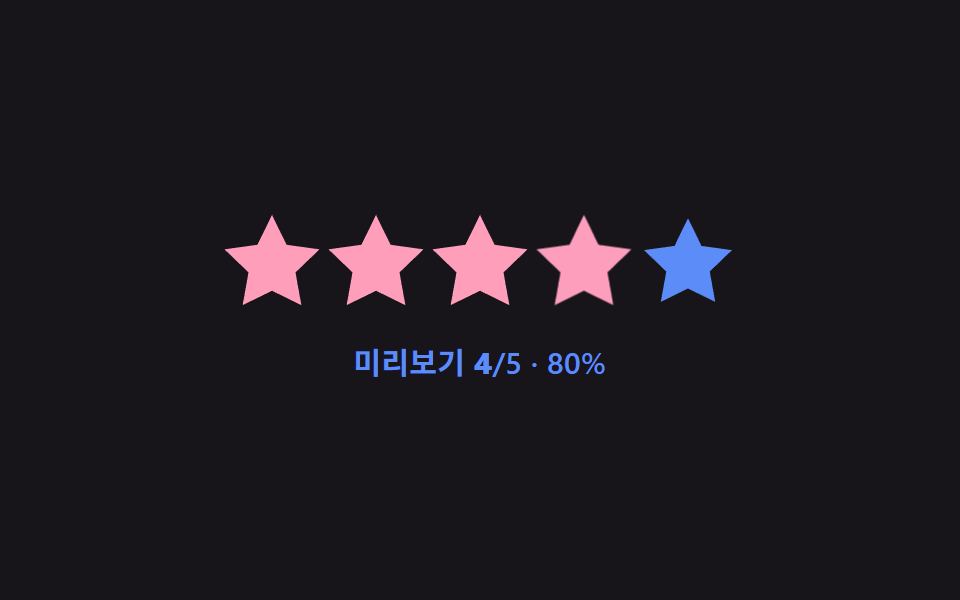
04Average fill overlay — the average value's decimal portion appears as a partial fill-width value overlaid on one star
Stars fill up to the average value's whole-number portion, and the remaining decimal portion value appears as a partial fill-width value overlaid on the next star.
Best forShowing an average rating on a product list, a score display on a review summary card
average()counts = {5:12, 4:8, 3:3, 2:1, 1:1}queue = [5,3,5,4,2,5,4,3,5,1]

<main class="stage">
<div class="sr is-demo" id="sr">
  <div class="sr__row" id="srRow">
    <span class="sr__star"><svg class="sr__base" viewBox="0 0 24 24"><path d="M12 .587l3.668 7.568 8.332 1.151-6.064 5.828 1.48 8.279L12 19.771l-7.416 3.642 1.48-8.279-6.064-5.828 8.332-1.151z"/></svg><span class="sr__fillclip" data-fc><svg class="sr__fill" viewBox="0 0 24 24"><path d="M12 .587l3.668 7.568 8.332 1.151-6.064 5.828 1.48 8.279L12 19.771l-7.416 3.642 1.48-8.279-6.064-5.828 8.332-1.151z"/></svg></span></span>
    <span class="sr__star"><svg class="sr__base" viewBox="0 0 24 24"><path d="M12 .587l3.668 7.568 8.332 1.151-6.064 5.828 1.48 8.279L12 19.771l-7.416 3.642 1.48-8.279-6.064-5.828 8.332-1.151z"/></svg><span class="sr__fillclip" data-fc><svg class="sr__fill" viewBox="0 0 24 24"><path d="M12 .587l3.668 7.568 8.332 1.151-6.064 5.828 1.48 8.279L12 19.771l-7.416 3.642 1.48-8.279-6.064-5.828 8.332-1.151z"/></svg></span></span>
    <span class="sr__star"><svg class="sr__base" viewBox="0 0 24 24"><path d="M12 .587l3.668 7.568 8.332 1.151-6.064 5.828 1.48 8.279L12 19.771l-7.416 3.642 1.48-8.279-6.064-5.828 8.332-1.151z"/></svg><span class="sr__fillclip" data-fc><svg class="sr__fill" viewBox="0 0 24 24"><path d="M12 .587l3.668 7.568 8.332 1.151-6.064 5.828 1.48 8.279L12 19.771l-7.416 3.642 1.48-8.279-6.064-5.828 8.332-1.151z"/></svg></span></span>
    <span class="sr__star"><svg class="sr__base" viewBox="0 0 24 24"><path d="M12 .587l3.668 7.568 8.332 1.151-6.064 5.828 1.48 8.279L12 19.771l-7.416 3.642 1.48-8.279-6.064-5.828 8.332-1.151z"/></svg><span class="sr__fillclip" data-fc><svg class="sr__fill" viewBox="0 0 24 24"><path d="M12 .587l3.668 7.568 8.332 1.151-6.064 5.828 1.48 8.279L12 19.771l-7.416 3.642 1.48-8.279-6.064-5.828 8.332-1.151z"/></svg></span></span>
    <span class="sr__star"><svg class="sr__base" viewBox="0 0 24 24"><path d="M12 .587l3.668 7.568 8.332 1.151-6.064 5.828 1.48 8.279L12 19.771l-7.416 3.642 1.48-8.279-6.064-5.828 8.332-1.151z"/></svg><span class="sr__fillclip" data-fc><svg class="sr__fill" viewBox="0 0 24 24"><path d="M12 .587l3.668 7.568 8.332 1.151-6.064 5.828 1.48 8.279L12 19.771l-7.416 3.642 1.48-8.279-6.064-5.828 8.332-1.151z"/></svg></span></span>
  </div>
  <div class="sr__readout"><b id="srAvg">4.16</b> <span class="sr__count">(<span id="srN">25</span>reviews)</span></div>
  <button class="sr__btn" type="button" id="srAdd">Add review</button>
</div>
</main>
@use "../../../../site/static/demo-tokens" as *;
// 계산 겹: 별점별 응답 개수 합을 전체 개수로 나눈 가중 평균을 구해, 정수 부분만큼 별을 채우고
// 남은 소수점 부분을 다음 별 하나의 채움 너비 값으로 겹쳐 그린다 (average()).
@include stage($stage-yellow);
.sr {
display: grid;
gap: $sp-4;
place-items: center;
}
.sr__row { display: flex; gap: $sp-2; }
.sr__star {
position: relative;
width: 40px;
height: 40px;
}
.sr__base,
.sr__fill svg {
position: absolute;
inset: 0;
width: 100%;
height: 100%;
}
.sr__base { fill: $subject-ink; opacity: .18; }
.sr__fillclip {
position: absolute;
inset: 0;
width: 0%;
overflow: hidden;
transition: width $dur-base $ease-out;
}
.sr__fill { fill: $subject-blue-deep; }
.sr__readout {
font: 700 22px/1.2 -apple-system, "Segoe UI", "Noto Sans KR", sans-serif;
color: $subject-ink;
b { font-variant-numeric: tabular-nums; }
}
.sr__count {
font-size: 14px;
font-weight: 500;
opacity: .7;
}
.sr__btn {
border: 0;
border-radius: $r-pill;
padding: $sp-2 $sp-5;
background: $subject-ink;
color: $stage-paper;
font: 600 13px/1 -apple-system, "Segoe UI", "Noto Sans KR", sans-serif;
cursor: pointer;
transition: transform $dur-instant $ease-out;
&:active { transform: scale(.94); }
}
@media (max-width: 340px) {
.sr__star { width: 30px; height: 30px; }
.sr__row { gap: $sp-1; }
.sr__readout { font-size: 18px; }
}
@media (prefers-reduced-motion: reduce) {
.sr__fillclip, .sr__btn { transition: none; }
}html, body {
margin: 0;
overflow: hidden;
}
.stage {
box-sizing: border-box;
min-height: 100vh;
display: grid;
place-items: center;
margin: 0;
background: #ffd23f;
font-family: -apple-system, "Segoe UI", "Noto Sans KR", sans-serif;
padding: clamp(8px, 4vw, 24px);
}
.sr {
display: grid;
gap: 16px;
place-items: center;
}
.sr__row {
display: flex;
gap: 8px;
}
.sr__star {
position: relative;
width: 40px;
height: 40px;
}
.sr__base,
.sr__fill svg {
position: absolute;
inset: 0;
width: 100%;
height: 100%;
}
.sr__base {
fill: #17141a;
opacity: 0.18;
}
.sr__fillclip {
position: absolute;
inset: 0;
width: 0%;
overflow: hidden;
transition: width 300ms ease-out;
}
.sr__fill {
fill: #0a4fe8;
}
.sr__readout {
font: 700 22px/1.2 -apple-system, "Segoe UI", "Noto Sans KR", sans-serif;
color: #17141a;
}
.sr__readout b {
font-variant-numeric: tabular-nums;
}
.sr__count {
font-size: 14px;
font-weight: 500;
opacity: 0.7;
}
.sr__btn {
border: 0;
border-radius: 999px;
padding: 8px 20px;
background: #17141a;
color: #ffffff;
font: 600 13px/1 -apple-system, "Segoe UI", "Noto Sans KR", sans-serif;
cursor: pointer;
transition: transform 140ms ease-out;
}
.sr__btn:active {
transform: scale(0.94);
}
@media (max-width: 340px) {
.sr__star {
width: 30px;
height: 30px;
}
.sr__row {
gap: 4px;
}
.sr__readout {
font-size: 18px;
}
}
@media (prefers-reduced-motion: reduce) {
.sr__fillclip, .sr__btn {
transition: none;
}
}(function () {
var root = document.getElementById('sr');
var clips = Array.prototype.slice.call(document.querySelectorAll('[data-fc]'));
var avgEl = document.getElementById('srAvg');
var nEl = document.getElementById('srN');
var btn = document.getElementById('srAdd');
// 계산 겹: 별점별 응답 개수(counts)로 가중 평균(합 / 개수)을 구하고, 정수 부분만큼 별을 채운 뒤
// 남은 소수점 부분을 다음 별 하나의 채움 너비 값으로 겹쳐 그린다.
var counts = { 5: 12, 4: 8, 3: 3, 2: 1, 1: 1 };
var queue = [5, 3, 5, 4, 2, 5, 4, 3, 5, 1];
var qi = 0;
function average() {
var sum = 0, n = 0;
for (var k in counts) { sum += Number(k) * counts[k]; n += counts[k]; }
return { avg: sum / n, n: n };
}
function paint() {
var r = average();
clips.forEach(function (el, idx) {
var starVal = Math.max(0, Math.min(1, r.avg - idx));
el.style.width = (starVal * 100).toFixed(1) + '%';
});
avgEl.textContent = r.avg.toFixed(2);
nEl.textContent = String(r.n);
}
function addReview() {
var v = queue[qi % queue.length];
qi++;
counts[v] = (counts[v] || 0) + 1;
paint();
}
btn.addEventListener('click', function () { root.classList.remove('is-demo'); stopAutoplay(); addReview(); });
paint();
// 자동 루프: 대기열의 다음 평점을 하나씩 추가해 평균 값이 실시간으로 옮겨가는 것을 반복해 보여준다.
var autoTimer = null;
function autoTick() { addReview(); if (qi % queue.length === 0) { counts = { 5: 12, 4: 8, 3: 3, 2: 1, 1: 1 }; } }
var reduce = window.matchMedia('(prefers-reduced-motion: reduce)').matches;
function stopAutoplay() { if (autoTimer) { clearInterval(autoTimer); autoTimer = null; } }
if (!reduce) { autoTimer = setInterval(autoTick, 480); }
})();import { useEffect, useRef } from "react";
import styles from "./AverageFillOverlay.module.scss";
const STAR_PATH =
"M12 .587l3.668 7.568 8.332 1.151-6.064 5.828 1.48 8.279L12 19.771l-7.416 3.642 1.48-8.279-6.064-5.828 8.332-1.151z";
export default function AverageFillOverlay() {
const rootRef = useRef<HTMLDivElement | null>(null);
useEffect(() => {
const root = rootRef.current;
if (!root) return;
const clips = Array.prototype.slice.call(
root.querySelectorAll(`.${styles.fillclip}`)
) as HTMLElement[];
const avgEl = root.querySelector<HTMLElement>(`.${styles.avg}`);
const nEl = root.querySelector<HTMLElement>(`.${styles.n}`);
const btn = root.querySelector<HTMLButtonElement>(`.${styles.btn}`);
if (!avgEl || !nEl || !btn) return;
// 계산 겹: 별점별 응답 개수(counts)로 가중 평균(합 / 개수)을 구하고, 정수 부분만큼 별을 채운 뒤
// 남은 소수점 부분을 다음 별 하나의 채움 너비 값으로 겹쳐 그린다.
let counts: Record<number, number> = { 5: 12, 4: 8, 3: 3, 2: 1, 1: 1 };
const queue = [5, 3, 5, 4, 2, 5, 4, 3, 5, 1];
let qi = 0;
function average() {
let sum = 0, n = 0;
for (const k in counts) { sum += Number(k) * counts[Number(k)]; n += counts[Number(k)]; }
return { avg: sum / n, n };
}
function paint() {
const r = average();
clips.forEach((el, idx) => {
const starVal = Math.max(0, Math.min(1, r.avg - idx));
el.style.width = (starVal * 100).toFixed(1) + "%";
});
avgEl!.textContent = r.avg.toFixed(2);
nEl!.textContent = String(r.n);
}
function addReview() {
const v = queue[qi % queue.length];
qi++;
counts[v] = (counts[v] || 0) + 1;
paint();
}
function onClick() { stopAutoplay(); addReview(); }
btn.addEventListener("click", onClick);
paint();
// 자동 루프: 대기열의 다음 평점을 하나씩 추가해 평균 값이 실시간으로 옮겨가는 것을 반복해 보여준다.
let autoTimer: number | null = null;
function autoTick() {
addReview();
if (qi % queue.length === 0) { counts = { 5: 12, 4: 8, 3: 3, 2: 1, 1: 1 }; }
}
function stopAutoplay() { if (autoTimer !== null) { window.clearInterval(autoTimer); autoTimer = null; } }
const reduce = window.matchMedia("(prefers-reduced-motion: reduce)").matches;
if (!reduce) { autoTimer = window.setInterval(autoTick, 480); }
return () => {
stopAutoplay();
btn.removeEventListener("click", onClick);
};
}, []);
return (
<div ref={rootRef} className={styles.stage}>
<div className={styles.sr}>
<div className={styles.row}>
{[0, 1, 2, 3, 4].map((i) => (
<span key={i} className={styles.star}>
<svg className={styles.base} viewBox="0 0 24 24"><path d={STAR_PATH} /></svg>
<span className={styles.fillclip}>
<svg className={styles.fill} viewBox="0 0 24 24"><path d={STAR_PATH} /></svg>
</span>
</span>
))}
</div>
<div className={styles.readout}>
<b className={styles.avg}>4.16</b> <span className={styles.count}>(<span className={styles.n}>25</span>건)</span>
</div>
<button className={styles.btn} type="button">리뷰 추가</button>
</div>
</div>
);
}04 Average fill overlay — the average value's decimal portion appears as a partial fill-width value overlaid on one star — Measured area 0.5% · moving frames 18/23Original by GODRICH · SCSS and React ship in the zip · Star Rating UI: 9 Interactive Rating Patterns
The post this demo lives in
 Star Rating UI: 9 Interactive Rating PatternsOne fill value follows the finger's position value in real time, one overlays an average's decimal part on a star, and o See all demos in this post
If you like this effect - similar demos
 Pickers04 Fill gloss — clipping the filled span to the value ratio and sweeping a highlightCSS Range Slider: 9 Physics-Grade Custom Sliders
 Pickers07 Sheet-swap value toggle — as the screen-width value narrows, a popover value changes into a bottom-sheet value that rises from belowDate Picker UI: 9 Popover & Calendar Patterns
 Pickers02 Picker Whose Radial Gauge Arc Fills to Match Its Value9 Graph Animation CSS Pickers With Live Recompute