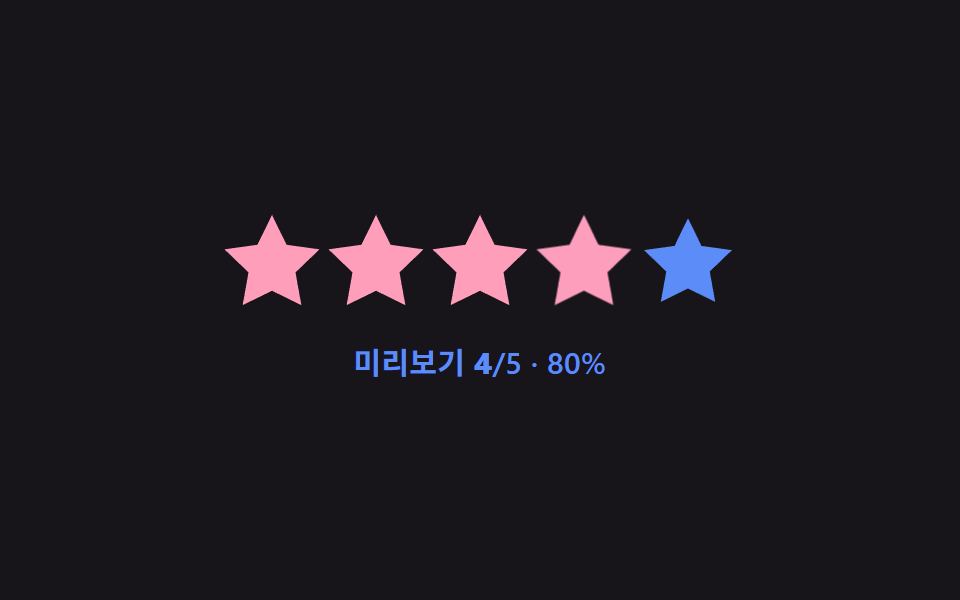
06Tooltip label swap — the label text value beside the star changes to match the hovered star's order value
Each time the hovered star's order value changes, the label text value mapped to that value changes together and appears beside the star, and it disappears once the pointer leaves.
Best forA rating form that confirms a satisfaction level in words, a score preview before submitting a review
LABELS = {1:'매우 별로', …, 5:'최고'}positionTip(i) — getBoundingClientRect 중심 xrequestSwap(i) — 40ms debounce

<main class="stage">
<div class="sr is-demo" id="sr">
  <div class="sr__tip" id="srTip">Average</div>
  <div class="sr__row" id="srRow">
    <span class="sr__star" data-i="1"><svg viewBox="0 0 24 24"><path d="M12 .587l3.668 7.568 8.332 1.151-6.064 5.828 1.48 8.279L12 19.771l-7.416 3.642 1.48-8.279-6.064-5.828 8.332-1.151z"/></svg></span>
    <span class="sr__star" data-i="2"><svg viewBox="0 0 24 24"><path d="M12 .587l3.668 7.568 8.332 1.151-6.064 5.828 1.48 8.279L12 19.771l-7.416 3.642 1.48-8.279-6.064-5.828 8.332-1.151z"/></svg></span>
    <span class="sr__star" data-i="3"><svg viewBox="0 0 24 24"><path d="M12 .587l3.668 7.568 8.332 1.151-6.064 5.828 1.48 8.279L12 19.771l-7.416 3.642 1.48-8.279-6.064-5.828 8.332-1.151z"/></svg></span>
    <span class="sr__star" data-i="4"><svg viewBox="0 0 24 24"><path d="M12 .587l3.668 7.568 8.332 1.151-6.064 5.828 1.48 8.279L12 19.771l-7.416 3.642 1.48-8.279-6.064-5.828 8.332-1.151z"/></svg></span>
    <span class="sr__star" data-i="5"><svg viewBox="0 0 24 24"><path d="M12 .587l3.668 7.568 8.332 1.151-6.064 5.828 1.48 8.279L12 19.771l-7.416 3.642 1.48-8.279-6.064-5.828 8.332-1.151z"/></svg></span>
  </div>
</div>
</main>
@use "../../../../site/static/demo-tokens" as *;
// 계산 겹: 별의 실제 렌더 중심 좌표(getBoundingClientRect)를 말풍선 translateX 값으로 옮기고,
// 인덱스 변경은 40ms 지연(debounce) 뒤에만 문구를 바꿔 스쳐 지나갈 때의 깜빡임을 막는다.
@include stage($stage-orange);
.sr {
position: relative;
display: grid;
place-items: center;
gap: $sp-8;
}
.sr__tip {
position: absolute;
top: 2px;
left: 0;
transform: translateX(0) translateX(-50%);
background: $subject-ink;
color: $stage-paper;
padding: $sp-1 $sp-3;
border-radius: $r-sm;
font: 600 13px/1 -apple-system, "Segoe UI", "Noto Sans KR", sans-serif;
white-space: nowrap;
opacity: 0;
transition: opacity $dur-instant $ease-out, transform $dur-quick $ease-out;
&::after {
content: "";
position: absolute;
top: 100%;
left: 50%;
transform: translateX(-50%);
border: 5px solid transparent;
border-top-color: $subject-ink;
}
&--show { opacity: 1; }
}
.sr__row { display: flex; gap: $sp-2; margin-top: 40px; }
.sr__star {
width: 40px;
height: 40px;
color: $subject-orange-deep;
opacity: .45;
transition: color $dur-quick $ease-out, opacity $dur-quick $ease-out;
svg { display: block; width: 100%; height: 100%; fill: currentColor; }
&--filled { color: $subject-blue-deep; opacity: 1; }
}
@media (max-width: 340px) {
.sr__star { width: 32px; height: 32px; }
.sr__row { gap: $sp-1; }
.sr__tip { font-size: 12px; top: 0; }
}
@media (prefers-reduced-motion: reduce) {
.sr__tip, .sr__star { transition: none; }
}html, body {
margin: 0;
overflow: hidden;
}
.stage {
box-sizing: border-box;
min-height: 100vh;
display: grid;
place-items: center;
margin: 0;
background: #ff4d1f;
font-family: -apple-system, "Segoe UI", "Noto Sans KR", sans-serif;
padding: clamp(8px, 4vw, 24px);
}
.sr {
position: relative;
display: grid;
place-items: center;
gap: 32px;
}
.sr__tip {
position: absolute;
top: 2px;
left: 0;
transform: translateX(0) translateX(-50%);
background: #17141a;
color: #ffffff;
padding: 4px 12px;
border-radius: 8px;
font: 600 13px/1 -apple-system, "Segoe UI", "Noto Sans KR", sans-serif;
white-space: nowrap;
opacity: 0;
transition: opacity 140ms ease-out, transform 220ms ease-out;
}
.sr__tip::after {
content: "";
position: absolute;
top: 100%;
left: 50%;
transform: translateX(-50%);
border: 5px solid transparent;
border-top-color: #17141a;
}
.sr__tip--show {
opacity: 1;
}
.sr__row {
display: flex;
gap: 8px;
margin-top: 40px;
}
.sr__star {
width: 40px;
height: 40px;
color: #c93000;
opacity: 0.45;
transition: color 220ms ease-out, opacity 220ms ease-out;
}
.sr__star svg {
display: block;
width: 100%;
height: 100%;
fill: currentColor;
}
.sr__star--filled {
color: #0a4fe8;
opacity: 1;
}
@media (max-width: 340px) {
.sr__star {
width: 32px;
height: 32px;
}
.sr__row {
gap: 4px;
}
.sr__tip {
font-size: 12px;
top: 32px;
}
}
@media (prefers-reduced-motion: reduce) {
.sr__tip, .sr__star {
transition: none;
}
}(function () {
var root = document.getElementById('sr');
var row = document.getElementById('srRow');
var tip = document.getElementById('srTip');
var stars = Array.prototype.slice.call(row.querySelectorAll('.sr__star'));
var LABELS = { 1: 'Very poor', 2: 'Poor', 3: 'Average', 4: 'Good', 5: 'Excellent' };
var pendingTimer = null;
var shownIndex = 0;
// 계산 겹: 별의 실제 렌더 위치(getBoundingClientRect 중심 x)를 말풍선의 translateX 값으로
// 그대로 옮기고, 인덱스 변경은 짧은 지연(debounce)을 거친 뒤에만 이름표 문구를 바꾼다 —
// 빠르게 스쳐 지나갈 때 문구가 매 별마다 깜빡이지 않게 하는 타이밍 계산이다.
function positionTip(i) {
var star = stars[i - 1];
var sr = star.getBoundingClientRect();
var rr = row.getBoundingClientRect();
var cx = sr.left + sr.width / 2 - rr.left;
tip.style.transform = 'translateX(' + cx.toFixed(1) + 'px) translateX(-50%)';
}
function commit(i) {
shownIndex = i;
tip.textContent = LABELS[i];
positionTip(i);
tip.classList.add('sr__tip--show');
stars.forEach(function (s, idx) { s.classList.toggle('sr__star--filled', idx < i); });
}
function requestSwap(i) {
if (pendingTimer) clearTimeout(pendingTimer);
pendingTimer = setTimeout(function () { commit(i); }, 40);
}
function hide() {
if (pendingTimer) { clearTimeout(pendingTimer); pendingTimer = null; }
tip.classList.remove('sr__tip--show');
stars.forEach(function (s) { s.classList.remove('sr__star--filled'); });
}
stars.forEach(function (s) {
var i = Number(s.getAttribute('data-i'));
s.addEventListener('pointerenter', function () { root.classList.remove('is-demo'); stopAutoplay(); requestSwap(i); });
});
row.addEventListener('pointerleave', hide);
// 자동 루프: 1부터 5까지 순서대로 머무르며 이름표 문구가 바뀌는 것을 보여주고 끝에서 감춘다.
var step = 0;
var autoTimer = null;
function autoTick() {
if (step < 5) { commit(step + 1); } else { hide(); }
step = (step + 1) % 7;
}
var reduce = window.matchMedia('(prefers-reduced-motion: reduce)').matches;
function stopAutoplay() { if (autoTimer) { clearInterval(autoTimer); autoTimer = null; } }
if (!reduce) { autoTimer = setInterval(autoTick, 340); autoTick(); }
})();import { useEffect, useRef } from "react";
import styles from "./TooltipLabelSwap.module.scss";
const STAR_PATH =
"M12 .587l3.668 7.568 8.332 1.151-6.064 5.828 1.48 8.279L12 19.771l-7.416 3.642 1.48-8.279-6.064-5.828 8.332-1.151z";
const LABELS: Record<number, string> = { 1: "매우 별로", 2: "별로", 3: "보통", 4: "좋음", 5: "최고" };
export default function TooltipLabelSwap() {
const rootRef = useRef<HTMLDivElement | null>(null);
useEffect(() => {
const root = rootRef.current;
if (!root) return;
const row = root.querySelector<HTMLDivElement>(`.${styles.row}`);
const tip = root.querySelector<HTMLDivElement>(`.${styles.tip}`);
if (!row || !tip) return;
const stars = Array.prototype.slice.call(
row.querySelectorAll(`.${styles.star}`)
) as HTMLElement[];
let pendingTimer: number | null = null;
// 계산 겹: 별의 실제 렌더 위치(getBoundingClientRect 중심 x)를 말풍선의 translateX 값으로
// 그대로 옮기고, 인덱스 변경은 짧은 지연(debounce)을 거친 뒤에만 이름표 문구를 바꾼다 —
// 빠르게 스쳐 지나갈 때 문구가 매 별마다 깜빡이지 않게 하는 타이밍 계산이다.
function positionTip(i: number) {
const star = stars[i - 1];
const sr = star.getBoundingClientRect();
const rr = row!.getBoundingClientRect();
const cx = sr.left + sr.width / 2 - rr.left;
tip!.style.transform = "translateX(" + cx.toFixed(1) + "px) translateX(-50%)";
}
function commit(i: number) {
tip!.textContent = LABELS[i];
positionTip(i);
tip!.classList.add(styles.show);
stars.forEach((s, idx) => s.classList.toggle(styles.filled, idx < i));
}
function requestSwap(i: number) {
if (pendingTimer !== null) window.clearTimeout(pendingTimer);
pendingTimer = window.setTimeout(() => commit(i), 40);
}
function hide() {
if (pendingTimer !== null) { window.clearTimeout(pendingTimer); pendingTimer = null; }
tip!.classList.remove(styles.show);
stars.forEach((s) => s.classList.remove(styles.filled));
}
const enterHandlers: Array<() => void> = [];
stars.forEach((s, idx) => {
const i = idx + 1;
const handler = () => { stopAutoplay(); requestSwap(i); };
enterHandlers.push(handler);
s.addEventListener("pointerenter", handler);
});
row.addEventListener("pointerleave", hide);
// 자동 루프: 1부터 5까지 순서대로 머무르며 이름표 문구가 바뀌는 것을 보여주고 끝에서 감춘다.
let step = 0;
let autoTimer: number | null = null;
function autoTick() {
if (step < 5) { commit(step + 1); } else { hide(); }
step = (step + 1) % 7;
}
function stopAutoplay() { if (autoTimer !== null) { window.clearInterval(autoTimer); autoTimer = null; } }
const reduce = window.matchMedia("(prefers-reduced-motion: reduce)").matches;
if (!reduce) { autoTimer = window.setInterval(autoTick, 340); autoTick(); }
return () => {
stopAutoplay();
if (pendingTimer !== null) window.clearTimeout(pendingTimer);
stars.forEach((s, idx) => s.removeEventListener("pointerenter", enterHandlers[idx]));
row.removeEventListener("pointerleave", hide);
};
}, []);
return (
<div ref={rootRef} className={styles.stage}>
<div className={styles.sr}>
<div className={styles.tip}>보통</div>
<div className={styles.row}>
{[1, 2, 3, 4, 5].map((i) => (
<span key={i} className={styles.star}>
<svg viewBox="0 0 24 24"><path d={STAR_PATH} /></svg>
</span>
))}
</div>
</div>
</div>
);
}06 Tooltip label swap — the label text value beside the star changes to match the hovered star's order value — Measured area 6.522% · moving frames 9/23Original by GODRICH · SCSS and React ship in the zip · Star Rating UI: 9 Interactive Rating Patterns
The post this demo lives in
 Star Rating UI: 9 Interactive Rating PatternsOne fill value follows the finger's position value in real time, one overlays an average's decimal part on a star, and o See all demos in this post
If you like this effect - similar demos
 Pickers01 Value bubble — converting track position to a percentage the label followsCSS Range Slider: 9 Physics-Grade Custom Sliders
 Pickers07 Sheet-swap value toggle — as the screen-width value narrows, a popover value changes into a bottom-sheet value that rises from belowDate Picker UI: 9 Popover & Calendar Patterns
 Pickers06 Vertical Accordion Panel a Measured-height Value Folds9 CSS Tab Panel Transition Patterns to Copy