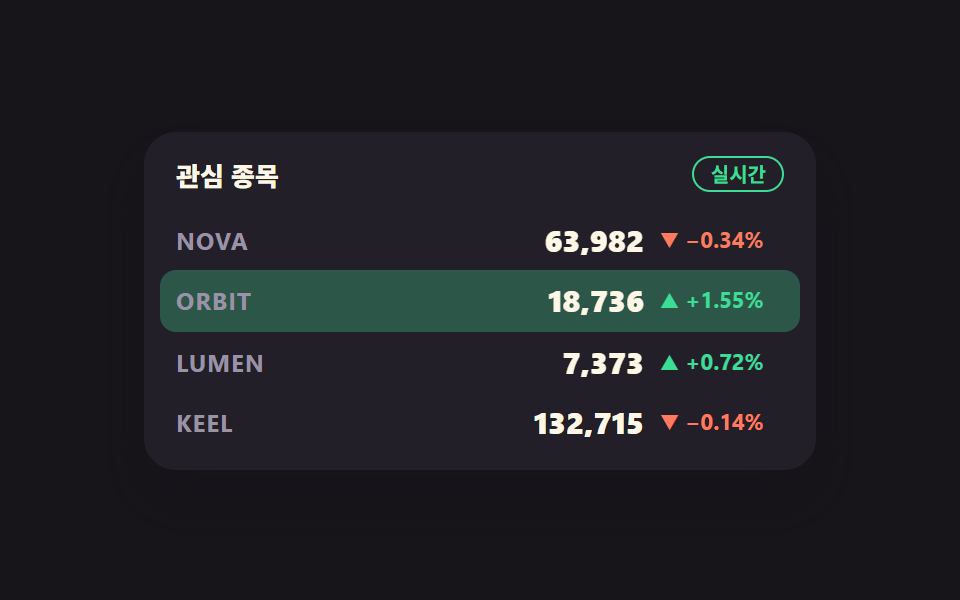
01Price cell that flashes green up, red down
A new value switches the cell background on in one frame with steps(1, end), then fades it out while tabular-nums keeps the digits from shifting
Best forWatchlist rows and the current-price column of a live order screen
steps(1, end)tabular-numssetInterval

<main class="stage">
<div class="pf is-demo" id="pf">
  <div class="pf__board">
    <div class="pf__head">
      <p class="pf__title">Watchlist</p>
      <span class="pf__live">LIVE</span>
    </div>
    <ul class="pf__rows">
      <!-- 행마다 이전값·현재값 두 장을 같은 칸에 겹친다 — steps(1, end) 컷이라 반투명 유령이 안 생긴다 -->
      <li class="pf__row" data-row="0">
        <span class="pf__sym">NOVA</span>
        <span class="pf__priceWrap">
          <span class="pf__price pf__price--prev" data-prev>0</span>
          <span class="pf__price pf__price--next" data-next>0</span>
        </span>
        <span class="pf__chgWrap">
          <span class="pf__chg pf__chg--prev" data-chgprev>0</span>
          <span class="pf__chg pf__chg--next" data-chgnext>0</span>
        </span>
      </li>
      <li class="pf__row" data-row="1">
        <span class="pf__sym">ORBIT</span>
        <span class="pf__priceWrap">
          <span class="pf__price pf__price--prev" data-prev>0</span>
          <span class="pf__price pf__price--next" data-next>0</span>
        </span>
        <span class="pf__chgWrap">
          <span class="pf__chg pf__chg--prev" data-chgprev>0</span>
          <span class="pf__chg pf__chg--next" data-chgnext>0</span>
        </span>
      </li>
      <li class="pf__row" data-row="2">
        <span class="pf__sym">LUMEN</span>
        <span class="pf__priceWrap">
          <span class="pf__price pf__price--prev" data-prev>0</span>
          <span class="pf__price pf__price--next" data-next>0</span>
        </span>
        <span class="pf__chgWrap">
          <span class="pf__chg pf__chg--prev" data-chgprev>0</span>
          <span class="pf__chg pf__chg--next" data-chgnext>0</span>
        </span>
      </li>
      <li class="pf__row" data-row="3">
        <span class="pf__sym">KEEL</span>
        <span class="pf__priceWrap">
          <span class="pf__price pf__price--prev" data-prev>0</span>
          <span class="pf__price pf__price--next" data-next>0</span>
        </span>
        <span class="pf__chgWrap">
          <span class="pf__chg pf__chg--prev" data-chgprev>0</span>
          <span class="pf__chg pf__chg--next" data-chgnext>0</span>
        </span>
      </li>
    </ul>
  </div>
</div>
</main>@use "../../../../site/static/demo-tokens" as *;
// 관심 종목 시세판 — 실사용에서는 시드 PRNG 가 setInterval 로 900ms 마다 한 행씩 값을 바꾸고,
// 바뀐 행의 배경이 한 프레임에 켜졌다가 천천히 꺼진다(가격 플래시). 방향은 색만으로 전하지 않고
// 화살표(▲▼)와 부호를 같이 적는다.
// 미리보기(.is-demo)는 같은 플래시를 CSS 키프레임으로 2초 루프에 눕혀 세 행이 차례로 켜지게 한다 —
// JS 는 미리보기 동안 값을 안 건드려 24프레임이 같은 순간을 재현한다.
$duration: $dur-loop;
$easing: $ease-out;
$flash-up: rgba(61, 220, 151, .3);
$flash-down: rgba(255, 122, 94, .3);
@include stage($stage-ink);
.pf { display: flex; justify-content: center; width: 100%; }
.pf__board {
width: min(100%, 320px); background: $tick-panel; border-radius: $r-card;
box-shadow: $shadow-raised; padding: $sp-3 $sp-2 $sp-2; overflow: hidden;
}
.pf__head { display: flex; align-items: center; justify-content: space-between; padding: 0 $sp-2 $sp-2; }
.pf__title { margin: 0; font-weight: 800; font-size: clamp(11px, 3vw, 13px); color: $subject-cream; }
// 라이브 배지 — 글자로도 상태를 말한다
.pf__live {
font-weight: 700; font-size: clamp(9px, 2.4vw, 10px); color: $tick-up;
border: 1px solid $tick-up; border-radius: $r-pill; padding: 0 $sp-2; line-height: 1.6;
}
.pf__rows { list-style: none; margin: 0; padding: 0; }
.pf__row {
display: grid; grid-template-columns: 1fr auto auto; align-items: center;
gap: $sp-2; padding: $sp-1 $sp-2; border-radius: $r-sm;
background-color: transparent;
}
.pf__sym {
font-weight: 700; font-size: clamp(10px, 2.8vw, 12px); color: $tick-mute; letter-spacing: .04em;
}
// 이전값·현재값을 같은 칸에 겹친다 — 컷 교체라 폭이 달라도 자리가 흔들리지 않는다
.pf__priceWrap, .pf__chgWrap { display: grid; justify-items: end; }
.pf__price, .pf__chg { grid-area: 1 / 1; font-variant-numeric: tabular-nums; }
.pf__price {
font-weight: 800; font-size: clamp(12px, 3.4vw, 15px); line-height: 1.5; color: $subject-cream;
}
.pf__chg {
font-weight: 700; font-size: clamp(10px, 2.6vw, 11px); line-height: 1.5; min-width: 62px;
}
.pf__chg.is-up { color: $tick-up; }
.pf__chg.is-down { color: $tick-down; }
// 실사용(정적 경로)에서는 현재값만 보인다 — 이전값은 자리만 지키고 안 보인다
.pf:not(.is-demo) .pf__price--prev, .pf:not(.is-demo) .pf__chg--prev { opacity: 0; }
// 실사용 플래시 — JS 가 붙인 is-up / is-down 이 한 프레임에 배경을 켜고 스스로 꺼진다.
// steps(1, end) 로 켜는 건 값 교체 쪽이고, 배경은 켜진 값에서 시작해 이어서 빠진다
.pf__row.is-up { animation: pfFlashUp 600ms $easing 1; }
.pf__row.is-down { animation: pfFlashDown 600ms $easing 1; }
@keyframes pfFlashUp { from { background-color: $flash-up; } to { background-color: transparent; } }
@keyframes pfFlashDown { from { background-color: $flash-down; } to { background-color: transparent; } }
// ── 미리보기 루프(2초): 6% 1번 행이 오르며 켜짐 → 34% 3번 행이 내리며 켜짐 → 62% 2번 행이 오르며 켜짐.
// 한 행의 배경은 켜진 뒤 다음 26% 동안 빠진다. 루프 안에서 세 번 = 초당 1.5회로 WCAG 2.3.1(초당 3회 미만) 아래.
// 값 교체(이전값 → 현재값)는 steps(1, end) 컷이라 두 장이 반투명하게 겹치는 유령 프레임이 없다.
// 되돌림은 96% 안에 끝난다 — 24프레임의 마지막 장이 2초의 95.8% 지점이라 그 뒤는 샘플이 없다.
.pf.is-demo .pf__row {
animation-duration: $duration;
animation-timing-function: $easing;
animation-iteration-count: infinite;
}
.pf.is-demo .pf__row[data-row="0"] { animation-name: pfRowA; }
.pf.is-demo .pf__row[data-row="2"] { animation-name: pfRowB; }
.pf.is-demo .pf__row[data-row="1"] { animation-name: pfRowC; }
@keyframes pfRowA {
0%, 4% { background-color: transparent; }
6% { background-color: $flash-up; }
32%, 100% { background-color: transparent; }
}
@keyframes pfRowB {
0%, 32% { background-color: transparent; }
34% { background-color: $flash-down; }
60%, 100% { background-color: transparent; }
}
@keyframes pfRowC {
0%, 60% { background-color: transparent; }
62% { background-color: $flash-up; }
88%, 100% { background-color: transparent; }
}
// 값 교체 — 켜지는 그 프레임에 이전값이 현재값으로 컷된다
.pf.is-demo .pf__price--prev, .pf.is-demo .pf__price--next,
.pf.is-demo .pf__chg--prev, .pf.is-demo .pf__chg--next {
animation-duration: $duration;
animation-timing-function: steps(1, end);
animation-iteration-count: infinite;
}
.pf.is-demo .pf__row[data-row="0"] .pf__price--prev,
.pf.is-demo .pf__row[data-row="0"] .pf__chg--prev { animation-name: pfPrevA; }
.pf.is-demo .pf__row[data-row="0"] .pf__price--next,
.pf.is-demo .pf__row[data-row="0"] .pf__chg--next { animation-name: pfNextA; }
.pf.is-demo .pf__row[data-row="2"] .pf__price--prev,
.pf.is-demo .pf__row[data-row="2"] .pf__chg--prev { animation-name: pfPrevB; }
.pf.is-demo .pf__row[data-row="2"] .pf__price--next,
.pf.is-demo .pf__row[data-row="2"] .pf__chg--next { animation-name: pfNextB; }
.pf.is-demo .pf__row[data-row="1"] .pf__price--prev,
.pf.is-demo .pf__row[data-row="1"] .pf__chg--prev { animation-name: pfPrevC; }
.pf.is-demo .pf__row[data-row="1"] .pf__price--next,
.pf.is-demo .pf__row[data-row="1"] .pf__chg--next { animation-name: pfNextC; }
.pf.is-demo .pf__row[data-row="3"] .pf__price--prev,
.pf.is-demo .pf__row[data-row="3"] .pf__chg--prev { opacity: 0; }
@keyframes pfPrevA { 0%, 4% { opacity: 1; } 6%, 100% { opacity: 0; } }
@keyframes pfNextA { 0%, 4% { opacity: 0; } 6%, 100% { opacity: 1; } }
@keyframes pfPrevB { 0%, 32% { opacity: 1; } 34%, 100% { opacity: 0; } }
@keyframes pfNextB { 0%, 32% { opacity: 0; } 34%, 100% { opacity: 1; } }
@keyframes pfPrevC { 0%, 60% { opacity: 1; } 62%, 100% { opacity: 0; } }
@keyframes pfNextC { 0%, 60% { opacity: 0; } 62%, 100% { opacity: 1; } }
@media (max-width: 340px) {
.pf__board { padding: $sp-2 $sp-1 $sp-1; }
.pf__head { padding: 0 $sp-1 $sp-1; }
.pf__row { gap: $sp-1; padding: 0 $sp-1; }
.pf__chg { min-width: 56px; }
}
@media (prefers-reduced-motion: reduce) {
// 플래시는 끄고 값만 갱신한다 — 방향은 화살표·부호·색이 그대로 말해 준다
.pf__row.is-up, .pf__row.is-down,
.pf.is-demo .pf__row { animation: none !important; background-color: transparent !important; }
.pf.is-demo .pf__price--prev, .pf.is-demo .pf__chg--prev { animation: none !important; opacity: 0 !important; }
.pf.is-demo .pf__price--next, .pf.is-demo .pf__chg--next { animation: none !important; opacity: 1 !important; }
}html, body {
margin: 0;
overflow: hidden;
}
.stage {
box-sizing: border-box;
min-height: 100vh;
display: grid;
place-items: center;
margin: 0;
background: #17141a;
font-family: -apple-system, "Segoe UI", "Noto Sans KR", sans-serif;
padding: clamp(8px, 4vw, 24px);
}
.pf {
display: flex;
justify-content: center;
width: 100%;
}
.pf__board {
width: min(100%, 320px);
background: #231f28;
border-radius: 16px;
box-shadow: 0 14px 24px rgba(23, 20, 26, 0.32);
padding: 12px 8px 8px;
overflow: hidden;
}
.pf__head {
display: flex;
align-items: center;
justify-content: space-between;
padding: 0 8px 8px;
}
.pf__title {
margin: 0;
font-weight: 800;
font-size: clamp(11px, 3vw, 13px);
color: #fff7e6;
}
.pf__live {
font-weight: 700;
font-size: clamp(9px, 2.4vw, 10px);
color: #3ddc97;
border: 1px solid #3ddc97;
border-radius: 999px;
padding: 0 8px;
line-height: 1.6;
}
.pf__rows {
list-style: none;
margin: 0;
padding: 0;
}
.pf__row {
display: grid;
grid-template-columns: 1fr auto auto;
align-items: center;
gap: 8px;
padding: 4px 8px;
border-radius: 8px;
background-color: transparent;
}
.pf__sym {
font-weight: 700;
font-size: clamp(10px, 2.8vw, 12px);
color: #9a93a6;
letter-spacing: 0.04em;
}
.pf__priceWrap, .pf__chgWrap {
display: grid;
justify-items: end;
}
.pf__price, .pf__chg {
grid-area: 1/1;
font-variant-numeric: tabular-nums;
}
.pf__price {
font-weight: 800;
font-size: clamp(12px, 3.4vw, 15px);
line-height: 1.5;
color: #fff7e6;
}
.pf__chg {
font-weight: 700;
font-size: clamp(10px, 2.6vw, 11px);
line-height: 1.5;
min-width: 62px;
}
.pf__chg.is-up {
color: #3ddc97;
}
.pf__chg.is-down {
color: #ff7a5e;
}
.pf:not(.is-demo) .pf__price--prev, .pf:not(.is-demo) .pf__chg--prev {
opacity: 0;
}
.pf__row.is-up {
animation: pfFlashUp 600ms ease-out 1;
}
.pf__row.is-down {
animation: pfFlashDown 600ms ease-out 1;
}
@keyframes pfFlashUp {
from {
background-color: rgba(61, 220, 151, 0.3);
}
to {
background-color: transparent;
}
}
@keyframes pfFlashDown {
from {
background-color: rgba(255, 122, 94, 0.3);
}
to {
background-color: transparent;
}
}
.pf.is-demo .pf__row {
animation-duration: 2s;
animation-timing-function: ease-out;
animation-iteration-count: infinite;
}
.pf.is-demo .pf__row[data-row="0"] {
animation-name: pfRowA;
}
.pf.is-demo .pf__row[data-row="2"] {
animation-name: pfRowB;
}
.pf.is-demo .pf__row[data-row="1"] {
animation-name: pfRowC;
}
@keyframes pfRowA {
0%, 4% {
background-color: transparent;
}
6% {
background-color: rgba(61, 220, 151, 0.3);
}
32%, 100% {
background-color: transparent;
}
}
@keyframes pfRowB {
0%, 32% {
background-color: transparent;
}
34% {
background-color: rgba(255, 122, 94, 0.3);
}
60%, 100% {
background-color: transparent;
}
}
@keyframes pfRowC {
0%, 60% {
background-color: transparent;
}
62% {
background-color: rgba(61, 220, 151, 0.3);
}
88%, 100% {
background-color: transparent;
}
}
.pf.is-demo .pf__price--prev, .pf.is-demo .pf__price--next,
.pf.is-demo .pf__chg--prev, .pf.is-demo .pf__chg--next {
animation-duration: 2s;
animation-timing-function: steps(1, end);
animation-iteration-count: infinite;
}
.pf.is-demo .pf__row[data-row="0"] .pf__price--prev,
.pf.is-demo .pf__row[data-row="0"] .pf__chg--prev {
animation-name: pfPrevA;
}
.pf.is-demo .pf__row[data-row="0"] .pf__price--next,
.pf.is-demo .pf__row[data-row="0"] .pf__chg--next {
animation-name: pfNextA;
}
.pf.is-demo .pf__row[data-row="2"] .pf__price--prev,
.pf.is-demo .pf__row[data-row="2"] .pf__chg--prev {
animation-name: pfPrevB;
}
.pf.is-demo .pf__row[data-row="2"] .pf__price--next,
.pf.is-demo .pf__row[data-row="2"] .pf__chg--next {
animation-name: pfNextB;
}
.pf.is-demo .pf__row[data-row="1"] .pf__price--prev,
.pf.is-demo .pf__row[data-row="1"] .pf__chg--prev {
animation-name: pfPrevC;
}
.pf.is-demo .pf__row[data-row="1"] .pf__price--next,
.pf.is-demo .pf__row[data-row="1"] .pf__chg--next {
animation-name: pfNextC;
}
.pf.is-demo .pf__row[data-row="3"] .pf__price--prev,
.pf.is-demo .pf__row[data-row="3"] .pf__chg--prev {
opacity: 0;
}
@keyframes pfPrevA {
0%, 4% {
opacity: 1;
}
6%, 100% {
opacity: 0;
}
}
@keyframes pfNextA {
0%, 4% {
opacity: 0;
}
6%, 100% {
opacity: 1;
}
}
@keyframes pfPrevB {
0%, 32% {
opacity: 1;
}
34%, 100% {
opacity: 0;
}
}
@keyframes pfNextB {
0%, 32% {
opacity: 0;
}
34%, 100% {
opacity: 1;
}
}
@keyframes pfPrevC {
0%, 60% {
opacity: 1;
}
62%, 100% {
opacity: 0;
}
}
@keyframes pfNextC {
0%, 60% {
opacity: 0;
}
62%, 100% {
opacity: 1;
}
}
@media (max-width: 340px) {
.pf__board {
padding: 8px 4px 4px;
}
.pf__head {
padding: 0 4px 4px;
}
.pf__row {
gap: 4px;
padding: 0 4px;
}
.pf__chg {
min-width: 56px;
}
}
@media (prefers-reduced-motion: reduce) {
.pf__row.is-up, .pf__row.is-down,
.pf.is-demo .pf__row {
animation: none !important;
background-color: transparent !important;
}
.pf.is-demo .pf__price--prev, .pf.is-demo .pf__chg--prev {
animation: none !important;
opacity: 0 !important;
}
.pf.is-demo .pf__price--next, .pf.is-demo .pf__chg--next {
animation: none !important;
opacity: 1 !important;
}
}// 가짜 시세는 시드 PRNG 로 만든다 — 같은 시드면 누가 열어도 같은 흐름이 재현된다.
// 외부 API·키가 필요 없고, 심볼도 실존 종목이 아니다.
var SEED = 296;
function mulberry32(a) {
return function () {
a |= 0; a = a + 0x6D2B79F5 | 0;
var t = Math.imul(a ^ a >>> 15, 1 | a);
t = t + Math.imul(t ^ t >>> 7, 61 | t) ^ t;
return ((t ^ t >>> 14) >>> 0) / 4294967296;
};
}
var rand = mulberry32(SEED);
var BASE = [64200, 18450, 7320, 132900]; // 전일 Close 4종 — 등락률의 기준
// vs prev close 등락을 먼저 한 번 굴려 오늘 가격을 만든다. 그래야 첫 화면부터 등락률이 0 이 아니다
var state = BASE.map(function (p) {
var day = (rand() - 0.55) * 0.055;
var now = Math.round(p * (1 + day));
return { price: now, chg: (now - p) / p * 100 };
});
var pf = document.getElementById('pf');
var rows = [].slice.call(pf.querySelectorAll('.pf__row'));
// 숫자는 자리가 흔들리면 읽기 어렵다 — 천 단위 구분자까지 넣어 고정 폭으로 그린다
function money(n) { return n.toLocaleString('en-US'); }
function pct(v) { return (v >= 0 ? '+' : '−') + Math.abs(v).toFixed(2) + '%'; }
function arrow(v) { return v >= 0 ? '▲' : '▼'; }
// 방향은 색만으로 전하지 않는다 — 화살표와 부호를 같이 적는다
function paint(i) {
var s = state[i], row = rows[i];
row.querySelector('[data-next]').textContent = money(s.price);
row.querySelector('[data-chgnext]').textContent = arrow(s.chg) + ' ' + pct(s.chg);
row.querySelector('[data-chgnext]').className = 'pf__chg pf__chg--next ' + (s.chg >= 0 ? 'is-up' : 'is-down');
}
function tick(i, flash) {
var s = state[i], row = rows[i];
var prevPrice = s.price, prevChg = s.chg;
var step = Math.round((rand() - 0.48) * s.price * 0.004);
if (step === 0) { step = rand() < 0.5 ? -1 : 1; }
s.price = prevPrice + step;
s.chg = (s.price - BASE[i]) / BASE[i] * 100;
// 직전 값을 뒤 장에 남겨 둔다 — 사람이 "얼마에서 얼마로" 를 한 눈에 본다
row.querySelector('[data-prev]').textContent = money(prevPrice);
var cp = row.querySelector('[data-chgprev]');
cp.textContent = arrow(prevChg) + ' ' + pct(prevChg);
cp.className = 'pf__chg pf__chg--prev ' + (prevChg >= 0 ? 'is-up' : 'is-down');
paint(i);
if (!flash) { return; }
// 플래시는 한 프레임에 켜고 스스로 꺼진다. 클래스를 떼었다 붙여야 같은 행이 연속으로 깜빡인다
row.classList.remove('is-up', 'is-down');
void row.offsetWidth;
row.classList.add(step >= 0 ? 'is-up' : 'is-down');
}
// 첫 화면부터 "직전 값 → 현재 값" 이 서로 다르게 서 있어야 미리보기 컷이 뜻을 갖는다.
// 그래서 시작가에서 한 번씩만 값을 굴려 두고(플래시 없이) 시작한다
state.forEach(function (s, i) { tick(i, false); });
// 격자 미리보기(.is-demo) 동안에는 CSS 키프레임만 돌고 JS 는 값을 안 건드린다 — 프레임이 같은 순간에 고정돼야
// 렌더 측정이 흔들리지 않는다. 사람이 포인터를 올리거나 키보드로 들어오면 그때부터 시드 시세가 실제로 갱신된다.
function live() { if (pf.classList.contains('is-demo')) { pf.classList.remove('is-demo'); } }
['pointerdown', 'pointermove', 'focusin'].forEach(function (ev) { pf.addEventListener(ev, live); });
// 한 번에 한 행만 바꾼다 — WCAG 2.3.1 은 초당 3회 미만을 요구하고, 900ms 간격이면 1.1회다
var cursor = 0;
var timer = setInterval(function () {
if (pf.classList.contains('is-demo')) { return; }
if (document.visibilityState === 'hidden') { return; }
tick(cursor);
cursor = (cursor + 1) % rows.length;
}, 900);
// 탭을 다시 보면 현재 상태를 그대로 다시 그린다 — 안 보이는 동안 쌓아 두지 않는다
document.addEventListener('visibilitychange', function () {
if (document.visibilityState === 'visible') { state.forEach(function (s, i) { paint(i); }); }
});
window.addEventListener('pagehide', function () { clearInterval(timer); });// PriceFlashCell — vanilla 판(run/296/demo/01-ticker-price-flash-cell/index.html) 의 React 포트.
// 관심 종목 시세판. 시드 PRNG 가 900ms 마다 한 행씩 값을 바꾸고, 바뀐 행의 배경이 한 프레임에
// 켜졌다가 스스로 꺼진다. 방향은 색만으로 전하지 않고 화살표(▲▼)와 부호를 같이 적는다.
import { useEffect, useRef, useState } from "react";
import styles from "./PriceFlashCell.module.scss";
export type PriceFlashCellProps = {
/** 격자 미리보기용 2초 자동 루프. 포인터를 올리거나 키보드로 들어오면 꺼지고 실제 갱신이 시작된다 */
demo?: boolean;
/** 시드 — 같은 값이면 누가 열어도 같은 시세 흐름이 재현된다 */
seed?: number;
/** 갱신 간격(ms). WCAG 2.3.1 은 초당 3회 미만을 요구한다 */
intervalMs?: number;
};
type Box<T> = { current: T };
type Row = { sym: string; base: number; price: number; chg: number; prev: number; prevChg: number; dir: number };
const SYMBOLS = ["NOVA", "ORBIT", "LUMEN", "KEEL"];
const BASE = [64200, 18450, 7320, 132900]; // 전일 종가 4종 — 등락률의 기준
/** 시드 PRNG — 외부 API·키가 필요 없고 심볼도 실존 종목이 아니다 */
function mulberry32(a: number) {
return function () {
a |= 0; a = a + 0x6D2B79F5 | 0;
let t = Math.imul(a ^ a >>> 15, 1 | a);
t = t + Math.imul(t ^ t >>> 7, 61 | t) ^ t;
return ((t ^ t >>> 14) >>> 0) / 4294967296;
};
}
/** 숫자는 자리가 흔들리면 읽기 어렵다 — 천 단위 구분자까지 넣어 고정 폭으로 그린다 */
const money = (n: number) => n.toLocaleString("en-US");
const pct = (v: number) => (v >= 0 ? "+" : "−") + Math.abs(v).toFixed(2) + "%";
const arrow = (v: number) => (v >= 0 ? "▲" : "▼");
function initialRows(rand: () => number): Row[] {
return SYMBOLS.map((sym, i) => {
// 전일 대비 등락을 먼저 한 번 굴려 오늘 가격을 만든다. 그래야 첫 화면부터 등락률이 0 이 아니다
const day = (rand() - 0.55) * 0.055;
const now = Math.round(BASE[i] * (1 + day));
const chg = (now - BASE[i]) / BASE[i] * 100;
return { sym, base: BASE[i], price: now, chg, prev: BASE[i], prevChg: 0, dir: 0 };
});
}
export default function PriceFlashCell({ demo = true, seed = 296, intervalMs = 900 }: PriceFlashCellProps) {
const randRef: Box<(() => number) | null> = useRef(null);
if (randRef.current === null) { randRef.current = mulberry32(seed); }
const [rows, setRows] = useState<Row[]>(() => initialRows(randRef.current as () => number));
const [live, setLive] = useState(!demo);
const cursor = useRef(0) as Box<number>;
useEffect(() => {
if (!live) { return; }
const id = window.setInterval(() => {
// 탭이 안 보이는 동안은 세지 않는다 — 돌아왔을 때 밀린 갱신이 한꺼번에 터지지 않게
if (document.visibilityState === "hidden") { return; }
const i = cursor.current;
cursor.current = (i + 1) % SYMBOLS.length;
setRows((old) => old.map((r, k) => {
if (k !== i) { return { ...r, dir: 0 }; }
const rand = randRef.current as () => number;
let step = Math.round((rand() - 0.48) * r.price * 0.004);
if (step === 0) { step = rand() < 0.5 ? -1 : 1; }
const price = r.price + step;
return { ...r, prev: r.price, prevChg: r.chg, price, chg: (price - r.base) / r.base * 100, dir: step >= 0 ? 1 : -1 };
}));
}, intervalMs);
return () => window.clearInterval(id);
}, [live, intervalMs]);
const rootCls = [styles.root, live ? "" : styles.isDemo].filter(Boolean).join(" ");
return (
<div
className={rootCls}
onPointerMove={() => setLive(true)}
onPointerDown={() => setLive(true)}
onFocus={() => setLive(true)}
>
<div className={styles.board}>
<div className={styles.head}>
<p className={styles.title}>관심 종목</p>
<span className={styles.liveTag}>실시간</span>
</div>
<ul className={styles.rows}>
{rows.map((r, i) => (
/* 행마다 이전값·현재값 두 장을 같은 칸에 겹친다 — steps(1, end) 컷이라 반투명 유령이 안 생긴다 */
<li
key={r.sym}
className={[styles.row, r.dir > 0 ? styles.isUp : "", r.dir < 0 ? styles.isDown : ""].filter(Boolean).join(" ")}
data-row={i}
>
<span className={styles.sym}>{r.sym}</span>
<span className={styles.priceWrap}>
<span className={`${styles.price} ${styles.pricePrev}`}>{money(r.prev)}</span>
<span className={`${styles.price} ${styles.priceNext}`}>{money(r.price)}</span>
</span>
<span className={styles.chgWrap}>
<span className={`${styles.chg} ${styles.chgPrev} ${r.prevChg >= 0 ? styles.upText : styles.downText}`}>
{arrow(r.prevChg)} {pct(r.prevChg)}
</span>
<span className={`${styles.chg} ${styles.chgNext} ${r.chg >= 0 ? styles.upText : styles.downText}`}>
{arrow(r.chg)} {pct(r.chg)}
</span>
</span>
</li>
))}
</ul>
</div>
</div>
);
}01 Price cell that flashes green up, red down — Measured area 19.33% · moving frames 9/23Original by GODRICH · SCSS and React ship in the zip · Stock Ticker UI: 9 Live Price Widgets, No API Key
The post this demo lives in
 Stock Ticker UI: 9 Live Price Widgets, No API KeyA stock ticker ui is the strip of numbers in a finance app that keeps changing while you watch it. These nine pieces inv See all demos in this post