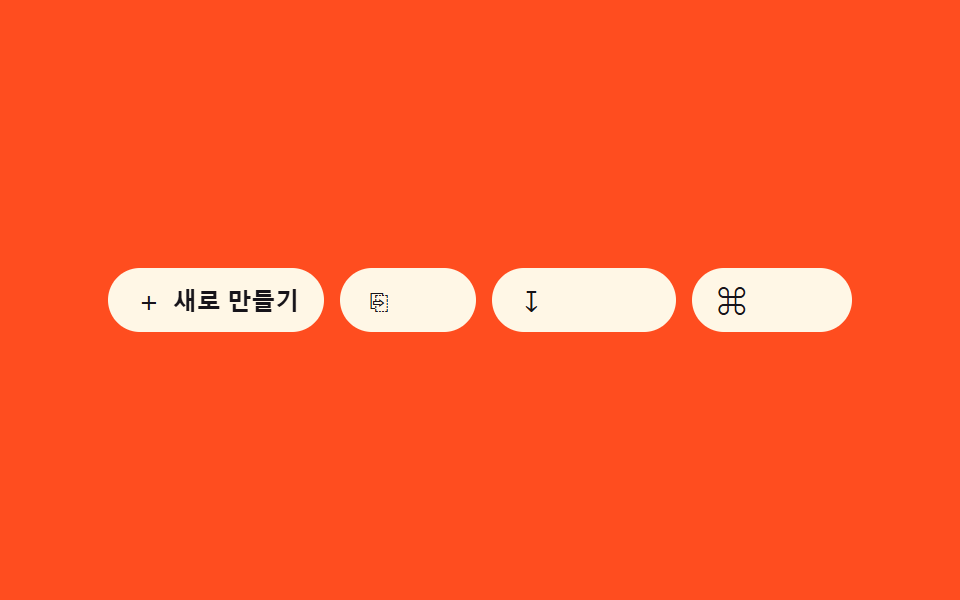
07Icon-label combo reveal — as the container-width value widens, an icon button's text-label width value grows from zero into view
Once the container-width value crosses a threshold, an icon button's label-width value grows from zero to its full text width.
Best forA responsive action button set, a button group inside a card
dur 400 easeOutCubicclip-path revealmeasured text width
<main class="stage">
<div class="clr is-demo" id="clr" role="group" aria-label="Quick actions"></div>
</main>
@use "../../../../site/static/demo-tokens" as *;
// 계산 겹: index.html 이 라벨의 실측 텍스트 폭(fullW)을 한 번 재 reveal 트랙 폭에 고정하고,
// easeOutCubic 로 보간한 진행률을 clip-path 로 매 프레임 그린다 — width 는 다시 건드리지 않는다.
@include stage($stage-orange);
.clr {
display: flex;
flex-wrap: wrap;
gap: $sp-2;
max-width: 100%;
}
.clr__btn {
display: flex;
align-items: center;
gap: $sp-1;
appearance: none;
border: none;
border-radius: $r-pill;
background: $subject-cream;
color: $subject-ink;
padding: $sp-2 $sp-3;
cursor: pointer;
flex: 0 0 auto;
&:focus-visible { outline: 2px solid $subject-blue-deep; outline-offset: 2px; }
}
.clr__icon {
font-size: 15px;
line-height: 1;
width: 16px;
text-align: center;
}
.clr__reveal {
display: inline-block;
overflow: hidden;
width: 0;
will-change: clip-path;
}
.clr__label {
display: inline-block;
white-space: nowrap;
font-size: 12px;
font-weight: 600;
opacity: 0;
will-change: opacity;
}
@media (max-width: 340px) {
.clr__btn { padding: $sp-1 $sp-2; }
.clr__label { font-size: 11px; }
}
@media (prefers-reduced-motion: reduce) {
.clr__reveal, .clr__label { transition: none; }
}html, body {
margin: 0;
overflow: hidden;
}
.stage {
box-sizing: border-box;
min-height: 100vh;
display: grid;
place-items: center;
margin: 0;
background: #ff4d1f;
font-family: -apple-system, "Segoe UI", "Noto Sans KR", sans-serif;
padding: clamp(8px, 4vw, 24px);
}
.clr {
display: flex;
flex-wrap: wrap;
gap: 8px;
max-width: 100%;
}
.clr__btn {
display: flex;
align-items: center;
gap: 4px;
appearance: none;
border: none;
border-radius: 999px;
background: #fff7e6;
color: #17141a;
padding: 8px 12px;
cursor: pointer;
flex: 0 0 auto;
}
.clr__btn:focus-visible {
outline: 2px solid #0a4fe8;
outline-offset: 2px;
}
.clr__icon {
font-size: 15px;
line-height: 1;
width: 16px;
text-align: center;
}
.clr__reveal {
display: inline-block;
overflow: hidden;
width: 0;
will-change: clip-path;
}
.clr__label {
display: inline-block;
white-space: nowrap;
font-size: 12px;
font-weight: 600;
opacity: 0;
will-change: opacity;
}
@media (max-width: 340px) {
.clr__btn {
padding: 4px 8px;
}
.clr__label {
font-size: 11px;
}
}
@media (prefers-reduced-motion: reduce) {
.clr__reveal, .clr__label {
transition: none;
}
}(function () {
var ITEMS = [
{ icon: '+', label: 'New' },
{ icon: '⎘', label: 'Duplicate' },
{ icon: '↧', label: 'Export' },
{ icon: '⌘', label: 'Shortcuts' }
];
var CYCLE_MS = 900; // 데모 자동 순회 간격 — 측정 창(2s) 안에 전환이 여러 번 들어오게 짧게 잡음
var reduce = window.matchMedia('(prefers-reduced-motion: reduce)').matches;
var root = document.getElementById('clr');
var isDemo = true;
function human() {
if (isDemo) { root.classList.remove('is-demo'); isDemo = false; }
}
function easeOutCubic(t) { return 1 - Math.pow(1 - t, 3); }
var cells = ITEMS.map(function (item) {
var btn = document.createElement('button');
btn.type = 'button';
btn.className = 'clr__btn';
var icon = document.createElement('span');
icon.className = 'clr__icon';
icon.textContent = item.icon;
icon.setAttribute('aria-hidden', 'true');
var reveal = document.createElement('span');
reveal.className = 'clr__reveal';
var label = document.createElement('span');
label.className = 'clr__label';
label.textContent = item.label;
reveal.appendChild(label);
btn.appendChild(icon);
btn.appendChild(reveal);
root.appendChild(btn);
return { btn: btn, reveal: reveal, label: label, progress: 0, target: 0, raf: 0, fullW: 0 };
});
// 계산 겹: 각 라벨의 실측 텍스트 폭(fullW)을 한 번 재고, reveal 트랙 폭을 그 값에 고정한 뒤
// clip-path 를 0→fullW 사이에서 이징으로 보간해 "덮개를 걷어내는" 진행률로 그린다 — width 자체는
// 다시 애니메이션하지 않는다(레이아웃 트리거는 최초 1회 뿐).
cells.forEach(function (cell) {
cell.fullW = cell.label.getBoundingClientRect().width;
cell.reveal.style.width = cell.fullW + 'px';
});
function render(cell) {
var pct = (1 - cell.progress) * 100;
cell.reveal.style.clipPath = 'inset(0 ' + pct.toFixed(2) + '% 0 0)';
cell.label.style.opacity = String(cell.progress);
}
function animate(cell, to) {
cell.target = to;
var from = cell.progress;
if (reduce) { cell.progress = to; render(cell); return; }
if (cell.raf) cancelAnimationFrame(cell.raf);
var dur = 400, t0 = 0;
function step(ts) {
if (!t0) t0 = ts;
var t = Math.min(1, (ts - t0) / dur);
cell.progress = from + (to - from) * easeOutCubic(t);
render(cell);
if (t < 1) cell.raf = requestAnimationFrame(step);
else cell.raf = 0;
}
cell.raf = requestAnimationFrame(step);
}
cells.forEach(function (cell) {
render(cell);
cell.btn.addEventListener('pointerenter', function () { human(); animate(cell, 1); });
cell.btn.addEventListener('pointerleave', function () { if (!isDemo) animate(cell, 0); });
cell.btn.addEventListener('focus', function () { human(); animate(cell, 1); });
cell.btn.addEventListener('blur', function () { if (!isDemo) animate(cell, 0); });
});
var active = -1;
var start = 0;
function loop(ts) {
if (!start) start = ts;
if (isDemo && !reduce) {
var idx = Math.floor((ts - start) / CYCLE_MS) % cells.length;
if (idx !== active) {
if (active >= 0) animate(cells[active], 0);
active = idx;
animate(cells[active], 1);
}
}
requestAnimationFrame(loop);
}
requestAnimationFrame(loop);
})();import { useEffect, useRef } from 'react';
import styles from './IconLabelComboReveal.module.scss';
type Box<T> = { current: T };
type Item = { icon: string; label: string };
const ITEMS: Item[] = [
{ icon: '+', label: '새로 만들기' },
{ icon: '⎘', label: '복제' },
{ icon: '↧', label: '내보내기' },
{ icon: '⌘', label: '단축키' }
];
const CYCLE_MS = 900; // 데모 자동 순회 간격 — 측정 창(2s) 안에 전환이 여러 번 들어오게 짧게 잡음
type Cell = {
reveal: HTMLSpanElement;
label: HTMLSpanElement;
progress: number;
raf: number;
fullW: number;
};
function easeOutCubic(t: number) { return 1 - Math.pow(1 - t, 3); }
export default function IconLabelComboReveal() {
const rootRef = useRef(null) as unknown as Box<HTMLDivElement>;
const revealRefs = useRef([]) as unknown as Box<HTMLSpanElement[]>;
const labelRefs = useRef([]) as unknown as Box<HTMLSpanElement[]>;
const btnRefs = useRef([]) as unknown as Box<HTMLButtonElement[]>;
useEffect(() => {
const root = rootRef.current;
const reduce = window.matchMedia('(prefers-reduced-motion: reduce)').matches;
let isDemo = true;
function human() {
if (isDemo) { root.classList.remove(styles.isDemo); isDemo = false; }
}
// 계산 겹: 각 라벨의 실측 텍스트 폭(fullW)을 한 번 재고, reveal 트랙 폭을 그 값에 고정한 뒤
// clip-path 를 0→fullW 사이에서 이징으로 보간해 진행률을 그린다 — width 는 다시 애니메이션하지 않는다.
const cells: Cell[] = ITEMS.map((_, i) => {
const reveal = revealRefs.current[i];
const label = labelRefs.current[i];
const fullW = label.getBoundingClientRect().width;
reveal.style.width = fullW + 'px';
return { reveal, label, progress: 0, raf: 0, fullW };
});
function render(cell: Cell) {
const pct = (1 - cell.progress) * 100;
cell.reveal.style.clipPath = `inset(0 ${pct.toFixed(2)}% 0 0)`;
cell.label.style.opacity = String(cell.progress);
}
function animate(cell: Cell, to: number) {
const from = cell.progress;
if (reduce) { cell.progress = to; render(cell); return; }
if (cell.raf) cancelAnimationFrame(cell.raf);
const dur = 400;
let t0 = 0;
function step(ts: number) {
if (!t0) t0 = ts;
const t = Math.min(1, (ts - t0) / dur);
cell.progress = from + (to - from) * easeOutCubic(t);
render(cell);
if (t < 1) cell.raf = requestAnimationFrame(step);
else cell.raf = 0;
}
cell.raf = requestAnimationFrame(step);
}
const cleanups: Array<() => void> = [];
cells.forEach((cell, i) => {
render(cell);
const btn = btnRefs.current[i];
const onEnter = () => { human(); animate(cell, 1); };
const onLeave = () => { if (!isDemo) animate(cell, 0); };
const onFocus = () => { human(); animate(cell, 1); };
const onBlur = () => { if (!isDemo) animate(cell, 0); };
btn.addEventListener('pointerenter', onEnter);
btn.addEventListener('pointerleave', onLeave);
btn.addEventListener('focus', onFocus);
btn.addEventListener('blur', onBlur);
cleanups.push(() => {
btn.removeEventListener('pointerenter', onEnter);
btn.removeEventListener('pointerleave', onLeave);
btn.removeEventListener('focus', onFocus);
btn.removeEventListener('blur', onBlur);
});
});
let active = -1;
let start = 0;
let raf = 0;
function loop(ts: number) {
if (!start) start = ts;
if (isDemo && !reduce) {
const idx = Math.floor((ts - start) / CYCLE_MS) % cells.length;
if (idx !== active) {
if (active >= 0) animate(cells[active], 0);
active = idx;
animate(cells[active], 1);
}
}
raf = requestAnimationFrame(loop);
}
raf = requestAnimationFrame(loop);
return () => {
cancelAnimationFrame(raf);
cells.forEach((cell) => { if (cell.raf) cancelAnimationFrame(cell.raf); });
cleanups.forEach((fn) => fn());
};
}, []);
return (
<div
className={`${styles.clr} ${styles.isDemo}`}
role="group"
aria-label="빠른 작업"
ref={(el: HTMLDivElement | null) => { if (el) rootRef.current = el; }}
>
{ITEMS.map((item, i) => (
<button
key={item.label}
type="button"
className={styles.btn}
ref={(el: HTMLButtonElement | null) => { if (el) btnRefs.current[i] = el; }}
>
<span className={styles.icon} aria-hidden="true">{item.icon}</span>
<span
className={styles.reveal}
ref={(el: HTMLSpanElement | null) => { if (el) revealRefs.current[i] = el; }}
>
<span
className={styles.label}
ref={(el: HTMLSpanElement | null) => { if (el) labelRefs.current[i] = el; }}
>
{item.label}
</span>
</span>
</button>
))}
</div>
);
}07 Icon-label combo reveal — as the container-width value widens, an icon button's text-label width value grows from zero into view — Measured area 0.602% · moving frames 9/23Original by GODRICH · SCSS and React ship in the zip · Button Group CSS: 9 Adjoined Patterns
The post this demo lives in
 Button Group CSS: 9 Adjoined PatternsButton Group CSS: One of nine slides its indicator along measured coordinates, one folds overflow buttons into a more-va See all demos in this post
If you like this effect - similar demos
 Buttons05 Split-dual value reveal — when a confirm value turns on, the button splits into two pieces, each revealing a different valueExpanding Button UI: 9 Shape-Morph Patterns
 Buttons08 Post-release wobble decay — the shape value wobbles side to side from the moment of release, and the wobble's width value shrinks until it stopsButton Press Animation UI: 9 Calculation Patterns
 Buttons01 Button Whose Glow Widens With the Distance ValueCSS Button Hover Effects — 9 Proximity Patterns