Button Group CSS: 9 Adjoined Patterns
Button Group CSS: One of nine slides its indicator along measured coordinates, one folds overflow buttons into a more-value as the group narrows, and one
 01 btn-group-shared-border-merge
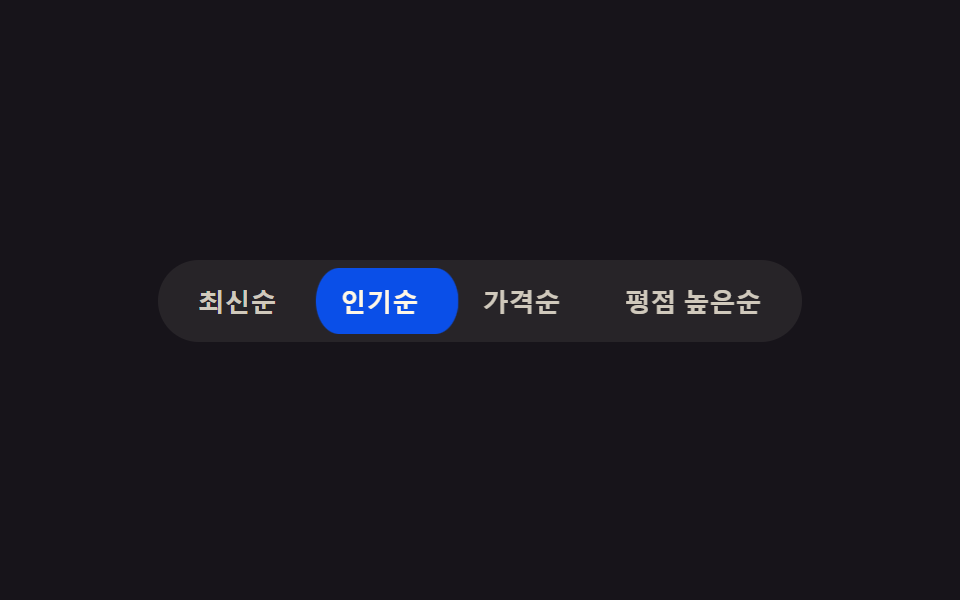 02 btn-group-active-slide-indicator
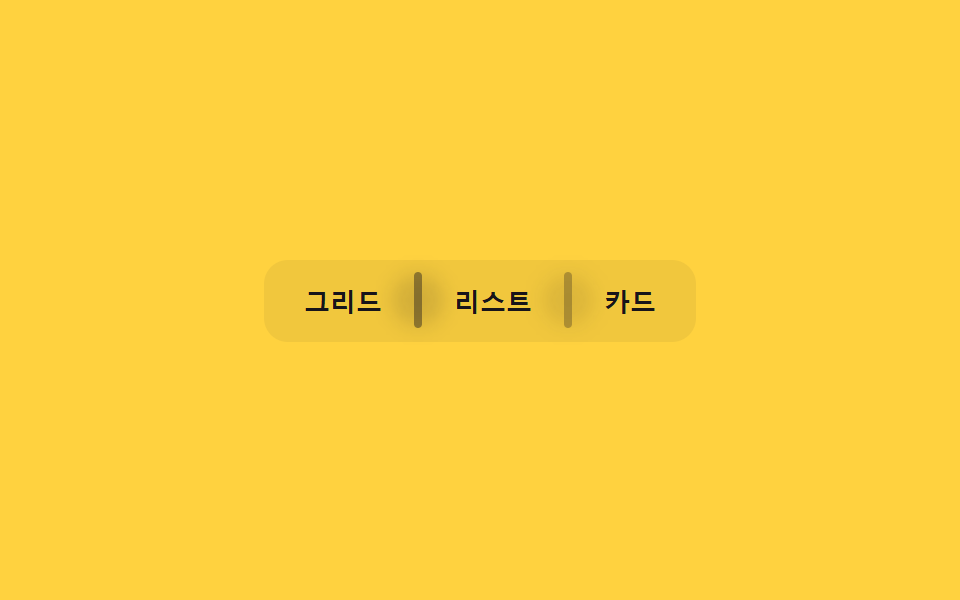 03 btn-group-divider-fade-on-hover
 04 btn-group-radio-exclusive-press
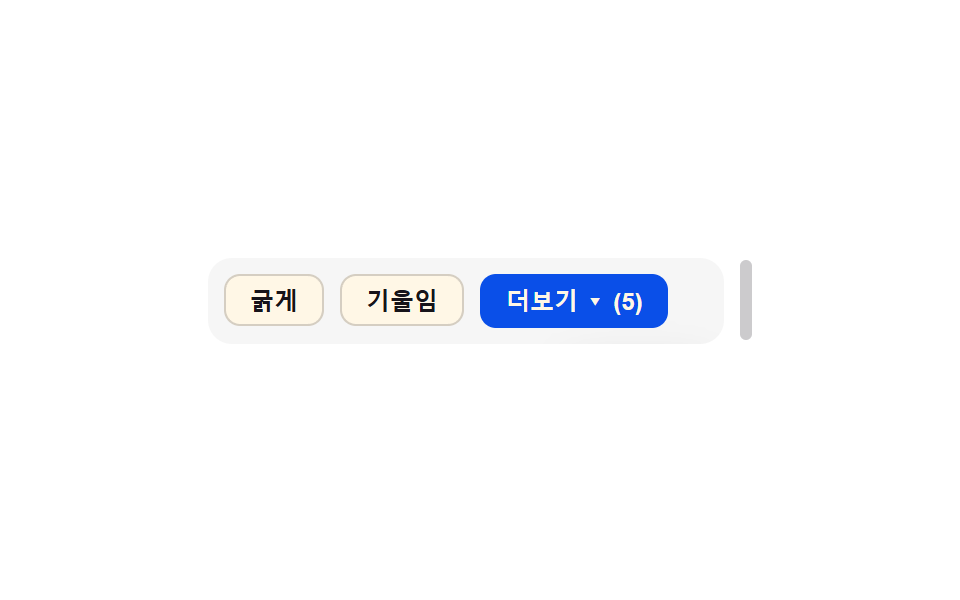 05 btn-group-overflow-collapse-more
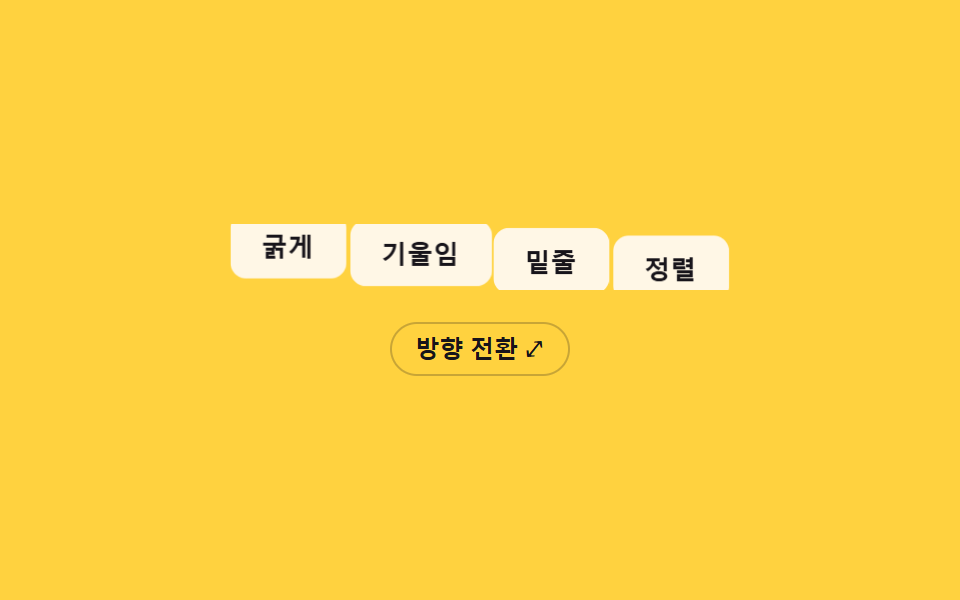 06 btn-group-vertical-horizontal-orient-morph
 07 btn-group-icon-label-combo-reveal
 08 btn-group-keyboard-arrow-focus-slide
 09 btn-group-disabled-ripple-block
Auto-plays · click a tile to jump to its section · all nine in one zip
- 01 Shared-border merge — the inner border value between two adjoined buttons overlaps into one line so it never renders doubled
- 02 Active-indicator slide — when the active-button value changes, the highlight background's position value glides to the new button along measured coordinates
- 03 Divider fade — the opacity value of the line between buttons fades as the pointer nears an adjacent button
- 04 Exclusive pressed state — when one button's pressed value turns on, every other button's pressed value turns off at the same instant
- 05 Overflow-collapse more — when the group-width value narrows, the overflowing buttons fold into a single more-value
- 06 Horizontal-vertical orient morph — when the group's orientation value flips, each button's position value travels between measured coordinates to re-lay the row
- 07 Icon-label combo reveal — as the container-width value widens, an icon button's text-label width value grows from zero into view
- 08 Keyboard arrow focus slide — as the arrow keys move the focus value, the focus outline's position value travels along the buttons' measured coordinates
- 09 Disabled ripple block — pressing a button whose disabled value is on stops the ripple-spread value midway and answers with a shake value instead
None of the nine calls out to a server, writes to localStorage, or reaches for Math.random; every one of these css btn group patterns instead runs its own short list of named constants through requestAnimationFrame and changes exactly one state value — which button is active, pressed, or focused — without touching the others' markup. Because the scope of each pattern stays this narrow, naming which value actually travels between buttons is usually enough to tell which of these nine plain button group html css patterns fits a given toolbar before any of the code below gets opened.
Anatomy of nine patterns — which value changes and when
All nine call requestAnimationFrame at least once, and all nine recompute a real value inside that call rather than leaving the motion entirely to a CSS transition: item 01's tickRipples() clips a click ripple's radius to the shared seam's own measured bound, item 02's loop() integrates a STIFF/DAMP spring toward the active button's own x and w, item 03's loop() runs a pointer-distance value through smoothstep and a SMOOTH lerp per divider, item 04's render() eases each button's depth through a STIFF/DAMP spring into a brief overshoot, item 05's ResizeObserver reruns a partial-sum cutoff against an OVERFLOW_BUFFER of 24px whenever a pointer-drag or the autoplay loop changes the group's own width, item 06's flip() reads every button's getBoundingClientRect() before and after an orientation change and transitions only the leftover distance, item 07's animate() eases a label's own clip-path reveal with easeOutCubic, item 08's select() eases a focus ring's position toward the newly focused button's own rectangle, and item 09's step() runs a capped ripple spread alongside a separate damped sine-decay shake. Every listener answers a real interaction rather than a fabricated timer: 01 and 02 each pair a click with a resize listener that re-measures its own seam or indicator position, 03 tracks pointermove and clears on pointerleave rather than any click at all, 04 and 08 both pair click with keydown for ArrowLeft/ArrowRight, 05 answers a plain click on its more-button alongside pointerdown/pointermove/pointerup on a drag handle that resizes the group by hand rather than through a window resize, 06 answers only a click on its own orientation toggle, 07 answers pointerenter/pointerleave/focus/blur instead of any click or resize, and 09 answers pointerdown rather than a click. Autoplay exists on every one of the nine through that same shared .is-demo class until a visitor's first real interaction turns it off, and Math.random appears in none of the nine. Under prefers-reduced-motion: reduce, the nine split into four different shortcuts rather than one shared rule: item 01 keeps its calculation but scales RIPPLE_MS down to 1, item 02 snaps the spring's target straight onto the button without integrating toward it, items 04, 07, 08, and 09 each skip their own step function outright and jump their depth, clip-path, focus-ring position, or shake straight to the resting value, item 03's own lerp coefficient collapses to 1 so the divider snaps every frame instead of easing, item 05 assigns the group's final width directly with no per-frame loop at all, and item 06 returns out of flip() right after recording both FLIP rectangles but before ever turning them into a transform, so native layout alone repositions the row with no transform at all. Reaching for a button group html css search usually turns up exactly these nine axes — shared border, active slide, divider fade, exclusive press, overflow fold, orientation morph, label reveal, focus slide, and disabled shake — rather than a tenth hidden one.
Code per pattern
01Shared-border merge — the inner border value between two adjoined buttons overlaps into one line so it never renders doubled
The inner border value between two adjoined buttons is deliberately overlapped by BLEED_PX (6px) so it never doubles no matter which button is active. A toolbar's alignment button set or a filter-option button set suits this pattern, since each click ripple is clipped with clip-path to the shared seam's own measured left/right bound, keeping the highlight from ever crossing into the next button.
<main class="stage">
<div class="bg is-demo" id="bg" role="group" aria-label="Text align">
  <button class="bg__btn" data-align="left" aria-pressed="true">Left</button>
  <button class="bg__btn" data-align="center" aria-pressed="false">Center</button>
  <button class="bg__btn" data-align="right" aria-pressed="false">Right</button>
  <button class="bg__btn" data-align="justify" aria-pressed="false">Justify</button>
  <span class="bg__seam" id="seam0" aria-hidden="true"></span>
  <span class="bg__seam" id="seam1" aria-hidden="true"></span>
  <span class="bg__seam" id="seam2" aria-hidden="true"></span>
</div>
</main>
@use "../../../../site/static/demo-tokens" as *;
// 계산 겹: index.html 이 getBoundingClientRect 로 버튼 사이 공유 경계선의 실측 좌표를 재고,
// 클릭 파동(ripple)이 그 좌표 + BLEED_PX 만큼만 이웃으로 번지도록 clip-path 를 매 프레임 계산한다.
// 경계선 자체은 이 파일에서 음수 margin 으로 겹쳐 항상 한 겹으로만 보인다.
@include stage($stage-ink);
.bg {
position: relative;
display: flex;
border-radius: $r-control;
overflow: visible;
}
.bg__btn {
position: relative;
appearance: none;
border: 1.5px solid rgba($subject-cream, .38);
background: rgba($subject-cream, .06);
color: $subject-cream;
font-size: 13px;
font-weight: 600;
padding: $sp-2 $sp-4;
cursor: pointer;
overflow: hidden;
transition: background-color $dur-quick $ease-out, color $dur-quick $ease-out, border-color $dur-quick $ease-out;
// 공유 경계선 병합 — 이웃 버튼과 1.5px 만큼 겹쳐 안쪽 경계선이 항상 한 겹으로만 보인다
& + & { margin-left: -1.5px; }
&:first-child { border-radius: $r-control 0 0 $r-control; }
&:last-child { border-radius: 0 $r-control $r-control 0; }
&:hover, &:focus-visible { z-index: 1; }
&:focus-visible { outline: 2px solid $subject-blue-light; outline-offset: 2px; }
}
.bg__btn--on {
background: $subject-blue-deep;
border-color: $subject-blue-deep;
color: $subject-cream;
z-index: 2;
}
.bg__ripple {
position: absolute;
border-radius: 50%;
background: rgba($subject-cream, .5);
pointer-events: none;
will-change: width, height, opacity, clip-path;
}
.bg__seam {
position: absolute;
top: 4px;
bottom: 4px;
width: 1px;
left: var(--seam-x, 0);
transform: translateX(-50%);
background: rgba($subject-cream, .16);
pointer-events: none;
z-index: 3;
}
@media (max-width: 340px) {
.bg__btn { font-size: 12px; padding: $sp-2 $sp-3; }
}
@media (prefers-reduced-motion: reduce) {
.bg__btn { transition: none; }
.bg__ripple { display: none; }
}html, body {
margin: 0;
overflow: hidden;
}
.stage {
box-sizing: border-box;
min-height: 100vh;
display: grid;
place-items: center;
margin: 0;
background: #17141a;
font-family: -apple-system, "Segoe UI", "Noto Sans KR", sans-serif;
padding: clamp(8px, 4vw, 24px);
}
.bg {
position: relative;
display: flex;
border-radius: 12px;
overflow: visible;
}
.bg__btn {
position: relative;
appearance: none;
border: 1.5px solid rgba(255, 247, 230, 0.38);
background: rgba(255, 247, 230, 0.06);
color: #fff7e6;
font-size: 13px;
font-weight: 600;
padding: 8px 16px;
cursor: pointer;
overflow: hidden;
transition: background-color 220ms ease-out, color 220ms ease-out, border-color 220ms ease-out;
}
.bg__btn + .bg__btn {
margin-left: -1.5px;
}
.bg__btn:first-child {
border-radius: 12px 0 0 12px;
}
.bg__btn:last-child {
border-radius: 0 12px 12px 0;
}
.bg__btn:hover, .bg__btn:focus-visible {
z-index: 1;
}
.bg__btn:focus-visible {
outline: 2px solid #5b8cf8;
outline-offset: 2px;
}
.bg__btn--on {
background: #0a4fe8;
border-color: #0a4fe8;
color: #fff7e6;
z-index: 2;
}
.bg__ripple {
position: absolute;
border-radius: 50%;
background: rgba(255, 247, 230, 0.5);
pointer-events: none;
will-change: width, height, opacity, clip-path;
}
.bg__seam {
position: absolute;
top: 4px;
bottom: 4px;
width: 1px;
left: var(--seam-x, 0);
transform: translateX(-50%);
background: rgba(255, 247, 230, 0.16);
pointer-events: none;
z-index: 3;
}
@media (max-width: 340px) {
.bg__btn {
font-size: 12px;
padding: 8px 12px;
}
}
@media (prefers-reduced-motion: reduce) {
.bg__btn {
transition: none;
}
.bg__ripple {
display: none;
}
}(function () {
var CYCLE_MS = 900; // 자동 루프가 다음 버튼으로 넘어가는 간격
var BLEED_PX = 6; // 계산 겹 상수: 파동이 이웃 경계선을 넘어 번질 수 있는 최대 여유(px) — 이 값만큼만 넘고 그 이상은 실측 경계선에서 잘린다
var reduce = window.matchMedia('(prefers-reduced-motion: reduce)').matches;
var RIPPLE_MS = reduce ? 1 : 420; // 계산 자체는 유지하되 reduce 에서는 목표 상태로 즉시 놓는다
var root = document.getElementById('bg');
var btns = Array.prototype.slice.call(root.querySelectorAll('.bg__btn'));
var seams = [document.getElementById('seam0'), document.getElementById('seam1'), document.getElementById('seam2')];
var isDemo = true;
// 계산 겹: 버튼 사이 공유 경계선의 실제 화면 좌표를 getBoundingClientRect 로 잰다 — 짐작 px 를 쓰지 않는다.
function measureSeams() {
var rootRect = root.getBoundingClientRect();
for (var i = 0; i < seams.length; i++) {
var a = btns[i].getBoundingClientRect();
var b = btns[i + 1].getBoundingClientRect();
var seamX = (a.right + b.left) / 2 - rootRect.left; // 두 버튼이 겹치는 경계선의 실측 중점
seams[i].style.setProperty('--seam-x', seamX.toFixed(2) + 'px');
}
}
function setActive(btn) {
btns.forEach(function (b) { b.setAttribute('aria-pressed', String(b === btn)); b.classList.toggle('bg__btn--on', b === btn); });
}
var ripples = [];
function spawnRipple(btn, clientX) {
var idx = btns.indexOf(btn);
var rect = btn.getBoundingClientRect();
var rootRect = root.getBoundingClientRect();
var originX = (clientX == null ? rect.left + rect.width / 2 : clientX) - rect.left;
var leftSeam = idx > 0 ? btns[idx - 1].getBoundingClientRect().right - rect.left : null;
var rightSeam = idx < btns.length - 1 ? btns[idx + 1].getBoundingClientRect().left - rect.left : null;
var span = document.createElement('span');
span.className = 'bg__ripple';
span.style.left = originX + 'px';
span.style.top = (rect.height / 2) + 'px';
btn.appendChild(span);
ripples.push({
el: span, start: performance.now(), from: 0, to: Math.max(rect.width, rect.height) * 1.3,
// 계산 겹: 파동이 번질 수 있는 한계를 이웃 경계선 실측값 + BLEED_PX 로 고정한다
minClip: leftSeam == null ? -9999 : leftSeam - BLEED_PX,
maxClip: rightSeam == null ? 9999 : rightSeam + BLEED_PX,
originX: originX
});
}
function easeOutQuad(t) { return 1 - (1 - t) * (1 - t); }
function tickRipples(ts) {
for (var i = ripples.length - 1; i >= 0; i--) {
var r = ripples[i];
var t = Math.min(1, (ts - r.start) / RIPPLE_MS);
var radius = r.from + (r.to - r.from) * easeOutQuad(t);
var left = Math.max(r.minClip, r.originX - radius);
var right = Math.min(r.maxClip, r.originX + radius);
r.el.style.width = radius * 2 + 'px';
r.el.style.height = radius * 2 + 'px';
r.el.style.marginLeft = -radius + 'px';
r.el.style.marginTop = -radius + 'px';
r.el.style.opacity = String(1 - t);
// clip-path 로 파동이 실측 경계선 밖으로 못 나가게 자른다
r.el.style.clipPath = 'inset(-9999px ' + Math.max(0, r.originX + radius - right) + 'px -9999px ' + Math.max(0, left - (r.originX - radius)) + 'px)';
if (t >= 1) { r.el.remove(); ripples.splice(i, 1); }
}
}
function human() {
if (isDemo) { root.classList.remove('is-demo'); isDemo = false; }
}
btns.forEach(function (b) {
b.addEventListener('click', function (e) {
human();
setActive(b);
spawnRipple(b, reduce ? null : e.clientX);
});
});
window.addEventListener('resize', measureSeams);
measureSeams();
var cycleStart = 0, lastIdx = -1;
function loop(ts) {
if (!cycleStart) cycleStart = ts;
if (isDemo && !reduce) {
var idx = Math.floor((ts - cycleStart) / CYCLE_MS) % btns.length;
if (idx !== lastIdx) { lastIdx = idx; setActive(btns[idx]); spawnRipple(btns[idx], null); }
}
tickRipples(ts);
requestAnimationFrame(loop);
}
requestAnimationFrame(loop);
})();// SharedBorderMerge — vanilla 판(run/369/demo/01-btn-group-shared-border-merge/index.html) 의 React 포트.
// getBoundingClientRect 로 버튼 사이 공유 경계선의 실측 좌표를 재고, 클릭 파동을 그 좌표 + BLEED_PX
// 만큼만 이웃으로 번지도록 clip-path 로 매 프레임 계산해 자른다.
import { useEffect, useRef } from "react";
import styles from "./SharedBorderMerge.module.scss";
type Box<T> = { current: T };
type RippleState = { el: HTMLSpanElement; start: number; to: number; minClip: number; maxClip: number; originX: number };
const ALIGNS = ["left", "center", "right", "justify"] as const;
const LABELS: Record<string, string> = { left: "왼쪽", center: "중앙", right: "오른쪽", justify: "양쪽" };
export default function SharedBorderMerge() {
const rootRef = useRef(null) as unknown as Box<HTMLDivElement>;
const btnRefs = useRef([]) as unknown as Box<HTMLButtonElement[]>;
const seamRefs = useRef([]) as unknown as Box<HTMLSpanElement[]>;
const rafRef = useRef(0) as unknown as Box<number>;
useEffect(() => {
const CYCLE_MS = 900;
const BLEED_PX = 6; // 계산 겹 상수: 파동이 이웃 경계선을 넘어 번질 수 있는 최대 여유(px)
const reduce = window.matchMedia("(prefers-reduced-motion: reduce)").matches;
const RIPPLE_MS = reduce ? 1 : 420;
const root = rootRef.current;
const btns = btnRefs.current;
const seams = seamRefs.current;
if (!root || btns.length === 0) return;
let isDemo = true;
const ripples: RippleState[] = [];
function measureSeams() {
const rootRect = root.getBoundingClientRect();
for (let i = 0; i < seams.length; i++) {
const a = btns[i].getBoundingClientRect();
const b = btns[i + 1].getBoundingClientRect();
const seamX = (a.right + b.left) / 2 - rootRect.left;
seams[i].style.setProperty("--seam-x", seamX.toFixed(2) + "px");
}
}
function setActive(btn: HTMLButtonElement) {
btns.forEach((b) => {
b.setAttribute("aria-pressed", String(b === btn));
b.classList.toggle(styles.btnOn, b === btn);
});
}
function spawnRipple(btn: HTMLButtonElement, clientX: number | null) {
const idx = btns.indexOf(btn);
const rect = btn.getBoundingClientRect();
const originX = (clientX == null ? rect.left + rect.width / 2 : clientX) - rect.left;
const leftSeam = idx > 0 ? btns[idx - 1].getBoundingClientRect().right - rect.left : null;
const rightSeam = idx < btns.length - 1 ? btns[idx + 1].getBoundingClientRect().left - rect.left : null;
const span = document.createElement("span");
span.className = styles.ripple;
span.style.left = originX + "px";
span.style.top = rect.height / 2 + "px";
btn.appendChild(span);
ripples.push({
el: span, start: performance.now(), to: Math.max(rect.width, rect.height) * 1.3,
minClip: leftSeam == null ? -9999 : leftSeam - BLEED_PX,
maxClip: rightSeam == null ? 9999 : rightSeam + BLEED_PX,
originX,
});
}
function easeOutQuad(t: number) { return 1 - (1 - t) * (1 - t); }
function tickRipples(ts: number) {
for (let i = ripples.length - 1; i >= 0; i--) {
const r = ripples[i];
const t = Math.min(1, (ts - r.start) / RIPPLE_MS);
const radius = r.to * easeOutQuad(t);
const left = Math.max(r.minClip, r.originX - radius);
const right = Math.min(r.maxClip, r.originX + radius);
r.el.style.width = radius * 2 + "px";
r.el.style.height = radius * 2 + "px";
r.el.style.marginLeft = -radius + "px";
r.el.style.marginTop = -radius + "px";
r.el.style.opacity = String(1 - t);
r.el.style.clipPath = "inset(-9999px " + Math.max(0, r.originX + radius - right) + "px -9999px " + Math.max(0, left - (r.originX - radius)) + "px)";
if (t >= 1) { r.el.remove(); ripples.splice(i, 1); }
}
}
function human() { if (isDemo) { root.classList.remove(styles.isDemo); isDemo = false; } }
function onClick(this: HTMLButtonElement, e: MouseEvent) {
human();
setActive(this);
spawnRipple(this, reduce ? null : e.clientX);
}
btns.forEach((b) => b.addEventListener("click", onClick as unknown as EventListener));
window.addEventListener("resize", measureSeams);
measureSeams();
let cycleStart = 0, lastIdx = -1;
function loop(ts: number) {
if (!cycleStart) cycleStart = ts;
if (isDemo && !reduce) {
const idx = Math.floor((ts - cycleStart) / CYCLE_MS) % btns.length;
if (idx !== lastIdx) { lastIdx = idx; setActive(btns[idx]); spawnRipple(btns[idx], null); }
}
tickRipples(ts);
rafRef.current = requestAnimationFrame(loop);
}
rafRef.current = requestAnimationFrame(loop);
return () => {
btns.forEach((b) => b.removeEventListener("click", onClick as unknown as EventListener));
window.removeEventListener("resize", measureSeams);
cancelAnimationFrame(rafRef.current);
};
}, []);
return (
<main className={styles.stage}>
<div className={styles.bg + " " + styles.isDemo} ref={rootRef} role="group" aria-label="텍스트 정렬">
{ALIGNS.map((align, i) => (
<button
key={align}
className={styles.btn}
data-align={align}
aria-pressed={i === 0}
ref={(el: HTMLButtonElement | null) => { if (el) btnRefs.current[i] = el; }}
>
{LABELS[align]}
</button>
))}
{[0, 1, 2].map((i) => (
<span key={i} className={styles.seam} ref={(el: HTMLSpanElement | null) => { if (el) seamRefs.current[i] = el; }} aria-hidden="true" />
))}
</div>
</main>
);
}01 · Shared-border merge — the inner border value between two adjoined buttons overlaps into one line so it never renders doubled — Measured area 2.754% · moving frames 11/23Original by GODRICH · SCSS and React ship in the zip · See the password
  function easeOutQuad(t) { return 1 - (1 - t) * (1 - t); }

  function tickRipples(ts) {
    for (var i = ripples.length - 1; i >= 0; i--) {
      var r = ripples[i];
      var t = Math.min(1, (ts - r.start) / RIPPLE_MS);
      var radius = r.from + (r.to - r.from) * easeOutQuad(t);
      var left = Math.max(r.minClip, r.originX - radius);
      var right = Math.min(r.maxClip, r.originX + radius);
      r.el.style.width = radius * 2 + 'px';
      r.el.style.height = radius * 2 + 'px';
      r.el.style.marginLeft = -radius + 'px';
      r.el.style.marginTop = -radius + 'px';
      r.el.style.opacity = String(1 - t);
      // clip-path cuts the ripple so it can never spill past the measured boundary
      r.el.style.clipPath = 'inset(-9999px ' + Math.max(0, r.originX + radius - right) + 'px -9999px ' + Math.max(0, left - (r.originX - radius)) + 'px)';
      if (t >= 1) { r.el.remove(); ripples.splice(i, 1); }
    }
  }
What the numbers say
Item 01 fills 2.75% of the frame cumulatively at a 47.5 average intensity while moving in 11 of 23 sampled frames, because a clipped ripple only ever paints inside its own seam's measured width instead of the whole button row.
02Active-indicator slide — when the active-button value changes, the highlight background's position value glides to the new button along measured coordinates
When the active-button value moves to another button, the highlight's position value glides between the two buttons' measured coordinates instead of jumping there. A tab-style button group or a sort-order selector suits this pattern, since a STIFF/DAMP spring keeps integrating x and w every frame — even past the target — so the indicator's width breathes as it travels between a narrow and a wide button.
<main class="stage">
<div class="asi-wrap">
<div class="asi is-demo" id="asi" role="group" aria-label="Sort by">
  <span class="asi__indicator" id="asiIndicator" aria-hidden="true"></span>
  <button class="asi__btn asi__btn--on" data-i="0" aria-pressed="true">Newest</button>
  <button class="asi__btn" data-i="1" aria-pressed="false">Popular</button>
  <button class="asi__btn" data-i="2" aria-pressed="false">Price</button>
  <button class="asi__btn" data-i="3" aria-pressed="false">Top rated</button>
</div>
</div>
</main>
@use "../../../../site/static/demo-tokens" as *;
// 계산 겹: index.html 이 getBoundingClientRect 로 활성 버튼의 실측 좌표·폭을 재고, 감쇠 스프링
// 방정식(x'' = k*(target-x) - c*x')을 매 프레임 적분해 표시자를 오버슛 후 정착시킨다.
// 폭 변화는 CSS width 가 아니라 transform: scaleX 비율로만 표현해 레이아웃을 다시 계산하지 않는다.
@include stage($stage-ink);
.asi-wrap {
max-width: 100%;
overflow-x: auto;
overflow-y: hidden;
}
.asi {
position: relative;
display: inline-flex;
gap: 0;
padding: 4px;
border-radius: $r-pill;
background: rgba($subject-cream, .07);
}
.asi__indicator {
position: absolute;
top: 4px;
left: 4px;
height: calc(100% - #{$sp-2});
border-radius: $r-pill;
background: $subject-blue-deep;
transform-origin: left center;
will-change: transform;
z-index: 0;
}
.asi__btn {
position: relative;
z-index: 1;
appearance: none;
border: none;
background: transparent;
color: rgba($subject-cream, .78);
font-size: 13px;
font-weight: 600;
padding: $sp-2 $sp-4;
white-space: nowrap;
cursor: pointer;
border-radius: $r-pill;
transition: color $dur-quick $ease-out;
}
.asi__btn--on {
color: $subject-cream;
}
.asi__btn:focus-visible {
outline: 2px solid $subject-blue-light;
outline-offset: 2px;
}
@media (max-width: 340px) {
.asi__btn { font-size: 12px; padding: $sp-1 $sp-3; }
}
@media (prefers-reduced-motion: reduce) {
.asi__btn { transition: none; }
}html, body {
margin: 0;
overflow: hidden;
}
.stage {
box-sizing: border-box;
min-height: 100vh;
display: grid;
place-items: center;
margin: 0;
background: #17141a;
font-family: -apple-system, "Segoe UI", "Noto Sans KR", sans-serif;
padding: clamp(8px, 4vw, 24px);
}
.asi-wrap {
max-width: 100%;
overflow-x: auto;
overflow-y: hidden;
}
.asi {
position: relative;
display: inline-flex;
gap: 0;
padding: 4px;
border-radius: 999px;
background: rgba(255, 247, 230, 0.07);
}
.asi__indicator {
position: absolute;
top: 4px;
left: 4px;
height: calc(100% - 8px);
border-radius: 999px;
background: #0a4fe8;
transform-origin: left center;
will-change: transform;
z-index: 0;
}
.asi__btn {
position: relative;
z-index: 1;
appearance: none;
border: none;
background: transparent;
color: rgba(255, 247, 230, 0.78);
font-size: 13px;
font-weight: 600;
padding: 8px 16px;
white-space: nowrap;
cursor: pointer;
border-radius: 999px;
transition: color 220ms ease-out;
}
.asi__btn--on {
color: #fff7e6;
}
.asi__btn:focus-visible {
outline: 2px solid #5b8cf8;
outline-offset: 2px;
}
@media (max-width: 340px) {
.asi__btn {
font-size: 12px;
padding: 4px 12px;
}
}
@media (prefers-reduced-motion: reduce) {
.asi__btn {
transition: none;
}
}(function () {
var CYCLE_MS = 1100; // 자동 루프가 다음 버튼으로 넘어가는 간격
var STIFF = 210; // 계산 겹 상수: 스프링 강성(k) — 클수록 목표에 빨리 붙는다
var DAMP = 18; // 계산 겹 상수: 감쇠(c) — 작을수록 오버슛이 크게 남는다
var reduce = window.matchMedia('(prefers-reduced-motion: reduce)').matches;
var root = document.getElementById('asi');
var indicator = document.getElementById('asiIndicator');
var btns = Array.prototype.slice.call(root.querySelectorAll('.asi__btn'));
var isDemo = true;
// 계산 겹: 목표(버튼 실측 좌표)를 향해 감쇠 스프링 방정식으로 위치·폭 비율을 매 프레임 적분한다.
// x'' = STIFF*(target-x) - DAMP*x' — cubic-bezier 로는 못 만드는 오버슛 후 정착 곡선이다.
// 폭은 CSS width 가 아니라 scaleX(비율) 로만 바꿔 레이아웃을 다시 계산하지 않는다(transform 전용 규칙).
var x = 0, w = 0, vx = 0, vw = 0, targetX = 0, targetW = 0, last = 0, activeIdx = 0;
var maxW = 0;
function measure(idx) {
var rootRect = root.getBoundingClientRect();
var r = btns[idx].getBoundingClientRect();
return { x: r.left - rootRect.left, w: r.width };
}
// 시작 시 모든 버튼 폭을 실측해 인디케이터의 고정 기준 폭(maxW)을 정한다 — scaleX 는 이 기준에 대한 비율이다
btns.forEach(function (b) { maxW = Math.max(maxW, b.getBoundingClientRect().width); });
indicator.style.width = maxW + 'px';
function goTo(idx, ts) {
activeIdx = idx;
btns.forEach(function (b, i) {
b.classList.toggle('asi__btn--on', i === idx);
b.setAttribute('aria-pressed', String(i === idx));
});
var m = measure(idx);
targetX = m.x; targetW = m.w;
if (reduce) { x = targetX; w = targetW; vx = 0; vw = 0; }
}
function human() {
if (isDemo) { root.classList.remove('is-demo'); isDemo = false; }
}
btns.forEach(function (b, i) {
b.addEventListener('click', function () { human(); goTo(i, performance.now()); });
});
window.addEventListener('resize', function () { var m = measure(activeIdx); targetX = m.x; targetW = m.w; });
// 초기 위치를 즉시 실측값으로 놓는다
requestAnimationFrame(function () { var m = measure(0); x = targetX = m.x; w = targetW = m.w; render(); });
function render() {
var scale = maxW > 0 ? w / maxW : 1;
indicator.style.transform = 'translateX(' + x.toFixed(2) + 'px) scaleX(' + scale.toFixed(4) + ')';
}
var cycleStart = 0, lastIdx = -1;
  function loop(ts) {
    if (!last) last = ts;
    var dt = Math.min(0.032, (ts - last) / 1000);
    last = ts;

    if (!cycleStart) cycleStart = ts;
    if (isDemo && !reduce) {
      var idx = Math.floor((ts - cycleStart) / CYCLE_MS) % btns.length;
      if (idx !== lastIdx) { lastIdx = idx; goTo(idx, ts); }
    }

    var ax = STIFF * (targetX - x) - DAMP * vx;
    var aw = STIFF * (targetW - w) - DAMP * vw;
    vx += ax * dt; x += vx * dt;
    vw += aw * dt; w += vw * dt;
    render();

    requestAnimationFrame(loop);
  }
requestAnimationFrame(loop);
})();// ActiveSlideIndicator — vanilla 판(run/369/demo/02-btn-group-active-slide-indicator/index.html) 의 React 포트.
// getBoundingClientRect 로 활성 버튼의 실측 좌표·폭을 재고, 감쇠 스프링 방정식을 매 프레임 적분해
// 표시자를 오버슛 후 정착시킨다. 폭 변화는 transform: scaleX 비율로만 표현한다.
import { useEffect, useRef } from "react";
import styles from "./ActiveSlideIndicator.module.scss";
type Box<T> = { current: T };
const LABELS = ["최신순", "인기순", "가격순", "평점 높은순"];
export default function ActiveSlideIndicator() {
const rootRef = useRef(null) as unknown as Box<HTMLDivElement>;
const indicatorRef = useRef(null) as unknown as Box<HTMLSpanElement>;
const btnRefs = useRef([]) as unknown as Box<HTMLButtonElement[]>;
const rafRef = useRef(0) as unknown as Box<number>;
useEffect(() => {
const CYCLE_MS = 1100;
const STIFF = 210; // 계산 겹 상수: 스프링 강성(k)
const DAMP = 18; // 계산 겹 상수: 감쇠(c)
const reduce = window.matchMedia("(prefers-reduced-motion: reduce)").matches;
const root = rootRef.current;
const indicator = indicatorRef.current;
const btns = btnRefs.current;
if (!root || !indicator || btns.length === 0) return;
let isDemo = true;
let x = 0, w = 0, vx = 0, vw = 0, targetX = 0, targetW = 0, last = 0, activeIdx = 0;
let maxW = 0;
btns.forEach((b) => { maxW = Math.max(maxW, b.getBoundingClientRect().width); });
indicator.style.width = maxW + "px";
function measure(idx: number) {
const rootRect = root!.getBoundingClientRect();
const r = btns[idx].getBoundingClientRect();
return { x: r.left - rootRect.left, w: r.width };
}
function goTo(idx: number) {
activeIdx = idx;
btns.forEach((b, i) => {
b.classList.toggle(styles.btnOn, i === idx);
b.setAttribute("aria-pressed", String(i === idx));
});
const m = measure(idx);
targetX = m.x; targetW = m.w;
if (reduce) { x = targetX; w = targetW; vx = 0; vw = 0; }
}
function human() { if (isDemo) { root!.classList.remove(styles.isDemo); isDemo = false; } }
function onResize() { const m = measure(activeIdx); targetX = m.x; targetW = m.w; }
window.addEventListener("resize", onResize);
const clicks: (() => void)[] = [];
btns.forEach((b, i) => {
const fn = () => { human(); goTo(i); };
b.addEventListener("click", fn);
clicks.push(fn);
});
function render() {
const scale = maxW > 0 ? w / maxW : 1;
indicator!.style.transform = "translateX(" + x.toFixed(2) + "px) scaleX(" + scale.toFixed(4) + ")";
}
let cycleStart = 0, lastIdx = -1;
function loop(ts: number) {
if (!last) last = ts;
const dt = Math.min(0.032, (ts - last) / 1000);
last = ts;
if (!cycleStart) cycleStart = ts;
if (isDemo && !reduce) {
const idx = Math.floor((ts - cycleStart) / CYCLE_MS) % btns.length;
if (idx !== lastIdx) { lastIdx = idx; goTo(idx); }
}
const ax = STIFF * (targetX - x) - DAMP * vx;
const aw = STIFF * (targetW - w) - DAMP * vw;
vx += ax * dt; x += vx * dt;
vw += aw * dt; w += vw * dt;
render();
rafRef.current = requestAnimationFrame(loop);
}
requestAnimationFrame(() => { const m = measure(0); x = targetX = m.x; w = targetW = m.w; render(); });
rafRef.current = requestAnimationFrame(loop);
return () => {
window.removeEventListener("resize", onResize);
btns.forEach((b, i) => b.removeEventListener("click", clicks[i]));
cancelAnimationFrame(rafRef.current);
};
}, []);
return (
<main className={styles.stage}>
<div className={styles.asiWrap}>
<div className={styles.asi + " " + styles.isDemo} ref={rootRef} role="group" aria-label="정렬 기준">
<span className={styles.indicator} ref={indicatorRef} aria-hidden="true" />
{LABELS.map((label, i) => (
<button
key={label}
className={styles.btn + (i === 0 ? " " + styles.btnOn : "")}
aria-pressed={i === 0}
ref={(el: HTMLButtonElement | null) => { if (el) btnRefs.current[i] = el; }}
>
{label}
</button>
))}
</div>
</div>
</main>
);
}02 · Active-indicator slide — when the active-button value changes, the highlight background's position value glides to the new button along measured coordinates — Measured area 4.878% · moving frames 13/23Original by GODRICH · SCSS and React ship in the zip · See the password
function loop(ts) {
if (!last) last = ts;
var dt = Math.min(0.032, (ts - last) / 1000);
last = ts;
if (!cycleStart) cycleStart = ts;
if (isDemo && !reduce) {
var idx = Math.floor((ts - cycleStart) / CYCLE_MS) % btns.length;
if (idx !== lastIdx) { lastIdx = idx; goTo(idx, ts); }
}
var ax = STIFF * (targetX - x) - DAMP * vx;
var aw = STIFF * (targetW - w) - DAMP * vw;
vx += ax * dt; x += vx * dt;
vw += aw * dt; w += vw * dt;
render();
requestAnimationFrame(loop);
}
What the numbers say
Item 02 fills 4.88% of the frame cumulatively at a 102.6 average intensity while moving in 13 of 23 sampled frames, because the spring keeps recomputing velocity for a few frames after the indicator visually arrives, before it fully settles.
03Divider fade — the opacity value of the line between buttons fades as the pointer nears an adjacent button
As the pointer-distance value nears a divider between two buttons, that divider's opacity value drops, softening the seam with its neighbor. A settings panel's view-toggle button set suits this pattern, since targetOpacity() runs the pointer distance through a smoothstep falloff and a SMOOTH lerp fades each divider independently rather than the whole row at once.
<main class="stage">
<div class="dfh is-demo" id="dfh" role="group" aria-label="View switch">
  <button class="dfh__btn">Grid</button>
  <span class="dfh__seam" id="seam0" aria-hidden="true"></span>
  <button class="dfh__btn">List</button>
  <span class="dfh__seam" id="seam1" aria-hidden="true"></span>
  <button class="dfh__btn">Cards</button>
</div>
</main>
@use "../../../../site/static/demo-tokens" as *;
// 계산 겹: index.html 이 포인터(x) 와 각 구분선의 실측 중점 사이 거리 값을 매 프레임 재고,
// smoothstep falloff 로 목표 투명도를 구한 뒤 지수 완화(lerp)로 순간이동 없이 따라가게 한다.
@include stage($stage-yellow);
.dfh {
position: relative;
display: flex;
align-items: center;
border-radius: $r-control;
background: rgba($subject-ink, .06);
padding: $sp-1;
}
.dfh__btn {
appearance: none;
border: none;
background: transparent;
color: $subject-ink;
font-size: 13px;
font-weight: 700;
padding: $sp-2 $sp-4;
cursor: pointer;
border-radius: $r-sm;
transition: background-color $dur-quick $ease-out;
&:hover, &:focus-visible { background: rgba($subject-ink, .08); }
&:focus-visible { outline: 2px solid $subject-blue; outline-offset: 2px; }
}
.dfh__seam {
position: relative;
width: 4px;
height: 28px;
align-self: center;
opacity: 1;
will-change: opacity;
&::before {
content: "";
position: absolute;
inset: 0;
border-radius: $r-xs;
background: rgba($subject-ink, .42);
}
&::after {
content: "";
position: absolute;
top: 50%;
left: 50%;
width: 26px;
height: 26px;
transform: translate(-50%, -50%);
border-radius: 50%;
background: rgba($subject-ink, .14);
filter: blur(5px);
}
}
@media (max-width: 340px) {
.dfh__btn { font-size: 12px; padding: $sp-2 $sp-3; }
}
@media (prefers-reduced-motion: reduce) {
.dfh__btn { transition: none; }
.dfh__seam { opacity: 1 !important; }
}html, body {
margin: 0;
overflow: hidden;
}
.stage {
box-sizing: border-box;
min-height: 100vh;
display: grid;
place-items: center;
margin: 0;
background: #ffd23f;
font-family: -apple-system, "Segoe UI", "Noto Sans KR", sans-serif;
padding: clamp(8px, 4vw, 24px);
}
.dfh {
position: relative;
display: flex;
align-items: center;
border-radius: 12px;
background: rgba(23, 20, 26, 0.06);
padding: 4px;
}
.dfh__btn {
appearance: none;
border: none;
background: transparent;
color: #17141a;
font-size: 13px;
font-weight: 700;
padding: 8px 16px;
cursor: pointer;
border-radius: 8px;
transition: background-color 220ms ease-out;
}
.dfh__btn:hover, .dfh__btn:focus-visible {
background: rgba(23, 20, 26, 0.08);
}
.dfh__btn:focus-visible {
outline: 2px solid #2f6df6;
outline-offset: 2px;
}
.dfh__seam {
position: relative;
width: 4px;
height: 28px;
align-self: center;
opacity: 1;
will-change: opacity;
}
.dfh__seam::before {
content: "";
position: absolute;
inset: 0;
border-radius: 4px;
background: rgba(23, 20, 26, 0.42);
}
.dfh__seam::after {
content: "";
position: absolute;
top: 50%;
left: 50%;
width: 26px;
height: 26px;
transform: translate(-50%, -50%);
border-radius: 50%;
background: rgba(23, 20, 26, 0.14);
filter: blur(5px);
}
@media (max-width: 340px) {
.dfh__btn {
font-size: 12px;
padding: 8px 12px;
}
}
@media (prefers-reduced-motion: reduce) {
.dfh__btn {
transition: none;
}
.dfh__seam {
opacity: 1 !important;
}
}(function () {
var FALLOFF_PX = 46; // 계산 겹 상수: 포인터 거리 값이 이 px 안이면 구분선 투명도가 낮아지기 시작한다
var SMOOTH = 0.22; // 계산 겹 상수: 지수 완화(lerp) 비율 — 값이 순간이동하지 않고 따라간다
var reduce = window.matchMedia('(prefers-reduced-motion: reduce)').matches;
var root = document.getElementById('dfh');
var seams = [document.getElementById('seam0'), document.getElementById('seam1')];
var isDemo = true;
var pointerX = null;
var opac = [1, 1]; // 계산 겹: 각 구분선의 현재 렌더 투명도(완화된 값)
function seamCenters() {
var rootRect = root.getBoundingClientRect();
return seams.map(function (s) {
var r = s.getBoundingClientRect();
return r.left + r.width / 2 - rootRect.left;
});
}
// 계산 겹: 포인터 거리 값 → 투명도 목표값(0~1)을 매끄러운 falloff 곡선으로 계산
function targetOpacity(dist) {
var t = Math.min(1, Math.max(0, dist / FALLOFF_PX));
return t * t * (3 - 2 * t); // smoothstep — 선형보다 자연스러운 감쇠
}
function human() {
if (isDemo) { root.classList.remove('is-demo'); isDemo = false; }
}
root.addEventListener('pointermove', function (e) {
human();
pointerX = e.clientX - root.getBoundingClientRect().left;
});
root.addEventListener('pointerleave', function () { pointerX = null; });
var demoStart = 0;
function demoPointerX(ts, width) {
var t = (ts - demoStart) / 1000;
return width / 2 + Math.sin(t * 1.1) * (width / 2 - 10); // 좌우로 오가는 시뮬레이션 좌표
}
  function loop(ts) {
    if (!demoStart) demoStart = ts;
    var rect = root.getBoundingClientRect();
    var px = isDemo && !reduce ? demoPointerX(ts, rect.width) : pointerX;
    var centers = seamCenters();

    for (var i = 0; i < seams.length; i++) {
      var target = px == null ? 1 : targetOpacity(Math.abs(px - centers[i]));
      opac[i] += (target - opac[i]) * (reduce ? 1 : SMOOTH);
      seams[i].style.opacity = opac[i].toFixed(3);
    }

    requestAnimationFrame(loop);
  }
  requestAnimationFrame(loop);
})();// DividerFadeOnHover — vanilla 판(run/369/demo/03-btn-group-divider-fade-on-hover/index.html) 의 React 포트.
// 포인터(x) 와 각 구분선의 실측 중점 사이 거리 값을 매 프레임 재고, smoothstep falloff 로 목표
// 투명도를 구한 뒤 지수 완화(lerp)로 순간이동 없이 따라가게 한다.
import { useEffect, useRef } from "react";
import styles from "./DividerFadeOnHover.module.scss";
type Box<T> = { current: T };
export default function DividerFadeOnHover() {
const rootRef = useRef(null) as unknown as Box<HTMLDivElement>;
const seamRefs = useRef([]) as unknown as Box<HTMLSpanElement[]>;
const rafRef = useRef(0) as unknown as Box<number>;
useEffect(() => {
const FALLOFF_PX = 46; // 계산 겹 상수: 포인터 거리 값이 이 px 안이면 구분선 투명도가 낮아지기 시작한다
const SMOOTH = 0.22; // 계산 겹 상수: 지수 완화(lerp) 비율
const reduce = window.matchMedia("(prefers-reduced-motion: reduce)").matches;
const root = rootRef.current;
const seams = seamRefs.current;
if (!root || seams.length === 0) return;
let isDemo = true;
let pointerX: number | null = null;
const opac = [1, 1];
function seamCenters() {
const rootRect = root!.getBoundingClientRect();
return seams.map((s) => {
const r = s.getBoundingClientRect();
return r.left + r.width / 2 - rootRect.left;
});
}
function targetOpacity(dist: number) {
const t = Math.min(1, Math.max(0, dist / FALLOFF_PX));
return t * t * (3 - 2 * t);
}
function human() { if (isDemo) { root!.classList.remove(styles.isDemo); isDemo = false; } }
function onMove(e: PointerEvent) { human(); pointerX = e.clientX - root!.getBoundingClientRect().left; }
function onLeave() { pointerX = null; }
root.addEventListener("pointermove", onMove);
root.addEventListener("pointerleave", onLeave);
let demoStart = 0;
function demoPointerX(ts: number, width: number) {
const t = (ts - demoStart) / 1000;
return width / 2 + Math.sin(t * 1.1) * (width / 2 - 10);
}
function loop(ts: number) {
if (!demoStart) demoStart = ts;
const rect = root!.getBoundingClientRect();
const px = isDemo && !reduce ? demoPointerX(ts, rect.width) : pointerX;
const centers = seamCenters();
for (let i = 0; i < seams.length; i++) {
const target = px == null ? 1 : targetOpacity(Math.abs(px - centers[i]));
opac[i] += (target - opac[i]) * (reduce ? 1 : SMOOTH);
seams[i].style.opacity = opac[i].toFixed(3);
}
rafRef.current = requestAnimationFrame(loop);
}
rafRef.current = requestAnimationFrame(loop);
return () => {
root.removeEventListener("pointermove", onMove);
root.removeEventListener("pointerleave", onLeave);
cancelAnimationFrame(rafRef.current);
};
}, []);
return (
<main className={styles.stage}>
<div className={styles.dfh + " " + styles.isDemo} ref={rootRef} role="group" aria-label="보기 전환">
<button className={styles.btn}>그리드</button>
<span className={styles.seam} ref={(el: HTMLSpanElement | null) => { if (el) seamRefs.current[0] = el; }} aria-hidden="true" />
<button className={styles.btn}>리스트</button>
<span className={styles.seam} ref={(el: HTMLSpanElement | null) => { if (el) seamRefs.current[1] = el; }} aria-hidden="true" />
<button className={styles.btn}>카드</button>
</div>
</main>
);
}03 · Divider fade — the opacity value of the line between buttons fades as the pointer nears an adjacent button — Measured area 0.297% · moving frames 13/23Original by GODRICH · SCSS and React ship in the zip · See the password
function loop(ts) {
if (!demoStart) demoStart = ts;
var rect = root.getBoundingClientRect();
var px = isDemo && !reduce ? demoPointerX(ts, rect.width) : pointerX;
var centers = seamCenters();
for (var i = 0; i < seams.length; i++) {
var target = px == null ? 1 : targetOpacity(Math.abs(px - centers[i]));
opac[i] += (target - opac[i]) * (reduce ? 1 : SMOOTH);
seams[i].style.opacity = opac[i].toFixed(3);
}
requestAnimationFrame(loop);
}
requestAnimationFrame(loop);
What the numbers say
Item 03 fills 0.30% of the frame cumulatively at the lowest 24.9 average intensity while moving in 13 of 23 sampled frames, because only a handful of 1px divider lines ever repaint, never the buttons themselves.
04Exclusive pressed state — when one button's pressed value turns on, every other button's pressed value turns off at the same instant
The moment one button's pressed value turns on, every other button's pressed value turns off at the same instant, so only a single value ever stays on. A view-mode selector or a single-choice filter button set suits this pattern, since a STIFF/DAMP spring drives each button's depth past 1 before settling, lifting the shadow blur and offset into a brief overshoot on press.
<main class="stage">
<div class="rep is-demo" id="rep" role="radiogroup" aria-label="View mode">
  <button class="rep__btn" role="radio" aria-checked="true" tabindex="0" data-i="0">List type</button>
  <button class="rep__btn" role="radio" aria-checked="false" tabindex="-1" data-i="1">Grid type</button>
  <button class="rep__btn" role="radio" aria-checked="false" tabindex="-1" data-i="2">Board type</button>
</div>
</main>
@use "../../../../site/static/demo-tokens" as *;
// 계산 겹: index.html 이 버튼마다 눌림 깊이(depth)를 감쇠 스프링으로 적분한다. 한 버튼이 켜지는
// 순간 나머지가 동시에 0으로 되돌아가고, 켜지는 버튼은 depth 1을 살짝 넘겼다가 정착한다(오버슛).
// translateY·box-shadow 는 그 깊이값의 함수다 — 레이아웃에 영향 없는 transform·paint 만 바뀐다.
@include stage($stage-orange);
.rep {
display: flex;
gap: $sp-3;
}
.rep__btn {
appearance: none;
border: none;
border-radius: $r-control;
background: $subject-cream;
color: $subject-ink;
font-size: 13px;
font-weight: 700;
padding: $sp-3 $sp-5;
cursor: pointer;
box-shadow: 0 8px 14px rgba(23, 20, 26, .34);
will-change: transform, box-shadow;
&:focus-visible { outline: 2px solid $subject-blue-deep; outline-offset: 2px; }
}
.rep__btn--on {
background: $subject-blue-deep;
color: $subject-cream;
}
@media (max-width: 340px) {
.rep { gap: $sp-2; }
.rep__btn { font-size: 12px; padding: $sp-2 $sp-4; }
}
@media (prefers-reduced-motion: reduce) {
.rep__btn { transition: none; }
}html, body {
margin: 0;
overflow: hidden;
}
.stage {
box-sizing: border-box;
min-height: 100vh;
display: grid;
place-items: center;
margin: 0;
background: #ff4d1f;
font-family: -apple-system, "Segoe UI", "Noto Sans KR", sans-serif;
padding: clamp(8px, 4vw, 24px);
}
.rep {
display: flex;
gap: 12px;
}
.rep__btn {
appearance: none;
border: none;
border-radius: 12px;
background: #fff7e6;
color: #17141a;
font-size: 13px;
font-weight: 700;
padding: 12px 20px;
cursor: pointer;
box-shadow: 0 8px 14px rgba(23, 20, 26, 0.34);
will-change: transform, box-shadow;
}
.rep__btn:focus-visible {
outline: 2px solid #0a4fe8;
outline-offset: 2px;
}
.rep__btn--on {
background: #0a4fe8;
color: #fff7e6;
}
@media (max-width: 340px) {
.rep {
gap: 8px;
}
.rep__btn {
font-size: 12px;
padding: 8px 16px;
}
}
@media (prefers-reduced-motion: reduce) {
.rep__btn {
transition: none;
}
}(function () {
var CYCLE_MS = 950; // 자동 루프가 다음 버튼을 누르는 간격
var STIFF = 320; // 계산 겹 상수: 눌림 깊이 스프링 강성
var DAMP = 14; // 계산 겹 상수: 감쇠 — 작을수록 눌린 뒤 살짝 되튀는 오버슛이 남는다
var reduce = window.matchMedia('(prefers-reduced-motion: reduce)').matches;
var root = document.getElementById('rep');
var btns = Array.prototype.slice.call(root.querySelectorAll('.rep__btn'));
var isDemo = true;
var checkedIdx = 0;
// 계산 겹: 버튼마다 눌림 깊이(depth 0~1)를 감쇠 스프링으로 적분한다 — 켜지는 버튼은
// depth 1을 살짝 넘겼다가(오버슛) 정착하고, 나머지는 동시에 0으로 되돌아간다.
var depth = btns.map(function () { return 0; });
var vel = btns.map(function () { return 0; });
var target = btns.map(function (b, i) { return i === 0 ? 1 : 0; });
function setChecked(idx) {
checkedIdx = idx;
btns.forEach(function (b, i) {
var on = i === idx;
b.setAttribute('aria-checked', String(on));
b.setAttribute('tabindex', on ? '0' : '-1');
target[i] = on ? 1 : 0;
if (reduce) { depth[i] = target[i]; vel[i] = 0; }
});
}
function human() {
if (isDemo) { root.classList.remove('is-demo'); isDemo = false; }
}
btns.forEach(function (b, i) {
b.addEventListener('click', function () { human(); setChecked(i); b.focus({ preventScroll: true }); });
});
root.addEventListener('keydown', function (e) {
if (e.key !== 'ArrowRight' && e.key !== 'ArrowLeft') return;
human();
var dir = e.key === 'ArrowRight' ? 1 : -1;
var next = (checkedIdx + dir + btns.length) % btns.length;
setChecked(next);
btns[next].focus({ preventScroll: true });
e.preventDefault();
});
function render(i) {
var d = depth[i];
var overshootLift = Math.max(0, -(d - 1)) * -2; // 오버슛 구간(d>1)에서 살짝 더 눌리는 표현
var y = d * 3 + (d > 1 ? (d - 1) * 4 : 0);
var blur = 14 - d * 8;
var offY = 8 - d * 6;
btns[i].style.transform = 'translateY(' + y.toFixed(2) + 'px)';
btns[i].style.boxShadow = '0 ' + Math.max(1, offY).toFixed(1) + 'px ' + Math.max(4, blur).toFixed(1) + 'px rgba(23,20,26,.34)';
btns[i].classList.toggle('rep__btn--on', d > 0.5);
}
var cycleStart = 0, lastIdx = -1;
function loop(ts) {
if (!cycleStart) cycleStart = ts;
if (isDemo && !reduce) {
var idx = Math.floor((ts - cycleStart) / CYCLE_MS) % btns.length;
if (idx !== lastIdx) { lastIdx = idx; setChecked(idx); }
}
for (var i = 0; i < btns.length; i++) {
var acc = STIFF * (target[i] - depth[i]) - DAMP * vel[i];
vel[i] += acc * (1 / 60);
depth[i] += vel[i] * (1 / 60);
render(i);
}
requestAnimationFrame(loop);
}
requestAnimationFrame(loop);
})();// RadioExclusivePress — vanilla 판(run/369/demo/04-btn-group-radio-exclusive-press/index.html) 의 React 포트.
// 버튼마다 눌림 깊이(depth)를 감쇠 스프링으로 적분한다. 한 버튼이 켜지는 순간 나머지가 동시에
// 0으로 되돌아가고, 켜지는 버튼은 depth 1을 살짝 넘겼다가 정착한다(오버슛).
import { useEffect, useRef } from "react";
import styles from "./RadioExclusivePress.module.scss";
type Box<T> = { current: T };
const LABELS = ["목록형", "격자형", "보드형"];
export default function RadioExclusivePress() {
const rootRef = useRef(null) as unknown as Box<HTMLDivElement>;
const btnRefs = useRef([]) as unknown as Box<HTMLButtonElement[]>;
const rafRef = useRef(0) as unknown as Box<number>;
useEffect(() => {
const CYCLE_MS = 950;
const STIFF = 320; // 계산 겹 상수: 눌림 깊이 스프링 강성
const DAMP = 14; // 계산 겹 상수: 감쇠
const reduce = window.matchMedia("(prefers-reduced-motion: reduce)").matches;
const root = rootRef.current;
const btns = btnRefs.current;
if (!root || btns.length === 0) return;
let isDemo = true;
let checkedIdx = 0;
const depth = btns.map(() => 0);
const vel = btns.map(() => 0);
const target = btns.map((_, i) => (i === 0 ? 1 : 0));
function setChecked(idx: number) {
checkedIdx = idx;
btns.forEach((b, i) => {
const on = i === idx;
b.setAttribute("aria-checked", String(on));
b.setAttribute("tabindex", on ? "0" : "-1");
target[i] = on ? 1 : 0;
if (reduce) { depth[i] = target[i]; vel[i] = 0; }
});
}
function human() { if (isDemo) { root!.classList.remove(styles.isDemo); isDemo = false; } }
const clicks: (() => void)[] = [];
btns.forEach((b, i) => {
const fn = () => { human(); setChecked(i); b.focus({ preventScroll: true }); };
b.addEventListener("click", fn);
clicks.push(fn);
});
function onKeydown(e: KeyboardEvent) {
if (e.key !== "ArrowRight" && e.key !== "ArrowLeft") return;
human();
const dir = e.key === "ArrowRight" ? 1 : -1;
const next = (checkedIdx + dir + btns.length) % btns.length;
setChecked(next);
btns[next].focus({ preventScroll: true });
e.preventDefault();
}
root.addEventListener("keydown", onKeydown);
function render(i: number) {
const d = depth[i];
const y = d * 3 + (d > 1 ? (d - 1) * 4 : 0);
const blur = 14 - d * 8;
const offY = 8 - d * 6;
btns[i].style.transform = "translateY(" + y.toFixed(2) + "px)";
btns[i].style.boxShadow = "0 " + Math.max(1, offY).toFixed(1) + "px " + Math.max(4, blur).toFixed(1) + "px rgba(23,20,26,.34)";
btns[i].classList.toggle(styles.btnOn, d > 0.5);
}
let cycleStart = 0, lastIdx = -1;
function loop(ts: number) {
if (!cycleStart) cycleStart = ts;
if (isDemo && !reduce) {
const idx = Math.floor((ts - cycleStart) / CYCLE_MS) % btns.length;
if (idx !== lastIdx) { lastIdx = idx; setChecked(idx); }
}
for (let i = 0; i < btns.length; i++) {
const acc = STIFF * (target[i] - depth[i]) - DAMP * vel[i];
vel[i] += acc * (1 / 60);
depth[i] += vel[i] * (1 / 60);
render(i);
}
rafRef.current = requestAnimationFrame(loop);
}
rafRef.current = requestAnimationFrame(loop);
return () => {
btns.forEach((b, i) => b.removeEventListener("click", clicks[i]));
root.removeEventListener("keydown", onKeydown);
cancelAnimationFrame(rafRef.current);
};
}, []);
return (
<main className={styles.stage}>
<div className={styles.rep + " " + styles.isDemo} ref={rootRef} role="radiogroup" aria-label="보기 방식">
{LABELS.map((label, i) => (
<button
key={label}
className={styles.btn}
role="radio"
aria-checked={i === 0}
tabIndex={i === 0 ? 0 : -1}
ref={(el: HTMLButtonElement | null) => { if (el) btnRefs.current[i] = el; }}
>
{label}
</button>
))}
</div>
</main>
);
}04 · Exclusive pressed state — when one button's pressed value turns on, every other button's pressed value turns off at the same instant — Measured area 9.53% · moving frames 15/23Original by GODRICH · SCSS and React ship in the zip · See the password
  btns.forEach(function (b, i) {
    b.addEventListener('click', function () { human(); setChecked(i); b.focus({ preventScroll: true }); });
  });

  root.addEventListener('keydown', function (e) {
    if (e.key !== 'ArrowRight' && e.key !== 'ArrowLeft') return;
    human();
    var dir = e.key === 'ArrowRight' ? 1 : -1;
    var next = (checkedIdx + dir + btns.length) % btns.length;
    setChecked(next);
    btns[next].focus({ preventScroll: true });
    e.preventDefault();
  });

  function render(i) {
    var d = depth[i];
    var overshootLift = Math.max(0, -(d - 1)) * -2; // in the overshoot range (d>1), express a slightly deeper press
    var y = d * 3 + (d > 1 ? (d - 1) * 4 : 0);
    var blur = 14 - d * 8;
    var offY = 8 - d * 6;
    btns[i].style.transform = 'translateY(' + y.toFixed(2) + 'px)';
    btns[i].style.boxShadow = '0 ' + Math.max(1, offY).toFixed(1) + 'px ' + Math.max(4, blur).toFixed(1) + 'px rgba(23,20,26,.34)';
    btns[i].classList.toggle('rep__btn--on', d > 0.5);
  }
What the numbers say
Item 04 fills 9.53% of the frame cumulatively at a 77.3 average intensity while moving in 15 of 23 sampled frames, because the overshoot recalculates a blurred box-shadow for every button on every frame, not only the one just pressed.
05Overflow-collapse more — when the group-width value narrows, the overflowing buttons fold into a single more-value
Once the group-width value falls below the buttons' combined width value, the overflowing ones fold into a single more-value. A toolbar button set on a narrow screen suits this pattern, since a partial-sum loop adds each button's cached width plus an OVERFLOW_BUFFER of 24px until the next one would no longer fit, then hides everything past that cutoff.
<main class="stage">
<div class="ovm is-demo" id="ovm">
  <div class="ovm__resizer" id="ovmBox" style="width: 260px;">
    <div class="ovm__track" id="ovmTrack" role="toolbar" aria-label="Formatting tools"></div>
    <button class="ovm__more" id="ovmMore" aria-haspopup="true" aria-expanded="false" hidden>More ▾</button>
    <ul class="ovm__menu" id="ovmMenu" hidden></ul>
  </div>
  <span class="ovm__handle" id="ovmHandle" aria-hidden="true"></span>
</div>
</main>
@use "../../../../site/static/demo-tokens" as *;
// 계산 겹: index.html 이 버튼마다 실측 폭을 한 번 캐시하고, 컨테이너 폭(실측)에서 OVERFLOW_BUFFER 를
// 뺀 여유값과 비교해 몇 개가 들어가는지 부분합으로 계산한다 — 추측 px 가 아니라 실측 합산이다.
// 컨테이너 폭 자체가 이 항목의 "값" 이라 여기서만 예외로 width 를 직접 바꾼다(다른 항목은 transform 전용).
@include stage($stage-paper);
.ovm {
display: flex;
align-items: center;
gap: $sp-2;
max-width: 100%;
overflow-x: auto;
overflow-y: hidden;
}
.ovm__resizer {
position: relative;
box-sizing: border-box;
overflow: hidden;
flex: 0 0 auto;
border-radius: $r-control;
background: rgba($subject-ink, .04);
padding: $sp-2;
display: flex;
align-items: center;
gap: $sp-2;
}
.ovm__track {
display: flex;
gap: $sp-2;
overflow: hidden;
flex: 0 0 auto;
}
.ovm__btn,
.ovm__more,
.ovm__menuBtn {
appearance: none;
border: 1px solid rgba($subject-ink, .18);
border-radius: $r-sm;
background: $subject-cream;
color: $subject-ink;
font-size: 12px;
font-weight: 600;
padding: $sp-1 $sp-3;
white-space: nowrap;
cursor: pointer;
flex: 0 0 auto;
}
.ovm__more {
background: $subject-blue-deep;
border-color: $subject-blue-deep;
color: $subject-cream;
}
.ovm__menu {
position: absolute;
top: 100%;
right: $sp-2;
margin: 4px 0 0;
padding: $sp-1;
list-style: none;
display: flex;
flex-direction: column;
gap: 4px;
background: $subject-cream;
border-radius: $r-sm;
box-shadow: $shadow-raised;
z-index: 2;
}
.ovm__handle {
flex: 0 0 auto;
width: 6px;
height: 40px;
border-radius: $r-xs;
background: rgba($subject-ink, .22);
cursor: ew-resize;
touch-action: none;
}
@media (max-width: 340px) {
.ovm__btn, .ovm__more, .ovm__menuBtn { font-size: 11px; padding: $sp-1 $sp-2; }
}
@media (prefers-reduced-motion: reduce) {
.ovm__resizer { transition: none; }
}html, body {
margin: 0;
overflow: hidden;
}
.stage {
box-sizing: border-box;
min-height: 100vh;
display: grid;
place-items: center;
margin: 0;
background: #ffffff;
font-family: -apple-system, "Segoe UI", "Noto Sans KR", sans-serif;
padding: clamp(8px, 4vw, 24px);
}
.ovm {
display: flex;
align-items: center;
gap: 8px;
max-width: 100%;
overflow-x: auto;
overflow-y: hidden;
}
.ovm__resizer {
position: relative;
box-sizing: border-box;
overflow: hidden;
flex: 0 0 auto;
border-radius: 12px;
background: rgba(23, 20, 26, 0.04);
padding: 8px;
display: flex;
align-items: center;
gap: 8px;
}
.ovm__track {
display: flex;
gap: 8px;
overflow: hidden;
flex: 0 0 auto;
}
.ovm__btn,
.ovm__more,
.ovm__menuBtn {
appearance: none;
border: 1px solid rgba(23, 20, 26, 0.18);
border-radius: 8px;
background: #fff7e6;
color: #17141a;
font-size: 12px;
font-weight: 600;
padding: 4px 12px;
white-space: nowrap;
cursor: pointer;
flex: 0 0 auto;
}
.ovm__more {
background: #0a4fe8;
border-color: #0a4fe8;
color: #fff7e6;
}
.ovm__menu {
position: absolute;
top: 100%;
right: 8px;
margin: 4px 0 0;
padding: 4px;
list-style: none;
display: flex;
flex-direction: column;
gap: 4px;
background: #fff7e6;
border-radius: 8px;
box-shadow: 0 14px 24px rgba(23, 20, 26, 0.32);
z-index: 2;
}
.ovm__handle {
flex: 0 0 auto;
width: 6px;
height: 40px;
border-radius: 4px;
background: rgba(23, 20, 26, 0.22);
cursor: ew-resize;
touch-action: none;
}
@media (max-width: 340px) {
.ovm__btn, .ovm__more, .ovm__menuBtn {
font-size: 11px;
padding: 4px 8px;
}
}
@media (prefers-reduced-motion: reduce) {
.ovm__resizer {
transition: none;
}
}(function () {
var LABELS = ['Bold', 'Italic', 'Underline', 'Strikethrough', 'Align', 'Color', 'Link'];
var OVERFLOW_BUFFER = 24; // 계산 겹 상수: 더보기 버튼 폭까지 계산한 뒤 남기는 안전 여유(px)
var MIN_W = 150, MAX_W = 320;
var reduce = window.matchMedia('(prefers-reduced-motion: reduce)').matches;
var root = document.getElementById('ovm');
var box = document.getElementById('ovmBox');
var track = document.getElementById('ovmTrack');
var more = document.getElementById('ovmMore');
var menu = document.getElementById('ovmMenu');
var handle = document.getElementById('ovmHandle');
var isDemo = true;
var btns = LABELS.map(function (label, i) {
var b = document.createElement('button');
b.className = 'ovm__btn';
b.type = 'button';
b.textContent = label;
b.dataset.i = String(i);
return b;
});
// 계산 겹: 각 버튼의 실제 폭을 한 번 실측해 캐시한다(추측 px 를 쓰지 않는다) — track 에 전부 넣고 잰 뒤
// 넘치는 만큼만 더보기로 옮긴다.
btns.forEach(function (b) { track.appendChild(b); });
var widths = btns.map(function (b) { return b.getBoundingClientRect().width; });
var gap = 8;
var moreWidth = 0;
function recompute() {
var avail = box.getBoundingClientRect().width - OVERFLOW_BUFFER;
moreWidth = moreWidth || (function () { more.hidden = false; var w = more.getBoundingClientRect().width; more.hidden = true; return w; })();
    var sumAll = widths.reduce(function (s, w) { return s + w; }, 0) + gap * (widths.length - 1);
    var cutoff = widths.length;
    if (sumAll > avail) {
      var sum = 0;
      cutoff = 0;
      for (var i = 0; i < widths.length; i++) {
        var add = widths[i] + (i > 0 ? gap : 0);
        if (sum + add + moreWidth > avail) break;
        sum += add;
        cutoff = i + 1;
      }
      cutoff = Math.max(1, cutoff);
    }

    btns.forEach(function (b, i) { b.hidden = i >= cutoff; });
    var overflowCount = widths.length - cutoff;
    more.hidden = overflowCount === 0;
    more.textContent = 'More ▾ (' + overflowCount + ')';
menu.innerHTML = '';
for (var j = cutoff; j < widths.length; j++) {
var li = document.createElement('li');
var mb = document.createElement('button');
mb.type = 'button';
mb.className = 'ovm__menuBtn';
mb.textContent = LABELS[j];
li.appendChild(mb);
menu.appendChild(li);
}
}
more.addEventListener('click', function () {
human();
var open = menu.hidden;
menu.hidden = !open;
more.setAttribute('aria-expanded', String(open));
});
function human() {
if (isDemo) { root.classList.remove('is-demo'); isDemo = false; }
}
var dragging = false, dragStartX = 0, dragStartW = 0;
handle.addEventListener('pointerdown', function (e) {
human();
dragging = true;
dragStartX = e.clientX;
dragStartW = box.getBoundingClientRect().width;
handle.setPointerCapture(e.pointerId);
});
handle.addEventListener('pointermove', function (e) {
if (!dragging) return;
var w = Math.min(MAX_W, Math.max(MIN_W, dragStartW + (e.clientX - dragStartX)));
box.style.width = w + 'px';
recompute();
});
handle.addEventListener('pointerup', function () { dragging = false; });
var ro = new ResizeObserver(function () { recompute(); });
ro.observe(box);
var start = 0;
function demoWidth(ts) {
var t = (ts - start) / 1900;
var wave = (Math.sin(t * Math.PI * 2) + 1) / 2; // 0~1
return MIN_W + wave * (MAX_W - MIN_W);
}
function loop(ts) {
if (!start) start = ts;
if (isDemo && !reduce) {
box.style.width = demoWidth(ts).toFixed(1) + 'px';
recompute();
}
requestAnimationFrame(loop);
}
recompute();
if (reduce) { box.style.width = MAX_W + 'px'; recompute(); }
requestAnimationFrame(loop);
})();import { useEffect, useRef } from 'react';
import styles from './OverflowCollapseMore.module.scss';
type Box<T> = { current: T };
const LABELS = ['굵게', '기울임', '밑줄', '취소선', '정렬', '색상', '링크'];
const OVERFLOW_BUFFER = 24; // 계산 겹 상수: 더보기 버튼 폭까지 계산한 뒤 남기는 안전 여유(px)
const MIN_W = 150;
const MAX_W = 320;
const GAP = 8;
export default function OverflowCollapseMore() {
const rootRef = useRef(null) as unknown as Box<HTMLDivElement>;
const boxRef = useRef(null) as unknown as Box<HTMLDivElement>;
const trackRef = useRef(null) as unknown as Box<HTMLDivElement>;
const moreRef = useRef(null) as unknown as Box<HTMLButtonElement>;
const menuRef = useRef(null) as unknown as Box<HTMLUListElement>;
const handleRef = useRef(null) as unknown as Box<HTMLSpanElement>;
const btnRefs = useRef([]) as unknown as Box<HTMLButtonElement[]>;
useEffect(() => {
const root = rootRef.current;
const box = boxRef.current;
const track = trackRef.current;
const more = moreRef.current;
const menu = menuRef.current;
const handle = handleRef.current;
const btns = btnRefs.current;
const reduce = window.matchMedia('(prefers-reduced-motion: reduce)').matches;
let isDemo = true;
// 계산 겹: 각 버튼의 실제 폭을 한 번 실측해 캐시한다(추측 px 를 쓰지 않는다) — 넘치는 만큼만 더보기로 옮긴다.
const widths = btns.map((b) => b.getBoundingClientRect().width);
let moreWidth = 0;
function recompute() {
const avail = box.getBoundingClientRect().width - OVERFLOW_BUFFER;
if (!moreWidth) {
more.hidden = false;
moreWidth = more.getBoundingClientRect().width;
more.hidden = true;
}
const sumAll = widths.reduce((s, w) => s + w, 0) + GAP * (widths.length - 1);
let cutoff = widths.length;
if (sumAll > avail) {
let sum = 0;
cutoff = 0;
for (let i = 0; i < widths.length; i++) {
const add = widths[i] + (i > 0 ? GAP : 0);
if (sum + add + moreWidth > avail) break;
sum += add;
cutoff = i + 1;
}
cutoff = Math.max(1, cutoff);
}
btns.forEach((b, i) => { b.hidden = i >= cutoff; });
const overflowCount = widths.length - cutoff;
more.hidden = overflowCount === 0;
more.textContent = `더보기 ▾ (${overflowCount})`;
menu.innerHTML = '';
for (let j = cutoff; j < widths.length; j++) {
const li = document.createElement('li');
const mb = document.createElement('button');
mb.type = 'button';
mb.className = styles.menuBtn;
mb.textContent = LABELS[j];
li.appendChild(mb);
menu.appendChild(li);
}
}
function human() {
if (isDemo) { root.classList.remove(styles.isDemo); isDemo = false; }
}
function onMoreClick() {
human();
const open = menu.hidden;
menu.hidden = !open;
more.setAttribute('aria-expanded', String(open));
}
more.addEventListener('click', onMoreClick);
let dragging = false;
let dragStartX = 0;
let dragStartW = 0;
function onPointerDown(e: PointerEvent) {
human();
dragging = true;
dragStartX = e.clientX;
dragStartW = box.getBoundingClientRect().width;
handle.setPointerCapture(e.pointerId);
}
function onPointerMove(e: PointerEvent) {
if (!dragging) return;
const w = Math.min(MAX_W, Math.max(MIN_W, dragStartW + (e.clientX - dragStartX)));
box.style.width = w + 'px';
recompute();
}
function onPointerUp() { dragging = false; }
handle.addEventListener('pointerdown', onPointerDown);
handle.addEventListener('pointermove', onPointerMove);
handle.addEventListener('pointerup', onPointerUp);
const ro = new ResizeObserver(() => recompute());
ro.observe(box);
let start = 0;
function demoWidth(ts: number) {
const t = (ts - start) / 1900;
const wave = (Math.sin(t * Math.PI * 2) + 1) / 2; // 0~1
return MIN_W + wave * (MAX_W - MIN_W);
}
let raf = 0;
function loop(ts: number) {
if (!start) start = ts;
if (isDemo && !reduce) {
box.style.width = demoWidth(ts).toFixed(1) + 'px';
recompute();
}
raf = requestAnimationFrame(loop);
}
recompute();
if (reduce) { box.style.width = MAX_W + 'px'; recompute(); }
raf = requestAnimationFrame(loop);
return () => {
cancelAnimationFrame(raf);
ro.disconnect();
more.removeEventListener('click', onMoreClick);
handle.removeEventListener('pointerdown', onPointerDown);
handle.removeEventListener('pointermove', onPointerMove);
handle.removeEventListener('pointerup', onPointerUp);
};
}, []);
return (
<div className={`${styles.ovm} ${styles.isDemo}`} ref={(el: HTMLDivElement | null) => { if (el) rootRef.current = el; }}>
<div
className={styles.resizer}
style={{ width: '260px' }}
ref={(el: HTMLDivElement | null) => { if (el) boxRef.current = el; }}
>
<div
className={styles.track}
role="toolbar"
aria-label="서식 도구"
ref={(el: HTMLDivElement | null) => { if (el) trackRef.current = el; }}
>
{LABELS.map((label, i) => (
<button
key={label}
type="button"
className={styles.btn}
ref={(el: HTMLButtonElement | null) => { if (el) btnRefs.current[i] = el; }}
>
{label}
</button>
))}
</div>
<button
type="button"
className={styles.more}
aria-haspopup="true"
aria-expanded="false"
hidden
ref={(el: HTMLButtonElement | null) => { if (el) moreRef.current = el; }}
>
더보기 ▾
</button>
<ul
className={styles.menu}
hidden
ref={(el: HTMLUListElement | null) => { if (el) menuRef.current = el; }}
/>
</div>
<span
className={styles.handle}
aria-hidden="true"
ref={(el: HTMLSpanElement | null) => { if (el) handleRef.current = el; }}
/>
</div>
);
}05 · Overflow-collapse more — when the group-width value narrows, the overflowing buttons fold into a single more-value — Measured area 6.63% · moving frames 22/23Original by GODRICH · SCSS and React ship in the zip · See the password
var sumAll = widths.reduce(function (s, w) { return s + w; }, 0) + gap * (widths.length - 1);
var cutoff = widths.length;
if (sumAll > avail) {
var sum = 0;
cutoff = 0;
for (var i = 0; i < widths.length; i++) {
var add = widths[i] + (i > 0 ? gap : 0);
if (sum + add + moreWidth > avail) break;
sum += add;
cutoff = i + 1;
}
cutoff = Math.max(1, cutoff);
}
btns.forEach(function (b, i) { b.hidden = i >= cutoff; });
var overflowCount = widths.length - cutoff;
more.hidden = overflowCount === 0;
more.textContent = 'More ▾ (' + overflowCount + ')';
What the numbers say
Item 05 fills 6.63% of the frame cumulatively at a 121.3 average intensity while moving in 22 of 23 sampled frames, because the resize-driven cutoff sum reruns on nearly every sampled frame instead of only once per breakpoint.
06Horizontal-vertical orient morph — when the group's orientation value flips, each button's position value travels between measured coordinates to re-lay the row
When the group's orientation value flips, each button's position value travels between measured coordinates as the row re-forms. A responsive toolbar or a button set that folds into a sidebar suits this pattern, since flip() reads every button's getBoundingClientRect() before and after the layout change, then transitions only the leftover difference over FLIP_MS (480ms).
<main class="stage">
<div class="vhm" id="vhm">
  <div class="vhm__group" id="vhmGroup" role="group" aria-label="Editing tools"></div>
  <button class="vhm__toggle" id="vhmToggle" type="button" aria-pressed="false">Switch orientation ⤢</button>
</div>
</main>
@use "../../../../site/static/demo-tokens" as *;
// 계산 겹: index.html 의 flip() 이 방향 전환 전(First)·후(Last) 각 버튼의 실측 좌표 차를 구해
// transform 으로 상쇄한 뒤 되돌리는 FLIP 기법 — 레이아웃 속성 자체는 전환에만 한 번 바뀌고,
// 눈에 보이는 이동은 항상 transform 으로만 그린다.
@include stage($stage-yellow);
.vhm {
display: flex;
flex-direction: column;
align-items: center;
gap: $sp-4;
max-width: 100%;
}
.vhm__group {
display: flex;
flex-direction: row;
gap: $sp-2;
max-width: 100%;
overflow-x: auto;
}
.vhm--vertical .vhm__group {
flex-direction: column;
overflow-x: visible;
}
.vhm__btn {
appearance: none;
border: none;
border-radius: $r-sm;
background: $subject-cream;
color: $subject-ink;
font-size: 13px;
font-weight: 700;
padding: $sp-2 $sp-4;
cursor: pointer;
white-space: nowrap;
flex: 0 0 auto;
}
.vhm__toggle {
appearance: none;
border: 1px solid rgba($subject-ink, .24);
border-radius: $r-pill;
background: transparent;
color: $subject-ink;
font-size: 12px;
font-weight: 600;
padding: $sp-1 $sp-3;
cursor: pointer;
}
@media (max-width: 340px) {
.vhm__btn { font-size: 12px; padding: $sp-2 $sp-3; }
}
@media (prefers-reduced-motion: reduce) {
.vhm__btn { transition: none !important; }
}html, body {
margin: 0;
overflow: hidden;
}
.stage {
box-sizing: border-box;
min-height: 100vh;
display: grid;
place-items: center;
margin: 0;
background: #ffd23f;
font-family: -apple-system, "Segoe UI", "Noto Sans KR", sans-serif;
padding: clamp(8px, 4vw, 24px);
}
.vhm {
display: flex;
flex-direction: column;
align-items: center;
gap: 16px;
max-width: 100%;
}
.vhm__group {
display: flex;
flex-direction: row;
gap: 8px;
max-width: 100%;
overflow-x: auto;
}
.vhm--vertical .vhm__group {
flex-direction: column;
overflow-x: visible;
}
.vhm__btn {
appearance: none;
border: none;
border-radius: 8px;
background: #fff7e6;
color: #17141a;
font-size: 13px;
font-weight: 700;
padding: 8px 16px;
cursor: pointer;
white-space: nowrap;
flex: 0 0 auto;
}
.vhm__toggle {
appearance: none;
border: 1px solid rgba(23, 20, 26, 0.24);
border-radius: 999px;
background: transparent;
color: #17141a;
font-size: 12px;
font-weight: 600;
padding: 4px 12px;
cursor: pointer;
}
@media (max-width: 340px) {
.vhm__btn {
font-size: 12px;
padding: 8px 12px;
}
}
@media (prefers-reduced-motion: reduce) {
.vhm__btn {
transition: none !important;
}
}(function () {
var LABELS = ['Bold', 'Italic', 'Underline', 'Align'];
var CYCLE_MS = 700; // 데모 자동 전환 주기 — 측정 창(2s) 안에 전환이 여러 번 들어오게 짧게 잡음
var FLIP_MS = 480;
var reduce = window.matchMedia('(prefers-reduced-motion: reduce)').matches;
var root = document.getElementById('vhm');
var group = document.getElementById('vhmGroup');
var toggle = document.getElementById('vhmToggle');
var isDemo = true;
var vertical = false;
var btns = LABELS.map(function (label) {
var b = document.createElement('button');
b.type = 'button';
b.className = 'vhm__btn';
b.textContent = label;
group.appendChild(b);
return b;
});
function human() {
if (isDemo) { root.classList.remove('is-demo'); isDemo = false; }
}
// 계산 겹: FLIP — 전환 전(First) 각 버튼의 실측 좌표를 재고, 전환 후(Last) 좌표와의 차이(Invert)를
// transform 으로 순간 상쇄한 뒤, 다음 프레임에 transform 을 0 으로 되돌려(Play) 자연스럽게 이어붙인다.
function flip(apply) {
var first = btns.map(function (b) { return b.getBoundingClientRect(); });
apply();
var last = btns.map(function (b) { return b.getBoundingClientRect(); });
if (reduce) return; // 계산은 유지하되 즉시 반영, 애니메이션 생략
btns.forEach(function (b, i) {
var dx = first[i].left - last[i].left;
var dy = first[i].top - last[i].top;
if (!dx && !dy) return;
b.style.transition = 'none';
b.style.transform = 'translate(' + dx + 'px,' + dy + 'px)';
// 강제 리플로우로 초기 transform 을 화면에 반영시킨 뒤에만 되돌리기 transition 이 재생된다.
b.getBoundingClientRect();
requestAnimationFrame(function () {
b.style.transition = 'transform ' + FLIP_MS + 'ms cubic-bezier(.22,.9,.32,1)';
b.style.transform = 'translate(0,0)';
});
});
}
function setOrientation(v) {
flip(function () {
vertical = v;
root.classList.toggle('vhm--vertical', vertical);
toggle.setAttribute('aria-pressed', String(vertical));
});
}
toggle.addEventListener('click', function () {
human();
setOrientation(!vertical);
});
var start = 0;
function loop(ts) {
if (!start) start = ts;
if (isDemo && !reduce) {
var phaseVertical = (ts - start) % (CYCLE_MS * 2) >= CYCLE_MS;
if (phaseVertical !== vertical) setOrientation(phaseVertical);
}
requestAnimationFrame(loop);
}
requestAnimationFrame(loop);
})();import { useEffect, useRef } from 'react';
import styles from './OrientMorph.module.scss';
type Box<T> = { current: T };
const LABELS = ['굵게', '기울임', '밑줄', '정렬'];
const CYCLE_MS = 700; // 데모 자동 전환 주기 — 측정 창(2s) 안에 전환이 여러 번 들어오게 짧게 잡음
const FLIP_MS = 480;
export default function OrientMorph() {
const rootRef = useRef(null) as unknown as Box<HTMLDivElement>;
const groupRef = useRef(null) as unknown as Box<HTMLDivElement>;
const toggleRef = useRef(null) as unknown as Box<HTMLButtonElement>;
const btnRefs = useRef([]) as unknown as Box<HTMLButtonElement[]>;
useEffect(() => {
const root = rootRef.current;
const toggle = toggleRef.current;
const btns = btnRefs.current;
const reduce = window.matchMedia('(prefers-reduced-motion: reduce)').matches;
let isDemo = true;
let vertical = false;
function human() {
if (isDemo) { root.classList.remove(styles.isDemo); isDemo = false; }
}
// 계산 겹: FLIP — 전환 전(First) 각 버튼의 실측 좌표를 재고, 전환 후(Last) 좌표와의 차이(Invert)를
// transform 으로 순간 상쇄한 뒤, 다음 프레임에 transform 을 0 으로 되돌려(Play) 자연스럽게 이어붙인다.
function flip(apply: () => void) {
const first = btns.map((b) => b.getBoundingClientRect());
apply();
const last = btns.map((b) => b.getBoundingClientRect());
if (reduce) return; // 계산은 유지하되 즉시 반영, 애니메이션 생략
btns.forEach((b, i) => {
const dx = first[i].left - last[i].left;
const dy = first[i].top - last[i].top;
if (!dx && !dy) return;
b.style.transition = 'none';
b.style.transform = `translate(${dx}px,${dy}px)`;
b.getBoundingClientRect();
requestAnimationFrame(() => {
b.style.transition = `transform ${FLIP_MS}ms cubic-bezier(.22,.9,.32,1)`;
b.style.transform = 'translate(0,0)';
});
});
}
function setOrientation(v: boolean) {
flip(() => {
vertical = v;
root.classList.toggle(styles.vertical, vertical);
toggle.setAttribute('aria-pressed', String(vertical));
});
}
function onToggleClick() {
human();
setOrientation(!vertical);
}
toggle.addEventListener('click', onToggleClick);
let start = 0;
let raf = 0;
function loop(ts: number) {
if (!start) start = ts;
if (isDemo && !reduce) {
const phaseVertical = (ts - start) % (CYCLE_MS * 2) >= CYCLE_MS;
if (phaseVertical !== vertical) setOrientation(phaseVertical);
}
raf = requestAnimationFrame(loop);
}
raf = requestAnimationFrame(loop);
return () => {
cancelAnimationFrame(raf);
toggle.removeEventListener('click', onToggleClick);
};
}, []);
return (
<div className={`${styles.vhm} ${styles.isDemo}`} ref={(el: HTMLDivElement | null) => { if (el) rootRef.current = el; }}>
<div
className={styles.group}
role="group"
aria-label="편집 도구"
ref={(el: HTMLDivElement | null) => { if (el) groupRef.current = el; }}
>
{LABELS.map((label, i) => (
<button
key={label}
type="button"
className={styles.btn}
ref={(el: HTMLButtonElement | null) => { if (el) btnRefs.current[i] = el; }}
>
{label}
</button>
))}
</div>
<button
type="button"
className={styles.toggle}
aria-pressed="false"
ref={(el: HTMLButtonElement | null) => { if (el) toggleRef.current = el; }}
>
방향 전환 ⤢
</button>
</div>
);
}06 · Horizontal-vertical orient morph — when the group's orientation value flips, each button's position value travels between measured coordinates to re-lay the row — Measured area 15.29% · moving frames 16/23Original by GODRICH · SCSS and React ship in the zip · See the password
  function flip(apply) {
    var first = btns.map(function (b) { return b.getBoundingClientRect(); });
    apply();
    var last = btns.map(function (b) { return b.getBoundingClientRect(); });

    if (reduce) return; // keep the calculation but apply it immediately, skipping the animation

    btns.forEach(function (b, i) {
      var dx = first[i].left - last[i].left;
      var dy = first[i].top - last[i].top;
      if (!dx && !dy) return;
      b.style.transition = 'none';
      b.style.transform = 'translate(' + dx + 'px,' + dy + 'px)';
      // only after a forced reflow paints the initial transform does the return transition actually play
      b.getBoundingClientRect();
      requestAnimationFrame(function () {
        b.style.transition = 'transform ' + FLIP_MS + 'ms cubic-bezier(.22,.9,.32,1)';
        b.style.transform = 'translate(0,0)';
      });
    });
  }
What the numbers say
Item 06 fills the highest 15.29% of the frame cumulatively at a 120.7 average intensity while moving in 16 of 23 sampled frames, because every button in the group travels its own distance at once instead of one button moving alone.
07Icon-label combo reveal — as the container-width value widens, an icon button's text-label width value grows from zero into view
Once the container-width value crosses a threshold, an icon button's label-width value grows from zero to its full text width. A responsive action button set or a button group inside a card suits this pattern, since hovering or focusing a button drives animate() through an easeOutCubic clip-path reveal over 400ms, measured against that label's own real text width rather than a fixed guess.
<main class="stage">
<div class="clr is-demo" id="clr" role="group" aria-label="Quick actions"></div>
</main>
@use "../../../../site/static/demo-tokens" as *;
// 계산 겹: index.html 이 라벨의 실측 텍스트 폭(fullW)을 한 번 재 reveal 트랙 폭에 고정하고,
// easeOutCubic 로 보간한 진행률을 clip-path 로 매 프레임 그린다 — width 는 다시 건드리지 않는다.
@include stage($stage-orange);
.clr {
display: flex;
flex-wrap: wrap;
gap: $sp-2;
max-width: 100%;
}
.clr__btn {
display: flex;
align-items: center;
gap: $sp-1;
appearance: none;
border: none;
border-radius: $r-pill;
background: $subject-cream;
color: $subject-ink;
padding: $sp-2 $sp-3;
cursor: pointer;
flex: 0 0 auto;
&:focus-visible { outline: 2px solid $subject-blue-deep; outline-offset: 2px; }
}
.clr__icon {
font-size: 15px;
line-height: 1;
width: 16px;
text-align: center;
}
.clr__reveal {
display: inline-block;
overflow: hidden;
width: 0;
will-change: clip-path;
}
.clr__label {
display: inline-block;
white-space: nowrap;
font-size: 12px;
font-weight: 600;
opacity: 0;
will-change: opacity;
}
@media (max-width: 340px) {
.clr__btn { padding: $sp-1 $sp-2; }
.clr__label { font-size: 11px; }
}
@media (prefers-reduced-motion: reduce) {
.clr__reveal, .clr__label { transition: none; }
}html, body {
margin: 0;
overflow: hidden;
}
.stage {
box-sizing: border-box;
min-height: 100vh;
display: grid;
place-items: center;
margin: 0;
background: #ff4d1f;
font-family: -apple-system, "Segoe UI", "Noto Sans KR", sans-serif;
padding: clamp(8px, 4vw, 24px);
}
.clr {
display: flex;
flex-wrap: wrap;
gap: 8px;
max-width: 100%;
}
.clr__btn {
display: flex;
align-items: center;
gap: 4px;
appearance: none;
border: none;
border-radius: 999px;
background: #fff7e6;
color: #17141a;
padding: 8px 12px;
cursor: pointer;
flex: 0 0 auto;
}
.clr__btn:focus-visible {
outline: 2px solid #0a4fe8;
outline-offset: 2px;
}
.clr__icon {
font-size: 15px;
line-height: 1;
width: 16px;
text-align: center;
}
.clr__reveal {
display: inline-block;
overflow: hidden;
width: 0;
will-change: clip-path;
}
.clr__label {
display: inline-block;
white-space: nowrap;
font-size: 12px;
font-weight: 600;
opacity: 0;
will-change: opacity;
}
@media (max-width: 340px) {
.clr__btn {
padding: 4px 8px;
}
.clr__label {
font-size: 11px;
}
}
@media (prefers-reduced-motion: reduce) {
.clr__reveal, .clr__label {
transition: none;
}
}(function () {
var ITEMS = [
{ icon: '+', label: 'New' },
{ icon: '⎘', label: 'Duplicate' },
{ icon: '↧', label: 'Export' },
{ icon: '⌘', label: 'Shortcuts' }
];
var CYCLE_MS = 900; // 데모 자동 순회 간격 — 측정 창(2s) 안에 전환이 여러 번 들어오게 짧게 잡음
var reduce = window.matchMedia('(prefers-reduced-motion: reduce)').matches;
var root = document.getElementById('clr');
var isDemo = true;
function human() {
if (isDemo) { root.classList.remove('is-demo'); isDemo = false; }
}
function easeOutCubic(t) { return 1 - Math.pow(1 - t, 3); }
var cells = ITEMS.map(function (item) {
var btn = document.createElement('button');
btn.type = 'button';
btn.className = 'clr__btn';
var icon = document.createElement('span');
icon.className = 'clr__icon';
icon.textContent = item.icon;
icon.setAttribute('aria-hidden', 'true');
var reveal = document.createElement('span');
reveal.className = 'clr__reveal';
var label = document.createElement('span');
label.className = 'clr__label';
label.textContent = item.label;
reveal.appendChild(label);
btn.appendChild(icon);
btn.appendChild(reveal);
root.appendChild(btn);
return { btn: btn, reveal: reveal, label: label, progress: 0, target: 0, raf: 0, fullW: 0 };
});
// 계산 겹: 각 라벨의 실측 텍스트 폭(fullW)을 한 번 재고, reveal 트랙 폭을 그 값에 고정한 뒤
// clip-path 를 0→fullW 사이에서 이징으로 보간해 "덮개를 걷어내는" 진행률로 그린다 — width 자체는
// 다시 애니메이션하지 않는다(레이아웃 트리거는 최초 1회 뿐).
cells.forEach(function (cell) {
cell.fullW = cell.label.getBoundingClientRect().width;
cell.reveal.style.width = cell.fullW + 'px';
});
  function render(cell) {
    var pct = (1 - cell.progress) * 100;
    cell.reveal.style.clipPath = 'inset(0 ' + pct.toFixed(2) + '% 0 0)';
    cell.label.style.opacity = String(cell.progress);
  }

  function animate(cell, to) {
    cell.target = to;
    var from = cell.progress;
    if (reduce) { cell.progress = to; render(cell); return; }
    if (cell.raf) cancelAnimationFrame(cell.raf);
    var dur = 400, t0 = 0;
    function step(ts) {
      if (!t0) t0 = ts;
      var t = Math.min(1, (ts - t0) / dur);
      cell.progress = from + (to - from) * easeOutCubic(t);
      render(cell);
      if (t < 1) cell.raf = requestAnimationFrame(step);
      else cell.raf = 0;
    }
    cell.raf = requestAnimationFrame(step);
  }
cells.forEach(function (cell) {
render(cell);
cell.btn.addEventListener('pointerenter', function () { human(); animate(cell, 1); });
cell.btn.addEventListener('pointerleave', function () { if (!isDemo) animate(cell, 0); });
cell.btn.addEventListener('focus', function () { human(); animate(cell, 1); });
cell.btn.addEventListener('blur', function () { if (!isDemo) animate(cell, 0); });
});
var active = -1;
var start = 0;
function loop(ts) {
if (!start) start = ts;
if (isDemo && !reduce) {
var idx = Math.floor((ts - start) / CYCLE_MS) % cells.length;
if (idx !== active) {
if (active >= 0) animate(cells[active], 0);
active = idx;
animate(cells[active], 1);
}
}
requestAnimationFrame(loop);
}
requestAnimationFrame(loop);
})();import { useEffect, useRef } from 'react';
import styles from './IconLabelComboReveal.module.scss';
type Box<T> = { current: T };
type Item = { icon: string; label: string };
const ITEMS: Item[] = [
{ icon: '+', label: '새로 만들기' },
{ icon: '⎘', label: '복제' },
{ icon: '↧', label: '내보내기' },
{ icon: '⌘', label: '단축키' }
];
const CYCLE_MS = 900; // 데모 자동 순회 간격 — 측정 창(2s) 안에 전환이 여러 번 들어오게 짧게 잡음
type Cell = {
reveal: HTMLSpanElement;
label: HTMLSpanElement;
progress: number;
raf: number;
fullW: number;
};
function easeOutCubic(t: number) { return 1 - Math.pow(1 - t, 3); }
export default function IconLabelComboReveal() {
const rootRef = useRef(null) as unknown as Box<HTMLDivElement>;
const revealRefs = useRef([]) as unknown as Box<HTMLSpanElement[]>;
const labelRefs = useRef([]) as unknown as Box<HTMLSpanElement[]>;
const btnRefs = useRef([]) as unknown as Box<HTMLButtonElement[]>;
useEffect(() => {
const root = rootRef.current;
const reduce = window.matchMedia('(prefers-reduced-motion: reduce)').matches;
let isDemo = true;
function human() {
if (isDemo) { root.classList.remove(styles.isDemo); isDemo = false; }
}
// 계산 겹: 각 라벨의 실측 텍스트 폭(fullW)을 한 번 재고, reveal 트랙 폭을 그 값에 고정한 뒤
// clip-path 를 0→fullW 사이에서 이징으로 보간해 진행률을 그린다 — width 는 다시 애니메이션하지 않는다.
const cells: Cell[] = ITEMS.map((_, i) => {
const reveal = revealRefs.current[i];
const label = labelRefs.current[i];
const fullW = label.getBoundingClientRect().width;
reveal.style.width = fullW + 'px';
return { reveal, label, progress: 0, raf: 0, fullW };
});
function render(cell: Cell) {
const pct = (1 - cell.progress) * 100;
cell.reveal.style.clipPath = `inset(0 ${pct.toFixed(2)}% 0 0)`;
cell.label.style.opacity = String(cell.progress);
}
function animate(cell: Cell, to: number) {
const from = cell.progress;
if (reduce) { cell.progress = to; render(cell); return; }
if (cell.raf) cancelAnimationFrame(cell.raf);
const dur = 400;
let t0 = 0;
function step(ts: number) {
if (!t0) t0 = ts;
const t = Math.min(1, (ts - t0) / dur);
cell.progress = from + (to - from) * easeOutCubic(t);
render(cell);
if (t < 1) cell.raf = requestAnimationFrame(step);
else cell.raf = 0;
}
cell.raf = requestAnimationFrame(step);
}
const cleanups: Array<() => void> = [];
cells.forEach((cell, i) => {
render(cell);
const btn = btnRefs.current[i];
const onEnter = () => { human(); animate(cell, 1); };
const onLeave = () => { if (!isDemo) animate(cell, 0); };
const onFocus = () => { human(); animate(cell, 1); };
const onBlur = () => { if (!isDemo) animate(cell, 0); };
btn.addEventListener('pointerenter', onEnter);
btn.addEventListener('pointerleave', onLeave);
btn.addEventListener('focus', onFocus);
btn.addEventListener('blur', onBlur);
cleanups.push(() => {
btn.removeEventListener('pointerenter', onEnter);
btn.removeEventListener('pointerleave', onLeave);
btn.removeEventListener('focus', onFocus);
btn.removeEventListener('blur', onBlur);
});
});
let active = -1;
let start = 0;
let raf = 0;
function loop(ts: number) {
if (!start) start = ts;
if (isDemo && !reduce) {
const idx = Math.floor((ts - start) / CYCLE_MS) % cells.length;
if (idx !== active) {
if (active >= 0) animate(cells[active], 0);
active = idx;
animate(cells[active], 1);
}
}
raf = requestAnimationFrame(loop);
}
raf = requestAnimationFrame(loop);
return () => {
cancelAnimationFrame(raf);
cells.forEach((cell) => { if (cell.raf) cancelAnimationFrame(cell.raf); });
cleanups.forEach((fn) => fn());
};
}, []);
return (
<div
className={`${styles.clr} ${styles.isDemo}`}
role="group"
aria-label="빠른 작업"
ref={(el: HTMLDivElement | null) => { if (el) rootRef.current = el; }}
>
{ITEMS.map((item, i) => (
<button
key={item.label}
type="button"
className={styles.btn}
ref={(el: HTMLButtonElement | null) => { if (el) btnRefs.current[i] = el; }}
>
<span className={styles.icon} aria-hidden="true">{item.icon}</span>
<span
className={styles.reveal}
ref={(el: HTMLSpanElement | null) => { if (el) revealRefs.current[i] = el; }}
>
<span
className={styles.label}
ref={(el: HTMLSpanElement | null) => { if (el) labelRefs.current[i] = el; }}
>
{item.label}
</span>
</span>
</button>
))}
</div>
);
}07 · Icon-label combo reveal — as the container-width value widens, an icon button's text-label width value grows from zero into view — Measured area 0.602% · moving frames 9/23Original by GODRICH · SCSS and React ship in the zip · See the password
function render(cell) {
var pct = (1 - cell.progress) * 100;
cell.reveal.style.clipPath = 'inset(0 ' + pct.toFixed(2) + '% 0 0)';
cell.label.style.opacity = String(cell.progress);
}
function animate(cell, to) {
cell.target = to;
var from = cell.progress;
if (reduce) { cell.progress = to; render(cell); return; }
if (cell.raf) cancelAnimationFrame(cell.raf);
var dur = 400, t0 = 0;
function step(ts) {
if (!t0) t0 = ts;
var t = Math.min(1, (ts - t0) / dur);
cell.progress = from + (to - from) * easeOutCubic(t);
render(cell);
if (t < 1) cell.raf = requestAnimationFrame(step);
else cell.raf = 0;
}
cell.raf = requestAnimationFrame(step);
}
What the numbers say
Item 07 fills 0.60% of the frame cumulatively at a 76.4 average intensity while moving in the fewest 9 of 23 sampled frames, because the reveal only plays for the short window right after a pointer or focus event, not continuously.
08Keyboard arrow focus slide — as the arrow keys move the focus value, the focus outline's position value travels along the buttons' measured coordinates
Each arrow-key press moves the focus value to the next button, and the focus outline's position value travels along the buttons' measured coordinates. An accessible toolbar or a keyboard-driven option button set suits this pattern, since select() updates aria-checked and tabIndex on every button while a FOCUS_EASE easing carries the ring's own left offset and width toward the newly focused button's own rectangle.
<main class="stage">
<div class="kfs is-demo" id="kfs">
  <div class="kfs__group" id="kfsGroup" role="radiogroup" aria-label="View mode"></div>
  <span class="kfs__ring" id="kfsRing" aria-hidden="true"></span>
</div>
</main>
@use "../../../../site/static/demo-tokens" as *;
// 계산 겹: index.html 이 선택된 버튼의 실측 좌표(getBoundingClientRect, 그룹 기준 상대값)를 매번 재고
// FOCUS_EASE 로 진행률을 보간해 포커스 링을 translate·리사이즈한다 — % 나 고정폭이 아니라 실측이다.
@include stage($stage-ink);
.kfs {
position: relative;
display: inline-flex;
max-width: 100%;
}
.kfs__group {
position: relative;
display: flex;
flex-wrap: wrap;
gap: $sp-2;
max-width: 100%;
}
.kfs__btn {
position: relative;
z-index: 1;
appearance: none;
border: none;
border-radius: $r-sm;
background: transparent;
color: $subject-cream;
font-size: 12px;
font-weight: 600;
padding: $sp-2 $sp-3;
cursor: pointer;
white-space: nowrap;
flex: 0 0 auto;
&:focus-visible { outline: 2px solid $subject-blue; outline-offset: 2px; }
&[aria-checked="true"] { color: $stage-ink; }
}
.kfs__ring {
position: absolute;
top: 0;
left: 0;
z-index: 0;
border-radius: $r-sm;
background: $subject-blue-light;
will-change: transform, width, height;
}
@media (max-width: 340px) {
.kfs__btn { font-size: 11px; padding: $sp-1 $sp-2; }
}
@media (prefers-reduced-motion: reduce) {
.kfs__ring { transition: none; }
}html, body {
margin: 0;
overflow: hidden;
}
.stage {
box-sizing: border-box;
min-height: 100vh;
display: grid;
place-items: center;
margin: 0;
background: #17141a;
font-family: -apple-system, "Segoe UI", "Noto Sans KR", sans-serif;
padding: clamp(8px, 4vw, 24px);
}
.kfs {
position: relative;
display: inline-flex;
max-width: 100%;
}
.kfs__group {
position: relative;
display: flex;
flex-wrap: wrap;
gap: 8px;
max-width: 100%;
}
.kfs__btn {
position: relative;
z-index: 1;
appearance: none;
border: none;
border-radius: 8px;
background: transparent;
color: #fff7e6;
font-size: 12px;
font-weight: 600;
padding: 8px 12px;
cursor: pointer;
white-space: nowrap;
flex: 0 0 auto;
}
.kfs__btn:focus-visible {
outline: 2px solid #2f6df6;
outline-offset: 2px;
}
.kfs__btn[aria-checked=true] {
color: #17141a;
}
.kfs__ring {
position: absolute;
top: 0;
left: 0;
z-index: 0;
border-radius: 8px;
background: #5b8cf8;
will-change: transform, width, height;
}
@media (max-width: 340px) {
.kfs__btn {
font-size: 11px;
padding: 4px 8px;
}
}
@media (prefers-reduced-motion: reduce) {
.kfs__ring {
transition: none;
}
}(function () {
var LABELS = ['Grid view', 'List view', 'Timeline view', 'Board view'];
var CYCLE_MS = 500; // 데모 자동 순회 간격 — 측정 창(2s) 안에 전환이 여러 번 들어오게 짧게 잡음
var FOCUS_EASE = 'easeInOut'; // 변형: easeInOut → linear (등속)
var EASES = {
linear: function (t) { return t; },
easeInOut: function (t) { return t < 0.5 ? 2 * t * t : 1 - Math.pow(-2 * t + 2, 2) / 2; }
};
var reduce = window.matchMedia('(prefers-reduced-motion: reduce)').matches;
var root = document.getElementById('kfs');
var group = document.getElementById('kfsGroup');
var ring = document.getElementById('kfsRing');
var isDemo = true;
var current = 0;
var btns = LABELS.map(function (label, i) {
var b = document.createElement('button');
b.type = 'button';
b.className = 'kfs__btn';
b.textContent = label;
b.setAttribute('role', 'radio');
b.setAttribute('aria-checked', i === 0 ? 'true' : 'false');
b.tabIndex = i === 0 ? 0 : -1;
group.appendChild(b);
return b;
});
function human() {
if (isDemo) { root.classList.remove('is-demo'); isDemo = false; }
}
// 계산 겹: 포커스 링을 목표 버튼의 실측 좌표(getBoundingClientRect, 그룹 기준 상대값)로 진행률 t 를
// FOCUS_EASE 로 보간해 translate·scale 한다 — % 나 고정폭이 아니라 매번 실측한다.
var raf = 0, from = null;
function measure(i) {
var r = btns[i].getBoundingClientRect();
var gr = group.getBoundingClientRect();
return { x: r.left - gr.left, y: r.top - gr.top, w: r.width, h: r.height };
}
function render(box) {
ring.style.transform = 'translate(' + box.x + 'px,' + box.y + 'px)';
ring.style.width = box.w + 'px';
ring.style.height = box.h + 'px';
}
function moveRing(toIdx) {
var to = measure(toIdx);
if (reduce || !from) { render(to); from = to; return; }
var start = from, dur = 260, t0 = 0;
var ease = EASES[FOCUS_EASE] || EASES.linear;
if (raf) cancelAnimationFrame(raf);
function step(ts) {
if (!t0) t0 = ts;
var t = Math.min(1, (ts - t0) / dur);
var e = ease(t);
render({
x: start.x + (to.x - start.x) * e,
y: start.y + (to.y - start.y) * e,
w: start.w + (to.w - start.w) * e,
h: start.h + (to.h - start.h) * e
});
if (t < 1) raf = requestAnimationFrame(step);
else { raf = 0; from = to; }
}
raf = requestAnimationFrame(step);
}
  function select(i, focus) {
    btns.forEach(function (b, j) {
      b.setAttribute('aria-checked', String(j === i));
      b.tabIndex = j === i ? 0 : -1;
    });
    current = i;
    moveRing(i);
    if (focus) btns[i].focus({ preventScroll: true });
  }

  btns.forEach(function (b, i) {
    b.addEventListener('click', function () { human(); select(i, false); });
    b.addEventListener('keydown', function (e) {
      if (e.key !== 'ArrowRight' && e.key !== 'ArrowLeft') return;
      human();
      e.preventDefault();
      var dir = e.key === 'ArrowRight' ? 1 : -1;
      select((current + dir + btns.length) % btns.length, true);
    });
  });
from = measure(0);
render(from);
var start0 = 0;
function loop(ts) {
if (!start0) start0 = ts;
if (isDemo && !reduce) {
var idx = Math.floor((ts - start0) / CYCLE_MS) % btns.length;
if (idx !== current) select(idx, false);
}
requestAnimationFrame(loop);
}
requestAnimationFrame(loop);
})();import { useEffect, useRef } from 'react';
import styles from './KeyboardArrowFocusSlide.module.scss';
type Box<T> = { current: T };
type Rect = { x: number; y: number; w: number; h: number };
const LABELS = ['그리드 보기', '리스트 보기', '타임라인 보기', '보드 보기'];
const CYCLE_MS = 500; // 데모 자동 순회 간격 — 측정 창(2s) 안에 전환이 여러 번 들어오게 짧게 잡음
const FOCUS_EASE = 'easeInOut'; // 변형: easeInOut → linear (등속)
const EASES: Record<string, (t: number) => number> = {
linear: (t) => t,
easeInOut: (t) => (t < 0.5 ? 2 * t * t : 1 - Math.pow(-2 * t + 2, 2) / 2)
};
export default function KeyboardArrowFocusSlide() {
const rootRef = useRef(null) as unknown as Box<HTMLDivElement>;
const groupRef = useRef(null) as unknown as Box<HTMLDivElement>;
const ringRef = useRef(null) as unknown as Box<HTMLSpanElement>;
const btnRefs = useRef([]) as unknown as Box<HTMLButtonElement[]>;
useEffect(() => {
const root = rootRef.current;
const group = groupRef.current;
const ring = ringRef.current;
const btns = btnRefs.current;
const reduce = window.matchMedia('(prefers-reduced-motion: reduce)').matches;
let isDemo = true;
let current = 0;
let raf = 0;
let from: Rect | null = null;
function human() {
if (isDemo) { root.classList.remove(styles.isDemo); isDemo = false; }
}
// 계산 겹: 포커스 링을 목표 버튼의 실측 좌표(getBoundingClientRect, 그룹 기준 상대값)로 진행률 t 를
// FOCUS_EASE 로 보간해 translate·리사이즈한다 — % 나 고정폭이 아니라 매번 실측한다.
function measure(i: number): Rect {
const r = btns[i].getBoundingClientRect();
const gr = group.getBoundingClientRect();
return { x: r.left - gr.left, y: r.top - gr.top, w: r.width, h: r.height };
}
function render(box: Rect) {
ring.style.transform = `translate(${box.x}px,${box.y}px)`;
ring.style.width = box.w + 'px';
ring.style.height = box.h + 'px';
}
function moveRing(toIdx: number) {
const to = measure(toIdx);
if (reduce || !from) { render(to); from = to; return; }
const start = from;
const dur = 260;
let t0 = 0;
const ease = EASES[FOCUS_EASE] || EASES.linear;
if (raf) cancelAnimationFrame(raf);
function step(ts: number) {
if (!t0) t0 = ts;
const t = Math.min(1, (ts - t0) / dur);
const e = ease(t);
render({
x: start.x + (to.x - start.x) * e,
y: start.y + (to.y - start.y) * e,
w: start.w + (to.w - start.w) * e,
h: start.h + (to.h - start.h) * e
});
if (t < 1) raf = requestAnimationFrame(step);
else { raf = 0; from = to; }
}
raf = requestAnimationFrame(step);
}
function select(i: number, focus: boolean) {
btns.forEach((b, j) => {
b.setAttribute('aria-checked', String(j === i));
b.tabIndex = j === i ? 0 : -1;
});
current = i;
moveRing(i);
if (focus) btns[i].focus({ preventScroll: true });
}
const cleanups: Array<() => void> = [];
btns.forEach((b, i) => {
const onClick = () => { human(); select(i, false); };
const onKeydown = (e: KeyboardEvent) => {
if (e.key !== 'ArrowRight' && e.key !== 'ArrowLeft') return;
human();
e.preventDefault();
const dir = e.key === 'ArrowRight' ? 1 : -1;
select((current + dir + btns.length) % btns.length, true);
};
b.addEventListener('click', onClick);
b.addEventListener('keydown', onKeydown);
cleanups.push(() => {
b.removeEventListener('click', onClick);
b.removeEventListener('keydown', onKeydown);
});
});
from = measure(0);
render(from);
let start0 = 0;
let loopRaf = 0;
function loop(ts: number) {
if (!start0) start0 = ts;
if (isDemo && !reduce) {
const idx = Math.floor((ts - start0) / CYCLE_MS) % btns.length;
if (idx !== current) select(idx, false);
}
loopRaf = requestAnimationFrame(loop);
}
loopRaf = requestAnimationFrame(loop);
return () => {
cancelAnimationFrame(loopRaf);
if (raf) cancelAnimationFrame(raf);
cleanups.forEach((fn) => fn());
};
}, []);
return (
<div className={`${styles.kfs} ${styles.isDemo}`} ref={(el: HTMLDivElement | null) => { if (el) rootRef.current = el; }}>
<div
className={styles.group}
role="radiogroup"
aria-label="보기 모드"
ref={(el: HTMLDivElement | null) => { if (el) groupRef.current = el; }}
>
{LABELS.map((label, i) => (
<button
key={label}
type="button"
className={styles.btn}
role="radio"
aria-checked={i === 0}
tabIndex={i === 0 ? 0 : -1}
ref={(el: HTMLButtonElement | null) => { if (el) btnRefs.current[i] = el; }}
>
{label}
</button>
))}
</div>
<span className={styles.ring} aria-hidden="true" ref={(el: HTMLSpanElement | null) => { if (el) ringRef.current = el; }} />
</div>
);
}08 · Keyboard arrow focus slide — as the arrow keys move the focus value, the focus outline's position value travels along the buttons' measured coordinates — Measured area 8.261% · moving frames 18/23Original by GODRICH · SCSS and React ship in the zip · See the password
function select(i, focus) {
btns.forEach(function (b, j) {
b.setAttribute('aria-checked', String(j === i));
b.tabIndex = j === i ? 0 : -1;
});
current = i;
moveRing(i);
if (focus) btns[i].focus({ preventScroll: true });
}
btns.forEach(function (b, i) {
b.addEventListener('click', function () { human(); select(i, false); });
b.addEventListener('keydown', function (e) {
if (e.key !== 'ArrowRight' && e.key !== 'ArrowLeft') return;
human();
e.preventDefault();
var dir = e.key === 'ArrowRight' ? 1 : -1;
select((current + dir + btns.length) % btns.length, true);
});
});
What the numbers say
Item 08 is the one item worth calling highest intensity here, filling 8.26% of the frame cumulatively at a 190.7 average intensity while moving in 18 of 23 sampled frames, because the ring itself is a bright accent outline, so every pixel it crosses reads as a large change.
09Disabled ripple block — pressing a button whose disabled value is on stops the ripple-spread value midway and answers with a shake value instead
Pressing a button whose disabled value is on still starts the ripple-spread value, but it halts halfway and the button's shake value answers briefly instead. A permission-locked action button or a submit button locked after completion suits this pattern, since the ripple's spread is capped at haltR while a separate damped SHAKE_FREQ/SHAKE_DECAY oscillator drives the button's own horizontal sine-decay shake.
<main class="stage">
<div class="drb is-demo" id="drb" role="group" aria-label="Batch actions"></div>
</main>
@use "../../../../site/static/demo-tokens" as *;
// 계산 겹 1: 리플이 버튼 대각선의 절반(HALT_RATIO)까지만 실측 확산되다 멈춘다(막힘의 시각화).
// 계산 겹 2: 흔들림은 캔버스 키프레임이 아니라 rAF 로 sin(진동) × exp(감쇠) 를 매 프레임 적분한다.
@include stage($stage-orange);
.drb {
display: flex;
flex-wrap: wrap;
gap: $sp-2;
max-width: 100%;
}
.drb__btn {
position: relative;
overflow: hidden;
appearance: none;
border: none;
border-radius: $r-sm;
background: $subject-cream;
color: $subject-ink;
font-size: 12px;
font-weight: 700;
padding: $sp-2 $sp-4;
cursor: not-allowed;
white-space: nowrap;
flex: 0 0 auto;
will-change: transform;
&[aria-disabled="true"] { opacity: .5; }
&:not([aria-disabled="true"]) { cursor: pointer; opacity: 1; }
}
.drb__ripple {
position: absolute;
top: 50%;
left: 50%;
width: 8px;
height: 8px;
border-radius: 50%;
background: $subject-ink;
opacity: 0;
pointer-events: none;
will-change: transform, opacity;
}
@media (max-width: 340px) {
.drb__btn { font-size: 11px; padding: $sp-1 $sp-3; }
}
@media (prefers-reduced-motion: reduce) {
.drb__btn { transition: none; }
}html, body {
margin: 0;
overflow: hidden;
}
.stage {
box-sizing: border-box;
min-height: 100vh;
display: grid;
place-items: center;
margin: 0;
background: #ff4d1f;
font-family: -apple-system, "Segoe UI", "Noto Sans KR", sans-serif;
padding: clamp(8px, 4vw, 24px);
}
.drb {
display: flex;
flex-wrap: wrap;
gap: 8px;
max-width: 100%;
}
.drb__btn {
position: relative;
overflow: hidden;
appearance: none;
border: none;
border-radius: 8px;
background: #fff7e6;
color: #17141a;
font-size: 12px;
font-weight: 700;
padding: 8px 16px;
cursor: not-allowed;
white-space: nowrap;
flex: 0 0 auto;
will-change: transform;
}
.drb__btn[aria-disabled=true] {
opacity: 0.5;
}
.drb__btn:not([aria-disabled=true]) {
cursor: pointer;
opacity: 1;
}
.drb__ripple {
position: absolute;
top: 50%;
left: 50%;
width: 8px;
height: 8px;
border-radius: 50%;
background: #17141a;
opacity: 0;
pointer-events: none;
will-change: transform, opacity;
}
@media (max-width: 340px) {
.drb__btn {
font-size: 11px;
padding: 4px 12px;
}
}
@media (prefers-reduced-motion: reduce) {
.drb__btn {
transition: none;
}
}(function () {
var ITEMS = [
{ label: 'Delete', disabled: true },
{ label: 'Approve', disabled: false },
{ label: 'Unlock', disabled: true },
{ label: 'Export', disabled: false }
];
var CYCLE_MS = 650; // 데모 자동 시도 간격
var HALT_RATIO = 0.5; // 계산 겹 상수: 리플이 최대 반경의 이 비율까지만 번지고 멈춘다
var SHAKE_MS = 420;
var SHAKE_FREQ = 26; // rad/s 대역 — 데모용 가정값
var SHAKE_DECAY = 6.5;
var SHAKE_AMPLITUDE = 6; // px, 데모용 가정값
var reduce = window.matchMedia('(prefers-reduced-motion: reduce)').matches;
var root = document.getElementById('drb');
var isDemo = true;
function human() {
if (isDemo) { root.classList.remove('is-demo'); isDemo = false; }
}
var cells = ITEMS.map(function (item) {
var btn = document.createElement('button');
btn.type = 'button';
btn.className = 'drb__btn';
btn.textContent = item.label;
if (item.disabled) btn.setAttribute('aria-disabled', 'true');
var ripple = document.createElement('span');
ripple.className = 'drb__ripple';
btn.appendChild(ripple);
root.appendChild(btn);
return { btn: btn, ripple: ripple, disabled: item.disabled, raf: 0 };
});
// 계산 겹 1: 리플이 버튼 대각선의 절반(HALT_RATIO)까지만 실측 확산되다 멈춘다(막힘의 시각화).
// 계산 겹 2: 흔들림은 캔버스 키프레임이 아니라 rAF 로 sin(진동) × exp(감쇠) 를 매 프레임 적분한다.
function attempt(cell) {
if (!cell.disabled) return;
var r = cell.btn.getBoundingClientRect();
var maxR = Math.hypot(r.width, r.height) / 2;
var haltR = maxR * HALT_RATIO;
if (reduce) {
cell.ripple.style.transform = 'translate(-50%,-50%) scale(' + (haltR / 4) + ')';
cell.ripple.style.opacity = '0.001';
cell.btn.style.transform = 'translate(0,0)';
return;
}
if (cell.raf) cancelAnimationFrame(cell.raf);
var t0 = 0;
var dur = Math.max(260, SHAKE_MS);
function step(ts) {
if (!t0) t0 = ts;
var t = (ts - t0) / 1000;
var tt = Math.min(1, (ts - t0) / dur);
// 리플: 0 → haltR 까지 감속 확산 후 멈춤(그 이상 안 커짐), 페이드는 확산과 별도로 진행
var spread = haltR * (1 - Math.pow(1 - Math.min(1, tt * 1.6), 2));
cell.ripple.style.transform = 'translate(-50%,-50%) scale(' + Math.max(0.001, spread / 4) + ')';
cell.ripple.style.opacity = String(Math.max(0, 1 - tt));
// 흔들림: 감쇠 진동자 — 캔버스 키프레임이 아니라 매 프레임 계산
var shakeT = Math.min(t, SHAKE_MS / 1000);
var dx = SHAKE_AMPLITUDE * Math.sin(SHAKE_FREQ * shakeT) * Math.exp(-SHAKE_DECAY * shakeT);
cell.btn.style.transform = 'translate(' + dx.toFixed(2) + 'px,0)';
if (tt < 1) cell.raf = requestAnimationFrame(step);
else { cell.raf = 0; cell.btn.style.transform = 'translate(0,0)'; }
}
cell.raf = requestAnimationFrame(step);
}
cells.forEach(function (cell) {
cell.btn.addEventListener('pointerdown', function () { human(); attempt(cell); });
});
var idx = 0, start = 0;
var disabledIdx = cells.map(function (c, i) { return c.disabled ? i : -1; }).filter(function (i) { return i >= 0; });
function loop(ts) {
if (!start) start = ts;
if (isDemo && !reduce) {
var slot = Math.floor((ts - start) / CYCLE_MS) % disabledIdx.length;
if (slot !== idx) { idx = slot; attempt(cells[disabledIdx[idx]]); }
}
requestAnimationFrame(loop);
}
requestAnimationFrame(loop);
})();import { useEffect, useRef } from 'react';
import styles from './DisabledRippleBlock.module.scss';
type Box<T> = { current: T };
type Item = { label: string; disabled: boolean };
const ITEMS: Item[] = [
{ label: '삭제', disabled: true },
{ label: '승인', disabled: false },
{ label: '잠금 해제', disabled: true },
{ label: '내보내기', disabled: false }
];
const CYCLE_MS = 650; // 데모 자동 시도 간격
const HALT_RATIO = 0.5; // 계산 겹 상수: 리플이 최대 반경의 이 비율까지만 번지고 멈춘다
const SHAKE_MS = 420;
const SHAKE_FREQ = 26; // rad/s 대역 — 데모용 가정값
const SHAKE_DECAY = 6.5;
const SHAKE_AMPLITUDE = 6; // px, 데모용 가정값
type Cell = { btn: HTMLButtonElement; ripple: HTMLSpanElement; disabled: boolean; raf: number };
export default function DisabledRippleBlock() {
const rootRef = useRef(null) as unknown as Box<HTMLDivElement>;
const btnRefs = useRef([]) as unknown as Box<HTMLButtonElement[]>;
const rippleRefs = useRef([]) as unknown as Box<HTMLSpanElement[]>;
useEffect(() => {
const root = rootRef.current;
const reduce = window.matchMedia('(prefers-reduced-motion: reduce)').matches;
let isDemo = true;
function human() {
if (isDemo) { root.classList.remove(styles.isDemo); isDemo = false; }
}
const cells: Cell[] = ITEMS.map((item, i) => ({
btn: btnRefs.current[i],
ripple: rippleRefs.current[i],
disabled: item.disabled,
raf: 0
}));
// 계산 겹 1: 리플이 버튼 대각선의 절반(HALT_RATIO)까지만 실측 확산되다 멈춘다(막힘의 시각화).
// 계산 겹 2: 흔들림은 캔버스 키프레임이 아니라 rAF 로 sin(진동) × exp(감쇠) 를 매 프레임 적분한다.
function attempt(cell: Cell) {
if (!cell.disabled) return;
const r = cell.btn.getBoundingClientRect();
const maxR = Math.hypot(r.width, r.height) / 2;
const haltR = maxR * HALT_RATIO;
if (reduce) {
cell.ripple.style.transform = `translate(-50%,-50%) scale(${haltR / 4})`;
cell.ripple.style.opacity = '0.001';
cell.btn.style.transform = 'translate(0,0)';
return;
}
if (cell.raf) cancelAnimationFrame(cell.raf);
let t0 = 0;
const dur = Math.max(260, SHAKE_MS);
function step(ts: number) {
if (!t0) t0 = ts;
const t = (ts - t0) / 1000;
const tt = Math.min(1, (ts - t0) / dur);
const spread = haltR * (1 - Math.pow(1 - Math.min(1, tt * 1.6), 2));
cell.ripple.style.transform = `translate(-50%,-50%) scale(${Math.max(0.001, spread / 4)})`;
cell.ripple.style.opacity = String(Math.max(0, 1 - tt));
const shakeT = Math.min(t, SHAKE_MS / 1000);
const dx = SHAKE_AMPLITUDE * Math.sin(SHAKE_FREQ * shakeT) * Math.exp(-SHAKE_DECAY * shakeT);
cell.btn.style.transform = `translate(${dx.toFixed(2)}px,0)`;
if (tt < 1) cell.raf = requestAnimationFrame(step);
else { cell.raf = 0; cell.btn.style.transform = 'translate(0,0)'; }
}
cell.raf = requestAnimationFrame(step);
}
const cleanups: Array<() => void> = [];
cells.forEach((cell) => {
const onDown = () => { human(); attempt(cell); };
cell.btn.addEventListener('pointerdown', onDown);
cleanups.push(() => cell.btn.removeEventListener('pointerdown', onDown));
});
const disabledIdx = cells.map((c, i) => (c.disabled ? i : -1)).filter((i) => i >= 0);
let idx = 0;
let start = 0;
let raf = 0;
function loop(ts: number) {
if (!start) start = ts;
if (isDemo && !reduce) {
const slot = Math.floor((ts - start) / CYCLE_MS) % disabledIdx.length;
if (slot !== idx) { idx = slot; attempt(cells[disabledIdx[idx]]); }
}
raf = requestAnimationFrame(loop);
}
raf = requestAnimationFrame(loop);
return () => {
cancelAnimationFrame(raf);
cells.forEach((c) => { if (c.raf) cancelAnimationFrame(c.raf); });
cleanups.forEach((fn) => fn());
};
}, []);
return (
<div className={`${styles.drb} ${styles.isDemo}`} role="group" aria-label="일괄 작업" ref={(el: HTMLDivElement | null) => { if (el) rootRef.current = el; }}>
{ITEMS.map((item, i) => (
<button
key={item.label}
type="button"
className={styles.btn}
aria-disabled={item.disabled || undefined}
ref={(el: HTMLButtonElement | null) => { if (el) btnRefs.current[i] = el; }}
>
{item.label}
<span className={styles.ripple} ref={(el: HTMLSpanElement | null) => { if (el) rippleRefs.current[i] = el; }} />
</button>
))}
</div>
);
}09 · Disabled ripple block — pressing a button whose disabled value is on stops the ripple-spread value midway and answers with a shake value instead — Measured area 2.133% · moving frames 16/23Original by GODRICH · SCSS and React ship in the zip · See the password
    function step(ts) {
      if (!t0) t0 = ts;
      var t = (ts - t0) / 1000;
      var tt = Math.min(1, (ts - t0) / dur);

      // ripple: decelerating spread from 0 to haltR, then stop (it never grows past that) — fade runs independently of the spread
      var spread = haltR * (1 - Math.pow(1 - Math.min(1, tt * 1.6), 2));
      cell.ripple.style.transform = 'translate(-50%,-50%) scale(' + Math.max(0.001, spread / 4) + ')';
      cell.ripple.style.opacity = String(Math.max(0, 1 - tt));

      // shake: a damped oscillator — computed every frame, not a canvas keyframe
      var shakeT = Math.min(t, SHAKE_MS / 1000);
      var dx = SHAKE_AMPLITUDE * Math.sin(SHAKE_FREQ * shakeT) * Math.exp(-SHAKE_DECAY * shakeT);
      cell.btn.style.transform = 'translate(' + dx.toFixed(2) + 'px,0)';

      if (tt < 1) cell.raf = requestAnimationFrame(step);
      else { cell.raf = 0; cell.btn.style.transform = 'translate(0,0)'; }
    }
    cell.raf = requestAnimationFrame(step);
What the numbers say
Item 09 fills 2.13% of the frame cumulatively at a 45.7 average intensity while moving in 16 of 23 sampled frames, because the shake amplitude itself stays small even while the oscillator keeps computing on every one of those frames.
Where values change position and size — active, width, and focus basis
A button group tailwind css utility layer usually means a single class swap, but three of these nine push further than that. Item 02's highlight background ties its own position directly to which button is active: x and w are both spring targets, so the indicator's width itself breathes wider or narrower depending on which button it is currently gliding toward, not only where it sits. Item 05's overflow fold changes size rather than position: the group-width value decides a cutoff index through a partial-sum loop, so a button is never told to shrink — it is only told whether it still fits before the next one would overflow the group. Item 08's focus ring, by contrast, changes position without touching size at all: FOCUS_EASE carries the ring's own left offset toward whichever button holds focus, while its width only updates to match that button's own measured rectangle. Swapping these constants into a different utility layer changes nothing about which value moves — item 02's spring still targets x and w, item 05's cutoff still sums cached widths — only the class names around them differ.
That active-versus-width-versus-focus split matters most once a pattern like this leaves this page for a real toolbar. 9 CSS Button Animations (SCSS + React, copy-paste) drives a single button's own hover or press value in isolation, while every pattern above instead coordinates one button's state against its siblings in the same group. 9 css button design ideas — candy, push, loading changes a button's own surface treatment — a gradient, a press depth, a loading fill — rather than a value that travels between adjoined buttons. 9 Icon Button CSS Patterns — Press, Drag, Expand expands or drags a single icon button's own size and position, never a value shared across a row of siblings the way the active indicator or the focus ring is here. Open the zip once with he9ea98k and every one of these nine button group patterns unlocks together, so there's no need to reopen it per item.
Where it breaks — rapid clicking, narrow screens, keyboard focus
Nine patterns that each compute their own timing also fail in three different ways once real users stop clicking one button at a time.
Rapid clicks before a spring settles
Item 04's render() reads depth[i] fresh on every click, so clicking a different button before the spring settles just retargets the same overshoot instead of snapping back to zero first. Item 02 behaves the same way — its loop() keeps integrating x and w toward whatever the latest targetX/targetW happen to be, so a fast second click simply redirects a spring that is already moving rather than restarting it.
Narrow screens and the overflow buffer
Item 05's cutoff loop only ever hides a whole button, never part of one, so a screen narrower than even the first button's own width plus OVERFLOW_BUFFER still leaves the more-value visible with every button folded behind it. Item 06's flip() measures rectangles right before an orientation change, so clicking its toggle again before the transition finishes can hand it a stale first rectangle from a layout that is already mid-flight.
Keyboard focus when a button hides
Item 08's select() moves tabIndex and the focus ring together, so its own roving-tabindex pattern keeps working even if a sibling button were hidden. Item 05 does not coordinate with that pattern at all — folding a focused button into the more-value would drop focus onto whatever hidden leaves behind, since collapsing buttons and moving focus are two systems that never call each other here.
Three variants and accessibility
Lowering item 02's DAMP from 18 to 9 leaves an overshoot in the spring, so the indicator slightly overshoots its target button and springs back, making the slide feel bouncier. Cutting item 05's OVERFLOW_BUFFER from 24 to 8px keeps buttons expanded longer, pushing the collapse point much closer to the screen edge. Switching item 08's FOCUS_EASE from easeInOut to linear removes the slow-in and slow-out, so the ring travels to the next button at one constant speed and arrow-key moves feel mechanical and clipped.
| Variant | What changes | What it doesn't touch |
|---|---|---|
| Slide-indicator travel time | DAMP 18 → 9 |
The STIFF value, the spring formula, which button is active |
| Overflow-collapse buffer | OVERFLOW_BUFFER 24 → 8 |
The cutoff loop itself, the more-value's own label, the group-width measurement |
| Focus-ring travel speed | FOCUS_EASE easeInOut → linear |
The radiogroup role, aria-checked, the ArrowLeft/ArrowRight handler |
Only items 04 and 08 set role="radiogroup" with aria-checked on each button, a roving tabIndex, and focus({preventScroll:true}) on every arrow-key move, since those two are the only patterns that enforce a single true selection the way native radio buttons do. The other seven stay plain role="group" buttons instead: 01, 02, and 06 mirror their own state through aria-pressed since more than one of those can matter, 05 adds aria-expanded on its own more-button and role="toolbar" on the track, and 03, 07, and 09 expose no pressed state at all because hovering, revealing, or shaking never changes which value is actually selected. Reduced motion collapses into three shortcuts: item 01 keeps its ripple math but scales the duration to 1, items 02, 04, 07, 08, and 09 skip their own step function and jump straight to the resting value, and items 03, 05, and 06 fall back on a plain scss transition: none, since their own JS already snaps the value directly rather than depending on a per-frame loop to finish.
FAQ
Is this button group css design set nine separate scripts, or one shared component with a config
Nine separate scripts — each one lives in its own file with its own set of named constants, and the code fence sitting next to a demo is exactly what that demo runs, with no shared template swapping variables in behind the scenes.
Does item 01's shared border come from a real CSS border, or is it faked with clip-path
Both play a part: the seam itself is a real 1px background line placed with a negative margin-left, while clip-path only clips the click ripple so it can never visually spill past that seam's own measured edge.
Why do only items 04 and 08 use a radiogroup instead of plain buttons
Because those two are the only patterns where exactly one button must stay selected at all times — a native role="radiogroup" with aria-checked and a roving tabIndex tells assistive tech that, while the rest allow more than one pressed state or expose no selection state at all.
Sources: MDN — ARIA toolbar role · MDN — ARIA group role · MDN — :focus-visible · MDN — Element.getBoundingClientRect()
You might also like
 Buttons9 CSS Button Animations (SCSS + React, copy-paste)
 Buttons9 button hover effects css that award sites reuse
 Buttons9 Icon Button CSS Patterns — Press, Drag, Expand
 ButtonsCTA Button Design: 9 Interaction Patterns
 ButtonsButton Press Animation UI: 9 Calculation Patterns
 ButtonsExpanding Button UI: 9 Shape-Morph Patterns
 Buttons9 CSS 3D Button Effects — Copy-paste Ready
 ButtonsBookmark Icon Animation: 9 Patterns, One Icon
 Buttons9 css button design ideas — candy, push, loading
 Buttons9 button state css patterns, loading to done