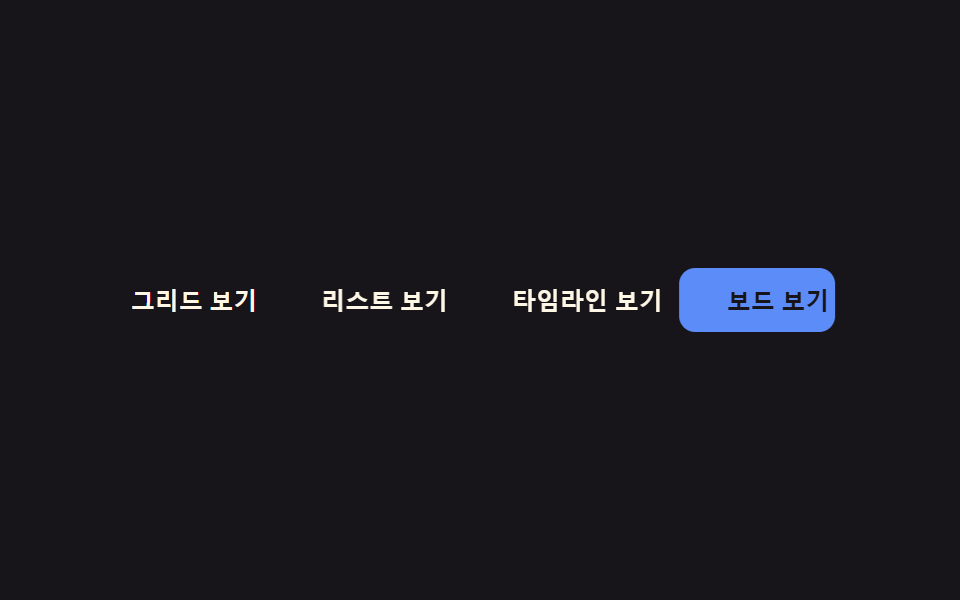
08Keyboard arrow focus slide — as the arrow keys move the focus value, the focus outline's position value travels along the buttons' measured coordinates
Each arrow-key press moves the focus value to the next button, and the focus outline's position value travels between the two buttons' measured coordinates.
Best forAn accessible toolbar, a keyboard-driven option button set
FOCUS_EASE easeInOuttranslate + resize ringmeasured coord tween
<main class="stage">
<div class="kfs is-demo" id="kfs">
  <div class="kfs__group" id="kfsGroup" role="radiogroup" aria-label="View mode"></div>
  <span class="kfs__ring" id="kfsRing" aria-hidden="true"></span>
</div>
</main>
@use "../../../../site/static/demo-tokens" as *;
// 계산 겹: index.html 이 선택된 버튼의 실측 좌표(getBoundingClientRect, 그룹 기준 상대값)를 매번 재고
// FOCUS_EASE 로 진행률을 보간해 포커스 링을 translate·리사이즈한다 — % 나 고정폭이 아니라 실측이다.
@include stage($stage-ink);
.kfs {
position: relative;
display: inline-flex;
max-width: 100%;
}
.kfs__group {
position: relative;
display: flex;
flex-wrap: wrap;
gap: $sp-2;
max-width: 100%;
}
.kfs__btn {
position: relative;
z-index: 1;
appearance: none;
border: none;
border-radius: $r-sm;
background: transparent;
color: $subject-cream;
font-size: 12px;
font-weight: 600;
padding: $sp-2 $sp-3;
cursor: pointer;
white-space: nowrap;
flex: 0 0 auto;
&:focus-visible { outline: 2px solid $subject-blue; outline-offset: 2px; }
&[aria-checked="true"] { color: $stage-ink; }
}
.kfs__ring {
position: absolute;
top: 0;
left: 0;
z-index: 0;
border-radius: $r-sm;
background: $subject-blue-light;
will-change: transform, width, height;
}
@media (max-width: 340px) {
.kfs__btn { font-size: 11px; padding: $sp-1 $sp-2; }
}
@media (prefers-reduced-motion: reduce) {
.kfs__ring { transition: none; }
}html, body {
margin: 0;
overflow: hidden;
}
.stage {
box-sizing: border-box;
min-height: 100vh;
display: grid;
place-items: center;
margin: 0;
background: #17141a;
font-family: -apple-system, "Segoe UI", "Noto Sans KR", sans-serif;
padding: clamp(8px, 4vw, 24px);
}
.kfs {
position: relative;
display: inline-flex;
max-width: 100%;
}
.kfs__group {
position: relative;
display: flex;
flex-wrap: wrap;
gap: 8px;
max-width: 100%;
}
.kfs__btn {
position: relative;
z-index: 1;
appearance: none;
border: none;
border-radius: 8px;
background: transparent;
color: #fff7e6;
font-size: 12px;
font-weight: 600;
padding: 8px 12px;
cursor: pointer;
white-space: nowrap;
flex: 0 0 auto;
}
.kfs__btn:focus-visible {
outline: 2px solid #2f6df6;
outline-offset: 2px;
}
.kfs__btn[aria-checked=true] {
color: #17141a;
}
.kfs__ring {
position: absolute;
top: 0;
left: 0;
z-index: 0;
border-radius: 8px;
background: #5b8cf8;
will-change: transform, width, height;
}
@media (max-width: 340px) {
.kfs__btn {
font-size: 11px;
padding: 4px 8px;
}
}
@media (prefers-reduced-motion: reduce) {
.kfs__ring {
transition: none;
}
}(function () {
var LABELS = ['Grid view', 'List view', 'Timeline view', 'Board view'];
var CYCLE_MS = 500; // 데모 자동 순회 간격 — 측정 창(2s) 안에 전환이 여러 번 들어오게 짧게 잡음
var FOCUS_EASE = 'easeInOut'; // 변형: easeInOut → linear (등속)
var EASES = {
linear: function (t) { return t; },
easeInOut: function (t) { return t < 0.5 ? 2 * t * t : 1 - Math.pow(-2 * t + 2, 2) / 2; }
};
var reduce = window.matchMedia('(prefers-reduced-motion: reduce)').matches;
var root = document.getElementById('kfs');
var group = document.getElementById('kfsGroup');
var ring = document.getElementById('kfsRing');
var isDemo = true;
var current = 0;
var btns = LABELS.map(function (label, i) {
var b = document.createElement('button');
b.type = 'button';
b.className = 'kfs__btn';
b.textContent = label;
b.setAttribute('role', 'radio');
b.setAttribute('aria-checked', i === 0 ? 'true' : 'false');
b.tabIndex = i === 0 ? 0 : -1;
group.appendChild(b);
return b;
});
function human() {
if (isDemo) { root.classList.remove('is-demo'); isDemo = false; }
}
// 계산 겹: 포커스 링을 목표 버튼의 실측 좌표(getBoundingClientRect, 그룹 기준 상대값)로 진행률 t 를
// FOCUS_EASE 로 보간해 translate·scale 한다 — % 나 고정폭이 아니라 매번 실측한다.
var raf = 0, from = null;
function measure(i) {
var r = btns[i].getBoundingClientRect();
var gr = group.getBoundingClientRect();
return { x: r.left - gr.left, y: r.top - gr.top, w: r.width, h: r.height };
}
function render(box) {
ring.style.transform = 'translate(' + box.x + 'px,' + box.y + 'px)';
ring.style.width = box.w + 'px';
ring.style.height = box.h + 'px';
}
function moveRing(toIdx) {
var to = measure(toIdx);
if (reduce || !from) { render(to); from = to; return; }
var start = from, dur = 260, t0 = 0;
var ease = EASES[FOCUS_EASE] || EASES.linear;
if (raf) cancelAnimationFrame(raf);
function step(ts) {
if (!t0) t0 = ts;
var t = Math.min(1, (ts - t0) / dur);
var e = ease(t);
render({
x: start.x + (to.x - start.x) * e,
y: start.y + (to.y - start.y) * e,
w: start.w + (to.w - start.w) * e,
h: start.h + (to.h - start.h) * e
});
if (t < 1) raf = requestAnimationFrame(step);
else { raf = 0; from = to; }
}
raf = requestAnimationFrame(step);
}
function select(i, focus) {
btns.forEach(function (b, j) {
b.setAttribute('aria-checked', String(j === i));
b.tabIndex = j === i ? 0 : -1;
});
current = i;
moveRing(i);
if (focus) btns[i].focus({ preventScroll: true });
}
btns.forEach(function (b, i) {
b.addEventListener('click', function () { human(); select(i, false); });
b.addEventListener('keydown', function (e) {
if (e.key !== 'ArrowRight' && e.key !== 'ArrowLeft') return;
human();
e.preventDefault();
var dir = e.key === 'ArrowRight' ? 1 : -1;
select((current + dir + btns.length) % btns.length, true);
});
});
from = measure(0);
render(from);
var start0 = 0;
function loop(ts) {
if (!start0) start0 = ts;
if (isDemo && !reduce) {
var idx = Math.floor((ts - start0) / CYCLE_MS) % btns.length;
if (idx !== current) select(idx, false);
}
requestAnimationFrame(loop);
}
requestAnimationFrame(loop);
})();import { useEffect, useRef } from 'react';
import styles from './KeyboardArrowFocusSlide.module.scss';
type Box<T> = { current: T };
type Rect = { x: number; y: number; w: number; h: number };
const LABELS = ['그리드 보기', '리스트 보기', '타임라인 보기', '보드 보기'];
const CYCLE_MS = 500; // 데모 자동 순회 간격 — 측정 창(2s) 안에 전환이 여러 번 들어오게 짧게 잡음
const FOCUS_EASE = 'easeInOut'; // 변형: easeInOut → linear (등속)
const EASES: Record<string, (t: number) => number> = {
linear: (t) => t,
easeInOut: (t) => (t < 0.5 ? 2 * t * t : 1 - Math.pow(-2 * t + 2, 2) / 2)
};
export default function KeyboardArrowFocusSlide() {
const rootRef = useRef(null) as unknown as Box<HTMLDivElement>;
const groupRef = useRef(null) as unknown as Box<HTMLDivElement>;
const ringRef = useRef(null) as unknown as Box<HTMLSpanElement>;
const btnRefs = useRef([]) as unknown as Box<HTMLButtonElement[]>;
useEffect(() => {
const root = rootRef.current;
const group = groupRef.current;
const ring = ringRef.current;
const btns = btnRefs.current;
const reduce = window.matchMedia('(prefers-reduced-motion: reduce)').matches;
let isDemo = true;
let current = 0;
let raf = 0;
let from: Rect | null = null;
function human() {
if (isDemo) { root.classList.remove(styles.isDemo); isDemo = false; }
}
// 계산 겹: 포커스 링을 목표 버튼의 실측 좌표(getBoundingClientRect, 그룹 기준 상대값)로 진행률 t 를
// FOCUS_EASE 로 보간해 translate·리사이즈한다 — % 나 고정폭이 아니라 매번 실측한다.
function measure(i: number): Rect {
const r = btns[i].getBoundingClientRect();
const gr = group.getBoundingClientRect();
return { x: r.left - gr.left, y: r.top - gr.top, w: r.width, h: r.height };
}
function render(box: Rect) {
ring.style.transform = `translate(${box.x}px,${box.y}px)`;
ring.style.width = box.w + 'px';
ring.style.height = box.h + 'px';
}
function moveRing(toIdx: number) {
const to = measure(toIdx);
if (reduce || !from) { render(to); from = to; return; }
const start = from;
const dur = 260;
let t0 = 0;
const ease = EASES[FOCUS_EASE] || EASES.linear;
if (raf) cancelAnimationFrame(raf);
function step(ts: number) {
if (!t0) t0 = ts;
const t = Math.min(1, (ts - t0) / dur);
const e = ease(t);
render({
x: start.x + (to.x - start.x) * e,
y: start.y + (to.y - start.y) * e,
w: start.w + (to.w - start.w) * e,
h: start.h + (to.h - start.h) * e
});
if (t < 1) raf = requestAnimationFrame(step);
else { raf = 0; from = to; }
}
raf = requestAnimationFrame(step);
}
function select(i: number, focus: boolean) {
btns.forEach((b, j) => {
b.setAttribute('aria-checked', String(j === i));
b.tabIndex = j === i ? 0 : -1;
});
current = i;
moveRing(i);
if (focus) btns[i].focus({ preventScroll: true });
}
const cleanups: Array<() => void> = [];
btns.forEach((b, i) => {
const onClick = () => { human(); select(i, false); };
const onKeydown = (e: KeyboardEvent) => {
if (e.key !== 'ArrowRight' && e.key !== 'ArrowLeft') return;
human();
e.preventDefault();
const dir = e.key === 'ArrowRight' ? 1 : -1;
select((current + dir + btns.length) % btns.length, true);
};
b.addEventListener('click', onClick);
b.addEventListener('keydown', onKeydown);
cleanups.push(() => {
b.removeEventListener('click', onClick);
b.removeEventListener('keydown', onKeydown);
});
});
from = measure(0);
render(from);
let start0 = 0;
let loopRaf = 0;
function loop(ts: number) {
if (!start0) start0 = ts;
if (isDemo && !reduce) {
const idx = Math.floor((ts - start0) / CYCLE_MS) % btns.length;
if (idx !== current) select(idx, false);
}
loopRaf = requestAnimationFrame(loop);
}
loopRaf = requestAnimationFrame(loop);
return () => {
cancelAnimationFrame(loopRaf);
if (raf) cancelAnimationFrame(raf);
cleanups.forEach((fn) => fn());
};
}, []);
return (
<div className={`${styles.kfs} ${styles.isDemo}`} ref={(el: HTMLDivElement | null) => { if (el) rootRef.current = el; }}>
<div
className={styles.group}
role="radiogroup"
aria-label="보기 모드"
ref={(el: HTMLDivElement | null) => { if (el) groupRef.current = el; }}
>
{LABELS.map((label, i) => (
<button
key={label}
type="button"
className={styles.btn}
role="radio"
aria-checked={i === 0}
tabIndex={i === 0 ? 0 : -1}
ref={(el: HTMLButtonElement | null) => { if (el) btnRefs.current[i] = el; }}
>
{label}
</button>
))}
</div>
<span className={styles.ring} aria-hidden="true" ref={(el: HTMLSpanElement | null) => { if (el) ringRef.current = el; }} />
</div>
);
}08 Keyboard arrow focus slide — as the arrow keys move the focus value, the focus outline's position value travels along the buttons' measured coordinates — Measured area 8.261% · moving frames 18/23Original by GODRICH · SCSS and React ship in the zip · Button Group CSS: 9 Adjoined Patterns
The post this demo lives in
 Button Group CSS: 9 Adjoined PatternsButton Group CSS: One of nine slides its indicator along measured coordinates, one folds overflow buttons into a more-va See all demos in this post
If you like this effect - similar demos
 Buttons04 Neighboring Buttons That Blur as the Distance Value GrowsCSS Button Hover Effects — 9 Proximity Patterns
 Buttons06 Drag-to-confirm — a button that reaches a confirmed state once a dragged position value passes a thresholdCTA Button Design: 9 Interaction Patterns
 Buttons01 Accordion-reveal value toggle — when the button's open value changes, its rounding and shadow values change along, presenting the content belowExpanding Button UI: 9 Shape-Morph Patterns