05The State of a Letter Mid Composition
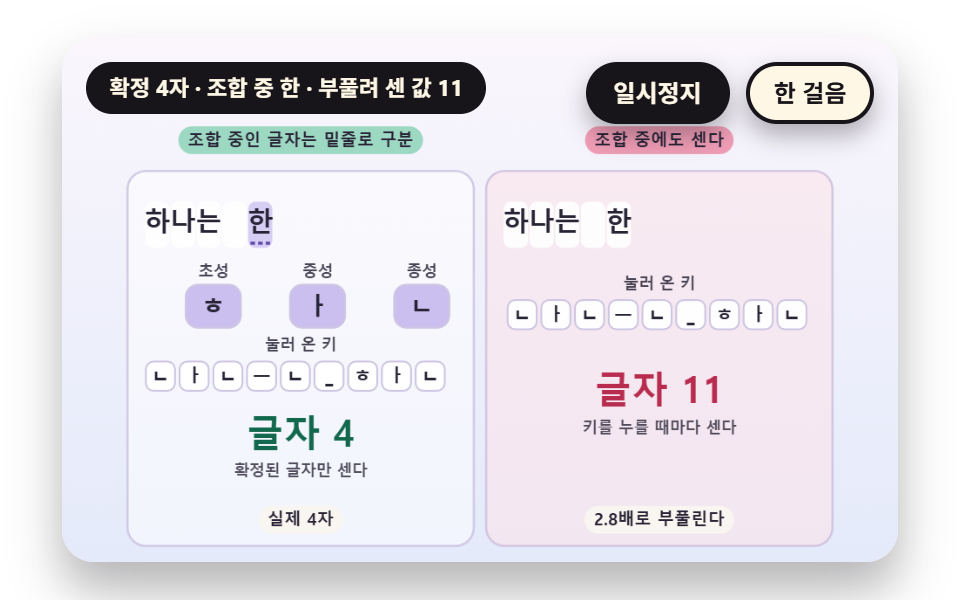
Pressing consonants and vowels one by one turns the cell from an initial only, to initial and vowel, to a block with a final, and a following consonant hands the final over as the next block initial; a composing block is set apart by a dotted underline, while the board on the right adds to the count mid composition and counts twice. Composing eleven characters, three of them spaces, from 24 jamo and space keys plus one wrong vowel and one delete gives 11 confirmed characters, while the board that counts every key reaches 24, inflated 2.2 times.
Best forA rule that counts keystrokes correctly for scripts written by composing
<main class="stage">
<div class="vj is-demo" id="vj">
  <div class="vj__pad" data-role="pad" tabindex="0" role="application" aria-label="Typing practice stage: press keys to practice yourself, Esc starts over">
    <canvas class="vj__canvas" data-role="canvas" width="480" height="300" role="img" aria-label="Two boards where pressing consonants and vowels one by one turns a letter into an initial only, then an initial and a vowel, then a block with a final. The left separates the composing letter from confirmed letters with a lavender ground and a dotted underline, shows the current jamo in the initial, vowel and final boxes, and counts only confirmed letters. The right raises the count on every key press and inflates it several times over."></canvas>
  </div>
  <p class="vj__status" data-role="status" aria-live="off">Typing practice demo</p>
  <div class="vj__ctrl">
    <button class="vj__pause" data-role="pause" type="button" aria-pressed="false">Pause</button>
    <button class="vj__step" data-role="step" type="button">Step</button>
  </div>
  <p class="vj__done" data-role="done" role="status" aria-live="polite"></p>
</div>
</main>
@use "../../../../site/static/demo-tokens" as *;
@include stage($stage-paper);
.vj {
position: relative;
width: min(92vw, calc(160vh - 12.8vw));
aspect-ratio: 480 / 300;
margin: 0 auto;
border-radius: $r-card;
overflow: hidden;
box-shadow: $shadow-raised;
background: $subject-cream;
}
// 무대 상자 — 누르면 키보드 포커스를 받는다. 글자 키는 직접 연습하고 Esc 는 처음부터 다시 시작한다(touch-action: none 은 이 상자에만). 무대 밖 터치는 페이지 스크롤 그대로
.vj__pad {
position: absolute;
inset: 0;
border-radius: inherit;
outline: none;
touch-action: none;
cursor: text;
}
// 바깥 .vj 가 넘침을 자르므로 포커스 테두리는 안쪽으로 들인다
.vj__pad:focus-visible {
outline: 3px solid $subject-ink;
outline-offset: -3px;
}
.vj__canvas {
position: absolute;
inset: 0;
display: block;
width: 100%;
height: 100%;
}
.vj__ctrl {
position: absolute;
right: $sp-3;
top: $sp-3;
display: flex;
gap: $sp-2;
}
.vj__pause,
.vj__step {
padding: $sp-1 $sp-3;
border: 2px solid $subject-ink;
border-radius: $r-pill;
background: $subject-ink;
color: $subject-cream;
font-family: inherit;
font-weight: 700;
font-size: 12px;
line-height: 1.6;
cursor: pointer;
box-shadow: $shadow-press;
transition: transform $dur-quick $ease-spring;
}
.vj__step {
background: $subject-cream;
color: $subject-ink;
}
// 스크린리더에만 읽히는 완료 알림
.vj__done {
position: absolute;
width: 1px;
height: 1px;
margin: 0;
overflow: hidden;
clip-path: inset(50%);
white-space: nowrap;
}
// 눌린 상태(멈춤) — 바탕과 글자색을 뒤집어 aria-pressed 가 눈에도 보이게
.vj__pause[aria-pressed="true"] {
background: $subject-cream;
color: $subject-ink;
}
.vj__pause:hover,
.vj__step:hover {
transform: translateY(-2px);
}
.vj__pause:active,
.vj__step:active {
transform: translateY(1px);
}
.vj__pause:focus-visible,
.vj__step:focus-visible {
outline: 3px solid $subject-ink;
outline-offset: 3px;
}
// 상태 줄 — 지금 장면의 수치를 글자로. 시연 중에는 aria-live off, 사람이 처음 손대면 polite
.vj__status {
position: absolute;
left: $sp-3;
top: $sp-3;
max-width: calc(100% - 190px);
margin: 0;
padding: $sp-1 $sp-3;
border-radius: $r-pill;
background: $subject-ink;
color: $subject-cream;
font-weight: 700;
font-size: 11px;
line-height: 1.6;
white-space: nowrap;
overflow: hidden;
text-overflow: ellipsis;
pointer-events: none;
}
@media (max-width: 340px) {
.vj__pause,
.vj__step,
.vj__status { font-size: 10px; padding: 0 $sp-2; }
}
// 움직임 줄이기 — 장면은 스크립트가 정지 장면 한 장으로 멈춘다. 버튼도 떠오르지 않게
@media (prefers-reduced-motion: reduce) {
.vj__pause,
.vj__step { transition: none !important; }
.vj__pause:hover,
.vj__pause:active,
.vj__step:hover,
.vj__step:active { transform: none !important; }
}html, body {
margin: 0;
overflow: hidden;
}
.stage {
box-sizing: border-box;
min-height: 100vh;
display: grid;
place-items: center;
margin: 0;
background: #ffffff;
font-family: -apple-system, "Segoe UI", "Noto Sans KR", sans-serif;
padding: clamp(8px, 4vw, 24px);
}
.vj {
position: relative;
width: min(92vw, 160vh - 12.8vw);
aspect-ratio: 480/300;
margin: 0 auto;
border-radius: 16px;
overflow: hidden;
box-shadow: 0 14px 24px rgba(23, 20, 26, 0.32);
background: #fff7e6;
}
.vj__pad {
position: absolute;
inset: 0;
border-radius: inherit;
outline: none;
touch-action: none;
cursor: text;
}
.vj__pad:focus-visible {
outline: 3px solid #17141a;
outline-offset: -3px;
}
.vj__canvas {
position: absolute;
inset: 0;
display: block;
width: 100%;
height: 100%;
}
.vj__ctrl {
position: absolute;
right: 12px;
top: 12px;
display: flex;
gap: 8px;
}
.vj__pause,
.vj__step {
padding: 4px 12px;
border: 2px solid #17141a;
border-radius: 999px;
background: #17141a;
color: #fff7e6;
font-family: inherit;
font-weight: 700;
font-size: 12px;
line-height: 1.6;
cursor: pointer;
box-shadow: 0 6px 12px rgba(23, 20, 26, 0.32);
transition: transform 220ms cubic-bezier(0.2, 0.8, 0.2, 1);
}
.vj__step {
background: #fff7e6;
color: #17141a;
}
.vj__done {
position: absolute;
width: 1px;
height: 1px;
margin: 0;
overflow: hidden;
clip-path: inset(50%);
white-space: nowrap;
}
.vj__pause[aria-pressed=true] {
background: #fff7e6;
color: #17141a;
}
.vj__pause:hover,
.vj__step:hover {
transform: translateY(-2px);
}
.vj__pause:active,
.vj__step:active {
transform: translateY(1px);
}
.vj__pause:focus-visible,
.vj__step:focus-visible {
outline: 3px solid #17141a;
outline-offset: 3px;
}
.vj__status {
position: absolute;
left: 12px;
top: 12px;
max-width: calc(100% - 190px);
margin: 0;
padding: 4px 12px;
border-radius: 999px;
background: #17141a;
color: #fff7e6;
font-weight: 700;
font-size: 11px;
line-height: 1.6;
white-space: nowrap;
overflow: hidden;
text-overflow: ellipsis;
pointer-events: none;
}
@media (max-width: 340px) {
.vj__pause,
.vj__step,
.vj__status {
font-size: 10px;
padding: 0 8px;
}
}
@media (prefers-reduced-motion: reduce) {
.vj__pause,
.vj__step {
transition: none !important;
}
.vj__pause:hover,
.vj__pause:active,
.vj__step:hover,
.vj__step:active {
transform: none !important;
}
}(function () {
const root = document.getElementById("vj");
if (!root) return;
// 무대 좌표 — 캔버스 안 계산은 늘 480×300. 화면에 보이는 크기와 상관없다
const W = 480;
const H = 300;
const PI = Math.PI;
const TAU = Math.PI * 2;
function clamp(v, lo, hi) { return v < lo ? lo : (v > hi ? hi : v); }
function lerp(a, b, k) { return a + (b - a) * k; }
function ease(x) { const c = clamp(x, 0, 1); return c * c * (3 - 2 * c); }
// 시드 고정 난수 — 선형 합동 생성기(곱 1664525, 더함 1013904223). 같은 시드면 같은 수열
function seeded(seed) {
let s = (seed >>> 0) || 1;
return function () {
s = (Math.imul(s, 1664525) + 1013904223) >>> 0;
return s / 4294967296;
};
}
// 파스텔 팔레트 — 글자는 늘 INK 나 진한 색, 면은 연한 색. 맞음은 민트, 틀림은 분홍, 내 커서는 라벤더
const BG_TOP = [250, 246, 252];
const BG_BOT = [228, 234, 250];
const FACE = [255, 253, 248];
const FACE_EDGE = [206, 198, 226];
const SKY = [176, 210, 246];
const SKY_DEEP = [60, 104, 162];
const GOLD = [250, 226, 150];
const GOLD_DEEP = [150, 108, 20];
const ROSE = [240, 150, 176];
const ROSE_DEEP = [184, 44, 80];
const MINT = [150, 214, 190];
const MINT_DEEP = [18, 104, 76];
const LAV = [188, 172, 236];
const LAV_DEEP = [96, 74, 170];
const INK = [40, 36, 54];
const PAPER = [250, 246, 240];
function mix(a, b, k) { return [lerp(a[0], b[0], k), lerp(a[1], b[1], k), lerp(a[2], b[2], k)]; }
function rgba(c, a) {
return 'rgba(' + Math.round(clamp(c[0], 0, 255)) + ',' + Math.round(clamp(c[1], 0, 255)) + ',' + Math.round(clamp(c[2], 0, 255)) + ',' + clamp(a, 0, 1).toFixed(3) + ')';
}
// 장면 시계(초)·판 반복 번호·시간표 — 시간표는 (시각, 할 일) 목록이고 시각이 지나면 한 번씩 부른다
// sceneT 는 rAF 타임스탬프 차이(dt, 한 프레임 0.05초 상한)를 쌓은 값 하나뿐이다 — 이 장면의 시간 원천은 이것 하나
let sceneT = 0;
let lap = 0;
let script = [];
let evAt = 0;
// 자동 시연이 끝나는 시각과 한 판이 되풀이되는 시각 — build() 가 시간표를 짜면서 정한다
let doneAt = 12;
let lapEnd = 14;
// 사람이 직접 키를 치는 중인가 — 켜지면 시간표의 가상 타자는 빠지고 판은 되풀이되지 않는다
let live = false;
function sched(t, f) { script.push({ t: t, f: f }); }
// ── 타자 기록 ─────────────────────────────────────────────
// 한 번의 키 입력은 (누른 시각, 키) 두 값이다. 타수도 오타도 열지도도 이 목록에서만 계산한다
const BS = 'Backspace';
let target = '';
let buf = '';
let strokes = [];
function sessReset(text) {
target = text;
buf = '';
strokes = [];
}
// 키 하나를 받는다 — 지우기는 마지막 글자를 빼고, 글자는 그 자리의 정답과 견줘 ok 를 정한다
function press(k, t) {
if (k === BS) {
if (buf.length > 0) {
buf = buf.slice(0, -1);
}
strokes.push({ t: t, k: k, ok: false });
return;
}
if (buf.length >= target.length) {
return;
}
const ok = k === target.charAt(buf.length);
buf += k;
strokes.push({ t: t, k: k, ok: ok });
}
// 글자 키 수와 맞은 수 — 지우기 키는 세지 않는다
function keyCount() {
let n = 0;
for (let i = 0; i < strokes.length; i += 1) {
if (strokes[i].k !== BS) {
n += 1;
}
}
return n;
}
function okCount() {
let n = 0;
for (let i = 0; i < strokes.length; i += 1) {
if (strokes[i].ok) {
n += 1;
}
}
return n;
}
// 정확도 — 맞은 글자 키 ÷ 글자 키 전체. 지워도 이미 친 틀린 키는 남는다
function accuracy() {
const n = keyCount();
return n === 0 ? 100 : (okCount() / n) * 100;
}
// 자리 옆 키 — 틀린 키는 같은 줄의 이웃 글쇠에서 고른다(스페이스 바는 c, 글자가 아닌 키는 n)
function nearKey(ch, rnd) {
const rows = ['qwertyuiop', 'asdfghjkl', 'zxcvbnm'];
for (let r = 0; r < rows.length; r += 1) {
const i = rows[r].indexOf(ch);
if (i >= 0) {
const j = i === 0 ? 1 : (i === rows[r].length - 1 ? i - 1 : (rnd() < 0.5 ? i - 1 : i + 1));
return rows[r].charAt(j);
}
}
return ch === ' ' ? 'c' : 'n';
}
// 시드 가상 타자 — 글자마다 간격은 pace(지금 시각) 의 ±20%, 오타는 지정한 자리에서만 낸다
// miss 는 [글자 자리, 알아채기 전에 더 치는 글자 수, 틀린 키 수(생략하면 1)] 목록. 틀린 키를 치고 lag 글자를 더 친 뒤 한 번에 지우고 다시 친다
function genStrokes(seed, text, pace, miss, t0) {
const rnd = seeded(seed);
const out = [];
let t = t0;
let i = 0;
const handled = {};
while (i < text.length) {
let hit = null;
for (let m = 0; m < miss.length; m += 1) {
if (miss[m][0] === i && !handled[i]) {
hit = miss[m];
}
}
t += pace(t) * (0.8 + 0.4 * rnd());
if (hit) {
handled[i] = true;
const lag = Math.min(hit[1], text.length - 1 - i);
const bad = hit.length > 2 ? hit[2] : 1;
for (let j = 0; j <= lag; j += 1) {
if (j > 0) {
t += pace(t) * (0.8 + 0.4 * rnd());
}
out.push({ t: t, k: j < bad ? nearKey(text.charAt(i + j), rnd) : text.charAt(i + j) });
}
t += 0.26 + 0.16 * rnd();
for (let j = 0; j <= lag; j += 1) {
out.push({ t: t, k: BS });
t += 0.09;
}
continue;
}
out.push({ t: t, k: text.charAt(i) });
i += 1;
}
return out;
}
// 시간표에 가상 타자의 키를 모두 올린다 — 끝나는 시각(doneAt)과 되풀이 시각(lapEnd)도 여기서 정한다
function schedule(raw, hold) {
for (let i = 0; i < raw.length; i += 1) {
const r = raw[i];
sched(r.t, function () { onKey(r.k, r.t); });
}
doneAt = raw.length > 0 ? raw[raw.length - 1].t + 0.35 : 1;
lapEnd = doneAt + hold;
}
function defaultFinished() {
return live ? buf.length >= target.length : sceneT >= doneAt;
}
const canvasEl = root.querySelector('[data-role="canvas"]');
const padEl = root.querySelector('[data-role="pad"]');
const pauseEl = root.querySelector('[data-role="pause"]');
const statusEl = root.querySelector('[data-role="status"]');
const stepEl = root.querySelector('[data-role="step"]');
const doneEl = root.querySelector('[data-role="done"]');
const ctxRaw = canvasEl ? canvasEl.getContext('2d') : null;
if (!canvasEl || !ctxRaw || !pauseEl || !padEl || !stepEl || !doneEl) {
return;
}
const cv = canvasEl;
const ctx = ctxRaw;
const pauseBtn = pauseEl;
const stepBtn = stepEl;
const doneP = doneEl;
const pad = padEl;
// 외부 웹폰트는 부르지 않는다 — 기기에 있는 글꼴 목록만. 타자 글자는 고정폭이라 칸 폭이 흔들리지 않는다
const FONT_STACK = 'system-ui, -apple-system, "Segoe UI", "Noto Sans KR", sans-serif';
const MONO_STACK = 'ui-monospace, "SF Mono", Menlo, Consolas, "Courier New", monospace';
let dpr = 1;
function fitCanvas() {
// 배율은 2 에서 자른다 — 배율 3 기기에서 화소가 2.25배로 늘지 않게
dpr = Math.min(window.devicePixelRatio || 1, 2);
cv.width = Math.round(W * dpr);
cv.height = Math.round(H * dpr);
ctx.setTransform(dpr, 0, 0, dpr, 0, 0);
}
const VIEW_S = 0.88;
function skyFill(top, bot) {
ctx.setTransform(dpr, 0, 0, dpr, 0, 0);
const g = ctx.createLinearGradient(0, 0, 0, H);
g.addColorStop(0, rgba(top, 1));
g.addColorStop(1, rgba(bot, 1));
ctx.fillStyle = g;
ctx.fillRect(0, 0, W, H);
// 위쪽 Pause·상태 알약이 덮는 띠를 비우려고 장면 전체를 VIEW_S 배로 줄여 아래 가운데에 붙인다 — 이 줄 뒤에 그리는 것은 모두 줄어든 좌표계
ctx.translate(W / 2, H - 3);
ctx.scale(VIEW_S, VIEW_S);
ctx.translate(-W / 2, -(H - 3));
}
function disc(x, y, r, c, a) {
if (r <= 0.2 || a <= 0) {
return;
}
ctx.beginPath();
ctx.arc(x, y, r, 0, TAU);
ctx.fillStyle = rgba(c, a);
ctx.fill();
}
function ring(x, y, r, width, c, a) {
if (r <= 0.2 || a <= 0) {
return;
}
ctx.beginPath();
ctx.arc(x, y, r, 0, TAU);
ctx.lineWidth = width;
ctx.strokeStyle = rgba(c, a);
ctx.stroke();
}
function seg(x1, y1, x2, y2, width, c, a) {
if (a <= 0) {
return;
}
ctx.beginPath();
ctx.moveTo(x1, y1);
ctx.lineTo(x2, y2);
ctx.lineWidth = width;
ctx.lineCap = 'round';
ctx.strokeStyle = rgba(c, a);
ctx.stroke();
}
function box(x, y, w, h, r, c, a) {
if (w <= 0.2 || h <= 0.2 || a <= 0) {
return;
}
ctx.beginPath();
ctx.roundRect(x, y, w, h, Math.max(0, Math.min(r, w / 2, h / 2)));
ctx.fillStyle = rgba(c, a);
ctx.fill();
}
function outline(x, y, w, h, r, width, c, a) {
if (w <= 0.2 || h <= 0.2 || a <= 0) {
return;
}
ctx.beginPath();
ctx.roundRect(x, y, w, h, Math.max(0, Math.min(r, w / 2, h / 2)));
ctx.lineWidth = width;
ctx.strokeStyle = rgba(c, a);
ctx.stroke();
}
function text(s, x, y, c, a, px, weight, align) {
ctx.font = weight + ' ' + px + 'px ' + FONT_STACK;
ctx.textAlign = align;
ctx.textBaseline = 'middle';
ctx.fillStyle = rgba(c, a);
ctx.fillText(s, x, y);
}
// 고정폭 글자 — 칸마다 같은 폭이라 커서와 오타 칸이 글자에 정확히 겹친다
function mono(s, x, y, c, a, px, weight, align) {
ctx.font = weight + ' ' + px + 'px ' + MONO_STACK;
ctx.textAlign = align;
ctx.textBaseline = 'middle';
ctx.fillStyle = rgba(c, a);
ctx.fillText(s, x, y);
}
// 고정폭 글꼴 한 칸의 폭 — 글꼴이 바뀌면 같이 바뀐다
function monoW(px) {
ctx.font = '400 ' + px + 'px ' + MONO_STACK;
return ctx.measureText('M').width;
}
// 글자 이름표 — 바탕 알약 위에 글자
function tag(s, x, y, bg, fg, px, align) {
ctx.font = '700 ' + px + 'px ' + FONT_STACK;
const w = ctx.measureText(s).width + px * 1.1;
const left = align === 'center' ? x - w / 2 : (align === 'right' ? x - w : x);
box(left, y - px * 0.82, w, px * 1.64, px * 0.82, bg, 0.92);
text(s, left + w / 2, y + 0.5, fg, 1, px, 700, 'center');
}
function panel(x, y, w, h, c, a) {
box(x, y, w, h, 12, c, a);
outline(x, y, w, h, 12, 1.5, FACE_EDGE, 0.9);
}
// ── 공통 틀 ───────────────────────────────────────────────
let shownStatus = '';
function pushStatus(s) {
if (!statusEl || s === shownStatus) {
return;
}
shownStatus = s;
statusEl.textContent = s;
}
let paused = false;
const reduceQuery = window.matchMedia('(prefers-reduced-motion: reduce)');
// 페이지를 연 채 움직임 줄이기 설정을 바꿔도 change 리스너가 다시 읽는다
let still = reduceQuery.matches;
// 자동 시연 표시 — 사람이 처음 손대면 떼고 상태 줄을 polite 로 켠다
let demo = root.classList.contains('is-demo');
const off = new AbortController();
function wake() {
if (!demo) {
return;
}
demo = false;
root.classList.remove('is-demo');
if (statusEl) {
statusEl.setAttribute('aria-live', 'polite');
}
}
// 한 판이 끝났음을 스크린리더에 한 번만 알린다 — 판이 되풀이돼도 다시 읽지 않는다
let doneSaid = false;
function checkDone() {
if (!doneSaid && finished()) {
doneSaid = true;
doneP.textContent = statusText();
}
}
function advance(dt) {
sceneT += dt;
while (evAt < script.length && script[evAt].t <= sceneT) {
const ev = script[evAt];
evAt += 1;
ev.f();
}
if (!live && sceneT >= lapEnd) {
lap += 1;
begin();
return;
}
update(dt);
}
// 시간표를 새로 짠다 — 같은 시각이면 짠 순서대로 부른다(정렬은 안정)
function fresh() {
sceneT = 0;
evAt = 0;
script = [];
build();
script.sort(function (a, b) { return a.t - b.t; });
}
// 첫 판은 START_S 만큼 앞서 시작한다 — 타자가 이미 치고 있는 장면에서 보인다
function runTo(t) {
while (sceneT < t - 1e-6) {
advance(Math.min(1 / 30, t - sceneT));
}
}
function begin() {
fresh();
if (lap === 0 && !still) {
runTo(START_S);
}
}
const DT_MAX = 0.05;
function showNow() {
draw();
pushStatus(statusText());
checkDone();
}
let rafId = 0;
let lastTs = -1;
function frame(ts) {
if (still || paused) {
rafId = 0;
return;
}
if (lastTs < 0) {
lastTs = ts;
}
const dt = Math.min((ts - lastTs) / 1000, DT_MAX);
lastTs = ts;
if (dt > 0) {
advance(dt);
}
showNow();
rafId = window.requestAnimationFrame(frame);
}
function startLoop() {
if (rafId) {
return;
}
// 멈췄던 사이의 시간을 첫 프레임 dt 로 넘기지 않는다
lastTs = -1;
rafId = window.requestAnimationFrame(frame);
}
function stopLoop() {
if (rafId) {
window.cancelAnimationFrame(rafId);
rafId = 0;
}
}
// 움직임 줄이기 — 루프 없이 한 판이 끝난 멈춘 한 장. 시간표를 끝까지 돌려 결과 화면에서 멈춘다
function showRest() {
stopLoop();
live = false;
fresh();
runTo(doneAt);
doneSaid = false;
showNow();
}
function play() {
begin();
showNow();
if (!paused) {
startLoop();
}
}
function togglePause() {
paused = !paused;
pauseBtn.setAttribute('aria-pressed', paused ? 'true' : 'false');
wake();
if (paused) {
stopLoop();
}
else if (!still) {
startLoop();
}
}
// 처음부터 — 자동 시연은 시간표를 다시, 직접 치던 중이면 빈 연습판을 다시
function restart() {
lap += 1;
doneSaid = false;
if (still) {
showRest();
return;
}
begin();
showNow();
if (!paused) {
startLoop();
}
}
// 직접 치기 — 첫 키가 오면 가상 타자를 빼고 빈 판에서 시작한다
let lastStamp = -1;
function goLive() {
live = true;
doneSaid = false;
lastStamp = -1;
shownStatus = '';
fresh();
if (still) {
showNow();
}
else {
lastTs = -1;
showNow();
if (!paused) {
startLoop();
}
}
}
// 이벤트 시각 e.timeStamp 와 rAF 시각은 같은 원점이라 빼면 마지막 프레임 이후의 간격이 나온다
function liveKey(k, stamp) {
let t = sceneT;
if (still) {
if (lastStamp >= 0) {
sceneT += clamp((stamp - lastStamp) / 1000, 0, 2);
}
lastStamp = stamp;
t = sceneT;
}
else if (lastTs >= 0) {
t = sceneT + clamp((stamp - lastTs) / 1000, 0, DT_MAX);
}
onKey(k, t);
if (still) {
update(0);
showNow();
}
}
// Step — 멈춘 채 시간표의 다음 키 하나까지 시계를 보낸다. 더 부를 일이 없으면 판을 다시 연다
function stepOnce() {
if (live) {
return;
}
wake();
if (!paused) {
paused = true;
pauseBtn.setAttribute('aria-pressed', 'true');
stopLoop();
}
if (evAt >= script.length) {
restart();
return;
}
runTo(script[evAt].t + 0.05);
showNow();
}
// 키 이름 바꾸기 — 한글 자모 장면은 이 함수를 덮어쓴다. 글자 키와 지우기 키만 받고 나머지는 빈 문자열
let keyMap = null;
function keyOf(e) {
if (keyMap) {
return keyMap(e);
}
if (e.key === 'Backspace') {
return BS;
}
return e.key.length === 1 ? e.key : '';
}
pauseBtn.addEventListener('click', togglePause, { signal: off.signal });
stepBtn.addEventListener('click', stepOnce, { signal: off.signal });
// 키보드 — 무대에 포커스가 있을 때만. 글자 키는 직접 치기, Esc 는 처음부터. Tab 은 그대로 두어 포커스가 나갈 수 있다
pad.addEventListener('keydown', function (e) {
if (e.altKey || e.ctrlKey || e.metaKey) {
return;
}
if (e.key === 'Escape') {
e.preventDefault();
wake();
if (live) {
goLive();
}
else {
restart();
}
return;
}
const k = keyOf(e);
if (k === '') {
return;
}
e.preventDefault();
if (paused) {
return;
}
if (!live) {
wake();
goLive();
}
liveKey(k, e.timeStamp);
}, { signal: off.signal });
// 마우스·터치 — 무대를 누르면 키보드 포커스만 준다
pad.addEventListener('click', function () {
pad.focus({ preventScroll: true });
}, { signal: off.signal });
// 탭이 숨으면 멈추고, 돌아오면 시계를 다시 맞춰 시작 — 숨은 동안의 몇 초가 한 프레임에 몰리지 않게
document.addEventListener('visibilitychange', function () {
if (document.hidden) {
stopLoop();
}
else if (!paused && !still) {
startLoop();
}
}, { signal: off.signal });
// 설정이 바뀌면 — 켜지면 결과 한 장, 꺼지면 다시 움직인다
reduceQuery.addEventListener('change', function () {
still = reduceQuery.matches;
if (still) {
showRest();
}
else {
live = false;
lap = 0;
play();
}
}, { signal: off.signal });
window.addEventListener('resize', function () {
fitCanvas();
showNow();
}, { signal: off.signal });
// ── 05 한글 조합 중 글자 상태 ───────────────────────────────
// 자모 키를 하나씩 받아 초성만, 초성과 Vowel, 받침까지 붙은 글자로 모양을 바꾼다. 받침이 있는 글자에 모음이 오면 받침이 다음 글자의 초성으로 넘어간다
// 조합 중인 글자는 점선 밑줄(COMPOSE_MARK)로 확정된 글자와 가르고, 글자 수는 확정된 것만 센다(commitLen). 오른쪽 판은 Counts on every key press
const JAMO_SEQ = 'ㅎㅏㄴㅏㄴㅡㄴ ㅎㅏㄴㄱㅡㄹㅇㅡㄹ ㅊㅣㄴㄷㅏ ';
const COMPOSE_MARK = 3;
const CHO = 'ㄱㄲㄴㄷㄸㄹㅁㅂㅃㅅㅆㅇㅈㅉㅊㅋㅌㅍㅎ';
const JUNG = 'ㅏㅐㅑㅒㅓㅔㅕㅖㅗㅘㅙㅚㅛㅜㅝㅞㅟㅠㅡㅢㅣ';
const JONG = ' ㄱㄲㄳㄴㄵㄶㄷㄹㄺㄻㄼㄽㄾㄿㅀㅁㅂㅄㅅㅆㅇㅈㅊㅋㅌㅍㅎ';
const WRONG_AT = 15;
const CELL = 16.8;
const START_S = 2.9;
let st = { done: '', c: '', v: '', f: '' };
let naive = 0;
let keyLog = [];
let expectText = '';
let kickL = -9;
let kickR = -9;
// Initial·Vowel·Final 번호에서 완성형 글자 하나를 만든다 — 0xAC00 + (Initial × 21 + Vowel) × 28 + Final
function syllable(c, v, f) {
return String.fromCharCode(0xAC00 + (CHO.indexOf(c) * 21 + JUNG.indexOf(v)) * 28 + (f === '' ? 0 : JONG.indexOf(f)));
}
function compNew() { return { done: '', c: '', v: '', f: '' }; }
// 조합 중인 글자 — 초성만이면 그 자음, 초성과 중성이면 받침 없는 글자, 받침까지면 받침 있는 글자
function compBlock(s) {
if (s.c !== '' && s.v !== '') {
return syllable(s.c, s.v, s.f);
}
return s.c;
}
function compFlush(s) {
s.done += compBlock(s);
s.c = '';
s.v = '';
s.f = '';
}
function compKey(s, k) {
if (k === ' ') {
compFlush(s);
s.done += ' ';
return;
}
if (JUNG.indexOf(k) >= 0) {
if (s.c !== '' && s.v === '') {
s.v = k;
return;
}
if (s.c !== '' && s.f !== '') {
// 받침이 다음 글자의 초성으로 넘어간다
const carry = s.f;
s.f = '';
compFlush(s);
s.c = carry;
s.v = k;
return;
}
compFlush(s);
s.done += k;
return;
}
if (s.c === '') {
s.c = k;
return;
}
if (s.v === '') {
compFlush(s);
s.c = k;
return;
}
if (s.f === '' && JONG.indexOf(k) > 0) {
s.f = k;
return;
}
compFlush(s);
s.c = k;
}
// 지우기 — 조합 중이면 마지막 자모 하나, 아니면 확정된 마지막 글자를 조합 중으로 되돌려 자모 하나를 뺀다
function compBack(s) {
if (s.f !== '') {
s.f = '';
return;
}
if (s.v !== '') {
s.v = '';
return;
}
if (s.c !== '') {
s.c = '';
return;
}
if (s.done.length === 0) {
return;
}
const ch = s.done.charAt(s.done.length - 1);
s.done = s.done.slice(0, -1);
const code = ch.charCodeAt(0) - 0xAC00;
if (code >= 0 && code < 11172) {
const jong = code % 28;
s.c = CHO.charAt(Math.floor(code / 588));
s.v = JUNG.charAt(Math.floor(code / 28) % 21);
s.f = jong > 0 ? JONG.charAt(jong) : '';
compBack(s);
}
}
function compText(s) { return s.done + compBlock(s); }
// 확정된 글자 수 — 조합 중인 글자는 넣지 않는다
function commitLen(s) { return s.done.length; }
// 가상 타자 — 자모를 한 키씩 치다가 WRONG_AT 번째 키 자리에서 틀린 모음을 한 번 치고 지운다
function makeRun() {
const raw = genStrokes(51, JAMO_SEQ, function () { return 0.3; }, [], 0.5);
const out = [];
let shift = 0;
for (let i = 0; i < raw.length; i += 1) {
if (i === WRONG_AT) {
out.push({ t: raw[i].t + shift, k: 'ㅗ' });
out.push({ t: raw[i].t + shift + 0.3, k: BS });
shift += 0.55;
}
out.push({ t: raw[i].t + shift, k: raw[i].k });
}
return out;
}
function expectOf() {
const s = compNew();
for (let i = 0; i < JAMO_SEQ.length; i += 1) {
compKey(s, JAMO_SEQ.charAt(i));
}
return compText(s);
}
// SIM-END
// 실제 키보드 — 한글 입력기가 켜져 있으면 keydown 의 key 가 글자가 아니라서 눌린 자리(code)를 두벌식 자판 표로 자모에 옮긴다
const DUBEOL = {
KeyR: 'ㄱ', KeyS: 'ㄴ', KeyE: 'ㄷ', KeyF: 'ㄹ', KeyA: 'ㅁ', KeyQ: 'ㅂ', KeyT: 'ㅅ', KeyD: 'ㅇ', KeyW: 'ㅈ', KeyC: 'ㅊ',
KeyZ: 'ㅋ', KeyX: 'ㅌ', KeyV: 'ㅍ', KeyG: 'ㅎ', KeyK: 'ㅏ', KeyO: 'ㅐ', KeyI: 'ㅑ', KeyJ: 'ㅓ', KeyP: 'ㅔ', KeyU: 'ㅕ',
KeyH: 'ㅗ', KeyY: 'ㅛ', KeyN: 'ㅜ', KeyB: 'ㅠ', KeyM: 'ㅡ', KeyL: 'ㅣ',
};
const DUBEOL_SHIFT = { KeyQ: 'ㅃ', KeyW: 'ㅉ', KeyE: 'ㄸ', KeyR: 'ㄲ', KeyT: 'ㅆ', KeyO: 'ㅒ', KeyP: 'ㅖ' };
keyMap = function (e) {
if (e.code === 'Backspace') {
return BS;
}
if (e.code === 'Space') {
return ' ';
}
if (e.shiftKey && DUBEOL_SHIFT[e.code]) {
return DUBEOL_SHIFT[e.code];
}
return DUBEOL[e.code] || '';
};
function build() {
st = compNew();
naive = 0;
keyLog = [];
expectText = expectOf();
kickL = -9;
kickR = -9;
if (!live) {
schedule(makeRun(), 2.6);
}
}
function onKey(k, t) {
const before = commitLen(st);
if (k === BS) {
compBack(st);
naive = Math.max(0, naive - 1);
}
else {
compKey(st, k);
naive += 1;
}
if (commitLen(st) > before) {
kickL = t;
}
kickR = t;
keyLog.push(k === BS ? '<' : k);
if (keyLog.length > 9) {
keyLog.shift();
}
}
function finished() {
return live ? compText(st) === expectText : sceneT >= doneAt;
}
function update(dt) { if (dt < 0) {
return;
} }
function cells(x0, y0, marked) {
const all = compText(st);
const blk = compBlock(st);
const nDone = st.done.length;
for (let i = 0; i < all.length; i += 1) {
const x = x0 + i * CELL;
const composing = i >= nDone && blk !== '';
if (marked && composing) {
box(x + 0.5, y0, CELL - 1, 30, 5, LAV, 0.55);
ctx.save();
ctx.setLineDash([COMPOSE_MARK, 2]);
ctx.beginPath();
ctx.moveTo(x + 2, y0 + 27);
ctx.lineTo(x + CELL - 2, y0 + 27);
ctx.lineWidth = 2;
ctx.strokeStyle = rgba(LAV_DEEP, 1);
ctx.stroke();
ctx.restore();
}
else {
box(x + 0.5, y0, CELL - 1, 30, 5, [255, 255, 255], 0.9);
}
text(all.charAt(i), x + CELL / 2, y0 + 14, INK, 1, 17, 700, 'center');
}
if (all.length === 0) {
outline(x0, y0, CELL, 30, 5, 1.2, FACE_EDGE, 1);
}
}
function jamoChips(x0, y0) {
const names = ['Initial', 'Vowel', 'Final'];
const vals = [st.c, st.v, st.f];
for (let i = 0; i < 3; i += 1) {
const x = x0 + i * 68;
text(names[i], x + 30, y0, INK, 0.85, 10, 700, 'center');
box(x + 12, y0 + 8, 36, 28, 8, vals[i] === '' ? [255, 255, 255] : LAV, vals[i] === '' ? 0.8 : 0.75);
outline(x + 12, y0 + 8, 36, 28, 8, 1.2, FACE_EDGE, 1);
text(vals[i] === '' ? '-' : vals[i], x + 30, y0 + 23, INK, vals[i] === '' ? 0.4 : 1, 16, 700, 'center');
}
}
function history(x0, y0) {
for (let i = 0; i < keyLog.length; i += 1) {
const x = x0 + i * 22;
box(x, y0, 19, 19, 5, [255, 255, 255], 0.95);
outline(x, y0, 19, 19, 5, 1.2, FACE_EDGE, 1);
text(keyLog[i] === ' ' ? '_' : keyLog[i], x + 9.5, y0 + 10, keyLog[i] === '<' ? ROSE_DEEP : INK, 1, 12, 700, 'center');
}
}
function draw() {
skyFill(BG_TOP, BG_BOT);
panel(10, 46, 226, 244, [255, 255, 255], 0.5);
panel(244, 46, 226, 244, [255, 255, 255], 0.5);
// 왼쪽 바탕은 글자가 확정되는 순간에, 오른쪽 바탕은 키를 누를 때마다 물든다
box(10, 46, 226, 244, 12, MINT, 0.26 * clamp(1 - (sceneT - kickL) / 0.4, 0, 1));
box(244, 46, 226, 244, 12, ROSE, 0.22 * clamp(1 - (sceneT - kickR) / 0.3, 0, 1));
cells(21, 66, true);
cells(255, 66, false);
jamoChips(36, 112);
text('Keys so far', 357, 120, INK, 0.85, 10, 700, 'center');
history(258, 130);
history(22, 170);
text('Keys so far', 123, 160, INK, 0.85, 10, 700, 'center');
text('Letters {n}'.replace('{n}', String(commitLen(st))), 123, 218, MINT_DEEP, 1, 24, 800, 'center');
text('Letters {n}'.replace('{n}', String(naive)), 357, 190, ROSE_DEEP, 1, 24, 800, 'center');
text('Counts confirmed letters only', 123, 242, INK, 0.8, 10, 700, 'center');
text('Counts on every key press', 357, 214, INK, 0.8, 10, 700, 'center');
tag('Composing letter has an underline', 123, 26, MINT, INK, 11, 'center');
tag('Counts mid composition', 357, 26, ROSE, INK, 11, 'center');
tag('Actual {n}'.replace('{n}', String(commitLen(st))), 123, 273, PAPER, INK, 11, 'center');
tag('Inflated {n}x'.replace('{n}', (commitLen(st) === 0 ? 0 : naive / commitLen(st)).toFixed(1)), 357, 273, PAPER, INK, 11, 'center');
}
function statusText() {
const b = compBlock(st);
return 'Confirmed {n}, composing {b}, count {r}'.replace('{n}', String(commitLen(st))).replace('{b}', b === '' ? '-' : b).replace('{r}', String(naive));
}
fitCanvas();
if (still) {
showRest();
}
else {
play();
}
return function () {
stopLoop();
off.abort();
};
})();// HangulCompositionJamoState - 같은 항목 vanilla index.html 의 React 판. 같은 계산을 useEffect 안에서 돌린다
import { useEffect, useRef } from "react";
import styles from "./HangulCompositionJamoState.module.scss";
const cx = (s: string): string => s.split(" ").map((n) => styles[n] ?? n).join(" ");
export default function HangulCompositionJamoState() {
const rootRef = useRef<HTMLDivElement | null>(null);
useEffect(() => {
const rootEl = rootRef.current;
if (!rootEl) return;
const root: HTMLElement = rootEl;
type RGB = [number, number, number];
// 무대 좌표 — 캔버스 안 계산은 늘 480×300. 화면에 보이는 크기와 상관없다
const W = 480;
const H = 300;
const PI = Math.PI;
const TAU = Math.PI * 2;
function clamp(v: number, lo: number, hi: number): number { return v < lo ? lo : (v > hi ? hi : v); }
function lerp(a: number, b: number, k: number): number { return a + (b - a) * k; }
function ease(x: number): number { const c = clamp(x, 0, 1); return c * c * (3 - 2 * c); }
// 시드 고정 난수 — 선형 합동 생성기(곱 1664525, 더함 1013904223). 같은 시드면 같은 수열
function seeded(seed: number): () => number {
let s = (seed >>> 0) || 1;
return function (): number {
s = (Math.imul(s, 1664525) + 1013904223) >>> 0;
return s / 4294967296;
};
}
// 파스텔 팔레트 — 글자는 늘 INK 나 진한 색, 면은 연한 색. 맞음은 민트, 틀림은 분홍, 내 커서는 라벤더
const BG_TOP: RGB = [250, 246, 252];
const BG_BOT: RGB = [228, 234, 250];
const FACE: RGB = [255, 253, 248];
const FACE_EDGE: RGB = [206, 198, 226];
const SKY: RGB = [176, 210, 246];
const SKY_DEEP: RGB = [60, 104, 162];
const GOLD: RGB = [250, 226, 150];
const GOLD_DEEP: RGB = [150, 108, 20];
const ROSE: RGB = [240, 150, 176];
const ROSE_DEEP: RGB = [184, 44, 80];
const MINT: RGB = [150, 214, 190];
const MINT_DEEP: RGB = [18, 104, 76];
const LAV: RGB = [188, 172, 236];
const LAV_DEEP: RGB = [96, 74, 170];
const INK: RGB = [40, 36, 54];
const PAPER: RGB = [250, 246, 240];
function mix(a: RGB, b: RGB, k: number): RGB { return [lerp(a[0], b[0], k), lerp(a[1], b[1], k), lerp(a[2], b[2], k)]; }
function rgba(c: RGB, a: number): string {
return 'rgba(' + Math.round(clamp(c[0], 0, 255)) + ',' + Math.round(clamp(c[1], 0, 255)) + ',' + Math.round(clamp(c[2], 0, 255)) + ',' + clamp(a, 0, 1).toFixed(3) + ')';
}
// 장면 시계(초)·판 반복 번호·시간표 — 시간표는 (시각, 할 일) 목록이고 시각이 지나면 한 번씩 부른다
// sceneT 는 rAF 타임스탬프 차이(dt, 한 프레임 0.05초 상한)를 쌓은 값 하나뿐이다 — 이 장면의 시간 원천은 이것 하나
let sceneT = 0;
let lap = 0;
type Ev = { t: number; f: () => void };
let script: Ev[] = [];
let evAt = 0;
// 자동 시연이 끝나는 시각과 한 판이 되풀이되는 시각 — build() 가 시간표를 짜면서 정한다
let doneAt = 12;
let lapEnd = 14;
// 사람이 직접 키를 치는 중인가 — 켜지면 시간표의 가상 타자는 빠지고 판은 되풀이되지 않는다
let live = false;
function sched(t: number, f: () => void): void { script.push({ t: t, f: f }); }
// ── 타자 기록 ─────────────────────────────────────────────
// 한 번의 키 입력은 (누른 시각, 키) 두 값이다. 타수도 오타도 열지도도 이 목록에서만 계산한다
const BS = 'Backspace';
type Raw = { t: number; k: string };
type Stroke = { t: number; k: string; ok: boolean };
let target = '';
let buf = '';
let strokes: Stroke[] = [];
function sessReset(text: string): void {
target = text;
buf = '';
strokes = [];
}
// 키 하나를 받는다 — 지우기는 마지막 글자를 빼고, 글자는 그 자리의 정답과 견줘 ok 를 정한다
function press(k: string, t: number): void {
if (k === BS) {
if (buf.length > 0) { buf = buf.slice(0, -1); }
strokes.push({ t: t, k: k, ok: false });
return;
}
if (buf.length >= target.length) { return; }
const ok = k === target.charAt(buf.length);
buf += k;
strokes.push({ t: t, k: k, ok: ok });
}
// 글자 키 수와 맞은 수 — 지우기 키는 세지 않는다
function keyCount(): number {
let n = 0;
for (let i = 0; i < strokes.length; i += 1) { if (strokes[i].k !== BS) { n += 1; } }
return n;
}
function okCount(): number {
let n = 0;
for (let i = 0; i < strokes.length; i += 1) { if (strokes[i].ok) { n += 1; } }
return n;
}
// 정확도 — 맞은 글자 키 ÷ 글자 키 전체. 지워도 이미 친 틀린 키는 남는다
function accuracy(): number {
const n = keyCount();
return n === 0 ? 100 : (okCount() / n) * 100;
}
// 자리 옆 키 — 틀린 키는 같은 줄의 이웃 글쇠에서 고른다(스페이스 바는 c, 글자가 아닌 키는 n)
function nearKey(ch: string, rnd: () => number): string {
const rows = ['qwertyuiop', 'asdfghjkl', 'zxcvbnm'];
for (let r = 0; r < rows.length; r += 1) {
const i = rows[r].indexOf(ch);
if (i >= 0) {
const j = i === 0 ? 1 : (i === rows[r].length - 1 ? i - 1 : (rnd() < 0.5 ? i - 1 : i + 1));
return rows[r].charAt(j);
}
}
return ch === ' ' ? 'c' : 'n';
}
// 시드 가상 타자 — 글자마다 간격은 pace(지금 시각) 의 ±20%, 오타는 지정한 자리에서만 낸다
// miss 는 [글자 자리, 알아채기 전에 더 치는 글자 수, 틀린 키 수(생략하면 1)] 목록. 틀린 키를 치고 lag 글자를 더 친 뒤 한 번에 지우고 다시 친다
function genStrokes(seed: number, text: string, pace: (t: number) => number, miss: number[][], t0: number): Raw[] {
const rnd = seeded(seed);
const out: Raw[] = [];
let t = t0;
let i = 0;
const handled: Record<number, boolean> = {};
while (i < text.length) {
let hit: number[] | null = null;
for (let m = 0; m < miss.length; m += 1) { if (miss[m][0] === i && !handled[i]) { hit = miss[m]; } }
t += pace(t) * (0.8 + 0.4 * rnd());
if (hit) {
handled[i] = true;
const lag = Math.min(hit[1], text.length - 1 - i);
const bad = hit.length > 2 ? hit[2] : 1;
for (let j = 0; j <= lag; j += 1) {
if (j > 0) { t += pace(t) * (0.8 + 0.4 * rnd()); }
out.push({ t: t, k: j < bad ? nearKey(text.charAt(i + j), rnd) : text.charAt(i + j) });
}
t += 0.26 + 0.16 * rnd();
for (let j = 0; j <= lag; j += 1) {
out.push({ t: t, k: BS });
t += 0.09;
}
continue;
}
out.push({ t: t, k: text.charAt(i) });
i += 1;
}
return out;
}
// 시간표에 가상 타자의 키를 모두 올린다 — 끝나는 시각(doneAt)과 되풀이 시각(lapEnd)도 여기서 정한다
function schedule(raw: Raw[], hold: number): void {
for (let i = 0; i < raw.length; i += 1) {
const r = raw[i];
sched(r.t, function (): void { onKey(r.k, r.t); });
}
doneAt = raw.length > 0 ? raw[raw.length - 1].t + 0.35 : 1;
lapEnd = doneAt + hold;
}
function defaultFinished(): boolean {
return live ? buf.length >= target.length : sceneT >= doneAt;
}
const canvasEl = root.querySelector('[data-role="canvas"]') as HTMLCanvasElement | null;
const padEl = root.querySelector('[data-role="pad"]') as HTMLElement | null;
const pauseEl = root.querySelector('[data-role="pause"]') as HTMLButtonElement | null;
const statusEl = root.querySelector('[data-role="status"]') as HTMLElement | null;
const stepEl = root.querySelector('[data-role="step"]') as HTMLButtonElement | null;
const doneEl = root.querySelector('[data-role="done"]') as HTMLElement | null;
const ctxRaw = canvasEl ? canvasEl.getContext('2d') : null;
if (!canvasEl || !ctxRaw || !pauseEl || !padEl || !stepEl || !doneEl) { return; }
const cv: HTMLCanvasElement = canvasEl;
const ctx: CanvasRenderingContext2D = ctxRaw;
const pauseBtn: HTMLButtonElement = pauseEl;
const stepBtn: HTMLButtonElement = stepEl;
const doneP: HTMLElement = doneEl;
const pad: HTMLElement = padEl;
// 외부 웹폰트는 부르지 않는다 — 기기에 있는 글꼴 목록만. 타자 글자는 고정폭이라 칸 폭이 흔들리지 않는다
const FONT_STACK = 'system-ui, -apple-system, "Segoe UI", "Noto Sans KR", sans-serif';
const MONO_STACK = 'ui-monospace, "SF Mono", Menlo, Consolas, "Courier New", monospace';
let dpr = 1;
function fitCanvas(): void {
// 배율은 2 에서 자른다 — 배율 3 기기에서 화소가 2.25배로 늘지 않게
dpr = Math.min(window.devicePixelRatio || 1, 2);
cv.width = Math.round(W * dpr);
cv.height = Math.round(H * dpr);
ctx.setTransform(dpr, 0, 0, dpr, 0, 0);
}
const VIEW_S = 0.88;
function skyFill(top: RGB, bot: RGB): void {
ctx.setTransform(dpr, 0, 0, dpr, 0, 0);
const g = ctx.createLinearGradient(0, 0, 0, H);
g.addColorStop(0, rgba(top, 1));
g.addColorStop(1, rgba(bot, 1));
ctx.fillStyle = g;
ctx.fillRect(0, 0, W, H);
// 위쪽 일시정지·상태 알약이 덮는 띠를 비우려고 장면 전체를 VIEW_S 배로 줄여 아래 가운데에 붙인다 — 이 줄 뒤에 그리는 것은 모두 줄어든 좌표계
ctx.translate(W / 2, H - 3);
ctx.scale(VIEW_S, VIEW_S);
ctx.translate(-W / 2, -(H - 3));
}
function disc(x: number, y: number, r: number, c: RGB, a: number): void {
if (r <= 0.2 || a <= 0) { return; }
ctx.beginPath();
ctx.arc(x, y, r, 0, TAU);
ctx.fillStyle = rgba(c, a);
ctx.fill();
}
function ring(x: number, y: number, r: number, width: number, c: RGB, a: number): void {
if (r <= 0.2 || a <= 0) { return; }
ctx.beginPath();
ctx.arc(x, y, r, 0, TAU);
ctx.lineWidth = width;
ctx.strokeStyle = rgba(c, a);
ctx.stroke();
}
function seg(x1: number, y1: number, x2: number, y2: number, width: number, c: RGB, a: number): void {
if (a <= 0) { return; }
ctx.beginPath();
ctx.moveTo(x1, y1);
ctx.lineTo(x2, y2);
ctx.lineWidth = width;
ctx.lineCap = 'round';
ctx.strokeStyle = rgba(c, a);
ctx.stroke();
}
function box(x: number, y: number, w: number, h: number, r: number, c: RGB, a: number): void {
if (w <= 0.2 || h <= 0.2 || a <= 0) { return; }
ctx.beginPath();
ctx.roundRect(x, y, w, h, Math.max(0, Math.min(r, w / 2, h / 2)));
ctx.fillStyle = rgba(c, a);
ctx.fill();
}
function outline(x: number, y: number, w: number, h: number, r: number, width: number, c: RGB, a: number): void {
if (w <= 0.2 || h <= 0.2 || a <= 0) { return; }
ctx.beginPath();
ctx.roundRect(x, y, w, h, Math.max(0, Math.min(r, w / 2, h / 2)));
ctx.lineWidth = width;
ctx.strokeStyle = rgba(c, a);
ctx.stroke();
}
function text(s: string, x: number, y: number, c: RGB, a: number, px: number, weight: number, align: CanvasTextAlign): void {
ctx.font = weight + ' ' + px + 'px ' + FONT_STACK;
ctx.textAlign = align;
ctx.textBaseline = 'middle';
ctx.fillStyle = rgba(c, a);
ctx.fillText(s, x, y);
}
// 고정폭 글자 — 칸마다 같은 폭이라 커서와 오타 칸이 글자에 정확히 겹친다
function mono(s: string, x: number, y: number, c: RGB, a: number, px: number, weight: number, align: CanvasTextAlign): void {
ctx.font = weight + ' ' + px + 'px ' + MONO_STACK;
ctx.textAlign = align;
ctx.textBaseline = 'middle';
ctx.fillStyle = rgba(c, a);
ctx.fillText(s, x, y);
}
// 고정폭 글꼴 한 칸의 폭 — 글꼴이 바뀌면 같이 바뀐다
function monoW(px: number): number {
ctx.font = '400 ' + px + 'px ' + MONO_STACK;
return ctx.measureText('M').width;
}
// 글자 이름표 — 바탕 알약 위에 글자
function tag(s: string, x: number, y: number, bg: RGB, fg: RGB, px: number, align: CanvasTextAlign): void {
ctx.font = '700 ' + px + 'px ' + FONT_STACK;
const w = ctx.measureText(s).width + px * 1.1;
const left = align === 'center' ? x - w / 2 : (align === 'right' ? x - w : x);
box(left, y - px * 0.82, w, px * 1.64, px * 0.82, bg, 0.92);
text(s, left + w / 2, y + 0.5, fg, 1, px, 700, 'center');
}
function panel(x: number, y: number, w: number, h: number, c: RGB, a: number): void {
box(x, y, w, h, 12, c, a);
outline(x, y, w, h, 12, 1.5, FACE_EDGE, 0.9);
}
// ── 공통 틀 ───────────────────────────────────────────────
let shownStatus = '';
function pushStatus(s: string): void {
if (!statusEl || s === shownStatus) { return; }
shownStatus = s;
statusEl.textContent = s;
}
let paused = false;
const reduceQuery = window.matchMedia('(prefers-reduced-motion: reduce)');
// 페이지를 연 채 움직임 줄이기 설정을 바꿔도 change 리스너가 다시 읽는다
let still = reduceQuery.matches;
// 자동 시연 표시 — 사람이 처음 손대면 떼고 상태 줄을 polite 로 켠다
let demo = root.classList.contains('is-demo');
const off = new AbortController();
function wake(): void {
if (!demo) { return; }
demo = false;
root.classList.remove('is-demo');
if (statusEl) { statusEl.setAttribute('aria-live', 'polite'); }
}
// 한 판이 끝났음을 스크린리더에 한 번만 알린다 — 판이 되풀이돼도 다시 읽지 않는다
let doneSaid = false;
function checkDone(): void {
if (!doneSaid && finished()) {
doneSaid = true;
doneP.textContent = statusText();
}
}
function advance(dt: number): void {
sceneT += dt;
while (evAt < script.length && script[evAt].t <= sceneT) {
const ev = script[evAt];
evAt += 1;
ev.f();
}
if (!live && sceneT >= lapEnd) { lap += 1; begin(); return; }
update(dt);
}
// 시간표를 새로 짠다 — 같은 시각이면 짠 순서대로 부른다(정렬은 안정)
function fresh(): void {
sceneT = 0;
evAt = 0;
script = [];
build();
script.sort(function (a: Ev, b: Ev): number { return a.t - b.t; });
}
// 첫 판은 START_S 만큼 앞서 시작한다 — 타자가 이미 치고 있는 장면에서 보인다
function runTo(t: number): void {
while (sceneT < t - 1e-6) { advance(Math.min(1 / 30, t - sceneT)); }
}
function begin(): void {
fresh();
if (lap === 0 && !still) { runTo(START_S); }
}
const DT_MAX = 0.05;
function showNow(): void {
draw();
pushStatus(statusText());
checkDone();
}
let rafId = 0;
let lastTs = -1;
function frame(ts: number): void {
if (still || paused) { rafId = 0; return; }
if (lastTs < 0) { lastTs = ts; }
const dt = Math.min((ts - lastTs) / 1000, DT_MAX);
lastTs = ts;
if (dt > 0) { advance(dt); }
showNow();
rafId = window.requestAnimationFrame(frame);
}
function startLoop(): void {
if (rafId) { return; }
// 멈췄던 사이의 시간을 첫 프레임 dt 로 넘기지 않는다
lastTs = -1;
rafId = window.requestAnimationFrame(frame);
}
function stopLoop(): void {
if (rafId) { window.cancelAnimationFrame(rafId); rafId = 0; }
}
// 움직임 줄이기 — 루프 없이 한 판이 끝난 멈춘 한 장. 시간표를 끝까지 돌려 결과 화면에서 멈춘다
function showRest(): void {
stopLoop();
live = false;
fresh();
runTo(doneAt);
doneSaid = false;
showNow();
}
function play(): void {
begin();
showNow();
if (!paused) { startLoop(); }
}
function togglePause(): void {
paused = !paused;
pauseBtn.setAttribute('aria-pressed', paused ? 'true' : 'false');
wake();
if (paused) { stopLoop(); } else if (!still) { startLoop(); }
}
// 처음부터 — 자동 시연은 시간표를 다시, 직접 치던 중이면 빈 연습판을 다시
function restart(): void {
lap += 1;
doneSaid = false;
if (still) { showRest(); return; }
begin();
showNow();
if (!paused) { startLoop(); }
}
// 직접 치기 — 첫 키가 오면 가상 타자를 빼고 빈 판에서 시작한다
let lastStamp = -1;
function goLive(): void {
live = true;
doneSaid = false;
lastStamp = -1;
shownStatus = '';
fresh();
if (still) { showNow(); } else { lastTs = -1; showNow(); if (!paused) { startLoop(); } }
}
// 이벤트 시각 e.timeStamp 와 rAF 시각은 같은 원점이라 빼면 마지막 프레임 이후의 간격이 나온다
function liveKey(k: string, stamp: number): void {
let t = sceneT;
if (still) {
if (lastStamp >= 0) { sceneT += clamp((stamp - lastStamp) / 1000, 0, 2); }
lastStamp = stamp;
t = sceneT;
} else if (lastTs >= 0) {
t = sceneT + clamp((stamp - lastTs) / 1000, 0, DT_MAX);
}
onKey(k, t);
if (still) { update(0); showNow(); }
}
// 한 걸음 — 멈춘 채 시간표의 다음 키 하나까지 시계를 보낸다. 더 부를 일이 없으면 판을 다시 연다
function stepOnce(): void {
if (live) { return; }
wake();
if (!paused) {
paused = true;
pauseBtn.setAttribute('aria-pressed', 'true');
stopLoop();
}
if (evAt >= script.length) {
restart();
return;
}
runTo(script[evAt].t + 0.05);
showNow();
}
// 키 이름 바꾸기 — 한글 자모 장면은 이 함수를 덮어쓴다. 글자 키와 지우기 키만 받고 나머지는 빈 문자열
let keyMap: ((e: KeyboardEvent) => string) | null = null;
function keyOf(e: KeyboardEvent): string {
if (keyMap) { return keyMap(e); }
if (e.key === 'Backspace') { return BS; }
return e.key.length === 1 ? e.key : '';
}
pauseBtn.addEventListener('click', togglePause, { signal: off.signal });
stepBtn.addEventListener('click', stepOnce, { signal: off.signal });
// 키보드 — 무대에 포커스가 있을 때만. 글자 키는 직접 치기, Esc 는 처음부터. Tab 은 그대로 두어 포커스가 나갈 수 있다
pad.addEventListener('keydown', function (e: KeyboardEvent): void {
if (e.altKey || e.ctrlKey || e.metaKey) { return; }
if (e.key === 'Escape') {
e.preventDefault();
wake();
if (live) { goLive(); } else { restart(); }
return;
}
const k = keyOf(e);
if (k === '') { return; }
e.preventDefault();
if (paused) { return; }
if (!live) {
wake();
goLive();
}
liveKey(k, e.timeStamp);
}, { signal: off.signal });
// 마우스·터치 — 무대를 누르면 키보드 포커스만 준다
pad.addEventListener('click', function (): void {
pad.focus({ preventScroll: true });
}, { signal: off.signal });
// 탭이 숨으면 멈추고, 돌아오면 시계를 다시 맞춰 시작 — 숨은 동안의 몇 초가 한 프레임에 몰리지 않게
document.addEventListener('visibilitychange', function (): void {
if (document.hidden) { stopLoop(); } else if (!paused && !still) { startLoop(); }
}, { signal: off.signal });
// 설정이 바뀌면 — 켜지면 결과 한 장, 꺼지면 다시 움직인다
reduceQuery.addEventListener('change', function (): void {
still = reduceQuery.matches;
if (still) { showRest(); } else { live = false; lap = 0; play(); }
}, { signal: off.signal });
window.addEventListener('resize', function (): void {
fitCanvas();
showNow();
}, { signal: off.signal });
// ── 05 한글 조합 중 글자 상태 ───────────────────────────────
// 자모 키를 하나씩 받아 초성만, 초성과 중성, 받침까지 붙은 글자로 모양을 바꾼다. 받침이 있는 글자에 모음이 오면 받침이 다음 글자의 초성으로 넘어간다
// 조합 중인 글자는 점선 밑줄(COMPOSE_MARK)로 확정된 글자와 가르고, 글자 수는 확정된 것만 센다(commitLen). 오른쪽 판은 키를 누를 때마다 센다
const JAMO_SEQ = 'ㅎㅏㄴㅏㄴㅡㄴ ㅎㅏㄴㄱㅡㄹㅇㅡㄹ ㅊㅣㄴㄷㅏ ';
const COMPOSE_MARK = 3;
const CHO = 'ㄱㄲㄴㄷㄸㄹㅁㅂㅃㅅㅆㅇㅈㅉㅊㅋㅌㅍㅎ';
const JUNG = 'ㅏㅐㅑㅒㅓㅔㅕㅖㅗㅘㅙㅚㅛㅜㅝㅞㅟㅠㅡㅢㅣ';
const JONG = ' ㄱㄲㄳㄴㄵㄶㄷㄹㄺㄻㄼㄽㄾㄿㅀㅁㅂㅄㅅㅆㅇㅈㅊㅋㅌㅍㅎ';
const WRONG_AT = 15;
const CELL = 16.8;
const START_S = 2.9;
let st: Comp = { done: '', c: '', v: '', f: '' };
let naive = 0;
let keyLog: string[] = [];
let expectText = '';
let kickL = -9;
let kickR = -9;
// SIM-BEGIN
type Comp = { done: string; c: string; v: string; f: string };
// 초성·중성·종성 번호에서 완성형 글자 하나를 만든다 — 0xAC00 + (초성 × 21 + 중성) × 28 + 종성
function syllable(c: string, v: string, f: string): string {
return String.fromCharCode(0xAC00 + (CHO.indexOf(c) * 21 + JUNG.indexOf(v)) * 28 + (f === '' ? 0 : JONG.indexOf(f)));
}
function compNew(): Comp { return { done: '', c: '', v: '', f: '' }; }
// 조합 중인 글자 — 초성만이면 그 자음, 초성과 중성이면 받침 없는 글자, 받침까지면 받침 있는 글자
function compBlock(s: Comp): string {
if (s.c !== '' && s.v !== '') { return syllable(s.c, s.v, s.f); }
return s.c;
}
function compFlush(s: Comp): void {
s.done += compBlock(s);
s.c = '';
s.v = '';
s.f = '';
}
function compKey(s: Comp, k: string): void {
if (k === ' ') { compFlush(s); s.done += ' '; return; }
if (JUNG.indexOf(k) >= 0) {
if (s.c !== '' && s.v === '') { s.v = k; return; }
if (s.c !== '' && s.f !== '') {
// 받침이 다음 글자의 초성으로 넘어간다
const carry = s.f;
s.f = '';
compFlush(s);
s.c = carry;
s.v = k;
return;
}
compFlush(s);
s.done += k;
return;
}
if (s.c === '') { s.c = k; return; }
if (s.v === '') { compFlush(s); s.c = k; return; }
if (s.f === '' && JONG.indexOf(k) > 0) { s.f = k; return; }
compFlush(s);
s.c = k;
}
// 지우기 — 조합 중이면 마지막 자모 하나, 아니면 확정된 마지막 글자를 조합 중으로 되돌려 자모 하나를 뺀다
function compBack(s: Comp): void {
if (s.f !== '') { s.f = ''; return; }
if (s.v !== '') { s.v = ''; return; }
if (s.c !== '') { s.c = ''; return; }
if (s.done.length === 0) { return; }
const ch = s.done.charAt(s.done.length - 1);
s.done = s.done.slice(0, -1);
const code = ch.charCodeAt(0) - 0xAC00;
if (code >= 0 && code < 11172) {
const jong = code % 28;
s.c = CHO.charAt(Math.floor(code / 588));
s.v = JUNG.charAt(Math.floor(code / 28) % 21);
s.f = jong > 0 ? JONG.charAt(jong) : '';
compBack(s);
}
}
function compText(s: Comp): string { return s.done + compBlock(s); }
// 확정된 글자 수 — 조합 중인 글자는 넣지 않는다
function commitLen(s: Comp): number { return s.done.length; }
// 가상 타자 — 자모를 한 키씩 치다가 WRONG_AT 번째 키 자리에서 틀린 모음을 한 번 치고 지운다
function makeRun(): Raw[] {
const raw = genStrokes(51, JAMO_SEQ, function (): number { return 0.3; }, [], 0.5);
const out: Raw[] = [];
let shift = 0;
for (let i = 0; i < raw.length; i += 1) {
if (i === WRONG_AT) {
out.push({ t: raw[i].t + shift, k: 'ㅗ' });
out.push({ t: raw[i].t + shift + 0.3, k: BS });
shift += 0.55;
}
out.push({ t: raw[i].t + shift, k: raw[i].k });
}
return out;
}
function expectOf(): string {
const s = compNew();
for (let i = 0; i < JAMO_SEQ.length; i += 1) { compKey(s, JAMO_SEQ.charAt(i)); }
return compText(s);
}
// SIM-END
// 실제 키보드 — 한글 입력기가 켜져 있으면 keydown 의 key 가 글자가 아니라서 눌린 자리(code)를 두벌식 자판 표로 자모에 옮긴다
const DUBEOL: Record<string, string> = {
KeyR: 'ㄱ', KeyS: 'ㄴ', KeyE: 'ㄷ', KeyF: 'ㄹ', KeyA: 'ㅁ', KeyQ: 'ㅂ', KeyT: 'ㅅ', KeyD: 'ㅇ', KeyW: 'ㅈ', KeyC: 'ㅊ',
KeyZ: 'ㅋ', KeyX: 'ㅌ', KeyV: 'ㅍ', KeyG: 'ㅎ', KeyK: 'ㅏ', KeyO: 'ㅐ', KeyI: 'ㅑ', KeyJ: 'ㅓ', KeyP: 'ㅔ', KeyU: 'ㅕ',
KeyH: 'ㅗ', KeyY: 'ㅛ', KeyN: 'ㅜ', KeyB: 'ㅠ', KeyM: 'ㅡ', KeyL: 'ㅣ',
};
const DUBEOL_SHIFT: Record<string, string> = { KeyQ: 'ㅃ', KeyW: 'ㅉ', KeyE: 'ㄸ', KeyR: 'ㄲ', KeyT: 'ㅆ', KeyO: 'ㅒ', KeyP: 'ㅖ' };
keyMap = function (e: KeyboardEvent): string {
if (e.code === 'Backspace') { return BS; }
if (e.code === 'Space') { return ' '; }
if (e.shiftKey && DUBEOL_SHIFT[e.code]) { return DUBEOL_SHIFT[e.code]; }
return DUBEOL[e.code] || '';
};
function build(): void {
st = compNew();
naive = 0;
keyLog = [];
expectText = expectOf();
kickL = -9;
kickR = -9;
if (!live) { schedule(makeRun(), 2.6); }
}
function onKey(k: string, t: number): void {
const before = commitLen(st);
if (k === BS) { compBack(st); naive = Math.max(0, naive - 1); } else { compKey(st, k); naive += 1; }
if (commitLen(st) > before) { kickL = t; }
kickR = t;
keyLog.push(k === BS ? '<' : k);
if (keyLog.length > 9) { keyLog.shift(); }
}
function finished(): boolean {
return live ? compText(st) === expectText : sceneT >= doneAt;
}
function update(dt: number): void { if (dt < 0) { return; } }
function cells(x0: number, y0: number, marked: boolean): void {
const all = compText(st);
const blk = compBlock(st);
const nDone = st.done.length;
for (let i = 0; i < all.length; i += 1) {
const x = x0 + i * CELL;
const composing = i >= nDone && blk !== '';
if (marked && composing) {
box(x + 0.5, y0, CELL - 1, 30, 5, LAV, 0.55);
ctx.save();
ctx.setLineDash([COMPOSE_MARK, 2]);
ctx.beginPath();
ctx.moveTo(x + 2, y0 + 27);
ctx.lineTo(x + CELL - 2, y0 + 27);
ctx.lineWidth = 2;
ctx.strokeStyle = rgba(LAV_DEEP, 1);
ctx.stroke();
ctx.restore();
} else {
box(x + 0.5, y0, CELL - 1, 30, 5, [255, 255, 255], 0.9);
}
text(all.charAt(i), x + CELL / 2, y0 + 14, INK, 1, 17, 700, 'center');
}
if (all.length === 0) { outline(x0, y0, CELL, 30, 5, 1.2, FACE_EDGE, 1); }
}
function jamoChips(x0: number, y0: number): void {
const names = ['초성', '중성', '종성'];
const vals = [st.c, st.v, st.f];
for (let i = 0; i < 3; i += 1) {
const x = x0 + i * 68;
text(names[i], x + 30, y0, INK, 0.85, 10, 700, 'center');
box(x + 12, y0 + 8, 36, 28, 8, vals[i] === '' ? [255, 255, 255] : LAV, vals[i] === '' ? 0.8 : 0.75);
outline(x + 12, y0 + 8, 36, 28, 8, 1.2, FACE_EDGE, 1);
text(vals[i] === '' ? '-' : vals[i], x + 30, y0 + 23, INK, vals[i] === '' ? 0.4 : 1, 16, 700, 'center');
}
}
function history(x0: number, y0: number): void {
for (let i = 0; i < keyLog.length; i += 1) {
const x = x0 + i * 22;
box(x, y0, 19, 19, 5, [255, 255, 255], 0.95);
outline(x, y0, 19, 19, 5, 1.2, FACE_EDGE, 1);
text(keyLog[i] === ' ' ? '_' : keyLog[i], x + 9.5, y0 + 10, keyLog[i] === '<' ? ROSE_DEEP : INK, 1, 12, 700, 'center');
}
}
function draw(): void {
skyFill(BG_TOP, BG_BOT);
panel(10, 46, 226, 244, [255, 255, 255], 0.5);
panel(244, 46, 226, 244, [255, 255, 255], 0.5);
// 왼쪽 바탕은 글자가 확정되는 순간에, 오른쪽 바탕은 키를 누를 때마다 물든다
box(10, 46, 226, 244, 12, MINT, 0.26 * clamp(1 - (sceneT - kickL) / 0.4, 0, 1));
box(244, 46, 226, 244, 12, ROSE, 0.22 * clamp(1 - (sceneT - kickR) / 0.3, 0, 1));
cells(21, 66, true);
cells(255, 66, false);
jamoChips(36, 112);
text('눌러 온 키', 357, 120, INK, 0.85, 10, 700, 'center');
history(258, 130);
history(22, 170);
text('눌러 온 키', 123, 160, INK, 0.85, 10, 700, 'center');
text('글자 {n}'.replace('{n}', String(commitLen(st))), 123, 218, MINT_DEEP, 1, 24, 800, 'center');
text('글자 {n}'.replace('{n}', String(naive)), 357, 190, ROSE_DEEP, 1, 24, 800, 'center');
text('확정된 글자만 센다', 123, 242, INK, 0.8, 10, 700, 'center');
text('키를 누를 때마다 센다', 357, 214, INK, 0.8, 10, 700, 'center');
tag('조합 중인 글자는 밑줄로 구분', 123, 26, MINT, INK, 11, 'center');
tag('조합 중에도 센다', 357, 26, ROSE, INK, 11, 'center');
tag('실제 {n}자'.replace('{n}', String(commitLen(st))), 123, 273, PAPER, INK, 11, 'center');
tag('{n}배로 부풀린다'.replace('{n}', (commitLen(st) === 0 ? 0 : naive / commitLen(st)).toFixed(1)), 357, 273, PAPER, INK, 11, 'center');
}
function statusText(): string {
const b = compBlock(st);
return '확정 {n}자 · 조합 중 {b} · 부풀려 센 값 {r}'.replace('{n}', String(commitLen(st))).replace('{b}', b === '' ? '-' : b).replace('{r}', String(naive));
}
fitCanvas();
if (still) { showRest(); } else { play(); }
return function (): void {
stopLoop();
off.abort();
};
}, []);
return (
<div className={cx("vj") + " is-demo"} ref={rootRef}>
<div className={cx("vj__pad")} data-role="pad" tabIndex={0} role="application" aria-label={'타자 연습 시연 무대 — 키를 누르면 직접 연습, Esc 로 처음부터'}>
<canvas className={cx("vj__canvas")} data-role="canvas" width={480} height={300} role="img" aria-label={'자음과 모음을 하나씩 누르면 글자가 초성만, 초성과 중성, 받침까지 붙은 모양으로 바뀌는 두 판. 왼쪽은 조합 중인 글자를 라벤더 바탕과 점선 밑줄로 확정된 글자와 가르고 초성 중성 종성 칸에 지금 자모를 보이며 글자 수는 확정된 것만 센다. 오른쪽은 키를 누를 때마다 글자 수를 올려 실제보다 몇 배로 부풀려 센다.'}></canvas>
</div>
<p className={cx("vj__status")} data-role="status" aria-live="off">{'타자 연습 시연'}</p>
<div className={cx("vj__ctrl")}>
<button className={cx("vj__pause")} data-role="pause" type="button" aria-pressed="false">{'일시정지'}</button>
<button className={cx("vj__step")} data-role="step" type="button">{'한 걸음'}</button>
</div>
<p className={cx("vj__done")} data-role="done" role="status" aria-live="polite"></p>
</div>
);
}05 The State of a Letter Mid Composition — Measured area 21.652% · moving frames 9/23Original by GODRICH · SCSS and React ship in the zip · Typing Practice: 9 Canvas Scenes
The post this demo lives in
 Typing Practice: 9 Canvas ScenesHow does typing practice turn keystrokes into a score? 01 counts recent seconds for words per minute, 03 lines each key See all demos in this post