07Mini player (PiP-style)
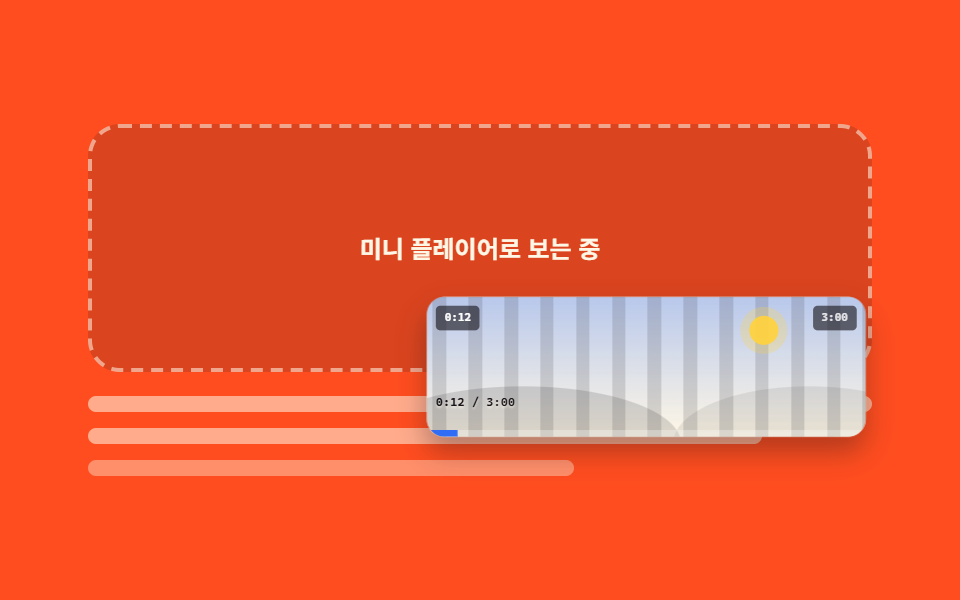
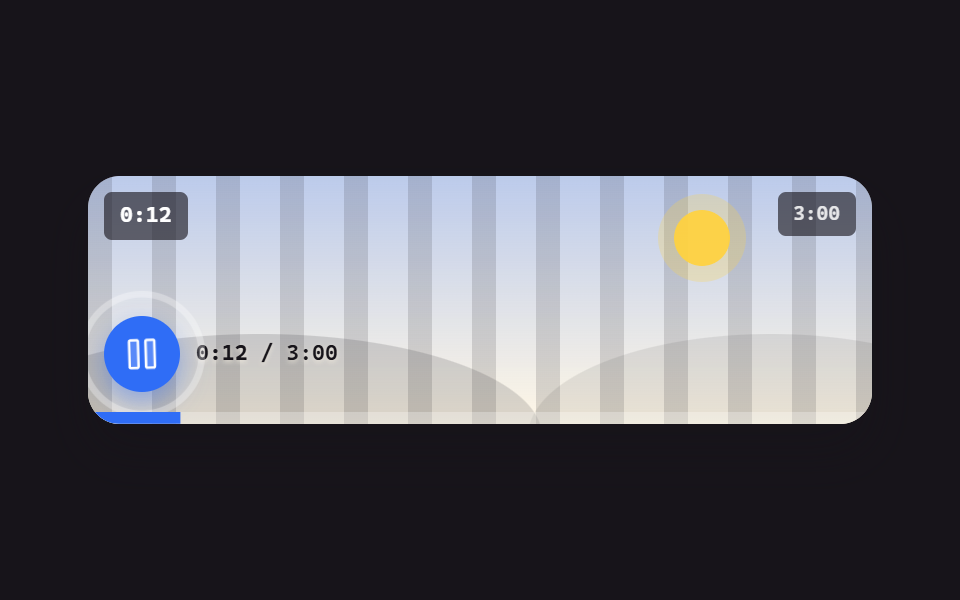
The mini button shrinks the player into a small floating card at the corner, and close returns it home. No separate window is spawned — the control itself fakes the move inside the page.
Best forTutorial pages where readers keep the video around while scrolling the text
scalearia-labelfocus
<main class="stage">
  <div class="pip is-demo" id="pip">
    <div class="pip__stack">
      <p class="pip__ph">Playing in mini player</p>
      <figure class="pl" id="pl">
        <div class="pl__screen">
          <div class="pl__stripes" aria-hidden="true"></div>
          <div class="pl__world" aria-hidden="true"><span class="pl__sun"></span><span class="pl__hill pl__hill--a"></span><span class="pl__hill pl__hill--b"></span></div>
          <span class="pl__clock" id="clock">0:12</span>
          <span class="pl__badge">3:00</span>
          <button class="pl__close" type="button" id="pip-close" aria-label="Close mini player">
            <svg viewBox="0 0 256 256" width="24" height="24" aria-hidden="true"><g fill="currentColor"><path d="M216 56v144a16 16 0 0 1-16 16H56a16 16 0 0 1-16-16V56a16 16 0 0 1 16-16h144a16 16 0 0 1 16 16" opacity=".2"/><path d="M205.66 194.34a8 8 0 0 1-11.32 11.32L128 139.31l-66.34 66.35a8 8 0 0 1-11.32-11.32L116.69 128L50.34 61.66a8 8 0 0 1 11.32-11.32L128 116.69l66.34-66.35a8 8 0 0 1 11.32 11.32L139.31 128Z"/></g></svg>
          </button>
          <div class="pl__bar">
            <span class="pl__time"><b id="t-now">0:12</b> / 3:00</span>
            <button class="pl__mini" type="button" id="pip-mini" aria-label="Mini player" aria-pressed="false">
              <svg viewBox="0 0 256 256" width="20" height="20" aria-hidden="true"><g fill="currentColor"><path d="M224 64v64h-88v72H40a8 8 0 0 1-8-8V64a8 8 0 0 1 8-8h176a8 8 0 0 1 8 8" opacity=".2"/><path d="M216 48H40a16 16 0 0 0-16 16v128a16 16 0 0 0 16 16h176a16 16 0 0 0 16-16V64a16 16 0 0 0-16-16M40 64h176v56h-80a8 8 0 0 0-8 8v64H40Zm176 128h-72v-56h72z"/></g></svg>
            </button>
          </div>
          <span class="pl__fillwrap" aria-hidden="true"><span class="pl__fill" id="fill"></span></span>
        </div>
      </figure>
    </div>
    <div class="pip__doc" aria-hidden="true">
      <span class="pip__line"></span>
      <span class="pip__line pip__line--b"></span>
      <span class="pip__line pip__line--c"></span>
    </div>
  </div>
</main>@use "../../../../site/static/demo-tokens" as *;
$duration: $dur-base;
$easing: $ease-spring;
$color: $subject-blue;
@include stage($stage-orange);
// 미니로 갈 때 쓰는 값 — 레이아웃(top/left/width/height)을 건드리지 않고 transform 하나로만 옮긴다
$mini-scale: .44;
$mini-x: -4px;
$mini-y: 40px;
.pip {
position: relative;
box-sizing: border-box;
width: min(392px, 92vw);
}
.pip__stack {
position: relative;
height: clamp(96px, 26vw, 132px);
}
// 원래 자리에 남는 자리표시
.pip__ph {
position: absolute;
inset: 0;
display: grid;
place-items: center;
box-sizing: border-box;
margin: 0;
border: 2px dashed rgba(255, 247, 230, .55);
border-radius: $r-card;
background: rgba(23, 20, 26, .16);
color: $subject-cream;
font-size: 12px;
line-height: 16px;
font-weight: 700;
opacity: 0;
}
// 본문 자리 (글 줄 흉내)
.pip__doc {
display: flex;
flex-direction: column;
gap: $sp-2;
padding-top: $sp-3;
}
.pip__line {
height: 8px;
border-radius: $r-xs;
background: rgba(255, 247, 230, .55);
}
.pip__line--b { width: 86%; }
.pip__line--c { width: 62%; background: rgba(255, 247, 230, .38); }
// ── 플레이어 ──
.pl {
position: absolute;
inset: 0;
box-sizing: border-box;
margin: 0;
border-radius: $r-card;
background: $subject-cream;
box-shadow: $shadow-raised;
overflow: hidden;
transform-origin: right bottom; // 규칙8: 우하단 도킹 계산 기준
transition: transform $duration $easing;
}
.pl__screen {
position: relative;
height: 100%;
overflow: hidden;
background: linear-gradient(180deg, rgba(47, 109, 246, .34), rgba(255, 247, 230, .96));
}
.pl__stripes {
position: absolute;
inset: 0 -72px;
background: repeating-linear-gradient(90deg, rgba(23, 20, 26, .14) 0 12px, transparent 12px 32px);
animation-name: pl-pan;
animation-duration: $dur-loop;
animation-timing-function: linear;
animation-iteration-count: infinite;
}
@keyframes pl-pan { from { transform: translateX(0); } to { transform: translateX(-64px); } }
.pl__world { position: absolute; inset: 0; }
.pl__sun {
position: absolute; right: 20%; top: 14%;
width: 26px; height: 26px;
border-radius: 50%;
background: rgba(255, 210, 63, .95);
box-shadow: 0 0 0 8px rgba(255, 210, 63, .25);
}
.pl__hill { position: absolute; bottom: -46%; height: 82%; border-radius: 50%; }
.pl__hill--a { left: -14%; width: 72%; background: rgba(23, 20, 26, .15); }
.pl__hill--b { right: -18%; width: 62%; background: rgba(23, 20, 26, .09); }
.pl__clock, .pl__badge {
position: absolute; top: $sp-2;
padding: $sp-1 $sp-2;
border-radius: $r-xs;
background: rgba(23, 20, 26, .62);
font-family: ui-monospace, "Cascadia Mono", Menlo, Consolas, monospace;
font-size: 10px; line-height: 14px; font-weight: 700;
}
.pl__clock { left: $sp-2; color: #fff; }
.pl__badge { right: $sp-2; color: rgba(255, 255, 255, .85); }
.pl__bar {
position: absolute; left: 0; right: 0; bottom: 0;
display: flex; align-items: center; gap: $sp-2;
padding: 0 $sp-2 $sp-3;
}
.pl__time {
color: $subject-ink; // 화면 아래쪽은 크림이라 흰 글자가 1.35~2.10:1 이었다 — 잉크로 8.69~13.49:1
font-family: ui-monospace, "Cascadia Mono", Menlo, Consolas, monospace;
font-size: 11px; line-height: 14px; font-weight: 600;
text-shadow: 0 1px 2px rgba(255, 247, 230, .6);
}
.pl__time b { font-weight: 700; }
.pl__mini {
box-sizing: border-box;
width: 36px; height: 36px;
flex: 0 0 auto;
margin-left: auto;
display: inline-flex; align-items: center; justify-content: center;
border: 0;
border-radius: $r-control;
background: $color;
color: #fff;
cursor: pointer;
box-shadow: 0 6px 14px rgba(47, 109, 246, .45);
}
.pl__mini:hover { background: rgba(47, 109, 246, .88); }
.pl__mini:focus-visible { outline: 2px solid $stage-yellow; outline-offset: 2px; }
// 미니 카드 위의 닫기 — 카드가 통째로 축소되므로 미리 키워 둔다 (축소 후 실효 약 33px)
.pl__close {
position: absolute; top: $sp-1; right: $sp-1;
box-sizing: border-box;
width: 40px; height: 40px;
display: inline-flex; align-items: center; justify-content: center;
border: 0;
border-radius: $r-control;
background: rgba(23, 20, 26, .82);
color: #fff;
cursor: pointer;
transform: scale(1.9);
transform-origin: right top; // 규칙8: 부모 축소 보정 모서리 고정
opacity: 0;
pointer-events: none;
}
.pl__close:focus-visible { outline: 2px solid $stage-yellow; outline-offset: 2px; }
.pl__fillwrap { position: absolute; left: 0; right: 0; bottom: 0; height: 6px; background: rgba(255, 255, 255, .28); }
.pl__fill {
display: block; height: 100%;
background: $color;
transform-origin: left center; // 규칙8: 좌변서 차오름
transform: scaleX(.07);
}
// ── 사람이 눌렀을 때 (JS 가 .is-demo 를 떼고 .is-mini 를 건다) ──
.pip.is-mini .pl { transform: translate($mini-x, $mini-y) scale($mini-scale); }
.pip.is-mini .pip__ph { opacity: 1; }
.pip.is-mini .pl__close { opacity: 1; pointer-events: auto; }
.pip.is-mini .pl__mini { opacity: 0; pointer-events: none; }
// ── 자동 루프: 플레이어가 오른쪽 아래 조각 카드로 줄었다가 제자리로. transform·opacity 만 ──
.pip.is-demo .pl {
animation-name: pip-shrink;
animation-duration: $dur-loop;
animation-timing-function: $easing;
animation-iteration-count: infinite;
}
.pip.is-demo .pip__ph {
animation-name: pip-ph;
animation-duration: $dur-loop;
animation-timing-function: steps(1, end);
animation-iteration-count: infinite;
}
.pip.is-demo .pl__close {
animation-name: pip-close;
animation-duration: $dur-loop;
animation-timing-function: steps(1, end);
animation-iteration-count: infinite;
}
.pip.is-demo .pl__mini {
animation-name: pip-minibtn;
animation-duration: $dur-loop;
animation-timing-function: steps(1, end);
animation-iteration-count: infinite;
}
// 줄어드는 구간을 세 프레임(24프레임 기준 4.17% 간격)으로 좁히고, 자리표시·닫기 버튼을 **줄어들기가 끝나는 그 시점**에
// 컷으로 켠다 — 그래야 "미니로 다 줄어든 장면" 이 최대 변화 프레임이 되어 poster 로 뽑힌다.
// 앞판은 자리표시가 줄어드는 도중(34%)에 켜져서 poster 가 어중간한 중간 크기 장면이었다 (실측 2026-09-12)
@keyframes pip-shrink {
0%, 26% { transform: none; }
38%, 70% { transform: translate($mini-x, $mini-y) scale($mini-scale); }
86%, 100% { transform: none; }
}
// 자리표시는 **줄어들기가 시작하는 그 프레임**에 켜고 돌아온 뒤에 끈다. 다 줄어든 뒤에 켜면
// 날아가는 동안 원래 자리가 텅 빈 채로 남아, 중간 프레임(= poster)이 "카드가 붕 떠 있는" 장면이 된다 (실측 2026-09-12)
@keyframes pip-ph {
0%, 25.99% { opacity: 0; }
26%, 85.99% { opacity: 1; }
86%, 100% { opacity: 0; }
}
@keyframes pip-close {
0%, 37.99% { opacity: 0; }
38%, 71.99% { opacity: 1; }
72%, 100% { opacity: 0; }
}
@keyframes pip-minibtn {
0%, 25.99% { opacity: 1; }
26%, 71.99% { opacity: 0; }
72%, 100% { opacity: 1; }
}
@media (max-width: 340px) {
.pip__doc { gap: $sp-1; padding-top: $sp-2; }
}
@media (prefers-reduced-motion: reduce) {
.pip.is-demo .pl, .pip.is-demo .pip__ph, .pip.is-demo .pl__close,
.pip.is-demo .pl__mini, .pl__stripes { animation: none !important; }
.pl { transition: none; }
}html, body {
margin: 0;
overflow: hidden;
}
.stage {
box-sizing: border-box;
min-height: 100vh;
display: grid;
place-items: center;
margin: 0;
background: #ff4d1f;
font-family: -apple-system, "Segoe UI", "Noto Sans KR", sans-serif;
padding: clamp(8px, 4vw, 24px);
}
.pip {
position: relative;
box-sizing: border-box;
width: min(392px, 92vw);
}
.pip__stack {
position: relative;
height: clamp(96px, 26vw, 132px);
}
.pip__ph {
position: absolute;
inset: 0;
display: grid;
place-items: center;
box-sizing: border-box;
margin: 0;
border: 2px dashed rgba(255, 247, 230, 0.55);
border-radius: 16px;
background: rgba(23, 20, 26, 0.16);
color: #fff7e6;
font-size: 12px;
line-height: 16px;
font-weight: 700;
opacity: 0;
}
.pip__doc {
display: flex;
flex-direction: column;
gap: 8px;
padding-top: 12px;
}
.pip__line {
height: 8px;
border-radius: 4px;
background: rgba(255, 247, 230, 0.55);
}
.pip__line--b {
width: 86%;
}
.pip__line--c {
width: 62%;
background: rgba(255, 247, 230, 0.38);
}
.pl {
position: absolute;
inset: 0;
box-sizing: border-box;
margin: 0;
border-radius: 16px;
background: #fff7e6;
box-shadow: 0 14px 24px rgba(23, 20, 26, 0.32);
overflow: hidden;
transform-origin: right bottom;
transition: transform 300ms cubic-bezier(0.2, 0.8, 0.2, 1);
}
.pl__screen {
position: relative;
height: 100%;
overflow: hidden;
background: linear-gradient(180deg, rgba(47, 109, 246, 0.34), rgba(255, 247, 230, 0.96));
}
.pl__stripes {
position: absolute;
inset: 0 -72px;
background: repeating-linear-gradient(90deg, rgba(23, 20, 26, 0.14) 0 12px, transparent 12px 32px);
animation-name: pl-pan;
animation-duration: 2s;
animation-timing-function: linear;
animation-iteration-count: infinite;
}
@keyframes pl-pan {
from {
transform: translateX(0);
}
to {
transform: translateX(-64px);
}
}
.pl__world {
position: absolute;
inset: 0;
}
.pl__sun {
position: absolute;
right: 20%;
top: 14%;
width: 26px;
height: 26px;
border-radius: 50%;
background: rgba(255, 210, 63, 0.95);
box-shadow: 0 0 0 8px rgba(255, 210, 63, 0.25);
}
.pl__hill {
position: absolute;
bottom: -46%;
height: 82%;
border-radius: 50%;
}
.pl__hill--a {
left: -14%;
width: 72%;
background: rgba(23, 20, 26, 0.15);
}
.pl__hill--b {
right: -18%;
width: 62%;
background: rgba(23, 20, 26, 0.09);
}
.pl__clock, .pl__badge {
position: absolute;
top: 8px;
padding: 4px 8px;
border-radius: 4px;
background: rgba(23, 20, 26, 0.62);
font-family: ui-monospace, "Cascadia Mono", Menlo, Consolas, monospace;
font-size: 10px;
line-height: 14px;
font-weight: 700;
}
.pl__clock {
left: 8px;
color: #fff;
}
.pl__badge {
right: 8px;
color: rgba(255, 255, 255, 0.85);
}
.pl__bar {
position: absolute;
left: 0;
right: 0;
bottom: 0;
display: flex;
align-items: center;
gap: 8px;
padding: 0 8px 12px;
}
.pl__time {
color: #17141a;
font-family: ui-monospace, "Cascadia Mono", Menlo, Consolas, monospace;
font-size: 11px;
line-height: 14px;
font-weight: 600;
text-shadow: 0 1px 2px rgba(255, 247, 230, 0.6);
}
.pl__time b {
font-weight: 700;
}
.pl__mini {
box-sizing: border-box;
width: 36px;
height: 36px;
flex: 0 0 auto;
margin-left: auto;
display: inline-flex;
align-items: center;
justify-content: center;
border: 0;
border-radius: 12px;
background: #2f6df6;
color: #fff;
cursor: pointer;
box-shadow: 0 6px 14px rgba(47, 109, 246, 0.45);
}
.pl__mini:hover {
background: rgba(47, 109, 246, 0.88);
}
.pl__mini:focus-visible {
outline: 2px solid #ffd23f;
outline-offset: 2px;
}
.pl__close {
position: absolute;
top: 4px;
right: 4px;
box-sizing: border-box;
width: 40px;
height: 40px;
display: inline-flex;
align-items: center;
justify-content: center;
border: 0;
border-radius: 12px;
background: rgba(23, 20, 26, 0.82);
color: #fff;
cursor: pointer;
transform: scale(1.9);
transform-origin: right top;
opacity: 0;
pointer-events: none;
}
.pl__close:focus-visible {
outline: 2px solid #ffd23f;
outline-offset: 2px;
}
.pl__fillwrap {
position: absolute;
left: 0;
right: 0;
bottom: 0;
height: 6px;
background: rgba(255, 255, 255, 0.28);
}
.pl__fill {
display: block;
height: 100%;
background: #2f6df6;
transform-origin: left center;
transform: scaleX(0.07);
}
.pip.is-mini .pl {
transform: translate(-4px, 40px) scale(0.44);
}
.pip.is-mini .pip__ph {
opacity: 1;
}
.pip.is-mini .pl__close {
opacity: 1;
pointer-events: auto;
}
.pip.is-mini .pl__mini {
opacity: 0;
pointer-events: none;
}
.pip.is-demo .pl {
animation-name: pip-shrink;
animation-duration: 2s;
animation-timing-function: cubic-bezier(0.2, 0.8, 0.2, 1);
animation-iteration-count: infinite;
}
.pip.is-demo .pip__ph {
animation-name: pip-ph;
animation-duration: 2s;
animation-timing-function: steps(1, end);
animation-iteration-count: infinite;
}
.pip.is-demo .pl__close {
animation-name: pip-close;
animation-duration: 2s;
animation-timing-function: steps(1, end);
animation-iteration-count: infinite;
}
.pip.is-demo .pl__mini {
animation-name: pip-minibtn;
animation-duration: 2s;
animation-timing-function: steps(1, end);
animation-iteration-count: infinite;
}
@keyframes pip-shrink {
0%, 26% {
transform: none;
}
38%, 70% {
transform: translate(-4px, 40px) scale(0.44);
}
86%, 100% {
transform: none;
}
}
@keyframes pip-ph {
0%, 25.99% {
opacity: 0;
}
26%, 85.99% {
opacity: 1;
}
86%, 100% {
opacity: 0;
}
}
@keyframes pip-close {
0%, 37.99% {
opacity: 0;
}
38%, 71.99% {
opacity: 1;
}
72%, 100% {
opacity: 0;
}
}
@keyframes pip-minibtn {
0%, 25.99% {
opacity: 1;
}
26%, 71.99% {
opacity: 0;
}
72%, 100% {
opacity: 1;
}
}
@media (max-width: 340px) {
.pip__doc {
gap: 4px;
padding-top: 8px;
}
}
@media (prefers-reduced-motion: reduce) {
.pip.is-demo .pl, .pip.is-demo .pip__ph, .pip.is-demo .pl__close,
.pip.is-demo .pl__mini, .pl__stripes {
animation: none !important;
}
.pl {
transition: none;
}
}// 실제 동작: 미니 버튼이 플레이어를 transform 으로 오른쪽 아래 조각 카드로 줄인다. Close·Escape 로 복귀.
var pip = document.getElementById('pip'),
btnMini = document.getElementById('pip-mini'),
btnClose = document.getElementById('pip-close'),
clock = document.getElementById('clock'),
now = document.getElementById('t-now'),
fill = document.getElementById('fill');
var DUR = 180, t = 12, last = Date.now();
function fmt(s) { s = Math.floor(s); return Math.floor(s / 60) + ':' + ('0' + (s % 60)).slice(-2); }
setInterval(function () {
var n = Date.now();
t = (t + (n - last) / 1000) % DUR;
last = n;
clock.textContent = fmt(t);
now.textContent = fmt(t);
fill.style.transform = 'scaleX(' + (t / DUR).toFixed(4) + ')';
}, 250);
function setMini(on) {
pip.classList.remove('is-demo');
pip.classList.toggle('is-mini', on);
btnMini.setAttribute('aria-pressed', on ? 'true' : 'false');
}
btnMini.addEventListener('click', function () {
setMini(true);
btnClose.focus({ preventScroll: true });
});
btnClose.addEventListener('click', function () {
setMini(false);
btnMini.focus({ preventScroll: true });
});
document.addEventListener('keydown', function (e) {
if (e.key === 'Escape' && pip.classList.contains('is-mini')) {
setMini(false);
btnMini.focus({ preventScroll: true });
}
});import { useEffect, useRef, useState } from "react";
import type { CSSProperties } from "react";
import styles from "./MiniPlayer.module.scss";
export type MiniPlayerProps = {
/** 더미 영상 길이(초) */
total?: number;
/** 시작 위치(초) */
start?: number;
duration?: number;
easing?: string;
color?: string;
};
type Vars = CSSProperties & { "--duration"?: string; "--easing"?: string; "--color"?: string };
function fmt(s: number) {
const n = Math.floor(s);
return Math.floor(n / 60) + ":" + ("0" + (n % 60)).slice(-2);
}
function MiniIcon() {
return (
<svg viewBox="0 0 256 256" width="20" height="20" aria-hidden="true">
<g fill="currentColor">
<path d="M224 64v64h-88v72H40a8 8 0 0 1-8-8V64a8 8 0 0 1 8-8h176a8 8 0 0 1 8 8" opacity=".2" />
<path d="M216 48H40a16 16 0 0 0-16 16v128a16 16 0 0 0 16 16h176a16 16 0 0 0 16-16V64a16 16 0 0 0-16-16M40 64h176v56h-80a8 8 0 0 0-8 8v64H40Zm176 128h-72v-56h72z" />
</g>
</svg>
);
}
function CloseIcon() {
return (
<svg viewBox="0 0 256 256" width="24" height="24" aria-hidden="true">
<g fill="currentColor">
<path d="M216 56v144a16 16 0 0 1-16 16H56a16 16 0 0 1-16-16V56a16 16 0 0 1 16-16h144a16 16 0 0 1 16 16" opacity=".2" />
<path d="M205.66 194.34a8 8 0 0 1-11.32 11.32L128 139.31l-66.34 66.35a8 8 0 0 1-11.32-11.32L116.69 128L50.34 61.66a8 8 0 0 1 11.32-11.32L128 116.69l66.34-66.35a8 8 0 0 1 11.32 11.32L139.31 128Z" />
</g>
</svg>
);
}
export default function MiniPlayer({
total = 180,
start = 12,
duration = 300,
easing = "cubic-bezier(.2,.8,.2,1)",
color = "#2f6df6",
}: MiniPlayerProps) {
const [mini, setMini] = useState(false);
const [t, setT] = useState(start);
const miniRef = useRef<HTMLButtonElement>(null);
const closeRef = useRef<HTMLButtonElement>(null);
const vars: Vars = { "--duration": `${duration}ms`, "--easing": easing, "--color": color };
// 더미 재생 시계 — 바닐라의 setInterval(250ms) 를 그대로
useEffect(() => {
let last = Date.now();
const id = setInterval(() => {
const n = Date.now();
const step = (n - last) / 1000;
last = n;
setT((p) => (p + step) % total);
}, 250);
return () => clearInterval(id);
}, [total]);
// 미니로 들어가면 닫기 버튼으로 초점을 옮긴다 (닫을 때 되돌리는 건 close 에서)
useEffect(() => {
if (mini) closeRef.current?.focus({ preventScroll: true });
}, [mini]);
// Escape 로 미니에서 나온다. 진짜 Document PiP 는 iframe 안에서 못 쓴다 — transform 으로 흉내 낸다
useEffect(() => {
if (!mini) return;
function onKey(e: KeyboardEvent) {
if (e.key === "Escape") close();
}
document.addEventListener("keydown", onKey);
return () => document.removeEventListener("keydown", onKey);
}, [mini]);
function close() {
setMini(false);
miniRef.current?.focus({ preventScroll: true });
}
return (
<div className={`${styles.pip} ${mini ? styles.isMini : ""}`} style={vars}>
<div className={styles.stack}>
<p className={styles.ph}>미니 플레이어로 보는 중</p>
<figure className={styles.player}>
<div className={styles.screen}>
<div className={styles.stripes} aria-hidden="true" />
<div className={styles.world} aria-hidden="true">
<span className={styles.sun} />
<span className={`${styles.hill} ${styles.hillA}`} />
<span className={`${styles.hill} ${styles.hillB}`} />
</div>
<span className={styles.clock}>{fmt(t)}</span>
<span className={styles.badge}>{fmt(total)}</span>
<button
ref={closeRef}
className={styles.close}
type="button"
aria-label="미니 플레이어 닫기"
onClick={close}
>
<CloseIcon />
</button>
<div className={styles.bar}>
<span className={styles.time}>
<b>{fmt(t)}</b> / {fmt(total)}
</span>
<button
ref={miniRef}
className={styles.mini}
type="button"
aria-label="미니 플레이어"
aria-pressed={mini}
onClick={() => setMini(true)}
>
<MiniIcon />
</button>
</div>
<span className={styles.fillwrap} aria-hidden="true">
<span className={styles.fill} style={{ transform: `scaleX(${(t / total).toFixed(4)})` }} />
</span>
</div>
</figure>
</div>
<div className={styles.doc} aria-hidden="true">
<span className={styles.line} />
<span className={`${styles.line} ${styles.lineB}`} />
<span className={`${styles.line} ${styles.lineC}`} />
</div>
</div>
);
}07 Mini player (PiP-style) — Measured area 46.533% · moving frames 23/23Original by GODRICH · SCSS and React ship in the zip · 9 Custom Video Player CSS Controls, No Video File
The post this demo lives in
 9 Custom Video Player CSS Controls, No Video FileA custom video player css setup replaces the browser's default control bar with your own markup and styles. All nine con See all demos in this post
If you like this effect - similar demos
 Embeds03 Notification list that splits read from unread9 Activity Feed UI Widgets — Sidebar-Ready Lists
 Embeds02 Video embed play-button overlay9 Social Share Button Design Embed Widgets
 Embeds01 YouTube responsive embed — a video frame that recomputes its ratio from the available width9 YouTube Embed Code UI Patterns (Copy-Paste)