09Keyboard shortcut overlay
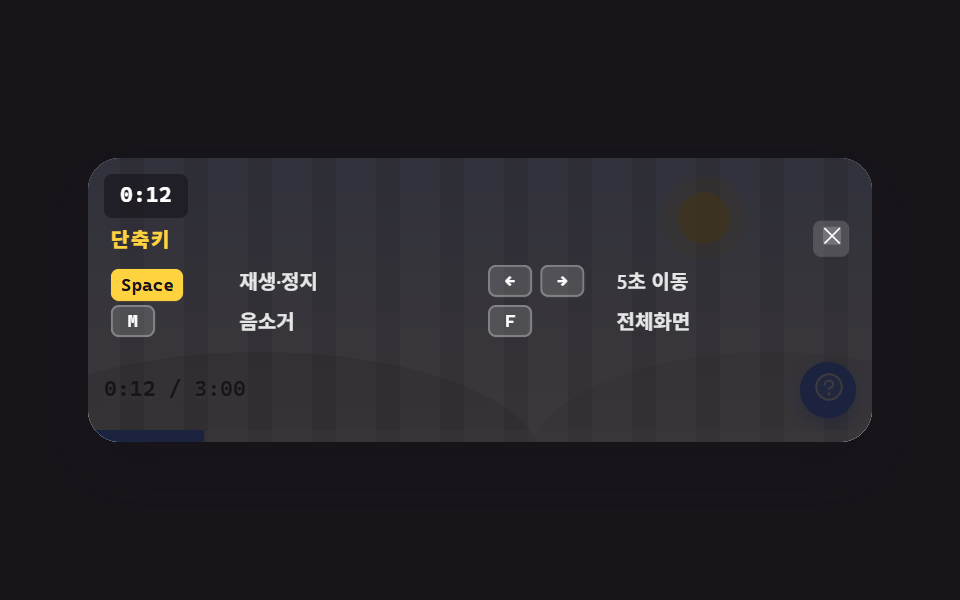
The ? button dims the stage and lists the shortcuts — and Space, arrow keys, M and F genuinely work right there, not just on paper.
Best forProduct videos visited by both keyboard-only and mouse-only users
kbdrole=dialogfocus
<main class="stage">
  <figure class="pl is-demo" id="pl">
    <div class="pl__screen">
      <div class="pl__stripes" aria-hidden="true"></div>
      <div class="pl__world" aria-hidden="true"><span class="pl__sun"></span><span class="pl__hill pl__hill--a"></span><span class="pl__hill pl__hill--b"></span></div>
      <span class="pl__clock"><span class="clk" id="clk">0:12</span><span class="clk clk--b" aria-hidden="true">0:07</span></span>
      <span class="pl__mute" aria-hidden="true">Mute</span>
      <div class="pl__bar">
        <span class="pl__time"><b id="t-now">0:12</b> / 3:00</span>
        <button class="qb" type="button" id="qb" aria-label="Shortcut help" aria-haspopup="dialog" aria-expanded="false">
          <span aria-hidden="true"><svg viewBox="0 0 256 256" width="17" height="17"><g fill="currentColor"><path d="M224 128a96 96 0 1 1-96-96a96 96 0 0 1 96 96" opacity=".2"/><path d="M140 180a12 12 0 1 1-12-12a12 12 0 0 1 12 12M128 72c-22.06 0-40 16.15-40 36v4a8 8 0 0 0 16 0v-4c0-11 10.77-20 24-20s24 9 24 20s-10.77 20-24 20a8 8 0 0 0-8 8v8a8 8 0 0 0 16 0v-.72c18.24-3.35 32-17.9 32-35.28c0-19.85-17.94-36-40-36m104 56A104 104 0 1 1 128 24a104.11 104.11 0 0 1 104 104m-16 0a88 88 0 1 0-88 88a88.1 88.1 0 0 0 88-88"/></g></svg></span>
        </button>
      </div>
      <span class="pl__fillwrap" aria-hidden="true"><span class="pl__fill" id="fill"></span></span>
      <div class="ovl" id="ovl" role="dialog" aria-modal="true" aria-label="Keyboard shortcuts">
        <div class="ovl__panel">
          <div class="ovl__head">
            <p class="ovl__title">Shortcuts</p>
            <button class="ovl__x" type="button" id="ovx" aria-label="Close">
              <span aria-hidden="true"><svg viewBox="0 0 256 256" width="13" height="13"><g fill="currentColor"><path d="M216 56v144a16 16 0 0 1-16 16H56a16 16 0 0 1-16-16V56a16 16 0 0 1 16-16h144a16 16 0 0 1 16 16" opacity=".2"/><path d="M205.66 194.34a8 8 0 0 1-11.32 11.32L128 139.31l-66.34 66.35a8 8 0 0 1-11.32-11.32L116.69 128L50.34 61.66a8 8 0 0 1 11.32-11.32L128 116.69l66.34-66.35a8 8 0 0 1 11.32 11.32L139.31 128Z"/></g></svg></span>
            </button>
          </div>
          <ul class="ovl__list">
            <li class="ovl__row"><span class="ovl__keys"><kbd class="k-space" data-k="space">Space</kbd></span><span class="ovl__what">Play / Pause</span></li>
            <li class="ovl__row"><span class="ovl__keys"><kbd class="k-left" data-k="left">←</kbd><kbd class="k-right" data-k="right">→</kbd></span><span class="ovl__what">Skip 5s</span></li>
            <li class="ovl__row"><span class="ovl__keys"><kbd class="k-m" data-k="m">M</kbd></span><span class="ovl__what">Mute</span></li>
            <li class="ovl__row"><span class="ovl__keys"><kbd class="k-f" data-k="f">F</kbd></span><span class="ovl__what">Fullscreen</span></li>
          </ul>
        </div>
      </div>
    </div>
  </figure>
</main>@use "../../../../site/static/demo-tokens" as *;
$duration: $dur-quick;
$easing: $ease-pop;
$color: $subject-blue;
@include stage($stage-ink);
// ── 플레이어 껍데기 (01 과 같은 무대 장치) ──
.pl {
position: relative;
box-sizing: border-box;
width: min(392px, 92vw);
margin: 0;
border-radius: $r-card;
background: $subject-cream;
box-shadow: $shadow-raised;
overflow: hidden;
transform: scale(1);
transform-origin: center center;
transition: transform $dur-base $ease-spring;
}
.pl.is-full { transform: scale(1.06); }
.pl__screen {
position: relative;
height: clamp(124px, 34vw, 142px);
overflow: hidden;
background: linear-gradient(180deg, rgba(47, 109, 246, .32), rgba(255, 247, 230, .96));
}
.pl__stripes {
position: absolute;
inset: 0 -72px;
background: repeating-linear-gradient(90deg, rgba(23, 20, 26, .14) 0 12px, transparent 12px 32px);
animation-name: pl-pan;
animation-duration: $dur-loop;
animation-timing-function: linear;
animation-iteration-count: infinite;
}
@keyframes pl-pan { from { transform: translateX(0); } to { transform: translateX(-64px); } }
.pl__world { position: absolute; inset: 0; }
.pl__sun {
position: absolute; right: 18%; top: 12%;
width: 26px; height: 26px; border-radius: 50%;
background: rgba(255, 210, 63, .95);
box-shadow: 0 0 0 8px rgba(255, 210, 63, .25);
}
.pl__hill { position: absolute; bottom: -46%; height: 78%; border-radius: 50%; }
.pl__hill--a { left: -14%; width: 72%; background: rgba(23, 20, 26, .15); }
.pl__hill--b { right: -18%; width: 62%; background: rgba(23, 20, 26, .09); }
// 시계 칩 — 두 시각을 같은 칸에 겹쳐 두고 컷으로 갈아 끼운다 (← → 5초 이동)
.pl__clock {
position: absolute; left: $sp-2; top: $sp-2;
z-index: 2;
display: inline-grid;
padding: $sp-1 $sp-2;
border-radius: $r-xs;
background: rgba(23, 20, 26, .62);
color: #fff;
font-family: ui-monospace, "Cascadia Mono", Menlo, Consolas, monospace;
font-size: 11px; line-height: 14px; font-weight: 700;
}
.clk { grid-area: 1 / 1; }
.clk--b { opacity: 0; }
.pl.is-paused .pl__clock { background: $stage-yellow; color: $subject-ink; }
// 음소거 알약 — M 이 먹었다는 증거. 어두운 막 위에 뜬다(z-index)
.pl__mute {
position: absolute; right: $sp-2; top: $sp-2;
z-index: 2;
padding: 0 $sp-2;
border-radius: $r-pill;
background: rgba(194, 54, 26, .94);
color: #fff;
font-size: 10px; line-height: 18px; font-weight: 700;
white-space: nowrap;
opacity: 0;
transform: scale(.7);
transform-origin: right center; // 규칙8: right 로 박아 둔 모서리 알약 — 중심이면 커지며 오른쪽 여백을 먹는다
transition: opacity $duration $easing, transform $duration $easing;
}
.pl.is-mute .pl__mute { opacity: 1; transform: none; }
.pl__bar {
position: absolute; left: 0; right: 0; bottom: 0;
display: flex; align-items: center; justify-content: space-between; gap: $sp-2;
padding: 0 $sp-2 $sp-3;
}
.pl__time {
color: $subject-ink; // 화면 아래쪽은 크림이라 흰 글자가 1.35~2.10:1 이었다 — 잉크로 8.69~13.49:1
font-family: ui-monospace, "Cascadia Mono", Menlo, Consolas, monospace;
font-size: 11px; line-height: 14px; font-weight: 600;
text-shadow: 0 1px 2px rgba(255, 247, 230, .6);
}
.pl__time b { font-weight: 700; }
.qb {
position: relative;
box-sizing: border-box;
width: 28px; height: 28px;
flex: 0 0 auto;
display: inline-flex; align-items: center; justify-content: center;
border: 0;
border-radius: 50%;
background: $color;
color: #fff;
cursor: pointer;
box-shadow: 0 4px 10px rgba(47, 109, 246, .45);
transition: transform $duration $easing;
}
.qb:hover { transform: scale(1.08); }
.qb:active { transform: scale(.92); }
.qb:focus-visible { outline: 2px solid $stage-yellow; outline-offset: 2px; }
.pl__fillwrap { position: absolute; left: 0; right: 0; bottom: 0; height: 6px; background: rgba(255, 255, 255, .28); }
.pl__fill {
display: block; height: 100%;
background: $color;
transform-origin: left center; // 규칙8: 좌변서 차오름
transform: scaleX(.08);
}
// ── 단축키 다이얼로그 — 화면을 어둡게 깔고 목록이 뜬다. 화면 상자 안에 갇힌다(BD9) ──
.ovl {
position: absolute; inset: 0;
background: rgba(23, 20, 26, .84);
opacity: 0;
visibility: hidden;
pointer-events: none;
transition: opacity $duration $easing;
}
.pl.is-open .ovl, .pl.is-demo .ovl { visibility: visible; }
.pl.is-open .ovl { opacity: 1; pointer-events: auto; }
.ovl__panel {
position: absolute; inset: 0;
box-sizing: border-box;
display: flex; flex-direction: column; justify-content: flex-start;
padding: $sp-8 $sp-3 $sp-3; // 위쪽 $sp-8 은 시계 칩(상단 30px)을 피하는 자리
transform: translateY(10px) scale(.94);
transition: transform $duration $easing;
}
.pl.is-open .ovl__panel { transform: none; }
.ovl__head { display: flex; align-items: center; justify-content: space-between; margin-bottom: $sp-1; }
.ovl__title {
margin: 0;
color: $stage-yellow;
font-size: 10px; line-height: 18px; font-weight: 800;
letter-spacing: .08em;
}
.ovl__x {
box-sizing: border-box;
width: 18px; height: 18px;
flex: 0 0 auto;
display: inline-flex; align-items: center; justify-content: center;
padding: 0;
border: 0;
border-radius: $r-xs;
background: rgba(255, 255, 255, .16);
color: #fff;
cursor: pointer;
transition: background $duration $easing;
}
.ovl__x:hover { background: rgba(255, 255, 255, .32); }
.ovl__x:focus-visible { outline: 2px solid $stage-yellow; outline-offset: 2px; }
// 4줄을 세로로 세우면 무대(124px)를 넘는다 — 2×2 격자로 접는다 (BD9)
.ovl__list { display: grid; grid-template-columns: 1fr 1fr; gap: $sp-1 $sp-2; margin: 0; padding: 0; list-style: none; }
.ovl__row { display: grid; grid-template-columns: 56px 1fr; align-items: center; gap: $sp-2; }
.ovl__keys { display: flex; align-items: center; gap: $sp-1; }
.ovl__what {
color: rgba(255, 255, 255, .88);
font-size: 10px; line-height: 16px; font-weight: 600;
}
.ovl kbd {
box-sizing: border-box;
min-width: 22px;
padding: 0 $sp-1;
border: 1px solid rgba(255, 255, 255, .28);
border-radius: $r-xs;
background: rgba(255, 255, 255, .14);
color: #fff;
font-family: ui-monospace, "Cascadia Mono", Menlo, Consolas, monospace;
font-size: 9px; line-height: 14px; font-weight: 700;
text-align: center;
}
// 사람이 진짜 키를 눌렀을 때 — 한 번만 반짝
.ovl kbd.is-hit {
animation-name: kbd-hit;
animation-duration: $dur-base;
animation-timing-function: $ease-pop;
animation-iteration-count: 1;
}
@keyframes kbd-hit {
0% { transform: translateY(0); background: rgba(255, 255, 255, .14); color: #fff; border-color: rgba(255, 255, 255, .28); }
30%, 60% { transform: translateY(2px); background: $stage-yellow; color: $subject-ink; border-color: $stage-yellow; }
100% { transform: translateY(0); background: rgba(255, 255, 255, .14); color: #fff; border-color: rgba(255, 255, 255, .28); }
}
// ── 자동 루프 (2s): 오버레이가 열리고 Space → ← → → → M → F 가 차례로 눌린다 ──
// animation- 낱개 속성만 쓴다. 단축을 쓰면 animation-delay 가 0 으로 리셋돼 kbd 다섯 개가 동시에 빛난다 (240 실측)
.pl.is-demo {
animation-name: sc-full;
animation-duration: $dur-loop;
animation-timing-function: $ease-spring;
animation-iteration-count: infinite;
}
.pl.is-demo .ovl {
animation-name: sc-dim;
animation-duration: $dur-loop;
animation-timing-function: $ease-out;
animation-iteration-count: infinite;
}
.pl.is-demo .ovl__panel {
animation-name: sc-rise;
animation-duration: $dur-loop;
animation-timing-function: $easing;
animation-iteration-count: infinite;
}
.pl.is-demo .pl__clock {
animation-name: sc-clock;
animation-duration: $dur-loop;
animation-timing-function: steps(1, end);
animation-iteration-count: infinite;
}
.pl.is-demo .clk {
animation-name: sc-clk-a;
animation-duration: $dur-loop;
animation-timing-function: steps(1, end);
animation-iteration-count: infinite;
}
.pl.is-demo .clk--b {
animation-name: sc-clk-b;
animation-duration: $dur-loop;
animation-timing-function: steps(1, end);
animation-iteration-count: infinite;
}
.pl.is-demo .pl__mute {
animation-name: sc-mute;
animation-duration: $dur-loop;
animation-timing-function: $easing;
animation-iteration-count: infinite;
}
.pl.is-demo .pl__fill {
animation-name: sc-fill;
animation-duration: $dur-loop;
animation-timing-function: linear;
animation-iteration-count: infinite;
}
// kbd 다섯 개는 같은 keyframes 를 음수 delay 로 어긋나게 돌린다 (delay 는 반드시 낱개 속성)
.pl.is-demo .ovl kbd {
animation-name: kbd-cycle;
animation-duration: $dur-loop;
animation-timing-function: $ease-out;
animation-iteration-count: infinite;
}
// 2s 루프 중 220~420ms 구간만 눌린 모양 — 음수 delay 로 다섯 개를 어긋나게 놓는다
@keyframes kbd-cycle {
0%, 10% { transform: translateY(0); background: rgba(255, 255, 255, .14); color: #fff; border-color: rgba(255, 255, 255, .28); }
11%, 20% { transform: translateY(2px); background: $stage-yellow; color: $subject-ink; border-color: $stage-yellow; }
21%, 100% { transform: translateY(0); background: rgba(255, 255, 255, .14); color: #fff; border-color: rgba(255, 255, 255, .28); }
}
// 다섯 키를 73% 안에 끝낸다 — 오버레이가 닫히는 84~85% 프레임에서는 **어두운 막만** 바뀌어야
// poster 가 "열린 오버레이" 쪽으로 뽑힌다 (poster 는 변한 픽셀 '면적' 이 가장 큰 장면이라,
// 노란 시계·음소거 알약·확대가 닫힘과 같은 프레임에 되돌아오면 그쪽 면적이 더 커진다 — 실측 2026-09-12)
.pl.is-demo .ovl .k-space { animation-delay: -1980ms; }
.pl.is-demo .ovl .k-left { animation-delay: -1700ms; }
.pl.is-demo .ovl .k-right { animation-delay: -1420ms; }
.pl.is-demo .ovl .k-m { animation-delay: -1180ms; }
.pl.is-demo .ovl .k-f { animation-delay: -940ms; }
// 여닫는 opacity 는 한 프레임(24프레임 기준 4.17%) 안으로 좁힌다 — 페이드 중간 프레임이 poster 로 뽑혀
// 오버레이가 반투명하게 시간 글자와 겹쳐 보였다 (실측 2026-09-12). 부드러움은 rise 쪽에만 남긴다
// 페이드 구간이 **샘플 프레임 사이**에 오게 맞춘다. 24프레임은 4.1667% 간격(…8.33·12.5…83.33·87.5…)이라
// 9→10% 와 84→85% 에 두면 반투명한 프레임이 한 장도 안 뽑힌다. 86→88% 였을 때 87.5% 프레임(opacity .25)이
// poster 로 뽑혀 오버레이가 유령처럼 비쳤다 (실측 2026-09-12)
// 여는 쪽은 샘플 프레임 사이(9→10%)에서 **컷**, 닫는 쪽은 84→90% 로 **나눠서** 사라진다.
// 둘 다 컷으로 하면 닫는 프레임의 변화량이 더 커서(그때는 노란 시계·음소거 알약·확대까지 같이 되돌아온다)
// poster 가 "오버레이가 없는 장면" 으로 뽑혔다 — 주인공이 안 보이는 썸네일이 된다 (실측 2026-09-12)
@keyframes sc-dim {
0%, 9% { opacity: 0; }
10%, 84% { opacity: 1; }
85%, 100% { opacity: 0; }
}
@keyframes sc-rise {
0%, 9% { transform: translateY(10px) scale(.94); }
16%, 84% { transform: none; }
85%, 100% { transform: translateY(10px) scale(.94); }
}
// Space — 시계 칩이 노랗게 컷되며 "멈췄다"를 알린다
@keyframes sc-clock {
0%, 21% { background: rgba(23, 20, 26, .62); color: #fff; }
22%, 73% { background: $stage-yellow; color: $subject-ink; }
74%, 100% { background: rgba(23, 20, 26, .62); color: #fff; }
}
// ← → — 두 시각을 한 프레임에 갈아 끼운다
@keyframes sc-clk-a {
0%, 34% { opacity: 1; }
35%, 49% { opacity: 0; }
50%, 100% { opacity: 1; }
}
@keyframes sc-clk-b {
0%, 34% { opacity: 0; }
35%, 49% { opacity: 1; }
50%, 100% { opacity: 0; }
}
// M — 음소거 알약
@keyframes sc-mute {
0%, 53% { opacity: 0; transform: scale(.7); }
58%, 73% { opacity: 1; transform: none; }
74%, 100% { opacity: 0; transform: scale(.7); }
}
// F — 플레이어가 확장 상태로
@keyframes sc-full {
0%, 63% { transform: scale(1); }
69%, 73% { transform: scale(1.06); }
78%, 100% { transform: scale(1); }
}
@keyframes sc-fill {
0% { transform: scaleX(.08); }
22%, 34% { transform: scaleX(.2); }
35%, 49% { transform: scaleX(.14); }
50%, 73% { transform: scaleX(.2); }
78%, 100% { transform: scaleX(.08); }
}
// 좁은 화면 — 여기서는 간격을 올리지 않는다 (BD9 세로 174px)
@media (max-width: 340px) {
.ovl__panel { padding: $sp-6 $sp-2 $sp-2; }
.ovl__list { gap: 0 $sp-1; }
.ovl__row { grid-template-columns: 52px 1fr; gap: $sp-1; }
}
@media (prefers-reduced-motion: reduce) {
.pl.is-demo, .pl.is-demo .ovl, .pl.is-demo .ovl__panel, .pl.is-demo .pl__clock,
.pl.is-demo .clk, .pl.is-demo .clk--b, .pl.is-demo .pl__mute, .pl.is-demo .pl__fill,
.pl.is-demo .ovl kbd, .ovl kbd.is-hit, .pl__stripes { animation: none !important; }
.pl, .ovl, .ovl__panel, .pl__mute, .qb, .ovl__x { transition: none; }
.pl.is-demo .ovl { opacity: 1; }
}html, body {
margin: 0;
overflow: hidden;
}
.stage {
box-sizing: border-box;
min-height: 100vh;
display: grid;
place-items: center;
margin: 0;
background: #17141a;
font-family: -apple-system, "Segoe UI", "Noto Sans KR", sans-serif;
padding: clamp(8px, 4vw, 24px);
}
.pl {
position: relative;
box-sizing: border-box;
width: min(392px, 92vw);
margin: 0;
border-radius: 16px;
background: #fff7e6;
box-shadow: 0 14px 24px rgba(23, 20, 26, 0.32);
overflow: hidden;
transform: scale(1);
transform-origin: center center;
transition: transform 300ms cubic-bezier(0.2, 0.8, 0.2, 1);
}
.pl.is-full {
transform: scale(1.06);
}
.pl__screen {
position: relative;
height: clamp(124px, 34vw, 142px);
overflow: hidden;
background: linear-gradient(180deg, rgba(47, 109, 246, 0.32), rgba(255, 247, 230, 0.96));
}
.pl__stripes {
position: absolute;
inset: 0 -72px;
background: repeating-linear-gradient(90deg, rgba(23, 20, 26, 0.14) 0 12px, transparent 12px 32px);
animation-name: pl-pan;
animation-duration: 2s;
animation-timing-function: linear;
animation-iteration-count: infinite;
}
@keyframes pl-pan {
from {
transform: translateX(0);
}
to {
transform: translateX(-64px);
}
}
.pl__world {
position: absolute;
inset: 0;
}
.pl__sun {
position: absolute;
right: 18%;
top: 12%;
width: 26px;
height: 26px;
border-radius: 50%;
background: rgba(255, 210, 63, 0.95);
box-shadow: 0 0 0 8px rgba(255, 210, 63, 0.25);
}
.pl__hill {
position: absolute;
bottom: -46%;
height: 78%;
border-radius: 50%;
}
.pl__hill--a {
left: -14%;
width: 72%;
background: rgba(23, 20, 26, 0.15);
}
.pl__hill--b {
right: -18%;
width: 62%;
background: rgba(23, 20, 26, 0.09);
}
.pl__clock {
position: absolute;
left: 8px;
top: 8px;
z-index: 2;
display: inline-grid;
padding: 4px 8px;
border-radius: 4px;
background: rgba(23, 20, 26, 0.62);
color: #fff;
font-family: ui-monospace, "Cascadia Mono", Menlo, Consolas, monospace;
font-size: 11px;
line-height: 14px;
font-weight: 700;
}
.clk {
grid-area: 1/1;
}
.clk--b {
opacity: 0;
}
.pl.is-paused .pl__clock {
background: #ffd23f;
color: #17141a;
}
.pl__mute {
position: absolute;
right: 8px;
top: 8px;
z-index: 2;
padding: 0 8px;
border-radius: 999px;
background: rgba(194, 54, 26, 0.94);
color: #fff;
font-size: 10px;
line-height: 18px;
font-weight: 700;
white-space: nowrap;
opacity: 0;
transform: scale(0.7);
transform-origin: right center;
transition: opacity 220ms cubic-bezier(0.2, 1.4, 0.4, 1), transform 220ms cubic-bezier(0.2, 1.4, 0.4, 1);
}
.pl.is-mute .pl__mute {
opacity: 1;
transform: none;
}
.pl__bar {
position: absolute;
left: 0;
right: 0;
bottom: 0;
display: flex;
align-items: center;
justify-content: space-between;
gap: 8px;
padding: 0 8px 12px;
}
.pl__time {
color: #17141a;
font-family: ui-monospace, "Cascadia Mono", Menlo, Consolas, monospace;
font-size: 11px;
line-height: 14px;
font-weight: 600;
text-shadow: 0 1px 2px rgba(255, 247, 230, 0.6);
}
.pl__time b {
font-weight: 700;
}
.qb {
position: relative;
box-sizing: border-box;
width: 28px;
height: 28px;
flex: 0 0 auto;
display: inline-flex;
align-items: center;
justify-content: center;
border: 0;
border-radius: 50%;
background: #2f6df6;
color: #fff;
cursor: pointer;
box-shadow: 0 4px 10px rgba(47, 109, 246, 0.45);
transition: transform 220ms cubic-bezier(0.2, 1.4, 0.4, 1);
}
.qb:hover {
transform: scale(1.08);
}
.qb:active {
transform: scale(0.92);
}
.qb:focus-visible {
outline: 2px solid #ffd23f;
outline-offset: 2px;
}
.pl__fillwrap {
position: absolute;
left: 0;
right: 0;
bottom: 0;
height: 6px;
background: rgba(255, 255, 255, 0.28);
}
.pl__fill {
display: block;
height: 100%;
background: #2f6df6;
transform-origin: left center;
transform: scaleX(0.08);
}
.ovl {
position: absolute;
inset: 0;
background: rgba(23, 20, 26, 0.84);
opacity: 0;
visibility: hidden;
pointer-events: none;
transition: opacity 220ms cubic-bezier(0.2, 1.4, 0.4, 1);
}
.pl.is-open .ovl, .pl.is-demo .ovl {
visibility: visible;
}
.pl.is-open .ovl {
opacity: 1;
pointer-events: auto;
}
.ovl__panel {
position: absolute;
inset: 0;
box-sizing: border-box;
display: flex;
flex-direction: column;
justify-content: flex-start;
padding: 32px 12px 12px;
transform: translateY(10px) scale(0.94);
transition: transform 220ms cubic-bezier(0.2, 1.4, 0.4, 1);
}
.pl.is-open .ovl__panel {
transform: none;
}
.ovl__head {
display: flex;
align-items: center;
justify-content: space-between;
margin-bottom: 4px;
}
.ovl__title {
margin: 0;
color: #ffd23f;
font-size: 10px;
line-height: 18px;
font-weight: 800;
letter-spacing: 0.08em;
}
.ovl__x {
box-sizing: border-box;
width: 18px;
height: 18px;
flex: 0 0 auto;
display: inline-flex;
align-items: center;
justify-content: center;
padding: 0;
border: 0;
border-radius: 4px;
background: rgba(255, 255, 255, 0.16);
color: #fff;
cursor: pointer;
transition: background 220ms cubic-bezier(0.2, 1.4, 0.4, 1);
}
.ovl__x:hover {
background: rgba(255, 255, 255, 0.32);
}
.ovl__x:focus-visible {
outline: 2px solid #ffd23f;
outline-offset: 2px;
}
.ovl__list {
display: grid;
grid-template-columns: 1fr 1fr;
gap: 4px 8px;
margin: 0;
padding: 0;
list-style: none;
}
.ovl__row {
display: grid;
grid-template-columns: 56px 1fr;
align-items: center;
gap: 8px;
}
.ovl__keys {
display: flex;
align-items: center;
gap: 4px;
}
.ovl__what {
color: rgba(255, 255, 255, 0.88);
font-size: 10px;
line-height: 16px;
font-weight: 600;
}
.ovl kbd {
box-sizing: border-box;
min-width: 22px;
padding: 0 4px;
border: 1px solid rgba(255, 255, 255, 0.28);
border-radius: 4px;
background: rgba(255, 255, 255, 0.14);
color: #fff;
font-family: ui-monospace, "Cascadia Mono", Menlo, Consolas, monospace;
font-size: 9px;
line-height: 14px;
font-weight: 700;
text-align: center;
}
.ovl kbd.is-hit {
animation-name: kbd-hit;
animation-duration: 300ms;
animation-timing-function: cubic-bezier(0.2, 1.4, 0.4, 1);
animation-iteration-count: 1;
}
@keyframes kbd-hit {
0% {
transform: translateY(0);
background: rgba(255, 255, 255, 0.14);
color: #fff;
border-color: rgba(255, 255, 255, 0.28);
}
30%, 60% {
transform: translateY(2px);
background: #ffd23f;
color: #17141a;
border-color: #ffd23f;
}
100% {
transform: translateY(0);
background: rgba(255, 255, 255, 0.14);
color: #fff;
border-color: rgba(255, 255, 255, 0.28);
}
}
.pl.is-demo {
animation-name: sc-full;
animation-duration: 2s;
animation-timing-function: cubic-bezier(0.2, 0.8, 0.2, 1);
animation-iteration-count: infinite;
}
.pl.is-demo .ovl {
animation-name: sc-dim;
animation-duration: 2s;
animation-timing-function: ease-out;
animation-iteration-count: infinite;
}
.pl.is-demo .ovl__panel {
animation-name: sc-rise;
animation-duration: 2s;
animation-timing-function: cubic-bezier(0.2, 1.4, 0.4, 1);
animation-iteration-count: infinite;
}
.pl.is-demo .pl__clock {
animation-name: sc-clock;
animation-duration: 2s;
animation-timing-function: steps(1, end);
animation-iteration-count: infinite;
}
.pl.is-demo .clk {
animation-name: sc-clk-a;
animation-duration: 2s;
animation-timing-function: steps(1, end);
animation-iteration-count: infinite;
}
.pl.is-demo .clk--b {
animation-name: sc-clk-b;
animation-duration: 2s;
animation-timing-function: steps(1, end);
animation-iteration-count: infinite;
}
.pl.is-demo .pl__mute {
animation-name: sc-mute;
animation-duration: 2s;
animation-timing-function: cubic-bezier(0.2, 1.4, 0.4, 1);
animation-iteration-count: infinite;
}
.pl.is-demo .pl__fill {
animation-name: sc-fill;
animation-duration: 2s;
animation-timing-function: linear;
animation-iteration-count: infinite;
}
.pl.is-demo .ovl kbd {
animation-name: kbd-cycle;
animation-duration: 2s;
animation-timing-function: ease-out;
animation-iteration-count: infinite;
}
@keyframes kbd-cycle {
0%, 10% {
transform: translateY(0);
background: rgba(255, 255, 255, 0.14);
color: #fff;
border-color: rgba(255, 255, 255, 0.28);
}
11%, 20% {
transform: translateY(2px);
background: #ffd23f;
color: #17141a;
border-color: #ffd23f;
}
21%, 100% {
transform: translateY(0);
background: rgba(255, 255, 255, 0.14);
color: #fff;
border-color: rgba(255, 255, 255, 0.28);
}
}
.pl.is-demo .ovl .k-space {
animation-delay: -1980ms;
}
.pl.is-demo .ovl .k-left {
animation-delay: -1700ms;
}
.pl.is-demo .ovl .k-right {
animation-delay: -1420ms;
}
.pl.is-demo .ovl .k-m {
animation-delay: -1180ms;
}
.pl.is-demo .ovl .k-f {
animation-delay: -940ms;
}
@keyframes sc-dim {
0%, 9% {
opacity: 0;
}
10%, 84% {
opacity: 1;
}
85%, 100% {
opacity: 0;
}
}
@keyframes sc-rise {
0%, 9% {
transform: translateY(10px) scale(0.94);
}
16%, 84% {
transform: none;
}
85%, 100% {
transform: translateY(10px) scale(0.94);
}
}
@keyframes sc-clock {
0%, 21% {
background: rgba(23, 20, 26, 0.62);
color: #fff;
}
22%, 73% {
background: #ffd23f;
color: #17141a;
}
74%, 100% {
background: rgba(23, 20, 26, 0.62);
color: #fff;
}
}
@keyframes sc-clk-a {
0%, 34% {
opacity: 1;
}
35%, 49% {
opacity: 0;
}
50%, 100% {
opacity: 1;
}
}
@keyframes sc-clk-b {
0%, 34% {
opacity: 0;
}
35%, 49% {
opacity: 1;
}
50%, 100% {
opacity: 0;
}
}
@keyframes sc-mute {
0%, 53% {
opacity: 0;
transform: scale(0.7);
}
58%, 73% {
opacity: 1;
transform: none;
}
74%, 100% {
opacity: 0;
transform: scale(0.7);
}
}
@keyframes sc-full {
0%, 63% {
transform: scale(1);
}
69%, 73% {
transform: scale(1.06);
}
78%, 100% {
transform: scale(1);
}
}
@keyframes sc-fill {
0% {
transform: scaleX(0.08);
}
22%, 34% {
transform: scaleX(0.2);
}
35%, 49% {
transform: scaleX(0.14);
}
50%, 73% {
transform: scaleX(0.2);
}
78%, 100% {
transform: scaleX(0.08);
}
}
@media (max-width: 340px) {
.ovl__panel {
padding: 24px 8px 8px;
}
.ovl__list {
gap: 0 4px;
}
.ovl__row {
grid-template-columns: 52px 1fr;
gap: 4px;
}
}
@media (prefers-reduced-motion: reduce) {
.pl.is-demo, .pl.is-demo .ovl, .pl.is-demo .ovl__panel, .pl.is-demo .pl__clock,
.pl.is-demo .clk, .pl.is-demo .clk--b, .pl.is-demo .pl__mute, .pl.is-demo .pl__fill,
.pl.is-demo .ovl kbd, .ovl kbd.is-hit, .pl__stripes {
animation: none !important;
}
.pl, .ovl, .ovl__panel, .pl__mute, .qb, .ovl__x {
transition: none;
}
.pl.is-demo .ovl {
opacity: 1;
}
}// 실제 동작: ? 로 Shortcuts 다이얼로그를 열고 Space·←·→·M·F 가 그 자리에서 먹는다.
var root = document.getElementById('pl'),
qbtn = document.getElementById('qb'),
ovx = document.getElementById('ovx'),
clk = document.getElementById('clk'),
now = document.getElementById('t-now'),
fill = document.getElementById('fill');
var DUR = 180, t = 12, playing = true, last = Date.now();
function fmt(s) { s = Math.floor(s); return Math.floor(s / 60) + ':' + ('0' + (s % 60)).slice(-2); }
function paint() {
clk.textContent = fmt(t);
now.textContent = fmt(t);
fill.style.transform = 'scaleX(' + (t / DUR).toFixed(4) + ')';
}
paint();
setInterval(function () {
var n = Date.now();
if (playing) { t = (t + (n - last) / 1000) % DUR; paint(); }
last = n;
}, 250);
function wake() { root.classList.remove('is-demo'); }
function openOvl() {
wake(); root.classList.add('is-open');
qbtn.setAttribute('aria-expanded', 'true');
ovx.focus({ preventScroll: true });
}
function closeOvl() {
root.classList.remove('is-open');
qbtn.setAttribute('aria-expanded', 'false');
qbtn.focus({ preventScroll: true });
}
qbtn.addEventListener('click', openOvl);
ovx.addEventListener('click', closeOvl);
function flash(k) {
var el = document.querySelector('.ovl kbd[data-k="' + k + '"]');
if (!el) return;
el.classList.remove('is-hit'); void el.offsetWidth; el.classList.add('is-hit');
}
document.addEventListener('keydown', function (e) {
if (e.key === 'Escape') { if (root.classList.contains('is-open')) closeOvl(); return; }
var k = e.key === ' ' ? 'space' : e.key === 'ArrowLeft' ? 'left' : e.key === 'ArrowRight' ? 'right'
: (e.key || '').toLowerCase() === 'm' ? 'm' : (e.key || '').toLowerCase() === 'f' ? 'f' : null;
if (!k) return;
e.preventDefault(); wake();
if (k === 'space') { playing = !playing; root.classList.toggle('is-paused', !playing); }
if (k === 'left') { t = Math.max(0, t - 5); paint(); }
if (k === 'right') { t = Math.min(DUR, t + 5); paint(); }
if (k === 'm') root.classList.toggle('is-mute');
if (k === 'f') root.classList.toggle('is-full');
flash(k);
});import { useEffect, useRef, useState } from "react";
import type { CSSProperties } from "react";
import styles from "./ShortcutOverlay.module.scss";
export type ShortcutOverlayProps = {
/** 더미 영상 길이(초) */
total?: number;
/** 시작 위치(초) */
start?: number;
duration?: number;
easing?: string;
color?: string;
};
type Vars = CSSProperties & { "--duration"?: string; "--easing"?: string; "--color"?: string };
// TS7006 방지 — 'react' 의 이벤트 제네릭 대신 필요한 필드만 로컬로 선언한다
type Hit = { id: string; n: number };
type Row = { keys: { id: string; label: string }[]; what: string };
const ROWS: Row[] = [
{ keys: [{ id: "space", label: "Space" }], what: "재생·정지" },
{ keys: [{ id: "left", label: "←" }, { id: "right", label: "→" }], what: "5초 이동" },
{ keys: [{ id: "m", label: "M" }], what: "음소거" },
{ keys: [{ id: "f", label: "F" }], what: "전체화면" },
];
function fmt(s: number) {
const n = Math.floor(s);
return Math.floor(n / 60) + ":" + ("0" + (n % 60)).slice(-2);
}
function QuestionIcon() {
return (
<svg viewBox="0 0 256 256" width="17" height="17" aria-hidden="true">
<g fill="currentColor">
<path d="M224 128a96 96 0 1 1-96-96a96 96 0 0 1 96 96" opacity=".2" />
<path d="M140 180a12 12 0 1 1-12-12a12 12 0 0 1 12 12M128 72c-22.06 0-40 16.15-40 36v4a8 8 0 0 0 16 0v-4c0-11 10.77-20 24-20s24 9 24 20s-10.77 20-24 20a8 8 0 0 0-8 8v8a8 8 0 0 0 16 0v-.72c18.24-3.35 32-17.9 32-35.28c0-19.85-17.94-36-40-36m104 56A104 104 0 1 1 128 24a104.11 104.11 0 0 1 104 104m-16 0a88 88 0 1 0-88 88a88.1 88.1 0 0 0 88-88" />
</g>
</svg>
);
}
function CloseIcon() {
return (
<svg viewBox="0 0 256 256" width="13" height="13" aria-hidden="true">
<g fill="currentColor">
<path d="M216 56v144a16 16 0 0 1-16 16H56a16 16 0 0 1-16-16V56a16 16 0 0 1 16-16h144a16 16 0 0 1 16 16" opacity=".2" />
<path d="M205.66 194.34a8 8 0 0 1-11.32 11.32L128 139.31l-66.34 66.35a8 8 0 0 1-11.32-11.32L116.69 128L50.34 61.66a8 8 0 0 1 11.32-11.32L128 116.69l66.34-66.35a8 8 0 0 1 11.32 11.32L139.31 128Z" />
</g>
</svg>
);
}
export default function ShortcutOverlay({
total = 180,
start = 12,
duration = 220,
easing = "cubic-bezier(.2,1.4,.4,1)",
color = "#2f6df6",
}: ShortcutOverlayProps) {
const [open, setOpen] = useState(false);
const [playing, setPlaying] = useState(true);
const [mute, setMute] = useState(false);
const [full, setFull] = useState(false);
const [t, setT] = useState(start);
const [hit, setHit] = useState<Hit>({ id: "", n: 0 });
const qbRef = useRef<HTMLButtonElement>(null);
const xRef = useRef<HTMLButtonElement>(null);
const vars: Vars = { "--duration": `${duration}ms`, "--easing": easing, "--color": color };
// 더미 재생 시계 — Space 로 멈추면 같이 멈춘다 (바닐라의 setInterval(250ms))
useEffect(() => {
if (!playing) return;
let last = Date.now();
const id = setInterval(() => {
const n = Date.now();
const step = (n - last) / 1000;
last = n;
setT((p) => (p + step) % total);
}, 250);
return () => clearInterval(id);
}, [playing, total]);
// 열리면 닫기 버튼으로 초점을 옮긴다 (되돌리는 건 close 에서)
useEffect(() => {
if (open) xRef.current?.focus({ preventScroll: true });
}, [open]);
// 단축키는 오버레이가 닫혀 있어도 그 자리에서 먹는다. Escape 는 오버레이만 닫는다
useEffect(() => {
function onKey(e: KeyboardEvent) {
if (e.key === "Escape") {
if (open) close();
return;
}
const k =
e.key === " " ? "space"
: e.key === "ArrowLeft" ? "left"
: e.key === "ArrowRight" ? "right"
: (e.key || "").toLowerCase() === "m" ? "m"
: (e.key || "").toLowerCase() === "f" ? "f"
: "";
if (!k) return;
e.preventDefault();
if (k === "space") setPlaying((v) => !v);
if (k === "left") setT((v) => Math.max(0, v - 5));
if (k === "right") setT((v) => Math.min(total, v + 5));
if (k === "m") setMute((v) => !v);
if (k === "f") setFull((v) => !v);
setHit((h) => ({ id: k, n: h.n + 1 }));
}
document.addEventListener("keydown", onKey);
return () => document.removeEventListener("keydown", onKey);
}, [open, total]);
function close() {
setOpen(false);
qbRef.current?.focus({ preventScroll: true });
}
const cls = [
styles.player,
open ? styles.isOpen : "",
playing ? "" : styles.isPaused,
mute ? styles.isMute : "",
full ? styles.isFull : "",
].join(" ");
return (
<figure className={cls} style={vars}>
<div className={styles.screen}>
<div className={styles.stripes} aria-hidden="true" />
<div className={styles.world} aria-hidden="true">
<span className={styles.sun} />
<span className={`${styles.hill} ${styles.hillA}`} />
<span className={`${styles.hill} ${styles.hillB}`} />
</div>
<span className={styles.clock}>{fmt(t)}</span>
<span className={styles.badge}>{fmt(total)}</span>
<span className={styles.mute} aria-hidden="true">음소거</span>
<div className={styles.bar}>
<span className={styles.time}>
<b>{fmt(t)}</b> / {fmt(total)}
</span>
<button
ref={qbRef}
className={styles.qb}
type="button"
aria-label="단축키 안내"
aria-haspopup="dialog"
aria-expanded={open}
onClick={() => setOpen(true)}
>
<QuestionIcon />
</button>
</div>
<span className={styles.fillwrap} aria-hidden="true">
<span className={styles.fill} style={{ transform: `scaleX(${(t / total).toFixed(4)})` }} />
</span>
<div className={styles.ovl} role="dialog" aria-modal="true" aria-label="키보드 단축키 안내">
<div className={styles.panel}>
<div className={styles.head}>
<p className={styles.title}>단축키</p>
<button ref={xRef} className={styles.x} type="button" aria-label="닫기" onClick={close}>
<CloseIcon />
</button>
</div>
<ul className={styles.list}>
{ROWS.map((r) => (
<li key={r.what} className={styles.row}>
<span className={styles.keys}>
{r.keys.map((k) => (
// key 를 바꿔 다시 마운트시켜야 눌림 애니메이션이 매번 처음부터 돈다
<kbd
key={k.id + "-" + (hit.id === k.id ? hit.n : 0)}
className={`${styles.kbd} ${hit.id === k.id ? styles.isHit : ""}`}
>
{k.label}
</kbd>
))}
</span>
<span className={styles.what}>{r.what}</span>
</li>
))}
</ul>
</div>
</div>
</div>
</figure>
);
}09 Keyboard shortcut overlay — Measured area 43.807% · moving frames 20/23Original by GODRICH · SCSS and React ship in the zip · 9 Custom Video Player CSS Controls, No Video File
The post this demo lives in
 9 Custom Video Player CSS Controls, No Video FileA custom video player css setup replaces the browser's default control bar with your own markup and styles. All nine con See all demos in this post
If you like this effect - similar demos
 Embeds02 Video embed play-button overlay9 Social Share Button Design Embed Widgets
 Embeds01 YouTube responsive embed — a video frame that recomputes its ratio from the available width9 YouTube Embed Code UI Patterns (Copy-Paste)
 Embeds07 Keyboard Page Navigation That Calculates the Remaining Distance and Eases Into ItPDF Viewer Implementation: 9 UI Patterns