01Transition That Pairs Elements by a Unique Name Value
Elements sharing the same name value across two screens are paired automatically, so two elements that differ in position, size and shape are interpolated as if one smoothly grew or shrank into the other.
Best forList-card-to-detail-screen transitions, thumbnail expansion
view-transition-name::view-transition-group(np-shared)$duration
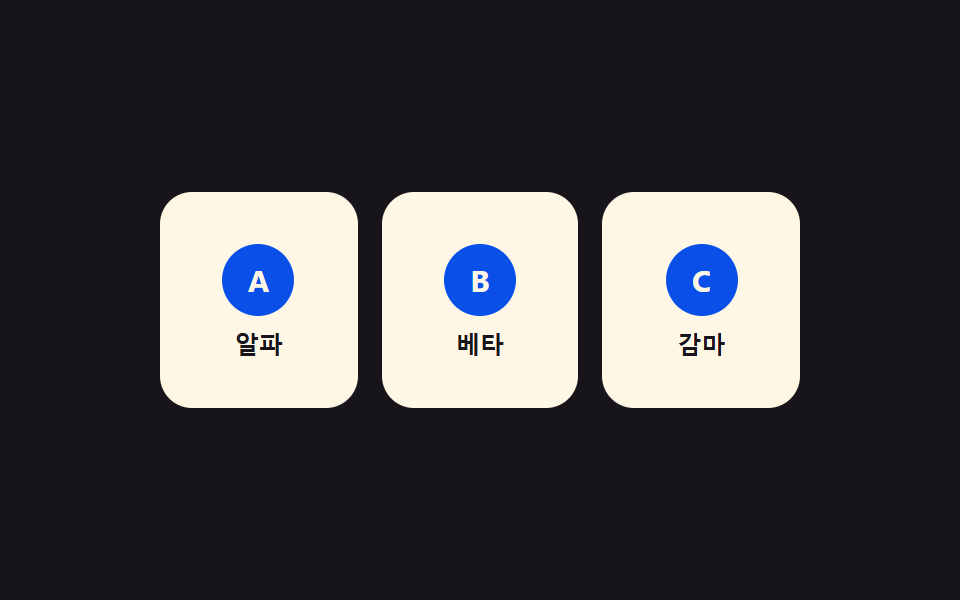
<main class="stage">
<div class="np is-demo" id="np">
  <div class="np__grid" id="npGrid">
    <button type="button" class="np__card" id="npCard0" data-id="0" aria-label="Open Alpha">
      <span class="np__badge">A</span><span class="np__t">Alpha</span>
    </button>
    <button type="button" class="np__card" id="npCard1" data-id="1" aria-label="Open Beta">
      <span class="np__badge">B</span><span class="np__t">Beta</span>
    </button>
    <button type="button" class="np__card" id="npCard2" data-id="2" aria-label="Open Gamma">
      <span class="np__badge">C</span><span class="np__t">Gamma</span>
    </button>
  </div>
  <div class="np__detail" id="npDetail" hidden>
    <button type="button" class="np__back" id="npBack" aria-label="To list">Back</button>
    <span class="np__badge np__badge--lg" id="npDetailBadge">A</span>
    <p class="np__title" id="npDetailTitle">Alpha</p>
    <p class="np__desc">Name-tag value <code id="npName">card-0</code> matched</p>
  </div>
</div>
</main>
@use "../../../../site/static/demo-tokens" as *;
// ── 변수 3개 ──────────────────────────────────────────
$duration: $dur-enter;
$easing: $ease-spring;
$color: $subject-blue-deep;
@include stage($stage-ink);
.np { position: relative; width: min(100%, 320px); height: 200px; }
.np__grid {
display: grid; grid-template-columns: repeat(3, 1fr); gap: $sp-3;
width: 100%; height: 100%; align-content: center;
}
// [hidden] 은 UA 스타일시트라 같은 특이도의 author .np__grid{display:grid} 에 밀린다 —
// 명시적으로 덮어써야 실제로 사라진다(안 그러면 두 패널이 동시에 렌더돼 이름표 값이 겹친다)
.np__grid[hidden], .np__detail[hidden] { display: none; }
.np__card {
view-transition-name: none;
display: flex; flex-direction: column; align-items: center; justify-content: center; gap: $sp-2;
border: none; border-radius: $r-card; background: $subject-cream; cursor: pointer;
padding: $sp-4 $sp-2; height: 108px;
}
.np__card:focus-visible { outline: 2px solid $subject-cream; outline-offset: 2px; }
.np__badge {
display: grid; place-items: center; width: 36px; height: 36px; border-radius: $r-pill;
background: $color; color: $subject-cream; font: 700 15px/1 -apple-system, "Segoe UI", sans-serif;
}
.np__badge--lg { width: 56px; height: 56px; font-size: 22px; }
.np__t { font: 600 12px/1 -apple-system, "Segoe UI", sans-serif; color: $subject-ink; }
.np__detail {
position: relative; width: 100%; height: 100%; box-sizing: border-box;
display: flex; flex-direction: column; align-items: center; justify-content: center; gap: $sp-2;
border-radius: $r-card; background: $subject-cream; padding: $sp-4;
}
.np__back {
position: absolute; top: $sp-3; left: $sp-3; border: none; border-radius: $r-pill;
background: rgba($subject-ink, .1); color: $subject-ink; font: 700 11px/1 -apple-system, sans-serif;
padding: $sp-1 $sp-3; cursor: pointer;
}
.np__title { margin: 0; font: 700 18px/1 -apple-system, "Segoe UI", sans-serif; color: $subject-ink; }
.np__desc { margin: 0; font: 400 11px/1.4 -apple-system, sans-serif; color: rgba($subject-ink, .72); text-align: center; }
.np__desc code {
display: inline-block; margin-top: $sp-1; padding: $sp-1 $sp-2; border-radius: $r-xs;
background: rgba($subject-ink, .1); font: 700 11px/1.2 "Space Mono", monospace; color: $subject-ink;
}
// 실사용 원리: 열릴 카드와 상세 패널에 같은 view-transition-name 값을 순간적으로 실어
// document.startViewTransition() 을 부르면, 브라우저가 두 스냅샷의 위치·크기 차이를 자동으로 보간한다.
::view-transition-group(np-shared) {
animation-duration: $duration;
animation-timing-function: $easing;
}
@media (max-width: 340px) {
.np { height: 160px; }
.np__card { height: 80px; padding: $sp-2 $sp-1; gap: $sp-1; }
.np__badge { width: 26px; height: 26px; font-size: 12px; }
.np__detail { padding: $sp-3; gap: $sp-1; }
.np__title { font-size: 15px; }
.np__desc { font-size: 10px; }
}
@media (prefers-reduced-motion: reduce) {
::view-transition-group(*),
::view-transition-old(*),
::view-transition-new(*) { animation: none !important; }
}html, body {
margin: 0;
overflow: hidden;
}
.stage {
box-sizing: border-box;
min-height: 100vh;
display: grid;
place-items: center;
margin: 0;
background: #17141a;
font-family: -apple-system, "Segoe UI", "Noto Sans KR", sans-serif;
padding: clamp(8px, 4vw, 24px);
}
.np {
position: relative;
width: min(100%, 320px);
height: 200px;
}
.np__grid {
display: grid;
grid-template-columns: repeat(3, 1fr);
gap: 12px;
width: 100%;
height: 100%;
align-content: center;
}
.np__grid[hidden], .np__detail[hidden] {
display: none;
}
.np__card {
view-transition-name: none;
display: flex;
flex-direction: column;
align-items: center;
justify-content: center;
gap: 8px;
border: none;
border-radius: 16px;
background: #fff7e6;
cursor: pointer;
padding: 16px 8px;
height: 108px;
}
.np__card:focus-visible {
outline: 2px solid #fff7e6;
outline-offset: 2px;
}
.np__badge {
display: grid;
place-items: center;
width: 36px;
height: 36px;
border-radius: 999px;
background: #0a4fe8;
color: #fff7e6;
font: 700 15px/1 -apple-system, "Segoe UI", sans-serif;
}
.np__badge--lg {
width: 56px;
height: 56px;
font-size: 22px;
}
.np__t {
font: 600 12px/1 -apple-system, "Segoe UI", sans-serif;
color: #17141a;
}
.np__detail {
position: relative;
width: 100%;
height: 100%;
box-sizing: border-box;
display: flex;
flex-direction: column;
align-items: center;
justify-content: center;
gap: 8px;
border-radius: 16px;
background: #fff7e6;
padding: 16px;
}
.np__back {
position: absolute;
top: 12px;
left: 12px;
border: none;
border-radius: 999px;
background: rgba(23, 20, 26, 0.1);
color: #17141a;
font: 700 11px/1 -apple-system, sans-serif;
padding: 4px 12px;
cursor: pointer;
}
.np__title {
margin: 0;
font: 700 18px/1 -apple-system, "Segoe UI", sans-serif;
color: #17141a;
}
.np__desc {
margin: 0;
font: 400 11px/1.4 -apple-system, sans-serif;
color: rgba(23, 20, 26, 0.72);
text-align: center;
}
.np__desc code {
display: inline-block;
margin-top: 4px;
padding: 4px 8px;
border-radius: 4px;
background: rgba(23, 20, 26, 0.1);
font: 700 11px/1.2 "Space Mono", monospace;
color: #17141a;
}
::view-transition-group(np-shared) {
animation-duration: 600ms;
animation-timing-function: cubic-bezier(0.2, 0.8, 0.2, 1);
}
@media (max-width: 340px) {
.np {
height: 160px;
}
.np__card {
height: 80px;
padding: 8px 4px;
gap: 4px;
}
.np__badge {
width: 26px;
height: 26px;
font-size: 12px;
}
.np__detail {
padding: 12px;
gap: 4px;
}
.np__title {
font-size: 15px;
}
.np__desc {
font-size: 10px;
}
}
@media (prefers-reduced-motion: reduce) {
::view-transition-group(*),
::view-transition-old(*),
::view-transition-new(*) {
animation: none !important;
}
}(function () {
var SUPPORTS_VT = 'startViewTransition' in document;
var root = document.getElementById('np');
var grid = document.getElementById('npGrid');
var detail = document.getElementById('npDetail');
var back = document.getElementById('npBack');
var cards = [0, 1, 2].map(function (i) { return document.getElementById('npCard' + i); });
var detailBadge = document.getElementById('npDetailBadge');
var detailTitle = document.getElementById('npDetailTitle');
var nameEl = document.getElementById('npName');
var DATA = [{ b: 'A', t: 'Alpha' }, { b: 'B', t: 'Beta' }, { b: 'C', t: 'Gamma' }];
var HOLD_MS = 1000;
var reduce = window.matchMedia('(prefers-reduced-motion: reduce)').matches;
var opened = null;
var isDemo = true;
function human() {
if (isDemo) { root.classList.remove('is-demo'); isDemo = false; }
}
// 계산 겹: Name-tag value(view-transition-name)을 그 순간 선택된 카드 하나에만 실어 보낸다 —
// 모든 카드에 상시 부여하면 이름이 겹쳐 매칭이 깨진다. 값은 매번 새로 계산해서 준다.
function assignName(id, on) {
cards[id].style.viewTransitionName = on ? 'np-shared' : '';
}
function openRender(id) {
if (opened !== null) assignName(opened, false);
assignName(id, true);
detail.style.viewTransitionName = 'np-shared';
grid.hidden = true;
detail.hidden = false;
detailBadge.textContent = DATA[id].b;
detailTitle.textContent = DATA[id].t;
nameEl.textContent = 'card-' + id;
opened = id;
}
function closeRender() {
detail.hidden = true;
grid.hidden = false;
if (opened !== null) assignName(opened, false);
detail.style.viewTransitionName = '';
opened = null;
}
function change(fn) {
if (SUPPORTS_VT) { document.startViewTransition(fn); }
else { fn(); }
}
function open(id) {
if (opened === id) return;
change(function () { openRender(id); });
}
function close() {
if (opened === null) return;
change(closeRender);
}
cards.forEach(function (c, i) {
c.addEventListener('click', function () { human(); open(i); });
});
back.addEventListener('click', function () { human(); close(); });
root.addEventListener('keydown', function (e) {
if (e.key === 'Escape') { human(); close(); }
});
var seq = [0, 1, 2];
var si = 0;
function loop() {
if (!isDemo) return;
if (opened === null) { open(seq[si % seq.length]); si++; }
else { close(); }
window.setTimeout(loop, HOLD_MS);
}
if (!reduce) {
window.setTimeout(loop, HOLD_MS);
} else {
root.classList.remove('is-demo');
}
})();// NameTagPairSwap — vanilla 판(run/401/demo/01-view-transition-name-pair-swap/index.html) 의 React 포트.
// 카드와 상세 패널에 같은 view-transition-name 값(np-shared)을 그 순간에만 실어 startViewTransition 을 부른다.
import { useEffect, useRef } from "react";
import styles from "./NameTagPairSwap.module.scss";
type Box<T> = { current: T };
const DATA = [
{ b: "A", t: "알파" },
{ b: "B", t: "베타" },
{ b: "C", t: "감마" },
];
const HOLD_MS = 1000;
export default function NameTagPairSwap() {
const rootRef = useRef(null) as unknown as Box<HTMLDivElement>;
const gridRef = useRef(null) as unknown as Box<HTMLDivElement>;
const detailRef = useRef(null) as unknown as Box<HTMLDivElement>;
const cardRefs = useRef([null, null, null]) as unknown as Box<(HTMLButtonElement | null)[]>;
const badgeRef = useRef(null) as unknown as Box<HTMLElement>;
const titleRef = useRef(null) as unknown as Box<HTMLElement>;
const nameRef = useRef(null) as unknown as Box<HTMLElement>;
const timerRef = useRef(0) as unknown as Box<number>;
useEffect(() => {
const SUPPORTS_VT = "startViewTransition" in document;
const reduce = window.matchMedia("(prefers-reduced-motion: reduce)").matches;
let isDemo = true;
let opened: number | null = null;
function human() {
if (isDemo) { rootRef.current?.classList.remove(styles.isDemo); isDemo = false; }
}
// 계산 겹: 이름표 값(view-transition-name)을 그 순간 선택된 카드 하나에만 실어 보낸다 —
// 모든 카드에 상시 부여하면 이름이 겹쳐 매칭이 깨진다. 값은 매번 새로 계산해서 준다.
function assignName(id: number, on: boolean) {
const c = cardRefs.current[id];
if (c) c.style.viewTransitionName = on ? "np-shared" : "";
}
function openRender(id: number) {
if (opened !== null) assignName(opened, false);
assignName(id, true);
const detail = detailRef.current;
const grid = gridRef.current;
if (detail) detail.style.viewTransitionName = "np-shared";
grid?.setAttribute("hidden", "");
detail?.removeAttribute("hidden");
if (badgeRef.current) badgeRef.current.textContent = DATA[id].b;
if (titleRef.current) titleRef.current.textContent = DATA[id].t;
if (nameRef.current) nameRef.current.textContent = "card-" + id;
opened = id;
}
function closeRender() {
detailRef.current?.setAttribute("hidden", "");
gridRef.current?.removeAttribute("hidden");
if (opened !== null) assignName(opened, false);
if (detailRef.current) detailRef.current.style.viewTransitionName = "";
opened = null;
}
function change(fn: () => void) {
if (SUPPORTS_VT) { document.startViewTransition(fn); }
else { fn(); }
}
function open(id: number) {
if (opened === id) return;
change(() => openRender(id));
}
function close() {
if (opened === null) return;
change(closeRender);
}
function onCardClick(i: number) { return () => { human(); open(i); }; }
const clickHandlers = [0, 1, 2].map(onCardClick);
cardRefs.current.forEach((c, i) => c?.addEventListener("click", clickHandlers[i]));
function onBackClick() { human(); close(); }
detailRef.current; // noop keep ref referenced
const backBtn = rootRef.current?.querySelector<HTMLButtonElement>("[data-back]");
backBtn?.addEventListener("click", onBackClick);
function onKeydown(e: KeyboardEvent) {
if (e.key === "Escape") { human(); close(); }
}
rootRef.current?.addEventListener("keydown", onKeydown);
const seq = [0, 1, 2];
let si = 0;
function loop() {
if (!isDemo) return;
if (opened === null) { open(seq[si % seq.length]); si++; }
else { close(); }
timerRef.current = window.setTimeout(loop, HOLD_MS);
}
if (!reduce) {
timerRef.current = window.setTimeout(loop, HOLD_MS);
} else {
rootRef.current?.classList.remove(styles.isDemo);
}
return () => {
window.clearTimeout(timerRef.current);
cardRefs.current.forEach((c, i) => c?.removeEventListener("click", clickHandlers[i]));
backBtn?.removeEventListener("click", onBackClick);
rootRef.current?.removeEventListener("keydown", onKeydown);
};
}, []);
return (
<main className={styles.stage}>
<div className={styles.np + " " + styles.isDemo} ref={rootRef}>
<div className={styles.grid} ref={gridRef}>
<button type="button" className={styles.card} aria-label="알파 열기" ref={(el: HTMLButtonElement | null) => { cardRefs.current[0] = el; }}>
<span className={styles.badge}>A</span><span className={styles.t}>알파</span>
</button>
<button type="button" className={styles.card} aria-label="베타 열기" ref={(el: HTMLButtonElement | null) => { cardRefs.current[1] = el; }}>
<span className={styles.badge}>B</span><span className={styles.t}>베타</span>
</button>
<button type="button" className={styles.card} aria-label="감마 열기" ref={(el: HTMLButtonElement | null) => { cardRefs.current[2] = el; }}>
<span className={styles.badge}>C</span><span className={styles.t}>감마</span>
</button>
</div>
<div className={styles.detail} ref={detailRef} hidden>
<button type="button" className={styles.back} data-back aria-label="목록으로">뒤로</button>
<span className={styles.badge + " " + styles.badgeLg} ref={badgeRef}>A</span>
<p className={styles.title} ref={titleRef}>알파</p>
<p className={styles.desc}>이름표 값 <code ref={nameRef}>card-0</code>로 짝지어졌다</p>
</div>
</div>
</main>
);
}01 Transition That Pairs Elements by a Unique Name Value — Measured area 44.292% · moving frames 7/23Original by GODRICH · SCSS and React ship in the zip · View Transitions API: 9 Patterns by One Value
The post this demo lives in
 View Transitions API: 9 Patterns by One ValueView transitions api: The page seems to carry over, but the browser keeps the outgoing view as a snapshot value layered See all demos in this post
If you like this effect - similar demos
 Transitions02 Icon fill-swap toggle — when the selected tab changes, that spot's fill-amount value switches from low to fullCSS Bottom Navigation Bar: 9 Transition Patterns
 Transitions02 Transition a Magnetic Pull-strength Value Assembles In9 CSS Page Transition Effects, Canvas Particles
 Transitions05 Rubber-band drag close — a drag distance value that meets growing resistance past a thresholdCart Drawer UI Patterns: 9 Motion Techniques