03A String Whose Overtones Depend on Where It Was Struck
Each overtone gets its own size from the point where the hammer landed, the string shape is the sum of those vibrations, and higher overtones fade first until one smooth bow is left.
Best forSound-physics figure in music class material
STRIKE_POINTDECAY_BASE_MSpartialSizes
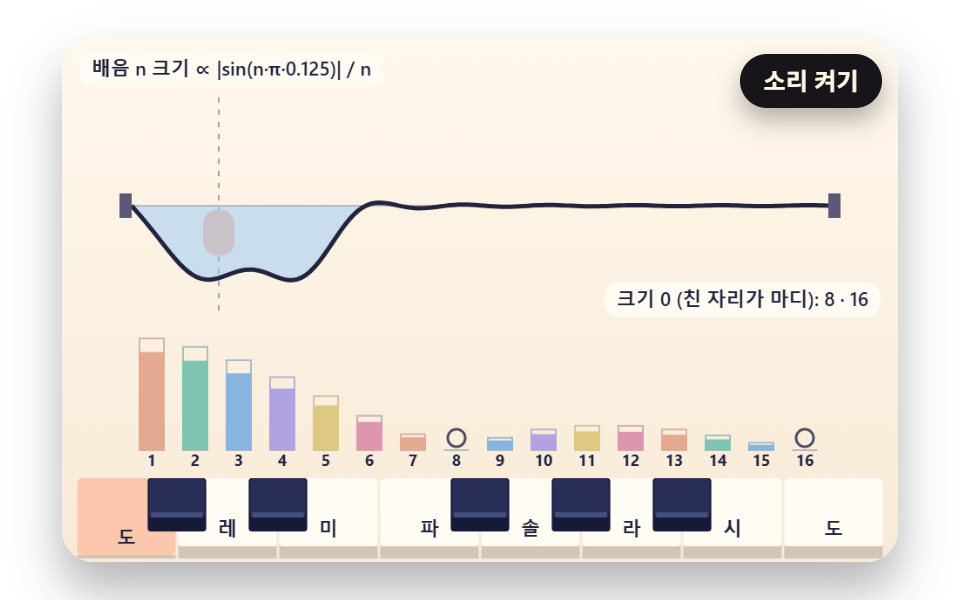
<main class="stage">
<div class="pn is-demo" id="pn">
  <canvas class="pn__canvas" data-role="canvas" width="480" height="300" role="img" aria-label="String vibration and overtone bars, each overtone sized by where the hammer struck."></canvas>
  <div class="pn__keys" data-role="keys" data-key-class="pn__key" role="group" aria-label="Keys — computer keys A S D F G H J K play white keys, W E T Y U play black keys"></div>
  <button class="pn__sound" data-role="sound" type="button" aria-pressed="false">Sound on</button>
  <p class="pn__live" data-role="live" aria-live="polite"></p>
</div>
</main>
@use "../../../../site/static/demo-tokens" as *;
@include stage($stage-paper);
.pn {
position: relative;
width: min(92vw, calc(160vh - 12.8vw));
aspect-ratio: 480 / 300;
margin: 0 auto;
border-radius: $r-card;
// clip — 화면 밖 건반 버튼에 포커스가 가도 상자가 스크롤되지 않는다(hidden 은 스크롤될 수 있다)
overflow: clip;
box-shadow: $shadow-raised;
background: $subject-cream;
}
.pn__canvas {
position: absolute;
inset: 0;
display: block;
width: 100%;
height: 100%;
}
// 건반 버튼 층 — 그림과 같은 자리에 투명 버튼을 겹친다. 층 자체는 포인터를 통과시키고 버튼만 받는다
.pn__keys {
position: absolute;
inset: 0;
pointer-events: none;
}
.pn__key {
position: absolute;
margin: 0;
padding: 0;
border: 0;
border-radius: $r-xs;
background: transparent;
pointer-events: auto;
cursor: pointer;
touch-action: none;
-webkit-tap-highlight-color: transparent;
}
// 포커스 링 — 진한 테두리 + 안쪽 크림 테두리 두 겹이라 상아 건반·남색 건반 어디서나 보인다
.pn__key:focus-visible {
outline: 2px solid $subject-ink;
outline-offset: -2px;
box-shadow: inset 0 0 0 4px $subject-cream;
}
.pn__sound {
position: absolute;
top: $sp-2;
right: $sp-2;
padding: $sp-1 $sp-3;
border: 0;
border-radius: $r-pill;
background: $subject-ink;
color: $subject-cream;
font-family: inherit;
font-weight: 700;
font-size: 12px;
line-height: 1.6;
cursor: pointer;
box-shadow: $shadow-press;
}
.pn__sound[aria-pressed="true"] {
background: $subject-cream;
color: $subject-ink;
outline: 2px solid $subject-ink;
outline-offset: -2px;
}
.pn__sound:focus-visible {
outline: 2px solid $subject-ink;
outline-offset: 2px;
}
// 화면에서는 숨기고 화면 낭독기는 읽는 알림 줄 — display: none 이 아니라 1px 상자로 줄여 접근성 트리에 남긴다
.pn__live {
position: absolute;
width: 1px;
height: 1px;
margin: 0;
padding: 0;
overflow: hidden;
clip-path: inset(50%);
white-space: nowrap;
border: 0;
}
@media (max-width: 340px) {
.pn__sound { font-size: 11px; padding: $sp-1 $sp-2; }
}
// 동작 줄이기 — 장면은 스크립트가 루프 없는 정지 판으로 바꾼다(matchMedia change 리스너). 여기서는 버튼 그림자만 거둔다
@media (prefers-reduced-motion: reduce) {
.pn__sound { box-shadow: none !important; }
}html, body {
margin: 0;
overflow: hidden;
}
.stage {
box-sizing: border-box;
min-height: 100vh;
display: grid;
place-items: center;
margin: 0;
background: #ffffff;
font-family: -apple-system, "Segoe UI", "Noto Sans KR", sans-serif;
padding: clamp(8px, 4vw, 24px);
}
.pn {
position: relative;
width: min(92vw, 160vh - 12.8vw);
aspect-ratio: 480/300;
margin: 0 auto;
border-radius: 16px;
overflow: clip;
box-shadow: 0 14px 24px rgba(23, 20, 26, 0.32);
background: #fff7e6;
}
.pn__canvas {
position: absolute;
inset: 0;
display: block;
width: 100%;
height: 100%;
}
.pn__keys {
position: absolute;
inset: 0;
pointer-events: none;
}
.pn__key {
position: absolute;
margin: 0;
padding: 0;
border: 0;
border-radius: 4px;
background: transparent;
pointer-events: auto;
cursor: pointer;
touch-action: none;
-webkit-tap-highlight-color: transparent;
}
.pn__key:focus-visible {
outline: 2px solid #17141a;
outline-offset: -2px;
box-shadow: inset 0 0 0 4px #fff7e6;
}
.pn__sound {
position: absolute;
top: 8px;
right: 8px;
padding: 4px 12px;
border: 0;
border-radius: 999px;
background: #17141a;
color: #fff7e6;
font-family: inherit;
font-weight: 700;
font-size: 12px;
line-height: 1.6;
cursor: pointer;
box-shadow: 0 6px 12px rgba(23, 20, 26, 0.32);
}
.pn__sound[aria-pressed=true] {
background: #fff7e6;
color: #17141a;
outline: 2px solid #17141a;
outline-offset: -2px;
}
.pn__sound:focus-visible {
outline: 2px solid #17141a;
outline-offset: 2px;
}
.pn__live {
position: absolute;
width: 1px;
height: 1px;
margin: 0;
padding: 0;
overflow: hidden;
clip-path: inset(50%);
white-space: nowrap;
border: 0;
}
@media (max-width: 340px) {
.pn__sound {
font-size: 11px;
padding: 4px 8px;
}
}
@media (prefers-reduced-motion: reduce) {
.pn__sound {
box-shadow: none !important;
}
}(function () {
const root = document.getElementById("pn");
if (!root) return;
const W = 480;
const H = 300;
const FIXED_DT = 16;
const DT_SEC = FIXED_DT / 1000;
const TAU = Math.PI * 2;
// 파스텔 팔레트 — 크림 바탕, 상아 흰건반, 짙은 남색 검은건반. 음 이름 글자는 진한 INK 로 읽힌다
const BG_TOP = [255, 248, 236];
const BG_LOW = [248, 234, 216];
const IVORY = [255, 252, 244];
const IVORY_SHADE = [236, 226, 210];
const IVORY_SIDE = [212, 198, 180];
const NAVY = [40, 46, 88];
const NAVY_TOP = [70, 78, 128];
const NAVY_SIDE = [22, 26, 56];
const INK = [34, 36, 62];
const INK_SOFT = [92, 88, 118];
const PEACH = [255, 188, 156];
const MINT = [140, 218, 192];
const SKY = [150, 200, 246];
const LILAC = [196, 180, 248];
const LEMON = [248, 224, 140];
const ROSE = [246, 166, 188];
const GLOWS = [PEACH, MINT, SKY, LILAC, LEMON, ROSE];
const FONT_FAMILY = '"Segoe UI", "Malgun Gothic", "Hiragino Sans", "Noto Sans KR", sans-serif';
// 음 이름 — 음 번호를 12 로 나눈 나머지(0 = C)로 고른다. 로케일마다 문구.json 이 바꾼다
const NOTE_NAMES = ['C', 'C♯', 'D', 'D♯', 'E', 'F', 'F♯', 'G', 'G♯', 'A', 'A♯', 'B'];
const BLACK_PCS = [1, 3, 6, 8, 10];
function pcOf(m) { return ((m % 12) + 12) % 12; }
function isBlack(m) { return BLACK_PCS.indexOf(pcOf(m)) >= 0; }
function noteName(m) { return NOTE_NAMES[pcOf(m)]; }
// 음 높이 — 69번 음(가운데 C 위의 A)을 440Hz 로 두고 반음 하나마다 2^(1/12) 배
const A4_MIDI = 69;
const A4_HZ = 440;
function freqOf(m) { return A4_HZ * Math.pow(2, (m - A4_MIDI) / 12); }
function clamp(v, lo, hi) { return v < lo ? lo : (v > hi ? hi : v); }
function lerp(a, b, k) { return a + (b - a) * k; }
function smooth(x) { const c = clamp(x, 0, 1); return c * c * (3 - 2 * c); }
function rgba(c, a) {
return 'rgba(' + Math.round(clamp(c[0], 0, 255)) + ',' + Math.round(clamp(c[1], 0, 255)) + ',' + Math.round(clamp(c[2], 0, 255)) + ',' + clamp(a, 0, 1).toFixed(3) + ')';
}
function mixRGB(a, b, k) { return [lerp(a[0], b[0], k), lerp(a[1], b[1], k), lerp(a[2], b[2], k)]; }
// 시드 고정 난수 — 같은 시드면 같은 불꽃·흔들림이 다시 나온다 (32비트 정수 섞기)
function makeRng(seed) {
let s = seed >>> 0;
return function () {
s = (s + 0x6d2b79f5) >>> 0;
let t = s;
t = Math.imul(t ^ (t >>> 15), t | 1);
t ^= t + Math.imul(t ^ (t >>> 7), t | 61);
return ((t ^ (t >>> 14)) >>> 0) / 4294967296;
};
}
// key 스프링 — 가속도 = −강성 × (위치 − 목표) − 감쇠 × 속도. 위치 1 은 key 바닥, 넘으면 KEYBED_BOUNCE 만큼만 되튄다
const KEY_SPRING_STIFFNESS = 420;
const KEY_SPRING_DAMPING = 16;
const KEYBED_BOUNCE = 0.3;
function makeSpring() { return { x: 0, v: 0, target: 0 }; }
function stepSpring(s, k, c, dt) {
const a = -k * (s.x - s.target) - c * s.v;
s.v += a * dt;
s.x += s.v * dt;
if (s.x > 1) {
s.x = 1;
s.v = -s.v * KEYBED_BOUNCE;
}
}
// 음마다 스프링 하나 — 치면 목표 1(바닥)로, 세기 × PRESS_KICK 만큼 아래로 밀어 넣는 속도 덤을 얹는다. 떼면 목표 0
const PRESS_KICK = 14;
const springs = new Map();
function springOf(m) {
let s = springs.get(m);
if (!s) {
s = makeSpring();
springs.set(m, s);
}
return s;
}
function stepSprings() {
springs.forEach(function (s) { stepSpring(s, KEY_SPRING_STIFFNESS, KEY_SPRING_DAMPING, DT_SEC); });
}
function resetSprings() {
springs.forEach(function (s) { s.x = 0; s.v = 0; s.target = 0; });
}
function pressSpring(m, vel) {
const s = springOf(m);
s.target = 1;
s.v += vel * PRESS_KICK;
}
function releaseSpring(m) { springOf(m).target = 0; }
function keyDepth(m) { const s = springs.get(m); return s ? shown(s) : 0; }
function keyTint(m) { return isHeld(m) ? 1 : clamp(keyDepth(m), 0, 1); }
function keyGlow(m) { return GLOWS[pcOf(m) % GLOWS.length]; }
// 평평한 key string — lo~hi 음을 x0~x1 폭에 흰건반 기준으로 고르게 놓고, 검은건반은 흰건반 경계 위에 좁고 짧게
const BLACK_WIDTH_RATIO = 0.58;
const BLACK_HEIGHT_RATIO = 0.62;
function whiteCount(lo, hi) {
let n = 0;
for (let m = lo; m <= hi; m += 1) {
if (!isBlack(m)) {
n += 1;
}
}
return n;
}
function layoutFlat(lo, hi, x0, x1, top, bottom) {
const ww = (x1 - x0) / whiteCount(lo, hi);
const whites = [];
const blacks = [];
let i = 0;
for (let m = lo; m <= hi; m += 1) {
if (isBlack(m)) {
const bw = ww * BLACK_WIDTH_RATIO;
blacks.push({ midi: m, black: true, x: x0 + i * ww - bw / 2, y: top, w: bw, h: (bottom - top) * BLACK_HEIGHT_RATIO });
}
else {
whites.push({ midi: m, black: false, x: x0 + i * ww, y: top, w: ww, h: bottom - top });
i += 1;
}
}
return whites.concat(blacks);
}
// 컴퓨터 자판 한 string = 한 옥타브 — 가운데 string A S D F G H J K 가 흰건반, 윗줄 W E T Y U 가 검은건반 (자판 배열과 상관없이 ev.code 로)
const KEY_CODES = ['KeyA', 'KeyW', 'KeyS', 'KeyE', 'KeyD', 'KeyF', 'KeyT', 'KeyG', 'KeyY', 'KeyH', 'KeyU', 'KeyJ', 'KeyK'];
// 동시 음 수 상한 — 열 음을 한꺼번에 눌러도 MAX_VOICES 개만 울리고, 넘치면 가장 오래된 음을 놓는다. 화면도 같은 상한으로 그린다
const MAX_VOICES = 6;
const voices = [];
function allocVoice(pool, midi, startMs, auto) {
const freed = [];
for (let i = pool.length - 1; i >= 0; i -= 1) {
if (pool[i].midi === midi) {
freed.push(pool[i]);
pool.splice(i, 1);
}
}
while (pool.length >= MAX_VOICES) {
const old = pool.shift();
if (old) {
freed.push(old);
}
}
pool.push({ midi: midi, startMs: startMs, auto: auto, nodes: null, gain: null });
return freed;
}
function findVoice(midi) {
for (let i = 0; i < voices.length; i += 1) {
if (voices[i].midi === midi) {
return voices[i];
}
}
return null;
}
// 소리 — 기본 꺼짐. AudioContext 는 「Sound on」 버튼의 클릭 핸들러(tail) 안에서만 만든다
let audio = null;
let master = null;
let soundOn = false;
// 두 시계 맞추기 — 소리를 켠 순간의 오디오 시각(초)과 화면 시계(ms)를 짝으로 적어 두고, 그 뒤로는 오디오 시계로 화면 시계를 끈다
let audioBaseSec = 0;
let clockBaseMs = 0;
function screenToAudioSec(ms) { return audioBaseSec + (ms - clockBaseMs) / 1000; }
function audioToScreenMs(sec) { return clockBaseMs + (sec - audioBaseSec) * 1000; }
// 오실레이터 합성 — 사인파 배음 넷(크기 PARTIAL_GAINS)을 더하고, 치는 순간 ATTACK_SEC 만에 올라갔다 DECAY_SEC 동안 잦아든다
const PARTIAL_GAINS = [1, 0.42, 0.18, 0.08];
const ATTACK_SEC = 0.006;
const DECAY_SEC = 1.6;
const RELEASE_SEC = 0.09;
const MASTER_GAIN = 0.16;
function synthStart(v, vel, atMs) {
if (!audio || !master || !soundOn) {
return;
}
const t0 = Math.max(audio.currentTime, screenToAudioSec(atMs));
const g = audio.createGain();
g.gain.setValueAtTime(0.0001, t0);
g.gain.linearRampToValueAtTime(0.25 + 0.75 * vel, t0 + ATTACK_SEC);
g.gain.exponentialRampToValueAtTime(0.0001, t0 + DECAY_SEC);
g.connect(master);
const f = freqOf(v.midi);
const nodes = [];
for (let i = 0; i < PARTIAL_GAINS.length; i += 1) {
const o = audio.createOscillator();
const pg = audio.createGain();
o.type = 'sine';
o.frequency.setValueAtTime(f * (i + 1), t0);
pg.gain.setValueAtTime(PARTIAL_GAINS[i] / PARTIAL_GAINS.length, t0);
o.connect(pg);
pg.connect(g);
o.start(t0);
o.stop(t0 + DECAY_SEC + 0.05);
nodes.push(o);
}
v.nodes = nodes;
v.gain = g;
}
function synthStop(v, atMs) {
if (!audio || !v.gain || !v.nodes) {
return;
}
const t0 = Math.max(audio.currentTime, screenToAudioSec(atMs));
v.gain.gain.cancelScheduledValues(t0);
v.gain.gain.setTargetAtTime(0.0001, t0, RELEASE_SEC / 3);
for (let i = 0; i < v.nodes.length; i += 1) {
try {
v.nodes[i].stop(t0 + RELEASE_SEC * 2);
}
catch (e) { /* 이미 멈춘 노드 */ }
}
v.nodes = null;
v.gain = null;
}
const canvasEl = root.querySelector('[data-role="canvas"]');
const keysEl = root.querySelector('[data-role="keys"]');
const soundEl = root.querySelector('[data-role="sound"]');
const liveEl = root.querySelector('[data-role="live"]');
const ctxRaw = canvasEl ? canvasEl.getContext('2d') : null;
if (!canvasEl || !ctxRaw || !keysEl || !soundEl || !liveEl) {
return;
}
const cv = canvasEl;
const ctx = ctxRaw;
const keysBox = keysEl;
const soundBtn = soundEl;
const live = liveEl;
const reduceQuery = window.matchMedia('(prefers-reduced-motion: reduce)');
// 페이지를 연 채 동작 줄이기 설정을 바꿔도 change 리스너가 이 값을 다시 읽는다
let still = reduceQuery.matches;
// 자동 시연 중인가 — 사람이 처음 손대면 시연 표시를 뗀다
let demo = root.classList.contains('is-demo');
const off = new AbortController();
function fitCanvas() {
// 배율은 2 에서 자른다 — 배율 3 기기에서 화소가 2.25배로 늘어 프레임마다 일이 그만큼 커지지 않게
const dpr = Math.min(window.devicePixelRatio || 1, 2);
cv.width = Math.round(W * dpr);
cv.height = Math.round(H * dpr);
ctx.setTransform(dpr, 0, 0, dpr, 0, 0);
}
function clearStage(top, low) {
const g = ctx.createLinearGradient(0, 0, 0, H);
g.addColorStop(0, rgba(top, 1));
g.addColorStop(1, rgba(low, 1));
ctx.fillStyle = g;
ctx.fillRect(0, 0, W, H);
}
function fontOf(size, weight) { return weight + ' ' + size.toFixed(1) + 'px ' + FONT_FAMILY; }
function roundRectPath(x, y, w, h, r) {
const rr = Math.min(r, w / 2, h / 2);
ctx.beginPath();
ctx.moveTo(x + rr, y);
ctx.arcTo(x + w, y, x + w, y + h, rr);
ctx.arcTo(x + w, y + h, x, y + h, rr);
ctx.arcTo(x, y + h, x, y, rr);
ctx.arcTo(x, y, x + w, y, rr);
ctx.closePath();
}
// 판 위 설명 글 — 크림 알약 바탕에 진한 글자. 돌려주는 값은 알약 폭
function drawCaption(text, x, y, alignRight) {
ctx.font = fontOf(11, 600);
const bw = ctx.measureText(text).width + 14;
const bx = alignRight ? x - bw : x;
ctx.fillStyle = rgba(IVORY, 0.92);
roundRectPath(bx, y, bw, 20, 8);
ctx.fill();
ctx.fillStyle = rgba(INK, 1);
ctx.textAlign = 'left';
ctx.textBaseline = 'middle';
ctx.fillText(text, bx + 7, y + 10.5);
return bw;
}
// 평평한 key 그리기 — depth(m) 0~1 만큼 앞쪽이 내려가 앞턱이 얇아지고, tint(m) 0~1 만큼 그 음의 빛깔로 물든다. ox 는 가로로 밀린 만큼(보이는 창의 왼쪽 끝)
const KEY_LIP = 7;
function drawFlatKeys(keys, depth, tint, glow, names, ox = 0) {
ctx.save();
ctx.translate(-ox, 0);
for (let i = 0; i < keys.length; i += 1) {
const k = keys[i];
if (k.black || k.x - ox > W || k.x + k.w - ox < 0) {
continue;
}
const d = clamp(depth(k.midi), -0.2, 1);
const drop = d * (KEY_LIP - 2);
const face = mixRGB(mixRGB(IVORY, IVORY_SHADE, Math.max(0, d) * 0.6), glow(k.midi), tint(k.midi) * 0.75);
ctx.fillStyle = rgba(face, 1);
roundRectPath(k.x + 0.75, k.y, k.w - 1.5, k.h - KEY_LIP + drop, 3);
ctx.fill();
ctx.fillStyle = rgba(IVORY_SIDE, 1);
ctx.fillRect(k.x + 0.75, k.y + k.h - KEY_LIP + drop, k.w - 1.5, KEY_LIP - drop);
if (names && k.w >= 14) {
ctx.font = fontOf(Math.min(11, k.w * 0.42), 700);
ctx.textAlign = 'center';
ctx.textBaseline = 'alphabetic';
ctx.fillStyle = rgba(INK, 1);
ctx.fillText(noteName(k.midi), k.x + k.w / 2, k.y + k.h - KEY_LIP - 6 + drop);
}
}
for (let i = 0; i < keys.length; i += 1) {
const k = keys[i];
if (!k.black || k.x - ox > W || k.x + k.w - ox < 0) {
continue;
}
const d = clamp(depth(k.midi), -0.2, 1);
const drop = d * 4;
const face = mixRGB(NAVY, glow(k.midi), tint(k.midi) * 0.55);
ctx.fillStyle = rgba(NAVY_SIDE, 1);
roundRectPath(k.x, k.y, k.w, k.h + 2, 2);
ctx.fill();
ctx.fillStyle = rgba(face, 1);
roundRectPath(k.x + 1, k.y, k.w - 2, k.h - 6 + drop, 2);
ctx.fill();
ctx.fillStyle = rgba(mixRGB(NAVY_TOP, glow(k.midi), tint(k.midi) * 0.5), 1);
ctx.fillRect(k.x + 2, k.y + k.h - 9 + drop, k.w - 4, 3);
}
ctx.restore();
}
// 친 자리와 배음 — string 하나(STRING_X0~STRING_X1)를 위에서, 아래에 배음 막대, 맨 아래 key string(가운데 도부터 한 옥타브)
const LO = 60;
const HI = 72;
const KB_TOP = 252;
const KB_BOTTOM = 298;
const STRING_X0 = 40;
const STRING_X1 = 440;
const STRING_Y = 96;
const AMP_PX = 50;
// 해머가 닿는 자리 — string 길이에 대한 비율. 1/8 이면 8번째 배음은 그 자리가 마디라 크기가 0
const STRIKE_POINT = 0.125;
const PARTIALS = 16;
// 배음 n 의 감쇠 시간 = DECAY_BASE_MS ÷ (1 + DECAY_SLOPE × (n − 1)) — 높은 배음일수록 먼저 잦아든다
const DECAY_BASE_MS = 2600;
const DECAY_SLOPE = 0.55;
// 화면용 떨림 빠르기 — 기본음이 VIS_HZ 번 떨고 n 번째 배음은 n 배 (실제 소리보다 수백 배 느리게)
const VIS_HZ = 1.3;
const ZERO_EPS = 0.02;
const BAR_X0 = 44;
const BAR_GAP = 25;
const BAR_W = 15;
const BAR_BASE = 236;
const BAR_MAX = 64;
const BEAT_MS = 400;
const LOOP_MS = 3200;
// 시연 — 도를 세게, 조금 뒤 솔을 조금 여리게
const SEQ = [[0.55, 60, 1.6, 0.9], [4.25, 67, 1.6, 0.8]];
const SIZE_LABEL = 'overtone n size ∝ |sin(n·π·{p})| / n';
const ZERO_LABEL = 'size 0 (node at strike point): {list}';
const NONE_LABEL = 'no overtone at size 0';
let keys = [];
let amps0 = [];
let norm = 1;
let strikeAt = -1e9;
let strikeMidi = 60;
let strikeVel = 0;
// 친 자리로 정해지는 배음 크기 — 해머가 p 에서 순간 속도를 주면 n 번째 모양 sin(nπx) 에 실리는 몫은 sin(nπp)/n
function partialSizes(p) {
const out = [];
for (let n = 1; n <= PARTIALS; n += 1) {
out.push(Math.sin(n * Math.PI * p) / n);
}
return out;
}
function decayMs(n) { return DECAY_BASE_MS / (1 + DECAY_SLOPE * (n - 1)); }
function zeroList(sizes) {
const out = [];
for (let i = 0; i < sizes.length; i += 1) {
if (Math.abs(sizes[i]) < ZERO_EPS) {
out.push(i + 1);
}
}
return out;
}
function build() {
keys = layoutFlat(LO, HI, 8, W - 8, KB_TOP, KB_BOTTOM);
amps0 = partialSizes(STRIKE_POINT);
let s = 0;
for (let i = 0; i < amps0.length; i += 1) {
s += Math.abs(amps0[i]);
}
norm = s > 0 ? 1 / s : 1;
}
function reset() { resetSprings(); strikeAt = -1e9; strikeVel = 0; }
function loopLength() { return LOOP_MS; }
function step(ms, prev) {
runSeq(SEQ, BEAT_MS, ms, prev);
stepSprings();
}
function finalScene() { strikeVel = 1; strikeMidi = LO; const s = springOf(LO); s.target = 1; s.x = 1; }
function onNoteOn(midi, vel, auto) {
pressSpring(midi, vel);
strikeAt = clock;
strikeMidi = midi;
strikeVel = vel;
}
function onNoteOff(midi, auto) { releaseSpring(midi); }
function keyBase() { return LO; }
function keyPan() { return 0; }
function onDrag(x, y, down) { }
function onKeyFocus(midi) { }
function onWake() { }
function keyRects() { return keys; }
// 지금 n 번째 배음의 크기 — 처음 크기 × 세기 × e^(−지난 시간 / 그 배음의 감쇠 시간)
function sizeNow(i, t) { return amps0[i] * strikeVel * Math.exp(-t / decayMs(i + 1)); }
// string 모양 — 배음마다 sin(nπx) 모양을 그 배음 빠르기로 떨게 해 더한다. 치는 순간은 평평하고 속도만 있다
function shapeAt(u, t) {
if (still) {
return 0;
}
const f = VIS_HZ * Math.sqrt(freqOf(strikeMidi) / freqOf(60));
let y = 0;
for (let i = 0; i < PARTIALS; i += 1) {
const n = i + 1;
y += sizeNow(i, t) * Math.sin(n * Math.PI * u) * Math.sin(TAU * n * f * t / 1000);
}
return y * norm * AMP_PX * 2.4;
}
function draw() {
clearStage(BG_TOP, BG_LOW);
const t = clock - strikeAt;
const sx = lerp(STRING_X0, STRING_X1, STRIKE_POINT);
// 친 자리 표시 — 점선과 hammer 머리(치는 순간 위로 솟았다 내려간다)
ctx.setLineDash([3, 4]);
ctx.strokeStyle = rgba(INK_SOFT, 0.55);
ctx.lineWidth = 1;
ctx.beginPath();
ctx.moveTo(sx, 34);
ctx.lineTo(sx, 160);
ctx.stroke();
ctx.setLineDash([]);
const lift = still ? 0 : Math.max(0, 1 - Math.abs(t - 60) / 120);
ctx.fillStyle = rgba(PEACH, 1);
roundRectPath(sx - 9, STRING_Y + 16 - lift * 14, 18, 26, 8);
ctx.fill();
// 줄과 쉼 string 사이를 칠한 떨림 면
const pts = [];
for (let i = 0; i <= 160; i += 1) {
const u = i / 160;
pts.push([lerp(STRING_X0, STRING_X1, u), STRING_Y + shapeAt(u, t)]);
}
ctx.beginPath();
ctx.moveTo(STRING_X0, STRING_Y);
for (let i = 0; i < pts.length; i += 1) {
ctx.lineTo(pts[i][0], pts[i][1]);
}
ctx.lineTo(STRING_X1, STRING_Y);
ctx.closePath();
ctx.fillStyle = rgba(SKY, 0.5);
ctx.fill();
ctx.strokeStyle = rgba(INK_SOFT, 0.35);
ctx.lineWidth = 1;
ctx.beginPath();
ctx.moveTo(STRING_X0, STRING_Y);
ctx.lineTo(STRING_X1, STRING_Y);
ctx.stroke();
ctx.strokeStyle = rgba(INK, 1);
ctx.lineWidth = 2.5;
ctx.beginPath();
for (let i = 0; i < pts.length; i += 1) {
if (i === 0) {
ctx.moveTo(pts[i][0], pts[i][1]);
}
else {
ctx.lineTo(pts[i][0], pts[i][1]);
}
}
ctx.stroke();
ctx.fillStyle = rgba(INK_SOFT, 1);
ctx.fillRect(STRING_X0 - 7, STRING_Y - 7, 7, 14);
ctx.fillRect(STRING_X1, STRING_Y - 7, 7, 14);
// 배음 막대 — 지금 크기(진한 면)와 처음 크기(옅은 테두리). 0 인 배음은 빈 동그라미
let top = 0;
for (let i = 0; i < PARTIALS; i += 1) {
top = Math.max(top, Math.abs(amps0[i]));
}
for (let i = 0; i < PARTIALS; i += 1) {
const x = BAR_X0 + i * BAR_GAP;
const h0 = Math.abs(amps0[i]) / top * BAR_MAX;
const hn = still ? h0 * strikeVel : Math.abs(sizeNow(i, t)) / top * BAR_MAX;
const c = GLOWS[i % GLOWS.length];
ctx.strokeStyle = rgba(mixRGB(c, INK, 0.3), 0.6);
ctx.lineWidth = 1;
ctx.strokeRect(x + 0.5, BAR_BASE - h0, BAR_W - 1, h0);
ctx.fillStyle = rgba(mixRGB(c, INK, 0.12), 1);
ctx.fillRect(x, BAR_BASE - hn, BAR_W, hn);
if (Math.abs(amps0[i]) < ZERO_EPS) {
ctx.strokeStyle = rgba(INK, 0.8);
ctx.lineWidth = 1.5;
ctx.beginPath();
ctx.arc(x + BAR_W / 2, BAR_BASE - 7, 5, 0, TAU);
ctx.stroke();
}
ctx.font = fontOf(9, 700);
ctx.textAlign = 'center';
ctx.textBaseline = 'top';
ctx.fillStyle = rgba(INK, 1);
ctx.fillText(String(i + 1), x + BAR_W / 2, BAR_BASE + 2);
}
drawCaption(SIZE_LABEL.replace('{p}', String(STRIKE_POINT)), 10, 8, false);
const z = zeroList(amps0);
drawCaption(z.length > 0 ? ZERO_LABEL.replace('{list}', z.join(' · ')) : NONE_LABEL, W - 10, 140, true);
drawFlatKeys(keys, keyDepth, keyTint, keyGlow, true);
}
// 계산을 마치고 그리기 시작했는가
let ready = false;
// 정리 뒤(리액트 언마운트)에 늦게 온 일이 다시 시작하지 않게
let alive = true;
// 화면 시계(ms) — 16ms 고정 스텝으로만 늘어난다. 소리가 켜져 있으면 오디오 시계가 목표를 정한다
let clock = 0;
let screenTarget = 0;
let prevLoop = 0;
// 사람이 마지막으로 친 시각 — HUMAN_QUIET_MS 동안 조용하면 자동 시연이 다시 이어진다
const HUMAN_QUIET_MS = 2500;
let lastHuman = -1e9;
function autoAllowed() { return demo || clock - lastHuman > HUMAN_QUIET_MS; }
// 스프링 값을 화면에 쓸 때 — 동작 줄이기면 흔들림 없이 목표 자리 그대로
function shown(s) { return still ? s.target : s.x; }
function wake() {
if (!demo) {
return;
}
demo = false;
root.classList.remove('is-demo');
onWake();
}
// 음 이름 알림 — 사람이 친 음은 GROUP_MS 안에 든 것끼리 한 줄로, 자동 시연은 한 마디(BAR_MS)에 한 번 모아서
const GROUP_MS = 250;
const BAR_MS = 2000;
const BAR_LABEL = 'Autoplay: {names}';
let groupNames = [];
let lastSpoken = -1e9;
let barNames = [];
let barIndex = 0;
function announce(midi, auto) {
const nm = noteName(midi);
if (auto) {
if (barNames.indexOf(nm) < 0) {
barNames.push(nm);
}
return;
}
if (clock - lastSpoken > GROUP_MS) {
groupNames = [];
}
if (groupNames.indexOf(nm) < 0) {
groupNames.push(nm);
}
lastSpoken = clock;
live.textContent = groupNames.join(' · ');
}
function flushBar() {
const b = Math.floor(clock / BAR_MS);
if (b === barIndex) {
return;
}
barIndex = b;
if (barNames.length > 0 && clock - lastSpoken > BAR_MS) {
live.textContent = BAR_LABEL.replace('{names}', barNames.join(' · '));
}
barNames = [];
}
// key 버튼 — 그림 위에 투명한 진짜 <button> 을 같은 자리에 겹친다. 눌린 동안 aria-pressed="true"
const keyButtons = new Map();
function setPressed(midi, on) {
const b = keyButtons.get(midi);
if (b) {
b.setAttribute('aria-pressed', on ? 'true' : 'false');
}
}
function isHeld(midi) { return findVoice(midi) !== null; }
function press(midi, vel, auto) {
if (!auto) {
lastHuman = clock;
wake();
}
const freed = allocVoice(voices, midi, clock, auto);
for (let i = 0; i < freed.length; i += 1) {
synthStop(freed[i], clock);
if (freed[i].midi !== midi) {
setPressed(freed[i].midi, false);
onNoteOff(freed[i].midi, auto);
}
}
const v = findVoice(midi);
if (v) {
synthStart(v, vel, clock);
}
setPressed(midi, true);
announce(midi, auto);
onNoteOn(midi, vel, auto);
if (still && ready) {
render();
}
}
function release(midi, auto) {
const v = findVoice(midi);
if (!v || (auto && !v.auto)) {
return;
}
voices.splice(voices.indexOf(v), 1);
synthStop(v, clock);
setPressed(midi, false);
onNoteOff(midi, auto);
if (still && ready) {
render();
}
}
function releaseAll() {
while (voices.length > 0) {
const v = voices[voices.length - 1];
release(v.midi, v.auto);
if (voices.indexOf(v) >= 0) {
voices.splice(voices.indexOf(v), 1);
}
}
}
// 악보 따라 치기 — 지난 시각(prev)부터 이번 시각(ms)까지 지나간 시작·끝을 찾는다. 한 바퀴 넘어가면 둘로 나눠 본다
function crossed(t, prev, ms) {
return prev <= ms ? (t > prev && t <= ms) : (t > prev || t <= ms);
}
function runSeq(seq, beatMs, ms, prev) {
for (let i = 0; i < seq.length; i += 1) {
const n = seq[i];
if (crossed((n[0] + n[2]) * beatMs, prev, ms)) {
release(n[1], true);
}
}
for (let i = 0; i < seq.length; i += 1) {
const n = seq[i];
if (crossed(n[0] * beatMs, prev, ms) && autoAllowed()) {
press(n[1], n[3], true);
}
}
}
// 포인터 자리를 판 좌표(480×300)로 — 화면에 보이는 캔버스 크기와 상관없이
function toBoard(ev) {
const r = cv.getBoundingClientRect();
return [(ev.clientX - r.left) * W / Math.max(1, r.width), (ev.clientY - r.top) * H / Math.max(1, r.height)];
}
function buildButtons() {
while (keysBox.firstChild) {
keysBox.removeChild(keysBox.firstChild);
}
keyButtons.clear();
const rects = keyRects();
for (let i = 0; i < rects.length; i += 1) {
const k = rects[i];
const b = document.createElement('button');
b.type = 'button';
b.className = keysBox.getAttribute('data-key-class') || '';
// 이름 + 옥타브 번호(가운데 C = 4) — 두 옥타브 이상인 판에서 같은 이름 건반을 낭독으로도 가른다
b.setAttribute('aria-label', noteName(k.midi) + String(Math.floor(k.midi / 12) - 1));
b.setAttribute('aria-pressed', isHeld(k.midi) ? 'true' : 'false');
b.style.left = (k.x / W * 100).toFixed(3) + '%';
b.style.top = (k.y / H * 100).toFixed(3) + '%';
b.style.width = (k.w / W * 100).toFixed(3) + '%';
b.style.height = (k.h / H * 100).toFixed(3) + '%';
const midi = k.midi;
b.addEventListener('pointerdown', function (ev) {
const r = b.getBoundingClientRect();
// key 앞쪽(아래)을 칠수록 세게 — 0.45~1
press(midi, 0.45 + 0.55 * clamp((ev.clientY - r.top) / Math.max(1, r.height), 0, 1), false);
}, { signal: off.signal });
b.addEventListener('pointerenter', function (ev) {
if ((ev.buttons & 1) === 1) {
press(midi, 0.7, false);
}
}, { signal: off.signal });
const up = function () { const v = findVoice(midi); if (v && !v.auto) {
release(midi, false);
} };
b.addEventListener('pointerup', up, { signal: off.signal });
b.addEventListener('pointerleave', up, { signal: off.signal });
b.addEventListener('pointercancel', up, { signal: off.signal });
// 키보드 — 포커스된 건반에서 Enter·Space 를 누르는 동안 눌리고, 떼면 놓인다
b.addEventListener('keydown', function (ev) {
if (ev.key !== 'Enter' && ev.key !== ' ') {
return;
}
ev.preventDefault();
if (!ev.repeat) {
press(midi, 0.75, false);
}
}, { signal: off.signal });
b.addEventListener('keyup', function (ev) {
if (ev.key !== 'Enter' && ev.key !== ' ') {
return;
}
ev.preventDefault();
up();
}, { signal: off.signal });
b.addEventListener('focus', function () { onKeyFocus(midi); }, { signal: off.signal });
keysBox.appendChild(b);
keyButtons.set(midi, b);
}
}
let panShown = 0;
function syncPan() {
const p = keyPan();
if (Math.abs(p - panShown) < 0.05) {
return;
}
panShown = p;
keysBox.style.transform = 'translateX(' + (-p / W * 100).toFixed(3) + '%)';
}
// 컴퓨터 자판 — 가운데 string 한 줄이 한 옥타브. 누르고 있는 동안 소리가 이어진다(자동 반복은 무시)
window.addEventListener('keydown', function (ev) {
const i = KEY_CODES.indexOf(ev.code);
if (i < 0 || ev.repeat || ev.ctrlKey || ev.metaKey || ev.altKey) {
return;
}
press(keyBase() + i, 0.75, false);
}, { signal: off.signal });
window.addEventListener('keyup', function (ev) {
const i = KEY_CODES.indexOf(ev.code);
if (i < 0) {
return;
}
const v = findVoice(keyBase() + i);
if (v && !v.auto) {
release(keyBase() + i, false);
}
}, { signal: off.signal });
root.addEventListener('pointermove', function (ev) {
const p = toBoard(ev);
onDrag(p[0], p[1], (ev.buttons & 1) === 1);
}, { signal: off.signal });
// Sound on — AudioContext 를 만드는 곳은 이 클릭 핸들러 하나뿐이다. 켜는 순간 화면 시계를 오디오 시계에 다시 맞춘다
const SOUND_ON_LABEL = 'Sound on';
const SOUND_OFF_LABEL = 'Sound off';
function syncClocks() {
if (!audio) {
return;
}
audioBaseSec = audio.currentTime;
clockBaseMs = clock;
screenTarget = clock;
}
soundBtn.addEventListener('click', function () {
if (!audio) {
audio = new AudioContext();
master = audio.createGain();
master.gain.value = MASTER_GAIN;
master.connect(audio.destination);
}
soundOn = !soundOn;
soundBtn.setAttribute('aria-pressed', soundOn ? 'true' : 'false');
soundBtn.textContent = soundOn ? SOUND_OFF_LABEL : SOUND_ON_LABEL;
if (soundOn) {
syncClocks();
audio.resume().then(syncClocks);
}
else {
for (let i = 0; i < voices.length; i += 1) {
synthStop(voices[i], clock);
}
screenTarget = clock;
}
wake();
}, { signal: off.signal });
function render() {
draw();
syncPan();
}
function tick() {
clock += FIXED_DT;
const ms = clock % loopLength();
step(ms, prevLoop);
prevLoop = ms;
flushBar();
}
let rafId = 0;
let lastTs = -1;
function frame(ts) {
if (still) {
rafId = 0;
return;
}
if (lastTs < 0) {
lastTs = ts;
}
// 탭이 숨었다 돌아와도 한 번에 100ms 까지만 따라잡는다
const dt = Math.min(ts - lastTs, 100);
lastTs = ts;
if (soundOn && audio && audio.state === 'running') {
screenTarget = audioToScreenMs(audio.currentTime);
if (screenTarget - clock > 200) {
syncClocks();
}
}
else {
screenTarget += dt;
}
let n = 0;
while (clock + FIXED_DT <= screenTarget && n < 8) {
tick();
n += 1;
}
if (n === 8) {
screenTarget = clock;
}
render();
rafId = window.requestAnimationFrame(frame);
}
function startLoop() {
if (rafId) {
return;
}
lastTs = -1;
rafId = window.requestAnimationFrame(frame);
}
function stopLoop() {
if (rafId) {
window.cancelAnimationFrame(rafId);
rafId = 0;
}
}
// 동작 줄이기 — 루프를 돌리지 않고 눌린 key 색과 음 이름만 바뀌는 정지 판 한 장
function showStill() {
stopLoop();
releaseAll();
reset();
finalScene();
render();
}
function play() {
releaseAll();
clock = 0;
screenTarget = 0;
prevLoop = 0;
barIndex = 0;
reset();
render();
startLoop();
}
// 설정이 페이지를 연 채 바뀌면 — 켜지면 정지 판으로, 꺼지면 시연을 처음부터
function onMotionPref() {
still = reduceQuery.matches;
if (!ready) {
return;
}
if (still) {
showStill();
}
else {
play();
}
}
reduceQuery.addEventListener('change', onMotionPref, { signal: off.signal });
window.addEventListener('resize', function () {
fitCanvas();
// 화면 폭이 바뀌면 key 배치(07 은 key 폭 최소값)와 버튼 자리를 다시 계산한다
if (ready) {
build();
buildButtons();
render();
}
}, { signal: off.signal });
function begin() {
if (!alive) {
return;
}
fitCanvas();
build();
buildButtons();
ready = true;
if (still) {
showStill();
}
else {
play();
}
}
begin();
return function () {
alive = false;
stopLoop();
off.abort();
for (let i = 0; i < voices.length; i += 1) {
synthStop(voices[i], clock);
}
if (audio) {
audio.close();
}
};
})();// StringStrikePointOvertones - vanilla 판(03-piano-string-strike-point-overtones) 의 React 포트. 같은 계산을 useEffect 안에서 돌린다.
import { useEffect, useRef } from "react";
import styles from "./StringStrikePointOvertones.module.scss";
const cx = (s: string): string => s.split(" ").map((n) => styles[n] ?? n).join(" ");
export default function StringStrikePointOvertones() {
const rootRef = useRef<HTMLDivElement | null>(null);
useEffect(() => {
const rootEl = rootRef.current;
if (!rootEl) return;
const root: HTMLElement = rootEl;
type RGB = [number, number, number];
type Pt = [number, number];
// 건반 한 개의 판 위 상자 — (x, y) 왼쪽 위, w·h 크기. 버튼 자리도 이 상자로 정한다
type KeyRect = { midi: number; black: boolean; x: number; y: number; w: number; h: number };
// 감쇠 스프링 하나 — x 위치(0 = 쉼, 1 = 바닥), v 속도(1/초), target 목표
type Spring = { x: number; v: number; target: number };
// 울리는 음 하나 — 소리를 켰을 때만 nodes·gain 이 생긴다. 소리가 꺼져 있으면 화면용 기록만 남는다
type Voice = { midi: number; startMs: number; auto: boolean; nodes: OscillatorNode[] | null; gain: GainNode | null };
// 악보 한 음 — [시작 박, 음 번호, 길이(박), 세기 0~1]
type SeqNote = [number, number, number, number];
const W = 480;
const H = 300;
const FIXED_DT = 16;
const DT_SEC = FIXED_DT / 1000;
const TAU = Math.PI * 2;
// 파스텔 팔레트 — 크림 바탕, 상아 흰건반, 짙은 남색 검은건반. 음 이름 글자는 진한 INK 로 읽힌다
const BG_TOP: RGB = [255, 248, 236];
const BG_LOW: RGB = [248, 234, 216];
const IVORY: RGB = [255, 252, 244];
const IVORY_SHADE: RGB = [236, 226, 210];
const IVORY_SIDE: RGB = [212, 198, 180];
const NAVY: RGB = [40, 46, 88];
const NAVY_TOP: RGB = [70, 78, 128];
const NAVY_SIDE: RGB = [22, 26, 56];
const INK: RGB = [34, 36, 62];
const INK_SOFT: RGB = [92, 88, 118];
const PEACH: RGB = [255, 188, 156];
const MINT: RGB = [140, 218, 192];
const SKY: RGB = [150, 200, 246];
const LILAC: RGB = [196, 180, 248];
const LEMON: RGB = [248, 224, 140];
const ROSE: RGB = [246, 166, 188];
const GLOWS: RGB[] = [PEACH, MINT, SKY, LILAC, LEMON, ROSE];
const FONT_FAMILY = '"Segoe UI", "Malgun Gothic", "Hiragino Sans", "Noto Sans KR", sans-serif';
// 음 이름 — 음 번호를 12 로 나눈 나머지(0 = 도)로 고른다. 로케일마다 문구.json 이 바꾼다
const NOTE_NAMES: string[] = ['도', '도♯', '레', '레♯', '미', '파', '파♯', '솔', '솔♯', '라', '라♯', '시'];
const BLACK_PCS: number[] = [1, 3, 6, 8, 10];
function pcOf(m: number): number { return ((m % 12) + 12) % 12; }
function isBlack(m: number): boolean { return BLACK_PCS.indexOf(pcOf(m)) >= 0; }
function noteName(m: number): string { return NOTE_NAMES[pcOf(m)]; }
// 음 높이 — 69번 음(가운데 도 위의 라)을 440Hz 로 두고 반음 하나마다 2^(1/12) 배
const A4_MIDI = 69;
const A4_HZ = 440;
function freqOf(m: number): number { return A4_HZ * Math.pow(2, (m - A4_MIDI) / 12); }
function clamp(v: number, lo: number, hi: number): number { return v < lo ? lo : (v > hi ? hi : v); }
function lerp(a: number, b: number, k: number): number { return a + (b - a) * k; }
function smooth(x: number): number { const c = clamp(x, 0, 1); return c * c * (3 - 2 * c); }
function rgba(c: RGB, a: number): string {
return 'rgba(' + Math.round(clamp(c[0], 0, 255)) + ',' + Math.round(clamp(c[1], 0, 255)) + ',' + Math.round(clamp(c[2], 0, 255)) + ',' + clamp(a, 0, 1).toFixed(3) + ')';
}
function mixRGB(a: RGB, b: RGB, k: number): RGB { return [lerp(a[0], b[0], k), lerp(a[1], b[1], k), lerp(a[2], b[2], k)]; }
// 시드 고정 난수 — 같은 시드면 같은 불꽃·흔들림이 다시 나온다 (32비트 정수 섞기)
function makeRng(seed: number): () => number {
let s = seed >>> 0;
return function (): number {
s = (s + 0x6d2b79f5) >>> 0;
let t = s;
t = Math.imul(t ^ (t >>> 15), t | 1);
t ^= t + Math.imul(t ^ (t >>> 7), t | 61);
return ((t ^ (t >>> 14)) >>> 0) / 4294967296;
};
}
// 건반 스프링 — 가속도 = −강성 × (위치 − 목표) − 감쇠 × 속도. 위치 1 은 건반 바닥, 넘으면 KEYBED_BOUNCE 만큼만 되튄다
const KEY_SPRING_STIFFNESS = 420;
const KEY_SPRING_DAMPING = 16;
const KEYBED_BOUNCE = 0.3;
function makeSpring(): Spring { return { x: 0, v: 0, target: 0 }; }
function stepSpring(s: Spring, k: number, c: number, dt: number): void {
const a = -k * (s.x - s.target) - c * s.v;
s.v += a * dt;
s.x += s.v * dt;
if (s.x > 1) { s.x = 1; s.v = -s.v * KEYBED_BOUNCE; }
}
// 음마다 스프링 하나 — 치면 목표 1(바닥)로, 세기 × PRESS_KICK 만큼 아래로 밀어 넣는 속도 덤을 얹는다. 떼면 목표 0
const PRESS_KICK = 14;
const springs = new Map<number, Spring>();
function springOf(m: number): Spring {
let s = springs.get(m);
if (!s) { s = makeSpring(); springs.set(m, s); }
return s;
}
function stepSprings(): void {
springs.forEach(function (s: Spring): void { stepSpring(s, KEY_SPRING_STIFFNESS, KEY_SPRING_DAMPING, DT_SEC); });
}
function resetSprings(): void {
springs.forEach(function (s: Spring): void { s.x = 0; s.v = 0; s.target = 0; });
}
function pressSpring(m: number, vel: number): void {
const s = springOf(m);
s.target = 1;
s.v += vel * PRESS_KICK;
}
function releaseSpring(m: number): void { springOf(m).target = 0; }
function keyDepth(m: number): number { const s = springs.get(m); return s ? shown(s) : 0; }
function keyTint(m: number): number { return isHeld(m) ? 1 : clamp(keyDepth(m), 0, 1); }
function keyGlow(m: number): RGB { return GLOWS[pcOf(m) % GLOWS.length]; }
// 평평한 건반 줄 — lo~hi 음을 x0~x1 폭에 흰건반 기준으로 고르게 놓고, 검은건반은 흰건반 경계 위에 좁고 짧게
const BLACK_WIDTH_RATIO = 0.58;
const BLACK_HEIGHT_RATIO = 0.62;
function whiteCount(lo: number, hi: number): number {
let n = 0;
for (let m = lo; m <= hi; m += 1) { if (!isBlack(m)) { n += 1; } }
return n;
}
function layoutFlat(lo: number, hi: number, x0: number, x1: number, top: number, bottom: number): KeyRect[] {
const ww = (x1 - x0) / whiteCount(lo, hi);
const whites: KeyRect[] = [];
const blacks: KeyRect[] = [];
let i = 0;
for (let m = lo; m <= hi; m += 1) {
if (isBlack(m)) {
const bw = ww * BLACK_WIDTH_RATIO;
blacks.push({ midi: m, black: true, x: x0 + i * ww - bw / 2, y: top, w: bw, h: (bottom - top) * BLACK_HEIGHT_RATIO });
} else {
whites.push({ midi: m, black: false, x: x0 + i * ww, y: top, w: ww, h: bottom - top });
i += 1;
}
}
return whites.concat(blacks);
}
// 컴퓨터 자판 한 줄 = 한 옥타브 — 가운데 줄 A S D F G H J K 가 흰건반, 윗줄 W E T Y U 가 검은건반 (자판 배열과 상관없이 ev.code 로)
const KEY_CODES: string[] = ['KeyA', 'KeyW', 'KeyS', 'KeyE', 'KeyD', 'KeyF', 'KeyT', 'KeyG', 'KeyY', 'KeyH', 'KeyU', 'KeyJ', 'KeyK'];
// 동시 음 수 상한 — 열 음을 한꺼번에 눌러도 MAX_VOICES 개만 울리고, 넘치면 가장 오래된 음을 놓는다. 화면도 같은 상한으로 그린다
const MAX_VOICES = 6;
const voices: Voice[] = [];
function allocVoice(pool: Voice[], midi: number, startMs: number, auto: boolean): Voice[] {
const freed: Voice[] = [];
for (let i = pool.length - 1; i >= 0; i -= 1) {
if (pool[i].midi === midi) { freed.push(pool[i]); pool.splice(i, 1); }
}
while (pool.length >= MAX_VOICES) {
const old = pool.shift();
if (old) { freed.push(old); }
}
pool.push({ midi: midi, startMs: startMs, auto: auto, nodes: null, gain: null });
return freed;
}
function findVoice(midi: number): Voice | null {
for (let i = 0; i < voices.length; i += 1) { if (voices[i].midi === midi) { return voices[i]; } }
return null;
}
// 소리 — 기본 꺼짐. AudioContext 는 「소리 켜기」 버튼의 클릭 핸들러(tail) 안에서만 만든다
let audio: AudioContext | null = null;
let master: GainNode | null = null;
let soundOn = false;
// 두 시계 맞추기 — 소리를 켠 순간의 오디오 시각(초)과 화면 시계(ms)를 짝으로 적어 두고, 그 뒤로는 오디오 시계로 화면 시계를 끈다
let audioBaseSec = 0;
let clockBaseMs = 0;
function screenToAudioSec(ms: number): number { return audioBaseSec + (ms - clockBaseMs) / 1000; }
function audioToScreenMs(sec: number): number { return clockBaseMs + (sec - audioBaseSec) * 1000; }
// 오실레이터 합성 — 사인파 배음 넷(크기 PARTIAL_GAINS)을 더하고, 치는 순간 ATTACK_SEC 만에 올라갔다 DECAY_SEC 동안 잦아든다
const PARTIAL_GAINS: number[] = [1, 0.42, 0.18, 0.08];
const ATTACK_SEC = 0.006;
const DECAY_SEC = 1.6;
const RELEASE_SEC = 0.09;
const MASTER_GAIN = 0.16;
function synthStart(v: Voice, vel: number, atMs: number): void {
if (!audio || !master || !soundOn) { return; }
const t0 = Math.max(audio.currentTime, screenToAudioSec(atMs));
const g = audio.createGain();
g.gain.setValueAtTime(0.0001, t0);
g.gain.linearRampToValueAtTime(0.25 + 0.75 * vel, t0 + ATTACK_SEC);
g.gain.exponentialRampToValueAtTime(0.0001, t0 + DECAY_SEC);
g.connect(master);
const f = freqOf(v.midi);
const nodes: OscillatorNode[] = [];
for (let i = 0; i < PARTIAL_GAINS.length; i += 1) {
const o = audio.createOscillator();
const pg = audio.createGain();
o.type = 'sine';
o.frequency.setValueAtTime(f * (i + 1), t0);
pg.gain.setValueAtTime(PARTIAL_GAINS[i] / PARTIAL_GAINS.length, t0);
o.connect(pg);
pg.connect(g);
o.start(t0);
o.stop(t0 + DECAY_SEC + 0.05);
nodes.push(o);
}
v.nodes = nodes;
v.gain = g;
}
function synthStop(v: Voice, atMs: number): void {
if (!audio || !v.gain || !v.nodes) { return; }
const t0 = Math.max(audio.currentTime, screenToAudioSec(atMs));
v.gain.gain.cancelScheduledValues(t0);
v.gain.gain.setTargetAtTime(0.0001, t0, RELEASE_SEC / 3);
for (let i = 0; i < v.nodes.length; i += 1) {
try { v.nodes[i].stop(t0 + RELEASE_SEC * 2); } catch (e) { /* 이미 멈춘 노드 */ }
}
v.nodes = null;
v.gain = null;
}
const canvasEl = root.querySelector('[data-role="canvas"]') as HTMLCanvasElement | null;
const keysEl = root.querySelector('[data-role="keys"]') as HTMLElement | null;
const soundEl = root.querySelector('[data-role="sound"]') as HTMLButtonElement | null;
const liveEl = root.querySelector('[data-role="live"]') as HTMLElement | null;
const ctxRaw = canvasEl ? canvasEl.getContext('2d') : null;
if (!canvasEl || !ctxRaw || !keysEl || !soundEl || !liveEl) { return; }
const cv: HTMLCanvasElement = canvasEl;
const ctx: CanvasRenderingContext2D = ctxRaw;
const keysBox: HTMLElement = keysEl;
const soundBtn: HTMLButtonElement = soundEl;
const live: HTMLElement = liveEl;
const reduceQuery = window.matchMedia('(prefers-reduced-motion: reduce)');
// 페이지를 연 채 동작 줄이기 설정을 바꿔도 change 리스너가 이 값을 다시 읽는다
let still = reduceQuery.matches;
// 자동 시연 중인가 — 사람이 처음 손대면 시연 표시를 뗀다
let demo = root.classList.contains('is-demo');
const off = new AbortController();
function fitCanvas(): void {
// 배율은 2 에서 자른다 — 배율 3 기기에서 화소가 2.25배로 늘어 프레임마다 일이 그만큼 커지지 않게
const dpr = Math.min(window.devicePixelRatio || 1, 2);
cv.width = Math.round(W * dpr);
cv.height = Math.round(H * dpr);
ctx.setTransform(dpr, 0, 0, dpr, 0, 0);
}
function clearStage(top: RGB, low: RGB): void {
const g = ctx.createLinearGradient(0, 0, 0, H);
g.addColorStop(0, rgba(top, 1));
g.addColorStop(1, rgba(low, 1));
ctx.fillStyle = g;
ctx.fillRect(0, 0, W, H);
}
function fontOf(size: number, weight: number): string { return weight + ' ' + size.toFixed(1) + 'px ' + FONT_FAMILY; }
function roundRectPath(x: number, y: number, w: number, h: number, r: number): void {
const rr = Math.min(r, w / 2, h / 2);
ctx.beginPath();
ctx.moveTo(x + rr, y);
ctx.arcTo(x + w, y, x + w, y + h, rr);
ctx.arcTo(x + w, y + h, x, y + h, rr);
ctx.arcTo(x, y + h, x, y, rr);
ctx.arcTo(x, y, x + w, y, rr);
ctx.closePath();
}
// 판 위 설명 글 — 크림 알약 바탕에 진한 글자. 돌려주는 값은 알약 폭
function drawCaption(text: string, x: number, y: number, alignRight: boolean): number {
ctx.font = fontOf(11, 600);
const bw = ctx.measureText(text).width + 14;
const bx = alignRight ? x - bw : x;
ctx.fillStyle = rgba(IVORY, 0.92);
roundRectPath(bx, y, bw, 20, 8);
ctx.fill();
ctx.fillStyle = rgba(INK, 1);
ctx.textAlign = 'left';
ctx.textBaseline = 'middle';
ctx.fillText(text, bx + 7, y + 10.5);
return bw;
}
// 평평한 건반 그리기 — depth(m) 0~1 만큼 앞쪽이 내려가 앞턱이 얇아지고, tint(m) 0~1 만큼 그 음의 빛깔로 물든다. ox 는 가로로 밀린 만큼(보이는 창의 왼쪽 끝)
const KEY_LIP = 7;
function drawFlatKeys(keys: KeyRect[], depth: (m: number) => number, tint: (m: number) => number, glow: (m: number) => RGB, names: boolean, ox: number = 0): void {
ctx.save();
ctx.translate(-ox, 0);
for (let i = 0; i < keys.length; i += 1) {
const k = keys[i];
if (k.black || k.x - ox > W || k.x + k.w - ox < 0) { continue; }
const d = clamp(depth(k.midi), -0.2, 1);
const drop = d * (KEY_LIP - 2);
const face = mixRGB(mixRGB(IVORY, IVORY_SHADE, Math.max(0, d) * 0.6), glow(k.midi), tint(k.midi) * 0.75);
ctx.fillStyle = rgba(face, 1);
roundRectPath(k.x + 0.75, k.y, k.w - 1.5, k.h - KEY_LIP + drop, 3);
ctx.fill();
ctx.fillStyle = rgba(IVORY_SIDE, 1);
ctx.fillRect(k.x + 0.75, k.y + k.h - KEY_LIP + drop, k.w - 1.5, KEY_LIP - drop);
if (names && k.w >= 14) {
ctx.font = fontOf(Math.min(11, k.w * 0.42), 700);
ctx.textAlign = 'center';
ctx.textBaseline = 'alphabetic';
ctx.fillStyle = rgba(INK, 1);
ctx.fillText(noteName(k.midi), k.x + k.w / 2, k.y + k.h - KEY_LIP - 6 + drop);
}
}
for (let i = 0; i < keys.length; i += 1) {
const k = keys[i];
if (!k.black || k.x - ox > W || k.x + k.w - ox < 0) { continue; }
const d = clamp(depth(k.midi), -0.2, 1);
const drop = d * 4;
const face = mixRGB(NAVY, glow(k.midi), tint(k.midi) * 0.55);
ctx.fillStyle = rgba(NAVY_SIDE, 1);
roundRectPath(k.x, k.y, k.w, k.h + 2, 2);
ctx.fill();
ctx.fillStyle = rgba(face, 1);
roundRectPath(k.x + 1, k.y, k.w - 2, k.h - 6 + drop, 2);
ctx.fill();
ctx.fillStyle = rgba(mixRGB(NAVY_TOP, glow(k.midi), tint(k.midi) * 0.5), 1);
ctx.fillRect(k.x + 2, k.y + k.h - 9 + drop, k.w - 4, 3);
}
ctx.restore();
}
// 친 자리와 배음 — 줄 하나(STRING_X0~STRING_X1)를 위에서, 아래에 배음 막대, 맨 아래 건반 줄(가운데 도부터 한 옥타브)
const LO = 60;
const HI = 72;
const KB_TOP = 252;
const KB_BOTTOM = 298;
const STRING_X0 = 40;
const STRING_X1 = 440;
const STRING_Y = 96;
const AMP_PX = 50;
// 해머가 닿는 자리 — 줄 길이에 대한 비율. 1/8 이면 8번째 배음은 그 자리가 마디라 크기가 0
const STRIKE_POINT = 0.125;
const PARTIALS = 16;
// 배음 n 의 감쇠 시간 = DECAY_BASE_MS ÷ (1 + DECAY_SLOPE × (n − 1)) — 높은 배음일수록 먼저 잦아든다
const DECAY_BASE_MS = 2600;
const DECAY_SLOPE = 0.55;
// 화면용 떨림 빠르기 — 기본음이 VIS_HZ 번 떨고 n 번째 배음은 n 배 (실제 소리보다 수백 배 느리게)
const VIS_HZ = 1.3;
const ZERO_EPS = 0.02;
const BAR_X0 = 44;
const BAR_GAP = 25;
const BAR_W = 15;
const BAR_BASE = 236;
const BAR_MAX = 64;
const BEAT_MS = 400;
const LOOP_MS = 3200;
// 시연 — 도를 세게, 조금 뒤 솔을 조금 여리게
const SEQ: SeqNote[] = [[0.55, 60, 1.6, 0.9], [4.25, 67, 1.6, 0.8]];
const SIZE_LABEL = '배음 n 크기 ∝ |sin(n·π·{p})| / n';
const ZERO_LABEL = '크기 0 (친 자리가 마디): {list}';
const NONE_LABEL = '크기 0 인 배음 없음';
let keys: KeyRect[] = [];
let amps0: number[] = [];
let norm = 1;
let strikeAt = -1e9;
let strikeMidi = 60;
let strikeVel = 0;
// 친 자리로 정해지는 배음 크기 — 해머가 p 에서 순간 속도를 주면 n 번째 모양 sin(nπx) 에 실리는 몫은 sin(nπp)/n
function partialSizes(p: number): number[] {
const out: number[] = [];
for (let n = 1; n <= PARTIALS; n += 1) { out.push(Math.sin(n * Math.PI * p) / n); }
return out;
}
function decayMs(n: number): number { return DECAY_BASE_MS / (1 + DECAY_SLOPE * (n - 1)); }
function zeroList(sizes: number[]): number[] {
const out: number[] = [];
for (let i = 0; i < sizes.length; i += 1) { if (Math.abs(sizes[i]) < ZERO_EPS) { out.push(i + 1); } }
return out;
}
function build(): void {
keys = layoutFlat(LO, HI, 8, W - 8, KB_TOP, KB_BOTTOM);
amps0 = partialSizes(STRIKE_POINT);
let s = 0;
for (let i = 0; i < amps0.length; i += 1) { s += Math.abs(amps0[i]); }
norm = s > 0 ? 1 / s : 1;
}
function reset(): void { resetSprings(); strikeAt = -1e9; strikeVel = 0; }
function loopLength(): number { return LOOP_MS; }
function step(ms: number, prev: number): void {
runSeq(SEQ, BEAT_MS, ms, prev);
stepSprings();
}
function finalScene(): void { strikeVel = 1; strikeMidi = LO; const s = springOf(LO); s.target = 1; s.x = 1; }
function onNoteOn(midi: number, vel: number, auto: boolean): void {
pressSpring(midi, vel);
strikeAt = clock;
strikeMidi = midi;
strikeVel = vel;
}
function onNoteOff(midi: number, auto: boolean): void { releaseSpring(midi); }
function keyBase(): number { return LO; }
function keyPan(): number { return 0; }
function onDrag(x: number, y: number, down: boolean): void { }
function onKeyFocus(midi: number): void { }
function onWake(): void { }
function keyRects(): KeyRect[] { return keys; }
// 지금 n 번째 배음의 크기 — 처음 크기 × 세기 × e^(−지난 시간 / 그 배음의 감쇠 시간)
function sizeNow(i: number, t: number): number { return amps0[i] * strikeVel * Math.exp(-t / decayMs(i + 1)); }
// 줄 모양 — 배음마다 sin(nπx) 모양을 그 배음 빠르기로 떨게 해 더한다. 치는 순간은 평평하고 속도만 있다
function shapeAt(u: number, t: number): number {
if (still) { return 0; }
const f = VIS_HZ * Math.sqrt(freqOf(strikeMidi) / freqOf(60));
let y = 0;
for (let i = 0; i < PARTIALS; i += 1) {
const n = i + 1;
y += sizeNow(i, t) * Math.sin(n * Math.PI * u) * Math.sin(TAU * n * f * t / 1000);
}
return y * norm * AMP_PX * 2.4;
}
function draw(): void {
clearStage(BG_TOP, BG_LOW);
const t = clock - strikeAt;
const sx = lerp(STRING_X0, STRING_X1, STRIKE_POINT);
// 친 자리 표시 — 점선과 해머 머리(치는 순간 위로 솟았다 내려간다)
ctx.setLineDash([3, 4]);
ctx.strokeStyle = rgba(INK_SOFT, 0.55);
ctx.lineWidth = 1;
ctx.beginPath();
ctx.moveTo(sx, 34);
ctx.lineTo(sx, 160);
ctx.stroke();
ctx.setLineDash([]);
const lift = still ? 0 : Math.max(0, 1 - Math.abs(t - 60) / 120);
ctx.fillStyle = rgba(PEACH, 1);
roundRectPath(sx - 9, STRING_Y + 16 - lift * 14, 18, 26, 8);
ctx.fill();
// 줄과 쉼 줄 사이를 칠한 떨림 면
const pts: Pt[] = [];
for (let i = 0; i <= 160; i += 1) {
const u = i / 160;
pts.push([lerp(STRING_X0, STRING_X1, u), STRING_Y + shapeAt(u, t)]);
}
ctx.beginPath();
ctx.moveTo(STRING_X0, STRING_Y);
for (let i = 0; i < pts.length; i += 1) { ctx.lineTo(pts[i][0], pts[i][1]); }
ctx.lineTo(STRING_X1, STRING_Y);
ctx.closePath();
ctx.fillStyle = rgba(SKY, 0.5);
ctx.fill();
ctx.strokeStyle = rgba(INK_SOFT, 0.35);
ctx.lineWidth = 1;
ctx.beginPath();
ctx.moveTo(STRING_X0, STRING_Y);
ctx.lineTo(STRING_X1, STRING_Y);
ctx.stroke();
ctx.strokeStyle = rgba(INK, 1);
ctx.lineWidth = 2.5;
ctx.beginPath();
for (let i = 0; i < pts.length; i += 1) { if (i === 0) { ctx.moveTo(pts[i][0], pts[i][1]); } else { ctx.lineTo(pts[i][0], pts[i][1]); } }
ctx.stroke();
ctx.fillStyle = rgba(INK_SOFT, 1);
ctx.fillRect(STRING_X0 - 7, STRING_Y - 7, 7, 14);
ctx.fillRect(STRING_X1, STRING_Y - 7, 7, 14);
// 배음 막대 — 지금 크기(진한 면)와 처음 크기(옅은 테두리). 0 인 배음은 빈 동그라미
let top = 0;
for (let i = 0; i < PARTIALS; i += 1) { top = Math.max(top, Math.abs(amps0[i])); }
for (let i = 0; i < PARTIALS; i += 1) {
const x = BAR_X0 + i * BAR_GAP;
const h0 = Math.abs(amps0[i]) / top * BAR_MAX;
const hn = still ? h0 * strikeVel : Math.abs(sizeNow(i, t)) / top * BAR_MAX;
const c = GLOWS[i % GLOWS.length];
ctx.strokeStyle = rgba(mixRGB(c, INK, 0.3), 0.6);
ctx.lineWidth = 1;
ctx.strokeRect(x + 0.5, BAR_BASE - h0, BAR_W - 1, h0);
ctx.fillStyle = rgba(mixRGB(c, INK, 0.12), 1);
ctx.fillRect(x, BAR_BASE - hn, BAR_W, hn);
if (Math.abs(amps0[i]) < ZERO_EPS) {
ctx.strokeStyle = rgba(INK, 0.8);
ctx.lineWidth = 1.5;
ctx.beginPath();
ctx.arc(x + BAR_W / 2, BAR_BASE - 7, 5, 0, TAU);
ctx.stroke();
}
ctx.font = fontOf(9, 700);
ctx.textAlign = 'center';
ctx.textBaseline = 'top';
ctx.fillStyle = rgba(INK, 1);
ctx.fillText(String(i + 1), x + BAR_W / 2, BAR_BASE + 2);
}
drawCaption(SIZE_LABEL.replace('{p}', String(STRIKE_POINT)), 10, 8, false);
const z = zeroList(amps0);
drawCaption(z.length > 0 ? ZERO_LABEL.replace('{list}', z.join(' · ')) : NONE_LABEL, W - 10, 140, true);
drawFlatKeys(keys, keyDepth, keyTint, keyGlow, true);
}
// 계산을 마치고 그리기 시작했는가
let ready = false;
// 정리 뒤(리액트 언마운트)에 늦게 온 일이 다시 시작하지 않게
let alive = true;
// 화면 시계(ms) — 16ms 고정 스텝으로만 늘어난다. 소리가 켜져 있으면 오디오 시계가 목표를 정한다
let clock = 0;
let screenTarget = 0;
let prevLoop = 0;
// 사람이 마지막으로 친 시각 — HUMAN_QUIET_MS 동안 조용하면 자동 시연이 다시 이어진다
const HUMAN_QUIET_MS = 2500;
let lastHuman = -1e9;
function autoAllowed(): boolean { return demo || clock - lastHuman > HUMAN_QUIET_MS; }
// 스프링 값을 화면에 쓸 때 — 동작 줄이기면 흔들림 없이 목표 자리 그대로
function shown(s: Spring): number { return still ? s.target : s.x; }
function wake(): void {
if (!demo) { return; }
demo = false;
root.classList.remove('is-demo');
onWake();
}
// 음 이름 알림 — 사람이 친 음은 GROUP_MS 안에 든 것끼리 한 줄로, 자동 시연은 한 마디(BAR_MS)에 한 번 모아서
const GROUP_MS = 250;
const BAR_MS = 2000;
const BAR_LABEL = '자동 연주: {names}';
let groupNames: string[] = [];
let lastSpoken = -1e9;
let barNames: string[] = [];
let barIndex = 0;
function announce(midi: number, auto: boolean): void {
const nm = noteName(midi);
if (auto) {
if (barNames.indexOf(nm) < 0) { barNames.push(nm); }
return;
}
if (clock - lastSpoken > GROUP_MS) { groupNames = []; }
if (groupNames.indexOf(nm) < 0) { groupNames.push(nm); }
lastSpoken = clock;
live.textContent = groupNames.join(' · ');
}
function flushBar(): void {
const b = Math.floor(clock / BAR_MS);
if (b === barIndex) { return; }
barIndex = b;
if (barNames.length > 0 && clock - lastSpoken > BAR_MS) { live.textContent = BAR_LABEL.replace('{names}', barNames.join(' · ')); }
barNames = [];
}
// 건반 버튼 — 그림 위에 투명한 진짜 <button> 을 같은 자리에 겹친다. 눌린 동안 aria-pressed="true"
const keyButtons = new Map<number, HTMLButtonElement>();
function setPressed(midi: number, on: boolean): void {
const b = keyButtons.get(midi);
if (b) { b.setAttribute('aria-pressed', on ? 'true' : 'false'); }
}
function isHeld(midi: number): boolean { return findVoice(midi) !== null; }
function press(midi: number, vel: number, auto: boolean): void {
if (!auto) { lastHuman = clock; wake(); }
const freed = allocVoice(voices, midi, clock, auto);
for (let i = 0; i < freed.length; i += 1) {
synthStop(freed[i], clock);
if (freed[i].midi !== midi) { setPressed(freed[i].midi, false); onNoteOff(freed[i].midi, auto); }
}
const v = findVoice(midi);
if (v) { synthStart(v, vel, clock); }
setPressed(midi, true);
announce(midi, auto);
onNoteOn(midi, vel, auto);
if (still && ready) { render(); }
}
function release(midi: number, auto: boolean): void {
const v = findVoice(midi);
if (!v || (auto && !v.auto)) { return; }
voices.splice(voices.indexOf(v), 1);
synthStop(v, clock);
setPressed(midi, false);
onNoteOff(midi, auto);
if (still && ready) { render(); }
}
function releaseAll(): void {
while (voices.length > 0) {
const v = voices[voices.length - 1];
release(v.midi, v.auto);
if (voices.indexOf(v) >= 0) { voices.splice(voices.indexOf(v), 1); }
}
}
// 악보 따라 치기 — 지난 시각(prev)부터 이번 시각(ms)까지 지나간 시작·끝을 찾는다. 한 바퀴 넘어가면 둘로 나눠 본다
function crossed(t: number, prev: number, ms: number): boolean {
return prev <= ms ? (t > prev && t <= ms) : (t > prev || t <= ms);
}
function runSeq(seq: SeqNote[], beatMs: number, ms: number, prev: number): void {
for (let i = 0; i < seq.length; i += 1) {
const n = seq[i];
if (crossed((n[0] + n[2]) * beatMs, prev, ms)) { release(n[1], true); }
}
for (let i = 0; i < seq.length; i += 1) {
const n = seq[i];
if (crossed(n[0] * beatMs, prev, ms) && autoAllowed()) { press(n[1], n[3], true); }
}
}
// 포인터 자리를 판 좌표(480×300)로 — 화면에 보이는 캔버스 크기와 상관없이
function toBoard(ev: PointerEvent): Pt {
const r = cv.getBoundingClientRect();
return [(ev.clientX - r.left) * W / Math.max(1, r.width), (ev.clientY - r.top) * H / Math.max(1, r.height)];
}
function buildButtons(): void {
while (keysBox.firstChild) { keysBox.removeChild(keysBox.firstChild); }
keyButtons.clear();
const rects = keyRects();
for (let i = 0; i < rects.length; i += 1) {
const k = rects[i];
const b = document.createElement('button');
b.type = 'button';
b.className = keysBox.getAttribute('data-key-class') || '';
// 이름 + 옥타브 번호(가운데 도 = 4) — 두 옥타브 이상인 판에서 같은 이름 건반을 낭독으로도 가른다
b.setAttribute('aria-label', noteName(k.midi) + String(Math.floor(k.midi / 12) - 1));
b.setAttribute('aria-pressed', isHeld(k.midi) ? 'true' : 'false');
b.style.left = (k.x / W * 100).toFixed(3) + '%';
b.style.top = (k.y / H * 100).toFixed(3) + '%';
b.style.width = (k.w / W * 100).toFixed(3) + '%';
b.style.height = (k.h / H * 100).toFixed(3) + '%';
const midi = k.midi;
b.addEventListener('pointerdown', function (ev: PointerEvent): void {
const r = b.getBoundingClientRect();
// 건반 앞쪽(아래)을 칠수록 세게 — 0.45~1
press(midi, 0.45 + 0.55 * clamp((ev.clientY - r.top) / Math.max(1, r.height), 0, 1), false);
}, { signal: off.signal });
b.addEventListener('pointerenter', function (ev: PointerEvent): void {
if ((ev.buttons & 1) === 1) { press(midi, 0.7, false); }
}, { signal: off.signal });
const up = function (): void { const v = findVoice(midi); if (v && !v.auto) { release(midi, false); } };
b.addEventListener('pointerup', up, { signal: off.signal });
b.addEventListener('pointerleave', up, { signal: off.signal });
b.addEventListener('pointercancel', up, { signal: off.signal });
// 키보드 — 포커스된 건반에서 Enter·Space 를 누르는 동안 눌리고, 떼면 놓인다
b.addEventListener('keydown', function (ev: KeyboardEvent): void {
if (ev.key !== 'Enter' && ev.key !== ' ') { return; }
ev.preventDefault();
if (!ev.repeat) { press(midi, 0.75, false); }
}, { signal: off.signal });
b.addEventListener('keyup', function (ev: KeyboardEvent): void {
if (ev.key !== 'Enter' && ev.key !== ' ') { return; }
ev.preventDefault();
up();
}, { signal: off.signal });
b.addEventListener('focus', function (): void { onKeyFocus(midi); }, { signal: off.signal });
keysBox.appendChild(b);
keyButtons.set(midi, b);
}
}
let panShown = 0;
function syncPan(): void {
const p = keyPan();
if (Math.abs(p - panShown) < 0.05) { return; }
panShown = p;
keysBox.style.transform = 'translateX(' + (-p / W * 100).toFixed(3) + '%)';
}
// 컴퓨터 자판 — 가운데 줄 한 줄이 한 옥타브. 누르고 있는 동안 소리가 이어진다(자동 반복은 무시)
window.addEventListener('keydown', function (ev: KeyboardEvent): void {
const i = KEY_CODES.indexOf(ev.code);
if (i < 0 || ev.repeat || ev.ctrlKey || ev.metaKey || ev.altKey) { return; }
press(keyBase() + i, 0.75, false);
}, { signal: off.signal });
window.addEventListener('keyup', function (ev: KeyboardEvent): void {
const i = KEY_CODES.indexOf(ev.code);
if (i < 0) { return; }
const v = findVoice(keyBase() + i);
if (v && !v.auto) { release(keyBase() + i, false); }
}, { signal: off.signal });
root.addEventListener('pointermove', function (ev: PointerEvent): void {
const p = toBoard(ev);
onDrag(p[0], p[1], (ev.buttons & 1) === 1);
}, { signal: off.signal });
// 소리 켜기 — AudioContext 를 만드는 곳은 이 클릭 핸들러 하나뿐이다. 켜는 순간 화면 시계를 오디오 시계에 다시 맞춘다
const SOUND_ON_LABEL = '소리 켜기';
const SOUND_OFF_LABEL = '소리 끄기';
function syncClocks(): void {
if (!audio) { return; }
audioBaseSec = audio.currentTime;
clockBaseMs = clock;
screenTarget = clock;
}
soundBtn.addEventListener('click', function (): void {
if (!audio) {
audio = new AudioContext();
master = audio.createGain();
master.gain.value = MASTER_GAIN;
master.connect(audio.destination);
}
soundOn = !soundOn;
soundBtn.setAttribute('aria-pressed', soundOn ? 'true' : 'false');
soundBtn.textContent = soundOn ? SOUND_OFF_LABEL : SOUND_ON_LABEL;
if (soundOn) {
syncClocks();
audio.resume().then(syncClocks);
} else {
for (let i = 0; i < voices.length; i += 1) { synthStop(voices[i], clock); }
screenTarget = clock;
}
wake();
}, { signal: off.signal });
function render(): void {
draw();
syncPan();
}
function tick(): void {
clock += FIXED_DT;
const ms = clock % loopLength();
step(ms, prevLoop);
prevLoop = ms;
flushBar();
}
let rafId = 0;
let lastTs = -1;
function frame(ts: number): void {
if (still) { rafId = 0; return; }
if (lastTs < 0) { lastTs = ts; }
// 탭이 숨었다 돌아와도 한 번에 100ms 까지만 따라잡는다
const dt = Math.min(ts - lastTs, 100);
lastTs = ts;
if (soundOn && audio && audio.state === 'running') {
screenTarget = audioToScreenMs(audio.currentTime);
if (screenTarget - clock > 200) { syncClocks(); }
} else {
screenTarget += dt;
}
let n = 0;
while (clock + FIXED_DT <= screenTarget && n < 8) {
tick();
n += 1;
}
if (n === 8) { screenTarget = clock; }
render();
rafId = window.requestAnimationFrame(frame);
}
function startLoop(): void {
if (rafId) { return; }
lastTs = -1;
rafId = window.requestAnimationFrame(frame);
}
function stopLoop(): void {
if (rafId) { window.cancelAnimationFrame(rafId); rafId = 0; }
}
// 동작 줄이기 — 루프를 돌리지 않고 눌린 건반 색과 음 이름만 바뀌는 정지 판 한 장
function showStill(): void {
stopLoop();
releaseAll();
reset();
finalScene();
render();
}
function play(): void {
releaseAll();
clock = 0;
screenTarget = 0;
prevLoop = 0;
barIndex = 0;
reset();
render();
startLoop();
}
// 설정이 페이지를 연 채 바뀌면 — 켜지면 정지 판으로, 꺼지면 시연을 처음부터
function onMotionPref(): void {
still = reduceQuery.matches;
if (!ready) { return; }
if (still) { showStill(); } else { play(); }
}
reduceQuery.addEventListener('change', onMotionPref, { signal: off.signal });
window.addEventListener('resize', function (): void {
fitCanvas();
// 화면 폭이 바뀌면 건반 배치(07 은 건반 폭 최소값)와 버튼 자리를 다시 계산한다
if (ready) { build(); buildButtons(); render(); }
}, { signal: off.signal });
function begin(): void {
if (!alive) { return; }
fitCanvas();
build();
buildButtons();
ready = true;
if (still) { showStill(); } else { play(); }
}
begin();
return function (): void {
alive = false;
stopLoop();
off.abort();
for (let i = 0; i < voices.length; i += 1) { synthStop(voices[i], clock); }
if (audio) { audio.close(); }
};
}, []);
return (
<div className={cx("pn") + " is-demo"} ref={rootRef}>
<canvas className={cx("pn__canvas")} data-role="canvas" width={480} height={300} role="img" aria-label="해머가 친 자리로 배음마다 크기가 정해진 줄 떨림과 배음 막대."></canvas>
<div className={cx("pn__keys")} data-role="keys" data-key-class={cx("pn__key")} role="group" aria-label="건반 — 자판 A S D F G H J K 는 흰건반, W E T Y U 는 검은건반"></div>
<button className={cx("pn__sound")} data-role="sound" type="button" aria-pressed="false">{'소리 켜기'}</button>
<p className={cx("pn__live")} data-role="live" aria-live="polite"></p>
</div>
);
}03 A String Whose Overtones Depend on Where It Was Struck — Measured area 16.561% · moving frames 23/23Original by GODRICH · SCSS and React ship in the zip · JavaScript Piano: 9 Scenes, Keys to Strings
The post this demo lives in
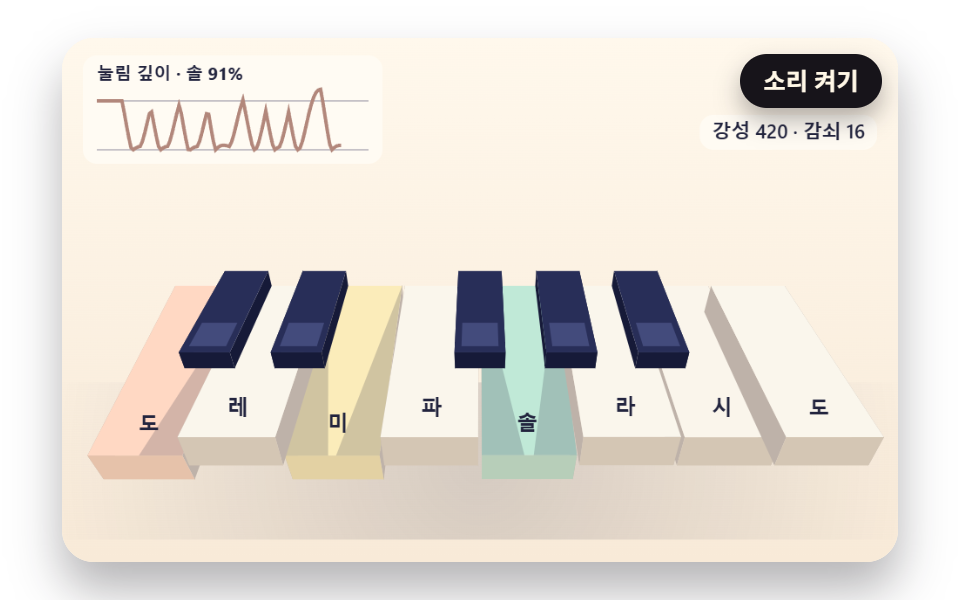 JavaScript Piano: 9 Scenes, Keys to StringsIn a javascript piano, when a key goes down, how should the string shake? 03 sizes each overtone by where the hammer lan See all demos in this post
If you like this effect - similar demos
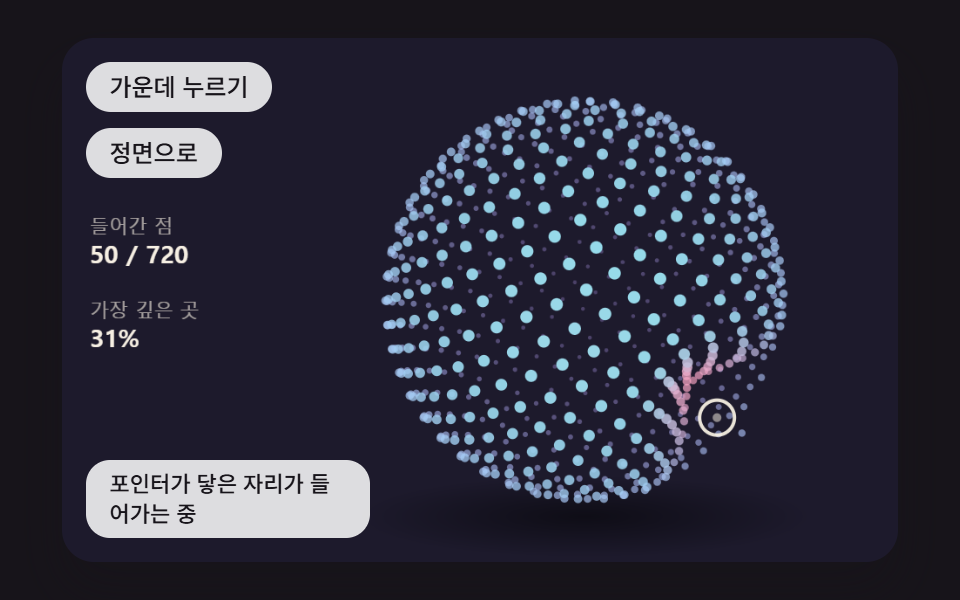 Interactions03 A Point-Cloud Sphere That Dents Where the Pointer Touches and Springs BackJavaScript 3D Animation: 9 Pointer-Led Models
 Interactions04 Character whose eyes chase the cursor3D Hover Effect CSS: 9 Pointer-Following Scenes
 Interactions03 Pointing at the next buttonMascot Animation: 9 CSS Parts from Wave to Sleep