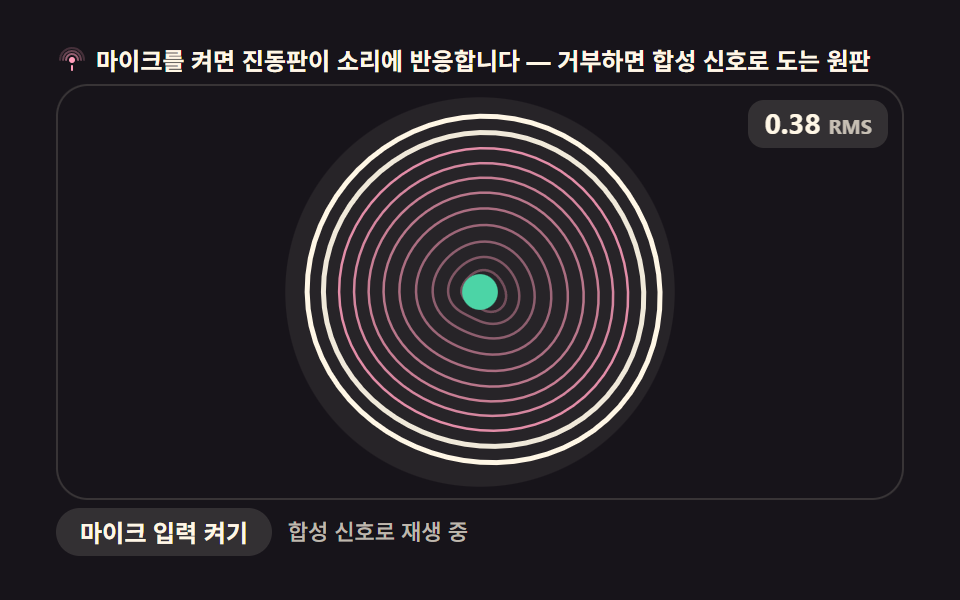
09Circular membrane vibration modes (mic input)
The default is a synthetic signal, but pressing the mic button reads real bass energy through getUserMedia and AnalyserNode and maps it to the circular membrane's vibration radius. Denying permission makes the requestAnimationFrame loop fall straight back to the synthetic signal.
Best forMusic-app background visuals, live-streaming overlays
getUserMediaAnalyserNoderequestAnimationFrame
<main class="stage">
<div class="mb" id="mb">
  <p class="mb__hint">
    <svg class="mb__ico" viewBox="0 0 256 256" aria-hidden="true"><g fill="currentColor"><circle cx="128" cy="128" r="24"/><path d="M80 128a48 48 0 0 1 96 0" fill="none" stroke="currentColor" stroke-width="16" stroke-linecap="round" opacity=".55"/><path d="M56 128a72 72 0 0 1 144 0" fill="none" stroke="currentColor" stroke-width="16" stroke-linecap="round" opacity=".35"/><path d="M32 128a96 96 0 0 1 192 0" fill="none" stroke="currentColor" stroke-width="16" stroke-linecap="round" opacity=".2"/><rect x="120" y="168" width="16" height="48" rx="8"/></g></svg>
    <span>Mic on and the plate hears you — synthetic signal otherwise</span>
  </p>
  <div class="mb__field" id="field" role="application" aria-label="Membrane plate playground">
    <canvas class="mb__cv" id="cv"></canvas>
    <b class="mb__badge" aria-hidden="true"><span class="mb__badgeNum">0.32</span><span class="mb__badgeUnit">RMS</span></b>
  </div>
  <p class="mb__ctrl">
    <button class="mb__btn" id="micBtn" type="button">Enable mic input</button>
    <span class="mb__state" id="state" role="status">Playing a synthetic signal</span>
  </p>
</div>
</main>
@use "../../../../site/static/demo-tokens" as *;
// 멤브레인 진동판 + 마이크 입력 — 움직임은 전부 캔버스 rAF 루프 안에 있다. CSS 는 무대·판·버튼만.
// @keyframes 를 하나도 두지 않는다 — CSS 애니메이션이 0개여야 렌더러가 실시간으로 프레임을 찍어
// 캔버스가 실제로 도는 모습이 담긴다(도구/demo.py 렌더(), 01~08 같은 선례).
$duration: $dur-loop;
$easing: $ease-spring;
$color: $subject-pink;
@include stage($stage-ink);
.mb {
--plate-bg: #{rgba($subject-cream, .07)};
--mem: #{$subject-pink};
--rim: #{$subject-cream};
--ring: #{$subject-mint};
--track: #{rgba($subject-cream, .22)};
--btn-bg: #{rgba($subject-cream, .12)};
--btn-fg: #{$subject-cream};
--state-fg: #{rgba($subject-cream, .72)};
display: flex; flex-direction: column; gap: $sp-1;
width: 100%; max-width: 424px;
}
.mb__hint {
display: flex; align-items: center; gap: $sp-1; margin: 0;
font-weight: 700; font-size: clamp(10px, 2.8vw, 12px); line-height: 1.35;
color: $subject-cream;
}
.mb__ico { width: 16px; height: 16px; flex: 0 0 auto; color: $subject-pink; }
.mb__field {
position: relative; height: 208px;
border-radius: $r-card; overflow: hidden;
background: $subject-ink;
box-shadow: inset 0 0 0 1px rgba($subject-cream, .14);
}
.mb__cv { display: block; width: 100%; height: 100%; }
.mb__badge {
position: absolute; top: $sp-2; right: $sp-2; margin: 0;
display: flex; align-items: baseline; gap: 4px;
padding: 4px $sp-2;
border-radius: $r-sm;
background: rgba($subject-cream, .12);
font-weight: 700; font-size: 12px; line-height: 1.2;
color: $subject-cream;
font-variant-numeric: tabular-nums;
}
.mb__badgeNum { font-size: 14px; }
.mb__badgeUnit { font-size: 10px; opacity: .72; }
.mb__ctrl {
display: flex; align-items: center; gap: $sp-2;
margin: 0;
}
.mb__btn {
flex: 0 0 auto;
margin: 0; padding: $sp-1 $sp-3;
border: none; border-radius: $r-pill;
background: var(--btn-bg);
font: inherit; font-weight: 700; font-size: 12px; line-height: 1.4;
color: var(--btn-fg);
cursor: pointer;
transition: background $dur-quick $ease-out, transform $dur-quick $ease-spring;
}
.mb__btn:hover { background: rgba($subject-cream, .2); }
.mb__btn:active { transform: scale(.96); }
.mb__btn:focus-visible { outline: 2px solid $color; outline-offset: 2px; }
.mb__btn:disabled { opacity: .6; cursor: default; transform: none; }
.mb__state {
flex: 1 1 auto; min-width: 0;
font-size: 11px; line-height: 1.4; font-weight: 500;
color: var(--state-fg);
}
@media (max-width: 340px) {
.mb { gap: 0; }
.mb__hint { font-size: 10px; line-height: 1.25; }
.mb__field { height: 108px; }
.mb__ctrl { flex-direction: column; align-items: stretch; gap: 0; }
.mb__state { font-size: 10px; line-height: 1.3; }
}
@media (prefers-reduced-motion: reduce) {
.mb__btn { transition: none !important; }
.mb.is-still .mb__state { opacity: .9 !important; }
}html, body {
margin: 0;
overflow: hidden;
}
.stage {
box-sizing: border-box;
min-height: 100vh;
display: grid;
place-items: center;
margin: 0;
background: #17141a;
font-family: -apple-system, "Segoe UI", "Noto Sans KR", sans-serif;
padding: clamp(8px, 4vw, 24px);
}
.mb {
--plate-bg: rgba(255, 247, 230, 0.07);
--mem: #ff9ebb;
--rim: #fff7e6;
--ring: #4cd4a6;
--track: rgba(255, 247, 230, 0.22);
--btn-bg: rgba(255, 247, 230, 0.12);
--btn-fg: #fff7e6;
--state-fg: rgba(255, 247, 230, 0.72);
display: flex;
flex-direction: column;
gap: 4px;
width: 100%;
max-width: 424px;
}
.mb__hint {
display: flex;
align-items: center;
gap: 4px;
margin: 0;
font-weight: 700;
font-size: clamp(10px, 2.8vw, 12px);
line-height: 1.35;
color: #fff7e6;
}
.mb__ico {
width: 16px;
height: 16px;
flex: 0 0 auto;
color: #ff9ebb;
}
.mb__field {
position: relative;
height: 208px;
border-radius: 16px;
overflow: hidden;
background: #17141a;
box-shadow: inset 0 0 0 1px rgba(255, 247, 230, 0.14);
}
.mb__cv {
display: block;
width: 100%;
height: 100%;
}
.mb__badge {
position: absolute;
top: 8px;
right: 8px;
margin: 0;
display: flex;
align-items: baseline;
gap: 4px;
padding: 4px 8px;
border-radius: 8px;
background: rgba(255, 247, 230, 0.12);
font-weight: 700;
font-size: 12px;
line-height: 1.2;
color: #fff7e6;
font-variant-numeric: tabular-nums;
}
.mb__badgeNum {
font-size: 14px;
}
.mb__badgeUnit {
font-size: 10px;
opacity: 0.72;
}
.mb__ctrl {
display: flex;
align-items: center;
gap: 8px;
margin: 0;
}
.mb__btn {
flex: 0 0 auto;
margin: 0;
padding: 4px 12px;
border: none;
border-radius: 999px;
background: var(--btn-bg);
font: inherit;
font-weight: 700;
font-size: 12px;
line-height: 1.4;
color: var(--btn-fg);
cursor: pointer;
transition: background 220ms ease-out, transform 220ms cubic-bezier(0.2, 0.8, 0.2, 1);
}
.mb__btn:hover {
background: rgba(255, 247, 230, 0.2);
}
.mb__btn:active {
transform: scale(0.96);
}
.mb__btn:focus-visible {
outline: 2px solid #ff9ebb;
outline-offset: 2px;
}
.mb__btn:disabled {
opacity: 0.6;
cursor: default;
transform: none;
}
.mb__state {
flex: 1 1 auto;
min-width: 0;
font-size: 11px;
line-height: 1.4;
font-weight: 500;
color: var(--state-fg);
}
@media (max-width: 340px) {
.mb {
gap: 0;
}
.mb__hint {
font-size: 10px;
line-height: 1.25;
}
.mb__field {
height: 108px;
}
.mb__ctrl {
flex-direction: column;
align-items: stretch;
gap: 0;
}
.mb__state {
font-size: 10px;
line-height: 1.3;
}
}
@media (prefers-reduced-motion: reduce) {
.mb__btn {
transition: none !important;
}
.mb.is-still .mb__state {
opacity: 0.9 !important;
}
}// 멤브레인 진동판 + 마이크 입력 — 원形 진동판(멤브레인)을 극좌표 격자로 나누고
// 반경 방향으로 서로 다른 mode(주파수)의 사인파를 더해 변위를 만든다. 기본은 시드 고정
// 합성 신호(미리보기·측정용 — getUserMedia 는 헤드리스 렌더에서 권한 대화상자로 막히므로),
// 마이크 버튼을 누르면 getUserMedia + AnalyserNode 로 실제 소리 진폭을 읽어 mode 진폭에 얹는다.
// 권한을 거부하거나 오디오 입력이 없으면 안전하게 합성 신호로 되돌아간다(폴백).
var root = document.getElementById('mb');
var field = document.getElementById('field');
var cv = document.getElementById('cv');
var ctx = cv.getContext('2d', { willReadFrequently: false });
var micBtn = document.getElementById('micBtn');
var stateEl = document.getElementById('state');
var numEl = document.querySelector('.mb__badgeNum');
var css = getComputedStyle(root);
var MEM = css.getPropertyValue('--mem').trim();
var RIM = css.getPropertyValue('--rim').trim();
var RING = css.getPropertyValue('--ring').trim();
var BGN = css.getPropertyValue('--plate-bg').trim();
var SEED = 7; // 합성 신호 시드 — 고정해야 24프레임 촬영이 매번 같은 무늬를 준다
var LOOP = 2; // 합성 루프 한 바퀴(초) — 캡처 창(2초)과 같아 gif 가 이어진다
var MODES = [ // (주파수 배수, 반경 방향 마디 수) — 클라드니 진동판의 낮은 모드들
{ f: 1.0, nodes: 1, amp: 1.00 },
{ f: 1.6, nodes: 2, amp: 0.55 },
{ f: 2.3, nodes: 3, amp: 0.30 }
];
var RG = 24, AG = 64; // 격자 — 반경 24칸 · 원주 64칸 (픽셀 계산은 여기서 한 번)
var reduce = window.matchMedia('(prefers-reduced-motion: reduce)').matches;
var W = 0, H = 0, dpr = 1, raf = 0;
var micOn = false, analyser = null, audioBuf = null, micStream = null, audioCtx = null;
// 시드 고정 난수 — Math.random 을 쓰면 프레임마다 무늬가 달라져 측정이 흔들린다
function seeded(i) {
var x = Math.sin(i * 127.1 + SEED * 311.7) * 43758.5453;
return x - Math.floor(x);
}
var PHASE = [];
for (var i = 0; i < MODES.length; i++) PHASE.push(seeded(i + 1) * Math.PI * 2);
function fit() {
var r = field.getBoundingClientRect();
dpr = window.devicePixelRatio || 1;
W = r.width; H = r.height;
cv.width = Math.round(W * dpr);
cv.height = Math.round(H * dpr);
ctx.setTransform(dpr, 0, 0, dpr, 0, 0);
}
// 합성 진폭(0~1) — 마이크가 켜져 있으면 실측 RMS 로 대체된다
function synthLevel(sec) {
var u = (sec % LOOP) / LOOP * Math.PI * 2;
return 0.38 + 0.30 * Math.sin(u) * Math.sin(u * 0.5 + 0.7) + 0.10 * Math.sin(u * 3.1);
}
function micLevel() {
if (!analyser || !audioBuf) return null;
analyser.getByteTimeDomainData(audioBuf);
var sum = 0;
for (var i = 0; i < audioBuf.length; i++) {
var v = (audioBuf[i] - 128) / 128;
sum += v * v;
}
var rms = Math.sqrt(sum / audioBuf.length);
return Math.min(1, rms * 3.2); // 조용한 방 기준으로 게인을 올려 놓는다
}
// 진동판 그리기 — 반경 좌표를 미리 계산해 두고 매 프레임 격자 점의 변위만 다시 잰다
function draw(level, sec) {
ctx.clearRect(0, 0, W, H);
var cx = W * 0.5, cy = H * 0.5;
var R = Math.min(W, H) * 0.42;
// 접시 배경
ctx.beginPath();
ctx.arc(cx, cy, R + 10, 0, Math.PI * 2);
ctx.fillStyle = BGN;
ctx.fill();
// 모드별 진폭 — 합성은 시간으로, 마이크는 실측 레벨로
var t = sec;
var amps = [];
for (var m = 0; m < MODES.length; m++) {
var a = MODES[m].amp * level * Math.sin(t * Math.PI * 2 * MODES[m].f + PHASE[m]);
amps.push(a);
}
// 반경 방향 링들 — 클라드니식 마디. 바깥쪽 링일수록 변위가 커 진동판이 살아 있는 것처럼 보인다
for (var rg = RG; rg >= 2; rg -= 2) {
var rr = R * (rg / RG);
var wobble = 0;
for (m = 0; m < MODES.length; m++) {
wobble += amps[m] * Math.sin((rg / RG) * Math.PI * MODES[m].nodes);
}
ctx.beginPath();
for (var ag = 0; ag <= AG; ag++) {
var th = (ag / AG) * Math.PI * 2;
// 각도 방향 물결 — 모드가 섞이며 꽃잎 무늬가 생긴다
var petal = 0;
for (m = 0; m < MODES.length; m++) {
petal += amps[m] * Math.sin(MODES[m].nodes * th + PHASE[m]);
}
var rad = rr + wobble * 10 + petal * 7;
var x = cx + Math.cos(th) * rad;
var y = cy + Math.sin(th) * rad;
if (ag === 0) ctx.moveTo(x, y); else ctx.lineTo(x, y);
}
ctx.closePath();
var depth = rg / RG; // 안쪽 링은 옅게 — 입체감
ctx.strokeStyle = depth > 0.86 ? RIM : MEM;
ctx.globalAlpha = 0.22 + depth * 0.78;
ctx.lineWidth = rg > RG - 3 ? 2.5 : 1.25;
ctx.stroke();
}
ctx.globalAlpha = 1;
// 중앙 허브 — 진폭에 따라 살짝 커진다(자기 중심에서)
ctx.beginPath();
ctx.arc(cx, cy, 7 + level * 5, 0, Math.PI * 2);
ctx.fillStyle = RING;
ctx.fill();
}
var t0 = 0;
function frame(ts) {
if (!t0) t0 = ts;
var sec = (ts - t0) / 1000;
var lv = micOn ? (micLevel() || 0.3) : synthLevel(sec);
if (numEl) numEl.textContent = lv.toFixed(2);
draw(lv, sec);
raf = requestAnimationFrame(frame);
}
// 마이크 — getUserMedia 로 실제 소리를 얻는다. 거부·오류·미지원 전부 합성 폴백.
function enableMic() {
if (!navigator.mediaDevices || !navigator.mediaDevices.getUserMedia) {
stateEl.textContent = 'This browser does not support mic input — playing a synthetic signal';
return;
}
stateEl.textContent = 'Waiting for mic permission';
navigator.mediaDevices.getUserMedia({ audio: true }).then(function (stream) {
micStream = stream;
var AC = window.AudioContext || window.webkitAudioContext;
audioCtx = new AC();
var src = audioCtx.createMediaStreamSource(stream);
analyser = audioCtx.createAnalyser();
analyser.fftSize = 1024;
audioBuf = new Uint8Array(analyser.fftSize);
src.connect(analyser); // 분석만 — 스피커로 재생하지 않는다(하울링 방지)
micOn = true;
micBtn.disabled = true;
micBtn.textContent = 'Mic on';
stateEl.textContent = 'Mic is live — make some sound';
}).catch(function () {
micOn = false;
stateEl.textContent = 'Permission denied — playing a synthetic signal';
});
}
micBtn.addEventListener('click', enableMic);
fit();
window.addEventListener('resize', function () { fit(); if (reduce) draw(0.5, 0.3); });
if (reduce) {
// reduce — 루프 없이 level 0.5 의 한 장만 그린다(빈 화면이 아니다)
root.classList.add('is-still');
draw(0.5, 0.3);
if (numEl) numEl.textContent = '0.50';
} else {
raf = requestAnimationFrame(frame);
}// MembraneMicInput — vanilla 판(run/303/demo/09-wave-membrane-mic-input/index.html) 의 React 포트.
// 원형 진동판(멤브레인)을 극좌표 격자로 나누고 반경 방향으로 서로 다른 모드의 사인파를 더해
// 변위를 만든다. 기본은 시드 고정 합성 신호, 마이크 버튼을 누르면 getUserMedia + AnalyserNode 로
// 실제 소리 진폭을 읽어 모드 진폭에 얹는다. 권한 거부·오류·미지원은 합성 폴백.
import { useEffect, useRef, useState } from "react";
import type { CSSProperties } from "react";
import styles from "./MembraneMicInput.module.scss";
export type MembraneMicInputProps = {
duration?: number;
easing?: string;
accentColor?: string;
};
type Vars = CSSProperties & { "--duration"?: string; "--easing"?: string; "--color"?: string };
const TITLE = "멤브레인 진동판 마이크 입력 데모";
const HINT_TEXT = "마이크를 켜면 진동판이 소리에 반응합니다 — 거부하면 합성 신호로 도는 원판";
const FIELD_LABEL = "멤브레인 진동판 실험판";
const BADGE_UNIT = "RMS";
const MIC_BTN_LABEL = "마이크 입력 켜기";
const MIC_ON_LABEL = "마이크 켜짐";
const STATE_PLAYING = "합성 신호로 재생 중";
const STATE_WAITING = "마이크 권한을 기다리는 중";
const STATE_LIVE = "마이크 입력 반응 중 — 소리를 내 보세요";
const STATE_UNSUPPORTED = "이 브라우저는 마이크 입력을 지원하지 않아 합성 신호로 재생합니다";
const STATE_DENIED = "권한 거부 — 합성 신호로 재생합니다";
export default function MembraneMicInput({
duration = 2000,
easing = "cubic-bezier(.2, .8, .2, 1)",
accentColor = "#ff9ebb",
}: MembraneMicInputProps) {
const rootRef = useRef<HTMLDivElement>(null);
const fieldRef = useRef<HTMLDivElement>(null);
const cvRef = useRef<HTMLCanvasElement>(null);
const numRef = useRef<HTMLSpanElement>(null);
// useEffect 안의 enableMic 를 버튼 onClick 으로 끌어내는 다리
const enableMicRef = useRef<() => void>(function () {});
const [still, setStill] = useState(false);
const [micOn, setMicOn] = useState(false);
const [btnLabel, setBtnLabel] = useState(MIC_BTN_LABEL);
const [stateText, setStateText] = useState(STATE_PLAYING);
const vars: Vars = {
"--duration": `${duration}ms`,
"--easing": easing,
"--color": accentColor,
};
useEffect(() => {
const root0 = rootRef.current;
const field0 = fieldRef.current;
const cv0 = cvRef.current;
const numEl = numRef.current;
if (!root0 || !field0 || !cv0) return;
const ctx0 = cv0.getContext("2d");
if (!ctx0) return;
// 중첩 함수(클로저) 안에서는 가드로 좁힌 널 타입이 전달되지 않는다 — 확인된 값으로 다시 상수를 묶는다
const root: HTMLDivElement = root0;
const field: HTMLDivElement = field0;
const cv: HTMLCanvasElement = cv0;
const ctx: CanvasRenderingContext2D = ctx0;
const css = getComputedStyle(root);
const MEM = css.getPropertyValue("--mem").trim();
const RIM = css.getPropertyValue("--rim").trim();
const RING = css.getPropertyValue("--ring").trim();
const BGN = css.getPropertyValue("--plate-bg").trim();
const SEED = 7; // 합성 신호 시드 — 고정해야 프레임 촬영이 매번 같은 무늬를 준다
const LOOP = 2; // 합성 루프 한 바퀴(초) — 캡처 창(2초)과 같아 gif 가 이어진다
const MODES = [ // (주파수 배수, 반경 방향 마디 수) — 클라드니 진동판의 낮은 모드들
{ f: 1.0, nodes: 1, amp: 1.00 },
{ f: 1.6, nodes: 2, amp: 0.55 },
{ f: 2.3, nodes: 3, amp: 0.30 },
];
const RG = 24, AG = 64; // 격자 — 반경 24칸 · 원주 64칸 (픽셀 계산은 여기서 한 번)
const reduce = window.matchMedia("(prefers-reduced-motion: reduce)").matches;
let W = 0, H = 0, dpr = 1, raf = 0;
let micActive = false;
let analyser: AnalyserNode | null = null;
let audioBuf: Uint8Array | null = null;
let micStream: MediaStream | null = null;
let audioCtx: AudioContext | null = null;
// 시드 고정 난수 — Math.random 을 쓰면 프레임마다 무늬가 달라져 측정이 흔들린다
function seeded(i: number) {
const x = Math.sin(i * 127.1 + SEED * 311.7) * 43758.5453;
return x - Math.floor(x);
}
const PHASE: number[] = [];
for (let i = 0; i < MODES.length; i++) PHASE.push(seeded(i + 1) * Math.PI * 2);
function fit() {
const r = field!.getBoundingClientRect();
dpr = window.devicePixelRatio || 1;
W = r.width; H = r.height;
cv!.width = Math.round(W * dpr);
cv!.height = Math.round(H * dpr);
ctx!.setTransform(dpr, 0, 0, dpr, 0, 0);
}
// 합성 진폭(0~1) — 마이크가 켜져 있으면 실측 RMS 로 대체된다
function synthLevel(sec: number) {
const u = (sec % LOOP) / LOOP * Math.PI * 2;
return 0.38 + 0.30 * Math.sin(u) * Math.sin(u * 0.5 + 0.7) + 0.10 * Math.sin(u * 3.1);
}
function micLevel() {
if (!analyser || !audioBuf) return null;
// Uint8Array<ArrayBufferLike> 는 인수로 못 넘긴다(TS5.7 제네릭) — ArrayBuffer 로 좁혀 넘긴다
analyser.getByteTimeDomainData(audioBuf as Uint8Array<ArrayBuffer>);
let sum = 0;
for (let i = 0; i < audioBuf.length; i++) {
const v = (audioBuf[i] - 128) / 128;
sum += v * v;
}
const rms = Math.sqrt(sum / audioBuf.length);
return Math.min(1, rms * 3.2); // 조용한 방 기준으로 게인을 올려 놓는다
}
// 진동판 그리기 — 반경 좌표를 미리 계산해 두고 매 프레임 격자 점의 변위만 다시 잰다
function draw(level: number, sec: number) {
ctx.clearRect(0, 0, W, H);
const cx = W * 0.5, cy = H * 0.5;
const R = Math.min(W, H) * 0.42;
// 접시 배경
ctx.beginPath();
ctx.arc(cx, cy, R + 10, 0, Math.PI * 2);
ctx.fillStyle = BGN;
ctx.fill();
// 모드별 진폭 — 합성은 시간으로, 마이크는 실측 레벨로
const t = sec;
const amps: number[] = [];
for (let m = 0; m < MODES.length; m++) {
const a = MODES[m].amp * level * Math.sin(t * Math.PI * 2 * MODES[m].f + PHASE[m]);
amps.push(a);
}
// 반경 방향 링들 — 클라드니식 마디. 바깥쪽 링일수록 변위가 커 진동판이 살아 있는 것처럼 보인다
for (let rg = RG; rg >= 2; rg -= 2) {
const rr = R * (rg / RG);
let wobble = 0;
for (let m = 0; m < MODES.length; m++) {
wobble += amps[m] * Math.sin((rg / RG) * Math.PI * MODES[m].nodes);
}
ctx.beginPath();
for (let ag = 0; ag <= AG; ag++) {
const th = (ag / AG) * Math.PI * 2;
// 각도 방향 물결 — 모드가 섞이며 꽃잎 무늬가 생긴다
let petal = 0;
for (let m = 0; m < MODES.length; m++) {
petal += amps[m] * Math.sin(MODES[m].nodes * th + PHASE[m]);
}
const rad = rr + wobble * 10 + petal * 7;
const x = cx + Math.cos(th) * rad;
const y = cy + Math.sin(th) * rad;
if (ag === 0) ctx.moveTo(x, y); else ctx.lineTo(x, y);
}
ctx.closePath();
const depth = rg / RG; // 안쪽 링은 옅게 — 입체감
ctx.strokeStyle = depth > 0.86 ? RIM : MEM;
ctx.globalAlpha = 0.22 + depth * 0.78;
ctx.lineWidth = rg > RG - 3 ? 2.5 : 1.25;
ctx.stroke();
}
ctx.globalAlpha = 1;
// 중앙 허브 — 진폭에 따라 살짝 커진다(자기 중심에서)
ctx.beginPath();
ctx.arc(cx, cy, 7 + level * 5, 0, Math.PI * 2);
ctx.fillStyle = RING;
ctx.fill();
}
let t0 = 0;
function frame(ts: number) {
if (!t0) t0 = ts;
const sec = (ts - t0) / 1000;
const lv = micActive ? (micLevel() || 0.3) : synthLevel(sec);
if (numEl) numEl.textContent = lv.toFixed(2);
draw(lv, sec);
raf = requestAnimationFrame(frame);
}
// 마이크 — getUserMedia 로 실제 소리를 얻는다. 거부·오류·미지원 전부 합성 폴백.
function enableMic() {
const nav = (navigator as unknown as {
mediaDevices?: { getUserMedia?: (c: { audio: boolean }) => Promise<MediaStream> };
});
if (!nav.mediaDevices || !nav.mediaDevices.getUserMedia) {
setStateText(STATE_UNSUPPORTED);
return;
}
setStateText(STATE_WAITING);
nav.mediaDevices.getUserMedia({ audio: true }).then(function (stream) {
micStream = stream;
const AC = (window as unknown as {
AudioContext?: new () => AudioContext;
webkitAudioContext?: new () => AudioContext;
});
const Ctor = AC.AudioContext || AC.webkitAudioContext;
if (!Ctor) return;
audioCtx = new Ctor();
const src = audioCtx.createMediaStreamSource(stream);
analyser = audioCtx.createAnalyser();
analyser.fftSize = 1024;
audioBuf = new Uint8Array(analyser.fftSize);
src.connect(analyser); // 분석만 — 스피커로 재생하지 않는다(하울링 방지)
micActive = true;
setMicOn(true);
setBtnLabel(MIC_ON_LABEL);
setStateText(STATE_LIVE);
}).catch(function () {
micActive = false;
setStateText(STATE_DENIED);
});
}
enableMicRef.current = enableMic;
function onResize() {
fit();
if (reduce) draw(0.5, 0.3);
}
fit();
window.addEventListener("resize", onResize);
if (reduce) {
// reduce — 루프 없이 level 0.5 의 한 장만 그린다(빈 화면이 아니다)
setStill(true);
draw(0.5, 0.3);
if (numEl) numEl.textContent = "0.50";
} else {
raf = requestAnimationFrame(frame);
}
return () => {
cancelAnimationFrame(raf);
window.removeEventListener("resize", onResize);
if (micStream) {
micStream.getTracks().forEach(function (tr) { tr.stop(); });
}
if (audioCtx) audioCtx.close().catch(function () { /* 종류 무관 — 이미 닫혔을 수 있다 */ });
};
}, []);
return (
<main className={styles.stage}>
<div
className={`${styles.mb}${still ? ` ${styles["is-still"]}` : ""}`}
ref={rootRef}
style={vars}
aria-label={TITLE}
>
<p className={styles["mb__hint"]}>
<svg className={styles["mb__ico"]} viewBox="0 0 256 256" aria-hidden="true">
<g fill="currentColor">
<circle cx="128" cy="128" r="24" />
<path d="M80 128a48 48 0 0 1 96 0" fill="none" stroke="currentColor" stroke-width="16" stroke-linecap="round" opacity=".55" />
<path d="M56 128a72 72 0 0 1 144 0" fill="none" stroke="currentColor" stroke-width="16" stroke-linecap="round" opacity=".35" />
<path d="M32 128a96 96 0 0 1 192 0" fill="none" stroke="currentColor" stroke-width="16" stroke-linecap="round" opacity=".2" />
<rect x="120" y="168" width="16" height="48" rx="8" />
</g>
</svg>
<span>{HINT_TEXT}</span>
</p>
<div
className={styles["mb__field"]}
ref={fieldRef}
role="application"
aria-label={FIELD_LABEL}
>
<canvas className={styles["mb__cv"]} ref={cvRef}></canvas>
<b className={styles["mb__badge"]} aria-hidden="true">
<span className={styles["mb__badgeNum"]} ref={numRef}>0.32</span>
<span className={styles["mb__badgeUnit"]}>{BADGE_UNIT}</span>
</b>
</div>
<p className={styles["mb__ctrl"]}>
<button
className={styles["mb__btn"]}
type="button"
disabled={micOn}
onClick={function () { (enableMicRef.current || (function () {}))(); }}
>
{btnLabel}
</button>
<span className={styles["mb__state"]} role="status">{stateText}</span>
</p>
</div>
</main>
);
}09 Circular membrane vibration modes (mic input) — Measured area 18.58% · moving frames 23/23Original by GODRICH · SCSS and React ship in the zip · Wave Interference Simulation: 9 Canvas Scenes
The post this demo lives in
 Wave Interference Simulation: 9 Canvas ScenesA wave interference simulation shows what happens on screen when two or more waves combine, and this set builds nine of See all demos in this post