06UV gauge whose needle settles on the band it means
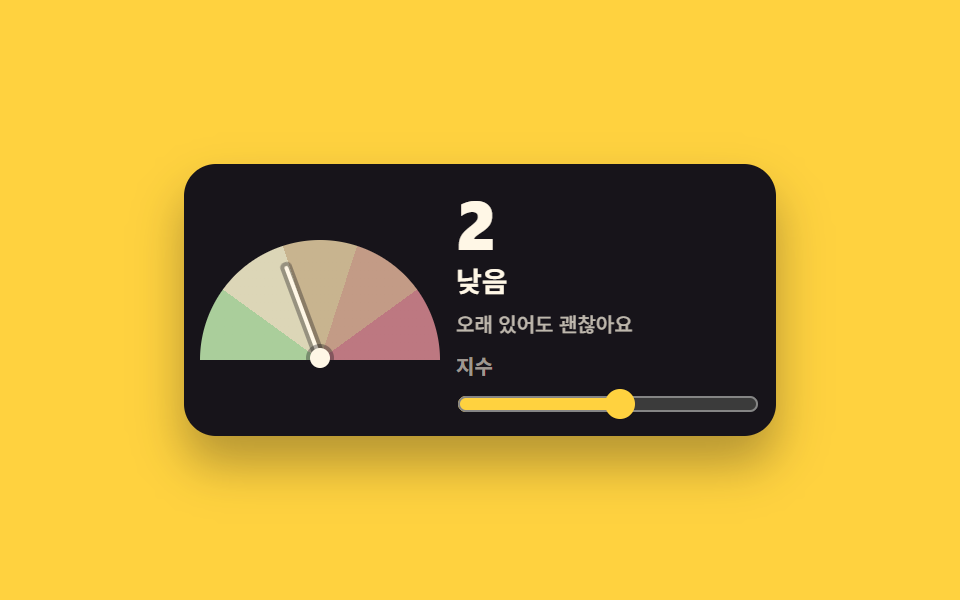
Five graded color bands run across a half dial; moving the value swings the needle to rest on its band while the grade name and the advice line change.
Best forUV and air-index cards, outdoor-activity guidance
conic-gradientgridtransform-origin
<main class="stage stage--yellow">
  <section class="uv is-demo" id="uv" aria-label="UV index gauge">
    <div class="uv__dial" role="img" aria-label="UV index dial">
      <span class="uv__disc" aria-hidden="true"></span>
      <span class="uv__needle" aria-hidden="true"></span>
      <span class="uv__hub" aria-hidden="true"></span>
    </div>
    <div class="uv__panel">
      <p class="uv__value"><output id="uv-num" class="uv__swap"><span class="uv__v">6</span><span class="uv__alt" aria-hidden="true">2</span></output></p>
      <p class="uv__grade" id="uv-grade"><span class="uv__swap"><span class="uv__v">High</span><span class="uv__alt" aria-hidden="true">Low</span></span></p>
      <p class="uv__advice" id="uv-advice"><span class="uv__swap"><span class="uv__v">Wear sunscreen and a hat</span><span class="uv__alt" aria-hidden="true">Fine to stay out long</span></span></p>
      <label class="uv__lab" for="uv-range">Index</label>
      <input class="uv__range" id="uv-range" type="range" min="0" max="11" step="1" value="6" aria-label="Pick a UV index">
    </div>
  </section>
</main>
@use "../../../../site/static/demo-tokens" as *;
// 자외선 게이지 — 눈금 반원은 conic-gradient 다섯 등급 띠, 바늘은 transform: rotate 뿐.
// 카드는 grid 2열(auto 1fr) 배치, 다섯 등급 띠는 conic-gradient 정지점으로 나눈다 — 칸 요소가 따로 없다.
$duration: $dur-loop;
$easing: $ease-spring;
$color: $subject-blue;
@include stage($stage-yellow);
.uv {
box-sizing: border-box;
display: grid;
grid-template-columns: auto 1fr;
gap: $sp-2;
align-items: center;
width: min(296px, 92vw);
padding: $sp-3 $sp-2 $sp-2;
border-radius: $r-card;
background: $subject-ink;
color: $subject-cream;
box-shadow: $shadow-raised;
}
.uv * { box-sizing: border-box; }
// 반원 다이얼 — 정사각 원반을 border-radius: 50% 로 그리고 conic 다섯 등급 띠를 입힌 뒤
// clip-path 로 위쪽 절반만 보여준다(수평선 아래 슬리브가 남지 않게 중심선까지 자른다)
.uv__dial {
position: relative;
width: 120px;
height: 64px;
}
.uv__disc {
position: absolute;
top: 0;
left: 0;
width: 120px;
height: 120px;
border-radius: 50%;
background: conic-gradient(from 270deg at 50% 50%,
#aace9b 0 36deg, #dcd6b7 36deg 72deg, #c8b48f 72deg 108deg, #c39b86 108deg 144deg, #bd7881 144deg 180deg,
rgba(255, 247, 230, 0) 180deg 360deg);
clip-path: inset(0 0 60px 0);
}
.uv__needle {
position: absolute;
left: calc(50% - 1px);
bottom: 4px;
width: 2px;
height: 50px;
border-radius: $r-pill;
background: $subject-cream;
transform-origin: 50% calc(100% - 1px); // 규칙8: 경첩·피벗 — 바늘이 붙는 지점은 허브 중심(바닥에서 5px, 바늘 발보다 1px 위)이다
transform: rotate(8deg);
box-shadow: 0 0 0 2px rgba(23, 20, 26, .35);
}
.uv__hub {
position: absolute;
left: calc(50% - 5px);
bottom: 0;
width: 10px;
height: 10px;
border-radius: 50%;
background: $subject-cream;
box-shadow: 0 0 0 2px rgba(23, 20, 26, .35);
}
.uv__panel {
display: grid;
gap: $sp-1;
min-width: 0;
}
.uv__value {
margin: 0;
font-size: 34px;
font-weight: 800;
line-height: 1;
font-variant-numeric: tabular-nums;
}
.uv__grade {
margin: 0;
font-size: 14px;
font-weight: 700;
line-height: 1.3;
}
.uv__advice {
margin: 0;
font-size: 10px;
font-weight: 500;
line-height: 1.4;
color: rgba(255, 247, 230, .72);
}
.uv__lab {
margin-top: $sp-1;
font-size: 10px;
font-weight: 700;
line-height: 1.3;
color: rgba(255, 247, 230, .58);
}
.uv__range {
width: 100%;
margin: 0;
accent-color: $stage-yellow;
&:focus-visible { outline: 2px solid $stage-yellow; outline-offset: 2px; }
}
// 겹쳐 둔 두 번째 값 — 미리보기 루프에서만 보인다
.uv__swap { position: relative; display: inline-block; }
.uv__alt {
position: absolute;
inset: 0;
opacity: 0;
white-space: nowrap;
}
// ── 격자 미리보기 루프 (2초) ──
// 바늘이 낮음쪽으로 내려갔다(0~44%) 높음쪽으로 되돌아온다(88% 안). 값 글자는 컷으로 맞바뀐다.
@keyframes uv-swing {
0%, 12% { transform: rotate(8deg); }
34% { transform: rotate(-68deg); }
50% { transform: rotate(-20deg); }
62% { transform: rotate(-68deg); }
74% { transform: rotate(-45deg); }
86% { transform: rotate(-68deg); }
88%, 100% { transform: rotate(8deg); }
}
@keyframes uv-va { 0%, 44% { opacity: 1; } 45%, 87% { opacity: 0; } 88%, 100% { opacity: 1; } }
@keyframes uv-vb { 0%, 44% { opacity: 0; } 45%, 87% { opacity: 1; } 88%, 100% { opacity: 0; } }
.uv.is-demo {
.uv__needle {
animation-name: uv-swing;
animation-duration: $duration;
animation-timing-function: $easing;
animation-iteration-count: infinite;
animation-fill-mode: backwards;
}
.uv__swap .uv__v { animation-name: uv-va; }
.uv__swap .uv__alt { animation-name: uv-vb; }
.uv__swap .uv__v, .uv__swap .uv__alt {
animation-duration: $duration;
animation-timing-function: steps(1, end);
animation-iteration-count: infinite;
animation-fill-mode: backwards;
}
}
@media (max-width: 340px) {
.uv { padding: $sp-2 $sp-1 $sp-1; gap: $sp-2; }
.uv__dial { width: 96px; height: 52px; }
.uv__disc { width: 96px; height: 96px; clip-path: inset(0 0 44px 0); }
.uv__needle { height: 40px; }
.uv__value { font-size: 28px; }
}
@media (prefers-reduced-motion: reduce) {
.uv.is-demo .uv__needle,
.uv.is-demo .uv__swap .uv__v,
.uv.is-demo .uv__swap .uv__alt {
animation: none !important;
transform: none !important;
}
// 정지 상태: 실제 조작 경로가 지켰던 각도(8deg)를 그대로 보여준다
.uv.is-demo .uv__needle { transform: rotate(8deg) !important; }
.uv.is-demo .uv__swap .uv__v { opacity: 1 !important; }
.uv.is-demo .uv__swap .uv__alt { opacity: 0 !important; }
.uv__needle { transition: none !important; }
}html, body {
margin: 0;
overflow: hidden;
}
.stage {
box-sizing: border-box;
min-height: 100vh;
display: grid;
place-items: center;
margin: 0;
background: #ffd23f;
font-family: -apple-system, "Segoe UI", "Noto Sans KR", sans-serif;
padding: clamp(8px, 4vw, 24px);
}
.uv {
box-sizing: border-box;
display: grid;
grid-template-columns: auto 1fr;
gap: 8px;
align-items: center;
width: min(296px, 92vw);
padding: 12px 8px 8px;
border-radius: 16px;
background: #17141a;
color: #fff7e6;
box-shadow: 0 14px 24px rgba(23, 20, 26, 0.32);
}
.uv * {
box-sizing: border-box;
}
.uv__dial {
position: relative;
width: 120px;
height: 64px;
}
.uv__disc {
position: absolute;
top: 0;
left: 0;
width: 120px;
height: 120px;
border-radius: 50%;
background: conic-gradient(from 270deg at 50% 50%, #aace9b 0 36deg, #dcd6b7 36deg 72deg, #c8b48f 72deg 108deg, #c39b86 108deg 144deg, #bd7881 144deg 180deg, rgba(255, 247, 230, 0) 180deg 360deg);
clip-path: inset(0 0 60px 0);
}
.uv__needle {
position: absolute;
left: calc(50% - 1px);
bottom: 4px;
width: 2px;
height: 50px;
border-radius: 999px;
background: #fff7e6;
transform-origin: 50% calc(100% - 1px);
transform: rotate(8deg);
box-shadow: 0 0 0 2px rgba(23, 20, 26, 0.35);
}
.uv__hub {
position: absolute;
left: calc(50% - 5px);
bottom: 0;
width: 10px;
height: 10px;
border-radius: 50%;
background: #fff7e6;
box-shadow: 0 0 0 2px rgba(23, 20, 26, 0.35);
}
.uv__panel {
display: grid;
gap: 4px;
min-width: 0;
}
.uv__value {
margin: 0;
font-size: 34px;
font-weight: 800;
line-height: 1;
font-variant-numeric: tabular-nums;
}
.uv__grade {
margin: 0;
font-size: 14px;
font-weight: 700;
line-height: 1.3;
}
.uv__advice {
margin: 0;
font-size: 10px;
font-weight: 500;
line-height: 1.4;
color: rgba(255, 247, 230, 0.72);
}
.uv__lab {
margin-top: 4px;
font-size: 10px;
font-weight: 700;
line-height: 1.3;
color: rgba(255, 247, 230, 0.58);
}
.uv__range {
width: 100%;
margin: 0;
accent-color: #ffd23f;
}
.uv__range:focus-visible {
outline: 2px solid #ffd23f;
outline-offset: 2px;
}
.uv__swap {
position: relative;
display: inline-block;
}
.uv__alt {
position: absolute;
inset: 0;
opacity: 0;
white-space: nowrap;
}
@keyframes uv-swing {
0%, 12% {
transform: rotate(8deg);
}
34% {
transform: rotate(-68deg);
}
50% {
transform: rotate(-20deg);
}
62% {
transform: rotate(-68deg);
}
74% {
transform: rotate(-45deg);
}
86% {
transform: rotate(-68deg);
}
88%, 100% {
transform: rotate(8deg);
}
}
@keyframes uv-va {
0%, 44% {
opacity: 1;
}
45%, 87% {
opacity: 0;
}
88%, 100% {
opacity: 1;
}
}
@keyframes uv-vb {
0%, 44% {
opacity: 0;
}
45%, 87% {
opacity: 1;
}
88%, 100% {
opacity: 0;
}
}
.uv.is-demo .uv__needle {
animation-name: uv-swing;
animation-duration: 2s;
animation-timing-function: cubic-bezier(0.2, 0.8, 0.2, 1);
animation-iteration-count: infinite;
animation-fill-mode: backwards;
}
.uv.is-demo .uv__swap .uv__v {
animation-name: uv-va;
}
.uv.is-demo .uv__swap .uv__alt {
animation-name: uv-vb;
}
.uv.is-demo .uv__swap .uv__v, .uv.is-demo .uv__swap .uv__alt {
animation-duration: 2s;
animation-timing-function: steps(1, end);
animation-iteration-count: infinite;
animation-fill-mode: backwards;
}
@media (max-width: 340px) {
.uv {
padding: 8px 4px 4px;
gap: 8px;
}
.uv__dial {
width: 96px;
height: 52px;
}
.uv__disc {
width: 96px;
height: 96px;
clip-path: inset(0 0 44px 0);
}
.uv__needle {
height: 40px;
}
.uv__value {
font-size: 28px;
}
}
@media (prefers-reduced-motion: reduce) {
.uv.is-demo .uv__needle,
.uv.is-demo .uv__swap .uv__v,
.uv.is-demo .uv__swap .uv__alt {
animation: none !important;
transform: none !important;
}
.uv.is-demo .uv__needle {
transform: rotate(8deg) !important;
}
.uv.is-demo .uv__swap .uv__v {
opacity: 1 !important;
}
.uv.is-demo .uv__swap .uv__alt {
opacity: 0 !important;
}
.uv__needle {
transition: none !important;
}
}// 바늘은 0~11 을 -90도~+90도로 바꿔 돈다. 등급과 지침 문장이 값에 함께 따라온다.
var uvRoot = document.getElementById('uv');
var uvRange = document.getElementById('uv-range');
var uvNeedle = uvRoot.querySelector('.uv__needle');
var uvNum = document.getElementById('uv-num');
var uvGrade = document.getElementById('uv-grade');
var uvAdvice = document.getElementById('uv-advice');
var uvLevels = [
{ max: 2, grade: 'Low', advice: 'Fine to stay out long' },
{ max: 5, grade: 'Moderate', advice: 'Take shade breaks' },
{ max: 7, grade: 'High', advice: 'Wear sunscreen and a hat' },
{ max: 10, grade: 'Very high', advice: 'Stay indoors at midday' },
{ max: 11, grade: 'Extreme', advice: 'Limit time outside' }
];
function uvLevel(v) {
for (var i = 0; i < uvLevels.length; i++) {
if (v <= uvLevels[i].max) return uvLevels[i];
}
return uvLevels[uvLevels.length - 1];
}
function uvApply(v) {
uvNeedle.style.transform = 'rotate(' + (v / 11 * 180 - 90) + 'deg)';
uvNum.querySelector('.uv__v').textContent = String(v);
var lv = uvLevel(v);
uvGrade.querySelector('.uv__v').textContent = lv.grade;
uvAdvice.querySelector('.uv__v').textContent = lv.advice;
uvRange.setAttribute('aria-valuenow', String(v));
}
uvRange.addEventListener('input', function () {
uvRoot.classList.remove('is-demo');
uvApply(Number(uvRange.value));
});
uvApply(Number(uvRange.value));import { useState } from "react";
import type { CSSProperties } from "react";
import styles from "./WeatherUvGauge.module.scss";
// vanilla 판(run/281/demo/06-weather-uv-gauge/index.html) 의 React 포트.
// 바늘은 0~11 을 -90도~+90도로 바꿔 돈다. 등급과 지침 문장이 값에 함께 따라온다.
export type UvLevel = {
max: number;
grade: string;
advice: string;
};
export type WeatherUvGaugeProps = {
groupLabel?: string;
dialLabel?: string;
indexLabel?: string;
rangeAria?: string;
levels?: UvLevel[];
/** 처음에 골라 둔 지수 */
value?: number;
/** 지수 최대(눈금 폭) */
scaleMax?: number;
/** 격자 미리보기 루프가 컷으로 맞바꾸는 두 번째 지수 */
loopTo?: number;
/** 격자 미리보기 2초 자동 루프. 사람이 손대면 꺼진다 */
demo?: boolean;
duration?: number;
easing?: string;
color?: string;
};
type Vars = CSSProperties & { "--duration"?: string; "--easing"?: string; "--color"?: string };
// 바늘 각도 — inline style 로 넣는다
type NeedleVars = CSSProperties & { transform?: string };
const DEFAULT_LEVELS: UvLevel[] = [
{ max: 2, grade: "낮음", advice: "오래 있어도 괜찮아요" },
{ max: 5, grade: "보통", advice: "그늘을 섞어 쉬세요" },
{ max: 7, grade: "높음", advice: "선크림을 바르고 모자를 쓰세요" },
{ max: 10, grade: "매우 높음", advice: "한낮에는 실내로 피하세요" },
{ max: 11, grade: "위험", advice: "외출을 줄이세요" },
];
function levelOf(v: number, levels: UvLevel[]): UvLevel {
for (let i = 0; i < levels.length; i++) {
if (v <= levels[i].max) return levels[i];
}
return levels[levels.length - 1];
}
export default function WeatherUvGauge({
groupLabel = "자외선 지수 게이지",
dialLabel = "자외선 지수 눈금",
indexLabel = "지수",
rangeAria = "자외선 지수 고르기",
levels = DEFAULT_LEVELS,
value = 6,
scaleMax = 11,
loopTo = 2,
demo = true,
duration = 2000,
easing = "cubic-bezier(.2,.8,.2,1)",
color = "#2f6df6",
}: WeatherUvGaugeProps) {
const [now, setNow] = useState(value);
const [live, setLive] = useState(demo);
const vars: Vars = { "--duration": `${duration}ms`, "--easing": easing, "--color": color };
const needleVars: NeedleVars = { transform: `rotate(${(now / scaleMax) * 180 - 90}deg)` };
const cur = levelOf(now, levels);
const alt = levelOf(loopTo, levels);
function slide(e: { target: { value: string } }): void {
setLive(false);
setNow(Number(e.target.value));
}
const cls = [styles.uv, live ? styles.isDemo : ""].filter(Boolean).join(" ");
return (
<main className={styles.stage}>
<section className={cls} style={vars} aria-label={groupLabel}>
<div className={styles.dial} role="img" aria-label={dialLabel}>
<span className={styles.disc} aria-hidden="true" />
<span className={styles.needle} style={needleVars} aria-hidden="true" />
<span className={styles.hub} aria-hidden="true" />
</div>
<div className={styles.panel}>
<p className={styles.value}>
<output className={styles.swap}>
<span className={styles.v}>{now}</span>
<span className={styles.alt} aria-hidden="true">{loopTo}</span>
</output>
</p>
<p className={styles.grade}>
<span className={styles.swap}>
<span className={styles.v}>{cur.grade}</span>
<span className={styles.alt} aria-hidden="true">{alt.grade}</span>
</span>
</p>
<p className={styles.advice}>
<span className={styles.swap}>
<span className={styles.v}>{cur.advice}</span>
<span className={styles.alt} aria-hidden="true">{alt.advice}</span>
</span>
</p>
<label className={styles.lab} htmlFor="uv-range">{indexLabel}</label>
<input
className={styles.range}
id="uv-range"
type="range"
min={0}
max={scaleMax}
step={1}
value={now}
aria-label={rangeAria}
aria-valuenow={now}
onChange={slide}
/>
</div>
</section>
</main>
);
}06 UV gauge whose needle settles on the band it means — Measured area 2.11% · moving frames 20/23Original by GODRICH · SCSS and React ship in the zip · Weather Widget Design — 9 Widgets, No Library
The post this demo lives in
 Weather Widget Design — 9 Widgets, No LibraryWeather widget design is the sky card on a dashboard — temperature, hour strip, week bars. These nine are plain HTML, SC See all demos in this post