Weather Widget Design — 9 Widgets, No Library
Weather widget design is the sky card on a dashboard — temperature, hour strip, week bars.
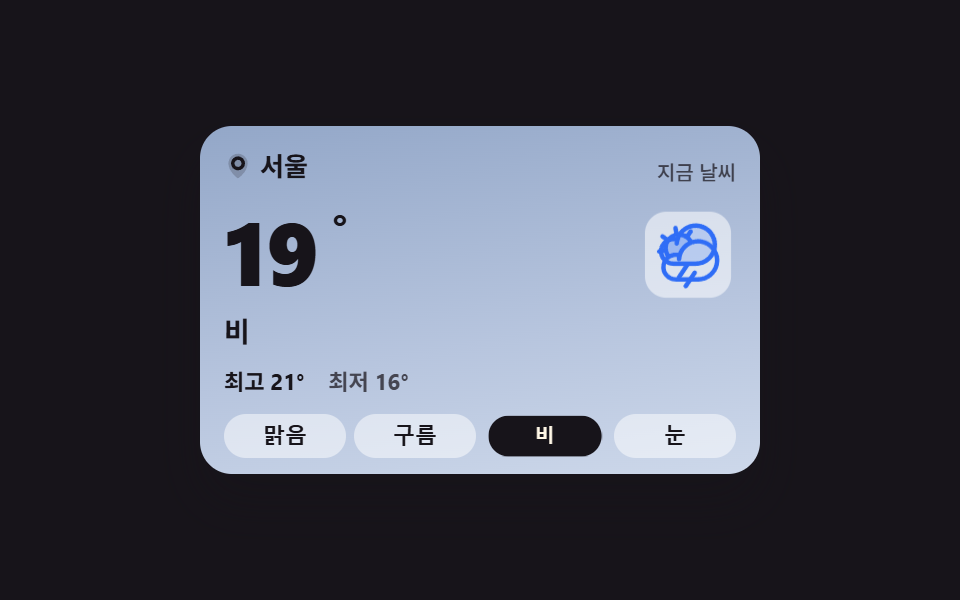 01 weather-current-card
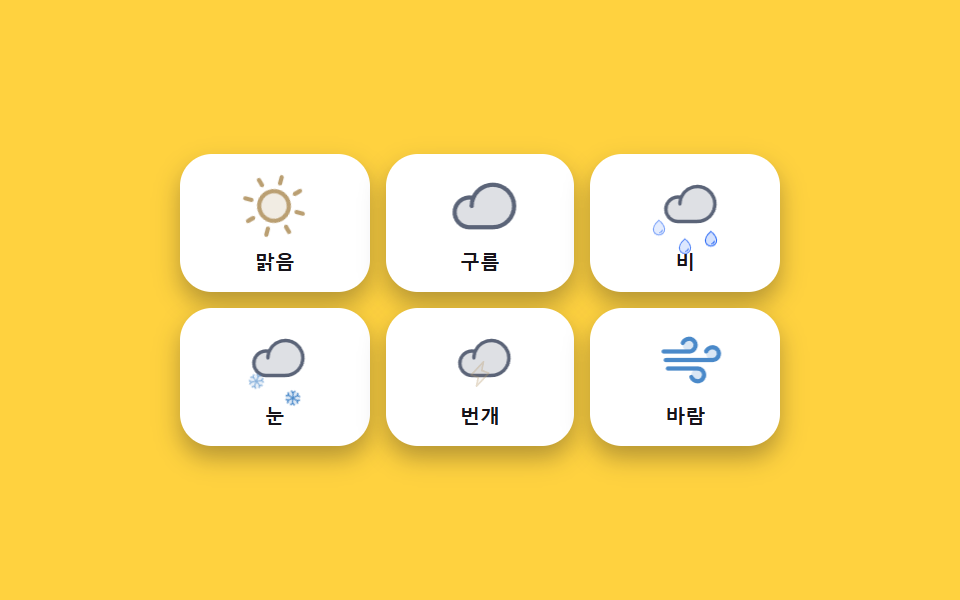 02 weather-icon-animations
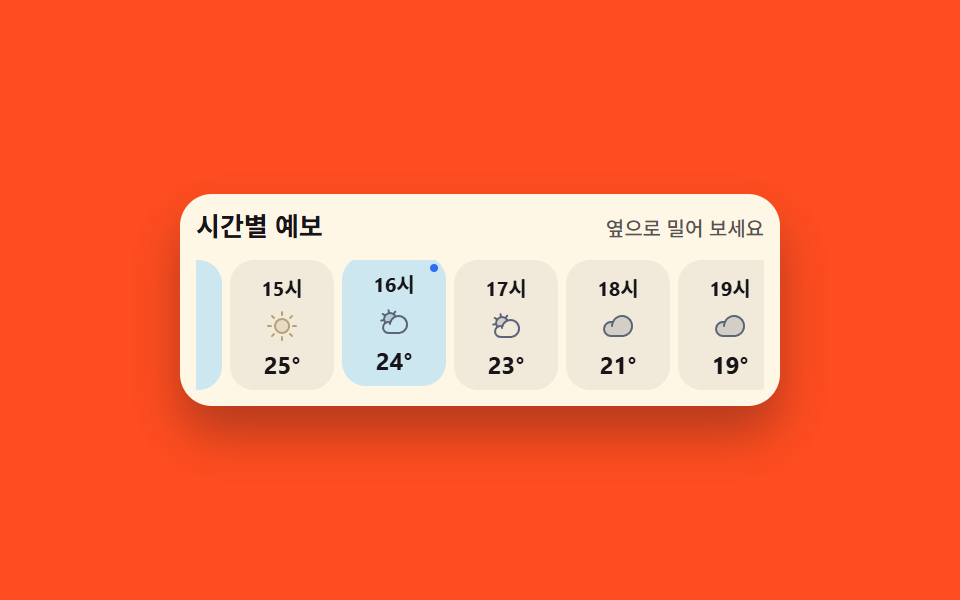 03 weather-hourly-strip
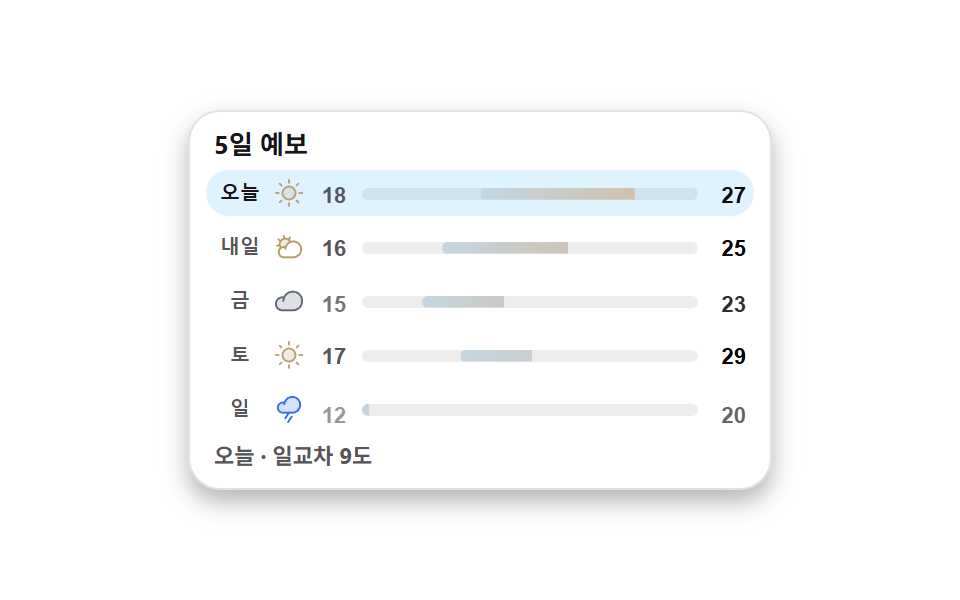 04 weather-daily-range
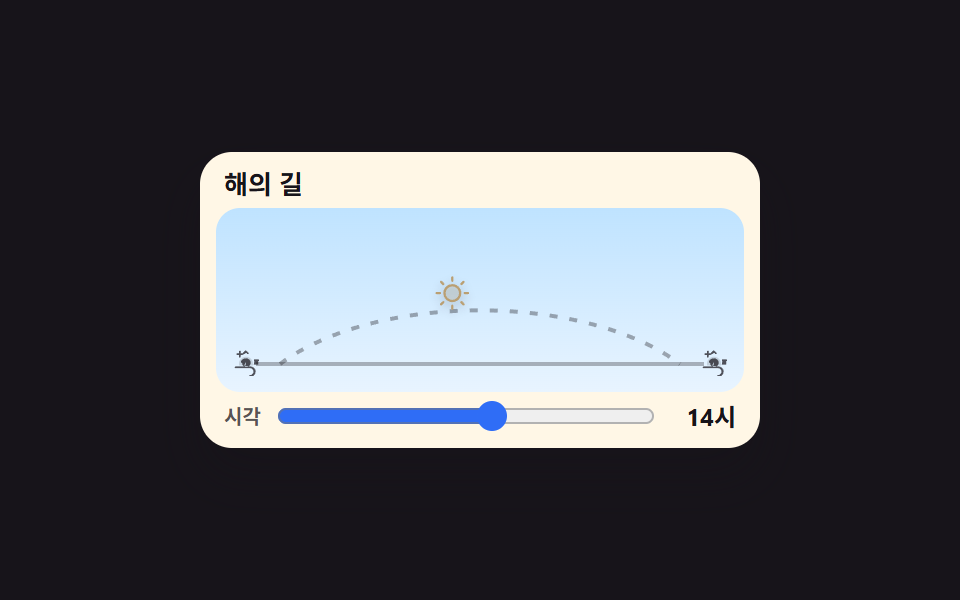 05 weather-sun-arc
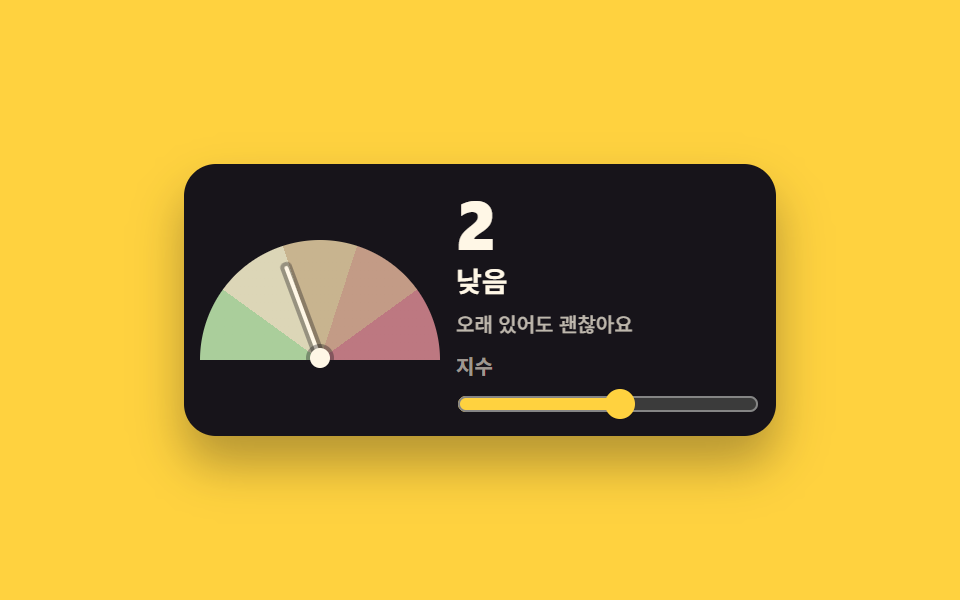 06 weather-uv-gauge
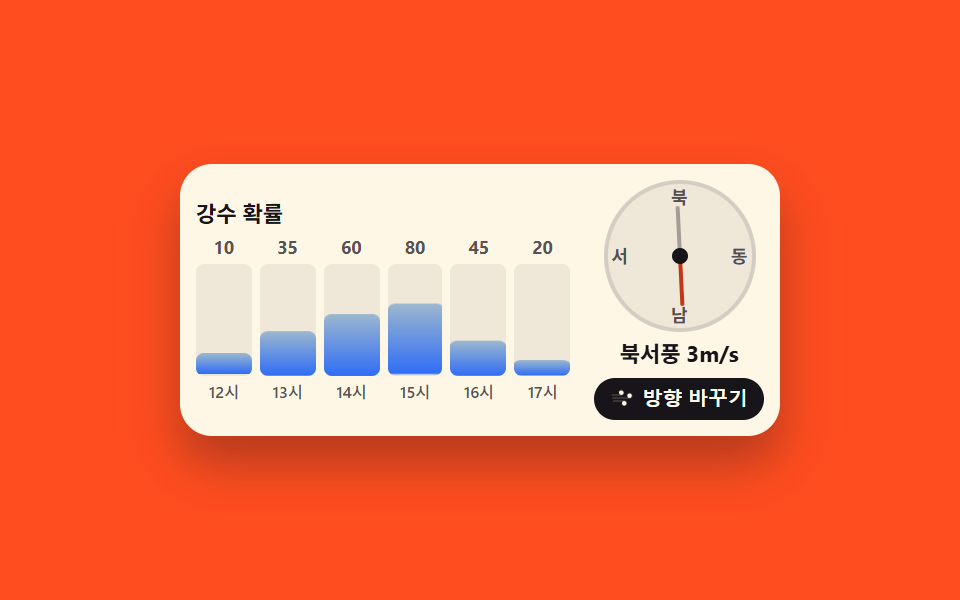 07 weather-precip-wind
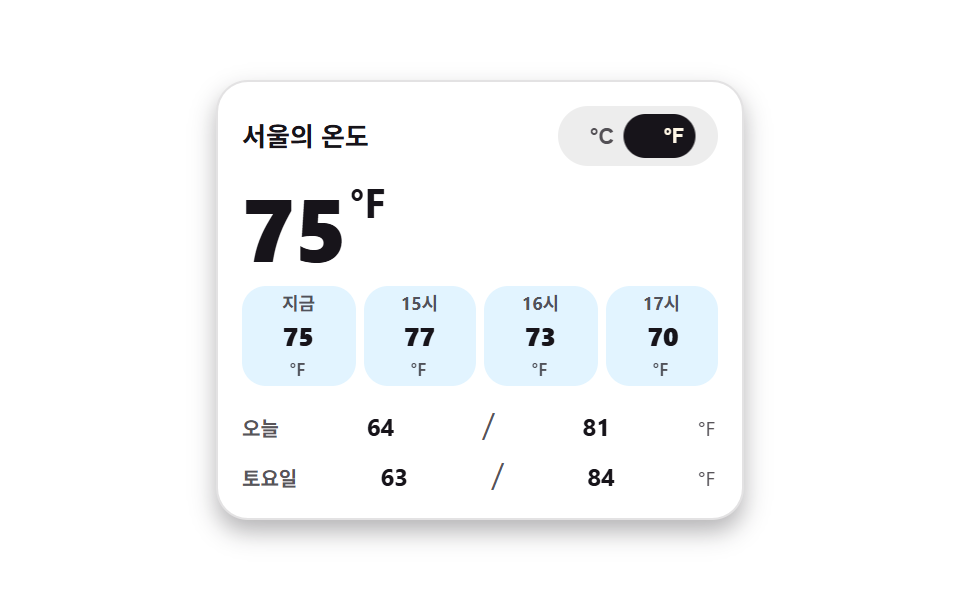 08 weather-unit-toggle
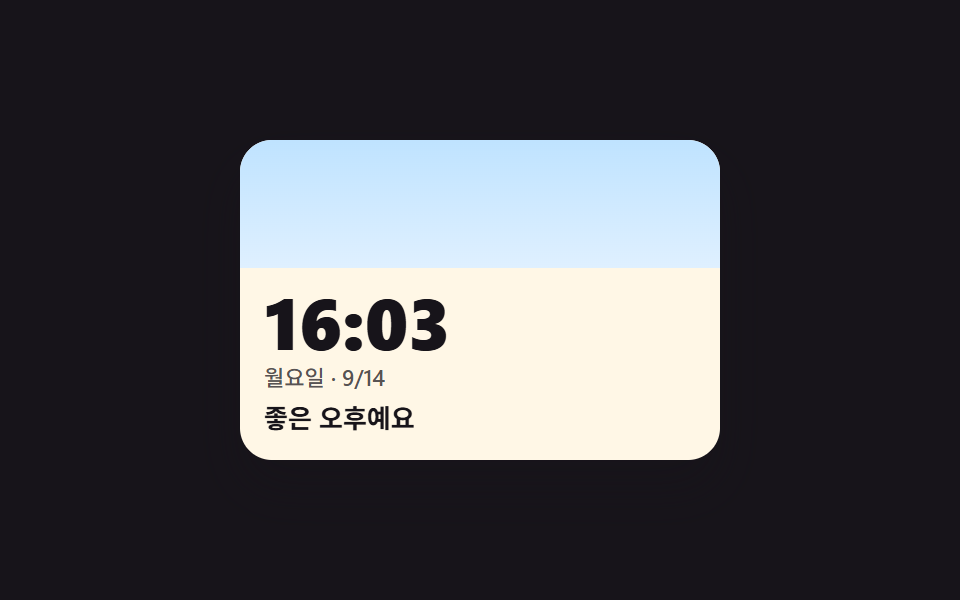 09 weather-live-clock-theme
Auto-plays · click a tile to jump to its section · all nine in one zip
- 01 Current-conditions card whose sky and copy swap together
- 02 Weather icons that never sit still — sun, cloud, rain, snow
- 03 Hourly strip whose current-hour cell lights up
- 04 Five-day list where each bar finds its span inside the week
- 05 The day's sun riding an arc from sunrise to sunset
- 06 UV gauge whose needle settles on the band it means
- 07 Precipitation bars that grow, and a compass that points into the wind
- 08 Unit toggle that converts every number on the card at once
- 09 Clock widget whose sky and greeting follow the real hour
The nine weather widget css pieces follow the shape of one day rather than a difficulty ladder. They open with now — the current-conditions card (01) and the icons that keep it alive (02) — then widen the timeline through the hourly strip (03) and the five-day list (04). With the day laid out, the sky itself takes over: the sun's path (05), the UV index that scores it (06), and the rain-and-wind pair (07). The last two are about the viewer rather than the weather — the unit toggle that converts every number at once (08) and the live clock whose sky follows the real hour (09). All nine share one set of colors, spacing, and easing values, so a dashboard carrying several of them keeps a single tone. Same-size neighbors for the same slot are the activity feed widgets and the dark-ground terminal UI parts, which set the light and dark ends of one widget row.
01Current-conditions card whose sky and copy swap together
What this weather widget ui design shows
Pick one of the four condition buttons and the card swaps as one set: the two stacked sky layers change over, the condition glyph swaps, and the temperature, the state line, and the high and low replace each other in the same frame. The exchange is a steps(1, end) cut rather than a crossfade — two half-transparent skies overlapping is precisely what a poster frame would catch — and the glyph adds a small pop so the cut alone does not leave the capture short of moving frames; the render measured a changed-pixel area of 33.206%, the largest of the nine, across 11 of 24 frames at intensity 56.6.
<main class="stage stage--ink">
  <section class="wc is-demo" id="wc" aria-label="Current weather card">
    <span class="wc__sky wc__sky--a" aria-hidden="true"></span>
    <span class="wc__sky wc__sky--b" aria-hidden="true"></span>
    <div class="wc__body">
      <header class="wc__head">
        <p class="wc__loc"><svg viewBox="0 0 256 256" width="14" height="14" fill="currentColor" aria-hidden="true"><path d="M128,16a88,88,0,0,0-88,88c0,75.3,80,132.17,83.41,134.55a8,8,0,0,0,9.18,0C136,236.17,216,179.3,216,104A88,88,0,0,0,128,16Z" opacity="0.2"/><path d="M128,40a64,64,0,1,0,64,64A64.07,64.07,0,0,0,128,40Zm0,96a32,32,0,1,1,32-32A32,32,0,0,1,128,136Z"/></svg>Seoul</p>
        <p class="wc__label">Right now</p>
      </header>
      <div class="wc__now">
        <p class="wc__temp">
          <span class="wc__swap"><span class="wc__v">24</span><span class="wc__alt" aria-hidden="true">19</span></span><span class="wc__deg">°</span>
        </p>
        <span class="wc__art" aria-hidden="true">
          <span class="wc__glyph wc__glyph--sunny"><svg viewBox="0 0 256 256" width="40" height="40" fill="currentColor"><path d="M184,128a56,56,0,1,1-56-56A56,56,0,0,1,184,128Z" opacity="0.2"/><path d="M120,40V16a8,8,0,0,1,16,0V40a8,8,0,0,1-16,0Zm72,88a64,64,0,1,1-64-64A64.07,64.07,0,0,1,192,128Zm-16,0a48,48,0,1,0-48,48A48.05,48.05,0,0,0,176,128ZM58.34,69.66A8,8,0,0,0,69.66,58.34l-16-16A8,8,0,0,0,42.34,53.66Zm0,116.68-16,16a8,8,0,0,0,11.32,11.32l16-16a8,8,0,0,0-11.32-11.32ZM192,72a8,8,0,0,0,5.66-2.34l16-16a8,8,0,0,0-11.32-11.32l-16,16A8,8,0,0,0,192,72Zm5.66,114.34a8,8,0,0,0-11.32,11.32l16,16a8,8,0,0,0,11.32-11.32ZM48,128a8,8,0,0,0-8-8H16a8,8,0,0,0,0,16H40A8,8,0,0,0,48,128Zm80,80a8,8,0,0,0-8,8v24a8,8,0,0,0,16,0V216A8,8,0,0,0,128,208Zm112-88H216a8,8,0,0,0,0,16h24a8,8,0,0,0,0-16Z"/></svg></span>
          <span class="wc__glyph wc__glyph--cloudy"><svg viewBox="0 0 256 256" width="40" height="40" fill="currentColor"><path d="M139.84,84.41v0a68.22,68.22,0,0,0-41.65,46v-.11a44.08,44.08,0,0,0-38.54,5h0a48,48,0,1,1,80.19-50.94Z" opacity="0.2"/><path d="M164,72a76.2,76.2,0,0,0-20.26,2.73,55.63,55.63,0,0,0-9.41-11.54l9.51-13.57a8,8,0,1,0-13.11-9.18L121.22,54A55.9,55.9,0,0,0,96,48c-.58,0-1.16,0-1.74,0L91.37,31.71a8,8,0,1,0-15.75,2.77L78.5,50.82A56.1,56.1,0,0,0,55.23,65.67L41.61,56.14a8,8,0,1,0-9.17,13.11L46,78.77A55.55,55.55,0,0,0,40,104c0,.57,0,1.15,0,1.72L23.71,108.6a8,8,0,0,0,1.38,15.88,8.24,8.24,0,0,0,1.39-.12l16.32-2.88a55.74,55.74,0,0,0,5.86,12.42A52,52,0,0,0,84,224h80a76,76,0,0,0,0-152ZM56,104a40,40,0,0,1,72.54-23.24,76.26,76.26,0,0,0-35.62,40,52.14,52.14,0,0,0-31,4.17A40,40,0,0,1,56,104ZM164,208H84a36,36,0,1,1,4.78-71.69c-.37,2.37-.63,4.79-.77,7.23a8,8,0,0,0,16,.92,58.91,58.91,0,0,1,1.88-11.81c0-.16.09-.32.12-.48A60.06,60.06,0,1,1,164,208Z"/></svg></span>
          <span class="wc__glyph wc__glyph--rainy"><svg viewBox="0 0 256 256" width="40" height="40" fill="currentColor"><path d="M224,92a68,68,0,0,1-68,68H76A44,44,0,1,1,90.2,74.34v.11A68.06,68.06,0,0,1,224,92Z" opacity="0.2"/><path d="M158.66,196.44l-32,48a8,8,0,1,1-13.32-8.88l32-48a8,8,0,0,1,13.32,8.88ZM232,92a76.08,76.08,0,0,1-76,76H132.28l-29.62,44.44a8,8,0,1,1-13.32-8.88L113.05,168H76A52,52,0,1,1,76,64a53.26,53.26,0,0,1,8.92.76A76.08,76.08,0,0,1,232,92Zm-16,0A60.06,60.06,0,0,0,96,88.46a8,8,0,0,1-16-.92q.21-3.66.77-7.23A38.11,38.11,0,0,0,76,80a36,36,0,0,0,0,72h80A60.07,60.07,0,0,0,216,92Z"/></svg></span>
          <span class="wc__glyph wc__glyph--snowy"><svg viewBox="0 0 256 256" width="40" height="40" fill="currentColor"><path d="M220,128a92,92,0,1,1-92-92A92.1,92.1,0,0,1,220,128Z" opacity="0.2"/><path d="M223.77,150.09a8,8,0,0,1-5.86,9.68l-24.64,6,6.46,24.11a8,8,0,0,1-5.66,9.8A8.25,8.25,0,0,1,192,200a8,8,0,0,1-7.72-5.93l-7.72-28.8L136,141.86v46.83l21.66,21.65a8,8,0,0,1-11.32,11.32L128,203.31l-18.34,18.35a8,8,0,0,1-11.32-11.32L120,188.69V141.86L79.45,165.27l-7.72,28.8A8,8,0,0,1,64,200a8.25,8.25,0,0,1-2.08-.27,8,8,0,0,1-5.66-9.8l6.46-24.11-24.64-6a8,8,0,0,1,3.82-15.54l29.45,7.23L112,128,71.36,104.54l-29.45,7.23A7.85,7.85,0,0,1,40,112a8,8,0,0,1-1.91-15.77l24.64-6L56.27,66.07a8,8,0,0,1,15.46-4.14l7.72,28.8L120,114.14V67.31L98.34,45.66a8,8,0,0,1,11.32-11.32L128,52.69l18.34-18.35a8,8,0,0,1,11.32,11.32L136,67.31v46.83l40.55-23.41,7.72-28.8a8,8,0,0,1,15.46,4.14l-6.46,24.11,24.64,6A8,8,0,0,1,216,112a7.85,7.85,0,0,1-1.91-.23l-29.45-7.23L144,128l40.64,23.46,29.45-7.23A8,8,0,0,1,223.77,150.09Z"/></svg></span>
        </span>
        <p class="wc__word wc__swap"><span class="wc__v">Sunny</span><span class="wc__alt" aria-hidden="true">Rain</span></p>
      </div>
      <p class="wc__range">
        <span class="wc__hi">High <span class="wc__swap"><span class="wc__v">27</span><span class="wc__alt" aria-hidden="true">21</span></span>°</span>
        <span class="wc__lo">Low <span class="wc__swap"><span class="wc__v">18</span><span class="wc__alt" aria-hidden="true">16</span></span>°</span>
      </p>
      <div class="wc__conds" role="group" aria-label="Choose a sky condition">
        <button class="wc__c is-on" type="button" data-cond="sunny" aria-pressed="true">Sunny</button>
        <button class="wc__c" type="button" data-cond="cloudy" aria-pressed="false">Cloudy</button>
        <button class="wc__c" type="button" data-cond="rainy" aria-pressed="false">Rain</button>
        <button class="wc__c" type="button" data-cond="snowy" aria-pressed="false">Snow</button>
      </div>
    </div>
  </section>
</main>@use "../../../../site/static/demo-tokens" as *;
// 하늘 상태를 고르면 카드 전체 — 하늘 배경·아이콘·온도·최고최저 — 가 한 세트로 맞바뀐다.
// 상태 교체는 steps(1, end) 컷: 크로스페이드로 겹치면 대표 이미지에 두 하늘이 반투명하게 겹친다(237 실측).
// 아이콘이 솟았다 내려앉는 pop 만 transform — 컷만으로는 움직인 프레임이 모자란다(252 실측).
$duration: $dur-loop;
$easing: $ease-spring;
$color: $subject-blue;
@include stage($stage-ink);
.wc {
position: relative;
box-sizing: border-box;
width: min(280px, 92vw);
overflow: hidden;
border-radius: $r-card;
color: $subject-ink;
box-shadow: $shadow-raised;
}
.wc * { box-sizing: border-box; }
// 두 하늘 겹 — 맑음(a)과 비(b). 기본은 a.
.wc__sky {
position: absolute;
inset: 0;
pointer-events: none;
}
.wc__sky--a { background: linear-gradient(170deg, #bfe3ff 0%, #dcefff 46%, #ffe9b0 100%); }
.wc__sky--b { background: linear-gradient(170deg, #93a7c8 0%, #b7c5de 60%, #cdd8ea 100%); opacity: 0; }
.wc__body {
position: relative;
display: grid;
gap: $sp-2;
padding: $sp-3 $sp-3 $sp-2;
}
.wc__head {
display: flex;
align-items: baseline;
justify-content: space-between;
gap: $sp-2;
}
.wc__loc {
display: inline-flex;
align-items: center;
gap: $sp-1;
margin: 0;
font-size: 13px;
font-weight: 700;
line-height: 1.3;
}
.wc__label {
margin: 0;
font-size: 10px;
font-weight: 500;
line-height: 1.3;
color: rgba($subject-ink, .72);
}
.wc__now {
display: grid;
grid-template-columns: 1fr auto;
align-items: center;
gap: $sp-2;
}
.wc__temp {
display: flex;
align-items: flex-start;
margin: 0;
font-size: 44px;
font-weight: 800;
line-height: 1;
font-variant-numeric: tabular-nums;
}
.wc__deg { font-size: 22px; font-weight: 700; }
.wc__word {
grid-column: 1 / -1;
margin: 0;
font-size: 14px;
font-weight: 700;
line-height: 1.3;
}
// 아이콘 네 겹 — 상태 클래스가 한 개만 보이게 한다
.wc__art {
position: relative;
display: grid;
place-items: center;
width: 48px;
height: 48px;
border-radius: $r-control;
background: rgba(255, 255, 255, .55);
}
.wc__glyph {
grid-area: 1 / 1;
display: grid;
place-items: center;
color: $subject-blue;
transition: none;
}
.wc__glyph--sunny { color: #ba9f72; }
.wc__glyph--rainy { opacity: 0; }
.wc__glyph--snowy { opacity: 0; color: #4a89c9; }
.wc.is-cloudy .wc__glyph--sunny,
.wc.is-rainy .wc__glyph--sunny,
.wc.is-snowy .wc__glyph--sunny { opacity: 0; }
.wc.is-cloudy .wc__glyph--cloudy { opacity: 1; }
.wc.is-rainy .wc__glyph--rainy { opacity: 1; }
.wc.is-snowy .wc__glyph--snowy { opacity: 1; }
.wc.is-cloudy .wc__sky--a,
.wc.is-rainy .wc__sky--a,
.wc.is-snowy .wc__sky--a { opacity: 0; }
.wc.is-cloudy .wc__sky--b,
.wc.is-rainy .wc__sky--b,
.wc.is-snowy .wc__sky--b { opacity: 1; }
// 실제 클릭: 아이콘이 한 번 솟았다 내려앉는다
@keyframes wc-pop {
0% { transform: translateY(3px) scale(.88); }
55% { transform: translateY(-3px) scale(1.04); }
100% { transform: translateY(0) scale(1); }
}
.wc__art.is-pop { animation-name: wc-pop; animation-duration: $dur-quick; animation-timing-function: $easing; animation-iteration-count: 1; }
.wc__range {
display: flex;
gap: $sp-3;
margin: 0;
font-size: 11px;
font-weight: 700;
line-height: 1.4;
font-variant-numeric: tabular-nums;
}
.wc__lo { color: rgba($subject-ink, .72); }
// 겹쳐 둔 두 번째 값 — 미리보기 루프에서만 보인다
.wc__swap { position: relative; display: inline-block; }
.wc__alt {
position: absolute;
inset: 0;
opacity: 0;
}
.wc__conds {
display: grid;
grid-template-columns: repeat(4, 1fr);
gap: $sp-1;
}
.wc__c {
padding: $sp-1 0;
border: 0;
border-radius: $r-control;
background: rgba(255, 255, 255, .5);
color: $subject-ink;
font-size: 11px;
font-weight: 700;
line-height: 1.3;
cursor: pointer;
&:focus-visible { outline: 2px solid $subject-blue; outline-offset: 2px; }
&.is-on { background: $subject-ink; color: $subject-cream; }
}
// ── 격자 미리보기 루프 (2초) ──
// 0~44% 맑음 → 45% 컷으로 비(아이콘 pop 함께) → 88% 맑음 복귀(90% 안)
@keyframes wc-a { 0%, 44% { opacity: 1; } 45%, 87% { opacity: 0; } 88%, 100% { opacity: 1; } }
@keyframes wc-b { 0%, 44% { opacity: 0; } 45%, 87% { opacity: 1; } 88%, 100% { opacity: 0; } }
@keyframes wc-va { 0%, 44% { opacity: 1; } 45%, 87% { opacity: 0; } 88%, 100% { opacity: 1; } }
@keyframes wc-vb { 0%, 44% { opacity: 0; } 45%, 87% { opacity: 1; } 88%, 100% { opacity: 0; } }
@keyframes wc-poploop {
0%, 42% { transform: translateY(0) scale(1); }
45% { transform: translateY(3px) scale(.88); }
58% { transform: translateY(-3px) scale(1.04); }
70%, 85% { transform: translateY(0) scale(1); }
88% { transform: translateY(3px) scale(.88); }
97%, 100% { transform: translateY(0) scale(1); }
}
@keyframes wc-press {
0%, 41% { transform: scale(1); }
45% { transform: scale(.9); }
57%, 100% { transform: scale(1); }
}
// 루프에서는 고른 단추의 강조도 상태와 함께 맞바뀐다 — 컷으로
@keyframes wc-on-a {
0%, 44% { background-color: $subject-ink; color: $subject-cream; }
45%, 87% { background-color: rgba(255, 255, 255, .5); color: $subject-ink; }
88%, 100% { background-color: $subject-ink; color: $subject-cream; }
}
@keyframes wc-on-b {
0%, 44% { background-color: rgba(255, 255, 255, .5); color: $subject-ink; }
45%, 87% { background-color: $subject-ink; color: $subject-cream; }
88%, 100% { background-color: rgba(255, 255, 255, .5); color: $subject-ink; }
}
.wc.is-demo {
.wc__sky--a { animation-name: wc-a; }
.wc__sky--b { animation-name: wc-b; }
.wc__glyph--sunny { animation-name: wc-a; }
.wc__glyph--rainy { animation-name: wc-b; }
.wc__sky--a, .wc__sky--b,
.wc__glyph--sunny, .wc__glyph--rainy {
animation-duration: $duration;
animation-timing-function: steps(1, end);
animation-iteration-count: infinite;
animation-fill-mode: backwards;
}
.wc__swap .wc__v { animation-name: wc-va; }
.wc__swap .wc__alt { animation-name: wc-vb; }
.wc__swap .wc__v, .wc__swap .wc__alt {
animation-duration: $duration;
animation-timing-function: steps(1, end);
animation-iteration-count: infinite;
animation-fill-mode: backwards;
}
.wc__art { animation-name: wc-poploop; animation-duration: $duration; animation-timing-function: $ease-out; animation-iteration-count: infinite; animation-fill-mode: backwards; }
.wc__c:nth-child(3) { animation-name: wc-press, wc-on-b; }
.wc__c:nth-child(1) { animation-name: wc-on-a; }
.wc__c:nth-child(1), .wc__c:nth-child(3) {
animation-duration: $duration, $duration;
animation-timing-function: $easing, steps(1, end);
animation-iteration-count: infinite, infinite;
animation-fill-mode: backwards, backwards;
}
}
@media (max-width: 340px) {
.wc__body { padding: $sp-2 $sp-2 $sp-1; }
.wc__temp { font-size: 36px; }
.wc__art { width: 40px; height: 40px; }
.wc__art svg { width: 32px; height: 32px; }
}
@media (prefers-reduced-motion: reduce) {
.wc.is-demo .wc__sky--a, .wc.is-demo .wc__sky--b,
.wc.is-demo .wc__glyph, .wc.is-demo .wc__swap .wc__v, .wc.is-demo .wc__swap .wc__alt,
.wc.is-demo .wc__art, .wc.is-demo .wc__c {
animation: none !important;
transform: none !important;
}
.wc.is-demo .wc__sky--a, .wc.is-demo .wc__glyph--sunny,
.wc.is-demo .wc__swap .wc__v { opacity: 1 !important; }
.wc.is-demo .wc__sky--b, .wc.is-demo .wc__glyph--rainy,
.wc.is-demo .wc__swap .wc__alt { opacity: 0 !important; }
.wc__art.is-pop { animation: none !important; }
}html, body {
margin: 0;
overflow: hidden;
}
.stage {
box-sizing: border-box;
min-height: 100vh;
display: grid;
place-items: center;
margin: 0;
background: #17141a;
font-family: -apple-system, "Segoe UI", "Noto Sans KR", sans-serif;
padding: clamp(8px, 4vw, 24px);
}
.wc {
position: relative;
box-sizing: border-box;
width: min(280px, 92vw);
overflow: hidden;
border-radius: 16px;
color: #17141a;
box-shadow: 0 14px 24px rgba(23, 20, 26, 0.32);
}
.wc * {
box-sizing: border-box;
}
.wc__sky {
position: absolute;
inset: 0;
pointer-events: none;
}
.wc__sky--a {
background: linear-gradient(170deg, #bfe3ff 0%, #dcefff 46%, #ffe9b0 100%);
}
.wc__sky--b {
background: linear-gradient(170deg, #93a7c8 0%, #b7c5de 60%, #cdd8ea 100%);
opacity: 0;
}
.wc__body {
position: relative;
display: grid;
gap: 8px;
padding: 12px 12px 8px;
}
.wc__head {
display: flex;
align-items: baseline;
justify-content: space-between;
gap: 8px;
}
.wc__loc {
display: inline-flex;
align-items: center;
gap: 4px;
margin: 0;
font-size: 13px;
font-weight: 700;
line-height: 1.3;
}
.wc__label {
margin: 0;
font-size: 10px;
font-weight: 500;
line-height: 1.3;
color: rgba(23, 20, 26, 0.72);
}
.wc__now {
display: grid;
grid-template-columns: 1fr auto;
align-items: center;
gap: 8px;
}
.wc__temp {
display: flex;
align-items: flex-start;
margin: 0;
font-size: 44px;
font-weight: 800;
line-height: 1;
font-variant-numeric: tabular-nums;
}
.wc__deg {
font-size: 22px;
font-weight: 700;
}
.wc__word {
grid-column: 1/-1;
margin: 0;
font-size: 14px;
font-weight: 700;
line-height: 1.3;
}
.wc__art {
position: relative;
display: grid;
place-items: center;
width: 48px;
height: 48px;
border-radius: 12px;
background: rgba(255, 255, 255, 0.55);
}
.wc__glyph {
grid-area: 1/1;
display: grid;
place-items: center;
color: #2f6df6;
transition: none;
}
.wc__glyph--sunny {
color: #ba9f72;
}
.wc__glyph--rainy {
opacity: 0;
}
.wc__glyph--snowy {
opacity: 0;
color: #4a89c9;
}
.wc.is-cloudy .wc__glyph--sunny,
.wc.is-rainy .wc__glyph--sunny,
.wc.is-snowy .wc__glyph--sunny {
opacity: 0;
}
.wc.is-cloudy .wc__glyph--cloudy {
opacity: 1;
}
.wc.is-rainy .wc__glyph--rainy {
opacity: 1;
}
.wc.is-snowy .wc__glyph--snowy {
opacity: 1;
}
.wc.is-cloudy .wc__sky--a,
.wc.is-rainy .wc__sky--a,
.wc.is-snowy .wc__sky--a {
opacity: 0;
}
.wc.is-cloudy .wc__sky--b,
.wc.is-rainy .wc__sky--b,
.wc.is-snowy .wc__sky--b {
opacity: 1;
}
@keyframes wc-pop {
0% {
transform: translateY(3px) scale(0.88);
}
55% {
transform: translateY(-3px) scale(1.04);
}
100% {
transform: translateY(0) scale(1);
}
}
.wc__art.is-pop {
animation-name: wc-pop;
animation-duration: 220ms;
animation-timing-function: cubic-bezier(0.2, 0.8, 0.2, 1);
animation-iteration-count: 1;
}
.wc__range {
display: flex;
gap: 12px;
margin: 0;
font-size: 11px;
font-weight: 700;
line-height: 1.4;
font-variant-numeric: tabular-nums;
}
.wc__lo {
color: rgba(23, 20, 26, 0.72);
}
.wc__swap {
position: relative;
display: inline-block;
}
.wc__alt {
position: absolute;
inset: 0;
opacity: 0;
}
.wc__conds {
display: grid;
grid-template-columns: repeat(4, 1fr);
gap: 4px;
}
.wc__c {
padding: 4px 0;
border: 0;
border-radius: 12px;
background: rgba(255, 255, 255, 0.5);
color: #17141a;
font-size: 11px;
font-weight: 700;
line-height: 1.3;
cursor: pointer;
}
.wc__c:focus-visible {
outline: 2px solid #2f6df6;
outline-offset: 2px;
}
.wc__c.is-on {
background: #17141a;
color: #fff7e6;
}
@keyframes wc-a {
0%, 44% {
opacity: 1;
}
45%, 87% {
opacity: 0;
}
88%, 100% {
opacity: 1;
}
}
@keyframes wc-b {
0%, 44% {
opacity: 0;
}
45%, 87% {
opacity: 1;
}
88%, 100% {
opacity: 0;
}
}
@keyframes wc-va {
0%, 44% {
opacity: 1;
}
45%, 87% {
opacity: 0;
}
88%, 100% {
opacity: 1;
}
}
@keyframes wc-vb {
0%, 44% {
opacity: 0;
}
45%, 87% {
opacity: 1;
}
88%, 100% {
opacity: 0;
}
}
@keyframes wc-poploop {
0%, 42% {
transform: translateY(0) scale(1);
}
45% {
transform: translateY(3px) scale(0.88);
}
58% {
transform: translateY(-3px) scale(1.04);
}
70%, 85% {
transform: translateY(0) scale(1);
}
88% {
transform: translateY(3px) scale(0.88);
}
97%, 100% {
transform: translateY(0) scale(1);
}
}
@keyframes wc-press {
0%, 41% {
transform: scale(1);
}
45% {
transform: scale(0.9);
}
57%, 100% {
transform: scale(1);
}
}
@keyframes wc-on-a {
0%, 44% {
background-color: #17141a;
color: #fff7e6;
}
45%, 87% {
background-color: rgba(255, 255, 255, 0.5);
color: #17141a;
}
88%, 100% {
background-color: #17141a;
color: #fff7e6;
}
}
@keyframes wc-on-b {
0%, 44% {
background-color: rgba(255, 255, 255, 0.5);
color: #17141a;
}
45%, 87% {
background-color: #17141a;
color: #fff7e6;
}
88%, 100% {
background-color: rgba(255, 255, 255, 0.5);
color: #17141a;
}
}
.wc.is-demo .wc__sky--a {
animation-name: wc-a;
}
.wc.is-demo .wc__sky--b {
animation-name: wc-b;
}
.wc.is-demo .wc__glyph--sunny {
animation-name: wc-a;
}
.wc.is-demo .wc__glyph--rainy {
animation-name: wc-b;
}
.wc.is-demo .wc__sky--a, .wc.is-demo .wc__sky--b,
.wc.is-demo .wc__glyph--sunny, .wc.is-demo .wc__glyph--rainy {
animation-duration: 2s;
animation-timing-function: steps(1, end);
animation-iteration-count: infinite;
animation-fill-mode: backwards;
}
.wc.is-demo .wc__swap .wc__v {
animation-name: wc-va;
}
.wc.is-demo .wc__swap .wc__alt {
animation-name: wc-vb;
}
.wc.is-demo .wc__swap .wc__v, .wc.is-demo .wc__swap .wc__alt {
animation-duration: 2s;
animation-timing-function: steps(1, end);
animation-iteration-count: infinite;
animation-fill-mode: backwards;
}
.wc.is-demo .wc__art {
animation-name: wc-poploop;
animation-duration: 2s;
animation-timing-function: ease-out;
animation-iteration-count: infinite;
animation-fill-mode: backwards;
}
.wc.is-demo .wc__c:nth-child(3) {
animation-name: wc-press, wc-on-b;
}
.wc.is-demo .wc__c:nth-child(1) {
animation-name: wc-on-a;
}
.wc.is-demo .wc__c:nth-child(1), .wc.is-demo .wc__c:nth-child(3) {
animation-duration: 2s, 2s;
animation-timing-function: cubic-bezier(0.2, 0.8, 0.2, 1), steps(1, end);
animation-iteration-count: infinite, infinite;
animation-fill-mode: backwards, backwards;
}
@media (max-width: 340px) {
.wc__body {
padding: 8px 8px 4px;
}
.wc__temp {
font-size: 36px;
}
.wc__art {
width: 40px;
height: 40px;
}
.wc__art svg {
width: 32px;
height: 32px;
}
}
@media (prefers-reduced-motion: reduce) {
.wc.is-demo .wc__sky--a, .wc.is-demo .wc__sky--b,
.wc.is-demo .wc__glyph, .wc.is-demo .wc__swap .wc__v, .wc.is-demo .wc__swap .wc__alt,
.wc.is-demo .wc__art, .wc.is-demo .wc__c {
animation: none !important;
transform: none !important;
}
.wc.is-demo .wc__sky--a, .wc.is-demo .wc__glyph--sunny,
.wc.is-demo .wc__swap .wc__v {
opacity: 1 !important;
}
.wc.is-demo .wc__sky--b, .wc.is-demo .wc__glyph--rainy,
.wc.is-demo .wc__swap .wc__alt {
opacity: 0 !important;
}
.wc__art.is-pop {
animation: none !important;
}
}// 하늘 상태를 고르면 카드 전체(하늘·아이콘·온도·최고최저)가 한 세트로 맞바뀐다.
// 값은 데이터 속성에 들어 있고, 화면 글자는 언어팩이 바꾼 텍스트 노드만 고친다.
var wcRoot = document.getElementById('wc');
// 상태 문구도 한 세트다 — 언어팩 사본이 이 한국어 글자를 통째로 바꾼다(04 의 drDetails 와 같은 방식)
var wcData = {
sunny: { temp: 24, hi: 27, lo: 18, word: 'Sunny' },
cloudy: { temp: 21, hi: 24, lo: 17, word: 'Cloudy' },
rainy: { temp: 19, hi: 21, lo: 16, word: 'Rain' },
snowy: { temp: -2, hi: 1, lo: -5, word: 'Snow' }
};
var wcSwaps = [
{ box: '.wc__temp .wc__swap', key: 'temp' },
{ box: '.wc__word', key: 'word' },
{ box: '.wc__hi .wc__swap', key: 'hi' },
{ box: '.wc__lo .wc__swap', key: 'lo' }
];
function wcApply(cond) {
wcRoot.classList.remove('is-sunny', 'is-cloudy', 'is-rainy', 'is-snowy');
wcRoot.classList.add('is-' + cond);
for (var i = 0; i < wcSwaps.length; i++) {
var box = wcRoot.querySelector(wcSwaps[i].box);
box.querySelector('.wc__v').textContent = String(wcData[cond][wcSwaps[i].key]);
}
var btns = wcRoot.querySelectorAll('.wc__c');
for (var j = 0; j < btns.length; j++) {
var on = btns[j].getAttribute('data-cond') === cond;
btns[j].setAttribute('aria-pressed', on ? 'true' : 'false');
btns[j].classList.toggle('is-on', on);
}
// 아이콘이 한 번 솟았다 내려앉는다 — 상태가 바뀌었다는 피드백
var art = wcRoot.querySelector('.wc__art');
art.classList.remove('is-pop');
void art.offsetWidth;
art.classList.add('is-pop');
}
wcRoot.addEventListener('click', function (e) {
var btn = e.target.closest('.wc__c');
if (!btn) return;
wcRoot.classList.remove('is-demo');
wcApply(btn.getAttribute('data-cond'));
});import { useState } from "react";
import type { CSSProperties } from "react";
import styles from "./WeatherCurrentCard.module.scss";
// vanilla 판(run/281/demo/01-weather-current-card/index.html) 의 React 포트.
// 하늘 상태를 고르면 카드 전체(하늘·아이콘·온도·최고최저)가 한 세트로 맞바뀐다.
export type WcCondition = {
id: string;
/** 단추에 쓰는 낱말 — 언어팩이 통째로 바꾼다 */
label: string;
/** 큰 온도 아래 붙는 하늘 낱말 */
word: string;
temp: number;
hi: number;
lo: number;
};
export type WeatherCurrentCardProps = {
location?: string;
label?: string;
hiLabel?: string;
loLabel?: string;
groupLabel?: string;
condsLabel?: string;
conditions?: WcCondition[];
/** 격자 미리보기 루프가 컷으로 맞바꾸는 두 번째 하늘 상태 */
loopTo?: string;
/** 격자 미리보기 2초 자동 루프. 사람이 손대면 꺼진다 */
demo?: boolean;
duration?: number;
easing?: string;
color?: string;
};
type Vars = CSSProperties & { "--duration"?: string; "--easing"?: string; "--color"?: string };
const DEFAULT_CONDITIONS: WcCondition[] = [
{ id: "sunny", label: "맑음", word: "맑음", temp: 24, hi: 27, lo: 18 },
{ id: "cloudy", label: "구름", word: "구름", temp: 21, hi: 24, lo: 17 },
{ id: "rainy", label: "비", word: "비", temp: 19, hi: 21, lo: 16 },
{ id: "snowy", label: "눈", word: "눈", temp: -2, hi: 1, lo: -5 },
];
function PinIcon() {
return (
<svg viewBox="0 0 256 256" width="14" height="14" fill="currentColor" aria-hidden="true"><path d="M128,16a88,88,0,0,0-88,88c0,75.3,80,132.17,83.41,134.55a8,8,0,0,0,9.18,0C136,236.17,216,179.3,216,104A88,88,0,0,0,128,16Z" opacity="0.2"/><path d="M128,40a64,64,0,1,0,64,64A64.07,64.07,0,0,0,128,40Zm0,96a32,32,0,1,1,32-32A32,32,0,0,1,128,136Z"/></svg>
);
}
function SunGlyph() {
return (
<svg viewBox="0 0 256 256" width="40" height="40" fill="currentColor"><path d="M184,128a56,56,0,1,1-56-56A56,56,0,0,1,184,128Z" opacity="0.2"/><path d="M120,40V16a8,8,0,0,1,16,0V40a8,8,0,0,1-16,0Zm72,88a64,64,0,1,1-64-64A64.07,64.07,0,0,1,192,128Zm-16,0a48,48,0,1,0-48,48A48.05,48.05,0,0,0,176,128ZM58.34,69.66A8,8,0,0,0,69.66,58.34l-16-16A8,8,0,0,0,42.34,53.66Zm0,116.68-16,16a8,8,0,0,0,11.32,11.32l16-16a8,8,0,0,0-11.32-11.32ZM192,72a8,8,0,0,0,5.66-2.34l16-16a8,8,0,0,0-11.32-11.32l-16,16A8,8,0,0,0,192,72Zm5.66,114.34a8,8,0,0,0-11.32,11.32l16,16a8,8,0,0,0,11.32-11.32ZM48,128a8,8,0,0,0-8-8H16a8,8,0,0,0,0,16H40A8,8,0,0,0,48,128Zm80,80a8,8,0,0,0-8,8v24a8,8,0,0,0,16,0V216A8,8,0,0,0,128,208Zm112-88H216a8,8,0,0,0,0,16h24a8,8,0,0,0,0-16Z"/></svg>
);
}
function CloudGlyph() {
return (
<svg viewBox="0 0 256 256" width="40" height="40" fill="currentColor"><path d="M139.84,84.41v0a68.22,68.22,0,0,0-41.65,46v-.11a44.08,44.08,0,0,0-38.54,5h0a48,48,0,1,1,80.19-50.94Z" opacity="0.2"/><path d="M164,72a76.2,76.2,0,0,0-20.26,2.73,55.63,55.63,0,0,0-9.41-11.54l9.51-13.57a8,8,0,1,0-13.11-9.18L121.22,54A55.9,55.9,0,0,0,96,48c-.58,0-1.16,0-1.74,0L91.37,31.71a8,8,0,1,0-15.75,2.77L78.5,50.82A56.1,56.1,0,0,0,55.23,65.67L41.61,56.14a8,8,0,1,0-9.17,13.11L46,78.77A55.55,55.55,0,0,0,40,104c0,.57,0,1.15,0,1.72L23.71,108.6a8,8,0,0,0,1.38,15.88,8.24,8.24,0,0,0,1.39-.12l16.32-2.88a55.74,55.74,0,0,0,5.86,12.42A52,52,0,0,0,84,224h80a76,76,0,0,0,0-152ZM56,104a40,40,0,0,1,72.54-23.24,76.26,76.26,0,0,0-35.62,40,52.14,52.14,0,0,0-31,4.17A40,40,0,0,1,56,104ZM164,208H84a36,36,0,1,1,4.78-71.69c-.37,2.37-.63,4.79-.77,7.23a8,8,0,0,0,16,.92,58.91,58.91,0,0,1,1.88-11.81c0-.16.09-.32.12-.48A60.06,60.06,0,1,1,164,208Z"/></svg>
);
}
function RainGlyph() {
return (
<svg viewBox="0 0 256 256" width="40" height="40" fill="currentColor"><path d="M224,92a68,68,0,0,1-68,68H76A44,44,0,1,1,90.2,74.34v.11A68.06,68.06,0,0,1,224,92Z" opacity="0.2"/><path d="M158.66,196.44l-32,48a8,8,0,1,1-13.32-8.88l32-48a8,8,0,0,1,13.32,8.88ZM232,92a76.08,76.08,0,0,1-76,76H132.28l-29.62,44.44a8,8,0,1,1-13.32-8.88L113.05,168H76A52,52,0,1,1,76,64a53.26,53.26,0,0,1,8.92.76A76.08,76.08,0,0,1,232,92Zm-16,0A60.06,60.06,0,0,0,96,88.46a8,8,0,0,1-16-.92q.21-3.66.77-7.23A38.11,38.11,0,0,0,76,80a36,36,0,0,0,0,72h80A60.07,60.07,0,0,0,216,92Z"/></svg>
);
}
function SnowGlyph() {
return (
<svg viewBox="0 0 256 256" width="40" height="40" fill="currentColor"><path d="M220,128a92,92,0,1,1-92-92A92.1,92.1,0,0,1,220,128Z" opacity="0.2"/><path d="M223.77,150.09a8,8,0,0,1-5.86,9.68l-24.64,6,6.46,24.11a8,8,0,0,1-5.66,9.8A8.25,8.25,0,0,1,192,200a8,8,0,0,1-7.72-5.93l-7.72-28.8L136,141.86v46.83l21.66,21.65a8,8,0,0,1-11.32,11.32L128,203.31l-18.34,18.35a8,8,0,0,1-11.32-11.32L120,188.69V141.86L79.45,165.27l-7.72,28.8A8,8,0,0,1,64,200a8.25,8.25,0,0,1-2.08-.27,8,8,0,0,1-5.66-9.8l6.46-24.11-24.64-6a8,8,0,0,1,3.82-15.54l29.45,7.23L112,128,71.36,104.54l-29.45,7.23A7.85,7.85,0,0,1,40,112a8,8,0,0,1-1.91-15.77l24.64-6L56.27,66.07a8,8,0,0,1,15.46-4.14l7.72,28.8L120,114.14V67.31L98.34,45.66a8,8,0,0,1,11.32-11.32L128,52.69l18.34-18.35a8,8,0,0,1,11.32,11.32L136,67.31v46.83l40.55-23.41,7.72-28.8a8,8,0,0,1,15.46,4.14l-6.46,24.11,24.64,6A8,8,0,0,1,216,112a7.85,7.85,0,0,1-1.91-.23l-29.45-7.23L144,128l40.64,23.46,29.45-7.23A8,8,0,0,1,223.77,150.09Z"/></svg>
);
}
// 상태 클래스 — 바닐라의 .is-sunny … 를 모듈 클래스로
const STATE_CLASS: { [k: string]: string } = {
sunny: styles.isSunny,
cloudy: styles.isCloudy,
rainy: styles.isRainy,
snowy: styles.isSnowy,
};
export default function WeatherCurrentCard({
location = "서울",
label = "지금 날씨",
hiLabel = "최고",
loLabel = "최저",
groupLabel = "현재 날씨 카드",
condsLabel = "하늘 상태 고르기",
conditions = DEFAULT_CONDITIONS,
loopTo = "rainy",
demo = true,
duration = 2000,
easing = "cubic-bezier(.2,.8,.2,1)",
color = "#2f6df6",
}: WeatherCurrentCardProps) {
const [cond, setCond] = useState("sunny");
const [live, setLive] = useState(demo);
// 아이콘이 솟았다 내려앉는 pop 을 다시 튜닌다 — key 를 바꿔 한 번짜리 애니메이션을 처음부터 돌린다
const [popTick, setPopTick] = useState(0);
const vars: Vars = { "--duration": `${duration}ms`, "--easing": easing, "--color": color };
const cur = conditions.filter((c: WcCondition) => c.id === cond)[0];
const alt = conditions.filter((c: WcCondition) => c.id === loopTo)[0];
function pick(id: string): void {
setLive(false);
setCond(id);
setPopTick((n: number) => n + 1);
}
const cls = [styles.wc, live ? styles.isDemo : "", STATE_CLASS[cond] || ""].filter(Boolean).join(" ");
return (
<main className={styles.stage}>
<section className={cls} style={vars} aria-label={groupLabel}>
<span className={`${styles.sky} ${styles["sky--a"]}`} aria-hidden="true" />
<span className={`${styles.sky} ${styles["sky--b"]}`} aria-hidden="true" />
<div className={styles.body}>
<header className={styles.head}>
<p className={styles.loc}><PinIcon />{location}</p>
<p className={styles.label}>{label}</p>
</header>
<div className={styles.now}>
<p className={styles.temp}>
<span className={styles.swap}><span className={styles.v}>{cur.temp}</span><span className={styles.alt} aria-hidden="true">{alt.temp}</span></span>
<span className={styles.deg}>°</span>
</p>
<span className={[styles.art, popTick > 0 ? styles.isPop : ""].filter(Boolean).join(" ")} key={popTick} aria-hidden="true">
<span className={`${styles.glyph} ${styles["glyph--sunny"]}`}><SunGlyph /></span>
<span className={`${styles.glyph} ${styles["glyph--cloudy"]}`}><CloudGlyph /></span>
<span className={`${styles.glyph} ${styles["glyph--rainy"]}`}><RainGlyph /></span>
<span className={`${styles.glyph} ${styles["glyph--snowy"]}`}><SnowGlyph /></span>
</span>
<p className={`${styles.word} ${styles.swap}`}><span className={styles.v}>{cur.word}</span><span className={styles.alt} aria-hidden="true">{alt.word}</span></p>
</div>
<p className={styles.range}>
<span className={styles.hi}>{hiLabel} <span className={styles.swap}><span className={styles.v}>{cur.hi}</span><span className={styles.alt} aria-hidden="true">{alt.hi}</span></span>°</span>
<span className={styles.lo}>{loLabel} <span className={styles.swap}><span className={styles.v}>{cur.lo}</span><span className={styles.alt} aria-hidden="true">{alt.lo}</span></span>°</span>
</p>
<div className={styles.conds} role="group" aria-label={condsLabel}>
{conditions.map((c: WcCondition) => (
<button
key={c.id}
className={[styles.c, c.id === cond ? styles.isOn : ""].filter(Boolean).join(" ")}
type="button"
aria-pressed={c.id === cond ? "true" : "false"}
onClick={() => pick(c.id)}
>{c.label}</button>
))}
</div>
</div>
</section>
</main>
);
}01 · Current-conditions card whose sky and copy swap together — Measured area 33.206% · moving frames 11/23Original by GODRICH · SCSS and React ship in the zip · See the password
Where to look in the code
It earns its place as the weather summary atop a dashboard or on travel and outdoor-event pages.
.wc__glyph {
  grid-area: 1 / 1;
  display: grid;
  place-items: center;
  color: $subject-blue;
  transition: none;
}
.wc__glyph--sunny { color: #e8960c; }
.wc__glyph--rainy { opacity: 0; }
.wc__glyph--snowy { opacity: 0; color: #4a89c9; }
.wc.is-cloudy .wc__glyph--sunny,
.wc.is-rainy .wc__glyph--sunny,
.wc.is-snowy .wc__glyph--sunny { opacity: 0; }
.wc.is-cloudy .wc__glyph--cloudy { opacity: 1; }
.wc.is-rainy .wc__glyph--rainy { opacity: 1; }
.wc.is-snowy .wc__glyph--snowy { opacity: 1; }
.wc.is-cloudy .wc__sky--a,
.wc.is-rainy .wc__sky--a,
.wc.is-snowy .wc__sky--a { opacity: 0; }
.wc.is-cloudy .wc__sky--b,
.wc.is-rainy .wc__sky--b,
.wc.is-snowy .wc__sky--b { opacity: 1; }
02Weather icons that never sit still — sun, cloud, rain, snow
What happens on screen
Six tiles each run a loop of their own inside one grid: the sun's rays make a full turn, clouds sway sideways, three raindrops fall on a 1s cycle staggered by .33s delays, snowflakes fall while rotating 160deg, and the bolt rests dim and then flashes twice. The comment at the top of the source notes that every period divides the 2s loop evenly, so one full cycle always fits inside the capture window.
<main class="stage stage--yellow">
  <section class="wi is-demo" id="wi" aria-label="Animated weather icons">
    <button class="wi__tile" type="button" aria-label="Replay the sunny icon">
      <span class="wi__fx wi__sun"><svg viewBox="0 0 256 256" width="34" height="34" fill="currentColor" aria-hidden="true"><path d="M184,128a56,56,0,1,1-56-56A56,56,0,0,1,184,128Z" opacity="0.2"/><path d="M120,40V16a8,8,0,0,1,16,0V40a8,8,0,0,1-16,0Zm72,88a64,64,0,1,1-64-64A64.07,64.07,0,0,1,192,128Zm-16,0a48,48,0,1,0-48,48A48.05,48.05,0,0,0,176,128ZM58.34,69.66A8,8,0,0,0,69.66,58.34l-16-16A8,8,0,0,0,42.34,53.66Zm0,116.68-16,16a8,8,0,0,0,11.32,11.32l16-16a8,8,0,0,0-11.32-11.32ZM192,72a8,8,0,0,0,5.66-2.34l16-16a8,8,0,0,0-11.32-11.32l-16,16A8,8,0,0,0,192,72Zm5.66,114.34a8,8,0,0,0-11.32,11.32l16,16a8,8,0,0,0,11.32-11.32ZM48,128a8,8,0,0,0-8-8H16a8,8,0,0,0,0,16H40A8,8,0,0,0,48,128Zm80,80a8,8,0,0,0-8,8v24a8,8,0,0,0,16,0V216A8,8,0,0,0,128,208Zm112-88H216a8,8,0,0,0,0,16h24a8,8,0,0,0,0-16Z"/></svg></span>
      <span class="wi__name">Sunny</span>
    </button>
    <button class="wi__tile" type="button" aria-label="Replay the cloudy icon">
      <span class="wi__fx wi__drift"><svg viewBox="0 0 256 256" width="34" height="34" fill="currentColor" aria-hidden="true"><path d="M240,128a80,80,0,0,1-80,80H72A56,56,0,1,1,85.92,97.74l0,.1A80,80,0,0,1,240,128Z" opacity="0.2"/><path d="M160,40A88.09,88.09,0,0,0,81.29,88.67,64,64,0,1,0,72,216h88a88,88,0,0,0,0-176Zm0,160H72a48,48,0,0,1,0-96c1.1,0,2.2,0,3.29.11A88,88,0,0,0,72,128a8,8,0,0,0,16,0,72,72,0,1,1,72,72Z"/></svg></span>
      <span class="wi__name">Cloudy</span>
    </button>
    <button class="wi__tile" type="button" aria-label="Replay the rain icon">
      <span class="wi__scene">
        <span class="wi__fx wi__drift wi__cloud-s"><svg viewBox="0 0 256 256" width="28" height="28" fill="currentColor" aria-hidden="true"><path d="M240,128a80,80,0,0,1-80,80H72A56,56,0,1,1,85.92,97.74l0,.1A80,80,0,0,1,240,128Z" opacity="0.2"/><path d="M160,40A88.09,88.09,0,0,0,81.29,88.67,64,64,0,1,0,72,216h88a88,88,0,0,0,0-176Zm0,160H72a48,48,0,0,1,0-96c1.1,0,2.2,0,3.29.11A88,88,0,0,0,72,128a8,8,0,0,0,16,0,72,72,0,1,1,72,72Z"/></svg></span>
        <span class="wi__fx wi__drop wi__drop--1"><svg viewBox="0 0 256 256" width="9" height="9" fill="currentColor" aria-hidden="true"><path d="M208,144a80,80,0,0,1-160,0c0-72,80-128,80-128S208,72,208,144Z" opacity="0.2"/><path d="M174,47.75a254.19,254.19,0,0,0-41.45-38.3,8,8,0,0,0-9.18,0A254.19,254.19,0,0,0,82,47.75C54.51,79.32,40,112.6,40,144a88,88,0,0,0,176,0C216,112.6,201.49,79.32,174,47.75ZM128,216a72.08,72.08,0,0,1-72-72c0-57.23,55.47-105,72-118,16.53,13,72,60.75,72,118A72.08,72.08,0,0,1,128,216Zm55.89-62.66a57.6,57.6,0,0,1-46.56,46.55A8.75,8.75,0,0,1,136,200a8,8,0,0,1-1.32-15.89c16.57-2.79,30.63-16.85,33.44-33.45a8,8,0,0,1,15.78,2.68Z"/></svg></span>
        <span class="wi__fx wi__drop wi__drop--2"><svg viewBox="0 0 256 256" width="9" height="9" fill="currentColor" aria-hidden="true"><path d="M208,144a80,80,0,0,1-160,0c0-72,80-128,80-128S208,72,208,144Z" opacity="0.2"/><path d="M174,47.75a254.19,254.19,0,0,0-41.45-38.3,8,8,0,0,0-9.18,0A254.19,254.19,0,0,0,82,47.75C54.51,79.32,40,112.6,40,144a88,88,0,0,0,176,0C216,112.6,201.49,79.32,174,47.75ZM128,216a72.08,72.08,0,0,1-72-72c0-57.23,55.47-105,72-118,16.53,13,72,60.75,72,118A72.08,72.08,0,0,1,128,216Zm55.89-62.66a57.6,57.6,0,0,1-46.56,46.55A8.75,8.75,0,0,1,136,200a8,8,0,0,1-1.32-15.89c16.57-2.79,30.63-16.85,33.44-33.45a8,8,0,0,1,15.78,2.68Z"/></svg></span>
        <span class="wi__fx wi__drop wi__drop--3"><svg viewBox="0 0 256 256" width="9" height="9" fill="currentColor" aria-hidden="true"><path d="M208,144a80,80,0,0,1-160,0c0-72,80-128,80-128S208,72,208,144Z" opacity="0.2"/><path d="M174,47.75a254.19,254.19,0,0,0-41.45-38.3,8,8,0,0,0-9.18,0A254.19,254.19,0,0,0,82,47.75C54.51,79.32,40,112.6,40,144a88,88,0,0,0,176,0C216,112.6,201.49,79.32,174,47.75ZM128,216a72.08,72.08,0,0,1-72-72c0-57.23,55.47-105,72-118,16.53,13,72,60.75,72,118A72.08,72.08,0,0,1,128,216Zm55.89-62.66a57.6,57.6,0,0,1-46.56,46.55A8.75,8.75,0,0,1,136,200a8,8,0,0,1-1.32-15.89c16.57-2.79,30.63-16.85,33.44-33.45a8,8,0,0,1,15.78,2.68Z"/></svg></span>
      </span>
      <span class="wi__name">Rain</span>
    </button>
    <button class="wi__tile" type="button" aria-label="Replay the snow icon">
      <span class="wi__scene">
        <span class="wi__fx wi__drift wi__cloud-s"><svg viewBox="0 0 256 256" width="28" height="28" fill="currentColor" aria-hidden="true"><path d="M240,128a80,80,0,0,1-80,80H72A56,56,0,1,1,85.92,97.74l0,.1A80,80,0,0,1,240,128Z" opacity="0.2"/><path d="M160,40A88.09,88.09,0,0,0,81.29,88.67,64,64,0,1,0,72,216h88a88,88,0,0,0,0-176Zm0,160H72a48,48,0,0,1,0-96c1.1,0,2.2,0,3.29.11A88,88,0,0,0,72,128a8,8,0,0,0,16,0,72,72,0,1,1,72,72Z"/></svg></span>
        <span class="wi__fx wi__flake wi__flake--1"><svg viewBox="0 0 256 256" width="10" height="10" fill="currentColor" aria-hidden="true"><path d="M220,128a92,92,0,1,1-92-92A92.1,92.1,0,0,1,220,128Z" opacity="0.2"/><path d="M223.77,150.09a8,8,0,0,1-5.86,9.68l-24.64,6,6.46,24.11a8,8,0,0,1-5.66,9.8A8.25,8.25,0,0,1,192,200a8,8,0,0,1-7.72-5.93l-7.72-28.8L136,141.86v46.83l21.66,21.65a8,8,0,0,1-11.32,11.32L128,203.31l-18.34,18.35a8,8,0,0,1-11.32-11.32L120,188.69V141.86L79.45,165.27l-7.72,28.8A8,8,0,0,1,64,200a8.25,8.25,0,0,1-2.08-.27,8,8,0,0,1-5.66-9.8l6.46-24.11-24.64-6a8,8,0,0,1,3.82-15.54l29.45,7.23L112,128,71.36,104.54l-29.45,7.23A7.85,7.85,0,0,1,40,112a8,8,0,0,1-1.91-15.77l24.64-6L56.27,66.07a8,8,0,0,1,15.46-4.14l7.72,28.8L120,114.14V67.31L98.34,45.66a8,8,0,0,1,11.32-11.32L128,52.69l18.34-18.35a8,8,0,0,1,11.32,11.32L136,67.31v46.83l40.55-23.41,7.72-28.8a8,8,0,0,1,15.46,4.14l-6.46,24.11,24.64,6A8,8,0,0,1,216,112a7.85,7.85,0,0,1-1.91-.23l-29.45-7.23L144,128l40.64,23.46,29.45-7.23A8,8,0,0,1,223.77,150.09Z"/></svg></span>
        <span class="wi__fx wi__flake wi__flake--2"><svg viewBox="0 0 256 256" width="10" height="10" fill="currentColor" aria-hidden="true"><path d="M220,128a92,92,0,1,1-92-92A92.1,92.1,0,0,1,220,128Z" opacity="0.2"/><path d="M223.77,150.09a8,8,0,0,1-5.86,9.68l-24.64,6,6.46,24.11a8,8,0,0,1-5.66,9.8A8.25,8.25,0,0,1,192,200a8,8,0,0,1-7.72-5.93l-7.72-28.8L136,141.86v46.83l21.66,21.65a8,8,0,0,1-11.32,11.32L128,203.31l-18.34,18.35a8,8,0,0,1-11.32-11.32L120,188.69V141.86L79.45,165.27l-7.72,28.8A8,8,0,0,1,64,200a8.25,8.25,0,0,1-2.08-.27,8,8,0,0,1-5.66-9.8l6.46-24.11-24.64-6a8,8,0,0,1,3.82-15.54l29.45,7.23L112,128,71.36,104.54l-29.45,7.23A7.85,7.85,0,0,1,40,112a8,8,0,0,1-1.91-15.77l24.64-6L56.27,66.07a8,8,0,0,1,15.46-4.14l7.72,28.8L120,114.14V67.31L98.34,45.66a8,8,0,0,1,11.32-11.32L128,52.69l18.34-18.35a8,8,0,0,1,11.32,11.32L136,67.31v46.83l40.55-23.41,7.72-28.8a8,8,0,0,1,15.46,4.14l-6.46,24.11,24.64,6A8,8,0,0,1,216,112a7.85,7.85,0,0,1-1.91-.23l-29.45-7.23L144,128l40.64,23.46,29.45-7.23A8,8,0,0,1,223.77,150.09Z"/></svg></span>
      </span>
      <span class="wi__name">Snow</span>
    </button>
    <button class="wi__tile" type="button" aria-label="Replay the lightning icon">
      <span class="wi__scene">
        <span class="wi__fx wi__drift wi__cloud-s"><svg viewBox="0 0 256 256" width="28" height="28" fill="currentColor" aria-hidden="true"><path d="M240,128a80,80,0,0,1-80,80H72A56,56,0,1,1,85.92,97.74l0,.1A80,80,0,0,1,240,128Z" opacity="0.2"/><path d="M160,40A88.09,88.09,0,0,0,81.29,88.67,64,64,0,1,0,72,216h88a88,88,0,0,0,0-176Zm0,160H72a48,48,0,0,1,0-96c1.1,0,2.2,0,3.29.11A88,88,0,0,0,72,128a8,8,0,0,0,16,0,72,72,0,1,1,72,72Z"/></svg></span>
        <span class="wi__fx wi__bolt"><svg viewBox="0 0 256 256" width="14" height="14" fill="currentColor" aria-hidden="true"><path d="M96,240l16-80L48,136,160,16,144,96l64,24Z" opacity="0.2"/><path d="M215.79,118.17a8,8,0,0,0-5-5.66L153.18,90.9l14.66-73.33a8,8,0,0,0-13.69-7l-112,120a8,8,0,0,0,3,13l57.63,21.61L88.16,238.43a8,8,0,0,0,13.69,7l112-120A8,8,0,0,0,215.79,118.17ZM109.37,214l10.47-52.38a8,8,0,0,0-5-9.06L62,132.71l84.62-90.66L136.16,94.43a8,8,0,0,0,5,9.06l52.8,19.8Z"/></svg></span>
      </span>
      <span class="wi__name">Lightning</span>
    </button>
    <button class="wi__tile" type="button" aria-label="Replay the wind icon">
      <span class="wi__fx wi__windfx"><svg viewBox="0 0 256 256" width="34" height="34" fill="currentColor" aria-hidden="true"><path d="M120,96a24,24,0,1,1,24-24A24,24,0,0,1,120,96Zm88-16a24,24,0,1,0,24,24A24,24,0,0,0,208,80Zm-56,80a24,24,0,1,0,24,24A24,24,0,0,0,152,160Z" opacity="0.2"/><path d="M184,184a32,32,0,0,1-32,32c-13.7,0-26.95-8.93-31.5-21.22a8,8,0,0,1,15-5.56C137.74,195.27,145,200,152,200a16,16,0,0,0,0-32H40a8,8,0,0,1,0-16H152A32,32,0,0,1,184,184Zm-64-80a32,32,0,0,0,0-64c-13.7,0-26.95,8.93-31.5,21.22a8,8,0,0,0,15,5.56C105.74,60.73,113,56,120,56a16,16,0,0,1,0,32H24a8,8,0,0,0,0,16Zm88-32c-13.7,0-26.95,8.93-31.5,21.22a8,8,0,0,0,15,5.56C193.74,92.73,201,88,208,88a16,16,0,0,1,0,32H32a8,8,0,0,0,0,16H208a32,32,0,0,0,0-64Z"/></svg></span>
      <span class="wi__name">Wind</span>
    </button>
  </section>
</main>@use "../../../../site/static/demo-tokens" as *;
// 날씨 아이콘 여섯 개가 한 격자 안에서 각자의 주기로 움직인다.
// 주기는 전부 설정 초(2s)의 약수 — 2초 캡처 창 안에 한 바퀴가 온전히 담긴다(271 실측).
// 딜레이가 걸린 루프에는 animation-fill-mode: backwards 를 붙인다(252 실측: 첫 프레임 번쩍임).
$duration: $dur-loop;
$easing: $ease-out;
$color: $subject-blue;
@include stage($stage-yellow);
.wi {
box-sizing: border-box;
display: grid;
grid-template-columns: repeat(3, 1fr);
gap: $sp-2;
width: min(300px, 92vw);
}
.wi * { box-sizing: border-box; }
.wi__tile {
display: grid;
justify-items: center;
gap: $sp-1;
padding: $sp-2 $sp-1;
border: 0;
border-radius: $r-card;
background: $stage-paper;
color: $subject-ink;
box-shadow: $shadow-press;
cursor: pointer;
&:focus-visible { outline: 2px solid $color; outline-offset: 2px; }
}
.wi__name {
font-size: 10px;
font-weight: 700;
line-height: 1.3;
}
.wi__tile > .wi__fx,
.wi__scene {
height: 36px;
display: grid;
place-items: center;
}
.wi__scene { position: relative; width: 64px; }
.wi__cloud-s { color: #5b6478; }
.wi__drift { color: #5b6478; }
.wi__sun { color: #ba9f72; }
.wi__windfx { color: #4a89c9; }
// ── 여섯 개의 움직임 ──
// 해: 광선이 제자리에서 한 바퀴 — 원은 대칭이라 아이콘 전체를 돌려도 어색하지 않다
@keyframes wi-spin {
from { transform: rotate(0deg); }
to { transform: rotate(360deg); }
}
.wi__sun { animation-name: wi-spin; animation-duration: $duration; animation-timing-function: linear; animation-iteration-count: infinite; }
// 구름·장면의 구름: 좌우로 살랑(2초 한 바퀴)
@keyframes wi-drift {
0%, 100% { transform: translateX(-3px); }
50% { transform: translateX(3px); }
}
.wi__drift { animation-name: wi-drift; animation-duration: $duration; animation-timing-function: $easing; animation-iteration-count: infinite; }
// 빗방울 세 개: 1초 주기, 딜레이로 엇갈린다 — 끝에서 옅어져 사라지는 것까지 포함
@keyframes wi-dropfall {
0% { transform: translateY(0); opacity: 0; }
18% { opacity: 1; }
72% { opacity: 1; }
100% { transform: translateY(12px); opacity: 0; }
}
.wi__drop {
position: absolute;
top: 20px;
color: $color;
animation-name: wi-dropfall;
animation-duration: 1s;
animation-timing-function: $easing;
animation-iteration-count: infinite;
animation-fill-mode: backwards;
}
.wi__drop--1 { left: 14px; }
.wi__drop--2 { left: 27px; animation-delay: .33s; }
.wi__drop--3 { left: 40px; animation-delay: .66s; }
// 눈송이 두 개: 떨어지며 반 바퀴 돈다
@keyframes wi-flakefall {
0% { transform: translateY(0) rotate(0deg); opacity: 0; }
18% { opacity: 1; }
72% { opacity: 1; }
100% { transform: translateY(12px) rotate(160deg); opacity: 0; }
}
.wi__flake {
position: absolute;
top: 20px;
color: #4a89c9;
animation-name: wi-flakefall;
animation-duration: 1s;
animation-timing-function: $easing;
animation-iteration-count: infinite;
animation-fill-mode: backwards;
}
.wi__flake--1 { left: 18px; }
.wi__flake--2 { left: 36px; animation-delay: .5s; }
// 번개: 쉬었다 두 번 번쩍 — steps 컷으로 중간 밝기가 없게 한다. 쉴 때도 흐릿하게 남아 있어 번개 칸임이 보인다
@keyframes wi-flash {
0%, 20% { opacity: .35; }
22%, 28% { opacity: 1; }
30%, 44% { opacity: .35; }
46%, 52% { opacity: 1; }
54%, 100% { opacity: .35; }
}
.wi__bolt {
position: absolute;
top: 18px;
left: 50%;
margin-left: -7px;
color: #ba9f72;
animation-name: wi-flash;
animation-duration: $duration;
animation-timing-function: steps(1, end);
animation-iteration-count: infinite;
animation-fill-mode: backwards;
}
// 바람: 오른쪽으로 밀렸다 돌아오는 흐름
@keyframes wi-gust {
0%, 100% { transform: translateX(-4px); }
45% { transform: translateX(5px); }
}
.wi__windfx { animation-name: wi-gust; animation-duration: $duration; animation-timing-function: $easing; animation-iteration-count: infinite; }
@media (max-width: 340px) {
.wi { gap: $sp-1; }
.wi__tile { padding: $sp-1 0; border-radius: $r-control; }
.wi__scene { width: 56px; }
}
@media (prefers-reduced-motion: reduce) {
.wi__fx { animation: none !important; transform: none !important; }
// 정지 상태에서도 아이콘과 장면 전체가 보인다 — 빗방울·눈송이·번개만 바닥에 얹어 둔다
.wi__drop, .wi__flake { opacity: 1 !important; }
.wi__bolt { opacity: 1 !important; }
}html, body {
margin: 0;
overflow: hidden;
}
.stage {
box-sizing: border-box;
min-height: 100vh;
display: grid;
place-items: center;
margin: 0;
background: #ffd23f;
font-family: -apple-system, "Segoe UI", "Noto Sans KR", sans-serif;
padding: clamp(8px, 4vw, 24px);
}
.wi {
box-sizing: border-box;
display: grid;
grid-template-columns: repeat(3, 1fr);
gap: 8px;
width: min(300px, 92vw);
}
.wi * {
box-sizing: border-box;
}
.wi__tile {
display: grid;
justify-items: center;
gap: 4px;
padding: 8px 4px;
border: 0;
border-radius: 16px;
background: #ffffff;
color: #17141a;
box-shadow: 0 6px 12px rgba(23, 20, 26, 0.32);
cursor: pointer;
}
.wi__tile:focus-visible {
outline: 2px solid #2f6df6;
outline-offset: 2px;
}
.wi__name {
font-size: 10px;
font-weight: 700;
line-height: 1.3;
}
.wi__tile > .wi__fx,
.wi__scene {
height: 36px;
display: grid;
place-items: center;
}
.wi__scene {
position: relative;
width: 64px;
}
.wi__cloud-s {
color: #5b6478;
}
.wi__drift {
color: #5b6478;
}
.wi__sun {
color: #ba9f72;
}
.wi__windfx {
color: #4a89c9;
}
@keyframes wi-spin {
from {
transform: rotate(0deg);
}
to {
transform: rotate(360deg);
}
}
.wi__sun {
animation-name: wi-spin;
animation-duration: 2s;
animation-timing-function: linear;
animation-iteration-count: infinite;
}
@keyframes wi-drift {
0%, 100% {
transform: translateX(-3px);
}
50% {
transform: translateX(3px);
}
}
.wi__drift {
animation-name: wi-drift;
animation-duration: 2s;
animation-timing-function: ease-out;
animation-iteration-count: infinite;
}
@keyframes wi-dropfall {
0% {
transform: translateY(0);
opacity: 0;
}
18% {
opacity: 1;
}
72% {
opacity: 1;
}
100% {
transform: translateY(12px);
opacity: 0;
}
}
.wi__drop {
position: absolute;
top: 20px;
color: #2f6df6;
animation-name: wi-dropfall;
animation-duration: 1s;
animation-timing-function: ease-out;
animation-iteration-count: infinite;
animation-fill-mode: backwards;
}
.wi__drop--1 {
left: 14px;
}
.wi__drop--2 {
left: 27px;
animation-delay: 0.33s;
}
.wi__drop--3 {
left: 40px;
animation-delay: 0.66s;
}
@keyframes wi-flakefall {
0% {
transform: translateY(0) rotate(0deg);
opacity: 0;
}
18% {
opacity: 1;
}
72% {
opacity: 1;
}
100% {
transform: translateY(12px) rotate(160deg);
opacity: 0;
}
}
.wi__flake {
position: absolute;
top: 20px;
color: #4a89c9;
animation-name: wi-flakefall;
animation-duration: 1s;
animation-timing-function: ease-out;
animation-iteration-count: infinite;
animation-fill-mode: backwards;
}
.wi__flake--1 {
left: 18px;
}
.wi__flake--2 {
left: 36px;
animation-delay: 0.5s;
}
@keyframes wi-flash {
0%, 20% {
opacity: 0.35;
}
22%, 28% {
opacity: 1;
}
30%, 44% {
opacity: 0.35;
}
46%, 52% {
opacity: 1;
}
54%, 100% {
opacity: 0.35;
}
}
.wi__bolt {
position: absolute;
top: 18px;
left: 50%;
margin-left: -7px;
color: #ba9f72;
animation-name: wi-flash;
animation-duration: 2s;
animation-timing-function: steps(1, end);
animation-iteration-count: infinite;
animation-fill-mode: backwards;
}
@keyframes wi-gust {
0%, 100% {
transform: translateX(-4px);
}
45% {
transform: translateX(5px);
}
}
.wi__windfx {
animation-name: wi-gust;
animation-duration: 2s;
animation-timing-function: ease-out;
animation-iteration-count: infinite;
}
@media (max-width: 340px) {
.wi {
gap: 4px;
}
.wi__tile {
padding: 4px 0;
border-radius: 12px;
}
.wi__scene {
width: 56px;
}
}
@media (prefers-reduced-motion: reduce) {
.wi__fx {
animation: none !important;
transform: none !important;
}
.wi__drop, .wi__flake {
opacity: 1 !important;
}
.wi__bolt {
opacity: 1 !important;
}
}// 아이콘 여섯 개가 각자의 주기로 움직인다 — 누르면 그 아이콘만 처음부터 다시 재생된다.
var wiRoot = document.getElementById('wi');
wiRoot.addEventListener('click', function (e) {
var tile = e.target.closest('.wi__tile');
if (!tile) return;
var fxs = tile.querySelectorAll('.wi__fx');
for (var i = 0; i < fxs.length; i++) {
fxs[i].style.animation = 'none';
}
void tile.offsetWidth;
for (var j = 0; j < fxs.length; j++) {
fxs[j].style.animation = '';
}
});import { useState } from "react";
import type { CSSProperties } from "react";
import styles from "./WeatherIconAnimations.module.scss";
// vanilla 판(run/281/demo/02-weather-icon-animations/index.html) 의 React 포트.
// 아이콘 여섯 개가 각자의 주기로 움직인다 — 누르면 그 타일만 key 를 바꿔 처음부터 다시 재생된다.
export type WiTile = {
id: string;
/** 타일 아래 붙는 낱말 — 언어팩이 통째로 바꾼다 */
name: string;
};
export type WeatherIconAnimationsProps = {
tiles?: WiTile[];
groupLabel?: string;
/** 자동 재생 표시(이 데모의 움직임은 루프가 아니라 상시 재생이라 화면 변화는 없다) */
demo?: boolean;
duration?: number;
easing?: string;
color?: string;
};
type Vars = CSSProperties & { "--duration"?: string; "--easing"?: string; "--color"?: string };
const DEFAULT_TILES: WiTile[] = [
{ id: "sun", name: "맑음" },
{ id: "cloud", name: "구름" },
{ id: "rain", name: "비" },
{ id: "snow", name: "눈" },
{ id: "storm", name: "번개" },
{ id: "wind", name: "바람" },
];
function SunIcon() {
return (
<svg viewBox="0 0 256 256" width="34" height="34" fill="currentColor" aria-hidden="true"><path d="M184,128a56,56,0,1,1-56-56A56,56,0,0,1,184,128Z" opacity="0.2"/><path d="M120,40V16a8,8,0,0,1,16,0V40a8,8,0,0,1-16,0Zm72,88a64,64,0,1,1-64-64A64.07,64.07,0,0,1,192,128Zm-16,0a48,48,0,1,0-48,48A48.05,48.05,0,0,0,176,128ZM58.34,69.66A8,8,0,0,0,69.66,58.34l-16-16A8,8,0,0,0,42.34,53.66Zm0,116.68-16,16a8,8,0,0,0,11.32,11.32l16-16a8,8,0,0,0-11.32-11.32ZM192,72a8,8,0,0,0,5.66-2.34l16-16a8,8,0,0,0-11.32-11.32l-16,16A8,8,0,0,0,192,72Zm5.66,114.34a8,8,0,0,0-11.32,11.32l16,16a8,8,0,0,0,11.32-11.32ZM48,128a8,8,0,0,0-8-8H16a8,8,0,0,0,0,16H40A8,8,0,0,0,48,128Zm80,80a8,8,0,0,0-8,8v24a8,8,0,0,0,16,0V216A8,8,0,0,0,128,208Zm112-88H216a8,8,0,0,0,0,16h24a8,8,0,0,0,0-16Z"/></svg>
);
}
function CloudIcon({ size = 34 }: { size?: number }) {
return (
<svg viewBox="0 0 256 256" width={size} height={size} fill="currentColor" aria-hidden="true"><path d="M240,128a80,80,0,0,1-80,80H72A56,56,0,1,1,85.92,97.74l0,.1A80,80,0,0,1,240,128Z" opacity="0.2"/><path d="M160,40A88.09,88.09,0,0,0,81.29,88.67,64,64,0,1,0,72,216h88a88,88,0,0,0,0-176Zm0,160H72a48,48,0,0,1,0-96c1.1,0,2.2,0,3.29.11A88,88,0,0,0,72,128a8,8,0,0,0,16,0,72,72,0,1,1,72,72Z"/></svg>
);
}
function DropIcon() {
return (
<svg viewBox="0 0 256 256" width="9" height="9" fill="currentColor" aria-hidden="true"><path d="M208,144a80,80,0,0,1-160,0c0-72,80-128,80-128S208,72,208,144Z" opacity="0.2"/><path d="M174,47.75a254.19,254.19,0,0,0-41.45-38.3,8,8,0,0,0-9.18,0A254.19,254.19,0,0,0,82,47.75C54.51,79.32,40,112.6,40,144a88,88,0,0,0,176,0C216,112.6,201.49,79.32,174,47.75ZM128,216a72.08,72.08,0,0,1-72-72c0-57.23,55.47-105,72-118,16.53,13,72,60.75,72,118A72.08,72.08,0,0,1,128,216Zm55.89-62.66a57.6,57.6,0,0,1-46.56,46.55A8.75,8.75,0,0,1,136,200a8,8,0,0,1-1.32-15.89c16.57-2.79,30.63-16.85,33.44-33.45a8,8,0,0,1,15.78,2.68Z"/></svg>
);
}
function FlakeIcon() {
return (
<svg viewBox="0 0 256 256" width="10" height="10" fill="currentColor" aria-hidden="true"><path d="M220,128a92,92,0,1,1-92-92A92.1,92.1,0,0,1,220,128Z" opacity="0.2"/><path d="M223.77,150.09a8,8,0,0,1-5.86,9.68l-24.64,6,6.46,24.11a8,8,0,0,1-5.66,9.8A8.25,8.25,0,0,1,192,200a8,8,0,0,1-7.72-5.93l-7.72-28.8L136,141.86v46.83l21.66,21.65a8,8,0,0,1-11.32,11.32L128,203.31l-18.34,18.35a8,8,0,0,1-11.32-11.32L120,188.69V141.86L79.45,165.27l-7.72,28.8A8,8,0,0,1,64,200a8.25,8.25,0,0,1-2.08-.27,8,8,0,0,1-5.66-9.8l6.46-24.11-24.64-6a8,8,0,0,1,3.82-15.54l29.45,7.23L112,128,71.36,104.54l-29.45,7.23A7.85,7.85,0,0,1,40,112a8,8,0,0,1-1.91-15.77l24.64-6L56.27,66.07a8,8,0,0,1,15.46-4.14l7.72,28.8L120,114.14V67.31L98.34,45.66a8,8,0,0,1,11.32-11.32L128,52.69l18.34-18.35a8,8,0,0,1,11.32,11.32L136,67.31v46.83l40.55-23.41,7.72-28.8a8,8,0,0,1,15.46,4.14l-6.46,24.11,24.64,6A8,8,0,0,1,216,112a7.85,7.85,0,0,1-1.91-.23l-29.45-7.23L144,128l40.64,23.46,29.45-7.23A8,8,0,0,1,223.77,150.09Z"/></svg>
);
}
function BoltIcon() {
return (
<svg viewBox="0 0 256 256" width="14" height="14" fill="currentColor" aria-hidden="true"><path d="M96,240l16-80L48,136,160,16,144,96l64,24Z" opacity="0.2"/><path d="M215.79,118.17a8,8,0,0,0-5-5.66L153.18,90.9l14.66-73.33a8,8,0,0,0-13.69-7l-112,120a8,8,0,0,0,3,13l57.63,21.61L88.16,238.43a8,8,0,0,0,13.69,7l112-120A8,8,0,0,0,215.79,118.17ZM109.37,214l10.47-52.38a8,8,0,0,0-5-9.06L62,132.71l84.62-90.66L136.16,94.43a8,8,0,0,0,5,9.06l52.8,19.8Z"/></svg>
);
}
function WindIcon() {
return (
<svg viewBox="0 0 256 256" width="34" height="34" fill="currentColor" aria-hidden="true"><path d="M120,96a24,24,0,1,1,24-24A24,24,0,0,1,120,96Zm88-16a24,24,0,1,0,24,24A24,24,0,0,0,208,80Zm-56,80a24,24,0,1,0,24,24A24,24,0,0,0,152,160Z" opacity="0.2"/><path d="M184,184a32,32,0,0,1-32,32c-13.7,0-26.95-8.93-31.5-21.22a8,8,0,0,1,15-5.56C137.74,195.27,145,200,152,200a16,16,0,0,0,0-32H40a8,8,0,0,1,0-16H152A32,32,0,0,1,184,184Zm-64-80a32,32,0,0,0,0-64c-13.7,0-26.95,8.93-31.5,21.22a8,8,0,0,0,15,5.56C105.74,60.73,113,56,120,56a16,16,0,0,1,0,32H24a8,8,0,0,0,0,16Zm88-32c-13.7,0-26.95,8.93-31.5,21.22a8,8,0,0,0,15,5.56C193.74,92.73,201,88,208,88a16,16,0,0,1,0,32H32a8,8,0,0,0,0,16H208a32,32,0,0,0,0-64Z"/></svg>
);
}
// 타일 한 개의 그림 — 아이디마다 장면이 다르다
function TileArt({ id }: { id: string }) {
if (id === "sun") return <span className={`${styles.fx} ${styles.sun}`}><SunIcon /></span>;
if (id === "cloud") return <span className={`${styles.fx} ${styles.drift}`}><CloudIcon /></span>;
if (id === "rain") {
return (
<span className={styles.scene}>
<span className={`${styles.fx} ${styles.drift} ${styles.cloudS}`}><CloudIcon size={28} /></span>
<span className={`${styles.fx} ${styles.drop} ${styles["drop--1"]}`}><DropIcon /></span>
<span className={`${styles.fx} ${styles.drop} ${styles["drop--2"]}`}><DropIcon /></span>
<span className={`${styles.fx} ${styles.drop} ${styles["drop--3"]}`}><DropIcon /></span>
</span>
);
}
if (id === "snow") {
return (
<span className={styles.scene}>
<span className={`${styles.fx} ${styles.drift} ${styles.cloudS}`}><CloudIcon size={28} /></span>
<span className={`${styles.fx} ${styles.flake} ${styles["flake--1"]}`}><FlakeIcon /></span>
<span className={`${styles.fx} ${styles.flake} ${styles["flake--2"]}`}><FlakeIcon /></span>
</span>
);
}
if (id === "storm") {
return (
<span className={styles.scene}>
<span className={`${styles.fx} ${styles.drift} ${styles.cloudS}`}><CloudIcon size={28} /></span>
<span className={`${styles.fx} ${styles.bolt}`}><BoltIcon /></span>
</span>
);
}
return <span className={`${styles.fx} ${styles.windfx}`}><WindIcon /></span>;
}
export default function WeatherIconAnimations({
tiles = DEFAULT_TILES,
groupLabel = "움직이는 날씨 아이콘",
demo = true,
duration = 2000,
easing = "ease-out",
color = "#2f6df6",
}: WeatherIconAnimationsProps) {
const [live, setLive] = useState(demo);
// 타일마다 재생 회수 — 누르면 그 타일의 key 가 바뀌어 애니메이션이 처음부터 다시 돈다
const [gens, setGens] = useState<number[]>(tiles.map(() => 0));
const vars: Vars = { "--duration": `${duration}ms`, "--easing": easing, "--color": color };
function replay(index: number): void {
setLive(false);
setGens((prev: number[]) => prev.map((g: number, k: number) => (k === index ? g + 1 : g)));
}
const cls = [styles.wi, live ? styles.isDemo : ""].filter(Boolean).join(" ");
return (
<main className={styles.stage}>
<section className={cls} style={vars} aria-label={groupLabel}>
{tiles.map((tile: WiTile, i: number) => (
<button
key={`${tile.id}-${gens[i]}`}
className={styles.tile}
type="button"
aria-label={`${tile.name} 아이콘 다시 재생`}
onClick={() => replay(i)}
>
<TileArt id={tile.id} />
<span className={styles.name}>{tile.name}</span>
</button>
))}
</section>
</main>
);
}02 · Weather icons that never sit still — sun, cloud, rain, snow — Measured area 2.385% · moving frames 23/23Original by GODRICH · SCSS and React ship in the zip · See the password
How to read the code
The grid measured only 2.385% changed area but movement in 23 of 24 frames — among the busiest frame counts here, which is what an icon row should be: always alive, never loud; condition icons in forecast lists or a weather app's first screen.
// Three raindrops: a 1s cycle, staggered by delays — the fade-out at the end is part of it
@keyframes wi-dropfall {
  0% { transform: translateY(0); opacity: 0; }
  18% { opacity: 1; }
  72% { opacity: 1; }
  100% { transform: translateY(12px); opacity: 0; }
}
.wi__drop {
  position: absolute;
  top: 20px;
  color: $subject-blue;
  animation-name: wi-dropfall;
  animation-duration: 1s;
  animation-timing-function: $easing;
  animation-iteration-count: infinite;
  animation-fill-mode: backwards;
}
.wi__drop--1 { left: 14px; }
.wi__drop--2 { left: 27px; animation-delay: .33s; }
.wi__drop--3 { left: 40px; animation-delay: .66s; }
03Hourly strip whose current-hour cell lights up
What moves
Hour cells run left to right into the night, and the cell closest to the real hour gets a lit corner dot, a sky tint, and a 2px lift while the rest stay flat. The scroll box carries scroll-snap-type: x mandatory with scroll-snap-align: start on each cell, so a flick settles exactly on a cell, and a few lines of script pick the nearest data-hour and flag it with aria-current.
<main class="stage stage--orange">
  <section class="hs is-demo" id="hs" aria-label="Hourly forecast strip">
    <header class="hs__head">
      <p class="hs__title">Hourly forecast</p>
      <p class="hs__hint">Swipe sideways</p>
    </header>
    <div class="hs__viewport" tabindex="0" aria-label="Hourly temperature list">
      <ul class="hs__track">
        <li class="hs__cell" data-hour="14"><span class="hs__dot" aria-hidden="true"></span><span class="hs__h">Now</span><svg viewBox="0 0 256 256" width="16" height="16" fill="currentColor" aria-hidden="true" class="hs__i"><path d="M184,128a56,56,0,1,1-56-56A56,56,0,0,1,184,128Z" opacity="0.2"/><path d="M120,40V16a8,8,0,0,1,16,0V40a8,8,0,0,1-16,0Zm72,88a64,64,0,1,1-64-64A64.07,64.07,0,0,1,192,128Zm-16,0a48,48,0,1,0-48,48A48.05,48.05,0,0,0,176,128ZM58.34,69.66A8,8,0,0,0,69.66,58.34l-16-16A8,8,0,0,0,42.34,53.66Zm0,116.68-16,16a8,8,0,0,0,11.32,11.32l16-16a8,8,0,0,0-11.32-11.32ZM192,72a8,8,0,0,0,5.66-2.34l16-16a8,8,0,0,0-11.32-11.32l-16,16A8,8,0,0,0,192,72Zm5.66,114.34a8,8,0,0,0-11.32,11.32l16,16a8,8,0,0,0,11.32-11.32ZM48,128a8,8,0,0,0-8-8H16a8,8,0,0,0,0,16H40A8,8,0,0,0,48,128Zm80,80a8,8,0,0,0-8,8v24a8,8,0,0,0,16,0V216A8,8,0,0,0,128,208Zm112-88H216a8,8,0,0,0,0,16h24a8,8,0,0,0,0-16Z"/></svg><span class="hs__t">24°</span></li>
        <li class="hs__cell" data-hour="15"><span class="hs__dot" aria-hidden="true"></span><span class="hs__h">3 PM</span><svg viewBox="0 0 256 256" width="16" height="16" fill="currentColor" aria-hidden="true" class="hs__i"><path d="M184,128a56,56,0,1,1-56-56A56,56,0,0,1,184,128Z" opacity="0.2"/><path d="M120,40V16a8,8,0,0,1,16,0V40a8,8,0,0,1-16,0Zm72,88a64,64,0,1,1-64-64A64.07,64.07,0,0,1,192,128Zm-16,0a48,48,0,1,0-48,48A48.05,48.05,0,0,0,176,128ZM58.34,69.66A8,8,0,0,0,69.66,58.34l-16-16A8,8,0,0,0,42.34,53.66Zm0,116.68-16,16a8,8,0,0,0,11.32,11.32l16-16a8,8,0,0,0-11.32-11.32ZM192,72a8,8,0,0,0,5.66-2.34l16-16a8,8,0,0,0-11.32-11.32l-16,16A8,8,0,0,0,192,72Zm5.66,114.34a8,8,0,0,0-11.32,11.32l16,16a8,8,0,0,0,11.32-11.32ZM48,128a8,8,0,0,0-8-8H16a8,8,0,0,0,0,16H40A8,8,0,0,0,48,128Zm80,80a8,8,0,0,0-8,8v24a8,8,0,0,0,16,0V216A8,8,0,0,0,128,208Zm112-88H216a8,8,0,0,0,0,16h24a8,8,0,0,0,0-16Z"/></svg><span class="hs__t">25°</span></li>
        <li class="hs__cell" data-hour="16"><span class="hs__dot" aria-hidden="true"></span><span class="hs__h">4 PM</span><svg viewBox="0 0 256 256" width="16" height="16" fill="currentColor" aria-hidden="true" class="hs__i hs__i--cloud"><path d="M139.84,84.41v0a68.22,68.22,0,0,0-41.65,46v-.11a44.08,44.08,0,0,0-38.54,5h0a48,48,0,1,1,80.19-50.94Z" opacity="0.2"/><path d="M164,72a76.2,76.2,0,0,0-20.26,2.73,55.63,55.63,0,0,0-9.41-11.54l9.51-13.57a8,8,0,1,0-13.11-9.18L121.22,54A55.9,55.9,0,0,0,96,48c-.58,0-1.16,0-1.74,0L91.37,31.71a8,8,0,1,0-15.75,2.77L78.5,50.82A56.1,56.1,0,0,0,55.23,65.67L41.61,56.14a8,8,0,1,0-9.17,13.11L46,78.77A55.55,55.55,0,0,0,40,104c0,.57,0,1.15,0,1.72L23.71,108.6a8,8,0,0,0,1.38,15.88,8.24,8.24,0,0,0,1.39-.12l16.32-2.88a55.74,55.74,0,0,0,5.86,12.42A52,52,0,0,0,84,224h80a76,76,0,0,0,0-152ZM56,104a40,40,0,0,1,72.54-23.24,76.26,76.26,0,0,0-35.62,40,52.14,52.14,0,0,0-31,4.17A40,40,0,0,1,56,104ZM164,208H84a36,36,0,1,1,4.78-71.69c-.37,2.37-.63,4.79-.77,7.23a8,8,0,0,0,16,.92,58.91,58.91,0,0,1,1.88-11.81c0-.16.09-.32.12-.48A60.06,60.06,0,1,1,164,208Z"/></svg><span class="hs__t">24°</span></li>
        <li class="hs__cell" data-hour="17"><span class="hs__dot" aria-hidden="true"></span><span class="hs__h">5 PM</span><svg viewBox="0 0 256 256" width="16" height="16" fill="currentColor" aria-hidden="true" class="hs__i hs__i--cloud"><path d="M139.84,84.41v0a68.22,68.22,0,0,0-41.65,46v-.11a44.08,44.08,0,0,0-38.54,5h0a48,48,0,1,1,80.19-50.94Z" opacity="0.2"/><path d="M164,72a76.2,76.2,0,0,0-20.26,2.73,55.63,55.63,0,0,0-9.41-11.54l9.51-13.57a8,8,0,1,0-13.11-9.18L121.22,54A55.9,55.9,0,0,0,96,48c-.58,0-1.16,0-1.74,0L91.37,31.71a8,8,0,1,0-15.75,2.77L78.5,50.82A56.1,56.1,0,0,0,55.23,65.67L41.61,56.14a8,8,0,1,0-9.17,13.11L46,78.77A55.55,55.55,0,0,0,40,104c0,.57,0,1.15,0,1.72L23.71,108.6a8,8,0,0,0,1.38,15.88,8.24,8.24,0,0,0,1.39-.12l16.32-2.88a55.74,55.74,0,0,0,5.86,12.42A52,52,0,0,0,84,224h80a76,76,0,0,0,0-152ZM56,104a40,40,0,0,1,72.54-23.24,76.26,76.26,0,0,0-35.62,40,52.14,52.14,0,0,0-31,4.17A40,40,0,0,1,56,104ZM164,208H84a36,36,0,1,1,4.78-71.69c-.37,2.37-.63,4.79-.77,7.23a8,8,0,0,0,16,.92,58.91,58.91,0,0,1,1.88-11.81c0-.16.09-.32.12-.48A60.06,60.06,0,1,1,164,208Z"/></svg><span class="hs__t">23°</span></li>
        <li class="hs__cell" data-hour="18"><span class="hs__dot" aria-hidden="true"></span><span class="hs__h">6 PM</span><svg viewBox="0 0 256 256" width="16" height="16" fill="currentColor" aria-hidden="true" class="hs__i hs__i--cloud"><path d="M240,128a80,80,0,0,1-80,80H72A56,56,0,1,1,85.92,97.74l0,.1A80,80,0,0,1,240,128Z" opacity="0.2"/><path d="M160,40A88.09,88.09,0,0,0,81.29,88.67,64,64,0,1,0,72,216h88a88,88,0,0,0,0-176Zm0,160H72a48,48,0,0,1,0-96c1.1,0,2.2,0,3.29.11A88,88,0,0,0,72,128a8,8,0,0,0,16,0,72,72,0,1,1,72,72Z"/></svg><span class="hs__t">21°</span></li>
        <li class="hs__cell" data-hour="19"><span class="hs__dot" aria-hidden="true"></span><span class="hs__h">7 PM</span><svg viewBox="0 0 256 256" width="16" height="16" fill="currentColor" aria-hidden="true" class="hs__i hs__i--cloud"><path d="M240,128a80,80,0,0,1-80,80H72A56,56,0,1,1,85.92,97.74l0,.1A80,80,0,0,1,240,128Z" opacity="0.2"/><path d="M160,40A88.09,88.09,0,0,0,81.29,88.67,64,64,0,1,0,72,216h88a88,88,0,0,0,0-176Zm0,160H72a48,48,0,0,1,0-96c1.1,0,2.2,0,3.29.11A88,88,0,0,0,72,128a8,8,0,0,0,16,0,72,72,0,1,1,72,72Z"/></svg><span class="hs__t">19°</span></li>
        <li class="hs__cell" data-hour="20"><span class="hs__dot" aria-hidden="true"></span><span class="hs__h">8 PM</span><svg viewBox="0 0 256 256" width="16" height="16" fill="currentColor" aria-hidden="true" class="hs__i hs__i--rain"><path d="M224,92a68,68,0,0,1-68,68H76A44,44,0,1,1,90.2,74.34v.11A68.06,68.06,0,0,1,224,92Z" opacity="0.2"/><path d="M158.66,196.44l-32,48a8,8,0,1,1-13.32-8.88l32-48a8,8,0,0,1,13.32,8.88ZM232,92a76.08,76.08,0,0,1-76,76H132.28l-29.62,44.44a8,8,0,1,1-13.32-8.88L113.05,168H76A52,52,0,1,1,76,64a53.26,53.26,0,0,1,8.92.76A76.08,76.08,0,0,1,232,92Zm-16,0A60.06,60.06,0,0,0,96,88.46a8,8,0,0,1-16-.92q.21-3.66.77-7.23A38.11,38.11,0,0,0,76,80a36,36,0,0,0,0,72h80A60.07,60.07,0,0,0,216,92Z"/></svg><span class="hs__t">18°</span></li>
        <li class="hs__cell" data-hour="21"><span class="hs__dot" aria-hidden="true"></span><span class="hs__h">9 PM</span><svg viewBox="0 0 256 256" width="16" height="16" fill="currentColor" aria-hidden="true" class="hs__i hs__i--rain"><path d="M224,92a68,68,0,0,1-68,68H76A44,44,0,1,1,90.2,74.34v.11A68.06,68.06,0,0,1,224,92Z" opacity="0.2"/><path d="M158.66,196.44l-32,48a8,8,0,1,1-13.32-8.88l32-48a8,8,0,0,1,13.32,8.88ZM232,92a76.08,76.08,0,0,1-76,76H132.28l-29.62,44.44a8,8,0,1,1-13.32-8.88L113.05,168H76A52,52,0,1,1,76,64a53.26,53.26,0,0,1,8.92.76A76.08,76.08,0,0,1,232,92Zm-16,0A60.06,60.06,0,0,0,96,88.46a8,8,0,0,1-16-.92q.21-3.66.77-7.23A38.11,38.11,0,0,0,76,80a36,36,0,0,0,0,72h80A60.07,60.07,0,0,0,216,92Z"/></svg><span class="hs__t">17°</span></li>
        <li class="hs__cell" data-hour="22"><span class="hs__dot" aria-hidden="true"></span><span class="hs__h">10 PM</span><svg viewBox="0 0 256 256" width="16" height="16" fill="currentColor" aria-hidden="true" class="hs__i hs__i--rain"><path d="M224,92a68,68,0,0,1-68,68H76A44,44,0,1,1,90.2,74.34v.11A68.06,68.06,0,0,1,224,92Z" opacity="0.2"/><path d="M158.66,196.44l-32,48a8,8,0,1,1-13.32-8.88l32-48a8,8,0,0,1,13.32,8.88ZM232,92a76.08,76.08,0,0,1-76,76H132.28l-29.62,44.44a8,8,0,1,1-13.32-8.88L113.05,168H76A52,52,0,1,1,76,64a53.26,53.26,0,0,1,8.92.76A76.08,76.08,0,0,1,232,92Zm-16,0A60.06,60.06,0,0,0,96,88.46a8,8,0,0,1-16-.92q.21-3.66.77-7.23A38.11,38.11,0,0,0,76,80a36,36,0,0,0,0,72h80A60.07,60.07,0,0,0,216,92Z"/></svg><span class="hs__t">17°</span></li>
      </ul>
    </div>
  </section>
</main>
@use "../../../../site/static/demo-tokens" as *;
// 시간별 띠 — 스크롤 상자(viewport)와 칸 줄(track)을 분리한다(051 실측).
// .is-demo 동안에는 스냅을 끈다: mandatory 스냅이 트랙 transform 을 다시 붙잡아 움직임을 먹는다(262 실측).
$duration: $dur-loop;
$easing: $ease-spring;
$color: $subject-blue;
@include stage($stage-orange);
.hs {
box-sizing: border-box;
width: min(300px, 92vw);
padding: $sp-2;
border-radius: $r-card;
background: $subject-cream;
color: $subject-ink;
box-shadow: $shadow-raised;
}
.hs * { box-sizing: border-box; }
.hs__head {
display: flex;
align-items: baseline;
justify-content: space-between;
gap: $sp-2;
}
.hs__title {
margin: 0;
font-size: 13px;
font-weight: 700;
line-height: 1.3;
}
.hs__hint {
margin: 0;
font-size: 10px;
font-weight: 500;
line-height: 1.3;
color: rgba($subject-ink, .72);
}
.hs__viewport {
  margin-top: $sp-2;
  overflow-x: auto;
  scroll-snap-type: x mandatory;
  scrollbar-width: none;
  &::-webkit-scrollbar { display: none; }
  &:focus-visible { outline: 2px solid $subject-blue; outline-offset: 2px; border-radius: $r-control; }
}
.hs__track {
  display: grid;
  grid-auto-flow: column;
  grid-auto-columns: 52px;
  gap: $sp-1;
  margin: 0;
  padding: 0;
  list-style: none;
}
.hs__cell {
position: relative;
display: grid;
justify-items: center;
gap: $sp-1;
padding: $sp-2 0 $sp-1;
border-radius: $r-control;
background: rgba(23, 20, 26, .06);
scroll-snap-align: start;
font-variant-numeric: tabular-nums;
}
.hs__h {
font-size: 10px;
font-weight: 700;
line-height: 1.3;
// 셀 면이 주황 무대 위 얇은 오버레이라 합성 배경이 #c49387 다 — 알파 .72 로는 4.0 에 그친다
color: $subject-ink;
}
.hs__i { color: #ba9f72; }
.hs__i--cloud { color: #5b6478; }
.hs__i--rain { color: $subject-blue; }
.hs__t {
font-size: 12px;
font-weight: 700;
line-height: 1.3;
}
.hs__dot {
position: absolute;
top: $sp-1;
right: $sp-1;
width: 4px;
height: 4px;
border-radius: 50%;
background: rgba(23, 20, 26, 0);
}
// 지금 칸 — 점이 켜지고 칸이 살짝 앞으로 나온다
.hs__cell.is-now {
background: rgba(110, 200, 255, .35);
// 실제 조작 경로에서도 지금 칸은 2px 앞으로 — 미리보기 루프(hs-pop)가 이 값을 이어받는다
transform: translateY(-2px);
.hs__dot { background: $subject-blue; }
.hs__h { color: $subject-ink; }
}
// ── 격자 미리보기 루프 (2초) ──
// 트랙이 한 칸 미끄러졌다 돌아오고(85% 안), 그 사이 지금 칸의 불은 컷으로 다음 칸으로 넘어간다.
@keyframes hs-slide {
0%, 30% { transform: translateX(0); }
44%, 80% { transform: translateX(-52px); }
90%, 100% { transform: translateX(0); }
}
@keyframes hs-lita { 0%, 43% { background-color: rgba(110, 200, 255, .35); } 44%, 87% { background-color: rgba(23, 20, 26, .06); } 88%, 100% { background-color: rgba(110, 200, 255, .35); } }
@keyframes hs-litb { 0%, 43% { background-color: rgba(23, 20, 26, .06); } 44%, 87% { background-color: rgba(110, 200, 255, .35); } 88%, 100% { background-color: rgba(23, 20, 26, .06); } }
@keyframes hs-dota { 0%, 43% { opacity: 1; } 44%, 87% { opacity: 0; } 88%, 100% { opacity: 1; } }
@keyframes hs-dotb { 0%, 43% { opacity: 0; } 44%, 87% { opacity: 1; } 88%, 100% { opacity: 0; } }
@keyframes hs-pop {
0%, 41% { transform: translateY(0); }
44% { transform: translateY(-2px); }
58%, 85% { transform: translateY(-2px); }
88% { transform: translateY(0); }
100% { transform: translateY(0); }
}
@keyframes hs-dotpulse {
0%, 100% { transform: scale(1); }
50% { transform: scale(1.6); }
}
.hs.is-demo {
.hs__viewport { scroll-snap-type: none; }
.hs__track {
animation-name: hs-slide;
animation-duration: $duration;
animation-timing-function: $easing;
animation-iteration-count: infinite;
animation-fill-mode: backwards;
}
// 렌더러가 시각에 따라 어느 칸이든 지금 칸으로 골랐을 수 있으니 첫 두 칸을 순서대로 켠다
.hs__cell:nth-child(1) { animation-name: hs-lita, hs-pop; }
.hs__cell:nth-child(2) { animation-name: hs-litb; }
.hs__cell:nth-child(1), .hs__cell:nth-child(2) {
animation-duration: $duration, $duration;
animation-timing-function: steps(1, end), $ease-out;
animation-iteration-count: infinite, infinite;
animation-fill-mode: backwards, backwards;
}
.hs__cell:nth-child(1) .hs__dot { animation-name: hs-dota, hs-dotpulse; animation-duration: $duration, 1s; animation-timing-function: steps(1, end), $ease-out; animation-iteration-count: infinite, infinite; animation-fill-mode: backwards, backwards; }
.hs__cell:nth-child(2) .hs__dot { animation-name: hs-dotb; animation-duration: $duration; animation-timing-function: steps(1, end); animation-iteration-count: infinite; animation-fill-mode: backwards; }
}
@media (max-width: 340px) {
.hs { padding: $sp-2 $sp-1; }
.hs__track { grid-auto-columns: 48px; }
}
@media (prefers-reduced-motion: reduce) {
.hs.is-demo .hs__track,
.hs.is-demo .hs__cell,
.hs.is-demo .hs__dot {
animation: none !important;
transform: none !important;
}
// 미리보기 루프 규칙과 같은 특이도로 되돌린다 — 정지 상태에서도 지금 칸은 색·점·2px 앞으로가 남는다
.hs__cell.is-now,
.hs.is-demo .hs__cell.is-now { background: rgba(110, 200, 255, .35) !important; transform: translateY(-2px) !important; }
.hs__cell.is-now .hs__dot { opacity: 1 !important; }
}html, body {
margin: 0;
overflow: hidden;
}
.stage {
box-sizing: border-box;
min-height: 100vh;
display: grid;
place-items: center;
margin: 0;
background: #ff4d1f;
font-family: -apple-system, "Segoe UI", "Noto Sans KR", sans-serif;
padding: clamp(8px, 4vw, 24px);
}
.hs {
box-sizing: border-box;
width: min(300px, 92vw);
padding: 8px;
border-radius: 16px;
background: #fff7e6;
color: #17141a;
box-shadow: 0 14px 24px rgba(23, 20, 26, 0.32);
}
.hs * {
box-sizing: border-box;
}
.hs__head {
display: flex;
align-items: baseline;
justify-content: space-between;
gap: 8px;
}
.hs__title {
margin: 0;
font-size: 13px;
font-weight: 700;
line-height: 1.3;
}
.hs__hint {
margin: 0;
font-size: 10px;
font-weight: 500;
line-height: 1.3;
color: rgba(23, 20, 26, 0.72);
}
.hs__viewport {
margin-top: 8px;
overflow-x: auto;
scroll-snap-type: x mandatory;
scrollbar-width: none;
}
.hs__viewport::-webkit-scrollbar {
display: none;
}
.hs__viewport:focus-visible {
outline: 2px solid #2f6df6;
outline-offset: 2px;
border-radius: 12px;
}
.hs__track {
display: grid;
grid-auto-flow: column;
grid-auto-columns: 52px;
gap: 4px;
margin: 0;
padding: 0;
list-style: none;
}
.hs__cell {
position: relative;
display: grid;
justify-items: center;
gap: 4px;
padding: 8px 0 4px;
border-radius: 12px;
background: rgba(23, 20, 26, 0.06);
scroll-snap-align: start;
font-variant-numeric: tabular-nums;
}
.hs__h {
font-size: 10px;
font-weight: 700;
line-height: 1.3;
color: #17141a;
}
.hs__i {
color: #ba9f72;
}
.hs__i--cloud {
color: #5b6478;
}
.hs__i--rain {
color: #2f6df6;
}
.hs__t {
font-size: 12px;
font-weight: 700;
line-height: 1.3;
}
.hs__dot {
position: absolute;
top: 4px;
right: 4px;
width: 4px;
height: 4px;
border-radius: 50%;
background: rgba(23, 20, 26, 0);
}
.hs__cell.is-now {
background: rgba(110, 200, 255, 0.35);
transform: translateY(-2px);
}
.hs__cell.is-now .hs__dot {
background: #2f6df6;
}
.hs__cell.is-now .hs__h {
color: #17141a;
}
@keyframes hs-slide {
0%, 30% {
transform: translateX(0);
}
44%, 80% {
transform: translateX(-52px);
}
90%, 100% {
transform: translateX(0);
}
}
@keyframes hs-lita {
0%, 43% {
background-color: rgba(110, 200, 255, 0.35);
}
44%, 87% {
background-color: rgba(23, 20, 26, 0.06);
}
88%, 100% {
background-color: rgba(110, 200, 255, 0.35);
}
}
@keyframes hs-litb {
0%, 43% {
background-color: rgba(23, 20, 26, 0.06);
}
44%, 87% {
background-color: rgba(110, 200, 255, 0.35);
}
88%, 100% {
background-color: rgba(23, 20, 26, 0.06);
}
}
@keyframes hs-dota {
0%, 43% {
opacity: 1;
}
44%, 87% {
opacity: 0;
}
88%, 100% {
opacity: 1;
}
}
@keyframes hs-dotb {
0%, 43% {
opacity: 0;
}
44%, 87% {
opacity: 1;
}
88%, 100% {
opacity: 0;
}
}
@keyframes hs-pop {
0%, 41% {
transform: translateY(0);
}
44% {
transform: translateY(-2px);
}
58%, 85% {
transform: translateY(-2px);
}
88% {
transform: translateY(0);
}
100% {
transform: translateY(0);
}
}
@keyframes hs-dotpulse {
0%, 100% {
transform: scale(1);
}
50% {
transform: scale(1.6);
}
}
.hs.is-demo .hs__viewport {
scroll-snap-type: none;
}
.hs.is-demo .hs__track {
animation-name: hs-slide;
animation-duration: 2s;
animation-timing-function: cubic-bezier(0.2, 0.8, 0.2, 1);
animation-iteration-count: infinite;
animation-fill-mode: backwards;
}
.hs.is-demo .hs__cell:nth-child(1) {
animation-name: hs-lita, hs-pop;
}
.hs.is-demo .hs__cell:nth-child(2) {
animation-name: hs-litb;
}
.hs.is-demo .hs__cell:nth-child(1), .hs.is-demo .hs__cell:nth-child(2) {
animation-duration: 2s, 2s;
animation-timing-function: steps(1, end), ease-out;
animation-iteration-count: infinite, infinite;
animation-fill-mode: backwards, backwards;
}
.hs.is-demo .hs__cell:nth-child(1) .hs__dot {
animation-name: hs-dota, hs-dotpulse;
animation-duration: 2s, 1s;
animation-timing-function: steps(1, end), ease-out;
animation-iteration-count: infinite, infinite;
animation-fill-mode: backwards, backwards;
}
.hs.is-demo .hs__cell:nth-child(2) .hs__dot {
animation-name: hs-dotb;
animation-duration: 2s;
animation-timing-function: steps(1, end);
animation-iteration-count: infinite;
animation-fill-mode: backwards;
}
@media (max-width: 340px) {
.hs {
padding: 8px 4px;
}
.hs__track {
grid-auto-columns: 48px;
}
}
@media (prefers-reduced-motion: reduce) {
.hs.is-demo .hs__track,
.hs.is-demo .hs__cell,
.hs.is-demo .hs__dot {
animation: none !important;
transform: none !important;
}
.hs__cell.is-now,
.hs.is-demo .hs__cell.is-now {
background: rgba(110, 200, 255, 0.35) !important;
transform: translateY(-2px) !important;
}
.hs__cell.is-now .hs__dot {
opacity: 1 !important;
}
}// 실제 시각과 가장 가까운 칸을 찾아 점을 켜고 aria-current 를 붙인다.
var hsRoot = document.getElementById('hs');
var hsCells = hsRoot.querySelectorAll('.hs__cell');
var hsNow = new Date().getHours();
var hsBest = 0;
var hsGap = 99;
for (var i = 0; i < hsCells.length; i++) {
  var gap = Math.abs(Number(hsCells[i].getAttribute('data-hour')) - hsNow);
  if (gap < hsGap) { hsGap = gap; hsBest = i; }
}
var hsTarget = hsCells[hsBest];
hsTarget.classList.add('is-now');
hsTarget.setAttribute('aria-current', 'true');
// 칸을 누르면 미리보기 루프를 그만두고 진짜 스크롤로 쓰게 둔다
hsRoot.addEventListener('pointerdown', function () {
hsRoot.classList.remove('is-demo');
}, { once: true });import { useState } from "react";
import type { CSSProperties } from "react";
import styles from "./WeatherHourlyStrip.module.scss";
// vanilla 판(run/281/demo/03-weather-hourly-strip/index.html) 의 React 포트.
// 실제 시각과 가장 가까운 칸을 찾아 점을 켜고 aria-current 를 붙인다.
// 칸에 손을 대면 미리보기 루프를 그만두고 진짜 스크롤로 쓰게 둔다.
export type HsHour = {
hour: number;
/** 칸 위 라벨("지금", "15시" …) — 언어팩이 통째로 바꾼다 */
label: string;
icon: "sun" | "cloudsun" | "cloud" | "rain";
/** 온도 글자 그대로("24°") */
temp: string;
};
export type WeatherHourlyStripProps = {
title?: string;
hint?: string;
groupLabel?: string;
viewportLabel?: string;
hours?: HsHour[];
/** 격자 미리보기 2초 자동 루프. 사람이 손대면 꺼진다 */
demo?: boolean;
duration?: number;
easing?: string;
color?: string;
};
type Vars = CSSProperties & { "--duration"?: string; "--easing"?: string; "--color"?: string };
const DEFAULT_HOURS: HsHour[] = [
{ hour: 14, label: "지금", icon: "sun", temp: "24°" },
{ hour: 15, label: "15시", icon: "sun", temp: "25°" },
{ hour: 16, label: "16시", icon: "cloudsun", temp: "24°" },
{ hour: 17, label: "17시", icon: "cloudsun", temp: "23°" },
{ hour: 18, label: "18시", icon: "cloud", temp: "21°" },
{ hour: 19, label: "19시", icon: "cloud", temp: "19°" },
{ hour: 20, label: "20시", icon: "rain", temp: "18°" },
{ hour: 21, label: "21시", icon: "rain", temp: "17°" },
{ hour: 22, label: "22시", icon: "rain", temp: "17°" },
];
function SunIcon() {
return (
<svg viewBox="0 0 256 256" width="16" height="16" fill="currentColor" aria-hidden="true"><path d="M184,128a56,56,0,1,1-56-56A56,56,0,0,1,184,128Z" opacity="0.2"/><path d="M120,40V16a8,8,0,0,1,16,0V40a8,8,0,0,1-16,0Zm72,88a64,64,0,1,1-64-64A64.07,64.07,0,0,1,192,128Zm-16,0a48,48,0,1,0-48,48A48.05,48.05,0,0,0,176,128ZM58.34,69.66A8,8,0,0,0,69.66,58.34l-16-16A8,8,0,0,0,42.34,53.66Zm0,116.68-16,16a8,8,0,0,0,11.32,11.32l16-16a8,8,0,0,0-11.32-11.32ZM192,72a8,8,0,0,0,5.66-2.34l16-16a8,8,0,0,0-11.32-11.32l-16,16A8,8,0,0,0,192,72Zm5.66,114.34a8,8,0,0,0-11.32,11.32l16,16a8,8,0,0,0,11.32-11.32ZM48,128a8,8,0,0,0-8-8H16a8,8,0,0,0,0,16H40A8,8,0,0,0,48,128Zm80,80a8,8,0,0,0-8,8v24a8,8,0,0,0,16,0V216A8,8,0,0,0,128,208Zm112-88H216a8,8,0,0,0,0,16h24a8,8,0,0,0,0-16Z"/></svg>
);
}
function CloudSunIcon() {
return (
<svg viewBox="0 0 256 256" width="16" height="16" fill="currentColor" aria-hidden="true"><path d="M139.84,84.41v0a68.22,68.22,0,0,0-41.65,46v-.11a44.08,44.08,0,0,0-38.54,5h0a48,48,0,1,1,80.19-50.94Z" opacity="0.2"/><path d="M164,72a76.2,76.2,0,0,0-20.26,2.73,55.63,55.63,0,0,0-9.41-11.54l9.51-13.57a8,8,0,1,0-13.11-9.18L121.22,54A55.9,55.9,0,0,0,96,48c-.58,0-1.16,0-1.74,0L91.37,31.71a8,8,0,1,0-15.75,2.77L78.5,50.82A56.1,56.1,0,0,0,55.23,65.67L41.61,56.14a8,8,0,1,0-9.17,13.11L46,78.77A55.55,55.55,0,0,0,40,104c0,.57,0,1.15,0,1.72L23.71,108.6a8,8,0,0,0,1.38,15.88,8.24,8.24,0,0,0,1.39-.12l16.32-2.88a55.74,55.74,0,0,0,5.86,12.42A52,52,0,0,0,84,224h80a76,76,0,0,0,0-152ZM56,104a40,40,0,0,1,72.54-23.24,76.26,76.26,0,0,0-35.62,40,52.14,52.14,0,0,0-31,4.17A40,40,0,0,1,56,104ZM164,208H84a36,36,0,1,1,4.78-71.69c-.37,2.37-.63,4.79-.77,7.23a8,8,0,0,0,16,.92,58.91,58.91,0,0,1,1.88-11.81c0-.16.09-.32.12-.48A60.06,60.06,0,1,1,164,208Z"/></svg>
);
}
function CloudIcon() {
return (
<svg viewBox="0 0 256 256" width="16" height="16" fill="currentColor" aria-hidden="true"><path d="M240,128a80,80,0,0,1-80,80H72A56,56,0,1,1,85.92,97.74l0,.1A80,80,0,0,1,240,128Z" opacity="0.2"/><path d="M160,40A88.09,88.09,0,0,0,81.29,88.67,64,64,0,1,0,72,216h88a88,88,0,0,0,0-176Zm0,160H72a48,48,0,0,1,0-96c1.1,0,2.2,0,3.29.11A88,88,0,0,0,72,128a8,8,0,0,0,16,0,72,72,0,1,1,72,72Z"/></svg>
);
}
function RainIcon() {
return (
<svg viewBox="0 0 256 256" width="16" height="16" fill="currentColor" aria-hidden="true"><path d="M224,92a68,68,0,0,1-68,68H76A44,44,0,1,1,90.2,74.34v.11A68.06,68.06,0,0,1,224,92Z" opacity="0.2"/><path d="M158.66,196.44l-32,48a8,8,0,1,1-13.32-8.88l32-48a8,8,0,0,1,13.32,8.88ZM232,92a76.08,76.08,0,0,1-76,76H132.28l-29.62,44.44a8,8,0,1,1-13.32-8.88L113.05,168H76A52,52,0,1,1,76,64a53.26,53.26,0,0,1,8.92.76A76.08,76.08,0,0,1,232,92Zm-16,0A60.06,60.06,0,0,0,96,88.46a8,8,0,0,1-16-.92q.21-3.66.77-7.23A38.11,38.11,0,0,0,76,80a36,36,0,0,0,0,72h80A60.07,60.07,0,0,0,216,92Z"/></svg>
);
}
function HourIcon({ kind }: { kind: HsHour["icon"] }) {
if (kind === "cloudsun") return <CloudSunIcon />;
if (kind === "cloud") return <CloudIcon />;
if (kind === "rain") return <RainIcon />;
return <SunIcon />;
}
export default function WeatherHourlyStrip({
title = "시간별 예보",
hint = "옆으로 밀어 보세요",
groupLabel = "시간별 예보 띠",
viewportLabel = "시간별 온도 목록",
hours = DEFAULT_HOURS,
demo = true,
duration = 2000,
easing = "cubic-bezier(.2,.8,.2,1)",
color = "#2f6df6",
}: WeatherHourlyStripProps) {
const [live, setLive] = useState(demo);
// 실제 시각과 가장 가까운 칸 — 마운트 때 한 번 정한다
const [nowIdx] = useState(() => {
const nowHour = new Date().getHours();
let best = 0;
let gap = 99;
hours.forEach((h: HsHour, i: number) => {
const g = Math.abs(h.hour - nowHour);
if (g < gap) { gap = g; best = i; }
});
return best;
});
const vars: Vars = { "--duration": `${duration}ms`, "--easing": easing, "--color": color };
const cls = [styles.hs, live ? styles.isDemo : ""].filter(Boolean).join(" ");
const iconCls = (kind: HsHour["icon"]): string => {
if (kind === "cloud") return `${styles.i} ${styles["i--cloud"]}`;
if (kind === "rain") return `${styles.i} ${styles["i--rain"]}`;
return styles.i;
};
return (
<main className={styles.stage}>
<section className={cls} style={vars} aria-label={groupLabel}>
<header className={styles.head}>
<p className={styles.title}>{title}</p>
<p className={styles.hint}>{hint}</p>
</header>
<div
className={styles.viewport}
tabIndex={0}
aria-label={viewportLabel}
onPointerDown={() => setLive(false)}
>
<ul className={styles.track}>
{hours.map((h: HsHour, i: number) => (
<li
key={h.hour}
className={[styles.cell, i === nowIdx ? styles.isNow : ""].filter(Boolean).join(" ")}
aria-current={i === nowIdx ? "true" : undefined}
>
<span className={styles.dot} aria-hidden="true" />
<span className={styles.h}>{h.label}</span>
<span className={iconCls(h.icon)} aria-hidden="true"><HourIcon kind={h.icon} /></span>
<span className={styles.t}>{h.temp}</span>
</li>
))}
</ul>
</div>
</section>
</main>
);
}03 · Hourly strip whose current-hour cell lights up — Measured area 10.719% · moving frames 7/23Original by GODRICH · SCSS and React ship in the zip · See the password
What to change
The preview slid the track one cell over and back, measuring 10.719% changed area across 7 of 24 frames at intensity 53.1; hourly forecasts and school-run timing guides.
.hs__viewport {
margin-top: $sp-2;
overflow-x: auto;
scroll-snap-type: x mandatory;
scrollbar-width: none;
&::-webkit-scrollbar { display: none; }
&:focus-visible { outline: 2px solid $subject-blue; outline-offset: 2px; border-radius: $r-control; }
}
.hs__track {
display: grid;
grid-auto-flow: column;
grid-auto-columns: 52px;
gap: $sp-1;
margin: 0;
padding: 0;
list-style: none;
}
for (var i = 0; i < hsCells.length; i++) {
var gap = Math.abs(Number(hsCells[i].getAttribute('data-hour')) - hsNow);
if (gap < hsGap) { hsGap = gap; hsBest = i; }
}
var hsTarget = hsCells[hsBest];
hsTarget.classList.add('is-now');
hsTarget.setAttribute('aria-current', 'true');
04Five-day list where each bar finds its span inside the week
What you see
Each day's low-to-high bar lands where it falls inside the week's overall range: one pass reads every row's data-lo and data-hi, finds the week's minimum and maximum, and writes left and width as percentages of that span, so a swing day gets a longer bar further along the track and a calm day a short one. Bars enter through a clip-path wipe rather than a width transition, because animating width re-runs layout and scaleX would flatten the rounded ends.
<main class="stage stage--paper">
  <section class="dr is-demo" id="dr" aria-label="5-day forecast">
    <p class="dr__title">5-day forecast</p>
    <ul class="dr__list">
      <li><button class="dr__row is-sel" type="button" data-lo="18" data-hi="27" aria-pressed="true" aria-label="Today, low 18, high 27">
        <span class="dr__day">Today</span>
        <svg viewBox="0 0 256 256" width="15" height="15" fill="currentColor" aria-hidden="true" class="dr__i dr__i--sun"><path d="M184,128a56,56,0,1,1-56-56A56,56,0,0,1,184,128Z" opacity="0.2"/><path d="M120,40V16a8,8,0,0,1,16,0V40a8,8,0,0,1-16,0Zm72,88a64,64,0,1,1-64-64A64.07,64.07,0,0,1,192,128Zm-16,0a48,48,0,1,0-48,48A48.05,48.05,0,0,0,176,128ZM58.34,69.66A8,8,0,0,0,69.66,58.34l-16-16A8,8,0,0,0,42.34,53.66Zm0,116.68-16,16a8,8,0,0,0,11.32,11.32l16-16a8,8,0,0,0-11.32-11.32ZM192,72a8,8,0,0,0,5.66-2.34l16-16a8,8,0,0,0-11.32-11.32l-16,16A8,8,0,0,0,192,72Zm5.66,114.34a8,8,0,0,0-11.32,11.32l16,16a8,8,0,0,0,11.32-11.32ZM48,128a8,8,0,0,0-8-8H16a8,8,0,0,0,0,16H40A8,8,0,0,0,48,128Zm80,80a8,8,0,0,0-8,8v24a8,8,0,0,0,16,0V216A8,8,0,0,0,128,208Zm112-88H216a8,8,0,0,0,0,16h24a8,8,0,0,0,0-16Z"/></svg>
        <span class="dr__lo">18</span><span class="dr__track"><span class="dr__bar"></span></span><span class="dr__hi">27</span>
      </button></li>
      <li><button class="dr__row" type="button" data-lo="16" data-hi="25" aria-pressed="false" aria-label="Tomorrow, low 16, high 25">
        <span class="dr__day">Tomorrow</span>
        <svg viewBox="0 0 256 256" width="15" height="15" fill="currentColor" aria-hidden="true" class="dr__i dr__i--cloudsun"><path d="M139.84,84.41v0a68.22,68.22,0,0,0-41.65,46v-.11a44.08,44.08,0,0,0-38.54,5h0a48,48,0,1,1,80.19-50.94Z" opacity="0.2"/><path d="M164,72a76.2,76.2,0,0,0-20.26,2.73,55.63,55.63,0,0,0-9.41-11.54l9.51-13.57a8,8,0,1,0-13.11-9.18L121.22,54A55.9,55.9,0,0,0,96,48c-.58,0-1.16,0-1.74,0L91.37,31.71a8,8,0,1,0-15.75,2.77L78.5,50.82A56.1,56.1,0,0,0,55.23,65.67L41.61,56.14a8,8,0,1,0-9.17,13.11L46,78.77A55.55,55.55,0,0,0,40,104c0,.57,0,1.15,0,1.72L23.71,108.6a8,8,0,0,0,1.38,15.88,8.24,8.24,0,0,0,1.39-.12l16.32-2.88a55.74,55.74,0,0,0,5.86,12.42A52,52,0,0,0,84,224h80a76,76,0,0,0,0-152ZM56,104a40,40,0,0,1,72.54-23.24,76.26,76.26,0,0,0-35.62,40,52.14,52.14,0,0,0-31,4.17A40,40,0,0,1,56,104ZM164,208H84a36,36,0,1,1,4.78-71.69c-.37,2.37-.63,4.79-.77,7.23a8,8,0,0,0,16,.92,58.91,58.91,0,0,1,1.88-11.81c0-.16.09-.32.12-.48A60.06,60.06,0,1,1,164,208Z"/></svg>
        <span class="dr__lo">16</span><span class="dr__track"><span class="dr__bar"></span></span><span class="dr__hi">25</span>
      </button></li>
      <li><button class="dr__row" type="button" data-lo="15" data-hi="23" aria-pressed="false" aria-label="Friday, low 15, high 23">
        <span class="dr__day">Fri</span>
        <svg viewBox="0 0 256 256" width="15" height="15" fill="currentColor" aria-hidden="true" class="dr__i dr__i--cloud"><path d="M240,128a80,80,0,0,1-80,80H72A56,56,0,1,1,85.92,97.74l0,.1A80,80,0,0,1,240,128Z" opacity="0.2"/><path d="M160,40A88.09,88.09,0,0,0,81.29,88.67,64,64,0,1,0,72,216h88a88,88,0,0,0,0-176Zm0,160H72a48,48,0,0,1,0-96c1.1,0,2.2,0,3.29.11A88,88,0,0,0,72,128a8,8,0,0,0,16,0,72,72,0,1,1,72,72Z"/></svg>
        <span class="dr__lo">15</span><span class="dr__track"><span class="dr__bar"></span></span><span class="dr__hi">23</span>
      </button></li>
      <li><button class="dr__row" type="button" data-lo="17" data-hi="29" aria-pressed="false" aria-label="Saturday, low 17, high 29">
        <span class="dr__day">Sat</span>
        <svg viewBox="0 0 256 256" width="15" height="15" fill="currentColor" aria-hidden="true" class="dr__i dr__i--sun"><path d="M184,128a56,56,0,1,1-56-56A56,56,0,0,1,184,128Z" opacity="0.2"/><path d="M120,40V16a8,8,0,0,1,16,0V40a8,8,0,0,1-16,0Zm72,88a64,64,0,1,1-64-64A64.07,64.07,0,0,1,192,128Zm-16,0a48,48,0,1,0-48,48A48.05,48.05,0,0,0,176,128ZM58.34,69.66A8,8,0,0,0,69.66,58.34l-16-16A8,8,0,0,0,42.34,53.66Zm0,116.68-16,16a8,8,0,0,0,11.32,11.32l16-16a8,8,0,0,0-11.32-11.32ZM192,72a8,8,0,0,0,5.66-2.34l16-16a8,8,0,0,0-11.32-11.32l-16,16A8,8,0,0,0,192,72Zm5.66,114.34a8,8,0,0,0-11.32,11.32l16,16a8,8,0,0,0,11.32-11.32ZM48,128a8,8,0,0,0-8-8H16a8,8,0,0,0,0,16H40A8,8,0,0,0,48,128Zm80,80a8,8,0,0,0-8,8v24a8,8,0,0,0,16,0V216A8,8,0,0,0,128,208Zm112-88H216a8,8,0,0,0,0,16h24a8,8,0,0,0,0-16Z"/></svg>
        <span class="dr__lo">17</span><span class="dr__track"><span class="dr__bar"></span></span><span class="dr__hi">29</span>
      </button></li>
      <li><button class="dr__row" type="button" data-lo="12" data-hi="20" aria-pressed="false" aria-label="Sunday, low 12, high 20">
        <span class="dr__day">Sun</span>
        <svg viewBox="0 0 256 256" width="15" height="15" fill="currentColor" aria-hidden="true" class="dr__i dr__i--rain"><path d="M224,92a68,68,0,0,1-68,68H76A44,44,0,1,1,90.2,74.34v.11A68.06,68.06,0,0,1,224,92Z" opacity="0.2"/><path d="M158.66,196.44l-32,48a8,8,0,1,1-13.32-8.88l32-48a8,8,0,0,1,13.32,8.88ZM232,92a76.08,76.08,0,0,1-76,76H132.28l-29.62,44.44a8,8,0,1,1-13.32-8.88L113.05,168H76A52,52,0,1,1,76,64a53.26,53.26,0,0,1,8.92.76A76.08,76.08,0,0,1,232,92Zm-16,0A60.06,60.06,0,0,0,96,88.46a8,8,0,0,1-16-.92q.21-3.66.77-7.23A38.11,38.11,0,0,0,76,80a36,36,0,0,0,0,72h80A60.07,60.07,0,0,0,216,92Z"/></svg>
        <span class="dr__lo">12</span><span class="dr__track"><span class="dr__bar"></span></span><span class="dr__hi">20</span>
      </button></li>
    </ul>
    <p class="dr__detail" aria-live="polite">Today · 9° swing</p>
  </section>
</main>@use "../../../../site/static/demo-tokens" as *;
// 5일 예보 — 막대의 left/width 는 JS 가 주간 범위 안 비율로 계산해 정적으로 놓는다(레이아웃 애니메이션 아님).
// 등장은 clip-path 위프: width 를 물리면 레이아웃이 다시 계산되고, scaleX 로 물리면 둥근 끝이 눌린다.
$duration: $dur-loop;
$easing: $ease-out;
$color: $subject-blue;
@include stage($stage-paper);
.dr {
box-sizing: border-box;
display: grid;
gap: $sp-1;
width: min(292px, 92vw);
padding: $sp-2;
border: 1px solid rgba(23, 20, 26, .12);
border-radius: $r-card;
background: $stage-paper;
color: $subject-ink;
box-shadow: $shadow-press;
}
.dr * { box-sizing: border-box; }
.dr__title {
margin: 0;
padding: 0 $sp-1;
font-size: 13px;
font-weight: 700;
line-height: 1.3;
}
.dr__list {
display: grid;
gap: $sp-1;
margin: 0;
padding: 0;
list-style: none;
}
.dr__row {
display: grid;
// 버튼은 display:grid 여도 폭이 fit-content 라 li 를 못 채운다 — 1fr 트랙이 0 으로 접혀 막대가 사라진다
width: 100%;
grid-template-columns: 26px 16px 20px 1fr 20px;
align-items: center;
gap: $sp-1;
padding: $sp-1;
border: 0;
border-radius: $r-control;
background: rgba(23, 20, 26, 0);
font-variant-numeric: tabular-nums;
cursor: pointer;
&:focus-visible { outline: 2px solid $subject-blue; outline-offset: 2px; }
&.is-sel { background: rgba(110, 200, 255, .22); }
}
.dr__day {
font-size: 10px;
font-weight: 700;
line-height: 1.3;
color: rgba($subject-ink, .72);
}
.is-sel .dr__day { color: $subject-ink; }
.dr__i--sun { color: #ba9f72; }
.dr__i--cloudsun { color: #b59c6a; }
.dr__i--cloud { color: #5b6478; }
.dr__i--rain { color: $subject-blue; }
.dr__lo, .dr__hi {
font-size: 11px;
font-weight: 700;
line-height: 1.3;
}
.dr__hi { text-align: right; }
.dr__lo { color: rgba($subject-ink, .72); }
// 온도 범위 트랙 — 막대는 안쪽 비율로 놓인다
.dr__track {
position: relative;
height: 6px;
border-radius: $r-pill;
background: rgba(23, 20, 26, .08);
}
.dr__bar {
position: absolute;
top: 0;
bottom: 0;
border-radius: $r-pill;
background: linear-gradient(90deg, #c4d6e2, #d2bea4);
}
.dr__detail {
margin: 0;
padding: 0 $sp-1;
font-size: 11px;
font-weight: 700;
line-height: 1.4;
color: rgba($subject-ink, .72);
}
// ── 격자 미리보기 루프 (2초) ──
// 다섯 막대가 시차를 두고 좌에서 우로 펴지고(0~44%), 88% 에 컷으로 접힌 뒤 다시 시작 — 복귀는 90% 안.
@keyframes dr-wipe {
0% { clip-path: inset(0 100% 0 0); }
36%, 86% { clip-path: inset(0 0 0 0); }
88%, 100% { clip-path: inset(0 100% 0 0); }
}
@keyframes dr-num {
0% { transform: translateY(6px); opacity: 0; }
30%, 86% { transform: translateY(0); opacity: 1; }
88%, 100% { transform: translateY(6px); opacity: 0; }
}
.dr.is-demo {
// 차례는 li 로 센다 — .dr__row 는 li 의 유일한 자식이라 :nth-child 를 버튼에 걸면 전부 1번이 된다
.dr__list > li:nth-child(1) .dr__bar { animation-name: dr-wipe; animation-delay: 0s; }
.dr__list > li:nth-child(2) .dr__bar { animation-name: dr-wipe; animation-delay: .12s; }
.dr__list > li:nth-child(3) .dr__bar { animation-name: dr-wipe; animation-delay: .24s; }
.dr__list > li:nth-child(4) .dr__bar { animation-name: dr-wipe; animation-delay: .36s; }
.dr__list > li:nth-child(5) .dr__bar { animation-name: dr-wipe; animation-delay: .48s; }
.dr__bar {
animation-duration: $duration;
animation-timing-function: $easing;
animation-iteration-count: infinite;
animation-fill-mode: backwards;
}
.dr__list > li:nth-child(1) .dr__hi, .dr__list > li:nth-child(1) .dr__lo { animation-name: dr-num; animation-delay: 0s; }
.dr__list > li:nth-child(3) .dr__hi, .dr__list > li:nth-child(3) .dr__lo { animation-name: dr-num; animation-delay: .12s; }
.dr__list > li:nth-child(5) .dr__hi, .dr__list > li:nth-child(5) .dr__lo { animation-name: dr-num; animation-delay: .24s; }
.dr__lo, .dr__hi {
animation-duration: $duration;
animation-timing-function: $ease-out;
animation-iteration-count: infinite;
animation-fill-mode: backwards;
}
}
@media (max-width: 340px) {
.dr { padding: $sp-1; }
.dr__row { grid-template-columns: 22px 14px 18px 1fr 18px; padding: 0 $sp-1; }
}
@media (prefers-reduced-motion: reduce) {
.dr.is-demo .dr__bar,
.dr.is-demo .dr__lo,
.dr.is-demo .dr__hi {
animation: none !important;
transform: none !important;
opacity: 1 !important;
clip-path: none !important;
}
}html, body {
margin: 0;
overflow: hidden;
}
.stage {
box-sizing: border-box;
min-height: 100vh;
display: grid;
place-items: center;
margin: 0;
background: #ffffff;
font-family: -apple-system, "Segoe UI", "Noto Sans KR", sans-serif;
padding: clamp(8px, 4vw, 24px);
}
.dr {
box-sizing: border-box;
display: grid;
gap: 4px;
width: min(292px, 92vw);
padding: 8px;
border: 1px solid rgba(23, 20, 26, 0.12);
border-radius: 16px;
background: #ffffff;
color: #17141a;
box-shadow: 0 6px 12px rgba(23, 20, 26, 0.32);
}
.dr * {
box-sizing: border-box;
}
.dr__title {
margin: 0;
padding: 0 4px;
font-size: 13px;
font-weight: 700;
line-height: 1.3;
}
.dr__list {
display: grid;
gap: 4px;
margin: 0;
padding: 0;
list-style: none;
}
.dr__row {
display: grid;
width: 100%;
grid-template-columns: 26px 16px 20px 1fr 20px;
align-items: center;
gap: 4px;
padding: 4px;
border: 0;
border-radius: 12px;
background: rgba(23, 20, 26, 0);
font-variant-numeric: tabular-nums;
cursor: pointer;
}
.dr__row:focus-visible {
outline: 2px solid #2f6df6;
outline-offset: 2px;
}
.dr__row.is-sel {
background: rgba(110, 200, 255, 0.22);
}
.dr__day {
font-size: 10px;
font-weight: 700;
line-height: 1.3;
color: rgba(23, 20, 26, 0.72);
}
.is-sel .dr__day {
color: #17141a;
}
.dr__i--sun {
color: #ba9f72;
}
.dr__i--cloudsun {
color: #b59c6a;
}
.dr__i--cloud {
color: #5b6478;
}
.dr__i--rain {
color: #2f6df6;
}
.dr__lo, .dr__hi {
font-size: 11px;
font-weight: 700;
line-height: 1.3;
}
.dr__hi {
text-align: right;
}
.dr__lo {
color: rgba(23, 20, 26, 0.72);
}
.dr__track {
position: relative;
height: 6px;
border-radius: 999px;
background: rgba(23, 20, 26, 0.08);
}
.dr__bar {
position: absolute;
top: 0;
bottom: 0;
border-radius: 999px;
background: linear-gradient(90deg, #c4d6e2, #d2bea4);
}
.dr__detail {
margin: 0;
padding: 0 4px;
font-size: 11px;
font-weight: 700;
line-height: 1.4;
color: rgba(23, 20, 26, 0.72);
}
@keyframes dr-wipe {
0% {
clip-path: inset(0 100% 0 0);
}
36%, 86% {
clip-path: inset(0 0 0 0);
}
88%, 100% {
clip-path: inset(0 100% 0 0);
}
}
@keyframes dr-num {
0% {
transform: translateY(6px);
opacity: 0;
}
30%, 86% {
transform: translateY(0);
opacity: 1;
}
88%, 100% {
transform: translateY(6px);
opacity: 0;
}
}
.dr.is-demo .dr__list > li:nth-child(1) .dr__bar {
animation-name: dr-wipe;
animation-delay: 0s;
}
.dr.is-demo .dr__list > li:nth-child(2) .dr__bar {
animation-name: dr-wipe;
animation-delay: 0.12s;
}
.dr.is-demo .dr__list > li:nth-child(3) .dr__bar {
animation-name: dr-wipe;
animation-delay: 0.24s;
}
.dr.is-demo .dr__list > li:nth-child(4) .dr__bar {
animation-name: dr-wipe;
animation-delay: 0.36s;
}
.dr.is-demo .dr__list > li:nth-child(5) .dr__bar {
animation-name: dr-wipe;
animation-delay: 0.48s;
}
.dr.is-demo .dr__bar {
animation-duration: 2s;
animation-timing-function: ease-out;
animation-iteration-count: infinite;
animation-fill-mode: backwards;
}
.dr.is-demo .dr__list > li:nth-child(1) .dr__hi, .dr.is-demo .dr__list > li:nth-child(1) .dr__lo {
animation-name: dr-num;
animation-delay: 0s;
}
.dr.is-demo .dr__list > li:nth-child(3) .dr__hi, .dr.is-demo .dr__list > li:nth-child(3) .dr__lo {
animation-name: dr-num;
animation-delay: 0.12s;
}
.dr.is-demo .dr__list > li:nth-child(5) .dr__hi, .dr.is-demo .dr__list > li:nth-child(5) .dr__lo {
animation-name: dr-num;
animation-delay: 0.24s;
}
.dr.is-demo .dr__lo, .dr.is-demo .dr__hi {
animation-duration: 2s;
animation-timing-function: ease-out;
animation-iteration-count: infinite;
animation-fill-mode: backwards;
}
@media (max-width: 340px) {
.dr {
padding: 4px;
}
.dr__row {
grid-template-columns: 22px 14px 18px 1fr 18px;
padding: 0 4px;
}
}
@media (prefers-reduced-motion: reduce) {
.dr.is-demo .dr__bar,
.dr.is-demo .dr__lo,
.dr.is-demo .dr__hi {
animation: none !important;
transform: none !important;
opacity: 1 !important;
clip-path: none !important;
}
}// 막대의 left/width 는 주간 전체 범위 안에서 비율로 계산한다 — 값이 바뀌어도 자리가 저절로 맞는다.
var drRoot = document.getElementById('dr');
var drRows = drRoot.querySelectorAll('.dr__row');
var drMin = Infinity;
var drMax = -Infinity;
var drDays = [];
for (var i = 0; i < drRows.length; i++) {
var lo = Number(drRows[i].getAttribute('data-lo'));
var hi = Number(drRows[i].getAttribute('data-hi'));
drDays.push({ row: drRows[i], lo: lo, hi: hi });
drMin = Math.min(drMin, lo);
drMax = Math.max(drMax, hi);
}
var drSpan = drMax - drMin;
for (var j = 0; j < drDays.length; j++) {
  var d = drDays[j];
  var bar = d.row.querySelector('.dr__bar');
  bar.style.left = ((d.lo - drMin) / drSpan * 100) + '%';
  bar.style.width = ((d.hi - d.lo) / drSpan * 100) + '%';
}
// 상세 문장은 날짜마다 미리 써 둔 전체 문장에서 뽑는다 — 언어팩 사본에서 통째로 바뀐다
var drDetails = [
'Today · 9° swing',
'Tomorrow · 9° swing',
'Friday · 8° swing',
'Saturday · 12° swing',
'Sunday · 8° swing'
];
function drPick(idx) {
for (var k = 0; k < drRows.length; k++) {
var on = k === idx;
drRows[k].classList.toggle('is-sel', on);
drRows[k].setAttribute('aria-pressed', on ? 'true' : 'false');
}
drRoot.querySelector('.dr__detail').textContent = drDetails[idx];
}
drRoot.addEventListener('click', function (e) {
var row = e.target.closest('.dr__row');
if (!row) return;
drRoot.classList.remove('is-demo');
for (var m = 0; m < drDays.length; m++) {
if (drDays[m].row === row) { drPick(m); break; }
}
});import { useState } from "react";
import type { CSSProperties } from "react";
import styles from "./WeatherDailyRange.module.scss";
// vanilla 판(run/281/demo/04-weather-daily-range/index.html) 의 React 포트.
// 막대의 left/width 는 주간 전체 범위 안에서 비율로 계산한다 — 값이 바뀌어도 자리가 저절로 맞는다.
export type DrDay = {
/** 날짜 낱말("오늘", "금" …) — 언어팩이 통째로 바꾼다 */
day: string;
icon: "sun" | "cloudsun" | "cloud" | "rain";
lo: number;
hi: number;
/** 아래 상세 문장 전체 — 날짜마다 미리 써 둔다 */
detail: string;
/** 낭독기용 전체 문장 */
ariaLabel: string;
};
export type WeatherDailyRangeProps = {
title?: string;
groupLabel?: string;
days?: DrDay[];
/** 격자 미리보기 2초 자동 루프. 사람이 손대면 꺼진다 */
demo?: boolean;
duration?: number;
easing?: string;
color?: string;
};
type Vars = CSSProperties & { "--duration"?: string; "--easing"?: string; "--color"?: string };
const DEFAULT_DAYS: DrDay[] = [
{ day: "오늘", icon: "sun", lo: 18, hi: 27, detail: "오늘 · 일교차 9도", ariaLabel: "오늘, 최저 18도, 최고 27도" },
{ day: "내일", icon: "cloudsun", lo: 16, hi: 25, detail: "내일 · 일교차 9도", ariaLabel: "내일, 최저 16도, 최고 25도" },
{ day: "금", icon: "cloud", lo: 15, hi: 23, detail: "금요일 · 일교차 8도", ariaLabel: "금요일, 최저 15도, 최고 23도" },
{ day: "토", icon: "sun", lo: 17, hi: 29, detail: "토요일 · 일교차 12도", ariaLabel: "토요일, 최저 17도, 최고 29도" },
{ day: "일", icon: "rain", lo: 12, hi: 20, detail: "일요일 · 일교차 8도", ariaLabel: "일요일, 최저 12도, 최고 20도" },
];
function SunIcon() {
return (
<svg viewBox="0 0 256 256" width="15" height="15" fill="currentColor" aria-hidden="true"><path d="M184,128a56,56,0,1,1-56-56A56,56,0,0,1,184,128Z" opacity="0.2"/><path d="M120,40V16a8,8,0,0,1,16,0V40a8,8,0,0,1-16,0Zm72,88a64,64,0,1,1-64-64A64.07,64.07,0,0,1,192,128Zm-16,0a48,48,0,1,0-48,48A48.05,48.05,0,0,0,176,128ZM58.34,69.66A8,8,0,0,0,69.66,58.34l-16-16A8,8,0,0,0,42.34,53.66Zm0,116.68-16,16a8,8,0,0,0,11.32,11.32l16-16a8,8,0,0,0-11.32-11.32ZM192,72a8,8,0,0,0,5.66-2.34l16-16a8,8,0,0,0-11.32-11.32l-16,16A8,8,0,0,0,192,72Zm5.66,114.34a8,8,0,0,0-11.32,11.32l16,16a8,8,0,0,0,11.32-11.32ZM48,128a8,8,0,0,0-8-8H16a8,8,0,0,0,0,16H40A8,8,0,0,0,48,128Zm80,80a8,8,0,0,0-8,8v24a8,8,0,0,0,16,0V216A8,8,0,0,0,128,208Zm112-88H216a8,8,0,0,0,0,16h24a8,8,0,0,0,0-16Z"/></svg>
);
}
function CloudSunIcon() {
return (
<svg viewBox="0 0 256 256" width="15" height="15" fill="currentColor" aria-hidden="true"><path d="M139.84,84.41v0a68.22,68.22,0,0,0-41.65,46v-.11a44.08,44.08,0,0,0-38.54,5h0a48,48,0,1,1,80.19-50.94Z" opacity="0.2"/><path d="M164,72a76.2,76.2,0,0,0-20.26,2.73,55.63,55.63,0,0,0-9.41-11.54l9.51-13.57a8,8,0,1,0-13.11-9.18L121.22,54A55.9,55.9,0,0,0,96,48c-.58,0-1.16,0-1.74,0L91.37,31.71a8,8,0,1,0-15.75,2.77L78.5,50.82A56.1,56.1,0,0,0,55.23,65.67L41.61,56.14a8,8,0,1,0-9.17,13.11L46,78.77A55.55,55.55,0,0,0,40,104c0,.57,0,1.15,0,1.72L23.71,108.6a8,8,0,0,0,1.38,15.88,8.24,8.24,0,0,0,1.39-.12l16.32-2.88a55.74,55.74,0,0,0,5.86,12.42A52,52,0,0,0,84,224h80a76,76,0,0,0,0-152ZM56,104a40,40,0,0,1,72.54-23.24,76.26,76.26,0,0,0-35.62,40,52.14,52.14,0,0,0-31,4.17A40,40,0,0,1,56,104ZM164,208H84a36,36,0,1,1,4.78-71.69c-.37,2.37-.63,4.79-.77,7.23a8,8,0,0,0,16,.92,58.91,58.91,0,0,1,1.88-11.81c0-.16.09-.32.12-.48A60.06,60.06,0,1,1,164,208Z"/></svg>
);
}
function CloudIcon() {
return (
<svg viewBox="0 0 256 256" width="15" height="15" fill="currentColor" aria-hidden="true"><path d="M240,128a80,80,0,0,1-80,80H72A56,56,0,1,1,85.92,97.74l0,.1A80,80,0,0,1,240,128Z" opacity="0.2"/><path d="M160,40A88.09,88.09,0,0,0,81.29,88.67,64,64,0,1,0,72,216h88a88,88,0,0,0,0-176Zm0,160H72a48,48,0,0,1,0-96c1.1,0,2.2,0,3.29.11A88,88,0,0,0,72,128a8,8,0,0,0,16,0,72,72,0,1,1,72,72Z"/></svg>
);
}
function RainIcon() {
return (
<svg viewBox="0 0 256 256" width="15" height="15" fill="currentColor" aria-hidden="true"><path d="M224,92a68,68,0,0,1-68,68H76A44,44,0,1,1,90.2,74.34v.11A68.06,68.06,0,0,1,224,92Z" opacity="0.2"/><path d="M158.66,196.44l-32,48a8,8,0,1,1-13.32-8.88l32-48a8,8,0,0,1,13.32,8.88ZM232,92a76.08,76.08,0,0,1-76,76H132.28l-29.62,44.44a8,8,0,1,1-13.32-8.88L113.05,168H76A52,52,0,1,1,76,64a53.26,53.26,0,0,1,8.92.76A76.08,76.08,0,0,1,232,92Zm-16,0A60.06,60.06,0,0,0,96,88.46a8,8,0,0,1-16-.92q.21-3.66.77-7.23A38.11,38.11,0,0,0,76,80a36,36,0,0,0,0,72h80A60.07,60.07,0,0,0,216,92Z"/></svg>
);
}
function DayIcon({ kind }: { kind: DrDay["icon"] }) {
if (kind === "cloudsun") return <CloudSunIcon />;
if (kind === "cloud") return <CloudIcon />;
if (kind === "rain") return <RainIcon />;
return <SunIcon />;
}
export default function WeatherDailyRange({
title = "5일 예보",
groupLabel = "5일 예보",
days = DEFAULT_DAYS,
demo = true,
duration = 2000,
easing = "ease-out",
color = "#2f6df6",
}: WeatherDailyRangeProps) {
const [sel, setSel] = useState(0);
const [live, setLive] = useState(demo);
const vars: Vars = { "--duration": `${duration}ms`, "--easing": easing, "--color": color };
// 주간 전체 범위 안 비율 — 값이 바뀌어도 자리가 저절로 맞는다
const min = days.reduce((m: number, d: DrDay) => Math.min(m, d.lo), Infinity);
const max = days.reduce((m: number, d: DrDay) => Math.max(m, d.hi), -Infinity);
const span = max - min;
const barVars = (d: DrDay): Vars => ({
left: `${((d.lo - min) / span) * 100}%`,
width: `${((d.hi - d.lo) / span) * 100}%`,
});
const iconCls = (kind: DrDay["icon"]): string => {
if (kind === "sun") return `${styles.i} ${styles["i--sun"]}`;
if (kind === "cloudsun") return `${styles.i} ${styles["i--cloudsun"]}`;
if (kind === "cloud") return `${styles.i} ${styles["i--cloud"]}`;
return `${styles.i} ${styles["i--rain"]}`;
};
function pick(index: number): void {
setLive(false);
setSel(index);
}
const cls = [styles.dr, live ? styles.isDemo : ""].filter(Boolean).join(" ");
return (
<main className={styles.stage}>
<section className={cls} style={vars} aria-label={groupLabel}>
<p className={styles.title}>{title}</p>
<ul className={styles.list}>
{days.map((d: DrDay, i: number) => (
<li key={d.day}>
<button
className={[styles.row, i === sel ? styles.isSel : ""].filter(Boolean).join(" ")}
type="button"
aria-pressed={i === sel ? "true" : "false"}
aria-label={d.ariaLabel}
onClick={() => pick(i)}
>
<span className={styles.day}>{d.day}</span>
<span className={iconCls(d.icon)} aria-hidden="true"><DayIcon kind={d.icon} /></span>
<span className={styles.lo}>{d.lo}</span>
<span className={styles.track}><span className={styles.bar} style={barVars(d)} /></span>
<span className={styles.hi}>{d.hi}</span>
</button>
</li>
))}
</ul>
<p className={styles.detail} aria-live="polite">{days[sel].detail}</p>
</section>
</main>
);
}04 · Five-day list where each bar finds its span inside the week — Measured area 2.409% · moving frames 18/23Original by GODRICH · SCSS and React ship in the zip · See the password
Where to look in the code
The five wipes stagger by .12s each — the delay is keyed off the list items rather than the buttons inside them, since otherwise every row would count as the first one — and together measured 2.409% changed area at intensity 46.9 over 18 of 24 frames, every number steady on tabular-nums; weekly forecast lists, what-to-pack guides.
var drSpan = drMax - drMin;
for (var j = 0; j < drDays.length; j++) {
var d = drDays[j];
var bar = d.row.querySelector('.dr__bar');
bar.style.left = ((d.lo - drMin) / drSpan * 100) + '%';
bar.style.width = ((d.hi - d.lo) / drSpan * 100) + '%';
}
@keyframes dr-wipe {
  0% { clip-path: inset(0 100% 0 0); }
  36%, 86% { clip-path: inset(0 0 0 0); }
  88%, 100% { clip-path: inset(0 100% 0 0); }
}
@keyframes dr-num {
  0% { transform: translateY(6px); opacity: 0; }
  30%, 86% { transform: translateY(0); opacity: 1; }
  88%, 100% { transform: translateY(6px); opacity: 0; }
}
05The day's sun riding an arc from sunrise to sunset
What happens on screen
A sun rides a half-ellipse arc from the 6am horizon to the 8pm one: offset-path puts it on the curve, and offset-distance, driven by the hour slider, moves it along, so there is no top/left trigonometry anywhere in the file. The path borrows the radius and the end points of the SVG arc drawn beneath it, with the y values raised 9px — half the sun icon — so the icon's center rides the drawn line instead of hanging below it; path() coordinates are fixed pixels that do not scale with the box, so the narrow-width version is written out by hand in the 340px media query.
<main class="stage stage--ink">
  <section class="sa is-demo" id="sa" aria-label="Path of the sun">
    <p class="sa__title">Path of the sun</p>
    <div class="sa__skywrap">
      <span class="sa__band sa__band--morning" aria-hidden="true"></span>
      <span class="sa__band sa__band--noon" aria-hidden="true"></span>
      <span class="sa__band sa__band--evening" aria-hidden="true"></span>
      <svg class="sa__arc" viewBox="0 0 240 90" aria-hidden="true">
        <path class="sa__path" d="M 20 80 A 120 60 0 0 1 220 80" fill="none" stroke="rgba(23,20,26,.35)" stroke-width="2" stroke-dasharray="4 6"/>
        <line x1="8" y1="80" x2="232" y2="80" stroke="rgba(23,20,26,.3)" stroke-width="2"/>
      </svg>
      <span class="sa__sun" aria-hidden="true"><svg viewBox="0 0 256 256" width="18" height="18" fill="currentColor"><path d="M184,128a56,56,0,1,1-56-56A56,56,0,0,1,184,128Z" opacity="0.2"/><path d="M120,40V16a8,8,0,0,1,16,0V40a8,8,0,0,1-16,0Zm72,88a64,64,0,1,1-64-64A64.07,64.07,0,0,1,192,128Zm-16,0a48,48,0,1,0-48,48A48.05,48.05,0,0,0,176,128ZM58.34,69.66A8,8,0,0,0,69.66,58.34l-16-16A8,8,0,0,0,42.34,53.66Zm0,116.68-16,16a8,8,0,0,0,11.32,11.32l16-16a8,8,0,0,0-11.32-11.32ZM192,72a8,8,0,0,0,5.66-2.34l16-16a8,8,0,0,0-11.32-11.32l-16,16A8,8,0,0,0,192,72Zm5.66,114.34a8,8,0,0,0-11.32,11.32l16,16a8,8,0,0,0,11.32-11.32ZM48,128a8,8,0,0,0-8-8H16a8,8,0,0,0,0,16H40A8,8,0,0,0,48,128Zm80,80a8,8,0,0,0-8,8v24a8,8,0,0,0,16,0V216A8,8,0,0,0,128,208Zm112-88H216a8,8,0,0,0,0,16h24a8,8,0,0,0,0-16Z"/></svg></span>
      <span class="sa__rise" aria-hidden="true"><svg viewBox="0 0 256 256" width="14" height="14" fill="currentColor"><path d="M192,144a64.33,64.33,0,0,1-2,16H66a64,64,0,1,1,126-16Z" opacity="0.2"/><path d="M240,152H199.55a73.54,73.54,0,0,0,0-48H240a8,8,0,0,1,0,16ZM117.66,53.66,128,43.31l10.34,10.35a8,8,0,0,0,11.32-11.32l-18-18a8,8,0,0,0-11.32,0l-18,18a8,8,0,0,0,11.32,11.32ZM72,24a8,8,0,0,0-8,8V48H48a8,8,0,0,0,0,16h16v16a8,8,0,0,0,16,0V64h16a8,8,0,0,0,0-16H80V32A8,8,0,0,0,72,24ZM168,184H32a8,8,0,0,1,0-16H168a48,48,0,0,1,0,96h-4.6a8,8,0,1,1-3.2-15.68c1.28-.26,2.53-.32,3.8-.32a32,32,0,0,0,0-64ZM120,96a40,40,0,0,0-38.66,29.76A8,8,0,0,0,88.9,136a8.14,8.14,0,0,0,2.22-.31A40,40,0,1,0,120,96Zm0,64a24,24,0,0,1-8.69-1.63,56,56,0,0,1,15.06-25.74A23.94,23.94,0,0,1,120,160Z"/></svg></span>
      <span class="sa__set" aria-hidden="true"><svg viewBox="0 0 256 256" width="14" height="14" fill="currentColor"><path d="M192,144a64.33,64.33,0,0,1-2,16H66a64,64,0,1,1,126-16Z" opacity="0.2"/><path d="M240,152H199.55a73.54,73.54,0,0,0,0-48H240a8,8,0,0,1,0,16ZM117.66,53.66,128,43.31l10.34,10.35a8,8,0,0,0,11.32-11.32l-18-18a8,8,0,0,0-11.32,0l-18,18a8,8,0,0,0,11.32,11.32ZM72,24a8,8,0,0,0-8,8V48H48a8,8,0,0,0,0,16h16v16a8,8,0,0,0,16,0V64h16a8,8,0,0,0,0-16H80V32A8,8,0,0,0,72,24ZM168,184H32a8,8,0,0,1,0-16H168a48,48,0,0,1,0,96h-4.6a8,8,0,1,1-3.2-15.68c1.28-.26,2.53-.32,3.8-.32a32,32,0,0,0,0-64ZM120,96a40,40,0,0,0-38.66,29.76A8,8,0,0,0,88.9,136a8.14,8.14,0,0,0,2.22-.31A40,40,0,1,0,120,96Zm0,64a24,24,0,0,1-8.69-1.63,56,56,0,0,1,15.06-25.74A23.94,23.94,0,0,1,120,160Z"/></svg></span>
    </div>
    <div class="sa__ctrl">
      <label class="sa__lab" for="sa-hour">Time</label>
      <input class="sa__range" id="sa-hour" type="range" min="6" max="20" step="1" value="14" aria-label="Pick a time of day">
      <output class="sa__time" id="sa-time" for="sa-hour">2 PM</output>
    </div>
  </section>
</main>
@use "../../../../site/static/demo-tokens" as *;
// 해의 길 — 해가 offset-path 로 타원 아치를 따라 굴러간다. top/left 계산이 사라진다.
// 하늘 밴드 교체는 steps(1, end) 컷 — 세 하늘이 반투명하게 겹치는 프레임을 만들지 않는다.
$duration: $dur-loop;
$easing: $ease-out;
$color: #ba9f72;
@include stage($stage-ink);
.sa {
box-sizing: border-box;
display: grid;
gap: $sp-1;
width: min(280px, 92vw);
padding: $sp-2;
border-radius: $r-card;
background: $subject-cream;
color: $subject-ink;
box-shadow: $shadow-raised;
}
.sa * { box-sizing: border-box; }
.sa__title {
margin: 0;
padding: 0 $sp-1;
font-size: 13px;
font-weight: 700;
line-height: 1.3;
}
.sa__skywrap {
position: relative;
height: 92px;
border-radius: $r-control;
overflow: hidden;
}
.sa__band {
position: absolute;
inset: 0;
pointer-events: none;
}
.sa__band--morning { background: linear-gradient(180deg, #ffd9a3 0%, #ffeccc 100%); opacity: 0; }
.sa__band--noon { background: linear-gradient(180deg, #bfe3ff 0%, #e8f4ff 100%); opacity: 0; }
.sa__band--evening { background: linear-gradient(180deg, #ddc9b9 0%, #ffd9b8 100%); opacity: 0; }
.sa.is-morning .sa__band--morning { opacity: 1; }
.sa.is-noon .sa__band--noon { opacity: 1; }
.sa.is-evening .sa__band--evening { opacity: 1; }
.sa__arc {
position: absolute;
left: 50%;
bottom: $sp-1;
width: 240px;
height: 90px;
margin-left: -120px;
}
.sa__sun {
position: absolute;
left: 50%;
bottom: $sp-1;
width: 240px;
height: 90px;
margin-left: -120px;
pointer-events: none;
color: #ba9f72;
// 아치를 따라가는 길 — SVG 아치(M 20 80 A 120 60 0 0 1 220 80)와 반지름·시작끝 x 는 같고
// y 만 9px(해 아이콘 18px 의 절반) 올렸다. 해 심이 길 위에 놓이므로 아이콘이 선을 타고 굴러간다.
// 좁은 화면(340px) 길은 아래 미디어쿼리에 같은 방식으로 손으로 한 벌 더 적어 둔다 — 자동 추종이 아니다
offset-path: path("M 20 71 A 120 60 0 0 1 220 71");
offset-distance: 57%;
offset-rotate: 0deg;
display: grid;
place-items: center;
filter: drop-shadow(0 2px 2px rgba(23, 20, 26, .25));
}
.sa__rise, .sa__set {
position: absolute;
bottom: $sp-1;
color: rgba($subject-ink, .72);
}
.sa__rise { left: $sp-2; }
.sa__set { right: $sp-2; }
.sa__ctrl {
display: grid;
grid-template-columns: auto 1fr auto;
align-items: center;
gap: $sp-2;
padding: 0 $sp-1;
}
.sa__lab {
font-size: 10px;
font-weight: 700;
line-height: 1.3;
color: rgba($subject-ink, .72);
}
.sa__range {
width: 100%;
margin: 0;
accent-color: $subject-blue;
&:focus-visible { outline: 2px solid $subject-blue; outline-offset: 2px; }
}
.sa__time {
min-width: 32px;
font-size: 12px;
font-weight: 700;
line-height: 1.3;
font-variant-numeric: tabular-nums;
text-align: right;
}
// ── 격자 미리보기 루프 (2초) ──
// 해가 일출에서 일몰까지 아치를 한 바퀴(2s) 돌고, 루프 처음으로 컷 복귀 — 다음 일출이다.
@keyframes sa-travel {
from { offset-distance: 0%; }
to { offset-distance: 100%; }
}
@keyframes sa-morning { 0%, 27% { opacity: 1; } 28%, 100% { opacity: 0; } }
@keyframes sa-noon { 0%, 27% { opacity: 0; } 28%, 65% { opacity: 1; } 66%, 100% { opacity: 0; } }
@keyframes sa-evening { 0%, 65% { opacity: 0; } 66%, 100% { opacity: 1; } }
.sa.is-demo {
.sa__sun {
animation-name: sa-travel;
animation-duration: $duration;
animation-timing-function: $easing;
animation-iteration-count: infinite;
animation-fill-mode: backwards;
}
.sa__band--morning { animation-name: sa-morning; animation-duration: $duration; animation-timing-function: steps(1, end); animation-iteration-count: infinite; animation-fill-mode: backwards; }
.sa__band--noon { animation-name: sa-noon; animation-duration: $duration; animation-timing-function: steps(1, end); animation-iteration-count: infinite; animation-fill-mode: backwards; }
.sa__band--evening { animation-name: sa-evening; animation-duration: $duration; animation-timing-function: steps(1, end); animation-iteration-count: infinite; animation-fill-mode: backwards; }
}
@media (max-width: 340px) {
.sa { padding: $sp-1; }
.sa__skywrap { height: 84px; }
.sa__arc, .sa__sun { width: 216px; height: 81px; margin-left: -108px; }
.sa__sun { offset-path: path("M 16 64 A 108 54 0 0 1 200 64"); }
}
@media (prefers-reduced-motion: reduce) {
.sa.is-demo .sa__sun,
.sa.is-demo .sa__band {
animation: none !important;
}
// 정지 상태에서도 해는 아치 위, 하늘은 한 밴드 — 실제 조작 경로(is-*)가 값을 준다
.sa.is-demo .sa__band--noon { opacity: 1 !important; }
}html, body {
margin: 0;
overflow: hidden;
}
.stage {
box-sizing: border-box;
min-height: 100vh;
display: grid;
place-items: center;
margin: 0;
background: #17141a;
font-family: -apple-system, "Segoe UI", "Noto Sans KR", sans-serif;
padding: clamp(8px, 4vw, 24px);
}
.sa {
box-sizing: border-box;
display: grid;
gap: 4px;
width: min(280px, 92vw);
padding: 8px;
border-radius: 16px;
background: #fff7e6;
color: #17141a;
box-shadow: 0 14px 24px rgba(23, 20, 26, 0.32);
}
.sa * {
box-sizing: border-box;
}
.sa__title {
margin: 0;
padding: 0 4px;
font-size: 13px;
font-weight: 700;
line-height: 1.3;
}
.sa__skywrap {
position: relative;
height: 92px;
border-radius: 12px;
overflow: hidden;
}
.sa__band {
position: absolute;
inset: 0;
pointer-events: none;
}
.sa__band--morning {
background: linear-gradient(180deg, #ffd9a3 0%, #ffeccc 100%);
opacity: 0;
}
.sa__band--noon {
background: linear-gradient(180deg, #bfe3ff 0%, #e8f4ff 100%);
opacity: 0;
}
.sa__band--evening {
background: linear-gradient(180deg, #ddc9b9 0%, #ffd9b8 100%);
opacity: 0;
}
.sa.is-morning .sa__band--morning {
opacity: 1;
}
.sa.is-noon .sa__band--noon {
opacity: 1;
}
.sa.is-evening .sa__band--evening {
opacity: 1;
}
.sa__arc {
position: absolute;
left: 50%;
bottom: 4px;
width: 240px;
height: 90px;
margin-left: -120px;
}
.sa__sun {
position: absolute;
left: 50%;
bottom: 4px;
width: 240px;
height: 90px;
margin-left: -120px;
pointer-events: none;
color: #ba9f72;
offset-path: path("M 20 71 A 120 60 0 0 1 220 71");
offset-distance: 57%;
offset-rotate: 0deg;
display: grid;
place-items: center;
filter: drop-shadow(0 2px 2px rgba(23, 20, 26, 0.25));
}
.sa__rise, .sa__set {
position: absolute;
bottom: 4px;
color: rgba(23, 20, 26, 0.72);
}
.sa__rise {
left: 8px;
}
.sa__set {
right: 8px;
}
.sa__ctrl {
display: grid;
grid-template-columns: auto 1fr auto;
align-items: center;
gap: 8px;
padding: 0 4px;
}
.sa__lab {
font-size: 10px;
font-weight: 700;
line-height: 1.3;
color: rgba(23, 20, 26, 0.72);
}
.sa__range {
width: 100%;
margin: 0;
accent-color: #2f6df6;
}
.sa__range:focus-visible {
outline: 2px solid #2f6df6;
outline-offset: 2px;
}
.sa__time {
min-width: 32px;
font-size: 12px;
font-weight: 700;
line-height: 1.3;
font-variant-numeric: tabular-nums;
text-align: right;
}
@keyframes sa-travel {
from {
offset-distance: 0%;
}
to {
offset-distance: 100%;
}
}
@keyframes sa-morning {
0%, 27% {
opacity: 1;
}
28%, 100% {
opacity: 0;
}
}
@keyframes sa-noon {
0%, 27% {
opacity: 0;
}
28%, 65% {
opacity: 1;
}
66%, 100% {
opacity: 0;
}
}
@keyframes sa-evening {
0%, 65% {
opacity: 0;
}
66%, 100% {
opacity: 1;
}
}
.sa.is-demo .sa__sun {
animation-name: sa-travel;
animation-duration: 2s;
animation-timing-function: ease-out;
animation-iteration-count: infinite;
animation-fill-mode: backwards;
}
.sa.is-demo .sa__band--morning {
animation-name: sa-morning;
animation-duration: 2s;
animation-timing-function: steps(1, end);
animation-iteration-count: infinite;
animation-fill-mode: backwards;
}
.sa.is-demo .sa__band--noon {
animation-name: sa-noon;
animation-duration: 2s;
animation-timing-function: steps(1, end);
animation-iteration-count: infinite;
animation-fill-mode: backwards;
}
.sa.is-demo .sa__band--evening {
animation-name: sa-evening;
animation-duration: 2s;
animation-timing-function: steps(1, end);
animation-iteration-count: infinite;
animation-fill-mode: backwards;
}
@media (max-width: 340px) {
.sa {
padding: 4px;
}
.sa__skywrap {
height: 84px;
}
.sa__arc, .sa__sun {
width: 216px;
height: 81px;
margin-left: -108px;
}
.sa__sun {
offset-path: path("M 16 64 A 108 54 0 0 1 200 64");
}
}
@media (prefers-reduced-motion: reduce) {
.sa.is-demo .sa__sun,
.sa.is-demo .sa__band {
animation: none !important;
}
.sa.is-demo .sa__band--noon {
opacity: 1 !important;
}
}// 해는 아치를 따라 굴러가고(offset-path), 시각을 고르면 그 높이에 멈춘다.
// 하늘색은 아침/낮/저녁 세 밴드 — 실제 조작에서는 클래스로, 루프에서는 컷으로 맞바뀐다.
var saRoot = document.getElementById('sa');
var saSun = saRoot.querySelector('.sa__sun');
var saRange = document.getElementById('sa-hour');
var saTime = document.getElementById('sa-time');
// Time 낱말은 배열 리터럴에서 뽑는다 — 언어팩 사본에서 배열 안 글자가 통째로 바뀐다
var saHours = ['6 AM', '7 AM', '8 AM', '9 AM', '10 AM', '11 AM', 'Noon', '1 PM', '2 PM', '3 PM', '4 PM', '5 PM', '6 PM', '7 PM', '8 PM'];
function saBandClass(t) {
if (t < 0.25) return 'is-morning';
if (t < 0.72) return 'is-noon';
return 'is-evening';
}
function saApply(hour) {
var t = (hour - 6) / 14;
saSun.style.offsetDistance = (t * 100) + '%';
saRoot.classList.remove('is-morning', 'is-noon', 'is-evening');
saRoot.classList.add(saBandClass(t));
saTime.textContent = saHours[hour - 6];
saRange.setAttribute('aria-valuenow', String(hour));
}
saRange.addEventListener('input', function () {
saRoot.classList.remove('is-demo');
saApply(Number(saRange.value));
});
saApply(Number(saRange.value));import { useState } from "react";
import type { CSSProperties } from "react";
import styles from "./WeatherSunArc.module.scss";
// vanilla 판(run/281/demo/05-weather-sun-arc/index.html) 의 React 포트.
// 해는 아치를 따라 굴러가고(offset-path), 시각을 고르면 그 높이에 멈춘다.
// 하늘색은 아침/낮/저녁 세 밴드 — 실제 조작에서는 클래스로, 루프에서는 컷으로 맞바뀐다.
export type WeatherSunArcProps = {
title?: string;
groupLabel?: string;
hourLabel?: string;
rangeAria?: string;
/** 시각 낱말("6시" … "20시") — 언어팩이 배열째로 바꾼다 */
hourWords?: string[];
/** 처음에 골라 둔 시각 */
hour?: number;
min?: number;
max?: number;
/** 격자 미리보기 2초 자동 루프. 사람이 손대면 꺼진다 */
demo?: boolean;
duration?: number;
easing?: string;
color?: string;
};
type Vars = CSSProperties & { "--duration"?: string; "--easing"?: string; "--color"?: string };
// 해 심의 아치 위치 — inline style 로 넣는다
type SunVars = CSSProperties & { offsetDistance?: string };
const DEFAULT_HOUR_WORDS: string[] = [
"6시", "7시", "8시", "9시", "10시", "11시", "12시", "13시", "14시",
"15시", "16시", "17시", "18시", "19시", "20시",
];
const BAND_CLASS: { [k: string]: string } = {
morning: styles.isMorning,
noon: styles.isNoon,
evening: styles.isEvening,
};
function SunOrb() {
return (
<svg viewBox="0 0 256 256" width="18" height="18" fill="currentColor"><path d="M184,128a56,56,0,1,1-56-56A56,56,0,0,1,184,128Z" opacity="0.2"/><path d="M120,40V16a8,8,0,0,1,16,0V40a8,8,0,0,1-16,0Zm72,88a64,64,0,1,1-64-64A64.07,64.07,0,0,1,192,128Zm-16,0a48,48,0,1,0-48,48A48.05,48.05,0,0,0,176,128ZM58.34,69.66A8,8,0,0,0,69.66,58.34l-16-16A8,8,0,0,0,42.34,53.66Zm0,116.68-16,16a8,8,0,0,0,11.32,11.32l16-16a8,8,0,0,0-11.32-11.32ZM192,72a8,8,0,0,0,5.66-2.34l16-16a8,8,0,0,0-11.32-11.32l-16,16A8,8,0,0,0,192,72Zm5.66,114.34a8,8,0,0,0-11.32,11.32l16,16a8,8,0,0,0,11.32-11.32ZM48,128a8,8,0,0,0-8-8H16a8,8,0,0,0,0,16H40A8,8,0,0,0,48,128Zm80,80a8,8,0,0,0-8,8v24a8,8,0,0,0,16,0V216A8,8,0,0,0,128,208Zm112-88H216a8,8,0,0,0,0,16h24a8,8,0,0,0,0-16Z"/></svg>
);
}
function SunRiseIcon() {
return (
<svg viewBox="0 0 256 256" width="14" height="14" fill="currentColor"><path d="M192,144a64.33,64.33,0,0,1-2,16H66a64,64,0,1,1,126-16Z" opacity="0.2"/><path d="M240,152H199.55a73.54,73.54,0,0,0,0-48H240a8,8,0,0,1,0,16ZM117.66,53.66,128,43.31l10.34,10.35a8,8,0,0,0,11.32-11.32l-18-18a8,8,0,0,0-11.32,0l-18,18a8,8,0,0,0,11.32,11.32ZM72,24a8,8,0,0,0-8,8V48H48a8,8,0,0,0,0,16h16v16a8,8,0,0,0,16,0V64h16a8,8,0,0,0,0-16H80V32A8,8,0,0,0,72,24ZM168,184H32a8,8,0,0,1,0-16H168a48,48,0,0,1,0,96h-4.6a8,8,0,1,1-3.2-15.68c1.28-.26,2.53-.32,3.8-.32a32,32,0,0,0,0-64ZM120,96a40,40,0,0,0-38.66,29.76A8,8,0,0,0,88.9,136a8.14,8.14,0,0,0,2.22-.31A40,40,0,1,0,120,96Zm0,64a24,24,0,0,1-8.69-1.63,56,56,0,0,1,15.06-25.74A23.94,23.94,0,0,1,120,160Z"/></svg>
);
}
export default function WeatherSunArc({
title = "해의 길",
groupLabel = "해의 길",
hourLabel = "시각",
rangeAria = "하루 시각 고르기",
hourWords = DEFAULT_HOUR_WORDS,
hour = 14,
min = 6,
max = 20,
demo = true,
duration = 2000,
easing = "ease-out",
color = "#e8960c",
}: WeatherSunArcProps) {
const [now, setNow] = useState(hour);
const [live, setLive] = useState(demo);
const vars: Vars = { "--duration": `${duration}ms`, "--easing": easing, "--color": color };
const span = max - min;
const t = (now - min) / span;
const sunVars: SunVars = { offsetDistance: `${t * 100}%` };
// 하늘 밴드 — 시각 비율로 고른다
const band = t < 0.25 ? "morning" : t < 0.72 ? "noon" : "evening";
const word = hourWords[now - min] || "";
function slide(e: { target: { value: string } }): void {
setLive(false);
setNow(Number(e.target.value));
}
const cls = [styles.sa, live ? styles.isDemo : "", BAND_CLASS[band] || ""].filter(Boolean).join(" ");
return (
<main className={styles.stage}>
<section className={cls} style={vars} aria-label={groupLabel}>
<p className={styles.title}>{title}</p>
<div className={styles.skywrap}>
<span className={`${styles.band} ${styles["band--morning"]}`} aria-hidden="true" />
<span className={`${styles.band} ${styles["band--noon"]}`} aria-hidden="true" />
<span className={`${styles.band} ${styles["band--evening"]}`} aria-hidden="true" />
<svg className={styles.arc} viewBox="0 0 240 90" aria-hidden="true">
<path className={styles.path} d="M 20 80 A 120 60 0 0 1 220 80" fill="none" stroke="rgba(23,20,26,.35)" strokeWidth="2" strokeDasharray="4 6" />
<line x1="8" y1="80" x2="232" y2="80" stroke="rgba(23,20,26,.3)" strokeWidth="2" />
</svg>
<span className={styles.sun} style={sunVars} aria-hidden="true"><SunOrb /></span>
<span className={styles.rise} aria-hidden="true"><SunRiseIcon /></span>
<span className={styles.set} aria-hidden="true"><SunRiseIcon /></span>
</div>
<div className={styles.ctrl}>
<label className={styles.lab} htmlFor="sa-hour">{hourLabel}</label>
<input
className={styles.range}
id="sa-hour"
type="range"
min={min}
max={max}
step={1}
value={now}
aria-label={rangeAria}
aria-valuenow={now}
onChange={slide}
/>
<output className={styles.time} htmlFor="sa-hour">{word}</output>
</div>
</section>
</main>
);
}05 · The day's sun riding an arc from sunrise to sunset — Measured area 16.797% · moving frames 23/23Original by GODRICH · SCSS and React ship in the zip · See the password
How to read the code
Beneath it, the morning, noon, and evening bands trade places as the hour changes; one sunrise-to-sunset pass logged 16.797% changed area at intensity 46.2 over 23 of 24 frames, and the card fits sunrise-sunset displays and golden-hour planning.
.sa__sun {
  position: absolute;
  left: 50%;
  bottom: $sp-1;
  width: 240px;
  height: 90px;
  margin-left: -120px;
  pointer-events: none;
  color: #e8960c;
  // The path the sun follows — same radius and same start/end x as the SVG arc (M 20 80 A 120 60 0 0 1 220 80),
  // with only y raised 9px (half of the 18px sun icon). The sun's center sits on the path, so the icon rides the drawn line.
  // The narrow-screen (340px) path is written out by hand the same way in the media query below — it does not follow automatically
  offset-path: path("M 20 71 A 120 60 0 0 1 220 71");
  offset-distance: 57%;
  offset-rotate: 0deg;
  display: grid;
  place-items: center;
  filter: drop-shadow(0 2px 2px rgba(23, 20, 26, .25));
}
function saApply(hour) {
  var t = (hour - 6) / 14;
  saSun.style.offsetDistance = (t * 100) + '%';
  saRoot.classList.remove('is-morning', 'is-noon', 'is-evening');
  saRoot.classList.add(saBandClass(t));
  saTime.textContent = saHours[hour - 6];
  saRange.setAttribute('aria-valuenow', String(hour));
}
06UV gauge whose needle settles on the band it means
What moves
One conic-gradient paints the five bands — from green low to red extreme, 36deg each starting from 270deg — across a disc that a clip cuts down to a half dial, and the needle is a 2px bar whose transform-origin sits at the center of the hub, 1px above the bar's own foot, so moving the value rotates nothing but the needle. The dial and the readout sit on a two-column grid, and the value figure swaps with a steps(1, end) cut while the grade name and the advice line follow.
<main class="stage stage--yellow">
  <section class="uv is-demo" id="uv" aria-label="UV index gauge">
    <div class="uv__dial" role="img" aria-label="UV index dial">
      <span class="uv__disc" aria-hidden="true"></span>
      <span class="uv__needle" aria-hidden="true"></span>
      <span class="uv__hub" aria-hidden="true"></span>
    </div>
    <div class="uv__panel">
      <p class="uv__value"><output id="uv-num" class="uv__swap"><span class="uv__v">6</span><span class="uv__alt" aria-hidden="true">2</span></output></p>
      <p class="uv__grade" id="uv-grade"><span class="uv__swap"><span class="uv__v">High</span><span class="uv__alt" aria-hidden="true">Low</span></span></p>
      <p class="uv__advice" id="uv-advice"><span class="uv__swap"><span class="uv__v">Wear sunscreen and a hat</span><span class="uv__alt" aria-hidden="true">Fine to stay out long</span></span></p>
      <label class="uv__lab" for="uv-range">Index</label>
      <input class="uv__range" id="uv-range" type="range" min="0" max="11" step="1" value="6" aria-label="Pick a UV index">
    </div>
  </section>
</main>
@use "../../../../site/static/demo-tokens" as *;
// 자외선 게이지 — 눈금 반원은 conic-gradient 다섯 등급 띠, 바늘은 transform: rotate 뿐.
// 카드는 grid 2열(auto 1fr) 배치, 다섯 등급 띠는 conic-gradient 정지점으로 나눈다 — 칸 요소가 따로 없다.
$duration: $dur-loop;
$easing: $ease-spring;
$color: $subject-blue;
@include stage($stage-yellow);
.uv {
box-sizing: border-box;
display: grid;
grid-template-columns: auto 1fr;
gap: $sp-2;
align-items: center;
width: min(296px, 92vw);
padding: $sp-3 $sp-2 $sp-2;
border-radius: $r-card;
background: $subject-ink;
color: $subject-cream;
box-shadow: $shadow-raised;
}
.uv * { box-sizing: border-box; }
// 반원 다이얼 — 정사각 원반을 border-radius: 50% 로 그리고 conic 다섯 등급 띠를 입힌 뒤
// clip-path 로 위쪽 절반만 보여준다(수평선 아래 슬리브가 남지 않게 중심선까지 자른다)
.uv__dial {
position: relative;
width: 120px;
height: 64px;
}
.uv__disc {
position: absolute;
top: 0;
left: 0;
width: 120px;
height: 120px;
border-radius: 50%;
background: conic-gradient(from 270deg at 50% 50%,
#aace9b 0 36deg, #dcd6b7 36deg 72deg, #c8b48f 72deg 108deg, #c39b86 108deg 144deg, #bd7881 144deg 180deg,
rgba(255, 247, 230, 0) 180deg 360deg);
clip-path: inset(0 0 60px 0);
}
.uv__needle {
position: absolute;
left: calc(50% - 1px);
bottom: 4px;
width: 2px;
height: 50px;
border-radius: $r-pill;
background: $subject-cream;
transform-origin: 50% calc(100% - 1px); // 규칙8: 경첩·피벗 — 바늘이 붙는 지점은 허브 중심(바닥에서 5px, 바늘 발보다 1px 위)이다
transform: rotate(8deg);
box-shadow: 0 0 0 2px rgba(23, 20, 26, .35);
}
.uv__hub {
position: absolute;
left: calc(50% - 5px);
bottom: 0;
width: 10px;
height: 10px;
border-radius: 50%;
background: $subject-cream;
box-shadow: 0 0 0 2px rgba(23, 20, 26, .35);
}
.uv__panel {
display: grid;
gap: $sp-1;
min-width: 0;
}
.uv__value {
margin: 0;
font-size: 34px;
font-weight: 800;
line-height: 1;
font-variant-numeric: tabular-nums;
}
.uv__grade {
margin: 0;
font-size: 14px;
font-weight: 700;
line-height: 1.3;
}
.uv__advice {
margin: 0;
font-size: 10px;
font-weight: 500;
line-height: 1.4;
color: rgba(255, 247, 230, .72);
}
.uv__lab {
margin-top: $sp-1;
font-size: 10px;
font-weight: 700;
line-height: 1.3;
color: rgba(255, 247, 230, .58);
}
.uv__range {
width: 100%;
margin: 0;
accent-color: $stage-yellow;
&:focus-visible { outline: 2px solid $stage-yellow; outline-offset: 2px; }
}
// 겹쳐 둔 두 번째 값 — 미리보기 루프에서만 보인다
.uv__swap { position: relative; display: inline-block; }
.uv__alt {
position: absolute;
inset: 0;
opacity: 0;
white-space: nowrap;
}
// ── 격자 미리보기 루프 (2초) ──
// 바늘이 낮음쪽으로 내려갔다(0~44%) 높음쪽으로 되돌아온다(88% 안). 값 글자는 컷으로 맞바뀐다.
@keyframes uv-swing {
0%, 12% { transform: rotate(8deg); }
34% { transform: rotate(-68deg); }
50% { transform: rotate(-20deg); }
62% { transform: rotate(-68deg); }
74% { transform: rotate(-45deg); }
86% { transform: rotate(-68deg); }
88%, 100% { transform: rotate(8deg); }
}
@keyframes uv-va { 0%, 44% { opacity: 1; } 45%, 87% { opacity: 0; } 88%, 100% { opacity: 1; } }
@keyframes uv-vb { 0%, 44% { opacity: 0; } 45%, 87% { opacity: 1; } 88%, 100% { opacity: 0; } }
.uv.is-demo {
.uv__needle {
animation-name: uv-swing;
animation-duration: $duration;
animation-timing-function: $easing;
animation-iteration-count: infinite;
animation-fill-mode: backwards;
}
.uv__swap .uv__v { animation-name: uv-va; }
.uv__swap .uv__alt { animation-name: uv-vb; }
.uv__swap .uv__v, .uv__swap .uv__alt {
animation-duration: $duration;
animation-timing-function: steps(1, end);
animation-iteration-count: infinite;
animation-fill-mode: backwards;
}
}
@media (max-width: 340px) {
.uv { padding: $sp-2 $sp-1 $sp-1; gap: $sp-2; }
.uv__dial { width: 96px; height: 52px; }
.uv__disc { width: 96px; height: 96px; clip-path: inset(0 0 44px 0); }
.uv__needle { height: 40px; }
.uv__value { font-size: 28px; }
}
@media (prefers-reduced-motion: reduce) {
.uv.is-demo .uv__needle,
.uv.is-demo .uv__swap .uv__v,
.uv.is-demo .uv__swap .uv__alt {
animation: none !important;
transform: none !important;
}
// 정지 상태: 실제 조작 경로가 지켰던 각도(8deg)를 그대로 보여준다
.uv.is-demo .uv__needle { transform: rotate(8deg) !important; }
.uv.is-demo .uv__swap .uv__v { opacity: 1 !important; }
.uv.is-demo .uv__swap .uv__alt { opacity: 0 !important; }
.uv__needle { transition: none !important; }
}html, body {
margin: 0;
overflow: hidden;
}
.stage {
box-sizing: border-box;
min-height: 100vh;
display: grid;
place-items: center;
margin: 0;
background: #ffd23f;
font-family: -apple-system, "Segoe UI", "Noto Sans KR", sans-serif;
padding: clamp(8px, 4vw, 24px);
}
.uv {
box-sizing: border-box;
display: grid;
grid-template-columns: auto 1fr;
gap: 8px;
align-items: center;
width: min(296px, 92vw);
padding: 12px 8px 8px;
border-radius: 16px;
background: #17141a;
color: #fff7e6;
box-shadow: 0 14px 24px rgba(23, 20, 26, 0.32);
}
.uv * {
box-sizing: border-box;
}
.uv__dial {
position: relative;
width: 120px;
height: 64px;
}
.uv__disc {
position: absolute;
top: 0;
left: 0;
width: 120px;
height: 120px;
border-radius: 50%;
background: conic-gradient(from 270deg at 50% 50%, #aace9b 0 36deg, #dcd6b7 36deg 72deg, #c8b48f 72deg 108deg, #c39b86 108deg 144deg, #bd7881 144deg 180deg, rgba(255, 247, 230, 0) 180deg 360deg);
clip-path: inset(0 0 60px 0);
}
.uv__needle {
position: absolute;
left: calc(50% - 1px);
bottom: 4px;
width: 2px;
height: 50px;
border-radius: 999px;
background: #fff7e6;
transform-origin: 50% calc(100% - 1px);
transform: rotate(8deg);
box-shadow: 0 0 0 2px rgba(23, 20, 26, 0.35);
}
.uv__hub {
position: absolute;
left: calc(50% - 5px);
bottom: 0;
width: 10px;
height: 10px;
border-radius: 50%;
background: #fff7e6;
box-shadow: 0 0 0 2px rgba(23, 20, 26, 0.35);
}
.uv__panel {
display: grid;
gap: 4px;
min-width: 0;
}
.uv__value {
margin: 0;
font-size: 34px;
font-weight: 800;
line-height: 1;
font-variant-numeric: tabular-nums;
}
.uv__grade {
margin: 0;
font-size: 14px;
font-weight: 700;
line-height: 1.3;
}
.uv__advice {
margin: 0;
font-size: 10px;
font-weight: 500;
line-height: 1.4;
color: rgba(255, 247, 230, 0.72);
}
.uv__lab {
margin-top: 4px;
font-size: 10px;
font-weight: 700;
line-height: 1.3;
color: rgba(255, 247, 230, 0.58);
}
.uv__range {
width: 100%;
margin: 0;
accent-color: #ffd23f;
}
.uv__range:focus-visible {
outline: 2px solid #ffd23f;
outline-offset: 2px;
}
.uv__swap {
position: relative;
display: inline-block;
}
.uv__alt {
position: absolute;
inset: 0;
opacity: 0;
white-space: nowrap;
}
@keyframes uv-swing {
0%, 12% {
transform: rotate(8deg);
}
34% {
transform: rotate(-68deg);
}
50% {
transform: rotate(-20deg);
}
62% {
transform: rotate(-68deg);
}
74% {
transform: rotate(-45deg);
}
86% {
transform: rotate(-68deg);
}
88%, 100% {
transform: rotate(8deg);
}
}
@keyframes uv-va {
0%, 44% {
opacity: 1;
}
45%, 87% {
opacity: 0;
}
88%, 100% {
opacity: 1;
}
}
@keyframes uv-vb {
0%, 44% {
opacity: 0;
}
45%, 87% {
opacity: 1;
}
88%, 100% {
opacity: 0;
}
}
.uv.is-demo .uv__needle {
animation-name: uv-swing;
animation-duration: 2s;
animation-timing-function: cubic-bezier(0.2, 0.8, 0.2, 1);
animation-iteration-count: infinite;
animation-fill-mode: backwards;
}
.uv.is-demo .uv__swap .uv__v {
animation-name: uv-va;
}
.uv.is-demo .uv__swap .uv__alt {
animation-name: uv-vb;
}
.uv.is-demo .uv__swap .uv__v, .uv.is-demo .uv__swap .uv__alt {
animation-duration: 2s;
animation-timing-function: steps(1, end);
animation-iteration-count: infinite;
animation-fill-mode: backwards;
}
@media (max-width: 340px) {
.uv {
padding: 8px 4px 4px;
gap: 8px;
}
.uv__dial {
width: 96px;
height: 52px;
}
.uv__disc {
width: 96px;
height: 96px;
clip-path: inset(0 0 44px 0);
}
.uv__needle {
height: 40px;
}
.uv__value {
font-size: 28px;
}
}
@media (prefers-reduced-motion: reduce) {
.uv.is-demo .uv__needle,
.uv.is-demo .uv__swap .uv__v,
.uv.is-demo .uv__swap .uv__alt {
animation: none !important;
transform: none !important;
}
.uv.is-demo .uv__needle {
transform: rotate(8deg) !important;
}
.uv.is-demo .uv__swap .uv__v {
opacity: 1 !important;
}
.uv.is-demo .uv__swap .uv__alt {
opacity: 0 !important;
}
.uv__needle {
transition: none !important;
}
}// 바늘은 0~11 을 -90도~+90도로 바꿔 돈다. 등급과 지침 문장이 값에 함께 따라온다.
var uvRoot = document.getElementById('uv');
var uvRange = document.getElementById('uv-range');
var uvNeedle = uvRoot.querySelector('.uv__needle');
var uvNum = document.getElementById('uv-num');
var uvGrade = document.getElementById('uv-grade');
var uvAdvice = document.getElementById('uv-advice');
var uvLevels = [
{ max: 2, grade: 'Low', advice: 'Fine to stay out long' },
{ max: 5, grade: 'Moderate', advice: 'Take shade breaks' },
{ max: 7, grade: 'High', advice: 'Wear sunscreen and a hat' },
{ max: 10, grade: 'Very high', advice: 'Stay indoors at midday' },
{ max: 11, grade: 'Extreme', advice: 'Limit time outside' }
];
function uvLevel(v) {
for (var i = 0; i < uvLevels.length; i++) {
if (v <= uvLevels[i].max) return uvLevels[i];
}
return uvLevels[uvLevels.length - 1];
}
function uvApply(v) {
uvNeedle.style.transform = 'rotate(' + (v / 11 * 180 - 90) + 'deg)';
uvNum.querySelector('.uv__v').textContent = String(v);
var lv = uvLevel(v);
uvGrade.querySelector('.uv__v').textContent = lv.grade;
uvAdvice.querySelector('.uv__v').textContent = lv.advice;
uvRange.setAttribute('aria-valuenow', String(v));
}
uvRange.addEventListener('input', function () {
uvRoot.classList.remove('is-demo');
uvApply(Number(uvRange.value));
});
uvApply(Number(uvRange.value));import { useState } from "react";
import type { CSSProperties } from "react";
import styles from "./WeatherUvGauge.module.scss";
// vanilla 판(run/281/demo/06-weather-uv-gauge/index.html) 의 React 포트.
// 바늘은 0~11 을 -90도~+90도로 바꿔 돈다. 등급과 지침 문장이 값에 함께 따라온다.
export type UvLevel = {
max: number;
grade: string;
advice: string;
};
export type WeatherUvGaugeProps = {
groupLabel?: string;
dialLabel?: string;
indexLabel?: string;
rangeAria?: string;
levels?: UvLevel[];
/** 처음에 골라 둔 지수 */
value?: number;
/** 지수 최대(눈금 폭) */
scaleMax?: number;
/** 격자 미리보기 루프가 컷으로 맞바꾸는 두 번째 지수 */
loopTo?: number;
/** 격자 미리보기 2초 자동 루프. 사람이 손대면 꺼진다 */
demo?: boolean;
duration?: number;
easing?: string;
color?: string;
};
type Vars = CSSProperties & { "--duration"?: string; "--easing"?: string; "--color"?: string };
// 바늘 각도 — inline style 로 넣는다
type NeedleVars = CSSProperties & { transform?: string };
const DEFAULT_LEVELS: UvLevel[] = [
{ max: 2, grade: "낮음", advice: "오래 있어도 괜찮아요" },
{ max: 5, grade: "보통", advice: "그늘을 섞어 쉬세요" },
{ max: 7, grade: "높음", advice: "선크림을 바르고 모자를 쓰세요" },
{ max: 10, grade: "매우 높음", advice: "한낮에는 실내로 피하세요" },
{ max: 11, grade: "위험", advice: "외출을 줄이세요" },
];
function levelOf(v: number, levels: UvLevel[]): UvLevel {
for (let i = 0; i < levels.length; i++) {
if (v <= levels[i].max) return levels[i];
}
return levels[levels.length - 1];
}
export default function WeatherUvGauge({
groupLabel = "자외선 지수 게이지",
dialLabel = "자외선 지수 눈금",
indexLabel = "지수",
rangeAria = "자외선 지수 고르기",
levels = DEFAULT_LEVELS,
value = 6,
scaleMax = 11,
loopTo = 2,
demo = true,
duration = 2000,
easing = "cubic-bezier(.2,.8,.2,1)",
color = "#2f6df6",
}: WeatherUvGaugeProps) {
const [now, setNow] = useState(value);
const [live, setLive] = useState(demo);
const vars: Vars = { "--duration": `${duration}ms`, "--easing": easing, "--color": color };
const needleVars: NeedleVars = { transform: `rotate(${(now / scaleMax) * 180 - 90}deg)` };
const cur = levelOf(now, levels);
const alt = levelOf(loopTo, levels);
function slide(e: { target: { value: string } }): void {
setLive(false);
setNow(Number(e.target.value));
}
const cls = [styles.uv, live ? styles.isDemo : ""].filter(Boolean).join(" ");
return (
<main className={styles.stage}>
<section className={cls} style={vars} aria-label={groupLabel}>
<div className={styles.dial} role="img" aria-label={dialLabel}>
<span className={styles.disc} aria-hidden="true" />
<span className={styles.needle} style={needleVars} aria-hidden="true" />
<span className={styles.hub} aria-hidden="true" />
</div>
<div className={styles.panel}>
<p className={styles.value}>
<output className={styles.swap}>
<span className={styles.v}>{now}</span>
<span className={styles.alt} aria-hidden="true">{loopTo}</span>
</output>
</p>
<p className={styles.grade}>
<span className={styles.swap}>
<span className={styles.v}>{cur.grade}</span>
<span className={styles.alt} aria-hidden="true">{alt.grade}</span>
</span>
</p>
<p className={styles.advice}>
<span className={styles.swap}>
<span className={styles.v}>{cur.advice}</span>
<span className={styles.alt} aria-hidden="true">{alt.advice}</span>
</span>
</p>
<label className={styles.lab} htmlFor="uv-range">{indexLabel}</label>
<input
className={styles.range}
id="uv-range"
type="range"
min={0}
max={scaleMax}
step={1}
value={now}
aria-label={rangeAria}
aria-valuenow={now}
onChange={slide}
/>
</div>
</section>
</main>
);
}06 · UV gauge whose needle settles on the band it means — Measured area 2.11% · moving frames 20/23Original by GODRICH · SCSS and React ship in the zip · See the password
What to change
The needle's swing loop measured 2.11% changed area at intensity 55.0 over 20 of 24 frames; UV and air-index cards, outdoor-activity guidance.
// Half dial — a square disc rounded with border-radius: 50%, painted with five conic grade bands,
// then clipped with clip-path to show only the top half (cut to the center line so no sliver is left below the horizon)
.uv__dial {
  position: relative;
  width: 120px;
  height: 64px;
}
.uv__disc {
  position: absolute;
  top: 0;
  left: 0;
  width: 120px;
  height: 120px;
  border-radius: 50%;
  background: conic-gradient(from 270deg at 50% 50%,
    #7ed957 0 36deg, #ffe45c 36deg 72deg, #ffb020 72deg 108deg, #f2691f 108deg 144deg, #d7263d 144deg 180deg,
    rgba(255, 247, 230, 0) 180deg 360deg);
  clip-path: inset(0 0 60px 0);
}
07Precipitation bars that grow, and a compass that points into the wind
What you see
Six chance-of-rain bars grow upward in a .08s stagger — each bar's height is a static --h custom property and only transform: scaleY animates, anchored by transform-origin: bottom — while the compass needle swings to the wind's bearing and a button walks through eight directions, renaming it beside the speed figure. The needle is two colors in one gradient, red head over gray tail, so a single rotation reads as direction rather than a spinning stick.
<main class="stage stage--orange">
  <section class="pw is-demo" id="pw" aria-label="Rain chance and wind">
    <div class="pw__rain">
      <p class="pw__rt">Chance of rain</p>
      <div class="pw__cols" role="img" aria-label="Hourly rain-chance bars">
        <div class="pw__col"><span class="pw__pct">10</span><span class="pw__barwrap"><span class="pw__bar" style="--h: 20%"></span></span><span class="pw__hr">Noon</span></div>
        <div class="pw__col"><span class="pw__pct">35</span><span class="pw__barwrap"><span class="pw__bar" style="--h: 44%"></span></span><span class="pw__hr">1 PM</span></div>
        <div class="pw__col"><span class="pw__pct">60</span><span class="pw__barwrap"><span class="pw__bar" style="--h: 68%"></span></span><span class="pw__hr">2 PM</span></div>
        <div class="pw__col"><span class="pw__pct">80</span><span class="pw__barwrap"><span class="pw__bar" style="--h: 88%"></span></span><span class="pw__hr">3 PM</span></div>
        <div class="pw__col"><span class="pw__pct">45</span><span class="pw__barwrap"><span class="pw__bar" style="--h: 52%"></span></span><span class="pw__hr">4 PM</span></div>
        <div class="pw__col"><span class="pw__pct">20</span><span class="pw__barwrap"><span class="pw__bar" style="--h: 28%"></span></span><span class="pw__hr">5 PM</span></div>
      </div>
    </div>
    <div class="pw__wind">
      <div class="pw__compass" aria-hidden="true">
        <span class="pw__tick pw__tick--n">N</span>
        <span class="pw__tick pw__tick--e">E</span>
        <span class="pw__tick pw__tick--s">S</span>
        <span class="pw__tick pw__tick--w">W</span>
        <span class="pw__needle"></span>
        <span class="pw__hub"></span>
      </div>
      <p class="pw__wlab" aria-live="polite"><span class="pw__swap"><span class="pw__v">NW wind 3 m/s</span><span class="pw__alt" aria-hidden="true">NW wind 5 m/s</span></span></p>
      <button class="pw__btn" type="button" id="pw-turn"><svg viewBox="0 0 256 256" width="12" height="12" fill="currentColor" aria-hidden="true"><path d="M184,184a32,32,0,0,1-32,32c-13.7,0-26.95-8.93-31.5-21.22a8,8,0,0,1,15-5.56C137.74,195.27,145,200,152,200a16,16,0,0,0,0-32H40a8,8,0,0,1,0-16H152A32,32,0,0,1,184,184Zm-64-80a32,32,0,0,0,0-64c-13.7,0-26.95,8.93-31.5,21.22a8,8,0,0,0,15,5.56C105.74,60.73,113,56,120,56a16,16,0,0,1,0,32H24a8,8,0,0,0,0,16Zm88-32c-13.7,0-26.95,8.93-31.5,21.22a8,8,0,0,0,15,5.56C193.74,92.73,201,88,208,88a16,16,0,0,1,0,32H32a8,8,0,0,0,0,16H208a32,32,0,0,0,0-64Z" opacity="0.2"/><path d="M120,96a24,24,0,1,1,24-24A24,24,0,0,1,120,96Zm88-16a24,24,0,1,0,24,24A24,24,0,0,0,208,80Zm-56,80a24,24,0,1,0,24,24A24,24,0,0,0,152,160Z"/></svg>Change direction</button>
    </div>
  </section>
</main>@use "../../../../site/static/demo-tokens" as *;
// 강수 막대 — 여섯 칸은 grid-template-columns: repeat(6, 1fr) (게이지는 grid, BD19 오탐 회피).
// 막대 성장은 scaleY (transform-origin: bottom), 높이값 자체는 --h 에 정적으로.
$duration: $dur-loop;
$easing: $ease-out;
$color: $subject-blue;
@include stage($stage-orange);
.pw {
box-sizing: border-box;
display: grid;
grid-template-columns: 1fr auto;
gap: $sp-3;
align-items: center;
width: min(300px, 92vw);
padding: $sp-2;
border-radius: $r-card;
background: $subject-cream;
color: $subject-ink;
box-shadow: $shadow-raised;
}
.pw * { box-sizing: border-box; }
.pw__rt {
margin: 0 0 $sp-1;
font-size: 11px;
font-weight: 700;
line-height: 1.3;
}
.pw__cols {
display: grid;
grid-template-columns: repeat(6, 1fr);
gap: $sp-1;
align-items: end;
}
.pw__col {
display: grid;
justify-items: center;
gap: $sp-1;
}
.pw__pct {
font-size: 9px;
font-weight: 700;
line-height: 1;
font-variant-numeric: tabular-nums;
color: rgba($subject-ink, .72);
}
.pw__barwrap {
position: relative;
display: block;
width: 100%;
height: 56px;
border-radius: $r-xs;
background: rgba(23, 20, 26, .07);
overflow: hidden;
}
.pw__bar {
position: absolute;
left: 0;
right: 0;
bottom: 0;
height: var(--h);
border-radius: $r-xs $r-xs 0 0;
transform-origin: bottom; // 규칙8: 채움 방향 — 막대는 바닥에서 자란다(기본 50% 50% 면 가운데서 벌어진다)
background: linear-gradient(180deg, #9cb7ce, $subject-blue);
}
.pw__hr {
font-size: 8px;
font-weight: 500;
line-height: 1;
color: rgba($subject-ink, .72);
}
// 나침반
.pw__wind {
display: grid;
justify-items: center;
gap: $sp-1;
}
.pw__compass {
position: relative;
width: 76px;
height: 76px;
border-radius: 50%;
background: rgba(23, 20, 26, .07);
box-shadow: inset 0 0 0 2px rgba(23, 20, 26, .12);
}
.pw__tick {
position: absolute;
font-size: 9px;
font-weight: 700;
line-height: 1;
color: rgba($subject-ink, .72);
}
.pw__tick--n { top: $sp-1; left: 50%; transform: translateX(-50%); }
.pw__tick--s { bottom: $sp-1; left: 50%; transform: translateX(-50%); }
.pw__tick--w { left: $sp-1; top: 50%; transform: translateY(-50%); }
.pw__tick--e { right: $sp-1; top: 50%; transform: translateY(-50%); }
.pw__needle {
position: absolute;
left: calc(50% - 1px);
top: calc(50% - 25px);
width: 2px;
height: 50px;
border-radius: $r-pill;
background: linear-gradient(180deg, $error 0 50%, rgba(23, 20, 26, .35) 50% 100%);
transform-origin: 50% 50%;
transform: rotate(315deg);
}
.pw__hub {
position: absolute;
left: calc(50% - 4px);
top: calc(50% - 4px);
width: 8px;
height: 8px;
border-radius: 50%;
background: $subject-ink;
}
.pw__wlab {
margin: 0;
font-size: 11px;
font-weight: 700;
line-height: 1.3;
font-variant-numeric: tabular-nums;
}
.pw__btn {
display: inline-flex;
align-items: center;
gap: $sp-1;
padding: $sp-1 $sp-2;
border: 0;
border-radius: $r-control;
background: $subject-ink;
color: $subject-cream;
font-size: 10px;
font-weight: 700;
line-height: 1.3;
cursor: pointer;
&:focus-visible { outline: 2px solid $subject-blue; outline-offset: 2px; }
}
// 겹쳐 둔 두 번째 값 — 미리보기 루프에서만 보인다
.pw__swap { position: relative; display: inline-block; }
.pw__alt {
position: absolute;
inset: 0;
opacity: 0;
white-space: nowrap;
}
// ── 격자 미리보기 루프 (2초) ──
// 여섯 막대가 시차를 두고 자라 오르고(0~48%), 88% 에 접힌다 — 복귀는 90% 안.
// 바늘은 북서(315도)에서 북(0도)으로 크게 한 바퀴 감아 돌아간 뒤 제자리.
@keyframes pw-grow {
0% { transform: scaleY(0); }
40%, 86% { transform: scaleY(1); }
88%, 100% { transform: scaleY(0); }
}
@keyframes pw-va { 0%, 44% { opacity: 1; } 45%, 87% { opacity: 0; } 88%, 100% { opacity: 1; } }
@keyframes pw-vb { 0%, 44% { opacity: 0; } 45%, 87% { opacity: 1; } 88%, 100% { opacity: 0; } }
@keyframes pw-swing {
0%, 30% { transform: rotate(315deg); }
55% { transform: rotate(45deg); }
88%, 100% { transform: rotate(315deg); }
}
.pw.is-demo {
.pw__col:nth-child(1) .pw__bar { animation-name: pw-grow; animation-delay: 0s; }
.pw__col:nth-child(2) .pw__bar { animation-name: pw-grow; animation-delay: .08s; }
.pw__col:nth-child(3) .pw__bar { animation-name: pw-grow; animation-delay: .16s; }
.pw__col:nth-child(4) .pw__bar { animation-name: pw-grow; animation-delay: .24s; }
.pw__col:nth-child(5) .pw__bar { animation-name: pw-grow; animation-delay: .32s; }
.pw__col:nth-child(6) .pw__bar { animation-name: pw-grow; animation-delay: .4s; }
.pw__bar {
animation-duration: $duration;
animation-timing-function: $easing;
animation-iteration-count: infinite;
animation-fill-mode: backwards;
}
.pw__needle {
animation-name: pw-swing;
animation-duration: $duration;
animation-timing-function: $ease-spring;
animation-iteration-count: infinite;
animation-fill-mode: backwards;
}
.pw__swap .pw__v { animation-name: pw-va; }
.pw__swap .pw__alt { animation-name: pw-vb; }
.pw__swap .pw__v, .pw__swap .pw__alt {
animation-duration: $duration;
animation-timing-function: steps(1, end);
animation-iteration-count: infinite;
animation-fill-mode: backwards;
}
}
@media (max-width: 340px) {
.pw { padding: $sp-1; gap: $sp-2; }
.pw__barwrap { height: 44px; }
.pw__compass { width: 64px; height: 64px; }
.pw__needle { height: 42px; top: calc(50% - 21px); }
.pw__tick { font-size: 8px; }
}
@media (prefers-reduced-motion: reduce) {
.pw.is-demo .pw__bar,
.pw.is-demo .pw__needle,
.pw.is-demo .pw__swap .pw__v,
.pw.is-demo .pw__swap .pw__alt {
animation: none !important;
transform: none !important;
}
// 정지 상태: 막대는 다 자란 모습, 바늘은 실제 풍향각
.pw.is-demo .pw__bar { transform: scaleY(1) !important; }
.pw.is-demo .pw__needle { transform: rotate(315deg) !important; }
.pw.is-demo .pw__swap .pw__v { opacity: 1 !important; }
.pw.is-demo .pw__swap .pw__alt { opacity: 0 !important; }
}html, body {
margin: 0;
overflow: hidden;
}
.stage {
box-sizing: border-box;
min-height: 100vh;
display: grid;
place-items: center;
margin: 0;
background: #ff4d1f;
font-family: -apple-system, "Segoe UI", "Noto Sans KR", sans-serif;
padding: clamp(8px, 4vw, 24px);
}
.pw {
box-sizing: border-box;
display: grid;
grid-template-columns: 1fr auto;
gap: 12px;
align-items: center;
width: min(300px, 92vw);
padding: 8px;
border-radius: 16px;
background: #fff7e6;
color: #17141a;
box-shadow: 0 14px 24px rgba(23, 20, 26, 0.32);
}
.pw * {
box-sizing: border-box;
}
.pw__rt {
margin: 0 0 4px;
font-size: 11px;
font-weight: 700;
line-height: 1.3;
}
.pw__cols {
display: grid;
grid-template-columns: repeat(6, 1fr);
gap: 4px;
align-items: end;
}
.pw__col {
display: grid;
justify-items: center;
gap: 4px;
}
.pw__pct {
font-size: 9px;
font-weight: 700;
line-height: 1;
font-variant-numeric: tabular-nums;
color: rgba(23, 20, 26, 0.72);
}
.pw__barwrap {
position: relative;
display: block;
width: 100%;
height: 56px;
border-radius: 4px;
background: rgba(23, 20, 26, 0.07);
overflow: hidden;
}
.pw__bar {
position: absolute;
left: 0;
right: 0;
bottom: 0;
height: var(--h);
border-radius: 4px 4px 0 0;
transform-origin: bottom;
background: linear-gradient(180deg, #9cb7ce, #2f6df6);
}
.pw__hr {
font-size: 8px;
font-weight: 500;
line-height: 1;
color: rgba(23, 20, 26, 0.72);
}
.pw__wind {
display: grid;
justify-items: center;
gap: 4px;
}
.pw__compass {
position: relative;
width: 76px;
height: 76px;
border-radius: 50%;
background: rgba(23, 20, 26, 0.07);
box-shadow: inset 0 0 0 2px rgba(23, 20, 26, 0.12);
}
.pw__tick {
position: absolute;
font-size: 9px;
font-weight: 700;
line-height: 1;
color: rgba(23, 20, 26, 0.72);
}
.pw__tick--n {
top: 4px;
left: 50%;
transform: translateX(-50%);
}
.pw__tick--s {
bottom: 4px;
left: 50%;
transform: translateX(-50%);
}
.pw__tick--w {
left: 4px;
top: 50%;
transform: translateY(-50%);
}
.pw__tick--e {
right: 4px;
top: 50%;
transform: translateY(-50%);
}
.pw__needle {
position: absolute;
left: calc(50% - 1px);
top: calc(50% - 25px);
width: 2px;
height: 50px;
border-radius: 999px;
background: linear-gradient(180deg, #c2361a 0 50%, rgba(23, 20, 26, 0.35) 50% 100%);
transform-origin: 50% 50%;
transform: rotate(315deg);
}
.pw__hub {
position: absolute;
left: calc(50% - 4px);
top: calc(50% - 4px);
width: 8px;
height: 8px;
border-radius: 50%;
background: #17141a;
}
.pw__wlab {
margin: 0;
font-size: 11px;
font-weight: 700;
line-height: 1.3;
font-variant-numeric: tabular-nums;
}
.pw__btn {
display: inline-flex;
align-items: center;
gap: 4px;
padding: 4px 8px;
border: 0;
border-radius: 12px;
background: #17141a;
color: #fff7e6;
font-size: 10px;
font-weight: 700;
line-height: 1.3;
cursor: pointer;
}
.pw__btn:focus-visible {
outline: 2px solid #2f6df6;
outline-offset: 2px;
}
.pw__swap {
position: relative;
display: inline-block;
}
.pw__alt {
position: absolute;
inset: 0;
opacity: 0;
white-space: nowrap;
}
@keyframes pw-grow {
0% {
transform: scaleY(0);
}
40%, 86% {
transform: scaleY(1);
}
88%, 100% {
transform: scaleY(0);
}
}
@keyframes pw-va {
0%, 44% {
opacity: 1;
}
45%, 87% {
opacity: 0;
}
88%, 100% {
opacity: 1;
}
}
@keyframes pw-vb {
0%, 44% {
opacity: 0;
}
45%, 87% {
opacity: 1;
}
88%, 100% {
opacity: 0;
}
}
@keyframes pw-swing {
0%, 30% {
transform: rotate(315deg);
}
55% {
transform: rotate(45deg);
}
88%, 100% {
transform: rotate(315deg);
}
}
.pw.is-demo .pw__col:nth-child(1) .pw__bar {
animation-name: pw-grow;
animation-delay: 0s;
}
.pw.is-demo .pw__col:nth-child(2) .pw__bar {
animation-name: pw-grow;
animation-delay: 0.08s;
}
.pw.is-demo .pw__col:nth-child(3) .pw__bar {
animation-name: pw-grow;
animation-delay: 0.16s;
}
.pw.is-demo .pw__col:nth-child(4) .pw__bar {
animation-name: pw-grow;
animation-delay: 0.24s;
}
.pw.is-demo .pw__col:nth-child(5) .pw__bar {
animation-name: pw-grow;
animation-delay: 0.32s;
}
.pw.is-demo .pw__col:nth-child(6) .pw__bar {
animation-name: pw-grow;
animation-delay: 0.4s;
}
.pw.is-demo .pw__bar {
animation-duration: 2s;
animation-timing-function: ease-out;
animation-iteration-count: infinite;
animation-fill-mode: backwards;
}
.pw.is-demo .pw__needle {
animation-name: pw-swing;
animation-duration: 2s;
animation-timing-function: cubic-bezier(0.2, 0.8, 0.2, 1);
animation-iteration-count: infinite;
animation-fill-mode: backwards;
}
.pw.is-demo .pw__swap .pw__v {
animation-name: pw-va;
}
.pw.is-demo .pw__swap .pw__alt {
animation-name: pw-vb;
}
.pw.is-demo .pw__swap .pw__v, .pw.is-demo .pw__swap .pw__alt {
animation-duration: 2s;
animation-timing-function: steps(1, end);
animation-iteration-count: infinite;
animation-fill-mode: backwards;
}
@media (max-width: 340px) {
.pw {
padding: 4px;
gap: 8px;
}
.pw__barwrap {
height: 44px;
}
.pw__compass {
width: 64px;
height: 64px;
}
.pw__needle {
height: 42px;
top: calc(50% - 21px);
}
.pw__tick {
font-size: 8px;
}
}
@media (prefers-reduced-motion: reduce) {
.pw.is-demo .pw__bar,
.pw.is-demo .pw__needle,
.pw.is-demo .pw__swap .pw__v,
.pw.is-demo .pw__swap .pw__alt {
animation: none !important;
transform: none !important;
}
.pw.is-demo .pw__bar {
transform: scaleY(1) !important;
}
.pw.is-demo .pw__needle {
transform: rotate(315deg) !important;
}
.pw.is-demo .pw__swap .pw__v {
opacity: 1 !important;
}
.pw.is-demo .pw__swap .pw__alt {
opacity: 0 !important;
}
}// 강수 막대는 scaleY 로 아래에서 자라고(높이값은 --h 로 정적으로 들어 있다),
// 나침반 바늘은 풍향 각도로 돈다 — 누르면 여덟 방향을 돌아가며 바꾼다.
var pwRoot = document.getElementById('pw');
var pwDirs = [
{ deg: 0, name: 'N wind', speed: 2 },
{ deg: 45, name: 'NE wind', speed: 3 },
{ deg: 90, name: 'E wind', speed: 4 },
{ deg: 135, name: 'SE wind', speed: 3 },
{ deg: 180, name: 'S wind', speed: 2 },
{ deg: 225, name: 'SW wind', speed: 4 },
{ deg: 270, name: 'W wind', speed: 5 },
{ deg: 315, name: 'NW wind', speed: 3 }
];
var pwIdx = 7;
var pwNeedle = pwRoot.querySelector('.pw__needle');
var pwLabel = pwRoot.querySelector('.pw__wlab');
function pwApply(i) {
var d = pwDirs[i];
pwNeedle.style.transform = 'rotate(' + d.deg + 'deg)';
pwLabel.querySelector('.pw__v').textContent = d.name + ' ' + d.speed + 'm/s';
}
document.getElementById('pw-turn').addEventListener('click', function () {
pwRoot.classList.remove('is-demo');
pwIdx = (pwIdx + 1) % pwDirs.length;
pwApply(pwIdx);
});
pwApply(pwIdx);import { useState } from "react";
import type { CSSProperties } from "react";
import styles from "./WeatherPrecipWind.module.scss";
// vanilla 판(run/281/demo/07-weather-precip-wind/index.html) 의 React 포트.
// 강수 막대는 scaleY 로 아래에서 자라고(높이값은 --h 로 정적으로 들어 있다),
// 나침반 바늘은 풍향 각도로 돈다 — 누르면 여덟 방향을 돌아가며 바꾼다.
export type PwBar = {
/** 퍼센트 숫자 */
pct: number;
/** 막대 높이 — CSS 변수 --h 값 그대로("20%") */
h: string;
/** 밑 라벨("12시") — 언어팩이 통째로 바꾼다 */
hour: string;
};
export type PwDir = {
deg: number;
name: string;
speed: number;
};
export type WeatherPrecipWindProps = {
groupLabel?: string;
rainTitle?: string;
barsAria?: string;
buttonLabel?: string;
bars?: PwBar[];
dirs?: PwDir[];
/** 겹쳐 둔 두 번째 풍문 글자 — 미리보기 루프에서만 보인다 */
altLabel?: string;
/** 처음에 골라 둔 풍향 인덱스 */
startIdx?: number;
/** 격자 미리보기 2초 자동 루프. 사람이 손대면 꺼진다 */
demo?: boolean;
duration?: number;
easing?: string;
color?: string;
};
type Vars = CSSProperties & { "--duration"?: string; "--easing"?: string; "--color"?: string };
// 막대 높이 — CSS 변수로만 전달한다
type BarVars = CSSProperties & { "--h"?: string };
// 바늘 각도 — inline style 로 넣는다
type NeedleVars = CSSProperties & { transform?: string };
const DEFAULT_BARS: PwBar[] = [
{ pct: 10, h: "20%", hour: "12시" },
{ pct: 35, h: "44%", hour: "13시" },
{ pct: 60, h: "68%", hour: "14시" },
{ pct: 80, h: "88%", hour: "15시" },
{ pct: 45, h: "52%", hour: "16시" },
{ pct: 20, h: "28%", hour: "17시" },
];
const DEFAULT_DIRS: PwDir[] = [
{ deg: 0, name: "북풍", speed: 2 },
{ deg: 45, name: "북동풍", speed: 3 },
{ deg: 90, name: "동풍", speed: 4 },
{ deg: 135, name: "남동풍", speed: 3 },
{ deg: 180, name: "남풍", speed: 2 },
{ deg: 225, name: "남서풍", speed: 4 },
{ deg: 270, name: "서풍", speed: 5 },
{ deg: 315, name: "북서풍", speed: 3 },
];
function WindMarkIcon() {
return (
<svg viewBox="0 0 256 256" width="12" height="12" fill="currentColor" aria-hidden="true"><path d="M184,184a32,32,0,0,1-32,32c-13.7,0-26.95-8.93-31.5-21.22a8,8,0,0,1,15-5.56C137.74,195.27,145,200,152,200a16,16,0,0,0,0-32H40a8,8,0,0,1,0-16H152A32,32,0,0,1,184,184Zm-64-80a32,32,0,0,0,0-64c-13.7,0-26.95,8.93-31.5,21.22a8,8,0,0,0,15,5.56C105.74,60.73,113,56,120,56a16,16,0,0,1,0,32H24a8,8,0,0,0,0,16Zm88-32c-13.7,0-26.95,8.93-31.5,21.22a8,8,0,0,0,15,5.56C193.74,92.73,201,88,208,88a16,16,0,0,1,0,32H32a8,8,0,0,0,0,16H208a32,32,0,0,0,0-64Z" opacity="0.2"/><path d="M120,96a24,24,0,1,1,24-24A24,24,0,0,1,120,96Zm88-16a24,24,0,1,0,24,24A24,24,0,0,0,208,80Zm-56,80a24,24,0,1,0,24,24A24,24,0,0,0,152,160Z"/></svg>
);
}
export default function WeatherPrecipWind({
groupLabel = "강수 확률과 바람",
rainTitle = "강수 확률",
barsAria = "시간별 강수 확률 막대",
buttonLabel = "방향 바꾸기",
bars = DEFAULT_BARS,
dirs = DEFAULT_DIRS,
altLabel = "북서풍 5m/s",
startIdx = 7,
demo = true,
duration = 2000,
easing = "ease-out",
color = "#2f6df6",
}: WeatherPrecipWindProps) {
const [idx, setIdx] = useState(startIdx);
const [live, setLive] = useState(demo);
const vars: Vars = { "--duration": `${duration}ms`, "--easing": easing, "--color": color };
const dir = dirs[idx % dirs.length];
const needleVars: NeedleVars = { transform: `rotate(${dir.deg}deg)` };
const windWord = `${dir.name} ${dir.speed}m/s`;
function turn(): void {
setLive(false);
setIdx((prev: number) => (prev + 1) % dirs.length);
}
const cls = [styles.pw, live ? styles.isDemo : ""].filter(Boolean).join(" ");
return (
<main className={styles.stage}>
<section className={cls} style={vars} aria-label={groupLabel}>
<div className={styles.rain}>
<p className={styles.rt}>{rainTitle}</p>
<div className={styles.cols} role="img" aria-label={barsAria}>
{bars.map((b: PwBar) => (
<div className={styles.col} key={b.hour}>
<span className={styles.pct}>{b.pct}</span>
<span className={styles.barwrap}><span className={styles.bar} style={({ "--h": b.h } as BarVars)} /></span>
<span className={styles.hr}>{b.hour}</span>
</div>
))}
</div>
</div>
<div className={styles.wind}>
<div className={styles.compass} aria-hidden="true">
<span className={`${styles.tick} ${styles["tick--n"]}`}>북</span>
<span className={`${styles.tick} ${styles["tick--e"]}`}>동</span>
<span className={`${styles.tick} ${styles["tick--s"]}`}>남</span>
<span className={`${styles.tick} ${styles["tick--w"]}`}>서</span>
<span className={styles.needle} style={needleVars} />
<span className={styles.hub} />
</div>
<p className={styles.wlab} aria-live="polite">
<span className={styles.swap}>
<span className={styles.v}>{windWord}</span>
<span className={styles.alt} aria-hidden="true">{altLabel}</span>
</span>
</p>
<button className={styles.btn} type="button" onClick={turn}><WindMarkIcon />{buttonLabel}</button>
</div>
</section>
</main>
);
}07 · Precipitation bars that grow, and a compass that points into the wind — Measured area 3.967% · moving frames 23/23Original by GODRICH · SCSS and React ship in the zip · See the password
Where to look in the code
Growth and swing together logged 3.967% changed area at intensity 76.4 over 23 of 24 frames; rain-chance and wind cards, laundry and outdoor planning.
.pw__bar {
  position: absolute;
  left: 0;
  right: 0;
  bottom: 0;
  height: var(--h);
  border-radius: $r-xs $r-xs 0 0;
  // The anchor point matters — the bar grows from its foot (the default 50% 50% opens it from the middle)
  transform-origin: bottom;
  background: linear-gradient(180deg, #4a9fe8, $subject-blue);
}
@keyframes pw-grow {
  0% { transform: scaleY(0); }
  40%, 86% { transform: scaleY(1); }
  88%, 100% { transform: scaleY(0); }
}
@keyframes pw-va { 0%, 44% { opacity: 1; } 45%, 87% { opacity: 0; } 88%, 100% { opacity: 1; } }
@keyframes pw-vb { 0%, 44% { opacity: 0; } 45%, 87% { opacity: 1; } 88%, 100% { opacity: 0; } }
@keyframes pw-swing {
  0%, 30% { transform: rotate(315deg); }
  55% { transform: rotate(45deg); }
  88%, 100% { transform: rotate(315deg); }
}
08Unit toggle that converts every number on the card at once
What happens on screen
Choosing °C or °F converts the big figure, the four hourly cells, and the week's low-high pairs in the same tick: every value carries data-c, one loop writes Math.round(c * 9 / 5 + 32) into each, the suffixes flip, and the segment thumb slides to the picked side with aria-pressed following. The pick is stored in localStorage inside a try/catch — the note inside the catch says that in a window where saving is blocked, only the current screen keeps the choice.
<main class="stage stage--paper">
  <section class="ut is-demo" id="ut" aria-label="Choose temperature units">
    <header class="ut__head">
      <p class="ut__title">Seoul temperatures</p>
      <div class="ut__seg" role="group" aria-label="Temperature unit">
        <span class="ut__thumb" aria-hidden="true"></span>
        <button class="ut__u is-on" type="button" data-unit="c" aria-pressed="true">°C</button>
        <button class="ut__u" type="button" data-unit="f" aria-pressed="false">°F</button>
      </div>
    </header>
    <p class="ut__big"><output class="ut__swap"><span class="ut__v ut-c" data-c="24">24</span><span class="ut__alt" aria-hidden="true">75</span></output><span class="ut__deg ut__swap"><span class="ut__v ut-suffix">°C</span><span class="ut__alt" aria-hidden="true">°F</span></span></p>
    <ul class="ut__hours">
      <li class="ut__h"><span class="ut__hl">Now</span><span class="ut__ht ut__swap"><span class="ut__v ut-c" data-c="24">24</span><span class="ut__alt" aria-hidden="true">75</span></span><span class="ut__hs ut__swap"><span class="ut__v ut-suffix">°C</span><span class="ut__alt" aria-hidden="true">°F</span></span></li>
      <li class="ut__h"><span class="ut__hl">3 PM</span><span class="ut__ht ut__swap"><span class="ut__v ut-c" data-c="25">25</span><span class="ut__alt" aria-hidden="true">77</span></span><span class="ut__hs ut__swap"><span class="ut__v ut-suffix">°C</span><span class="ut__alt" aria-hidden="true">°F</span></span></li>
      <li class="ut__h"><span class="ut__hl">4 PM</span><span class="ut__ht ut__swap"><span class="ut__v ut-c" data-c="23">23</span><span class="ut__alt" aria-hidden="true">73</span></span><span class="ut__hs ut__swap"><span class="ut__v ut-suffix">°C</span><span class="ut__alt" aria-hidden="true">°F</span></span></li>
      <li class="ut__h"><span class="ut__hl">5 PM</span><span class="ut__ht ut__swap"><span class="ut__v ut-c" data-c="21">21</span><span class="ut__alt" aria-hidden="true">70</span></span><span class="ut__hs ut__swap"><span class="ut__v ut-suffix">°C</span><span class="ut__alt" aria-hidden="true">°F</span></span></li>
    </ul>
    <ul class="ut__days">
      <li class="ut__d"><span class="ut__dl">Today</span><span class="ut__dv ut__swap"><span class="ut__v ut-c" data-c="18">18</span><span class="ut__alt" aria-hidden="true">64</span></span><span class="ut__dd">/</span><span class="ut__dv ut__swap"><span class="ut__v ut-c" data-c="27">27</span><span class="ut__alt" aria-hidden="true">81</span></span><span class="ut__ds ut__swap"><span class="ut__v ut-suffix">°C</span><span class="ut__alt" aria-hidden="true">°F</span></span></li>
      <li class="ut__d"><span class="ut__dl">Saturday</span><span class="ut__dv ut__swap"><span class="ut__v ut-c" data-c="17">17</span><span class="ut__alt" aria-hidden="true">63</span></span><span class="ut__dd">/</span><span class="ut__dv ut__swap"><span class="ut__v ut-c" data-c="29">29</span><span class="ut__alt" aria-hidden="true">84</span></span><span class="ut__ds ut__swap"><span class="ut__v ut-suffix">°C</span><span class="ut__alt" aria-hidden="true">°F</span></span></li>
    </ul>
  </section>
</main>
@use "../../../../site/static/demo-tokens" as *;
// 단위 토글 — 고르면 카드 안 모든 숫자가 같은 순간에 환산된다.
// 미리보기 루프도 카드의 모든 숫자·접미사를 한 컷(steps(1,end))에 같이 바꾼다 — 큰 온도만 바꾸면
// 「75°F 옆에 24°C 칸」이라는 실사용에 없는 장면이 poster 로 뽑힌다. 실제 환산은 JS 가 전 칸에 한다.
$duration: $dur-loop;
$easing: $ease-spring;
$color: $subject-blue;
@include stage($stage-paper);
.ut {
box-sizing: border-box;
display: grid;
gap: $sp-2;
width: min(264px, 92vw);
padding: $sp-3;
border: 1px solid rgba(23, 20, 26, .12);
border-radius: $r-card;
background: $stage-paper;
color: $subject-ink;
box-shadow: $shadow-press;
}
.ut * { box-sizing: border-box; }
.ut__head {
display: flex;
align-items: center;
justify-content: space-between;
gap: $sp-2;
}
.ut__title {
margin: 0;
font-size: 13px;
font-weight: 700;
line-height: 1.3;
}
// 두 단위 세그먼트 — 엄지가 칸을 옮겨 다닌다 (translateX 고정폭, 칸은 2칸 grid)
.ut__seg {
position: relative;
display: grid;
grid-template-columns: repeat(2, 36px);
padding: $sp-1;
border-radius: $r-pill;
background: rgba(23, 20, 26, .08);
}
.ut__thumb {
position: absolute;
top: $sp-1;
left: $sp-1;
width: 36px;
height: calc(100% - 8px);
border-radius: $r-pill;
background: $subject-ink;
transition: transform $dur-quick $easing;
}
.ut.is-f .ut__thumb { transform: translateX(36px); }
.ut__u {
position: relative;
z-index: 1;
padding: $sp-1 0;
border: 0;
background: none;
color: rgba($subject-ink, .72);
font-size: 11px;
font-weight: 700;
line-height: 1.3;
font-variant-numeric: tabular-nums;
cursor: pointer;
&:focus-visible { outline: 2px solid $subject-blue; outline-offset: 2px; border-radius: $r-pill; }
&.is-on { color: $subject-cream; }
}
.ut__big {
display: flex;
align-items: flex-start;
margin: 0;
font-size: 44px;
font-weight: 800;
line-height: 1;
font-variant-numeric: tabular-nums;
}
.ut__deg {
font-size: 20px;
font-weight: 700;
}
.ut__hours {
display: grid;
grid-template-columns: repeat(4, 1fr);
gap: $sp-1;
margin: 0;
padding: 0;
list-style: none;
}
.ut__h {
display: grid;
justify-items: center;
gap: $sp-1;
padding: $sp-1 0;
border-radius: $r-control;
background: rgba(110, 200, 255, .2);
font-variant-numeric: tabular-nums;
}
.ut__hl {
font-size: 9px;
font-weight: 700;
line-height: 1;
color: rgba($subject-ink, .72);
}
.ut__ht {
font-size: 13px;
font-weight: 800;
line-height: 1.2;
}
.ut__hs {
font-size: 9px;
font-weight: 500;
line-height: 1;
color: rgba($subject-ink, .72);
}
.ut__days {
display: grid;
gap: $sp-1;
margin: 0;
padding: 0;
list-style: none;
}
.ut__d {
display: flex;
align-items: baseline;
justify-content: space-between;
gap: $sp-2;
font-variant-numeric: tabular-nums;
}
.ut__dl {
font-size: 10px;
font-weight: 700;
line-height: 1.3;
color: rgba($subject-ink, .72);
}
.ut__dv {
font-size: 12px;
font-weight: 700;
line-height: 1.3;
}
.ut__dd { color: rgba($subject-ink, .72); }
.ut__ds {
font-size: 10px;
color: rgba($subject-ink, .72);
}
// 겹쳐 둔 두 번째 값 — 미리보기 루프에서만 보인다
.ut__swap { position: relative; display: inline-block; }
.ut__alt {
position: absolute;
inset: 0;
opacity: 0;
}
// ── 격자 미리보기 루프 (2초) ──
// 0~44% 섭씨 → 45% 컷으로 화씨(엄지 이동·강조 맞바뀜 함께) → 88% 섭씨 복귀.
@keyframes ut-va { 0%, 44% { opacity: 1; } 45%, 87% { opacity: 0; } 88%, 100% { opacity: 1; } }
@keyframes ut-vb { 0%, 44% { opacity: 0; } 45%, 87% { opacity: 1; } 88%, 100% { opacity: 0; } }
@keyframes ut-thumb {
0%, 42% { transform: translateX(0); }
56%, 84% { transform: translateX(36px); }
96%, 100% { transform: translateX(0); }
}
@keyframes ut-suffix {
0%, 44% { opacity: 1; }
45%, 87% { opacity: 0; }
88%, 100% { opacity: 1; }
}
@keyframes ut-pressf {
0%, 41% { transform: scale(1); }
45% { transform: scale(.9); }
57%, 100% { transform: scale(1); }
}
// 강조도 같은 컷에 맞바뀐다 — 엄지만 옮기면 엄지 밑 글자가 어두운 채로 묻히고
// 반대쪽 크림 글자는 밝은 바닥에서 사라져 토글이 빈 알약으로 찍힌다(poster 실측).
@keyframes ut-labelc {
0%, 44% { color: $subject-cream; }
45%, 87% { color: rgba($subject-ink, .72); }
88%, 100% { color: $subject-cream; }
}
@keyframes ut-labelf {
0%, 44% { color: rgba($subject-ink, .72); }
45%, 87% { color: $subject-cream; }
88%, 100% { color: rgba($subject-ink, .72); }
}
.ut.is-demo {
.ut__swap .ut__v { animation-name: ut-va; }
.ut__swap .ut__alt { animation-name: ut-vb; }
.ut__swap .ut__v, .ut__swap .ut__alt {
animation-duration: $duration;
animation-timing-function: steps(1, end);
animation-iteration-count: infinite;
animation-fill-mode: backwards;
}
.ut__thumb {
animation-name: ut-thumb;
animation-duration: $duration;
animation-timing-function: $easing;
animation-iteration-count: infinite;
animation-fill-mode: backwards;
}
// 접미사 °C/°F 도 숫자와 같은 컷 스왑 — 겹쳐 보이는 순간이 없게
.ut__deg .ut__v, .ut__deg .ut__alt {
animation-name: ut-va, ut-vb;
animation-duration: $duration, $duration;
animation-timing-function: steps(1, end), steps(1, end);
animation-iteration-count: infinite, infinite;
animation-fill-mode: backwards, backwards;
}
.ut__deg .ut__v { animation-name: ut-va; }
.ut__deg .ut__alt { animation-name: ut-vb; }
.ut__seg .ut__u[data-unit='c'] {
animation-name: ut-labelc;
animation-duration: $duration;
animation-timing-function: steps(1, end);
animation-iteration-count: infinite;
animation-fill-mode: backwards;
}
.ut__seg .ut__u[data-unit='f'] {
animation-name: ut-pressf, ut-labelf;
animation-duration: $duration, $duration;
animation-timing-function: $easing, steps(1, end);
animation-iteration-count: infinite, infinite;
animation-fill-mode: backwards, backwards;
}
}
@media (max-width: 340px) {
.ut { padding: $sp-1 $sp-2; gap: $sp-1; }
.ut__big { font-size: 30px; }
.ut__deg { font-size: 16px; }
.ut__h { padding: 0; }
.ut__d { gap: $sp-1; }
.ut__dv { font-size: 11px; }
}
@media (prefers-reduced-motion: reduce) {
.ut.is-demo .ut__swap .ut__v,
.ut.is-demo .ut__swap .ut__alt,
.ut.is-demo .ut__thumb,
.ut.is-demo .ut__u {
animation: none !important;
transform: none !important;
}
.ut.is-demo .ut__swap .ut__v { opacity: 1 !important; }
.ut.is-demo .ut__swap .ut__alt { opacity: 0 !important; }
.ut__thumb { transition: none !important; }
}html, body {
margin: 0;
overflow: hidden;
}
.stage {
box-sizing: border-box;
min-height: 100vh;
display: grid;
place-items: center;
margin: 0;
background: #ffffff;
font-family: -apple-system, "Segoe UI", "Noto Sans KR", sans-serif;
padding: clamp(8px, 4vw, 24px);
}
.ut {
box-sizing: border-box;
display: grid;
gap: 8px;
width: min(264px, 92vw);
padding: 12px;
border: 1px solid rgba(23, 20, 26, 0.12);
border-radius: 16px;
background: #ffffff;
color: #17141a;
box-shadow: 0 6px 12px rgba(23, 20, 26, 0.32);
}
.ut * {
box-sizing: border-box;
}
.ut__head {
display: flex;
align-items: center;
justify-content: space-between;
gap: 8px;
}
.ut__title {
margin: 0;
font-size: 13px;
font-weight: 700;
line-height: 1.3;
}
.ut__seg {
position: relative;
display: grid;
grid-template-columns: repeat(2, 36px);
padding: 4px;
border-radius: 999px;
background: rgba(23, 20, 26, 0.08);
}
.ut__thumb {
position: absolute;
top: 4px;
left: 4px;
width: 36px;
height: calc(100% - 8px);
border-radius: 999px;
background: #17141a;
transition: transform 220ms cubic-bezier(0.2, 0.8, 0.2, 1);
}
.ut.is-f .ut__thumb {
transform: translateX(36px);
}
.ut__u {
position: relative;
z-index: 1;
padding: 4px 0;
border: 0;
background: none;
color: rgba(23, 20, 26, 0.72);
font-size: 11px;
font-weight: 700;
line-height: 1.3;
font-variant-numeric: tabular-nums;
cursor: pointer;
}
.ut__u:focus-visible {
outline: 2px solid #2f6df6;
outline-offset: 2px;
border-radius: 999px;
}
.ut__u.is-on {
color: #fff7e6;
}
.ut__big {
display: flex;
align-items: flex-start;
margin: 0;
font-size: 44px;
font-weight: 800;
line-height: 1;
font-variant-numeric: tabular-nums;
}
.ut__deg {
font-size: 20px;
font-weight: 700;
}
.ut__hours {
display: grid;
grid-template-columns: repeat(4, 1fr);
gap: 4px;
margin: 0;
padding: 0;
list-style: none;
}
.ut__h {
display: grid;
justify-items: center;
gap: 4px;
padding: 4px 0;
border-radius: 12px;
background: rgba(110, 200, 255, 0.2);
font-variant-numeric: tabular-nums;
}
.ut__hl {
font-size: 9px;
font-weight: 700;
line-height: 1;
color: rgba(23, 20, 26, 0.72);
}
.ut__ht {
font-size: 13px;
font-weight: 800;
line-height: 1.2;
}
.ut__hs {
font-size: 9px;
font-weight: 500;
line-height: 1;
color: rgba(23, 20, 26, 0.72);
}
.ut__days {
display: grid;
gap: 4px;
margin: 0;
padding: 0;
list-style: none;
}
.ut__d {
display: flex;
align-items: baseline;
justify-content: space-between;
gap: 8px;
font-variant-numeric: tabular-nums;
}
.ut__dl {
font-size: 10px;
font-weight: 700;
line-height: 1.3;
color: rgba(23, 20, 26, 0.72);
}
.ut__dv {
font-size: 12px;
font-weight: 700;
line-height: 1.3;
}
.ut__dd {
color: rgba(23, 20, 26, 0.72);
}
.ut__ds {
font-size: 10px;
color: rgba(23, 20, 26, 0.72);
}
.ut__swap {
position: relative;
display: inline-block;
}
.ut__alt {
position: absolute;
inset: 0;
opacity: 0;
}
@keyframes ut-va {
0%, 44% {
opacity: 1;
}
45%, 87% {
opacity: 0;
}
88%, 100% {
opacity: 1;
}
}
@keyframes ut-vb {
0%, 44% {
opacity: 0;
}
45%, 87% {
opacity: 1;
}
88%, 100% {
opacity: 0;
}
}
@keyframes ut-thumb {
0%, 42% {
transform: translateX(0);
}
56%, 84% {
transform: translateX(36px);
}
96%, 100% {
transform: translateX(0);
}
}
@keyframes ut-suffix {
0%, 44% {
opacity: 1;
}
45%, 87% {
opacity: 0;
}
88%, 100% {
opacity: 1;
}
}
@keyframes ut-pressf {
0%, 41% {
transform: scale(1);
}
45% {
transform: scale(0.9);
}
57%, 100% {
transform: scale(1);
}
}
@keyframes ut-labelc {
0%, 44% {
color: #fff7e6;
}
45%, 87% {
color: rgba(23, 20, 26, 0.72);
}
88%, 100% {
color: #fff7e6;
}
}
@keyframes ut-labelf {
0%, 44% {
color: rgba(23, 20, 26, 0.72);
}
45%, 87% {
color: #fff7e6;
}
88%, 100% {
color: rgba(23, 20, 26, 0.72);
}
}
.ut.is-demo .ut__swap .ut__v {
animation-name: ut-va;
}
.ut.is-demo .ut__swap .ut__alt {
animation-name: ut-vb;
}
.ut.is-demo .ut__swap .ut__v, .ut.is-demo .ut__swap .ut__alt {
animation-duration: 2s;
animation-timing-function: steps(1, end);
animation-iteration-count: infinite;
animation-fill-mode: backwards;
}
.ut.is-demo .ut__thumb {
animation-name: ut-thumb;
animation-duration: 2s;
animation-timing-function: cubic-bezier(0.2, 0.8, 0.2, 1);
animation-iteration-count: infinite;
animation-fill-mode: backwards;
}
.ut.is-demo .ut__deg .ut__v, .ut.is-demo .ut__deg .ut__alt {
animation-name: ut-va, ut-vb;
animation-duration: 2s, 2s;
animation-timing-function: steps(1, end), steps(1, end);
animation-iteration-count: infinite, infinite;
animation-fill-mode: backwards, backwards;
}
.ut.is-demo .ut__deg .ut__v {
animation-name: ut-va;
}
.ut.is-demo .ut__deg .ut__alt {
animation-name: ut-vb;
}
.ut.is-demo .ut__seg .ut__u[data-unit=c] {
animation-name: ut-labelc;
animation-duration: 2s;
animation-timing-function: steps(1, end);
animation-iteration-count: infinite;
animation-fill-mode: backwards;
}
.ut.is-demo .ut__seg .ut__u[data-unit=f] {
animation-name: ut-pressf, ut-labelf;
animation-duration: 2s, 2s;
animation-timing-function: cubic-bezier(0.2, 0.8, 0.2, 1), steps(1, end);
animation-iteration-count: infinite, infinite;
animation-fill-mode: backwards, backwards;
}
@media (max-width: 340px) {
.ut {
padding: 4px 8px;
gap: 4px;
}
.ut__big {
font-size: 30px;
}
.ut__deg {
font-size: 16px;
}
.ut__h {
padding: 0;
}
.ut__d {
gap: 4px;
}
.ut__dv {
font-size: 11px;
}
}
@media (prefers-reduced-motion: reduce) {
.ut.is-demo .ut__swap .ut__v,
.ut.is-demo .ut__swap .ut__alt,
.ut.is-demo .ut__thumb,
.ut.is-demo .ut__u {
animation: none !important;
transform: none !important;
}
.ut.is-demo .ut__swap .ut__v {
opacity: 1 !important;
}
.ut.is-demo .ut__swap .ut__alt {
opacity: 0 !important;
}
.ut__thumb {
transition: none !important;
}
}// 단위를 고르면 카드 안 모든 온도가 같은 순간에 환산되고, 고른 값은 저장돼 다음에 열어도 그대로다.
var utRoot = document.getElementById('ut');
var utCells = utRoot.querySelectorAll('.ut-c');
var utSuffixes = utRoot.querySelectorAll('.ut-suffix');
var utButtons = utRoot.querySelectorAll('.ut__u');
function utShow(unit) {
for (var i = 0; i < utCells.length; i++) {
var c = Number(utCells[i].getAttribute('data-c'));
utCells[i].textContent = unit === 'f' ? String(Math.round(c * 9 / 5 + 32)) : String(c);
}
for (var j = 0; j < utSuffixes.length; j++) {
utSuffixes[j].textContent = unit === 'f' ? '°F' : '°C';
}
for (var k = 0; k < utButtons.length; k++) {
var on = utButtons[k].getAttribute('data-unit') === unit;
utButtons[k].classList.toggle('is-on', on);
utButtons[k].setAttribute('aria-pressed', on ? 'true' : 'false');
}
utRoot.classList.toggle('is-f', unit === 'f');
}
function utRemember(unit) {
try { localStorage.setItem('ut-unit', unit); } catch (err) { /* 저장이 막힌 창에서는 이번 화면만 */ }
}
utRoot.addEventListener('click', function (e) {
var btn = e.target.closest('.ut__u');
if (!btn) return;
utRoot.classList.remove('is-demo');
var unit = btn.getAttribute('data-unit');
utShow(unit);
utRemember(unit);
});
// 저장돼 있던 단위를 되살린다 — 없으면 섭씨
var utSaved = null;
try { utSaved = localStorage.getItem('ut-unit'); } catch (err2) { utSaved = null; }
utShow(utSaved === 'f' ? 'f' : 'c');import { useEffect, useState } from "react";
import type { CSSProperties } from "react";
import styles from "./WeatherUnitToggle.module.scss";
// vanilla 판(run/281/demo/08-weather-unit-toggle/index.html) 의 React 포트.
// 단위를 고르면 카드 안 모든 온도가 같은 순간에 환산되고, 고른 값은 저장돼 다음에 열어도 그대로다.
export type UtHour = {
/** 칸 라벨("지금", "15시" …) — 언어팩이 통째로 바꾼다 */
label: string;
/** 섭씨 원본값 */
c: number;
};
export type UtDay = {
label: string;
lo: number;
hi: number;
};
export type WeatherUnitToggleProps = {
title?: string;
groupLabel?: string;
segLabel?: string;
celsiusLabel?: string;
fahrenheitLabel?: string;
/** 큰 온도 — 섭씨 원본값 */
big?: number;
hours?: UtHour[];
days?: UtDay[];
/** 저장 열쇠 — 브라우저마다 이 이름으로 단위를 기억한다 */
storageKey?: string;
/** 격자 미리보기 2초 자동 루프. 사람이 손대면 꺼진다 */
demo?: boolean;
duration?: number;
easing?: string;
color?: string;
};
type Vars = CSSProperties & { "--duration"?: string; "--easing"?: string; "--color"?: string };
const DEFAULT_HOURS: UtHour[] = [
{ label: "지금", c: 24 },
{ label: "15시", c: 25 },
{ label: "16시", c: 23 },
{ label: "17시", c: 21 },
];
const DEFAULT_DAYS: UtDay[] = [
{ label: "오늘", lo: 18, hi: 27 },
{ label: "토요일", lo: 17, hi: 29 },
];
function toF(c: number): number {
return Math.round((c * 9) / 5 + 32);
}
function loadUnit(key: string): string {
try {
return localStorage.getItem(key) || "";
} catch (e) {
// 저장이 막힌 창에서는 이번 화면만
return "";
}
}
function saveUnit(key: string, unit: string): void {
try {
localStorage.setItem(key, unit);
} catch (e) {
/* 저장이 막힌 창에서는 이번 화면만 */
}
}
export default function WeatherUnitToggle({
title = "서울의 온도",
groupLabel = "온도 단위 고르기",
segLabel = "온도 단위",
celsiusLabel = "°C",
fahrenheitLabel = "°F",
big = 24,
hours = DEFAULT_HOURS,
days = DEFAULT_DAYS,
storageKey = "ut-unit",
demo = true,
duration = 2000,
easing = "cubic-bezier(.2,.8,.2,1)",
color = "#2f6df6",
}: WeatherUnitToggleProps) {
const [unit, setUnit] = useState("c");
const [live, setLive] = useState(demo);
// 저장돼 있던 단위를 되살린다 — 없으면 섭씨
useEffect(() => {
if (loadUnit(storageKey) === "f") setUnit("f");
}, []);
const vars: Vars = { "--duration": `${duration}ms`, "--easing": easing, "--color": color };
const isF = unit === "f";
const suffix = isF ? fahrenheitLabel : celsiusLabel;
const show = (c: number): number => (isF ? toF(c) : c);
function pick(next: string): void {
setLive(false);
setUnit(next);
saveUnit(storageKey, next);
}
const cls = [styles.ut, live ? styles.isDemo : "", isF ? styles.isF : ""].filter(Boolean).join(" ");
return (
<main className={styles.stage}>
<section className={cls} style={vars} aria-label={groupLabel}>
<header className={styles.head}>
<p className={styles.title}>{title}</p>
<div className={styles.seg} role="group" aria-label={segLabel}>
<span className={styles.thumb} aria-hidden="true" />
<button
className={[styles.u, styles.uC, !isF ? styles.isOn : ""].filter(Boolean).join(" ")}
type="button"
aria-pressed={!isF ? "true" : "false"}
onClick={() => pick("c")}
>{celsiusLabel}</button>
<button
className={[styles.u, styles.uF, isF ? styles.isOn : ""].filter(Boolean).join(" ")}
type="button"
aria-pressed={isF ? "true" : "false"}
onClick={() => pick("f")}
>{fahrenheitLabel}</button>
</div>
</header>
<p className={styles.big}>
<output className={styles.swap}>
<span className={styles.v}>{show(big)}</span>
<span className={styles.alt} aria-hidden="true">{isF ? big : toF(big)}</span>
</output>
<span className={`${styles.deg} ${styles.swap}`}>
<span className={styles.v}>{suffix}</span>
<span className={styles.alt} aria-hidden="true">{isF ? celsiusLabel : fahrenheitLabel}</span>
</span>
</p>
<ul className={styles.hours}>
{hours.map((h: UtHour) => (
<li className={styles.h} key={h.label}>
<span className={styles.hl}>{h.label}</span>
<span className={`${styles.ht} ${styles.swap}`}>
<span className={styles.v}>{show(h.c)}</span>
<span className={styles.alt} aria-hidden="true">{isF ? h.c : toF(h.c)}</span>
</span>
<span className={`${styles.hs} ${styles.swap}`}>
<span className={styles.v}>{suffix}</span>
<span className={styles.alt} aria-hidden="true">{isF ? celsiusLabel : fahrenheitLabel}</span>
</span>
</li>
))}
</ul>
<ul className={styles.days}>
{days.map((d: UtDay) => (
<li className={styles.d} key={d.label}>
<span className={styles.dl}>{d.label}</span>
<span className={`${styles.dv} ${styles.swap}`}>
<span className={styles.v}>{show(d.lo)}</span>
<span className={styles.alt} aria-hidden="true">{isF ? d.lo : toF(d.lo)}</span>
</span>
<span className={styles.dd}>/</span>
<span className={`${styles.dv} ${styles.swap}`}>
<span className={styles.v}>{show(d.hi)}</span>
<span className={styles.alt} aria-hidden="true">{isF ? d.hi : toF(d.hi)}</span>
</span>
<span className={`${styles.ds} ${styles.swap}`}>
<span className={styles.v}>{suffix}</span>
<span className={styles.alt} aria-hidden="true">{isF ? celsiusLabel : fahrenheitLabel}</span>
</span>
</li>
))}
</ul>
</section>
</main>
);
}08 · Unit toggle that converts every number on the card at once — Measured area 2.162% · moving frames 8/23Original by GODRICH · SCSS and React ship in the zip · See the password
How to read the code
The loop measured 2.162% changed area at intensity 108.1, the highest intensity of the nine, over 8 of 24 frames; unit settings on global services, weather cards for travelers.
function utShow(unit) {
  for (var i = 0; i < utCells.length; i++) {
    var c = Number(utCells[i].getAttribute('data-c'));
    utCells[i].textContent = unit === 'f' ? String(Math.round(c * 9 / 5 + 32)) : String(c);
  }
  for (var j = 0; j < utSuffixes.length; j++) {
    utSuffixes[j].textContent = unit === 'f' ? '°F' : '°C';
  }
  for (var k = 0; k < utButtons.length; k++) {
    var on = utButtons[k].getAttribute('data-unit') === unit;
    utButtons[k].classList.toggle('is-on', on);
    utButtons[k].setAttribute('aria-pressed', on ? 'true' : 'false');
  }
  utRoot.classList.toggle('is-f', unit === 'f');
}
function utRemember(unit) {
  try { localStorage.setItem('ut-unit', unit); } catch (err) { /* in a window where saving is blocked, this screen only */ }
}
09Clock widget whose sky and greeting follow the real hour
What moves
The clock reads the device time: setInterval fires every second, but the digits rewrite only when the minute actually changes, and each new hour hands the sky band, the sun-or-moon orb, and the greeting to the next slot. The clock element carries role="timer" with aria-live="off" — a polite live region here would announce the time once a second — and the digits sit on tabular-nums so the colon never jumps.
<main class="stage stage--ink">
  <section class="lc is-demo" id="lc" aria-label="Live clock with day theme">
    <div class="lc__skywrap" aria-hidden="true">
      <span class="lc__band lc__band--morning"></span>
      <span class="lc__band lc__band--noon"></span>
      <span class="lc__band lc__band--evening"></span>
      <span class="lc__band lc__band--night"></span>
      <span class="lc__orb lc__orb--sun"><svg viewBox="0 0 256 256" width="22" height="22" fill="currentColor"><path d="M184,128a56,56,0,1,1-56-56A56,56,0,0,1,184,128Z" opacity="0.2"/><path d="M120,40V16a8,8,0,0,1,16,0V40a8,8,0,0,1-16,0Zm72,88a64,64,0,1,1-64-64A64.07,64.07,0,0,1,192,128Zm-16,0a48,48,0,1,0-48,48A48.05,48.05,0,0,0,176,128ZM58.34,69.66A8,8,0,0,0,69.66,58.34l-16-16A8,8,0,0,0,42.34,53.66Zm0,116.68-16,16a8,8,0,0,0,11.32,11.32l16-16a8,8,0,0,0-11.32-11.32ZM192,72a8,8,0,0,0,5.66-2.34l16-16a8,8,0,0,0-11.32-11.32l-16,16A8,8,0,0,0,192,72Zm5.66,114.34a8,8,0,0,0-11.32,11.32l16,16a8,8,0,0,0,11.32-11.32ZM48,128a8,8,0,0,0-8-8H16a8,8,0,0,0,0,16H40A8,8,0,0,0,48,128Zm80,80a8,8,0,0,0-8,8v24a8,8,0,0,0,16,0V216A8,8,0,0,0,128,208Zm112-88H216a8,8,0,0,0,0,16h24a8,8,0,0,0,0-16Z"/></svg></span>
      <span class="lc__orb lc__orb--moon"><svg viewBox="0 0 256 256" width="20" height="20" fill="currentColor"><path d="M210.69,158.18A88,88,0,1,1,97.82,45.31,96.08,96.08,0,0,0,192,160,96.78,96.78,0,0,0,210.69,158.18Z" opacity="0.2"/><path d="M240,96a8,8,0,0,1-8,8H216v16a8,8,0,0,1-16,0V104H184a8,8,0,0,1,0-16h16V72a8,8,0,0,1,16,0V88h16A8,8,0,0,1,240,96ZM144,56h8v8a8,8,0,0,0,16,0V56h8a8,8,0,0,0,0-16h-8V32a8,8,0,0,0-16,0v8h-8a8,8,0,0,0,0,16Zm72.77,97a8,8,0,0,1,1.43,8A96,96,0,1,1,95.07,37.8a8,8,0,0,1,10.6,9.06A88.07,88.07,0,0,0,209.14,150.33,8,8,0,0,1,216.77,153Zm-19.39,14.88c-1.79.09-3.59.14-5.38.14A104.11,104.11,0,0,1,88,64c0-1.79,0-3.59.14-5.38A80,80,0,1,0,197.38,167.86Z"/></svg></span>
    </div>
    <div class="lc__body">
      <p class="lc__clock" role="timer" aria-live="off" aria-label="Current time"><span class="lc__swap"><span class="lc__v" id="lc-now">14:32</span><span class="lc__alt" aria-hidden="true">14:33</span></span></p>
      <p class="lc__date" id="lc-date">Sat · 9/12</p>
      <p class="lc__hi"><span class="lc__swap"><span class="lc__v" id="lc-hi-v">Good afternoon</span><span class="lc__alt" aria-hidden="true">Good evening</span></span></p>
    </div>
  </section>
</main>
@use "../../../../site/static/demo-tokens" as *;
// 실시간 시계 — 분이 바뀌는 순간만 글자가 바뀌고, 시간대가 하늘 색과 인사말을 이어 받는다.
// 하늘·인사말 교체는 steps(1, end) 컷, 시계 글자도 컷 — 반투명 유령 프레임을 만들지 않는다.
$duration: $dur-loop;
$easing: $ease-out;
$color: $subject-blue;
@include stage($stage-ink);
.lc {
box-sizing: border-box;
display: grid;
width: min(240px, 92vw);
overflow: hidden;
border-radius: $r-card;
background: $subject-cream;
color: $subject-ink;
box-shadow: $shadow-raised;
}
.lc * { box-sizing: border-box; }
.lc__skywrap {
position: relative;
height: 64px;
}
.lc__band {
position: absolute;
inset: 0;
opacity: 0;
}
.lc__band--morning { background: linear-gradient(180deg, #ffd9a3 0%, #ffe9c8 100%); }
.lc__band--noon { background: linear-gradient(180deg, #bfe3ff 0%, #dff0ff 100%); }
.lc__band--evening { background: linear-gradient(180deg, #ddc9b9 0%, #ffd9b8 100%); }
.lc__band--night { background: linear-gradient(180deg, #3d4460 0%, #6c7794 100%); }
.lc.is-morning .lc__band--morning { opacity: 1; }
.lc.is-noon .lc__band--noon { opacity: 1; }
.lc.is-evening .lc__band--evening { opacity: 1; }
.lc.is-night .lc__band--night { opacity: 1; }
// 해와 달 — 시간대가 바뀌면 맞바뀐다. 해는 광선이 늘 돌고 달은 살짝 떠 있는다(2초·1초 = 2s 약수)
.lc__orb {
position: absolute;
top: $sp-2;
display: grid;
place-items: center;
}
.lc__orb svg { display: block; }
.lc__orb--sun { right: $sp-3; color: #ba9f72; }
.lc__orb--sun svg {
animation-name: lc-spin;
animation-duration: $duration;
animation-timing-function: linear;
animation-iteration-count: infinite;
}
@keyframes lc-spin {
from { transform: rotate(0deg); }
to { transform: rotate(360deg); }
}
.lc__orb--moon { right: $sp-3; color: #f4f0e4; opacity: 0; }
.lc__orb--moon svg {
animation-name: lc-bob;
animation-duration: 1s;
animation-timing-function: $ease-out;
animation-iteration-count: infinite;
}
@keyframes lc-bob {
0%, 100% { transform: translateY(-2px); }
50% { transform: translateY(2px); }
}
.lc.is-night .lc__orb--sun { opacity: 0; }
.lc.is-night .lc__orb--moon { opacity: 1; }
.lc.is-evening .lc__orb--sun { opacity: 0; }
.lc.is-evening .lc__orb--moon { opacity: 1; }
.lc__body {
display: grid;
gap: $sp-1;
padding: $sp-2 $sp-3 $sp-3;
}
.lc__clock {
margin: 0;
font-size: 36px;
font-weight: 800;
line-height: 1;
font-variant-numeric: tabular-nums;
}
.lc__date {
margin: 0;
font-size: 11px;
font-weight: 500;
line-height: 1.3;
color: rgba($subject-ink, .72);
}
.lc__hi {
margin: 0;
font-size: 13px;
font-weight: 700;
line-height: 1.3;
}
// 겹쳐 둔 두 번째 값 — 미리보기 루프에서만 보인다
.lc__swap { position: relative; display: inline-block; }
.lc__alt {
position: absolute;
inset: 0;
opacity: 0;
}
// ── 격자 미리보기 루프 (2초) ──
// 낮(0~33%) → 저녁(34~66%) → 밤(67~87%) → 낮 복귀(88%, 90% 안). 분 글자는 45% 에 한 번 컷.
@keyframes lc-noon { 0%, 33% { opacity: 1; } 34%, 87% { opacity: 0; } 88%, 100% { opacity: 1; } }
@keyframes lc-evening { 0%, 33% { opacity: 0; } 34%, 66% { opacity: 1; } 67%, 100% { opacity: 0; } }
@keyframes lc-night { 0%, 66% { opacity: 0; } 67%, 87% { opacity: 1; } 88%, 100% { opacity: 0; } }
@keyframes lc-va { 0%, 44% { opacity: 1; } 45%, 87% { opacity: 0; } 88%, 100% { opacity: 1; } }
@keyframes lc-vb { 0%, 44% { opacity: 0; } 45%, 87% { opacity: 1; } 88%, 100% { opacity: 0; } }
@keyframes lc-suna { 0%, 33% { opacity: 1; } 34%, 100% { opacity: 0; } }
@keyframes lc-moonb { 0%, 33% { opacity: 0; } 34%, 66% { opacity: 0; } 67%, 87% { opacity: 1; } 88%, 100% { opacity: 0; } }
.lc.is-demo {
.lc__band--noon { animation-name: lc-noon; animation-duration: $duration; animation-timing-function: steps(1, end); animation-iteration-count: infinite; animation-fill-mode: backwards; }
.lc__band--evening { animation-name: lc-evening; animation-duration: $duration; animation-timing-function: steps(1, end); animation-iteration-count: infinite; animation-fill-mode: backwards; }
.lc__band--night { animation-name: lc-night; animation-duration: $duration; animation-timing-function: steps(1, end); animation-iteration-count: infinite; animation-fill-mode: backwards; }
.lc__band--morning { opacity: 0; }
.lc__orb--sun { animation-name: lc-suna; animation-duration: $duration; animation-timing-function: steps(1, end); animation-iteration-count: infinite; animation-fill-mode: backwards; }
.lc__orb--moon { animation-name: lc-moonb; animation-duration: $duration; animation-timing-function: steps(1, end); animation-iteration-count: infinite; animation-fill-mode: backwards; }
.lc__swap .lc__v { animation-name: lc-va; }
.lc__swap .lc__alt { animation-name: lc-vb; }
.lc__swap .lc__v, .lc__swap .lc__alt {
animation-duration: $duration;
animation-timing-function: steps(1, end);
animation-iteration-count: infinite;
animation-fill-mode: backwards;
}
}
@media (max-width: 340px) {
.lc__body { padding: $sp-2 $sp-2 $sp-2; }
.lc__clock { font-size: 30px; }
}
@media (prefers-reduced-motion: reduce) {
.lc.is-demo .lc__band,
.lc.is-demo .lc__orb,
.lc.is-demo .lc__swap .lc__v,
.lc.is-demo .lc__swap .lc__alt {
animation: none !important;
}
.lc__orb--sun svg, .lc__orb--moon svg { animation: none !important; transform: none !important; }
// 정지 상태: 실제 조작(시간 경과)이 정해 둔 시간대가 보인다
.lc.is-demo .lc__swap .lc__v { opacity: 1 !important; }
.lc.is-demo .lc__swap .lc__alt { opacity: 0 !important; }
// 해·달은 시간대 반 클래스를 따른다 — 밤에 해를 붙박아 두면 정지 화면이 거짓말을 한다
.lc.is-demo:not(.is-evening):not(.is-night) .lc__orb--sun { opacity: 1 !important; }
.lc.is-demo:not(.is-evening):not(.is-night) .lc__orb--moon { opacity: 0 !important; }
.lc.is-demo.is-evening .lc__orb--sun,
.lc.is-demo.is-night .lc__orb--sun { opacity: 0 !important; }
.lc.is-demo.is-evening .lc__orb--moon,
.lc.is-demo.is-night .lc__orb--moon { opacity: 1 !important; }
}html, body {
margin: 0;
overflow: hidden;
}
.stage {
box-sizing: border-box;
min-height: 100vh;
display: grid;
place-items: center;
margin: 0;
background: #17141a;
font-family: -apple-system, "Segoe UI", "Noto Sans KR", sans-serif;
padding: clamp(8px, 4vw, 24px);
}
.lc {
box-sizing: border-box;
display: grid;
width: min(240px, 92vw);
overflow: hidden;
border-radius: 16px;
background: #fff7e6;
color: #17141a;
box-shadow: 0 14px 24px rgba(23, 20, 26, 0.32);
}
.lc * {
box-sizing: border-box;
}
.lc__skywrap {
position: relative;
height: 64px;
}
.lc__band {
position: absolute;
inset: 0;
opacity: 0;
}
.lc__band--morning {
background: linear-gradient(180deg, #ffd9a3 0%, #ffe9c8 100%);
}
.lc__band--noon {
background: linear-gradient(180deg, #bfe3ff 0%, #dff0ff 100%);
}
.lc__band--evening {
background: linear-gradient(180deg, #ddc9b9 0%, #ffd9b8 100%);
}
.lc__band--night {
background: linear-gradient(180deg, #3d4460 0%, #6c7794 100%);
}
.lc.is-morning .lc__band--morning {
opacity: 1;
}
.lc.is-noon .lc__band--noon {
opacity: 1;
}
.lc.is-evening .lc__band--evening {
opacity: 1;
}
.lc.is-night .lc__band--night {
opacity: 1;
}
.lc__orb {
position: absolute;
top: 8px;
display: grid;
place-items: center;
}
.lc__orb svg {
display: block;
}
.lc__orb--sun {
right: 12px;
color: #ba9f72;
}
.lc__orb--sun svg {
animation-name: lc-spin;
animation-duration: 2s;
animation-timing-function: linear;
animation-iteration-count: infinite;
}
@keyframes lc-spin {
from {
transform: rotate(0deg);
}
to {
transform: rotate(360deg);
}
}
.lc__orb--moon {
right: 12px;
color: #f4f0e4;
opacity: 0;
}
.lc__orb--moon svg {
animation-name: lc-bob;
animation-duration: 1s;
animation-timing-function: ease-out;
animation-iteration-count: infinite;
}
@keyframes lc-bob {
0%, 100% {
transform: translateY(-2px);
}
50% {
transform: translateY(2px);
}
}
.lc.is-night .lc__orb--sun {
opacity: 0;
}
.lc.is-night .lc__orb--moon {
opacity: 1;
}
.lc.is-evening .lc__orb--sun {
opacity: 0;
}
.lc.is-evening .lc__orb--moon {
opacity: 1;
}
.lc__body {
display: grid;
gap: 4px;
padding: 8px 12px 12px;
}
.lc__clock {
margin: 0;
font-size: 36px;
font-weight: 800;
line-height: 1;
font-variant-numeric: tabular-nums;
}
.lc__date {
margin: 0;
font-size: 11px;
font-weight: 500;
line-height: 1.3;
color: rgba(23, 20, 26, 0.72);
}
.lc__hi {
margin: 0;
font-size: 13px;
font-weight: 700;
line-height: 1.3;
}
.lc__swap {
position: relative;
display: inline-block;
}
.lc__alt {
position: absolute;
inset: 0;
opacity: 0;
}
@keyframes lc-noon {
0%, 33% {
opacity: 1;
}
34%, 87% {
opacity: 0;
}
88%, 100% {
opacity: 1;
}
}
@keyframes lc-evening {
0%, 33% {
opacity: 0;
}
34%, 66% {
opacity: 1;
}
67%, 100% {
opacity: 0;
}
}
@keyframes lc-night {
0%, 66% {
opacity: 0;
}
67%, 87% {
opacity: 1;
}
88%, 100% {
opacity: 0;
}
}
@keyframes lc-va {
0%, 44% {
opacity: 1;
}
45%, 87% {
opacity: 0;
}
88%, 100% {
opacity: 1;
}
}
@keyframes lc-vb {
0%, 44% {
opacity: 0;
}
45%, 87% {
opacity: 1;
}
88%, 100% {
opacity: 0;
}
}
@keyframes lc-suna {
0%, 33% {
opacity: 1;
}
34%, 100% {
opacity: 0;
}
}
@keyframes lc-moonb {
0%, 33% {
opacity: 0;
}
34%, 66% {
opacity: 0;
}
67%, 87% {
opacity: 1;
}
88%, 100% {
opacity: 0;
}
}
.lc.is-demo .lc__band--noon {
animation-name: lc-noon;
animation-duration: 2s;
animation-timing-function: steps(1, end);
animation-iteration-count: infinite;
animation-fill-mode: backwards;
}
.lc.is-demo .lc__band--evening {
animation-name: lc-evening;
animation-duration: 2s;
animation-timing-function: steps(1, end);
animation-iteration-count: infinite;
animation-fill-mode: backwards;
}
.lc.is-demo .lc__band--night {
animation-name: lc-night;
animation-duration: 2s;
animation-timing-function: steps(1, end);
animation-iteration-count: infinite;
animation-fill-mode: backwards;
}
.lc.is-demo .lc__band--morning {
opacity: 0;
}
.lc.is-demo .lc__orb--sun {
animation-name: lc-suna;
animation-duration: 2s;
animation-timing-function: steps(1, end);
animation-iteration-count: infinite;
animation-fill-mode: backwards;
}
.lc.is-demo .lc__orb--moon {
animation-name: lc-moonb;
animation-duration: 2s;
animation-timing-function: steps(1, end);
animation-iteration-count: infinite;
animation-fill-mode: backwards;
}
.lc.is-demo .lc__swap .lc__v {
animation-name: lc-va;
}
.lc.is-demo .lc__swap .lc__alt {
animation-name: lc-vb;
}
.lc.is-demo .lc__swap .lc__v, .lc.is-demo .lc__swap .lc__alt {
animation-duration: 2s;
animation-timing-function: steps(1, end);
animation-iteration-count: infinite;
animation-fill-mode: backwards;
}
@media (max-width: 340px) {
.lc__body {
padding: 8px 8px 8px;
}
.lc__clock {
font-size: 30px;
}
}
@media (prefers-reduced-motion: reduce) {
.lc.is-demo .lc__band,
.lc.is-demo .lc__orb,
.lc.is-demo .lc__swap .lc__v,
.lc.is-demo .lc__swap .lc__alt {
animation: none !important;
}
.lc__orb--sun svg, .lc__orb--moon svg {
animation: none !important;
transform: none !important;
}
.lc.is-demo .lc__swap .lc__v {
opacity: 1 !important;
}
.lc.is-demo .lc__swap .lc__alt {
opacity: 0 !important;
}
.lc.is-demo:not(.is-evening):not(.is-night) .lc__orb--sun {
opacity: 1 !important;
}
.lc.is-demo:not(.is-evening):not(.is-night) .lc__orb--moon {
opacity: 0 !important;
}
.lc.is-demo.is-evening .lc__orb--sun,
.lc.is-demo.is-night .lc__orb--sun {
opacity: 0 !important;
}
.lc.is-demo.is-evening .lc__orb--moon,
.lc.is-demo.is-night .lc__orb--moon {
opacity: 1 !important;
}
}// 실제 시계 — 매초 돌되 분이 바뀔 때만 글자를 고친다.
// 낭독기가 매초 소리치지 않게 role="timer" + aria-live="off" 로 묵음한다.
// 인사말·요일은 전체 문장 배열에서 뽑는다 — 언어팩 사본에서는 배열 안 글자가 통째로 바뀐다.
var lcRoot = document.getElementById('lc');
var lcNow = document.getElementById('lc-now');
var lcDate = document.getElementById('lc-date');
var lcHi = document.getElementById('lc-hi-v');
var lcWeek = ['Sunday', 'Monday', 'Tuesday', 'Wednesday', 'Thursday', 'Friday', 'Saturday'];
var lcHiWords = ['Good morning', 'Good afternoon', 'Good evening', 'Good night'];
var lcLastMinute = -1;
function lcTheme(h) {
if (h >= 5 && h < 12) return 'is-morning';
if (h < 18) return 'is-noon';
if (h < 22) return 'is-evening';
return 'is-night';
}
function lcGreeting(h) {
if (h >= 5 && h < 12) return lcHiWords[0];
if (h < 18) return lcHiWords[1];
if (h < 22) return lcHiWords[2];
return lcHiWords[3];
}
function lcPad(n) { return n < 10 ? '0' + n : String(n); }
function lcTick() {
var d = new Date();
if (d.getMinutes() !== lcLastMinute) {
lcLastMinute = d.getMinutes();
lcNow.textContent = lcPad(d.getHours()) + ':' + lcPad(d.getMinutes());
lcDate.textContent = lcWeek[d.getDay()] + ' · ' + (d.getMonth() + 1) + '/' + d.getDate();
lcHi.textContent = lcGreeting(d.getHours());
lcRoot.classList.remove('is-morning', 'is-noon', 'is-evening', 'is-night');
lcRoot.classList.add(lcTheme(d.getHours()));
// 격자 루프에 겹쳐 둔 다음 분 글자도 진짜 시각에서 만든다 — 맞지 않는 시간이 화면에 남지 않게
var nx = new Date(d.getTime() + 60000);
var alt = lcRoot.querySelector('.lc__swap .lc__alt');
if (alt) { alt.textContent = lcPad(nx.getHours()) + ':' + lcPad(nx.getMinutes()); }
}
}
setInterval(lcTick, 1000);
lcTick();import { useEffect, useState } from "react";
import type { CSSProperties } from "react";
import styles from "./WeatherLiveClockTheme.module.scss";
// vanilla 판(run/281/demo/09-weather-live-clock-theme/index.html) 의 React 포트.
// 실제 시계 — 매초 돌되 분이 바뀔 때만 글자를 고친다.
// 낭독기가 매초 소리치지 않게 role="timer" + aria-live="off" 로 묵음한다.
export type WeatherLiveClockThemeProps = {
groupLabel?: string;
clockLabel?: string;
/** 요일 낱말 — 일요일부터. 언어팩이 배열째로 바꾼다 */
weekWords?: string[];
/** 인사말 — 아침·오후·저녁·밤 순 */
greetings?: string[];
/** 날짜 표기 사이 구분 글자 */
dateSep?: string;
/** 격자 미리보기 2초 자동 루프 */
demo?: boolean;
duration?: number;
easing?: string;
color?: string;
};
type Vars = CSSProperties & { "--duration"?: string; "--easing"?: string; "--color"?: string };
const DEFAULT_WEEK: string[] = ["일요일", "월요일", "화요일", "수요일", "목요일", "금요일", "토요일"];
const DEFAULT_GREETINGS: string[] = ["좋은 아침이에요", "좋은 오후예요", "좋은 저녁이에요", "좋은 밤이에요"];
const THEME_CLASS: { [k: string]: string } = {
morning: styles.isMorning,
noon: styles.isNoon,
evening: styles.isEvening,
night: styles.isNight,
};
function pad(n: number): string {
return n < 10 ? `0${n}` : String(n);
}
function themeOf(h: number): string {
if (h >= 5 && h < 12) return "morning";
if (h < 18) return "noon";
if (h < 22) return "evening";
return "night";
}
function greetingIndex(h: number): number {
if (h >= 5 && h < 12) return 0;
if (h < 18) return 1;
if (h < 22) return 2;
return 3;
}
type ClockState = {
now: string;
/** 겹쳐 둔 다음 분 글자 — 격자 루프에서만 보인다 */
next: string;
date: string;
greeting: string;
theme: string;
};
function readClock(weekWords: string[], greetings: string[], sep: string): ClockState {
const d = new Date();
const nx = new Date(d.getTime() + 60000);
return {
now: `${pad(d.getHours())}:${pad(d.getMinutes())}`,
next: `${pad(nx.getHours())}:${pad(nx.getMinutes())}`,
date: `${weekWords[d.getDay()]} ${sep} ${d.getMonth() + 1}/${d.getDate()}`,
greeting: greetings[greetingIndex(d.getHours())],
theme: themeOf(d.getHours()),
};
}
function SunOrb() {
return (
<svg viewBox="0 0 256 256" width="22" height="22" fill="currentColor"><path d="M184,128a56,56,0,1,1-56-56A56,56,0,0,1,184,128Z" opacity="0.2"/><path d="M120,40V16a8,8,0,0,1,16,0V40a8,8,0,0,1-16,0Zm72,88a64,64,0,1,1-64-64A64.07,64.07,0,0,1,192,128Zm-16,0a48,48,0,1,0-48,48A48.05,48.05,0,0,0,176,128ZM58.34,69.66A8,8,0,0,0,69.66,58.34l-16-16A8,8,0,0,0,42.34,53.66Zm0,116.68-16,16a8,8,0,0,0,11.32,11.32l16-16a8,8,0,0,0-11.32-11.32ZM192,72a8,8,0,0,0,5.66-2.34l16-16a8,8,0,0,0-11.32-11.32l-16,16A8,8,0,0,0,192,72Zm5.66,114.34a8,8,0,0,0-11.32,11.32l16,16a8,8,0,0,0,11.32-11.32ZM48,128a8,8,0,0,0-8-8H16a8,8,0,0,0,0,16H40A8,8,0,0,0,48,128Zm80,80a8,8,0,0,0-8,8v24a8,8,0,0,0,16,0V216A8,8,0,0,0,128,208Zm112-88H216a8,8,0,0,0,0,16h24a8,8,0,0,0,0-16Z"/></svg>
);
}
function MoonOrb() {
return (
<svg viewBox="0 0 256 256" width="20" height="20" fill="currentColor"><path d="M210.69,158.18A88,88,0,1,1,97.82,45.31,96.08,96.08,0,0,0,192,160,96.78,96.78,0,0,0,210.69,158.18Z" opacity="0.2"/><path d="M240,96a8,8,0,0,1-8,8H216v16a8,8,0,0,1-16,0V104H184a8,8,0,0,1,0-16h16V72a8,8,0,0,1,16,0V88h16A8,8,0,0,1,240,96ZM144,56h8v8a8,8,0,0,0,16,0V56h8a8,8,0,0,0,0-16h-8V32a8,8,0,0,0-16,0v8h-8a8,8,0,0,0,0,16Zm72.77,97a8,8,0,0,1,1.43,8A96,96,0,1,1,95.07,37.8a8,8,0,0,1,10.6,9.06A88.07,88.07,0,0,0,209.14,150.33,8,8,0,0,1,216.77,153Zm-19.39,14.88c-1.79.09-3.59.14-5.38.14A104.11,104.11,0,0,1,88,64c0-1.79,0-3.59.14-5.38A80,80,0,1,0,197.38,167.86Z"/></svg>
);
}
export default function WeatherLiveClockTheme({
groupLabel = "실시간 시계와 하루 테마",
clockLabel = "현재 시각",
weekWords = DEFAULT_WEEK,
greetings = DEFAULT_GREETINGS,
dateSep = "·",
demo = true,
duration = 2000,
easing = "ease-out",
color = "#2f6df6",
}: WeatherLiveClockThemeProps) {
const [clock, setClock] = useState<ClockState>(() => readClock(weekWords, greetings, dateSep));
// 매초 돌되 분이 바뀔 때만 글자를 고친다
useEffect(() => {
const id = setInterval(() => {
setClock((prev: ClockState) => {
const next = readClock(weekWords, greetings, dateSep);
return next.now === prev.now ? prev : next;
});
}, 1000);
return () => clearInterval(id);
}, []);
const vars: Vars = { "--duration": `${duration}ms`, "--easing": easing, "--color": color };
const cls = [styles.lc, demo ? styles.isDemo : "", THEME_CLASS[clock.theme] || ""].filter(Boolean).join(" ");
return (
<main className={styles.stage}>
<section className={cls} style={vars} aria-label={groupLabel}>
<div className={styles.skywrap} aria-hidden="true">
<span className={`${styles.band} ${styles["band--morning"]}`} />
<span className={`${styles.band} ${styles["band--noon"]}`} />
<span className={`${styles.band} ${styles["band--evening"]}`} />
<span className={`${styles.band} ${styles["band--night"]}`} />
<span className={`${styles.orb} ${styles["orb--sun"]}`}><SunOrb /></span>
<span className={`${styles.orb} ${styles["orb--moon"]}`}><MoonOrb /></span>
</div>
<div className={styles.body}>
<p className={styles.clock} role="timer" aria-live="off" aria-label={clockLabel}>
<span className={styles.swap}>
<span className={styles.v}>{clock.now}</span>
<span className={styles.alt} aria-hidden="true">{clock.next}</span>
</span>
</p>
<p className={styles.date}>{clock.date}</p>
<p className={styles.hi}>
<span className={styles.swap}>
<span className={styles.v}>{clock.greeting}</span>
<span className={styles.alt} aria-hidden="true">{greetings[2]}</span>
</span>
</p>
</div>
</section>
</main>
);
}09 · Clock widget whose sky and greeting follow the real hour — Measured area 11.155% · moving frames 16/23Original by GODRICH · SCSS and React ship in the zip · See the password
What to change
One minute-change handover logged 11.155% changed area at intensity 84.3 over 16 of 24 frames; clock and greeting atop dashboards, kiosk wait screens.
function lcPad(n) { return n < 10 ? '0' + n : String(n); }
function lcTick() {
  var d = new Date();
  if (d.getMinutes() !== lcLastMinute) {
    lcLastMinute = d.getMinutes();
    lcNow.textContent = lcPad(d.getHours()) + ':' + lcPad(d.getMinutes());
    lcDate.textContent = lcWeek[d.getDay()] + ' · ' + (d.getMonth() + 1) + '/' + d.getDate();
    lcHi.textContent = lcGreeting(d.getHours());
    lcRoot.classList.remove('is-morning', 'is-noon', 'is-evening', 'is-night');
    lcRoot.classList.add(lcTheme(d.getHours()));
    // The next-minute text stacked underneath for the grid loop is built from the real clock too — no wrong time is left on screen
    var nx = new Date(d.getTime() + 60000);
    var alt = lcRoot.querySelector('.lc__swap .lc__alt');
    if (alt) { alt.textContent = lcPad(nx.getHours()) + ':' + lcPad(nx.getMinutes()); }
  }
}
setInterval(lcTick, 1000);
lcTick();
Where does it break — the trap
The first break was in the UV dial's paint. The five bands come from a single conic-gradient that colors only the top half of a 120px disc and leaves the bottom half transparent, and the first version relied on the 64px-tall dial window to hide the unused half. A window crops at its own box edge — 4px below the disc's center — and along that stray strip the gradient's edge anti-aliasing left thin slivers of green and red sitting below the horizon line. Cutting the disc itself to its own center line, clip-path: inset(0 0 60px 0), removed the strip, because the clip and the disc now share the same 60px half.
The second was a number that never existed. The unit toggle's suffix first swapped through a ::after pseudo-element fading out while the figure cut over with steps(1, end); on the poster frame the figure had already cut to 75 while the suffix was still mid-fade, and the frame read 75°C — a state the real click path never produces, since it rewrites figure and suffix in the same loop. Both suffixes now sit stacked like the figures, .ut__v over .ut__alt, and swap with the same cut, so number and unit change inside one frame.
The third was the hourly strip fighting itself. Its preview slides the track with a transform, but the viewport carries scroll-snap-type: x mandatory, and mandatory snapping re-grabs a transformed track and pulls it back to the snapped cell, so the motion is swallowed and the strip jumps in cell-sized steps. Snap switches off only while the demo class is on — .hs.is-demo .hs__viewport { scroll-snap-type: none; } — and the first pointer touch drops the class, handing the strip back to its cell-perfect scrolling.
The fourth only shows in frame 0. The five-day wipes and the rain bars stagger their loops with animation-delay (.12s steps in 04, .08s in 07), and during a delay an element waits in its unanimated state — for these bars that is the fully grown look, since each bar's height is static. The capture's first frame showed every bar already full before they collapsed and grew again: a flash of the ending at the start. animation-fill-mode: backwards holds the 0% keyframe through the delay, so frame 0 is the honest start; the icon file records the same fix for its delayed drops.
Three properties in this set are newer than the rest, and their support numbers (caniuse, measured 2026-09-12) are the same in every language edition of this article: offset-path — Chrome 46+, Safari 16+, Firefox 72+, Edge 79+, 96.35% of global traffic (caniuse.com/css-motion-paths); scroll-snap-type — Chrome 69+, Safari 11+, Firefox 68+, Edge 79+, 96.8% (caniuse.com/css-snappoints); conic-gradient — Chrome 69+, Safari 12.1+, Firefox 83+, Edge 79+, 96.44% (caniuse.com/css-conic-gradients). Everything else the nine use is older still. Strings like unit suffixes and greetings, rewritten by script after a dictionary has already swapped the page, are caught on the inspection side by i18n JSON checks. The zip carries the exact sources behind all nine — SCSS, HTML, and the scripts quoted above — and the password that opens it is 639h7wyh.
Three variations, one value each
| Name | The one value changed | What it feels like |
|---|---|---|
| Fast-forward day | $dur-loop 2s → 1s |
The sun crosses in one second and the drops fall twice as often — kiosk energy |
| Instrument easing | $ease-spring → linear (06, 07) |
Needle and compass travel like gauges instead of springs |
| Golden hour | Clear-sky blue #bfe3ff → orange #f2a76c (01) |
The same card reads as late evening, borrowing the evening band's own orange |
Accessibility (reduced-motion)
Under prefers-reduced-motion: reduce, self-running motion stops and the state the viewer chose stays put: 01 holds the sunny sky with its current numbers, 02 parks the drops, flakes, and bolt fully visible instead of half-faded, 03 keeps the lit now-cell, 04 shows all five bars grown with their numbers, 05 pins the sun on the arc under the noon band, 06 holds the needle at the angle the slider last set, which is its 8deg start angle until someone moves it, 07 shows grown bars and the needle at its bearing, 08 stops on Celsius with the thumb parked, and 09 stops on the current hour's sky and greeting. Every declaration in these reduce blocks carries !important, because the preview-loop rules stack an .is-demo class on top of the base selectors and would otherwise win on specificity.
For screen readers, the live clock is the one to get right: it carries role="timer" with aria-live="off", so the time is read once with the card rather than announced every second. The condition buttons (01) and the unit buttons (08) are toggle buttons with aria-pressed, the hourly strip marks its now-cell with aria-current, the sun-arc slider mirrors each step through aria-valuenow, and each five-day row carries a full low-and-high label of its own. :focus-visible outlines are on every button, the scrollable strip, and both sliders.
The roundups next door: embed widget UI patterns is the collection these widgets belong to, activity feed widgets covers the feed-shaped neighbor, and standalone dashboard widgets the dashboard frame they sit in. The about page describes how each demo is rendered and measured before an article is written.
FAQ
Does a current weather widget need a weather API?
No. Every number in the nine is hardcoded sample data, and the widgets are the presentation layer: when a real forecast arrives, you write it into the DOM exactly the way the unit toggle writes converted values into the cells that carry data-c. The only thing any of the demos reads live is the device clock in 09. For the opposite job — taking values from a person instead of showing them — CSS input design collects form widgets at this same scale.
Does offset-path work in Safari?
Yes, from Safari 16. Measured on caniuse, 2026-09-12: Chrome 46+, Safari 16+, Firefox 72+, Edge 79+, and 96.35% of global traffic. The demo already drives the sun by setting offsetDistance from the slider, which is the same hook a left/top fallback for older browsers would use.
How does the unit preference persist?
In localStorage under the key ut-unit, written on click and read on load — both wrapped in try/catch, because private windows and locked-down embeds throw on access. If storage is blocked, the card still converts every number for the current view and quietly opens on Celsius the next time.
You might also like
 Embeds9 Activity Feed UI Widgets — Sidebar-Ready Lists
 Embeds9 Social Share Button Design Embed Widgets
 EmbedsCode Editor JavaScript: 9 UI Parts, No Library
 Embeds9 Code Block UI Patterns — No Highlighter Library
 EmbedsTerminal UI Design: 9 Copy-Paste CLI Parts
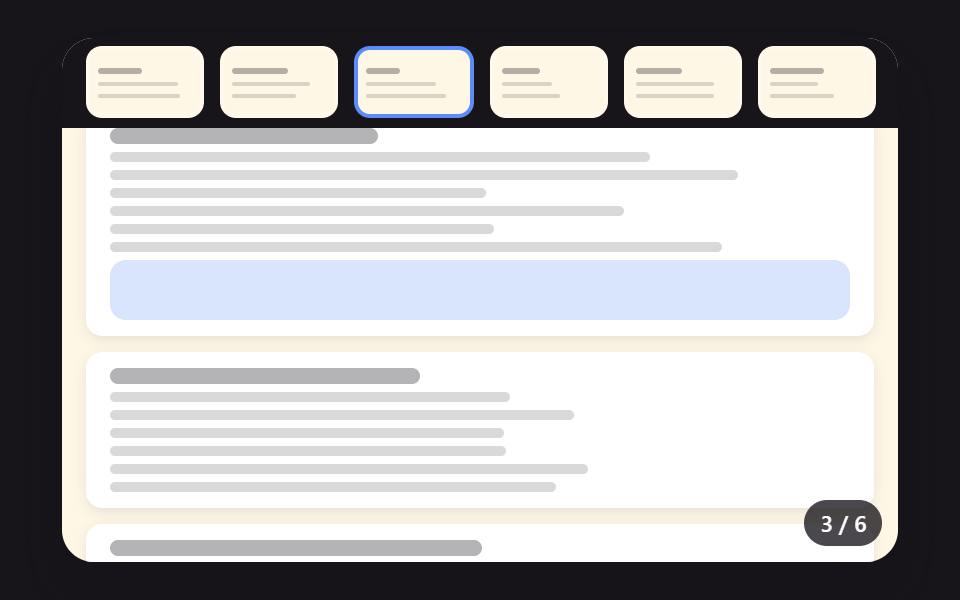 EmbedsPDF Viewer Implementation: 9 UI Patterns
 Embeds9 Custom Video Player CSS Controls, No Video File
 Dashboard UIStock Ticker UI: 9 Live Price Widgets, No API Key
 Embeds9 YouTube Embed Code UI Patterns (Copy-Paste)
 Dashboard UICSS Countdown Timer: 9 Clocks That Drain and Flip