07一度だけ見せるアプリパスワード
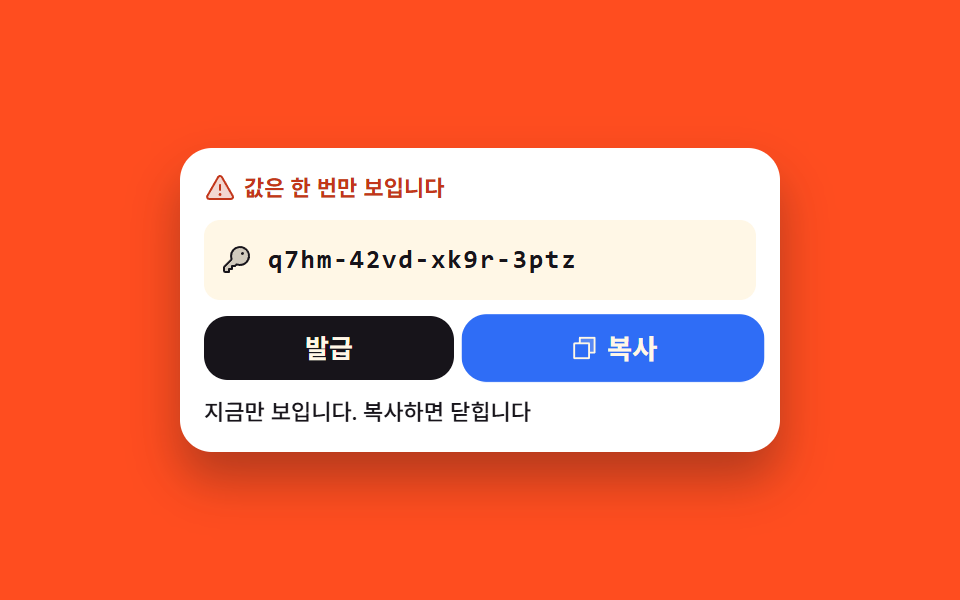
発行を押すと隠されていた場所が左から一コマずつ剥がれて文字が現れ、コピーが済むと同じ場所が点で覆われて二度と開きません。値が一度しか見えないという注意は、現れる前からカードに書かれています。
使いどころメールアプリやスクリプトに渡すアプリパスワードを発行する設定カード
navigator.clipboardsteps(16, end)aria-live
<main class="stage">
  <section class="tk is-demo" data-state="hidden">
    <p class="tk__warn">
      <span class="tk__ic" aria-hidden="true"><svg xmlns="http://www.w3.org/2000/svg" width="16" height="16" viewBox="0 0 256 256"><g fill="currentColor"><path d="M215.46 216H40.54c-12.62 0-20.54-13.21-14.41-23.91l87.46-151.87c6.3-11 22.52-11 28.82 0l87.46 151.87c6.13 10.7-1.79 23.91-14.41 23.91" opacity=".2"/><path d="M236.8 188.09L149.35 36.22a24.76 24.76 0 0 0-42.7 0L19.2 188.09a23.51 23.51 0 0 0 0 23.72A24.35 24.35 0 0 0 40.55 224h174.9a24.35 24.35 0 0 0 21.33-12.19a23.51 23.51 0 0 0 .02-23.72m-13.87 15.71a8.5 8.5 0 0 1-7.48 4.2H40.55a8.5 8.5 0 0 1-7.48-4.2a7.59 7.59 0 0 1 0-7.72l87.45-151.87a8.75 8.75 0 0 1 15 0l87.45 151.87a7.59 7.59 0 0 1-.04 7.72M120 144v-40a8 8 0 0 1 16 0v40a8 8 0 0 1-16 0m20 36a12 12 0 1 1-12-12a12 12 0 0 1 12 12"/></g></svg></span>
      値は一度だけ表示されます
    </p>
    <div class="tk__field">
      <span class="tk__ic" aria-hidden="true"><svg xmlns="http://www.w3.org/2000/svg" width="16" height="16" viewBox="0 0 256 256"><g fill="currentColor"><path d="M232 98.36c-1.27 38.56-33.33 69.64-71.91 69.64a71.7 71.7 0 0 1-26.92-5.17L120 176H96v24H72v24H40a8 8 0 0 1-8-8v-28.69a8 8 0 0 1 2.34-5.65l58.83-58.83A71.7 71.7 0 0 1 88 95.91c0-38.58 31.08-70.64 69.64-71.87A72 72 0 0 1 232 98.36" opacity=".2"/><path d="M216.57 39.43a80 80 0 0 0-132.66 81.35L28.69 176A15.86 15.86 0 0 0 24 187.31V216a16 16 0 0 0 16 16h32a8 8 0 0 0 8-8v-16h16a8 8 0 0 0 8-8v-16h16a8 8 0 0 0 5.66-2.34l9.56-9.57A79.7 79.7 0 0 0 160 176h.1a80 80 0 0 0 56.47-136.57M224 98.1c-1.09 34.09-29.75 61.86-63.89 61.9H160a63.7 63.7 0 0 1-23.65-4.51a8 8 0 0 0-8.84 1.68L116.69 168H96a8 8 0 0 0-8 8v16H72a8 8 0 0 0-8 8v16H40v-28.69l58.83-58.82a8 8 0 0 0 1.68-8.84A63.7 63.7 0 0 1 96 95.92c0-34.14 27.81-62.8 61.9-63.89A64 64 0 0 1 224 98.1M192 76a12 12 0 1 1-12-12a12 12 0 0 1 12 12"/></g></svg></span>
      <span class="tk__slot">
        <span class="tk__val" id="tk-val">q7hm-42vd-xk9r-3ptz</span>
        <span class="tk__cover" aria-hidden="true"></span>
      </span>
    </div>
    <div class="tk__row">
      <button class="tk__btn tk__btn--issue" id="tk-issue" type="button">発行</button>
      <button class="tk__btn tk__btn--copy" id="tk-copy" type="button" aria-disabled="true">
        <span class="tk__ic" aria-hidden="true"><svg xmlns="http://www.w3.org/2000/svg" width="14" height="14" viewBox="0 0 256 256"><g fill="currentColor"><path d="M216 40v128h-48V88H88V40Z" opacity=".2"/><path d="M216 32H88a8 8 0 0 0-8 8v40H40a8 8 0 0 0-8 8v128a8 8 0 0 0 8 8h128a8 8 0 0 0 8-8v-40h40a8 8 0 0 0 8-8V40a8 8 0 0 0-8-8m-56 176H48V96h112Zm48-48h-32V88a8 8 0 0 0-8-8H96V48h112Z"/></g></svg></span>
        コピー
      </button>
    </div>
    <p class="tk__live" role="status" aria-live="polite">
      <span class="tk__word" data-word="hidden">まだ発行していません</span>
      <span class="tk__word" data-word="shown">いまだけ表示されます。コピーすると閉じます</span>
      <span class="tk__word" data-word="burned">コピーしました。二度と表示できません</span>
    </p>
  </section>
</main>@use "../../../../site/static/demo-tokens" as *;
$duration: $dur-base;
$easing: $ease-spring;
$color: $subject-blue;
@include stage($stage-orange);
.tk {
box-sizing: border-box;
display: flex;
flex-direction: column;
gap: $sp-2;
width: min(300px, 88vw);
padding: $sp-3;
border-radius: $r-card;
background-color: $stage-paper;
color: $subject-ink;
box-shadow: $shadow-raised;
font-family: -apple-system, "Segoe UI", "Noto Sans KR", sans-serif;
}
.tk__ic { display: inline-flex; flex: 0 0 auto; }
.tk__ic svg { display: block; }
// 「한 번만 보인다」 는 경고는 누르기 전부터 카드에 적혀 있다
.tk__warn {
display: flex;
align-items: center;
gap: $sp-1;
margin: 0;
font-size: 11px;
line-height: 16px;
font-weight: 700;
color: $error;
}
.tk__field {
display: flex;
align-items: center;
gap: $sp-2;
padding: $sp-2;
border-radius: $r-sm;
background-color: $subject-cream;
color: $subject-ink;
}
.tk__slot {
position: relative;
flex: 1 1 auto;
min-width: 0;
height: 24px;
}
.tk__val {
position: absolute;
left: 0;
top: 0;
white-space: nowrap;
font-family: ui-monospace, "Consolas", monospace;
font-size: 13px;
line-height: 24px;
font-weight: 700;
letter-spacing: 1px;
color: $subject-ink;
}
// 덮개는 오른쪽에 붙어 있고 폭만 줄어든다 — 왼쪽부터 칸 단위로 걷힌다
.tk__cover {
position: absolute;
top: 0;
right: 0;
bottom: 0;
width: 100%;
border-radius: $r-xs;
background-color: $subject-ink;
background-image: radial-gradient(circle, $subject-cream 2px, transparent 2.5px);
background-size: 12px 12px;
background-position: right center;
}
// 사람이 실제로 조작한 경로 — 루프를 껐을 때도 화면이 비지 않게 정적 규칙을 먼저 둔다
.tk:not(.is-demo)[data-state="shown"] .tk__cover { width: 0; }
.tk:not(.is-demo)[data-state="burned"] .tk__cover { width: 100%; }
.tk__row { display: flex; gap: $sp-2; }
.tk__btn {
flex: 1 1 auto;
box-sizing: border-box;
display: inline-flex;
align-items: center;
justify-content: center;
gap: $sp-1;
margin: 0;
padding: 0;
height: 32px;
border: 0;
border-radius: $r-control;
cursor: pointer;
font-family: inherit;
font-size: 13px;
line-height: 18px;
font-weight: 700;
transition-property: background-color, color;
transition-duration: $duration;
transition-timing-function: $easing;
}
.tk__btn:focus-visible { outline: 3px solid $color; outline-offset: 3px; }
.tk__btn--issue { background-color: $subject-ink; color: $subject-cream; }
.tk__btn--issue:disabled { opacity: .4; cursor: default; }
.tk__btn--copy { background-color: $color; color: $subject-cream; }
.tk__btn--copy[aria-disabled="true"] {
background-color: $subject-cream;
color: $subject-ink;
opacity: .45;
cursor: default;
}
.tk__live {
position: relative;
margin: 0;
height: 16px;
}
.tk__word {
position: absolute;
left: 0;
right: 0;
top: 0;
font-size: 11px;
line-height: 16px;
font-weight: 500;
color: $subject-ink;
opacity: 0;
}
.tk:not(.is-demo)[data-state="hidden"] .tk__word[data-word="hidden"],
.tk:not(.is-demo)[data-state="shown"] .tk__word[data-word="shown"],
.tk:not(.is-demo)[data-state="burned"] .tk__word[data-word="burned"] { opacity: 1; }
// ── 자동 루프: 덮개가 16칸으로 끊어지며 걷히고, 드러난 자리는 그대로 둔다 (퇴장을 재현하지 않는다) ──
.tk.is-demo .tk__cover {
animation-name: tk-strip;
animation-duration: $dur-loop;
animation-timing-function: steps(16, end);
animation-iteration-count: infinite;
}
@keyframes tk-strip {
0% { width: 100%; }
10% { width: 100%; }
56% { width: 0%; }
100% { width: 0%; }
}
// 안내 문구는 한 프레임에 컷 — 크로스페이드는 유령 프레임을 만든다
.tk.is-demo .tk__word {
animation-duration: $dur-loop;
animation-timing-function: steps(1, end);
animation-iteration-count: infinite;
}
.tk.is-demo .tk__word[data-word="hidden"] { animation-name: tk-w-hidden; }
.tk.is-demo .tk__word[data-word="shown"] { animation-name: tk-w-shown; }
@keyframes tk-w-hidden {
0% { opacity: 1; }
56% { opacity: 0; }
100% { opacity: 0; }
}
@keyframes tk-w-shown {
0% { opacity: 0; }
56% { opacity: 1; }
100% { opacity: 1; }
}
// 덮개가 다 걷히는 56% 가 이 데모의 최대 변화 — 복사 버튼 껍질이 같은 프레임에 함께 열린다
.tk.is-demo .tk__btn--copy {
animation-name: tk-copy-skin, tk-copy-pop;
animation-duration: $dur-loop, $dur-loop;
animation-timing-function: steps(1, end), $easing;
animation-iteration-count: infinite, infinite;
}
@keyframes tk-copy-skin {
0% { background-color: $subject-cream; color: $subject-ink; opacity: .45; }
56% { background-color: $color; color: $subject-cream; opacity: 1; }
100% { background-color: $color; color: $subject-cream; opacity: 1; }
}
@keyframes tk-copy-pop {
0% { transform: scale(1); }
54% { transform: scale(1); }
60% { transform: scale(1.06); }
70% { transform: scale(1); }
100% { transform: scale(1); }
}
// 컷만으로는 움직인 프레임이 안 차서, 발급 버튼이 눌리는 반동을 옆에 함께 건다
.tk.is-demo .tk__btn--issue {
animation-name: tk-press;
animation-duration: $dur-loop;
animation-timing-function: $easing;
animation-iteration-count: infinite;
}
@keyframes tk-press {
0% { transform: translateY(0); }
6% { transform: translateY(0); }
10% { transform: translateY(3px); }
18% { transform: translateY(0); }
100% { transform: translateY(0); }
}
@media (max-width: 340px) {
.tk { gap: $sp-1; padding: $sp-2; }
.tk__field { padding: $sp-1; }
.tk__slot { height: 20px; }
.tk__val { font-size: 12px; line-height: 20px; letter-spacing: 0; }
.tk__btn { height: 28px; font-size: 12px; }
.tk__warn { font-size: 10px; }
}
@media (prefers-reduced-motion: reduce) {
.tk.is-demo .tk__cover,
.tk.is-demo .tk__word,
.tk.is-demo .tk__btn--copy,
.tk.is-demo .tk__btn--issue { animation: none !important; }
.tk.is-demo .tk__cover { width: 0 !important; }
.tk.is-demo .tk__word[data-word="shown"] { opacity: 1 !important; }
.tk.is-demo .tk__btn--copy { background-color: $color !important; color: $subject-cream !important; opacity: 1 !important; }
}html, body {
margin: 0;
overflow: hidden;
}
.stage {
box-sizing: border-box;
min-height: 100vh;
display: grid;
place-items: center;
margin: 0;
background: #ff4d1f;
font-family: -apple-system, "Segoe UI", "Noto Sans KR", sans-serif;
padding: clamp(8px, 4vw, 24px);
}
.tk {
box-sizing: border-box;
display: flex;
flex-direction: column;
gap: 8px;
width: min(300px, 88vw);
padding: 12px;
border-radius: 16px;
background-color: #ffffff;
color: #17141a;
box-shadow: 0 14px 24px rgba(23, 20, 26, 0.32);
font-family: -apple-system, "Segoe UI", "Noto Sans KR", sans-serif;
}
.tk__ic {
display: inline-flex;
flex: 0 0 auto;
}
.tk__ic svg {
display: block;
}
.tk__warn {
display: flex;
align-items: center;
gap: 4px;
margin: 0;
font-size: 11px;
line-height: 16px;
font-weight: 700;
color: #c2361a;
}
.tk__field {
display: flex;
align-items: center;
gap: 8px;
padding: 8px;
border-radius: 8px;
background-color: #fff7e6;
color: #17141a;
}
.tk__slot {
position: relative;
flex: 1 1 auto;
min-width: 0;
height: 24px;
}
.tk__val {
position: absolute;
left: 0;
top: 0;
white-space: nowrap;
font-family: ui-monospace, "Consolas", monospace;
font-size: 13px;
line-height: 24px;
font-weight: 700;
letter-spacing: 1px;
color: #17141a;
}
.tk__cover {
position: absolute;
top: 0;
right: 0;
bottom: 0;
width: 100%;
border-radius: 4px;
background-color: #17141a;
background-image: radial-gradient(circle, #fff7e6 2px, transparent 2.5px);
background-size: 12px 12px;
background-position: right center;
}
.tk:not(.is-demo)[data-state=shown] .tk__cover {
width: 0;
}
.tk:not(.is-demo)[data-state=burned] .tk__cover {
width: 100%;
}
.tk__row {
display: flex;
gap: 8px;
}
.tk__btn {
flex: 1 1 auto;
box-sizing: border-box;
display: inline-flex;
align-items: center;
justify-content: center;
gap: 4px;
margin: 0;
padding: 0;
height: 32px;
border: 0;
border-radius: 12px;
cursor: pointer;
font-family: inherit;
font-size: 13px;
line-height: 18px;
font-weight: 700;
transition-property: background-color, color;
transition-duration: 300ms;
transition-timing-function: cubic-bezier(0.2, 0.8, 0.2, 1);
}
.tk__btn:focus-visible {
outline: 3px solid #2f6df6;
outline-offset: 3px;
}
.tk__btn--issue {
background-color: #17141a;
color: #fff7e6;
}
.tk__btn--issue:disabled {
opacity: 0.4;
cursor: default;
}
.tk__btn--copy {
background-color: #2f6df6;
color: #fff7e6;
}
.tk__btn--copy[aria-disabled=true] {
background-color: #fff7e6;
color: #17141a;
opacity: 0.45;
cursor: default;
}
.tk__live {
position: relative;
margin: 0;
height: 16px;
}
.tk__word {
position: absolute;
left: 0;
right: 0;
top: 0;
font-size: 11px;
line-height: 16px;
font-weight: 500;
color: #17141a;
opacity: 0;
}
.tk:not(.is-demo)[data-state=hidden] .tk__word[data-word=hidden],
.tk:not(.is-demo)[data-state=shown] .tk__word[data-word=shown],
.tk:not(.is-demo)[data-state=burned] .tk__word[data-word=burned] {
opacity: 1;
}
.tk.is-demo .tk__cover {
animation-name: tk-strip;
animation-duration: 2s;
animation-timing-function: steps(16, end);
animation-iteration-count: infinite;
}
@keyframes tk-strip {
0% {
width: 100%;
}
10% {
width: 100%;
}
56% {
width: 0%;
}
100% {
width: 0%;
}
}
.tk.is-demo .tk__word {
animation-duration: 2s;
animation-timing-function: steps(1, end);
animation-iteration-count: infinite;
}
.tk.is-demo .tk__word[data-word=hidden] {
animation-name: tk-w-hidden;
}
.tk.is-demo .tk__word[data-word=shown] {
animation-name: tk-w-shown;
}
@keyframes tk-w-hidden {
0% {
opacity: 1;
}
56% {
opacity: 0;
}
100% {
opacity: 0;
}
}
@keyframes tk-w-shown {
0% {
opacity: 0;
}
56% {
opacity: 1;
}
100% {
opacity: 1;
}
}
.tk.is-demo .tk__btn--copy {
animation-name: tk-copy-skin, tk-copy-pop;
animation-duration: 2s, 2s;
animation-timing-function: steps(1, end), cubic-bezier(0.2, 0.8, 0.2, 1);
animation-iteration-count: infinite, infinite;
}
@keyframes tk-copy-skin {
0% {
background-color: #fff7e6;
color: #17141a;
opacity: 0.45;
}
56% {
background-color: #2f6df6;
color: #fff7e6;
opacity: 1;
}
100% {
background-color: #2f6df6;
color: #fff7e6;
opacity: 1;
}
}
@keyframes tk-copy-pop {
0% {
transform: scale(1);
}
54% {
transform: scale(1);
}
60% {
transform: scale(1.06);
}
70% {
transform: scale(1);
}
100% {
transform: scale(1);
}
}
.tk.is-demo .tk__btn--issue {
animation-name: tk-press;
animation-duration: 2s;
animation-timing-function: cubic-bezier(0.2, 0.8, 0.2, 1);
animation-iteration-count: infinite;
}
@keyframes tk-press {
0% {
transform: translateY(0);
}
6% {
transform: translateY(0);
}
10% {
transform: translateY(3px);
}
18% {
transform: translateY(0);
}
100% {
transform: translateY(0);
}
}
@media (max-width: 340px) {
.tk {
gap: 4px;
padding: 8px;
}
.tk__field {
padding: 4px;
}
.tk__slot {
height: 20px;
}
.tk__val {
font-size: 12px;
line-height: 20px;
letter-spacing: 0;
}
.tk__btn {
height: 28px;
font-size: 12px;
}
.tk__warn {
font-size: 10px;
}
}
@media (prefers-reduced-motion: reduce) {
.tk.is-demo .tk__cover,
.tk.is-demo .tk__word,
.tk.is-demo .tk__btn--copy,
.tk.is-demo .tk__btn--issue {
animation: none !important;
}
.tk.is-demo .tk__cover {
width: 0 !important;
}
.tk.is-demo .tk__word[data-word=shown] {
opacity: 1 !important;
}
.tk.is-demo .tk__btn--copy {
background-color: #2f6df6 !important;
color: #fff7e6 !important;
opacity: 1 !important;
}
}// 실제 동작: 発行 → 덮개가 걷히고, 복사하면 진짜로 클립보드에 넣은 뒤 같은 자리가 다시 덮인다
var root = document.querySelector('.tk');
var valueEl = document.getElementById('tk-val');
var issueBtn = document.getElementById('tk-issue');
var copyBtn = document.getElementById('tk-copy');
function setState(s) {
root.classList.remove('is-demo'); // 사람이 만졌으니 자동 루프를 끈다
root.setAttribute('data-state', s);
issueBtn.disabled = s !== 'hidden';
copyBtn.setAttribute('aria-disabled', String(s !== 'shown'));
}
issueBtn.addEventListener('click', function () { setState('shown'); });
copyBtn.addEventListener('click', function () {
if (root.getAttribute('data-state') !== 'shown') return; // 잠긴 버튼은 아무 일도 하지 않는다
if (navigator.clipboard && navigator.clipboard.writeText) {
navigator.clipboard.writeText(valueEl.textContent).catch(function () {});
}
setState('burned'); // 한 번 복사하면 다시는 안 열린다
});import { useState } from "react";
import type { CSSProperties } from "react";
import styles from "./AppPasswordReveal.module.scss";
export type RevealState = "hidden" | "shown" | "burned";
export type AppPasswordRevealProps = {
token?: string;
warn?: string;
labels?: { issue: string; copy: string };
logs?: Record<RevealState, string>;
duration?: number;
easing?: string;
color?: string;
};
type Vars = CSSProperties & { "--duration"?: string; "--easing"?: string; "--color"?: string };
const WARNING = (
<g fill="currentColor">
<path d="M215.46 216H40.54c-12.62 0-20.54-13.21-14.41-23.91l87.46-151.87c6.3-11 22.52-11 28.82 0l87.46 151.87c6.13 10.7-1.79 23.91-14.41 23.91" opacity=".2" />
<path d="M236.8 188.09L149.35 36.22a24.76 24.76 0 0 0-42.7 0L19.2 188.09a23.51 23.51 0 0 0 0 23.72A24.35 24.35 0 0 0 40.55 224h174.9a24.35 24.35 0 0 0 21.33-12.19a23.51 23.51 0 0 0 .02-23.72m-13.87 15.71a8.5 8.5 0 0 1-7.48 4.2H40.55a8.5 8.5 0 0 1-7.48-4.2a7.59 7.59 0 0 1 0-7.72l87.45-151.87a8.75 8.75 0 0 1 15 0l87.45 151.87a7.59 7.59 0 0 1-.04 7.72M120 144v-40a8 8 0 0 1 16 0v40a8 8 0 0 1-16 0m20 36a12 12 0 1 1-12-12a12 12 0 0 1 12 12" />
</g>
);
const KEY = (
<g fill="currentColor">
<path d="M232 98.36c-1.27 38.56-33.33 69.64-71.91 69.64a71.7 71.7 0 0 1-26.92-5.17L120 176H96v24H72v24H40a8 8 0 0 1-8-8v-28.69a8 8 0 0 1 2.34-5.65l58.83-58.83A71.7 71.7 0 0 1 88 95.91c0-38.58 31.08-70.64 69.64-71.87A72 72 0 0 1 232 98.36" opacity=".2" />
<path d="M216.57 39.43a80 80 0 0 0-132.66 81.35L28.69 176A15.86 15.86 0 0 0 24 187.31V216a16 16 0 0 0 16 16h32a8 8 0 0 0 8-8v-16h16a8 8 0 0 0 8-8v-16h16a8 8 0 0 0 5.66-2.34l9.56-9.57A79.7 79.7 0 0 0 160 176h.1a80 80 0 0 0 56.47-136.57M224 98.1c-1.09 34.09-29.75 61.86-63.89 61.9H160a63.7 63.7 0 0 1-23.65-4.51a8 8 0 0 0-8.84 1.68L116.69 168H96a8 8 0 0 0-8 8v16H72a8 8 0 0 0-8 8v16H40v-28.69l58.83-58.82a8 8 0 0 0 1.68-8.84A63.7 63.7 0 0 1 96 95.92c0-34.14 27.81-62.8 61.9-63.89A64 64 0 0 1 224 98.1M192 76a12 12 0 1 1-12-12a12 12 0 0 1 12 12" />
</g>
);
const COPY = (
<g fill="currentColor">
<path d="M216 40v128h-48V88H88V40Z" opacity=".2" />
<path d="M216 32H88a8 8 0 0 0-8 8v40H40a8 8 0 0 0-8 8v128a8 8 0 0 0 8 8h128a8 8 0 0 0 8-8v-40h40a8 8 0 0 0 8-8V40a8 8 0 0 0-8-8m-56 176H48V96h112Zm48-48h-32V88a8 8 0 0 0-8-8H96V48h112Z" />
</g>
);
export default function AppPasswordReveal({
token = "q7hm-42vd-xk9r-3ptz",
warn = "Shown only once",
labels = { issue: "Issue", copy: "Copy" },
logs = {
hidden: "Not issued yet",
shown: "Visible now only — copying closes it",
burned: "Copied. You cannot see it again",
},
duration = 300,
easing = "cubic-bezier(.2,.8,.2,1)",
color = "#2f6df6",
}: AppPasswordRevealProps) {
const [demo, setDemo] = useState(true);
const [state, setState] = useState<RevealState>("hidden");
const vars: Vars = { "--duration": `${duration}ms`, "--easing": easing, "--color": color };
// 사람이 만지면 자동 루프를 끈다
function applyState(s: RevealState) {
setDemo(false);
setState(s);
}
function copyToken() {
if (state !== "shown") return; // 잠긴 버튼은 아무 일도 하지 않는다
if (navigator.clipboard && navigator.clipboard.writeText) {
navigator.clipboard.writeText(token).catch(() => {});
}
applyState("burned"); // 한 번 복사하면 다시는 안 열린다
}
return (
<section className={`${styles.tk} ${demo ? styles.isDemo : ""}`} data-state={state} style={vars}>
<p className={styles.warn}>
<span className={styles.ic} aria-hidden="true">
<svg viewBox="0 0 256 256" width="16" height="16">{WARNING}</svg>
</span>
{warn}
</p>
<div className={styles.field}>
<span className={styles.ic} aria-hidden="true">
<svg viewBox="0 0 256 256" width="16" height="16">{KEY}</svg>
</span>
<span className={styles.slot}>
<span className={styles.val}>{token}</span>
<span className={styles.cover} aria-hidden="true" />
</span>
</div>
<div className={styles.row}>
<button
className={`${styles.btn} ${styles.btnIssue}`}
type="button"
disabled={state !== "hidden"}
onClick={() => applyState("shown")}
>
{labels.issue}
</button>
<button
className={`${styles.btn} ${styles.btnCopy}`}
type="button"
aria-disabled={state !== "shown"}
onClick={copyToken}
>
<span className={styles.ic} aria-hidden="true">
<svg viewBox="0 0 256 256" width="14" height="14">{COPY}</svg>
</span>
{labels.copy}
</button>
</div>
<p className={styles.live} role="status" aria-live="polite">
<span className={styles.word} data-word="hidden">{logs.hidden}</span>
<span className={styles.word} data-word="shown">{logs.shown}</span>
<span className={styles.word} data-word="burned">{logs.burned}</span>
</p>
</section>
);
}07 一度だけ見せるアプリパスワード — 計測 累積面積 8.803% · 動いたフレーム 17/23GODRICH オリジナル · SCSS と React は zip に同梱 · アカウント セキュリティ 設定 UI 9選 — ログイン後の画面
このデモが属する記事
 アカウント セキュリティ 設定 UI 9選 — ログイン後の画面アカウント セキュリティ 設定とは、ログインを済ませた人が次に巡り会う画面のことです。今つながっている端末、二段階認証、パスワードそのものを、本人の手で確かめて変えていく場所です。9つすべて実際に動きます。端末の行は本当に折りたたまれ、バッ この記事のデモをすべて見る