04パスワード強度バー
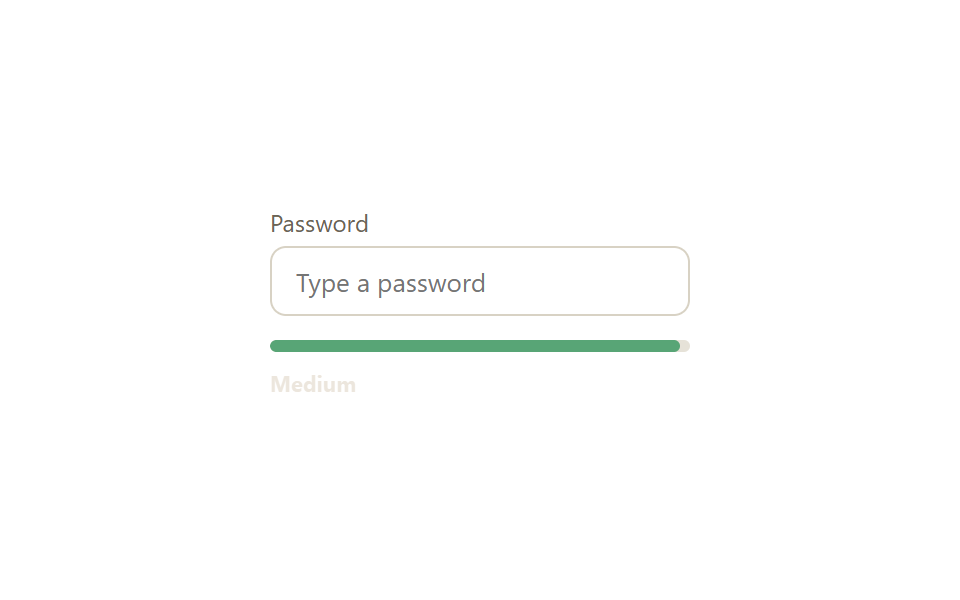
入力中のパスワードの長さと文字の組み合わせに応じてバーが赤→オレンジ→緑に伸びていき、横のテキストが「弱い・普通・強い」をリアルタイムで知らせます。
使いどころ会員登録のパスワード入力欄、パスワード変更画面
input 이벤트커스텀 프로퍼티 --strengtharia-live
<main class="stage">
  <div class="pw-card is-demo">
    <label class="pw-card__label" for="pw">Password</label>
    <input class="pw-input" id="pw" type="password" placeholder="Type a password">
    <div class="pw-meter">
      <span class="pw-meter__fill"></span>
    </div>
    <p class="pw-status" aria-live="polite">
      <span class="pw-status__text pw-status__text--weak">Weak</span>
      <span class="pw-status__text pw-status__text--medium">Medium</span>
      <span class="pw-status__text pw-status__text--strong">Strong</span>
    </p>
  </div>
</main>
@use "../../../../site/static/demo-tokens" as *;
$duration: $dur-base; // 막대 너비·색이 바뀌는 시간
$easing: $ease-out;
$color: $error; // 약함 색 기준값
@include stage($stage-paper);
.pw-card {
width: min(210px, 80vw);
display: flex;
flex-direction: column;
gap: $sp-1;
}
.pw-card__label { font-size: 12px; color: #6b6455; font-family: inherit; }
.pw-input {
box-sizing: border-box;
width: 100%;
padding: $sp-2 $sp-3;
border: 1.5px solid #d8d2c4;
border-radius: $r-sm;
font-size: 13px;
font-family: inherit;
color: $stage-ink;
margin-bottom: $sp-2;
&:focus { outline: none; border-color: $subject-blue; }
}
.pw-meter {
height: 6px;
border-radius: $r-xs;
background: #e6e2d8;
overflow: hidden;
}
.pw-meter__fill {
display: block;
height: 100%;
width: 0%;
background: $color;
border-radius: $r-xs;
transition: width $duration $easing, background-color $duration $easing;
}
.pw-status {
position: relative;
height: 14px;
margin: $sp-1 0 0;
}
.pw-status__text {
position: absolute;
left: 0; top: 0;
font-size: 11px;
font-weight: 700;
font-family: inherit;
opacity: 0;
transition: opacity $duration $easing;
}
.pw-status__text--weak { color: $error; }
.pw-status__text--medium { color: #9c7c4d; }
.pw-status__text--strong { color: #51a474; }
.pw-card.is-demo .pw-meter__fill { animation: fill-cycle $dur-loop $easing infinite; }
.pw-card.is-demo .pw-status__text--weak { animation: show-weak $dur-loop $easing infinite; }
.pw-card.is-demo .pw-status__text--medium { animation: show-medium $dur-loop $easing infinite; }
.pw-card.is-demo .pw-status__text--strong { animation: show-strong $dur-loop $easing infinite; }
@keyframes fill-cycle {
0%, 5% { width: 0%; background: $color; }
30% { width: 35%; background: $color; }
55% { width: 65%; background: #c8af8f; }
80%, 100% { width: 100%; background: #51a474; }
}
@keyframes show-weak { 0%, 5% { opacity: 0; } 12%, 45% { opacity: 1; } 55%, 100% { opacity: 0; } }
@keyframes show-medium { 0%, 50% { opacity: 0; } 58%, 70% { opacity: 1; } 78%, 100% { opacity: 0; } }
@keyframes show-strong { 0%, 75% { opacity: 0; } 83%, 100% { opacity: 1; } }
@media (prefers-reduced-motion: reduce) {
.pw-meter__fill, .pw-status__text { transition: none; }
.pw-card.is-demo .pw-meter__fill,
.pw-card.is-demo .pw-status__text--weak,
.pw-card.is-demo .pw-status__text--medium,
.pw-card.is-demo .pw-status__text--strong { animation: none; }
}html, body {
margin: 0;
overflow: hidden;
}
.stage {
box-sizing: border-box;
min-height: 100vh;
display: grid;
place-items: center;
margin: 0;
background: #ffffff;
font-family: -apple-system, "Segoe UI", "Noto Sans KR", sans-serif;
padding: clamp(8px, 4vw, 24px);
}
.pw-card {
width: min(210px, 80vw);
display: flex;
flex-direction: column;
gap: 4px;
}
.pw-card__label {
font-size: 12px;
color: #6b6455;
font-family: inherit;
}
.pw-input {
box-sizing: border-box;
width: 100%;
padding: 8px 12px;
border: 1.5px solid #d8d2c4;
border-radius: 8px;
font-size: 13px;
font-family: inherit;
color: #17141a;
margin-bottom: 8px;
}
.pw-input:focus {
outline: none;
border-color: #2f6df6;
}
.pw-meter {
height: 6px;
border-radius: 4px;
background: #e6e2d8;
overflow: hidden;
}
.pw-meter__fill {
display: block;
height: 100%;
width: 0%;
background: #c2361a;
border-radius: 4px;
transition: width 300ms ease-out, background-color 300ms ease-out;
}
.pw-status {
position: relative;
height: 14px;
margin: 4px 0 0;
}
.pw-status__text {
position: absolute;
left: 0;
top: 0;
font-size: 11px;
font-weight: 700;
font-family: inherit;
opacity: 0;
transition: opacity 300ms ease-out;
}
.pw-status__text--weak {
color: #c2361a;
}
.pw-status__text--medium {
color: #9c7c4d;
}
.pw-status__text--strong {
color: #51a474;
}
.pw-card.is-demo .pw-meter__fill {
animation: fill-cycle 2s ease-out infinite;
}
.pw-card.is-demo .pw-status__text--weak {
animation: show-weak 2s ease-out infinite;
}
.pw-card.is-demo .pw-status__text--medium {
animation: show-medium 2s ease-out infinite;
}
.pw-card.is-demo .pw-status__text--strong {
animation: show-strong 2s ease-out infinite;
}
@keyframes fill-cycle {
0%, 5% {
width: 0%;
background: #c2361a;
}
30% {
width: 35%;
background: #c2361a;
}
55% {
width: 65%;
background: #c8af8f;
}
80%, 100% {
width: 100%;
background: #51a474;
}
}
@keyframes show-weak {
0%, 5% {
opacity: 0;
}
12%, 45% {
opacity: 1;
}
55%, 100% {
opacity: 0;
}
}
@keyframes show-medium {
0%, 50% {
opacity: 0;
}
58%, 70% {
opacity: 1;
}
78%, 100% {
opacity: 0;
}
}
@keyframes show-strong {
0%, 75% {
opacity: 0;
}
83%, 100% {
opacity: 1;
}
}
@media (prefers-reduced-motion: reduce) {
.pw-meter__fill, .pw-status__text {
transition: none;
}
.pw-card.is-demo .pw-meter__fill,
.pw-card.is-demo .pw-status__text--weak,
.pw-card.is-demo .pw-status__text--medium,
.pw-card.is-demo .pw-status__text--strong {
animation: none;
}
}var inp=document.getElementById('pw'),
fill=document.querySelector('.pw-meter__fill'),
card=document.querySelector('.pw-card');
inp.addEventListener('input',function(){
card.classList.remove('is-demo');
var v=inp.value, s=0;
if(v.length>=6)s++;
if(/[a-z]/.test(v)&&/[A-Z]/.test(v))s++;
if(/[0-9]/.test(v))s++;
if(/[^A-Za-z0-9]/.test(v))s++;
var pct=v.length?[15,40,70,100,100][s]:0;
var col=['#b27062','#b27062','#c8af8f','#51a474','#51a474'][s];
fill.style.width=pct+'%'; fill.style.background=col;
});import { useMemo, useState, type ChangeEvent, type CSSProperties } from "react";
import styles from "./PasswordStrengthMeter.module.scss";
export type PasswordStrengthMeterProps = {
/** 막대 너비·색이 바뀌는 시간 (기본 300ms) */
duration?: number;
easing?: string;
};
const LEVELS = ["", "Weak", "Weak", "Medium", "Strong", "Strong"];
const COLORS = ["#e6e2d8", "#c2361a", "#c2361a", "#ff9d1f", "#1f9d55", "#1f9d55"];
const WIDTHS = [0, 15, 15, 40, 70, 100];
function score(v: string) {
let s = 0;
if (v.length >= 6) s++;
if (/[a-z]/.test(v) && /[A-Z]/.test(v)) s++;
if (/[0-9]/.test(v)) s++;
if (/[^A-Za-z0-9]/.test(v)) s++;
return v.length ? s + 1 : 0;
}
/** input 이벤트마다 길이·문자 조합을 다시 계산해 막대 너비·색·라벨을 갱신한다 */
export default function PasswordStrengthMeter({ duration = 300, easing = "ease-out" }: PasswordStrengthMeterProps) {
const [value, setValue] = useState("");
const s = useMemo(() => score(value), [value]);
const style = { "--duration": `${duration}ms`, "--easing": easing } as CSSProperties;
const onChange = (e: ChangeEvent<HTMLInputElement>) => setValue(e.target.value);
return (
<div className={styles.card} style={style}>
<label className={styles.label} htmlFor="pw-react">Password</label>
<input className={styles.input} id="pw-react" type="password" value={value} onChange={onChange} placeholder="Type a password" />
<div className={styles.meter}>
<span className={styles.fill} style={{ width: `${WIDTHS[s]}%`, background: COLORS[s] }} />
</div>
<p className={styles.status} aria-live="polite" style={{ color: COLORS[s] }}>{LEVELS[s]}</p>
</div>
);
}04 パスワード強度バー — 計測 累積面積 1.076% · 動いたフレーム 19/23GODRICH オリジナル · SCSS と React は zip に同梱 · ログイン画面 デザイン 9選 — コピペで使えるカードUI
このデモが属する記事
 ログイン画面 デザイン 9選 — コピペで使えるカードUIログイン画面 デザインはメールと入力欄・ボタンだけに見えますが、実際にはカードの質感・画面分割・ステップ進行まで9つの小さな判断でできています。9つのうち1つは、画面をぼかすと同時にモーダルを重ねて表示し、セッション切れを伝えます。会員登録 この記事のデモをすべて見る