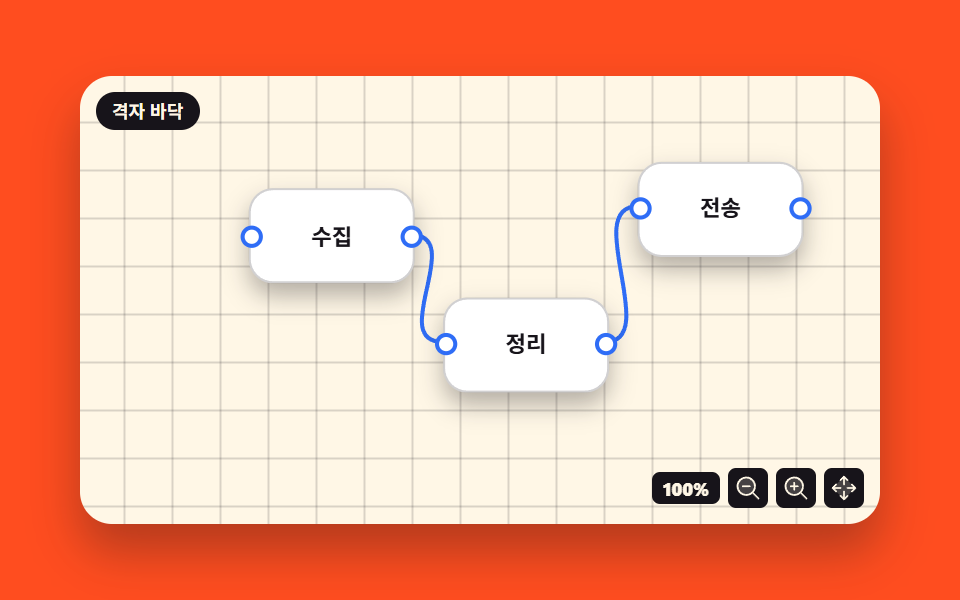
07水たまりグラデーション背景
同心円のように広がる青緑・ピンク・紫の水たまりが暗い背景の上でゆっくり揺れる — クリックすると水たまりの色の配置が入れ替わる。
使いどころ瞑想・旅行サービスの背景
radialGradienttransform-originmix-blend-mode
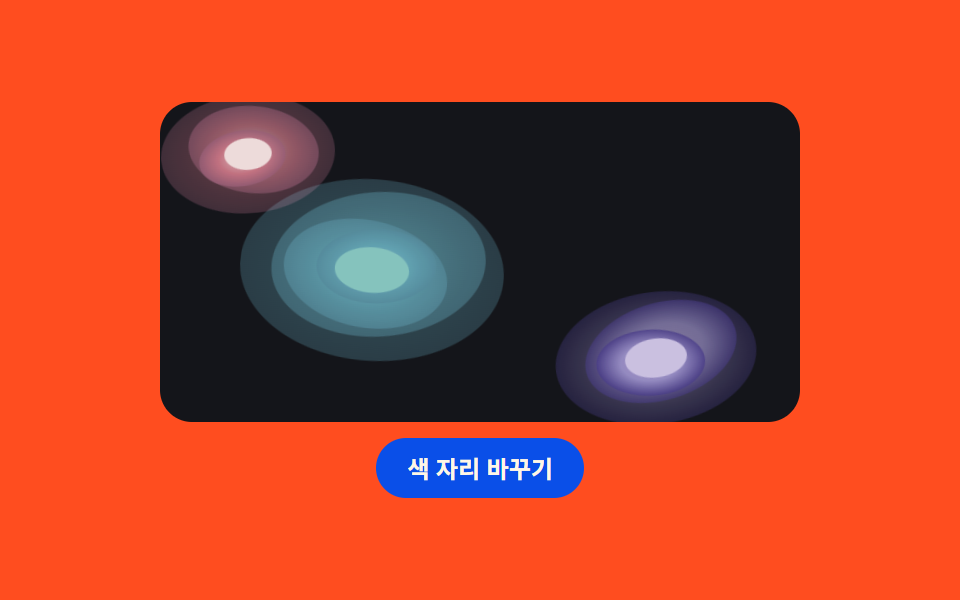
<main class="stage">
<div class="pl is-demo" id="plRoot">
  <div class="pl__board">
    <svg class="pl__svg" viewBox="0 0 300 160" role="img" aria-label="水たまり背景">
      <defs>
        <radialGradient id="plTeal" cx="50%" cy="50%" r="50%">
          <stop offset="0%" stop-color="#86b3c3"/>
          <stop offset="55%" stop-color="#5399a8"/>
          <stop offset="100%" stop-color="#478090"/>
        </radialGradient>
        <radialGradient id="plPink" cx="50%" cy="50%" r="50%">
          <stop offset="0%" stop-color="#e3c7c6"/>
          <stop offset="55%" stop-color="#c96a78"/>
          <stop offset="100%" stop-color="#8d4f66"/>
        </radialGradient>
        <radialGradient id="plViolet" cx="50%" cy="50%" r="50%">
          <stop offset="0%" stop-color="#af9cce"/>
          <stop offset="55%" stop-color="#9387c4"/>
          <stop offset="100%" stop-color="#392a7a"/>
        </radialGradient>
      </defs>
      <g class="pl__blob pl__blob--teal" id="plTealGroup">
        <ellipse cx="96" cy="84" rx="64" ry="44" fill="url(#plTeal)" opacity=".34"/>
        <ellipse cx="99" cy="81" rx="52" ry="35" fill="url(#plTeal)" opacity=".5" transform="rotate(-8 99 81)"/>
        <ellipse cx="93" cy="86" rx="40" ry="26" fill="url(#plTeal)" opacity=".7" transform="rotate(7 93 86)"/>
        <ellipse cx="98" cy="82" rx="29" ry="18" fill="url(#plTeal)" opacity=".9" transform="rotate(-4 98 82)"/>
        <ellipse cx="96" cy="84" rx="18" ry="11" fill="#7bbeb5"/>
      </g>
      <g class="pl__blob pl__blob--pink" id="plPinkGroup">
        <ellipse cx="34" cy="26" rx="44" ry="30" fill="url(#plPink)" opacity=".34"/>
        <ellipse cx="37" cy="24" rx="33" ry="22" fill="url(#plPink)" opacity=".55" transform="rotate(10 37 24)"/>
        <ellipse cx="31" cy="28" rx="22" ry="14" fill="url(#plPink)" opacity=".8" transform="rotate(-6 31 28)"/>
        <ellipse cx="34" cy="26" rx="12" ry="8" fill="#ebd8d6"/>
      </g>
      <g class="pl__blob pl__blob--violet" id="plVioletGroup">
        <ellipse cx="238" cy="128" rx="52" ry="34" fill="url(#plViolet)" opacity=".34"/>
        <ellipse cx="241" cy="125" rx="40" ry="25" fill="url(#plViolet)" opacity=".55" transform="rotate(-9 241 125)"/>
        <ellipse cx="235" cy="130" rx="28" ry="17" fill="url(#plViolet)" opacity=".8" transform="rotate(5 235 130)"/>
        <ellipse cx="238" cy="128" rx="16" ry="10" fill="#c5badd"/>
      </g>
    </svg>
  </div>
  <button class="pl__btn" id="plBtn" type="button" aria-pressed="false">色の位置を入れ替える</button>
</div>
</main>@use "../../../../site/static/demo-tokens" as *;
// 물웅덩이 그라디언트 배경 — SVG radialGradient 로 물감이 번지는 웅덩이를 겹겹이 놓는다.
// 한 웅덩이는 같은 색의 동심 타원 4~5겹(안쪽일수록 밝고 진하게).
// 겹치는 부위는 mix-blend-mode: screen 으로 서로 밝게 섞이고,
// 각 웅덩이는 transform-box: fill-box 기준으로 제자리에서 느리게 흔들린다.
$duration: $dur-loop;
$easing: ease-in-out;
$color: #86b3c3;
$board: #14151a;
@include stage($stage-orange);
.pl {
display: flex; flex-direction: column; align-items: center; gap: $sp-2;
width: min(100%, 320px);
}
.pl__board {
box-sizing: border-box;
width: 100%; height: 160px;
border-radius: $r-card; overflow: hidden;
background: $board;
}
.pl__svg { display: block; width: 100%; height: 100%; }
.pl__blob {
transform-box: fill-box; transform-origin: center;
mix-blend-mode: screen;
animation-name: plSway; animation-duration: 1s;
animation-timing-function: $easing; animation-iteration-count: infinite;
animation-direction: alternate;
transition: transform $dur-enter $ease-spring;
}
.pl__blob--pink { animation-delay: 330ms; }
.pl__blob--violet { animation-delay: 660ms; }
// 색 자리 바꾸기: 청록은 좌상단으로, 분홍은 중앙으로 이동(거리만큼 translate)
.pl.is-swap .pl__blob--teal { transform: translate(-62px, -58px); }
.pl.is-swap .pl__blob--pink { transform: translate(62px, 58px); }
.pl__btn {
box-sizing: border-box; padding: $sp-2 $sp-4; border: 0;
border-radius: $r-pill; background: $subject-blue-deep; color: $subject-cream;
font-family: inherit; font-weight: 700; font-size: 12px; line-height: 1.2;
cursor: pointer;
}
@keyframes plSway {
from { transform: rotate(-8deg) scale(.97); }
to { transform: rotate(8deg) scale(1.05); }
}
// 사람이 누른 상태: 제자리 흔들림만 끊고(민 웅덩이가 멈춰 보인다) 자리 바꾸기를 본다
.pl:not(.is-demo) .pl__blob { animation-name: none; }
@media (max-width: 340px) {
.pl__board { height: 126px; }
.pl__btn { padding: $sp-1 $sp-3; font-size: 11px; }
}
@media (prefers-reduced-motion: reduce) {
.pl__blob { animation-name: none !important; transition: none !important; }
}html, body {
margin: 0;
overflow: hidden;
}
.stage {
box-sizing: border-box;
min-height: 100vh;
display: grid;
place-items: center;
margin: 0;
background: #ff4d1f;
font-family: -apple-system, "Segoe UI", "Noto Sans KR", sans-serif;
padding: clamp(8px, 4vw, 24px);
}
.pl {
display: flex;
flex-direction: column;
align-items: center;
gap: 8px;
width: min(100%, 320px);
}
.pl__board {
box-sizing: border-box;
width: 100%;
height: 160px;
border-radius: 16px;
overflow: hidden;
background: #14151a;
}
.pl__svg {
display: block;
width: 100%;
height: 100%;
}
.pl__blob {
transform-box: fill-box;
transform-origin: center;
mix-blend-mode: screen;
animation-name: plSway;
animation-duration: 1s;
animation-timing-function: ease-in-out;
animation-iteration-count: infinite;
animation-direction: alternate;
transition: transform 600ms cubic-bezier(0.2, 0.8, 0.2, 1);
}
.pl__blob--pink {
animation-delay: 330ms;
}
.pl__blob--violet {
animation-delay: 660ms;
}
.pl.is-swap .pl__blob--teal {
transform: translate(-62px, -58px);
}
.pl.is-swap .pl__blob--pink {
transform: translate(62px, 58px);
}
.pl__btn {
box-sizing: border-box;
padding: 8px 16px;
border: 0;
border-radius: 999px;
background: #0a4fe8;
color: #fff7e6;
font-family: inherit;
font-weight: 700;
font-size: 12px;
line-height: 1.2;
cursor: pointer;
}
@keyframes plSway {
from {
transform: rotate(-8deg) scale(0.97);
}
to {
transform: rotate(8deg) scale(1.05);
}
}
.pl:not(.is-demo) .pl__blob {
animation-name: none;
}
@media (max-width: 340px) {
.pl__board {
height: 126px;
}
.pl__btn {
padding: 4px 12px;
font-size: 11px;
}
}
@media (prefers-reduced-motion: reduce) {
.pl__blob {
animation-name: none !important;
transition: none !important;
}
}// 色の位置を入れ替える: .is-swap 하나로 청록 웅덩이와 분홍 웅덩이의 위치를 맞바꾼다.
// SVG g 도 CSS transform/transition 을 따르므로 (transform-box: fill-box)
// 도형을 다시 그리지 않고 위치만 옮긴다.
(function () {
var root = document.getElementById('plRoot');
var btn = document.getElementById('plBtn');
btn.addEventListener('click', function () {
root.classList.remove('is-demo');
var swapped = root.classList.toggle('is-swap');
btn.setAttribute('aria-pressed', swapped ? 'true' : 'false');
});
})();// PoolGradient — vanilla 판(run/078/demo/07-object-pool-gradient/index.html) 의 React 포트.
// 색 자리 바꾸기는 swapped 하나로 갈린다. 첫 클릭에 미리보기 루프(is-demo)를 뗀다.
import { useState } from "react";
import type { CSSProperties } from "react";
import styles from "./PoolGradient.module.scss";
export type PoolGradientProps = {
duration?: number;
easing?: string;
color?: string;
initialSwap?: boolean;
};
type Vars = CSSProperties & { "--duration"?: string; "--easing"?: string; "--color"?: string };
export default function PoolGradient(props: PoolGradientProps) {
const duration = props.duration ?? 1000;
const easing = props.easing ?? "ease-in-out";
const color = props.color ?? "#2bb3e6";
const [swap, setSwap] = useState<boolean>(props.initialSwap ?? false);
const [preview, setPreview] = useState<boolean>(true);
const vars: Vars = { "--duration": duration + "ms", "--easing": easing, "--color": color };
const rootClass = ["pl", preview ? "is-demo" : "", swap ? "is-swap" : ""]
.filter(Boolean).map((c) => (styles as { [k: string]: string })[c]).join(" ");
return (
<main className={styles.stage}>
<div className={rootClass} style={vars}>
<div className={styles["pl__board"]}>
<svg className={styles["pl__svg"]} viewBox="0 0 300 160" role="img" aria-label="물웅덩이 배경">
<defs>
<radialGradient id="plTeal" cx="50%" cy="50%" r="50%">
<stop offset="0%" stopColor="#2bb3e6"></stop>
<stop offset="55%" stopColor="#1a8fa8"></stop>
<stop offset="100%" stopColor="#14647a"></stop>
</radialGradient>
<radialGradient id="plPink" cx="50%" cy="50%" r="50%">
<stop offset="0%" stopColor="#f2827f"></stop>
<stop offset="55%" stopColor="#c96a78"></stop>
<stop offset="100%" stopColor="#8d4f66"></stop>
</radialGradient>
<radialGradient id="plViolet" cx="50%" cy="50%" r="50%">
<stop offset="0%" stopColor="#8a5cd6"></stop>
<stop offset="55%" stopColor="#5b3fd4"></stop>
<stop offset="100%" stopColor="#392a7a"></stop>
</radialGradient>
</defs>
<g className={styles["pl__blob"] + " " + styles["pl__blob--teal"]}>
<ellipse cx="96" cy="84" rx="64" ry="44" fill="url(#plTeal)" opacity=".34"></ellipse>
<ellipse cx="99" cy="81" rx="52" ry="35" fill="url(#plTeal)" opacity=".5" transform="rotate(-8 99 81)"></ellipse>
<ellipse cx="93" cy="86" rx="40" ry="26" fill="url(#plTeal)" opacity=".7" transform="rotate(7 93 86)"></ellipse>
<ellipse cx="98" cy="82" rx="29" ry="18" fill="url(#plTeal)" opacity=".9" transform="rotate(-4 98 82)"></ellipse>
<ellipse cx="96" cy="84" rx="18" ry="11" fill="#29d8c0"></ellipse>
</g>
<g className={styles["pl__blob"] + " " + styles["pl__blob--pink"]}>
<ellipse cx="34" cy="26" rx="44" ry="30" fill="url(#plPink)" opacity=".34"></ellipse>
<ellipse cx="37" cy="24" rx="33" ry="22" fill="url(#plPink)" opacity=".55" transform="rotate(10 37 24)"></ellipse>
<ellipse cx="31" cy="28" rx="22" ry="14" fill="url(#plPink)" opacity=".8" transform="rotate(-6 31 28)"></ellipse>
<ellipse cx="34" cy="26" rx="12" ry="8" fill="#f2a39b"></ellipse>
</g>
<g className={styles["pl__blob"] + " " + styles["pl__blob--violet"]}>
<ellipse cx="238" cy="128" rx="52" ry="34" fill="url(#plViolet)" opacity=".34"></ellipse>
<ellipse cx="241" cy="125" rx="40" ry="25" fill="url(#plViolet)" opacity=".55" transform="rotate(-9 241 125)"></ellipse>
<ellipse cx="235" cy="130" rx="28" ry="17" fill="url(#plViolet)" opacity=".8" transform="rotate(5 235 130)"></ellipse>
<ellipse cx="238" cy="128" rx="16" ry="10" fill="#9a77e8"></ellipse>
</g>
</svg>
</div>
<button
className={styles["pl__btn"]}
type="button"
aria-pressed={swap ? "true" : "false"}
onClick={() => { setPreview(false); setSwap((s) => !s); }}
>
색 자리 바꾸기
</button>
</div>
</main>
);
}07 水たまりグラデーション背景 — 計測 累積面積 5.185% · 動いたフレーム 22/23GODRICH オリジナル · SCSS と React は zip に同梱 · CSS アニメーション サンプル 9選 — 洗濯機・家・車を図形で動かす
このデモが属する記事
 CSS アニメーション サンプル 9選 — 洗濯機・家・車を図形で動かすcss アニメーション サンプルとして、洗濯機・家・車などの身の回りの物を、画像を一枚も使わずに色付きの箱いくつかで描いて動かす作り方を9つまとめました。どれも純粋な CSS の図形だけで、下のグリッドの中で今動いています。 この記事のデモをすべて見る