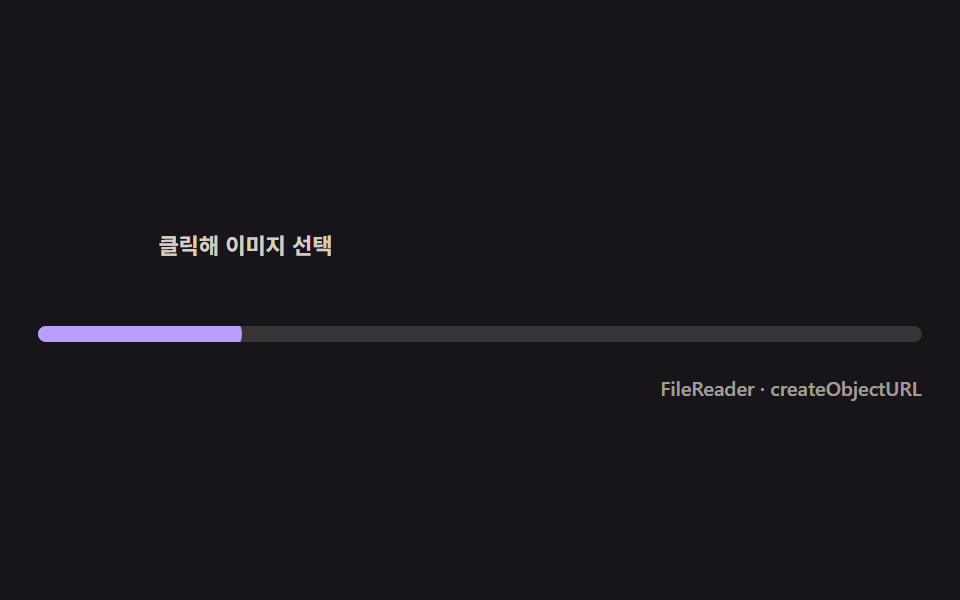
05読み込んだ瞬間に弾むサムネイルポップイン
FileReaderがdataURLの読み込みを終えた瞬間を合図にサムネイルが0からオーバーシュートで拡大し、その下の進捗バーはそこから初めて満ちていきます。
使いどころ画像添付、商品登録フォーム
FileReadercreateObjectURLtransform
<main class="stage">
<div class="tp is-demo" id="tpRoot" role="group" tabindex="0" aria-label="画像サムネイルアップロード">
  <label class="tp__drop" for="tpInput">
    <span class="tp__thumb" id="tpThumb" aria-hidden="true">
      <svg viewBox="0 0 256 256" width="22" height="22"><g fill="currentColor"><path d="M216 40H40a16 16 0 0 0-16 16v144a16 16 0 0 0 16 16h176a16 16 0 0 0 16-16V56a16 16 0 0 0-16-16m-72 88l-24-24-40 40h136Z" opacity=".2"/><path d="M216 40H40a16 16 0 0 0-16 16v144a16 16 0 0 0 16 16h176a16 16 0 0 0 16-16V56a16 16 0 0 0-16-16m0 16v102.75l-26.07-26.06a16 16 0 0 0-22.63 0l-20 20-44-44a16 16 0 0 0-22.63 0L40 149.37V56ZM40 172l52-52 76 76H40Zm176 28h-4.69l-40-40 20-20L216 164.69V200Z"/></g></svg>
    </span>
    <input class="tp__input" id="tpInput" type="file" accept="image/*">
    <span class="tp__hint">クリックして画像を選択</span>
  </label>
  <div class="tp__track">
    <span class="tp__fill" id="tpFill"></span>
  </div>
  <div class="tp__bar">
    <span class="tp__meta">FileReader · createObjectURL</span>
  </div>
</div>
</main>
@use "../../../../site/static/demo-tokens" as *;
// 썸네일 팝인(05) — 스케일 오버슈트는 토큰의 $ease-elastic(고무줄식 되돌아옴)을 그대로 쓴다.
// 실사용 경로는 .is-pop 클래스 전환(트랜지션)으로 같은 이징을 쓴다 — index.html 의 reader.onload 참고.
@include stage($stage-ink);
$tp-text: $subject-cream;
$tp-thumb: $subject-lilac;
$tp-fill: $subject-lilac;
$duration: $dur-loop;
$easing: $ease-elastic;
$color: $tp-thumb;
.tp {
display: flex; flex-direction: column; gap: $sp-4;
width: 100%; height: 100%; min-height: 164px;
justify-content: center;
}
.tp:focus-visible { outline: 2px solid $tp-thumb; outline-offset: 2px; border-radius: $r-control; }
.tp__drop {
display: flex; align-items: center; gap: $sp-3;
cursor: pointer;
}
.tp__thumb {
position: relative;
flex: 0 0 auto;
width: 48px; height: 48px;
border-radius: $r-sm;
background-color: rgba($tp-thumb, .16);
background-size: cover; background-position: center;
display: flex; align-items: center; justify-content: center;
color: rgba($tp-thumb, .82);
transform: scale(0);
opacity: 0;
transition: transform $dur-enter $ease-elastic, opacity $dur-quick $ease-out;
}
.tp__thumb.is-pop { transform: scale(1); opacity: 1; }
.tp__input {
position: absolute; width: 1px; height: 1px; overflow: hidden; clip: rect(0 0 0 0); white-space: nowrap;
}
.tp__hint {
font-weight: 600; font-size: 11px; line-height: 1.3;
color: rgba($tp-text, .82);
}
.tp__track {
position: relative;
height: $sp-2;
border-radius: $r-pill;
background: rgba($tp-text, .14);
overflow: hidden;
}
.tp__fill {
position: absolute; inset: 0;
transform-origin: left center;
transform: scaleX(0);
border-radius: $r-pill;
background: $tp-fill;
}
.tp__bar { display: flex; justify-content: flex-end; }
.tp__meta { font-weight: 500; font-size: 10px; color: rgba($tp-text, .6); }
// ── 데모 루프 — 팝인 뒤에야 바가 채워진다(신호 순서가 핵심) ──
@keyframes tpPop {
0%, 8% { opacity: 0; transform: scale(0); }
14% { opacity: 1; transform: scale(1.18); animation-timing-function: $ease-out; }
20% { transform: scale(1); }
84% { opacity: 1; transform: scale(1); }
90% { opacity: 0; transform: scale(.9); }
100% { opacity: 0; transform: scale(.9); }
}
@keyframes tpFillLoop {
0%, 20% { transform: scaleX(0); }
60% { transform: scaleX(1); }
84% { transform: scaleX(1); }
90%, 100% { transform: scaleX(0); }
}
.is-demo .tp__thumb {
animation-name: tpPop;
animation-duration: $duration;
animation-timing-function: $ease-elastic;
animation-iteration-count: infinite;
}
.is-demo .tp__fill {
animation-name: tpFillLoop;
animation-duration: $duration;
animation-timing-function: $ease-out;
animation-iteration-count: infinite;
}
@media (max-width: 340px) {
.tp__thumb { width: 40px; height: 40px; }
}
@media (prefers-reduced-motion: reduce) {
.is-demo .tp__thumb, .is-demo .tp__fill { animation: none !important; }
.is-demo .tp__thumb { opacity: 1 !important; transform: scale(1) !important; }
.is-demo .tp__fill { transform: scaleX(.7) !important; }
}html, body {
margin: 0;
overflow: hidden;
}
.stage {
box-sizing: border-box;
min-height: 100vh;
display: grid;
place-items: center;
margin: 0;
background: #17141a;
font-family: -apple-system, "Segoe UI", "Noto Sans KR", sans-serif;
padding: clamp(8px, 4vw, 24px);
}
.tp {
display: flex;
flex-direction: column;
gap: 16px;
width: 100%;
height: 100%;
min-height: 164px;
justify-content: center;
}
.tp:focus-visible {
outline: 2px solid #b9a0ff;
outline-offset: 2px;
border-radius: 12px;
}
.tp__drop {
display: flex;
align-items: center;
gap: 12px;
cursor: pointer;
}
.tp__thumb {
position: relative;
flex: 0 0 auto;
width: 48px;
height: 48px;
border-radius: 8px;
background-color: rgba(185, 160, 255, 0.16);
background-size: cover;
background-position: center;
display: flex;
align-items: center;
justify-content: center;
color: rgba(185, 160, 255, 0.82);
transform: scale(0);
opacity: 0;
transition: transform 600ms cubic-bezier(0.34, 1.56, 0.64, 1), opacity 220ms ease-out;
}
.tp__thumb.is-pop {
transform: scale(1);
opacity: 1;
}
.tp__input {
position: absolute;
width: 1px;
height: 1px;
overflow: hidden;
clip: rect(0 0 0 0);
white-space: nowrap;
}
.tp__hint {
font-weight: 600;
font-size: 11px;
line-height: 1.3;
color: rgba(255, 247, 230, 0.82);
}
.tp__track {
position: relative;
height: 8px;
border-radius: 999px;
background: rgba(255, 247, 230, 0.14);
overflow: hidden;
}
.tp__fill {
position: absolute;
inset: 0;
transform-origin: left center;
transform: scaleX(0);
border-radius: 999px;
background: #b9a0ff;
}
.tp__bar {
display: flex;
justify-content: flex-end;
}
.tp__meta {
font-weight: 500;
font-size: 10px;
color: rgba(255, 247, 230, 0.6);
}
@keyframes tpPop {
0%, 8% {
opacity: 0;
transform: scale(0);
}
14% {
opacity: 1;
transform: scale(1.18);
animation-timing-function: ease-out;
}
20% {
transform: scale(1);
}
84% {
opacity: 1;
transform: scale(1);
}
90% {
opacity: 0;
transform: scale(0.9);
}
100% {
opacity: 0;
transform: scale(0.9);
}
}
@keyframes tpFillLoop {
0%, 20% {
transform: scaleX(0);
}
60% {
transform: scaleX(1);
}
84% {
transform: scaleX(1);
}
90%, 100% {
transform: scaleX(0);
}
}
.is-demo .tp__thumb {
animation-name: tpPop;
animation-duration: 2s;
animation-timing-function: cubic-bezier(0.34, 1.56, 0.64, 1);
animation-iteration-count: infinite;
}
.is-demo .tp__fill {
animation-name: tpFillLoop;
animation-duration: 2s;
animation-timing-function: ease-out;
animation-iteration-count: infinite;
}
@media (max-width: 340px) {
.tp__thumb {
width: 40px;
height: 40px;
}
}
@media (prefers-reduced-motion: reduce) {
.is-demo .tp__thumb, .is-demo .tp__fill {
animation: none !important;
}
.is-demo .tp__thumb {
opacity: 1 !important;
transform: scale(1) !important;
}
.is-demo .tp__fill {
transform: scaleX(0.7) !important;
}
}// 썸네일 팝인 — FileReader 가 dataURL 을 다 읽는 순간(onload)을 신호로 삼아
// 썸네일이 0에서 오버슈트로 커지고, 그 아래 진행 바는 그제서야 채워지기 시작한다.
(function () {
var root = document.getElementById('tpRoot');
var input = document.getElementById('tpInput');
var thumb = document.getElementById('tpThumb');
var fill = document.getElementById('tpFill');
if (!root || !input || !thumb || !fill) return;
function fillTo(pct, dur) {
var t0 = performance.now();
function step(now) {
var k = Math.min(1, (now - t0) / dur);
fill.style.transform = 'scaleX(' + (pct * k / 100) + ')';
if (k < 1) requestAnimationFrame(step);
}
requestAnimationFrame(step);
}
input.addEventListener('change', function (e) {
var file = e.target.files && e.target.files[0];
if (!file) return;
root.classList.remove('is-demo');
var reader = new FileReader();
reader.onload = function () {
thumb.style.backgroundImage = 'url(' + reader.result + ')';
thumb.classList.add('is-pop');
fillTo(100, 900);
};
reader.readAsDataURL(file);
// 더 빠른 미리보기가 필요하면 createObjectURL 로도 즉시 참조를 만들 수 있다(여기선 즉시 해제).
var objUrl = URL.createObjectURL(file);
URL.revokeObjectURL(objUrl);
});
})();// UploadProgressThumbnailPop — vanilla 판(run/329/demo/05-upload-progress-thumbnail-pop/index.html) 의 React 포트.
// FileReader 가 dataURL 을 다 읽는 순간(onload)을 신호로 삼아 썸네일이 0에서 오버슈트로 커지고,
// 그 아래 진행 바는 그제서야 채워지기 시작한다.
import { useRef, useState } from "react";
import type { CSSProperties } from "react";
import styles from "./UploadProgressThumbnailPop.module.scss";
export type UploadProgressThumbnailPopProps = {
duration?: string;
easing?: string;
color?: string;
fillMs?: number; // 팝인 뒤 바가 채워지는 데 걸리는 시간(ms)
};
type Vars = CSSProperties & { "--duration"?: string; "--easing"?: string; "--color"?: string };
type FileEvt = { target: { files: { length: number; 0?: File } | FileList | null } };
const HINT = "클릭해 이미지 선택";
const META = "FileReader · createObjectURL";
export default function UploadProgressThumbnailPop({
duration = "2s",
easing = "cubic-bezier(.34,1.56,.64,1)",
color = "#b9a0ff",
fillMs = 900
}: UploadProgressThumbnailPopProps) {
const [demo, setDemo] = useState(true);
const [popped, setPopped] = useState(false);
const [bgUrl, setBgUrl] = useState("");
const fillRef = useRef<HTMLSpanElement | null>(null);
const vars: Vars = { "--duration": duration, "--easing": easing, "--color": color };
function fillTo(pct: number, dur: number): void {
const t0 = performance.now();
function step(now: number): void {
const k = Math.min(1, (now - t0) / dur);
if (fillRef.current) fillRef.current.style.transform = "scaleX(" + (pct * k / 100) + ")";
if (k < 1) requestAnimationFrame(step);
}
requestAnimationFrame(step);
}
function onChange(e: FileEvt): void {
const files = e.target.files as FileList | null;
const file = files && files[0] ? files[0] : null;
if (!file) return;
setDemo(false);
const reader = new FileReader();
reader.onload = () => {
setBgUrl(String(reader.result));
setPopped(true);
fillTo(100, fillMs);
};
reader.readAsDataURL(file);
// 더 빠른 미리보기가 필요하면 createObjectURL 로도 즉시 참조를 만들 수 있다(여기선 즉시 해제).
const objUrl = URL.createObjectURL(file);
URL.revokeObjectURL(objUrl);
}
const rootCls = demo ? `${styles.tp} ${styles.isDemo}` : styles.tp;
const thumbCls = popped ? `${styles.thumb} ${styles.isPop}` : styles.thumb;
return (
<main className={styles.stage}>
<div className={rootCls} style={vars} role="group" tabIndex={0} aria-label="이미지 썸네일 업로드">
<label className={styles.drop}>
<span
className={thumbCls}
aria-hidden="true"
style={bgUrl ? { backgroundImage: `url(${bgUrl})` } : undefined}
>
<svg viewBox="0 0 256 256" width="22" height="22"><g fill="currentColor"><path d="M216 40H40a16 16 0 0 0-16 16v144a16 16 0 0 0 16 16h176a16 16 0 0 0 16-16V56a16 16 0 0 0-16-16m-72 88l-24-24-40 40h136Z" opacity=".2"/><path d="M216 40H40a16 16 0 0 0-16 16v144a16 16 0 0 0 16 16h176a16 16 0 0 0 16-16V56a16 16 0 0 0-16-16m0 16v102.75l-26.07-26.06a16 16 0 0 0-22.63 0l-20 20-44-44a16 16 0 0 0-22.63 0L40 149.37V56ZM40 172l52-52 76 76H40Zm176 28h-4.69l-40-40 20-20L216 164.69V200Z"/></g></svg>
</span>
<input className={styles.input} type="file" accept="image/*" onChange={onChange} />
<span className={styles.hint}>{HINT}</span>
</label>
<div className={styles.track}>
<span className={styles.fill} ref={fillRef}></span>
</div>
<div className={styles.bar}>
<span className={styles.meta}>{META}</span>
</div>
</div>
</main>
);
}05 読み込んだ瞬間に弾むサムネイルポップイン — 計測 累積面積 4.903% · 動いたフレーム 16/23GODRICH オリジナル · SCSS と React は zip に同梱 · アップロード プログレスバー ローダー9種 — 計算するUI
このデモが属する記事
 アップロード プログレスバー ローダー9種 — 計算するUIアップロード プログレスバーは、バイトと時間の実測値からリング・速度・チェックの動きを計算して描く部品です。ファイルをドロップすると、バイトと時間から速度を計算してリングが回り、完了するとチェックに変わります。9つの状態をライブラリなしで計 この記事のデモをすべて見る