09レスポンシブ clamp() スケール
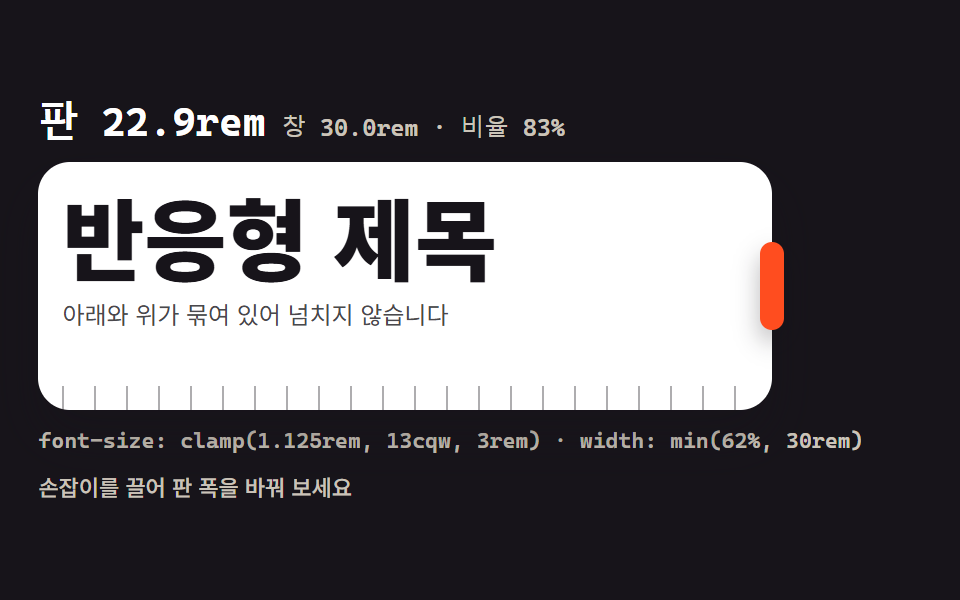
枠の端をドラッグするとビューポート幅が rem で表示され、見出しサイズが clamp() の区間の中でなめらかに追従します。min() で下限と上限を同時に縛る方法も入れました。
使いどころレスポンシブサイトの見出しスケール設計
clamp()innerWidthmin()
<main class="stage">
<div class="cf is-demo" id="cf">
  <div class="cf__reads">
    <span class="cf__big" id="big">パネル 17.9rem</span>
    <span class="cf__sub" id="sub">ウィンドウ 30rem · 比率 62%</span>
  </div>
  <div class="cf__frame" id="frame">
    <div class="cf__inner">
      <h2 class="cf__title">レスポンシブ見出し</h2>
      <p class="cf__lede">下限と上限で縛られているので、はみ出しません</p>
    </div>
    <span class="cf__ruler" aria-hidden="true"></span>
    <button class="cf__grip" id="grip" type="button" aria-label="パネル幅の調整"></button>
  </div>
  <p class="cf__formula">font-size: clamp(1.125rem, 13cqw, 3rem) · width: min(62%, 30rem)</p>
  <p class="cf__note">ハンドルをドラッグしてパネル幅を変えてみてください</p>
</div>
</main>
@use "../../../../site/static/demo-tokens" as *;
// 반응형 clamp() 스케일 — 무대는 480×300 고정이라 "창" 대신 판 안의 리사이즈 상자로 흉내 낸다.
// 상자에 container-type: inline-size 를 걸어 제목 크기가 clamp(1.125rem, 13cqw, 3rem) 로
// 상자 폭을 따라가게 한다. 창 폭은 window.innerWidth 를 실제로 읽어 rem 로 환산해 함께 찍는다.
// min() 은 판 폭의 윗묶음(62% 와 30rem 중 작은 쪽)으로 함께 쓴다.
// 미리보기 루프는 판 폭을 % 로 부드럽게 늘였다 줄인다 — cqw 로 잰 제목이 구간 안에서 따라온다.
$duration: $dur-base;
$easing: $ease-spring;
$color: $stage-paper;
$mono: ui-monospace, "Cascadia Mono", Consolas, "Courier New", monospace;
$tick: rgba(23, 20, 26, .35);
@include stage($stage-ink);
.cf {
display: flex; flex-direction: column; gap: $sp-2;
box-sizing: border-box; width: min(100%, 448px);
}
// ── 판 숫자: 판 폭(rem) · 창 폭(innerWidth → rem) · 무대 대비 비율
.cf__reads { display: flex; flex-wrap: wrap; align-items: baseline; gap: $sp-2; }
.cf__big { color: $stage-paper; font-family: $mono; font-weight: 700; font-size: 20px; line-height: 1.2; }
.cf__sub { color: rgba(255, 247, 230, .78); font-family: $mono; font-weight: 500; font-size: 12px; line-height: 1.4; }
// ── 판: 이 상자가 곧 좁은 뷰포트 역할. cqw 단위가 이 상자 폭을 본다
.cf__frame {
position: relative;
container-type: inline-size;
width: min(62%, 30rem);
box-sizing: border-box;
padding: $sp-3 $sp-3 0;
border-radius: $r-card;
background: $stage-paper; box-shadow: $shadow-raised;
}
.cf__inner { min-height: 92px; }
.cf__title {
margin: 0; color: $subject-ink;
font-weight: 800; font-size: clamp(1.125rem, 13cqw, 3rem); line-height: 1.15;
}
.cf__lede { margin: 0; margin-top: $sp-1; color: rgba(23, 20, 26, .78); font-weight: 400; font-size: clamp(.75rem, 3.4cqw, .875rem); line-height: 1.5; }
// 눈금자: 한 눈금이 1rem(16px) — 판이 늘면 눈금이 그만큼 더 보인다
.cf__ruler {
display: block; height: 12px; margin-top: $sp-2;
background: repeating-linear-gradient(90deg, $tick 0 1px, transparent 1px 16px);
}
// ── 끌기 손잡이: 판의 오른쪽 변에 붙는다
.cf__grip {
position: absolute; top: 50%; right: -6px;
width: 12px; height: 44px;
border: 0; border-radius: $r-pill;
background: $stage-orange; box-shadow: $shadow-press;
cursor: ew-resize; touch-action: none;
transform: translateY(-50%);
}
.cf__grip:focus-visible { outline: 2px solid $stage-yellow; outline-offset: 2px; }
.cf__formula { margin: 0; color: rgba(255, 247, 230, .78); font-family: $mono; font-weight: 500; font-size: 11px; line-height: 1.4; }
.cf__note { margin: 0; color: rgba(255, 247, 230, .78); font-weight: 500; font-size: 11px; line-height: 1.4; }
// ── 격자 미리보기 루프 (2초)
// 판 폭이 56% → 100% 로 자라 46% 로 줄어 56% 로 돌아온다. 폭은 % 로 — cqw 제목이 구간 안에서 따라온다.
.cf.is-demo .cf__frame {
animation-name: cfFrame; animation-duration: $dur-loop; animation-timing-function: $ease-out;
animation-iteration-count: infinite;
}
// 손잡이는 폭이 멈춰 있는 구간에 한 번씩 부풀어 "여기가 끌린다" 를 알린다 (자기 중심에서)
.cf.is-demo .cf__grip {
animation-name: cfGrip; animation-duration: $dur-loop; animation-timing-function: $easing;
animation-iteration-count: infinite;
}
@keyframes cfFrame {
0%, 6% { width: 56%; }
40%, 46% { width: 100%; }
86%, 92% { width: 46%; }
100% { width: 56%; }
}
@keyframes cfGrip {
0%, 41% { transform: translateY(-50%) scaleX(1); }
43.5% { transform: translateY(-50%) scaleX(1.4); }
46%, 100% { transform: translateY(-50%) scaleX(1); }
}
// ── 좁은 화면: 읽칸과 크기를 줄인다 (값을 올리지 않고 내린다)
@media (max-width: 340px) {
.cf { gap: $sp-1; }
.cf__big { font-size: 16px; }
.cf__sub, .cf__formula { font-size: 10px; }
.cf__note { display: none; }
.cf__frame { padding: $sp-2 $sp-2 0; }
.cf__inner { min-height: 64px; }
.cf__title { font-size: clamp(1rem, 11cqw, 2.25rem); }
.cf__grip { height: 36px; }
}
@media (prefers-reduced-motion: reduce) {
.cf.is-demo .cf__frame { animation: none !important; }
.cf.is-demo .cf__grip { animation: none !important; transform: translateY(-50%) !important; }
}html, body {
margin: 0;
overflow: hidden;
}
.stage {
box-sizing: border-box;
min-height: 100vh;
display: grid;
place-items: center;
margin: 0;
background: #17141a;
font-family: -apple-system, "Segoe UI", "Noto Sans KR", sans-serif;
padding: clamp(8px, 4vw, 24px);
}
.cf {
display: flex;
flex-direction: column;
gap: 8px;
box-sizing: border-box;
width: min(100%, 448px);
}
.cf__reads {
display: flex;
flex-wrap: wrap;
align-items: baseline;
gap: 8px;
}
.cf__big {
color: #ffffff;
font-family: ui-monospace, "Cascadia Mono", Consolas, "Courier New", monospace;
font-weight: 700;
font-size: 20px;
line-height: 1.2;
}
.cf__sub {
color: rgba(255, 247, 230, 0.78);
font-family: ui-monospace, "Cascadia Mono", Consolas, "Courier New", monospace;
font-weight: 500;
font-size: 12px;
line-height: 1.4;
}
.cf__frame {
position: relative;
container-type: inline-size;
width: min(62%, 30rem);
box-sizing: border-box;
padding: 12px 12px 0;
border-radius: 16px;
background: #ffffff;
box-shadow: 0 14px 24px rgba(23, 20, 26, 0.32);
}
.cf__inner {
min-height: 92px;
}
.cf__title {
margin: 0;
color: #17141a;
font-weight: 800;
font-size: clamp(1.125rem, 13cqw, 3rem);
line-height: 1.15;
}
.cf__lede {
margin: 0;
margin-top: 4px;
color: rgba(23, 20, 26, 0.78);
font-weight: 400;
font-size: clamp(0.75rem, 3.4cqw, 0.875rem);
line-height: 1.5;
}
.cf__ruler {
display: block;
height: 12px;
margin-top: 8px;
background: repeating-linear-gradient(90deg, rgba(23, 20, 26, 0.35) 0 1px, transparent 1px 16px);
}
.cf__grip {
position: absolute;
top: 50%;
right: -6px;
width: 12px;
height: 44px;
border: 0;
border-radius: 999px;
background: #ff4d1f;
box-shadow: 0 6px 12px rgba(23, 20, 26, 0.32);
cursor: ew-resize;
touch-action: none;
transform: translateY(-50%);
}
.cf__grip:focus-visible {
outline: 2px solid #ffd23f;
outline-offset: 2px;
}
.cf__formula {
margin: 0;
color: rgba(255, 247, 230, 0.78);
font-family: ui-monospace, "Cascadia Mono", Consolas, "Courier New", monospace;
font-weight: 500;
font-size: 11px;
line-height: 1.4;
}
.cf__note {
margin: 0;
color: rgba(255, 247, 230, 0.78);
font-weight: 500;
font-size: 11px;
line-height: 1.4;
}
.cf.is-demo .cf__frame {
animation-name: cfFrame;
animation-duration: 2s;
animation-timing-function: ease-out;
animation-iteration-count: infinite;
}
.cf.is-demo .cf__grip {
animation-name: cfGrip;
animation-duration: 2s;
animation-timing-function: cubic-bezier(0.2, 0.8, 0.2, 1);
animation-iteration-count: infinite;
}
@keyframes cfFrame {
0%, 6% {
width: 56%;
}
40%, 46% {
width: 100%;
}
86%, 92% {
width: 46%;
}
100% {
width: 56%;
}
}
@keyframes cfGrip {
0%, 41% {
transform: translateY(-50%) scaleX(1);
}
43.5% {
transform: translateY(-50%) scaleX(1.4);
}
46%, 100% {
transform: translateY(-50%) scaleX(1);
}
}
@media (max-width: 340px) {
.cf {
gap: 4px;
}
.cf__big {
font-size: 16px;
}
.cf__sub, .cf__formula {
font-size: 10px;
}
.cf__note {
display: none;
}
.cf__frame {
padding: 8px 8px 0;
}
.cf__inner {
min-height: 64px;
}
.cf__title {
font-size: clamp(1rem, 11cqw, 2.25rem);
}
.cf__grip {
height: 36px;
}
}
@media (prefers-reduced-motion: reduce) {
.cf.is-demo .cf__frame {
animation: none !important;
}
.cf.is-demo .cf__grip {
animation: none !important;
transform: translateY(-50%) !important;
}
}var cf = document.getElementById('cf');
var frame = document.getElementById('frame');
var big = document.getElementById('big');
var sub = document.getElementById('sub');
var grip = document.getElementById('grip');
var lastW = -1;
// パネル 폭(rem)·ウィンドウ 폭(innerWidth 을 rem 으로 환산)·무대 대비 비율을 다시 쓴다.
// 루프가 パネル 폭을 움직일 때도 ResizeObserver 가 잡아 숫자가 따라온다.
function update() {
var w = frame.offsetWidth;
if (w === lastW) return;
lastW = w;
var winRem = window.innerWidth / 16;
var ratio = Math.round(w / cf.clientWidth * 100);
big.textContent = 'パネル ' + (w / 16).toFixed(1) + 'rem';
sub.textContent = 'ウィンドウ ' + winRem.toFixed(1) + 'rem · 比率 ' + ratio + '%';
}
if ('ResizeObserver' in window) {
new ResizeObserver(update).observe(frame);
new ResizeObserver(update).observe(cf);
}
window.addEventListener('resize', update);
(function tick() { update(); requestAnimationFrame(tick); })();
update();
// 손잡이 드래그 — 포인터 캡처로 마우스·터치·펜이 같은 길을 쓴다
var dragging = false;
var startX = 0;
var startW = 0;
grip.addEventListener('pointerdown', function (e) {
dragging = true;
startX = e.clientX;
startW = frame.offsetWidth;
cf.classList.remove('is-demo');
grip.setPointerCapture(e.pointerId);
e.preventDefault();
});
grip.addEventListener('pointermove', function (e) {
if (!dragging) return;
var w = Math.min(Math.max(startW + (e.clientX - startX), 176), cf.clientWidth);
frame.style.width = w + 'px';
});
function endDrag() { dragging = false; }
grip.addEventListener('pointerup', endDrag);
grip.addEventListener('pointercancel', endDrag);
// 키보드는 한 칸에 1rem(16px) 씩
grip.addEventListener('keydown', function (e) {
var step = 0;
if (e.key === 'ArrowLeft' || e.key === 'ArrowDown') step = -16;
if (e.key === 'ArrowRight' || e.key === 'ArrowUp') step = 16;
if (!step) return;
cf.classList.remove('is-demo');
e.preventDefault();
var w = Math.min(Math.max(frame.offsetWidth + step, 176), cf.clientWidth);
frame.style.width = w + 'px';
});// ClampFluidScale — vanilla 판(run/074/demo/09-clamp-fluid-scale/index.html) 의 React 포트.
// 판(리사이즈 상자)에 container-type: inline-size 를 걸어 제목이 clamp(1.125rem, 13cqw, 3rem) 로
// 판 폭을 따라가게 한다. 창 폭은 window.innerWidth 를 실제로 읽어 rem 로 환산해 찍는다.
// 미리보기 루프가 판 폭을 움직일 때는 ResizeObserver 가 잡아 숫자가 따라온다.
import { useEffect, useRef, useState } from "react";
import type { CSSProperties } from "react";
import styles from "./ClampFluidScale.module.scss";
export type ClampFluidScaleProps = {
duration?: number;
easing?: string;
color?: string;
};
type Vars = CSSProperties & { "--duration"?: string; "--easing"?: string; "--color"?: string };
// useRef<T> 는 T | null 을 돌려준다 — ambient 타입에 맞춰 상자 타입을 따로 둔다
type Box<T> = { current: T | null };
type DragState = { on: boolean; x: number; w: number };
type DragBox = { current: DragState };
type PtrEvt = { clientX: number; pointerId: number; preventDefault(): void };
type KeyEvt = { key: string; preventDefault(): void };
type RO = { observe(t: unknown): void };
const BIG_PREFIX = "판 ";
const SUB_WIN = "창 ";
const SUB_RATIO = "rem · 비율 ";
const TITLE = "반응형 제목";
const LEDE = "아래와 위가 묶여 있어 넘치지 않습니다";
const FORMULA = "font-size: clamp(1.125rem, 13cqw, 3rem) · width: min(62%, 30rem)";
const NOTE = "손잡이를 끌어 판 폭을 바꿔 보세요";
const GRIP_ARIA = "판 폭 조절";
const MIN_W = 176;
export default function ClampFluidScale(props: ClampFluidScaleProps) {
const duration = props.duration ?? 300;
const easing = props.easing ?? "cubic-bezier(.2, .8, .2, 1)";
const color = props.color ?? "#ffffff";
const [preview, setPreview] = useState<boolean>(true);
const [reads, setReads] = useState<string>("판 17.9rem");
const [subReads, setSubReads] = useState<string>("창 30rem · 비율 62%");
const rootRef = useRef<HTMLDivElement>(null) as Box<HTMLDivElement>;
const frameRef = useRef<HTMLDivElement>(null) as Box<HTMLDivElement>;
const drag = useRef<DragState>({ on: false, x: 0, w: 0 }) as DragBox;
// 판 폭(rem)·창 폭(innerWidth → rem)·무대 대비 비율을 다시 쓴다
useEffect(() => {
const frame = frameRef.current;
const root = rootRef.current;
if (!frame || !root) return;
let lastW = -1;
const update = () => {
const w = frame.offsetWidth;
if (w === lastW || !root) return;
lastW = w;
const winRem = window.innerWidth / 16;
const ratio = Math.round((w / root.clientWidth) * 100);
setReads(BIG_PREFIX + (w / 16).toFixed(1) + "rem");
setSubReads(SUB_WIN + winRem.toFixed(1) + SUB_RATIO + ratio + "%");
};
update();
if (typeof ResizeObserver !== "undefined") {
const ro: RO = new ResizeObserver(update);
ro.observe(frame);
ro.observe(root);
}
window.addEventListener("resize", update);
let raf = 0;
const tick = () => { update(); raf = requestAnimationFrame(tick); };
raf = requestAnimationFrame(tick);
return () => {
window.removeEventListener("resize", update);
cancelAnimationFrame(raf);
};
}, []);
const setWidth = (w: number) => {
const frame = frameRef.current;
const root = rootRef.current;
if (!frame || !root) return;
frame.style.width = Math.min(Math.max(w, MIN_W), root.clientWidth) + "px";
};
const vars: Vars = { "--duration": duration + "ms", "--easing": easing, "--color": color };
return (
<main className={styles.stage}>
<div
ref={rootRef}
className={styles.root + (preview ? " " + styles.isDemo : "")}
style={vars}
>
<div className={styles.reads}>
<span className={styles.big}>{reads}</span>
<span className={styles.sub}>{subReads}</span>
</div>
<div ref={frameRef} className={styles.frame}>
<div className={styles.inner}>
<h2 className={styles.title}>{TITLE}</h2>
<p className={styles.lede}>{LEDE}</p>
</div>
<span className={styles.ruler} aria-hidden="true" />
<button
className={styles.grip}
type="button"
aria-label={GRIP_ARIA}
onPointerDown={(e: PtrEvt) => {
drag.current = { on: true, x: e.clientX, w: (frameRef.current as HTMLDivElement).offsetWidth };
setPreview(false);
e.preventDefault();
}}
onPointerMove={(e: PtrEvt) => {
if (!drag.current.on) return;
setWidth(drag.current.w + (e.clientX - drag.current.x));
}}
onPointerUp={() => { drag.current.on = false; }}
onPointerCancel={() => { drag.current.on = false; }}
onKeyDown={(e: KeyEvt) => {
let step = 0;
if (e.key === "ArrowLeft" || e.key === "ArrowDown") step = -16;
if (e.key === "ArrowRight" || e.key === "ArrowUp") step = 16;
if (!step) return;
setPreview(false);
e.preventDefault();
setWidth((frameRef.current as HTMLDivElement).offsetWidth + step);
}}
/>
</div>
<p className={styles.formula}>{FORMULA}</p>
<p className={styles.note}>{NOTE}</p>
</div>
</main>
);
}09 レスポンシブ clamp() スケール — 計測 累積面積 30.844% · 動いたフレーム 21/23GODRICH オリジナル · SCSS と React は zip に同梱 · css タイポグラフィ プレイグラウンド 9種 — webフォントを読み込まずに
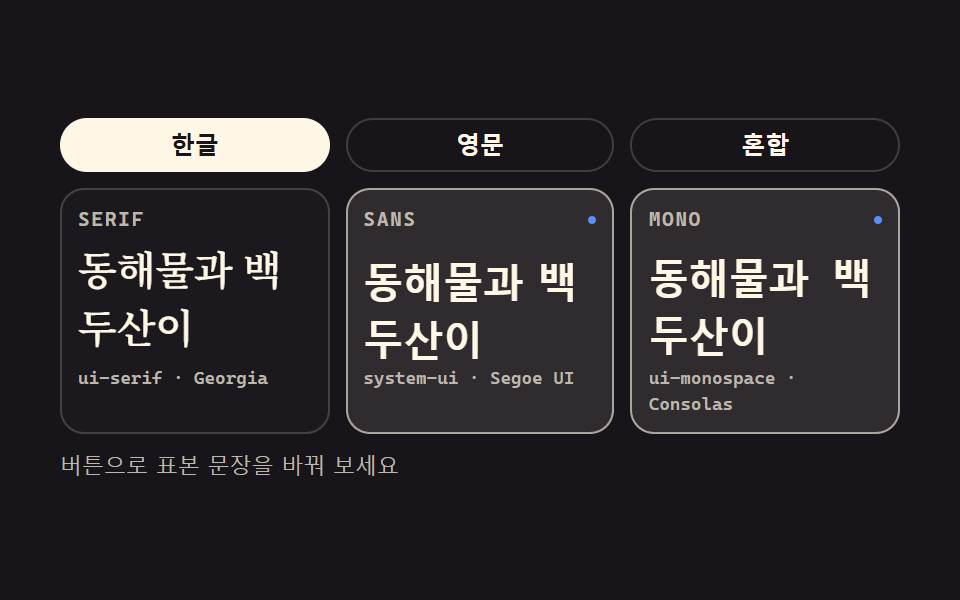
このデモが属する記事
 css タイポグラフィ プレイグラウンド 9種 — webフォントを読み込まずにcss タイポグラフィとは、フォントのダウンロードを待たずにサイズ・太さ・字間・行間でページの読み心地を決める作業です。この9つのプレイグラウンドは webフォントを読み込まずに、OS がもともと持っているシステムフォントだけで組んであり、 この記事のデモをすべて見る