03次のボタンを指す案内
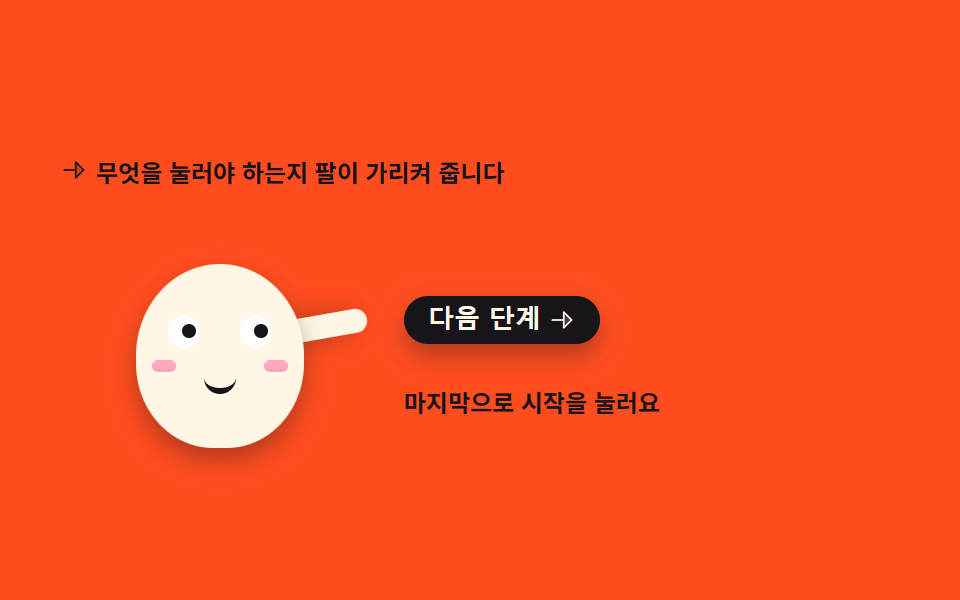
腕がボタンの方へ伸び、瞳も同じ方向へ動きます。ボタンを押すと腕が下り、案内が一段進みます。
使いどころ機能を初めて使う瞬間、どこを押せばよいかを示す案内ステップ
rotatetranslateXaria-livebox-shadow
<svg width="0" height="0" style="position:absolute" aria-hidden="true">
  <defs>
    <symbol id="ico-arrow" viewBox="0 0 256 256" fill="currentColor"><path d="m216 128l-72 72V56Z" opacity=".2"/><path d="m221.66 122.34l-72-72A8 8 0 0 0 136 56v64H40a8 8 0 0 0 0 16h96v64a8 8 0 0 0 13.66 5.66l72-72a8 8 0 0 0 0-11.32M152 180.69V75.31L204.69 128Z"/></symbol>
  </defs>
</svg>
<main class="stage">
<div class="pg is-demo" id="pg" data-step="0">
  <p class="pg__hint">
    <svg class="pg__ico" aria-hidden="true"><use href="#ico-arrow"/></svg>
    <span>何を押せばよいか腕が示します</span>
  </p>

  <div class="pg__row">
    <!-- 캐릭터는 피사체라 손으로 그린다 — 크림 몸에 잉크 이목구비, 오른쪽 버튼을 가리키는 팔 하나.
         팔의 축은 어깨, 눈동자는 버튼 쪽으로 같이 옮겨 간다. -->
    <div class="pg__char" aria-label="ボタンを指すマスコット" role="img">
      <i class="pg__arm"></i>
      <span class="pg__body">
        <i class="pg__eye pg__eye--l"><span class="pg__pupil"></span></i>
        <i class="pg__eye pg__eye--r"><span class="pg__pupil"></span></i>
        <i class="pg__cheek pg__cheek--l"></i>
        <i class="pg__cheek pg__cheek--r"></i>
        <i class="pg__mouth"></i>
      </span>
    </div>

    <div class="pg__side">
      <button class="pg__btn" id="pgNext" type="button">
        <span>次へ</span>
        <svg class="pg__btnIco" aria-hidden="true"><use href="#ico-arrow"/></svg>
      </button>
      <!-- 안내 문구 교체를 스크린 낭독기에 알리는 영역 — data-step 이 바뀌면 보이는 스팬이 갈린다 -->
      <p class="pg__say" aria-live="polite">
        <span class="pg__msg pg__msg--0">まずプロフィールを埋めましょう</span>
        <span class="pg__msg pg__msg--1">次に通知を選びます</span>
        <span class="pg__msg pg__msg--2">最後に開始を押します</span>
      </p>
    </div>
  </div>
</div>
</main>@use "../../../../site/static/demo-tokens" as *;
// 다음 버튼을 가리키는 안내 — 팔이 버튼 쪽으로 뻗고 눈동자도 같은 방향으로 옮겨 간다.
// 격자 미리보기(.is-demo)는 「가리킴 → 버튼 강조(box-shadow 링) → 다음 단계」를 2s 안에
// 세 바퀴째 보여 준다. 문구 교체는 steps(1, end) 로 한 프레임에 컷해 반투명 유령을 만들지 않고
// 컷 옆에는 팔 살짝 내림(rotate) 이 움직임 프레임을 채운다. 복귀는 87~90% 안에 끝난다.
// 사람이 버튼을 누르면 JS 가 .is-demo 를 떼고 data-step 로 세 단계를 순환시킨다.
$duration: $dur-loop;
$easing: $ease-spring;
$color: $subject-cream;
@include stage($stage-orange);
// 주황 무대 위 글자는 잉크만 쓴다(설계 대비 표 — 크림 글자는 주황 위 3.11 대 1 로 AA 미달).
// 캐릭터 몸은 크림(면은 규칙 밖), 몸에 얹는 이목구비는 잉크다.
.pg { display: flex; flex-direction: column; gap: $sp-3; width: 100%; max-width: 420px; }
.pg__hint {
display: flex; align-items: center; gap: $sp-1; margin: 0;
font-weight: 700; font-size: clamp(10px, 2.6vw, 12px); color: $subject-ink;
}
.pg__ico { width: 14px; height: 14px; flex: 0 0 auto; color: $subject-ink; }
.pg__row { display: flex; align-items: flex-end; gap: $sp-3; }
.pg__char { position: relative; width: 160px; height: 118px; flex: 0 0 auto; }
// 몸 — 크림 타원(01·02 와 같은 몸). 필요한 transform 이 없어 축은 그대로 둔다
.pg__body {
position: absolute; left: 38px; top: 26px; width: 84px; height: 92px;
border-radius: 50% 50% 46% 46%;
background: $color;
box-shadow: $shadow-press;
}
// 눈 — 크림 몸 위 흰 눈알 + 잉크 눈동자. 눈동자는 버튼 쪽(오른쪽)으로 translateX 로 옮겨 간다.
// 기본 자세부터 가리키는 중이라 눈동자는 오른쪽에 두고 미리보기 첫 8% 에 slide 한다.
.pg__eye {
position: absolute; top: 26px; width: 16px; height: 16px;
border-radius: 50%; background: $stage-paper;
}
.pg__eye--l { left: 16px; }
.pg__eye--r { left: 52px; }
.pg__pupil {
position: absolute; left: 4px; top: 4px; width: 7px; height: 7px;
border-radius: 50%; background: $subject-ink;
transform: translateX(3px);
}
.pg__cheek {
position: absolute; top: 48px; width: 12px; height: 6px;
border-radius: $r-pill; background: $subject-pink; opacity: .9;
}
.pg__cheek--l { left: 8px; }
.pg__cheek--r { right: 8px; }
.pg__mouth {
position: absolute; top: 54px; left: 34px; width: 16px; height: 8px;
border-bottom: 3px solid $subject-ink;
border-radius: 0 0 $r-pill $r-pill;
}
// 팔 — 몸 뒤에 붙는 캡슐. 축은 어깨(아래 끝, 50% 95%): 팔은 어깨에 붙어 있어 붙는 지점에서
// 돌아간다(규칙 8 예외). 기본 자세는 버튼을 가리키는 80도(위에서부터 시계 방향).
.pg__arm {
position: absolute; left: 110px; top: 22px; width: 12px; height: 40px;
border-radius: $r-pill; background: $color;
transform-origin: 50% 95%;
transform: rotate(80deg);
box-shadow: $shadow-press;
}
.pg__side { display: flex; flex-direction: column; gap: $sp-2; flex: 1 1 auto; min-width: 0; }
// 버튼 — 잉크 면에 크림 글자(대비 충분). 누르면 자기 중심에서 살짝 줄어든다(규칙 8 기본 축 그대로)
.pg__btn {
display: inline-flex; align-items: center; gap: $sp-1;
align-self: flex-start;
border: 0; border-radius: $r-control; padding: $sp-1 $sp-3;
background: $subject-ink; color: $subject-cream;
font-weight: 800; font-size: clamp(11px, 2.8vw, 13px); line-height: 1.2;
box-shadow: $shadow-press; cursor: pointer;
transition: transform $dur-instant $ease-out, box-shadow $dur-instant $ease-out;
}
.pg__btn:active { transform: scale(.96); box-shadow: none; }
.pg__btn:focus-visible { outline: 2px solid $subject-ink; outline-offset: 2px; }
.pg__btnIco { width: 14px; height: 14px; flex: 0 0 auto; }
// 안내 문구 — 절대배치 스팬 세 개의 자리를 height 로 미리 비운다(BD9: scrollHeight 는 절대배치도 잡는다).
// 실제 상태(미리보기 아님)는 data-step 에 따라 스팬 하나만 display 로 뜬다.
.pg__say { position: relative; height: 44px; margin: 0; }
.pg__msg {
position: absolute; inset: 0; display: none; align-items: center;
font-weight: 700; font-size: clamp(10px, 2.6vw, 12px); line-height: 1.4; color: $subject-ink;
}
.pg[data-step="0"] .pg__msg--0,
.pg[data-step="1"] .pg__msg--1,
.pg[data-step="2"] .pg__msg--2 { display: flex; }
// ── 미리보기 루프(.is-demo) ──────────────────────────────────
// 가리킴(유지) → 버튼 강조 링 → 문구 컷 → 팔 살짝 내림, 를 세 단계 반복하고 87% 에 첫 문구로 돌아온다.
.is-demo .pg__msg { display: flex; visibility: hidden; opacity: 0; }
@keyframes pgPoint {
0%, 31% { transform: rotate(80deg); }
34% { transform: rotate(92deg); }
37%, 62% { transform: rotate(80deg); }
65% { transform: rotate(92deg); }
68%, 86% { transform: rotate(80deg); }
88% { transform: rotate(92deg); }
90%, 100% { transform: rotate(80deg); }
}
@keyframes pgLook {
0% { transform: translateX(0); }
8%, 100% { transform: translateX(3px); }
}
// 버튼 강조 — box-shadow 링이 퍼지며 사라진다(칩 box-shadow). 문구 단계마다 한 번씩
@keyframes pgGlow {
0%, 2% { box-shadow: $shadow-press, 0 0 0 0 rgba(255, 247, 230, .55); }
26% { box-shadow: $shadow-press, 0 0 0 12px rgba(255, 247, 230, 0); }
33%, 38% { box-shadow: $shadow-press, 0 0 0 0 rgba(255, 247, 230, 0); }
40% { box-shadow: $shadow-press, 0 0 0 0 rgba(255, 247, 230, .55); }
57% { box-shadow: $shadow-press, 0 0 0 12px rgba(255, 247, 230, 0); }
63%, 68% { box-shadow: $shadow-press, 0 0 0 0 rgba(255, 247, 230, 0); }
70% { box-shadow: $shadow-press, 0 0 0 0 rgba(255, 247, 230, .55); }
84% { box-shadow: $shadow-press, 0 0 0 12px rgba(255, 247, 230, 0); }
90%, 100% { box-shadow: $shadow-press, 0 0 0 0 rgba(255, 247, 230, 0); }
}
// 문구 교체 — steps(1, end) 컷. 중간 반투명 프레임이 생기지 않는다
@keyframes pgMsg0 {
0%, 30% { opacity: 1; visibility: visible; }
31%, 86% { opacity: 0; visibility: hidden; }
87%, 100% { opacity: 1; visibility: visible; }
}
@keyframes pgMsg1 {
0%, 31% { opacity: 0; visibility: hidden; }
32%, 61% { opacity: 1; visibility: visible; }
62%, 100% { opacity: 0; visibility: hidden; }
}
@keyframes pgMsg2 {
0%, 62% { opacity: 0; visibility: hidden; }
63%, 86% { opacity: 1; visibility: visible; }
87%, 100% { opacity: 0; visibility: hidden; }
}
.is-demo .pg__arm {
animation-name: pgPoint;
animation-duration: $duration;
animation-timing-function: $easing;
animation-iteration-count: infinite;
}
.is-demo .pg__pupil {
animation-name: pgLook;
animation-duration: $duration;
animation-timing-function: $easing;
animation-iteration-count: infinite;
}
.is-demo .pg__btn {
animation-name: pgGlow;
animation-duration: $duration;
animation-timing-function: $ease-out;
animation-iteration-count: infinite;
}
.is-demo .pg__msg--0,
.is-demo .pg__msg--1,
.is-demo .pg__msg--2 {
animation-duration: $duration;
animation-timing-function: steps(1, end);
animation-iteration-count: infinite;
}
.is-demo .pg__msg--0 { animation-name: pgMsg0; }
.is-demo .pg__msg--1 { animation-name: pgMsg1; }
.is-demo .pg__msg--2 { animation-name: pgMsg2; }
// 사람이 버튼을 눌렀을 때 — 팔이 내려왔다 다시 버튼을 가리킨다(한 번 재생)
@keyframes pgNod {
0% { transform: rotate(80deg); }
35% { transform: rotate(126deg); }
70%, 100% { transform: rotate(80deg); }
}
.pg.is-bump .pg__arm {
animation-name: pgNod;
animation-duration: 640ms;
animation-timing-function: $easing;
animation-iteration-count: 1;
animation-fill-mode: both;
}
@media (max-width: 340px) {
.pg { gap: $sp-2; }
.pg__row { gap: $sp-2; }
.pg__char { width: 124px; height: 96px; }
.pg__body { left: 27px; top: 20px; width: 70px; height: 76px; }
.pg__eye { top: 21px; width: 13px; height: 13px; }
.pg__eye--l { left: 12px; }
.pg__eye--r { left: 45px; }
.pg__pupil { left: 3px; top: 3px; width: 6px; height: 6px; }
.pg__cheek { top: 40px; width: 10px; height: 5px; }
.pg__cheek--l { left: 7px; }
.pg__cheek--r { right: 7px; }
.pg__mouth { top: 45px; left: 28px; width: 14px; height: 7px; }
.pg__arm { left: 86px; top: 16px; width: 10px; height: 34px; }
.pg__say { height: 36px; }
}
// reduce 에서는 미리보기 루프를 끊고 첫 단계 문구를 띄운 한 장으로 세운다.
// is-demo 중에도 data-step 규칙이 문구를 보이게 한다(미리보기 애니메이션이 꺼져도 화면이 성립한다).
@media (prefers-reduced-motion: reduce) {
.is-demo .pg__arm,
.is-demo .pg__pupil,
.is-demo .pg__btn { animation: none !important; }
.is-demo .pg__msg--0,
.is-demo .pg__msg--1,
.is-demo .pg__msg--2 { animation: none !important; }
.is-demo[data-step="0"] .pg__msg--0,
.is-demo[data-step="1"] .pg__msg--1,
.is-demo[data-step="2"] .pg__msg--2 { visibility: visible !important; opacity: 1 !important; }
.pg.is-bump .pg__arm { animation: none !important; }
.pg__btn { transition: none !important; }
}html, body {
margin: 0;
overflow: hidden;
}
.stage {
box-sizing: border-box;
min-height: 100vh;
display: grid;
place-items: center;
margin: 0;
background: #ff4d1f;
font-family: -apple-system, "Segoe UI", "Noto Sans KR", sans-serif;
padding: clamp(8px, 4vw, 24px);
}
.pg {
display: flex;
flex-direction: column;
gap: 12px;
width: 100%;
max-width: 420px;
}
.pg__hint {
display: flex;
align-items: center;
gap: 4px;
margin: 0;
font-weight: 700;
font-size: clamp(10px, 2.6vw, 12px);
color: #17141a;
}
.pg__ico {
width: 14px;
height: 14px;
flex: 0 0 auto;
color: #17141a;
}
.pg__row {
display: flex;
align-items: flex-end;
gap: 12px;
}
.pg__char {
position: relative;
width: 160px;
height: 118px;
flex: 0 0 auto;
}
.pg__body {
position: absolute;
left: 38px;
top: 26px;
width: 84px;
height: 92px;
border-radius: 50% 50% 46% 46%;
background: #fff7e6;
box-shadow: 0 6px 12px rgba(23, 20, 26, 0.32);
}
.pg__eye {
position: absolute;
top: 26px;
width: 16px;
height: 16px;
border-radius: 50%;
background: #ffffff;
}
.pg__eye--l {
left: 16px;
}
.pg__eye--r {
left: 52px;
}
.pg__pupil {
position: absolute;
left: 4px;
top: 4px;
width: 7px;
height: 7px;
border-radius: 50%;
background: #17141a;
transform: translateX(3px);
}
.pg__cheek {
position: absolute;
top: 48px;
width: 12px;
height: 6px;
border-radius: 999px;
background: #ff9ebb;
opacity: 0.9;
}
.pg__cheek--l {
left: 8px;
}
.pg__cheek--r {
right: 8px;
}
.pg__mouth {
position: absolute;
top: 54px;
left: 34px;
width: 16px;
height: 8px;
border-bottom: 3px solid #17141a;
border-radius: 0 0 999px 999px;
}
.pg__arm {
position: absolute;
left: 110px;
top: 22px;
width: 12px;
height: 40px;
border-radius: 999px;
background: #fff7e6;
transform-origin: 50% 95%;
transform: rotate(80deg);
box-shadow: 0 6px 12px rgba(23, 20, 26, 0.32);
}
.pg__side {
display: flex;
flex-direction: column;
gap: 8px;
flex: 1 1 auto;
min-width: 0;
}
.pg__btn {
display: inline-flex;
align-items: center;
gap: 4px;
align-self: flex-start;
border: 0;
border-radius: 12px;
padding: 4px 12px;
background: #17141a;
color: #fff7e6;
font-weight: 800;
font-size: clamp(11px, 2.8vw, 13px);
line-height: 1.2;
box-shadow: 0 6px 12px rgba(23, 20, 26, 0.32);
cursor: pointer;
transition: transform 140ms ease-out, box-shadow 140ms ease-out;
}
.pg__btn:active {
transform: scale(0.96);
box-shadow: none;
}
.pg__btn:focus-visible {
outline: 2px solid #17141a;
outline-offset: 2px;
}
.pg__btnIco {
width: 14px;
height: 14px;
flex: 0 0 auto;
}
.pg__say {
position: relative;
height: 44px;
margin: 0;
}
.pg__msg {
position: absolute;
inset: 0;
display: none;
align-items: center;
font-weight: 700;
font-size: clamp(10px, 2.6vw, 12px);
line-height: 1.4;
color: #17141a;
}
.pg[data-step="0"] .pg__msg--0,
.pg[data-step="1"] .pg__msg--1,
.pg[data-step="2"] .pg__msg--2 {
display: flex;
}
.is-demo .pg__msg {
display: flex;
visibility: hidden;
opacity: 0;
}
@keyframes pgPoint {
0%, 31% {
transform: rotate(80deg);
}
34% {
transform: rotate(92deg);
}
37%, 62% {
transform: rotate(80deg);
}
65% {
transform: rotate(92deg);
}
68%, 86% {
transform: rotate(80deg);
}
88% {
transform: rotate(92deg);
}
90%, 100% {
transform: rotate(80deg);
}
}
@keyframes pgLook {
0% {
transform: translateX(0);
}
8%, 100% {
transform: translateX(3px);
}
}
@keyframes pgGlow {
0%, 2% {
box-shadow: 0 6px 12px rgba(23, 20, 26, 0.32), 0 0 0 0 rgba(255, 247, 230, 0.55);
}
26% {
box-shadow: 0 6px 12px rgba(23, 20, 26, 0.32), 0 0 0 12px rgba(255, 247, 230, 0);
}
33%, 38% {
box-shadow: 0 6px 12px rgba(23, 20, 26, 0.32), 0 0 0 0 rgba(255, 247, 230, 0);
}
40% {
box-shadow: 0 6px 12px rgba(23, 20, 26, 0.32), 0 0 0 0 rgba(255, 247, 230, 0.55);
}
57% {
box-shadow: 0 6px 12px rgba(23, 20, 26, 0.32), 0 0 0 12px rgba(255, 247, 230, 0);
}
63%, 68% {
box-shadow: 0 6px 12px rgba(23, 20, 26, 0.32), 0 0 0 0 rgba(255, 247, 230, 0);
}
70% {
box-shadow: 0 6px 12px rgba(23, 20, 26, 0.32), 0 0 0 0 rgba(255, 247, 230, 0.55);
}
84% {
box-shadow: 0 6px 12px rgba(23, 20, 26, 0.32), 0 0 0 12px rgba(255, 247, 230, 0);
}
90%, 100% {
box-shadow: 0 6px 12px rgba(23, 20, 26, 0.32), 0 0 0 0 rgba(255, 247, 230, 0);
}
}
@keyframes pgMsg0 {
0%, 30% {
opacity: 1;
visibility: visible;
}
31%, 86% {
opacity: 0;
visibility: hidden;
}
87%, 100% {
opacity: 1;
visibility: visible;
}
}
@keyframes pgMsg1 {
0%, 31% {
opacity: 0;
visibility: hidden;
}
32%, 61% {
opacity: 1;
visibility: visible;
}
62%, 100% {
opacity: 0;
visibility: hidden;
}
}
@keyframes pgMsg2 {
0%, 62% {
opacity: 0;
visibility: hidden;
}
63%, 86% {
opacity: 1;
visibility: visible;
}
87%, 100% {
opacity: 0;
visibility: hidden;
}
}
.is-demo .pg__arm {
animation-name: pgPoint;
animation-duration: 2s;
animation-timing-function: cubic-bezier(0.2, 0.8, 0.2, 1);
animation-iteration-count: infinite;
}
.is-demo .pg__pupil {
animation-name: pgLook;
animation-duration: 2s;
animation-timing-function: cubic-bezier(0.2, 0.8, 0.2, 1);
animation-iteration-count: infinite;
}
.is-demo .pg__btn {
animation-name: pgGlow;
animation-duration: 2s;
animation-timing-function: ease-out;
animation-iteration-count: infinite;
}
.is-demo .pg__msg--0,
.is-demo .pg__msg--1,
.is-demo .pg__msg--2 {
animation-duration: 2s;
animation-timing-function: steps(1, end);
animation-iteration-count: infinite;
}
.is-demo .pg__msg--0 {
animation-name: pgMsg0;
}
.is-demo .pg__msg--1 {
animation-name: pgMsg1;
}
.is-demo .pg__msg--2 {
animation-name: pgMsg2;
}
@keyframes pgNod {
0% {
transform: rotate(80deg);
}
35% {
transform: rotate(126deg);
}
70%, 100% {
transform: rotate(80deg);
}
}
.pg.is-bump .pg__arm {
animation-name: pgNod;
animation-duration: 640ms;
animation-timing-function: cubic-bezier(0.2, 0.8, 0.2, 1);
animation-iteration-count: 1;
animation-fill-mode: both;
}
@media (max-width: 340px) {
.pg {
gap: 8px;
}
.pg__row {
gap: 8px;
}
.pg__char {
width: 124px;
height: 96px;
}
.pg__body {
left: 27px;
top: 20px;
width: 70px;
height: 76px;
}
.pg__eye {
top: 21px;
width: 13px;
height: 13px;
}
.pg__eye--l {
left: 12px;
}
.pg__eye--r {
left: 45px;
}
.pg__pupil {
left: 3px;
top: 3px;
width: 6px;
height: 6px;
}
.pg__cheek {
top: 40px;
width: 10px;
height: 5px;
}
.pg__cheek--l {
left: 7px;
}
.pg__cheek--r {
right: 7px;
}
.pg__mouth {
top: 45px;
left: 28px;
width: 14px;
height: 7px;
}
.pg__arm {
left: 86px;
top: 16px;
width: 10px;
height: 34px;
}
.pg__say {
height: 36px;
}
}
@media (prefers-reduced-motion: reduce) {
.is-demo .pg__arm,
.is-demo .pg__pupil,
.is-demo .pg__btn {
animation: none !important;
}
.is-demo .pg__msg--0,
.is-demo .pg__msg--1,
.is-demo .pg__msg--2 {
animation: none !important;
}
.is-demo[data-step="0"] .pg__msg--0,
.is-demo[data-step="1"] .pg__msg--1,
.is-demo[data-step="2"] .pg__msg--2 {
visibility: visible !important;
opacity: 1 !important;
}
.pg.is-bump .pg__arm {
animation: none !important;
}
.pg__btn {
transition: none !important;
}
}// 다음 버튼을 가리키는 안내 — 격자 미리보기(.is-demo)를 떼고 실제 단계 진행을 맡는다.
// 단계 문구는 스팬 3개를 data-step 으로 갈아 끼운다(교체는 한 컷). 버튼은 <button> 이라
// 엔터·스페이스가 브라우저 기본 동작으로 그대로 먹는다. 식별자는 전부 영어다(BD22).
(function () {
var root = document.getElementById('pg');
var btn = document.getElementById('pgNext');
var bumpTimer = null;
function next() {
var step = Number(root.getAttribute('data-step') || '0');
root.classList.remove('is-demo');
root.setAttribute('data-step', String((step + 1) % 3));
root.classList.remove('is-bump');
void root.offsetWidth;
root.classList.add('is-bump');
clearTimeout(bumpTimer);
bumpTimer = setTimeout(function () { root.classList.remove('is-bump'); }, 700);
}
btn.addEventListener('click', next);
}());// PointGuide — vanilla 판(run/300/demo/03-mascot-point-guide/index.html) 의 React 포트.
// 버튼을 누르면 미리보기(.isDemo)를 떼고 data-step 로 세 단계를 순환한다.
// 팔 내렸다 올리기는 key 리마운트로 다시 시작한다(애니메이션 재발동). 훅은 useState 세 개뿐.
// 이벤트 핸들러 파라미터는 ambient 타입이 없어 쓰지 않는다 — () => advance() 로 인자를 받지 않는다.
import { useState } from "react";
import type { CSSProperties } from "react";
import styles from "./PointGuide.module.scss";
export type PointGuideProps = {
duration?: number;
easing?: string;
color?: string;
};
type Vars = CSSProperties & { "--duration"?: string; "--easing"?: string; "--color"?: string };
const HINT = "무엇을 눌러야 하는지 팔이 가리켜 줍니다";
const NEXT = "다음 단계";
const CHAR_LABEL = "버튼을 가리키는 마스코트";
const STEPS = ["먼저 프로필을 채워 봐요", "다음으로 알림을 골라요", "마지막으로 시작을 눌러요"];
export default function PointGuide({
duration = 2000,
easing = "cubic-bezier(.2, .8, .2, 1)",
color = "#fff7e6",
}: PointGuideProps) {
const [step, setStep] = useState(0);
const [demo, setDemo] = useState(true);
const [bump, setBump] = useState(0);
const vars: Vars = { "--duration": `${duration}ms`, "--easing": easing, "--color": color };
function advance() {
setDemo(false);
setStep((s) => (s + 1) % 3);
setBump((b) => b + 1);
}
const armClass = [styles.arm, demo ? "" : styles.nod].filter(Boolean).join(" ");
return (
<main className={styles.stage}>
<svg width="0" height="0" style={{ position: "absolute" }} aria-hidden="true">
<defs>
<symbol id="ico-arrow" viewBox="0 0 256 256" fill="currentColor"><path d="m216 128l-72 72V56Z" opacity=".2" /><path d="m221.66 122.34l-72-72A8 8 0 0 0 136 56v64H40a8 8 0 0 0 0 16h96v64a8 8 0 0 0 13.66 5.66l72-72a8 8 0 0 0 0-11.32M152 180.69V75.31L204.69 128Z" /></symbol>
</defs>
</svg>
<div className={`${styles.root} ${demo ? styles.isDemo : ""}`.trim()} style={vars} data-step={String(step)}>
<p className={styles.hint}>
<svg className={styles.ico} aria-hidden="true"><use href="#ico-arrow" /></svg>
<span>{HINT}</span>
</p>
<div className={styles.row}>
<div className={styles.char} aria-label={CHAR_LABEL} role="img">
<i className={armClass} key={demo ? "demo" : `nod-${bump}`}></i>
<span className={styles.body}>
<i className={`${styles.eye} ${styles.eyeL}`}><span className={styles.pupil}></span></i>
<i className={`${styles.eye} ${styles.eyeR}`}><span className={styles.pupil}></span></i>
<i className={`${styles.cheek} ${styles.cheekL}`}></i>
<i className={`${styles.cheek} ${styles.cheekR}`}></i>
<i className={styles.mouth}></i>
</span>
</div>
<div className={styles.side}>
<button className={styles.btn} type="button" onClick={() => advance()}>
<span>{NEXT}</span>
<svg className={styles.btnIco} aria-hidden="true"><use href="#ico-arrow" /></svg>
</button>
<p className={styles.say} aria-live="polite">
<span className={`${styles.msg} ${styles.msg0}`}>{STEPS[0]}</span>
<span className={`${styles.msg} ${styles.msg1}`}>{STEPS[1]}</span>
<span className={`${styles.msg} ${styles.msg2}`}>{STEPS[2]}</span>
</p>
</div>
</div>
</div>
</main>
);
}03 次のボタンを指す案内 — 計測 累積面積 3.006% · 動いたフレーム 19/23GODRICH オリジナル · SCSS と React は zip に同梱 · css キャラクター アニメーション 9選 — 挨拶から居眠りまで
このデモが属する記事
 css キャラクター アニメーション 9選 — 挨拶から居眠りまでcss キャラクター アニメーションは、画面に立つマスコットの体・腕・目を transform だけで動かし、待っている・失敗した・終わったという状態を絵のほうで伝える仕組みです。ここに並べた9つはライブラリもウェブフォントも使わず、ind この記事のデモをすべて見る