08撫でると沈む反応
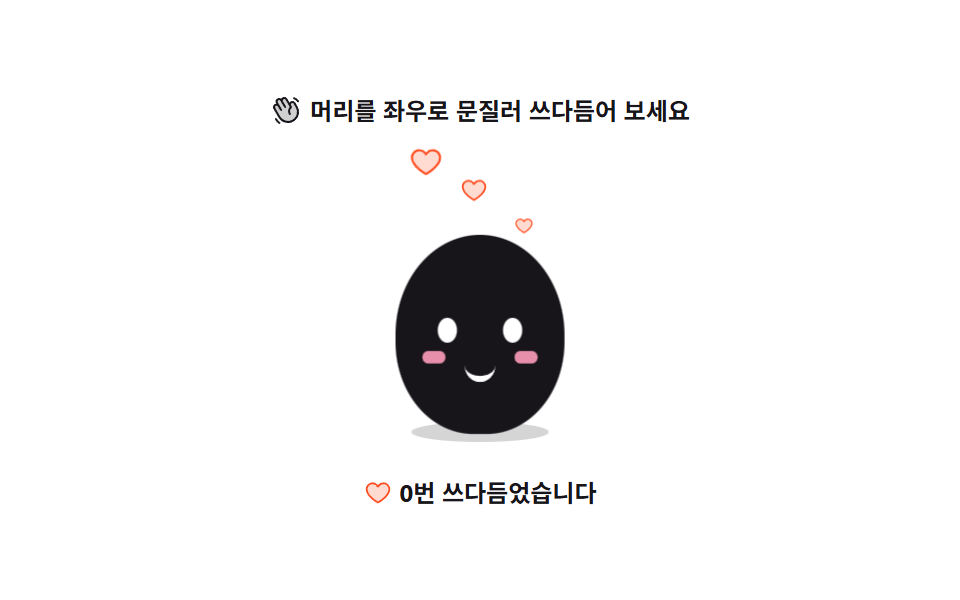
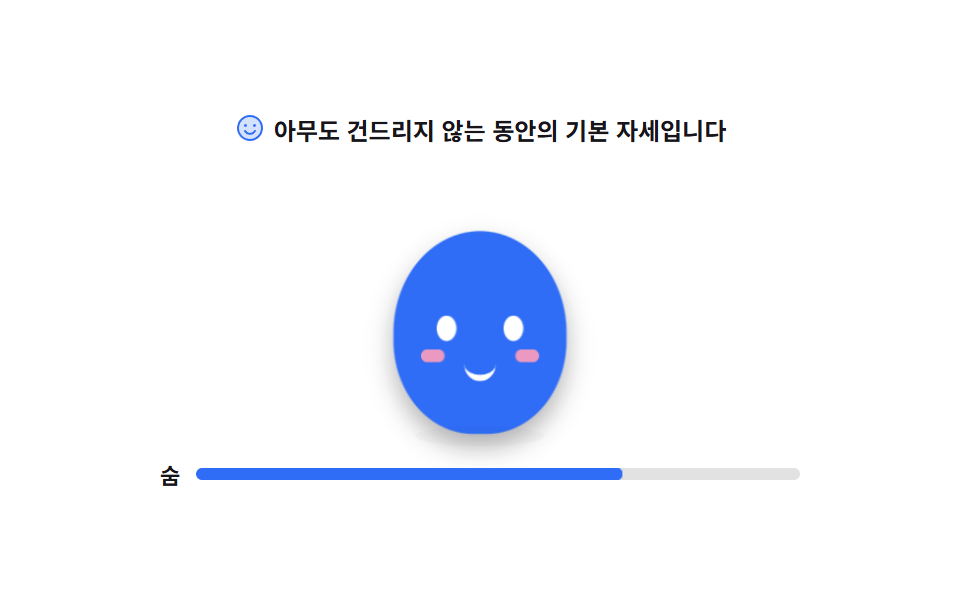
ポインターで頭をこすると体が横に広がって沈み、離すと一度行き過ぎてから戻ります。こすった回数だけハートが上がります。
使いどころ空き時間に触ってみたくなるブランドキャラクターの置き場所や、404ページの遊び
scalepointerdowntransform-origintouch-action
<svg width="0" height="0" style="position:absolute" aria-hidden="true">
  <defs>
    <symbol id="ico-heart" viewBox="0 0 256 256" fill="currentColor"><g><path d="M232 102c0 66-104 122-104 122S24 168 24 102a54 54 0 0 1 54-54c22.59 0 41.94 12.31 50 32c8.06-19.69 27.41-32 50-32a54 54 0 0 1 54 54" opacity=".2"/><path d="M178 40c-20.65 0-38.73 8.88-50 23.89C116.73 48.88 98.65 40 78 40a62.07 62.07 0 0 0-62 62c0 70 103.79 126.66 108.21 129a8 8 0 0 0 7.58 0C136.21 228.66 240 172 240 102a62.07 62.07 0 0 0-62-62m-50 174.8c-18.26-10.64-96-59.11-96-112.8a46.06 46.06 0 0 1 46-46c19.45 0 35.78 10.36 42.6 27a8 8 0 0 0 14.8 0c6.82-16.67 23.15-27 42.6-27a46.06 46.06 0 0 1 46 46c0 53.61-77.76 102.15-96 112.8"/></g></symbol>
    <symbol id="ico-hand" viewBox="0 0 256 256" fill="currentColor"><g><path d="M184 213.27A80 80 0 0 1 74.7 184l-40-69.32a20 20 0 0 1 34.64-20L55.08 70a20 20 0 0 1 34.65-20l6.92 12a20 20 0 0 1 34.64-20l30 52A20 20 0 0 1 196 74l17.31 30A80 80 0 0 1 184 213.27" opacity=".2"/><path d="m220.17 100l-17.31-30a28 28 0 0 0-38.24-10.25a27.7 27.7 0 0 0-9 8.34L138.2 38a28 28 0 0 0-48.48 0a28 28 0 0 0-41.57 36l1.59 2.76A27.7 27.7 0 0 0 38 80.41a28 28 0 0 0-10.24 38.25l40 69.32a87.47 87.47 0 0 0 53.43 41a88.6 88.6 0 0 0 22.92 3a88 88 0 0 0 76.06-132Zm-6.66 62.64A72 72 0 0 1 81.62 180l-40-69.32a12 12 0 0 1 20.78-12L81.63 132a8 8 0 1 0 13.85-8L62 66a12 12 0 1 1 20.78-12L114 108a8 8 0 1 0 13.85-8l-24.28-42a12 12 0 1 1 20.78-12l33.42 57.9a48 48 0 0 0-5.54 60.6a8 8 0 0 0 13.24-9a32 32 0 0 1 7.31-43.5a8 8 0 0 0 2.13-10.4L168.23 90A12 12 0 1 1 189 78l17.31 30a71.56 71.56 0 0 1 7.2 54.62ZM184.25 31.71A8 8 0 0 1 194 26a59.62 59.62 0 0 1 36.53 28l.33.57a8 8 0 1 1-13.85 8l-.33-.57a43.67 43.67 0 0 0-26.8-20.5a8 8 0 0 1-5.63-9.79M80.89 237a8 8 0 0 1-11.23 1.33A119.6 119.6 0 0 1 40.06 204a8 8 0 0 1 13.86-8a103.7 103.7 0 0 0 25.64 29.72A8 8 0 0 1 80.89 237"/></g></symbol>
  </defs>
</svg>
<main class="stage">
<div class="mb is-demo" id="mb">
  <p class="mb__hint">
    <svg class="mb__ico" aria-hidden="true"><use href="#ico-hand"/></svg>
    <span>頭を左右にこすってなでてみてください</span>
  </p>

  <div class="mb__floor">
    <!-- 캐릭터 자체를 버튼으로 둬 키보드(Enter·Space)에서도 같은 반응이 나오게 한다.
         버튼에 display:grid 를 주면 폭이 fit-content 로 줄어드는 함정이 있으니(281-04 실측)
         display:block + 고정 폭으로만 쓴다. 캐릭터는 피사체라 손으로 그린다(01 과 같은 몸). -->
    <button class="mb__char" id="mbChar" type="button" aria-label="マスコットをなでる">
      <span class="mb__hearts" id="mbHearts" aria-hidden="true">
        <i class="mb__heart mb__heart--loop" style="--i:0; --x:30%"><svg><use href="#ico-heart"/></svg></i>
        <i class="mb__heart mb__heart--loop" style="--i:1; --x:48%"><svg><use href="#ico-heart"/></svg></i>
        <i class="mb__heart mb__heart--loop" style="--i:2; --x:66%"><svg><use href="#ico-heart"/></svg></i>
      </span>
      <span class="mb__body">
        <i class="mb__eye mb__eye--l"></i>
        <i class="mb__eye mb__eye--r"></i>
        <i class="mb__cheek mb__cheek--l"></i>
        <i class="mb__cheek mb__cheek--r"></i>
        <i class="mb__mouth"></i>
      </span>
      <span class="mb__shadow"></span>
    </button>
  </div>

  <p class="mb__tally">
    <svg class="mb__tallyIco" aria-hidden="true"><use href="#ico-heart"/></svg>
    <span id="mbTally">0回なでました</span>
  </p>
</div>
</main>@use "../../../../site/static/demo-tokens" as *;
// 쓰다듬으면 눌리는 반응 — 포인터로 문지르는 동안 몸이 발을 딛고 가로로 퍼지며 눌리고(squash),
// 손을 떼면 $ease-pop 이 한 번 넘겨 되돌린다(overshoot). 문지른 횟수만큼 하트가 떠오른다.
// squash 는 발이 바닥에 붙은 채 눌리는 것이라 transform-origin 을 중심이 아닌 바닥(50% 100%)에 둔다
// (blog-demo 규칙 8 의 정당한 예외 — 붙는 지점이 있는 요소). 하트는 스스로 커지는 요소라 중심에서 커진다.
$duration: $dur-loop;
$easing: $ease-spring;
$color: $subject-ink;
@include stage($stage-paper);
.mb { display: flex; flex-direction: column; align-items: center; gap: $sp-3; width: 100%; max-width: 320px; }
.mb__hint {
display: flex; align-items: center; gap: $sp-1; margin: 0;
font-weight: 700; font-size: clamp(10px, 2.8vw, 12px); color: $subject-ink;
}
.mb__ico { width: 16px; height: 16px; flex: 0 0 auto; color: $color; }
.mb__floor { position: relative; width: 100%; height: 150px; display: grid; place-items: end center; }
// 버튼이지만 display:grid 는 쓰지 않는다 — 버튼 폭이 fit-content 라 1fr 칸이 0 으로 접힌다(281-04 실측).
// touch-action:none — 폰에서 문지를 때 스크롤이 pointermove 를 가로채지 않게 한다.
.mb__char {
position: relative; display: block; width: 136px; height: 132px;
border: 0; background: transparent; padding: 0; cursor: pointer;
touch-action: none;
}
.mb__char:focus-visible { outline: 2px solid $subject-blue; outline-offset: 4px; border-radius: $r-sm; }
// 몸 — 타원 하나. 눌림은 이 요소의 scale 로만 준다. 발이 붙은 바닥 기준(주석 위쪽 참조)
.mb__body {
position: absolute; left: 50%; bottom: 8px; display: block; width: 88px; height: 96px;
margin-left: -44px;
border-radius: 50% 50% 46% 46%;
background: $color;
transform-origin: 50% 100%;
transition: transform 520ms $ease-pop; // 손을 뗄 때: 한 번 넘겨 되돌아온다(overshoot)
}
.mb.is-press .mb__body {
transform: scale(1.22, .84);
transition: transform $dur-quick $ease-spring; // 누르는 쪽은 빠르게 눌린다
}
.mb__eye {
position: absolute; top: 40px; width: 10px; height: 12px;
border-radius: 50%; background: $stage-paper;
transform-origin: 50% 50%;
transition: transform $dur-quick $ease-spring;
}
.mb__eye--l { left: 22px; }
.mb__eye--r { right: 22px; }
// 눌려서 쓰다듬기는 기분이 좋다 — 눈도 살짝 감는다
.mb.is-press .mb__eye { transform: scaleY(.45); }
.mb__cheek {
position: absolute; top: 56px; width: 12px; height: 6px;
border-radius: $r-pill; background: $subject-pink; opacity: .9;
}
.mb__cheek--l { left: 14px; }
.mb__cheek--r { right: 14px; }
.mb__mouth {
position: absolute; top: 60px; left: 50%; width: 16px; height: 8px;
margin-left: -8px;
border-bottom: 3px solid $stage-paper;
border-radius: 0 0 $r-pill $r-pill;
}
// 그림자는 바닥에 눌린 면 — 몸이 가로로 퍼지면 그림자도 퍼진다
.mb__shadow {
position: absolute; left: 50%; bottom: 4px; width: 72px; height: 10px;
margin-left: -36px;
border-radius: 50%;
background: rgba(23, 20, 26, .18);
transition: transform 520ms $ease-pop;
}
.mb.is-press .mb__shadow { transform: scaleX(1.24); transition: transform $dur-quick $ease-spring; }
// 하트 — 24~76% 사이에 띄운다. 전경 $stage-orange 는 페이퍼 픽셀(255,255,255) 위 3.3:1 로
// 글자가 아니라 아이콘 면이라 그래픽 기준(3:1)을 쓴다. 커질 때는 중심에서 커진다.
.mb__hearts { position: absolute; inset: 0; pointer-events: none; }
.mb__heart {
position: absolute; bottom: 96px; left: calc(var(--x, 50%) - 10px);
width: 20px; height: 20px;
color: $stage-orange; opacity: 0;
transform-origin: 50% 50%;
}
.mb__heart svg { display: block; width: 100%; height: 100%; } // Phosphor Duotone heart.svg 인라인(use)
// 사람이 문질러서 생긴 하트 — 한 번 떠오르고 사라진다(실사용 경로)
.mb__heart--once {
animation-name: mbHeartOnce;
animation-duration: 1.5s;
animation-timing-function: $ease-out;
animation-fill-mode: forwards;
}
// 격자 미리보기 하트 — 시차를 주고 루프 안에서는 사라지지 않게 떠 있는 채로 끝낸다(255 실측).
// delay 가 있으므로 animation-fill-mode: backwards 를 반드시 함께(252-08 실측), 단축은 쓰지 않는다(240 실측).
.mb.is-demo .mb__heart--loop {
animation-name: mbHeartLoop;
animation-duration: $duration;
animation-delay: calc(var(--i) * 360ms);
animation-timing-function: $ease-out;
animation-iteration-count: infinite;
animation-fill-mode: backwards;
}
.mb__tally {
display: flex; align-items: center; gap: $sp-1; margin: 0;
font-weight: 700; font-size: clamp(10px, 2.8vw, 12px); color: $subject-ink;
}
.mb__tallyIco { width: 14px; height: 14px; flex: 0 0 auto; color: $stage-orange; }
// ── 미리보기 루프 ────────────────────────────────────────────
// 2초 안에 「눌림 → 문지르는 떨림 → 떼며 한 번 넘김 → 하트 상승」이 다 보이게.
@keyframes mbSquashLoop {
0% { transform: scale(1, 1); }
26% { transform: scale(1.22, .84); }
32% { transform: scale(1.16, .88); }
40% { transform: scale(1.22, .84); }
48% { transform: scale(1.14, .9); }
54% { transform: scale(.93, 1.06); }
62% { transform: scale(1.02, .99); }
68%, 100% { transform: scale(1, 1); }
}
@keyframes mbShadowLoop {
0% { transform: scaleX(1); }
26%, 40% { transform: scaleX(1.22); }
32% { transform: scaleX(1.16); }
54% { transform: scaleX(.95); }
68%, 100% { transform: scaleX(1); }
}
@keyframes mbHeartOnce {
0% { transform: translateY(0) scale(.4); opacity: 0; }
12% { opacity: 1; }
72% { opacity: 1; }
100% { transform: translateY(-76px) scale(1); opacity: 0; }
}
@keyframes mbHeartLoop {
0% { transform: translateY(10px) scale(.3); opacity: 0; }
12% { opacity: 1; }
80% { transform: translateY(-50px) scale(1); }
100% { transform: translateY(-56px) scale(1); opacity: 1; }
}
.mb.is-demo .mb__body {
animation-name: mbSquashLoop;
animation-duration: $duration;
animation-timing-function: $easing;
animation-iteration-count: infinite;
}
.mb.is-demo .mb__shadow {
animation-name: mbShadowLoop;
animation-duration: $duration;
animation-timing-function: $easing;
animation-iteration-count: infinite;
}
@media (max-width: 340px) {
.mb { gap: $sp-2; }
.mb__floor { height: 118px; }
.mb__char { width: 120px; height: 112px; }
.mb__body { width: 80px; height: 84px; margin-left: -40px; }
.mb__eye { top: 36px; width: 9px; height: 11px; }
.mb__eye--l { left: 20px; }
.mb__eye--r { right: 20px; }
.mb__cheek { top: 50px; }
.mb__mouth { top: 54px; }
.mb__shadow { width: 64px; margin-left: -32px; }
.mb__heart { bottom: 84px; width: 16px; height: 16px; left: calc(var(--x, 50%) - 8px); }
}
// reduce — 미리보기 루프를 끊고 「눌린 순간 + 하트」 한 장으로 세운다. 사용자가 건드리는
// squash 피드백(transition)은 사용자가 일으킨 움직임이라 그대로 둔다.
@media (prefers-reduced-motion: reduce) {
.mb.is-demo .mb__body,
.mb.is-demo .mb__shadow,
.mb.is-demo .mb__heart--loop { animation: none !important; }
.mb.is-demo .mb__body { transform: scale(1.2, .85) !important; }
.mb.is-demo .mb__shadow { transform: scaleX(1.2) !important; }
.mb.is-demo .mb__heart--loop { opacity: 1 !important; transform: translateY(-40px) scale(1) !important; }
}html, body {
margin: 0;
overflow: hidden;
}
.stage {
box-sizing: border-box;
min-height: 100vh;
display: grid;
place-items: center;
margin: 0;
background: #ffffff;
font-family: -apple-system, "Segoe UI", "Noto Sans KR", sans-serif;
padding: clamp(8px, 4vw, 24px);
}
.mb {
display: flex;
flex-direction: column;
align-items: center;
gap: 12px;
width: 100%;
max-width: 320px;
}
.mb__hint {
display: flex;
align-items: center;
gap: 4px;
margin: 0;
font-weight: 700;
font-size: clamp(10px, 2.8vw, 12px);
color: #17141a;
}
.mb__ico {
width: 16px;
height: 16px;
flex: 0 0 auto;
color: #17141a;
}
.mb__floor {
position: relative;
width: 100%;
height: 150px;
display: grid;
place-items: end center;
}
.mb__char {
position: relative;
display: block;
width: 136px;
height: 132px;
border: 0;
background: transparent;
padding: 0;
cursor: pointer;
touch-action: none;
}
.mb__char:focus-visible {
outline: 2px solid #2f6df6;
outline-offset: 4px;
border-radius: 8px;
}
.mb__body {
position: absolute;
left: 50%;
bottom: 8px;
display: block;
width: 88px;
height: 96px;
margin-left: -44px;
border-radius: 50% 50% 46% 46%;
background: #17141a;
transform-origin: 50% 100%;
transition: transform 520ms cubic-bezier(0.2, 1.4, 0.4, 1);
}
.mb.is-press .mb__body {
transform: scale(1.22, 0.84);
transition: transform 220ms cubic-bezier(0.2, 0.8, 0.2, 1);
}
.mb__eye {
position: absolute;
top: 40px;
width: 10px;
height: 12px;
border-radius: 50%;
background: #ffffff;
transform-origin: 50% 50%;
transition: transform 220ms cubic-bezier(0.2, 0.8, 0.2, 1);
}
.mb__eye--l {
left: 22px;
}
.mb__eye--r {
right: 22px;
}
.mb.is-press .mb__eye {
transform: scaleY(0.45);
}
.mb__cheek {
position: absolute;
top: 56px;
width: 12px;
height: 6px;
border-radius: 999px;
background: #ff9ebb;
opacity: 0.9;
}
.mb__cheek--l {
left: 14px;
}
.mb__cheek--r {
right: 14px;
}
.mb__mouth {
position: absolute;
top: 60px;
left: 50%;
width: 16px;
height: 8px;
margin-left: -8px;
border-bottom: 3px solid #ffffff;
border-radius: 0 0 999px 999px;
}
.mb__shadow {
position: absolute;
left: 50%;
bottom: 4px;
width: 72px;
height: 10px;
margin-left: -36px;
border-radius: 50%;
background: rgba(23, 20, 26, 0.18);
transition: transform 520ms cubic-bezier(0.2, 1.4, 0.4, 1);
}
.mb.is-press .mb__shadow {
transform: scaleX(1.24);
transition: transform 220ms cubic-bezier(0.2, 0.8, 0.2, 1);
}
.mb__hearts {
position: absolute;
inset: 0;
pointer-events: none;
}
.mb__heart {
position: absolute;
bottom: 96px;
left: calc(var(--x, 50%) - 10px);
width: 20px;
height: 20px;
color: #ff4d1f;
opacity: 0;
transform-origin: 50% 50%;
}
.mb__heart svg {
display: block;
width: 100%;
height: 100%;
}
.mb__heart--once {
animation-name: mbHeartOnce;
animation-duration: 1.5s;
animation-timing-function: ease-out;
animation-fill-mode: forwards;
}
.mb.is-demo .mb__heart--loop {
animation-name: mbHeartLoop;
animation-duration: 2s;
animation-delay: calc(var(--i) * 360ms);
animation-timing-function: ease-out;
animation-iteration-count: infinite;
animation-fill-mode: backwards;
}
.mb__tally {
display: flex;
align-items: center;
gap: 4px;
margin: 0;
font-weight: 700;
font-size: clamp(10px, 2.8vw, 12px);
color: #17141a;
}
.mb__tallyIco {
width: 14px;
height: 14px;
flex: 0 0 auto;
color: #ff4d1f;
}
@keyframes mbSquashLoop {
0% {
transform: scale(1, 1);
}
26% {
transform: scale(1.22, 0.84);
}
32% {
transform: scale(1.16, 0.88);
}
40% {
transform: scale(1.22, 0.84);
}
48% {
transform: scale(1.14, 0.9);
}
54% {
transform: scale(0.93, 1.06);
}
62% {
transform: scale(1.02, 0.99);
}
68%, 100% {
transform: scale(1, 1);
}
}
@keyframes mbShadowLoop {
0% {
transform: scaleX(1);
}
26%, 40% {
transform: scaleX(1.22);
}
32% {
transform: scaleX(1.16);
}
54% {
transform: scaleX(0.95);
}
68%, 100% {
transform: scaleX(1);
}
}
@keyframes mbHeartOnce {
0% {
transform: translateY(0) scale(0.4);
opacity: 0;
}
12% {
opacity: 1;
}
72% {
opacity: 1;
}
100% {
transform: translateY(-76px) scale(1);
opacity: 0;
}
}
@keyframes mbHeartLoop {
0% {
transform: translateY(10px) scale(0.3);
opacity: 0;
}
12% {
opacity: 1;
}
80% {
transform: translateY(-50px) scale(1);
}
100% {
transform: translateY(-56px) scale(1);
opacity: 1;
}
}
.mb.is-demo .mb__body {
animation-name: mbSquashLoop;
animation-duration: 2s;
animation-timing-function: cubic-bezier(0.2, 0.8, 0.2, 1);
animation-iteration-count: infinite;
}
.mb.is-demo .mb__shadow {
animation-name: mbShadowLoop;
animation-duration: 2s;
animation-timing-function: cubic-bezier(0.2, 0.8, 0.2, 1);
animation-iteration-count: infinite;
}
@media (max-width: 340px) {
.mb {
gap: 8px;
}
.mb__floor {
height: 118px;
}
.mb__char {
width: 120px;
height: 112px;
}
.mb__body {
width: 80px;
height: 84px;
margin-left: -40px;
}
.mb__eye {
top: 36px;
width: 9px;
height: 11px;
}
.mb__eye--l {
left: 20px;
}
.mb__eye--r {
right: 20px;
}
.mb__cheek {
top: 50px;
}
.mb__mouth {
top: 54px;
}
.mb__shadow {
width: 64px;
margin-left: -32px;
}
.mb__heart {
bottom: 84px;
width: 16px;
height: 16px;
left: calc(var(--x, 50%) - 8px);
}
}
@media (prefers-reduced-motion: reduce) {
.mb.is-demo .mb__body,
.mb.is-demo .mb__shadow,
.mb.is-demo .mb__heart--loop {
animation: none !important;
}
.mb.is-demo .mb__body {
transform: scale(1.2, 0.85) !important;
}
.mb.is-demo .mb__shadow {
transform: scaleX(1.2) !important;
}
.mb.is-demo .mb__heart--loop {
opacity: 1 !important;
transform: translateY(-40px) scale(1) !important;
}
}// 쓰다듬기 — pointerdown 으로 누르고 pointermove 의 가로 이동거리를 합산해 36px 마다 한 번씩 센다.
// 손을 떼면(pointerup) .is-press 를 떼고, transition 이 $ease-pop 으로 한 번 넘겨 되돌린다.
// 캐릭터에 touch-action:none 을 둬 폰에서 스크롤이 문지름을 가로채지 않게 한다(SCSS 참조).
(function () {
var root = document.getElementById('mb');
var btn = document.getElementById('mbChar');
var tally = document.getElementById('mbTally');
var layer = document.getElementById('mbHearts');
var LABEL = '{n}回なでました';
var RUB_PX = 36;
var n = 0, down = false, lastX = 0, acc = 0;
function rub() {
n = n + 1;
tally.textContent = LABEL.replace('{n}', n);
var h = document.createElement('i');
h.className = 'mb__heart mb__heart--once';
h.style.setProperty('--x', (24 + Math.round(Math.random() * 52)) + '%');
h.innerHTML = '<svg><use href="#ico-heart"/></svg>';
layer.appendChild(h);
setTimeout(function () { h.remove(); }, 1500);
}
function press(on) { root.classList.toggle('is-press', on); }
function touch() { root.classList.remove('is-demo'); }
btn.addEventListener('pointerdown', function (e) {
touch();
down = true; lastX = e.clientX; acc = 0;
press(true);
try { btn.setPointerCapture(e.pointerId); } catch (err) { /* 캡처 못 잡으면 버튼 안에서만 센다 */ }
});
btn.addEventListener('pointermove', function (e) {
if (!down) return;
acc = acc + Math.abs(e.clientX - lastX);
lastX = e.clientX;
if (acc >= RUB_PX) { acc = 0; rub(); }
});
function release() {
if (!down) return;
down = false;
press(false);
}
btn.addEventListener('pointerup', release);
btn.addEventListener('pointercancel', release);
// 키보드 대체 — Enter·Space 로도 한 번 쓰다듬는다. 기본 click 과 겹치지 않게 preventDefault.
btn.addEventListener('keydown', function (e) {
if (e.key !== 'Enter' && e.key !== ' ') return;
e.preventDefault();
touch();
rub();
press(true);
setTimeout(function () { press(false); }, 380);
});
}());// PetSquash — vanilla 판(run/300/demo/08-mascot-pet-squash/index.html) 의 React 포트.
// 문지름은 pointerdown 으로 누르고 pointermove 의 가로 이동거리를 합산해 36px 마다 한 번, 하트 하나.
// 손을 뗄 때의 한 번 넘김(overshoot)은 CSS transition($ease-pop) 이 담당한다. 값은 vanilla 와 같다.
import { useRef, useState } from "react";
import type { CSSProperties } from "react";
import styles from "./PetSquash.module.scss";
export type PetSquashProps = {
duration?: number;
easing?: string;
color?: string;
};
type Vars = CSSProperties & { "--duration"?: string; "--easing"?: string; "--color"?: string };
type HeartVars = CSSProperties & { "--i"?: string; "--x"?: string };
// ambient.d.ts 가 React 이벤트 제네릭을 주지 않으므로 파라미터는 로컬 타입으로 받는다(237 실측)
type PointerEvt = { clientX: number; pointerId: number; currentTarget: { setPointerCapture?: (id: number) => void } };
type KeyEvt = { key: string; preventDefault(): void };
type Box<T> = { current: T }; // useRef<T> 는 T|null 을 돌려주므로 단언용(237·247 실측)
type Heart = { id: number; x: number };
const RUB_PX = 36;
const HINT_TEXT = "머리를 좌우로 문질러 쓰다듬어 보세요";
const PET_LABEL = "마스코트 쓰다듬기";
const ZERO_TEXT = "0번 쓰다듬었습니다";
const LABEL_TEXT = "{n}번 쓰다듬었습니다";
let heartSeq = 0;
export default function PetSquash({
duration = 2000,
easing = "cubic-bezier(.2, .8, .2, 1)",
color = "#17141a",
}: PetSquashProps) {
const [count, setCount] = useState(0);
const [demo, setDemo] = useState(true);
const [pressed, setPressed] = useState(false);
const [hearts, setHearts] = useState<Heart[]>([]);
const drag = useRef({ down: false, lastX: 0, acc: 0 }) as Box<{ down: boolean; lastX: number; acc: number }>;
const vars: Vars = { "--duration": `${duration}ms`, "--easing": easing, "--color": color };
function rub() {
setCount((c) => c + 1);
const h: Heart = { id: ++heartSeq, x: 24 + Math.round(Math.random() * 52) };
setHearts((prev) => prev.concat(h));
window.setTimeout(() => setHearts((prev) => prev.filter((p) => p.id !== h.id)), 1500);
}
function onDown(e: PointerEvt) {
setDemo(false);
drag.current = { down: true, lastX: e.clientX, acc: 0 };
setPressed(true);
try {
if (e.currentTarget.setPointerCapture) e.currentTarget.setPointerCapture(e.pointerId);
} catch (err) { /* 캡처를 못 잡으면 버튼 안에서만 문지름을 센다 */ }
}
function onMove(e: PointerEvt) {
if (!drag.current.down) return;
drag.current.acc += Math.abs(e.clientX - drag.current.lastX);
drag.current.lastX = e.clientX;
if (drag.current.acc >= RUB_PX) { drag.current.acc = 0; rub(); }
}
function onUp() {
if (!drag.current.down) return;
drag.current.down = false;
setPressed(false);
}
// 키보드 대체 — Enter·Space 로도 한 번 쓰다듬는다. 기본 click 과 겹치지 않게 preventDefault.
function onKey(e: KeyEvt) {
if (e.key !== "Enter" && e.key !== " ") return;
e.preventDefault();
setDemo(false);
rub();
setPressed(true);
window.setTimeout(() => setPressed(false), 380);
}
const cls = [styles.root, demo ? styles.isDemo : "", pressed ? styles.isPress : ""].filter(Boolean).join(" ");
const tally = (count === 0 ? ZERO_TEXT : LABEL_TEXT).replace("{n}", String(count));
return (
<main className={styles.stage}>
<svg width="0" height="0" style={{ position: "absolute" }} aria-hidden="true">
<defs>
<symbol id="ico-heart" viewBox="0 0 256 256" fill="currentColor"><g><path d="M232 102c0 66-104 122-104 122S24 168 24 102a54 54 0 0 1 54-54c22.59 0 41.94 12.31 50 32c8.06-19.69 27.41-32 50-32a54 54 0 0 1 54 54" opacity=".2"/><path d="M178 40c-20.65 0-38.73 8.88-50 23.89C116.73 48.88 98.65 40 78 40a62.07 62.07 0 0 0-62 62c0 70 103.79 126.66 108.21 129a8 8 0 0 0 7.58 0C136.21 228.66 240 172 240 102a62.07 62.07 0 0 0-62-62m-50 174.8c-18.26-10.64-96-59.11-96-112.8a46.06 46.06 0 0 1 46-46c19.45 0 35.78 10.36 42.6 27a8 8 0 0 0 14.8 0c6.82-16.67 23.15-27 42.6-27a46.06 46.06 0 0 1 46 46c0 53.61-77.76 102.15-96 112.8"/></g></symbol>
<symbol id="ico-hand" viewBox="0 0 256 256" fill="currentColor"><g><path d="M184 213.27A80 80 0 0 1 74.7 184l-40-69.32a20 20 0 0 1 34.64-20L55.08 70a20 20 0 0 1 34.65-20l6.92 12a20 20 0 0 1 34.64-20l30 52A20 20 0 0 1 196 74l17.31 30A80 80 0 0 1 184 213.27" opacity=".2"/><path d="m220.17 100l-17.31-30a28 28 0 0 0-38.24-10.25a27.7 27.7 0 0 0-9 8.34L138.2 38a28 28 0 0 0-48.48 0a28 28 0 0 0-41.57 36l1.59 2.76A27.7 27.7 0 0 0 38 80.41a28 28 0 0 0-10.24 38.25l40 69.32a87.47 87.47 0 0 0 53.43 41a88.6 88.6 0 0 0 22.92 3a88 88 0 0 0 76.06-132Zm-6.66 62.64A72 72 0 0 1 81.62 180l-40-69.32a12 12 0 0 1 20.78-12L81.63 132a8 8 0 1 0 13.85-8L62 66a12 12 0 1 1 20.78-12L114 108a8 8 0 1 0 13.85-8l-24.28-42a12 12 0 1 1 20.78-12l33.42 57.9a48 48 0 0 0-5.54 60.6a8 8 0 0 0 13.24-9a32 32 0 0 1 7.31-43.5a8 8 0 0 0 2.13-10.4L168.23 90A12 12 0 1 1 189 78l17.31 30a71.56 71.56 0 0 1 7.2 54.62ZM184.25 31.71A8 8 0 0 1 194 26a59.62 59.62 0 0 1 36.53 28l.33.57a8 8 0 1 1-13.85 8l-.33-.57a43.67 43.67 0 0 0-26.8-20.5a8 8 0 0 1-5.63-9.79M80.89 237a8 8 0 0 1-11.23 1.33A119.6 119.6 0 0 1 40.06 204a8 8 0 0 1 13.86-8a103.7 103.7 0 0 0 25.64 29.72A8 8 0 0 1 80.89 237"/></g></symbol>
</defs>
</svg>
<div className={cls} style={vars}>
<p className={styles.hint}>
<svg className={styles.ico} aria-hidden="true"><use href="#ico-hand" /></svg>
<span>{HINT_TEXT}</span>
</p>
<div className={styles.floor}>
<button
className={styles.char}
type="button"
aria-label={PET_LABEL}
onPointerDown={onDown}
onPointerMove={onMove}
onPointerUp={onUp}
onPointerCancel={onUp}
onKeyDown={onKey}
>
<span className={styles.hearts} aria-hidden="true">
{hearts.map((h) => (
<i key={h.id} className={`${styles.heart} ${styles.heartOnce}`} style={{ "--x": `${h.x}%` } as HeartVars}>
<svg><use href="#ico-heart" /></svg>
</i>
))}
{demo && (
<>
<i className={`${styles.heart} ${styles.heartLoop}`} style={{ "--i": "0", "--x": "30%" } as HeartVars}><svg><use href="#ico-heart" /></svg></i>
<i className={`${styles.heart} ${styles.heartLoop}`} style={{ "--i": "1", "--x": "48%" } as HeartVars}><svg><use href="#ico-heart" /></svg></i>
<i className={`${styles.heart} ${styles.heartLoop}`} style={{ "--i": "2", "--x": "66%" } as HeartVars}><svg><use href="#ico-heart" /></svg></i>
</>
)}
</span>
<span className={styles.body}>
<i className={`${styles.eye} ${styles.eyeL}`} />
<i className={`${styles.eye} ${styles.eyeR}`} />
<i className={`${styles.cheek} ${styles.cheekL}`} />
<i className={`${styles.cheek} ${styles.cheekR}`} />
<i className={styles.mouth} />
</span>
<span className={styles.shadow} />
</button>
</div>
<p className={styles.tally}>
<svg className={styles.tallyIco} aria-hidden="true"><use href="#ico-heart" /></svg>
<span>{tally}</span>
</p>
</div>
</main>
);
}08 撫でると沈む反応 — 計測 累積面積 4.586% · 動いたフレーム 23/23GODRICH オリジナル · SCSS と React は zip に同梱 · css キャラクター アニメーション 9選 — 挨拶から居眠りまで
このデモが属する記事
 css キャラクター アニメーション 9選 — 挨拶から居眠りまでcss キャラクター アニメーションは、画面に立つマスコットの体・腕・目を transform だけで動かし、待っている・失敗した・終わったという状態を絵のほうで伝える仕組みです。ここに並べた9つはライブラリもウェブフォントも使わず、ind この記事のデモをすべて見る