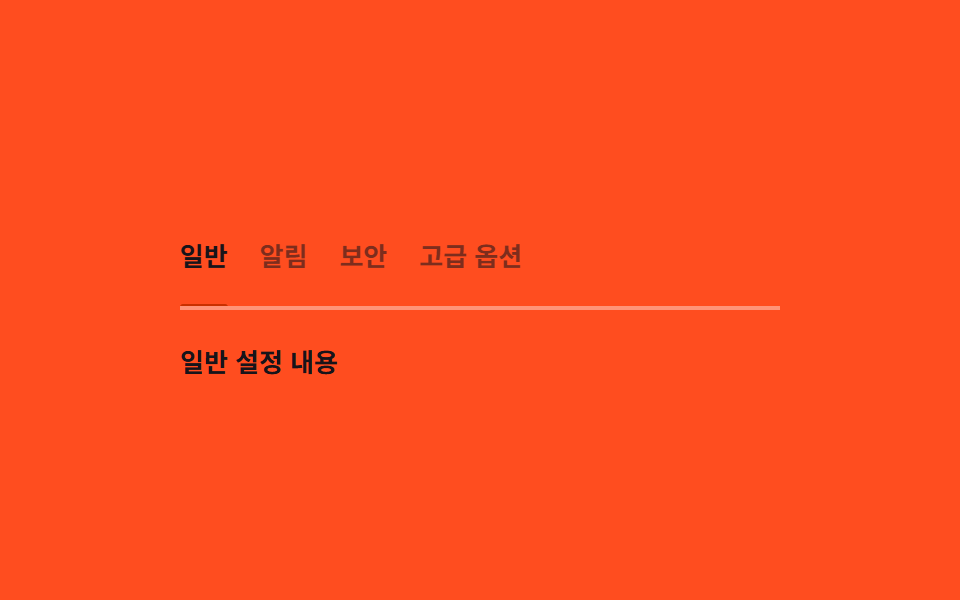
03キーボードタブ — 矢印キーで変わった値の分だけ下線位置を求め直すタブ
矢印キーでアクティブなタブが変わった状態になると、そのタブの横位置と幅の値を求め直して下線がその値まで移動し、画面外にあるタブは一覧がその値の分だけ横にずれて表示されます。
使いどころ設定画面のカテゴリタブ、ダッシュボード上部のタブメニュー
getBoundingClientRect--x--w
<main class="stage">
<div class="tk is-demo" id="tk">
  <div class="tk__tabs" id="tkTabs" role="tablist" aria-label="設定カテゴリー">
    <div class="tk__underline" id="tkUnderline" aria-hidden="true"></div>
    <button class="tk__tab" role="tab" data-t type="button" tabindex="0" aria-selected="true">一般</button>
    <button class="tk__tab" role="tab" data-t type="button" tabindex="-1" aria-selected="false">通知</button>
    <button class="tk__tab" role="tab" data-t type="button" tabindex="-1" aria-selected="false">セキュリティ</button>
    <button class="tk__tab" role="tab" data-t type="button" tabindex="-1" aria-selected="false">詳細オプション</button>
  </div>
  <p class="tk__panel" id="tkPanel">一般設定の内容</p>
</div>
</main>
@use "../../../../site/static/demo-tokens" as *;
// 키보드 탭 — 밑줄은 --x·--w(getBoundingClientRect 실측 px) 로만 움직인다.
// 화면 밖 탭은 JS 가 스크롤 값을 같은 실측으로 계산해 컨테이너를 움직인다.
$duration: $dur-enter;
$easing: $ease-spring;
$color: $subject-orange-deep;
@include stage($stage-orange);
.tk {
width: min(100%, 300px);
display: flex;
flex-direction: column;
gap: $sp-4;
}
.tk__tabs {
position: relative;
display: flex;
gap: $sp-4;
overflow-x: auto;
scrollbar-width: none;
padding-bottom: $sp-2;
border-bottom: 2px solid rgba(255, 255, 255, .4);
}
.tk__tabs::-webkit-scrollbar { display: none; }
.tk__underline {
position: absolute;
left: 0;
bottom: -2px;
height: 3px;
border-radius: $r-xs;
background: $color;
transform: translateX(var(--x, 0px));
width: var(--w, 40px);
transition: transform $duration $easing, width $duration $easing;
}
.tk__tab {
flex: 0 0 auto;
border: 0;
background: transparent;
padding: $sp-2 0;
font-family: inherit;
font-weight: 700;
font-size: 13px;
white-space: nowrap;
color: rgba(23, 20, 26, .56);
cursor: pointer;
}
.tk__tab[aria-selected="true"] { color: $subject-ink; }
.tk__tab:focus-visible { outline: 2px solid $subject-ink; outline-offset: 2px; }
.tk__panel {
margin: 0;
font-weight: 600;
font-size: 13px;
color: $subject-ink;
}
@media (max-width: 340px) {
.tk__tabs { gap: $sp-3; }
}
@media (prefers-reduced-motion: reduce) {
.tk__underline { transition: none !important; }
}html, body {
margin: 0;
overflow: hidden;
}
.stage {
box-sizing: border-box;
min-height: 100vh;
display: grid;
place-items: center;
margin: 0;
background: #ff4d1f;
font-family: -apple-system, "Segoe UI", "Noto Sans KR", sans-serif;
padding: clamp(8px, 4vw, 24px);
}
.tk {
width: min(100%, 300px);
display: flex;
flex-direction: column;
gap: 16px;
}
.tk__tabs {
position: relative;
display: flex;
gap: 16px;
overflow-x: auto;
scrollbar-width: none;
padding-bottom: 8px;
border-bottom: 2px solid rgba(255, 255, 255, 0.4);
}
.tk__tabs::-webkit-scrollbar {
display: none;
}
.tk__underline {
position: absolute;
left: 0;
bottom: -2px;
height: 3px;
border-radius: 4px;
background: #c93000;
transform: translateX(var(--x, 0px));
width: var(--w, 40px);
transition: transform 600ms cubic-bezier(0.2, 0.8, 0.2, 1), width 600ms cubic-bezier(0.2, 0.8, 0.2, 1);
}
.tk__tab {
flex: 0 0 auto;
border: 0;
background: transparent;
padding: 8px 0;
font-family: inherit;
font-weight: 700;
font-size: 13px;
white-space: nowrap;
color: rgba(23, 20, 26, 0.56);
cursor: pointer;
}
.tk__tab[aria-selected=true] {
color: #17141a;
}
.tk__tab:focus-visible {
outline: 2px solid #17141a;
outline-offset: 2px;
}
.tk__panel {
margin: 0;
font-weight: 600;
font-size: 13px;
color: #17141a;
}
@media (max-width: 340px) {
.tk__tabs {
gap: 12px;
}
}
@media (prefers-reduced-motion: reduce) {
.tk__underline {
transition: none !important;
}
}(function () {
var root = document.getElementById('tk');
var tabsEl = document.getElementById('tkTabs');
var underline = document.getElementById('tkUnderline');
var panel = document.getElementById('tkPanel');
var tabs = Array.prototype.slice.call(document.querySelectorAll('[data-t]'));
var TEXTS = ['一般設定の内容', '通知設定の内容', 'セキュリティ設定の内容', '詳細オプションの内容'];
var index = 0;
var autoplay = null;
// 계산 겹: 탭이 바뀔 때마다 그 탭의 실제 렌더 위치·폭을 getBoundingClientRect 로 다시 재서
// 밑줄 이동 값을 만들고, 탭이 컨테이너 밖에 있으면 스크롤 값도 같은 실측으로 계산한다.
function place(i) {
var tab = tabs[i];
var containerRect = tabsEl.getBoundingClientRect();
var rect = tab.getBoundingClientRect();
var x = rect.left - containerRect.left + tabsEl.scrollLeft;
var w = rect.width;
underline.style.setProperty('--x', x.toFixed(1) + 'px');
underline.style.setProperty('--w', w.toFixed(1) + 'px');
var left = x;
var right = x + w;
if (left < tabsEl.scrollLeft) { tabsEl.scrollLeft = left; }
else if (right > tabsEl.scrollLeft + tabsEl.clientWidth) { tabsEl.scrollLeft = right - tabsEl.clientWidth; }
}
function select(i) {
var len = tabs.length;
index = ((i % len) + len) % len;
tabs.forEach(function (t, k) {
t.setAttribute('aria-selected', k === index ? 'true' : 'false');
t.setAttribute('tabindex', k === index ? '0' : '-1');
});
panel.textContent = TEXTS[index];
place(index);
}
tabs.forEach(function (t, i) {
t.addEventListener('click', function () {
root.classList.remove('is-demo');
stopAutoplay();
select(i);
t.focus({ preventScroll: true });
});
});
tabsEl.addEventListener('keydown', function (e) {
if (e.key !== 'ArrowRight' && e.key !== 'ArrowLeft' && e.key !== 'Home' && e.key !== 'End') { return; }
e.preventDefault();
root.classList.remove('is-demo');
stopAutoplay();
if (e.key === 'ArrowRight') { select(index + 1); }
if (e.key === 'ArrowLeft') { select(index - 1); }
if (e.key === 'Home') { select(0); }
if (e.key === 'End') { select(tabs.length - 1); }
tabs[index].focus({ preventScroll: true });
});
function stopAutoplay() {
if (autoplay) { clearInterval(autoplay); autoplay = null; }
}
select(0);
var reduce = window.matchMedia('(prefers-reduced-motion: reduce)').matches;
if (!reduce) {
autoplay = setInterval(function () { select(index + 1); }, 480);
}
})();import { useEffect, useRef, useState } from "react";
import styles from "./TabsKeyboard.module.scss";
// 키보드 탭 — 탭이 바뀔 때마다 실제 렌더 위치·폭을 getBoundingClientRect 로 다시 재서 밑줄 이동 값을 만든다.
// 계산 겹: 화면 밖 탭은 같은 실측으로 스크롤 값도 계산한다. 실사용 click/keydown 리스너 있음.
const LABELS = ["일반", "알림", "보안", "고급 옵션"];
const TEXTS = ["일반 설정 내용", "알림 설정 내용", "보안 설정 내용", "고급 옵션 내용"];
export default function TabsKeyboard() {
const rootRef = useRef<HTMLDivElement>(null);
const tabsElRef = useRef<HTMLDivElement>(null);
const underlineRef = useRef<HTMLDivElement>(null);
const tabRefs = useRef<(HTMLButtonElement | null)[]>([]);
const [index, setIndexState] = useState(0);
const indexRef = useRef(0);
const autoplayRef = useRef<number | null>(null);
function place(i: number) {
const tabsEl = tabsElRef.current;
const underline = underlineRef.current;
const tab = (tabRefs.current ?? [])[i];
if (!tabsEl || !underline || !tab) return;
const containerRect = tabsEl.getBoundingClientRect();
const rect = tab.getBoundingClientRect();
const x = rect.left - containerRect.left + tabsEl.scrollLeft;
const w = rect.width;
underline.style.setProperty("--x", x.toFixed(1) + "px");
underline.style.setProperty("--w", w.toFixed(1) + "px");
const left = x;
const right = x + w;
if (left < tabsEl.scrollLeft) { tabsEl.scrollLeft = left; }
else if (right > tabsEl.scrollLeft + tabsEl.clientWidth) { tabsEl.scrollLeft = right - tabsEl.clientWidth; }
}
function select(i: number) {
const len = LABELS.length;
const next = ((i % len) + len) % len;
indexRef.current = next;
setIndexState(next);
window.setTimeout(() => place(next), 0);
}
function stopAutoplay() {
if (autoplayRef.current) {
window.clearInterval(autoplayRef.current);
autoplayRef.current = null;
}
}
useEffect(() => {
place(0);
const reduce = window.matchMedia("(prefers-reduced-motion: reduce)").matches;
if (!reduce) {
autoplayRef.current = window.setInterval(() => select((indexRef.current ?? 0) + 1), 480);
}
return () => stopAutoplay();
// eslint-disable-next-line react-hooks/exhaustive-deps
}, []);
function onKeyDown(e: KeyboardEvent) {
if (e.key !== "ArrowRight" && e.key !== "ArrowLeft" && e.key !== "Home" && e.key !== "End") return;
e.preventDefault();
rootRef.current?.classList.remove(styles["is-demo"]);
stopAutoplay();
if (e.key === "ArrowRight") select((indexRef.current ?? 0) + 1);
if (e.key === "ArrowLeft") select((indexRef.current ?? 0) - 1);
if (e.key === "Home") select(0);
if (e.key === "End") select(LABELS.length - 1);
(tabRefs.current ?? [])[indexRef.current ?? 0]?.focus({ preventScroll: true });
}
return (
<main className={styles.stage}>
<div ref={rootRef} className={`${styles.tk} ${styles["is-demo"]}`}>
<div ref={tabsElRef} className={styles.tk__tabs} role="tablist" aria-label="설정 카테고리" onKeyDown={onKeyDown}>
<div ref={underlineRef} className={styles.tk__underline} aria-hidden="true" />
{LABELS.map((label, i) => (
<button
key={label}
ref={(el: HTMLButtonElement | null) => { if (tabRefs.current) tabRefs.current[i] = el; }}
className={styles.tk__tab}
role="tab"
type="button"
tabIndex={i === index ? 0 : -1}
aria-selected={i === index}
onClick={() => {
rootRef.current?.classList.remove(styles["is-demo"]);
stopAutoplay();
select(i);
(tabRefs.current ?? [])[i]?.focus({ preventScroll: true });
}}
>
{label}
</button>
))}
</div>
<p className={styles.tk__panel}>{TEXTS[index]}</p>
</div>
</main>
);
}03 キーボードタブ — 矢印キーで変わった値の分だけ下線位置を求め直すタブ — 計測 累積面積 0.953% · 動いたフレーム 8/23GODRICH オリジナル · SCSS と React は zip に同梱 · マイクロインタラクション UIパターン9選 — トーストからスクロールスパイまで
このデモが属する記事
 マイクロインタラクション UIパターン9選 — トーストからスクロールスパイまでマイクロインタラクションは、9つのうち1つは通知が積まれた順番の値から消える時点を求め直し後ろの通知の位置を詰め、1つはスクロールした位置で各見出しの重なり比率の値を比べて活性項目を変え、もう1つは入力の値が変わるたびに待機時間の値を最初か この記事のデモをすべて見る