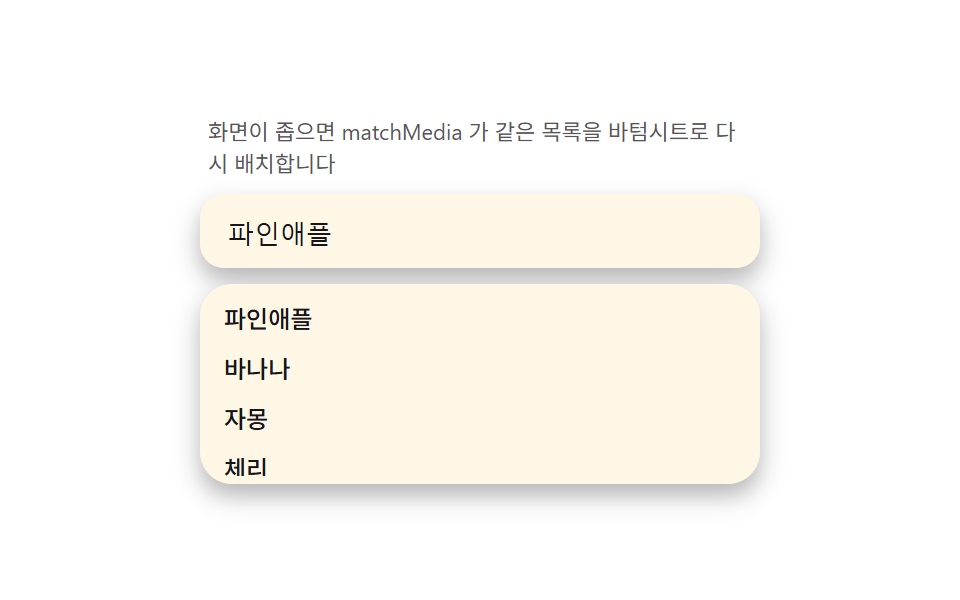
08モバイルシート変身 — 画面が狭いとドロップダウンがボトムシートへ変わるメディアクエリ切替
matchMediaでビューポート幅を検知し、狭い画面では同じリストDOMをボトムシート(下端固定・上部持ち手)へ再配置すると、仮想キーボードが出てもvisualViewportの高さに合わせてシートが縮みます。デモ測定はリサイズでモバイル幅を作り、2つのレイアウト切替を1項目に収めます。
使いどころモバイルweb検索
visualViewporttransitionmatchMedia
<main class="stage">
<div class="ms" id="ms">
  <p class="ms__hint">画面が狭いとmatchMediaが同じリストをボトムシートに再配置します</p>
  <div class="ms__field">
    <input class="ms__input" type="text" value="パイナップル" readonly aria-label="フルーツ検索">
  </div>
  <div class="ms__sheet" id="msSheet">
    <span class="ms__handle" aria-hidden="true"></span>
    <ul class="ms__list" id="msList" role="listbox" aria-label="サジェスト一覧"></ul>
  </div>
</div>
</main>
@use "../../../../site/static/demo-tokens" as *;
$duration: $dur-base;
$easing: $ease-out;
$color: $subject-blue-deep;
@include stage($stage-paper);
.ms {
width: 100%;
max-width: 280px;
margin: 0 auto;
display: flex;
flex-direction: column;
gap: $sp-2;
}
.ms__hint {
margin: 0;
padding: 0 $sp-1;
font-weight: 400;
font-size: 11px;
line-height: 1.4;
color: rgba($subject-ink, .72);
}
.ms__field {
background: $subject-cream;
border-radius: $r-control;
padding: $sp-2 $sp-3;
box-shadow: $shadow-press;
}
.ms__input {
width: 100%;
border: 0;
outline: 0;
background: transparent;
font-weight: 500;
font-size: 13px;
color: $subject-ink;
}
.ms__sheet {
background: $subject-cream;
border-radius: $r-card;
box-shadow: $shadow-press;
padding: $sp-1;
}
.ms__handle {
display: none;
width: 32px;
height: 4px;
margin: 0 auto $sp-1;
border-radius: $r-xs;
background: rgba($subject-ink, .24);
}
.ms__list {
margin: 0;
padding: 0;
list-style: none;
overflow-y: hidden;
max-height: calc(28px + 64px * var(--kb, 0));
}
.ms__item {
padding: $sp-1 $sp-2;
border-radius: $r-sm;
font-weight: 500;
font-size: 12px;
color: $subject-ink;
}
.is-sheet .ms {
position: relative;
height: 130px;
}
.is-sheet .ms__hint {
display: none;
}
.is-sheet .ms__sheet {
position: absolute;
left: 0;
right: 0;
bottom: 0;
border-bottom-left-radius: 0;
border-bottom-right-radius: 0;
box-shadow: $shadow-raised;
}
.is-sheet .ms__handle {
display: block;
}
@media (max-width: 340px) {
.ms { max-width: 220px; }
.ms__input { font-size: 12px; }
}
@media (prefers-reduced-motion: reduce) {
.ms__list {
transition: none;
}
}html, body {
margin: 0;
overflow: hidden;
}
.stage {
box-sizing: border-box;
min-height: 100vh;
display: grid;
place-items: center;
margin: 0;
background: #ffffff;
font-family: -apple-system, "Segoe UI", "Noto Sans KR", sans-serif;
padding: clamp(8px, 4vw, 24px);
}
.ms {
width: 100%;
max-width: 280px;
margin: 0 auto;
display: flex;
flex-direction: column;
gap: 8px;
}
.ms__hint {
margin: 0;
padding: 0 4px;
font-weight: 400;
font-size: 11px;
line-height: 1.4;
color: rgba(23, 20, 26, 0.72);
}
.ms__field {
background: #fff7e6;
border-radius: 12px;
padding: 8px 12px;
box-shadow: 0 6px 12px rgba(23, 20, 26, 0.32);
}
.ms__input {
width: 100%;
border: 0;
outline: 0;
background: transparent;
font-weight: 500;
font-size: 13px;
color: #17141a;
}
.ms__sheet {
background: #fff7e6;
border-radius: 16px;
box-shadow: 0 6px 12px rgba(23, 20, 26, 0.32);
padding: 4px;
}
.ms__handle {
display: none;
width: 32px;
height: 4px;
margin: 0 auto 4px;
border-radius: 4px;
background: rgba(23, 20, 26, 0.24);
}
.ms__list {
margin: 0;
padding: 0;
list-style: none;
overflow-y: hidden;
max-height: calc(28px + 64px * var(--kb, 0));
}
.ms__item {
padding: 4px 8px;
border-radius: 8px;
font-weight: 500;
font-size: 12px;
color: #17141a;
}
.is-sheet .ms {
position: relative;
height: 130px;
}
.is-sheet .ms__hint {
display: none;
}
.is-sheet .ms__sheet {
position: absolute;
left: 0;
right: 0;
bottom: 0;
border-bottom-left-radius: 0;
border-bottom-right-radius: 0;
box-shadow: 0 14px 24px rgba(23, 20, 26, 0.32);
}
.is-sheet .ms__handle {
display: block;
}
@media (max-width: 340px) {
.ms {
max-width: 220px;
}
.ms__input {
font-size: 12px;
}
}
@media (prefers-reduced-motion: reduce) {
.ms__list {
transition: none;
}
}// 모바일 시트 변신(08) — matchMedia(340px) 로 좁은 화면을 감지해 같은 목록 DOM 을
// 인라인 드롭다운/바텀시트로 재배치한다(root 클래스 토글, 진짜 API). 가상 키보드는
// 정적 캡처에서 실제로 열리지 않으니, window.visualViewport 로 실측한 높이(있으면
// innerHeight 와의 차)를 기본값으로 삼고 그 위에 스크립트로 만든 0→1 목표값을
// lerp(관성 보간)로 뒤쫓게 해 "키보드가 밀어 올리는" 느낌을 재현한다 — 목록의
// max-height 를 --kb 변수로 calc() 에 물린다.
(function () {
var root = document.getElementById('ms');
var sheet = document.getElementById('msSheet');
var list = document.getElementById('msList');
if (!root || !sheet || !list) return;
var WORDS = ['パイナップル', 'バナナ', 'グレープフルーツ', 'チェリー', 'スイカ', 'マンゴー'];
list.innerHTML = WORDS.map(function (w) {
return '<li class="ms__item" role="option">' + w + '</li>';
}).join('');
var mq = window.matchMedia('(max-width: 340px)');
function applyLayout(m) { root.classList.toggle('is-sheet', m.matches); }
applyLayout(mq);
if (mq.addEventListener) mq.addEventListener('change', applyLayout);
else if (mq.addListener) mq.addListener(applyLayout);
var vv = window.visualViewport;
function realKbPx() {
if (!vv) return 0;
return Math.max(0, window.innerHeight - vv.height);
}
// 정적 캡처에서는 realKbPx() 가 대부분 0 이라 화면에 보이는 열림·닫힘은
// 아래 목표값 lerp 가 만든다 — 실제 기기에서는 이 값이 목표값을 대신한다.
var current = 0, target = 0;
var lastFlip = 0;
function tick(now) {
if (now - lastFlip > 900) {
target = target === 0 ? 1 : 0;
lastFlip = now;
}
current += (target - current) * 0.12;
sheet.style.setProperty('--kb', current.toFixed(4));
if (playing) requestAnimationFrame(tick);
}
var playing = true;
function stop() {
playing = false;
sheet.style.setProperty('--kb', '0');
}
root.addEventListener('pointerdown', stop);
var reduce = window.matchMedia('(prefers-reduced-motion: reduce)').matches;
if (reduce) {
sheet.style.setProperty('--kb', String(realKbPx() > 0 ? 1 : 0.4));
} else {
requestAnimationFrame(function (t) { lastFlip = t; tick(t); });
}
})();// SearchAutocompleteMobileSheetMorph — vanilla 판(run/335/demo/08-search-autocomplete-mobile-sheet-morph/index.html)
// 의 React 포트. matchMedia(340px) 로 좁은 화면을 감지해 같은 목록 DOM 을 인라인
// 드롭다운/바텀시트로 재배치한다(root 클래스 토글, 진짜 API). visualViewport 로
// 실측한 키보드 높이를 기본값으로 삼고, 그 위에 스크립트가 만든 0→1 목표값을
// lerp(관성 보간)로 뒤쫓게 해 "키보드가 밀어 올리는" 느낌을 재현한다 — 목록의
// max-height 를 --kb 변수로 calc() 에 물린다.
import { useEffect, useRef } from "react";
import styles from "./SearchAutocompleteMobileSheetMorph.module.scss";
export type SearchAutocompleteMobileSheetMorphProps = {
duration?: string;
easing?: string;
color?: string;
};
const HINT = "화면이 좁으면 matchMedia 가 같은 목록을 바텀시트로 다시 배치합니다";
const ARIA_LABEL = "과일 검색";
const LIST_LABEL = "제안 목록";
const WORDS = ["파인애플", "바나나", "자몽", "체리", "수박", "망고"];
export default function SearchAutocompleteMobileSheetMorph({
duration = "300ms",
easing = "ease-out",
color = "#0a4fe8"
}: SearchAutocompleteMobileSheetMorphProps) {
const rootRef = useRef<HTMLDivElement | null>(null);
const sheetRef = useRef<HTMLDivElement | null>(null);
const listRef = useRef<HTMLUListElement | null>(null);
useEffect(() => {
const root = rootRef.current;
const sheet = sheetRef.current;
const list = listRef.current;
if (!root || !sheet || !list) return;
list.innerHTML = WORDS.map((w) => '<li class="' + styles.item + '" role="option">' + w + "</li>").join("");
const mq = window.matchMedia("(max-width: 340px)");
function applyLayout(m: MediaQueryList | MediaQueryListEvent): void {
root!.classList.toggle(styles.isSheet, m.matches);
}
applyLayout(mq);
const mqAny = mq as MediaQueryList & { addListener?: (cb: (m: MediaQueryListEvent) => void) => void; removeListener?: (cb: (m: MediaQueryListEvent) => void) => void };
if (mq.addEventListener) mq.addEventListener("change", applyLayout);
else if (mqAny.addListener) mqAny.addListener(applyLayout);
const vv = window.visualViewport;
function realKbPx(): number {
if (!vv) return 0;
return Math.max(0, window.innerHeight - vv.height);
}
// 정적 캡처에서는 realKbPx() 가 대부분 0 이라 화면에 보이는 열림·닫힘은
// 아래 목표값 lerp 가 만든다 — 실제 기기에서는 이 값이 목표값을 대신한다.
let current = 0;
let target = 0;
let lastFlip = 0;
let playing = true;
let raf = 0;
function tick(now: number): void {
if (now - lastFlip > 900) {
target = target === 0 ? 1 : 0;
lastFlip = now;
}
current += (target - current) * 0.12;
sheet!.style.setProperty("--kb", current.toFixed(4));
if (playing) raf = requestAnimationFrame(tick);
}
function stop(): void {
playing = false;
sheet!.style.setProperty("--kb", "0");
}
root.addEventListener("pointerdown", stop);
const reduce = window.matchMedia("(prefers-reduced-motion: reduce)").matches;
if (reduce) {
sheet.style.setProperty("--kb", String(realKbPx() > 0 ? 1 : 0.4));
} else {
raf = requestAnimationFrame((t) => {
lastFlip = t;
tick(t);
});
}
return () => {
playing = false;
cancelAnimationFrame(raf);
root.removeEventListener("pointerdown", stop);
if (mq.removeEventListener) mq.removeEventListener("change", applyLayout);
else if (mqAny.removeListener) mqAny.removeListener(applyLayout);
};
// eslint-disable-next-line react-hooks/exhaustive-deps
}, []);
return (
<main className={styles.stage}>
<div className={styles.ms} ref={rootRef}>
<p className={styles.hint}>{HINT}</p>
<div className={styles.field}>
<input
className={styles.input}
type="text"
defaultValue="파인애플"
readOnly
aria-label={ARIA_LABEL}
style={{ caretColor: color, transitionDuration: duration, transitionTimingFunction: easing }}
/>
</div>
<div className={styles.sheet} ref={sheetRef}>
<span className={styles.handle} aria-hidden="true" />
<ul className={styles.list} ref={listRef} role="listbox" aria-label={LIST_LABEL} />
</div>
</div>
</main>
);
}08 モバイルシート変身 — 画面が狭いとドロップダウンがボトムシートへ変わるメディアクエリ切替 — 計測 累積面積 29.61% · 動いたフレーム 13/23GODRICH オリジナル · SCSS と React は zip に同梱 · オートコンプリート 実装 — ハイライト・デバウンス・編集距離を重ねた9種
このデモが属する記事
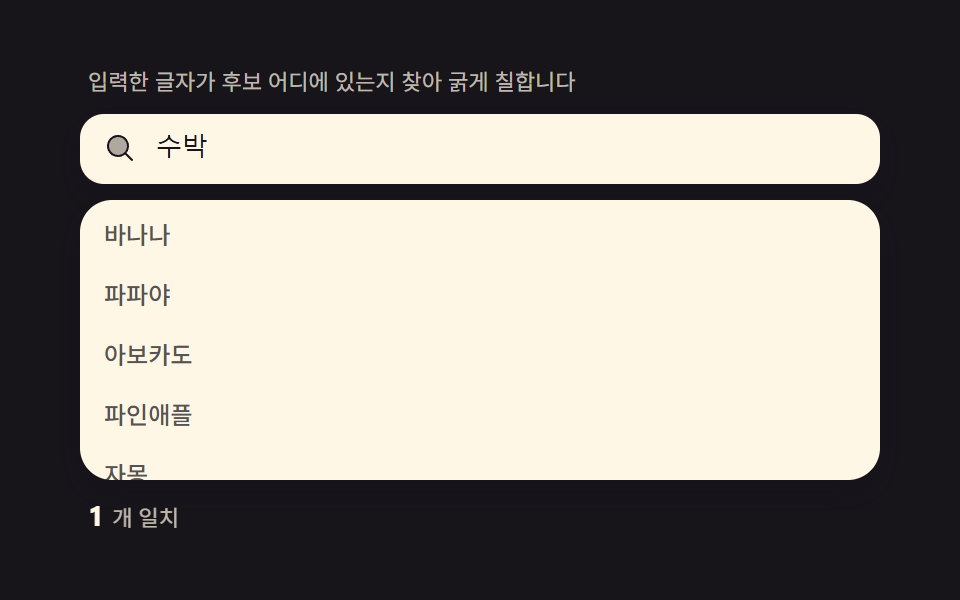 オートコンプリート 実装 — ハイライト・デバウンス・編集距離を重ねた9種検索窓のオートコンプリート 実装は文字を打つたびに再計算が走る一枚の層です。入力した文字が候補のどこにあるかを見つけてその部分だけ太字にし、300msのデバウンスでリクエストをまとめ、キーボードでもリストを巡れます。最近の検索・誤字候補・人 この記事のデモをすべて見る