03機能比較表
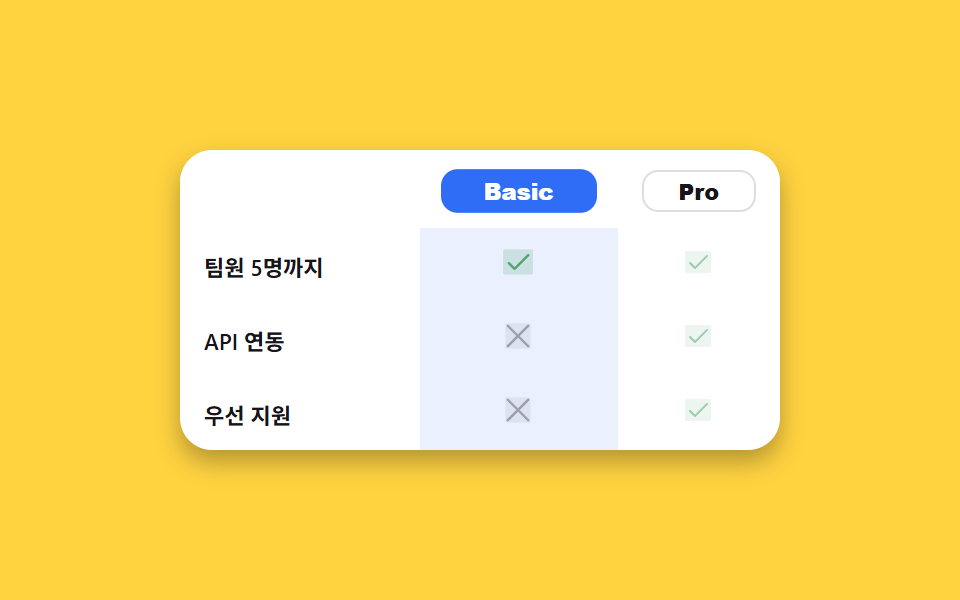
요금제 이름을 클릭하면 aria-pressed 가 바뀌며 그 열의 체크·엑스 아이콘이 실제로 확대되고 배경이 강조됩니다.
使いどころ
aria-pressedscaleclick
<main class="stage">
  <table class="fc">
    <caption class="sr-only">プラン別機能比較</caption>
    <thead>
      <tr>
        <th scope="col"></th>
        <th scope="col"><button type="button" class="fc__plan" data-plan="basic" aria-pressed="false">Basic</button></th>
        <th scope="col"><button type="button" class="fc__plan is-on" data-plan="pro" aria-pressed="true">Pro</button></th>
      </tr>
    </thead>
    <tbody>
      <tr>
        <th scope="row">チーム5名まで</th>
        <td class="fc__cell" data-plan="basic"><span class="fc__ic fc__ic--yes" aria-hidden="true"><svg viewBox="0 0 256 256" width="16" height="16"><g fill="currentColor"><path d="M232 56v144a16 16 0 0 1-16 16H40a16 16 0 0 1-16-16V56a16 16 0 0 1 16-16h176a16 16 0 0 1 16 16" opacity=".2"/><path d="m205.66 85.66l-96 96a8 8 0 0 1-11.32 0l-40-40a8 8 0 0 1 11.32-11.32L104 164.69l90.34-90.35a8 8 0 0 1 11.32 11.32"/></g></svg></span><span class="sr-only">あり</span></td>
        <td class="fc__cell" data-plan="pro"><span class="fc__ic fc__ic--yes" aria-hidden="true"><svg viewBox="0 0 256 256" width="16" height="16"><g fill="currentColor"><path d="M232 56v144a16 16 0 0 1-16 16H40a16 16 0 0 1-16-16V56a16 16 0 0 1 16-16h176a16 16 0 0 1 16 16" opacity=".2"/><path d="m205.66 85.66l-96 96a8 8 0 0 1-11.32 0l-40-40a8 8 0 0 1 11.32-11.32L104 164.69l90.34-90.35a8 8 0 0 1 11.32 11.32"/></g></svg></span><span class="sr-only">あり</span></td>
      </tr>
      <tr>
        <th scope="row">API連携</th>
        <td class="fc__cell" data-plan="basic"><span class="fc__ic fc__ic--no" aria-hidden="true"><svg viewBox="0 0 256 256" width="16" height="16"><g fill="currentColor"><path d="M216 56v144a16 16 0 0 1-16 16H56a16 16 0 0 1-16-16V56a16 16 0 0 1 16-16h144a16 16 0 0 1 16 16" opacity=".2"/><path d="M205.66 194.34a8 8 0 0 1-11.32 11.32L128 139.31l-66.34 66.35a8 8 0 0 1-11.32-11.32L116.69 128L50.34 61.66a8 8 0 0 1 11.32-11.32L128 116.69l66.34-66.35a8 8 0 0 1 11.32 11.32L139.31 128Z"/></g></svg></span><span class="sr-only">なし</span></td>
        <td class="fc__cell" data-plan="pro"><span class="fc__ic fc__ic--yes" aria-hidden="true"><svg viewBox="0 0 256 256" width="16" height="16"><g fill="currentColor"><path d="M232 56v144a16 16 0 0 1-16 16H40a16 16 0 0 1-16-16V56a16 16 0 0 1 16-16h176a16 16 0 0 1 16 16" opacity=".2"/><path d="m205.66 85.66l-96 96a8 8 0 0 1-11.32 0l-40-40a8 8 0 0 1 11.32-11.32L104 164.69l90.34-90.35a8 8 0 0 1 11.32 11.32"/></g></svg></span><span class="sr-only">あり</span></td>
      </tr>
      <tr>
        <th scope="row">優先サポート</th>
        <td class="fc__cell" data-plan="basic"><span class="fc__ic fc__ic--no" aria-hidden="true"><svg viewBox="0 0 256 256" width="16" height="16"><g fill="currentColor"><path d="M216 56v144a16 16 0 0 1-16 16H56a16 16 0 0 1-16-16V56a16 16 0 0 1 16-16h144a16 16 0 0 1 16 16" opacity=".2"/><path d="M205.66 194.34a8 8 0 0 1-11.32 11.32L128 139.31l-66.34 66.35a8 8 0 0 1-11.32-11.32L116.69 128L50.34 61.66a8 8 0 0 1 11.32-11.32L128 116.69l66.34-66.35a8 8 0 0 1 11.32 11.32L139.31 128Z"/></g></svg></span><span class="sr-only">なし</span></td>
        <td class="fc__cell" data-plan="pro"><span class="fc__ic fc__ic--yes" aria-hidden="true"><svg viewBox="0 0 256 256" width="16" height="16"><g fill="currentColor"><path d="M232 56v144a16 16 0 0 1-16 16H40a16 16 0 0 1-16-16V56a16 16 0 0 1 16-16h176a16 16 0 0 1 16 16" opacity=".2"/><path d="m205.66 85.66l-96 96a8 8 0 0 1-11.32 0l-40-40a8 8 0 0 1 11.32-11.32L104 164.69l90.34-90.35a8 8 0 0 1 11.32 11.32"/></g></svg></span><span class="sr-only">あり</span></td>
      </tr>
    </tbody>
  </table>
</main>@use "../../../../site/static/demo-tokens" as *;
// ── 변수 3개 ──────────────────────────────────────────
$duration: $dur-base;
$easing: $ease-spring;
$color: $subject-blue;
@include stage($stage-yellow);
.fc { width: min(300px, 92vw); border-collapse: collapse; background: $stage-paper; border-radius: $r-card; overflow: hidden; box-shadow: $shadow-press; }
.fc th, .fc td { padding: $sp-2 $sp-3; text-align: center; font-family: inherit; }
.fc thead th:first-child { width: 40%; }
.fc tbody th { text-align: left; font-weight: 600; font-size: 11px; color: $subject-ink; }
.fc__plan {
width: 100%;
padding: $sp-1 $sp-2;
border: 1px solid rgba(23, 20, 26, .14);
border-radius: $r-sm;
background: $stage-paper;
color: $subject-ink;
font-weight: 800; font-size: 11px; line-height: 1;
cursor: pointer;
transition: background $duration $easing, color $duration $easing, transform $duration $easing;
}
.fc__plan.is-on { background: $color; color: $stage-paper; border-color: $color; transform: scale(1.04); }
.fc__cell { transition: background $duration $easing, opacity $duration $easing; opacity: .55; }
.fc__cell.is-on { background: rgba(47, 109, 246, .1); opacity: 1; }
.fc__ic { display: inline-grid; place-items: center; transition: transform $duration $easing; }
.fc__cell.is-on .fc__ic { transform: scale(1.15); }
.fc__ic--yes { color: #50a26e; }
.fc__ic--no { color: rgba(23, 20, 26, .32); }
.sr-only {
position: absolute; width: 1px; height: 1px; padding: 0; margin: -1px;
overflow: hidden; clip: rect(0, 0, 0, 0); white-space: nowrap; border: 0;
}
// ── 접근성 ──────────────────────────────────────────
@media (prefers-reduced-motion: reduce) {
.fc__plan, .fc__cell, .fc__ic { transition: none !important; }
}
// ── 반응형(320px) ────────────────────────────────────
@media (max-width: 340px), (max-height: 220px) {
.fc th, .fc td { padding: $sp-1 $sp-2; }
.fc__plan { font-size: 10px; }
}html, body {
margin: 0;
overflow: hidden;
}
.stage {
box-sizing: border-box;
min-height: 100vh;
display: grid;
place-items: center;
margin: 0;
background: #ffd23f;
font-family: -apple-system, "Segoe UI", "Noto Sans KR", sans-serif;
padding: clamp(8px, 4vw, 24px);
}
.fc {
width: min(300px, 92vw);
border-collapse: collapse;
background: #ffffff;
border-radius: 16px;
overflow: hidden;
box-shadow: 0 6px 12px rgba(23, 20, 26, 0.32);
}
.fc th, .fc td {
padding: 8px 12px;
text-align: center;
font-family: inherit;
}
.fc thead th:first-child {
width: 40%;
}
.fc tbody th {
text-align: left;
font-weight: 600;
font-size: 11px;
color: #17141a;
}
.fc__plan {
width: 100%;
padding: 4px 8px;
border: 1px solid rgba(23, 20, 26, 0.14);
border-radius: 8px;
background: #ffffff;
color: #17141a;
font-weight: 800;
font-size: 11px;
line-height: 1;
cursor: pointer;
transition: background 300ms cubic-bezier(0.2, 0.8, 0.2, 1), color 300ms cubic-bezier(0.2, 0.8, 0.2, 1), transform 300ms cubic-bezier(0.2, 0.8, 0.2, 1);
}
.fc__plan.is-on {
background: #2f6df6;
color: #ffffff;
border-color: #2f6df6;
transform: scale(1.04);
}
.fc__cell {
transition: background 300ms cubic-bezier(0.2, 0.8, 0.2, 1), opacity 300ms cubic-bezier(0.2, 0.8, 0.2, 1);
opacity: 0.55;
}
.fc__cell.is-on {
background: rgba(47, 109, 246, 0.1);
opacity: 1;
}
.fc__ic {
display: inline-grid;
place-items: center;
transition: transform 300ms cubic-bezier(0.2, 0.8, 0.2, 1);
}
.fc__cell.is-on .fc__ic {
transform: scale(1.15);
}
.fc__ic--yes {
color: #50a26e;
}
.fc__ic--no {
color: rgba(23, 20, 26, 0.32);
}
.sr-only {
position: absolute;
width: 1px;
height: 1px;
padding: 0;
margin: -1px;
overflow: hidden;
clip: rect(0, 0, 0, 0);
white-space: nowrap;
border: 0;
}
@media (prefers-reduced-motion: reduce) {
.fc__plan, .fc__cell, .fc__ic {
transition: none !important;
}
}
@media (max-width: 340px), (max-height: 220px) {
.fc th, .fc td {
padding: 4px 8px;
}
.fc__plan {
font-size: 10px;
}
}// 실제 동작: 요금제 이름을 누르면 aria-pressed 가 바뀌며 그 열이 실제로 강조되고(배경·아이콘 확대), 다른 열은 옅어진다.
// .is-demo 자동 再生: 1초마다 basic·pro 를 번갈아 강조해 데모 렌더에서도 움직임이 보인다.
function select(plan) {
document.querySelectorAll('.fc__plan').forEach(function (b) {
var on = b.getAttribute('data-plan') === plan;
b.classList.toggle('is-on', on);
b.setAttribute('aria-pressed', String(on));
});
document.querySelectorAll('.fc__cell').forEach(function (c) {
c.classList.toggle('is-on', c.getAttribute('data-plan') === plan);
});
}
document.querySelectorAll('.fc__plan').forEach(function (btn) {
btn.addEventListener('click', function () { select(btn.getAttribute('data-plan')); restart(); });
});
var order = ['pro', 'basic'], oi = 0, timer = null;
function tick() { oi = (oi + 1) % order.length; select(order[oi]); }
function restart() { if (timer) clearInterval(timer); timer = setInterval(tick, 1000); }
restart();import { useEffect, useState } from "react";
import type { CSSProperties } from "react";
import styles from "./FeatureComparison.module.scss";
export type FeatureComparisonProps = { duration?: number; easing?: string; color?: string };
type Vars = CSSProperties & { "--duration"?: string; "--easing"?: string; "--color"?: string };
const ROWS: { label: string; basic: boolean; pro: boolean }[] = [
{ label: "팀원 5명까지", basic: true, pro: true },
{ label: "API 연동", basic: false, pro: true },
{ label: "우선 지원", basic: false, pro: true },
];
function Check() {
return (
<svg viewBox="0 0 256 256" width="16" height="16">
<g fill="currentColor">
<path d="M232 56v144a16 16 0 0 1-16 16H40a16 16 0 0 1-16-16V56a16 16 0 0 1 16-16h176a16 16 0 0 1 16 16" opacity=".2" />
<path d="m205.66 85.66l-96 96a8 8 0 0 1-11.32 0l-40-40a8 8 0 0 1 11.32-11.32L104 164.69l90.34-90.35a8 8 0 0 1 11.32 11.32" />
</g>
</svg>
);
}
function Cross() {
return (
<svg viewBox="0 0 256 256" width="16" height="16">
<g fill="currentColor">
<path d="M216 56v144a16 16 0 0 1-16 16H56a16 16 0 0 1-16-16V56a16 16 0 0 1 16-16h144a16 16 0 0 1 16 16" opacity=".2" />
<path d="M205.66 194.34a8 8 0 0 1-11.32 11.32L128 139.31l-66.34 66.35a8 8 0 0 1-11.32-11.32L116.69 128L50.34 61.66a8 8 0 0 1 11.32-11.32L128 116.69l66.34-66.35a8 8 0 0 1 11.32 11.32L139.31 128Z" />
</g>
</svg>
);
}
export default function FeatureComparison({ duration = 300, easing = "cubic-bezier(.2,.8,.2,1)", color = "#2f6df6" }: FeatureComparisonProps) {
const [plan, setPlan] = useState<"basic" | "pro">("pro");
const vars: Vars = { "--duration": `${duration}ms`, "--easing": easing, "--color": color };
// 자동 재생: 1초마다 basic·pro 를 번갈아 강조 (사용자가 직접 눌러도 즉시 반영된다)
useEffect(() => {
const id = setInterval(() => setPlan((p) => (p === "pro" ? "basic" : "pro")), 1000);
return () => clearInterval(id);
}, []);
return (
<table className={styles.fc} style={vars}>
<caption className={styles.srOnly}>요금제별 기능 비교</caption>
<thead>
<tr>
<th scope="col" />
{(["basic", "pro"] as const).map((p) => (
<th scope="col" key={p}>
<button
type="button"
className={`${styles.plan} ${plan === p ? styles.on : ""}`}
aria-pressed={plan === p}
onClick={() => setPlan(p)}
>
{p === "basic" ? "Basic" : "Pro"}
</button>
</th>
))}
</tr>
</thead>
<tbody>
{ROWS.map((r) => (
<tr key={r.label}>
<th scope="row">{r.label}</th>
{(["basic", "pro"] as const).map((p) => {
const has = p === "basic" ? r.basic : r.pro;
return (
<td key={p} className={`${styles.cell} ${plan === p ? styles.on : ""}`}>
<span className={has ? styles.yes : styles.no} aria-hidden="true">{has ? <Check /> : <Cross />}</span>
<span className={styles.srOnly}>{has ? "있음" : "없음"}</span>
</td>
);
})}
</tr>
))}
</tbody>
</table>
);
}03 機能比較表 — 計測 累積面積 15.99% · 動いたフレーム 7/23GODRICH オリジナル · SCSS と React は zip に同梱 · 【コピペOK】信頼を作るLPパーツ9選
このデモが属する記事
 【コピペOK】信頼を作るLPパーツ9選LPパーツは、統計カウンターやロゴバーから比較表・問い合わせフォームまで、ランディングページのあちこちに散らばっていた信頼づくりの部品をひとまとめにしたコード集です。LPにそのまま貼れる九つのうち一つは、ページが開いた瞬間に数字が実際に0か この記事のデモをすべて見る