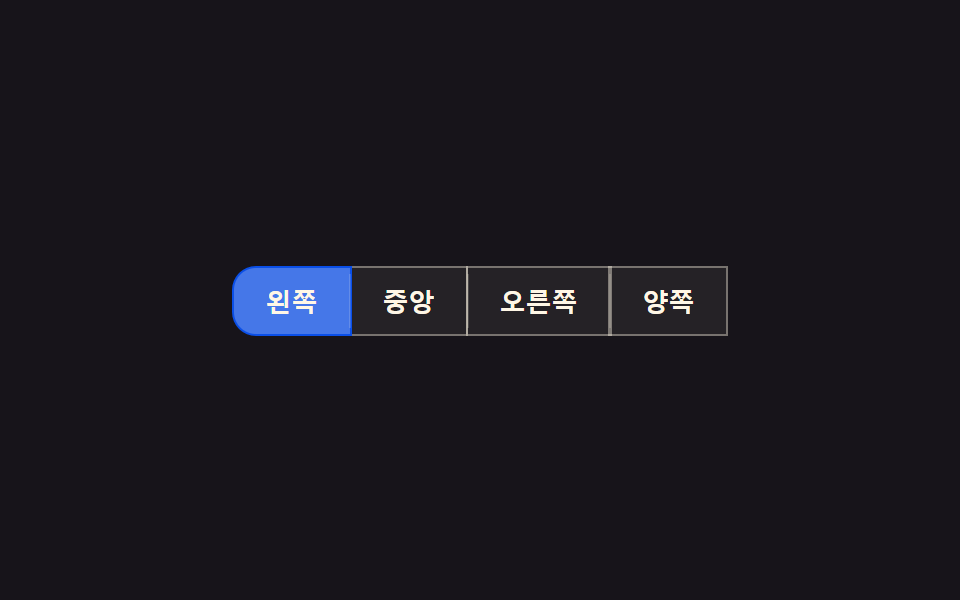
01共有境界線マージ — 隣り合う二つのボタンの内側の境界線の値が一つに重なり、二重に見えない方式
ボタンが接する内側の境界線の値をあえて重ね合わせ、どのボタンがアクティブでも境界線が二重に見えません。
使いどころツールバーの整列ボタン群、フィルターオプションのボタン群
margin-left: -1.5px seamclip-path bleedBLEED_PX 6

<main class="stage">
<div class="bg is-demo" id="bg" role="group" aria-label="テキスト整列">
  <button class="bg__btn" data-align="left" aria-pressed="true">左</button>
  <button class="bg__btn" data-align="center" aria-pressed="false">中央</button>
  <button class="bg__btn" data-align="right" aria-pressed="false">右</button>
  <button class="bg__btn" data-align="justify" aria-pressed="false">両端</button>
  <span class="bg__seam" id="seam0" aria-hidden="true"></span>
  <span class="bg__seam" id="seam1" aria-hidden="true"></span>
  <span class="bg__seam" id="seam2" aria-hidden="true"></span>
</div>
</main>
@use "../../../../site/static/demo-tokens" as *;
// 계산 겹: index.html 이 getBoundingClientRect 로 버튼 사이 공유 경계선의 실측 좌표를 재고,
// 클릭 파동(ripple)이 그 좌표 + BLEED_PX 만큼만 이웃으로 번지도록 clip-path 를 매 프레임 계산한다.
// 경계선 자체은 이 파일에서 음수 margin 으로 겹쳐 항상 한 겹으로만 보인다.
@include stage($stage-ink);
.bg {
position: relative;
display: flex;
border-radius: $r-control;
overflow: visible;
}
.bg__btn {
position: relative;
appearance: none;
border: 1.5px solid rgba($subject-cream, .38);
background: rgba($subject-cream, .06);
color: $subject-cream;
font-size: 13px;
font-weight: 600;
padding: $sp-2 $sp-4;
cursor: pointer;
overflow: hidden;
transition: background-color $dur-quick $ease-out, color $dur-quick $ease-out, border-color $dur-quick $ease-out;
// 공유 경계선 병합 — 이웃 버튼과 1.5px 만큼 겹쳐 안쪽 경계선이 항상 한 겹으로만 보인다
& + & { margin-left: -1.5px; }
&:first-child { border-radius: $r-control 0 0 $r-control; }
&:last-child { border-radius: 0 $r-control $r-control 0; }
&:hover, &:focus-visible { z-index: 1; }
&:focus-visible { outline: 2px solid $subject-blue-light; outline-offset: 2px; }
}
.bg__btn--on {
background: $subject-blue-deep;
border-color: $subject-blue-deep;
color: $subject-cream;
z-index: 2;
}
.bg__ripple {
position: absolute;
border-radius: 50%;
background: rgba($subject-cream, .5);
pointer-events: none;
will-change: width, height, opacity, clip-path;
}
.bg__seam {
position: absolute;
top: 4px;
bottom: 4px;
width: 1px;
left: var(--seam-x, 0);
transform: translateX(-50%);
background: rgba($subject-cream, .16);
pointer-events: none;
z-index: 3;
}
@media (max-width: 340px) {
.bg__btn { font-size: 12px; padding: $sp-2 $sp-3; }
}
@media (prefers-reduced-motion: reduce) {
.bg__btn { transition: none; }
.bg__ripple { display: none; }
}html, body {
margin: 0;
overflow: hidden;
}
.stage {
box-sizing: border-box;
min-height: 100vh;
display: grid;
place-items: center;
margin: 0;
background: #17141a;
font-family: -apple-system, "Segoe UI", "Noto Sans KR", sans-serif;
padding: clamp(8px, 4vw, 24px);
}
.bg {
position: relative;
display: flex;
border-radius: 12px;
overflow: visible;
}
.bg__btn {
position: relative;
appearance: none;
border: 1.5px solid rgba(255, 247, 230, 0.38);
background: rgba(255, 247, 230, 0.06);
color: #fff7e6;
font-size: 13px;
font-weight: 600;
padding: 8px 16px;
cursor: pointer;
overflow: hidden;
transition: background-color 220ms ease-out, color 220ms ease-out, border-color 220ms ease-out;
}
.bg__btn + .bg__btn {
margin-left: -1.5px;
}
.bg__btn:first-child {
border-radius: 12px 0 0 12px;
}
.bg__btn:last-child {
border-radius: 0 12px 12px 0;
}
.bg__btn:hover, .bg__btn:focus-visible {
z-index: 1;
}
.bg__btn:focus-visible {
outline: 2px solid #5b8cf8;
outline-offset: 2px;
}
.bg__btn--on {
background: #0a4fe8;
border-color: #0a4fe8;
color: #fff7e6;
z-index: 2;
}
.bg__ripple {
position: absolute;
border-radius: 50%;
background: rgba(255, 247, 230, 0.5);
pointer-events: none;
will-change: width, height, opacity, clip-path;
}
.bg__seam {
position: absolute;
top: 4px;
bottom: 4px;
width: 1px;
left: var(--seam-x, 0);
transform: translateX(-50%);
background: rgba(255, 247, 230, 0.16);
pointer-events: none;
z-index: 3;
}
@media (max-width: 340px) {
.bg__btn {
font-size: 12px;
padding: 8px 12px;
}
}
@media (prefers-reduced-motion: reduce) {
.bg__btn {
transition: none;
}
.bg__ripple {
display: none;
}
}(function () {
var CYCLE_MS = 900; // 자동 루프가 다음 버튼으로 넘어가는 간격
var BLEED_PX = 6; // 계산 겹 상수: 파동이 이웃 경계선을 넘어 번질 수 있는 최대 여유(px) — 이 값만큼만 넘고 그 이상은 실측 경계선에서 잘린다
var reduce = window.matchMedia('(prefers-reduced-motion: reduce)').matches;
var RIPPLE_MS = reduce ? 1 : 420; // 계산 자체는 유지하되 reduce 에서는 목표 상태로 즉시 놓는다
var root = document.getElementById('bg');
var btns = Array.prototype.slice.call(root.querySelectorAll('.bg__btn'));
var seams = [document.getElementById('seam0'), document.getElementById('seam1'), document.getElementById('seam2')];
var isDemo = true;
// 계산 겹: 버튼 사이 공유 경계선의 실제 화면 좌표를 getBoundingClientRect 로 잰다 — 짐작 px 를 쓰지 않는다.
function measureSeams() {
var rootRect = root.getBoundingClientRect();
for (var i = 0; i < seams.length; i++) {
var a = btns[i].getBoundingClientRect();
var b = btns[i + 1].getBoundingClientRect();
var seamX = (a.right + b.left) / 2 - rootRect.left; // 두 버튼이 겹치는 경계선의 실측 중점
seams[i].style.setProperty('--seam-x', seamX.toFixed(2) + 'px');
}
}
function setActive(btn) {
btns.forEach(function (b) { b.setAttribute('aria-pressed', String(b === btn)); b.classList.toggle('bg__btn--on', b === btn); });
}
var ripples = [];
function spawnRipple(btn, clientX) {
var idx = btns.indexOf(btn);
var rect = btn.getBoundingClientRect();
var rootRect = root.getBoundingClientRect();
var originX = (clientX == null ? rect.left + rect.width / 2 : clientX) - rect.left;
var leftSeam = idx > 0 ? btns[idx - 1].getBoundingClientRect().right - rect.left : null;
var rightSeam = idx < btns.length - 1 ? btns[idx + 1].getBoundingClientRect().left - rect.left : null;
var span = document.createElement('span');
span.className = 'bg__ripple';
span.style.left = originX + 'px';
span.style.top = (rect.height / 2) + 'px';
btn.appendChild(span);
ripples.push({
el: span, start: performance.now(), from: 0, to: Math.max(rect.width, rect.height) * 1.3,
// 계산 겹: 파동이 번질 수 있는 한계를 이웃 경계선 실측값 + BLEED_PX 로 고정한다
minClip: leftSeam == null ? -9999 : leftSeam - BLEED_PX,
maxClip: rightSeam == null ? 9999 : rightSeam + BLEED_PX,
originX: originX
});
}
function easeOutQuad(t) { return 1 - (1 - t) * (1 - t); }
function tickRipples(ts) {
for (var i = ripples.length - 1; i >= 0; i--) {
var r = ripples[i];
var t = Math.min(1, (ts - r.start) / RIPPLE_MS);
var radius = r.from + (r.to - r.from) * easeOutQuad(t);
var left = Math.max(r.minClip, r.originX - radius);
var right = Math.min(r.maxClip, r.originX + radius);
r.el.style.width = radius * 2 + 'px';
r.el.style.height = radius * 2 + 'px';
r.el.style.marginLeft = -radius + 'px';
r.el.style.marginTop = -radius + 'px';
r.el.style.opacity = String(1 - t);
// clip-path 로 파동이 실측 경계선 밖으로 못 나가게 자른다
r.el.style.clipPath = 'inset(-9999px ' + Math.max(0, r.originX + radius - right) + 'px -9999px ' + Math.max(0, left - (r.originX - radius)) + 'px)';
if (t >= 1) { r.el.remove(); ripples.splice(i, 1); }
}
}
function human() {
if (isDemo) { root.classList.remove('is-demo'); isDemo = false; }
}
btns.forEach(function (b) {
b.addEventListener('click', function (e) {
human();
setActive(b);
spawnRipple(b, reduce ? null : e.clientX);
});
});
window.addEventListener('resize', measureSeams);
measureSeams();
var cycleStart = 0, lastIdx = -1;
function loop(ts) {
if (!cycleStart) cycleStart = ts;
if (isDemo && !reduce) {
var idx = Math.floor((ts - cycleStart) / CYCLE_MS) % btns.length;
if (idx !== lastIdx) { lastIdx = idx; setActive(btns[idx]); spawnRipple(btns[idx], null); }
}
tickRipples(ts);
requestAnimationFrame(loop);
}
requestAnimationFrame(loop);
})();// SharedBorderMerge — vanilla 판(run/369/demo/01-btn-group-shared-border-merge/index.html) 의 React 포트.
// getBoundingClientRect 로 버튼 사이 공유 경계선의 실측 좌표를 재고, 클릭 파동을 그 좌표 + BLEED_PX
// 만큼만 이웃으로 번지도록 clip-path 로 매 프레임 계산해 자른다.
import { useEffect, useRef } from "react";
import styles from "./SharedBorderMerge.module.scss";
type Box<T> = { current: T };
type RippleState = { el: HTMLSpanElement; start: number; to: number; minClip: number; maxClip: number; originX: number };
const ALIGNS = ["left", "center", "right", "justify"] as const;
const LABELS: Record<string, string> = { left: "왼쪽", center: "중앙", right: "오른쪽", justify: "양쪽" };
export default function SharedBorderMerge() {
const rootRef = useRef(null) as unknown as Box<HTMLDivElement>;
const btnRefs = useRef([]) as unknown as Box<HTMLButtonElement[]>;
const seamRefs = useRef([]) as unknown as Box<HTMLSpanElement[]>;
const rafRef = useRef(0) as unknown as Box<number>;
useEffect(() => {
const CYCLE_MS = 900;
const BLEED_PX = 6; // 계산 겹 상수: 파동이 이웃 경계선을 넘어 번질 수 있는 최대 여유(px)
const reduce = window.matchMedia("(prefers-reduced-motion: reduce)").matches;
const RIPPLE_MS = reduce ? 1 : 420;
const root = rootRef.current;
const btns = btnRefs.current;
const seams = seamRefs.current;
if (!root || btns.length === 0) return;
let isDemo = true;
const ripples: RippleState[] = [];
function measureSeams() {
const rootRect = root.getBoundingClientRect();
for (let i = 0; i < seams.length; i++) {
const a = btns[i].getBoundingClientRect();
const b = btns[i + 1].getBoundingClientRect();
const seamX = (a.right + b.left) / 2 - rootRect.left;
seams[i].style.setProperty("--seam-x", seamX.toFixed(2) + "px");
}
}
function setActive(btn: HTMLButtonElement) {
btns.forEach((b) => {
b.setAttribute("aria-pressed", String(b === btn));
b.classList.toggle(styles.btnOn, b === btn);
});
}
function spawnRipple(btn: HTMLButtonElement, clientX: number | null) {
const idx = btns.indexOf(btn);
const rect = btn.getBoundingClientRect();
const originX = (clientX == null ? rect.left + rect.width / 2 : clientX) - rect.left;
const leftSeam = idx > 0 ? btns[idx - 1].getBoundingClientRect().right - rect.left : null;
const rightSeam = idx < btns.length - 1 ? btns[idx + 1].getBoundingClientRect().left - rect.left : null;
const span = document.createElement("span");
span.className = styles.ripple;
span.style.left = originX + "px";
span.style.top = rect.height / 2 + "px";
btn.appendChild(span);
ripples.push({
el: span, start: performance.now(), to: Math.max(rect.width, rect.height) * 1.3,
minClip: leftSeam == null ? -9999 : leftSeam - BLEED_PX,
maxClip: rightSeam == null ? 9999 : rightSeam + BLEED_PX,
originX,
});
}
function easeOutQuad(t: number) { return 1 - (1 - t) * (1 - t); }
function tickRipples(ts: number) {
for (let i = ripples.length - 1; i >= 0; i--) {
const r = ripples[i];
const t = Math.min(1, (ts - r.start) / RIPPLE_MS);
const radius = r.to * easeOutQuad(t);
const left = Math.max(r.minClip, r.originX - radius);
const right = Math.min(r.maxClip, r.originX + radius);
r.el.style.width = radius * 2 + "px";
r.el.style.height = radius * 2 + "px";
r.el.style.marginLeft = -radius + "px";
r.el.style.marginTop = -radius + "px";
r.el.style.opacity = String(1 - t);
r.el.style.clipPath = "inset(-9999px " + Math.max(0, r.originX + radius - right) + "px -9999px " + Math.max(0, left - (r.originX - radius)) + "px)";
if (t >= 1) { r.el.remove(); ripples.splice(i, 1); }
}
}
function human() { if (isDemo) { root.classList.remove(styles.isDemo); isDemo = false; } }
function onClick(this: HTMLButtonElement, e: MouseEvent) {
human();
setActive(this);
spawnRipple(this, reduce ? null : e.clientX);
}
btns.forEach((b) => b.addEventListener("click", onClick as unknown as EventListener));
window.addEventListener("resize", measureSeams);
measureSeams();
let cycleStart = 0, lastIdx = -1;
function loop(ts: number) {
if (!cycleStart) cycleStart = ts;
if (isDemo && !reduce) {
const idx = Math.floor((ts - cycleStart) / CYCLE_MS) % btns.length;
if (idx !== lastIdx) { lastIdx = idx; setActive(btns[idx]); spawnRipple(btns[idx], null); }
}
tickRipples(ts);
rafRef.current = requestAnimationFrame(loop);
}
rafRef.current = requestAnimationFrame(loop);
return () => {
btns.forEach((b) => b.removeEventListener("click", onClick as unknown as EventListener));
window.removeEventListener("resize", measureSeams);
cancelAnimationFrame(rafRef.current);
};
}, []);
return (
<main className={styles.stage}>
<div className={styles.bg + " " + styles.isDemo} ref={rootRef} role="group" aria-label="텍스트 정렬">
{ALIGNS.map((align, i) => (
<button
key={align}
className={styles.btn}
data-align={align}
aria-pressed={i === 0}
ref={(el: HTMLButtonElement | null) => { if (el) btnRefs.current[i] = el; }}
>
{LABELS[align]}
</button>
))}
{[0, 1, 2].map((i) => (
<span key={i} className={styles.seam} ref={(el: HTMLSpanElement | null) => { if (el) seamRefs.current[i] = el; }} aria-hidden="true" />
))}
</div>
</main>
);
}01 共有境界線マージ — 隣り合う二つのボタンの内側の境界線の値が一つに重なり、二重に見えない方式 — 計測 累積面積 2.754% · 動いたフレーム 11/23GODRICH オリジナル · SCSS と React は zip に同梱 · ボタン グループ ui 9選 — 隣り合うボタンが一つに動く仕組み
このデモが属する記事
 ボタン グループ ui 9選 — 隣り合うボタンが一つに動く仕組みボタン グループ ui: 9つのうち1つはアクティブボタンの値が変わるとスライド表示子の位置の値が実測座標に沿って移動し、1つはグループの幅の値が縮むと溢れたボタンがもっと見る値の中に折り畳まれ、もう1つは方向キーでフォーカスの値が移る際に この記事のデモをすべて見る