05폭에 맞춰 자동 축약
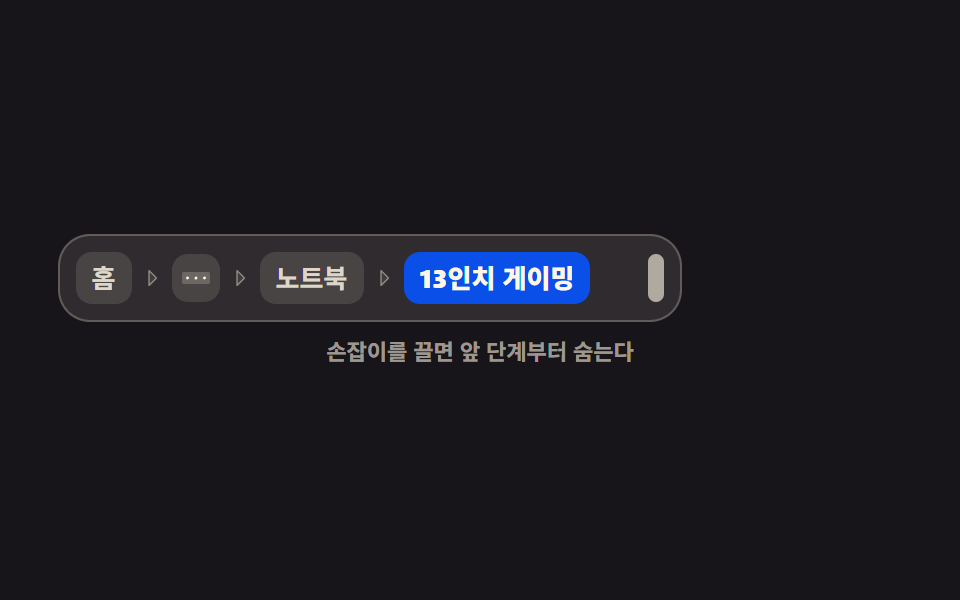
상자 폭이 줄면 앞 단계부터 하나씩 점 세 개로 숨어 경로가 절대 두 줄이 되지 않고, 폭이 다시 넓어지면 숨었던 단계가 순서대로 돌아옵니다.
쓰임사이드바가 열리고 닫히는 대시보드처럼 같은 경로가 여러 폭에서 살아야 할 때
ResizeObserverscrollWidthhidden
<main class="stage">
  <div class="at is-demo">
    <div class="at__frame" id="at-frame">
      <div class="at__panel" id="at-panel">
        <nav class="at__nav" aria-label="경로" id="at-nav">
          <ol class="at__list" id="at-list">
            <li class="at__item">
              <a class="at__crumb" href="#">홈</a>
              <span class="at__sep" aria-hidden="true"><svg viewBox="0 0 256 256" width="12" height="12" aria-hidden="true"><g fill="currentColor"><path d="m176 128l-80 80V48Z" opacity=".2"/><path d="m181.66 122.34l-80-80A8 8 0 0 0 88 48v160a8 8 0 0 0 13.66 5.66l80-80a8 8 0 0 0 0-11.32M104 188.69V67.31L164.69 128Z"/></g></svg></span>
            </li>
            <li class="at__item" id="at-dots" hidden>
              <span class="at__crumb at__crumb--dots" aria-label="숨은 단계"><svg viewBox="0 0 256 256" width="16" height="16" aria-hidden="true"><g fill="currentColor"><path d="M240 96v64a16 16 0 0 1-16 16H32a16 16 0 0 1-16-16V96a16 16 0 0 1 16-16h192a16 16 0 0 1 16 16" opacity=".2"/><path d="M140 128a12 12 0 1 1-12-12a12 12 0 0 1 12 12m56-12a12 12 0 1 0 12 12a12 12 0 0 0-12-12m-136 0a12 12 0 1 0 12 12a12 12 0 0 0-12-12"/></g></svg></span>
              <span class="at__sep" aria-hidden="true"><svg viewBox="0 0 256 256" width="12" height="12" aria-hidden="true"><g fill="currentColor"><path d="m176 128l-80 80V48Z" opacity=".2"/><path d="m181.66 122.34l-80-80A8 8 0 0 0 88 48v160a8 8 0 0 0 13.66 5.66l80-80a8 8 0 0 0 0-11.32M104 188.69V67.31L164.69 128Z"/></g></svg></span>
            </li>
            <li class="at__item" data-hide>
              <a class="at__crumb" href="#">전자기기</a>
              <span class="at__sep" aria-hidden="true"><svg viewBox="0 0 256 256" width="12" height="12" aria-hidden="true"><g fill="currentColor"><path d="m176 128l-80 80V48Z" opacity=".2"/><path d="m181.66 122.34l-80-80A8 8 0 0 0 88 48v160a8 8 0 0 0 13.66 5.66l80-80a8 8 0 0 0 0-11.32M104 188.69V67.31L164.69 128Z"/></g></svg></span>
            </li>
            <li class="at__item" data-hide>
              <a class="at__crumb" href="#">컴퓨터</a>
              <span class="at__sep" aria-hidden="true"><svg viewBox="0 0 256 256" width="12" height="12" aria-hidden="true"><g fill="currentColor"><path d="m176 128l-80 80V48Z" opacity=".2"/><path d="m181.66 122.34l-80-80A8 8 0 0 0 88 48v160a8 8 0 0 0 13.66 5.66l80-80a8 8 0 0 0 0-11.32M104 188.69V67.31L164.69 128Z"/></g></svg></span>
            </li>
            <li class="at__item" data-hide>
              <a class="at__crumb" href="#">노트북</a>
              <span class="at__sep" aria-hidden="true"><svg viewBox="0 0 256 256" width="12" height="12" aria-hidden="true"><g fill="currentColor"><path d="m176 128l-80 80V48Z" opacity=".2"/><path d="m181.66 122.34l-80-80A8 8 0 0 0 88 48v160a8 8 0 0 0 13.66 5.66l80-80a8 8 0 0 0 0-11.32M104 188.69V67.31L164.69 128Z"/></g></svg></span>
            </li>
            <li class="at__item">
              <span class="at__crumb at__crumb--now" aria-current="page">13인치 게이밍</span>
            </li>
          </ol>
        </nav>
        <span class="at__handle" id="at-handle" role="separator" aria-orientation="vertical" aria-label="폭 조절" tabindex="0"></span>
      </div>
    </div>
    <p class="at__cap">손잡이를 끌면 앞 단계부터 숨는다</p>
  </div>
</main>@use "../../../../site/static/demo-tokens" as *;
$duration: $dur-base;
$easing: $ease-spring;
$color: $subject-blue;
@include stage($stage-ink);
// flex 자식에는 hidden 이 안 먹는 경우가 있다 — 직접 못 박는다
[hidden] { display: none !important; }
.at {
display: flex;
flex-direction: column;
align-items: center;
width: min(432px, 88vw);
color: $subject-cream;
font-size: clamp(11px, 3vw, 13px);
line-height: 18px;
user-select: none;
-webkit-user-select: none;
}
// 바깥 틀은 고정, 안쪽 패널만 폭이 변한다
.at__frame { width: 100%; }
.at__panel {
box-sizing: border-box;
display: flex;
align-items: center;
gap: $sp-2;
width: 100%;
padding: $sp-2;
border: 1px solid rgba($subject-cream, .24);
border-radius: $r-card;
background: rgba($subject-cream, .10);
}
.at__nav {
flex: 1 1 auto;
min-width: 0;
overflow: hidden;
}
// 자연 폭(max-content)으로 두되 칸 자리가 다 떨어지면 마지막 칸만 말줄임으로 줄어든다.
// JS 는 재는 순간에만 max-width 를 풀어 "진짜 넘치는가" 를 본다
.at__list {
display: flex;
align-items: center;
width: max-content;
max-width: 100%;
margin: 0;
padding: 0;
list-style: none;
}
.at__item {
flex: 0 0 auto;
display: flex;
align-items: center;
white-space: nowrap;
}
.at__item:last-child { flex: 0 1 auto; min-width: 0; }
.at__sep {
display: inline-flex;
margin: 0 $sp-1;
color: rgba($subject-cream, .42);
}
.at__sep svg { display: block; }
.at__crumb {
display: inline-flex;
align-items: center;
padding: $sp-1 $sp-2;
border-radius: $r-sm;
background: rgba($subject-cream, .12);
color: rgba($subject-cream, .82);
font-weight: 600;
line-height: 18px;
text-decoration: none;
white-space: nowrap;
}
.at__crumb:hover { background: rgba($subject-cream, .24); color: $subject-cream; }
.at__crumb:focus-visible { outline: 2px solid $subject-cream; outline-offset: 2px; }
.at__crumb--dots {
padding: $sp-1;
color: $subject-cream;
}
.at__crumb--dots svg { display: block; }
.at__crumb--now {
display: block;
min-width: 0;
overflow: hidden;
text-overflow: ellipsis;
background: $subject-blue-deep;
color: $subject-cream;
font-weight: 800;
}
.at__crumb--now:hover { background: $subject-blue-deep; }
.at__handle {
flex: 0 0 auto;
width: 8px;
height: 24px;
border-radius: $r-pill;
background: rgba($subject-cream, .62);
cursor: col-resize;
touch-action: none;
}
.at__handle:hover { background: $subject-cream; }
.at__handle:focus-visible { outline: 2px solid $color; outline-offset: 2px; }
.at__cap {
margin: $sp-2 0 0;
font-size: 11px;
line-height: 14px;
font-weight: 600;
color: rgba($subject-cream, .58);
text-align: center;
}
// ── 자동 루프(2초): 폭 100% → 46% → 100%. 진짜 ResizeObserver 가 반응해 칸이 사라졌다 돌아온다 ──
// 여기만 width 를 애니메이션한다 — 폭 변화 자체가 주제이고, 레이아웃이 다시 계산돼야 콜백이 돈다
.at.is-demo .at__panel {
animation-name: at-squeeze;
animation-duration: $dur-loop;
animation-timing-function: $easing;
animation-iteration-count: infinite;
}
@keyframes at-squeeze {
0%, 8% { width: 100%; }
44%, 56% { width: 46%; }
86%, 100% { width: 100%; }
}
@media (prefers-reduced-motion: reduce) {
.at.is-demo .at__panel { animation: none !important; width: 100%; }
.at__crumb, .at__handle { transition: none; }
}
@media (max-width: 340px) {
.at__panel { padding: $sp-1; }
.at__crumb { padding: $sp-1; }
.at__cap { margin-top: $sp-1; }
}html, body {
margin: 0;
overflow: hidden;
}
.stage {
box-sizing: border-box;
min-height: 100vh;
display: grid;
place-items: center;
margin: 0;
background: #17141a;
font-family: -apple-system, "Segoe UI", "Noto Sans KR", sans-serif;
padding: clamp(8px, 4vw, 24px);
}
[hidden] {
display: none !important;
}
.at {
display: flex;
flex-direction: column;
align-items: center;
width: min(432px, 88vw);
color: #fff7e6;
font-size: clamp(11px, 3vw, 13px);
line-height: 18px;
user-select: none;
-webkit-user-select: none;
}
.at__frame {
width: 100%;
}
.at__panel {
box-sizing: border-box;
display: flex;
align-items: center;
gap: 8px;
width: 100%;
padding: 8px;
border: 1px solid rgba(255, 247, 230, 0.24);
border-radius: 16px;
background: rgba(255, 247, 230, 0.1);
}
.at__nav {
flex: 1 1 auto;
min-width: 0;
overflow: hidden;
}
.at__list {
display: flex;
align-items: center;
width: max-content;
max-width: 100%;
margin: 0;
padding: 0;
list-style: none;
}
.at__item {
flex: 0 0 auto;
display: flex;
align-items: center;
white-space: nowrap;
}
.at__item:last-child {
flex: 0 1 auto;
min-width: 0;
}
.at__sep {
display: inline-flex;
margin: 0 4px;
color: rgba(255, 247, 230, 0.42);
}
.at__sep svg {
display: block;
}
.at__crumb {
display: inline-flex;
align-items: center;
padding: 4px 8px;
border-radius: 8px;
background: rgba(255, 247, 230, 0.12);
color: rgba(255, 247, 230, 0.82);
font-weight: 600;
line-height: 18px;
text-decoration: none;
white-space: nowrap;
}
.at__crumb:hover {
background: rgba(255, 247, 230, 0.24);
color: #fff7e6;
}
.at__crumb:focus-visible {
outline: 2px solid #fff7e6;
outline-offset: 2px;
}
.at__crumb--dots {
padding: 4px;
color: #fff7e6;
}
.at__crumb--dots svg {
display: block;
}
.at__crumb--now {
display: block;
min-width: 0;
overflow: hidden;
text-overflow: ellipsis;
background: #0a4fe8;
color: #fff7e6;
font-weight: 800;
}
.at__crumb--now:hover {
background: #0a4fe8;
}
.at__handle {
flex: 0 0 auto;
width: 8px;
height: 24px;
border-radius: 999px;
background: rgba(255, 247, 230, 0.62);
cursor: col-resize;
touch-action: none;
}
.at__handle:hover {
background: #fff7e6;
}
.at__handle:focus-visible {
outline: 2px solid #2f6df6;
outline-offset: 2px;
}
.at__cap {
margin: 8px 0 0;
font-size: 11px;
line-height: 14px;
font-weight: 600;
color: rgba(255, 247, 230, 0.58);
text-align: center;
}
.at.is-demo .at__panel {
animation-name: at-squeeze;
animation-duration: 2s;
animation-timing-function: cubic-bezier(0.2, 0.8, 0.2, 1);
animation-iteration-count: infinite;
}
@keyframes at-squeeze {
0%, 8% {
width: 100%;
}
44%, 56% {
width: 46%;
}
86%, 100% {
width: 100%;
}
}
@media (prefers-reduced-motion: reduce) {
.at.is-demo .at__panel {
animation: none !important;
width: 100%;
}
.at__crumb, .at__handle {
transition: none;
}
}
@media (max-width: 340px) {
.at__panel {
padding: 4px;
}
.at__crumb {
padding: 4px;
}
.at__cap {
margin-top: 4px;
}
}// 실동작: ResizeObserver 가 패널 폭을 보고, 목록의 scrollWidth 가 넘치면 앞 단계부터 hidden 을 붙인다
var root = document.querySelector('.at');
var frame = document.getElementById('at-frame');
var panel = document.getElementById('at-panel');
var nav = document.getElementById('at-nav');
var list = document.getElementById('at-list');
var dots = document.getElementById('at-dots');
var handle = document.getElementById('at-handle');
var hideables = [].slice.call(list.querySelectorAll('[data-hide]'));
function fit() {
list.style.maxWidth = 'none'; // 재는 동안만 자연 폭으로
hideables.forEach(function (el) { el.hidden = false; });
dots.hidden = true;
for (var i = 0; i < hideables.length && list.scrollWidth > nav.clientWidth; i++) {
dots.hidden = false;
hideables[i].hidden = true;
}
list.style.maxWidth = '';
}
new ResizeObserver(fit).observe(panel);
function setW(px) {
var fw = frame.clientWidth;
var w = Math.max(104, Math.min(px, fw));
panel.style.width = (w / fw * 100) + '%';
}
var isDragging = false;
handle.addEventListener('pointerdown', function (e) {
root.classList.remove('is-demo');
handle.setPointerCapture(e.pointerId);
isDragging = true;
e.preventDefault();
});
handle.addEventListener('pointermove', function (e) {
if (!isDragging) return;
setW(e.clientX - frame.getBoundingClientRect().left + 8);
});
handle.addEventListener('pointerup', function () { isDragging = false; });
handle.addEventListener('pointercancel', function () { isDragging = false; });
handle.addEventListener('keydown', function (e) {
if (e.key !== 'ArrowLeft' && e.key !== 'ArrowRight') return;
e.preventDefault();
root.classList.remove('is-demo');
setW(panel.getBoundingClientRect().width + (e.key === 'ArrowRight' ? 16 : -16));
});import { useEffect, useRef, useState } from "react";
import type { CSSProperties, ReactNode } from "react";
import styles from "./AutoTruncate.module.scss";
export type AutoTruncateProps = {
path?: string[];
duration?: number;
easing?: string;
color?: string;
};
type KeyEvt = { key: string; preventDefault(): void };
type PtrEvt = { clientX: number; pointerId: number; preventDefault(): void };
type Vars = CSSProperties & { "--duration"?: string; "--easing"?: string; "--color"?: string };
const CaretRight = () => (
<span className={styles.sep} aria-hidden="true"><svg viewBox="0 0 256 256" width="12" height="12" aria-hidden="true"><g fill="currentColor"><path d="m176 128l-80 80V48Z" opacity=".2"/><path d="m181.66 122.34l-80-80A8 8 0 0 0 88 48v160a8 8 0 0 0 13.66 5.66l80-80a8 8 0 0 0 0-11.32M104 188.69V67.31L164.69 128Z"/></g></svg></span>
);
const DotsThree = () => (
<svg viewBox="0 0 256 256" width="16" height="16" aria-hidden="true"><g fill="currentColor"><path d="M240 96v64a16 16 0 0 1-16 16H32a16 16 0 0 1-16-16V96a16 16 0 0 1 16-16h192a16 16 0 0 1 16 16" opacity=".2"/><path d="M140 128a12 12 0 1 1-12-12a12 12 0 0 1 12 12m56-12a12 12 0 1 0 12 12a12 12 0 0 0-12-12m-136 0a12 12 0 1 0 12 12a12 12 0 0 0-12-12"/></g></svg>
);
export default function AutoTruncate({
path = ["Home", "Electronics", "Computers", "Laptops", "13-inch gaming"],
duration = 300,
easing = "cubic-bezier(.2,.8,.2,1)",
color = "#2f6df6",
}: AutoTruncateProps) {
// 앞쪽(홈 다음)부터 몇 칸을 hidden 으로 숨겼는지
const [cut, setCut] = useState(0);
const frameRef = useRef<HTMLDivElement>(null);
const panelRef = useRef<HTMLDivElement>(null);
const navRef = useRef<HTMLElement>(null);
const listRef = useRef<HTMLOListElement>(null);
const dragging = useRef(false);
const vars: Vars = { "--duration": `${duration}ms`, "--easing": easing, "--color": color };
useEffect(() => {
const panel = panelRef.current;
const nav = navRef.current;
const list = listRef.current;
if (!panel || !nav || !list) return;
// scrollWidth 가 clientWidth 를 넘으면 앞 단계부터 hidden — 재는 동안만 리스트를 자연 폭으로 편다
const fit = (): void => {
const middles = Array.prototype.filter.call(
list.children, (el: HTMLElement) => el.dataset.hide === "1") as HTMLElement[];
const dots = Array.prototype.find.call(
list.children, (el: HTMLElement) => el.dataset.dots === "1") as HTMLElement | undefined;
if (!middles.length || !dots) return;
list.style.maxWidth = "none";
middles.forEach((el: HTMLElement): void => { el.hidden = false; });
dots.hidden = true;
let n = 0;
while (n < middles.length && list.scrollWidth > nav.clientWidth) {
dots.hidden = false;
middles[n].hidden = true;
n++;
}
list.style.maxWidth = "";
setCut(n);
};
const ro = new ResizeObserver(fit);
ro.observe(panel);
return () => ro.disconnect();
}, []);
function setW(px: number): void {
const frame = frameRef.current;
const panel = panelRef.current;
if (!frame || !panel) return;
const fw = frame.clientWidth;
const w = Math.max(104, Math.min(px, fw));
panel.style.width = `${(w / fw) * 100}%`;
}
function onDown(e: PtrEvt): void {
dragging.current = true;
e.preventDefault();
}
function onMove(e: PtrEvt): void {
const frame = frameRef.current;
if (!dragging.current || !frame) return;
setW(e.clientX - frame.getBoundingClientRect().left + 8);
}
function onUp(): void { dragging.current = false; }
function onKey(e: KeyEvt): void {
if (e.key !== "ArrowLeft" && e.key !== "ArrowRight") return;
e.preventDefault();
const panel = panelRef.current;
if (!panel) return;
setW(panel.getBoundingClientRect().width + (e.key === "ArrowRight" ? 16 : -16));
}
const last = path.length - 1;
const rows: ReactNode[] = [];
path.forEach((name: string, i: number) => {
if (i === last) {
rows.push(
<li className={styles.item} key={name}>
<span className={`${styles.crumb} ${styles.now}`} aria-current="page">{name}</span>
</li>
);
return;
}
rows.push(
<li className={styles.item} key={name} data-hide={i > 0 ? "1" : undefined} hidden={i > 0 && i <= cut}>
<a className={styles.crumb} href="#">{name}</a>
<CaretRight />
</li>
);
if (i === 0) {
rows.push(
<li className={styles.item} key={name + "-dots"} data-dots="1" hidden={cut === 0}>
<span className={`${styles.crumb} ${styles.dots}`} aria-label="Hidden steps"><DotsThree /></span>
<CaretRight />
</li>
);
}
});
return (
<div className={styles.at} style={vars}>
<div className={styles.frame} ref={frameRef}>
<div className={styles.panel} ref={panelRef}>
<nav className={styles.nav} ref={navRef} aria-label="Breadcrumb">
<ol className={styles.list} ref={listRef}>{rows}</ol>
</nav>
<span
className={styles.handle}
role="separator"
aria-orientation="vertical"
aria-label="Resize width"
tabIndex={0}
onPointerDown={onDown}
onPointerMove={onMove}
onPointerUp={onUp}
onPointerCancel={onUp}
onKeyDown={onKey}
/>
</div>
</div>
<p className={styles.cap}>Drag the handle — front steps hide first</p>
</div>
);
}05 폭에 맞춰 자동 축약 — 측정 누적면적 9.197% · 움직인 프레임 16/23GODRICH 원작 · zip 에 SCSS·React 포함 · 브레드크럼 UI 9종 — 경로가 길어도 안 깨지는 내비게이션
이 데모가 속한 글
 브레드크럼 UI 9종 — 경로가 길어도 안 깨지는 내비게이션브레드크럼 UI는 지금 열린 페이지가 사이트 어디에 있는지 홈부터 차례로 경로로 보여 주는 내비게이션입니다. 경로가 길어도 안 깨지는 아홉 벌을 실제로 돌아가는 코드로 드립니다. 아홉 개 중 하나는 화면에 보이는 경 이 글의 데모 전부 보기