08저장해 둔 커서 위치 값에 정확히 끼워 넣는 삽입
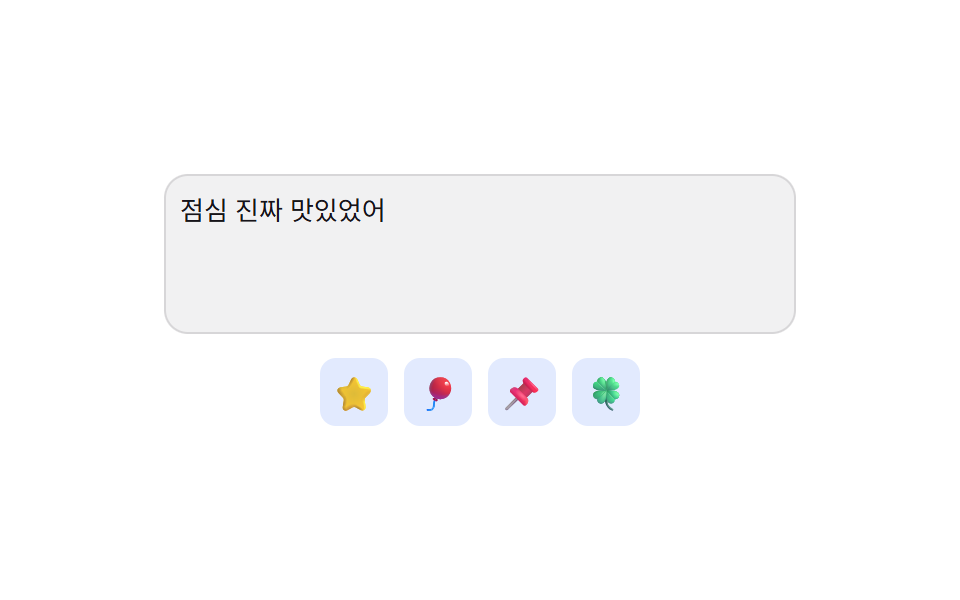
입력창을 벗어나기 직전의 커서 위치 값을 미리 저장해 두었다가, 이모지를 고른 순간 그 값이 가리키던 글자 사이로 되돌아가 이모지를 끼워 넣어 커서가 늘 맨 끝으로 밀리지 않게 한다.
쓰임본문 중간에 이모지를 넣는 긴 댓글·메시지 입력창
savedStartselectionStartsetSelectionRange
<main class="stage">
<div class="ip is-demo" id="ip">
<textarea class="ip__field" id="ipField" rows="3" aria-label="메시지 입력"></textarea>
<div class="ip__panel" role="group" aria-label="이모지 삽입">
<button class="ip__pick" type="button" aria-label="별">⭐</button>
<button class="ip__pick" type="button" aria-label="풍선">🎈</button>
<button class="ip__pick" type="button" aria-label="압정">📌</button>
<button class="ip__pick" type="button" aria-label="네잎클로버">🍀</button>
</div>
<p class="ip__sr" role="status" aria-live="polite" id="ipLive"></p>
</div>
</main>@use "../../../../site/static/demo-tokens" as *;
// 계산 겹: index.html 이 blur 시각의 selectionStart/selectionEnd 값을 저장해 두고,
// 이모지를 고르면 그 값이 가리키던 글자 사이로 되돌아가 끼워 넣는다 — 끝에 붙이지 않는다.
@include stage($stage-paper);
.ip { display: flex; flex-direction: column; align-items: center; gap: $sp-3; width: 100%; padding: 0 $sp-3; }
.ip__field {
width: 100%; max-width: 300px; min-height: 64px; border: none; border-radius: $r-control;
background: rgba($subject-ink, .06); color: $subject-ink; font-size: 13px; line-height: 1.6;
padding: $sp-2; resize: none; box-shadow: 0 0 0 1px rgba($subject-ink, .12) inset;
font-family: inherit;
}
.ip__field:focus-visible { outline: 2px solid $subject-blue; outline-offset: 2px; }
.ip__panel { display: flex; gap: $sp-2; }
.ip__pick {
width: 34px; height: 34px; border: none; border-radius: $r-sm; background: rgba($subject-blue, .14);
font-size: 17px; cursor: pointer; display: flex; align-items: center; justify-content: center;
transform: scale(1); transition: transform $dur-quick $ease-spring, background $dur-quick $ease-out;
}
.ip__pick:hover, .ip__pick:focus-visible { background: rgba($subject-blue, .26); transform: scale(1.12); }
.ip__pick--pop { animation: ipPop $dur-quick $ease-pop; }
.ip__sr { position: absolute; width: 1px; height: 1px; overflow: hidden; clip: rect(0 0 0 0); margin: -1px; padding: 0; border: 0; }
@keyframes ipPop {
0% { transform: scale(.7); }
60% { transform: scale(1.22); }
100% { transform: scale(1); }
}
@media (max-width: 340px) {
.ip__field { max-width: 260px; min-height: 56px; font-size: 12px; }
.ip__pick { width: 28px; height: 28px; font-size: 14px; }
}
@media (prefers-reduced-motion: reduce) {
.ip__pick { transition: none; }
.ip__pick--pop { animation: none; }
}html, body {
margin: 0;
overflow: hidden;
}
.stage {
box-sizing: border-box;
min-height: 100vh;
display: grid;
place-items: center;
margin: 0;
background: #ffffff;
font-family: -apple-system, "Segoe UI", "Noto Sans KR", sans-serif;
padding: clamp(8px, 4vw, 24px);
}
.ip {
display: flex;
flex-direction: column;
align-items: center;
gap: 12px;
width: 100%;
padding: 0 12px;
}
.ip__field {
width: 100%;
max-width: 300px;
min-height: 64px;
border: none;
border-radius: 12px;
background: rgba(23, 20, 26, 0.06);
color: #17141a;
font-size: 13px;
line-height: 1.6;
padding: 8px;
resize: none;
box-shadow: 0 0 0 1px rgba(23, 20, 26, 0.12) inset;
font-family: inherit;
}
.ip__field:focus-visible {
outline: 2px solid #2f6df6;
outline-offset: 2px;
}
.ip__panel {
display: flex;
gap: 8px;
}
.ip__pick {
width: 34px;
height: 34px;
border: none;
border-radius: 8px;
background: rgba(47, 109, 246, 0.14);
font-size: 17px;
cursor: pointer;
display: flex;
align-items: center;
justify-content: center;
transform: scale(1);
transition: transform 220ms cubic-bezier(0.2, 0.8, 0.2, 1), background 220ms ease-out;
}
.ip__pick:hover, .ip__pick:focus-visible {
background: rgba(47, 109, 246, 0.26);
transform: scale(1.12);
}
.ip__pick--pop {
animation: ipPop 220ms cubic-bezier(0.2, 1.4, 0.4, 1);
}
.ip__sr {
position: absolute;
width: 1px;
height: 1px;
overflow: hidden;
clip: rect(0 0 0 0);
margin: -1px;
padding: 0;
border: 0;
}
@keyframes ipPop {
0% {
transform: scale(0.7);
}
60% {
transform: scale(1.22);
}
100% {
transform: scale(1);
}
}
@media (max-width: 340px) {
.ip__field {
max-width: 260px;
min-height: 56px;
font-size: 12px;
}
.ip__pick {
width: 28px;
height: 28px;
font-size: 14px;
}
}
@media (prefers-reduced-motion: reduce) {
.ip__pick {
transition: none;
}
.ip__pick--pop {
animation: none;
}
}(function () {
var root = document.getElementById('ip');
var field = document.getElementById('ipField');
var live = document.getElementById('ipLive');
var synthetic = false;
function human() { if (synthetic) return; if (root.classList.contains('is-demo')) root.classList.remove('is-demo'); }
// 계산 겹: 입력창이 초점을 잃기 직전(blur)에 selectionStart/selectionEnd 값을 저장해 두고,
// 이모지를 고르는 순간 그 값이 가리키던 글자 사이에 정확히 끼워 넣어 커서를 그 자리로 되돌린다.
// (끝에 이어붙이면 값을 안 쓴 것과 같다 — 저장된 위치 값을 실제로 읽어 쓰는 것이 계산 겹이다.)
var savedStart = 0;
var savedEnd = 0;
field.addEventListener('blur', function () {
savedStart = field.selectionStart;
savedEnd = field.selectionEnd;
});
field.addEventListener('input', function () {
live.textContent = '글자 ' + field.value.length + '개, 커서 ' + field.selectionStart + '번째';
});
var picks = Array.prototype.slice.call(document.querySelectorAll('.ip__pick'));
picks.forEach(function (btn) {
btn.addEventListener('click', function () {
human();
var emoji = btn.textContent;
var value = field.value;
var before = value.slice(0, savedStart);
var after = value.slice(savedEnd);
field.value = before + emoji + after;
var landAt = savedStart + emoji.length;
field.focus({ preventScroll: true });
field.setSelectionRange(landAt, landAt);
savedStart = landAt;
savedEnd = landAt;
live.textContent = before.length + '번째 글자 뒤에 끼워짐, 커서 ' + landAt + '번째로 이동';
btn.classList.add('ip__pick--pop');
window.setTimeout(function () { btn.classList.remove('ip__pick--pop'); }, 260);
});
});
var reduce = window.matchMedia('(prefers-reduced-motion: reduce)').matches;
var DEMO_TEXT = '점심 진짜 맛있었어';
var MID = 5;
var step = 0, loopTimer = 0;
function runStep() {
if (!root.classList.contains('is-demo')) return;
synthetic = true;
if (step % 2 === 0) {
field.value = DEMO_TEXT;
field.focus({ preventScroll: true });
field.setSelectionRange(MID, MID);
field.blur();
} else {
var idx = (step / 2) % picks.length | 0;
picks[idx].dispatchEvent(new MouseEvent('click', { bubbles: true }));
}
synthetic = false;
step++;
loopTimer = window.setTimeout(runStep, 620);
}
if (!reduce) { loopTimer = window.setTimeout(runStep, 480); }
else { root.classList.remove('is-demo'); }
})();// EmojiPickerInsertCursorPositionPreserve — vanilla 판(run/402/demo/08-.../index.html) 의 React 포트.
// 계산 겹: 입력창이 blur 되는 순간의 selectionStart/selectionEnd 값을 저장해 두고, 이모지를
// 고르면 그 값이 가리키던 글자 사이로 되돌아가 끼워 넣는다 — 끝에 이어붙이지 않는다.
import { useEffect, useRef, useState } from "react";
import styles from "./EmojiPickerInsertCursorPositionPreserve.module.scss";
type Box<T> = { current: T };
const PICKS = [
{ ch: "⭐", label: "별" },
{ ch: "\u{1F388}", label: "풍선" },
{ ch: "\u{1F4CC}", label: "압정" },
{ ch: "\u{1F340}", label: "네잎클로버" },
];
const DEMO_TEXT = "점심 진짜 맛있었어";
const MID = 5;
export default function EmojiPickerInsertCursorPositionPreserve() {
const [isDemo, setIsDemo] = useState(true);
const [value, setValue] = useState("");
const [live, setLive] = useState("");
const [popIndex, setPopIndex] = useState(-1);
const isDemoRef = useRef(true) as unknown as Box<boolean>;
const synthRef = useRef(false) as unknown as Box<boolean>;
const valueRef = useRef("") as unknown as Box<string>;
const savedStartRef = useRef(0) as unknown as Box<number>;
const savedEndRef = useRef(0) as unknown as Box<number>;
const fieldRef = useRef(null) as unknown as Box<HTMLTextAreaElement>;
const loopTimerRef = useRef(0) as unknown as Box<number>;
const popTimerRef = useRef(0) as unknown as Box<number>;
function human() {
if (synthRef.current) return;
if (isDemoRef.current) { isDemoRef.current = false; setIsDemo(false); }
}
function onBlur() {
const el = fieldRef.current;
if (!el) return;
savedStartRef.current = el.selectionStart;
savedEndRef.current = el.selectionEnd;
}
function onInput(e: { target: { value: string; selectionStart: number | null } }) {
valueRef.current = e.target.value;
setValue(e.target.value);
setLive("글자 " + e.target.value.length + "개, 커서 " + (e.target.selectionStart ?? 0) + "번째");
}
function pick(i: number) {
human();
const emoji = PICKS[i].ch;
const start = savedStartRef.current;
const end = savedEndRef.current;
const cur = valueRef.current;
const before = cur.slice(0, start);
const after = cur.slice(end);
const next = before + emoji + after;
valueRef.current = next;
setValue(next);
const landAt = start + emoji.length;
savedStartRef.current = landAt;
savedEndRef.current = landAt;
setLive(before.length + "번째 글자 뒤에 끼워짐, 커서 " + landAt + "번째로 이동");
const el = fieldRef.current;
if (el) {
window.setTimeout(() => {
el.focus({ preventScroll: true });
el.setSelectionRange(landAt, landAt);
}, 0);
}
setPopIndex(i);
window.clearTimeout(popTimerRef.current);
popTimerRef.current = window.setTimeout(() => setPopIndex(-1), 260);
}
useEffect(() => {
const reduce = window.matchMedia("(prefers-reduced-motion: reduce)").matches;
let step = 0;
function runStep() {
if (!isDemoRef.current) return;
synthRef.current = true;
if (step % 2 === 0) {
valueRef.current = DEMO_TEXT;
setValue(DEMO_TEXT);
const el = fieldRef.current;
if (el) {
el.focus({ preventScroll: true });
el.setSelectionRange(MID, MID);
el.blur();
} else {
savedStartRef.current = MID;
savedEndRef.current = MID;
}
} else {
const idx = Math.floor(step / 2) % PICKS.length;
pick(idx);
}
synthRef.current = false;
step++;
loopTimerRef.current = window.setTimeout(runStep, 620);
}
if (!reduce) { loopTimerRef.current = window.setTimeout(runStep, 480); }
else { isDemoRef.current = false; setIsDemo(false); }
return () => { window.clearTimeout(loopTimerRef.current); window.clearTimeout(popTimerRef.current); };
// eslint-disable-next-line react-hooks/exhaustive-deps
}, []);
return (
<main className={styles.stage}>
<div className={styles.ip + " " + (isDemo ? styles.isDemo : "")}>
<textarea
className={styles.field}
rows={3}
aria-label="메시지 입력"
ref={fieldRef}
value={value}
onChange={onInput}
onBlur={onBlur}
/>
<div className={styles.panel} role="group" aria-label="이모지 삽입">
{PICKS.map((p, i) => (
<button
key={i}
type="button"
className={styles.pick + " " + (popIndex === i ? styles.pickPop : "")}
aria-label={p.label}
onClick={() => pick(i)}
>
{p.ch}
</button>
))}
</div>
<p className={styles.sr} role="status" aria-live="polite">{live}</p>
</div>
</main>
);
}08 저장해 둔 커서 위치 값에 정확히 끼워 넣는 삽입 — 측정 누적면적 2.754% · 움직인 프레임 8/23GODRICH 원작 · zip 에 SCSS·React 포함 · 이모지 검색기 9가지 — 값 하나로 여닫는 패턴
이 데모가 속한 글
 이모지 검색기 9가지 — 값 하나로 여닫는 패턴이모지 검색기 아홉 가지를 나란히 놓고 보면, 입력창 아래 남은 공간 값이 패널 높이보다 작을 때만 패널이 위로 열리는 자리로 바뀌고, 누르고 있는 시간 값이 정해둔 값을 넘을 때만 같은 이모지의 변형이 부채꼴로 펼 이 글의 데모 전부 보기