04Hình tên lửa
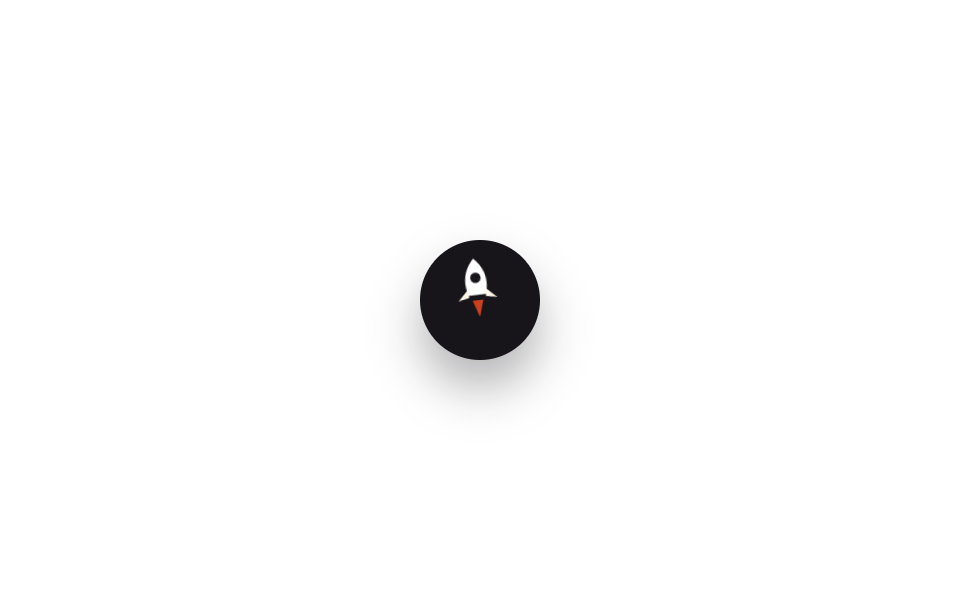
Chính nút là icon tên lửa; hover lên thì thân nghiêng đi, nhấc bổng lên chút và ngọn lửa phía sau chớp tắt, tạo cảm giác đang phóng lên.
Dùng choTrang landing game và startup, portfolio cần chút vui nhộn
rotate+translateYopacity 깜빡임700ms
<main class="stage">
  <button type="button" class="totop is-demo" aria-label="Phóng lên đầu trang">
    <svg class="totop__rocket" viewBox="0 0 24 28" aria-hidden="true">
      <path class="totop__body" d="M12 1 C17 6 18 12 16 18 L8 18 C6 12 7 6 12 1 Z"/>
      <circle class="totop__window" cx="12" cy="10" r="2.4"/>
      <path class="totop__fin totop__fin--l" d="M8 15 L3 20 L8 19 Z"/>
      <path class="totop__fin totop__fin--r" d="M16 15 L21 20 L16 19 Z"/>
      <path class="totop__flame" d="M9.5 18 L12 25 L14.5 18 Z"/>
    </svg>
  </button>
</main>
@use "../../../../site/static/demo-tokens" as *;
// ── 변수 3개 ──────────────────────────────────────────
$duration: 700ms;
$easing: $ease-out;
$color: $stage-orange; // 불꽃 색
@include stage($stage-paper);
.totop {
width: 60px; height: 60px;
border: 0;
border-radius: $r-pill;
background: $subject-ink;
display: grid;
place-items: center;
box-shadow: $shadow-raised;
cursor: pointer;
}
.totop__rocket {
width: 26px; height: 30px;
transform-origin: center bottom;
}
.totop__body { fill: $stage-paper; }
.totop__window { fill: $subject-ink; }
.totop__fin { fill: $subject-cream; }
.totop__flame {
fill: $color;
transform-origin: center top;
opacity: 0;
}
// 실제 사용: 마우스를 올리거나 포커스하면 1회 발사
.totop:hover .totop__rocket,
.totop:focus-visible .totop__rocket { animation: rocket-launch $duration $easing 1; }
.totop:hover .totop__flame,
.totop:focus-visible .totop__flame { animation: flame-flicker $duration $easing 1; }
// 데모 루프 — 같은 모양을 2초 주기 뒤쪽에 압축해 자동 재생 (064-02 와 같은 기법)
.totop.is-demo .totop__rocket { animation: rocket-launch-loop 2s $easing infinite; }
.totop.is-demo .totop__flame { animation: flame-flicker-loop 2s $easing infinite; }
@keyframes rocket-launch {
0% { transform: translateY(0) rotate(0deg); }
40% { transform: translateY(-9px) rotate(-9deg); }
100% { transform: translateY(-2px) rotate(-4deg); }
}
@keyframes flame-flicker {
0%, 100% { opacity: 0; transform: scaleY(.6); }
40% { opacity: 1; transform: scaleY(1.3); }
70% { opacity: .7; transform: scaleY(.9); }
}
@keyframes rocket-launch-loop {
0%, 55% { transform: translateY(0) rotate(0deg); }
75% { transform: translateY(-9px) rotate(-9deg); }
100% { transform: translateY(-2px) rotate(-4deg); }
}
@keyframes flame-flicker-loop {
0%, 55%, 100% { opacity: 0; transform: scaleY(.6); }
75% { opacity: 1; transform: scaleY(1.3); }
90% { opacity: .7; transform: scaleY(.9); }
}
@media (prefers-reduced-motion: reduce) {
.totop:hover .totop__rocket, .totop:focus-visible .totop__rocket,
.totop.is-demo .totop__rocket,
.totop:hover .totop__flame, .totop:focus-visible .totop__flame,
.totop.is-demo .totop__flame { animation: none; }
}html, body {
margin: 0;
overflow: hidden;
}
.stage {
box-sizing: border-box;
min-height: 100vh;
display: grid;
place-items: center;
margin: 0;
background: #ffffff;
font-family: -apple-system, "Segoe UI", "Noto Sans KR", sans-serif;
padding: clamp(8px, 4vw, 24px);
}
.totop {
width: 60px;
height: 60px;
border: 0;
border-radius: 999px;
background: #17141a;
display: grid;
place-items: center;
box-shadow: 0 14px 24px rgba(23, 20, 26, 0.32);
cursor: pointer;
}
.totop__rocket {
width: 26px;
height: 30px;
transform-origin: center bottom;
}
.totop__body {
fill: #ffffff;
}
.totop__window {
fill: #17141a;
}
.totop__fin {
fill: #fff7e6;
}
.totop__flame {
fill: #ff4d1f;
transform-origin: center top;
opacity: 0;
}
.totop:hover .totop__rocket,
.totop:focus-visible .totop__rocket {
animation: rocket-launch 700ms ease-out 1;
}
.totop:hover .totop__flame,
.totop:focus-visible .totop__flame {
animation: flame-flicker 700ms ease-out 1;
}
.totop.is-demo .totop__rocket {
animation: rocket-launch-loop 2s ease-out infinite;
}
.totop.is-demo .totop__flame {
animation: flame-flicker-loop 2s ease-out infinite;
}
@keyframes rocket-launch {
0% {
transform: translateY(0) rotate(0deg);
}
40% {
transform: translateY(-9px) rotate(-9deg);
}
100% {
transform: translateY(-2px) rotate(-4deg);
}
}
@keyframes flame-flicker {
0%, 100% {
opacity: 0;
transform: scaleY(0.6);
}
40% {
opacity: 1;
transform: scaleY(1.3);
}
70% {
opacity: 0.7;
transform: scaleY(0.9);
}
}
@keyframes rocket-launch-loop {
0%, 55% {
transform: translateY(0) rotate(0deg);
}
75% {
transform: translateY(-9px) rotate(-9deg);
}
100% {
transform: translateY(-2px) rotate(-4deg);
}
}
@keyframes flame-flicker-loop {
0%, 55%, 100% {
opacity: 0;
transform: scaleY(0.6);
}
75% {
opacity: 1;
transform: scaleY(1.3);
}
90% {
opacity: 0.7;
transform: scaleY(0.9);
}
}
@media (prefers-reduced-motion: reduce) {
.totop:hover .totop__rocket, .totop:focus-visible .totop__rocket,
.totop.is-demo .totop__rocket,
.totop:hover .totop__flame, .totop:focus-visible .totop__flame,
.totop.is-demo .totop__flame {
animation: none;
}
}import type { CSSProperties } from "react";
import styles from "./RocketButton.module.scss";
export type RocketButtonProps = {
/** 발사 애니메이션 시간 (기본 700ms) */
duration?: number;
easing?: string;
flameColor?: string;
};
type Vars = CSSProperties & { "--duration"?: string; "--easing"?: string; "--flame"?: string };
// 실제 사용: 마우스를 올리거나 키보드로 포커스하면 로켓이 한 번 발사된다. 상태 없이 CSS 로 처리한다
export default function RocketButton({
duration = 700,
easing = "ease-out",
flameColor = "#ff4d1f",
}: RocketButtonProps) {
const vars: Vars = { "--duration": `${duration}ms`, "--easing": easing, "--flame": flameColor };
return (
<button
type="button"
className={styles.totop}
style={vars}
aria-label="맨 위로 발사"
onClick={() => window.scrollTo({ top: 0, behavior: "smooth" })}
>
<svg className={styles.rocket} viewBox="0 0 24 28" aria-hidden="true">
<path className={styles.body} d="M12 1 C17 6 18 12 16 18 L8 18 C6 12 7 6 12 1 Z" />
<circle className={styles.window} cx="12" cy="10" r="2.4" />
<path className={styles.fin} d="M8 15 L3 20 L8 19 Z" />
<path className={styles.fin} d="M16 15 L21 20 L16 19 Z" />
<path className={styles.flame} d="M9.5 18 L12 25 L14.5 18 Z" />
</svg>
</button>
);
}04 Hình tên lửa — Diện tích đo được 0.289% · khung hình chuyển động 10/23Nguyên tác GODRICH · SCSS và React nằm trong tệp zip · 9 nút back to top button css — hiện khi cuộn
Bài viết chứa demo này
 9 nút back to top button css — hiện khi cuộnNút back to top button css là nút nhỏ đưa bạn về đầu trang khi đã cuộn xuống sâu. Chín kiểu dưới đây chạy từ bản không A Xem tất cả demo trong bài này