07Nút gợn vòng tròn
Khi bấm, vòng viền (không phải hình tròn đặc) phóng to ra ngoài trong khi opacity mờ dần, tạo phản hồi clic lan ra như tiếng chuông chứ không phải sóng.
Dùng choNút like và bookmark, nút gửi tin nhắn trong chat
::after 링 확산scale + opacity:active 트리거
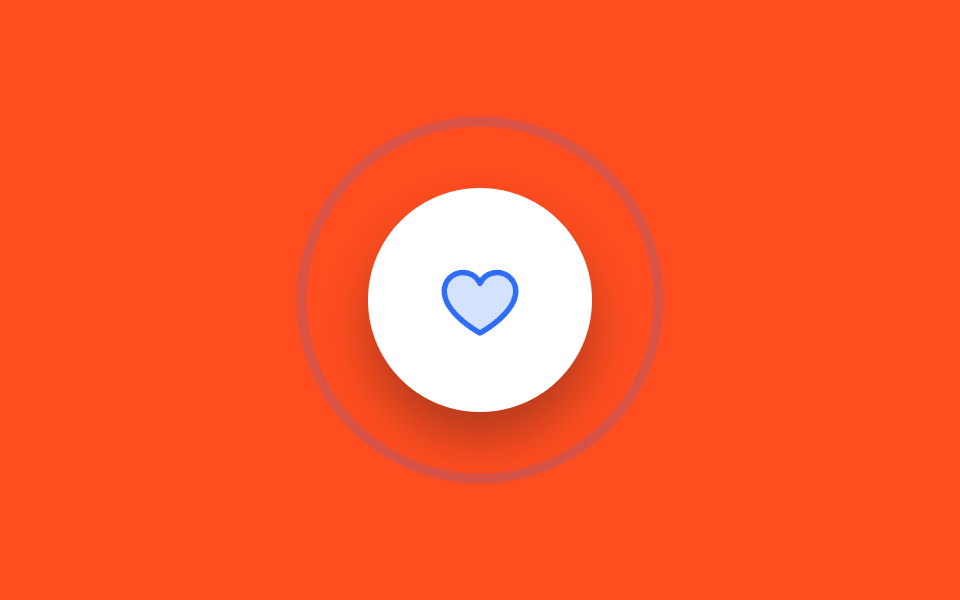
<main class="stage is-demo">
  <button class="btn" type="button" aria-label="Thích">
    <svg class="btn__heart" viewBox="0 0 256 256" aria-hidden="true" focusable="false">
      <g fill="currentColor"><path d="M232 102c0 66-104 122-104 122S24 168 24 102a54 54 0 0 1 54-54c22.59 0 41.94 12.31 50 32c8.06-19.69 27.41-32 50-32a54 54 0 0 1 54 54" opacity=".2"/><path d="M178 40c-20.65 0-38.73 8.88-50 23.89C116.73 48.88 98.65 40 78 40a62.07 62.07 0 0 0-62 62c0 70 103.79 126.66 108.21 129a8 8 0 0 0 7.58 0C136.21 228.66 240 172 240 102a62.07 62.07 0 0 0-62-62m-50 174.8c-18.26-10.64-96-59.11-96-112.8a46.06 46.06 0 0 1 46-46c19.45 0 35.78 10.36 42.6 27a8 8 0 0 0 14.8 0c6.82-16.67 23.15-27 42.6-27a46.06 46.06 0 0 1 46 46c0 53.61-77.76 102.15-96 112.8"/></g>
    </svg>
  </button>
</main>
@use "../../../../site/static/demo-tokens" as *;
// ── 변수 3개 ──────────────────────────────────────────
$duration: $dur-loop; // 2s — 핑 두 번
$easing: $ease-out;
$color: $subject-blue; // 링·하트 색
@include stage($stage-orange);
.btn {
box-sizing: border-box;
position: relative;
width: 112px;
height: 112px;
border: none;
border-radius: 50%;
background: $stage-paper;
cursor: pointer;
display: grid;
place-items: center;
box-shadow: $shadow-raised;
}
.btn__heart {
width: 44px;
height: 44px;
color: $color; // Phosphor duotone: g fill="currentColor" 가 이 값을 물려받는다
}
// 테두리 링 — 채워진 원이 아니라 굵은 선이 퍼진다
.btn::after {
content: "";
position: absolute;
inset: 0;
border-radius: 50%;
border: 3px solid $color;
opacity: 0;
transform: scale(1);
}
// 실사용: 누르는 순간 한 번
.btn:active .btn__heart { animation: heart-pop $dur-base $ease-pop 1; }
.btn:active::after { animation: ring $dur-base $easing 1; }
.btn:focus-visible { outline: 3px solid $subject-ink; outline-offset: 4px; }
// 격자 미리보기: 2초에 두 번 종소리처럼 퍼진다
.stage.is-demo .btn__heart { animation: heart-pop $duration $ease-pop infinite; }
.stage.is-demo .btn::after { animation: ring $duration $easing infinite; }
@keyframes ring {
0% { transform: scale(1); opacity: .9; }
34% { transform: scale(1.8); opacity: 0; }
50% { transform: scale(1); opacity: .9; }
84% { transform: scale(1.8); opacity: 0; }
100% { transform: scale(1); opacity: 0; }
}
@keyframes heart-pop {
0%, 50% { transform: scale(1); }
8%, 58% { transform: scale(1.14); }
16%, 66% { transform: scale(.96); }
22%, 72% { transform: scale(1); }
}
@media (prefers-reduced-motion: reduce) {
.stage.is-demo .btn__heart, .stage.is-demo .btn::after { animation: none; }
.stage.is-demo .btn::after { opacity: 0; }
}html, body {
margin: 0;
overflow: hidden;
}
.stage {
box-sizing: border-box;
min-height: 100vh;
display: grid;
place-items: center;
margin: 0;
background: #ff4d1f;
font-family: -apple-system, "Segoe UI", "Noto Sans KR", sans-serif;
padding: clamp(8px, 4vw, 24px);
}
.btn {
box-sizing: border-box;
position: relative;
width: 112px;
height: 112px;
border: none;
border-radius: 50%;
background: #ffffff;
cursor: pointer;
display: grid;
place-items: center;
box-shadow: 0 14px 24px rgba(23, 20, 26, 0.32);
}
.btn__heart {
width: 44px;
height: 44px;
color: #2f6df6;
}
.btn::after {
content: "";
position: absolute;
inset: 0;
border-radius: 50%;
border: 3px solid #2f6df6;
opacity: 0;
transform: scale(1);
}
.btn:active .btn__heart {
animation: heart-pop 300ms cubic-bezier(0.2, 1.4, 0.4, 1) 1;
}
.btn:active::after {
animation: ring 300ms ease-out 1;
}
.btn:focus-visible {
outline: 3px solid #17141a;
outline-offset: 4px;
}
.stage.is-demo .btn__heart {
animation: heart-pop 2s cubic-bezier(0.2, 1.4, 0.4, 1) infinite;
}
.stage.is-demo .btn::after {
animation: ring 2s ease-out infinite;
}
@keyframes ring {
0% {
transform: scale(1);
opacity: 0.9;
}
34% {
transform: scale(1.8);
opacity: 0;
}
50% {
transform: scale(1);
opacity: 0.9;
}
84% {
transform: scale(1.8);
opacity: 0;
}
100% {
transform: scale(1);
opacity: 0;
}
}
@keyframes heart-pop {
0%, 50% {
transform: scale(1);
}
8%, 58% {
transform: scale(1.14);
}
16%, 66% {
transform: scale(0.96);
}
22%, 72% {
transform: scale(1);
}
}
@media (prefers-reduced-motion: reduce) {
.stage.is-demo .btn__heart, .stage.is-demo .btn::after {
animation: none;
}
.stage.is-demo .btn::after {
opacity: 0;
}
}import type { CSSProperties } from "react";
import styles from "./RippleRingButton.module.scss";
export type RippleRingButtonProps = {
duration?: number;
easing?: string;
color?: string;
label?: string;
};
export default function RippleRingButton({
duration = 300,
easing = "ease-out",
color = "#2f6df6",
label = "좋아요",
}: RippleRingButtonProps) {
const vars: CSSProperties = { "--duration": `${duration}ms`, "--easing": easing, "--color": color } as CSSProperties;
return (
<button className={styles.btn} style={vars} type="button" aria-label={label}>
<svg className={styles.heart} viewBox="0 0 256 256" aria-hidden="true" focusable="false">
<g fill="currentColor"><path d="M232 102c0 66-104 122-104 122S24 168 24 102a54 54 0 0 1 54-54c22.59 0 41.94 12.31 50 32c8.06-19.69 27.41-32 50-32a54 54 0 0 1 54 54" opacity=".2" /><path d="M178 40c-20.65 0-38.73 8.88-50 23.89C116.73 48.88 98.65 40 78 40a62.07 62.07 0 0 0-62 62c0 70 103.79 126.66 108.21 129a8 8 0 0 0 7.58 0C136.21 228.66 240 172 240 102a62.07 62.07 0 0 0-62-62m-50 174.8c-18.26-10.64-96-59.11-96-112.8a46.06 46.06 0 0 1 46-46c19.45 0 35.78 10.36 42.6 27a8 8 0 0 0 14.8 0c6.82-16.67 23.15-27 42.6-27a46.06 46.06 0 0 1 46 46c0 53.61-77.76 102.15-96 112.8" /></g>
</svg>
</button>
);
}07 Nút gợn vòng tròn — Diện tích đo được 13.521% · khung hình chuyển động 18/23Nguyên tác GODRICH · SCSS và React nằm trong tệp zip · 9 css button design ideas — dán một file là chạy
Bài viết chứa demo này
 9 css button design ideas — dán một file là chạycss button design là quyết định màu, hình dáng nút và cách nó phản ứng với chuột, chỉ bằng vài dòng code. Muốn nút gradi Xem tất cả demo trong bài này