05Vòng glow quanh icon
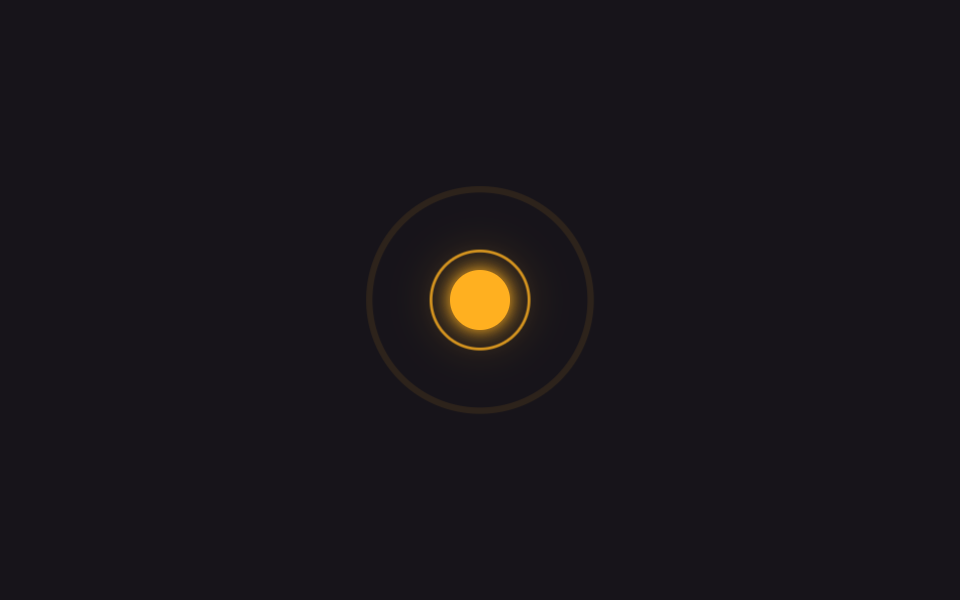
Hai vòng tròn .ring--a và .ring--b ôm quanh icon, phóng to bằng scale lệch nhau nửa chu kỳ trong khi opacity mờ dần về 0, đọc như tín hiệu lan ra xa.
Dùng choIcon thông báo và trạng thái đang bật, chỉ báo live
animation-delaybox-shadow 링scale · opacity
<main class="stage is-demo">
  <span class="icon-wrap" aria-hidden="true">
    <span class="ring ring--a"></span>
    <span class="ring ring--b"></span>
    <span class="icon"></span>
  </span>
</main>
@use "../../../../site/static/demo-tokens" as *;
// ── 변수 3개 ──────────────────────────────────────────
$duration: $dur-loop; // 2s — 링 한 번 퍼지는 시간
$easing: ease-out;
$color: #ffb020; // 네온 앰버 (알림)
@include stage($stage-ink);
.icon-wrap { position: relative; width: 72px; height: 72px; display: grid; place-items: center; }
.icon {
width: 30px; height: 30px; border-radius: 50%;
background: $color;
box-shadow: 0 0 $sp-2 $color, 0 0 $sp-6 rgba($color, .6);
}
.ring {
position: absolute; inset: 0;
border-radius: 50%;
border: 2px solid $color;
opacity: 0;
}
// transform·opacity 만 — 이 항목은 순수하게 원칙대로다
.stage.is-demo .ring--a { animation: ring $duration $easing infinite; }
.stage.is-demo .ring--b { animation: ring $duration $easing infinite; animation-delay: $duration * .5; }
@keyframes ring {
0% { transform: scale(.7); opacity: .8; }
70% { transform: scale(1.7); opacity: 0; }
100% { transform: scale(1.7); opacity: 0; }
}
@media (prefers-reduced-motion: reduce) {
.stage.is-demo .ring--a, .stage.is-demo .ring--b { animation: none; opacity: 0; }
}html, body {
margin: 0;
overflow: hidden;
}
.stage {
box-sizing: border-box;
min-height: 100vh;
display: grid;
place-items: center;
margin: 0;
background: #17141a;
font-family: -apple-system, "Segoe UI", "Noto Sans KR", sans-serif;
padding: clamp(8px, 4vw, 24px);
}
.icon-wrap {
position: relative;
width: 72px;
height: 72px;
display: grid;
place-items: center;
}
.icon {
width: 30px;
height: 30px;
border-radius: 50%;
background: #ffb020;
box-shadow: 0 0 8px #ffb020, 0 0 24px rgba(255, 176, 32, 0.6);
}
.ring {
position: absolute;
inset: 0;
border-radius: 50%;
border: 2px solid #ffb020;
opacity: 0;
}
.stage.is-demo .ring--a {
animation: ring 2s ease-out infinite;
}
.stage.is-demo .ring--b {
animation: ring 2s ease-out infinite;
animation-delay: 1s;
}
@keyframes ring {
0% {
transform: scale(0.7);
opacity: 0.8;
}
70% {
transform: scale(1.7);
opacity: 0;
}
100% {
transform: scale(1.7);
opacity: 0;
}
}
@media (prefers-reduced-motion: reduce) {
.stage.is-demo .ring--a, .stage.is-demo .ring--b {
animation: none;
opacity: 0;
}
}import type { CSSProperties } from "react";
import styles from "./IconGlowRing.module.scss";
export type IconGlowRingProps = {
/** 링 한 번 퍼지는 시간 (기본 2000ms) */
duration?: number;
color?: string;
};
export default function IconGlowRing({ duration = 2000, color = "#ffb020" }: IconGlowRingProps) {
const vars: CSSProperties = { "--duration": `${duration}ms`, "--color": color } as CSSProperties;
return (
<span className={styles.wrap} style={vars} aria-hidden="true">
<span className={`${styles.ring} ${styles.ringA}`} />
<span className={`${styles.ring} ${styles.ringB}`} />
<span className={styles.icon} />
</span>
);
}05 Vòng glow quanh icon — Diện tích đo được 6.007% · khung hình chuyển động 23/23Nguyên tác GODRICH · SCSS và React nằm trong tệp zip · 9 css glow effect — nút chữ phát sáng như neon
Bài viết chứa demo này
 9 css glow effect — nút chữ phát sáng như neoncss glow effect là lớp trang trí tạo vầng sáng lan ra quanh nút hoặc dòng chữ, trông như biển neon nhưng chỉ làm bằng và Xem tất cả demo trong bài này