06Gạch chân phát sáng
Gạch chân phủ gradient neon chỉ trượt bằng translateX tới dưới mục menu đang chọn, vệt sáng box-shadow lan theo cùng lúc.
Dùng choMenu điều hướng theme tối, tab của site game và streaming
translateXbox-shadowlinear-gradient
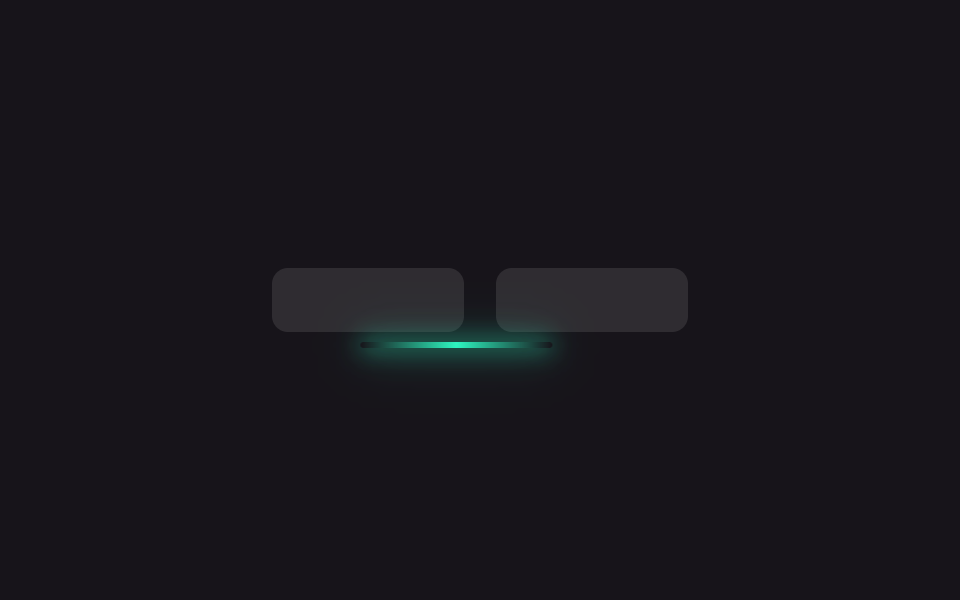
<main class="stage is-demo">
  <nav class="nav" aria-hidden="true">
    <span class="tab"></span>
    <span class="tab"></span>
    <span class="indicator"></span>
  </nav>
</main>
@use "../../../../site/static/demo-tokens" as *;
// ── 변수 3개 ──────────────────────────────────────────
$duration: $dur-loop; // 2s — 왕복 한 번
$easing: $ease-spring;
$color: #2df5c0; // 네온 틸
@include stage($stage-ink);
// 탭 두 개가 같은 고정 폭이라 인디케이터는 그 폭+간격만큼만 옮기면 된다 (짐작 없는 값 — BD19)
$tab-w: 96px;
$tab-gap: $sp-4;
.nav { position: relative; display: flex; gap: $tab-gap; }
.tab {
flex: 0 0 auto;
width: $tab-w; height: $sp-8;
border-radius: $r-sm;
background: rgba($stage-paper, .1);
}
.indicator {
position: absolute; left: 0; bottom: -$sp-2;
width: $tab-w; height: 3px;
border-radius: $r-xs;
background: linear-gradient(90deg, transparent, $color, transparent);
box-shadow: 0 0 $sp-3 $color, 0 0 $sp-6 rgba($color, .6);
}
// translateX 만 움직인다 — 폭이 고정값이라 도착 지점도 고정값이다
.stage.is-demo .indicator {
animation: slide $duration $easing infinite;
}
@keyframes slide {
0%, 40% { transform: translateX(0); }
60%, 90% { transform: translateX(#{$tab-w + $tab-gap}); }
100% { transform: translateX(0); }
}
@media (prefers-reduced-motion: reduce) {
.stage.is-demo .indicator { animation: none; }
}html, body {
margin: 0;
overflow: hidden;
}
.stage {
box-sizing: border-box;
min-height: 100vh;
display: grid;
place-items: center;
margin: 0;
background: #17141a;
font-family: -apple-system, "Segoe UI", "Noto Sans KR", sans-serif;
padding: clamp(8px, 4vw, 24px);
}
.nav {
position: relative;
display: flex;
gap: 16px;
}
.tab {
flex: 0 0 auto;
width: 96px;
height: 32px;
border-radius: 8px;
background: rgba(255, 255, 255, 0.1);
}
.indicator {
position: absolute;
left: 0;
bottom: -8px;
width: 96px;
height: 3px;
border-radius: 4px;
background: linear-gradient(90deg, transparent, #2df5c0, transparent);
box-shadow: 0 0 12px #2df5c0, 0 0 24px rgba(45, 245, 192, 0.6);
}
.stage.is-demo .indicator {
animation: slide 2s cubic-bezier(0.2, 0.8, 0.2, 1) infinite;
}
@keyframes slide {
0%, 40% {
transform: translateX(0);
}
60%, 90% {
transform: translateX(112px);
}
100% {
transform: translateX(0);
}
}
@media (prefers-reduced-motion: reduce) {
.stage.is-demo .indicator {
animation: none;
}
}import { useState } from "react";
import type { CSSProperties } from "react";
import styles from "./UnderlineGlow.module.scss";
export type UnderlineGlowProps = {
/** 슬라이드 시간 (기본 300ms) */
duration?: number;
easing?: string;
color?: string;
labels?: [string, string];
};
export default function UnderlineGlow({
duration = 300,
easing = "cubic-bezier(.2,.8,.2,1)",
color = "#2df5c0",
labels = ["탭 1", "탭 2"],
}: UnderlineGlowProps) {
const [active, setActive] = useState(0);
const vars: CSSProperties = { "--duration": `${duration}ms`, "--easing": easing, "--color": color } as CSSProperties;
return (
<nav className={styles.nav} style={vars}>
{labels.map((label, i) => (
<button
key={label}
type="button"
className={styles.tab}
aria-current={active === i}
onClick={() => setActive(i)}
>
{label}
</button>
))}
<span className={styles.indicator} data-active={active} />
</nav>
);
}06 Gạch chân phát sáng — Diện tích đo được 3.618% · khung hình chuyển động 7/23Nguyên tác GODRICH · SCSS và React nằm trong tệp zip · 9 css glow effect — nút chữ phát sáng như neon
Bài viết chứa demo này
 9 css glow effect — nút chữ phát sáng như neoncss glow effect là lớp trang trí tạo vầng sáng lan ra quanh nút hoặc dòng chữ, trông như biển neon nhưng chỉ làm bằng và Xem tất cả demo trong bài này