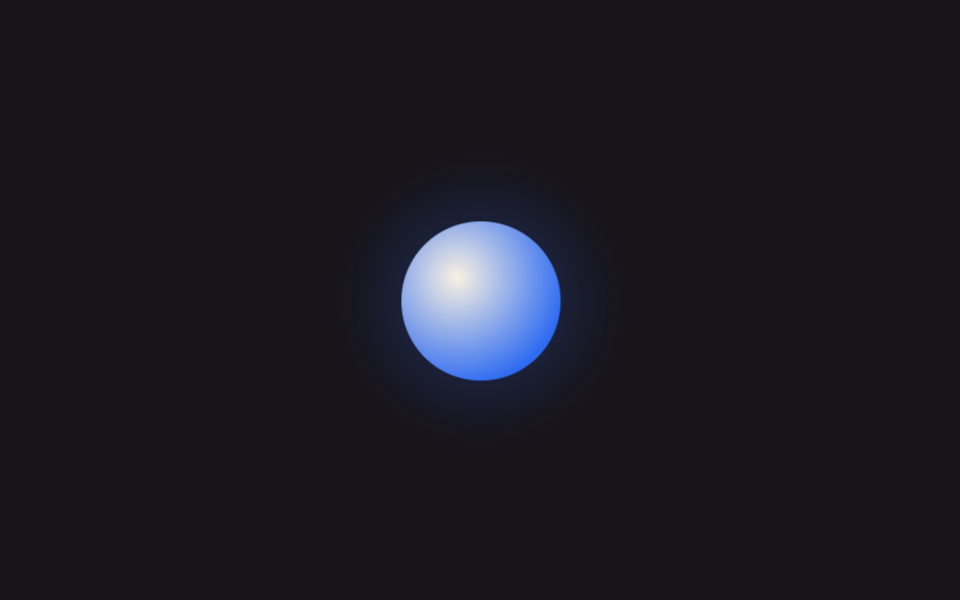
09Quả cầu pulse kiểu app AI
Quả cầu gradient mờ phồng lên xẹp xuống liên tục, ngầm báo AI đang suy nghĩ câu trả lời.
Dùng choChờ phản hồi chatbot AI, hiển thị trợ lý giọng nói đang nghe
blur 그라디언트2초 펄스::before 글로우
<main class="stage">
  <div class="orb" role="status" aria-label="Đang chuẩn bị phản hồi"></div>
</main>
@use "../../../../site/static/demo-tokens" as *;
$duration: $dur-loop; // 펄스 한 사이클 (2초)
$easing: ease-in-out;
$color: $subject-blue; // 구체 안쪽 색
@include stage($stage-ink);
.orb {
position: relative;
width: clamp(56px, 16vw, 84px);
height: clamp(56px, 16vw, 84px);
}
.orb::before {
content: "";
position: absolute;
inset: -30%;
border-radius: 50%;
background: radial-gradient(circle, rgba($color, .55), transparent 70%);
filter: blur(6px);
animation: glow $duration $easing infinite;
}
.orb::after {
content: "";
position: absolute;
inset: 0;
border-radius: 50%;
background: radial-gradient(circle at 35% 35%, $subject-cream, $color 75%);
animation: core $duration $easing infinite;
}
@keyframes core {
0%, 100% { transform: scale(.88); opacity: .88; }
50% { transform: scale(1.08); opacity: 1; }
}
@keyframes glow {
0%, 100% { transform: scale(.8); opacity: .35; }
50% { transform: scale(1.25); opacity: .65; }
}
@media (prefers-reduced-motion: reduce) {
.orb::before, .orb::after { animation: none; transform: scale(1); opacity: .75; }
}html, body {
margin: 0;
overflow: hidden;
}
.stage {
box-sizing: border-box;
min-height: 100vh;
display: grid;
place-items: center;
margin: 0;
background: #17141a;
font-family: -apple-system, "Segoe UI", "Noto Sans KR", sans-serif;
padding: clamp(8px, 4vw, 24px);
}
.orb {
position: relative;
width: clamp(56px, 16vw, 84px);
height: clamp(56px, 16vw, 84px);
}
.orb::before {
content: "";
position: absolute;
inset: -30%;
border-radius: 50%;
background: radial-gradient(circle, rgba(47, 109, 246, 0.55), transparent 70%);
filter: blur(6px);
animation: glow 2s ease-in-out infinite;
}
.orb::after {
content: "";
position: absolute;
inset: 0;
border-radius: 50%;
background: radial-gradient(circle at 35% 35%, #fff7e6, #2f6df6 75%);
animation: core 2s ease-in-out infinite;
}
@keyframes core {
0%, 100% {
transform: scale(0.88);
opacity: 0.88;
}
50% {
transform: scale(1.08);
opacity: 1;
}
}
@keyframes glow {
0%, 100% {
transform: scale(0.8);
opacity: 0.35;
}
50% {
transform: scale(1.25);
opacity: 0.65;
}
}
@media (prefers-reduced-motion: reduce) {
.orb::before, .orb::after {
animation: none;
transform: scale(1);
opacity: 0.75;
}
}import type { CSSProperties } from "react";
import styles from "./PulseOrb.module.scss";
export type PulseOrbProps = {
/** 오브 지름 (기본 68px) */
size?: number;
/** 펄스 한 사이클 시간 (기본 2000ms) */
duration?: number;
/** 구체 안쪽 색 */
color?: string;
label?: string;
};
type Vars = CSSProperties & { "--size"?: string; "--duration"?: string; "--color"?: string };
export default function PulseOrb({
size = 68,
duration = 2000,
color = "#2f6df6",
label = "Preparing a response",
}: PulseOrbProps) {
const vars: Vars = {
"--size": `${size}px`,
"--duration": `${duration}ms`,
"--color": color,
};
return <div className={styles.orb} style={vars} role="status" aria-label={label} />;
}09 Quả cầu pulse kiểu app AI — Diện tích đo được 8.89% · khung hình chuyển động 23/23Nguyên tác GODRICH · SCSS và React nằm trong tệp zip · 9 hiệu ứng css loading spinner animation gọn nhẹ
Bài viết chứa demo này
 9 hiệu ứng css loading spinner animation gọn nhẹCSS loading spinner animation là một khối nhỏ tự xoay, tự nảy hoặc tự đổi độ sáng bằng thuần CSS để báo cho người dùng b Xem tất cả demo trong bài này


