04Gauge nửa vòng tròn
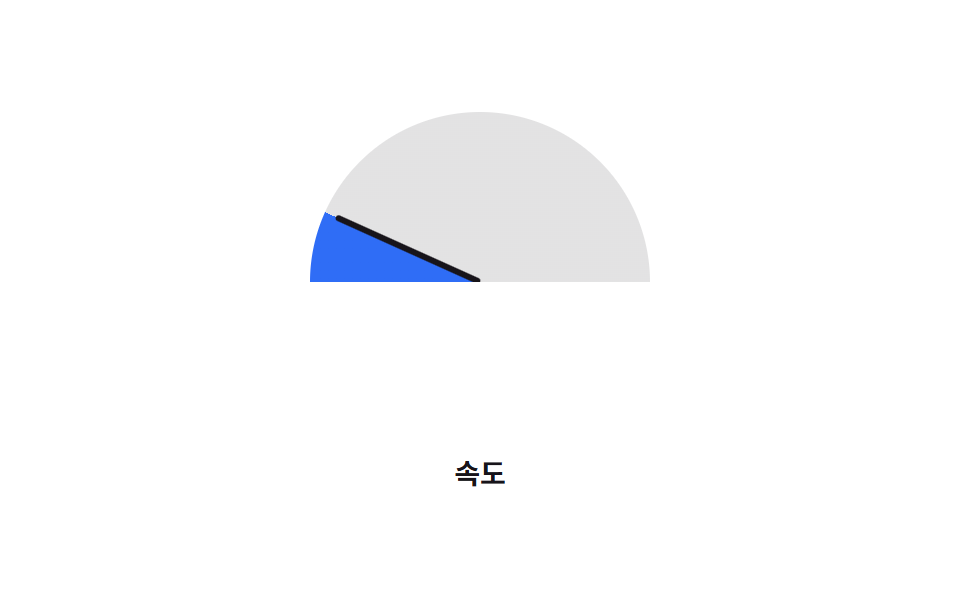
Kim đồng hồ xoay bằng transform:rotate() trên mặt số nửa hình tròn đúng theo --percent, quét từ đầu này sang đầu kia như đồng hồ tốc độ thay vì vẽ trọn một vòng.
Dùng choGauge tốc độ hoặc điểm số, dashboard mức đạt mục tiêu
transform: rotate()반원 clip바늘
<main class="stage">
  <div class="gauge is-demo" role="progressbar" aria-valuemin="0" aria-valuemax="100" aria-valuenow="76" aria-label="Tốc độ">
    <span class="gauge__needle"></span>
  </div>
  <p class="cap">Tốc độ</p>
</main>
@use "../../../../site/static/demo-tokens" as *;
// ── 변수 3개 ──────────────────────────────────────────
$duration: $dur-loop; // 바늘이 왼쪽 끝에서 오른쪽 끝까지 도는 시간
$easing: $ease-out;
$color: $subject-blue; // 채워진 구간 색
@include stage($stage-paper);
// 채움 각도와 바늘 각도를 같은 값으로 구동한다. ::before·바늘 둘 다 자식이라 inherits 가 필요하다
@property --percent {
syntax: "<number>";
inherits: true;
initial-value: 0;
}
.gauge {
--percent: 0;
position: relative;
width: clamp(140px, 38vw, 170px);
height: clamp(70px, 19vw, 85px); // 폭의 절반 — 원 아래쪽 절반을 overflow 로 자른다
overflow: hidden;
}
.gauge::before {
content: "";
position: absolute;
top: 0; left: 0;
width: 100%;
height: 200%; // 부모 높이의 두 배 = 완전한 원. 위쪽 절반만 보인다
border-radius: 50%;
background: conic-gradient(from -90deg, $color calc(var(--percent) * 1.8deg), rgba($subject-ink, .12) 0);
}
.gauge__needle {
position: absolute;
bottom: 0;
left: 50%;
width: 3px;
height: calc(100% - 6px);
background: $subject-ink;
border-radius: 2px;
transform-origin: bottom center; // 규칙8: 바늘 회전 피벗
transform: translateX(-50%) rotate(calc(var(--percent) * 1.8deg - 90deg));
}
.gauge.is-demo { animation: sweep $duration $easing infinite; }
@keyframes sweep { 0% { --percent: 0; } 100% { --percent: 100; } }
.cap {
margin: 14px 0 0;
color: $subject-ink;
font: 600 clamp(12px, 3.2vw, 14px)/1 -apple-system, "Segoe UI", "Noto Sans KR", sans-serif;
}
@media (prefers-reduced-motion: reduce) {
.gauge.is-demo { animation: none; --percent: 76; }
}html, body {
margin: 0;
overflow: hidden;
}
.stage {
box-sizing: border-box;
min-height: 100vh;
display: grid;
place-items: center;
margin: 0;
background: #ffffff;
font-family: -apple-system, "Segoe UI", "Noto Sans KR", sans-serif;
padding: clamp(8px, 4vw, 24px);
}
@property --percent {
syntax: "<number>";
inherits: true;
initial-value: 0;
}
.gauge {
--percent: 0;
position: relative;
width: clamp(140px, 38vw, 170px);
height: clamp(70px, 19vw, 85px);
overflow: hidden;
}
.gauge::before {
content: "";
position: absolute;
top: 0;
left: 0;
width: 100%;
height: 200%;
border-radius: 50%;
background: conic-gradient(from -90deg, #2f6df6 calc(var(--percent) * 1.8deg), rgba(23, 20, 26, 0.12) 0);
}
.gauge__needle {
position: absolute;
bottom: 0;
left: 50%;
width: 3px;
height: calc(100% - 6px);
background: #17141a;
border-radius: 2px;
transform-origin: bottom center;
transform: translateX(-50%) rotate(calc(var(--percent) * 1.8deg - 90deg));
}
.gauge.is-demo {
animation: sweep 2s ease-out infinite;
}
@keyframes sweep {
0% {
--percent: 0;
}
100% {
--percent: 100;
}
}
.cap {
margin: 14px 0 0;
color: #17141a;
font: 600 clamp(12px, 3.2vw, 14px)/1 -apple-system, "Segoe UI", "Noto Sans KR", sans-serif;
}
@media (prefers-reduced-motion: reduce) {
.gauge.is-demo {
animation: none;
--percent: 76;
}
}import type { CSSProperties } from "react";
import styles from "./HalfGauge.module.scss";
export type HalfGaugeProps = {
/** 0~100 */
percent: number;
duration?: number;
easing?: string;
color?: string;
label?: string;
};
type Vars = CSSProperties & {
"--duration"?: string;
"--easing"?: string;
"--percent"?: number;
};
export default function HalfGauge({
percent,
duration = 600,
easing = "ease-out",
color = "#2f6df6",
label,
}: HalfGaugeProps) {
const p = Math.max(0, Math.min(100, percent));
const vars: Vars = { "--duration": `${duration}ms`, "--easing": easing, "--color": color, "--percent": p };
return (
<div
className={styles.gauge}
style={vars}
role="progressbar"
aria-valuemin={0}
aria-valuemax={100}
aria-valuenow={p}
aria-label={label}
>
<span className={styles.needle} />
</div>
);
}04 Gauge nửa vòng tròn — Diện tích đo được 7.955% · khung hình chuyển động 23/23Nguyên tác GODRICH · SCSS và React nằm trong tệp zip · 9 CSS Progress Bar Circle Gauges — chỉ cần đổi số
Bài viết chứa demo này
 9 CSS Progress Bar Circle Gauges — chỉ cần đổi sốCSS progress bar circle là thanh và vòng tiến trình chỉ cần đổi một con số để vẽ lại toàn bộ. Chín kiểu dưới đây đều chạ Xem tất cả demo trong bài này