02Exit lúc unmount (allow-discrete)
Bấm đóng không unmount ngay — gắn class 'is-exiting' trước, transition-behavior: allow-discrete trì hoạn việc đổi display, rồi việc xóa state thật mới diễn ra bên trong onTransitionEnd.
Dùng choĐóng modal·dialog, animation toast tan biến
allow-discreteonTransitionEndexit class
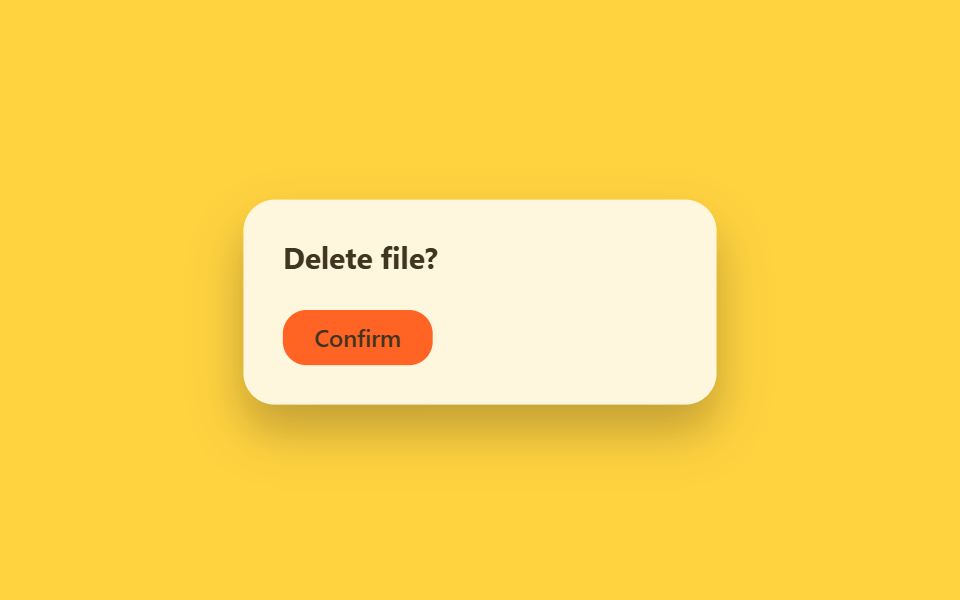
<main class="stage">
  <div class="ue-wrap is-demo">
    <div class="ue-dialog">
      <span class="ue-dialog__title">Delete file?</span>
      <span class="ue-dialog__btn">Confirm</span>
    </div>
  </div>
</main>
@use "../../../../site/static/demo-tokens" as *;
// ── 변수 3개 ──────────────────────────────────────────
$duration: $dur-base;
$easing: $ease-out;
$color: $subject-ink;
@include stage($stage-yellow);
.ue-wrap {
width: min(320px, 90vw);
display: grid;
place-items: center;
}
.ue-dialog {
width: min(240px, 82vw);
box-sizing: border-box;
padding: $sp-5;
border-radius: $r-card;
background: $stage-paper;
box-shadow: $shadow-raised;
display: flex;
flex-direction: column;
align-items: flex-start;
gap: $sp-4;
font-family: -apple-system, "Segoe UI", sans-serif;
}
.ue-dialog__title { font-weight: 700; font-size: 15px; line-height: 1.3; font-family: inherit; color: $color; }
.ue-dialog__btn {
padding: $sp-2 $sp-4;
border-radius: $r-control;
background: $stage-orange;
color: $subject-ink; // 주황 면 위 크림 글자는 3.11:1 — 잉크로 5.50:1
font-weight: 600;
font-size: 12px;
line-height: 1;
font-family: inherit;
}
// 실사용 원리: onClick 에서 바로 state 를 지우지 않고 class="is-exiting" 을 먼저 붙인 뒤
// transition-behavior: allow-discrete 로 display:none 전환을 트랜지션이 끝날 때까지 미룬다.
// 실제 언마운트(state 제거)는 onTransitionEnd 안에서 일어난다.
.ue-dialog {
display: flex;
opacity: 1;
transform: scale(1);
transition: opacity $duration $easing, transform $duration $easing, display $duration allow-discrete;
}
.ue-dialog.is-exiting {
display: none;
opacity: 0;
transform: scale(.92) translateY(6px);
}
// 캡처용 루프: 대화상자가 열려 있다가(60%) 닫힘 트랜지션을 겪고(75%) 다시 열리는 순환
@keyframes ue-exit {
0%, 45% { opacity: 1; transform: scale(1); }
90%, 100% { opacity: 0; transform: scale(.92) translateY(6px); }
}
.ue-wrap.is-demo .ue-dialog { animation: ue-exit $dur-loop $easing infinite; }
@media (prefers-reduced-motion: reduce) {
.ue-dialog { transition: none; }
.ue-wrap.is-demo .ue-dialog { animation: none !important; opacity: 1; transform: none; }
}html, body {
margin: 0;
overflow: hidden;
}
.stage {
box-sizing: border-box;
min-height: 100vh;
display: grid;
place-items: center;
margin: 0;
background: #ffd23f;
font-family: -apple-system, "Segoe UI", "Noto Sans KR", sans-serif;
padding: clamp(8px, 4vw, 24px);
}
.ue-wrap {
width: min(320px, 90vw);
display: grid;
place-items: center;
}
.ue-dialog {
width: min(240px, 82vw);
box-sizing: border-box;
padding: 20px;
border-radius: 16px;
background: #ffffff;
box-shadow: 0 14px 24px rgba(23, 20, 26, 0.32);
display: flex;
flex-direction: column;
align-items: flex-start;
gap: 16px;
font-family: -apple-system, "Segoe UI", sans-serif;
}
.ue-dialog__title {
font-weight: 700;
font-size: 15px;
line-height: 1.3;
font-family: inherit;
color: #17141a;
}
.ue-dialog__btn {
padding: 8px 16px;
border-radius: 12px;
background: #ff4d1f;
color: #17141a;
font-weight: 600;
font-size: 12px;
line-height: 1;
font-family: inherit;
}
.ue-dialog {
display: flex;
opacity: 1;
transform: scale(1);
transition: opacity 300ms ease-out, transform 300ms ease-out, display 300ms allow-discrete;
}
.ue-dialog.is-exiting {
display: none;
opacity: 0;
transform: scale(0.92) translateY(6px);
}
@keyframes ue-exit {
0%, 45% {
opacity: 1;
transform: scale(1);
}
90%, 100% {
opacity: 0;
transform: scale(0.92) translateY(6px);
}
}
.ue-wrap.is-demo .ue-dialog {
animation: ue-exit 2s ease-out infinite;
}
@media (prefers-reduced-motion: reduce) {
.ue-dialog {
transition: none;
}
.ue-wrap.is-demo .ue-dialog {
animation: none !important;
opacity: 1;
transform: none;
}
}import { CSSProperties, useState } from "react";
import styles from "./UnmountExitDiscrete.module.scss";
export interface UnmountExitDiscreteProps {
duration?: string;
easing?: string;
}
export default function UnmountExitDiscrete({
duration = "300ms",
easing = "ease-out",
}: UnmountExitDiscreteProps) {
const [open, setOpen] = useState(true);
const [exiting, setExiting] = useState(false);
const close = () => {
// Don't remove the dialog from state right away — add the exit class first.
// transition-behavior: allow-discrete (in the CSS module) keeps display: flex
// alive until the transition actually finishes; onTransitionEnd below does the
// real unmount once the browser reports the animation is done.
setExiting(true);
};
const style: CSSProperties & { "--duration"?: string; "--easing"?: string } = {
"--duration": duration,
"--easing": easing,
};
if (!open) return null;
return (
<div className={styles.wrap} style={style}>
<div
className={`${styles.dialog} ${exiting ? styles.exiting : ""}`}
onTransitionEnd={() => {
if (exiting) setOpen(false);
}}
>
<span className={styles.title}>Delete file?</span>
<button className={styles.btn} onClick={close}>Confirm</button>
</div>
</div>
);
}02 Exit lúc unmount (allow-discrete) — Diện tích đo được 22.772% · khung hình chuyển động 10/23Nguyên tác GODRICH · SCSS và React nằm trong tệp zip · 9 hiệu ứng react css animation không cần library
Bài viết chứa demo này
 9 hiệu ứng react css animation không cần libraryReact css animation là cách thêm chuyển động cho component bằng chính CSS, không cần cài library. Chín hiệu ứng dưới đây Xem tất cả demo trong bài này